remote control MERCEDES-BENZ G-CLASS SUV 2013 Owners Manual
[x] Cancel search | Manufacturer: MERCEDES-BENZ, Model Year: 2013, Model line: G-CLASS SUV, Model: MERCEDES-BENZ G-CLASS SUV 2013Pages: 364, PDF Size: 9.62 MB
Page 12 of 364
Fuse box in the transmission
tunnel ............................................
314
Important safety notes .................. 313
In the battery case .........................315G
Garage door opener Clearing the memory ..................... 284
Important safety notes
..................280
Opening/closing the garage door ..284
Programming the remote control ... 281
Gasoline ............................................. 351
Gear indicator (on-board
computer) .......................................... 222
Gear or selector lever (cleaning
guidelines) ......................................... 299
Genuine Mercedes-Benz parts ......... 348
Genuine wood trim and trim strips
(cleaning instructions) ......................299
Glove box ........................................... 263
Gradient-climbing capability
(maximum) ......................................... 168
GTW (Gross Trailer Weight)
(definition) ......................................... 338H
Hazard warning lamps ......................104
Headlamps Adding fluid to cleaning system .....292
Cleaning ......................................... 297
Cleaning system (capacity) ............356
Cleaning system (function)
............103
Cleaning system (notes) ................356
Fogging up ..................................... 105
Protective grille .............................. 112
see Automatic headlamp mode
Head restraints
Adjusting ......................................... 86
Adjusting (rear) ................................ 87
Installing/removing (rear) ................ 88
Luxury .............................................. 87
Resetting (front) ............................... 87
Heating
see Climate control High-beam headlamps
Display message ............................ 232
Switching on/off ........................... 103
Hill start assist
.................................. 141
HOLD function Function/notes ............................. 192
Hood
Closing ........................................... 289
Display message ............................ 246
Important safety notes .................. 288
Opening ......................................... 289
Hydroplaning ..................................... 162 I
Immobilizer .......................................... 64
Instrument cluster Overview ........................................ 209
Warning and indicator lamps .........247
Instrument cluster lighting .............. 209
Interior lighting ................................. 105
Automatic control .......................... 106
Cargo compartment lamp ..............107
Delayed switch-off (on-board
computer)
...................................... 220
Manual control ............................... 106
Overview ........................................ 105
Reading lamp ................................. 107
Rear interior lighting ......................108 J
Jack Pump lever ..................................... 342
Storage location ............................ 302
Using ............................................. 342
Jump starting (engine)
......................308 K
Key positions SmartKey ....................................... 139
Kickdown
Manual drive program .................... 15210
Index
Page 13 of 364
L
Lap time (RACETIMER) ......................222
LATCH-type (ISOFIX) child seat
anchors ................................................ 57
License plate lamp (display
message) ............................................ 233
Lights Activating/deactivating the
interior lighting delayed switch-off . 220
Automatic headlamp mode
............100
Cornering light function .................104
Driving abroad ................................. 98
Fog lamps ...................................... 101
Hazard warning lamps ................... 104
High beam flasher .......................... 104
High-beam headlamps ...................103
Light switch ..................................... 98
Low-beam headlamps ...................... 99
Parking lamps ................................ 102
Rear fog lamp ................................ 101
Standing lamps .............................. 102
Switching the daytime running
lamps on/off (on-board
computer) ...................................... 219
Switching the daytime running
lamps on/off (switch) ...................... 99
Switching the exterior lighting
delayed switch-off on/off (on-
board computer) ............................ 219
Switching the surround lighting
on/off (on-board computer) ..........219
Turn signals ................................... 103
see Changing bulbs
see Interior lighting
Light sensor (display message) .......234
LIM indicator lamp Cruise control ................................ 170
DISTRONIC PLUS ........................... 179
Variable SPEEDTRONIC .................175
Limit speed
Variable SPEEDTRONIC .................174
Load anchorage ................................. 266
Loading guidelines ............................262Locking
Emergency locking ........................... 76
From inside the vehicle (central
locking button) ................................. 74
see Central locking
Locking (doors)
Automatic ........................................ 75
Locking centrally
see Central locking
Locking verification signal (on-
board computer) ............................... 221
Low-beam headlamps Display message ............................ 231
Setting for driving abroad
(symmetrical) ................................... 98
Switching on/off .............................. 99
LOW RANGE off-road gear ................199
Luggage compartment
enlargement
Overview ........................................ 264
Lumbar support
Adjusting the 4-way lumbar
support ............................................ 89
Luxury head restraints .......................87 M
M+S tires ............................................ 320
Malfunction message see Display messages
Matte finish (cleaning
instructions) ...................................... 296
mbrace Call priority .................................... 276
Display message ............................ 229
Downloading destinations
(COMAND) ..................................... 277
Downloading routes .......................279
Emergency call .............................. 274
Geo fencing ................................... 280
Important safety notes .................. 272
Locating a stolen vehicle ............... 278
MB info call button ........................ 276
Remote vehicle locking .................. 277
Roadside Assistance button .......... 275
Self-test ......................................... 273
Speed alert .................................... 279
System .......................................... 273 Index
11
Page 14 of 364
Triggering the vehicle alarm ........... 280
Vehicle remote malfunction
diagnosis
....................................... 278
Vehicle remote unlocking .............. 277
Mechanical key
Function/notes ................................ 70
General notes .................................. 70
Removing
......................................... 70
Memory card (audio) ......................... 216
Memory function ................................. 95
Message memory (on-board
computer) .......................................... 225
Messages see Display messages
Mirrors
Sun visor ........................................ 269
see Exterior mirrors
see Rear-view mirror
Mobile phone
Menu (on-board computer) ............ 216
Mounting wheels
Mounting a new wheel ................... 343
Raising the vehicle ......................... 342
Removing a wheel ..........................343
Securing the vehicle against
rolling away ................................... 341
MP3
Operation ....................................... 216
see separate operating instructions
Multifunction display
Function/notes ............................. 212
Permanent display ......................... 219
Multifunction steering wheel
Back button ................................... 211
Operating the on-board computer . 210
Overview .......................................... 31N
Navigation Menu (on-board computer) ............ 214
see separate operating instructions
NECK-PRO head restraints
Operation ......................................... 47
Resetting after being triggered ........ 48
Notes on breaking-in a new
vehicle ................................................ 138 O
Occupant safety Children in the vehicle .....................54
Important safety notes ....................38
Odometer
see Trip odometer
Off-road
Differential locks ............................ 201
Off-road ABS .................................... 61
Off-road driving
Checklist ........................................ 165
Driving on sand .............................. 166
Important safety notes .................. 164
Traveling uphill ............................... 167
Off-road fording ................................. 162
Off-road system 4MATIC .......................................... 193
Oil
see Engine oil
On-board computer
AMG menu ..................................... 222
Assistance menu ........................... 218
Audio menu ................................... 215
Convenience submenu .................. 221
Display messages ..........................224
DISTRONIC PLUS ........................... 182
Factory settings submenu ............. 222
Important safety notes .................. 208
Instrument cluster submenu ..........219
Lighting submenu .......................... 219
Menu overview .............................. 212
Message memory .......................... 225
Navigation menu ............................ 214
Operation ....................................... 210
RACETIMER ................................... 222
Service menu ................................. 218
Settings menu ............................... 218
Standard display ............................ 212
Telephone menu ............................ 216
Trip menu ...................................... 212
Vehicle submenu ........................... 220
Video DVD operation ..................... 216
Operating system
see On-board computer
Outside temperature display ...........210
Overhead control panel ......................3412
Index
Page 16 of 364
Remote control
Programming (garage door
opener) .......................................... 281
Reporting safety defects .................... 24
Reserve (fuel tank) see Fuel
Reserve fuel
Display message ............................ 237
Warning lamp ................................. 256
see Fuel
Residual heat
Switching on/off ........................... 134
Restraint systems
see SRS (Supplemental Restraint
System)
Reversing lamps (display
message) ............................................ 233
Roadside Assistance (breakdown) ....22
Roof lining and carpets (cleaning
guidelines) ......................................... 300
Route (navigation) see Route guidance (navigation)
Route guidance (navigation) ............214S
Safety Children in the vehicle .....................54
Child restraint systems ....................54
Safety system
see Driving safety systems
Seat backrest
Folding back .................................. 265
Seat belts
Adjusting the height ......................... 52
Belt force limiters ............................ 53
Cleaning ......................................... 300
Correct usage .................................. 49
Emergency Tensioning Devices ........ 53
Fastening ......................................... 50
Fastening, front ............................... 51
Fastening in the rear, center ............51
Important safety guidelines .............48
Releasing ......................................... 52
Safety guidelines ............................. 40
Special seat belt retractor ............... 56
Warning lamp ................................. 248
Warning lamp (function) ................... 53 Seat heating
Indicator lamp (malfunction) ............ 90
Seats
Adjusting (electrically) .....................86
Adjusting the 4-way lumbar
support ............................................ 89
Adjusting the head restraint ............ 86
Cleaning the cover .........................299
Correct driver's seat position ...........
84
Important safety notes .................... 85
Overview .......................................... 85
Storing settings (memory
function) .......................................... 95
Switching seat heating on/off ......... 89
Switching seat ventilation on/off ....90
Seat ventilation
Indicator lamp (malfunction) ............ 90
Sensors (cleaning instructions) .......297
Service interval display Displaying a service message (on-
board computer) ............................ 293
Service menu (on-board computer) . 218
Service products Brake fluid ..................................... 354
Coolant (engine) ............................ 354
Engine oil ....................................... 353
Fuel ................................................ 350
Important safety notes .................. 350
Notes ............................................. 350
Refrigerant (air-conditioning
system) .......................................... 354
Washer fluid ................................... 356
Setting a speed limit
see SPEEDTRONIC
Settings
Calling up a stored setting ............... 96
Factory (on-board computer) ......... 222
On-board computer ....................... 218
Setting the air distribution ...............131
SETUP (on-board computer) ............. 222
Shift ranges ....................................... 150
Side marker lamp (display
message) ............................................ 233
Side marker lamps (changing
bulbs) ................................................. 11214
Index
Page 18 of 364
Supplemental Restraint System
see SRS (Supplemental Restraint
System)
Surround lighting (on-board
computer) .......................................... 219
Suspension tuning SETUP (on-board computer) .......... 222
SUV
(Sport Utility Vehicle) .......................22
Switching air-recirculation mode
on/off ................................................. 134
Switching off the alarm (ATA) ............65T
Tachometer ........................................ 210
Tailgate Opening dimensions ...................... 357
Tail lamps
Display message ............................ 233
see Lights
Tank content
Fuel gauge ..................................... 209
Technical data
Capacities ...................................... 350
Tires ............................................... 344
Tires/wheels ................................. 344
Trailer Loads .................................. 358
Vehicle data ................................... 357
Wheels ........................................... 344
TELEAID
Call priority .................................... 276
Downloading destinations
(COMAND) ..................................... 277
Downloading routes .......................279
Emergency call .............................. 274
Geo fencing ................................... 280
Important safety notes .................. 272
Locating a stolen vehicle ............... 278
MB info call button ........................ 276
Remote vehicle locking .................. 277
Roadside Assistance button .......... 275
Self-test ......................................... 273
Speed alert .................................... 279
System .......................................... 273
Triggering the vehicle alarm ........... 280 Vehicle remote malfunction
diagnosis
....................................... 278
Vehicle remote unlocking .............. 277
Telephone
Accepting a call ............................. 217
Display message ............................ 246
Menu (on-board computer) ............ 216
Number from the phone book ........ 217
Redialing
........................................ 217
Rejecting/ending a call ................. 217
Telephone compartment ..................263
Temperature Coolant .......................................... 209
Coolant (on-board computer) ......... 222
Engine oil (on-board computer) ...... 222
Outside temperature ...................... 210
Setting (climate control) ................ 131
Theft deterrent systems
ATA (Anti-Theft Alarm system) .........65
Immobilizer ...................................... 64
Tilt/sliding sunroof
see Sliding sunroof
Time
see Separate Operator's Manual
Timing (RACETIMER) .........................222
Tire pressure Calling up (on-board computer) ..... 325
Checking manually ........................325
Display message ............................ 242
Maximum ....................................... 324
Notes ............................................. 323
Recommended ............................... 322
Table (single tires) .........................322
Tire pressure monitor
Checking the tire pressure
electronically ................................. 327
Warning message .......................... 327
Tire pressure monitoring system
Function/notes ............................. 325
Restarting ...................................... 327
Warning lamp ................................. 259
Tires
Aspect ratio (definition) ................. 339
Average weight of the vehicle
occupants (definition) .................... 338
Bar (definition) ............................... 338
Changing a wheel .......................... 340
Characteristics .............................. 33716
Index
Page 282 of 364
Geo fencing
Geo fencing allows you to select areas which
the vehicle should
not
enter or leave. You will
be informed if the vehicle crosses the
boundaries of the selected areas. You can
select the way in which you receive this
information beforehand. Possible options
include text message, e-mail or an automated
call.
The area can be determined as either a circle
or a polygon with a maximum of ten corners.
You can specify up to ten areas
simultaneously. Different settings are
possible for each area.
USA only: these settings can be called up
under "Owners Online" at http://
www.mbusa.com.
Alternatively, you can trigger an MB Info call
and inform the customer service
representative that you wish to activate geo
fencing.
Currently inactive areas can be activated by
text message.
Triggering the vehicle alarm With this function, you can trigger the
vehicle's panic alarm via text message. An
alarm sounds and the exterior lighting
flashes. Depending on the setting, the panic
alarm lasts five or ten seconds. Afterwards,
the alarm switches off.
Brush guard (USA only)
G
WARNING
The brush guard is designed solely to enhance
the appearance of the vehicle and help
protect grille and headlamps from minor
mishaps, either on or off road.
Since the safety characteristics
are limited in
the event of an accident, brush guard are not
intended to prevent injury or damage in the
event of an accident. Also observe state and
local regulations on installation and use. Raise and lower the brush guard in an open
space with plenty of room.
i If you wish to remove the brush guard,
contact a qualified specialist workshop. Garage door opener
Important safety notes G
WARNING
Before programming the integrated remote
control to a garage door opener or gate
operator, make sure people and objects are
out of the way of the device to prevent
potential harm or damage. When
programming a garage door
opener, the door
moves up or down. When programming a gate
operator, the gate opens or closes.
Do not use the integrated remote control with
any garage door opener that lacks safety stop
and reverse features as required by U.S.
federal safety standards (this includes any
garage door opener model manufactured
before April 1, 1982). A garage door that
cannot detect an object - signaling the door
to stop and reverse - does not meet current
U.S. federal safety standards.
When programming a garage door opener,
park vehicle outside the garage.
Do not run the engine while programming the
integrated remote control. Inhalation of
exhaust gas is hazardous to your health. All
exhaust gas contains carbon monoxide (CO),
and inhaling it can cause unconsciousness
and possible death. All exhaust gas contains
carbon monoxide (CO), and inhaling it can
cause unconsciousness and possible death.
You can use the HomeLink ®
garage door
opener integrated into the rear-view mirror to
operate up to three different gate/garage
door opener systems. 280
Features
Stowage and features
Page 283 of 364
i
Certain garage door drives are
incompatible with the integrated garage
door opener. If you have difficulty
programming the integrated garage door
opener, contact an authorized Mercedes-
Benz Center. You can also contact the
following service hotlines:
R USA: Mercedes-Benz Customer
Assistance Center at
1-800-FOR-MERCedes
R Canada: Customer Service at
1-800-387-0100
i USA only:
This device complies with Part 15 of the
FCC Rules. Operation is subject to the
following two conditions:
1. This device may not cause harmful
interference, and
2. this device
must accept any interference
received, including interference that may
cause undesired operation.
Any unauthorized modification to this
device could void the user's authority to
operate the equipment.
i Canada only:
This device complies with the RSS-210
Rules of Industry Canada. Operation is
subject to the following two conditions:
1. This device may not cause harmful
interference, and
2. this device must accept any interference
received, including interference that may
cause undesired operation of the device.
Any unauthorized modification to this
device could void the user's authority to
operate the equipment.
Programming the remote control Programming
G
WARNING
Only press the button on the integrated
garage door opener if
there are no persons or
objects present within the sweep of the garage door. Persons could otherwise be
injured as the door moves.
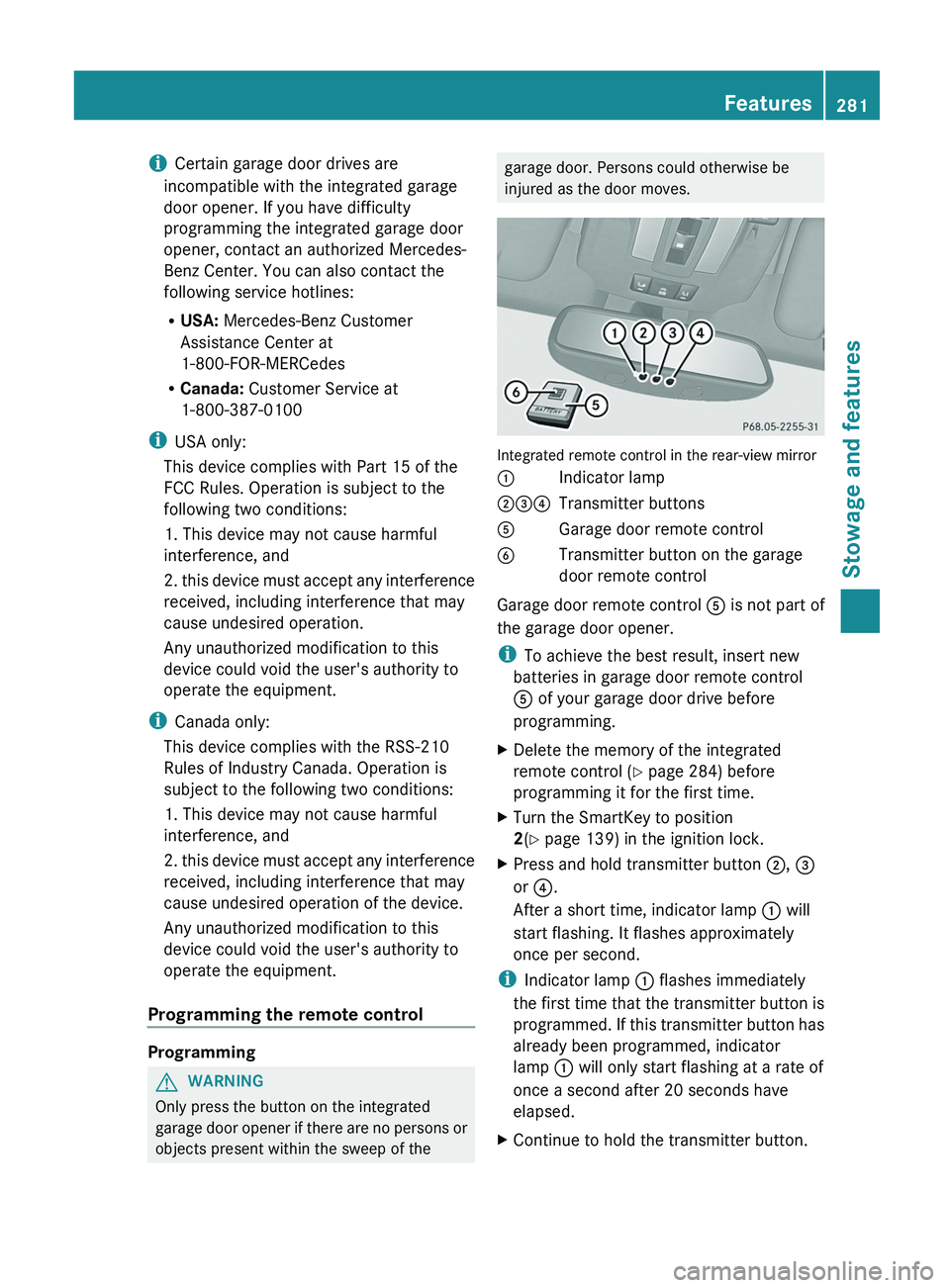
Integrated remote control in the rear-view mirror
0043
Indicator lamp
004400870085 Transmitter buttons
0083 Garage door remote control
0084 Transmitter button on the garage
door remote control
Garage door remote control 0083 is not part of
the garage door opener.
i To achieve the best result, insert new
batteries in garage door remote control
0083 of your garage door drive before
programming.
X Delete the memory of the integrated
remote control (Y
page 284) before
programming it for the first time.
X Turn the SmartKey to position
2
(Y page 139) in the ignition lock.
X Press and hold transmitter button 0044, 0087
or 0085.
After a short time, indicator lamp 0043 will
start flashing. It flashes approximately
once per second.
i Indicator lamp 0043 flashes immediately
the first time
that
the transmitter button is
programmed. If this transmitter button has
already been programmed, indicator
lamp 0043 will only start flashing at a rate of
once a second after 20 seconds have
elapsed.
X Continue to hold the transmitter button. Features
281
Stowage and features Z
Page 284 of 364
X
Point transmitter button 0083 of garage door
remote control 0084
towards the transmitter
buttons on the rear-view mirror at a
distance of 2 to 12 inches (5 to 30 cm).
i The distance between garage door
remote control 0083 and the integrated
garage door opener
depends
on the system
of the garage door drive. Several attempts
might be necessary. You should test every
position for at least 20 seconds before
trying another position.
X Keep transmitter button 0084 on garage door
remote control 0083
pressed until indicator
lamp 0043 starts to flash rapidly.
The programming has been successful if
indicator lamp 0043 flashes rapidly.
X Release transmitter buttons 0044, 0087 or 0085
on the integrated remote control and
transmitter button 0084 on the garage door
remote control.
If indicator lamp 0043 goes out after
approximately 20 seconds and has not
flashed rapidly:
X Release transmitter buttons 0044 ,
0087 or 0085
on the integrated remote control and
transmitter button 0084 on the garage door
remote control.
X Repeat the procedure for the other
transmitter buttons. When doing so, vary
the distance between the garage door's
remote control and
the
transmitter buttons
in the rear-view mirror.
i If the garage door system works with a
rolling code, you must synchronize the
remote control integrated in the rear-view
mirror with the garage door system
receiver after programming.
You will find further information in the
garage door opening system's operating
instructions, e.g. the sections on
"Synchronizing the transmitter" or
"Registering a new transmitter". You can
also call the hotline mentioned above. Synchronizing the rolling code
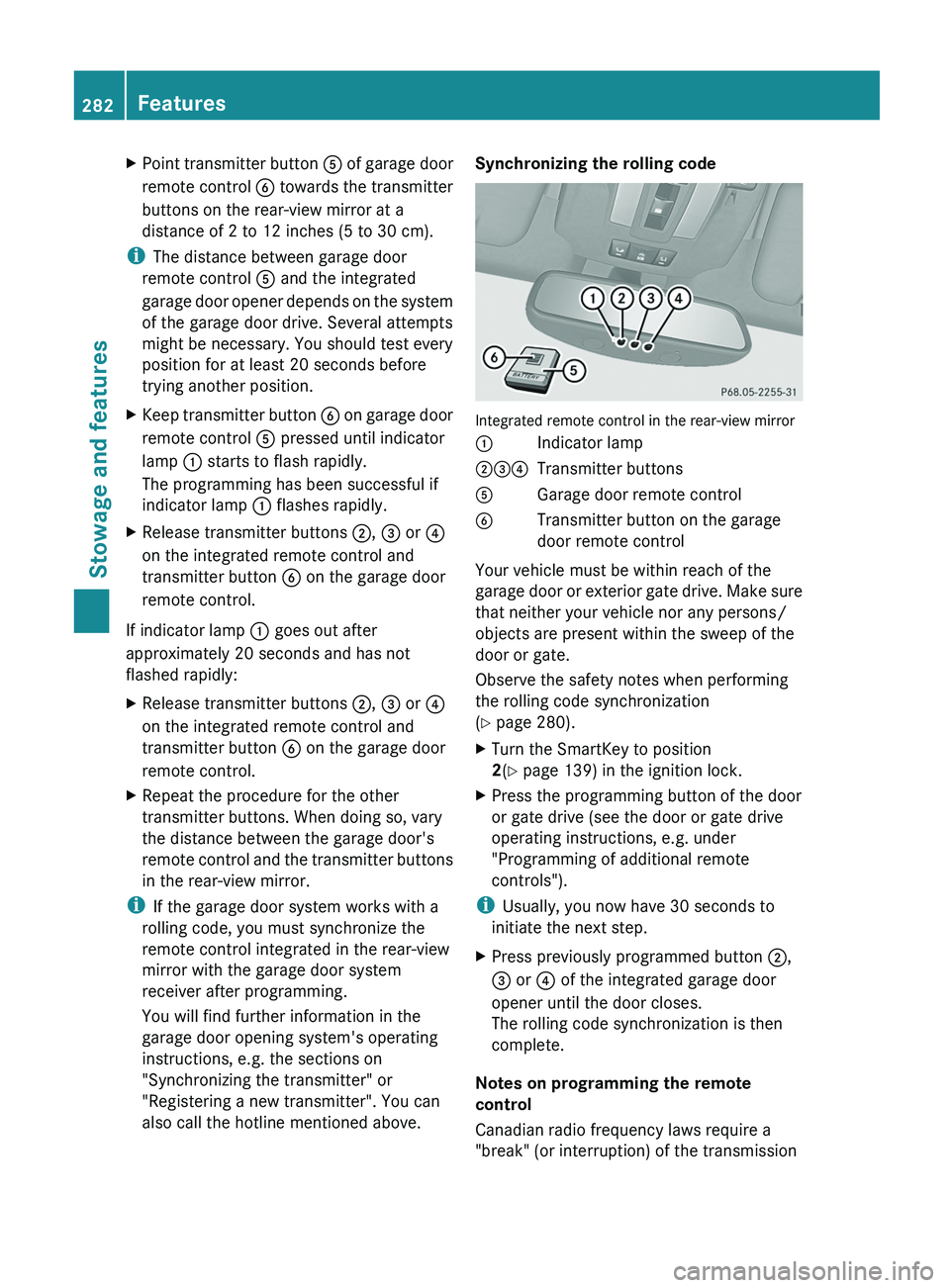
Integrated remote control in the rear-view mirror
0043
Indicator lamp
004400870085 Transmitter buttons
0083 Garage door remote control
0084 Transmitter button on the garage
door remote control
Your vehicle must be within reach of the
garage door or
exterior
gate drive. Make sure
that neither your vehicle nor any persons/
objects are present within the sweep of the
door or gate.
Observe the safety notes when performing
the rolling code synchronization
(Y page 280).
X Turn the SmartKey to position
2(Y page 139) in the ignition lock.
X Press the programming button of the door
or gate drive (see the door or gate drive
operating instructions, e.g. under
"Programming of additional remote
controls").
i Usually, you now have 30 seconds to
initiate the next step.
X Press previously programmed button 0044,
0087 or
0085 of the integrated garage door
opener until the door closes.
The rolling code synchronization is then
complete.
Notes on programming the remote
control
Canadian radio frequency laws require a
"break" (or interruption) of the transmission 282
Features
Stowage and features
Page 285 of 364
signals after broadcasting for a few seconds.
Therefore, these signals may not last long
enough for the integrated remote control to
recognize the signal during programming.
Comparable with Canadian law, American
garage door openers also have a built-in
"interruption".
If you live in Canada or have difficulties
programming the garage door opener
(regardless of where
you
live) when using the
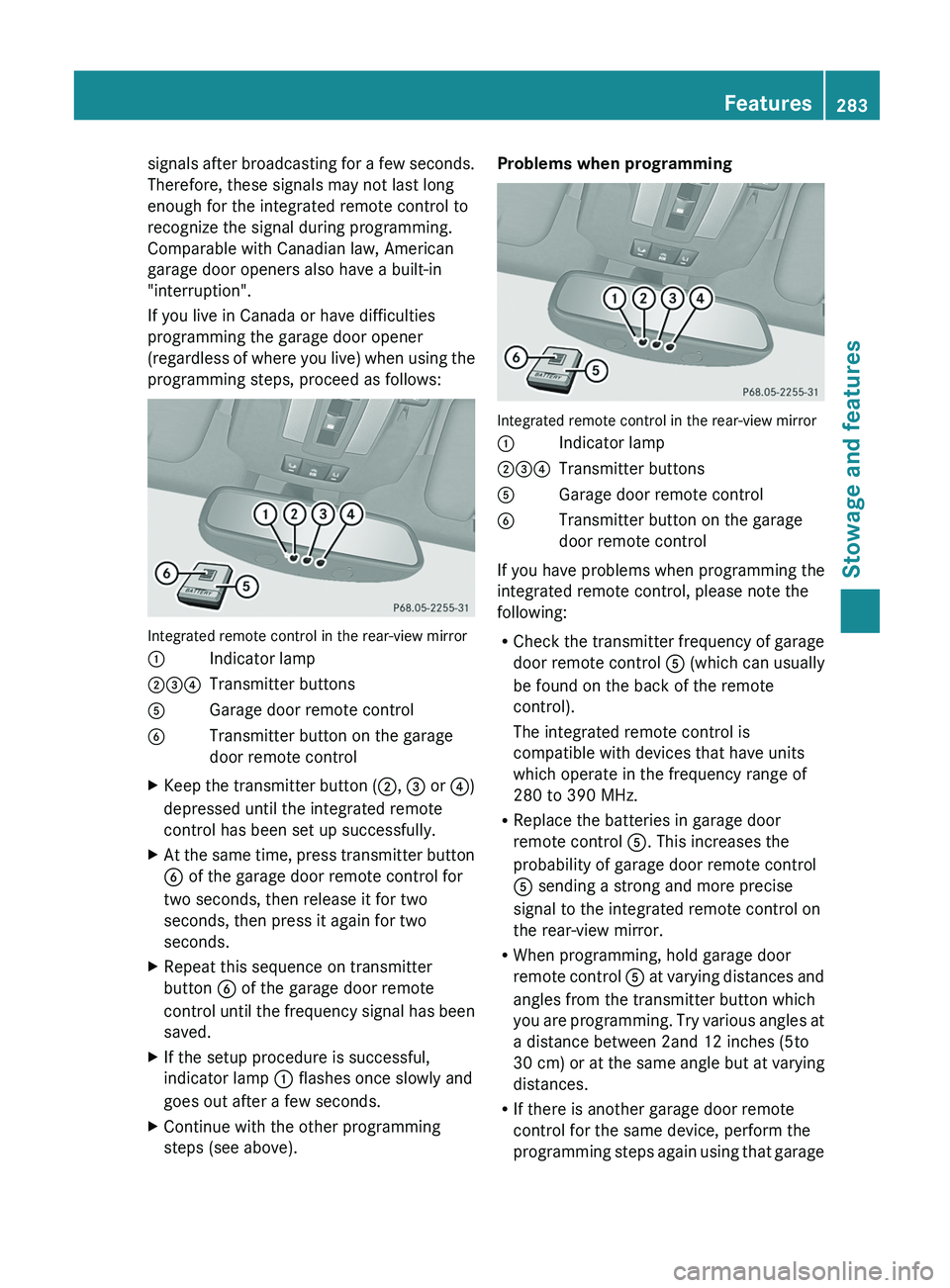
programming steps, proceed as follows: Integrated remote control in the rear-view mirror
0043
Indicator lamp
004400870085 Transmitter buttons
0083 Garage door remote control
0084 Transmitter button on the garage
door remote control
X Keep the transmitter button (0044, 0087 or
0085)
depressed until the integrated remote
control has been set up successfully.
X At the
same time, press transmitter button
0084 of the garage door remote control for
two seconds, then release it for two
seconds, then press it again for two
seconds.
X Repeat this sequence on transmitter
button 0084 of the garage door remote
control until the
frequency
signal has been
saved.
X If the setup procedure is successful,
indicator lamp 0043 flashes once slowly and
goes out after a few seconds.
X Continue with the other programming
steps (see above). Problems when programming
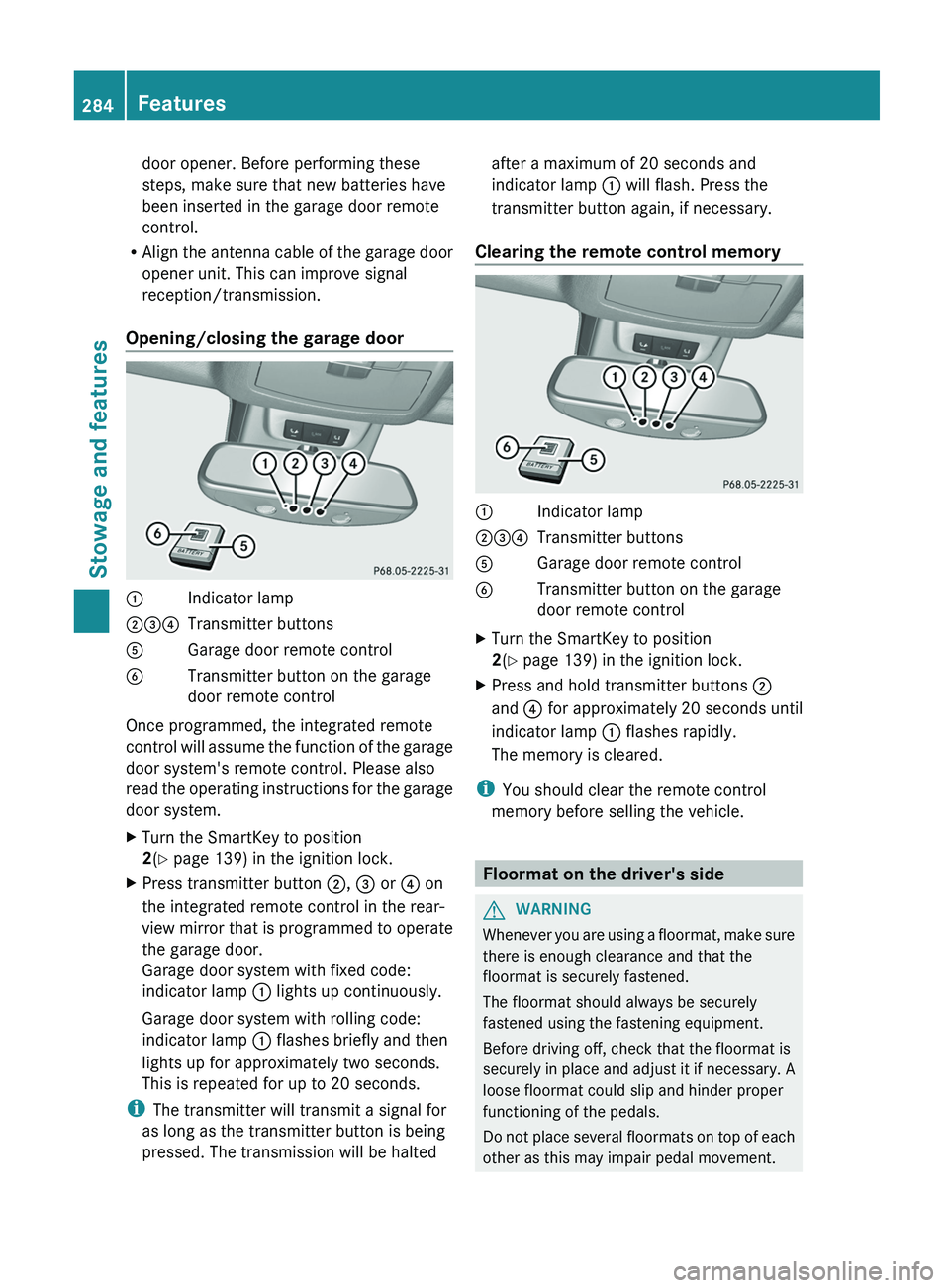
Integrated remote control in the rear-view mirror
0043
Indicator lamp
004400870085 Transmitter buttons
0083 Garage door remote control
0084 Transmitter button on the garage
door remote control
If you have problems when programming the
integrated remote control, please note the
following:
R Check the transmitter
frequency
of garage
door remote control 0083 (which can usually
be found on the back of the remote
control).
The integrated remote control is
compatible with devices that have units
which operate in the frequency range of
280 to 390 MHz.
R Replace the batteries in garage door
remote control 0083. This increases the
probability of garage door remote control
0083 sending a strong and more precise
signal to the integrated remote control on
the rear-view mirror.
R When programming, hold garage door
remote control 0083 at varying distances and
angles from the transmitter button which
you are programming. Try various angles at
a distance between 2and 12 inches (5to
30 cm) or at the same angle but at varying
distances.
R If there is another garage door remote
control for the same device, perform the
programming steps again using that garage Features
283Stowage and features Z
Page 286 of 364
door opener. Before performing these
steps, make sure that new batteries have
been inserted in the garage door remote
control.
R Align the antenna cable
of the garage door
opener unit. This can improve signal
reception/transmission.
Opening/closing the garage door 0043
Indicator lamp
004400870085 Transmitter buttons
0083 Garage door remote control
0084 Transmitter button on the garage
door remote control
Once programmed, the integrated remote
control will assume
the
function of the garage
door system's remote control. Please also
read the operating instructions for the garage
door system.
X Turn the SmartKey to position
2(Y page 139) in the ignition lock.
X Press transmitter button 0044, 0087 or 0085 on
the integrated remote control in the rear-
view mirror that is
programmed to operate
the garage door.
Garage door system with fixed code:
indicator lamp 0043 lights up continuously.
Garage door system with rolling code:
indicator lamp 0043 flashes briefly and then
lights up for approximately two seconds.
This is repeated for up to 20 seconds.
i The transmitter will transmit a signal for
as long as the transmitter button is being
pressed. The transmission will be halted after a maximum of 20 seconds and
indicator lamp
0043 will flash. Press the
transmitter button again, if necessary.
Clearing the remote control memory 0043
Indicator lamp
004400870085 Transmitter buttons
0083 Garage door remote control
0084 Transmitter button on the garage
door remote control
X Turn the SmartKey to position
2(Y page 139) in the ignition lock.
X Press and hold transmitter buttons 0044
and 0085 for approximately 20 seconds until
indicator lamp 0043 flashes rapidly.
The memory is cleared.
i You should clear the remote control
memory before selling the vehicle. Floormat on the driver's side
G
WARNING
Whenever you are using a floormat, make sure
there is enough clearance and that the
floormat is securely fastened.
The floormat should always be securely
fastened using the fastening equipment.
Before driving off, check that the floormat is
securely in place and
adjust it if necessary. A
loose floormat could slip and hinder proper
functioning of the pedals.
Do not place several floormats on top of each
other as this may impair pedal movement. 284
Features
Stowage and features