phone MERCEDES-BENZ G-CLASS SUV 2013 User Guide
[x] Cancel search | Manufacturer: MERCEDES-BENZ, Model Year: 2013, Model line: G-CLASS SUV, Model: MERCEDES-BENZ G-CLASS SUV 2013Pages: 364, PDF Size: 9.62 MB
Page 219 of 364
X
Switch on the mobile phone (see the
separate operating instructions).
X Switch on COMAND (see the separate
operating instructions).
X Establish a Bluetooth ®
connection to
COMAND; see the separate operating
instructions.
X Press the 0059 or 0065 button on the
steering wheel to select the Tel menu.
You will see one of the following display
messages in the multifunction display:
R Phone READY or the name of the network
provider: the mobile phone has found a
network and is ready to receive.
R Phone No Service: there is no network
available or the mobile phone is searching
for a network.
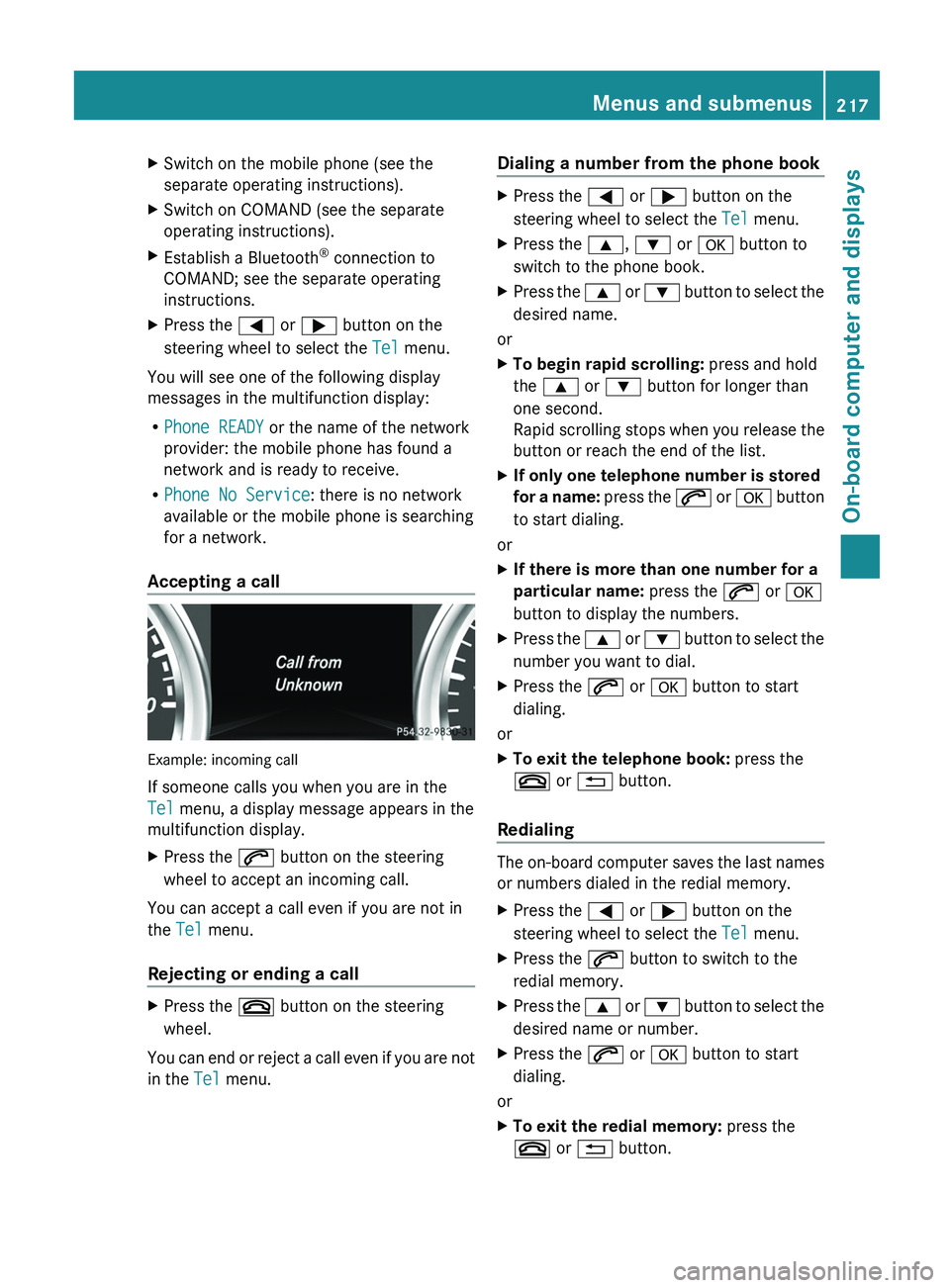
Accepting a call Example: incoming call
If someone calls you when you are in the
Tel menu, a display message appears in the
multifunction display.
X
Press the 006A button on the steering
wheel to accept an incoming call.
You can accept a call even if you are not in
the Tel menu.
Rejecting or ending a call X
Press the 007F button on the steering
wheel.
You can end or reject a call even if you are not
in the Tel menu. Dialing a number from the phone book X
Press the 0059 or 0065 button on the
steering wheel to select the Tel menu.
X Press the 0063, 0064 or 0076 button to
switch to the phone book.
X Press the 0063 or 0064 button to select the
desired name.
or
X To begin rapid scrolling: press and hold
the 0063 or 0064 button for longer than
one second.
Rapid scrolling stops when
you release the
button or reach the end of the list.
X If only one telephone number is stored
for a name:
press
the 006A or 0076 button
to start dialing.
or
X If there is more than one number for a
particular name: press the 006A or 0076
button to display the numbers.
X Press the 0063
or 0064 button
to select the
number you want to dial.
X Press the 006A or 0076 button to start
dialing.
or
X To exit the telephone book: press the
007F or 0041 button.
Redialing The on-board computer saves the last names
or numbers dialed in the redial memory.
X
Press the 0059 or 0065 button on the
steering wheel to select the Tel menu.
X Press the 006A button to switch to the
redial memory.
X Press the 0063
or 0064
button
to select the
desired name or number.
X Press the 006A or 0076 button to start
dialing.
or
X To exit the redial memory: press the
007F or 0041 button. Menus and submenus
217
On-board computer and displays Z
Page 248 of 364
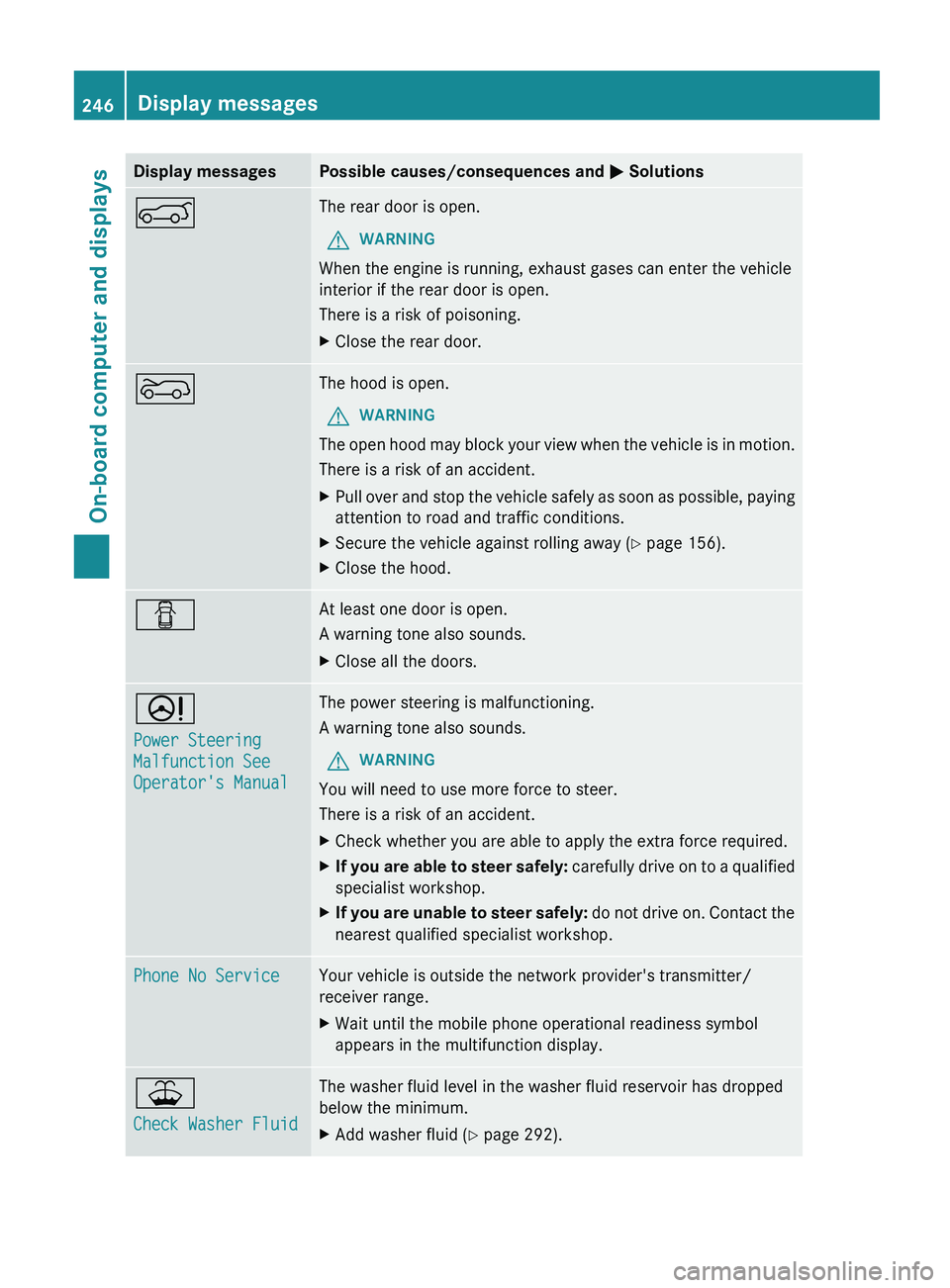
Display messages Possible causes/consequences and
0050 Solutions0065 The rear door is open.
G WARNING
When the engine is running, exhaust gases can enter the vehicle
interior if the rear door is open.
There is a risk of poisoning.
X Close the rear door. 0066 The hood is open.
G WARNING
The open hood may block your view when the vehicle is in motion.
There is a risk of an accident.
X Pull over and stop the vehicle safely as soon as possible, paying
attention to road and traffic conditions.
X Secure the vehicle against rolling away ( Y page 156).
X Close the hood. 0051 At least one door is open.
A warning tone also sounds.
X
Close all the doors. 0052
Power Steering
Malfunction See
Operator's Manual The power steering is malfunctioning.
A warning tone also sounds.
G WARNING
You will need to use more force to steer.
There is a risk of an accident.
X Check whether you are able to apply the extra force required.
X If you are able to steer safely:
carefully drive
on to a qualified
specialist workshop.
X If you are unable to steer safely: do not drive
on. Contact the
nearest qualified specialist workshop. Phone No Service Your vehicle is outside the network provider's transmitter/
receiver range.
X
Wait until the mobile phone operational readiness symbol
appears in the multifunction display. 00B2
Check Washer Fluid The washer fluid level in the washer fluid reservoir has dropped
below the minimum.
X
Add washer fluid ( Y page 292).246
Display messages
On-board computer and displays
Page 265 of 364
If the rear bench seat is not occupied:
X
Insert the belt tongue on the outer seat
belts into the buckle of opposite seat
belt 0043.
X Secure the load with sufficiently strong and
wear-resistant tie downs.
X Pad sharp edges for protection. Stowage areas
Stowage space
Important safety notes G
WARNING
To help avoid personal injury during a collision
or sudden maneuver, exercise care when
storing objects in the vehicle. Put luggage or
cargo in the cargo compartment if possible.
Do not pile luggage or cargo higher than the
seat backrests.
Keep compartment lids closed. This will help
to prevent stored objects from being thrown
about and injuring vehicle occupants during
R braking
R vehicle maneuvers
R an accident
Stowage compartments in the front Glove box X
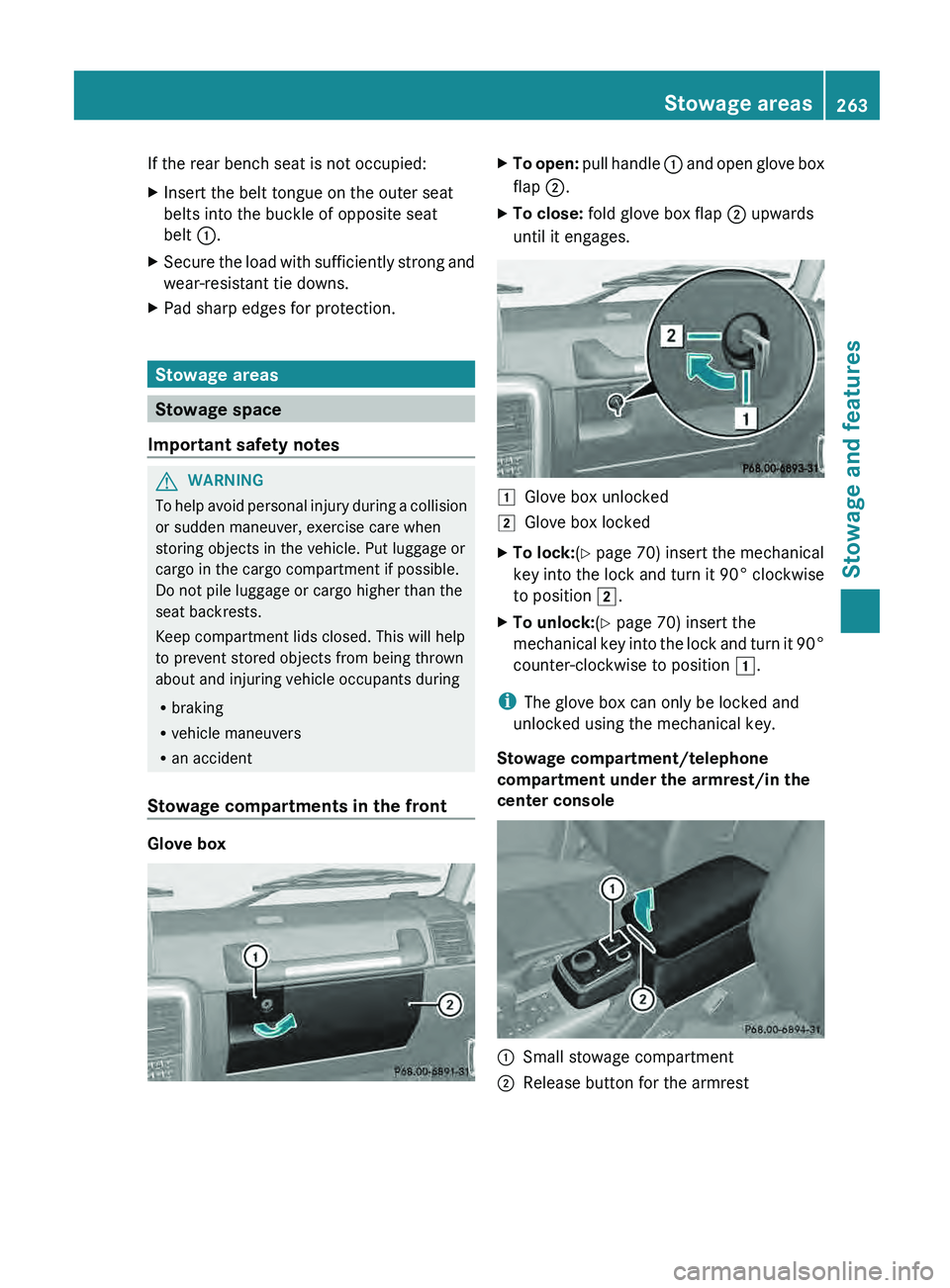
To open: pull handle 0043 and open glove box
flap 0044.
X To close: fold glove box flap 0044 upwards
until it engages. 0047
Glove box unlocked
0048 Glove box locked
X To lock:(Y page 70) insert the mechanical
key into the lock
and turn it 90° clockwise
to position 0048.
X To unlock:(Y page 70) insert the
mechanical key into the
lock and turn it 90°
counter-clockwise to position 0047.
i The glove box can only be locked and
unlocked using the mechanical key.
Stowage compartment/telephone
compartment under the armrest/in the
center console 0043
Small stowage compartment
0044 Release button for the armrest Stowage areas
263
Stowage and features Z
Page 266 of 364
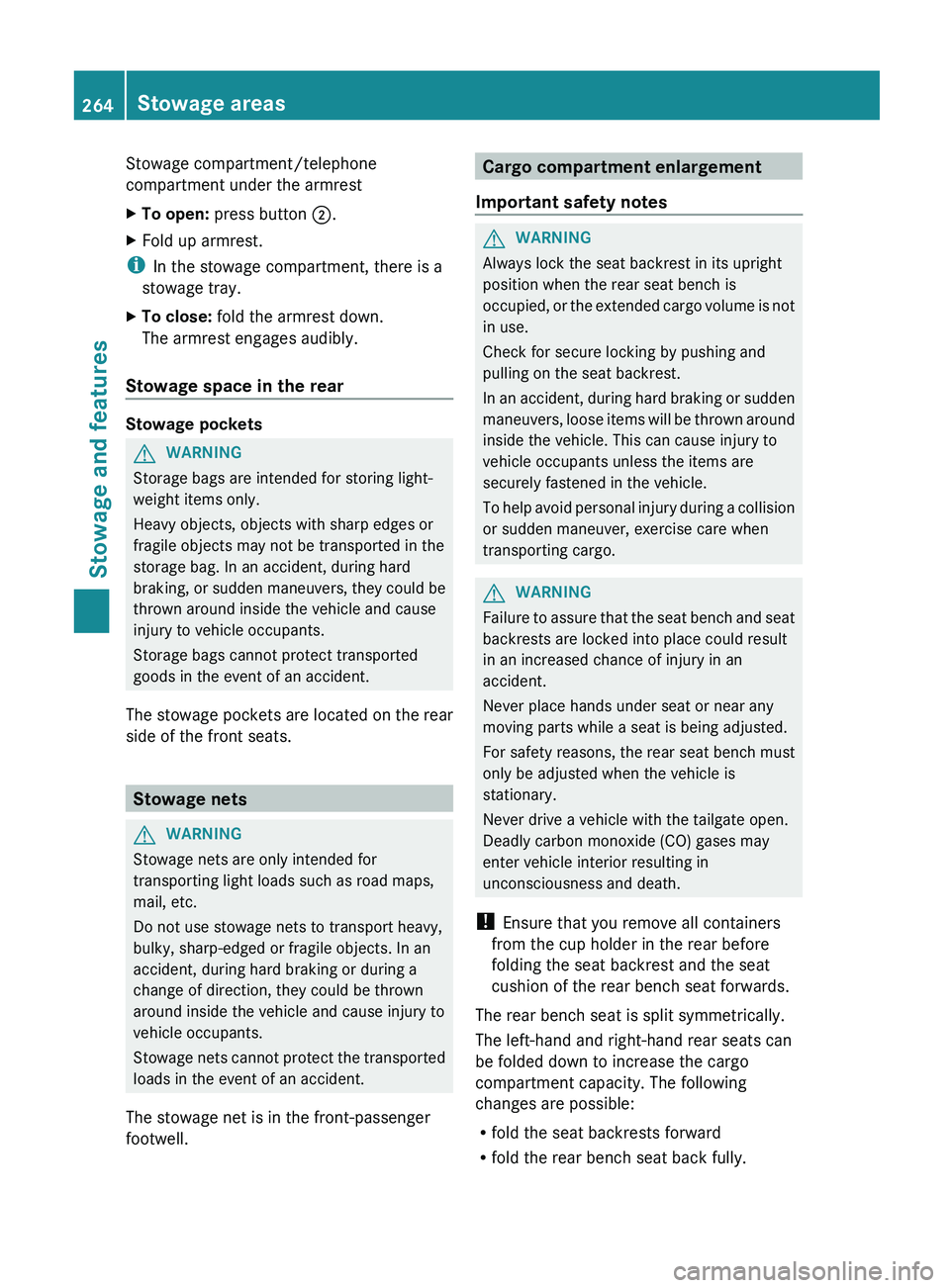
Stowage compartment/telephone
compartment under the armrest
X
To open: press button 0044.
X Fold up armrest.
i In the stowage compartment, there is a
stowage tray.
X To close: fold the armrest down.
The armrest engages audibly.
Stowage space in the rear Stowage pockets
G
WARNING
Storage bags are intended for storing light-
weight items only.
Heavy objects, objects with sharp edges or
fragile objects may not be transported in the
storage bag. In an accident, during hard
braking, or sudden maneuvers,
they could be
thrown around inside the vehicle and cause
injury to vehicle occupants.
Storage bags cannot protect transported
goods in the event of an accident.
The stowage pockets are located on the rear
side of the front seats. Stowage nets
G
WARNING
Stowage nets are only intended for
transporting light loads such as road maps,
mail, etc.
Do not use stowage nets to transport heavy,
bulky, sharp-edged or fragile objects. In an
accident, during hard braking or during a
change of direction, they could be thrown
around inside the vehicle and cause injury to
vehicle occupants.
Stowage nets cannot protect
the transported
loads in the event of an accident.
The stowage net is in the front-passenger
footwell. Cargo compartment enlargement
Important safety notes G
WARNING
Always lock the seat backrest in its upright
position when the rear seat bench is
occupied, or the extended
cargo volume is not
in use.
Check for secure locking by pushing and
pulling on the seat backrest.
In an accident, during hard braking or sudden
maneuvers, loose items will be thrown around
inside the vehicle. This can cause injury to
vehicle occupants unless the items are
securely fastened in the vehicle.
To help avoid personal injury during a collision
or sudden maneuver, exercise care when
transporting cargo. G
WARNING
Failure to assure that the seat bench and seat
backrests are locked into place could result
in an increased chance of injury in an
accident.
Never place hands under seat or near any
moving parts while a seat is being adjusted.
For safety reasons, the rear seat bench must
only be adjusted when the vehicle is
stationary.
Never drive a vehicle with the tailgate open.
Deadly carbon monoxide (CO) gases may
enter vehicle interior resulting in
unconsciousness and death.
! Ensure that you remove all containers
from the cup holder in the rear before
folding the seat backrest and the seat
cushion of the rear bench seat forwards.
The rear bench seat is split symmetrically.
The left-hand and right-hand rear seats can
be folded down to increase the cargo
compartment capacity. The following
changes are possible:
R fold the seat backrests forward
R fold the rear bench seat back fully.264
Stowage areas
Stowage and features
Page 273 of 364
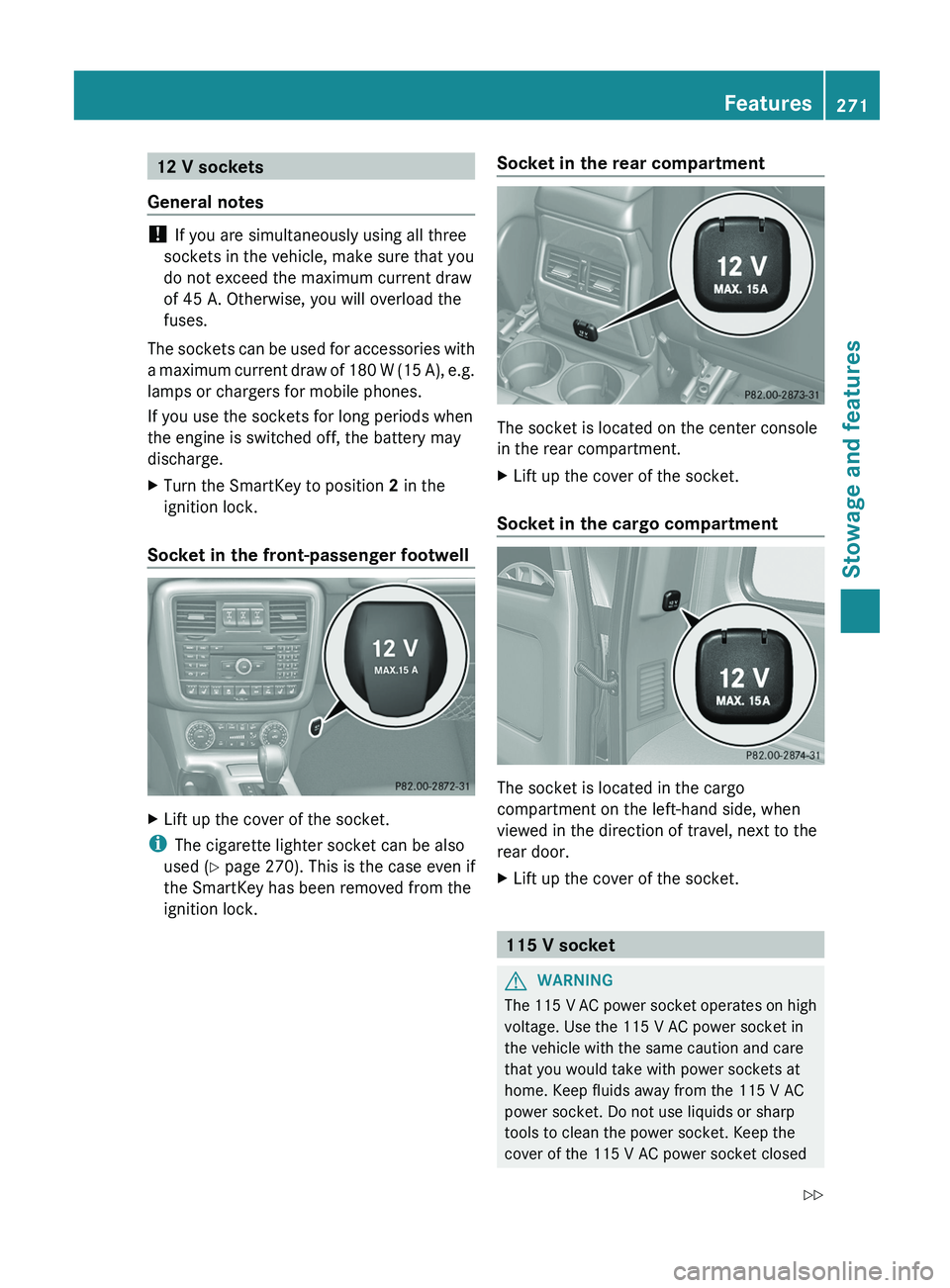
12 V sockets
General notes !
If you are simultaneously using all three
sockets in the vehicle, make sure that you
do not exceed the maximum current draw
of 45 A. Otherwise, you will overload the
fuses.
The sockets can be
used for accessories with
a maximum current draw of 180 W (15 A), e.g.
lamps or chargers for mobile phones.
If you use the sockets for long periods when
the engine is switched off, the battery may
discharge.
X Turn the SmartKey to position 2 in the
ignition lock.
Socket in the front-passenger footwell X
Lift up the cover of the socket.
i The cigarette lighter socket can be also
used ( Y page 270). This is the case even if
the SmartKey has been removed from the
ignition lock. Socket in the rear compartment The socket is located on the center console
in the rear compartment.
X
Lift up the cover of the socket.
Socket in the cargo compartment The socket is located in the cargo
compartment on the left-hand side, when
viewed in the direction of travel, next to the
rear door.
X
Lift up the cover of the socket. 115 V socket
G
WARNING
The 115 V AC power socket operates on high
voltage. Use the 115 V AC power socket in
the vehicle with the same caution and care
that you would take with power sockets at
home. Keep fluids away from the 115 V AC
power socket. Do not use liquids or sharp
tools to clean the power socket. Keep the
cover of the 115 V AC power socket closed Features
271
Stowage and features
Z
Page 275 of 364
and press the 0051 MB Info call button to
register. If one
of
these steps is not carried
out, it may not be possible to activate the
system.
If you have questions about the activation,
contact one of the following telephone
hotlines:
R USA: Response Center at
1-888-990-9007
R Canada: Customer Service at
1-888-923-8367
USA only : shortly after successfully
registering with the mbrace service a user ID
and password will be sent to you by post. You
can use this password to log onto the mbrace
area under "Owners Online" at http://
www.mbusa.com.
The mbrace system is available if:
R it has been activated and is operational.
Activation requires an available mobile
phone network, a valid SIM card and a
subscription to a security service.
R the battery is sufficiently charged.
R the corresponding mobile phone network
is available for transmitting data to the
Customer Center.
i Determining the location of the vehicle on
a map is only possible if there is sufficient
GPS reception and the vehicle position can
be forwarded to the Customer Center.
The mbrace system To adjust the volume during an mbrace call,
proceed as follows:
X
Press the 0081 or 0082 button on the
multifunction steering wheel.
or
X Use the COMAND volume control.
The mbrace system provides three different
services:
R automatic and manual emergency call
R Roadside Assistance call
R MB Info call USA only:
you can find further information
and a description of all available features
under "Owners Online" at http://
www.mbusa.com.
System self-test G
WARNING
A malfunction in the system has been
detected if one of the following conditions
occurs:
R the indicator lamp in the SOS button does
not light up during the system self-
diagnosis.
R the indicator lamp in the 009F Roadside
Assistance button does not light up during
the system self-diagnosis.
R the indicator lamp in the 0051 information
button does not light
up during the system
self-diagnosis.
R the indicator lamp in the SOS button,
009F Roadside Assistance button or 0051
information button continues to be lit red
after the system self-diagnosis.
R the Tele Aid inoperative or Tele Aid
not activated message appears on the
multifunction display after the system self-
diagnosis.
If a malfunction is indicated as outlined above,
the system may not operate as expected. In
the event of an emergency, assistance must
be summoned by other means.
Have the system checked at the nearest
authorized Mercedes-Benz Center or contact
the following service hotlines:
R USA: Response Center at
1-888-990-9007
R Canada: Customer Service at
1-888-923-8367
After you have switched on the ignition, the
system carries out a self-diagnosis. Features
273
Stowage and features Z
Page 276 of 364
Emergency call
Important safety notes
G
WARNING
If the indicator lamp in the SOS button is
flashing continuously and there was no voice
connection to the Response Center
established, then the mbrace system could
not initiate an emergency call (e.g. the
relevant cellular phone network is not
available).
The message Call Failed appears in the
multifunction display for approximately
10 seconds.
Should this occur, assistance must be
summoned by other means.
! You must have a license agreement to
activate the mbrace service. Ensure that
your system is activated
and ready for use,
and press the 0051 MB Info call button to
register. If one of these steps is not carried
out, it may not be possible to activate the
system.
If you have questions about the activation,
contact one of the following telephone
hotlines:
R USA: Response Center at
1-888-990-9007
R Canada: Customer Service at
1-888-923-8367
An emergency call is dialed automatically if
an air bag or Emergency Tensioning Device is
triggered.
i An automatically dialed mbrace
emergency call cannot be canceled.
An emergency call can also be initiated
manually.
As soon as the emergency call has been
initiated, the indicator lamp in the SOS button
flashes. The Connecting Call message
appears on the multifunction display.
COMAND is muted. Once the connection has been made, the
Call Connected message appears in the
multifunction display.
All important information on the emergency
is provided, for example:
R
Current location of the vehicle (as
determined by the GPS system)
R Vehicle model
R Vehicle color
R Vehicle identification number
A short time after the emergency call is
initiated, a voice connection is automatically
established between the Response Center
and the vehicle occupants. If the vehicle
occupants are able to
respond, the Response
Center will attempt to obtain more detailed
information on the emergency.
i If there is no response from the vehicle
occupants, an ambulance is immediately
sent to the vehicle.
Making an emergency call G
WARNING
If you feel at any way in jeopardy when in the
vehicle (e.g. smoke or fire in the vehicle,
vehicle in a dangerous road location), please
do not wait for voice contact after you have
pressed the SOS button. Carefully leave the
vehicle and move to a safe location. The
Response Center will automatically contact
local emergency officials with the vehicle's
approximate location if they receive an
automatic SOS signal and
cannot make voice
contact with the vehicle occupants. 274
Features
Stowage and features
Page 277 of 364
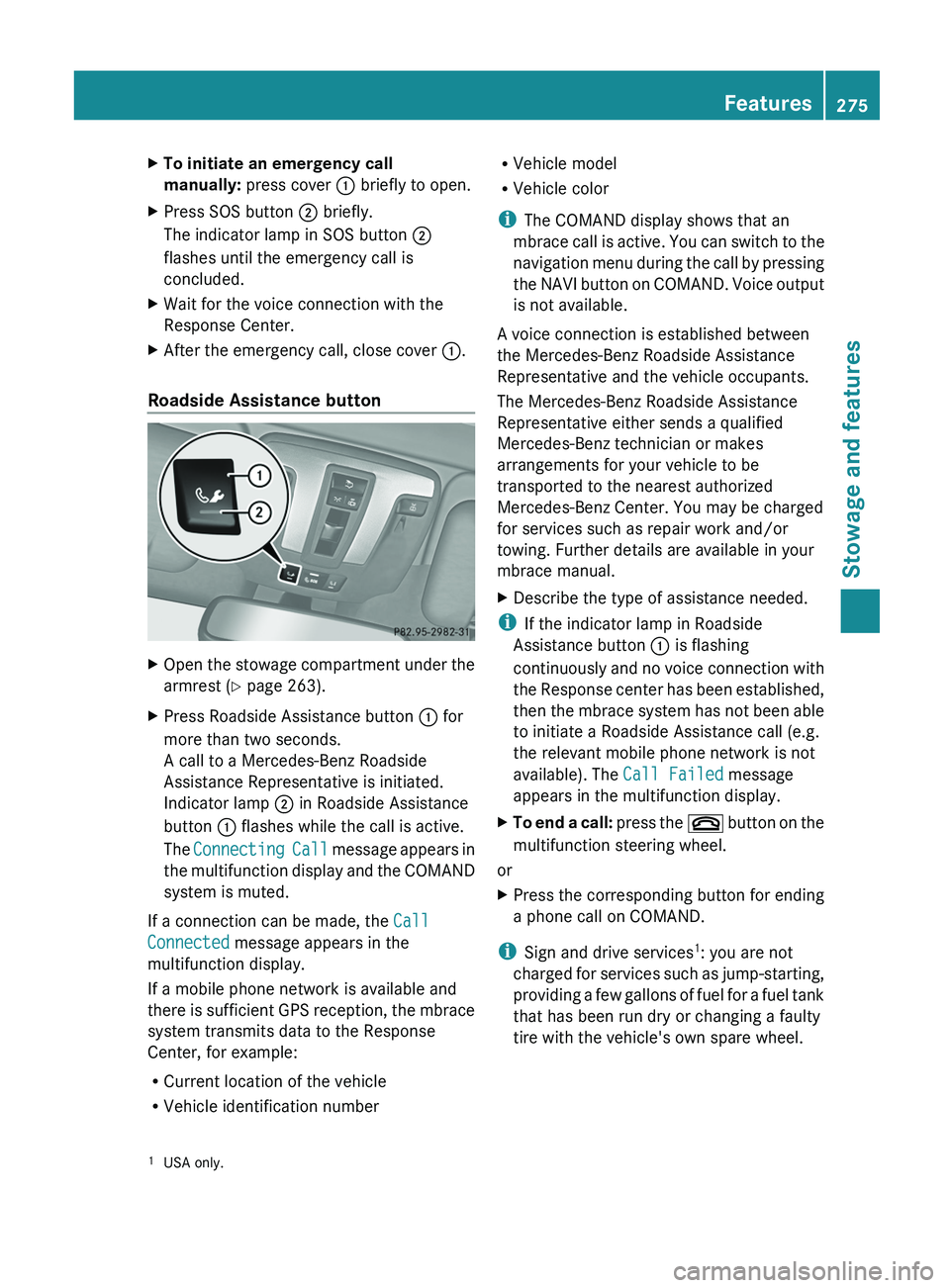
X
To initiate an emergency call
manually: press cover 0043 briefly to open.
X Press SOS button 0044 briefly.
The indicator lamp in SOS button 0044
flashes until the emergency call is
concluded.
X Wait for the voice connection with the
Response Center.
X After the emergency call, close cover 0043.
Roadside Assistance button X
Open the stowage compartment under the
armrest (Y page 263).
X Press Roadside Assistance button 0043 for
more than two seconds.
A call to a Mercedes-Benz Roadside
Assistance Representative is initiated.
Indicator lamp 0044 in Roadside Assistance
button 0043 flashes while the call is active.
The Connecting Call message
appears in
the multifunction display and the COMAND
system is muted.
If a connection can be made, the Call
Connected message appears in the
multifunction display.
If a mobile phone network is available and
there is sufficient
GPS
reception, the mbrace
system transmits data to the Response
Center, for example:
R Current location of the vehicle
R Vehicle identification number R
Vehicle model
R Vehicle color
i The COMAND display shows that an
mbrace call is
active.
You can switch to the
navigation menu during the call by pressing
the NAVI button on COMAND. Voice output
is not available.
A voice connection is established between
the Mercedes-Benz Roadside Assistance
Representative and the vehicle occupants.
The Mercedes-Benz Roadside Assistance
Representative either sends a qualified
Mercedes-Benz technician or makes
arrangements for your vehicle to be
transported to the nearest authorized
Mercedes-Benz Center. You may be charged
for services such as repair work and/or
towing. Further details are available in your
mbrace manual.
X Describe the type of assistance needed.
i If the indicator lamp in Roadside
Assistance button 0043 is flashing
continuously and no voice
connection with
the Response center has been established,
then the mbrace system has not been able
to initiate a Roadside Assistance call (e.g.
the relevant mobile phone network is not
available). The Call Failed message
appears in the multifunction display.
X To end a call: press the
007F
button on the
multifunction steering wheel.
or
X Press the corresponding button for ending
a phone call on COMAND.
i Sign and drive services 1
: you are not
charged for services such
as jump-starting,
providing a few gallons of fuel for a fuel tank
that has been run dry or changing a faulty
tire with the vehicle's own spare wheel.
1 USA only. Features
275
Stowage and features Z
Page 278 of 364
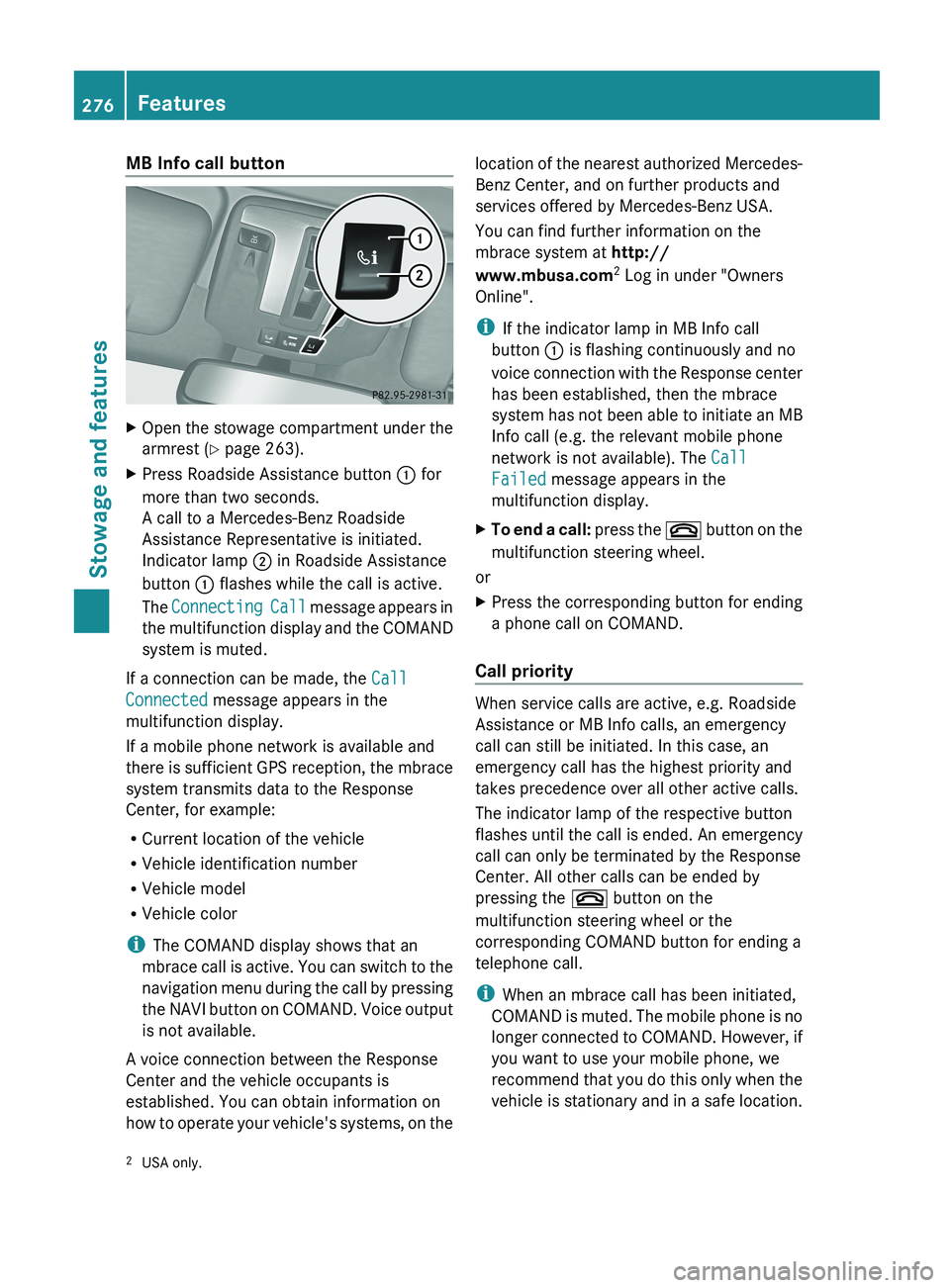
MB Info call button
X
Open the stowage compartment under the
armrest (Y page 263).
X Press Roadside Assistance button 0043 for
more than two seconds.
A call to a Mercedes-Benz Roadside
Assistance Representative is initiated.
Indicator lamp 0044 in Roadside Assistance
button 0043 flashes while the call is active.
The Connecting Call message
appears in
the multifunction display and the COMAND
system is muted.
If a connection can be made, the Call
Connected message appears in the
multifunction display.
If a mobile phone network is available and
there is sufficient
GPS
reception, the mbrace
system transmits data to the Response
Center, for example:
R Current location of the vehicle
R Vehicle identification number
R Vehicle model
R Vehicle color
i The COMAND display shows that an
mbrace call is active. You can switch to the
navigation menu during the call by pressing
the NAVI button on COMAND. Voice output
is not available.
A voice connection between the Response
Center and the vehicle occupants is
established. You can obtain information on
how to operate your vehicle's systems, on the location of the nearest authorized Mercedes-
Benz Center, and on further products and
services offered by Mercedes-Benz USA.
You can find further information on the
mbrace system at http://
www.mbusa.com
2
Log in under "Owners
Online".
i If the indicator lamp in MB Info call
button 0043 is flashing continuously and no
voice connection with
the
Response center
has been established, then the mbrace
system has not been able to initiate an MB
Info call (e.g. the relevant mobile phone
network is not available). The Call
Failed message appears in the
multifunction display.
X To end a call: press the 007F
button on the
multifunction steering wheel.
or
X Press the corresponding button for ending
a phone call on COMAND.
Call priority When service calls are active, e.g. Roadside
Assistance or MB Info calls, an emergency
call can still be initiated. In this case, an
emergency call has the highest priority and
takes precedence over all other active calls.
The indicator lamp of the respective button
flashes until the
call
is ended. An emergency
call can only be terminated by the Response
Center. All other calls can be ended by
pressing the 007F button on the
multifunction steering wheel or the
corresponding COMAND button for ending a
telephone call.
i When an mbrace call has been initiated,
COMAND is muted. The mobile phone is no
longer connected to COMAND. However, if
you want to use your mobile phone, we
recommend that you do this only when the
vehicle is stationary and in a safe location.
2 USA only.276
Features
Stowage and features
Page 279 of 364
Downloading destinations in COMAND
Destination Download gives you access to a
database with over ten million points of
interest (POIs) which
can
be downloaded onto
the navigation system of your vehicle. If you
know the destination, you can download the
address or obtain the location of points of
interest (POIs) or important destinations in
the surrounding area.
You are prompted to confirm route guidance
to the address entered.
i Information on the components and
operating principles of the COMAND
system can be found in the separate
COMAND operating instructions.
X Select Yes with the 0059 or 0065 button
on COMAND.
X Confirm with the 008B button on COMAND.
The system calculates the route and
subsequently starts the route guidance with
the address entered.
i If you select No,
the address can be stored
in the address book.
i The Destination Download function is
available if the corresponding mobile
phone network is available and data
transfer is possible.
Search & Send "Search & Send" is a destination entry
service. You can find further information on
"Search & Send" in the separate COMAND
operating instructions.
Vehicle remote opening
If you have unintentionally locked your
vehicle (e.g. the SmartKey is inside the
vehicle) and a replacement key is not
available:
X
Contact the following service hotlines: R
USA: Response Center at
1-888-990-9007
R Canada: Customer Service at
1-888-923-8367
You will be asked for your password.
X Return to your vehicle at the time arranged
with the Response Center.
X Press the release button on the door handle
of the rear door
for at least 20 seconds until
the indicator lamp in the SOS button
(Y page 274) flashes.
The Connecting Call message appears
on the multifunction display.
Alternatively, the vehicle can be opened via
the Internet in the "Owner's Online" section
using your identification number and
password 3
.
i Vehicle remote opening is
only possible if
the corresponding mobile phone network
is accessible.
The SOS button flashes and the
Connecting Call message appears in the
multifunction display to confirm that the
command for vehicle remote unlocking has
been received.
If the lock cylinder on the rear door is
pressed for longer than 20 seconds before
receiving authorization for remote
unlocking from the Response center, you
must wait 15 minutes before you can press
the lock cylinder on the rear door again.
Vehicle remote closing The remote closing feature can be used when
you have forgotten
to
lock the vehicle and you
are no longer nearby. The vehicle can then be
locked by the Mercedes-Benz Customer
Assistance Center.
The vehicle can be remotely locked within
four days of the ignition being turned off.
X Contact the following service hotlines:
3 USA only. Features
277
Stowage and features Z