phone MERCEDES-BENZ G-CLASS SUV 2013 Owners Manual
[x] Cancel search | Manufacturer: MERCEDES-BENZ, Model Year: 2013, Model line: G-CLASS SUV, Model: MERCEDES-BENZ G-CLASS SUV 2013Pages: 364, PDF Size: 9.62 MB
Page 14 of 364
Triggering the vehicle alarm ........... 280
Vehicle remote malfunction
diagnosis
....................................... 278
Vehicle remote unlocking .............. 277
Mechanical key
Function/notes ................................ 70
General notes .................................. 70
Removing
......................................... 70
Memory card (audio) ......................... 216
Memory function ................................. 95
Message memory (on-board
computer) .......................................... 225
Messages see Display messages
Mirrors
Sun visor ........................................ 269
see Exterior mirrors
see Rear-view mirror
Mobile phone
Menu (on-board computer) ............ 216
Mounting wheels
Mounting a new wheel ................... 343
Raising the vehicle ......................... 342
Removing a wheel ..........................343
Securing the vehicle against
rolling away ................................... 341
MP3
Operation ....................................... 216
see separate operating instructions
Multifunction display
Function/notes ............................. 212
Permanent display ......................... 219
Multifunction steering wheel
Back button ................................... 211
Operating the on-board computer . 210
Overview .......................................... 31N
Navigation Menu (on-board computer) ............ 214
see separate operating instructions
NECK-PRO head restraints
Operation ......................................... 47
Resetting after being triggered ........ 48
Notes on breaking-in a new
vehicle ................................................ 138 O
Occupant safety Children in the vehicle .....................54
Important safety notes ....................38
Odometer
see Trip odometer
Off-road
Differential locks ............................ 201
Off-road ABS .................................... 61
Off-road driving
Checklist ........................................ 165
Driving on sand .............................. 166
Important safety notes .................. 164
Traveling uphill ............................... 167
Off-road fording ................................. 162
Off-road system 4MATIC .......................................... 193
Oil
see Engine oil
On-board computer
AMG menu ..................................... 222
Assistance menu ........................... 218
Audio menu ................................... 215
Convenience submenu .................. 221
Display messages ..........................224
DISTRONIC PLUS ........................... 182
Factory settings submenu ............. 222
Important safety notes .................. 208
Instrument cluster submenu ..........219
Lighting submenu .......................... 219
Menu overview .............................. 212
Message memory .......................... 225
Navigation menu ............................ 214
Operation ....................................... 210
RACETIMER ................................... 222
Service menu ................................. 218
Settings menu ............................... 218
Standard display ............................ 212
Telephone menu ............................ 216
Trip menu ...................................... 212
Vehicle submenu ........................... 220
Video DVD operation ..................... 216
Operating system
see On-board computer
Outside temperature display ...........210
Overhead control panel ......................3412
Index
Page 18 of 364
Supplemental Restraint System
see SRS (Supplemental Restraint
System)
Surround lighting (on-board
computer) .......................................... 219
Suspension tuning SETUP (on-board computer) .......... 222
SUV
(Sport Utility Vehicle) .......................22
Switching air-recirculation mode
on/off ................................................. 134
Switching off the alarm (ATA) ............65T
Tachometer ........................................ 210
Tailgate Opening dimensions ...................... 357
Tail lamps
Display message ............................ 233
see Lights
Tank content
Fuel gauge ..................................... 209
Technical data
Capacities ...................................... 350
Tires ............................................... 344
Tires/wheels ................................. 344
Trailer Loads .................................. 358
Vehicle data ................................... 357
Wheels ........................................... 344
TELEAID
Call priority .................................... 276
Downloading destinations
(COMAND) ..................................... 277
Downloading routes .......................279
Emergency call .............................. 274
Geo fencing ................................... 280
Important safety notes .................. 272
Locating a stolen vehicle ............... 278
MB info call button ........................ 276
Remote vehicle locking .................. 277
Roadside Assistance button .......... 275
Self-test ......................................... 273
Speed alert .................................... 279
System .......................................... 273
Triggering the vehicle alarm ........... 280 Vehicle remote malfunction
diagnosis
....................................... 278
Vehicle remote unlocking .............. 277
Telephone
Accepting a call ............................. 217
Display message ............................ 246
Menu (on-board computer) ............ 216
Number from the phone book ........ 217
Redialing
........................................ 217
Rejecting/ending a call ................. 217
Telephone compartment ..................263
Temperature Coolant .......................................... 209
Coolant (on-board computer) ......... 222
Engine oil (on-board computer) ...... 222
Outside temperature ...................... 210
Setting (climate control) ................ 131
Theft deterrent systems
ATA (Anti-Theft Alarm system) .........65
Immobilizer ...................................... 64
Tilt/sliding sunroof
see Sliding sunroof
Time
see Separate Operator's Manual
Timing (RACETIMER) .........................222
Tire pressure Calling up (on-board computer) ..... 325
Checking manually ........................325
Display message ............................ 242
Maximum ....................................... 324
Notes ............................................. 323
Recommended ............................... 322
Table (single tires) .........................322
Tire pressure monitor
Checking the tire pressure
electronically ................................. 327
Warning message .......................... 327
Tire pressure monitoring system
Function/notes ............................. 325
Restarting ...................................... 327
Warning lamp ................................. 259
Tires
Aspect ratio (definition) ................. 339
Average weight of the vehicle
occupants (definition) .................... 338
Bar (definition) ............................... 338
Changing a wheel .......................... 340
Characteristics .............................. 33716
Index
Page 33 of 364
Multifunction steering wheel
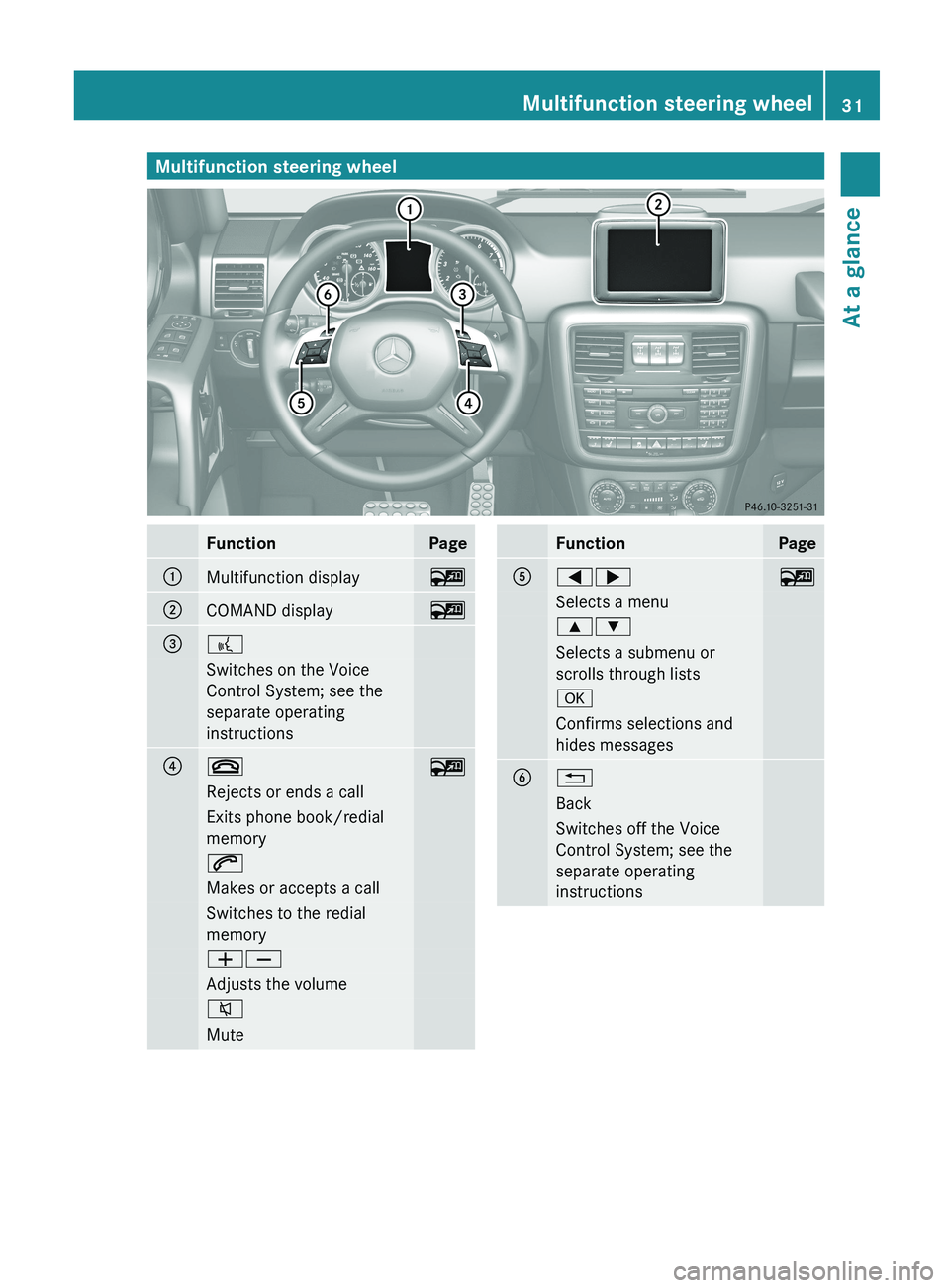
Function Page
0043
Multifunction display 00FC
0044
COMAND display 00FC
0087
0062
Switches on the Voice
Control System; see the
separate operating
instructions
0085
007F
00FC
Rejects or ends a call
Exits phone book/redial
memory
006A
Makes or accepts a call
Switches to the redial
memory
00810082
Adjusts the volume
006C
Mute Function Page
0083
00590065
00FC
Selects a menu
00630064
Selects a submenu or
scrolls through lists
0076
Confirms selections and
hides messages
0084
0041
Back
Switches off the Voice
Control System; see the
separate operating
instructionsMultifunction steering wheel
31At a glance
Page 36 of 364
Overhead control panel
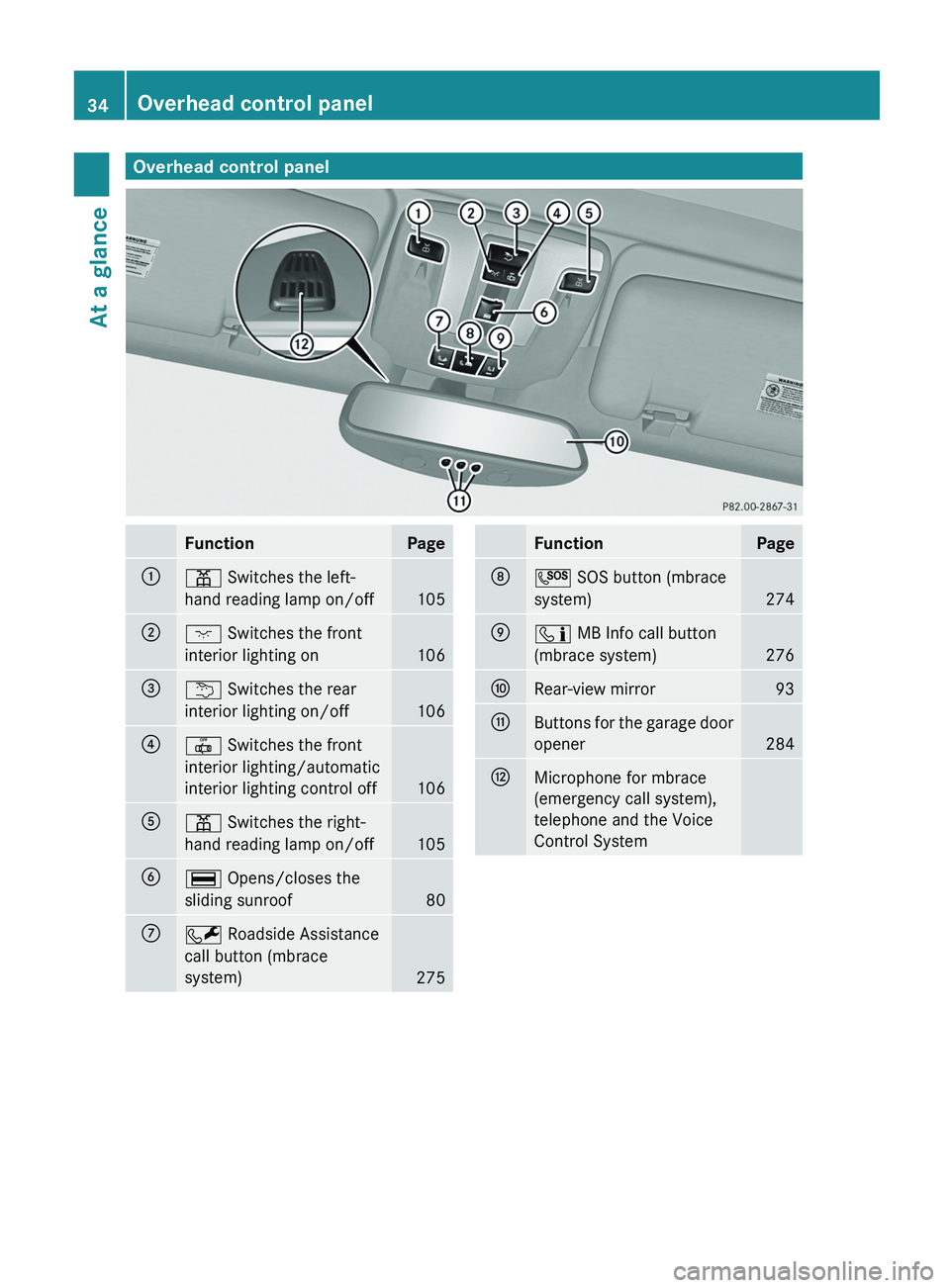
Function Page
0043
003D Switches the left-
hand reading lamp on/off
105
0044
004A Switches the front
interior lighting on
106
0087
0042 Switches the rear
interior lighting on/off
106
0085
0033 Switches the front
interior lighting/automatic
interior lighting control off
106
0083
003D Switches the right-
hand reading lamp on/off
105
0084
006A Opens/closes the
sliding sunroof
80
006B
0052 Roadside Assistance
call button (mbrace
system)
275 Function Page
006C
0053 SOS button (mbrace
system)
274
006D
00D9 MB Info call button
(mbrace system)
276
006E
Rear-view mirror 93
006F
Buttons for the garage door
opener
284
0070
Microphone for mbrace
(emergency call system),
telephone and the Voice
Control System34
Overhead control panelAt a glance
Page 48 of 364
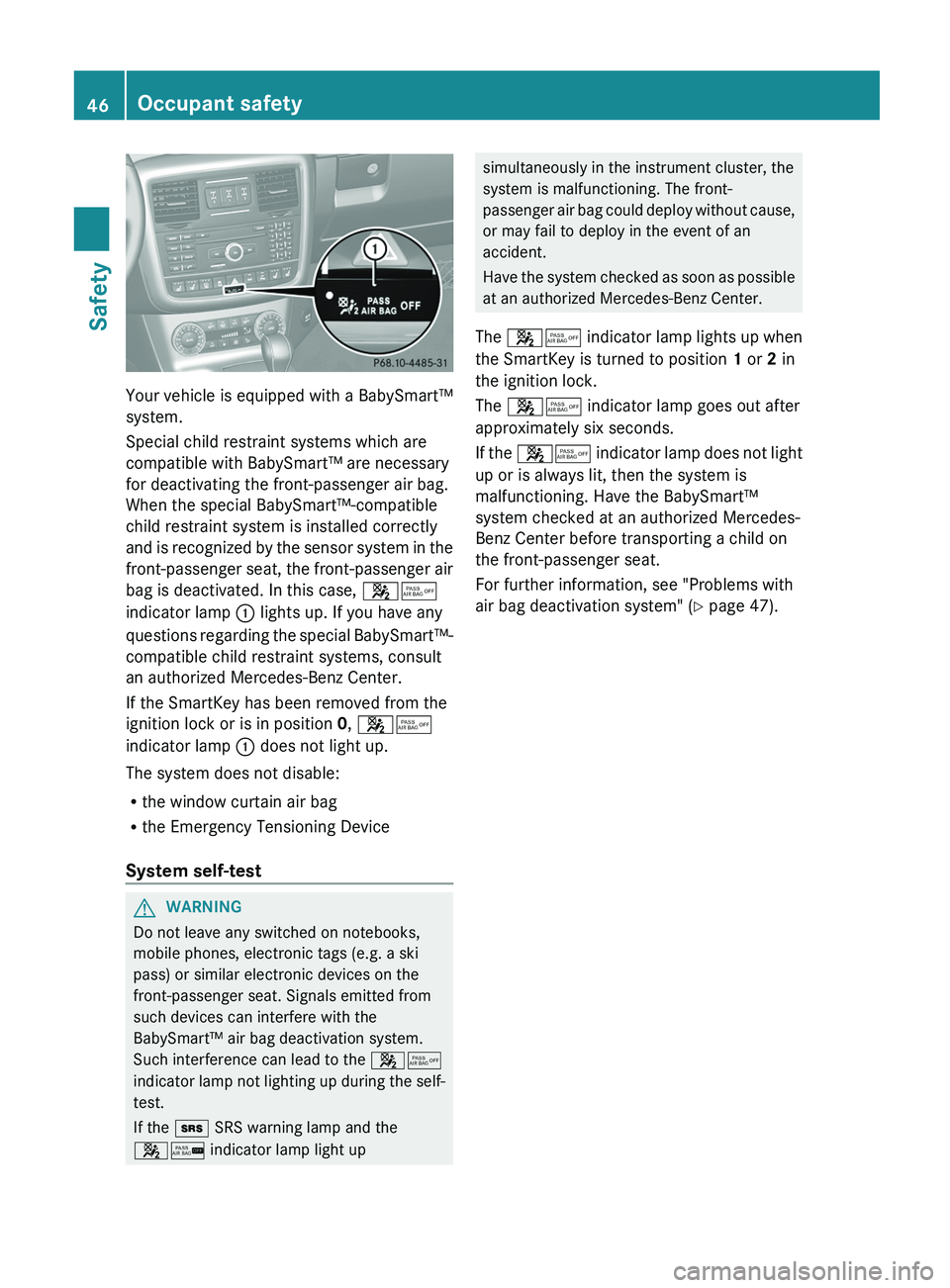
Your vehicle is equipped with a BabySmart™
system.
Special child restraint systems which are
compatible with BabySmart™ are necessary
for deactivating the front-passenger air bag.
When the special BabySmart™-compatible
child restraint system is installed correctly
and is recognized
by
the sensor system in the
front-passenger seat, the front-passenger air
bag is deactivated. In this case, 00730074
indicator lamp 0043 lights up. If you have any
questions regarding the special BabySmart™-
compatible child restraint systems, consult
an authorized Mercedes-Benz Center.
If the SmartKey has been removed from the
ignition lock or is in position 0, 00730074
indicator lamp 0043 does not light up.
The system does not disable:
R the window curtain air bag
R the Emergency Tensioning Device
System self-test G
WARNING
Do not leave any switched on notebooks,
mobile phones, electronic tags (e.g. a ski
pass) or similar electronic devices on the
front-passenger seat. Signals emitted from
such devices can interfere with the
BabySmart™ air bag deactivation system.
Such interference can lead to the 00730074
indicator lamp not lighting
up during the self-
test.
If the 007E SRS warning lamp and the
0073007C indicator lamp light up simultaneously in the instrument cluster, the
system is malfunctioning. The front-
passenger air bag
could
deploy without cause,
or may fail to deploy in the event of an
accident.
Have the system checked as soon as possible
at an authorized Mercedes-Benz Center.
The 00730074 indicator lamp lights up when
the SmartKey is turned to position 1 or 2 in
the ignition lock.
The 00730074 indicator lamp goes out after
approximately six seconds.
If the 00730074 indicator lamp does not light
up or is always lit, then the system is
malfunctioning. Have the BabySmart™
system checked at an authorized Mercedes-
Benz Center before transporting a child on
the front-passenger seat.
For further information, see "Problems with
air bag deactivation system" ( Y page 47).46
Occupant safety
Safety
Page 67 of 364
In the event that the engine cannot be
started when the starter battery is fully
charged, the immobilizer may be faulty.
Contact an authorized Mercedes-Benz
Center or call
1-800-FOR-MERCedes
(in the
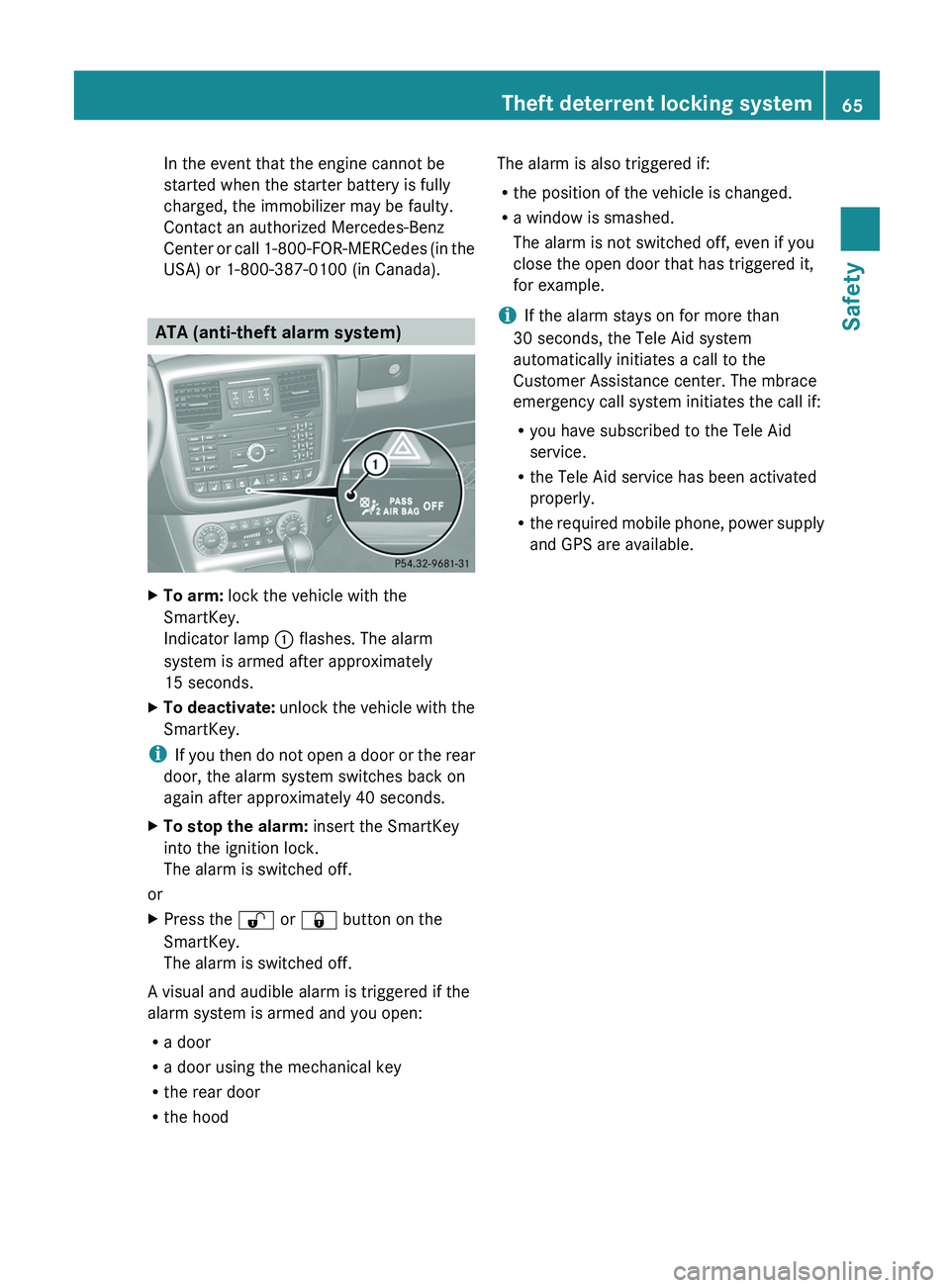
USA) or 1-800-387-0100 (in Canada). ATA (anti-theft alarm system)
X
To arm: lock the vehicle with the
SmartKey.
Indicator lamp 0043 flashes. The alarm
system is armed after approximately
15 seconds.
X To deactivate: unlock the vehicle
with the
SmartKey.
i If you then do
not open a door or the rear
door, the alarm system switches back on
again after approximately 40 seconds.
X To stop the alarm: insert the SmartKey
into the ignition lock.
The alarm is switched off.
or
X Press the 0036 or 0037 button on the
SmartKey.
The alarm is switched off.
A visual and audible alarm is triggered if the
alarm system is armed and you open:
R a door
R a door using the mechanical key
R the rear door
R the hood The alarm is also triggered if:
R
the position of the vehicle is changed.
R a window is smashed.
The alarm is not switched off, even if you
close the open door that has triggered it,
for example.
i If the alarm stays on for more than
30 seconds, the Tele Aid system
automatically initiates a call to the
Customer Assistance center. The mbrace
emergency call system initiates the call if:
R you have subscribed to the Tele Aid
service.
R the Tele Aid service has been activated
properly.
R the required mobile phone,
power supply
and GPS are available. Theft deterrent locking system
65
Safety Z
Page 160 of 364
i
When you apply parking
brake 0044 to brake
the vehicle, the brake lamps do not light up.
X To apply: pull parking brake 0044 up firmly.
Parking brake 0044 is applied.
When the ignition is switched on or the
engine is running, the 0049 (USA only) or
004D (Canada only) indicator lamp is lit in
the instrument cluster.
X To release: depress the brake pedal and
keep it depressed.
The selector lever lock is released.
X Pull parking brake 0044 up firmly.
X Press release button 0043 on parking
brake 0044 and move parking
brake 0044 down
to the stop.
When the ignition is switched on or the
engine is running, the 0049 (USA only)
or 0024 (Canada only) indicator lamp goes
out in the instrument cluster.
i If you pull away with parking brake 0044
applied, a warning tone sounds. Parking the vehicle for a long period
If you leave the
vehicle parked for longer than
four weeks, the battery may be damaged by
exhaustive discharge.
X Connecting a trickle charger.
i You can obtain information about trickle
chargers from a qualified specialist
workshop.
If you leave the
vehicle parked for longer than
six weeks, the vehicle may suffer damage as
a result of lack of use.
X Visit a qualified specialist workshop and
seek advice. Driving tips
General driving tips
Important safety notes G
WARNING
Always remember that you must concentrate
primarily on driving the vehicle. The driver's
concentration must always be directed
primarily at road traffic. For your own safety
and that of others, we recommend that you
stop the vehicle at a safe place and in
accordance with the traffic
conditions before
making or accepting a phone call.
Comply with all legal requirements if you use
the telephone while driving. Use the hands-
free system and only use the telephone when
road, weather and traffic conditions permit. In
some jurisdictions, it is forbidden for drivers
to use mobile phones while driving.
Only operate COMAND (Cockpit Management
and Data System) in compliance with all legal
requirements and when the road, weather and
traffic conditions permit. You may otherwise
not be able to observe the traffic conditions,
endangering yourself and others.
Remember that your vehicle covers a distance
of 44 ft (approximately 14 m) a second when
it is traveling at only 30 mph (approximately
50 km/h). G
WARNING
If you switch off the ignition while driving,
safety-relevant functions are only available
with limitations, or
not
at all. This could affect,
for example, the power steering and the brake
boosting effect. You will require considerably
more effort to steer and brake. There is a risk
of an accident.
Do not switch off the ignition while driving. 158
Driving tips
Driving and parking
Page 213 of 364
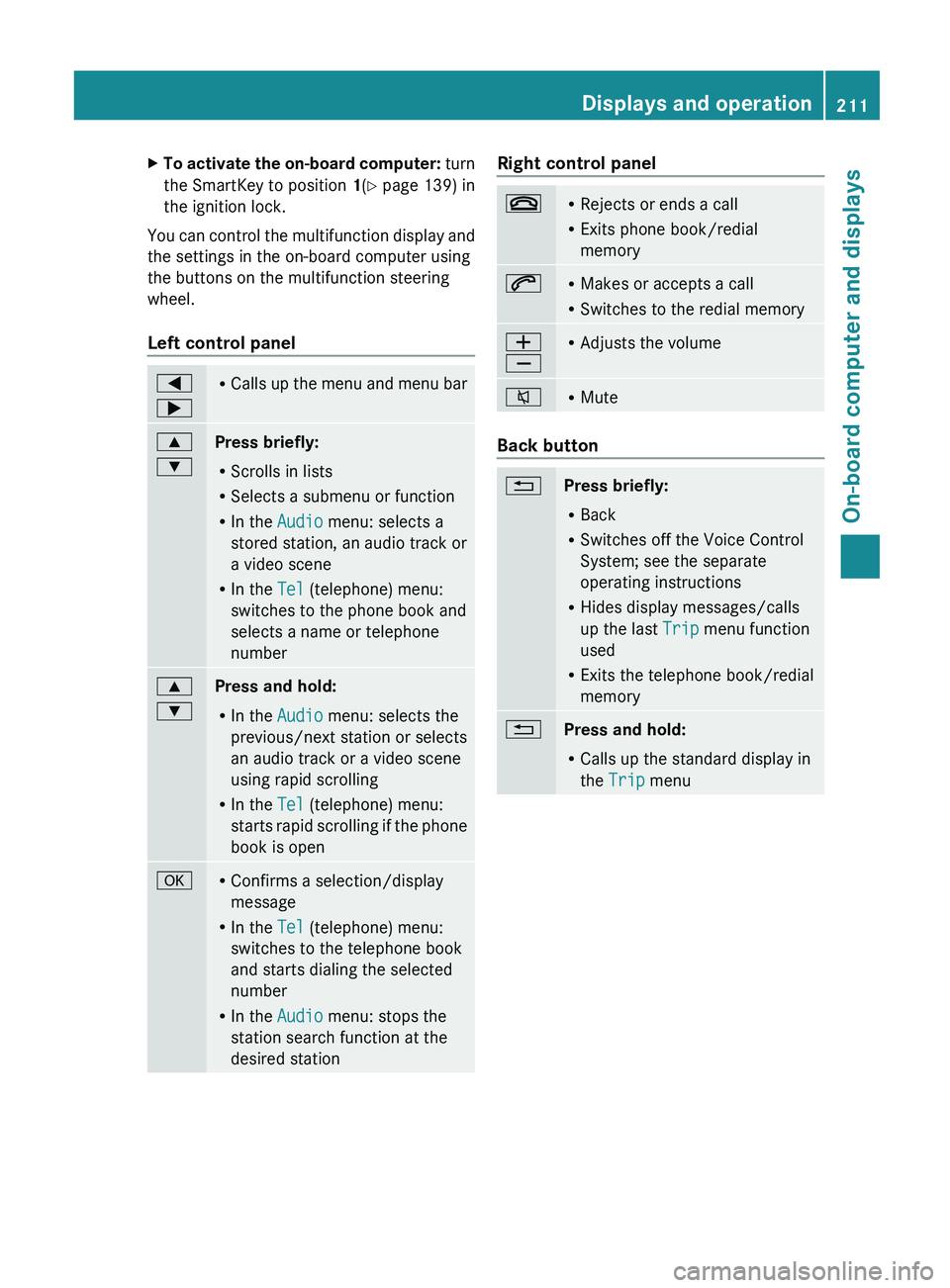
X
To activate the on-board computer: turn
the SmartKey to position 1(Y
page 139) in
the ignition lock.
You can control the multifunction display and
the settings in the on-board computer using
the buttons on the multifunction steering
wheel.
Left control panel 0059
0065 R
Calls up the menu
and menu bar0063
0064
Press briefly:
R
Scrolls in lists
R Selects a submenu or function
R In the Audio menu: selects a
stored station, an audio track or
a video scene
R In the Tel (telephone) menu:
switches to the phone book and
selects a name or telephone
number 0063
0064
Press and hold:
R
In the Audio menu: selects the
previous/next station or selects
an audio track or a video scene
using rapid scrolling
R In the Tel (telephone) menu:
starts rapid scrolling
if
the phone
book is open 0076 R
Confirms a selection/display
message
R In the Tel (telephone) menu:
switches to the telephone book
and starts dialing the selected
number
R In the Audio menu: stops the
station search function at the
desired station Right control panel
007F R
Rejects or ends a call
R Exits phone book/redial
memory 006A R
Makes or accepts a call
R Switches to the redial memory 0081
0082 R
Adjusts the volume 006C R
Mute Back button
0041
Press briefly:
R
Back
R Switches off the Voice Control
System; see the separate
operating instructions
R Hides display messages/calls
up the last Trip menu function
used
R Exits the telephone book/redial
memory 0041
Press and hold:
R
Calls up the standard display in
the Trip menu Displays and operation
211
On-board computer and displays Z
Page 214 of 364
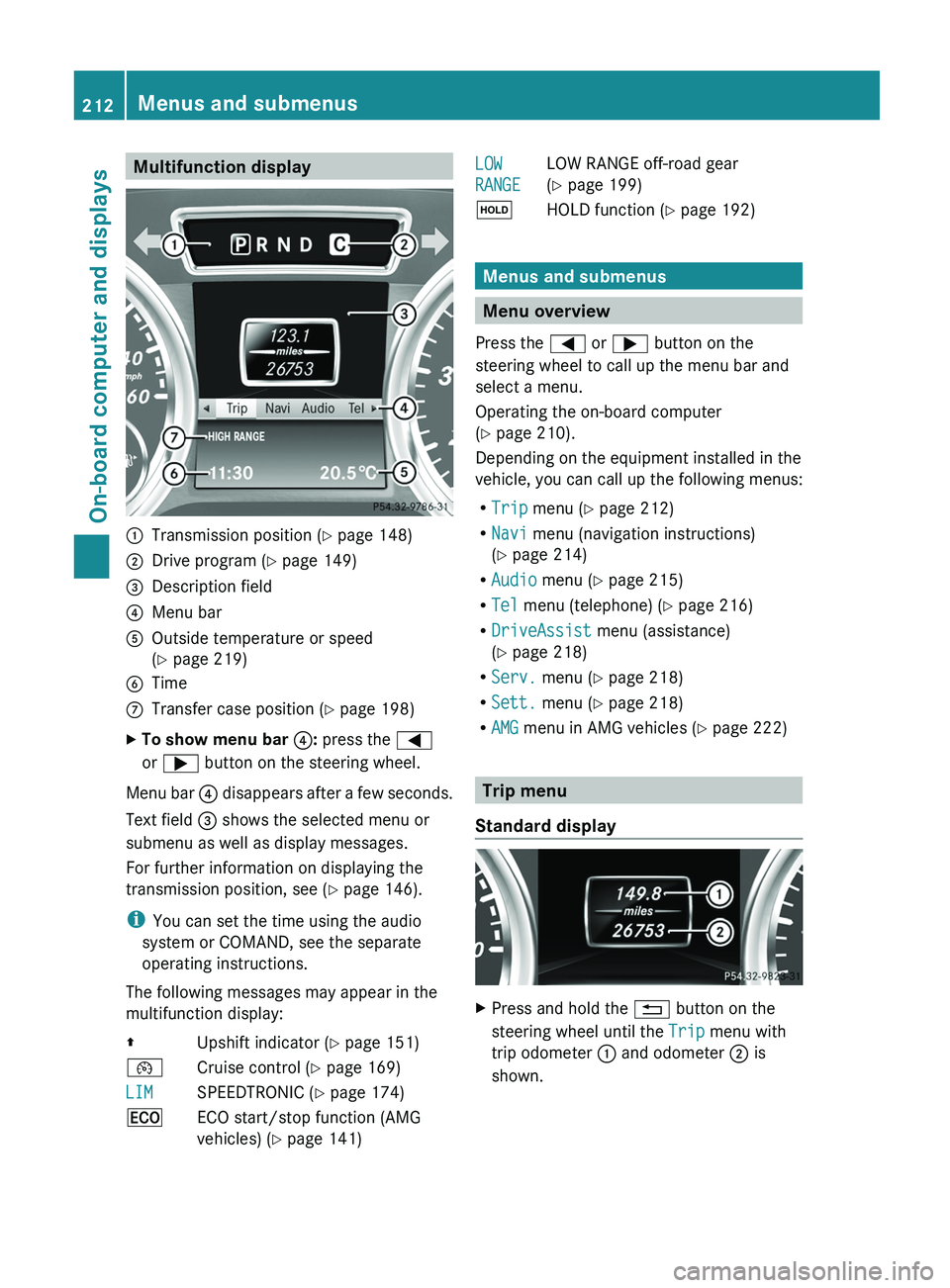
Multifunction display
0043
Transmission position ( Y page 148)
0044 Drive program (Y page 149)
0087 Description field
0085 Menu bar
0083 Outside temperature or speed
(Y page 219)
0084 Time
006B Transfer case position ( Y page 198)
X To show menu bar 0085: press the 0059
or 0065 button on the steering wheel.
Menu bar 0085 disappears after
a few seconds.
Text field 0087 shows the selected menu or
submenu as well as display messages.
For further information on displaying the
transmission position, see ( Y page 146).
i You can set the time using the audio
system or COMAND, see the separate
operating instructions.
The following messages may appear in the
multifunction display:
00A0 Upshift indicator (Y page 151)
00B2 Cruise control ( Y page 169)
LIM SPEEDTRONIC (
Y page 174)
00A7 ECO start/stop function (AMG
vehicles) ( Y page 141) LOW
RANGE
LOW RANGE off-road gear
(Y page 199)
00D9 HOLD function ( Y page 192) Menus and submenus
Menu overview
Press the 0059 or 0065 button on the
steering wheel to call up the menu bar and
select a menu.
Operating the on-board computer
(Y page 210).
Depending on the equipment installed in the
vehicle, you can call up the following menus:
R Trip menu (Y page 212)
R Navi menu (navigation instructions)
(Y page 214)
R Audio menu (Y page 215)
R Tel menu (telephone) ( Y page 216)
R DriveAssist menu (assistance)
(Y page 218)
R Serv. menu (Y page 218)
R Sett. menu (Y page 218)
R AMG menu in AMG vehicles ( Y page 222) Trip menu
Standard display X
Press and hold the 0041 button on the
steering wheel until the Trip menu with
trip odometer 0043 and odometer 0044 is
shown. 212
Menus and submenus
On-board computer and displays
Page 218 of 364
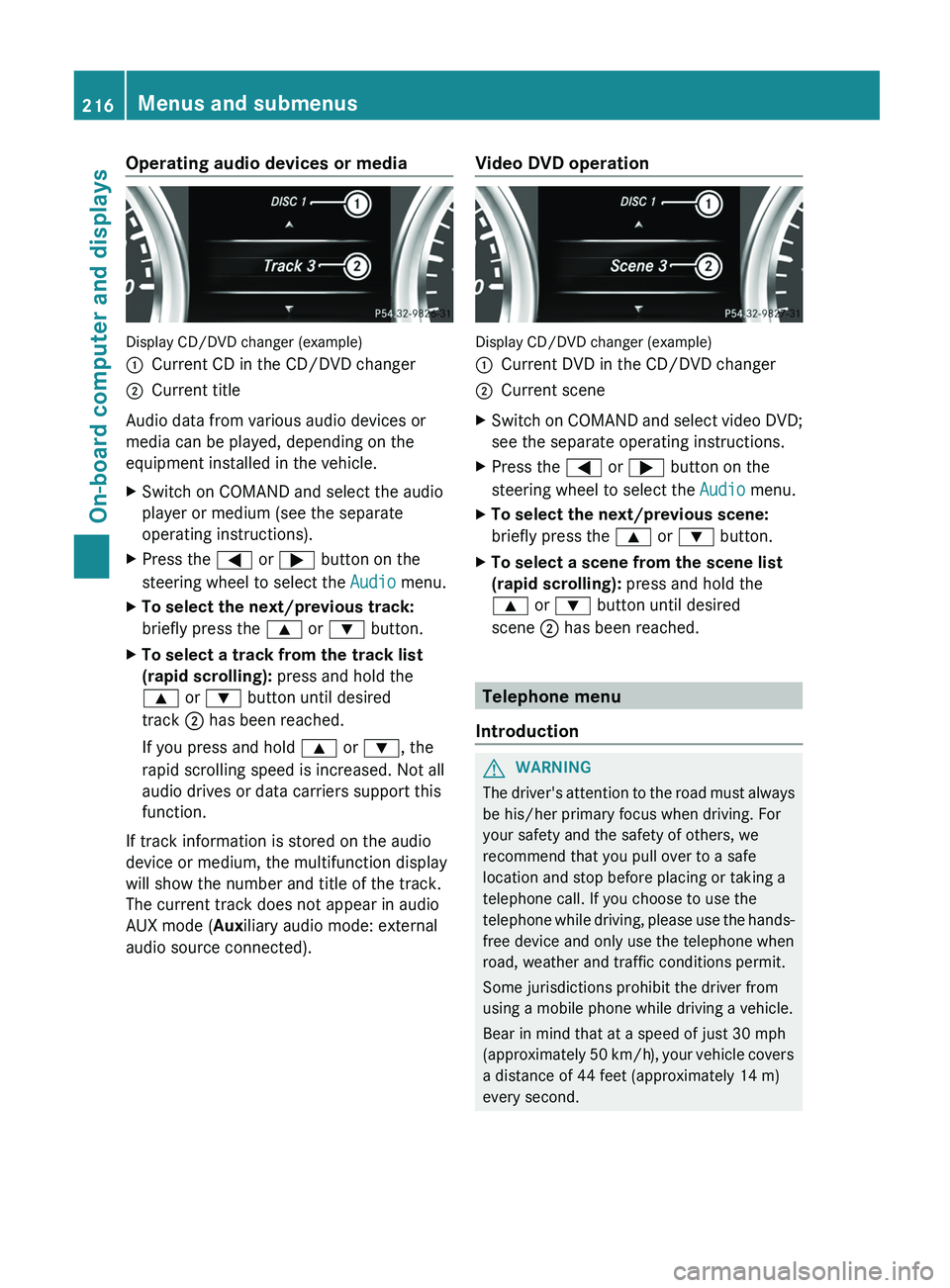
Operating audio devices or media
Display CD/DVD changer (example)
0043
Current CD in the CD/DVD changer
0044 Current title
Audio data from various audio devices or
media can be played, depending on the
equipment installed in the vehicle.
X Switch on COMAND and select the audio
player or medium (see the separate
operating instructions).
X Press the 0059 or 0065 button on the
steering wheel to select the Audio menu.
X To select the next/previous track:
briefly press the 0063 or 0064 button.
X To select a track from the track list
(rapid scrolling): press and hold the
0063 or 0064 button until desired
track 0044 has been reached.
If you press and hold 0063 or 0064, the
rapid scrolling speed is increased. Not all
audio drives or data carriers support this
function.
If track information is stored on the audio
device or medium, the multifunction display
will show the number and title of the track.
The current track does not appear in audio
AUX mode (Auxiliary audio mode: external
audio source connected). Video DVD operation Display CD/DVD changer (example)
0043
Current DVD in the CD/DVD changer
0044 Current scene
X Switch on COMAND and select video DVD;
see the separate operating instructions.
X Press the 0059 or 0065 button on the
steering wheel to select the Audio menu.
X To select the next/previous scene:
briefly press the 0063 or 0064 button.
X To select a scene from the scene list
(rapid scrolling): press and hold the
0063 or 0064 button until desired
scene 0044 has been reached. Telephone menu
Introduction G
WARNING
The driver's attention to the road must always
be his/her primary focus when driving. For
your safety and the safety of others, we
recommend that you pull over to a safe
location and stop before placing or taking a
telephone call. If you choose to use the
telephone while driving, please
use the hands-
free device and only use the telephone when
road, weather and traffic conditions permit.
Some jurisdictions prohibit the driver from
using a mobile phone while driving a vehicle.
Bear in mind that at a speed of just 30 mph
(approximately 50 km/h), your vehicle covers
a distance of 44 feet (approximately 14 m)
every second. 216
Menus and submenus
On-board computer and displays