reset MERCEDES-BENZ G-CLASS SUV 2013 User Guide
[x] Cancel search | Manufacturer: MERCEDES-BENZ, Model Year: 2013, Model line: G-CLASS SUV, Model: MERCEDES-BENZ G-CLASS SUV 2013Pages: 364, PDF Size: 9.62 MB
Page 95 of 364
Mirrors
Rear-view mirror
X Adjust the rear-view mirror by hand so you
have a good overview of the traffic
conditions behind you. Exterior mirrors
Adjusting the exterior mirrors G
WARNING
The exterior mirrors reduce the size of the
image. Objects are actually closer than they
appear. You could misjudge
the distance from
vehicles driving behind and cause an
accident, e.g. when changing lane. For this
reason, make sure of the actual distance from
the vehicle driving behind by glancing over
your shoulder. X
Make sure that the SmartKey is in position
1 or 2 (Y page 139) in the ignition lock.
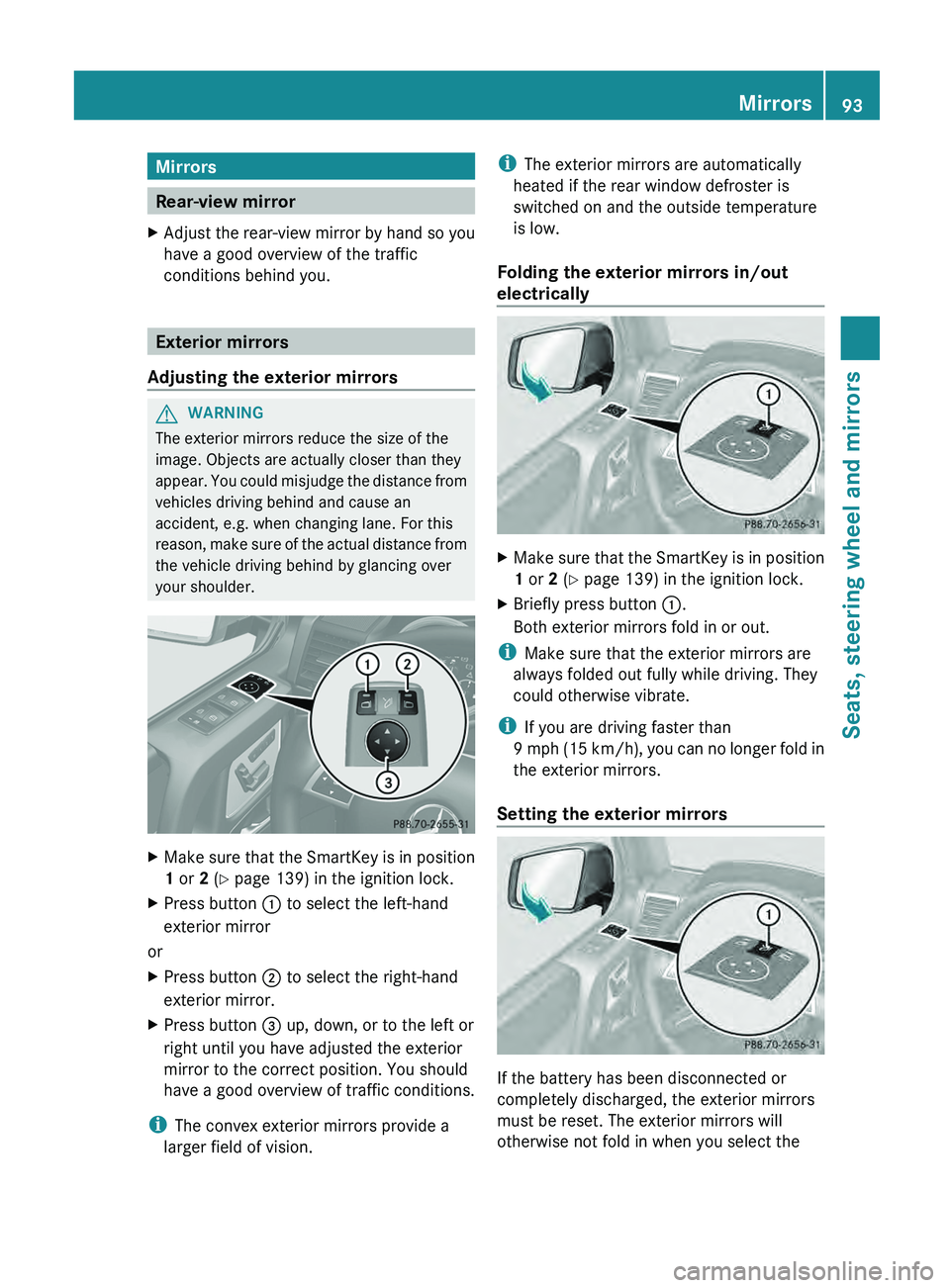
X Press button 0043 to select the left-hand
exterior mirror
or
X Press button 0044 to select the right-hand
exterior mirror.
X Press button 0087 up, down, or to the left or
right until you have adjusted the exterior
mirror to the correct position. You should
have a good overview of traffic conditions.
i The convex exterior mirrors provide a
larger field of vision. i
The exterior mirrors are automatically
heated if the rear window defroster is
switched on and the outside temperature
is low.
Folding the exterior mirrors in/out
electrically X
Make sure that the SmartKey is in position
1 or 2 (Y page 139) in the ignition lock.
X Briefly press button 0043.
Both exterior mirrors fold in or out.
i Make sure that the exterior mirrors are
always folded out fully while driving. They
could otherwise vibrate.
i If you are driving faster than
9 mph (15
km/h
), you can no longer fold in
the exterior mirrors.
Setting the exterior mirrors If the battery has been disconnected or
completely discharged, the exterior mirrors
must be reset. The exterior mirrors will
otherwise not fold in when you select the Mirrors
93
Seats, steering wheel and mirrors Z
Page 96 of 364
"Fold in mirrors when locking" function in the
on-board computer (Y page 221).
X
Make sure that the SmartKey is in position
1(Y page 139) in the ignition lock.
X Briefly press button 0043.
Folding the exterior mirrors in/out
automatically If the "Fold in mirrors when locking" function
is activated in the on-board computer
(Y page 221):
R
the exterior mirrors fold
in automatically as
soon as you lock the vehicle from the
outside.
R the exterior mirrors fold out again
automatically as soon as you unlock the
vehicle and then open the driver's or front-
passenger door.
Exterior mirror out of position X
Press button 0043 repeatedly until you hear
the mirror engage in position.
The mirror housing is engaged again and
you can adjust the
exterior mirrors as usual
(Y page 93). Automatic anti-glare mirrors
G
WARNING
If incident light from headlamps is prevented
from striking the sensor in the rear-view
mirror, for instance,
by
luggage piled too high
in the vehicle, the mirror's automatic anti-
glare function will not operate.
Incident light could then blind you. This may
distract you from the traffic conditions and,
as a result, you may cause an accident.
The rear-view mirror and the exterior mirror
on the driver's side automatically go into anti-
glare mode if:
R the ignition is switched on and
R incident light from headlamps strikes the
sensor in the rear-view mirror. i
The mirrors do not
go into anti-glare mode
if reverse gear is engaged or if the interior
lighting is switched on. Parking position for the exterior
mirror on the front-passenger side
Setting/storing the parking position Using reverse gear
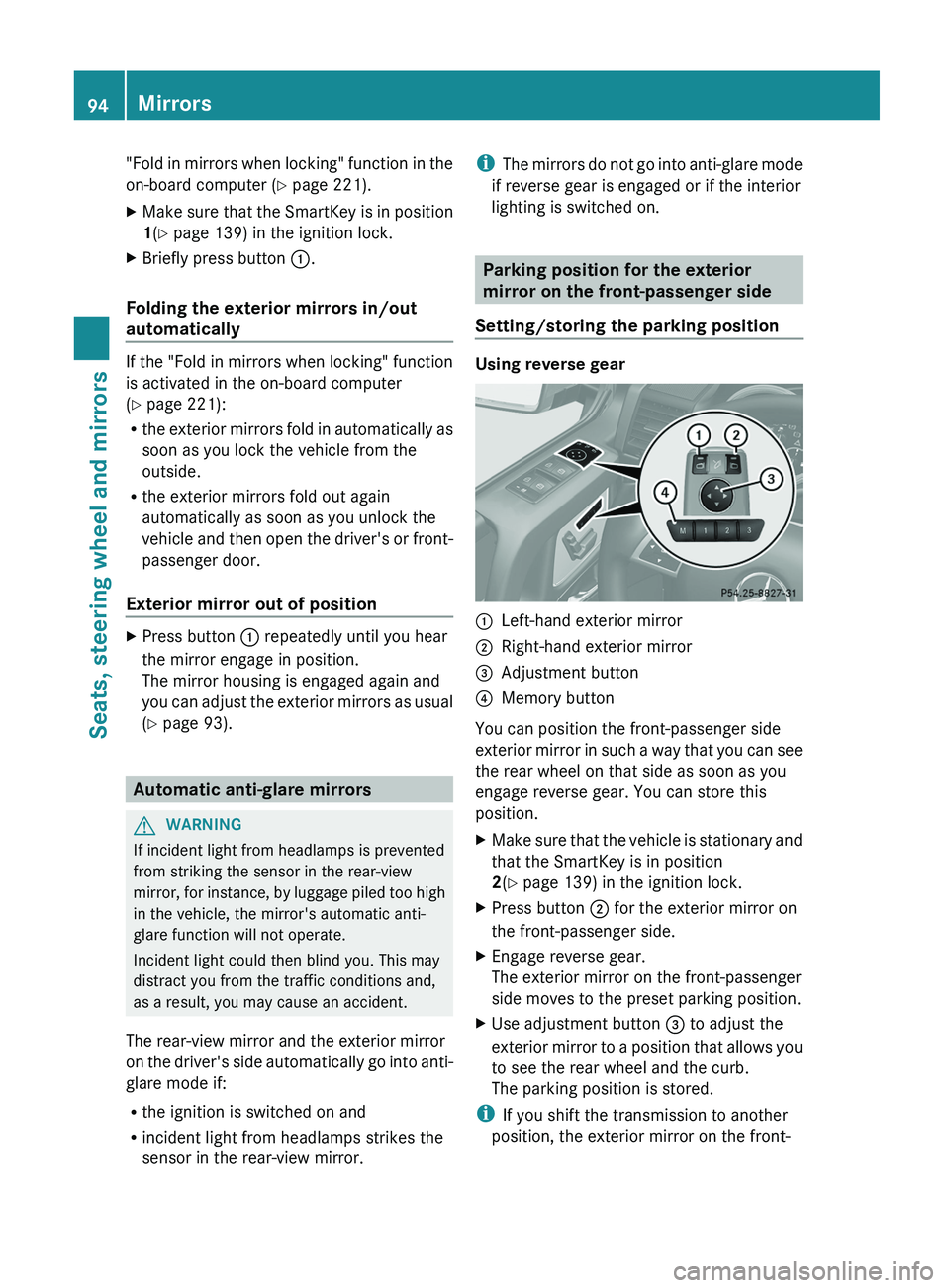
0043
Left-hand exterior mirror
0044 Right-hand exterior mirror
0087 Adjustment button
0085 Memory button
You can position the front-passenger side
exterior mirror in
such
a way that you can see
the rear wheel on that side as soon as you
engage reverse gear. You can store this
position.
X Make sure that the vehicle is stationary and
that the SmartKey is in position
2(Y page 139) in the ignition lock.
X Press button 0044 for the exterior mirror on
the front-passenger side.
X Engage reverse gear.
The exterior mirror on the front-passenger
side moves to the preset parking position.
X Use adjustment button 0087 to adjust the
exterior mirror to a
position that allows you
to see the rear wheel and the curb.
The parking position is stored.
i If you shift the transmission to another
position, the exterior mirror on the front- 94
Mirrors
Seats, steering wheel and mirrors
Page 105 of 364
X
To switch on the parking lamps: the
SmartKey is not inserted
in the ignition lock
or it is in position 0(Y page 139).
X Turn the light switch to 0063 (left-hand side
of the vehicle) or 0064
(right-hand side of
the vehicle). Headlamp cleaning system
The headlamps are cleaned automatically if
the "Wipe with washer fluid" function is
operated ten times while
the lights are on and
the engine is running (Y page 114). When you
switch off the ignition, the automatic
headlamp cleaning system is reset and
counting is resumed from 0. Combination switch
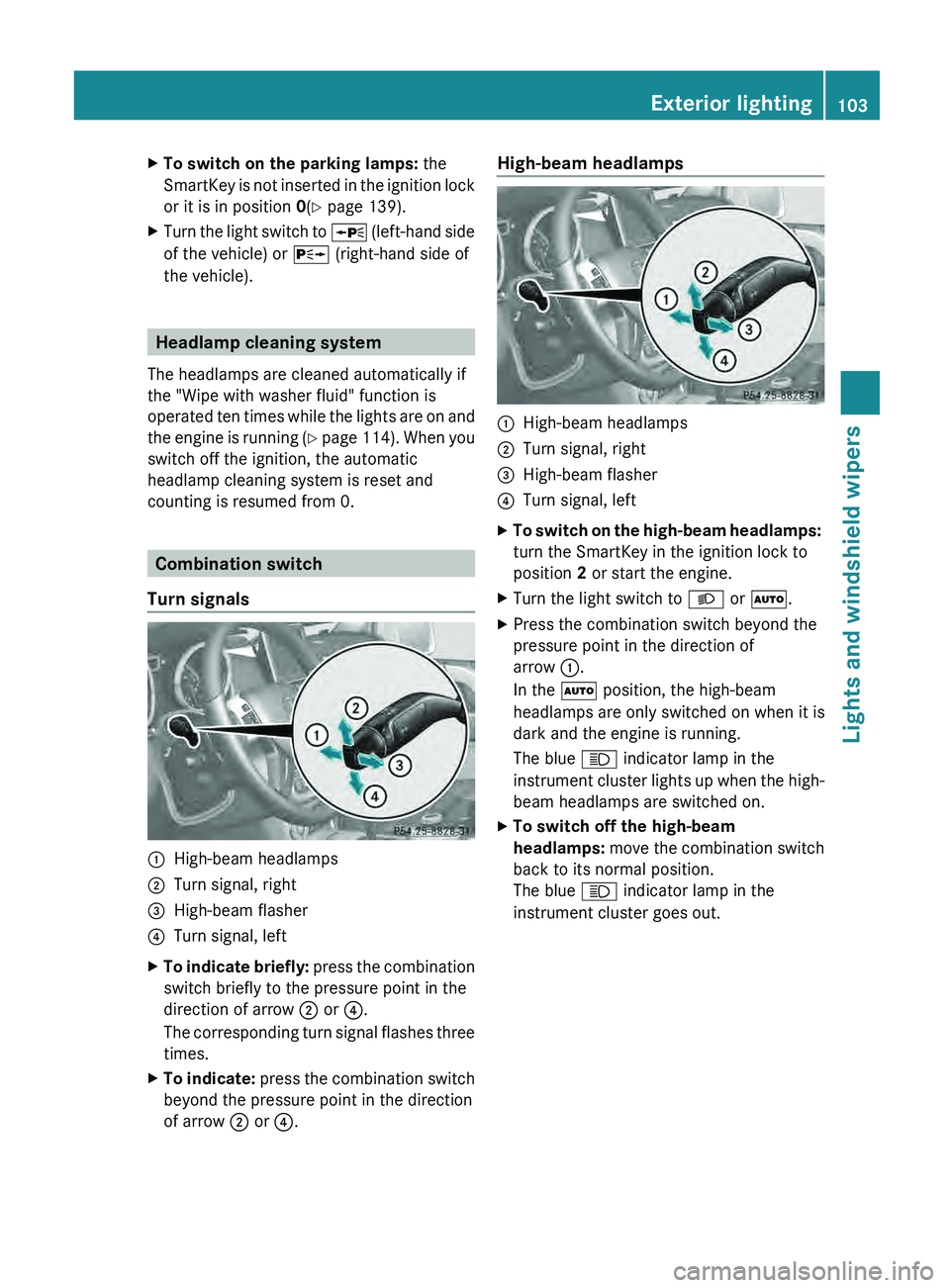
Turn signals 0043
High-beam headlamps
0044 Turn signal, right
0087 High-beam flasher
0085 Turn signal, left
X To indicate briefly: press the combination
switch briefly to the pressure point in the
direction of arrow 0044
or 0085.
The corresponding turn signal flashes three
times.
X To indicate: press the combination switch
beyond the pressure point in the direction
of arrow
0044 or 0085. High-beam headlamps
0043
High-beam headlamps
0044 Turn signal, right
0087 High-beam flasher
0085 Turn signal, left
X To switch on the high-beam headlamps:
turn the SmartKey in the ignition lock to
position 2 or start the engine.
X Turn the light switch to 0058 or 0058.
X Press the combination switch beyond the
pressure point in the direction of
arrow 0043.
In the 0058 position, the high-beam
headlamps are only switched on when it is
dark and the engine is running.
The blue 0057 indicator lamp in the
instrument cluster lights
up
when the high-
beam headlamps are switched on.
X To switch off the high-beam
headlamps: move the combination
switch
back to its normal position.
The blue 0057 indicator lamp in the
instrument cluster goes out. Exterior lighting
103
Lights and windshield wipers Z
Page 172 of 364
Cruise control lever
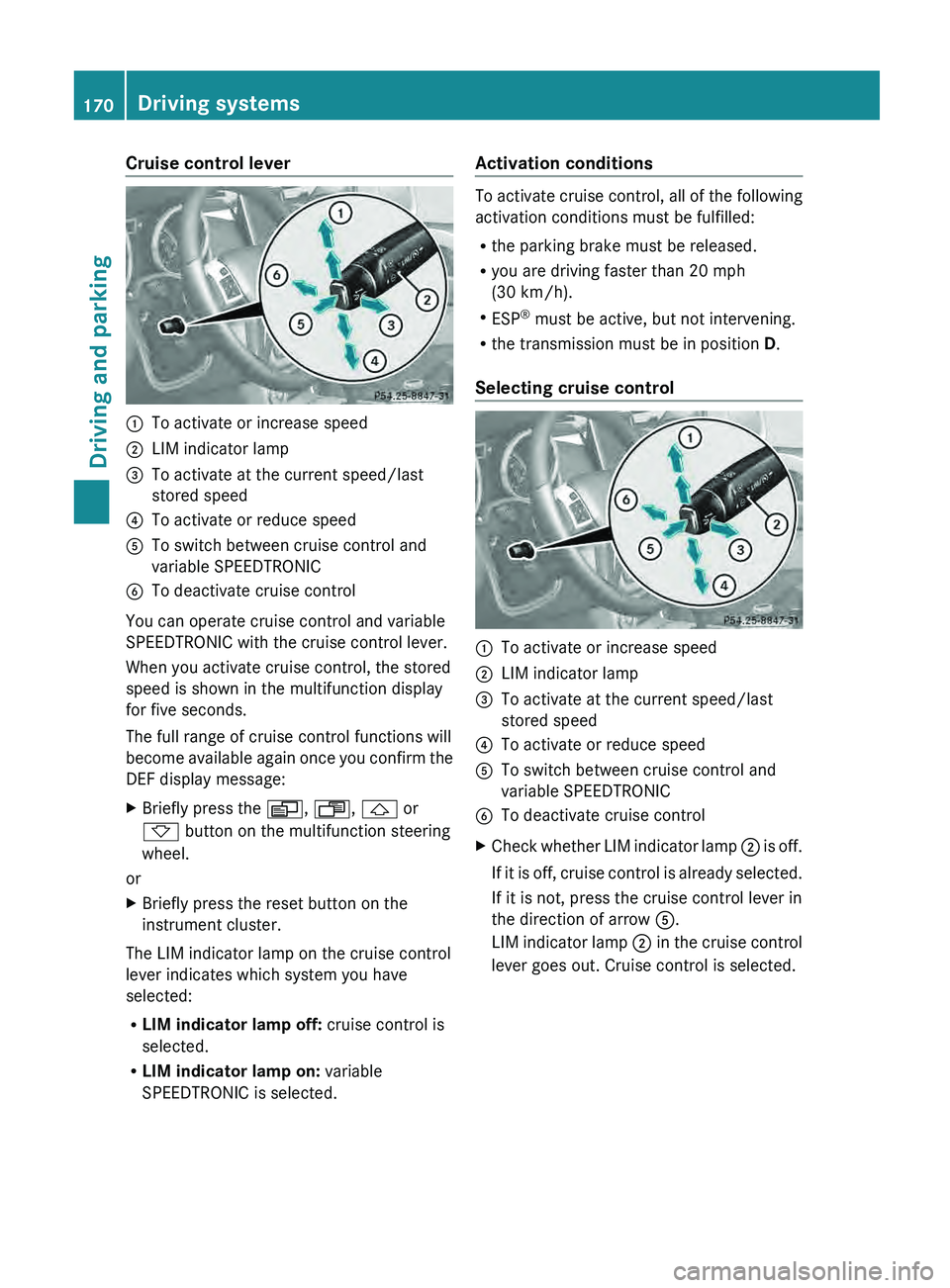
0043
To activate or increase speed
0044 LIM indicator lamp
0087 To activate at the current speed/last
stored speed
0085 To activate or reduce speed
0083 To switch between cruise control and
variable SPEEDTRONIC
0084 To deactivate cruise control
You can operate cruise control and variable
SPEEDTRONIC with the cruise control lever.
When you activate cruise control, the stored
speed is shown in the multifunction display
for five seconds.
The full range of cruise control functions will
become available again
once
you confirm the
DEF display message:
X Briefly press the 0080, 007F, 0041 or
0068 button on the multifunction steering
wheel.
or
X Briefly press the reset button on the
instrument cluster.
The LIM indicator lamp on the cruise control
lever indicates which system you have
selected:
R LIM indicator lamp off: cruise control is
selected.
R LIM indicator lamp on: variable
SPEEDTRONIC is selected. Activation conditions To activate cruise control, all of the following
activation conditions must be fulfilled:
R
the parking brake must be released.
R you are driving faster than 20 mph
(30 km/h).
R ESP ®
must be active, but not intervening.
R the transmission must be in position D.
Selecting cruise control 0043
To activate or increase speed
0044 LIM indicator lamp
0087 To activate at the current speed/last
stored speed
0085 To activate or reduce speed
0083 To switch between cruise control and
variable SPEEDTRONIC
0084 To deactivate cruise control
X Check whether LIM indicator lamp 0044 is off.
If it
is off, cruise control is already selected.
If it is not, press the cruise control lever in
the direction of arrow 0083.
LIM indicator lamp 0044 in the cruise control
lever goes out. Cruise control is selected. 170
Driving systems
Driving and parking
Page 180 of 364
road, weather and traffic conditions.
DISTRONIC PLUS is only an aid. You are
responsible for the distance to the vehicle in
front, for vehicle speed, for braking in good
time and for staying in lane. Only engage
DISTRONIC PLUS when the current road,
weather and traffic
conditions
permit it to be
done safely, and adapt your driving style
accordingly. Drive carefully and maintain a
suitable distance to the vehicle in front.
If DISTRONIC PLUS detects a risk of collision
but cannot sufficiently decelerate the vehicle
in order to maintain the set distance, you will
be warned visually and acoustically.
DISTRONIC PLUS cannot prevent a collision
without your intervention. An intermittent
warning tone will then sound and the distance
warning lamp will light up in the instrument
cluster. Brake immediately in order to
increase the distance from the vehicle in
front, or take evasive action, provided it is
safe to do so.
DISTRONIC PLUS may not detect narrow
vehicles driving in front, e.g. motorcycles, or
vehicles driving on a different line. Therefore,
always pay attention to traffic conditions
even when DISTRONIC PLUS is activated.
Otherwise, you may fail to recognize dangers
in time, cause an accident and injure yourself
and others.
In particular, the detection of obstacles can
be impaired if there is:
R the sensor is dirty or covered
R snow or heavy rain
R interference by other radar sources
R there is the possibility of strong radar
reflections, for example, in parking
garages.
If DISTRONIC PLUS is activated, the vehicle
brakes automatically in certain situations.
This can happen unexpectedly, especially
when towing or in a car wash. There is a risk
of an accident. In these or similar situations,
deactivate DISTRONIC PLUS.
If you want DISTRONIC PLUS to assist you,
the following activation conditions must be fulfilled (
Y page 179) and the radar sensor
system must be operational.
General notes DISTRONIC PLUS regulates the speed and
automatically helps you maintain the
distance to the vehicle detected in front.
DISTRONIC PLUS brakes automatically so
that the set speed is not exceeded.
On long and steep downhill gradients,
especially if the vehicle is laden or towing a
trailer, you must select shift range
1, 2 or 3
in good time. By doing so, you will make use
of the braking effect of the engine, which
relieves the load on the brake system and
prevents the brakes from overheating and
wearing too quickly.
If DISTRONIC PLUS detects a slower-moving
vehicle in front, your
vehicle is braked in order
to maintain the preset distance to the vehicle
in front.
If there is no vehicle in front, DISTRONIC
PLUS operates in the same way as cruise
control in the speed range between 20 mph
(Canada: 30 km/h) and120 mph (Canada:
200 km/h). If a vehicle is driving in front of
you, it operates in the speed range between
0 mph (0 km/h) and 120 mph (Canada:
200 km/h).
Do not use DISTRONIC PLUS while driving on
roads with steep gradients.
As DISTRONIC PLUS transmits radar waves,
it can resemble the radar detectors of the
responsible authorities. You can refer to the
relevant chapter in the Operator's Manual if
questions are asked about this.
i USA only:
This device has been approved by the FCC
as a “Vehicular Radar System”. The radar
sensor is intended for use in an automotive
radar system only. Removal, tampering, or
altering of the device will void any
warranties, and is not permitted by the
FCC. Do not tamper with, alter, or use in
any non-approved way. 178
Driving systems
Driving and parking
Page 215 of 364
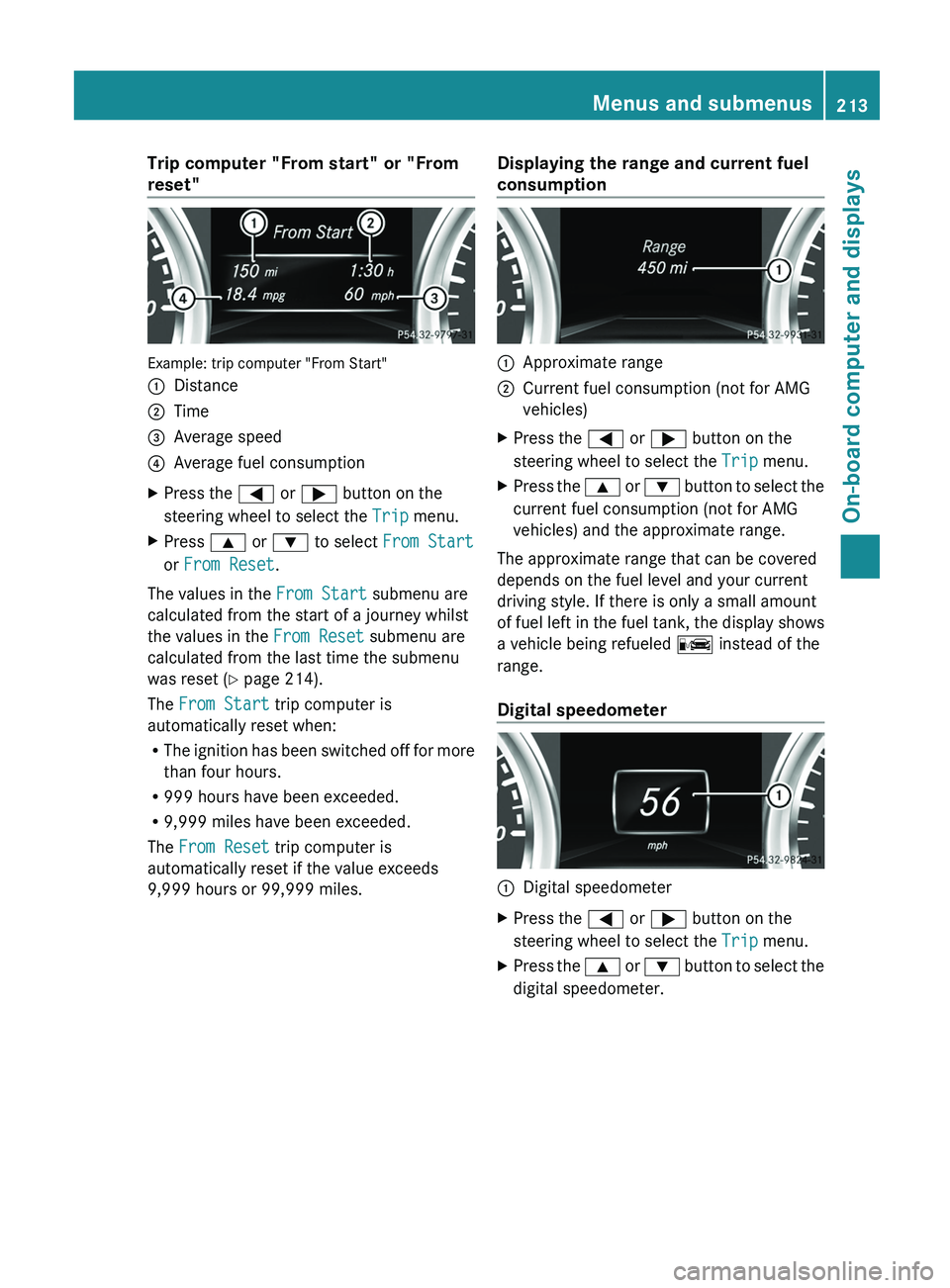
Trip computer "From start" or "From
reset"
Example: trip computer "From Start"
0043
Distance
0044 Time
0087 Average speed
0085 Average fuel consumption
X Press the 0059 or 0065 button on the
steering wheel to select the Trip menu.
X Press 0063 or 0064 to select From Start
or From Reset.
The values in the From Start submenu are
calculated from the start of a journey whilst
the values in the From Reset submenu are
calculated from the last time the submenu
was reset ( Y page 214).
The From Start trip computer is
automatically reset when:
R The ignition has
been
switched off for more
than four hours.
R 999 hours have been exceeded.
R 9,999 miles have been exceeded.
The From Reset trip computer is
automatically reset if the value exceeds
9,999 hours or 99,999 miles. Displaying the range and current fuel
consumption 0043
Approximate range
0044 Current fuel consumption (not for AMG
vehicles)
X Press the 0059 or 0065 button on the
steering wheel to select the Trip menu.
X Press the 0063 or 0064 button
to select the
current fuel consumption (not for AMG
vehicles) and the approximate range.
The approximate range that can be covered
depends on the fuel level and your current
driving style. If there is only a small amount
of fuel left in
the fuel tank, the display shows
a vehicle being refueled 00A8 instead of the
range.
Digital speedometer 0043
Digital speedometer
X Press the 0059 or 0065 button on the
steering wheel to select the Trip menu.
X Press the 0063 or
0064 button
to select the
digital speedometer. Menus and submenus
213
On-board computer and displays Z
Page 216 of 364
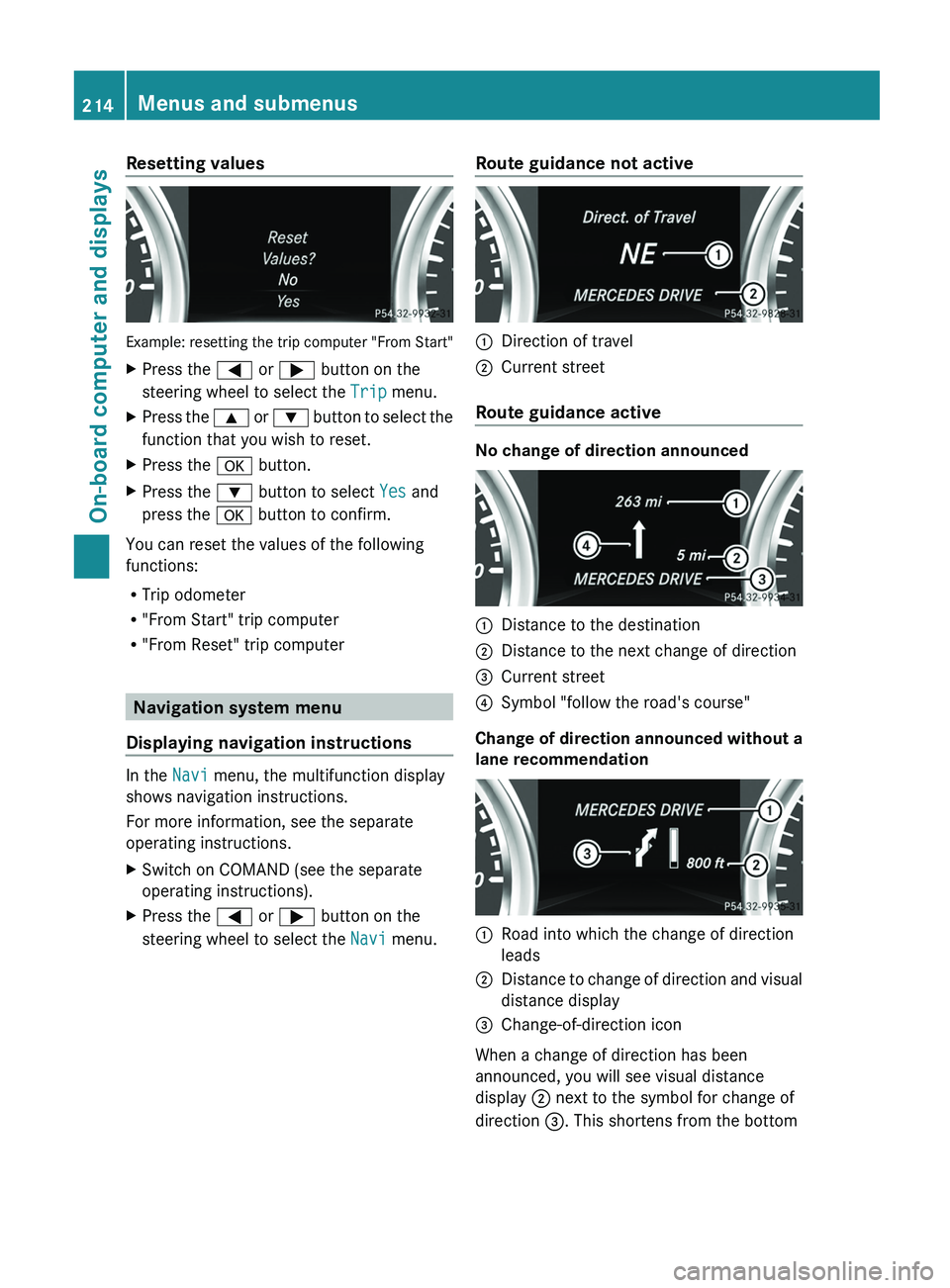
Resetting values
Example: resetting the trip computer "From Start"
X
Press the 0059 or 0065 button on the
steering wheel to select the Trip menu.
X Press the 0063 or 0064 button to select the
function that you wish to reset.
X Press the 0076 button.
X Press the 0064 button to select Yes and
press the 0076 button to confirm.
You can reset the values of the following
functions:
R Trip odometer
R "From Start" trip computer
R "From Reset" trip computer Navigation system menu
Displaying navigation instructions In the
Navi menu, the multifunction display
shows navigation instructions.
For more information, see the separate
operating instructions.
X Switch on COMAND (see the separate
operating instructions).
X Press the 0059 or 0065 button on the
steering wheel to select the Navi menu. Route guidance not active 0043
Direction of travel
0044 Current street
Route guidance active No change of direction announced
0043
Distance to the destination
0044 Distance to the next change of direction
0087 Current street
0085 Symbol "follow the road's course"
Change of direction announced without a
lane recommendation 0043
Road into which the change of direction
leads
0044 Distance to change of direction and visual
distance display
0087 Change-of-direction icon
When a change of direction has been
announced, you will see visual distance
display 0044 next to the symbol for change of
direction 0087. This shortens from the bottom 214
Menus and submenus
On-board computer and displays
Page 224 of 364
You can then only fold out the exterior mirrors
using button 0043.
Restoring the factory settings
X Press the 0059 or 0065 button on the
steering wheel to select the Sett. menu.
X Press the 0064
or 0063 button to select the
Factory Setting submenu.
X Press 0076 to confirm.
The Reset All Settings? message
appears.
X Press the 0064 or 0063 button to select
No or Yes.
X Press 0076 to confirm the selection.
If you select Yes, the multifunction display
shows a confirmation message.
For safety reasons, the Daytime Running
Lights function in the Lights submenu is
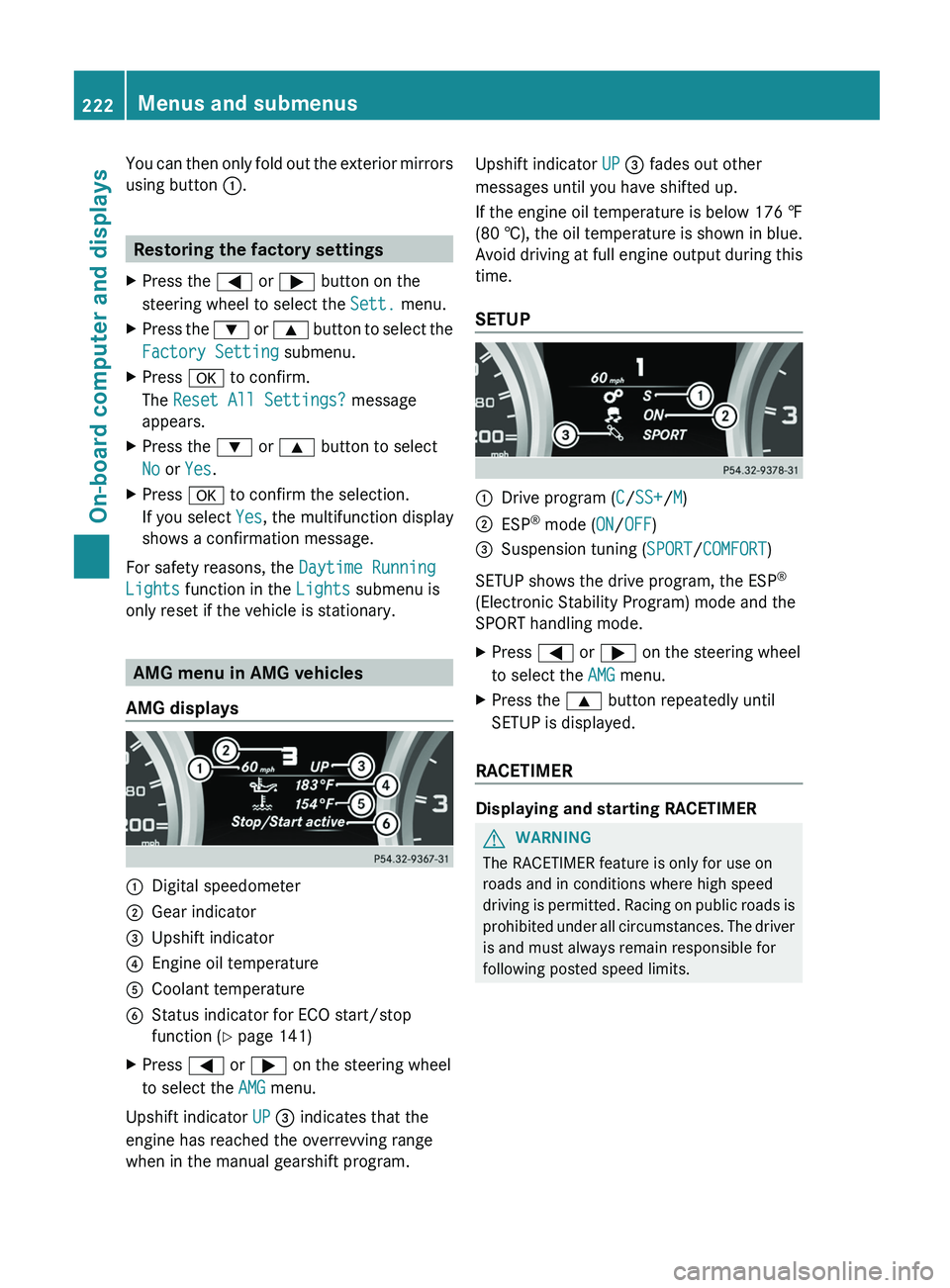
only reset if the vehicle is stationary. AMG menu in AMG vehicles
AMG displays 0043
Digital speedometer
0044 Gear indicator
0087 Upshift indicator
0085 Engine oil temperature
0083 Coolant temperature
0084 Status indicator for ECO start/stop
function ( Y page 141)
X Press 0059 or 0065 on the steering wheel
to select the AMG menu.
Upshift indicator UP 0087 indicates that the
engine has reached the overrevving range
when in the manual gearshift program. Upshift indicator UP 0087 fades out other
messages until you have shifted up.
If the engine oil temperature is below
176 ‡
(80 † ),
the oil temperature is shown in blue.
Avoid driving at full engine output during this
time.
SETUP 0043
Drive program (C/SS+/M)
0044 ESP ®
mode ( ON/OFF)
0087 Suspension tuning (SPORT/COMFORT)
SETUP shows the drive program, the ESP ®
(Electronic Stability Program) mode and the
SPORT handling mode.
X Press 0059 or 0065 on the steering wheel
to select the AMG menu.
X Press the 0063 button repeatedly until
SETUP is displayed.
RACETIMER Displaying and starting RACETIMER
G
WARNING
The RACETIMER feature is only for use on
roads and in conditions where high speed
driving is permitted.
Racing
on public roads is
prohibited under all circumstances. The driver
is and must always remain responsible for
following posted speed limits. 222
Menus and submenus
On-board computer and displays
Page 225 of 364
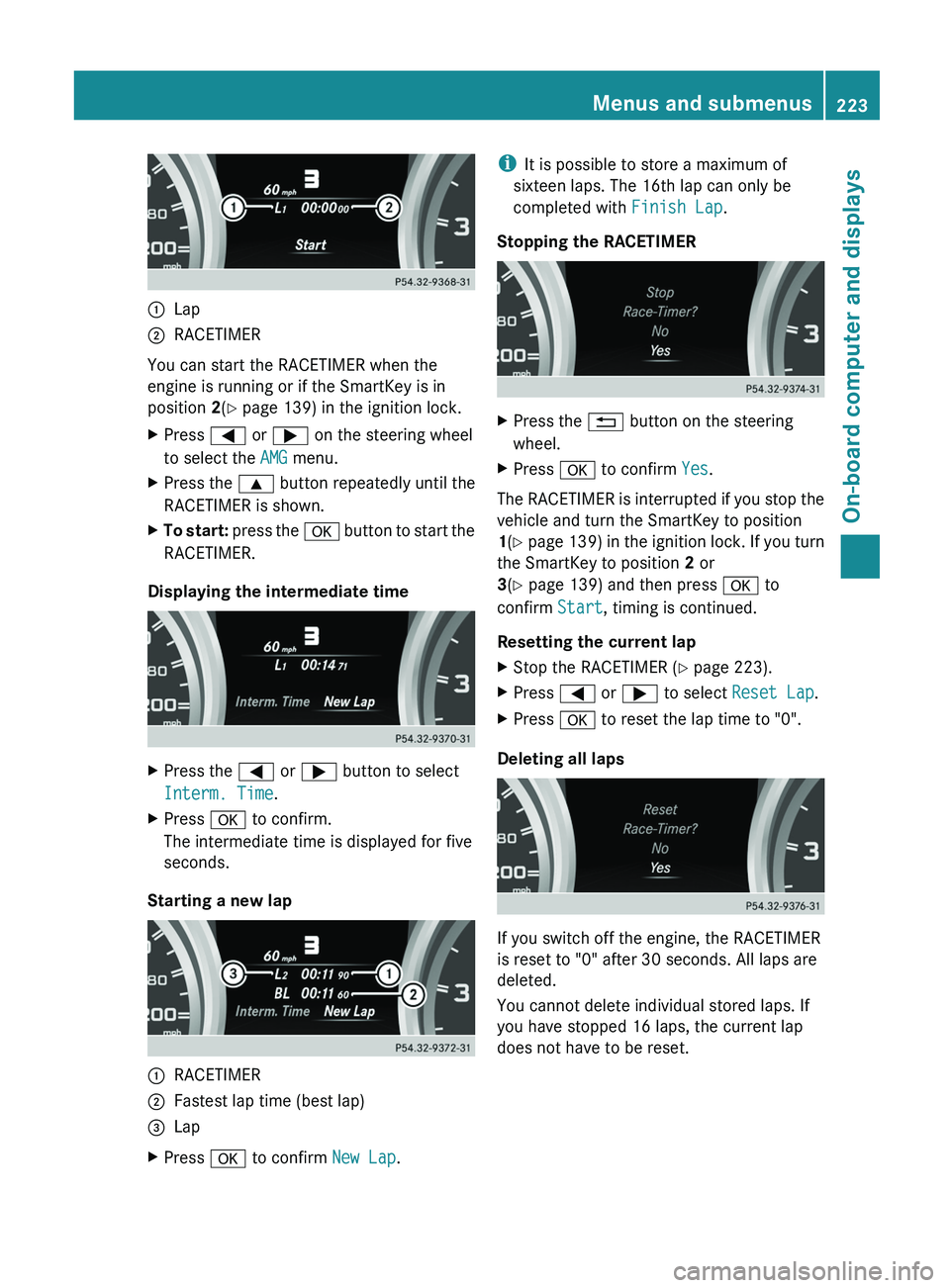
0043
Lap
0044 RACETIMER
You can start the RACETIMER when the
engine is running or if the SmartKey is in
position 2(Y page 139) in the ignition lock.
X Press 0059 or 0065 on the steering wheel
to select the AMG menu.
X Press the 0063 button repeatedly until the
RACETIMER is shown.
X To start: press the 0076 button to start the
RACETIMER.
Displaying the intermediate time X
Press the 0059 or 0065 button to select
Interm. Time.
X Press 0076 to confirm.
The intermediate time is displayed for five
seconds.
Starting a new lap 0043
RACETIMER
0044 Fastest lap time (best lap)
0087 Lap
X Press 0076 to confirm New Lap.i
It is possible to store a maximum of
sixteen laps. The 16th lap can only be
completed with Finish Lap.
Stopping the RACETIMER X
Press the 0041 button on the steering
wheel.
X Press 0076 to confirm Yes.
The RACETIMER is interrupted if you stop the
vehicle and turn the SmartKey to position
1(Y page 139) in
the ignition lock. If you turn
the SmartKey to position 2 or
3(Y page 139) and then press 0076 to
confirm Start, timing is continued.
Resetting the current lap
X Stop the RACETIMER ( Y page 223).
X Press 0059 or 0065 to select Reset Lap.
X Press 0076 to reset the lap time to "0".
Deleting all laps If you switch off the engine, the RACETIMER
is reset to "0" after 30 seconds. All laps are
deleted.
You cannot delete individual stored laps. If
you have stopped 16 laps, the current lap
does not have to be reset. Menus and submenus
223On-board computer and displays Z
Page 226 of 364
X
Reset the current lap (Y page 223).
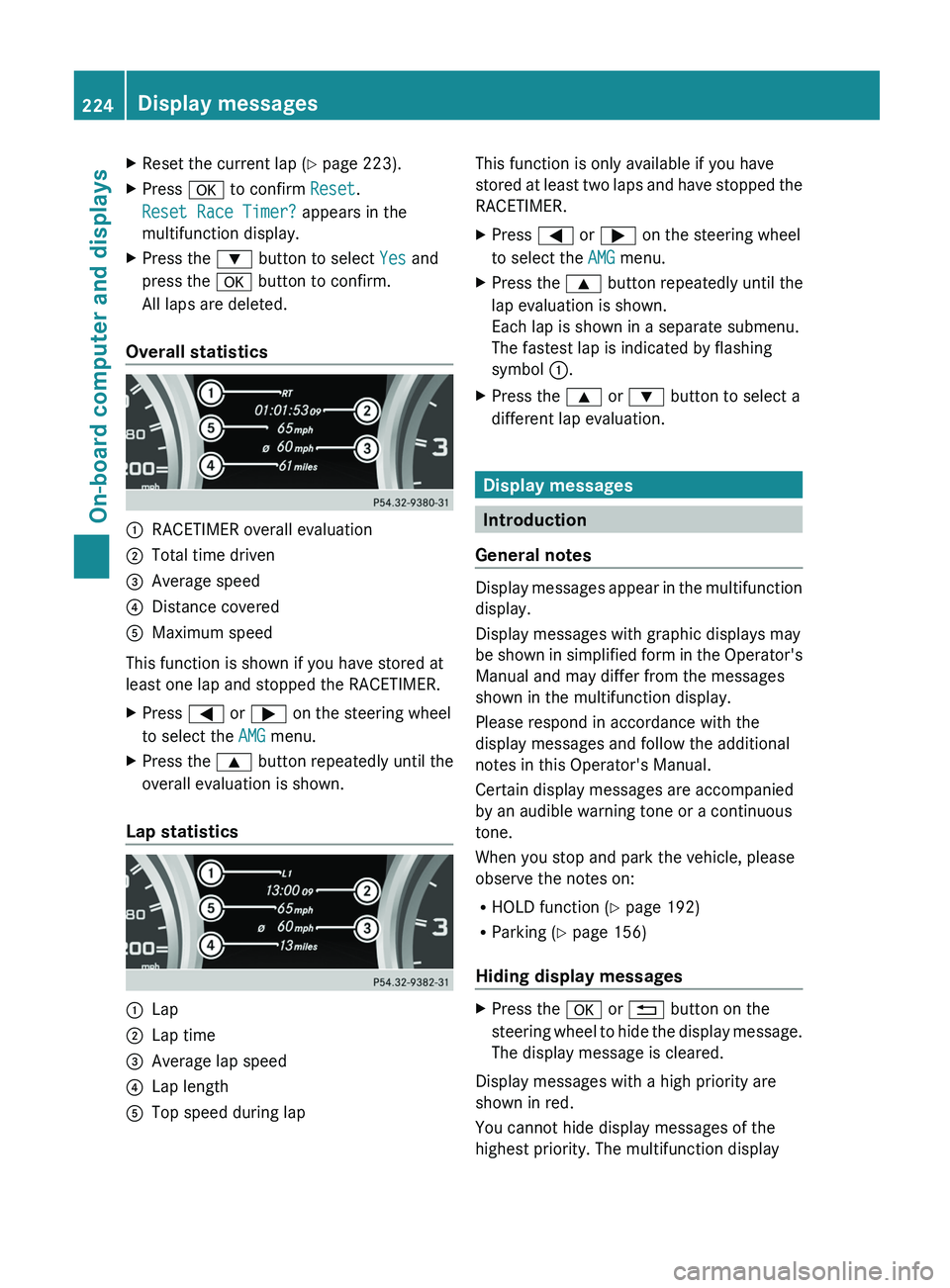
X Press 0076 to confirm Reset.
Reset Race Timer? appears in the
multifunction display.
X Press the 0064 button to select Yes and
press the 0076 button to confirm.
All laps are deleted.
Overall statistics 0043
RACETIMER overall evaluation
0044 Total time driven
0087 Average speed
0085 Distance covered
0083 Maximum speed
This function is shown if you have stored at
least one lap and stopped the RACETIMER.
X Press 0059 or 0065 on the steering wheel
to select the AMG menu.
X Press the 0063 button repeatedly until the
overall evaluation is shown.
Lap statistics 0043
Lap
0044 Lap time
0087 Average lap speed
0085 Lap length
0083 Top speed during lap This function is only available if you have
stored
at least
two
laps and have stopped the
RACETIMER.
X Press 0059 or 0065 on the steering wheel
to select the AMG menu.
X Press the 0063 button repeatedly until the
lap evaluation is shown.
Each lap is shown in a separate submenu.
The fastest lap is indicated by flashing
symbol 0043.
X Press the 0063 or 0064 button to select a
different lap evaluation. Display messages
Introduction
General notes Display messages appear in the multifunction
display.
Display messages with graphic displays may
be shown in
simplified
form in the Operator's
Manual and may differ from the messages
shown in the multifunction display.
Please respond in accordance with the
display messages and follow the additional
notes in this Operator's Manual.
Certain display messages are accompanied
by an audible warning tone or a continuous
tone.
When you stop and park the vehicle, please
observe the notes on:
R HOLD function ( Y page 192)
R Parking (Y page 156)
Hiding display messages X
Press the 0076 or 0041 button on the
steering wheel to hide
the display message.
The display message is cleared.
Display messages with a high priority are
shown in red.
You cannot hide display messages of the
highest priority. The multifunction display 224
Display messages
On-board computer and displays