trailer MERCEDES-BENZ G-CLASS SUV 2013 User Guide
[x] Cancel search | Manufacturer: MERCEDES-BENZ, Model Year: 2013, Model line: G-CLASS SUV, Model: MERCEDES-BENZ G-CLASS SUV 2013Pages: 364, PDF Size: 9.62 MB
Page 66 of 364
R
ESP ®
still provides support when you
brake.
R and are driving at above 37 mph
(60 km/h), ESP ®
still
intervenes when one
wheel reaches its grip limit even though it
is switched off.
i If ESP ®
is deactivated and one or more
wheels start to spin, the 00E5 warning lamp
in the instrument cluster flashes. In such
situations, ESP ®
will not stabilize the
vehicle.
i If ESP ®
is deactivated, it is automatically
reactivated when you drive faster than
37 mph (60 km/h) or if a predefined lateral
acceleration threshold has been exceeded.
Trailer stabilization G
WARNING
If road and weather conditions are poor,
trailer stabilization will not
be able to prevent
the vehicle/trailer combination from
swerving. Trailers with a high center of gravity
can tip over before ESP ®
can detect this.
There is a risk of an accident.
Always adapt your driving style to the
prevailing road and weather conditions.
Trailer stabilization does not work if ESP ®
is
deactivated because of a malfunction.
If your vehicle with trailer (vehicle/trailer
combination) begins to lurch, you can only
stabilize the vehicle/trailer combination by
depressing the brake firmly.
In this situation, ESP ®
assists you and can
detect if the vehicle/trailer combination
begins to lurch. ESP ®
slows the vehicle down
by braking and limiting the engine output until
the vehicle/trailer combination has
stabilized.
Trailer stabilization is active above speeds of
about 37 mph (60 km/h). EBD (electronic brake force
distribution)
i Observe the "Important safety notes"
section ( Y page 60). G
WARNING
If EBD has malfunctioned, the rear wheels can
still lock, e.g. under full braking. This
increases the risk of
skidding and an accident.
You should therefore adapt your driving style
to the different handling characteristics. Have
the brake system checked at a qualified
specialist workshop.
Observe information regarding indicator and
warning lamps ( Y page 250) as well as
display messages ( Y page 228).
EBD monitors and controls the brake
pressure on the rear wheels to improve
driving stability while braking. ADAPTIVE BRAKE
ADAPTIVE BRAKE provides increased
braking
safety. In addition to the braking function,
ADAPTIVE BRAKE also has the HOLD function
(Y page 192) and hill start assist
(Y page 141). Theft deterrent locking system
Immobilizer
X To activate: remove the SmartKey from
the ignition lock.
X To deactivate: switch on the ignition.
The immobilizer prevents your vehicle from
being started without the correct SmartKey.
When leaving the vehicle, always take the
SmartKey with you and lock the vehicle. The
engine can be started by anyone with a valid
SmartKey that is left inside the vehicle.
i The immobilizer is always deactivated
when you start the engine. 64
Theft deterrent locking system
Safety
Page 139 of 364
Useful information ............................
138
Breaking-in notes .............................. 138
Driving ............................................... 138
Automatic transmission ................... 145
Refueling ............................................ 153
Parking ............................................... 156
Driving tips ........................................ 158
Driving systems ................................ 169
Off-road driving systems ..................198
Towing a trailer ................................. 203 137Driving and parking
Page 151 of 364
Driving tips
Accelerator pedal position Your style of driving influences how the
automatic transmission shifts gear:
R
little throttle: early upshifts
R more throttle: late upshifts
Kickdown Use kickdown for maximum acceleration.
X
Depress the accelerator pedal beyond the
pressure point.
The transmission shifts to a lower gear
depending on the engine speed.
X Ease off the accelerator pedal once the
desired speed is reached.
The automatic
transmission shifts
back up.
Rocking the vehicle free Rocking the vehicle free by shifting back and
forth between transmission positions
D and
R can help to free a vehicle that has become
stuck in mud or snow. The vehicle's engine
management restricts repeated shifting
between transmission positions D and R up
to a maximum speed of up to 5 mph
(9 km/h). To shift back and forth between
transmission positions D and
R, move the
selector lever forwards and backwards past
the point of resistance.
Towing a trailer X
Drive in the middle of the engine speed
range on uphill gradients.
X Limit shift range to 3 or 2 depending
on the
uphill or downhill gradient ( Y page 150),
even if cruise control or SPEEDTRONIC is
activated.
X Shift the transfer case into low-range
driving position LOW RANGE on extreme
uphill gradients or steep
downhill gradients
(Y page 199). Program selector button
General notes The program selector button allows you to
choose between drive programs with
different driving characteristics.
i
In AMG vehicles, drive
program E is called
drive program C.
Drive programs E Economy
C Controlled
Efficiency Comfortable, economical
driving
S Sport Sporty driving style
M Manual Manual gear shifting
i
When the engine is
started, the automatic
transmission always switches to automatic
drive program E (drive program C in AMG
vehicles).
i For further information on the automatic
drive program, see ( Y page 150).
i Only change from automatic drive
program E or S to manual drive program
M when the vehicle is stationary.
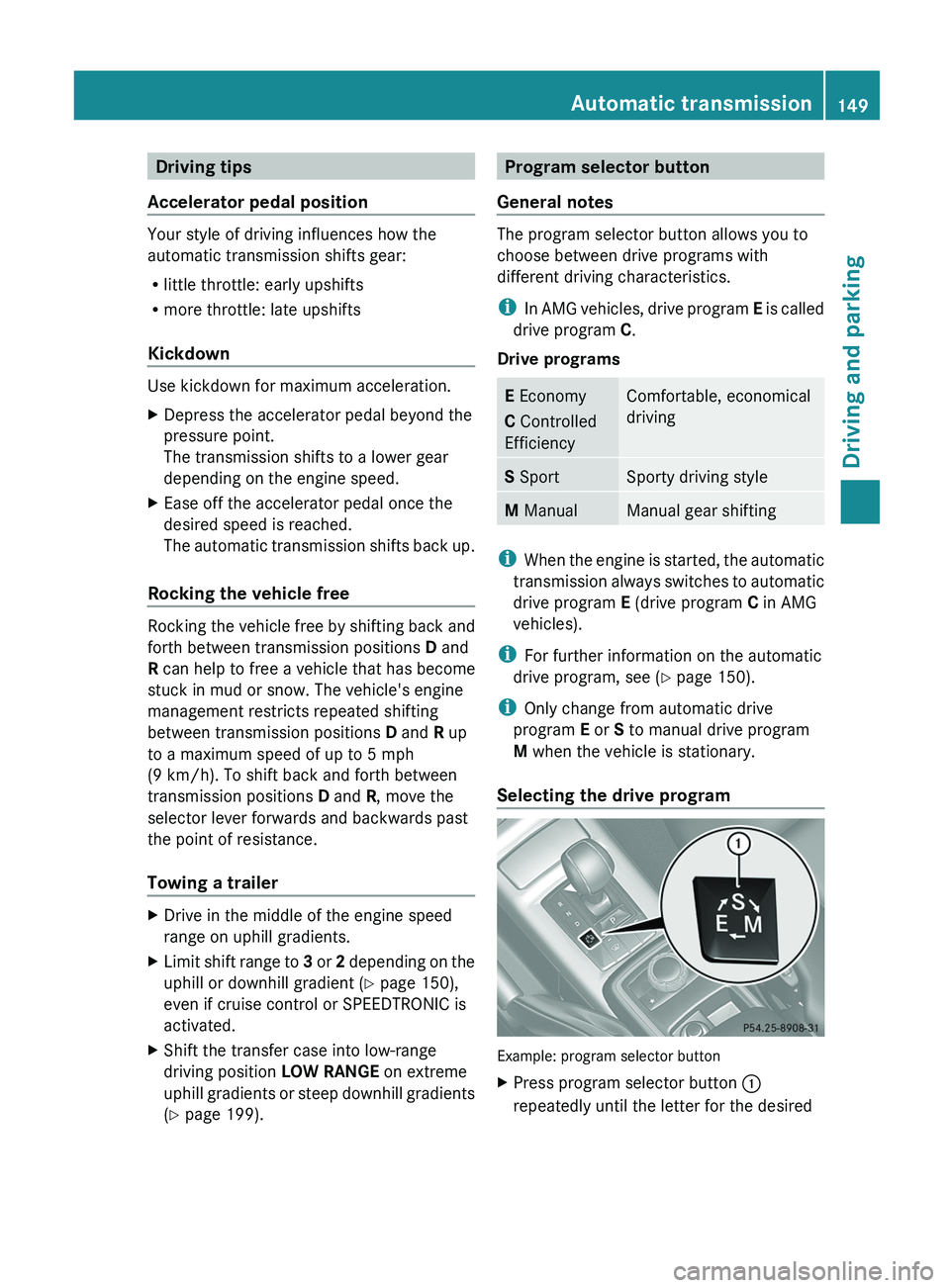
Selecting the drive program Example: program selector button
X
Press program selector button 0043
repeatedly until the letter for the desired Automatic transmission
149
Driving and parking Z
Page 177 of 364
done safely. Drive carefully and maintain a
suitable distance to the vehicle in front.
General notes
SPEEDTRONIC brakes automatically so that
you do not
exceed
the set speed. On long and
steep downhill gradients, especially if the
vehicle is laden or towing a trailer, you must
select shift range 1, 2 or 3 in good time. By
doing so, you will make use of the braking
effect of the engine, which relieves the load
on the brake system and prevents the brakes
from overheating and wearing too quickly. If
you need additional braking, depress the
brake pedal repeatedly rather than
continuously.
i The speed indicated in the speedometer
may differ slightly from the limit speed
stored.
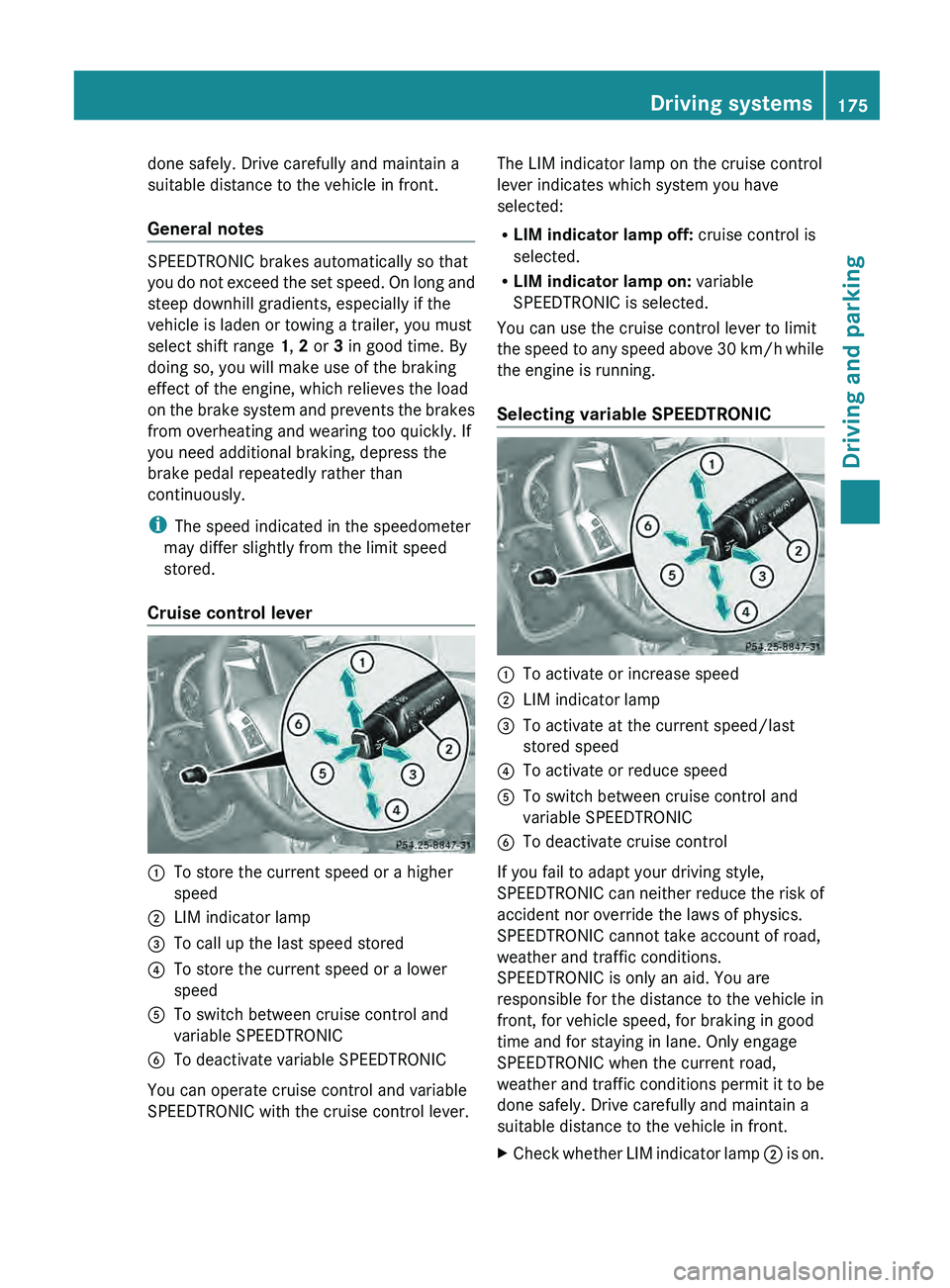
Cruise control lever 0043
To store the current speed or a higher
speed
0044 LIM indicator lamp
0087 To call up the last speed stored
0085 To store the current speed or a lower
speed
0083 To switch between cruise control and
variable SPEEDTRONIC
0084 To deactivate variable SPEEDTRONIC
You can operate cruise control and variable
SPEEDTRONIC with the cruise control lever. The LIM indicator lamp on the cruise control
lever indicates which system you have
selected:
R
LIM indicator lamp off: cruise control is
selected.
R LIM indicator lamp on: variable
SPEEDTRONIC is selected.
You can use the cruise control lever to limit
the speed to
any
speed above 30 km/h while
the engine is running.
Selecting variable SPEEDTRONIC 0043
To activate or increase speed
0044 LIM indicator lamp
0087 To activate at the current speed/last
stored speed
0085 To activate or reduce speed
0083 To switch between cruise control and
variable SPEEDTRONIC
0084 To deactivate cruise control
If you fail to adapt your driving style,
SPEEDTRONIC can neither
reduce
the risk of
accident nor override the laws of physics.
SPEEDTRONIC cannot take account of road,
weather and traffic conditions.
SPEEDTRONIC is only an aid. You are
responsible for the distance to the vehicle in
front, for vehicle speed, for braking in good
time and for staying in lane. Only engage
SPEEDTRONIC when the current road,
weather and traffic conditions permit it to be
done safely. Drive carefully and maintain a
suitable distance to the vehicle in front.
X Check whether LIM indicator lamp 0044 is on. Driving systems
175
Driving and parking Z
Page 180 of 364
road, weather and traffic conditions.
DISTRONIC PLUS is only an aid. You are
responsible for the distance to the vehicle in
front, for vehicle speed, for braking in good
time and for staying in lane. Only engage
DISTRONIC PLUS when the current road,
weather and traffic
conditions
permit it to be
done safely, and adapt your driving style
accordingly. Drive carefully and maintain a
suitable distance to the vehicle in front.
If DISTRONIC PLUS detects a risk of collision
but cannot sufficiently decelerate the vehicle
in order to maintain the set distance, you will
be warned visually and acoustically.
DISTRONIC PLUS cannot prevent a collision
without your intervention. An intermittent
warning tone will then sound and the distance
warning lamp will light up in the instrument
cluster. Brake immediately in order to
increase the distance from the vehicle in
front, or take evasive action, provided it is
safe to do so.
DISTRONIC PLUS may not detect narrow
vehicles driving in front, e.g. motorcycles, or
vehicles driving on a different line. Therefore,
always pay attention to traffic conditions
even when DISTRONIC PLUS is activated.
Otherwise, you may fail to recognize dangers
in time, cause an accident and injure yourself
and others.
In particular, the detection of obstacles can
be impaired if there is:
R the sensor is dirty or covered
R snow or heavy rain
R interference by other radar sources
R there is the possibility of strong radar
reflections, for example, in parking
garages.
If DISTRONIC PLUS is activated, the vehicle
brakes automatically in certain situations.
This can happen unexpectedly, especially
when towing or in a car wash. There is a risk
of an accident. In these or similar situations,
deactivate DISTRONIC PLUS.
If you want DISTRONIC PLUS to assist you,
the following activation conditions must be fulfilled (
Y page 179) and the radar sensor
system must be operational.
General notes DISTRONIC PLUS regulates the speed and
automatically helps you maintain the
distance to the vehicle detected in front.
DISTRONIC PLUS brakes automatically so
that the set speed is not exceeded.
On long and steep downhill gradients,
especially if the vehicle is laden or towing a
trailer, you must select shift range
1, 2 or 3
in good time. By doing so, you will make use
of the braking effect of the engine, which
relieves the load on the brake system and
prevents the brakes from overheating and
wearing too quickly.
If DISTRONIC PLUS detects a slower-moving
vehicle in front, your
vehicle is braked in order
to maintain the preset distance to the vehicle
in front.
If there is no vehicle in front, DISTRONIC
PLUS operates in the same way as cruise
control in the speed range between 20 mph
(Canada: 30 km/h) and120 mph (Canada:
200 km/h). If a vehicle is driving in front of
you, it operates in the speed range between
0 mph (0 km/h) and 120 mph (Canada:
200 km/h).
Do not use DISTRONIC PLUS while driving on
roads with steep gradients.
As DISTRONIC PLUS transmits radar waves,
it can resemble the radar detectors of the
responsible authorities. You can refer to the
relevant chapter in the Operator's Manual if
questions are asked about this.
i USA only:
This device has been approved by the FCC
as a “Vehicular Radar System”. The radar
sensor is intended for use in an automotive
radar system only. Removal, tampering, or
altering of the device will void any
warranties, and is not permitted by the
FCC. Do not tamper with, alter, or use in
any non-approved way. 178
Driving systems
Driving and parking
Page 194 of 364
There will be either no or only a weak course-
correcting brake application if:
R
there are vehicles or obstacles, e.g. crash
barriers, located on both sides of your
vehicle.
R a vehicle approaches you
too closely at the
side.
R you have adopted a sporty driving style with
high cornering speeds.
R you clearly brake or accelerate.
R a driving safety system intervenes, e.g.
ESP ®
.
R ESP ®
is switched off.
R the LOW RANGE off-road gear is activated.
R a loss of tire pressure has been detected.
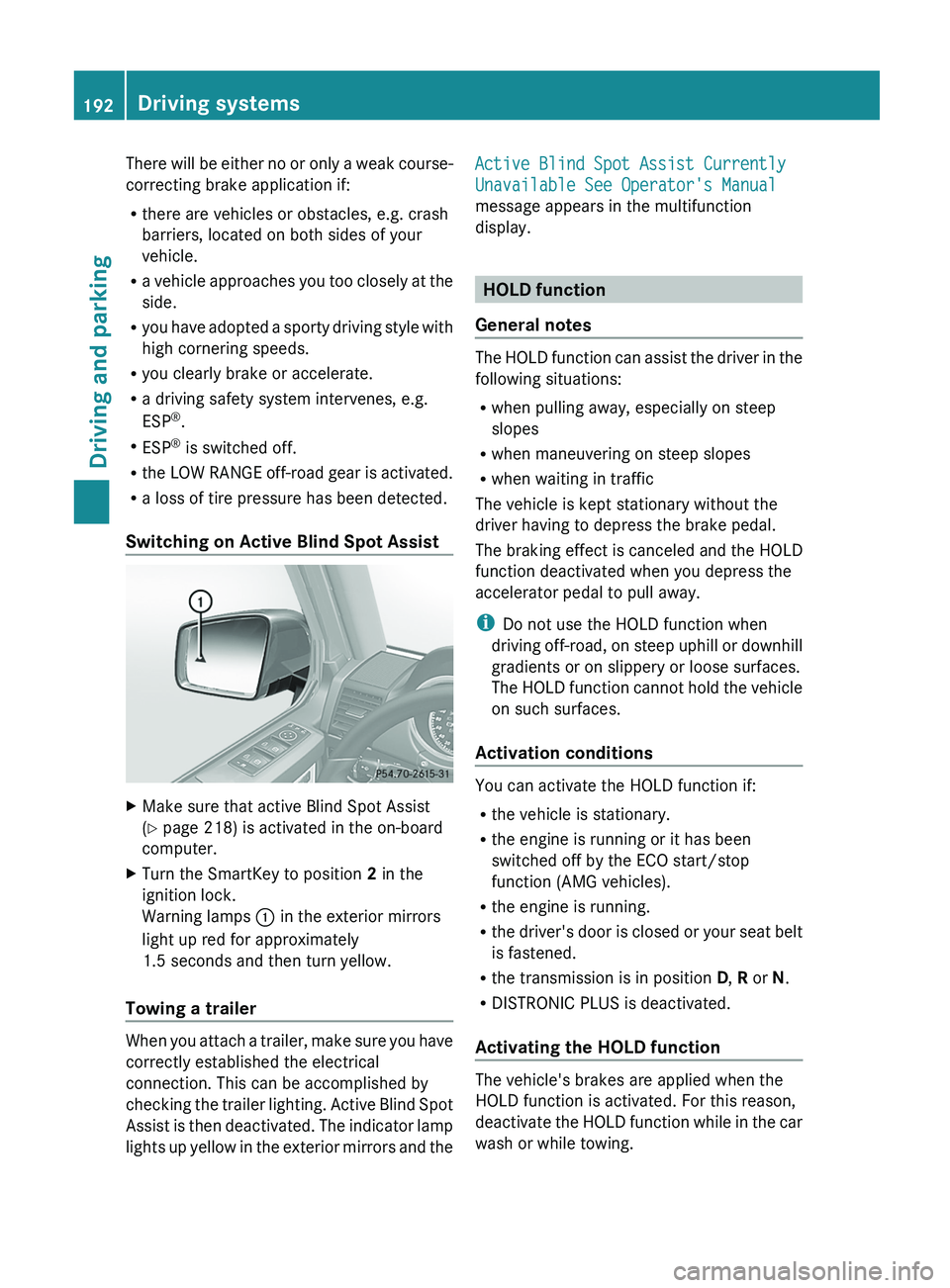
Switching on Active Blind Spot Assist X
Make sure that active Blind Spot Assist
(Y page 218) is activated in the on-board
computer.
X Turn the SmartKey to position 2 in the
ignition lock.
Warning lamps 0043 in the exterior mirrors
light up red for approximately
1.5 seconds and then turn yellow.
Towing a trailer When you attach a trailer, make sure you have
correctly established the electrical
connection. This can be accomplished by
checking the trailer lighting.
Active Blind Spot
Assist is then deactivated. The indicator lamp
lights up yellow in the exterior mirrors and the Active Blind Spot Assist Currently
Unavailable See Operator's Manual
message appears in the multifunction
display.
HOLD function
General notes The HOLD function can assist the driver in the
following situations:
R
when pulling away, especially on steep
slopes
R when maneuvering on steep slopes
R when waiting in traffic
The vehicle is kept stationary without the
driver having to depress the brake pedal.
The braking effect is
canceled and the HOLD
function deactivated when you depress the
accelerator pedal to pull away.
i Do not use the HOLD function when
driving off-road, on steep uphill or downhill
gradients or on slippery or loose surfaces.
The HOLD function cannot hold the vehicle
on such surfaces.
Activation conditions You can activate the HOLD function if:
R
the vehicle is stationary.
R the engine is running or it has been
switched off by the ECO start/stop
function (AMG vehicles).
R the engine is running.
R the driver's
door is
closed or your seat belt
is fastened.
R the transmission is in position D, R or N.
R DISTRONIC PLUS is deactivated.
Activating the HOLD function The vehicle's brakes are applied when the
HOLD function is activated. For this reason,
deactivate the HOLD
function
while in the car
wash or while towing. 192
Driving systems
Driving and parking
Page 196 of 364
i
In wintry driving conditions,
the maximum
effect of 4MATIC can only be achieved if
you use winter tires (M+S tires), with snow
chains if necessary.
For information about driving off-road, see
(Y page 164). PARKTRONIC
Important safety notes !
When parking, pay particular
attention to
objects above or below the sensors, such
as flower pots or trailer drawbars.
PARKTRONIC does not detect such objects
when they are in the immediate vicinity of
the vehicle. You could damage the vehicle
or the objects.
The sensors may not detect snow and other
objects that absorb ultrasonic waves.
Ultrasonic sources such as an automatic
car wash, the compressed-air brakes on a
truck or a pneumatic drill could cause
PARKTRONIC to malfunction.
PARKTRONIC may not function correctly on
uneven terrain.
PARKTRONIC is an electronic parking aid with
ultrasonic sensors. It indicates visually and
audibly the distance between your vehicle
and an object.
PARKTRONIC is only an aid. It is not a
replacement for your attention to your
immediate surroundings. You are always
responsible for safe maneuvering, parking
and exiting a parking space. Check in front,
behind and to the sides of the vehicle before
maneuvering, parking or exiting a parking
space. There must not be any persons,
animals or objects in the area in which you
are maneuvering.
PARKTRONIC cannot identify any persons or
objects outside of the detection range. As a
result, PARKTRONIC cannot warn you about
objects in this area. PARKTRONIC is activated automatically when
you:
R
switch on the ignition
R shift the transmission
to
position D, R or N
R release the parking brake
PARKTRONIC is deactivated at speeds above
11 mph (18 km/h). It is reactivated at lower
speeds.
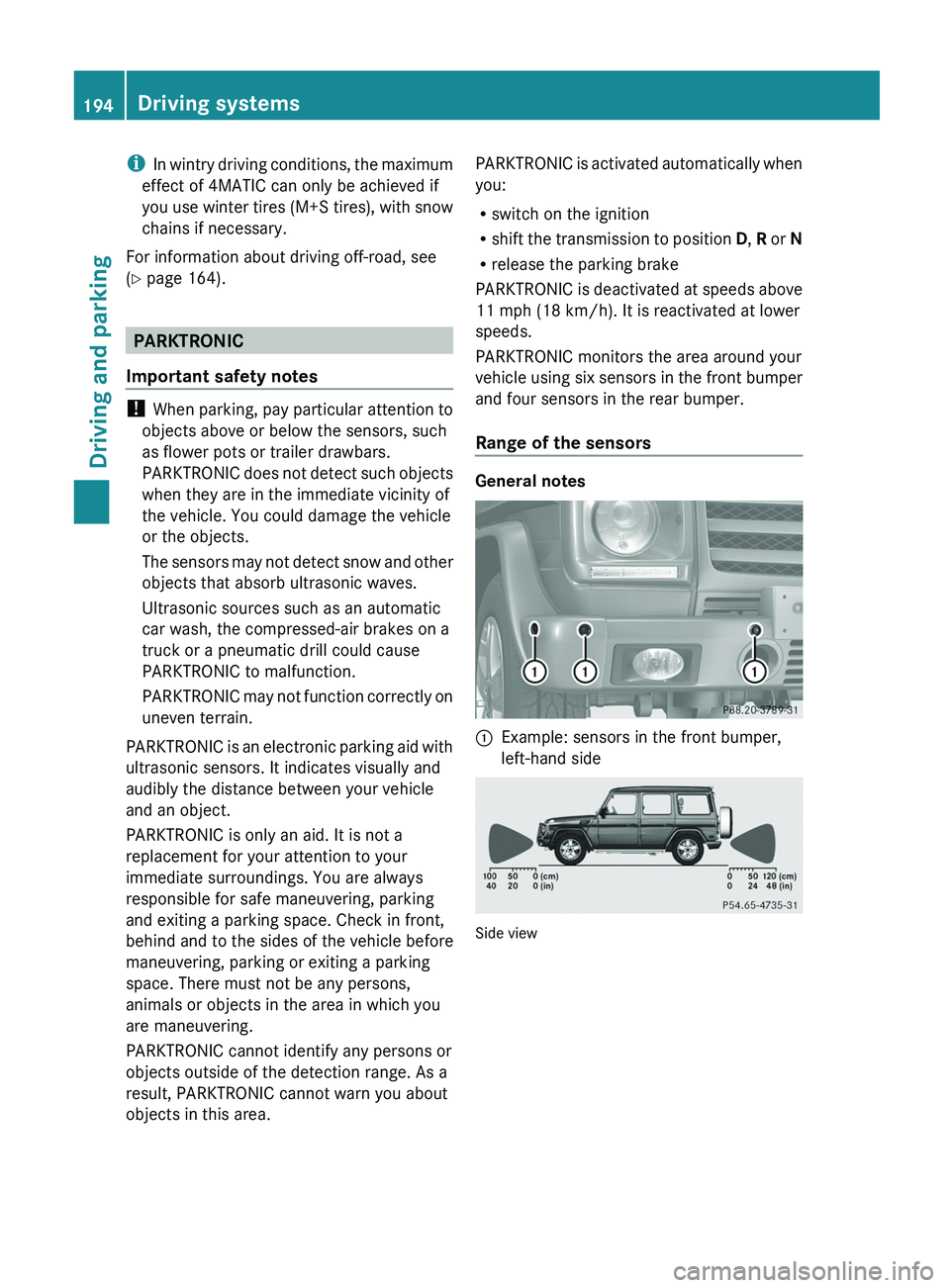
PARKTRONIC monitors the area around your
vehicle using six sensors in the front bumper
and four sensors in the rear bumper.
Range of the sensors General notes
0043
Example: sensors in the front bumper,
left-hand side Side view194
Driving systems
Driving and parking
Page 198 of 364
One or more segments light up as the vehicle
approaches an obstacle, depending on the
vehicle's distance from the obstacle.
From the:
R
sixth segment onwards, you will hear an
intermittent warning tone for
approximately two seconds.
R seventh segment onwards, you will hear a
warning tone for approximately two
seconds. This indicates that you have now
reached the minimum distance.
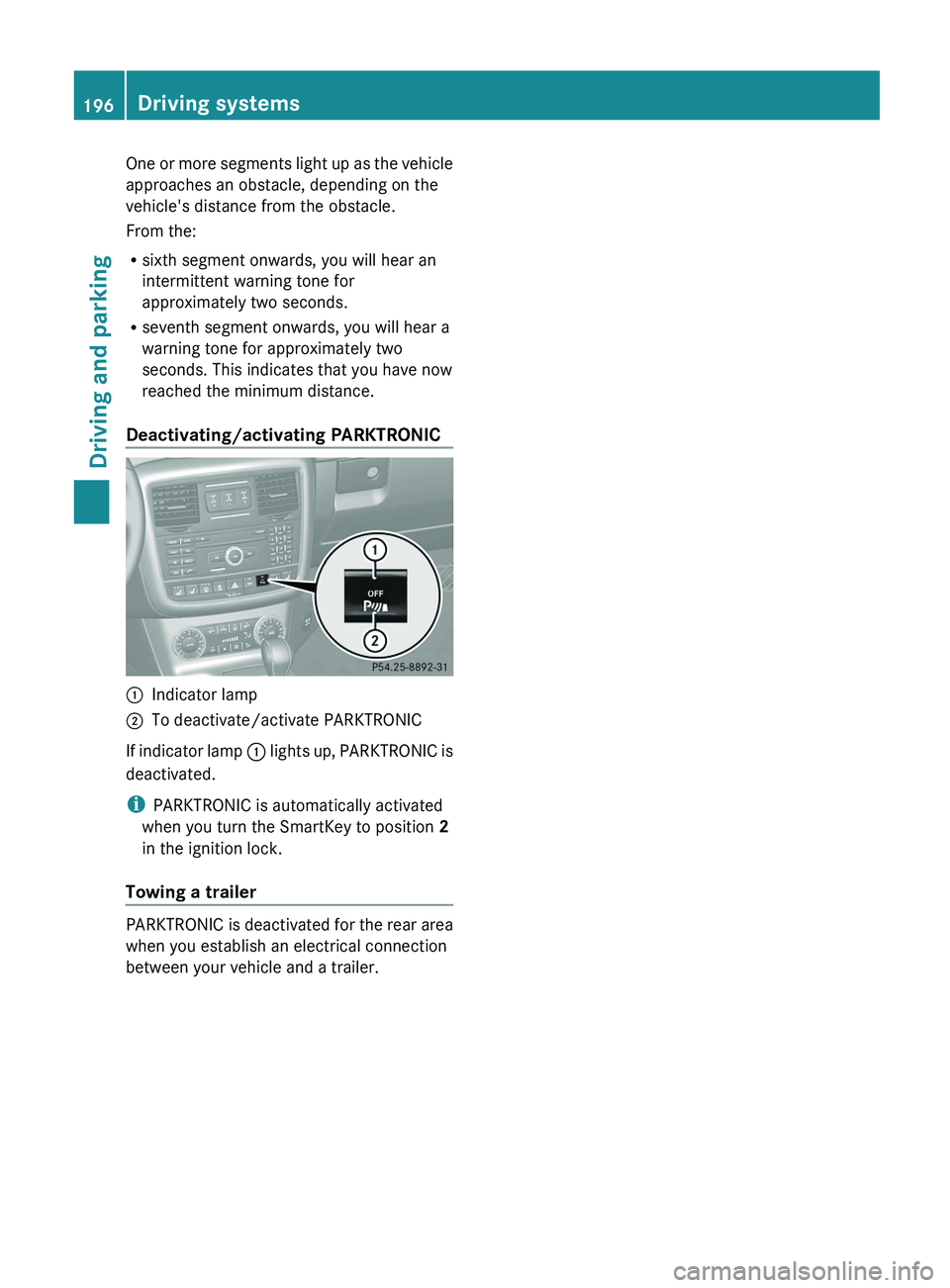
Deactivating/activating PARKTRONIC 0043
Indicator lamp
0044 To deactivate/activate PARKTRONIC
If indicator lamp 0043 lights up,
PARKTRONIC is
deactivated.
i PARKTRONIC is automatically activated
when you turn the SmartKey to position 2
in the ignition lock.
Towing a trailer PARKTRONIC is deactivated for the rear area
when you establish an electrical connection
between your vehicle and a trailer.196
Driving systems
Driving and parking
Page 200 of 364
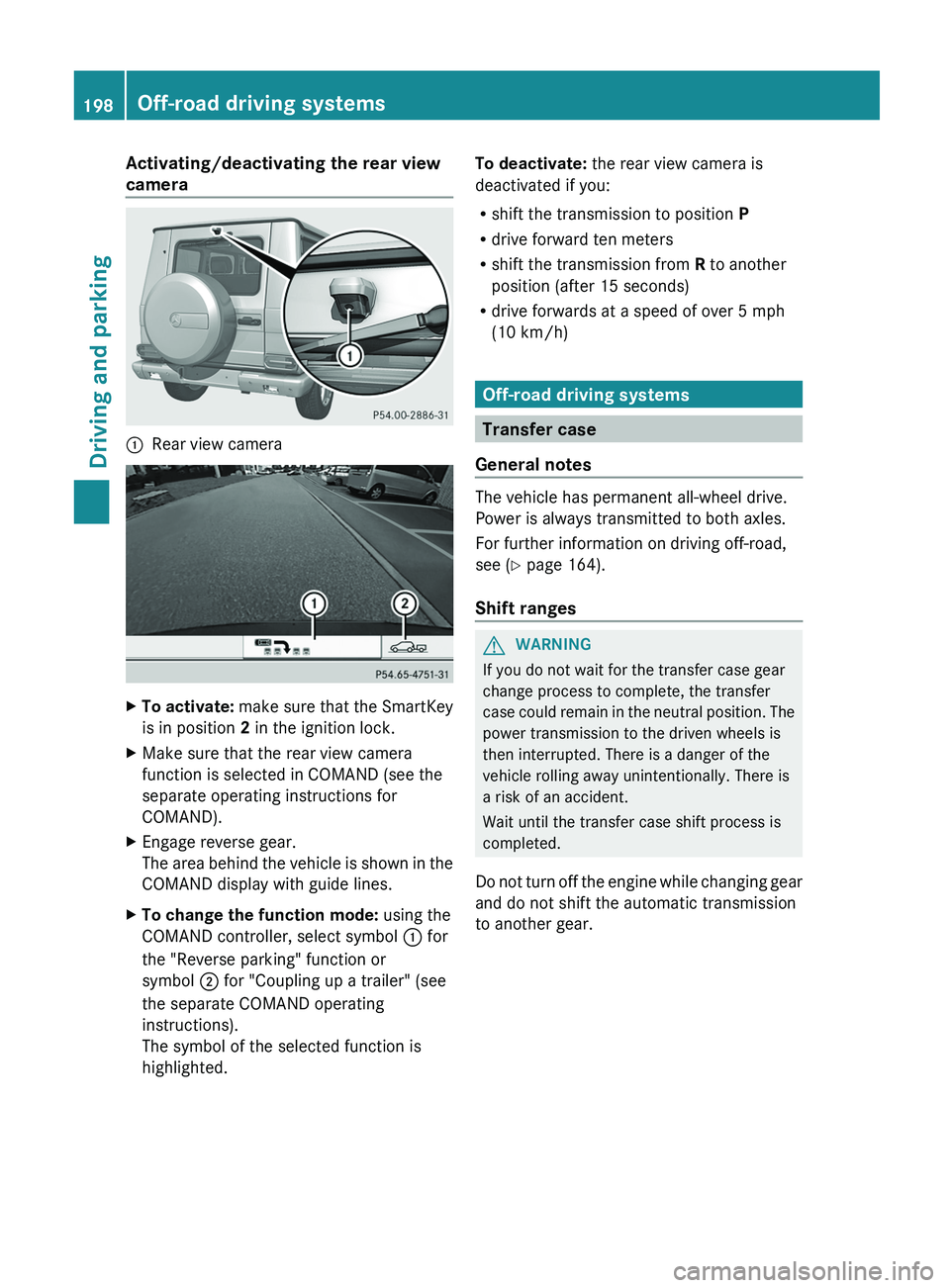
Activating/deactivating the rear view
camera
0043
Rear view camera X
To activate: make sure that the SmartKey
is in position 2 in the ignition lock.
X Make sure that the rear view camera
function is selected in COMAND (see the
separate operating instructions for
COMAND).
X Engage reverse gear.
The area behind the
vehicle is shown in the
COMAND display with guide lines.
X To change the function mode: using the
COMAND controller, select symbol 0043 for
the "Reverse parking" function or
symbol 0044 for "Coupling up a trailer" (see
the separate COMAND operating
instructions).
The symbol of the selected function is
highlighted. To deactivate:
the rear view camera is
deactivated if you:
R shift the transmission to position P
R drive forward ten meters
R shift the transmission from R to another
position (after 15 seconds)
R drive forwards at a speed of over 5 mph
(10 km/h) Off-road driving systems
Transfer case
General notes The vehicle has permanent all-wheel drive.
Power is always transmitted to both axles.
For further information on driving off-road,
see (
Y page 164).
Shift ranges G
WARNING
If you do not wait for the transfer case gear
change process to complete, the transfer
case could remain
in
the neutral position. The
power transmission to the driven wheels is
then interrupted. There is a danger of the
vehicle rolling away unintentionally. There is
a risk of an accident.
Wait until the transfer case shift process is
completed.
Do not turn off the engine while changing gear
and do not shift the automatic transmission
to another gear. 198
Off-road driving systems
Driving and parking
Page 201 of 364
HIGH
RANGE
Position for all normal on-
road driving conditions.
LOW
RANGE
Low-range position for
driving off-road.
Also for use on steep uphill
or downhill gradients,
especially when towing a
trailer.
The vehicle travels around
half the speed of on-road
driving range
HIGH RANGE .
The tractive power is
correspondingly higher. Shifting the transfer case
Important safety notes
G
WARNING
When the transfer case is in the neutral
position, power transmission to the driven
wheels is interrupted. As
a result, the vehicle
could roll away. There is a risk of an accident.
Secure the vehicle with the parking brake, and
on uphill or downhill gradients, also secure it
with a device such as a wheel chock. G
WARNING
When the transfer case is in the neutral
position, power transmission to the driven
wheels is interrupted. As
a result, the vehicle
could roll away. There is a risk of an accident.
Secure the vehicle with the parking brake, and
on uphill or downhill gradients, also secure it
with a device such as a wheel chock.
Always wait for the gear change process from
HIGH RANGE to LOW RANGE and from
LOW RANGE to HIGH RANGE to complete.
Do not turn off the engine while changing gear
and do not shift the automatic transmission
to another gear. General notes
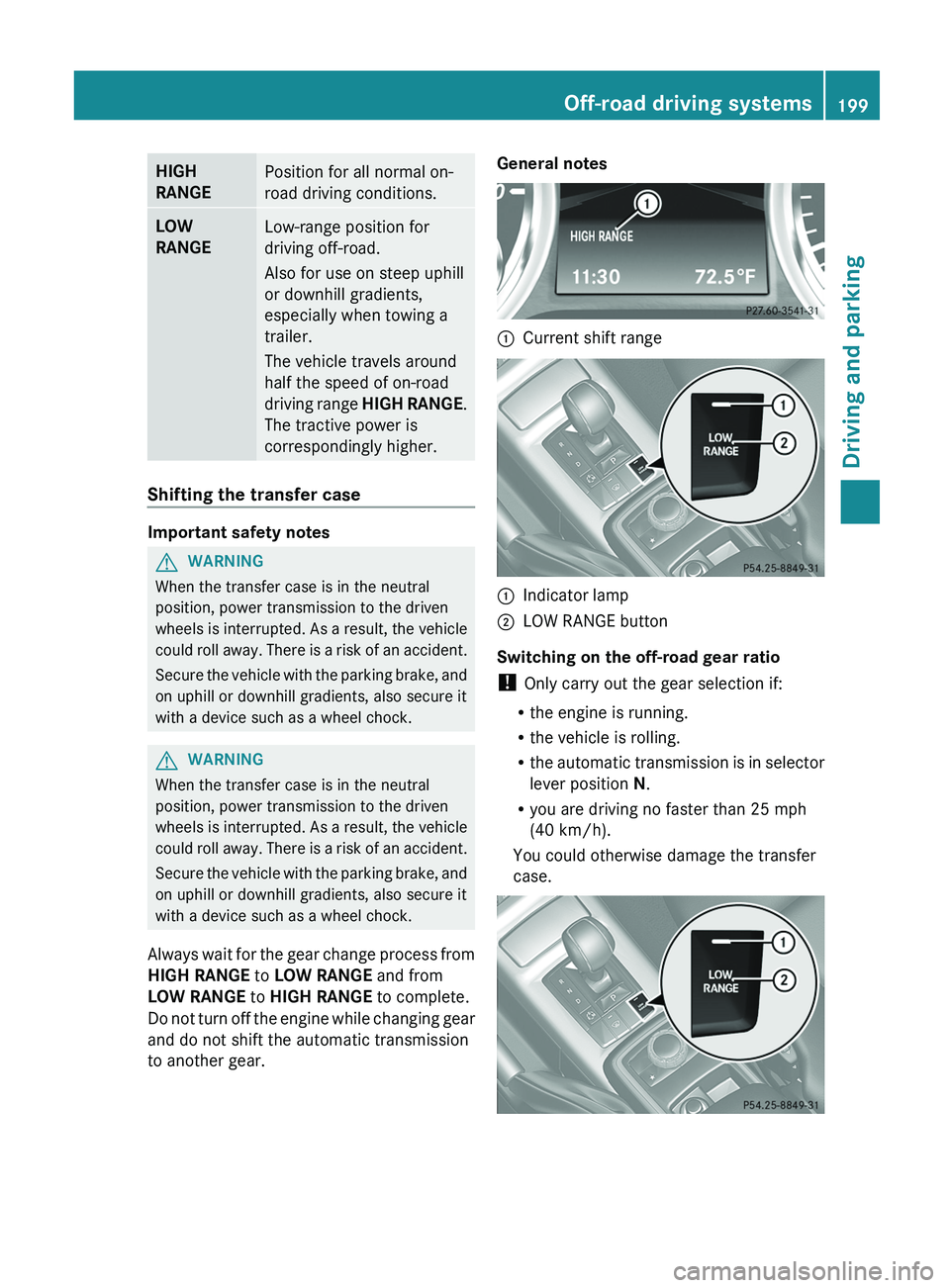
0043
Current shift range 0043
Indicator lamp
0044 LOW RANGE button
Switching on the off-road gear ratio
! Only carry out the gear selection if:
R the engine is running.
R the vehicle is rolling.
R the automatic transmission
is
in selector
lever position N.
R you are driving no faster than 25 mph
(40 km/h).
You could otherwise damage the transfer
case. Off-road driving systems
199
Driving and parking Z