service MERCEDES-BENZ G-CLASS SUV 2013 Owner's Manual
[x] Cancel search | Manufacturer: MERCEDES-BENZ, Model Year: 2013, Model line: G-CLASS SUV, Model: MERCEDES-BENZ G-CLASS SUV 2013Pages: 364, PDF Size: 9.62 MB
Page 166 of 364
Indicated temperatures just above the
freezing point do
not
guarantee that the road
surface is free of ice. The road may still be icy,
especially in wooded areas or on bridges. G
WARNING
If you activate the LOW off-road gear while
driving on a slippery
road surface, the wheels
may lose traction:
R if you remove your foot from the
accelerator pedal when driving
R if off road ABS intervenes when braking
If the wheels lose traction. the vehicle can no
longer be steered. There is an increased
danger of skidding and accidents.
Never activate the LOW off-road gear while
driving on a slippery road surface.
Drive particularly carefully on slippery road
surfaces. Avoid sudden acceleration, steering
and braking maneuvers. Do not use cruise
control.
If the vehicle threatens to skid or cannot be
stopped when moving at low speed:
X Shift the transmission to position N.
X Try to bring the vehicle under control using
corrective steering.
i For more information on driving with
snow chains, see ( Y page 321).Off-road driving
Important safety notes G
WARNING
Do not load items on the basic carrier bars. It
may cause instability
during
some maneuvers
which could result in an accident.
Drive slowly in unknown terrain. This will
make it easier to recognize unexpected
obstacles and avoid damage to the vehicle.
To help avoid the vehicle rolling over, never
turn it around on steep inclines. If the vehicle cannot complete the attempted climb, back it
down in reverse gear.
Do not drive along the side of a slope. The
vehicle might otherwise
rollover.
If in doing so
the vehicle begins to show a tendency to roll,
immediately steer into a line of gravity
(straight up or downhill).
Never let the vehicle roll backwards in idle.
You may lose control of the vehicle if you use
only the service brake. For information on
driving downhill, see "Driving downhill".
When driving off-road, sand, mud and water,
possibly mixed with oil, for example, could get
into the brakes. This could result in a reduced
braking effect or in total brake failure and also
in increased wear and tear. The braking
characteristics change depending on the
material ingressing the brakes. Clean the
brakes after driving off-road. If you detect a
reduced braking effect or grinding noises,
have the brake system checked in a qualified
specialist workshop as soon as possible.
Adapt your driving style to the different
braking characteristics.
Driving off-road increases the likelihood of
damage to the vehicle, which, in turn, can lead
to failure of the mechanical assembly or
systems. Adapt your driving style to suit the
terrain conditions. Drive carefully. Have
damage to the vehicle rectified immediately
at a qualified specialist workshop.
General notes H
Environmental note
Protection of the environment is of primary
importance. Treat nature with respect.
Observe all prohibiting signs.
Read this section carefully
before driving your
vehicle off-road. Practice by driving over more
gentle off-road terrain first.
Familiarize yourself with the characteristics
of your vehicle and the gear shift operation
before driving through difficult terrain. 164
Driving tips
Driving and parking
Page 210 of 364
Useful information
i This Operator's Manual describes all
models and all standard and optional
equipment of your vehicle available at the
time of publication of the Operator's
Manual. Country-specific differences are
possible. Please note that
your vehicle may
not be equipped with all features
described. This also applies to safety-
related systems and functions.
i Read the information on qualified
specialist workshops: ( Y page 23).Important safety notes
G
WARNING
The driver's concentration must always be
directed primarily at road traffic.
For your safety and the safety of others,
selecting features through the multifunction
steering wheel should only be done by the
driver when traffic and
road conditions permit
it to be done safely.
Bear in mind that at a speed of only 30 mph
(approximately 50 km/h), the vehicle covers
a distance of 44 feet (approximately 14 m) per
second. G
WARNING
No messages will be displayed if either the
instrument cluster or the multifunction
display is inoperative.
As a result, you will not be able to see
information about your driving conditions,
such as
R speed
R outside temperature
R warning/indicator lamps
R malfunction/warning messages
R failure of any systems
Driving characteristics may be impaired. If you must continue to drive, do so with added
caution. Contact an authorized Mercedes-
Benz Center as soon as possible.
G
WARNING
Malfunction and warning messages are only
displayed for certain systems and are
intentionally not very detailed. The
malfunction and warning messages are
simply a reminder with respect to the
operation of certain systems. They do not
replace the owner's and/or driver's
responsibility to maintain the vehicle's
operating safety. Have all required
maintenance services and safety checks
performed on the vehicle.
Bring the vehicle to
an authorized Mercedes-Benz Center to
address the malfunction and warning
messages. G
WARNING
All categories of messages contain important
information which should be taken note of
and, where a malfunction is indicated,
addressed as soon as possible at an
authorized Mercedes-Benz Center.
Failure to repair the condition noted may
cause damage not covered
by the Mercedes-
Benz Limited Warranty, or result in property
damage or personal injury.
For an illustration of the instrument cluster,
see ( Y page 209).208
Important safety notes
On-board computer and displays
Page 219 of 364
X
Switch on the mobile phone (see the
separate operating instructions).
X Switch on COMAND (see the separate
operating instructions).
X Establish a Bluetooth ®
connection to
COMAND; see the separate operating
instructions.
X Press the 0059 or 0065 button on the
steering wheel to select the Tel menu.
You will see one of the following display
messages in the multifunction display:
R Phone READY or the name of the network
provider: the mobile phone has found a
network and is ready to receive.
R Phone No Service: there is no network
available or the mobile phone is searching
for a network.
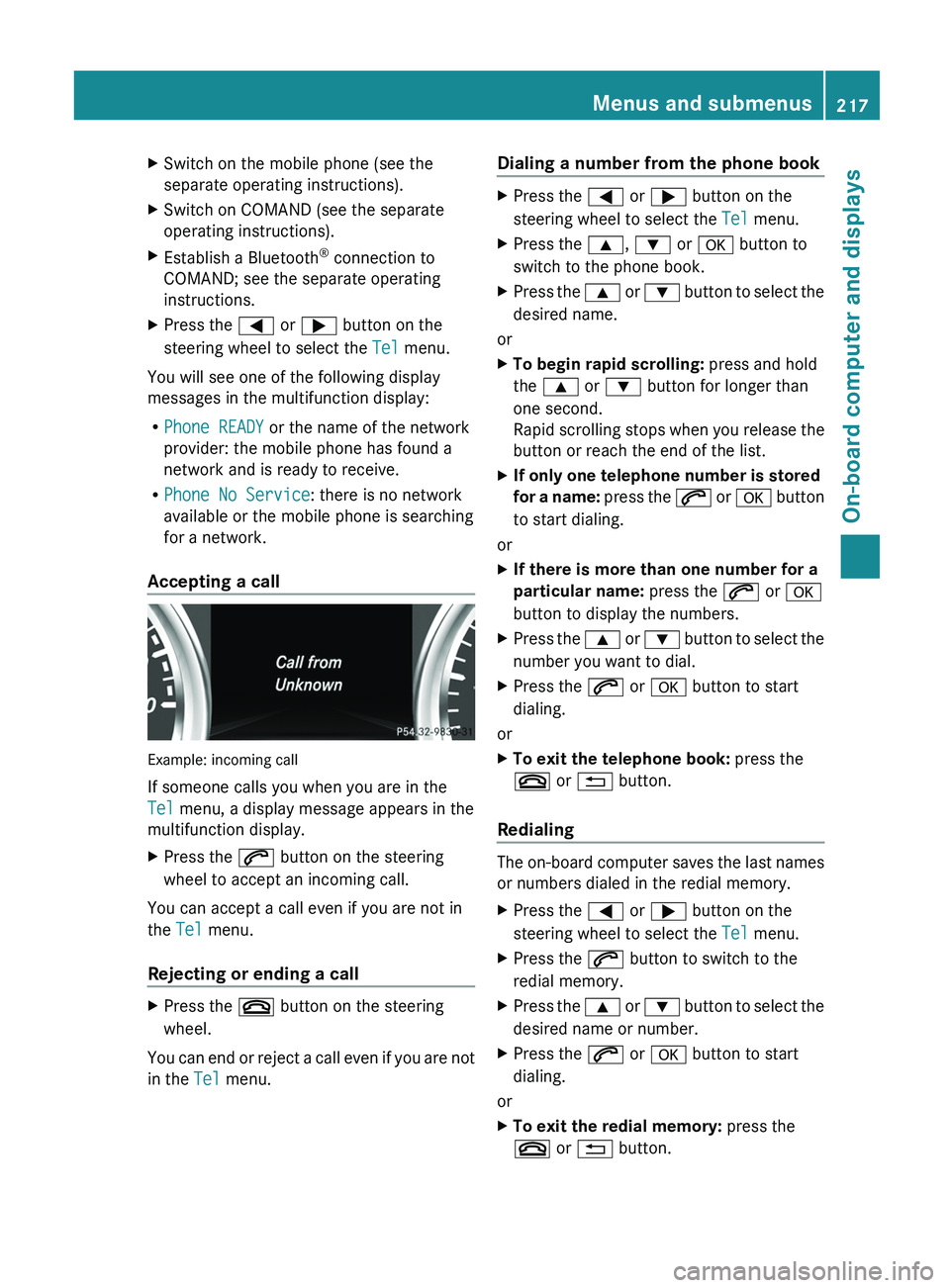
Accepting a call Example: incoming call
If someone calls you when you are in the
Tel menu, a display message appears in the
multifunction display.
X
Press the 006A button on the steering
wheel to accept an incoming call.
You can accept a call even if you are not in
the Tel menu.
Rejecting or ending a call X
Press the 007F button on the steering
wheel.
You can end or reject a call even if you are not
in the Tel menu. Dialing a number from the phone book X
Press the 0059 or 0065 button on the
steering wheel to select the Tel menu.
X Press the 0063, 0064 or 0076 button to
switch to the phone book.
X Press the 0063 or 0064 button to select the
desired name.
or
X To begin rapid scrolling: press and hold
the 0063 or 0064 button for longer than
one second.
Rapid scrolling stops when
you release the
button or reach the end of the list.
X If only one telephone number is stored
for a name:
press
the 006A or 0076 button
to start dialing.
or
X If there is more than one number for a
particular name: press the 006A or 0076
button to display the numbers.
X Press the 0063
or 0064 button
to select the
number you want to dial.
X Press the 006A or 0076 button to start
dialing.
or
X To exit the telephone book: press the
007F or 0041 button.
Redialing The on-board computer saves the last names
or numbers dialed in the redial memory.
X
Press the 0059 or 0065 button on the
steering wheel to select the Tel menu.
X Press the 006A button to switch to the
redial memory.
X Press the 0063
or 0064
button
to select the
desired name or number.
X Press the 006A or 0076 button to start
dialing.
or
X To exit the redial memory: press the
007F or 0041 button. Menus and submenus
217
On-board computer and displays Z
Page 220 of 364
Assistance menu
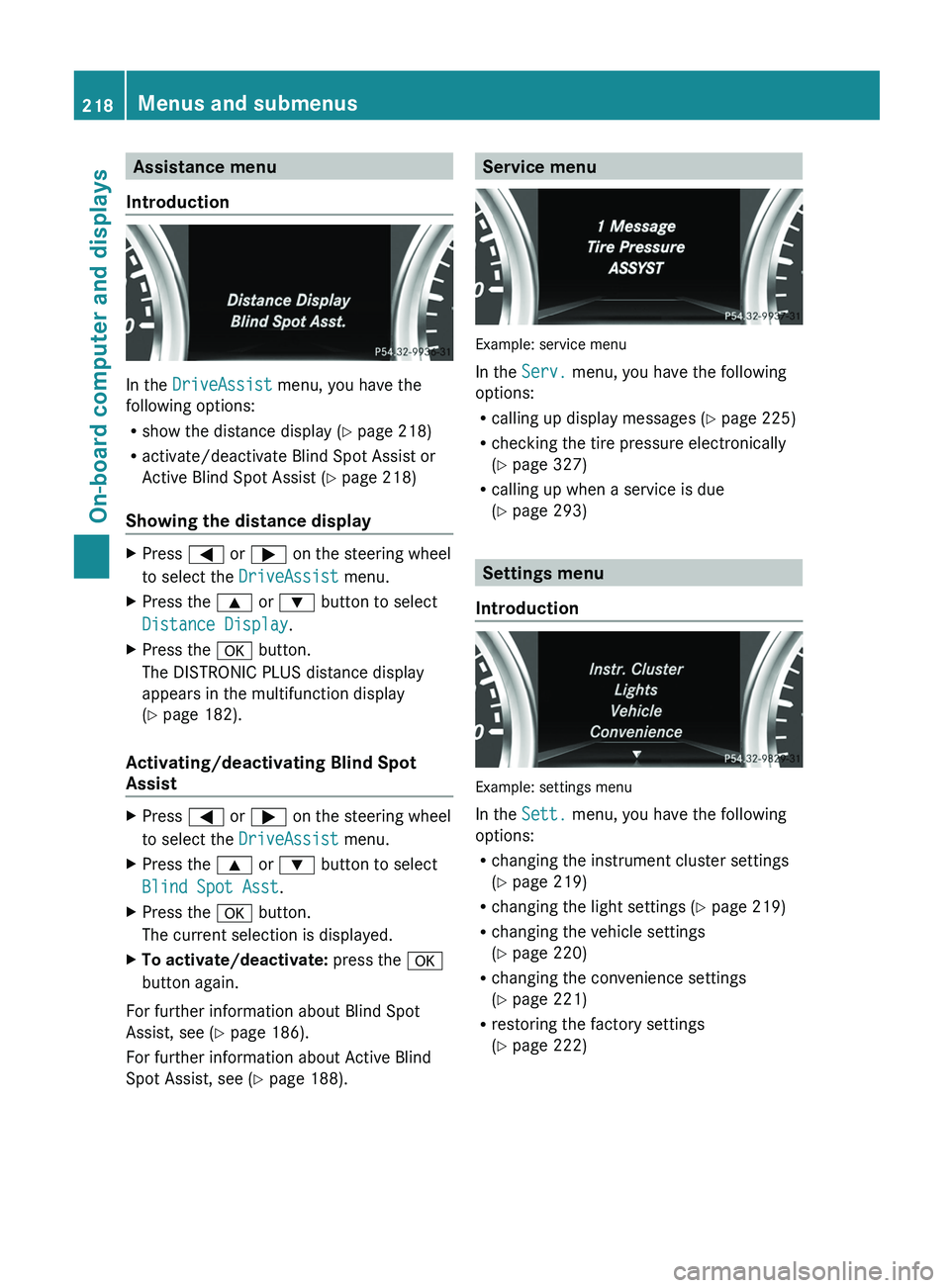
Introduction In the
DriveAssist menu, you have the
following options:
R show the distance display ( Y page 218)
R activate/deactivate Blind Spot Assist or
Active Blind Spot Assist (
Y page 218)
Showing the distance display X
Press 0059 or 0065 on the steering wheel
to select the DriveAssist menu.
X Press the 0063 or 0064 button to select
Distance Display.
X Press the 0076 button.
The DISTRONIC PLUS distance display
appears in the multifunction display
(Y page 182).
Activating/deactivating Blind Spot
Assist X
Press 0059 or 0065 on the steering wheel
to select the DriveAssist menu.
X Press the 0063 or 0064 button to select
Blind Spot Asst.
X Press the 0076 button.
The current selection is displayed.
X To activate/deactivate: press the 0076
button again.
For further information about Blind Spot
Assist, see (Y page 186).
For further information about Active Blind
Spot Assist, see (Y page 188). Service menu
Example: service menu
In the
Serv. menu, you have the following
options:
R calling up display messages ( Y page 225)
R checking the tire pressure electronically
(Y
page 327)
R calling up when a service is due
(Y page 293) Settings menu
Introduction Example: settings menu
In the
Sett. menu, you have the following
options:
R changing the instrument cluster settings
(Y page 219)
R changing the light settings (Y page 219)
R changing the vehicle settings
(
Y page 220)
R changing the convenience settings
(Y page 221)
R restoring the factory settings
(Y page 222)218
Menus and submenus
On-board computer and displays
Page 221 of 364
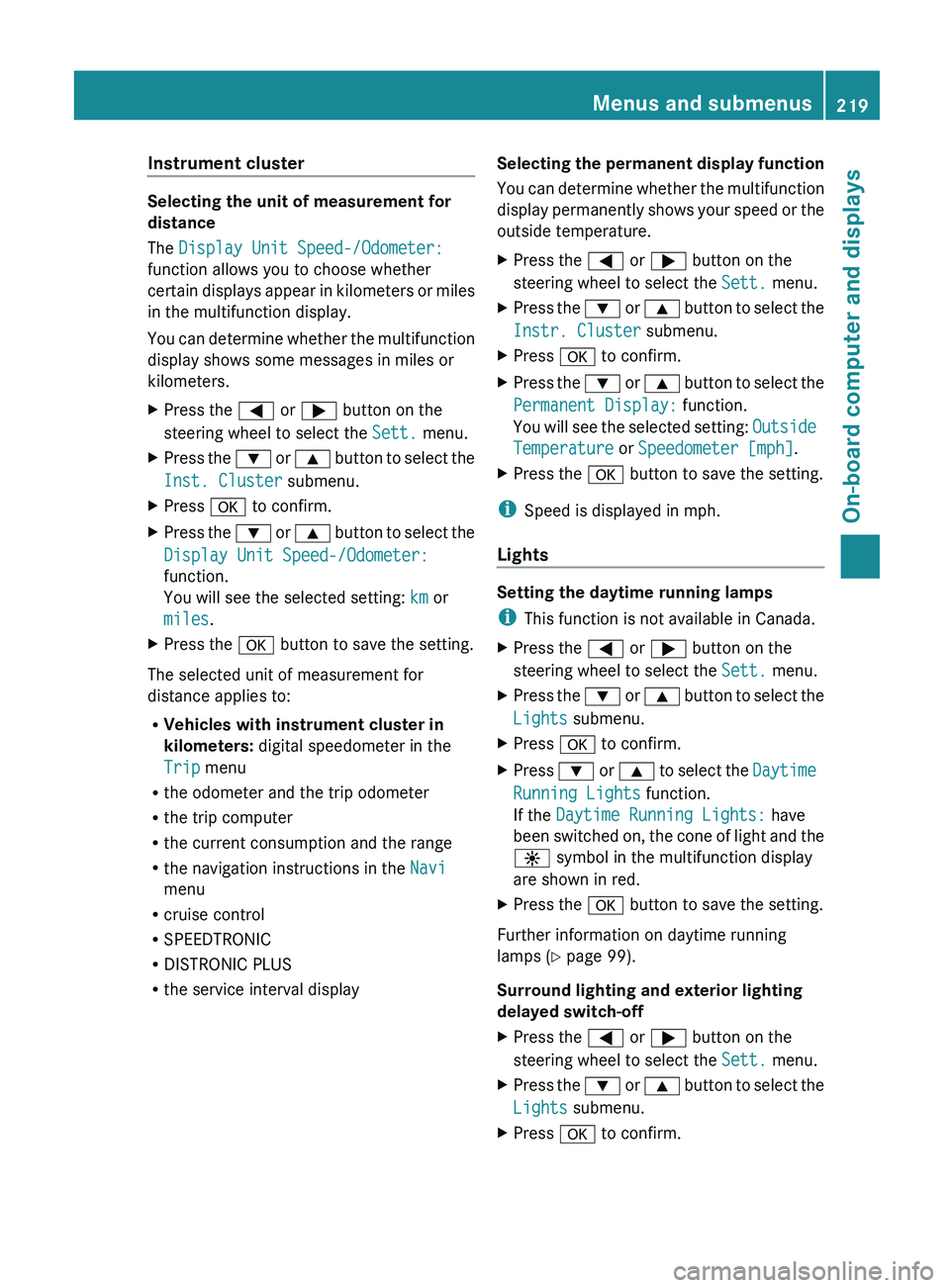
Instrument cluster
Selecting the unit of measurement for
distance
The Display Unit Speed-/Odometer:
function allows you to choose whether
certain displays appear
in
kilometers or miles
in the multifunction display.
You can determine whether the multifunction
display shows some messages in miles or
kilometers.
X Press the 0059 or 0065 button on the
steering wheel to select the Sett. menu.
X Press the 0064 or 0063 button
to select the
Inst. Cluster submenu.
X Press 0076 to confirm.
X Press the 0064
or 0063
button
to select the
Display Unit Speed-/Odometer:
function.
You will see the selected setting: km or
miles.
X Press the 0076 button to save the setting.
The selected unit of measurement for
distance applies to:
R Vehicles with instrument cluster in
kilometers: digital speedometer in the
Trip menu
R the odometer and the trip odometer
R the trip computer
R the current consumption and the range
R the navigation instructions in the Navi
menu
R cruise control
R SPEEDTRONIC
R DISTRONIC PLUS
R the service interval display Selecting the permanent display function
You can determine whether
the multifunction
display permanently shows your speed or the
outside temperature.
X Press the 0059 or 0065 button on the
steering wheel to select the Sett. menu.
X Press the 0064 or 0063 button
to select the
Instr. Cluster submenu.
X Press 0076 to confirm.
X Press the 0064 or 0063 button
to select the
Permanent Display: function.
You will see the selected setting: Outside
Temperature or Speedometer [mph].
X Press the 0076 button to save the setting.
i Speed is displayed in mph.
Lights Setting the daytime running lamps
i
This function is not available in Canada.
X Press the 0059 or 0065 button on the
steering wheel to select the Sett. menu.
X Press the 0064 or 0063 button
to select the
Lights submenu.
X Press 0076 to confirm.
X Press 0064 or 0063 to
select the Daytime
Running Lights function.
If the Daytime Running Lights: have
been switched on, the cone of light and the
0086 symbol in the multifunction display
are shown in red.
X Press the 0076 button to save the setting.
Further information on daytime running
lamps ( Y page 99).
Surround lighting and exterior lighting
delayed switch-off
X Press the 0059 or 0065 button on the
steering wheel to select the Sett. menu.
X Press the 0064 or 0063 button
to select the
Lights submenu.
X Press 0076 to confirm. Menus and submenus
219
On-board computer and displays Z
Page 231 of 364
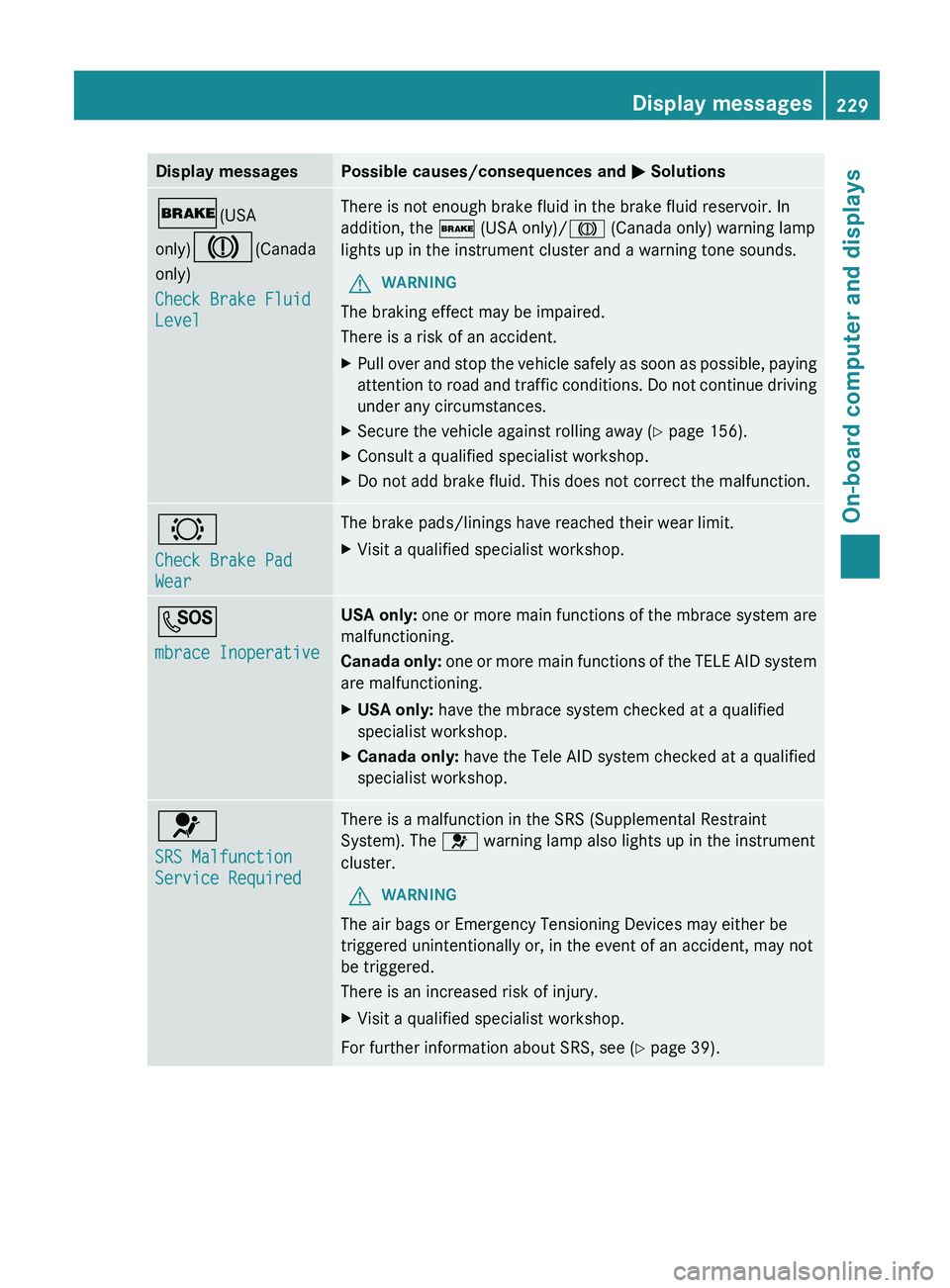
Display messages Possible causes/consequences and
0050 Solutions0027(USA
only)004D(Canada
only)
Check Brake Fluid
Level There is not enough brake fluid in the brake fluid reservoir. In
addition, the
0027 (USA only)/004D (Canada only) warning lamp
lights up in the instrument cluster and a warning tone sounds.
G WARNING
The braking effect may be impaired.
There is a risk of an accident.
X Pull over and stop the vehicle safely as soon as possible, paying
attention to road and
traffic conditions. Do not continue driving
under any circumstances.
X Secure the vehicle against rolling away ( Y page 156).
X Consult a qualified specialist workshop.
X Do not add brake fluid. This does not correct the malfunction. 0026
Check Brake Pad
Wear The brake pads/linings have reached their wear limit.
X
Visit a qualified specialist workshop. 0053
mbrace Inoperative USA only:
one or more main
functions of the mbrace system are
malfunctioning.
Canada only: one or more main functions of the TELE AID system
are malfunctioning.
X USA only: have the mbrace system checked at a qualified
specialist workshop.
X Canada only: have the Tele AID system checked at a qualified
specialist workshop. 0075
SRS Malfunction
Service Required There is a malfunction in the SRS (Supplemental Restraint
System). The 0075 warning lamp also lights up in the instrument
cluster.
G WARNING
The air bags or Emergency Tensioning Devices may either be
triggered unintentionally or, in the event of an accident, may not
be triggered.
There is an increased risk of injury.
X Visit a qualified specialist workshop.
For further information about SRS, see (Y page 39). Display messages
229
On-board computer and displays Z
Page 232 of 364
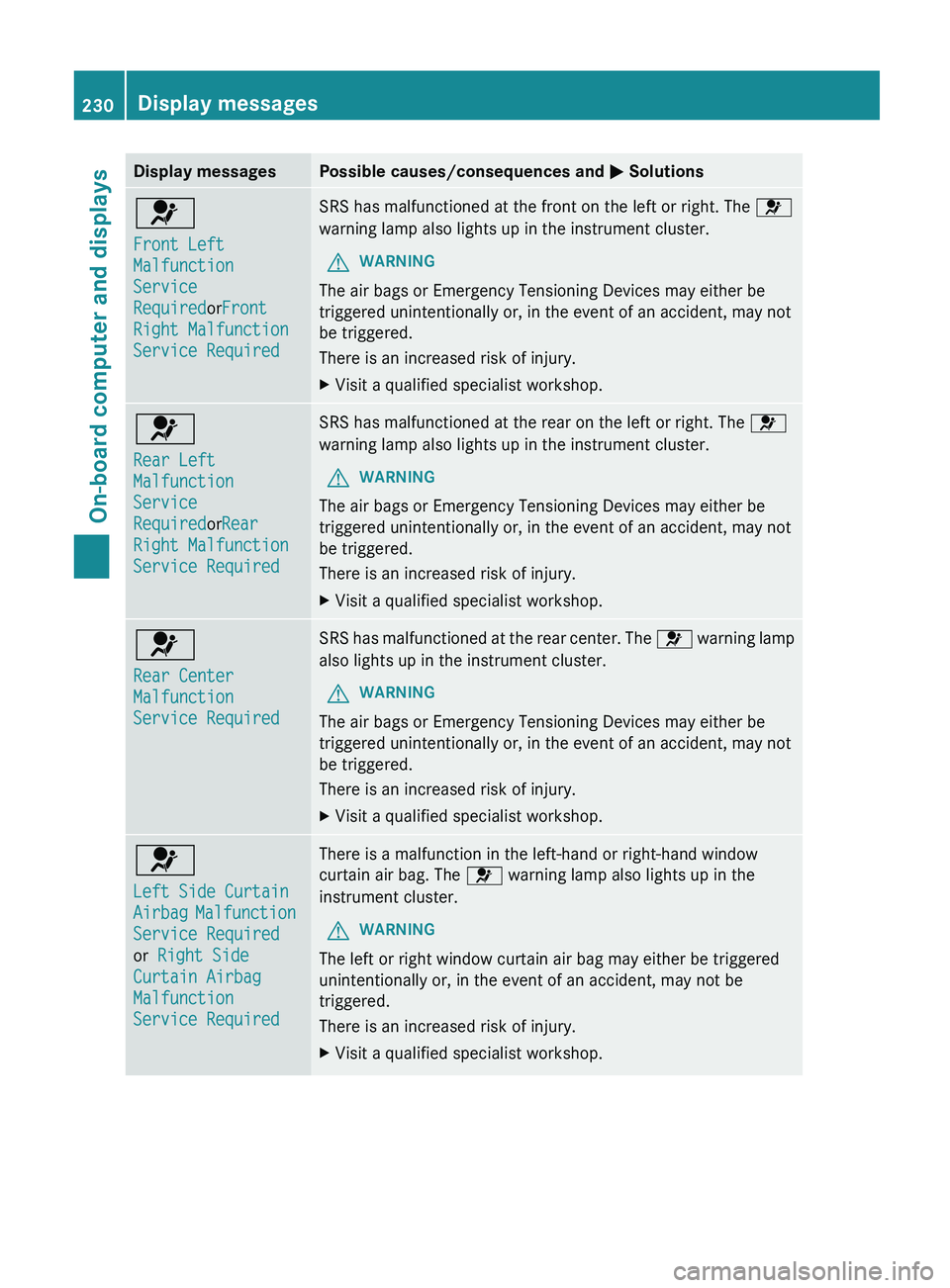
Display messages Possible causes/consequences and
0050 Solutions0075
Front Left
Malfunction
Service
RequiredorFront
Right Malfunction
Service Required SRS has malfunctioned at the front on the left or right. The
0075
warning lamp also lights up in the instrument cluster.
G WARNING
The air bags or Emergency Tensioning Devices may either be
triggered unintentionally or, in the event of an accident, may not
be triggered.
There is an increased risk of injury.
X Visit a qualified specialist workshop. 0075
Rear Left
Malfunction
Service
RequiredorRear
Right Malfunction
Service Required SRS has malfunctioned at the rear on the left or right. The
0075
warning lamp also lights up in the instrument cluster.
G WARNING
The air bags or Emergency Tensioning Devices may either be
triggered unintentionally or, in the event of an accident, may not
be triggered.
There is an increased risk of injury.
X Visit a qualified specialist workshop. 0075
Rear Center
Malfunction
Service Required SRS has malfunctioned at the rear center. The
0075 warning lamp
also lights up in the instrument cluster.
G WARNING
The air bags or Emergency Tensioning Devices may either be
triggered unintentionally or, in the event of an accident, may not
be triggered.
There is an increased risk of injury.
X Visit a qualified specialist workshop. 0075
Left Side Curtain
Airbag
Malfunction
Service Required
or Right Side
Curtain Airbag
Malfunction
Service Required There is a malfunction in the left-hand or right-hand window
curtain air bag. The
0075 warning lamp also lights up in the
instrument cluster.
G WARNING
The left or right window curtain air bag may either be triggered
unintentionally or, in the event of an accident, may not be
triggered.
There is an increased risk of injury.
X Visit a qualified specialist workshop.230
Display messagesOn-board computer and displays
Page 248 of 364
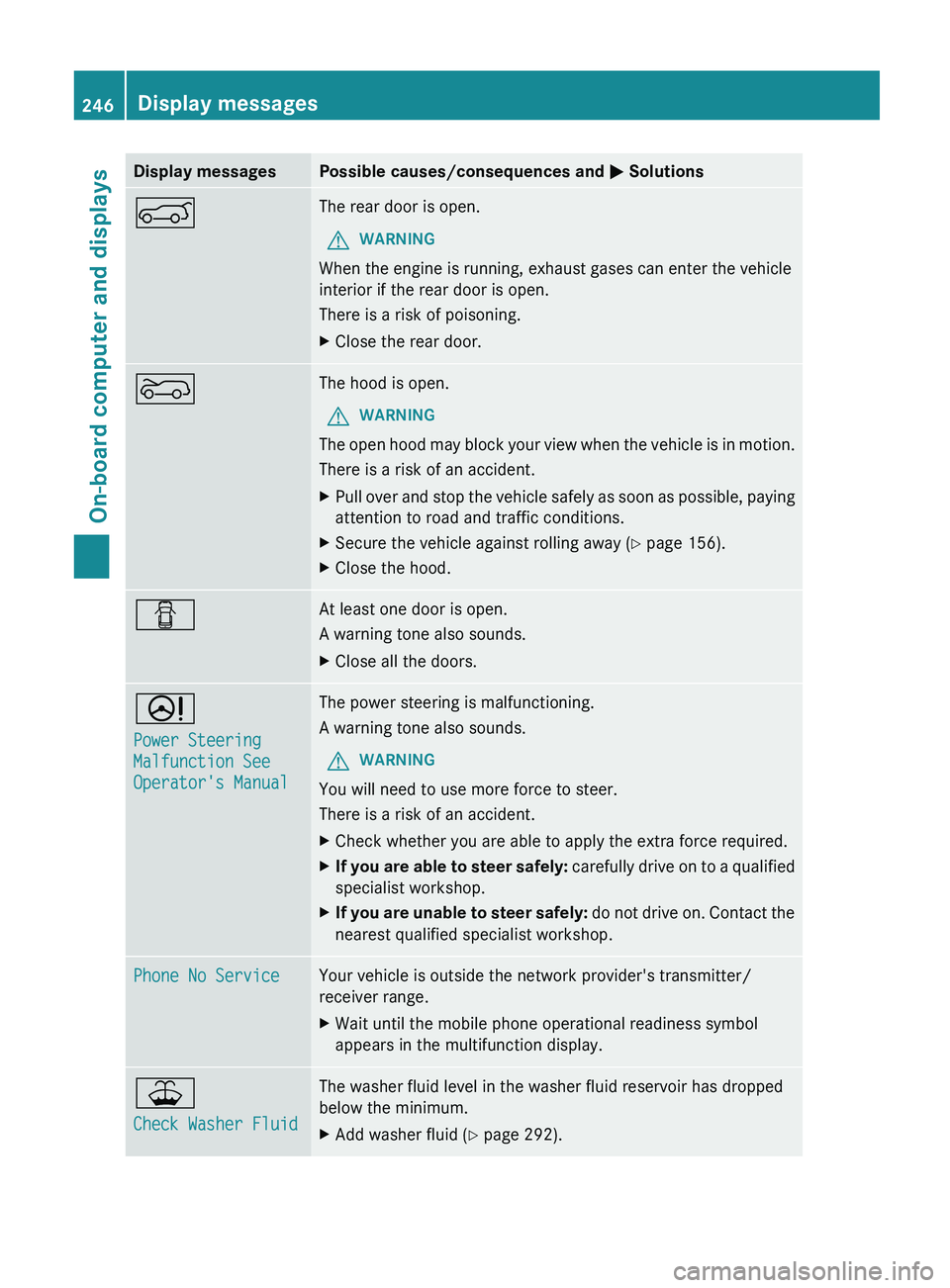
Display messages Possible causes/consequences and
0050 Solutions0065 The rear door is open.
G WARNING
When the engine is running, exhaust gases can enter the vehicle
interior if the rear door is open.
There is a risk of poisoning.
X Close the rear door. 0066 The hood is open.
G WARNING
The open hood may block your view when the vehicle is in motion.
There is a risk of an accident.
X Pull over and stop the vehicle safely as soon as possible, paying
attention to road and traffic conditions.
X Secure the vehicle against rolling away ( Y page 156).
X Close the hood. 0051 At least one door is open.
A warning tone also sounds.
X
Close all the doors. 0052
Power Steering
Malfunction See
Operator's Manual The power steering is malfunctioning.
A warning tone also sounds.
G WARNING
You will need to use more force to steer.
There is a risk of an accident.
X Check whether you are able to apply the extra force required.
X If you are able to steer safely:
carefully drive
on to a qualified
specialist workshop.
X If you are unable to steer safely: do not drive
on. Contact the
nearest qualified specialist workshop. Phone No Service Your vehicle is outside the network provider's transmitter/
receiver range.
X
Wait until the mobile phone operational readiness symbol
appears in the multifunction display. 00B2
Check Washer Fluid The washer fluid level in the washer fluid reservoir has dropped
below the minimum.
X
Add washer fluid ( Y page 292).246
Display messages
On-board computer and displays
Page 274 of 364
when not in use. Otherwise, you could suffer
an electric shock and be seriously or even
fatally injured.
G
WARNING
Any device that you connect must have a
suitable plug and meet
U.S. standards. Never
pull at a cable to disconnect a plug from a
115 V AC power socket. Never use a damaged
connection cable. The 115 V AC power socket
must never be connected to another 115 V
AC power source. Do not use a converter with
an earthed plug for the 115 V AC power
socket. This could cause serious injury to you
and/or other people. G
WARNING
If the 115 V AC power socket is damaged or
pulled out of the
trim, do not use or touch the
115 V AC power socket. The use of a 115 V
AC power socket that has been damaged or
pulled out of the trim could cause serious
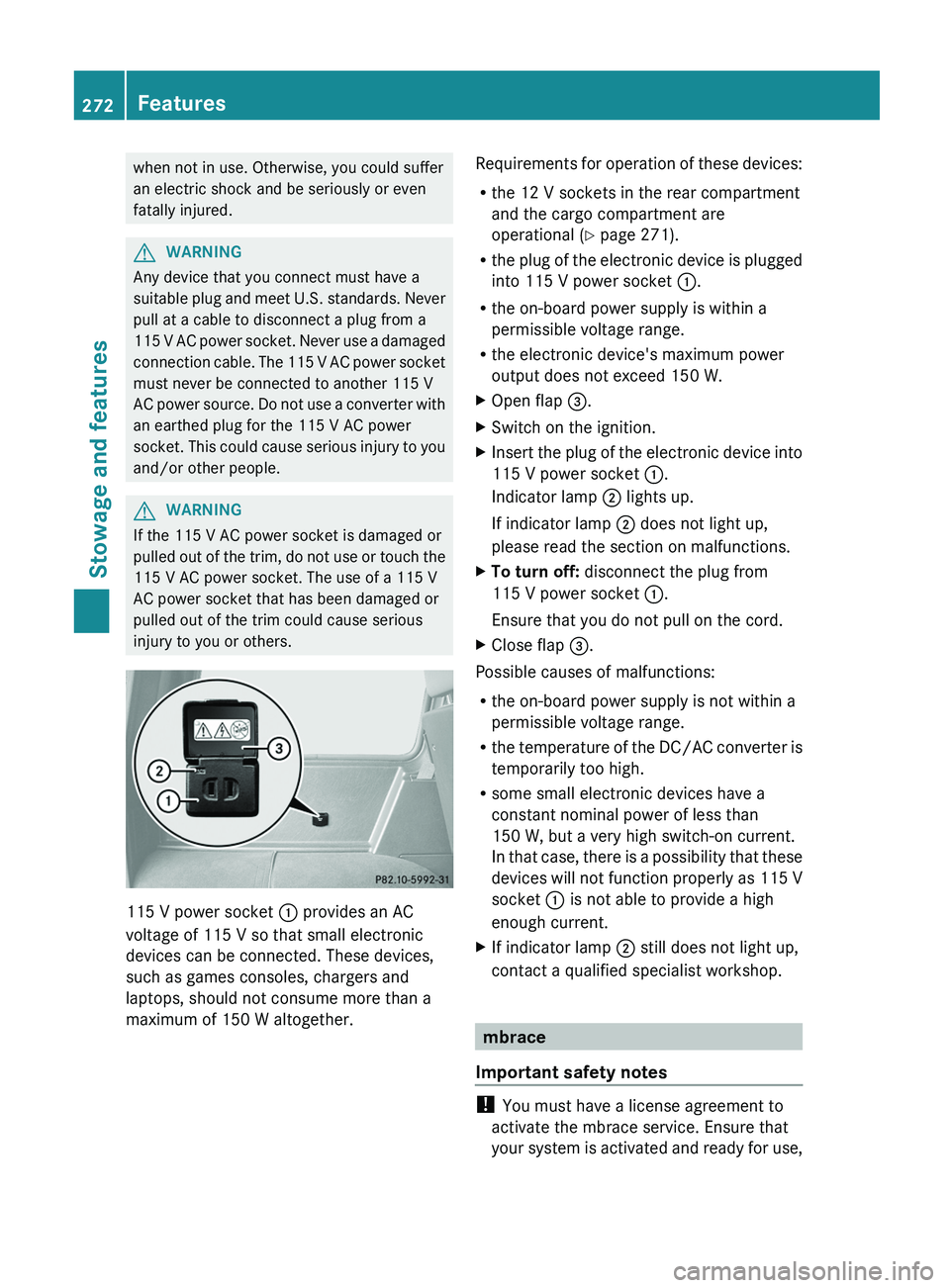
injury to you or others. 115 V power socket
0043 provides an AC
voltage of 115 V so that small electronic
devices can be connected. These devices,
such as games consoles, chargers and
laptops, should not consume more than a
maximum of 150 W altogether. Requirements for operation of these devices:
R
the 12 V sockets in the rear compartment
and the cargo compartment are
operational ( Y page 271).
R the plug of
the
electronic device is plugged
into 115 V power socket 0043.
R the on-board power supply is within a
permissible voltage range.
R the electronic device's maximum power
output does not exceed 150 W.
X Open flap 0087.
X Switch on the ignition.
X Insert the plug of the electronic device into
115 V power socket 0043.
Indicator lamp 0044 lights up.
If indicator lamp 0044 does not light up,
please read the section on malfunctions.
X To turn off: disconnect the plug from
115 V power socket 0043.
Ensure that you do not pull on the cord.
X Close flap 0087.
Possible causes of malfunctions:
R the on-board power supply is not within a
permissible voltage range.
R the temperature of
the
DC/AC converter is
temporarily too high.
R some small electronic devices have a
constant nominal power of less than
150 W, but a very high switch-on current.
In that case, there is a possibility that these
devices will not function properly as 115 V
socket 0043 is not able to provide a high
enough current.
X If indicator lamp 0044 still does not light up,
contact a qualified specialist workshop. mbrace
Important safety notes !
You must have a license agreement to
activate the mbrace service. Ensure that
your system is activated
and ready for use,272
Features
Stowage and features
Page 275 of 364
and press the 0051 MB Info call button to
register. If one
of
these steps is not carried
out, it may not be possible to activate the
system.
If you have questions about the activation,
contact one of the following telephone
hotlines:
R USA: Response Center at
1-888-990-9007
R Canada: Customer Service at
1-888-923-8367
USA only : shortly after successfully
registering with the mbrace service a user ID
and password will be sent to you by post. You
can use this password to log onto the mbrace
area under "Owners Online" at http://
www.mbusa.com.
The mbrace system is available if:
R it has been activated and is operational.
Activation requires an available mobile
phone network, a valid SIM card and a
subscription to a security service.
R the battery is sufficiently charged.
R the corresponding mobile phone network
is available for transmitting data to the
Customer Center.
i Determining the location of the vehicle on
a map is only possible if there is sufficient
GPS reception and the vehicle position can
be forwarded to the Customer Center.
The mbrace system To adjust the volume during an mbrace call,
proceed as follows:
X
Press the 0081 or 0082 button on the
multifunction steering wheel.
or
X Use the COMAND volume control.
The mbrace system provides three different
services:
R automatic and manual emergency call
R Roadside Assistance call
R MB Info call USA only:
you can find further information
and a description of all available features
under "Owners Online" at http://
www.mbusa.com.
System self-test G
WARNING
A malfunction in the system has been
detected if one of the following conditions
occurs:
R the indicator lamp in the SOS button does
not light up during the system self-
diagnosis.
R the indicator lamp in the 009F Roadside
Assistance button does not light up during
the system self-diagnosis.
R the indicator lamp in the 0051 information
button does not light
up during the system
self-diagnosis.
R the indicator lamp in the SOS button,
009F Roadside Assistance button or 0051
information button continues to be lit red
after the system self-diagnosis.
R the Tele Aid inoperative or Tele Aid
not activated message appears on the
multifunction display after the system self-
diagnosis.
If a malfunction is indicated as outlined above,
the system may not operate as expected. In
the event of an emergency, assistance must
be summoned by other means.
Have the system checked at the nearest
authorized Mercedes-Benz Center or contact
the following service hotlines:
R USA: Response Center at
1-888-990-9007
R Canada: Customer Service at
1-888-923-8367
After you have switched on the ignition, the
system carries out a self-diagnosis. Features
273
Stowage and features Z