ESP MERCEDES-BENZ G-CLASS SUV 2013 Service Manual
[x] Cancel search | Manufacturer: MERCEDES-BENZ, Model Year: 2013, Model line: G-CLASS SUV, Model: MERCEDES-BENZ G-CLASS SUV 2013Pages: 364, PDF Size: 9.62 MB
Page 167 of 364
The following driving systems are specially
adapted to off-road driving:
R
4ETS ( Y page 62)
R Transfer case (Y page 198)
R Differential locks ( Y page 201)
Observe the following notes:
R stop your vehicle and,
if necessary, shift the
transfer case to LOW
RANGE(Y page 199) before driving off-
road.
R AMG vehicles: to shift the transfer case to
LOW RANGE, deactivate the ECO start/
stop function (Y page 142).
R engage the differential locks, if necessary
(Y page 201)
i ABS, 4ETS, ESP ®
and BAS are deactivated
when the differential locks are activated.
This allows the front wheels to lock briefly,
so that these can dig into a loose surface.
However, please note that locked wheels
skid and can no longer steer.
R Check that items of luggage and loads are
stowed safely and are well secured
(Y page 267).
R To avoid damaging the vehicle, make sure
there is always sufficient ground clearance.
R Always keep the engine running and in gear
when driving on a downhill gradient.
R Always keep the engine running and in gear
when driving on a slope.
R Drive slowly and evenly, if necessary at a
walking pace.
R Ensure that the wheels are in contact with
the ground at all times.
R Drive with extreme care on unknown off-
road routes where visibility is poor. For
safety reasons, get out of the vehicle first
and survey the off-road route.
R Check the depth of water before fording
rivers and streams.
R When fording, do not stop and do not
switch off the engine. R
Look out for obstacles
such as rocks, holes,
tree stumps and furrows.
R Always keep the doors, rear door, side
windows and the sliding sunroof closed
while the vehicle is in motion.
R Switch off cruise control.
R Do not stray from marked routes or paths.
R Adapt your speed to the terrain. The
rougher, steeper or more ruts on the
terrain, the slower your speed should be.
R Drive slowly and at an even speed through
the water. Ensure that a bow wave does not
form as you drive.
R On sand, drive quickly to overcome the
rolling resistance. Otherwise, the vehicle
could dig itself into the sand.
R Do not jump with the vehicle as this will
interrupt the vehicle's propulsion.
R Avoid high engine speeds. Drive at
appropriate engine speeds (maximum
3,000 rpm).
R Do not shift the automatic transmission to
transmission position N.
R Always check the vehicle for damage after
off-road driving.
i Information about retrofitting special all-
terrain tires is available from any qualified
specialist workshop.
i Do not use the HOLD function when
driving off-road, on steep uphill or downhill
gradients or on slippery or loose surfaces.
The HOLD function cannot hold the vehicle
on such surfaces.
Checklist before driving off-road !
If the engine oil warning lamp lights up
while the vehicle is in motion, stop the
vehicle in a safe
place as soon as possible.
Check the engine oil level. The engine oil
warning lamp warning must not be ignored.
Continuing the journey while the symbol is
displayed could lead to engine damage. Driving tips
165
Driving and parking Z
Page 169 of 364
R
Shift the transfer case to LOW
RANGE(Y page 199).
R Avoid high engine speeds.
R Observe the safety notes
(Y page 164) and
the general notes (Y page 164) on off-road
driving.
R Restrict the shift range of the automatic
transmission to 1(Y page 150).
R Drive slowly.
R Where ruts are too deep, drive with the
wheels of one side on the center grassy
area, if possible.
Driving over obstacles !
Obstacles could damage the floor of the
vehicle or components of the chassis. Ask
passengers for guidance when
driving over
large obstacles. The passenger should
always keep a safe distance from the
vehicle when doing so in order to avoid
injury as a result of unexpected vehicle
movements. After driving off-road or over
obstacles, check the vehicle for possible
damage, especially to the underbody and
the components of the chassis.
! Drive with particular care when driving
over an obstacle while driving up or down
a steep slope.
The vehicle could otherwise tilt and slide
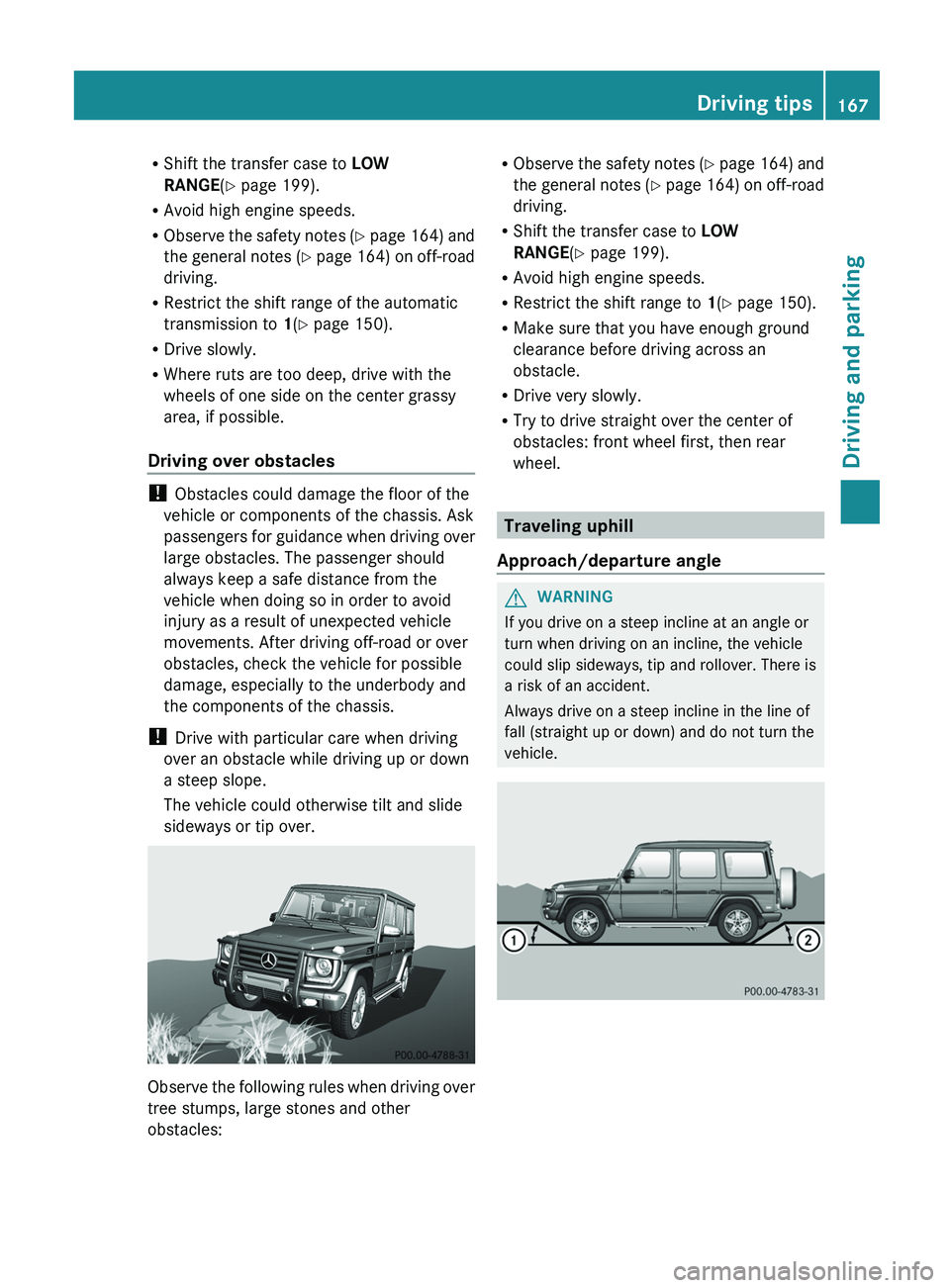
sideways or tip over. Observe the following rules when driving over
tree stumps, large stones and other
obstacles: R
Observe the safety notes
(Y page 164) and
the general notes (Y page 164) on off-road
driving.
R Shift the transfer case to LOW
RANGE(Y page 199).
R Avoid high engine speeds.
R Restrict the shift range to 1(Y page 150).
R Make sure that you have enough ground
clearance before driving across an
obstacle.
R Drive very slowly.
R Try to drive straight over the center of
obstacles: front wheel first, then rear
wheel. Traveling uphill
Approach/departure angle G
WARNING
If you drive on a steep incline at an angle or
turn when driving on an incline, the vehicle
could slip sideways, tip and rollover. There is
a risk of an accident.
Always drive on a steep incline in the line of
fall (straight up or down) and do not turn the
vehicle. Driving tips
167
Driving and parking Z
Page 170 of 364
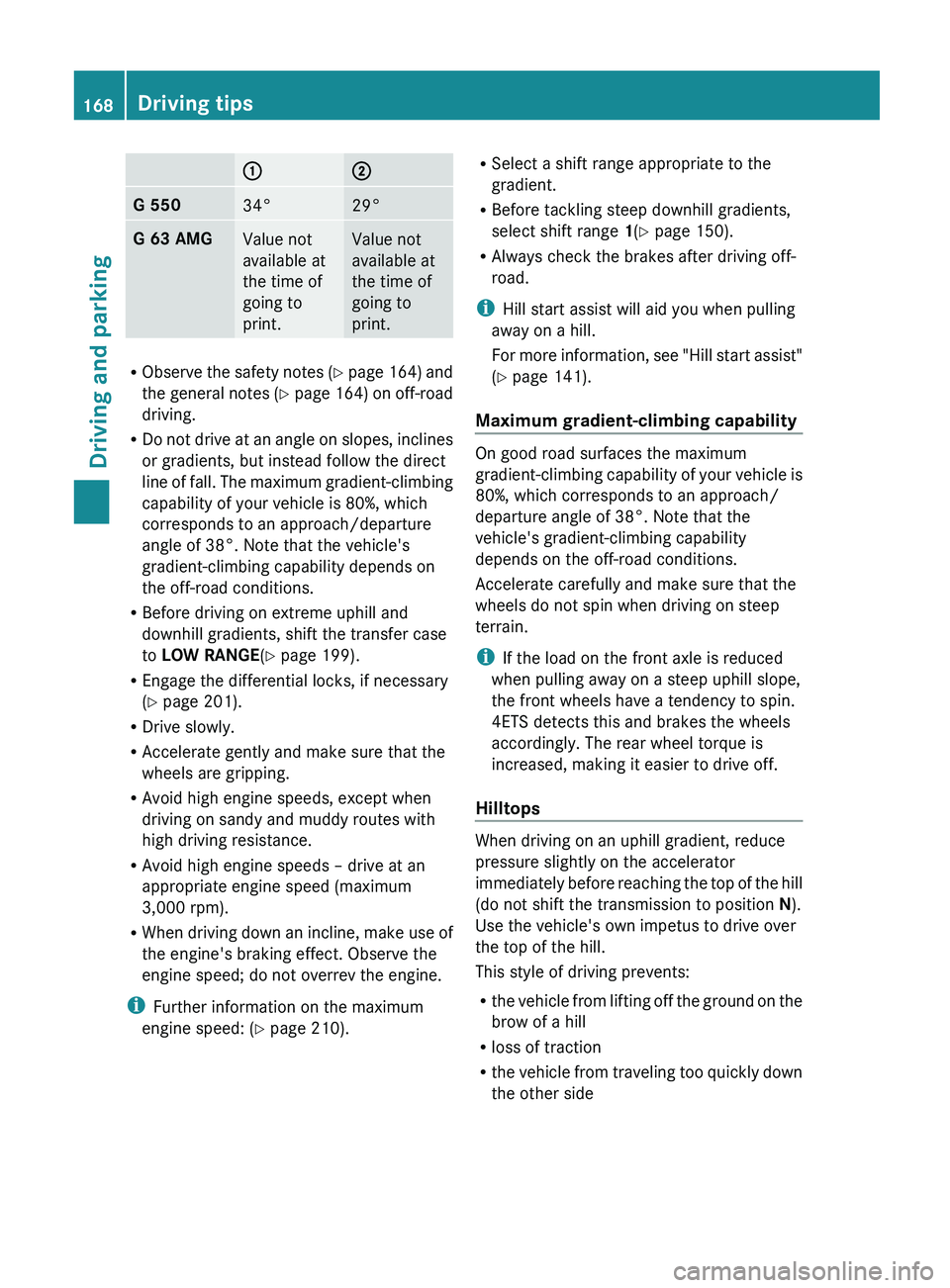
0043 0044
G 550
34° 29°
G 63 AMG
Value not
available at
the time of
going to
print. Value not
available at
the time of
going to
print.
R
Observe the safety notes
(Y page 164) and
the general notes (Y page 164) on off-road
driving.
R Do not drive at an angle on slopes, inclines
or gradients, but instead follow the direct
line of fall. The maximum gradient-climbing
capability of your vehicle is 80%, which
corresponds to an approach/departure
angle of 38°. Note that the vehicle's
gradient-climbing capability depends on
the off-road conditions.
R Before driving on extreme uphill and
downhill gradients, shift the transfer case
to LOW RANGE(Y page 199).
R Engage the differential locks, if necessary
(Y page 201).
R Drive slowly.
R Accelerate gently and make sure that the
wheels are gripping.
R Avoid high engine speeds, except when
driving on sandy and muddy routes with
high driving resistance.
R Avoid high engine speeds – drive at an
appropriate engine speed (maximum
3,000 rpm).
R When driving down an incline, make use of
the engine's braking effect. Observe the
engine speed; do not overrev the engine.
i Further information on the maximum
engine speed: ( Y page 210). R
Select a shift range appropriate to the
gradient.
R Before tackling steep downhill gradients,
select shift range 1(Y page 150).
R Always check the brakes after driving off-
road.
i Hill start assist will aid you when pulling
away on a hill.
For more information, see
"Hill start assist"
(Y page 141).
Maximum gradient-climbing capability On good road surfaces the maximum
gradient-climbing capability of your
vehicle is
80%, which corresponds to an approach/
departure angle of 38°. Note that the
vehicle's gradient-climbing capability
depends on the off-road conditions.
Accelerate carefully and make sure that the
wheels do not spin when driving on steep
terrain.
i If the load on the front axle is reduced
when pulling away on a steep uphill slope,
the front wheels have a tendency to spin.
4ETS detects this and brakes the wheels
accordingly. The rear wheel torque is
increased, making it easier to drive off.
Hilltops When driving on an uphill gradient, reduce
pressure slightly on the accelerator
immediately before reaching
the
top of the hill
(do not shift the transmission to position N).
Use the vehicle's own impetus to drive over
the top of the hill.
This style of driving prevents:
R the vehicle from lifting off the ground on the
brow of a hill
R loss of traction
R the vehicle from traveling too quickly down
the other side168
Driving tips
Driving and parking
Page 171 of 364
Driving downhill
R
Before tackling steep downhill gradients,
select shift range 1(Y page 150).
This way you use the engine's braking
effect to reduce the speed. If this is not
sufficient, brake gently. When doing so,
make sure that the vehicle is facing in the
direction of the line of fall.
R Observe the notes on driving in
mountainous terrain (Y page 168).
R Drive slowly.
R Do not drive at an angle down steep
inclines. Steer into the
line of fall and drive
with the front wheels aligned straight.
Otherwise, the vehicle could slip sideways,
tip and roll over.
R Check that the brakes are working normally
after a long downhill stretch.
i The special off-road ABS setting
(Y page 61) enables repeated, brief,
precise locking of the front wheels, which
leads to the wheels digging into the loose
ground. Note that when the front wheels
are fully braked, they slide easily over the
surface of the ground, making it difficult to
steer. Driving systems
Cruise control
Important safety notes G
WARNING
The brake pedal moves when cruise control
brakes the vehicle. A foot in the area under
the brake pedal could become trapped. The
movement of the pedal, and therefore the
vehicle's ability to brake,
may be restricted by
objects in the area under the brake. There is
a risk of an accident and injury.
Do not place your foot under the brake pedal.
Keep the area under the brake pedal free from
obstructions. If you fail to adapt your driving style, cruise
control can neither reduce the risk of
accident nor override the laws of physics.
Cruise control cannot take account of road,
weather and traffic conditions.
Cruise control
is only an aid. You are responsible for the
distance to the vehicle in front, for vehicle
speed and for braking in good time. Adjust
your driving style to the traffic conditions.
Only engage cruise control when the current
road, weather and traffic conditions permit it
to be done safely. Drive carefully and
maintain a suitable distance to the vehicle in
front.
Do not use cruise control:
R in traffic conditions that do not allow you
to drive at a constant speed, e.g. heavy
traffic, on winding roads or off-road
R on slippery road surfaces. Braking or
accelerating could cause the drive wheels
to lose traction and the vehicle could then
skid
R when there is poor visibility, e.g. due to fog,
heavy rain or snow
General notes Cruise control maintains a constant road
speed for you. On long and steep downhill
gradients, especially if the vehicle is laden,
you must select shift range 1, 2 or 3 in good
time. By doing so, you will make use of the
braking effect of the engine, which relieves
the load on the brake system and prevents
the brakes from
overheating
and wearing too
quickly.
Use cruise control only if road and traffic
conditions make it appropriate to maintain a
steady speed for a prolonged period. You can
store any road speed above 20 mph
(30 km/h).
i Cruise control should not be activated
during off-road driving. Driving systems
169
Driving and parking Z
Page 172 of 364
Cruise control lever
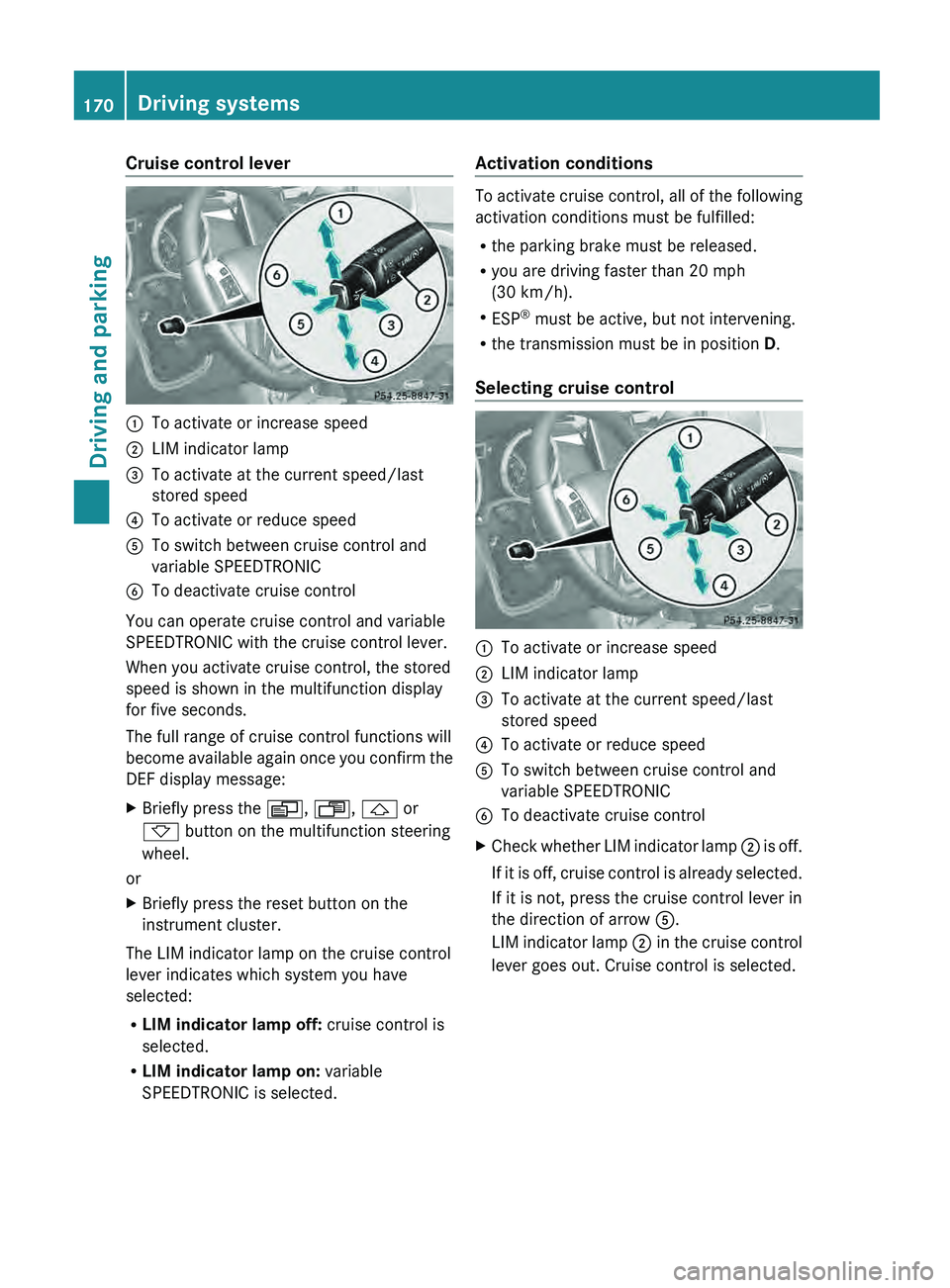
0043
To activate or increase speed
0044 LIM indicator lamp
0087 To activate at the current speed/last
stored speed
0085 To activate or reduce speed
0083 To switch between cruise control and
variable SPEEDTRONIC
0084 To deactivate cruise control
You can operate cruise control and variable
SPEEDTRONIC with the cruise control lever.
When you activate cruise control, the stored
speed is shown in the multifunction display
for five seconds.
The full range of cruise control functions will
become available again
once
you confirm the
DEF display message:
X Briefly press the 0080, 007F, 0041 or
0068 button on the multifunction steering
wheel.
or
X Briefly press the reset button on the
instrument cluster.
The LIM indicator lamp on the cruise control
lever indicates which system you have
selected:
R LIM indicator lamp off: cruise control is
selected.
R LIM indicator lamp on: variable
SPEEDTRONIC is selected. Activation conditions To activate cruise control, all of the following
activation conditions must be fulfilled:
R
the parking brake must be released.
R you are driving faster than 20 mph
(30 km/h).
R ESP ®
must be active, but not intervening.
R the transmission must be in position D.
Selecting cruise control 0043
To activate or increase speed
0044 LIM indicator lamp
0087 To activate at the current speed/last
stored speed
0085 To activate or reduce speed
0083 To switch between cruise control and
variable SPEEDTRONIC
0084 To deactivate cruise control
X Check whether LIM indicator lamp 0044 is off.
If it
is off, cruise control is already selected.
If it is not, press the cruise control lever in
the direction of arrow 0083.
LIM indicator lamp 0044 in the cruise control
lever goes out. Cruise control is selected. 170
Driving systems
Driving and parking
Page 176 of 364
0083
To switch between cruise control and
variable SPEEDTRONIC
0084 To deactivate cruise control
X Briefly press the cruise control lever
up 0043 or down 0085 to beyond the pressure
point.
The last speed stored is increased or
reduced.
i Cruise control is not deactivated if you
depress the accelerator pedal. For
example, if you accelerate briefly to
overtake, cruise control adjusts the
vehicle's speed to the last speed stored
after you have finished overtaking.
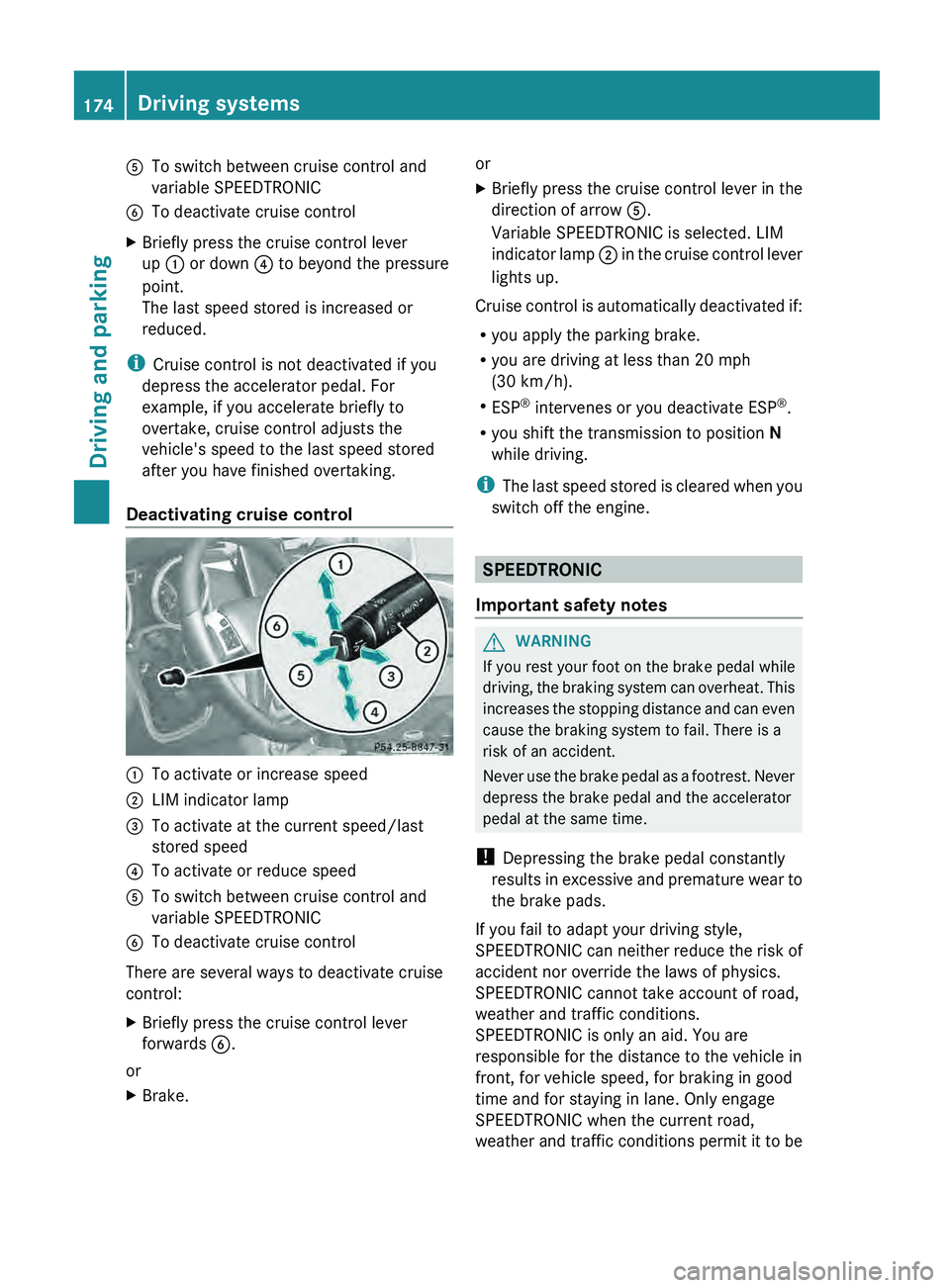
Deactivating cruise control 0043
To activate or increase speed
0044 LIM indicator lamp
0087 To activate at the current speed/last
stored speed
0085 To activate or reduce speed
0083 To switch between cruise control and
variable SPEEDTRONIC
0084 To deactivate cruise control
There are several ways to deactivate cruise
control:
X Briefly press the cruise control lever
forwards 0084.
or
X Brake. or
X
Briefly press the cruise control lever in the
direction of arrow 0083.
Variable SPEEDTRONIC is selected. LIM
indicator lamp
0044 in
the cruise control lever
lights up.
Cruise control is automatically deactivated if:
R you apply the parking brake.
R you are driving at less than 20 mph
(30 km/h).
R ESP ®
intervenes or you deactivate ESP ®
.
R you shift the transmission to position N
while driving.
i The
last speed stored is cleared when you
switch off the engine. SPEEDTRONIC
Important safety notes G
WARNING
If you rest your foot on the brake pedal while
driving, the braking system
can overheat. This
increases the stopping distance and can even
cause the braking system to fail. There is a
risk of an accident.
Never use the brake pedal as a footrest. Never
depress the brake pedal and the accelerator
pedal at the same time.
! Depressing the brake pedal constantly
results in excessive and premature wear to
the brake pads.
If you fail to adapt your driving style,
SPEEDTRONIC can neither reduce the risk of
accident nor override the laws of physics.
SPEEDTRONIC cannot take account of road,
weather and traffic conditions.
SPEEDTRONIC is only an aid. You are
responsible for the distance to the vehicle in
front, for vehicle speed, for braking in good
time and for staying in lane. Only engage
SPEEDTRONIC when the current road,
weather and traffic conditions permit it to be 174
Driving systems
Driving and parking
Page 177 of 364
done safely. Drive carefully and maintain a
suitable distance to the vehicle in front.
General notes
SPEEDTRONIC brakes automatically so that
you do not
exceed
the set speed. On long and
steep downhill gradients, especially if the
vehicle is laden or towing a trailer, you must
select shift range 1, 2 or 3 in good time. By
doing so, you will make use of the braking
effect of the engine, which relieves the load
on the brake system and prevents the brakes
from overheating and wearing too quickly. If
you need additional braking, depress the
brake pedal repeatedly rather than
continuously.
i The speed indicated in the speedometer
may differ slightly from the limit speed
stored.
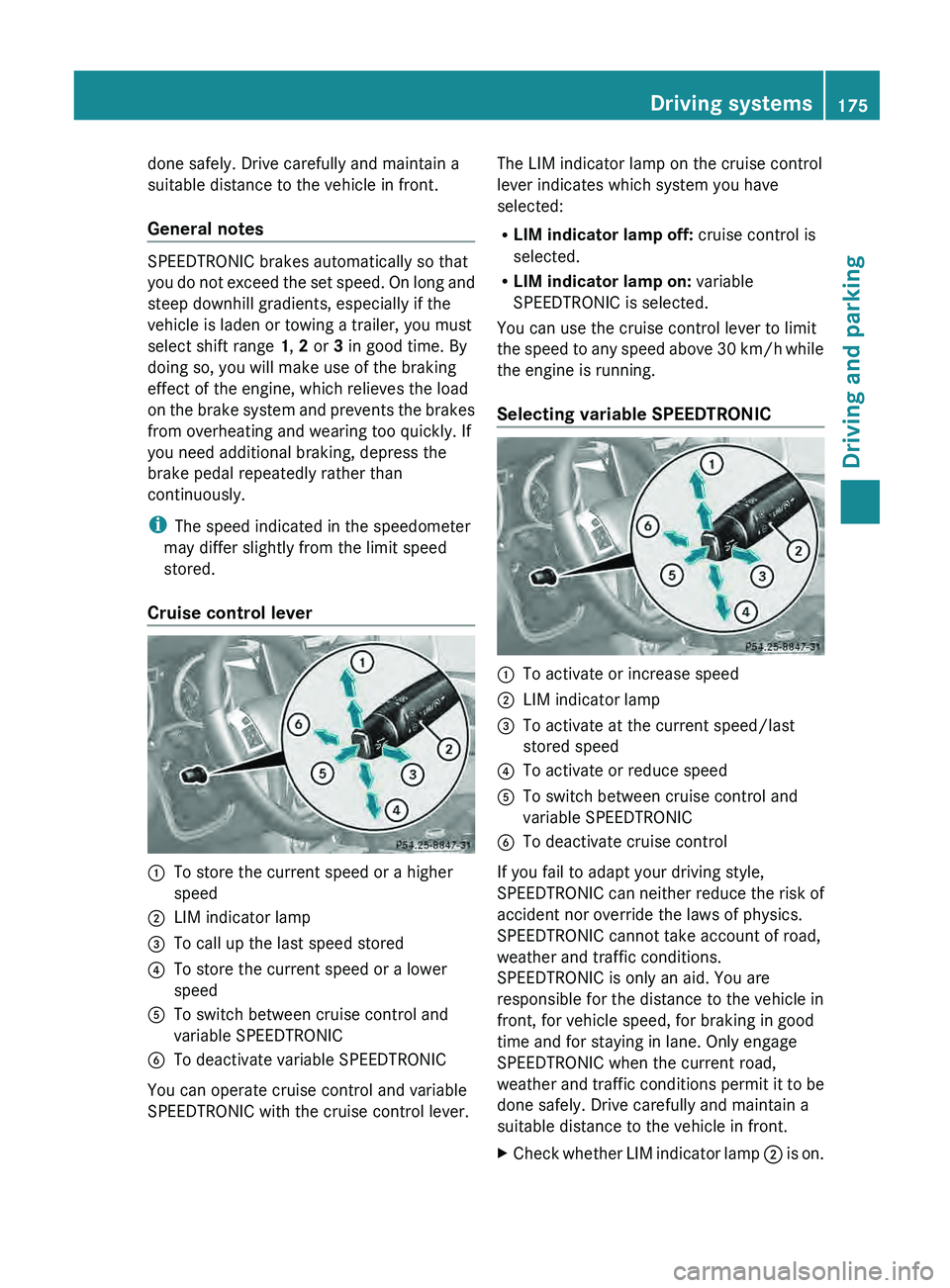
Cruise control lever 0043
To store the current speed or a higher
speed
0044 LIM indicator lamp
0087 To call up the last speed stored
0085 To store the current speed or a lower
speed
0083 To switch between cruise control and
variable SPEEDTRONIC
0084 To deactivate variable SPEEDTRONIC
You can operate cruise control and variable
SPEEDTRONIC with the cruise control lever. The LIM indicator lamp on the cruise control
lever indicates which system you have
selected:
R
LIM indicator lamp off: cruise control is
selected.
R LIM indicator lamp on: variable
SPEEDTRONIC is selected.
You can use the cruise control lever to limit
the speed to
any
speed above 30 km/h while
the engine is running.
Selecting variable SPEEDTRONIC 0043
To activate or increase speed
0044 LIM indicator lamp
0087 To activate at the current speed/last
stored speed
0085 To activate or reduce speed
0083 To switch between cruise control and
variable SPEEDTRONIC
0084 To deactivate cruise control
If you fail to adapt your driving style,
SPEEDTRONIC can neither
reduce
the risk of
accident nor override the laws of physics.
SPEEDTRONIC cannot take account of road,
weather and traffic conditions.
SPEEDTRONIC is only an aid. You are
responsible for the distance to the vehicle in
front, for vehicle speed, for braking in good
time and for staying in lane. Only engage
SPEEDTRONIC when the current road,
weather and traffic conditions permit it to be
done safely. Drive carefully and maintain a
suitable distance to the vehicle in front.
X Check whether LIM indicator lamp 0044 is on. Driving systems
175
Driving and parking Z
Page 178 of 364
If it is on, variable SPEEDTRONIC is already
selected.
If it is not, press the cruise control lever in
the direction of arrow 0083.
LIM indicator lamp
0044
in the cruise control
lever lights up. Variable SPEEDTRONIC is
selected.
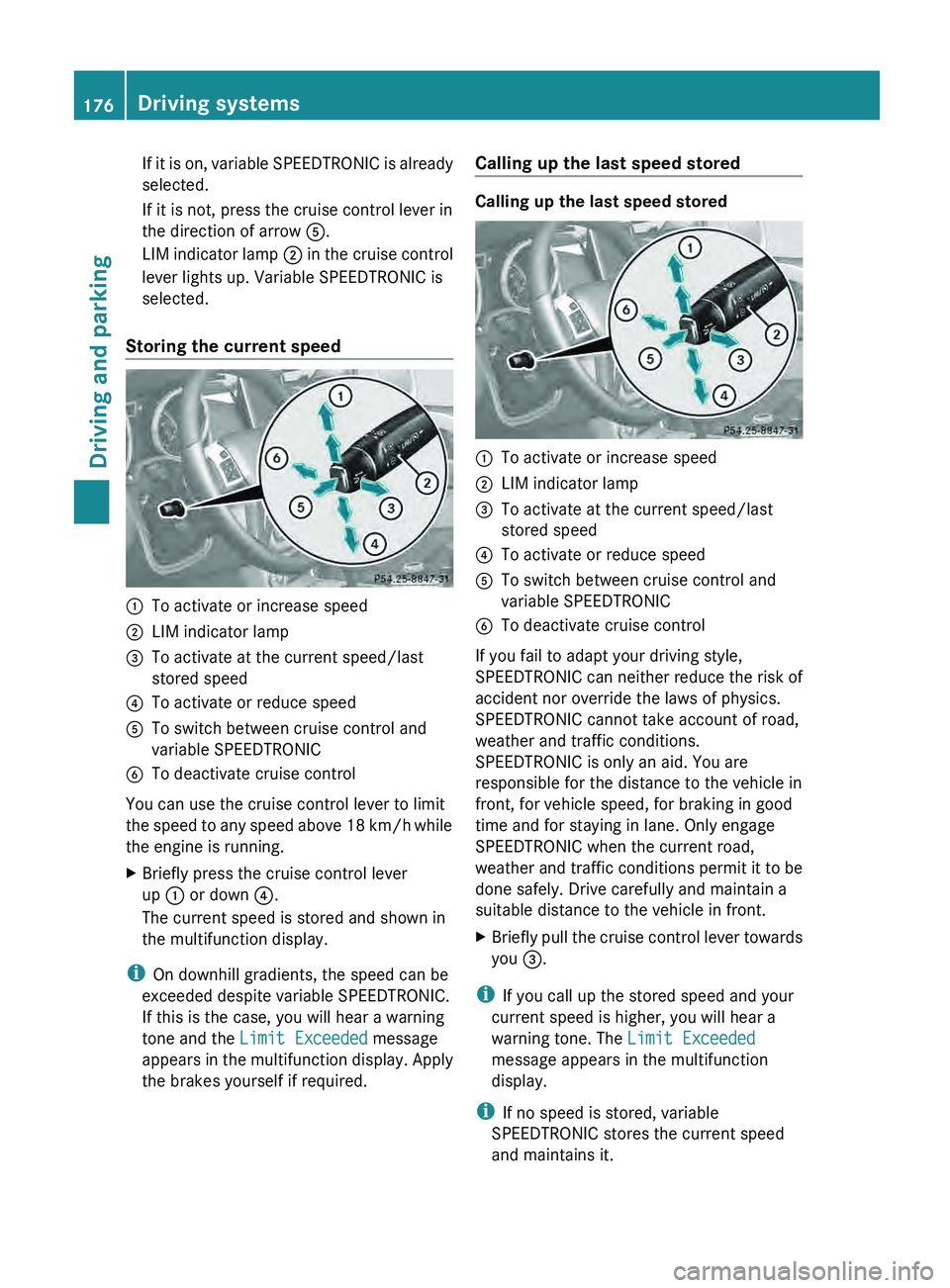
Storing the current speed 0043
To activate or increase speed
0044 LIM indicator lamp
0087 To activate at the current speed/last
stored speed
0085 To activate or reduce speed
0083 To switch between cruise control and
variable SPEEDTRONIC
0084 To deactivate cruise control
You can use the cruise control lever to limit
the speed to
any
speed above 18 km/h while
the engine is running.
X Briefly press the cruise control lever
up 0043 or down 0085.
The current speed is stored and shown in
the multifunction display.
i On downhill gradients, the speed can be
exceeded despite variable SPEEDTRONIC.
If this is the case, you will hear a warning
tone and the Limit Exceeded message
appears in the
multifunction
display. Apply
the brakes yourself if required. Calling up the last speed stored Calling up the last speed stored
0043
To activate or increase speed
0044 LIM indicator lamp
0087 To activate at the current speed/last
stored speed
0085 To activate or reduce speed
0083 To switch between cruise control and
variable SPEEDTRONIC
0084 To deactivate cruise control
If you fail to adapt your driving style,
SPEEDTRONIC can neither
reduce
the risk of
accident nor override the laws of physics.
SPEEDTRONIC cannot take account of road,
weather and traffic conditions.
SPEEDTRONIC is only an aid. You are
responsible for the distance to the vehicle in
front, for vehicle speed, for braking in good
time and for staying in lane. Only engage
SPEEDTRONIC when the current road,
weather and traffic conditions permit it to be
done safely. Drive carefully and maintain a
suitable distance to the vehicle in front.
X Briefly pull the cruise control lever towards
you 0087.
i If you call up the stored speed and your
current speed is higher, you will hear a
warning tone. The Limit Exceeded
message appears in the multifunction
display.
i If no speed is stored, variable
SPEEDTRONIC stores the current speed
and maintains it. 176
Driving systems
Driving and parking
Page 180 of 364
road, weather and traffic conditions.
DISTRONIC PLUS is only an aid. You are
responsible for the distance to the vehicle in
front, for vehicle speed, for braking in good
time and for staying in lane. Only engage
DISTRONIC PLUS when the current road,
weather and traffic
conditions
permit it to be
done safely, and adapt your driving style
accordingly. Drive carefully and maintain a
suitable distance to the vehicle in front.
If DISTRONIC PLUS detects a risk of collision
but cannot sufficiently decelerate the vehicle
in order to maintain the set distance, you will
be warned visually and acoustically.
DISTRONIC PLUS cannot prevent a collision
without your intervention. An intermittent
warning tone will then sound and the distance
warning lamp will light up in the instrument
cluster. Brake immediately in order to
increase the distance from the vehicle in
front, or take evasive action, provided it is
safe to do so.
DISTRONIC PLUS may not detect narrow
vehicles driving in front, e.g. motorcycles, or
vehicles driving on a different line. Therefore,
always pay attention to traffic conditions
even when DISTRONIC PLUS is activated.
Otherwise, you may fail to recognize dangers
in time, cause an accident and injure yourself
and others.
In particular, the detection of obstacles can
be impaired if there is:
R the sensor is dirty or covered
R snow or heavy rain
R interference by other radar sources
R there is the possibility of strong radar
reflections, for example, in parking
garages.
If DISTRONIC PLUS is activated, the vehicle
brakes automatically in certain situations.
This can happen unexpectedly, especially
when towing or in a car wash. There is a risk
of an accident. In these or similar situations,
deactivate DISTRONIC PLUS.
If you want DISTRONIC PLUS to assist you,
the following activation conditions must be fulfilled (
Y page 179) and the radar sensor
system must be operational.
General notes DISTRONIC PLUS regulates the speed and
automatically helps you maintain the
distance to the vehicle detected in front.
DISTRONIC PLUS brakes automatically so
that the set speed is not exceeded.
On long and steep downhill gradients,
especially if the vehicle is laden or towing a
trailer, you must select shift range
1, 2 or 3
in good time. By doing so, you will make use
of the braking effect of the engine, which
relieves the load on the brake system and
prevents the brakes from overheating and
wearing too quickly.
If DISTRONIC PLUS detects a slower-moving
vehicle in front, your
vehicle is braked in order
to maintain the preset distance to the vehicle
in front.
If there is no vehicle in front, DISTRONIC
PLUS operates in the same way as cruise
control in the speed range between 20 mph
(Canada: 30 km/h) and120 mph (Canada:
200 km/h). If a vehicle is driving in front of
you, it operates in the speed range between
0 mph (0 km/h) and 120 mph (Canada:
200 km/h).
Do not use DISTRONIC PLUS while driving on
roads with steep gradients.
As DISTRONIC PLUS transmits radar waves,
it can resemble the radar detectors of the
responsible authorities. You can refer to the
relevant chapter in the Operator's Manual if
questions are asked about this.
i USA only:
This device has been approved by the FCC
as a “Vehicular Radar System”. The radar
sensor is intended for use in an automotive
radar system only. Removal, tampering, or
altering of the device will void any
warranties, and is not permitted by the
FCC. Do not tamper with, alter, or use in
any non-approved way. 178
Driving systems
Driving and parking
Page 181 of 364
Any unauthorized modification to this
device could void the user’s authority to
operate the equipment.
i Canada only: This device complies with
RSS-210 of Industry Canada. Operation is
subject to the following two conditions:
1. This device may not cause interference,
and
2. this device must
accept any interference
received, including interference that may
cause undesired operation of the device.
Removal, tampering, or altering of the
device will void any warranties, and is not
permitted. Do not tamper with, alter, or use
the device in any non-approved way.
Any unauthorized modification to this
device could void the user's authority to
operate the equipment.
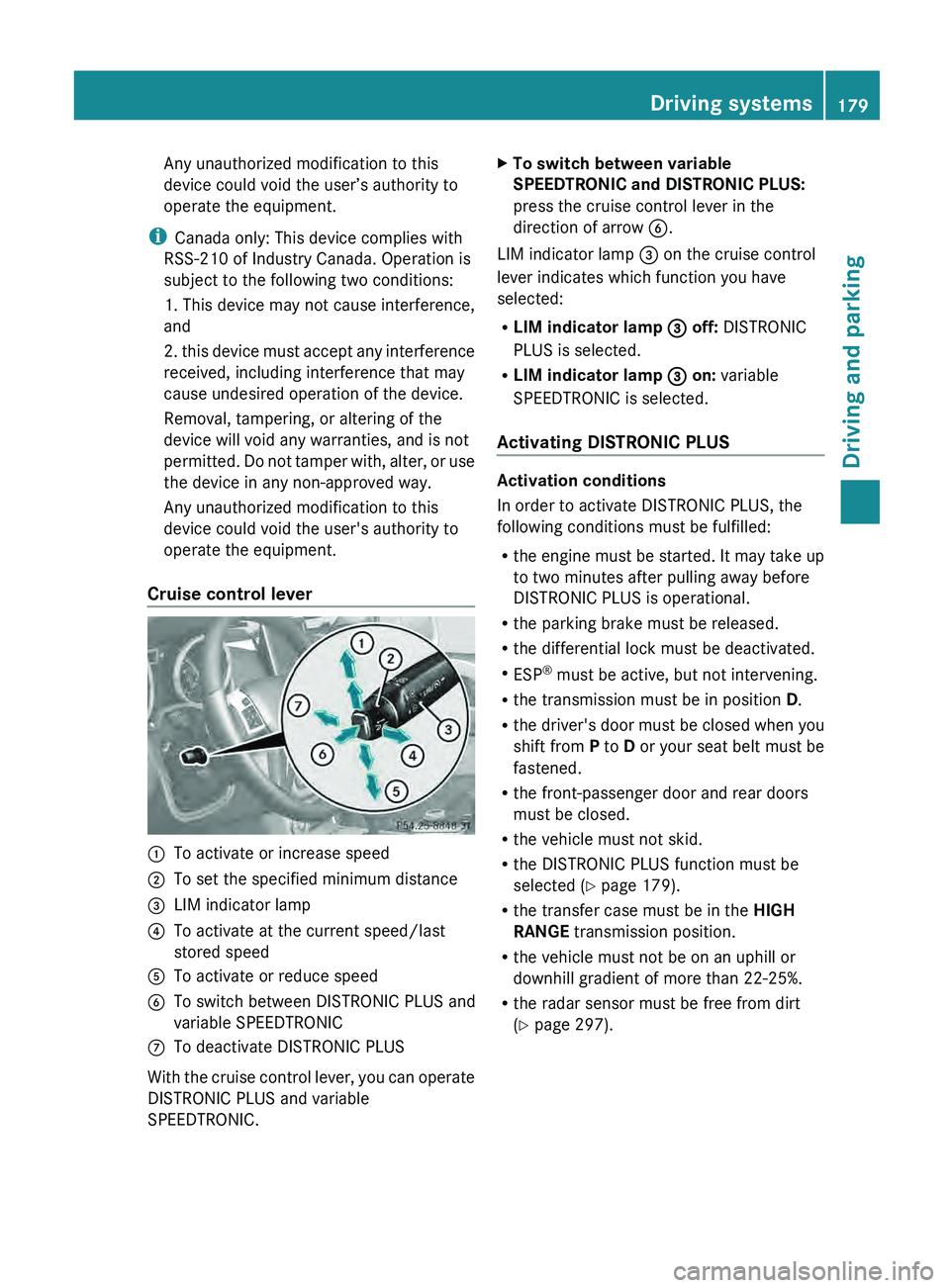
Cruise control lever 0043
To activate or increase speed
0044 To set the specified minimum distance
0087 LIM indicator lamp
0085 To activate at the current speed/last
stored speed
0083 To activate or reduce speed
0084 To switch between DISTRONIC PLUS and
variable SPEEDTRONIC
006B To deactivate DISTRONIC PLUS
With the cruise control lever, you can operate
DISTRONIC PLUS and variable
SPEEDTRONIC. X
To switch between variable
SPEEDTRONIC and DISTRONIC PLUS:
press the cruise control lever in the
direction of arrow 0084.
LIM indicator lamp 0087 on the cruise control
lever indicates which function you have
selected:
R LIM indicator lamp 0087 off: DISTRONIC
PLUS is selected.
R LIM indicator lamp 0087 on: variable
SPEEDTRONIC is selected.
Activating DISTRONIC PLUS Activation conditions
In order to activate DISTRONIC PLUS, the
following conditions must be fulfilled:
R
the engine must be
started. It may take up
to two minutes after pulling away before
DISTRONIC PLUS is operational.
R the parking brake must be released.
R the differential lock must be deactivated.
R ESP ®
must be active, but not intervening.
R the transmission must be in position D.
R the driver's door must be closed when you
shift from P to D or your seat belt must be
fastened.
R the front-passenger door and rear doors
must be closed.
R the vehicle must not skid.
R the DISTRONIC PLUS function must be
selected ( Y page 179).
R the transfer case must be in the HIGH
RANGE transmission position.
R the vehicle must not be on an uphill or
downhill gradient of more than 22-25%.
R the radar sensor must be free from dirt
(Y page 297). Driving systems
179Driving and parking Z