warning MERCEDES-BENZ G-CLASS SUV 2014 Owners Manual
[x] Cancel search | Manufacturer: MERCEDES-BENZ, Model Year: 2014, Model line: G-CLASS SUV, Model: MERCEDES-BENZ G-CLASS SUV 2014Pages: 272, PDF Size: 39.13 MB
Page 188 of 272
vehicle occupants unless the items are
securely fastened in the vehicle.
To help avoid personal injury during a collision
or sudden maneuver, exercise care when
transporting cargo. G
WARNING
Failure to assure that the seat bench and seat
backrests are locked into place could result
in an increased chance of injury in an
accident.
Never place hands under seat or near any
moving parts while a seat is being adjusted.
For safety reasons, the rear seat bench must
only be adjusted when the vehicle is
stationary.
Never drive a vehicle with the tailgate open.
Deadly carbon monoxide (CO) gases may
enter vehicle interior resulting in
unconsciousness and death.
! Ensure that you remove all containers
from the cup holder in the rear before
folding the seat backrest and the seat
cushion of the rear bench seat forwards.
Observe the loading guidelines (Y page 184).
The rear bench seat is split symmetrically.
The left-hand and right-hand rear seats can
be folded down to increase the cargo
compartment capacity. The following
changes are possible:
R fold the seat backrests forward
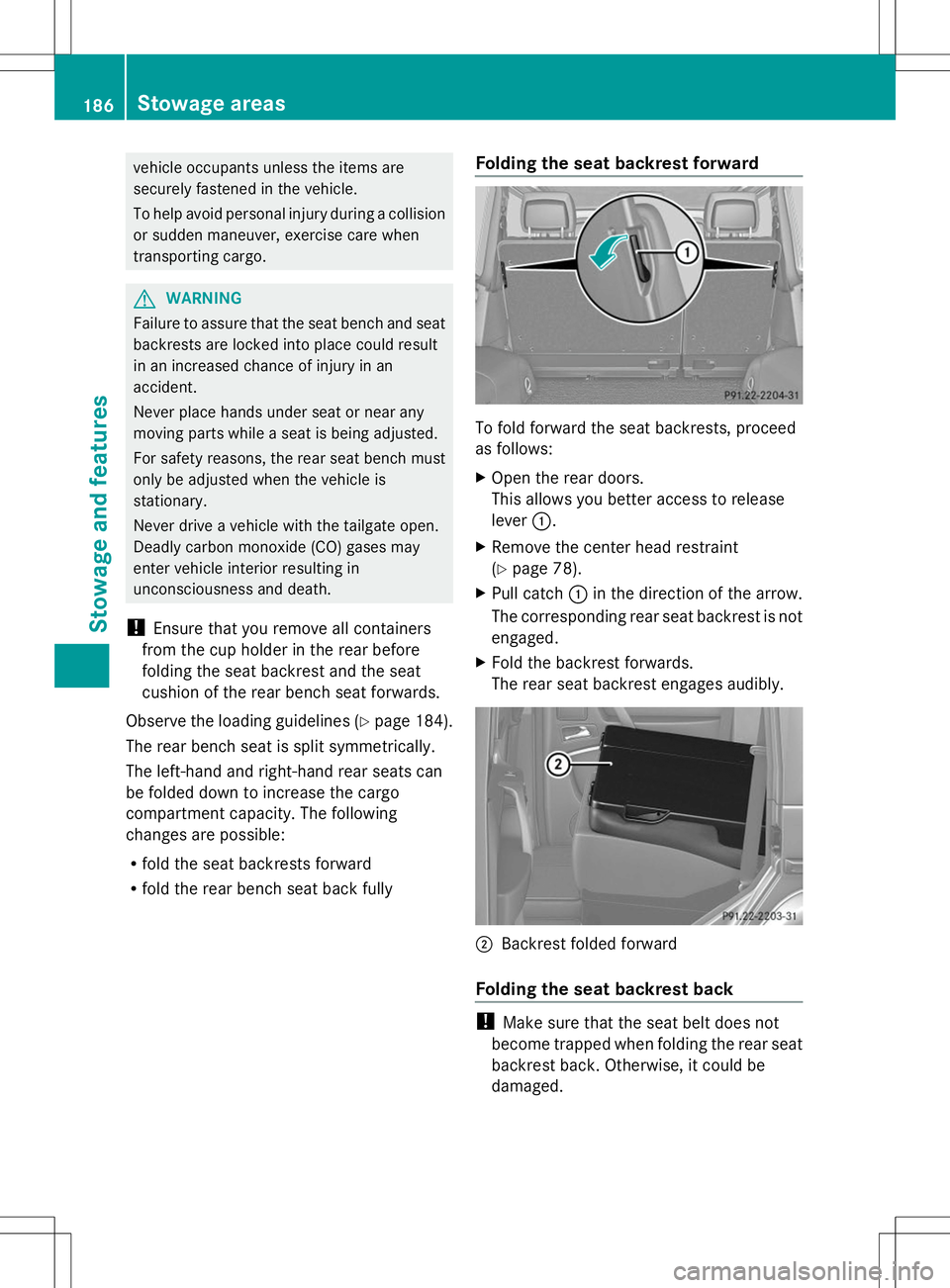
R fold the rear bench seat back fully Folding the seat backrest forward To fold forward the seat backrests, proceed
as follows:
X
Open the rear doors.
This allows you better access to release
lever :.
X Remove the center head restraint
(Y page 78).
X Pull catch :in the direction of the arrow.
The corresponding rear seat backrest is not
engaged.
X Fold the backrest forwards.
The rear seat backrest engages audibly. ;
Backrest folded forward
Folding the seat backrest back !
Make sure that the seat belt does not
become trapped when folding the rear seat
backrest back. Otherwise, it could be
damaged. 186
Stowage areasStowage and features
Page 189 of 272
X
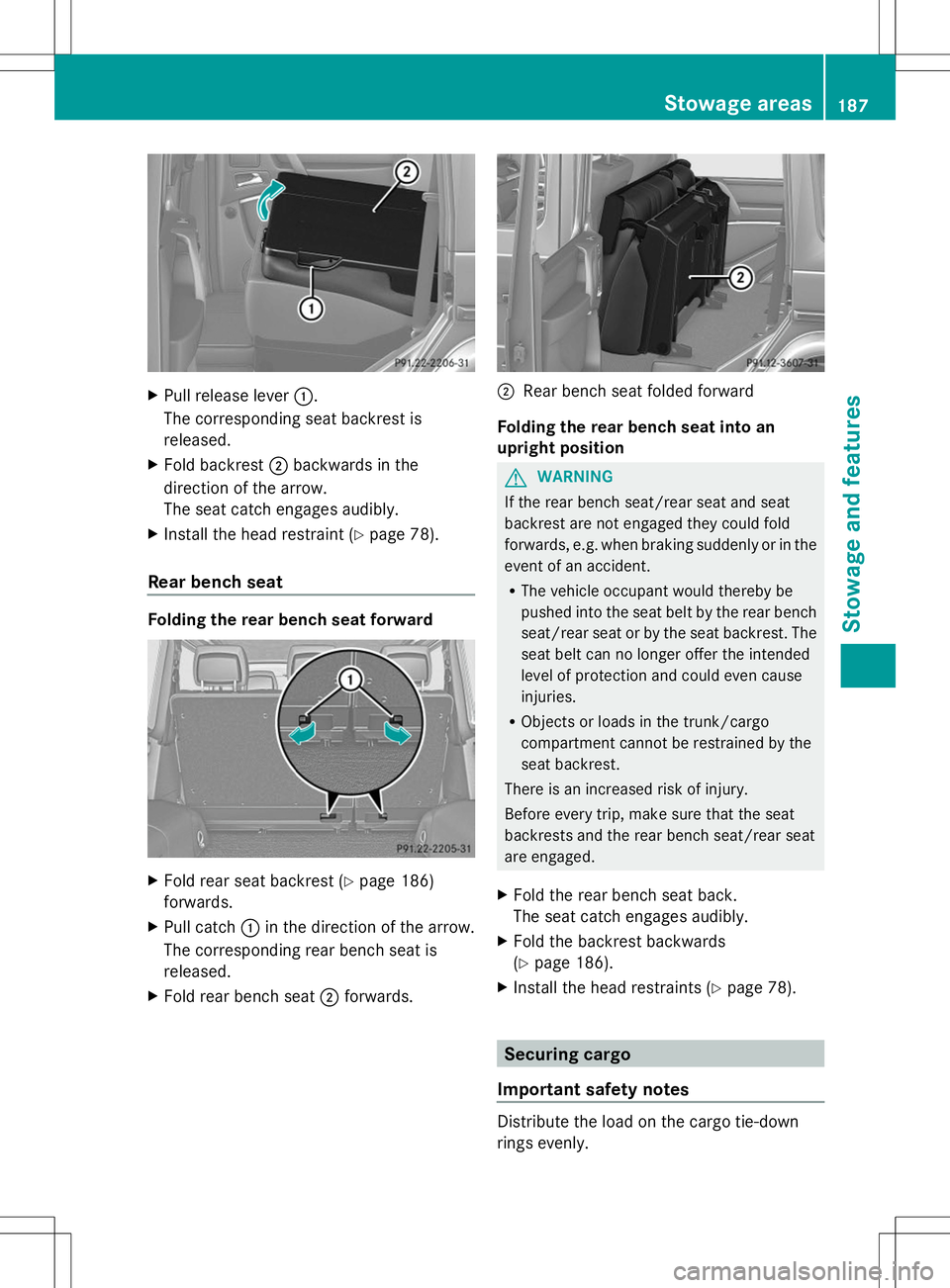
Pull release lever :.
The corresponding seat backrest is
released.
X Fold backrest ;backwards in the
direction of the arrow.
The seat catch engages audibly.
X Install the head restraint (Y page 78).
Rear bench seat Folding the rear bench seat forward
X
Fold rear seat backrest (Y page 186)
forwards.
X Pull catch :in the direction of the arrow.
The corresponding rear bench seat is
released.
X Fold rear bench seat ;forwards. ;
Rear bench seat folded forward
Folding the rear bench seat into an
upright position G
WARNING
If the rear bench seat/rear seat and seat
backrest are not engaged they could fold
forwards, e.g. when braking suddenly or in the
event of an accident.
R The vehicle occupant would thereby be
pushed into the seat belt by the rear bench
seat/rear seat or by the seat backrest. The
seat belt can no longer offer the intended
level of protection and could even cause
injuries.
R Objects or loads in the trunk/cargo
compartment cannot be restrained by the
seat backrest.
There is an increased risk of injury.
Before every trip, make sure that the seat
backrests and the rear bench seat/rear seat
are engaged.
X Fold the rear bench seat back.
The seat catch engages audibly.
X Fold the backrest backwards
(Y page 186).
X Install the head restraints (Y page 78). Securing cargo
Important safety notes Distribute the load on the cargo tie-down
rings evenly. Stowage areas
187Stowage and features Z
Page 191 of 272
X
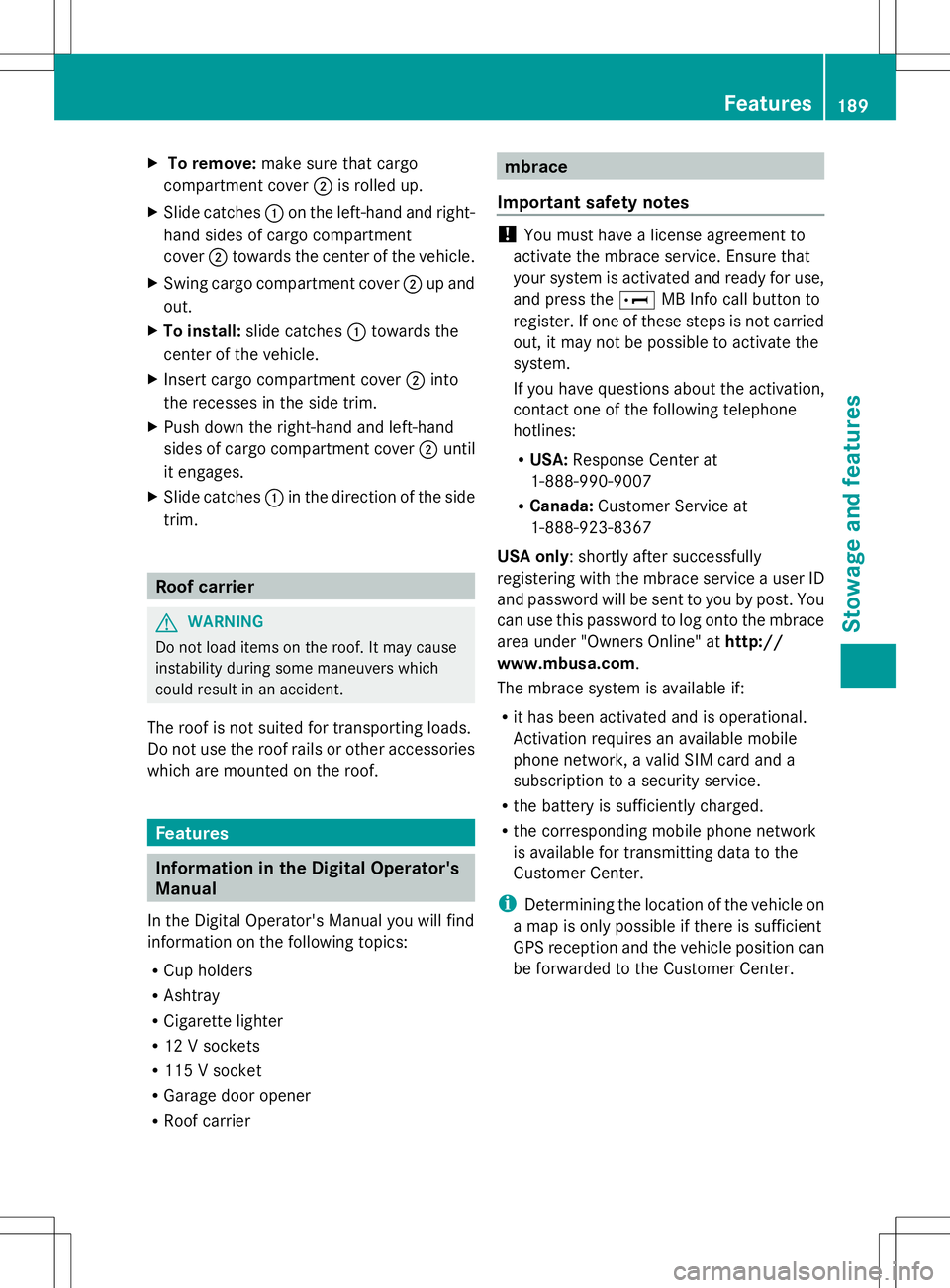
To remove: make sure that cargo
compartment cover ;is rolled up.
X Slide catches :on the left-hand and right-
hand sides of cargo compartment
cover ;towards the center of the vehicle.
X Swing cargo compartment cover ;up and
out.
X To install: slide catches :towards the
center of the vehicle.
X Insert cargo compartment cover ;into
the recesses in the side trim.
X Push down the right-hand and left-hand
sides of cargo compartment cover ;until
it engages.
X Slide catches :in the direction of the side
trim. Roof carrier
G
WARNING
Do not load items on the roof. It may cause
instability during some maneuvers which
could result in an accident.
The roof is not suited for transporting loads.
Do not use the roof rails or other accessories
which are mounted on the roof. Features
Information in the Digital Operator's
Manual
In the Digital Operator's Manual you will find
information on the following topics:
R Cup holders
R Ashtray
R Cigarette lighter
R 12 V sockets
R 115 V socket
R Garage door opener
R Roof carrier mbrace
Important safety notes !
You must have a license agreement to
activate the mbrace service. Ensure that
your system is activated and ready for use,
and press the EMB Info call button to
register. If one of these steps is not carried
out, it may not be possible to activate the
system.
If you have questions about the activation,
contact one of the following telephone
hotlines:
R USA: Response Center at
1-888-990-9007
R Canada: Customer Service at
1-888-923-8367
USA only: shortly after successfully
registering with the mbrace service a user ID
and password will be sent to you by post. You
can use this password to log onto the mbrace
area under "Owners Online" at http://
www.mbusa.com.
The mbrace system is available if:
R it has been activated and is operational.
Activation requires an available mobile
phone network, a valid SIM card and a
subscription to a security service.
R the battery is sufficiently charged.
R the corresponding mobile phone network
is available for transmitting data to the
Customer Center.
i Determining the location of the vehicle on
a map is only possible if there is sufficient
GPS reception and the vehicle position can
be forwarded to the Customer Center. Features
189Stowage an d features Z
Page 192 of 272
The mbrace system
To adjust the volume during an mbrace call,
proceed as follows:
X Press the WorX button on the
multifunction steering wheel.
or
X Use the COMAND volume control.
The mbrace system provides three different
services:
R automatic and manual emergency call
R Roadside Assistance call
R MB Info call
USA only: you can find further information
and a description of all available features
under "Owners Online" at http://
www.mbusa.com.
System self-test G
WARNING
A malfunction in the system has been
detected if one of the following conditions
occurs:
R the indicator lamp in the SOS button does
not light up during the system self-
diagnosis.
R the indicator lamp in the ºRoadside
Assistance button does not light up during
the system self-diagnosis.
R the indicator lamp in the Einformation
button does not light up during the system
self-diagnosis.
R the indicator lamp in the SOS button,
º Roadside Assistance button or E
information button continues to be lit red
after the system self-diagnosis.
R the Tele
Tele Aid Aidinoperative
inoperative orTele
Tele Aid
Aid
not activated
not activated message appears on the
multifunction display after the system self-
diagnosis.
If a malfunction is indicated as outlined above,
the system may not operate as expected. In the event of an emergency, assistance must
be summoned by other means.
Have the system checked at the nearest
authorized Mercedes-Benz Center or contact
the following service hotlines:
R
USA: Response Center at
1-888-990-9007
R Canada: Customer Service at
1-888-923-8367
After you have switched on the ignition, the
system carries out a self-diagnosis.
Emergency call Important safety notes
G
WARNING
If the indicator lamp in the SOS button is
flashing continuously and there was no voice
connection to the Response Center
established, then the mbrace system could
not initiate an emergency call (e.g. the
relevant cellular phone network is not
available).
The message Call Failed Call Failed appears in the
multifunction display for approximately
10 seconds.
Should this occur, assistance must be
summoned by other means.
! You must have a license agreement to
activate the mbrace service. Ensure that
your system is activated and ready for use,
and press the EMB Info call button to
register. If one of these steps is not carried
out, it may not be possible to activate the
system.
If you have questions about the activation,
contact one of the following telephone
hotlines:
R USA: Response Center at
1-888-990-9007
R Canada: Customer Service at
1-888-923-8367 190
FeaturesSto
wage an d features
Page 193 of 272
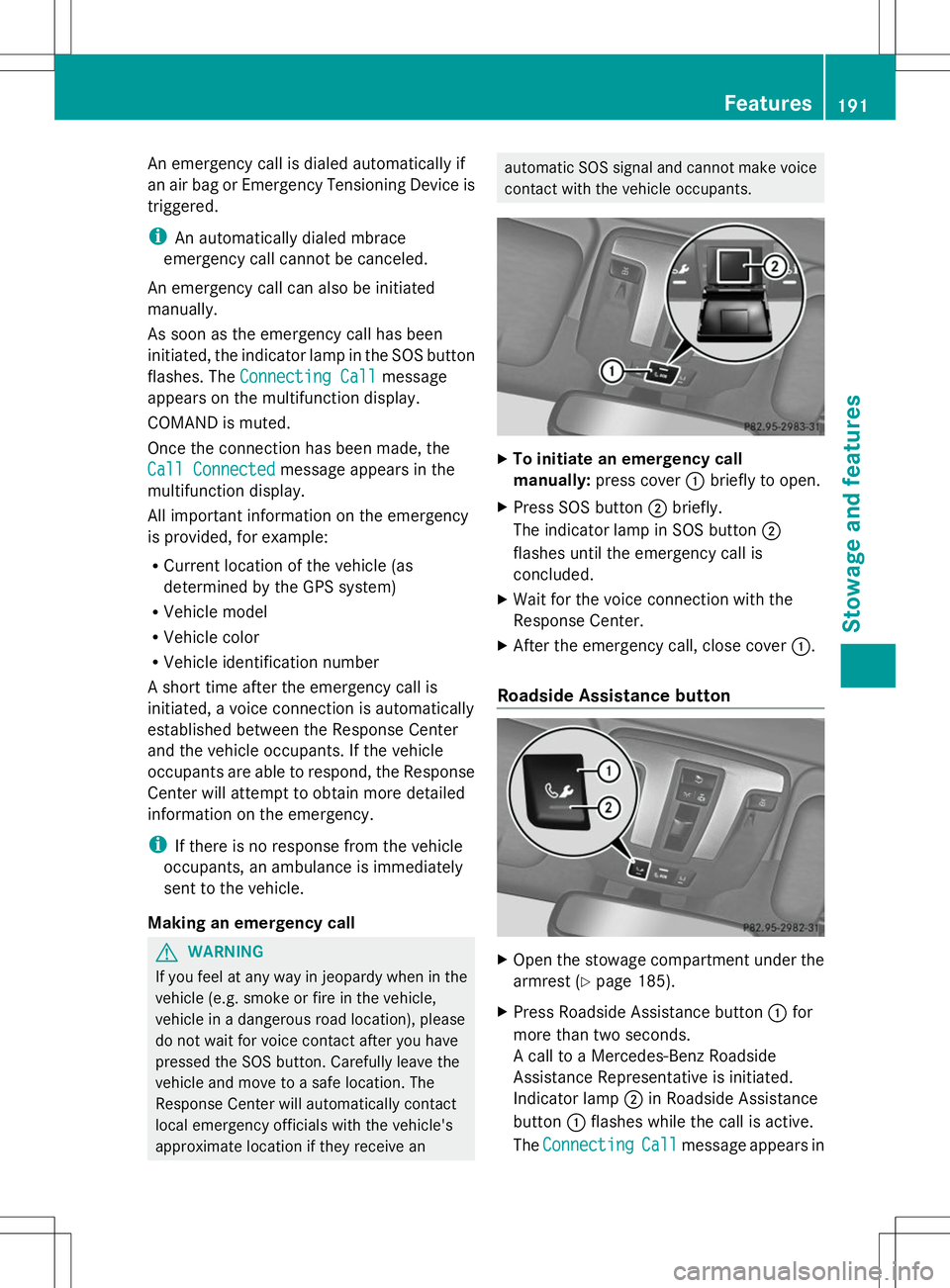
An emergency call is dialed automatically if
an air bag or Emergency Tensioning Device is
triggered.
i An automatically dialed mbrace
emergency call cannot be canceled.
An emergency call can also be initiated
manually.
As soon as the emergency call has been
initiated, the indicator lamp in the SOS button
flashes. The Connecting Call
Connecting Call message
appears on the multifunction display.
COMAND is muted.
Once the connection has been made, the
Call Connected
Call Connected message appears in the
multifunction display.
All important information on the emergency
is provided, for example:
R Current location of the vehicle (as
determined by the GPS system)
R Vehicle model
R Vehicle color
R Vehicle identification number
A short time after the emergency call is
initiated, a voice connection is automatically
established between the Response Center
and the vehicle occupants. If the vehicle
occupants are able to respond, the Response
Center will attempt to obtain more detailed
information on the emergency.
i If there is no response from the vehicle
occupants, an ambulance is immediately
sent to the vehicle.
Making an emergency call G
WARNING
If you feel at any way in jeopardy when in the
vehicle (e.g. smoke or fire in the vehicle,
vehicle in a dangerous road location), please
do not wait for voice contact after you have
pressed the SOS button. Carefully leave the
vehicle and move to a safe location. The
Response Center will automatically contact
local emergency officials with the vehicle's
approximate location if they receive an automatic SOS signal and cannot make voice
contact with the vehicle occupants.
X
To initiate an emergency call
manually: press cover :briefly to open.
X Press SOS button ;briefly.
The indicator lamp in SOS button ;
flashes until the emergency call is
concluded.
X Wait for the voice connection with the
Response Center.
X After the emergency call, close cover :.
Roadside Assistance button X
Open the stowage compartment under the
armrest (Y page 185).
X Press Roadside Assistance button :for
more than two seconds.
A call to a Mercedes-Benz Roadside
Assistance Representative is initiated.
Indicator lamp ;in Roadside Assistance
button :flashes while the call is active.
The Connecting
Connecting Call Callmessage appears in Features
191Stowage an d features Z
Page 195 of 272
R
Vehicle model
R Vehicle color
i The COMAND display shows that an
mbrace call is active. You can switch to the
navigation menu during the call by pressing
the NAVI button on COMAND. Voice output
is not available.
A voice connection between the Response
Center and the vehicle occupants is
established. You can obtain information on
how to operate your vehicle's systems, on the
location of the nearest authorized Mercedes-
Benz Center, and on further products and
services offered by Mercedes-Benz USA.
You can find further information on the
mbrace system at http://
www.mbusa.com 3
Log in under "Owners
Online".
i If the indicator lamp in MB Info call
button :is flashing continuously and no
voice connection with the Response center
has been established, then the mbrace
system has not been able to initiate an MB
Info call (e.g. the relevant mobile phone
network is not available). The Call Call
Failed
Failed message appears in the
multifunction display.
X To end a call: press the~button on the
multifunction steering wheel.
or
X Press the corresponding button for ending
a phone call on COMAND.
Call priority When service calls are active, e.g. Roadside
Assistance or MB Info calls, an emergency
call can still be initiated. In this case, an
emergency call has the highest priority and
takes precedence over all other active calls.
The indicator lamp of the respective button
flashes until the call is ended. An emergency
call can only be terminated by the Response
Center. All other calls can be ended by pressing the
~button on the
multifunction steering wheel or the
corresponding COMAND button for ending a
telephone call.
i When an mbrace call has been initiated,
COMAND is muted. The mobile phone is no
longer connected to COMAND. However, if
you want to use your mobile phone, we
recommend that you do this only when the
vehicle is stationary and in a safe location. Brush guard (USA only)
G
WARNING
The brush guard is designed solely to enhance
the appearance of the vehicle and help
protect grille and headlamps from minor
mishaps, either on or off road.
Since the safety characteristics are limited in
the event of an accident, brush guard are not
intended to prevent injury or damage in the
event of an accident. Also observe state and
local regulations on installation and use.
Raise and lower the brush guard in an open
space with plenty of room.
i If you wish to remove the brush guard,
contact a qualified specialist workshop. Garage door opener
Important safety notes G
WARNING
Before programming the integrated remote
control to a garage door opener or gate
operator, make sure people and objects are
out of the way of the device to prevent
potential harm or damage. When
programming a garage door opener, the door
moves up or down. When programming a gate
operator, the gate opens or closes.
Do not use the integrated remote control with
any garage door opener that lacks safety stop
3 USA only. Features
193Stowage and features
Z
Page 196 of 272
and reverse features as required by U.S.
federal safety standards (this includes any
garage door opener model manufactured
before April 1, 1982). A garage door that
cannot detect an object - signaling the door
to stop and reverse - does not meet current
U.S. federal safety standards.
When programming a garage door opener,
park vehicle outside the garage.
Do not run the engine while programming the
integrated remote control. Inhalation of
exhaust gas is hazardous to your health. All
exhaust gas contains carbon monoxide (CO),
and inhaling it can cause unconsciousness
and possible death. All exhaust gas contains
carbon monoxide (CO), and inhaling it can
cause unconsciousness and possible death.
You can use the HomeLink ®
garage door
opener integrated into the rear-view mirror to
operate up to three different gate/garage
door opener systems.
i Certain garage door drives are
incompatible with the integrated garage
door opener. If you have difficulty
programming the integrated garage door
opener, contact an authorized Mercedes-
Benz Center. You can also contact the
following service hotlines:
R USA: Mercedes-Benz Customer
Assistance Center at
1-800-FOR-MERCedes
R Canada: Customer Service at
1-800-387-0100
i USA only:
This device complies with Part 15 of the
FCC Rules. Operation is subject to the
following two conditions:
1. This device may not cause harmful
interference, and
2. this device must accept any interference
received, including interference that may
cause undesired operation. Any unauthorized modification to this
device could void the user's authority to
operate the equipment.
i Canada only:
This device complies with the RSS-210
Rules of Industry Canada. Operation is
subject to the following two conditions:
1. This device may not cause harmful
interference, and
2. this device must accept any interference
received, including interference that may
cause undesired operation of the device.
Any unauthorized modification to this
device could void the user's authority to
operate the equipment.
Programming the remote control Programming
G
WARNING
Only press the button on the integrated
garage door opener if there are no persons or
objects present within the sweep of the
garage door. Persons could otherwise be
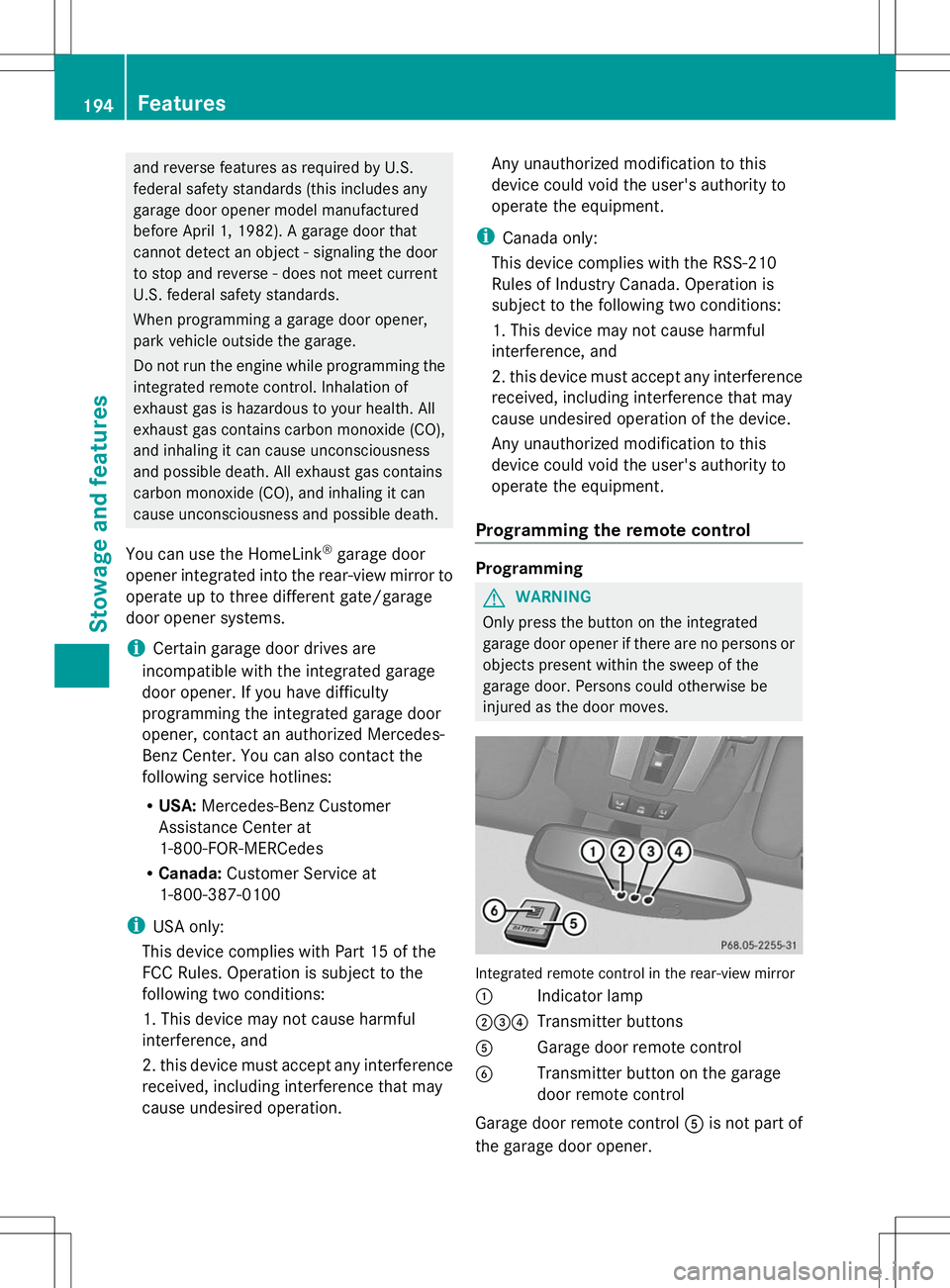
injured as the door moves. Integrated remote control in the rear-view mirror
:
Indicator lamp
;=? Transmitter buttons
A Garage door remote control
B Transmitter button on the garage
door remote control
Garage door remote control Ais not part of
the garage door opener. 194
FeaturesStowage and features
Page 200 of 272
after a maximum of 20 seconds and
indicator lamp
:will flash. Press the
transmitter button again, if necessary.
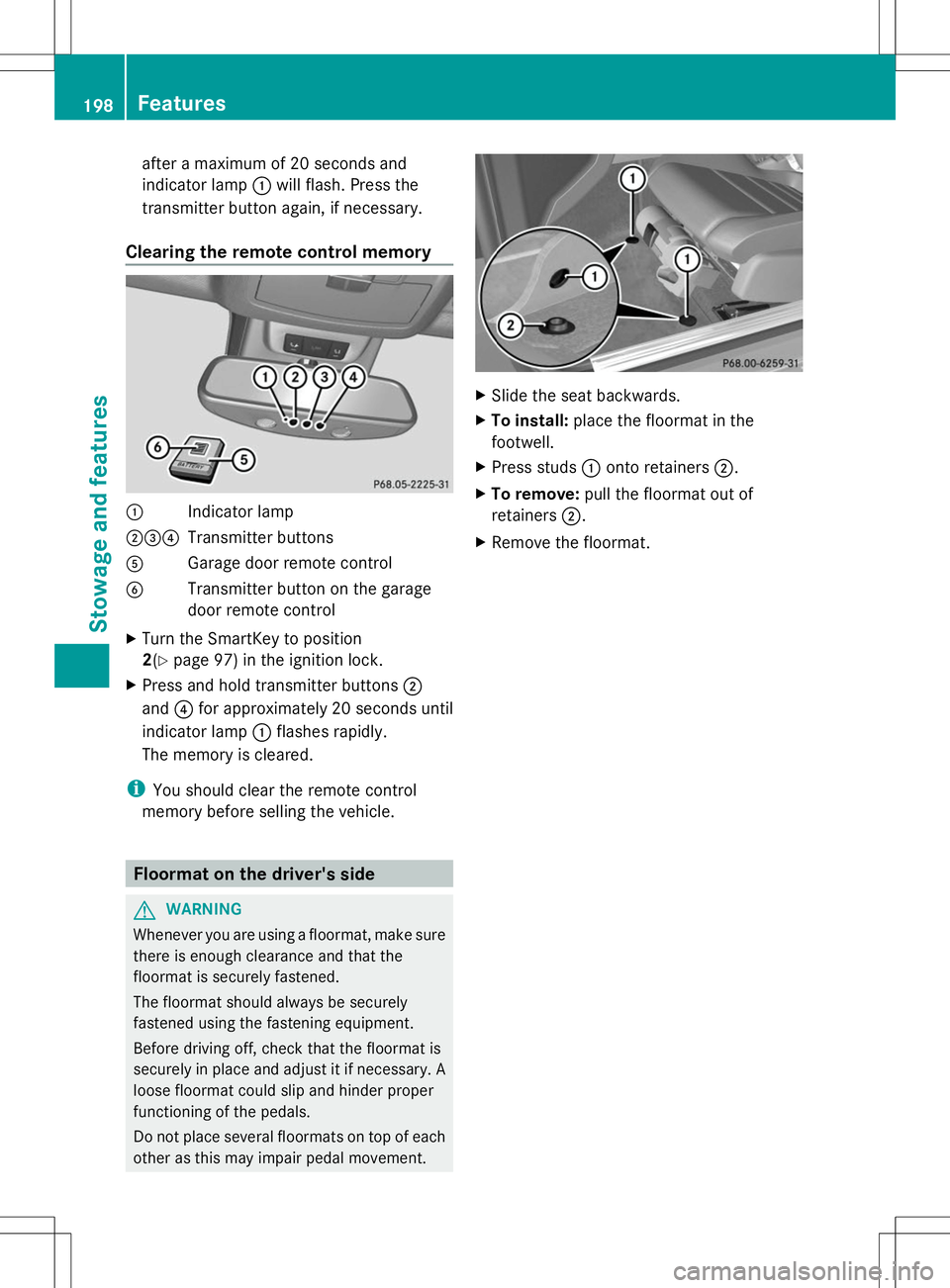
Clearing the remote control memory :
Indicator lamp
;=? Transmitter buttons
A Garage door remote control
B Transmitter button on the garage
door remote control
X Turn the SmartKey to position
2(Y page 97) in the ignition lock.
X Press and hold transmitter buttons ;
and ?for approximately 20 seconds until
indicator lamp :flashes rapidly.
The memory is cleared.
i You should clear the remote control
memory before selling the vehicle. Floormat on the driver's side
G
WARNING
Whenever you are using a floormat, make sure
there is enough clearance and that the
floormat is securely fastened.
The floormat should always be securely
fastened using the fastening equipment.
Before driving off, check that the floormat is
securely in place and adjust it if necessary. A
loose floormat could slip and hinder proper
functioning of the pedals.
Do not place several floormats on top of each
other as this may impair pedal movement. X
Slide the seat backwards.
X To install: place the floormat in the
footwell.
X Press studs :onto retainers ;.
X To remove: pull the floormat out of
retainers ;.
X Remove the floormat. 198
FeaturesStowage and features
Page 202 of 272
Useful information
i This Operator's Manual describes all
models and all standard and optional
equipment of your vehicle available at the
time of publication of the Operator's
Manual. Country-specific differences are
possible. Please note that your vehicle may
not be equipped with all features
described. This also applies to safety-
related systems and functions.
i Read the information on qualified
specialist workshops: (Y page 27).Engine compartment
Hood
Important safety notes G
WARNING
If the hood is unlatched, it may open up when
the vehicle is in motion and block your view.
There is a risk of an accident.
Never unlatch the hood while driving. G
WARNING
Certain components in the engine
compartment may be very hot, e.g. the drive
system and radiator. Working in the engine
compartment poses a risk of injury.
If possible, let the drive system cool down and
only touch the following described
components. G
WARNING
Opening the hood when the engine is
overheated or when there is a fire in the
engine compartment could expose you to hot
gases or other service products. There is a
risk of injury.
Let an overheated engine cool down before
opening the hood. If there is a fire in the
engine compartment, keep the hood closed
and contact the fire department. G
WARNING
The engine compartment contains moving
components. Certain components, such as
the radiator fan, may continue to run or start
again suddenly when the ignition is off. There
is a risk of injury.
If you need to do any work inside the engine
compartment:
R switch off the ignition
R never reach into the area where there is a
risk of danger from moving components,
such as the fan rotation area
R remove jewelery and watches
R keep items of clothing and hair, for
example, away from moving parts G
WARNING
The engine is equipped with a transistorized
ignition system. Because of the high voltage,
it is dangerous to touch any components
(ignition coils, spark plug sockets, diagnostic
socket) of the ignition system:
R with the engine running
R while starting the engine
R when the ignition is switched on and the
engine is turned manually G
WARNING
When the hood is open and the windshield
wipers are set in motion, you can be injured
by the wiper linkage. There is a risk of injury.
Always switch off the windshield wipers and
the ignition before opening the hood.
! Make sure that the windshield wipers are
not folded away from the windshield. You
could otherwise damage the windshield
wipers or the hood.
Do not touch the following when the ignition
is switched on:
R ignition coils
R spark plug connectors
R test socket 200
Engine compartmentMaintenance and care
Page 203 of 272
Opening the hood
The release lever on the hood is in the footwell
on the left-hand side of the vehicle when
viewed in the direction of travel.
X Make sure that the windshield wipers are
turned off.
X Pull release lever :on the hood.
The hood is released. X
Lift the hood slightly.
X Push hood catch handle ;in the direction
of the arrow and lift the hood.
Closing the hood G
WARNING
If the hood is unlatched, it may open up when
the vehicle is in motion and block your view.
There is a risk of an accident.
Never unlatch the hood while driving. X
Lower the hood and let it fall from a height
of approximately 8 inches (20 cm).
X Check that the hood has engaged properly.
If the hood can be raised slightly, it is not
properly engaged. Open it again and close
it with a little more force. Engine oil
Notes on the oil level Depending on your driving style, the vehicle
consumes up to 0.9 US qt (0.8 liters) of oil per
600 miles (1000 km). The oil consumption
may be higher than this when the vehicle is
new or if you frequently drive at high engine
speeds.
Checking the oil level using the oil
dipstick
Example: oil dipstick
When checking the oil level:
R
park the vehicle on a level surface.
R the engine should be switched off for
approximately five minutes if the engine is
at normal operating temperature.
R the engine should be switched off for at
least 30 minutes if the engine is not at
operating temperature, e.g. if you only start
the engine briefly.
X Pull oil dipstick :out of the dipstick guide
tube.
X Wipe off oil dipstick :. Engine compartment
201Maintenance and care Z