USB MERCEDES-BENZ G-CLASS SUV 2014 Owners Manual
[x] Cancel search | Manufacturer: MERCEDES-BENZ, Model Year: 2014, Model line: G-CLASS SUV, Model: MERCEDES-BENZ G-CLASS SUV 2014Pages: 272, PDF Size: 39.13 MB
Page 8 of 272
Cargo compartment enlargement
Important safety note s.................. 185
Cargo tie down rings .........................188
CD see also Digital Operator's Manual 170
CD player/CD changer (on-board
computer) .......................................... 144
Center console Overview .......................................... 34
Upper section .................................. 34
Central locking
Automatic locking (on-board
computer) ...................................... 144
Locking/unlocking (SmartKey) ........66
Changing bulbs
Side marker lamps ...........................86
Changing gears .................................. 101
Checklist After driving off-roa d...................... 108
Before driving off-road ...................108
Child-proof locks
Important safety notes ....................58
Rear doors ....................................... 58
Children
In the vehicle ................................... 53
Restraint systems ............................ 53
Child seat
Automatic recognition .....................44
Automatic recognition/air bag
deactivation, self-test ......................46
LATCH-type (ISOFIX) child seat
anchors ............................................ 56
Special seat belt retractor ...............55
Top Tether ....................................... 57
Troubleshooting ............................... 47
Chrome parts (cleaning
instructions) ...................................... 210
Cigarette lighter ................................ 189
Cleaning Trailer tow hitch ............................. 206
Clear button ....................................... 178
Climate control Controlling automatically .................94
Cooling with air dehumidification ..... 94
Defrosting the windows ...................94
Defrosting the windshield ................94Dual-zone automatic climate
control
....................................... 93, 94
Important safety notes ..............92, 94
Indicator lamp .................................. 94
Maximum cooling ............................ .94
Notes on using dual-zone
automatic climate control ................94
Overview of systems ........................92
Problems with "cooling with air
dehumidification" ............................. 94
Problem with the rear window
defroster .......................................... 94
Refrigerant ..................................... 261
Setting the air distribution ...............94
Setting the airflow ........................... 94
Setting the temperature ..................94
Switching air-recirculation mode
on/off .............................................. 94
Switching on/off .............................. 94
Switching residual heat on/off ........94
Switching the rear window
defroster on/off ............................... 94
Switching the ZONE function on/
off .................................................... 94
Windshield defroster ........................94
Cockpit
Overview .......................................... 30
see Instrument cluster
COMAND
Display ........................................... 173
Examples of operation ...................178
Menu overview .............................. 174
COMAND controller ...........................177
COMAND control panel .....................176
Combination switch ............................83
Compass Display messages ..........................144
Connecting a USB device
see also Digital Operator's Manual 170
Consumption statistics (on-board
computer) .......................................... 144
Convenience opening feature ............94
Convenience telephony see also Digital Operator's Manual 170
Coolant (engine)
Checking the level .........................203
Display message .................... 144, 152
Filling capacity ............................... 2636
Index
Page 176 of 272
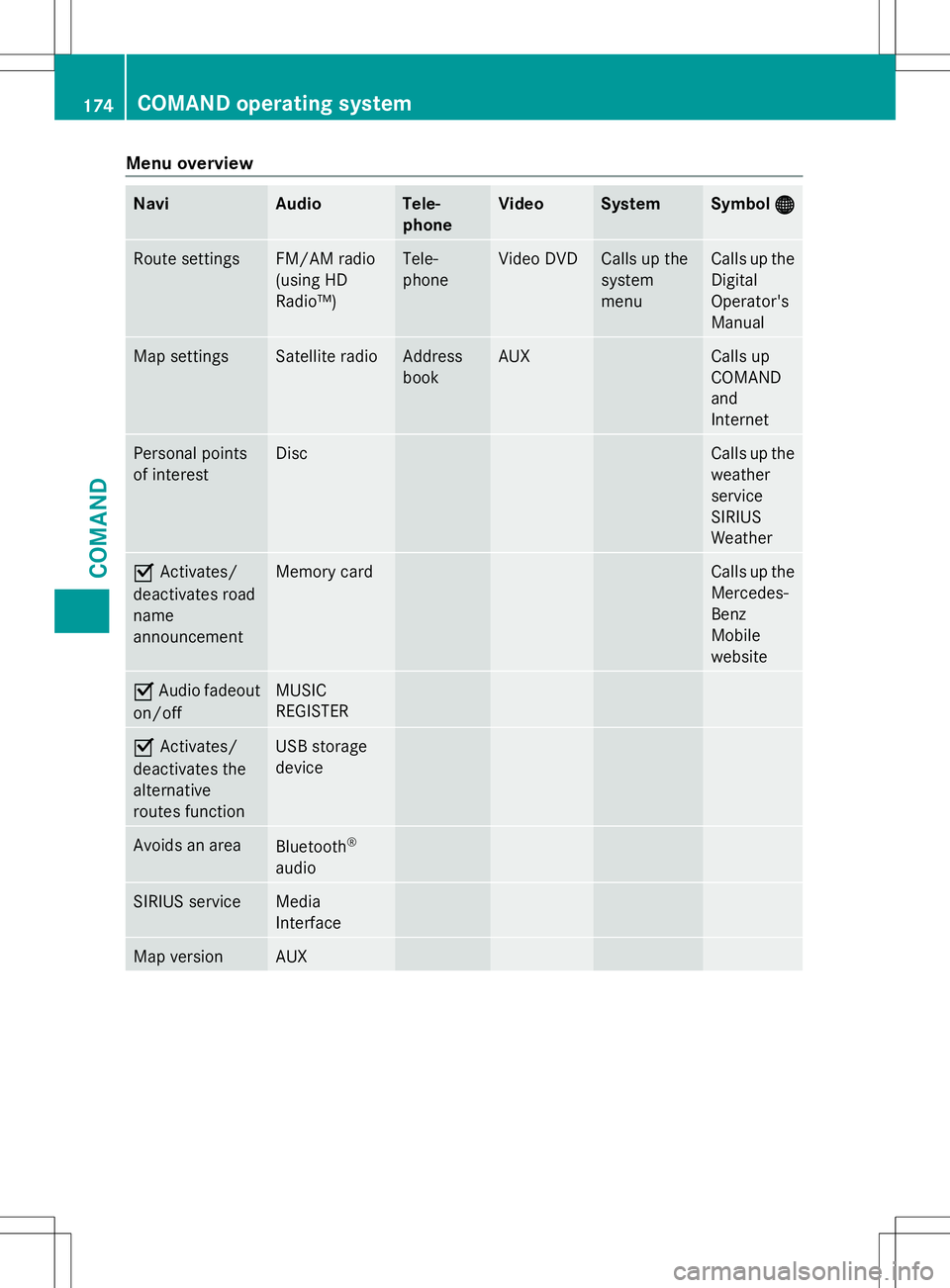
Menu overview
Navi Audio Tele-
phone Video System Symbol
® ® Route settings FM/AM radio
(using HD
Radio™) Tele-
phone Video DVD Calls up the
system
menu Calls up the
Digital
Operator's
Manual
Map settings Satellite radio Address
book AUX Calls up
COMAND
and
Internet
Personal points
of interest Disc Calls up the
weather
service
SIRIUS
Weather
O
Activates/
deactivates road
name
announcement Memory card Calls up the
Mercedes-
Benz
Mobile
website
O
Audio fadeout
on/off MUSIC
REGISTER
O
Activates/
deactivates the
alternative
routes function USB storage
device
Avoids an area
Bluetooth
®
audio SIRIUS service Media
Interface
Map version AUX174
COMAND operating systemCOMAND
Page 178 of 272
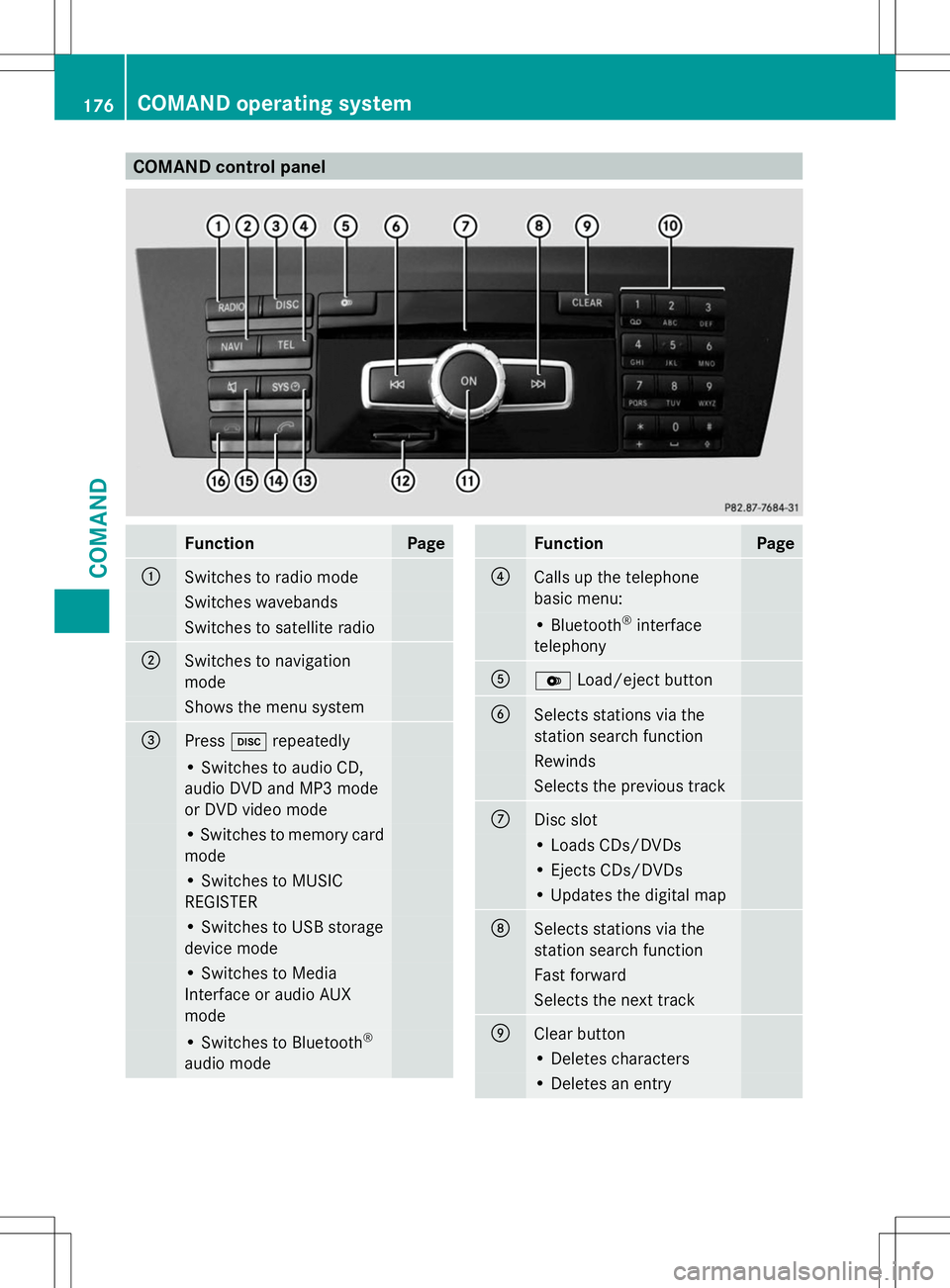
COMAND control panel
Function Page
:
Switches to radio mode
Switches wavebands
Switches to satellite radio
;
Switches to navigation
mode
Shows the menu system
=
Press
hrepeatedly • Switches to audio CD,
audio DVD and MP3 mode
or DVD video mode
• Switches to memory card
mode
• Switches to MUSIC
REGISTER
• Switches to USB storage
device mode
• Switches to Media
Interface or audio AUX
mode
• Switches to Bluetooth
®
audio mode Function Page
?
Calls up the telephone
basic menu:
• Bluetooth
®
interface
telephony A
V
Load/eject button B
Selects stations via the
station search function
Rewinds
Selects the previous track
C
Disc slot
• Loads CDs/DVDs
• Ejects CDs/DVDs
• Updates the digital map
D
Selects stations via the
station search function
Fast forward
Selects the next track
E
Clear button
• Deletes characters
• Deletes an entry176
COMAND operating systemCOMAND