radio MERCEDES-BENZ G-CLASS SUV 2014 Owners Manual
[x] Cancel search | Manufacturer: MERCEDES-BENZ, Model Year: 2014, Model line: G-CLASS SUV, Model: MERCEDES-BENZ G-CLASS SUV 2014Pages: 272, PDF Size: 39.13 MB
Page 16 of 272
Radio
Selecting a station .........................144
see separate operating instructions
Radio mode
see also Digital Operator's Manual 170
Radio-wave reception/
transmission in the vehicle
Declaration of conformity ................26
Reading lamp ....................................... 84
Rear bench seat Folding forward .............................. 187
Rear compartment
Setting the air vents ........................94
Rear door
Closing ............................................ .71
Display message ............................ 157
Important safety notes ....................70
Opening ........................................... 70
Rear fog lamp
Display message ............................ 144
Switching on/off .............................. 83
Rear lamps
see Lights
Rear seat bench
Folding into an upright position .....187
Rear seats
Display message ............................ 144
Rear view camera
Cleaning instructions .....................206
Function/notes ............................. 128
Rear view camera (cleaning
instructions) ...................................... 210
Rear-view mirror Anti-glare (manual) ..........................79
Dipping (automatic) .........................79
Rear window defroster .......................94
Problem (malfunction) .....................94
Switching on/off .............................. 94
Rear window wiper
Switching on/off .............................. 88
Refueling
Fuel gauge ..................................... 142
Important safety notes ..................101
Refueling proces s.......................... 102
see Fuel Remote control
Programming (garage door
opener) .................................. 189, 194
Replacing bulbs
Important safety notes ....................85
Overview of bulb type s.................... 86
Reserve (fuel tank)
see Fuel
Reserve fuel
Display message ............................ 144
Residual heat
Switching on/off .............................. 94
Restraint systems
see SRS (Supplemental Restraint
System)
Reversing lamps (display
message) ............................................ 144
Roof Display message ............................ 144
Roof lining and carpets (cleaning
guidelines) ......................................... 210
Route (navigation) see Route guidance (navigation)
Route guidance
see also Digital Operator's Manual 170
Route guidance (navigation) ............144 S
Safety Children in the vehicle .....................53
Child restraint systems ....................53
Safety system
see Driving safety systems
SD memory card
see also Digital Operator's Manual 170
Search & Send
see also Digital Operator's Manual 170
Seat
Folding the front seat backrests
forwards (EASY-ENTRY feature) .......78
Seat backrest
Folding back .................................. 186
Seat belts
Adjusting the height ......................... 51
Belt force limiters ............................ 52
Cleaning ......................................... 210
Correct usage .................................. 4814
Index
Page 28 of 272
accessories that have been specifically
approved for your vehicle.
Genuine Mercedes-Benz parts are subject to
strict quality control. Every part has been
specifically developed, manufactured or
selected for and adapted to Mercedes-Benz
vehicles. Only genuine Mercedes-Benz parts
should therefore be used.
More than 300,000 different genuine
Mercedes-Benz parts are available for
Mercedes-Benz models.
All authorized Mercedes-Benz Centers
maintain a supply of genuine Mercedes-Benz
parts for necessary service and repair work.
In addition, strategically located parts
delivery centers provide quick and reliable
parts service.
Always specify the vehicle identification
number (VIN) when ordering genuine
Mercedes-Benz parts (Y page 258).Operator's Manual
Vehicle equipment
This Operator's Manual describes all models
and all standard and optional equipment of
your vehicle available at the time of going to
print. Country-specific differences are
possible. Please note that your vehicle may
not be equipped with all features described.
This also applies to safety-related systems
and functions. The equipment in your vehicle
may therefore differ from some of the
descriptions or illustrations.
The original purchase agreement lists all
systems installed in your vehicle.
Contact an authorized Mercedes-Benz Center
if you have any questions about equipment or
operation.
The Operator's Manual and the Maintenance
Booklet are important documents and should
be kept in the vehicle. Operating safety
Important safety notes
G
WARNING
If you do not have the prescribed service/
maintenance work or any required repairs
carried out, this can result in malfunctions or
system failures. There is a risk of an accident.
Always have the prescribed service/
maintenance work as well as any required
repairs carried out at a qualified specialist
workshop. G
WARNING
Modifications to electronic components, their
software as well as wiring can impair their
function and/or the function of other
networked components. In particular,
systems relevant to safety could also be
affected. As a result, these may no longer
function as intended and/or jeopardize the
operating safety of the vehicle. There is an
increased risk of an accident and injury.
Never tamper with the wiring as well as
electronic components or their software. You
should have all work to electrical and
electronic equipment carried out at a qualified
specialist workshop.
Tampering with the electronic components,
their software or wiring can render the
operating permit invalid. Declarations of conformity
Vehicle components which receive
and/or transmit radio waves USA:
"The wireless devices of this vehicle
comply with Part 15 of the FCC Rules.
Operation is subject to the following two
conditions: 1) These devices may not cause
harmful interference, and 2) These devices
must accept any interference received,
including interference that may cause
undesired operation. Changes or
modifications not expressly approved by the 26
Introduction
Page 130 of 272
Problems with PARKTRONIC
Problem Possible causes/consequences and
M
MSolutions Only the red segments
in the PARKTRONIC
warning displays are lit.
You also hear a warning
tone for approximately
two seconds.
PARKTRONIC is
deactivated after a few
seconds, and the
indicator lamp in the
PARKTRONIC button
lights up. PARKTRONIC has malfunctioned and has switched off.
X
If problems persist, have PARKTRONIC checked at a qualified
specialist workshop. Only the red segments
in the PARKTRONIC
warning displays are lit.
PARKTRONIC is
deactivated after a few
seconds. The PARKTRONIC sensors are dirty or there is interference.
X
Clean the PARKTRONIC sensors (Y page 206).
X Switch the ignition back on. The problem may be caused by an external source of radio or
ultrasound waves.
X
See if PARKTRONIC functions in a different location. Rear view camera
Important safety notes The rear view camera is only an aid. It is not
a replacement for your attention to your
immediate surroundings. You are always
responsible for safe maneuvering and
parking. When maneuvering or parking, make
sure that there are no persons, animals or
objects in the area in which you are
maneuvering.
Under the following circumstances, the rear
view camera will not function, or will function
in a limited manner:
R the rear door is open
R in heavy rain, snow or fog
R at night or in very dark places
R if the camera is exposed to very bright light
R if the area is lit by fluorescent light or LED
lighting (the display may flicker) R
if there is a sudden change in temperature,
e.g. when driving into a heated garage in
winter
R if the camera lens is dirty or obstructed
R if the rear of your vehicle is damaged. In
this event, have the camera position and
setting checked at a qualified specialist
workshop Mercedes-Benz recommends
that you use an authorized Mercedes-Benz
Center for this purpose 128
Driving systemsDriving and parking
Page 172 of 272
Useful information
i These operating instructions describe all
the standard and optional equipment of
your COMAND system, as available at the
time of going to print. Country-specific
differences are possible. Please note that
your COMAND system may not be
equipped with all the features described.
This also applies to safety-related systems
and functions.
i Read the information on qualified
specialist workshops: (Y page 27).General notes
The COMAND section in these operating
instructions describes the basic principles for
operating your COMAND and the online and
Internet functions. More information can be
found in the Digital Operator's Manual.
The COMAND section in these operating
instructions describes the basic principles for
operating your COMAND. More information
can be found in the Digital Operator's Manual. Important safety notes
G
WARNING
Making alterations to electronic components
can cause malfunctions.
Radio, satellite radio, amplifier, DVD changer,
navigation module, phone and voice control
are networked. If one component is not
functional or if it has been incorrectly
removed/replaced, this could impair the
operation of other components.
This could seriously jeopardize the
operational safety of your vehicle.
We recommend that you always have
maintenance work on electronic components
carried out at an authorized Mercedes-Benz
Center. G
WARNING
In order to avoid distraction which could lead
to an accident, the driver should only enter
system settings with the vehicle at a standstill
and operate the system only when road,
weather and traffic conditions permit.
Bear in mind that at a speed of only 30 mph
(approximately 50 km/h), the vehicle covers
a distance of 44 feet (approximately 14 m) per
second.
COMAND delivers information to simplify
your choice of route and guide you
comfortably and safely to your destination.
For safety reasons, we recommend that you
bring your vehicle to a standstill, paying
attention to road and traffic conditions,
before making or accepting a telephone call
or viewing navigation maps, instructions or
downloaded information on the COMAND
screen. G
WARNING
While the navigation system provides
directional assistance, the driver must remain
focused on safe driving behavior, especially
attention to traffic and street signs, and
should utilize the system's audio cues while
driving.
The navigation system does not supply any
information on stop signs, yield signs, traffic
regulations or traffic safety rules. Their
observance always remains in the driver's
personal responsibility. DVD maps do not
cover all areas nor all routes within an area. G
WARNING
This equipment complies with FCC radiation
exposure limits set forth for uncontrolled
equipment and meets the FCC radio
frequency (RF) Exposure Guidelines in
Supplement C to OET65.
This equipment has very low levels of RF
energy that is deemed to comply without
maximum permissive exposure evaluation
(MPE). But it is desirable that it should be
installed and operated with at least 8inches 170
Important safety notesCOMAND
Page 173 of 272
(20 cm) and more between the radiator and a
person's body (excluding extremities: hands,
wrists, feet and legs.) Declarations of conformity
Vehicle components which receive
and/or transmit radio waves
i USA only: The wireless devices of this
vehicle comply with Part 15 of the FCC
Rules. Operation is subject to the following
two conditions:
1. These devices may not cause harmful
interference, and
2. These devices must accept any
interference received, including
interference that may cause undesired
operation.
Changes or modifications not expressly
approved by the party responsible for
compliance could void the user's authority
to operate the equipment.
i Canada only: the wireless devices of this
vehicle comply with Industry Canada
license-exempt RSS standard(s). Operation
is subject to the following two conditions:
1. These devices may not cause harmful
interference, and
2. These devices must accept any
interference received, including
interference that may cause undesired
operation. Information on copyright
General information
Information on licenses for free and Open
Source software used in your vehicle and in
the electronic components can be found on
this website: http://www.mercedes-
benz.com/opensource . Registered trademarks
Registered trademarks:
R Bluetooth ®
is a registered trademark of
Bluetooth ®
SIG Inc.
R DTS is a registered trademark of DTS, Inc.
R Dolby and MLP are registered trademarks
of DOLBY Laboratories.
R BabySmart™, ESP ®
and PRE-SAFE ®
are
registered trademarks of Daimler AG.
R HomeLink ®
is a registered trademark of
Prince.
R iPod ®
and iTunes ®
are registered
trademarks of Apple Inc.
R Logic7 ®
is a registered trademark of
Harman International Industries.
R Microsoft ®
and Windows media ®
are
registered trademarks of Microsoft
Corporation.
R SIRIUS is a registered trademark of Sirius
XM Radio Inc.
R HD Radio is a registered trademark of
iBiquity Digital Corporation.
R Gracenote ®
is a registered trademark of
Gracenote, Inc.
R ZAGATSurvey ®
and related brands are
registered trademarks of ZagatSurvey,
LLC. Function restrictions
For safety reasons, some COMAND functions
are restricted or unavailable while the vehicle
is in motion. You will notice this, for example
because either you will not be able to select
certain menu items or COMAND will display
a message to this effect. Function restrictions
171COMAND Z
Page 175 of 272
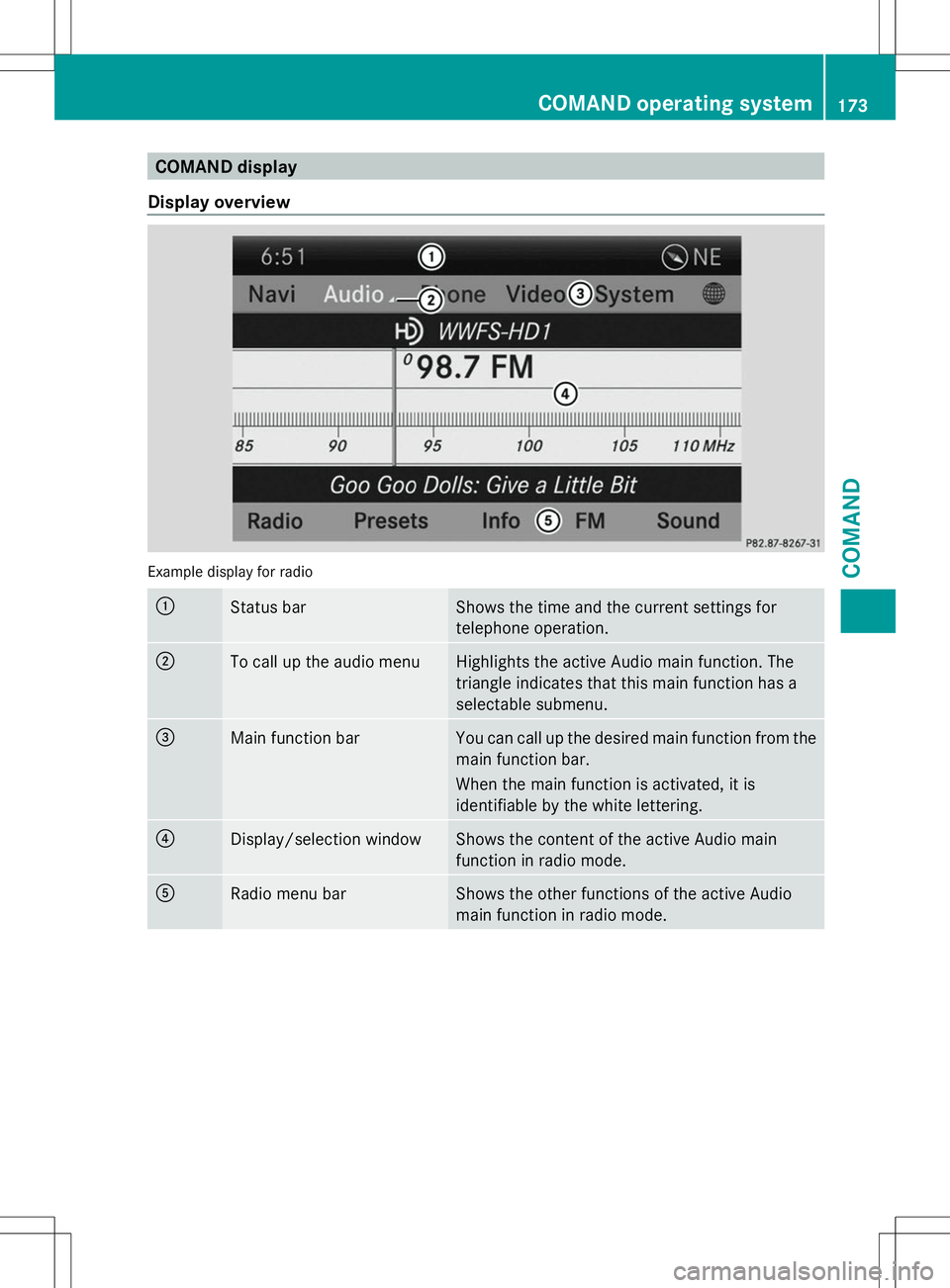
COMAND display
Display overview Example display for radio
:
Status bar Shows the time and the current settings for
telephone operation.
;
To call up the audio menu Highlights the active Audio main function. The
triangle indicates that this main function has a
selectable submenu.
=
Main function bar You can call up the desired main function from the
main function bar.
When the main function is activated, it is
identifiable by the white lettering.
?
Display/selection window Shows the content of the active Audio main
function in radio mode.
A
Radio menu bar Shows the other functions of the active Audio
main function in radio mode. COMAND operating system
173COMAND Z
Page 176 of 272
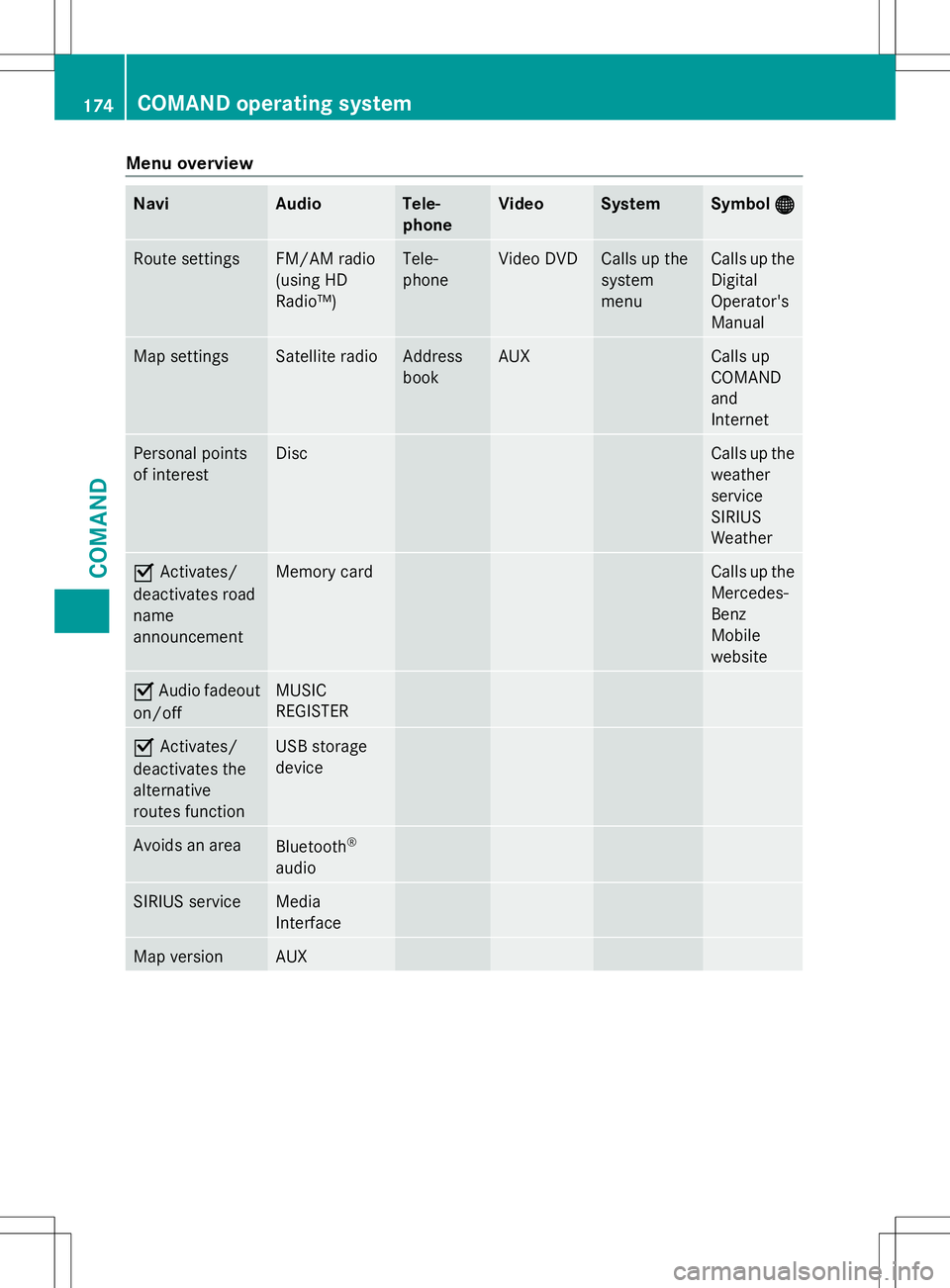
Menu overview
Navi Audio Tele-
phone Video System Symbol
® ® Route settings FM/AM radio
(using HD
Radio™) Tele-
phone Video DVD Calls up the
system
menu Calls up the
Digital
Operator's
Manual
Map settings Satellite radio Address
book AUX Calls up
COMAND
and
Internet
Personal points
of interest Disc Calls up the
weather
service
SIRIUS
Weather
O
Activates/
deactivates road
name
announcement Memory card Calls up the
Mercedes-
Benz
Mobile
website
O
Audio fadeout
on/off MUSIC
REGISTER
O
Activates/
deactivates the
alternative
routes function USB storage
device
Avoids an area
Bluetooth
®
audio SIRIUS service Media
Interface
Map version AUX174
COMAND operating systemCOMAND
Page 178 of 272
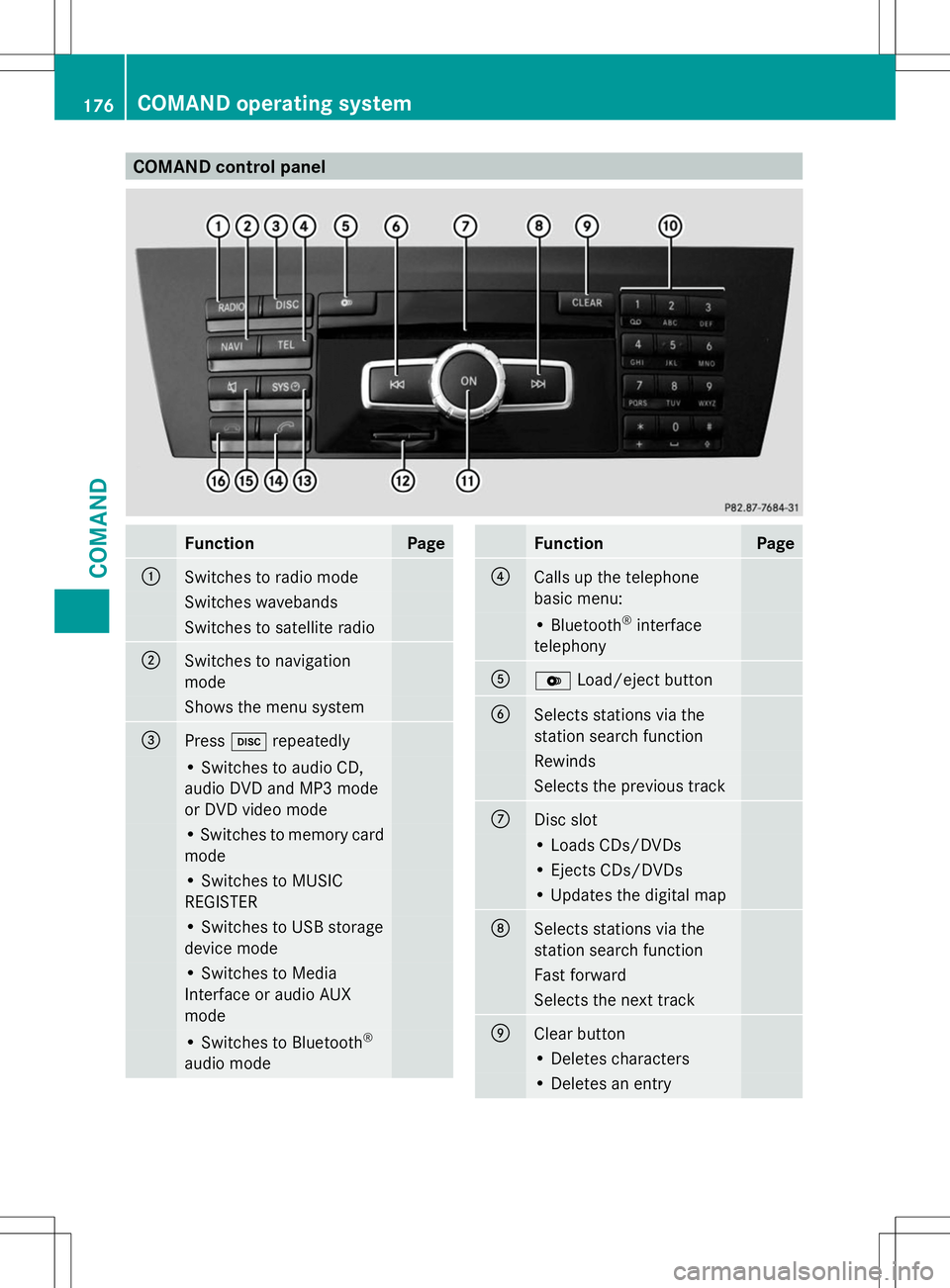
COMAND control panel
Function Page
:
Switches to radio mode
Switches wavebands
Switches to satellite radio
;
Switches to navigation
mode
Shows the menu system
=
Press
hrepeatedly • Switches to audio CD,
audio DVD and MP3 mode
or DVD video mode
• Switches to memory card
mode
• Switches to MUSIC
REGISTER
• Switches to USB storage
device mode
• Switches to Media
Interface or audio AUX
mode
• Switches to Bluetooth
®
audio mode Function Page
?
Calls up the telephone
basic menu:
• Bluetooth
®
interface
telephony A
V
Load/eject button B
Selects stations via the
station search function
Rewinds
Selects the previous track
C
Disc slot
• Loads CDs/DVDs
• Ejects CDs/DVDs
• Updates the digital map
D
Selects stations via the
station search function
Fast forward
Selects the next track
E
Clear button
• Deletes characters
• Deletes an entry176
COMAND operating systemCOMAND
Page 180 of 272
The COMAND controller can be:
R
pressed briefly or pressed and held W
R turned clockwise or counter-clockwise
cVd
R slid left or right XVY
R slid forwards or backwards ZVÆ
R slid diagonally aVb
Example of operation In the instructions, operating sequences are
described as follows:
X Press the $button.
Radio mode is activated.
X Select Radio
Radio by sliding VÆand turning
cVd the COMAND controller and press
W to confirm.
X Confirm Station List Station List by pressingW.
The station list appears. Buttons on the COMAND controller
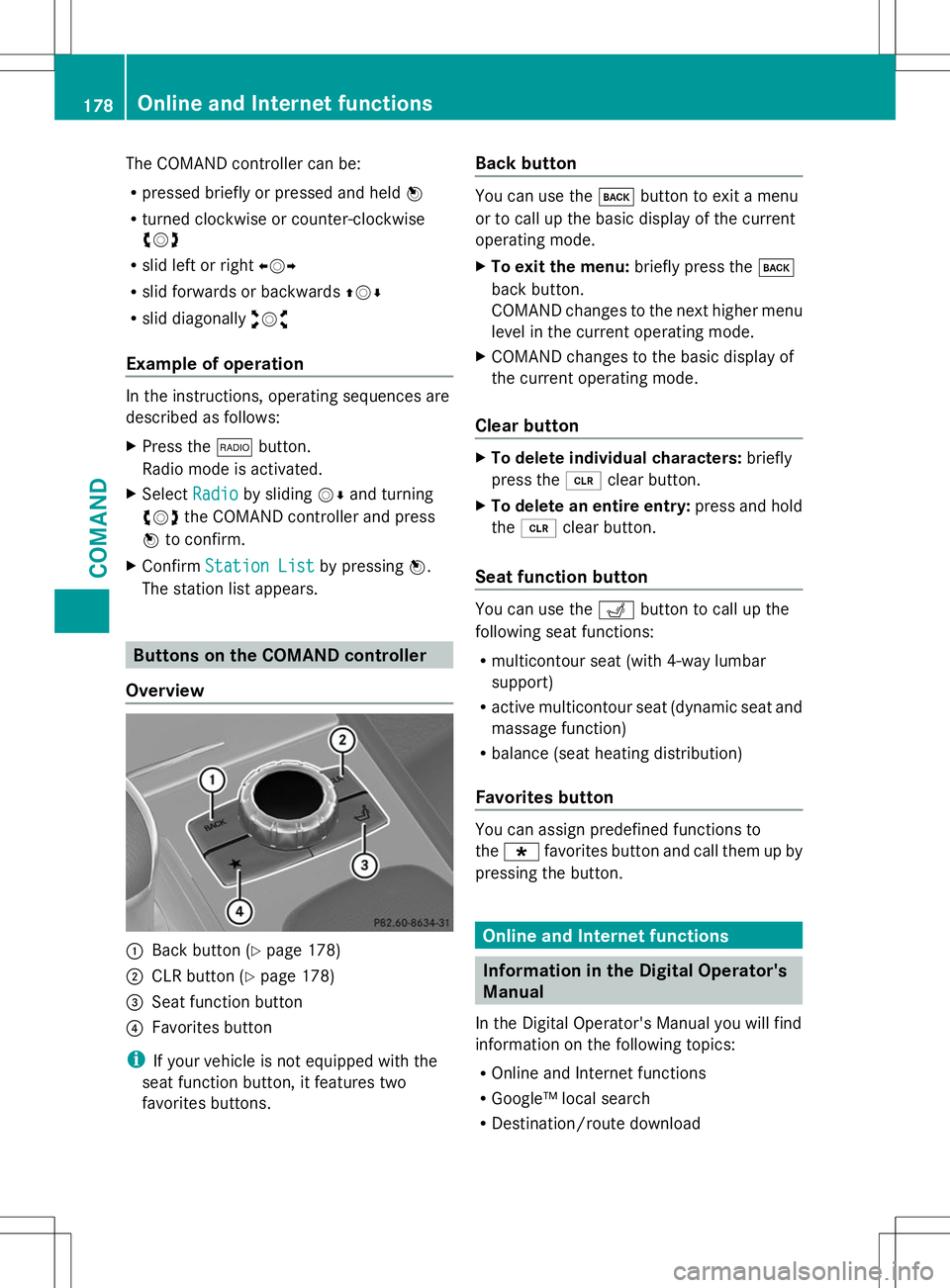
Overview :
Back button (Y page 178)
; CLR button (Y page 178)
= Seat function button
? Favorites button
i If your vehicle is not equipped with the
seat function button, it features two
favorites buttons. Back button You can use the
kbutton to exit a menu
or to call up the basic display of the current
operating mode.
X To exit the menu: briefly press thek
back button.
COMAND changes to the next higher menu
level in the current operating mode.
X COMAND changes to the basic display of
the current operating mode.
Clear button X
To delete individual characters: briefly
press the 2clear button.
X To delete an entire entry: press and hold
the 2 clear button.
Seat function button You can use the
Tbutton to call up the
following seat functions:
R multicontour seat (with 4-way lumbar
support)
R active multicontour seat (dynamic seat and
massage function)
R balance (seat heating distribution)
Favorites button You can assign predefined functions to
the
; favorites button and call them up by
pressing the button. Online and Internet functions
Information in the Digital Operator's
Manual
In the Digital Operator's Manual you will find
information on the following topics:
R Online and Internet functions
R Google™ local search
R Destination/route download 178
Online and Internet functionsCOMAND
Page 198 of 272
objects are present within the sweep of the
door or gate.
Observe the safety notes when performing
the rolling code synchronization
(Y page 193).
X Turn the SmartKey to position
2(Y page 97) in the ignition lock.
X Press the programming button of the door
or gate drive (see the door or gate drive
operating instructions, e.g. under
"Programming of additional remote
controls").
i Usually, you now have 30 seconds to
initiate the next step.
X Press previously programmed button ;,
= or? of the integrated garage door
opener until the door closes.
The rolling code synchronization is then
complete.
Notes on programming the remote
control
Canadian radio frequency laws require a
"break" (or interruption) of the transmission
signals after broadcasting for a few seconds.
Therefore, these signals may not last long
enough for the integrated remote control to
recognize the signal during programming.
Comparable with Canadian law, American
garage door openers also have a built-in
"interruption".
If you live in Canada or have difficulties
programming the garage door opener
(regardless of where you live) when using the
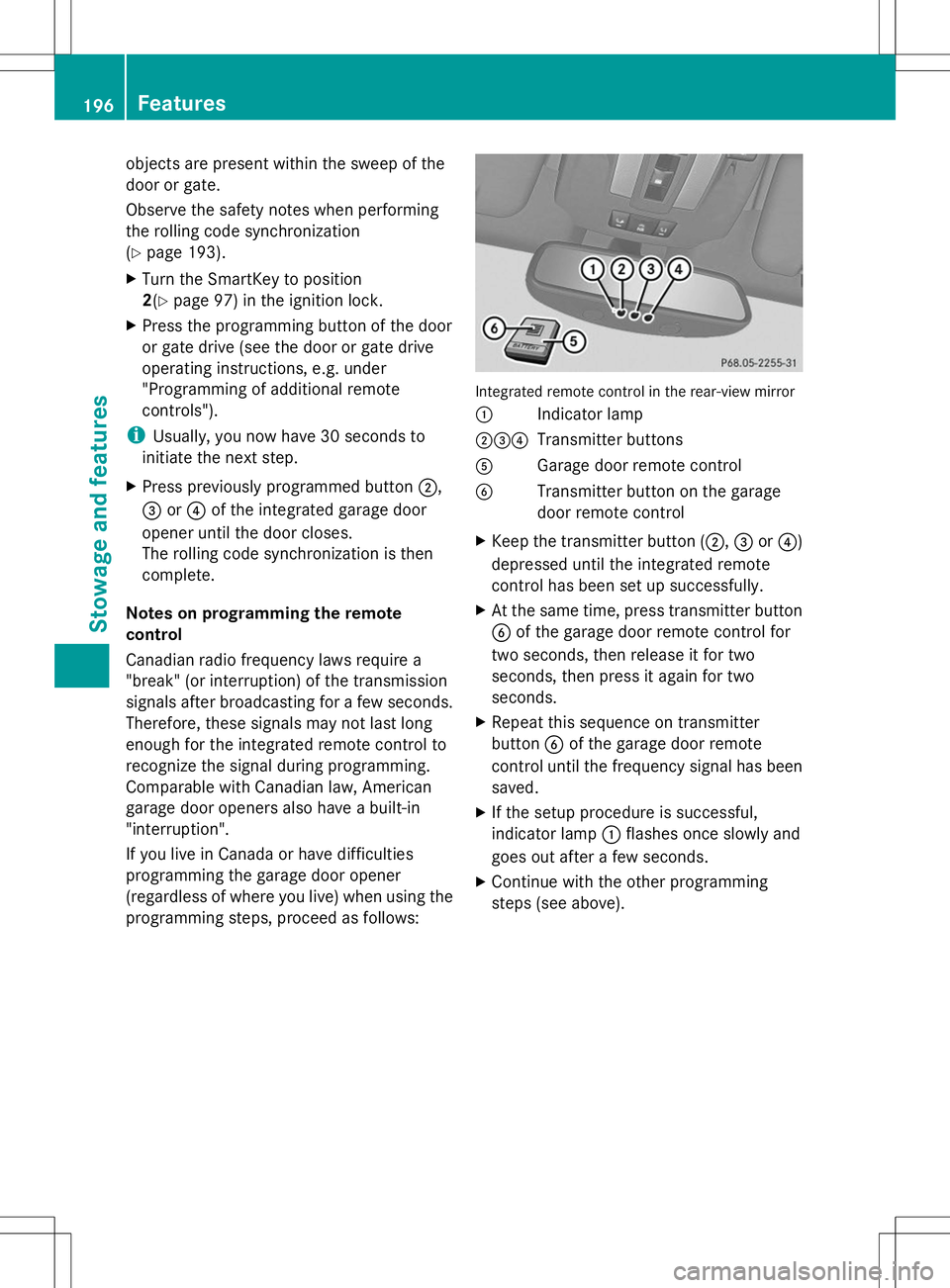
programming steps, proceed as follows: Integrated remote control in the rear-view mirror
:
Indicator lamp
;=? Transmitter buttons
A Garage door remote control
B Transmitter button on the garage
door remote control
X Keep the transmitter button (;, =or?)
depressed until the integrated remote
control has been set up successfully.
X At the same time, press transmitter button
B of the garage door remote control for
two seconds, then release it for two
seconds, then press it again for two
seconds.
X Repeat this sequence on transmitter
button Bof the garage door remote
control until the frequency signal has been
saved.
X If the setup procedure is successful,
indicator lamp :flashes once slowly and
goes out after a few seconds.
X Continue with the other programming
steps (see above). 196
FeaturesStowage and features