warning light MERCEDES-BENZ G-CLASS SUV 2014 Owners Manual
[x] Cancel search | Manufacturer: MERCEDES-BENZ, Model Year: 2014, Model line: G-CLASS SUV, Model: MERCEDES-BENZ G-CLASS SUV 2014Pages: 272, PDF Size: 39.13 MB
Page 6 of 272
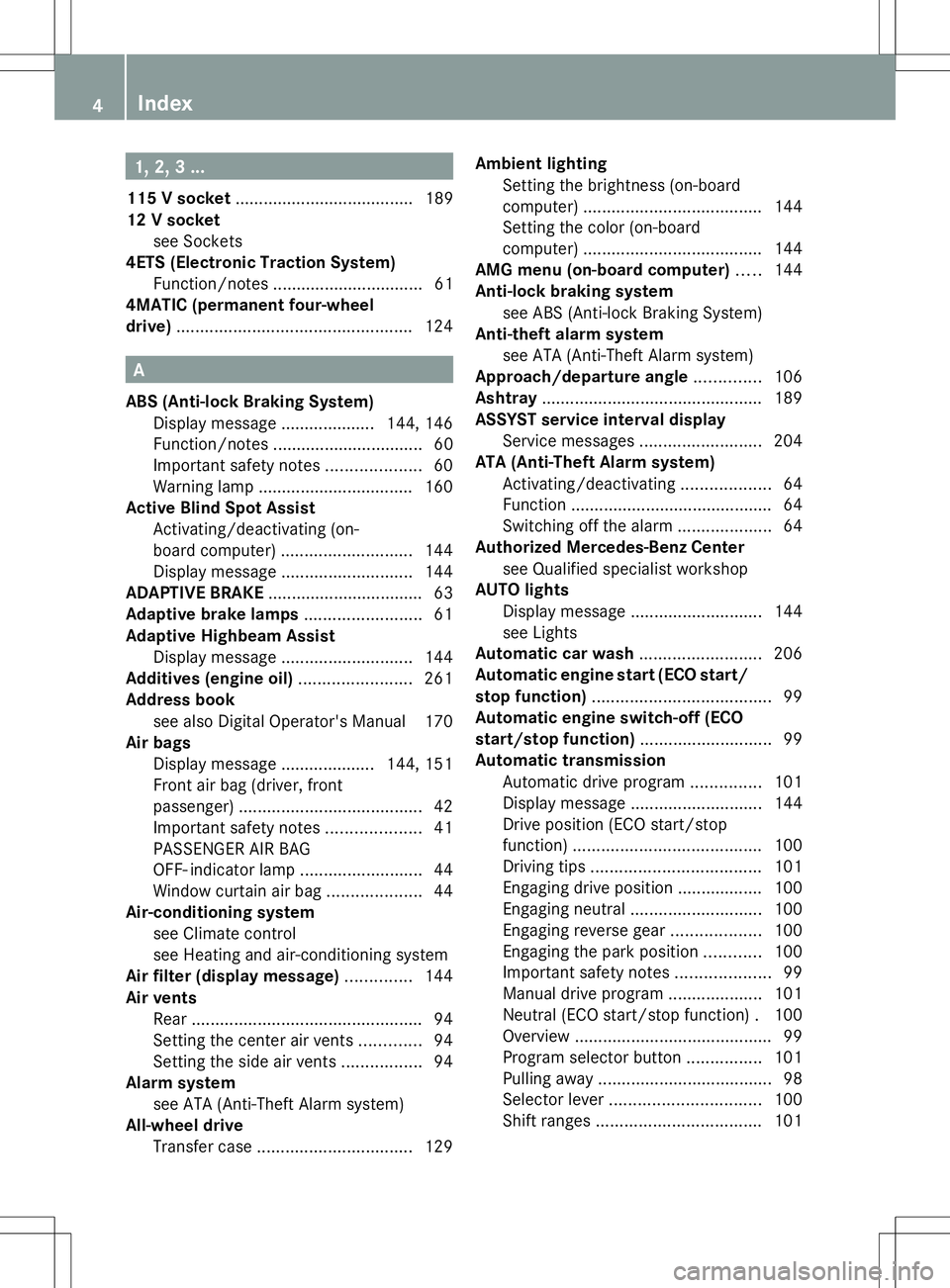
1, 2, 3 ...
115 V socket ...................................... 189
12 V socket see Sockets
4ETS (Electronic Traction System)
Function/notes ................................ 61
4MATIC (permanent four-wheel
drive) .................................................. 124A
ABS (Anti-lock Braking System) Display message .................... 144, 146
Function/notes ................................ 60
Important safety notes ....................60
Warning lamp ................................. 160
Active Blind Spot Assist
Activating/deactivating (on-
board computer) ............................ 144
Display message ............................ 144
ADAPTIVE BRAKE ................................. 63
Adaptive brake lamps .........................61
Adaptive Highbeam Assist Display message ............................ 144
Additives (engine oil) ........................261
Address book see also Digital Operator's Manual 170
Air bags
Display message .................... 144, 151
Front air bag (driver, front
passenger) ....................................... 42
Important safety notes ....................41
PASSENGER AIR BAG
OFF- indicator lamp ..........................44
Window curtain air bag ....................44
Air-conditioning system
see Climate control
see Heating and air-conditioning system
Air filter (display message) ..............144
Air vents Rear ................................................. 94
Setting the center air vents .............94
Setting the side air vents .................94
Alarm system
see ATA (Anti-Theft Alarm system)
All-wheel drive
Transfer case ................................. 129Ambient lighting
Setting the brightness (on-board
computer) ...................................... 144
Setting the color (on-board
computer) ...................................... 144
AMG menu (on-board computer) .....144
Anti-lock braking system see ABS (Anti-lock Braking System)
Anti-theft alarm system
see ATA (Anti-Theft Alarm system)
Approach/departure angle ..............106
Ashtray ............................................... 189
ASSYST service interval display Service messages ..........................204
ATA (Anti-Theft Alarm system)
Activating/deactivating ...................64
Function .......................................... .64
Switching off the alarm ....................64
Authorized Mercedes-Benz Center
see Qualified specialist workshop
AUTO lights
Display message ............................ 144
see Lights
Automatic car wash ..........................206
Automatic engine start (ECO start/
stop function) ...................................... 99
Automatic engine switch-off (ECO
start/stop function) ............................99
Automatic transmission Automatic drive program ...............101
Display message ............................ 144
Drive position (ECO start/stop
function) ........................................ 100
Driving tips .................................... 101
Engaging drive position .................. 100
Engaging neutral ............................ 100
Engaging reverse gear ...................100
Engaging the park position ............100
Important safety notes ....................99
Manual drive program ....................101
Neutral (ECO start/stop function) .100
Overview .......................................... 99
Program selector button ................101
Pulling away ..................................... 98
Selector lever ................................ 100
Shift ranges ................................... 1014
Index
Page 9 of 272
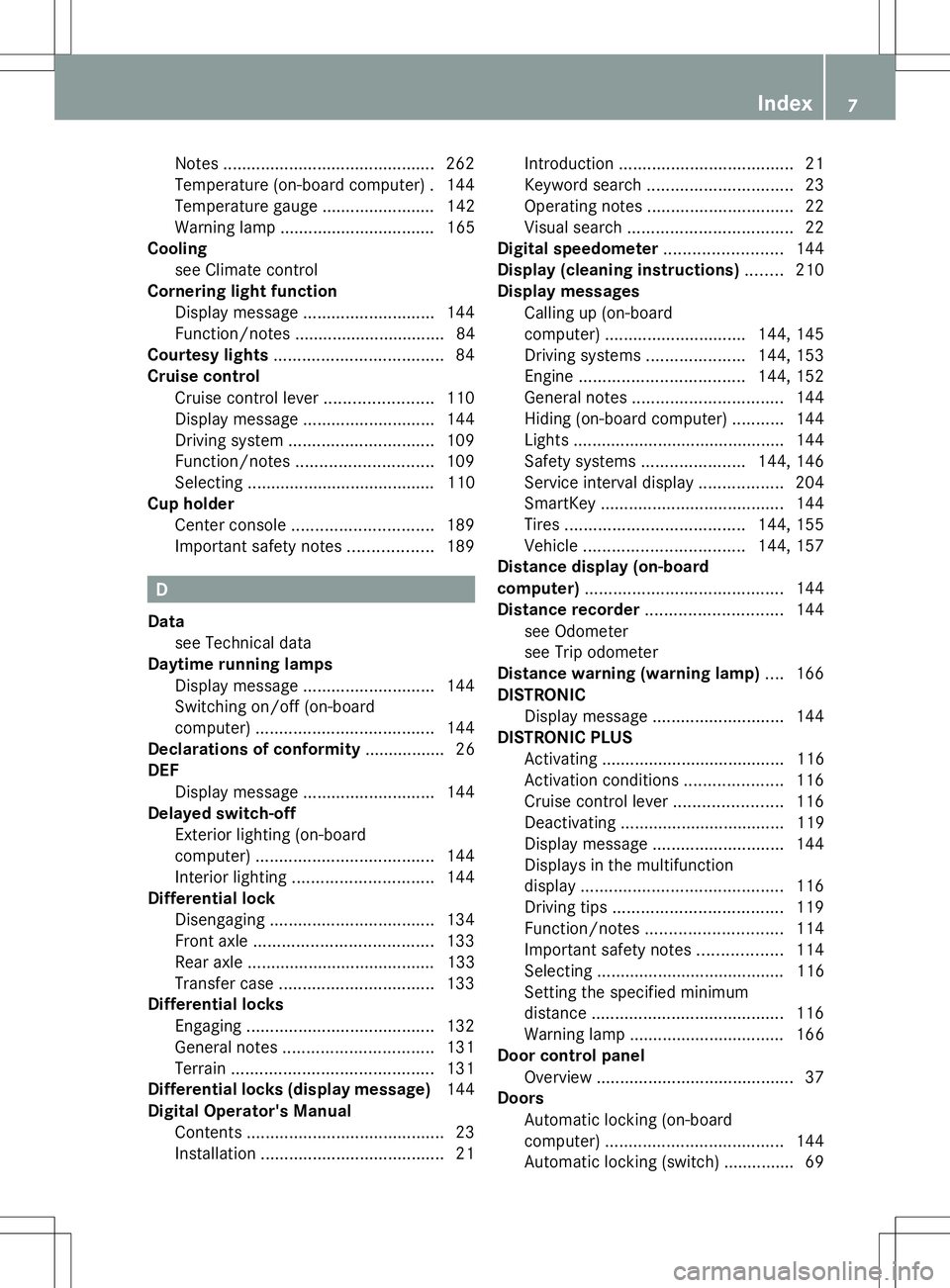
Notes
............................................. 262
Temperature (on-board computer) .144
Temperature gauge ........................ 142
Warning lamp ................................. 165
Cooling
see Climate control
Cornering light function
Display message ............................ 144
Function/notes ................................ 84
Courtesy lights .................................... 84
Cruise control Cruise control lever .......................110
Display message ............................ 144
Driving system ............................... 109
Function/notes ............................. 109
Selecting ........................................ 110
Cup holder
Center console .............................. 189
Important safety notes ..................189 D
Data see Technical data
Daytime running lamps
Display message ............................ 144
Switching on/off (on-board
computer) ...................................... 144
Declarations of conformity ................. 26
DEF Display message ............................ 144
Delayed switch-off
Exterior lighting (on-board
computer) ...................................... 144
Interior lighting .............................. 144
Differential lock
Disengaging ................................... 134
Front axle ...................................... 133
Rear axle ........................................ 133
Transfer case ................................. 133
Differential locks
Engaging ........................................ 132
General notes ................................ 131
Terrain ........................................... 131
Differential locks (display message) 144
Digital Operator's Manual Contents .......................................... 23
Installation ....................................... 21Introduction
..................................... 21
Keyword search ............................... 23
Operating notes ............................... 22
Visual search ................................... 22
Digital speedometer .........................144
Display (cleaning instructions) ........210
Display messages Calling up (on-board
computer) .............................. 144, 145
Driving systems .....................144, 153
Engine ................................... 144, 152
General notes ................................ 144
Hiding (on-board computer) ...........144
Lights ............................................ .144
Safety systems ...................... 144, 146
Service interval displa y.................. 204
SmartKey ....................................... 144
Tires ...................................... 144, 155
Vehicle .................................. 144, 157
Distance display (on-board
computer) .......................................... 144
Distance recorder ............................. 144
see Odometer
see Trip odometer
Distance warning (warning lamp) ....166
DISTRONIC Display message ............................ 144
DISTRONIC PLUS
Activating ....................................... 116
Activation conditions .....................116
Cruise control lever .......................116
Deactivating ................................... 119
Display message ............................ 144
Displays in the multifunction
displa y........................................... 116
Driving tips .................................... 119
Function/notes ............................. 114
Important safety notes ..................114
Selecting ........................................ 116
Setting the specified minimum
distance ......................................... 116
Warning lamp ................................. 166
Door control panel
Overview .......................................... 37
Doors
Automatic locking (on-board
computer) ...................................... 144
Automatic locking (switch) .............. .69 Index
7
Page 11 of 272
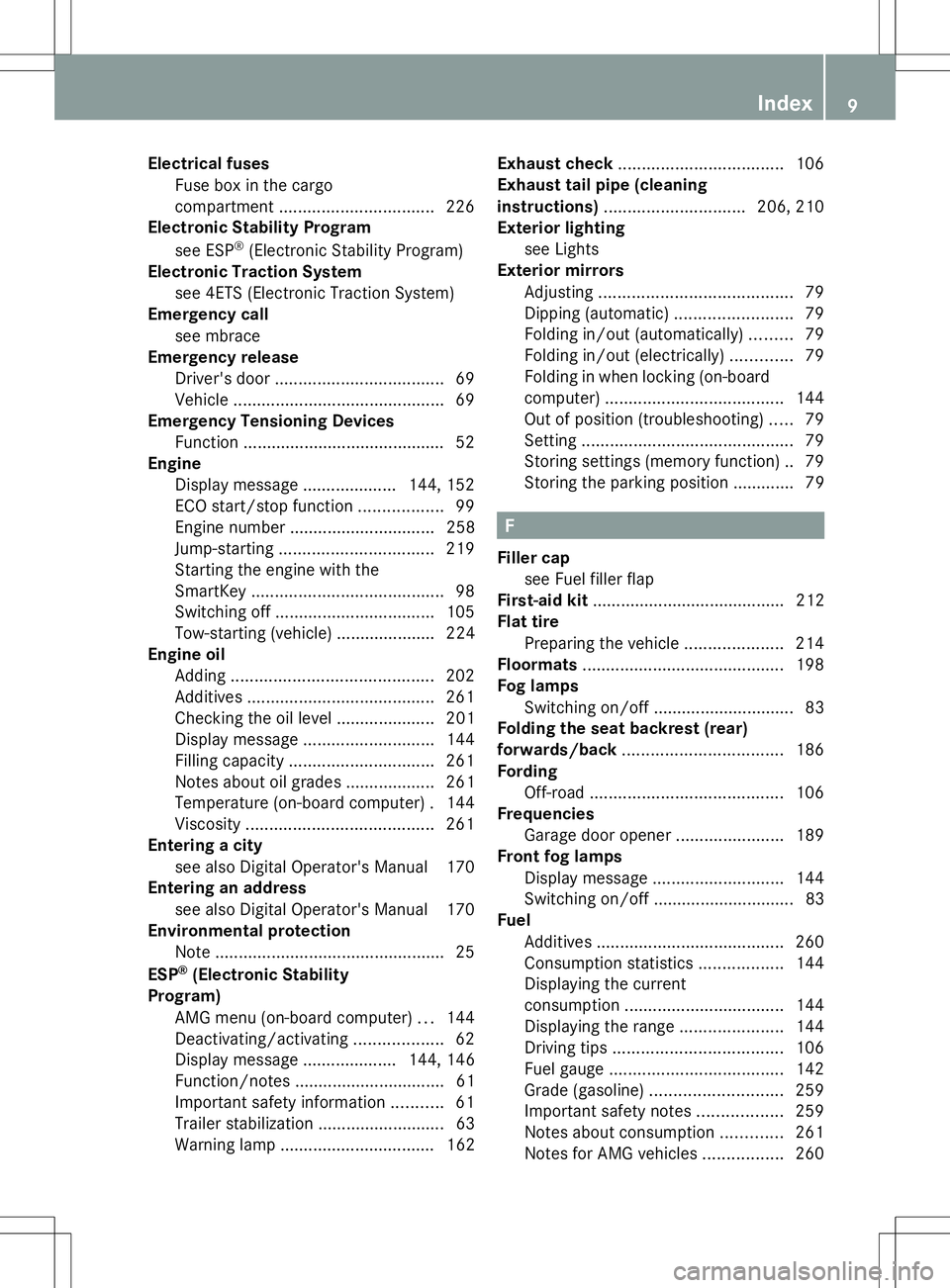
Electrical fuses
Fuse box in the cargo
compartmen t................................. 226
Electronic Stability Program
see ESP ®
(Electronic Stability Program)
Electronic Traction System
see 4ETS (Electronic Traction System)
Emergency call
see mbrace
Emergency release
Driver's door .................................... 69
Vehicle ............................................. 69
Emergency Tensioning Devices
Function .......................................... .52
Engine
Display message .................... 144, 152
ECO start/stop function ..................99
Engine number ............................... 258
Jump-starting ................................. 219
Starting the engine with the
SmartKey ......................................... 98
Switching off .................................. 105
Tow-starting (vehicle) ..................... 224
Engine oil
Adding ........................................... 202
Additives ........................................ 261
Checking the oil level ..................... 201
Display message ............................ 144
Filling capacity ............................... 261
Notes about oil grades ................... 261
Temperature (on-board computer) .144
Viscosity ........................................ 261
Entering a city
see also Digital Operator's Manual 170
Entering an address
see also Digital Operator's Manual 170
Environmental protection
Note ................................................ .25
ESP ®
(Electronic Stability
Program) AMG menu (on-board computer) ...144
Deactivating/activating ...................62
Display message .................... 144, 146
Function/notes ................................ 61
Important safety information ...........61
Trailer stabilization ........................... 63
Warning lamp ................................. 162 Exhaust check
................................... 106
Exhaust tail pipe (cleaning
instructions) .............................. 206, 210
Exterior lighting see Lights
Exterior mirrors
Adjusting ......................................... 79
Dipping (automatic) .........................79
Folding in/out (automatically). ........79
Folding in/out (electrically). ............79
Folding in when locking (on-board
computer) ...................................... 144
Out of position (troubleshooting) .....79
Setting ............................................. 79
Storing settings (memory function) .. 79
Storing the parking position ............. 79 F
Filler cap see Fuel filler flap
First-aid kit ......................................... 212
Flat tire Preparing the vehicle .....................214
Floormats ........................................... 198
Fog lamps Switching on/off .............................. 83
Folding the seat backrest (rear)
forwards/back .................................. 186
Fording Off-road ......................................... 106
Frequencies
Garage door opene r....................... 189
Front fog lamps
Display message ............................ 144
Switching on/off .............................. 83
Fuel
Additives ........................................ 260
Consumption statistics ..................144
Displaying the current
consumption .................................. 144
Displaying the range ......................144
Driving tips .................................... 106
Fuel gauge ..................................... 142
Grade (gasoline) ............................ 259
Important safety notes ..................259
Notes about consumption .............261
Notes for AMG vehicles .................260 Index
9
Page 13 of 272
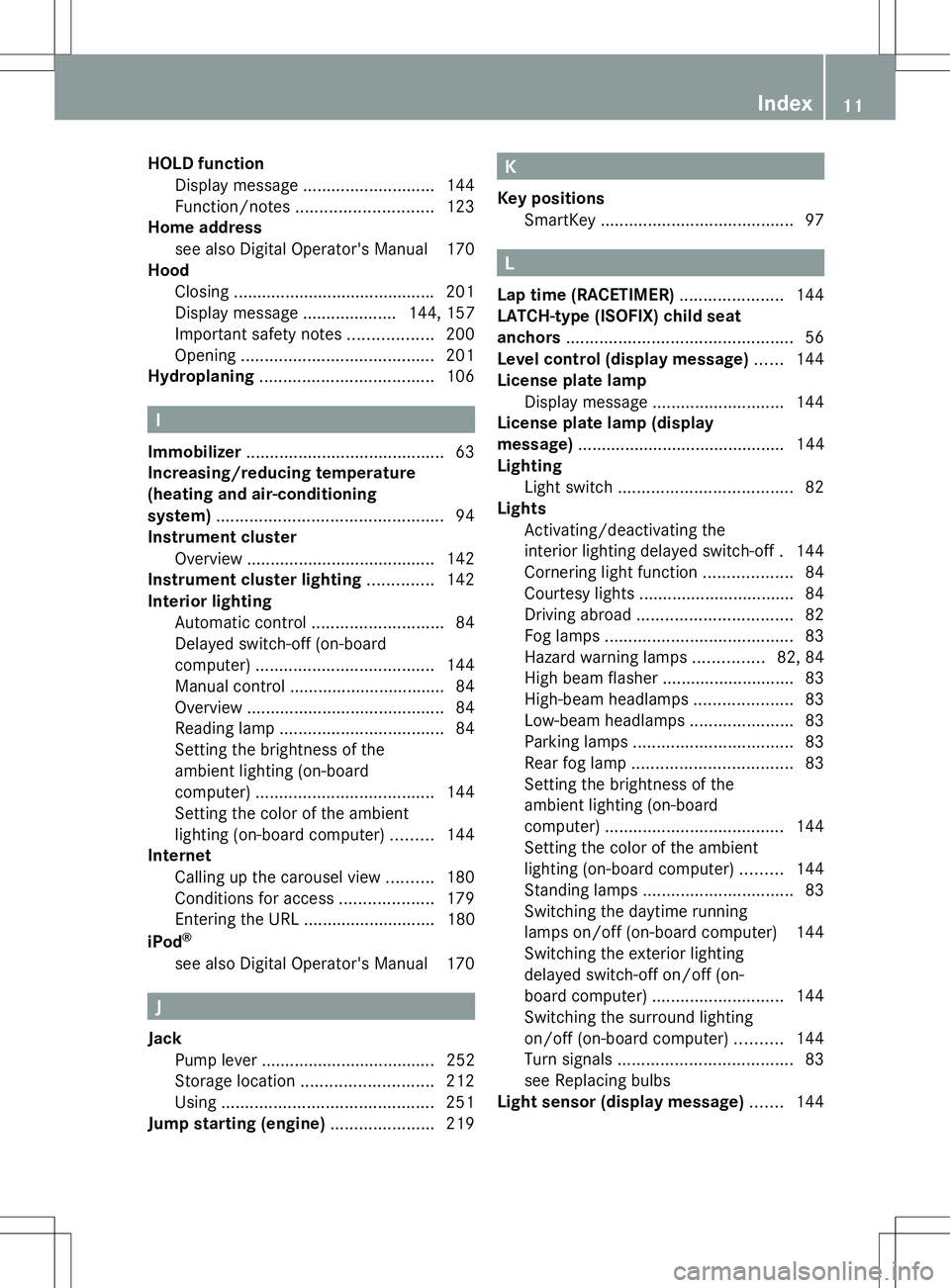
HOLD function
Display message ............................ 144
Function/notes ............................. 123
Home address
see also Digital Operator's Manual 170
Hood
Closing .......................................... .201
Display message .................... 144, 157
Important safety notes ..................200
Opening ......................................... 201
Hydroplaning ..................................... 106I
Immobilizer .......................................... 63
Increasing/reducing temperature
(heating and air-conditioning
system) ................................................ 94
Instrument cluster Overview ........................................ 142
Instrument cluster lighting ..............142
Interior lighting Automatic control ............................ 84
Delayed switch-off (on-board
computer) ...................................... 144
Manual control ................................ .84
Overview .......................................... 84
Reading lamp ................................... 84
Setting the brightness of the
ambient lighting (on-board
computer) ...................................... 144
Setting the color of the ambient
lighting (on-board computer) .........144
Internet
Calling up the carousel view ..........180
Conditions for access ....................179
Entering the URL ............................ 180
iPod ®
see also Digital Operator's Manual 170 J
Jack Pump lever ..................................... 252
Storage location ............................ 212
Using ............................................. 251
Jump starting (engine) ......................219 K
Key positions SmartKey ......................................... 97 L
Lap time (RACETIMER) ......................144
LATCH-type (ISOFIX) child seat
anchors ................................................ 56
Level control (display message) ......144
License plate lamp Display message ............................ 144
License plate lamp (display
message) ............................................ 144
Lighting Light switch ..................................... 82
Lights
Activating/deactivating the
interior lighting delayed switch-off .144
Cornering light function ...................84
Courtesy lights ................................ .84
Driving abroad ................................. 82
Fog lamps ........................................ 83
Hazard warning lamps ...............82, 84
High beam flasher ............................ 83
High-beam headlamps .....................83
Low-beam headlamps ......................83
Parking lamps .................................. 83
Rear fog lamp .................................. 83
Setting the brightness of the
ambient lighting (on-board
computer) ...................................... 144
Setting the color of the ambient
lighting (on-board computer) .........144
Standing lamps ................................ 83
Switching the daytime running
lamps on/off (on-board computer) 144
Switching the exterior lighting
delayed switch-off on/off (on-
board computer) ............................ 144
Switching the surround lighting
on/off (on-board computer) ..........144
Turn signals ..................................... 83
see Replacing bulbs
Light sensor (display message) .......144 Index
11
Page 15 of 272
O
Occupant safety Children in the vehicle .....................53
Important safety notes ....................40
Odometer ........................................... 144
Off-road Differential locks ............................ 131
Off-road ABS .................................... 60
Off-road driving
Checklist ........................................ 108
General information .......................106
Important safety notes ..................108
Off-road fording ................................. 107
Off-road system 4MATIC .......................................... 124
Oil
see Engine oil
On-board computer
AMG menu ..................................... 144
Assistance menu ........................... 144
Display messages ..........................144
DISTRONIC PLUS ........................... 116
Factory settings submenu .............144
Important safety notes ..................142
Lighting submenu .......................... 144
Menu overview .............................. 144
Message memory ..................144, 145
Message memory menu ................. 144
Navigation menu ............................ 144
Operation ....................................... 143
RACETIMER ................................... 144
Service menu ................................. 144
Standard displa y............................ 144
Video DVD operation .....................144
Online and Internet functions
Ending the connection ...................180
Establishing/ending the
connection ..................................... 179
Operating safety
Declaration of conformity ................26
Operating system
see On-board computer
Outside temperature display ...........142
Overhead control panel ......................36
Override feature Rear side windows ...........................59 P
Paint code number ............................258
Paintwork (cleaning
instructions) .............................. 206, 208
Parcel net ........................................... 185
Parking ............................................... 104
Engaging park position ..................100
Important safety notes ..................104
Position of exterior mirror, front-
passenger side ................................. 79
see PARKTRONIC
Parking aid
see Exterior mirrors
see PARKTRONIC
Parking brake
Applying ........................................ .105
Display message .................... 144, 148
Parking lamps
Switching on/off .............................. 83
PARKTRONIC
Deactivating/activating .................127
Driving system ............................... 125
Function/notes ............................. 125
Important safety notes ..................125
Problem (malfunction) ...................128
Range of the sensors .....................125
Trailer towing ................................. 127
Warning displa y............................. 126
Phone book
see also Digital Operator's Manual 170
Plastic trim (cleaning instructions) .210
Power washers .......................... 206, 207
Programming SmartKey ......................................... 67
Program selector button ..................101
Pulling away Automatic transmission ...................98 Q
Qualified specialist workshop ...........27 R
RACETIMER (on-board computer) ....144
Radar sensor system Activating/deactivating .................144
Display message ............................ 144 Index
13
Page 18 of 272
Sockets
Front-passenger footwell ...............189
Points to observe before use .........189
Trunk ............................................. 189
Soft top
Cleaning ......................................... 206
SOS
see mbrace
Spare fuses ........................................ 225
Spare wheel Mounting ....................................... 249
Notes/data .................................... 255
Spare wheel bracket at the rear ....213
Stainless-steel spare hub cap ........213
Specialist workshop ............................ 27
Special seat belt retractor .................. 51
Speed, controlling see Cruise control
Speedometer
In the Instrument cluster ...............142
Segments ...................................... 142
Selecting the unit of measurement 144
see Instrument cluster
SPEEDTRONIC
Display message ............................ 144
Selecting ........................................ 113
Variabl e......................................... 112
SRS
see SRS (Supplemental Restraint
System)
SRS (Supplemental Restraint
System)
Display message .................... 144, 149
Introduction ..................................... 40
Warning lamp ................................. 164
Warning lamp (function) ................... 40
Standing lamps
Display message ............................ 144
Switching on/off .............................. 83
Starting the engine
Important safety notes ....................98
Steering (display message) ......144, 157
Steering wheel Adjusting (electrically) .....................79
Buttons (on-board computer) ......... 143
Important safety notes ....................79
Paddle shifters ............................... 101Steering wheel heating
....................79
Storing settings (memory function) .. 79
Steering wheel (cleaning
instructions) ...................................... 210
Steering wheel paddle shifters ........101
Stopwatch (RACETIMER) ................... 144
Stowage areas ................................... 185
Stowage compartments Armrest (under) ............................. 185
Center console .............................. 185
Cup holders ................................... 189
Display message) ........................... 144
Door stowage compartment ..........185
Glove box ...................................... .185
Important safety information .........185
Summer tires ..................................... 230
Supplemental Restraint System see SRS (Supplemental Restraint
System)
Surround lighting (on-board
computer) .......................................... 144
Suspension tuning SETUP (on-board computer) ..........144
Switching air-recirculation mode
on/off ................................................... 94
Switching off the alarm (ATA) ............64
Systems settings (COMAND) see also Digital Operator's Manual 170 T
Tachometer ........................................ 142
Tailgate Display message ............................ 144
Opening dimensions ......................264
Tail lamps
Display message ............................ 144
see Lights
Tank content
Fuel gauge ..................................... 142
Technical data
Capacities ...................................... 258
Tires ............................................... 253
Tires/wheels ................................. 253
Trailer loads ................................... 266
Vehicle data ................................... 264
Wheels ........................................... 25316
Index
Page 24 of 272
Manual is not supported by the
Manual is not supported by the
system. Ejecting disc...
system. Ejecting disc... Please
contact your authorized Mercedes-Benz
Center. X
When the installation has been
completed: confirm ejection of the
installation CD using the COMAND
controller.
i Canceling the installation: you can
cancel the installation of the Digital
Operator's Manual during the installation
process. The installation can be continued
at a later date. To do this, simply insert the
installation CD into the CD/DVD drive
again and follow the installation
instructions, as described above. Operation
Calling up the Digital Operator's
Manual
X Press the qcontrol knob on COMAND.
COMAND switches on. The previously
selected menu appears after a warning
message.
X Using the COMAND controller, select the
® symbol in the menu bar and confirm
with W.
X Choose the "Operator's Manual" selection
card and confirm with W.
The basic menu for the Digital Operator's
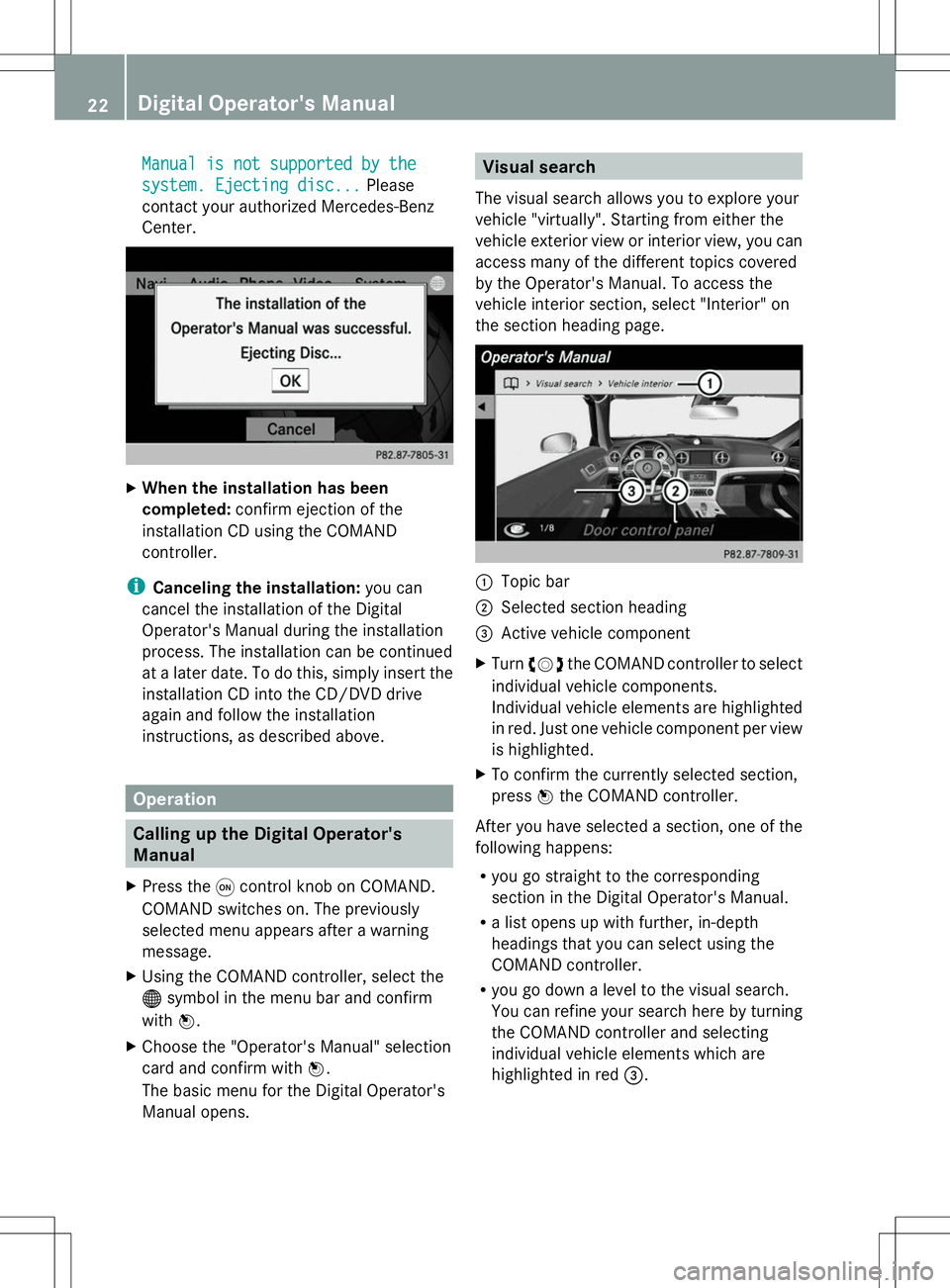
Manual opens. Visual search
The visual search allows you to explore your
vehicle "virtually". Starting from either the
vehicle exterior view or interior view, you can
access many of the different topics covered
by the Operator's Manual. To access the
vehicle interior section, select "Interior" on
the section heading page. :
Topic bar
; Selected section heading
= Active vehicle component
X Turn cVd the COMAND controller to select
individual vehicle components.
Individual vehicle elements are highlighted
in red. Just one vehicle component per view
is highlighted.
X To confirm the currently selected section,
press Wthe COMAND controller.
After you have selected a section, one of the
following happens:
R you go straight to the corresponding
section in the Digital Operator's Manual.
R a list opens up with further, in-depth
headings that you can select using the
COMAND controller.
R you go down a level to the visual search.
You can refine your search here by turning
the COMAND controller and selecting
individual vehicle elements which are
highlighted in red =.22
Digital Operator's Manual
Page 32 of 272
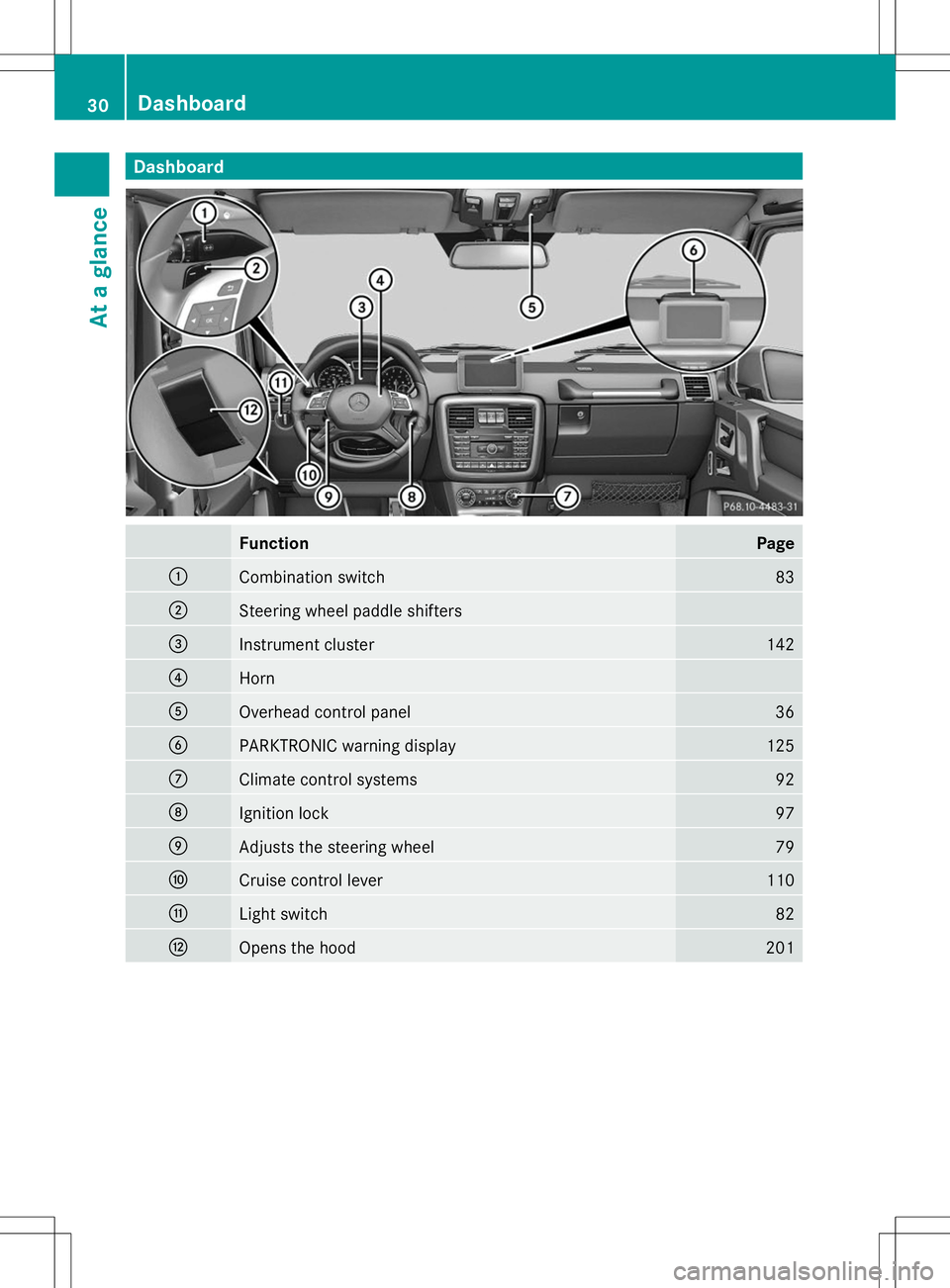
Dashboard
Function Page
:
Combination switch 83
;
Steering wheel paddle shifters
=
Instrument cluster 142
?
Horn
A
Overhead control panel 36
B
PARKTRONIC warning display 125
C
Climate control systems 92
D
Ignition lock 97
E
Adjusts the steering wheel 79
F
Cruise control lever 110
G
Light switch 82
H
Opens the hood 20130
Dashboa
rdAt a glance
Page 42 of 272
Useful information
i This Operator's Manual describes all
models and all standard and optional
equipment of your vehicle available at the
time of publication of the Operator's
Manual. Country-specific differences are
possible. Please note that your vehicle may
not be equipped with all features
described. This also applies to safety-
related systems and functions.
i Read the information on qualified
specialist workshops: (Y page 27).Occupant safety
Important safety notes
G
WARNING
Modifications to the restraint system, may
cause it to no longer work as intended. The
restraint system may then not perform its
intended protective function by failing in an
accident or triggering unexpectedly, for
example. There is an increased risk of injury.
Never modify parts of the restraint system.
Never tamper with the wiring as well as
electronic components or their software.
In this section, you will learn the most
important facts about the restraint system
components of the vehicle.
The restraint system consists of:
R Seat belts
R Child restraint systems
R LATCH-type (ISOFIX) child seat securing
system
Additional protection is provided by:
R SRS (Supplemental Restraint System)
R NECK-PRO head restraints
R Air bag system components with:
-The 45indicator lamp
- Front-passenger seat with BabySmart™
air bag deactivation system Although the systems are independent, their
protective functions work in conjunction with
each other. Not all air bags are always
deployed in an accident.
i Observe the additional information on
infants and children traveling with you in
the vehicle and restraint systems for
infants and children (Y page 53). SRS (Supplemental Restraint System)
Introduction SRS reduces the risk of occupants coming
into contact with the vehicle's interior in the
event of an accident. It can also reduce the
effect of the forces to which occupants are
subjected during an accident.
SRS consists of:
R SRS warning lamps 6
R Air bags
R Air bag control unit (with crash sensors)
R Emergency Tensioning Device (ETD) for
seat belts
R Seat belt force limiter
SRS warning lamp SRS functions are checked regularly when
you switch on the ignition and when the
engine is running. Therefore, malfunctions
can be detected in good time.
The
6 SRS warning lamp in the instrument
cluster lights up when the ignition is switched
on. It goes out no later than a few seconds
after the engine is started.
The SRS components are in operational
readiness when the 6SRS indicator lamp
goes out while the engine is running. 40
Occupant safetySafety
Page 46 of 272
This indicates the operational readiness of
the front-passenger air bag.
Note that objects placed on the front-
passenger seat may cause the system to
recognize the seat as occupied. This can
result in the deployment of the front-
passenger air bag if the impact fulfills the
specified criteria. If the 45indicator
lamp lights up, the front-passenger front air
bag is disabled and will not be deployed in
certain situations. If the 45indicator
lamp does not light up, the front-passenger
front air bag is enabled and can be deployed.
Window curtain air bags G
WARNING
Observe "Important safety notes"
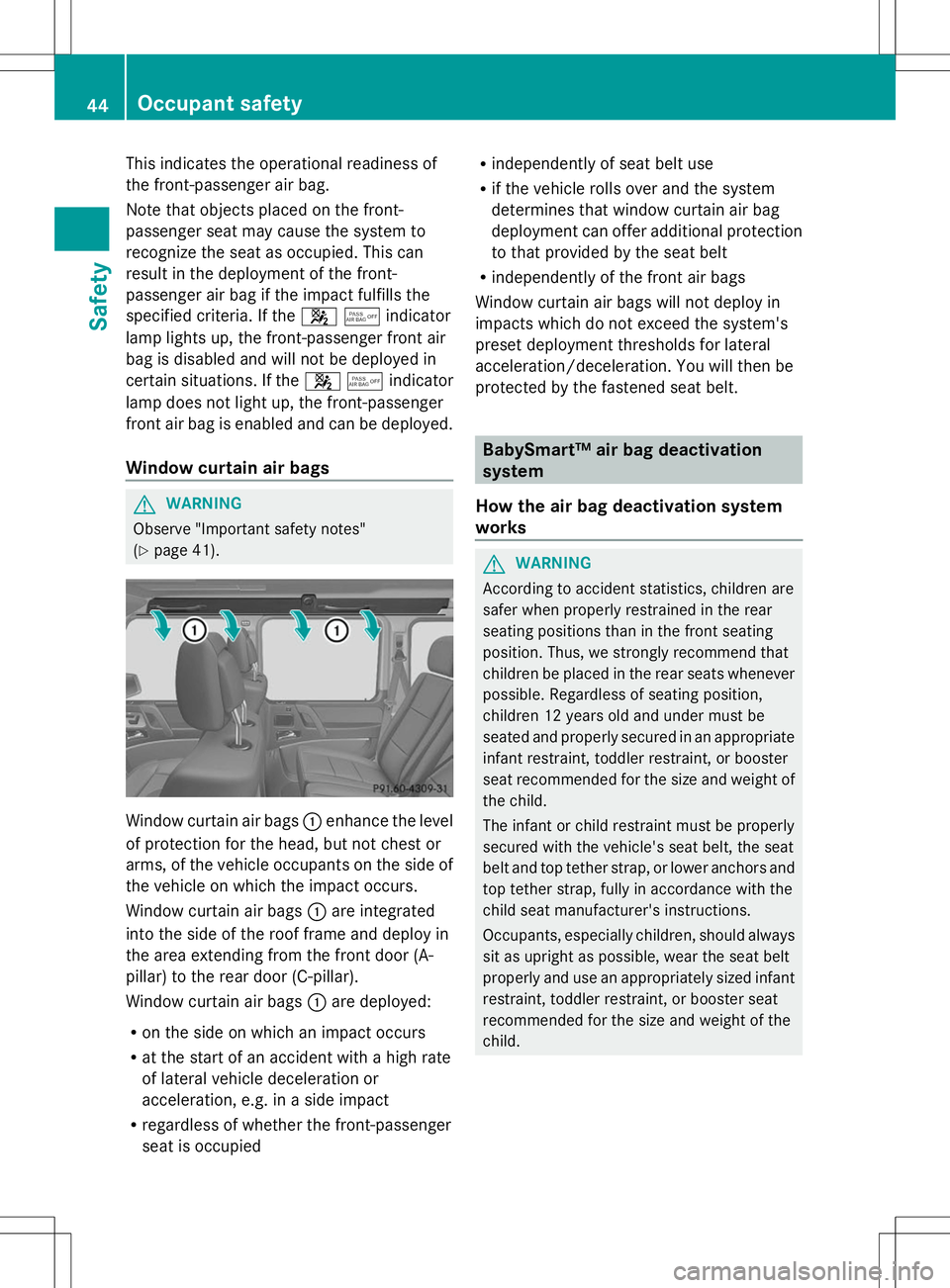
(Y page 41). Window curtain air bags
:enhance the level
of protection for the head, but not chest or
arms, of the vehicle occupants on the side of
the vehicle on which the impact occurs.
Window curtain air bags :are integrated
into the side of the roof frame and deploy in
the area extending from the front door (A-
pillar) to the rear door (C-pillar).
Window curtain air bags :are deployed:
R on the side on which an impact occurs
R at the start of an accident with a high rate
of lateral vehicle deceleration or
acceleration, e.g. in a side impact
R regardless of whether the front-passenger
seat is occupied R
independently of seat belt use
R if the vehicle rolls over and the system
determines that window curtain air bag
deployment can offer additional protection
to that provided by the seat belt
R independently of the front air bags
Window curtain air bags will not deploy in
impacts which do not exceed the system's
preset deployment thresholds for lateral
acceleration/deceleration. You will then be
protected by the fastened seat belt. BabySmart™ air bag deactivation
system
How the air bag deactivation system
works G
WARNING
According to accident statistics, children are
safer when properly restrained in the rear
seating positions than in the front seating
position. Thus, we strongly recommend that
children be placed in the rear seats whenever
possible. Regardless of seating position,
children 12 years old and under must be
seated and properly secured in an appropriate
infant restraint, toddler restraint, or booster
seat recommended for the size and weight of
the child.
The infant or child restraint must be properly
secured with the vehicle's seat belt, the seat
belt and top tether strap, or lower anchors and
top tether strap, fully in accordance with the
child seat manufacturer's instructions.
Occupants, especially children, should always
sit as upright as possible, wear the seat belt
properly and use an appropriately sized infant
restraint, toddler restraint, or booster seat
recommended for the size and weight of the
child. 44
Occupant safetySafety