phone MERCEDES-BENZ G-CLASS SUV 2016 User Guide
[x] Cancel search | Manufacturer: MERCEDES-BENZ, Model Year: 2016, Model line: G-CLASS SUV, Model: MERCEDES-BENZ G-CLASS SUV 2016Pages: 261, PDF Size: 6.01 MB
Page 136 of 261
Back button
% Press briefly:
R Back
R Hides displa ymessages/calls up
the last Trip
Tripmenu function used
R Exitst he telephone book/redial
memory % Press and hold:
R Callsupt he standard display in the
Trip
Trip menu Multifunction display
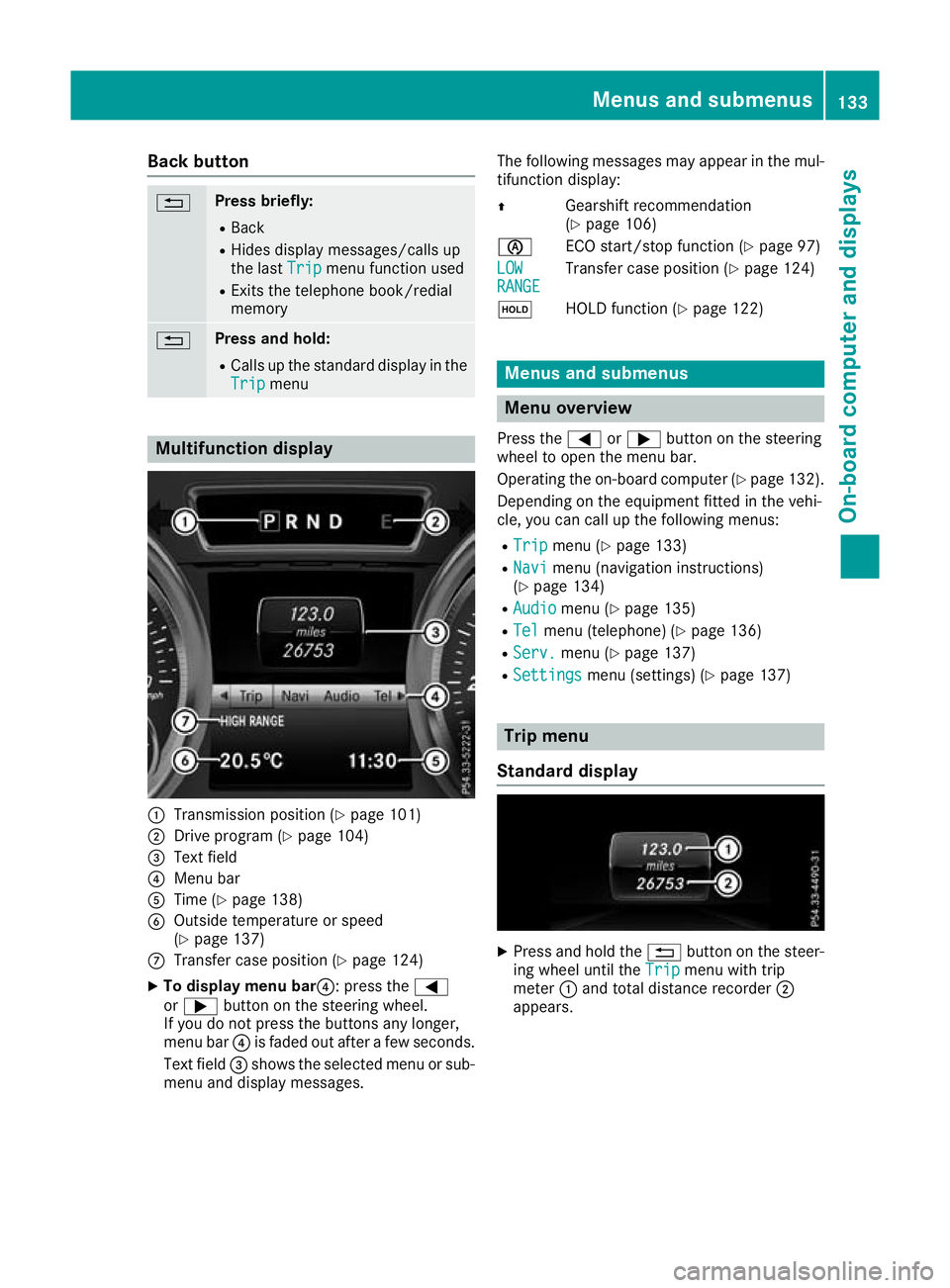
:
Transmission position (Y page 101)
; Drive program (Y page 104)
= Text field
? Menu bar
A Time (Y page 138)
B Outside temperature or speed
(Ypage 137)
C Transfer case position (Y page 124)
X To display menu bar?:p ress the=
or ; button on the steerin gwheel.
If you do not press the button sany longer,
menu bar ?is faded out after afew seconds.
Text field =shows the selected menu or sub-
menu and display messages. The following messages may appear in the mul-
tifunction display:
Z Gearshift recommendation
(Ypage 106)
è ECO start/stopf unction (Ypage 97)
LOW LOW
RANGE RANGE Transfer case position (Y
page 124)
ë HOLD function (Y page 122) Menu
sand submenus Menu overview
Press the =or; button on the steering
whee ltoopen the menu bar.
Operating the on-board compute r(Ypag e132).
Depending on the equipment fitted in the vehi-
cle, you can call up the following menus:
R Trip Trip menu (Y page133)
R Navi
Navi menu (navigatio ninstructions)
(Y pag e134)
R Audio
Audio menu (Y page135)
R Tel
Tel menu (telephone) (Y page136)
R Serv.
Serv. menu (Y page137)
R Settings
Settings menu (settings) (Y page137) Trip menu
Standard display X
Pres sand hold the %button on the steer-
ing wheel until the Trip
Tripmenu with trip
meter :and total distanc erecorder ;
appears. Menu
sand submenus
133On-boardcomputer and displays Z
Page 139 of 261
Audio files from various audi
oplayer sorm edia
can be played ,depen ding on the equipment fit-
ted in the vehicle.
X Switch on the multimedia system and select
media mode.
X Press the =or; button on the steering
whee ltoselect the Audio
Audio menu.
X Press the =or; button to select next
or previous track :.
If trac kinformatio niss aved on the audio
player or media ,the multifunctio ndisplay will
sho wthe titl eofthe track. Telephon
emenu
Introduction G
WARNING
Oper ating the integrated information systems
and communications equipment in the vehicle
while driving willd istract you from traffic con-
ditions. You coul dthen lose control of the
vehicle. There is arisk of an accident.
Only operate these devices if road traffic con-
ditions permit. If you are unsure about the
surrounding conditions, pullo ver toasafe
location and make entries only while the vehi-
cle is stationary.
When using the phone, you must observe the
lega lrequirements for the country in which you
are currently driving.
X Switch on the mobil ephone (see the manu-
facturer' soperating instructions).
X Switch on the multimedi asystem
(Y page1 70).
X Establish aBluetooth ®
connection to the mul-
timedi asystem (Y page175).
The multifunction display show sthe name of
the telephone and the mobil ephone network
provider.
X Press the =or; button on the steering
whee ltoselect the Tel Telmenu.
You can obtai nfurther information about suita-
ble mobil ephones and connecting mobile
phones via Bluetooth ®
:
R on the internet at http://www.mercedes-
benz.com/connect
R at any Mercedes-Benz Service Centre Accepting
acall If someon
ecalls you when you are in the Tel
Tel
menu, adisplay messag eappears in the multi-
function display.
You can accept acall at any time irrespective of
the selected menu.
X Press the 6button on the steering wheel
to accept an incoming call.
Rejecting or ending acall X
Press the ~button on the steering wheel.
You can end or reject acall even if you are not in
the Tel Tel menu.
Dialling anumber from the phone book X
Press the =or; button on the steering
wheel to select the Tel
Tel menu.
X Press the 9,:ora button to
switch to the phone book.
X Authorise access to the phone book on the
phone.
X Press the 9or: button to select the
desired name.
X If only one telephone number is stored for
an ame: press the 6ora button to
start dialling.
or X If more thano
ne number is stored for a
name:press the 6ora button to dis-
play the numbers.
X Press the 9or: button to select the
number you want to dial.
X Press the 6ora button to start dial-
ling.
or X To exit the telephone book: press the%
button.
Redialling The on-board computer saves the last names or
numbers dialled in the redial memory.
X Press the =or; button on the steering
wheel to select the Tel Telmenu.
X Press the 6button to switch to the redial
memory.
X Press the 9or: button to select the
desired name or number. 136
Menus and submenusOn-board computer and displays
Page 170 of 261
At
ag lance Oper
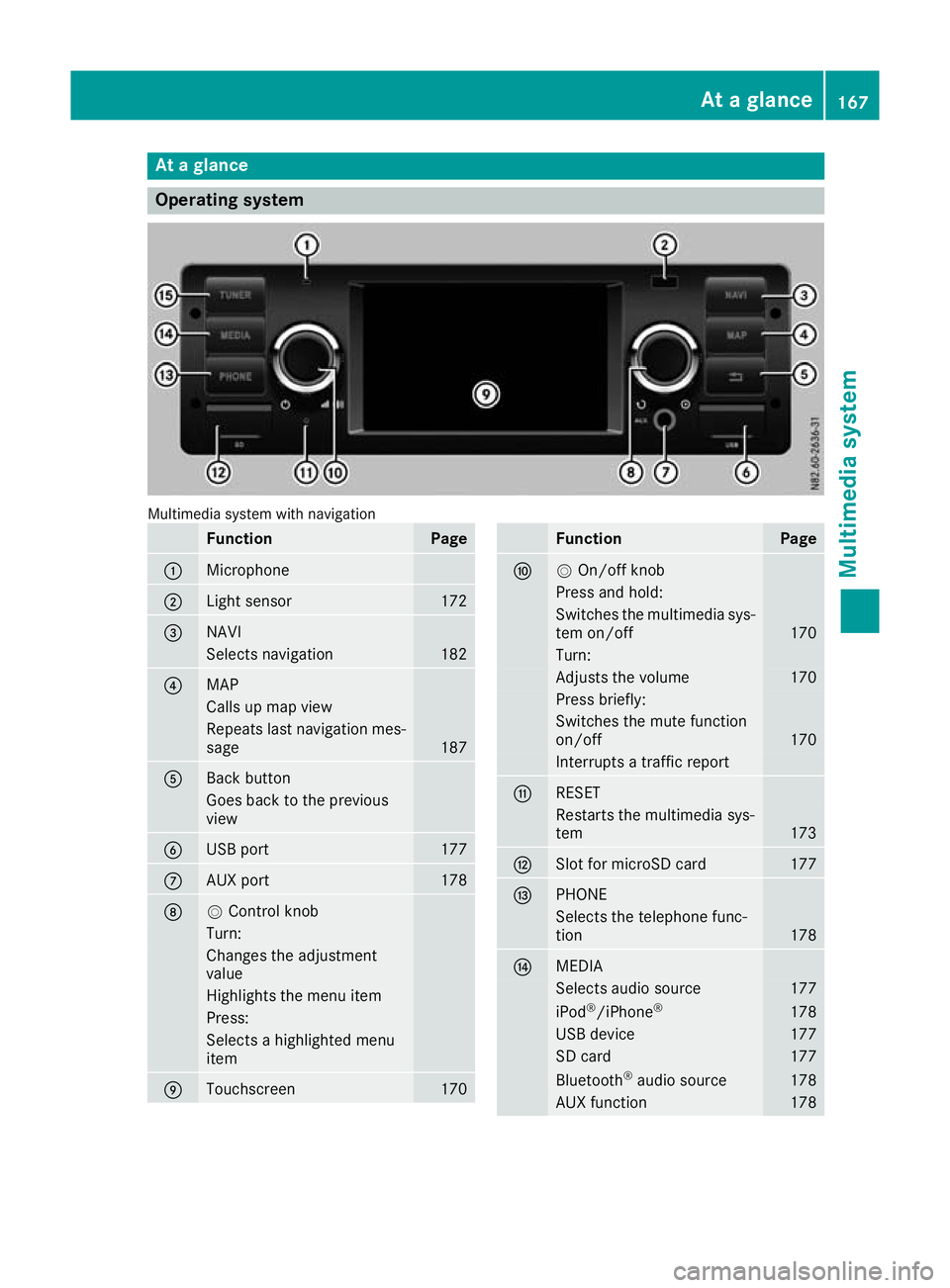
ating system Multimedia system with navigation
Function Page
:
Microphone
;
Light sensor 172
=
NAVI
Selects navigation 182
?
MAP
Calls up map view
Repeat
slast navigation mes-
sage 187
A
Back button
Goes back to th
eprevious
view B
USB port 177
C
AU
Xp ort 178
D
V
Control knob Turn:
Changes th
eadjustment
value Highlight
sthe menu item Press:
Selects
ahighlighte dmenu
item E
Touchscreen 170 Function Page
F
V
On/off knob Press and hold:
Switches the multimedi
asys-
tem on/off 170
Turn:
Adjusts the volume 170
Press briefly:
Switches the mute function
on/off
170
Interrupts
atraffic report G
RE
SET Restart
sthe multimedia sys-
tem 173
H
Slot fo
rmicroSD card 177
I
PHONE
Selects the telephone func-
tion
178
J
MEDIA
Selects audi
osource 177
iPod
®
/iPhone ® 178
USB device 177
SD card 177
Bluetooth
®
audi osource 178
AUX function 178At
ag lance
167Multimedia system Z
Page 172 of 261
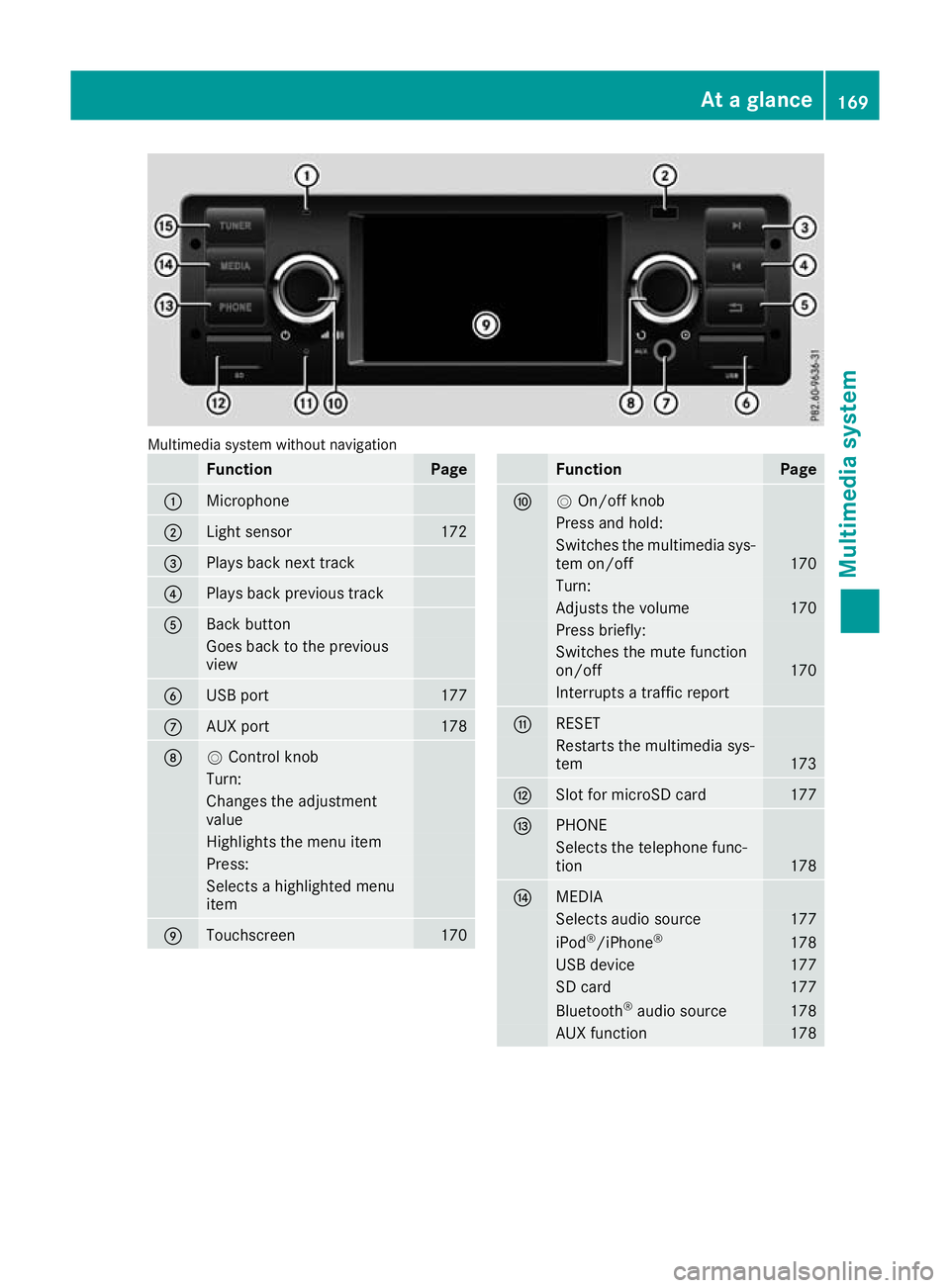
Multimedia system without navigation
Function Page
:
Microphone
;
Light sensor 172
=
Plays back next track
?
Plays back previous track
A
Back button
Goesb
ack to th eprevious
view B
USB port 177
C
AU
Xp ort 178
D
V
Control knob Turn:
Changes th
eadjustment
value Highlight
sthe menu item Press:
Selects
ahighlighte dmenu
item E
Touchscreen 170 Function Page
F
V
On/off knob Press and hold:
Switches the multimedi
asys-
tem on/off 170
Turn:
Adjusts the volume 170
Press briefly:
Switches the mute function
on/off
170
Interrupts
atraffic report G
RE
SET Restart
sthe multimedia sys-
tem 173
H
Slot fo
rmicroSD card 177
I
PHONE
Selects the telephone func-
tion
178
J
MEDIA
Selects audi
osource 177
iPod
®
/iPhone ® 178
USB device 177
SD card 177
Bluetooth
®
audi osource 178
AUX function 178At
ag lance
169Multimedia system Z
Page 177 of 261
Bluetooth
®
settings
Requirements for aBluetooth ®
connec-
tion Yo
uc an connec tBluetooth ®
-compatible mobile
phones and other audio equipmen ttothe mul-
timedia system.
To do so, the followin gcondition smust be met:
R mobile phones must support Hands Fre ePro-
file 1. 0ora bove
R the Bluetooth ®
devic emust be located inside
the vehicle in the vicinity of the multimedia
system
R every Bluetooth ®
devic emust have its own
Bluetooth ®
name, which you can assign your-
self
R Bluetooth ®
must be activate donboth the
multimedia syste mand on the respective
Bluetooth ®
device
R the Bluetooth ®
devic emust be visible for the
multimedia system
R the Bluetooth ®
devic emust support the audio
profile A2DP
i You can obtain further information about
suitable mobile phones:
R at aq ualified specialis tworkshop
R on the Internet at http://www.mercedes-
benz.com/connect
Activating or deactivating th eBlue-
tooth ®
function Switchin
gonthe Bluetooth ®
function on the
multimedi asystem is arequirement for:
R telephony with aBluetooth ®
-capable mobile
phone
R audi oplaybac kwithaB luetooth ®
-capable
mobil edevice
X Press the PHON Ebutton.
X Select O.
Am enu appears.
X Select Bluetooth
Bluetooth.
The #dot indicates that the function is
switched on. Searching for and pairin
gwithaBlue-
tooth ®
device When using your Bluetooth
®
device with the
multimedia system for the first time, you must
search for the Bluetooth ®
device and then pair
it.
Depending on the Bluetooth ®
device used, a
pairing code has to be entered into the Blue-
tooth ®
device or aprompt confirmed on the
Bluetooth ®
device.
There are two options for the search:
R on the Bluetooth ®
device, search for the mul-
timedia system
R on the multimedia system, search for the
Bluetooth ®
device
i Searchin
gonthe Bluetooth ®
device for the
multimedia system is, in most cases, easier.
Starting the search on the Bluetooth ®
device
X Press the PHONE button.
Al ist appears with Bluetooth ®
devices that
have already been paired.
X Start asearch for other Bluetooth ®
devices on
the Bluetooth ®
device (see the manufactur-
er's operating instructions).
i The Bluetooth ®
name "MB Bluetooth" has
been set as the default for the multimedia
system.
X Select the multimedia system on the Blue-
tooth ®
device.
Starting the search on the multimedia system X Press the PHONE button.
Al ist appears with Bluetooth ®
devices that
have already been paired.
X Select Add new device Add new device.
Am essage appears. The multimedia system
searches for available Bluetooth ®
devices.
If Bluetooth ®
devices are available, these
appear in alist. If no Bluetooth ®
devices are
available, amessage appears that no Blue-
tooth ®
device has been found. 174
System settingsMultimedia system
Page 178 of 261
X
Select the desire dBluetooth ®
device from the
list.
X To pair aBluetooth ®
device: enter the pair-
ing code on the Bluetooth ®
device or confirm
the prompt.
If the pairing process wa ssuccessful ,the
Bluetooth ®
device is automaticall yconnected
to the multimedi asystem.
i The pairing code is set to "1234" as default.
i You can pair
amaximum of 15 Bluetooth ®
device satone time.
Connecting paire dBluetooth ®
devices An already paire
dBluetooth ®
device can be con-
necte dwitht he multimedia system either man-
uall yora utomatically.
Whe nthe Aut oconnect
Aut oconnect functioniss witched
on, the multimedia system connects automati-
cally to paire dBluetooth ®
device snearby
(Y page 175).
Connecting manually
X Press the PHONE button.
Al ista ppears with Bluetooth ®
device sthat
have already been paired.
X Select the desired Bluetooth ®
device from the
list.
The Bluetooth ®
device is connected to the
multimedia system.
Endin gaBluetooth ®
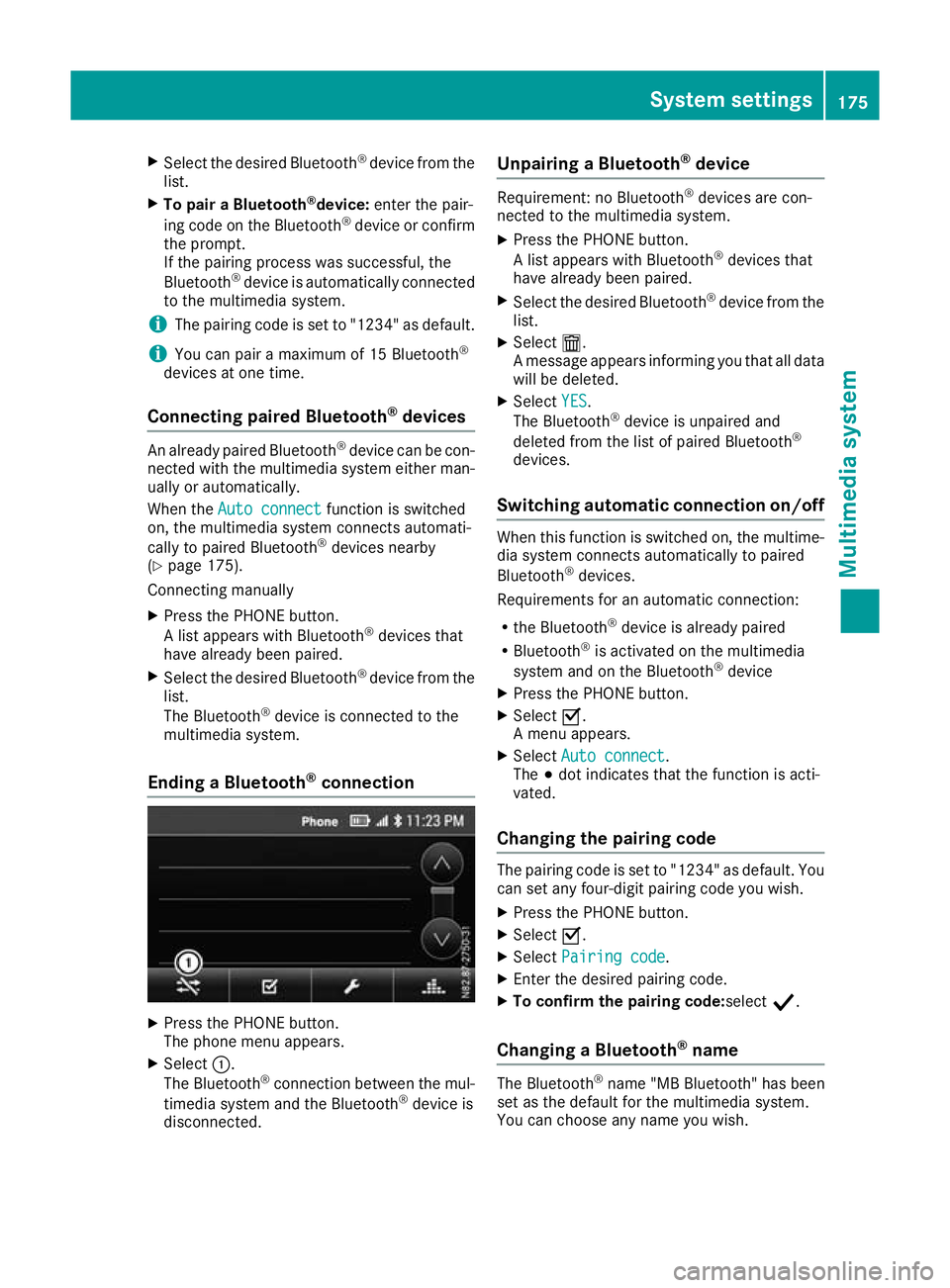
connection X
Press the PHONE button.
The phone men uappears.
X Select :.
The Bluetooth ®
connection between the mul-
timedia system and the Bluetooth ®
device is
disconnected. Unpairing
aBluetooth ®
device Require
ment:noB luetooth ®
device sare con-
nected to th emultimedia system.
X Press th ePHONE button.
Al ist appear swithB luetooth ®
device sthat
hav ealready been paired.
X Selec tthe desired Bluetooth ®
device from the
list.
X Select æ.
Am essage appear sinforming you that all data
will be deleted.
X Select YES
YES .
The Bluetooth ®
device is unpaire dand
deleted from th elist of paired Bluetooth ®
devices.
Switchin gautomatic connection on/off When this func
tion is switched on, the multime-
dia system connects automatically to paired
Bluetooth ®
devices.
Requirements for an automatic connection:
R the Bluetooth ®
device is already paired
R Bluetooth ®
is activated on the multimedia
system and on the Bluetooth ®
device
X Press the PHONE button.
X Select O.
Am enu appears.
X Select Auto connect Auto connect.
The #dot indicates that the function is acti-
vated.
Changing the pairing code The pairing code is set to "1234" as default. You
can set any four-digit pairing code you wish.
X Press the PHONE button.
X Select O.
X Select Pairing code
Pairing code.
X Enter the desired pairing code.
X To confirm the pairing code:select Y.
Changing aBluetooth ®
name The Bluetooth
®
name "MB Bluetooth "has been
set as the default for the multimedia system.
You can choose any name you wish. System settings
175Multimedia system Z
Page 179 of 261
X
Press the PHONE button.
X Select O.
X Select BT name
BT name.
X Enter the desired Bluetooth ®
name.
X To save aBluetooth ®
name: selectOK
OK.
X To delete individua lcharacters: select
¨.
X To switch to number entry: selectG.
i The new Bluetooth ®
name of the multimedia
system does not appear on the Bluetooth ®
devices that have already been paired. In
order for the new Bluetooth ®
name to appear,
Bluetooth ®
devices already paired must be
unpaired (Y page 175). In addition, the mul-
timedia system must be deleted from the list
of paired devices on the Bluetooth ®
device
(see the manufacturer's operating instruc-
tions). The Bluetooth ®
device must then be
paired once more (Y page 174).Radio
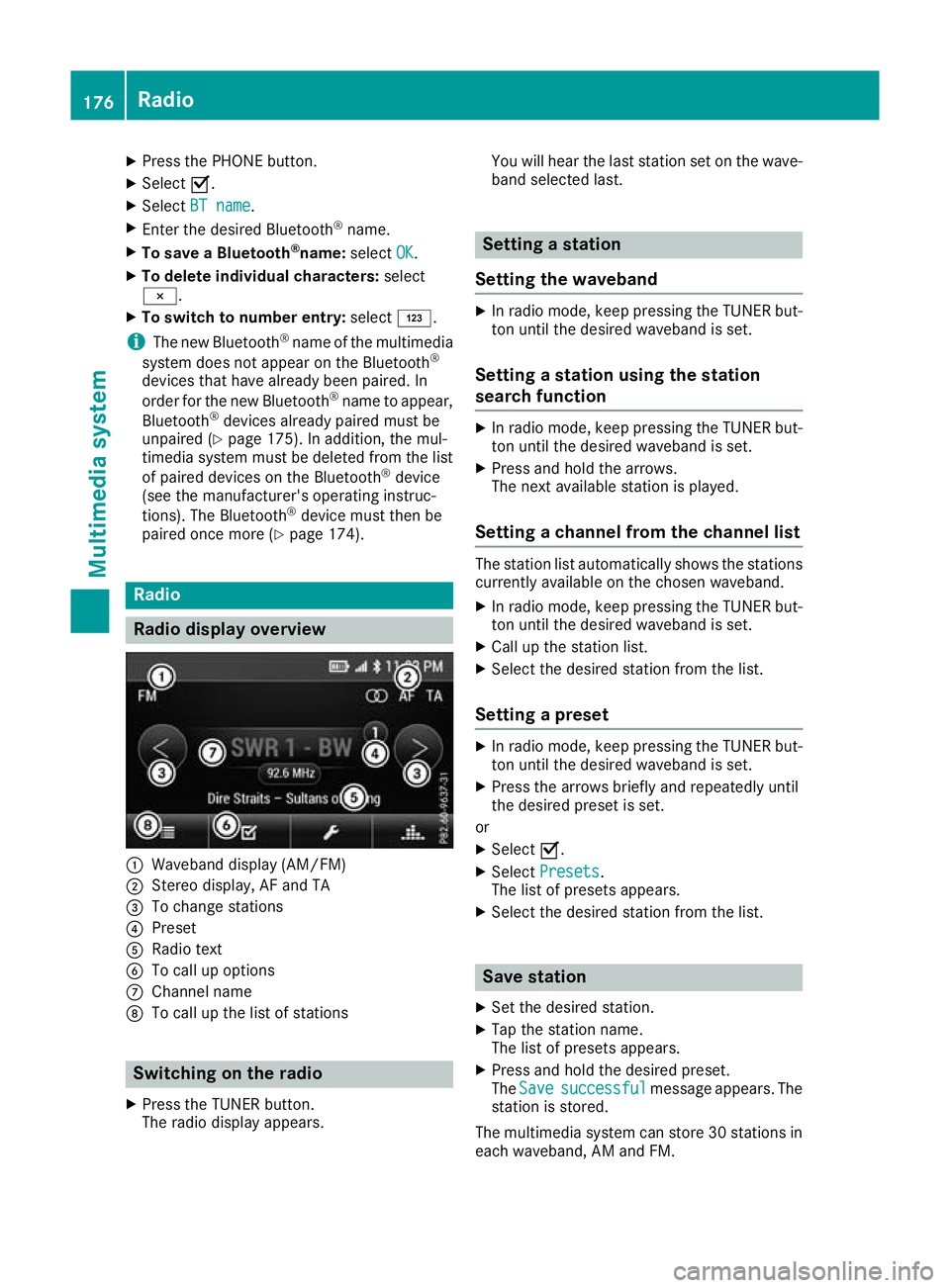
Radio display overv
iew:
Waveband display (AM/FM)
; Stereo display, AF and TA
= To change stations
? Preset
A Radio text
B To call up options
C Channel name
D To call up the list of stations Switching on the radio
X Press the TUNER button.
The radio display appears. You will hear the last station set on the wave-
band selected last. Setting
astation
Setting the waveband X
In radio mode, keep pressin gthe TUNER but-
ton until the desire dwaveband is set.
Setting astation using the station
search function X
In radiom ode, keep pressing the TUNER but-
ton until the desire dwaveband is set.
X Press and hold the arrows.
The next available station is played.
Setting achanne lfrom the channell ist The statio
nlist automatically shows the stations
currently availabl eonthe chosen waveband.
X In radio mode, keep pressing the TUNER but-
ton until the desired waveband is set.
X Call up the station list.
X Select the desired station from the list.
Setting apreset X
In radio mode, keep pressing the TUNER but-
ton until the desired waveband is set.
X Press the arrows briefly and repeatedly until
the desired preset is set.
or X Select O.
X Select Presets Presets.
The list of preset sappears.
X Select the desire dstation from the list. Save station
X Set the desired station.
X Tap the station name.
The list of presets appears.
X Press and hold the desired preset.
The Save Save successful
successful message appears. The
station is stored.
The multimedia system can store 30 stations in each waveband,A Mand FM. 176
RadioMultimedia system
Page 181 of 261
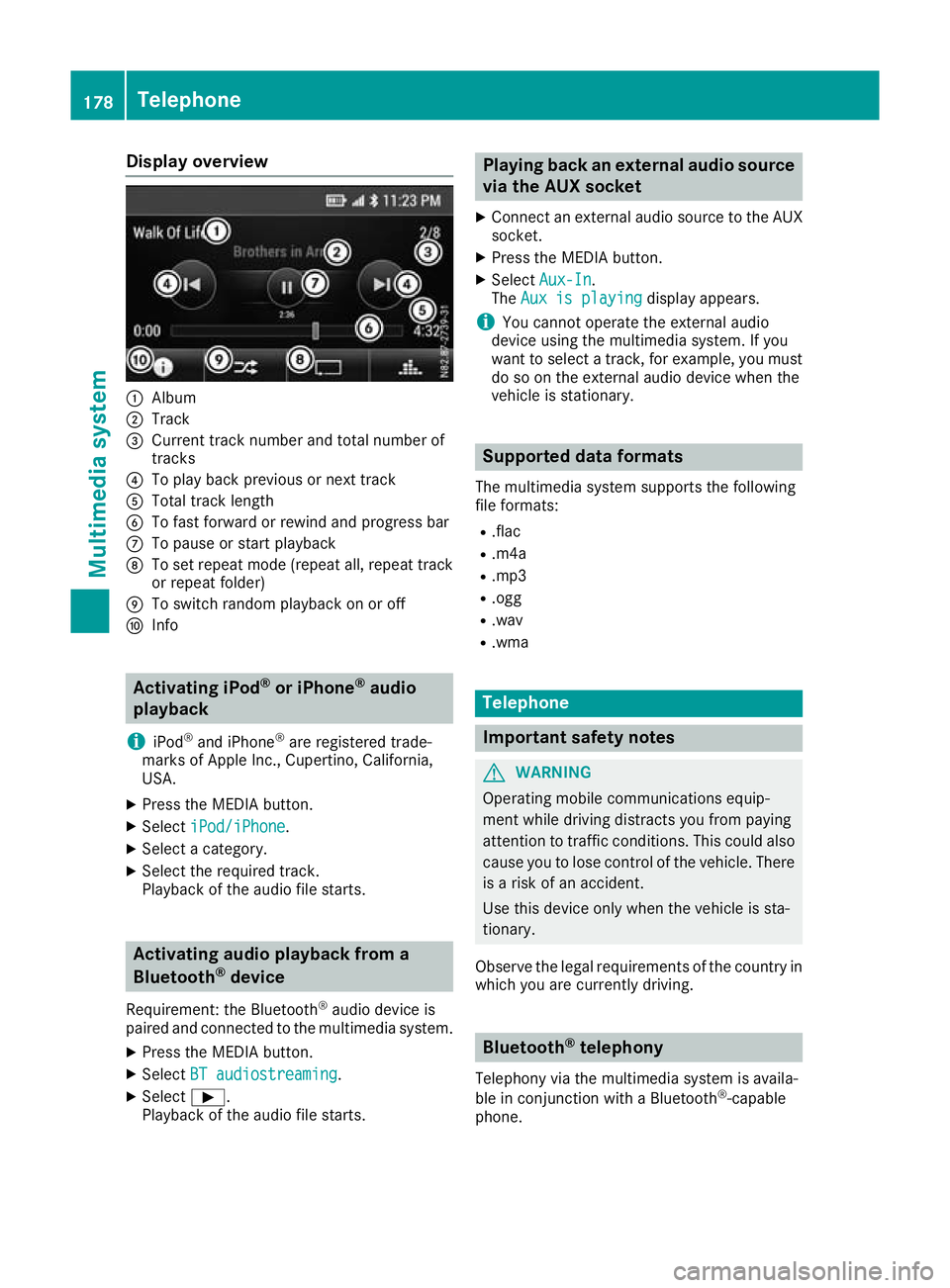
Display overview
:
Album
; Track
= Curren ttrac knumbe rand tota lnumbe rof
tracks
? To play back previous or next track
A Tota ltrac klen gth
B To fas tforwar dorrewind and progress bar
C To paus eorstart playback
D To set repea tmode(repeat all, repea ttrack
or repea tfolder)
E To switch rando mplaybac konoro ff
F Info Activatin
giPod ®
or iPhone ®
audio
playback
i iPod ®
and iPhone ®
are registere dtrade-
marks of Apple Inc. ,Cupertino ,California,
USA.
X Press th eMEDIA button.
X Select iPod/iPhone
iPod/iPhone.
X Selec tacategory.
X Selec tthe require dtrack.
Playbac koftheaudio file starts. Activating audio playback from a
Bluetooth ®
device
Requirement :the Bluetooth ®
audio device is
paired and connecte dtothemultimedia system.
X Press th eMEDIA button.
X Select BT audiostreaming
BT audiostreaming.
X Select Ì.
Playbac koftheaudio file starts. Playin
gback an external audio source
via the AUX socket
X Connect an external audio source to the AUX
socket.
X Press the MEDIAb utton.
X Select Aux-In
Aux-In.
The Aux is playing
Aux is playing display appears.
i You cannot operate the external audio
device using the multimedia system. If you
want to select atrack ,for example, you must
do so on the external audio device when the
vehicle is stationary. Supported dataf
ormats
The multimedia system supports the following
file formats:
R .flac
R .m4a
R .mp3
R .ogg
R .wav
R .wma Telephone
Important safety notes
G
WARNING
Operating mobile communications equip-
ment while driving distracts you from paying
attention to traffic conditions .This coul dalso
caus eyou to lose control of the vehicle. There
is ar isk of an accident.
Use this device only when the vehicl eissta-
tionary.
Observe the lega lrequirements of the country in
which you are currently driving. Bluetooth
®
telephony
Telephony via the multimedia system is availa-
ble in conjunction with aBluetooth ®
-capable
phone. 178
TelephoneMultimedi
asystem
Page 182 of 261
Call disconnected while th
evehicle is
in motion
The followin gcoul dbet hecaus eofc all discon-
nection:
R theG SM7
network coverag eisinsufficient
R thev ehicle has moved int oaGSM cel lwithno
free channels
R theS IMcar dused is no tcompatible wit hthe
network available
R you are usin gamobile phon ewith" Twincard"
and th emobile phon ewitht he secon dSIM
car disa lreadylogged on to th enetwork 999 or 112 emergency call
Makin gemergency calls without entering aPIN
is only possible using the mobile phone.
The 999 or112 emergency call number is a
public service. Anym isuse is punishable by law. Telephone op
eration
Requirements Th
ef ollowing conditions must be fulfilled in
order to make calls using the multimedia sys-
tem:
R the Bluetooth ®
function of the multimedia
system is activated
R the Bluetooth ®
function of the mobile phone
is activated
R the mobile phone is paired and connected to
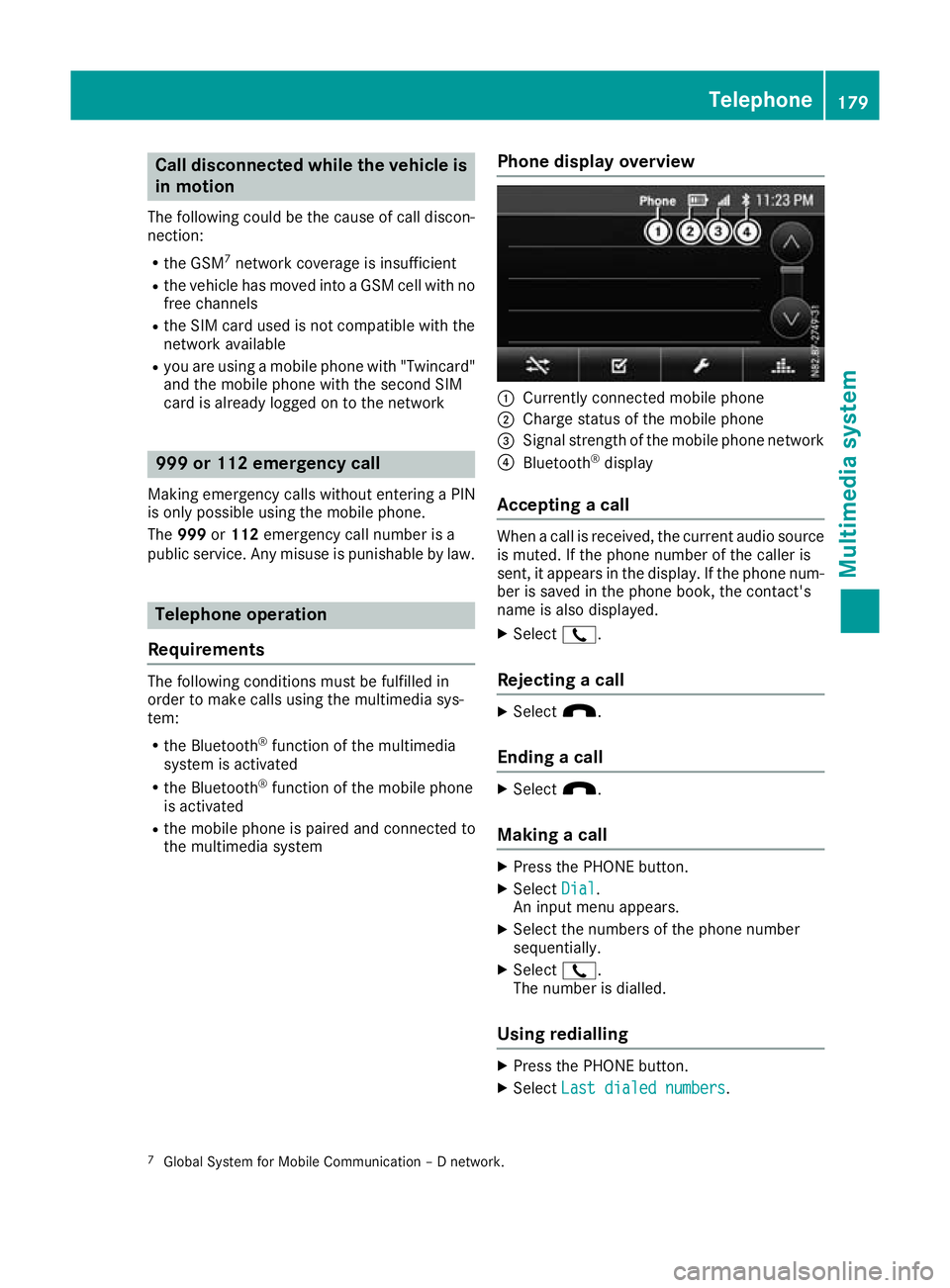
the multimedia system Phone display overview :
Currently connected mobile phone
; Charge status of the mobile phone
= Signal strength of the mobile phone network
? Bluetooth ®
display
Accepting acall When
acall is received, the curren taudio source
is muted. If the phone number of the caller is
sent ,itappears in the display. If the phone num-
ber is saved in the phone book, the contact's
name is also displayed.
X Select 2.
Rejecting acall X
Select x.
Ending acall X
Select x.
Making acall X
Press the PHONE button.
X Select Dial Dial.
An input men uappears.
X Select the numbers of the phone number
sequentially.
X Select 2.
The number is dialled.
Using redialling X
Press the PHONE button.
X Select Last dialed numbers
Last dialed numbers.
7 GlobalS ystem for Mobile Communicatio n–Dnetwork. Telephone
179Multimedia system Z
Page 183 of 261
X
Select the desire dentry.
X Select 2.
The number is dialled.
Switchin gautomati canswering on/off Whe
nthis function is switched on, incoming
calls are answered automatically.
X Press the PHONE button.
X Select O.
X Select Auto answer
Auto answer.
The #dot indicates that the function is
switched on.
Using direct dialling X
When atelephone number appears in amenu:
select atelephone number.
The number is dialled.
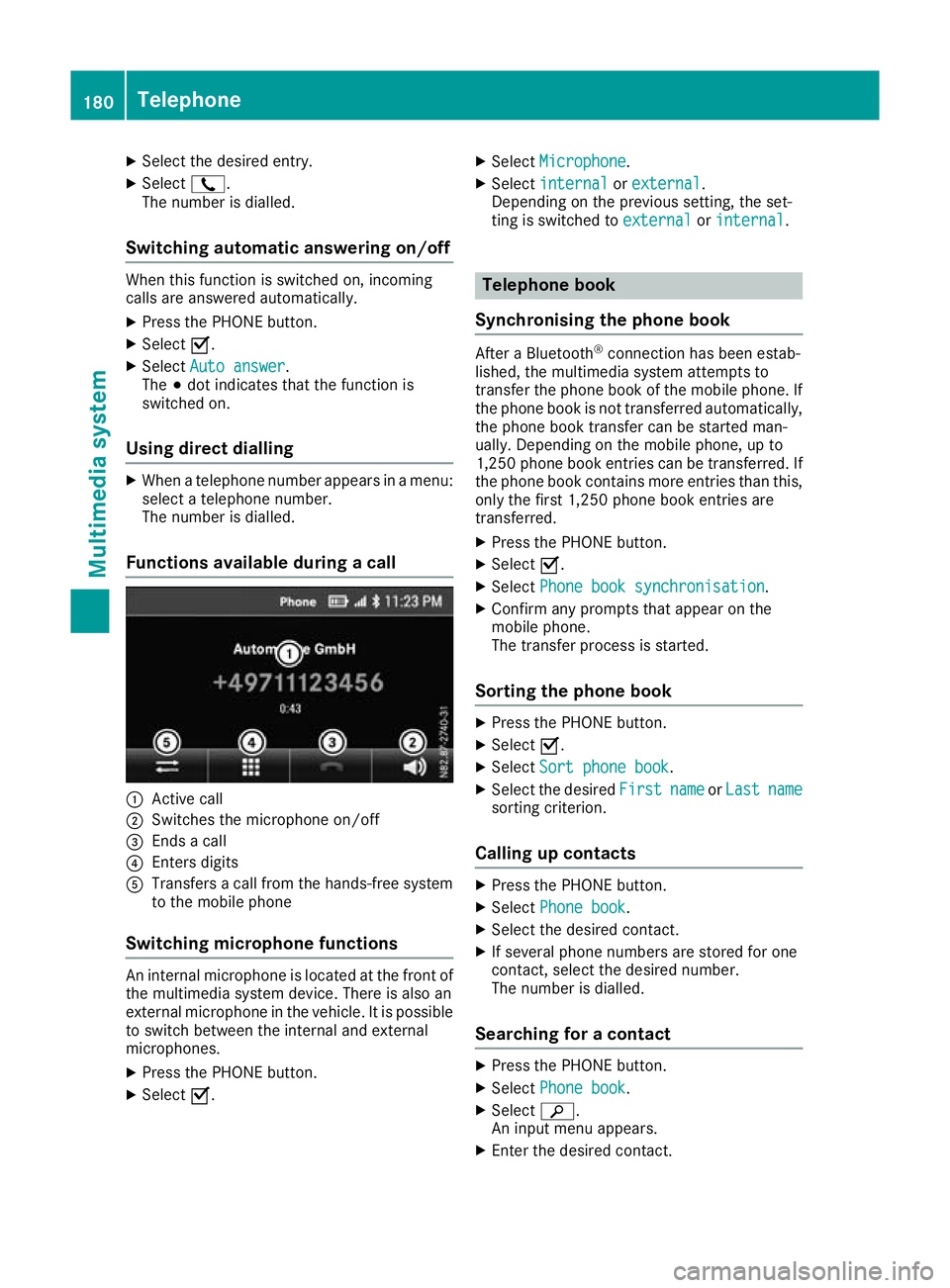
Functions available during acall :
Active call
; Switches th emicrophone on/off
= Ends acall
? Enters digits
A Transfers acallf rom the hands-free system
to the mobil ephone
Switchin gmicrophone functions An interna
lmicrophone is locate datthe front of
the multimedia system device .There is also an
externa lmicrophone in the vehicle. It is possible
to switch between the interna land external
microphones.
X Press the PHONE button.
X Select O. X
Select Microphone
Microphone.
X Select internal
internal orexternal
external .
Depending on the previous setting, the set-
ting is switched to external externalorinternal
internal . Telephon
ebook
Synchronisin gthe phone book After
aBluetooth ®
connectio nhasbeen estab-
lished, the multimedia system attempts to
transfer the phone book of the mobil ephone. If
the phone book is not transferred automatically, the phone book transfer can be started man-
ually. Depending on the mobil ephone, up to
1,250 phone book entries can be transferred .If
the phone book contains more entries tha nthis,
onl ythe first 1,250 phone book entries are
transferred.
X Press the PHONE button.
X Select O.
X Select Phone boo ksynchronisation
Phone boo ksynchronisation .
X Confir many prompts tha tappea ront he
mobil ephone.
The transfer proces sisstarted.
Sortin gthe phone book X
Press the PHONE button.
X Select O.
X Select Sortphone book
Sort phone book.
X Select the desired First Firstname
nameorLast
Last name
name
sortin gcriterion.
Calling up contacts X
Press the PHONE button.
X Select Phone book
Phone book.
X Select the desired contact.
X If several phone numbers are stored for one
contact, select the desired number.
The number is dialled.
Searching for acontact X
Press the PHONE button.
X Select Phone book Phone book.
X Select è.
An input menu appears.
X Enter the desired contact. 180
TelephoneMultimedia system