brake light MERCEDES-BENZ G-CLASS SUV 2016 Owners Manual
[x] Cancel search | Manufacturer: MERCEDES-BENZ, Model Year: 2016, Model line: G-CLASS SUV, Model: MERCEDES-BENZ G-CLASS SUV 2016Pages: 261, PDF Size: 6.01 MB
Page 7 of 261
1, 2,
3...
4ETS (Electronic Traction System) see ETS/4ETS (Electronic Trac-
tion System)
12 Vsocket
see Socket (12 V) A
ABS (Anti-lock Braking System) Display message ............................ 142
Function/notes ................................ 52
Warning lamp .................................1 58
Activating/deactivating air-recir-
culation mode ...................................... 89
ADAPTIVE BRAKE ................................. 56
Adaptive brake lights .......................... 53
AdBlue ®
Additive ......................................... 252
Display message ............................ 148
Filling capacity ............................... 252
Important safety notes .................. 251
Low outside temperatures ............. 252
Purity ............................................. 252
Topping up ..................................... 111
Additives (engine oil) ........................ 253
Adjustin gthe seat ............................... 69
AF (alternative frequency) ................ 177
Airc onditioning
Windscreen heating ......................... 88
Airf ilter(wh ite display message) .... 148
Airv ents
Important safety notes .................... 93
Rea r................................................. 94
Setting ............................................. 93
Setting the centre airv ents ............. 94
Setting the sid eairvents ................. 94
Air-conditionin gsystem
see Climate control
Airbag
Introduction ..................................... 36
PASSENGER AIR BAG OFF indica-
tor lamp .......................................... .32
Airbags
Fron tairbag (driver ,front
passenger )....................................... 37
Important safety gu idelines............. 36 Triggering ......................................... 37
Alarm
ATA (Anti-Theft Alarm system) ......... 56
Switching off (ATA) .......................... 56
Switching the function on/off
(ATA) ................................................ 56
All-whee ldrive
Transfer case ................................. 124
Approach/departurea ngle.............. 121
Aquaplaning ....................................... 117
Ashtray ............................................... 208
Assembly tool
General notes ................................ 210
Radio aerial .................................... 210
Assistance display (on-board com-
puter) .................................................. 137
Assistance menu (on-board com-
puter) .................................................. 137
ASSYST service interva ldisplay
Servic emessages .......................... 216
ATA (Anti-Theft Alarm system)
Activating/deactivatin g................... 56
Function ........................................... 56
Switching off the alarm .................... 56
Audi oAUX jack .................................. 178
AUTO lights
Displa ymessage ............................ 145
see Lights
Automatic engine start (ECO start/
sto pfunction) ...................................... 99
Automatic engine switch-off (ECO
start/sto pfunction) ............................ 98
Automatic headlamp mode ................ 75
Automatic transmission
Displa ymessage ............................ 153
Drive position (EC Ostart/stop
function) ........................................ 103
Drive programs .............................. 104
Driving tip s.................................... 103
Emergency running mod e.............. 108
Engaging drive position .................. 103
Engaging neutral ............................ 102
Engaging reverse gea r................... 102
Engaging the park position ............ 102
Important safety notes .................. 101
Kickdow n....................................... 104
Manua lshifting .............................. 106 4
Index
Page 9 of 261
Breakdown
see Fla ttyre
see Towing away
Brightness contro l(instrument
cluste rlighting) ................................... 26
Bulbs
Brake lamp ...................................... 79
Parking lamp (rear) .......................... 79
Rear foglamp ................................... 79
Reversing lamp ................................ 79
Tail lamp .......................................... 79
Turn signa llam p(front) .................... 79
Turn signa llam p(rear) ..................... 79
see Replacing bulbs
Bumper (steel) ................................... 210 C
Calling up afault
see Display messages
Car wash (care) ................................ .217
Care
Automatic car wash ....................... 217
Carpets .......................................... 221
Display .......................................... .220
Exhaus tpipe. ................................. 219
Exterior lighting ............................ .219
General notes ................................ 216
High-pressure cleaner .................... 218
Interior .......................................... .220
Paint .............................................. 218
Plastic trim ................................... .220
Roo flining ...................................... 221
Seat bel t........................................ 221
Seat cover ..................................... 220
Selector leve r................................ 220
Steering whee l............................... 220
Tri mp iece s.................................... 220
Washing by hand ........................... 217
Wheel s........................................... 218
Window s........................................ 219
Wipe rblade s.................................. 219
Woode nloa dc ompartment floor ... 221
Woode ntrim .................................. 220
Central locking
Automati cloc king (on-board com-
puter) ............................................. 139
Locking/unlocking (key) .................. 57 Centr
econsole
Lowe rsectio n................................. .29
Overview .......................................... 28
Upper sectio n................................. .28
Changing bulbs
Parking lamp (rear ).......................... 80
Changin ggears .................................. 103
Child
Restraint system .............................. 40
Child seat
Automati crecognition ..................... 42
Forward-facing restraint system ...... 45
ISOFIX .............................................. 40
On the front-passenger sea t............ 43
Problem (malfunction) ..................... 46
Rearward-facing restraint system .... 44
Recommendations ........................... 49
Suitable positions ............................ 46
Top Tether ....................................... 41
Child seat lock ..................................... 39
Child-proof locks
Important safety notes .................... 51
Rear doors ....................................... 51
Children
child sea tloc k. ................................. 39
Childre ninthe vehicle
Important safety notes .................... 38
Cigarette lighter ................................ 209
Cleaning ............................................. 166
Trailer tow hitch ............................. 220
Climate control
Auxiliary heating/ventilation ............ 89
Controlling automaticall y................. 86
Cooling with ai rdehumidifica tion ..... 85
Demisting the window s.................... 87
Demisting the windscree n............... 87
ECO start/stop function .................. 85
Important safety notes .................... 84
Indicato rlam p.................................. 86
Note sonu sing THERMATI Cauto-
mati cclimate control ....................... 85
Overview of systems ........................ 84
Problem with the rea rwindow
heating ............................................. 88
Problems with "cooling with air
dehumidification" ............................. 86
Setting the ai rdistribution ............... 86
Setting the ai rvents ........................ 93 6
Index
Page 11 of 261
Door
Automati clocking (on-boar dcom-
puter) ............................................ .139
Automatic locking (switch) .............. .62
Central locking/unlocking (key) ...... 57
Display message ............................ 153
Emergency lockin g........................... 62
Emergenc yunlocking ....................... 62
Important safety note s.................... 61
Opening (fro mthe inside )................ 61
Doors
Overview .......................................... 61
Drive program
Displa y........................................... 101
Drive programs
Automati ctransmissio n................. 104
Driver's door
see Door
Driver's seat
Displa ymessage ............................ 154
Drivin gabroad
Symmetrical dipped beam ............... 74
Drivin gdownhill ................................ 122
Drivin ginm ountainous terrain
Approach/departure angle ............ 121
Driving downhil l............................. 122
Gradient-climbing capability
(maximum) ..................................... 122
Drivin goff-road
Driving downhil l............................. 122
see Off-road driving
Drivin gonfloodedroads .................. 117
Drivin gsafety system
EBD (electroni cbrake force distri-
bution) ............................................. 55
Drivin gsafety systems
ABS (Anti-lock Braking System) ....... 52
ADAPTIV EBRAK E............................. 56
Adaptive brake lights ....................... 53
BAS (Brake Assist System) .............. 53
ESP ®
(Electronic Stability Pro-
gram) ............................................... 53
Important safety guideline s............. 52
Overview .......................................... 52
Drivin gsystems
Displa ymessage ............................ 149
HOLD function ............................... 122 Driving tips
Aquaplaning ................................... 117
Automatic transmi ssion ................. 103
Brakes .......................................... .115
Downhill gradient ........................... 116
Driving abroad ................................. 74
Driving in winter ............................ .118
Driving on flooded road s................ 117
Driving on sand .............................. 121
Driving on wet road s...................... 117
Driving ove robstacles ................... 121
Fue l................................................ 115
Genera l.......................................... 115
Gravel roads .................................. 121
Icy roa dsurfaces ........................... 118
Important safety notes .................... 95
Limite dbraking efficiency on sal-
ted roads ....................................... 116
New brake disks ............................ 116
New brake pads/linings ................ 116
Off-road driving .............................. 119
Off-road fording ............................. 117
Pulling away on slippery surfaces .. 117
Running-i ntips. ................................ 95
Snow chains .................................. 237
Subjecting brakes to aloa d. .......... 116
Symmetrical dipped beam ............... 74
The first 1500 km ............................ 95
Towing atraile r.............................. 128
Travelling uphill .............................. 121
Tyre ruts ........................................ 121
Wet roa dsurface ........................... 116 E
EASY-ENTRY feature Activating/deactivatin g................. 140
Function/notes ................................ 72
EASY-EXI Tfeature
Function/notes ................................ 72
Switching on/off ........................... 140
EBD (electronic brake force distri-
bution)
Display message ............................ 143
Function/notes ................................ 55
ECOs tart/stop function
Deactivating/activating ................... 98
General information ......................... 97 8
Index
Page 27 of 261
about possible vehicle damage
.Damage to
your vehicle that arise sfromc ulpable contra-
ventions against these instruction sare not
covered either by Mercedes-Ben zimplied
warrant yorbyt heNew or Used-Vehicle War-
ranty. QR code for rescu
ecards
The QR code is secured in the fuel filler flap and
on the opposite side on the B-pillar. In the event of an accident ,rescue services can use the QR
code to quickly find the appropriate rescue card
for your vehicle. The curren trescue card con-
tains, in acompact form, the most important
information about your vehicle, e.g. the routing
of the electric cables.
You can find more information under
www.mercedes-benz.de/qr-code. Data stored in the vehicle
Many of the ele ctroniccom ponent sinyour vehi-
cl ec an stor edata.
These dat amemories temporarily or perma-
nently stor etechnic al information about:
R thev ehicle' soperatin gstate
R events
R faults
In general, this technical information docu-
ments th estate ofac om ponent ,amodule, a
syste mort hesurroundings.
These include, fo rexample:
R operatin gconditi onsofs ystemcomponent s–
fo re xample, flui dlevels
R status messages concernin gthe vehicle and
it si nd ividual component s–forexample,
whee lrotationa lspeed, vehicle speed, decel-
eration in movement, latera lacceleration,
accelerator peda lposition
R malfunction sand defects in important system
components, fo rexample, lights ,brakes
R vehicle reaction sand operatin gconditi onsin
special drivin gsituation s–forexample, air-
bag deployment, intervention of stability con-
trol systems
R ambien tconditi ons–f orexample, outside
temperature These dat
aare of an exclusively technical nature
and can be used to:
R assist in detecting and rectifying faults and
defects
R analyse vehicle functions, e.g. after an acci-
dent
R optimise vehicle functions
The data cannot be used to trace the vehicle's
movements.
When your vehicle is serviced, technical infor-
mation can be read from the event data memory
and fault data memory.
Services include, for example:
R repair services
R service processes
R warranty events
R quality assurance
The information is read out by employees of the service network (including the manufacturer)
using special diagnostic testers. You can obtain more information there, if required.
After afault has been rectified, the information
is deleted from the fault memory or is continu-
ally overwritten.
During vehicle operation, certain situations may
arise in which these technical data –inconjunc-
tion with other information and, if applicable,
after consultation with an approved assessor –
may be linked to an individual person.
Examples include:
R accident reports
R damage to the vehicle
R witness statements
Further additional functions that have been con-
tractually agreed upon with the customer allow
certain vehicle data to be conveyed by the vehi-
cle as well. The additional functions include, for example, vehicle location in the event of an
emergency. Copyright info
rmation
Information on licences for free and open-
source softwar eused in your vehicle can be
foun dont hedat acarrier in your vehicle docu-
men twallet and ,includin gupdates, on th efol-
lowin gwebsite:
http://www.mercedes-benz.com/opensource 24
Introduction
Page 29 of 261
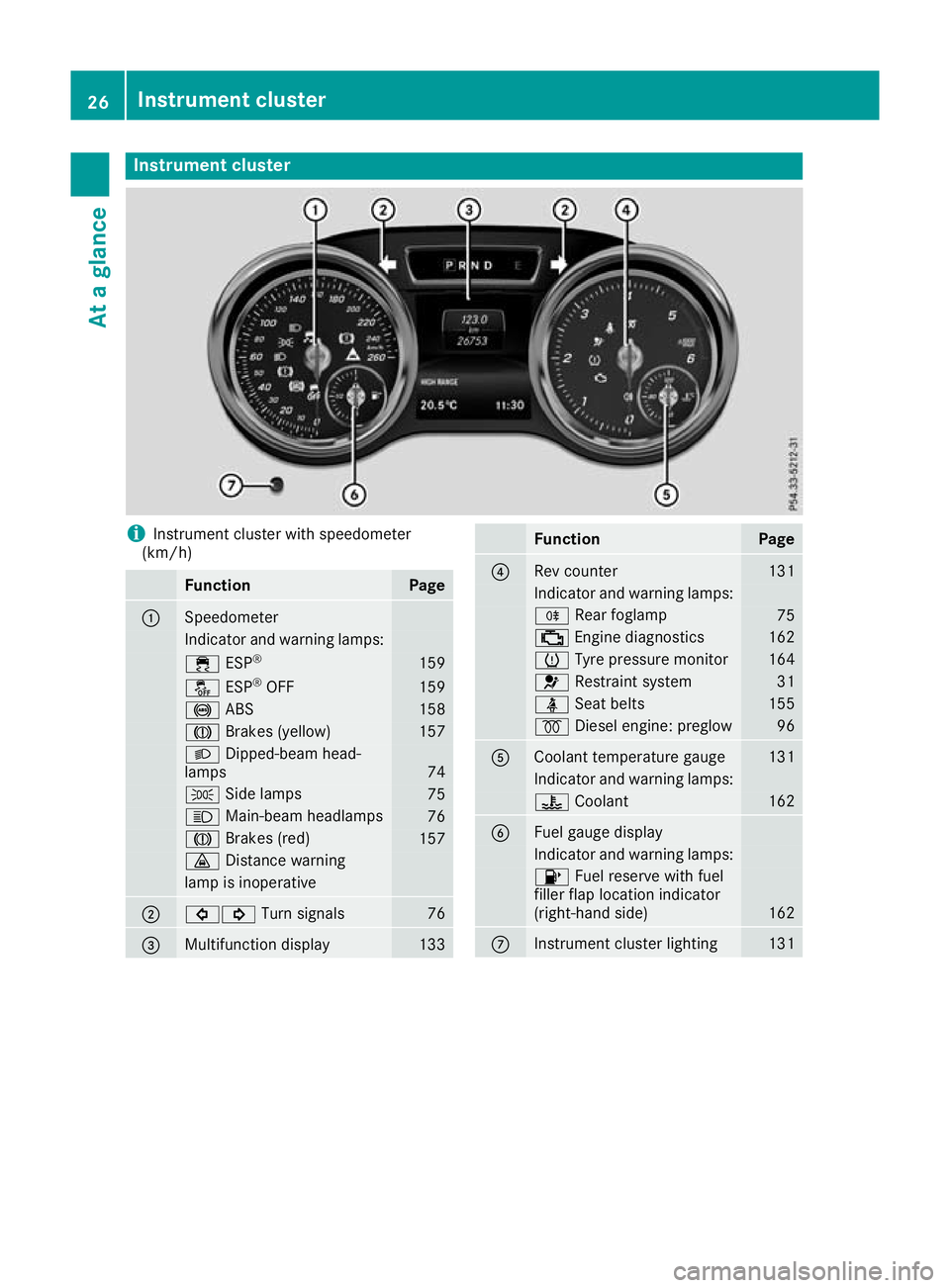
Instrumen
tcluster i
Instrument cluste
rwith speedometer
(km/h) Function Page
:
Speedometer
Indicator and warning lamps:
÷
ESP® 159
å
ESP®
OFF 159
!
ABS 158
J
Brakes (yellow) 157
L
Dipped-bea mhead-
lamps 74
T
Sidelam ps 75
K
Main-beam headlamps 76
J
Brakes(red) 157
·
Distance warning lamp is inoperative
;
#!
Turn signals 76
=
Multifunctio
ndisplay 133 Function Page
?
Rev counter 131
Indicato
rand warning lamps: R
Rear foglamp 75
;
Engine diagnost ics 162
h
Tyre pressure monitor 164
6
Restraint system 31
ü
Seat belts 155
%
Diesel engine: preglow 96
A
Coolant temperature gauge 131
Indicator and warning lamps:
?
Coolant 162
B
Fuel gaug
edisplay Indicator and warnin
glamps: 8
Fuel reserve with fuel
filler flap location indicator
(right-hand side) 162
C
Instrument cluster lighting 13126
Instrument clusterAt
ag lance
Page 32 of 261
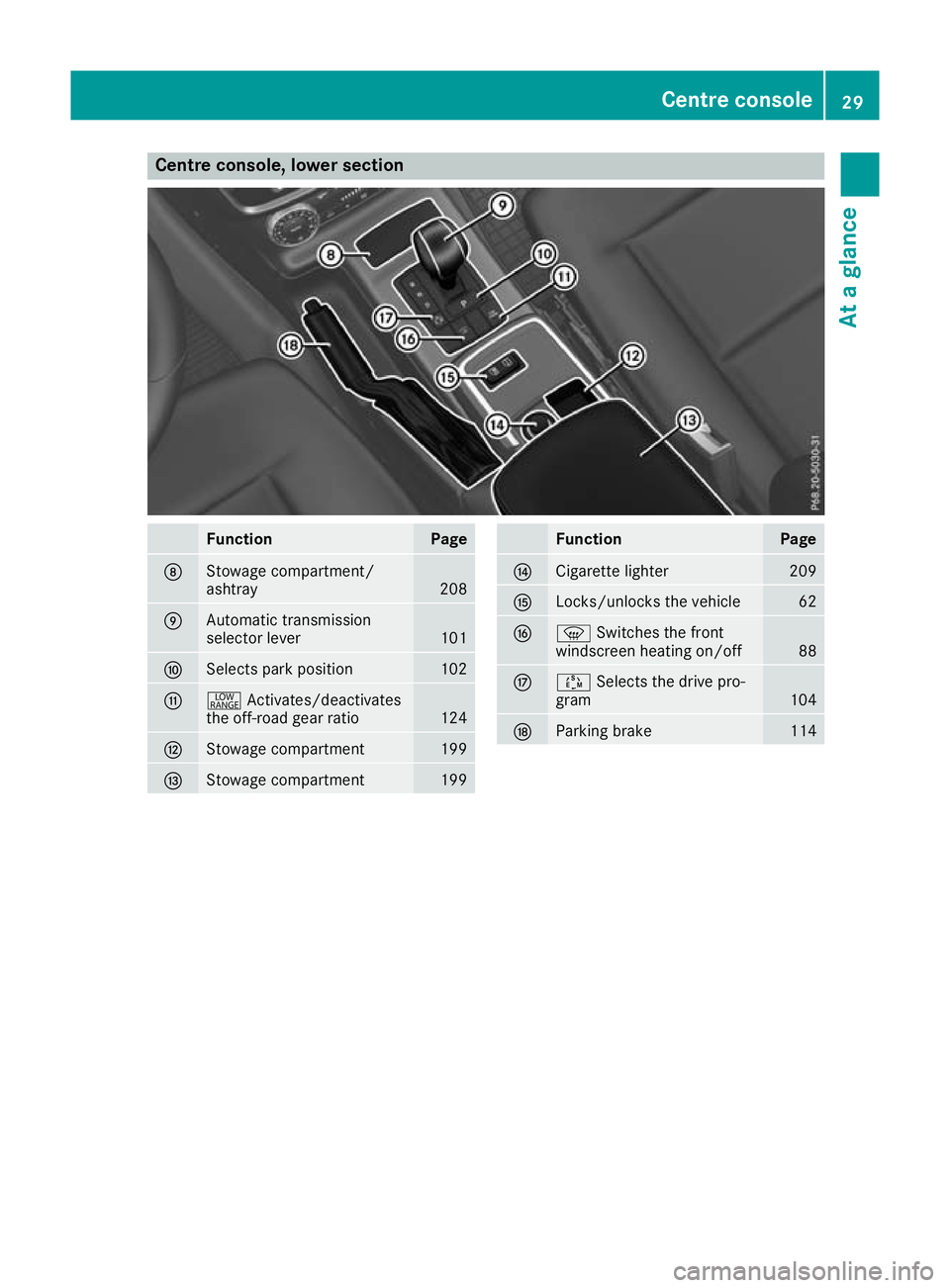
Centre console, lower section
Function Page
D
Stowage compartment/
ashtray
208
E
Automati
ctransmission
selecto rlev er 101
F
Selects park position 102
G
+
Activates/deactivates
the off-roa dgearratio 124
H
Stowage compartment 199
I
Stowage compartment 199 Function Page
J
Cigarette lighter 209
K
Locks/unlock
sthe vehicle 62
L
z
Switches the front
windscreen heating on/off 88
M
Ú
Selects the drive pro-
gram 104
N
Parkin
gbrake 114Centrec
onsole
29Atag lance
Page 42 of 261
Mercedes-Ben
zstrongly advises that you install
the child restraint system on arear seat. Chil-
dren are generally better protected there.
If ac hild younger than twelve years old and
under 1.50 minh eight is travellin ginthe vehi-
cle:
R always secur ethe child in achild restraint
system suitable for Mercedes-Ben zvehicles.
The child restraint system must be appropri-
ate to the age, weight and size of the child.
R be sure to observe the instructions and safety
notes in this section in addition to the child
restraint system manufacturer' sinstallation
instructions. G
WARNING
If you leave children unattende dint he vehi-
cle, they may be abletos et the vehiclein
motion if, for example, they:
R release the parking brake
R shift the automatic transmission out of park
position P
R start the engine
In addition, they may operate vehicl eequip-
ment and become trapped. There is arisk of
an accident and injury.
When leaving the vehicle, alwayst ake the key
with you and lock the vehicle. Never leave
children unattended in the vehicle. G
WARNING
If persons (particularly children) are exposed
to heatorc old foraprolonged period, there is
ar isk of serious or even fatal injuries. Never
leave persons (particularly children) unatten-
ded in the vehicle. G
WARNING
If the child restraint system is placed in direct sunlight, the parts coul dbecome very hot.
Childre ncouldbes uffer burns by touching
these parts, in particular on the metallic parts
of the child restraint system. There is arisk of
injury.
If you and yourc hild leave the vehicle, always
make sure that the child restraint system is
not in direct sunlight. Cove ritwithablanket, for example. If the child restraint system has
been expose
dtodirect sunlight, leave it to
cool dow nbefore securing the child in it.
Never leave children unattende dinthe vehi-
cle.
Always ensure that all vehicl eoccupants have
their sea tbelts fastened correctly and are sitting
properly .Particular attention must be pai dto
children.
Observ ethe safety notes on the sea tbelt
(Y pag e32) and the information on the correct
use of the sea tbelt( Y pag e33). Chil
dseat lock G
WARNING
If th eseat beltisr eleased while driving, the
child restraint system willnol onger be
secure dproperly.T he child seat lock is disa-
bleda nd the inertia real draw sinaportion of
the seat belt. The seat beltc annot be imme-
diately refastened. There is an increased risk
of injury ,possibly even fatal.
Stop the vehicl eimmediately, paying atten-
tion to road and traffic conditions. Reactivate the child seat lock and secure the child
restraint system properly.
All seat belts except the driver's seat belta re
equipped with achild seat lock. When enabled,
the child seat lock function ensure sthat the seat
beltd oes not slacken once the child restraint
system is secured.
Installing achild restraint system:
X Always comply with the child restraint system
manufacturer's installation instructions.
X Pullt he seat belts moothly out of the belts ash
guide.
X Engage the seat beltt ongue in the beltbuckle.
Activating the child seat lock: X Pullt he seat belto ut fullyand let the inertia
reel retract it again.
Whil ethe seat beltisr etracting, you should
hear aratcheting sound .The child seat lock
function is enabled.
X Push the child seat restraint system downso
that the seat beltist ight and does not loosen. Children in the vehicle
39Safety Z
Page 54 of 261
Child-proof locks
Important safety notes G
WARNING
If children ar etravelling in the vehicle, they
could:
R open doors, thus endangering other people
or road users
R exit the vehicl eand be caught by oncoming
traffic
R operate vehicl eequipment and become
trapped, for example
There is arisk of an accident and injury.
Always activate the child-proof locks and
overrid efeature if children are travelling in the
vehicle. When leaving the vehicle, alwayst ake
the key with you and lock the vehicle. Never
leave children unattended in the vehicle.
Child-proof locks for the rear doors
(Y page5 1).
Observe the important safety notes on the dou-
ble-lock function (Y page57). G
WARNING
If you leave children unattended in the vehi-
cle, they may be abletos et the vehiclein
motion if, for example, they:
R release the parking brake
R shift the automatic transmission out of park
position P
R start the engine
In addition, they may operate vehicl eequip-
ment and become trapped. There is arisk of
an accident and injury.
When leaving the vehicle, alwayst ake the key
with you and lock the vehicle. Never leave
children unattended in the vehicle. G
WARNING
If persons (particularly children) are exposed
to heatorc old foraprolonged period, there is
ar isk of serious or even fatal injuries. Never
leave persons (particularly children) unatten-
ded in the vehicle. G
WARNING
If the child restraint system is placed in direct sunlight, the parts coul dbecome very hot.
Childre ncouldbes uffer burns by touching
these parts, in particular on the metallic parts
of the child restraint system. There is arisk of
injury.
If you and yourc hild leave the vehicle, always
make sure that the child restraint system is
not in direct sunlight. Cove ritwithablanket,
for example. If the child restraint system has
been expose dtodirect sunlight, leave it to
cool downb efore securing the child in it.
Never leave children unattended in the vehi-
cle.
Child-proof locks for the rear side doors
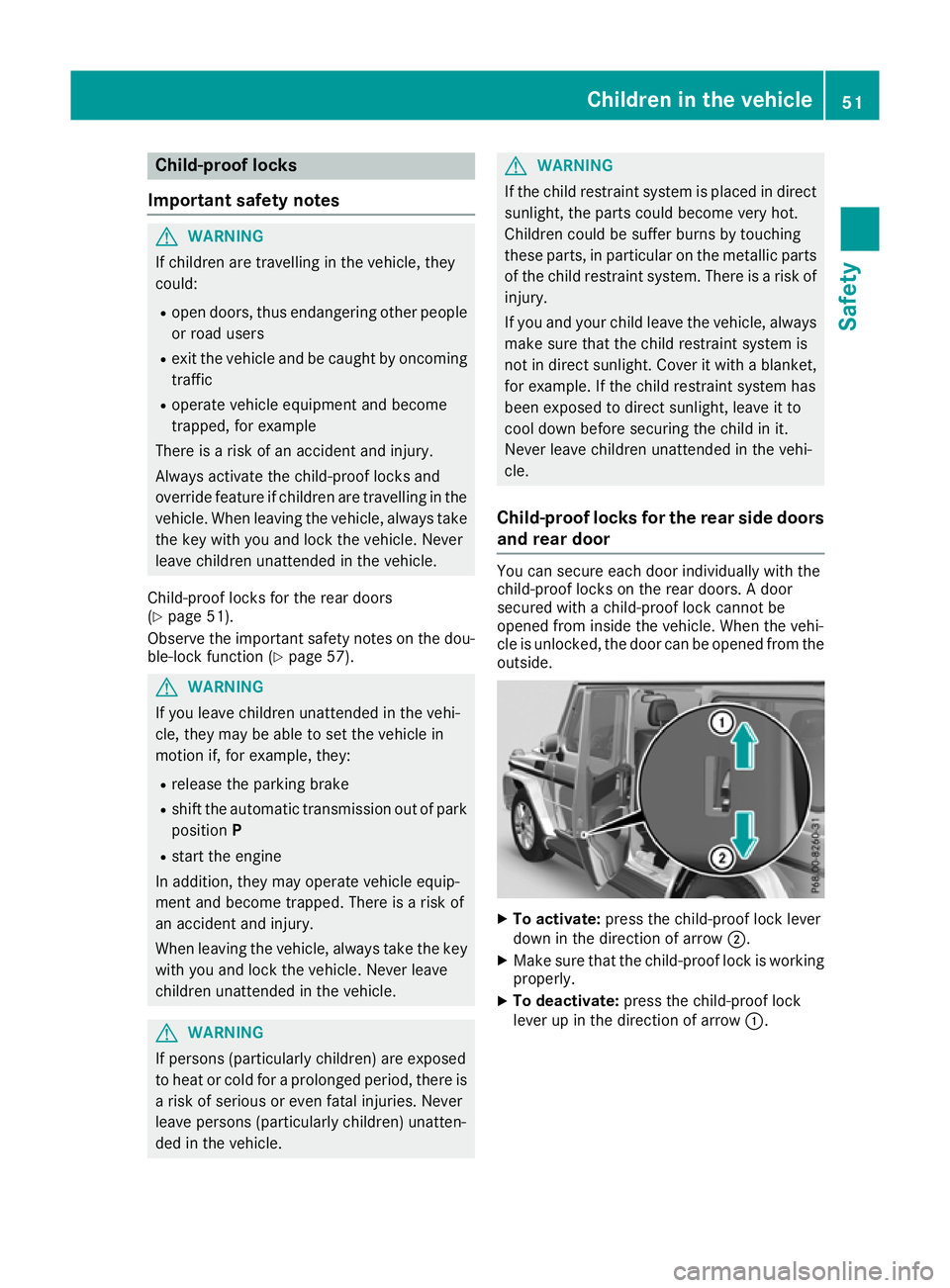
and rear door You can secure eac
hdoor individually with the
child-proof lock sonthe rear doors .Adoor
secured with achild-proof lock cannot be
opene dfrom inside the vehicle. When the vehi-
cle is unlocked, the door can be opene dfrom the
outside. X
To activate: press thechild-proof lock lever
down in the direction of arrow ;.
X Make sure tha tthe child-proof lock is working
properly.
X To deactivate: press the child-proof lock
lever up in the direction of arrow :. Child
renint hevehicle
51Safety Z
Page 55 of 261
Pets in the vehicle
G
WARNING
If you leave animals unsupervised or unse-
cured in the vehicle, they may push abutton
or as witch, for example.
They could:
R activate vehicl eequipment and become
trapped, for example
R switch vehicl esystems on or off, thus
endangering other road users
In the event of an accident, sudden braking or
abrupt changes of direction, unsecured ani-
mals coul dbeflung around the vehicle, injur-
ing the vehicl eoccupants. There is arisk of an
accident and injury.
Never leave animals unattended in the vehi-
cle. Always secure animals correctly during a
journey ,e.g. in an anima ltransport box. Driving safe
tysystems Drivin
gsafet ys ystems overview
In this section ,you will fin dinformati on about
th ef ollowin gdrivin gsafet ysystems:
R AB S(Anti-lock Braking System)
(Y page 52)
R BA S(Brake Assist System) (Y page 53)
R Adaptive brake lights (Y page 53)
R ESP ®
(Electronic Stability Program)
(Y page 53)
R EB D( electronic brak eforce distributi on)
(Y page 55)
R ADAPTIV EBRAKE (Y page 56) Important safety notes
If you fail to adapt your driving style or if you are
inattentive, th edriving safet ysystems can nei-
ther reduce th eriskofana ccidentnor override
th el aws of physics .Drivin gs afet ysystems are
merely aids designed to assist driving .You are
responsible for maintainin gthe distanc etothe
vehicl einfront,for vehicl espeed, for braking in
goo dtime, and for staying in lane. Always adapt
your driving style to suit th eprevailing road and weather conditions and maintain
asafe distance
fro mt hevehicle in front .Drive carefully.
The driving safet ysystems described work as
effectively as possible only when there is ade-
quate contac tbetween th etyres and th eroad
surface. Pay particular attention to th einforma-
tio nr egarding tyres, recommended minimum
tyr etread depths etc .inthe"Wheels and tyres"
sectio n(Ypage 235).
In wintry driving conditions ,always use winter
tyres (M+S tyres) and, if necessary, snow
chains. Only in this way will th edriving safety
systems described in this sectio nwork as effec-
tively as possible. ABS (Anti-lock Braking System)
Genera linformation AB
Sregulate sbrake pressure in such awaythat
the wheels do not lock when yo ubrake. This
allows yo utocontinue steering the vehicl ewhen
braking.
The yellow !ABS warning lamp in the instru-
ment cluster lights up when the ignition is
switched on. It goe soutwhen the engine is run-
ning.
ABS works from aspeed of abou t8km/h,
regardless of road-surface conditions. ABS
works on slippery surfaces ,evenw heny ou
brake onl ygently.
Important safety notes i
Observ
ethe "Important safety notes" sec-
tion (Y page 52). G
WARNING
If ABS is faulty, the wheels could lock when
braking. The steerability and braking charac-
teristics may be severely impaired.A ddition-
ally, further driving safety systems are deac-
tivated. There is an increased dange rofskid-
ding and accidents.
Drive on carefully.H ave ABS checked imme-
diately at aqualified specialist workshop.
If ABS is malfunctioning, other systems ,includ-
ing driving safety systems ,willa lsob ecome
inoperative. Observe the information on the ABS warning lamp (Y page158) and display mes- 52
Driving safety systemsSafety
Page 56 of 261
sages which may be shown in the instrument
cluster (Y page 142).
Braking X
If ABS intervenes: continue to depress the
bra kepedal with force until th ebraking sit-
uatio niso ver.
X To make afullb rake application: depress
th eb rak epedal with full force.
If AB Sintervene swhen braking ,you will fee la
pulsin ginthebrak epedal.
The pulsating brak epedal can be an indication
of hazardous road conditions; this serves as a
reminder to tak eextra car ewhile driving.
Off-road ABS An ESP
®
syste mspecifically suite dtooff-road
terrain is activated automaticall yonce the off-
roa dprogra misa ctivated.
At speed sbelow 60 km/h ,the front wheels lock
cyclically during braking .The digging-i neffect
achieved in the proces sreduce sthe stopping
distance during off-roa ddriving .Thisl im its
steering capability. BAS (Brak
eAssis tSystem)
General information BAS operate
sinemergency braking situations.
If yo udepress the brake pedal quickly ,BAS
automaticall yboosts the braking force ,thus
shortening the stopping distance.
Important safety notes i
Observe the "Important safety notes" sec-
tion (Y page 52). G
WARNING
If BAS is malfunctioning, the braking distance
in an emergency braking situation is
increased. There is arisk of accident.
In an emergency braking situation, depress
the brake peda lwith full force. ABS prevents
the wheels from locking. Braking X
Keep the brake pedald epressed firmly until
the emergency braking situation is over.
ABS prevents the wheels from locking.
The brakes willf unction as usual once you
release the brake pedal. BAS is deactivated. Adaptiv
ebrake lights
The adaptive brak elights warn followin gtraffic
in an emergenc ybraking situation by:
R flashin gbrak elamps
R activating th ehazard warning lamps
If you brak esharply from aspee dofm oret han
50 km/h or if braking is assisted by BAS, the
brak elamp sflas hrapidly. In this way, traffic
travellin gbehind you is warned in an eve nmore
noticeable manner.
If you brak esharply from aspee dofm oret han
70 km/h to astandstill, th ehazard warning
lamp sare activated automatically. If th ebrakes
are applie dagain ,the brak elamp sligh tupc on-
tinuously. The hazard warning lamp sswitch off
automatically if you travel faste rtha n1 0k m/ h.
You can also switch off th ehazard warning
lamp susingthe hazard warning button
(Y page 76). ESP
®
(Electronic Stability Program)
General notes i
Observ
ethe "Important safety notes" sec-
tion (Y page 52).
ESP ®
monitors driving stability and traction, i.e.
power transmission between the tyres and the
road surface.
If ESP ®
detects that the vehicle is deviating from
the direction desired by the driver, one or more
wheels are braked to stabilise the vehicle. The
engine output is also modified to keep the vehi- cle on the desired course within physical limits.
ESP ®
assists the driver when pulling awayon
wet or slippery roads. ESP ®
can also stabilise
the vehicle during braking. Driving safe
tysystems
53Safety Z