warning MERCEDES-BENZ G-CLASS SUV 2018 Owners Manual
[x] Cancel search | Manufacturer: MERCEDES-BENZ, Model Year: 2018, Model line: G-CLASS SUV, Model: MERCEDES-BENZ G-CLASS SUV 2018Pages: 549, PDF Size: 10.22 MB
Page 302 of 549
R
The service has been activated at a
Mercedes-Benz service centre.
Fu rther information can be found at: http://
www.mercedes.me
Multimedia sy stem:
4 Navigation 5
Z Options
5 Map content #
Activate Weather information O.
or #
Ifwe ather information display 6isavailable
in the map menu, activate O(/page 293)
it.
Cur rent we ather information is displa yed on
th e navigation map, e.g. temp erature or
cloud co ver.
% Weather information is not available in all
countries. Calling up
the Digital Owner's Manual (navi‐
ga tion) Calling up in
form ation on navigation
Multimedia sy stem:
4 Navigation 5
Z Options
5 Information on navigation #
Select theto pic. Te
lephone Te
lephony Note
s ontelephony &
WARNING Risk of di stra ction from oper‐
ating integrated communication equip‐
ment while theve hicle is in motion
If yo u operate communication equipment
integrated in theve hicle when driving, you
will be distracted from the tra ffic situation.
This could also cause youto lose control of
th eve hicle. #
Only operate this equipment when the
traf fic situation permits. #
Ifyo u cannot be sure of this, stop the
ve hicle whilst paying attention toroad
and traf fic conditions and ope rate the
equipment with theve hicle stationar y. &
WARNING Risk of di stra ction from oper‐
ating mobile communication equipment
while theve hicle is in motion
If yo u operate mobile communication equip‐
ment when driving, you will be distracted
from the tra ffic situation. This could also
cause youto lose control of theve hicle. #
Only operate this equipment when the
ve hicle is stationar y. Yo
u must obse rveth e legal requirements forthe
country in whi chyou are cur rently driving when
operating mobile communication equipment in
th eve hicle.
Fu rther information can be obtained from a
Mercedes-Benz service centre or at: http://
www.mercedes-benz.com/connect. Multimedia sy
stem 299
Page 318 of 549
#
Disconnect the connecting cable between
th e Mercedes-Benz Link control box and the
multimedia sy stem.
% Mercedes-Benz recommends disconnecting
th e connecting cable only when theve hicle
is stationar y. Apple CarPlay™
Overview of Apple CarPlay™
&
WARNING Risk of di stra ction from infor‐
mation sy stems and communications
equipment
If yo u operate information and communica‐
tion equipment integ rated in theve hicle
when driving, you will be distracted from the
traf fic situation. This could also cause youto
lose control of theve hicle. #
Only operate this equipment when the
traf fic situation permits. #
Ifyo u cannot be sure of this, stop the
ve hicle whilst paying attention toroad and traf
fic conditions and ope rate the
equipment with theve hicle stationar y. Yo
u must obse rveth e legal requirements forthe
country in whi chyou are cur rently driving when
operating the multimedia sy stem.
iPhone ®
functions can be used via the multime‐
dia sy stem using Apple CarPlay™. They are oper‐
ated using the cent ral control element or the
Siri ®
vo ice-operated control sy stem. You can
activate thevo ice-opera ted control sy stem by
pressing and holding theó button on the
multifunction steering wheel.
When using Apple CarPlay™ via thevo ice-oper‐
ated control sy stem, the multimedia sy stem can
st ill be operated via LINGU ATRO NIC
(/ page 237).
Only one mobile phone at a time can be connec‐
te d via Apple CarPlay™ tothe multimedia sys‐
te m.
The availability of Apple CarPlay™ may vary
according tothe count ry. The service pr
ovider is responsible forth is appli‐
cation and the services and conte nt connected
to it.
Information on Apple CarPlay™
While using Apple CarPlay™ various functions of
th e multimedia sy stem, e.g. telephony or the
media sources Blue tooth ®
audio and iPod ®
, are
una vailable.
Only one route guidance can be active at a time.
If ro ute guidance is active on the multimedia sys‐
te m, it is closed when route guidance is star ted
on the mobile phone.
Connecting an iPhone ®
via Apple CarPlay™
Re quirements:
R Apple ®
operating sy stem version iOS 8.3 or
abo veis ins talled on the iPhone ®
.
R An Internet connection is requiredforth e full
ra nge of functions for Apple CarPlay™.
R The iPhone ®
is connected tothe multimedia
sy stem via the USB port çusing a suita‐
ble cable (/ page 337). Multimedia sy
stem 315
Page 319 of 549
Multimedia sy
stem:
4 Connect 5
Apple CarPlay
Setting automatic or manual start
A messa geappears when connec tedfo rth efirst
time. #
Automatic star t:select Automatically.
Start automatically is activatedO.
Apple CarPlay™ will now start immediately
af te rth e iPhone ®
is connected tothe multi‐
media sy stem using a USB cable. #
Manual star t:select Manually . #
Select the iPhone ®
in the device list.
Ac cepting/rejecting the data pr otection reg‐
ulations
A message with the data pr otection regulations
appears. #
Select Accept & Start .
or #
Select Decline & End. Exiting Apple CarPlay™ #
Press theò button on the multifunction
st eering wheel, forex ample.
% If Apple CarPlay™ was not displa yed in the
fo re ground before disconnecting, the appli‐
cation starts in the bac kground when recon‐
nected. You can call up Apple CarPlay™ in
th e main menu.
Calling up Apple CarPlay™ sound settings
Multimedia sy stem:
4 Connect 5
Apple CarPlay 5
Sound #
Select theto ne menu (/ page 359).
Ending Apple CarPlay™
Multimedia sy stem:
4 Connect 5
Apple CarPlay #
Select Disconnect.
The connection is ended.
The mobile phone continues tobe supplied
with elect ricity.
or #
Disconnect the connecting cable between
th e mobile phone and multimedia sy stem.
Mercedes-Benz recommends disconnecting
th e connecting cable only when theve hicle is
st ationar y. Android
Auto Android
Autoove rview &
WARNING Risk of di stra ction from infor‐
mation sy stems and communications
equipment
If yo u operate information and communica‐
tion equipment integ rated in theve hicle
when driving, you will be distracted from the
traf fic situation. This could also cause youto
lose control of theve hicle. #
Only operate this equipment when the
traf fic situation permits. #
Ifyo u cannot be sure of this, stop the
ve hicle whilst paying attention toroad
and traf fic conditions and ope rate the
equipment with theve hicle stationar y. 316
Multimedia sy stem
Page 328 of 549
#
Tostart thete st mode: press and hold the
~ button on the multifunction steering
wheel for at least five seconds.
The test mode is star ted and automatically
ends af terth e language test has been per‐
fo rm ed. #
Toend thete st mode manuall y:switch off
th e ignition.
The test mode is ended. Online and Internet functions
Internet connection
Information on connecting
tothe Internet &
WARNING Risk of di stra ction from infor‐
mation sy stems and communications
equipment
If yo u operate information and communica‐
tion equipment integ rated in theve hicle
when driving, you will be distracted from the
traf fic situation. This could also cause youto
lose control of theve hicle. #
Only operate this equipment when the
traf fic situation permits. #
Ifyo u cannot be sure of this, stop the
ve hicle whilst paying attention toroad
and traf fic conditions and ope rate the
equipment with theve hicle stationar y. Yo
u must obse rveth e legal requirements forthe
country in whi chyou are cur rently driving when
operating the multimedia sy stem. &
WARNING Risk of di stra ction from oper‐
ating mobile communication equipment
while theve hicle is in motion
If yo u operate mobile communication equip‐
ment when driving, you will be distracted
from the tra ffic situation. This could also
cause youto lose control of theve hicle. #
Only operate this equipment when the
ve hicle is stationar y. Yo
u must obse rveth e legal requirements forthe
country in whi chyou are cur rently driving when operating mobile communication equipment in
th
eve hicle.
Depending on theve hicle's equipment, you can
es tablish an Internet connection in thefo llowing
wa ys:
R Vehicles with a communication module:
Internet use including Mercedes me connect
services and data roaming (/ page 325).
R Vehicles without a communication mod‐
ule:
- viaWi-Fi wi tha data-enabled mobile
phone (/ page 326)
- via Blue tooth®
with a data-enabled
mobile phone (/ page 327)
- via business telephony (/ page 326)
The Internet functions can only be used toa limi‐
te d degree whilst driving.
Fu nction of the communication module
On vehicles with a built-in communication mod‐
ule, the Internet connection is es tablished via an
integrated SIM card. Multimedia sy
stem 325
Page 333 of 549
Operating Mercedes-Benz Apps using
voice
control
Re quirements:
R The registration forth e use of Mercedes-
Benz Apps has been comple ted.
R The general term s and conditions ha vebeen
con firm ed.
The o symbol indicates that a Mercedes-
Benz app can be used via voice control. #
Select a Mercedes-Benz app.
The app menu is displa yed. #
Touse voice control: selectoLan-
guage. #
Say thequ estion or command.
% Voice control is not available in all countries
and languages. We
b br owser Calling up a
web page &
WARNING Risk of di stra ction from infor‐
mation sy stems and communications
equipment
If yo u operate information and communica‐
tion equipment integ rated in theve hicle
when driving, you will be distracted from the
traf fic situation. This could also cause youto
lose control of theve hicle. #
Only operate this equipment when the
traf fic situation permits. #
Ifyo u cannot be sure of this, stop the
ve hicle whilst paying attention toroad
and traf fic conditions and ope rate the
equipment with theve hicle stationar y. Yo
u must obse rveth e legal requirements forthe
country in whi chyou are cur rently driving when
operating the multimedia sy stem. Multimedia sy
stem:
4 Connect 5
z Browser
5 z Enter URL #
Ente r aweb address.
% The function is count ry-dependent. #
Tofinish the entry and call up thewe b‐
site: select ¬.
Showing/hiding thewe b br ows er menu
If yo u call up a website byselecting a link, for
ex ample, thewe b br ows er menu is hidden. #
Toshow/hide: pressthe% button.
% The web br ows er supports video playbac k.
% Nowebsites or videos are displa yed while
th eve hicle is in motion. 330
Multimedia sy stem
Page 336 of 549
Selecting and connecting Internet
radio sta‐
tions
Multimedia sy stem:
4 Radio 5
Þ Radio source
5 TuneIn radio 5
è Search #
Select a categor y. #
Select a station.
The connection is es tablished automaticall y.
or #
Select Enter address or POI. #
Enter a station name using the entry field.
% Arelatively lar gevolume of data can be
transmitte d when using Internet radio.
Saving/deleting an Internet radio station as
a fa vo urite
Multimedia sy stem:
4 Radio 5
Þ Radio source
5 TuneIn radio #
Select a station. #
Press and hold the cent ral control element
until an audible signal sounds.
The ß symbol appears bythest ation
name. #
Select ßFavourites.
The list of sa vedfavo urite stations appears.
or #
Create an account forth e online pr ovider
(TuneIn radio) and then log in on the multi‐
media sy stem.
Yo ur favo urites are impor tedto the multime‐
dia sy stem.
Deleting favo urites #
Select ßFavourites. #
Select a station. #
Press and hold the cent ral control element
until an audible signal sounds.
The ß symbol bythest ation name disap‐
pears. Setting Internet
radio options
Multimedia sy stem:
4 Radio 5
Þ Radio source
5 TuneIn radio 5
Z Options
The following options are available:
R Select stream : selectthest re am qualit y.
R Login to TuneIn account: log in to your
Tu neIn user account.
R Log out of account : log out ofyour TuneIn
user account. #
Select an option. Media
Au
dio mode In
fo rm ation on the audio mode &
WARNING Risk of di stra ction when han‐
dling da tastorage media
If yo u handle a data storage medium while
driving, your attention is diver ted from the Multimedia sy
stem 333
Page 363 of 549
Ac
tivating/deactivating volume adjustment
in the Bu rmester ®
sur round sound sy stem
Multimedia sy stem:
4 Media 5
à Sound
5 Automatic volume adjustment
Au tomatic volume adjustment compensates for
dif fering volumes when changing between audio
sources. #
Activate Oor deacti vate ª the function.
Ad justing the balance/ fader in the
Burmes ter®
sur round sound sy stem
Multimedia sy stem:
4 Media 5
à Sound
5 Balance and Fader #
Adjust the balance and fader. #
Toexitth e menu: pressthe% button. Switching sur
round sound on/off in the
Burmes ter®
sur round sound sy stem
Multimedia sy stem:
4 Media 5
à Sound
5 Surround sound #
Activate Oor deacti vate ª the function.
Ad justing the sound focus in the Bu rmester ®
sur round sound sy stem
Multimedia sy stem:
4 Media 5
à Sound 5
Sound focus #
Adjust the sound focus. Re
ar Seat Entertainment Sy stem Note
s on operating saf ety &
WARNING Risk of accident or inju rydue
to the driver operating theRe ar Seat
En tertainment Sy stem
If yo u operate theRe ar Seat En tertainment
Sy stem when driving you could lose cont rol
of theve hicle. #
Only ha vetheRe ar Seat En tertainment
Sy stem operated byrear compartment
passengers when they have their seat
belts fastened. #
Set thevo lume on the Blue tooth ®
speakers so that sounds, in particular
from outside theve hicle, can alw ays be
heard. &
WARNING Risk of accident or inju rydue
to incor rect modifications of theRe ar
Seat En tertainment Sy stem
The Rear Seat En tertainment Sy stem con‐
ta ins no parts that can be main tained by yo u.
Modi fications totheRe ar Seat En tertainment
Sy stem can impair its function and/or the
function of additionally networ ked compo‐
nents. #
Alw ays ha vemaintenance workand
re pairs car ried out at a qualified spe‐
cialist workshop. 360
Multimedia sy stem
Page 364 of 549
&
WARNING Risk of inju ryfrom unsecu red
items in theve hicle
If objects such as headphones/headsets or
ex tern al audio/video sources are not
secured in theve hicle interior, they can be
fl ung around and hit vehicle occupants. #
Alw aysstow these items or similar
objects carefully so that they cannot be
fl ung around, forex ample in a loc kable
ve hicle stowage compartment. Obse
rveth e no tes on loading theve hicle. &
WARNING Risk of accident and inju ry
caused byspilling liquids on a display
Spilled liquids could result in a fire or an
electric shoc k. #
Do not pour or sp ray any liquids on to
th e displa y. *
NO
TEDama getothere ar display and/or
th ere ar ben chseat The
rear displa ysoftheRe ar Seat En tertain‐
ment Sy stem and/or there ar ben chseat can
be damaged when folding there ar ben ch
seat forw ards. #
Make sure that when folding there ar
ben chseat forw ards it does not come
into con tact wi th there ar displa ysand
th e front seats. *
NO
TEDama getocomponent pa rts when
adjusting the front seats The
rear displa ysoftheRe ar Seat En tertain‐
ment Sy stem, the front seats or other com‐
ponent parts can be damaged when adjust‐
ing the front seats. #
When adjusting the front seats and the
fi tted rear displa ysmake sure that they
do not come into con tact wi thother
component parts. Obser
vethe no tes on adjusting the front seats. Fu
nction restrictions
Ra dio-based elect ronic devices, e.g. mobile
phones, can inter fere with theRe ar Seat En ter‐
ta inment Sy stem and adversely af fect thequ ality
of the playbac k.Ke ep the number of these devi‐
ces in theve hicle tothe minimum necessar y.
Note s ontemp eratures: intheev ent that a
re ar display overheats a saf ety shutoff is car ried
out. Pr otect there ar displa ysfrom cons tant
di re ct sunlight.
If th ete mp erature fluctuates widel y,condensa‐
tion could occur on the inside of the screen. This
can adversely af fect the function. Only switch on
th ere ar displa yswhen they have adjus tedto the
ambient temp erature.
Declarations of conformity
Obser vethe no tes on thefo llowing topics:
R Elect romagnetic compatibility (/ page 22)
R Wireless vehicle components (/ page 22) Multimedia sy
stem 361
Page 366 of 549
Re
solution (horizontal x vertical): 1024 x 600
pi xe ls
3 Calls up the main menu
4 Back button
5 Switches there ar display on or off
6 Lowe rsthevo lume
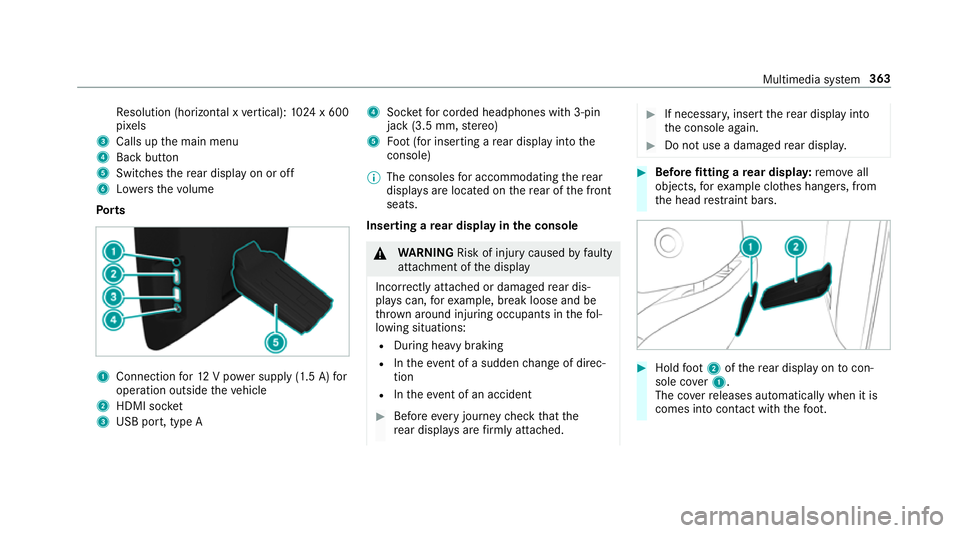
Po rts 1
Connection for12 V po wer supp ly(1.5 A) for
operation outside theve hicle
2 HDMI soc ket
3 USB port, type A 4
Socketfo r corded headphones with 3-pin
jack (3.5 mm, stereo)
5 Foot (for inserting a rear display into the
console)
% The consoles for accommodating there ar
displa ysare located on there ar of the front
seats.
Inserting a rear display in the console &
WARNING Risk of inju rycaused byfaulty
attachment of the display
Incor rectly attached or damaged rear dis‐
pla yscan, forex ample, break loose and be
th ro wn around injuring occupants in thefo l‐
lowing situations:
R During heavy braking
R Intheeve nt of a sudden change of direc‐
tion
R Intheeve nt of an accident #
Before every journey check that the
re ar displa ysare firm lyattached. #
If necessar y,inse rtthere ar display into
th e console again. #
Do not use a damaged rear displa y. #
Before fitting a rear displa y:remo veall
objects, forex ample clo thes hangers, from
th e head restra int bars. #
Hold foot 2 ofthere ar display on tocon‐
sole co ver1.
The co verre leases automatically when it is
comes into con tact wi th thefo ot. Multimedia sy
stem 363
Page 367 of 549
#
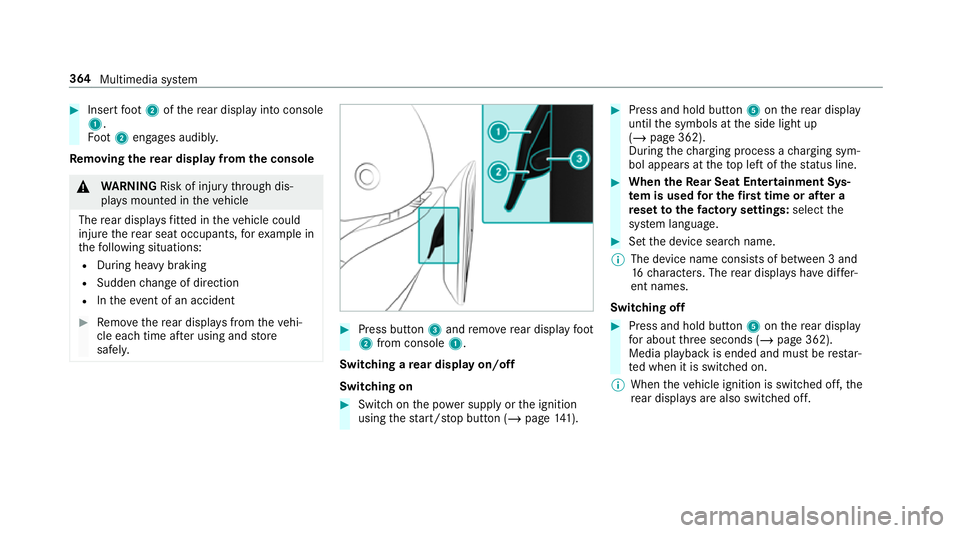
Insert foot 2 ofthere ar display into console
1.
Fo ot 2 engages audibly.
Re moving the rear display from the console &
WARNING Risk of inju rythro ugh dis‐
pla ysmounted in theve hicle
The rear displa ysfitted in theve hicle could
injure there ar seat occupants, forex ample in
th efo llowing situations:
R During heavy braking
R Sudden change of direction
R Intheev ent of an accident #
Remo vethere ar displa ysfrom theve hi‐
cle each time af ter using and store
safel y. #
Press button 3and remo verear display foot
2 from console 1.
Switching a rear display on/off
Switching on #
Switch on the po wer supp lyor the ignition
using thest art/ stop button (/ page141). #
Press and hold but ton5 onthere ar display
until the symbols at the side light up
(/ page 362).
During thech arging process a charging sym‐
bol appears at theto p left of thest atus line. #
When theRe ar Seat Entertainment Sys‐
te m is used for the firs t time or af ter a
re set tothefa ctory settings: selectthe
sy stem language. #
Set the device sear chname.
% The device name consi sts of between 3 and
16 characters. The rear displa yshave differ‐
ent names.
Switching off #
Press and hold button 5onthere ar display
fo r about thre e seconds (/ page 362).
Media playback is ended and must be restar‐
te d when it is switched on.
% When theve hicle ignition is switched off, the
re ar displa ysare also swit ched off. 364
Multimedia sy stem