navigation MERCEDES-BENZ G-CLASS SUV 2018 Owner's Guide
[x] Cancel search | Manufacturer: MERCEDES-BENZ, Model Year: 2018, Model line: G-CLASS SUV, Model: MERCEDES-BENZ G-CLASS SUV 2018Pages: 549, PDF Size: 10.22 MB
Page 285 of 549
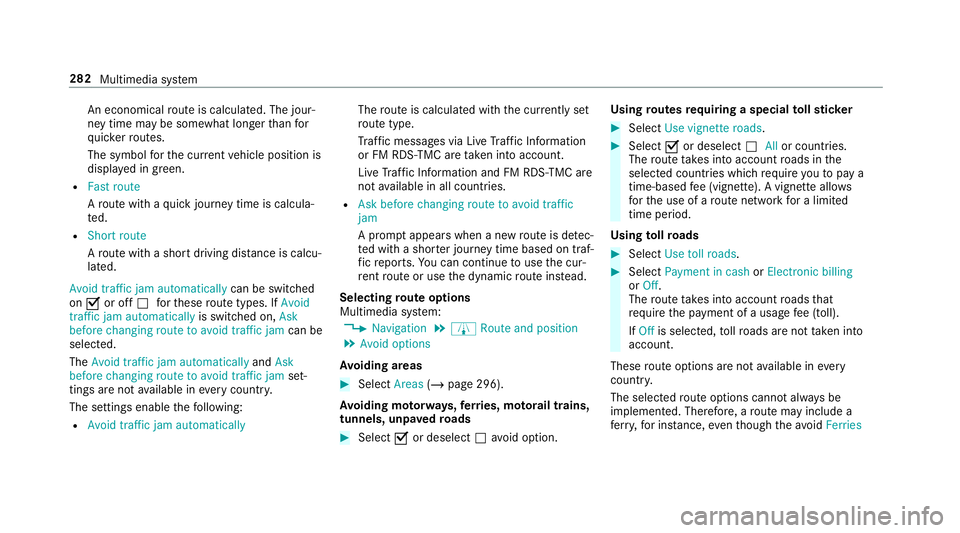
An economical
route is calculated. The jour‐
ney time may be som ewhat longer than for
qu icke rro utes.
The symbol forth e cur rent vehicle position is
displa yed in green.
R Fast route
Aro ute with a quick journey time is calcula‐
te d.
R Short route
Aro ute with a sho rtdriving dis tance is calcu‐
la te d.
Avoid traffic jam automatically can be switched
on O or off ªforth ese route types. If Avoid
traffic jam automatically is switched on, Ask
before changing route to avoid traffic jam can be
selected.
The Avoid traffic jam automatically andAsk
before changing route to avoid traffic jam set‐
tings are not available in every count ry.
The settings enable thefo llowing:
R Avoid traffic jam automatically The
route is calculated with the cur rently set
ro ute type.
Tr af fic messages via Live Traf fic Information
or FM RDS-TMC are take n into account.
Live Traf fic Information and FM RDS-TMC are
not available in all countries.
R Ask before changing route to avoid traffic
jam
A prom ptappears when a new route is de tec‐
te d with a shor ter journey time based on traf‐
fi c re ports. You can continue touse the cur‐
re nt route or use the dynamic route ins tead.
Selecting route options
Multimedia sy stem:
4 Navigation 5
À Route and position
5 Avoid options
Av oiding areas #
Select Areas(/page 296).
Av oiding mo torw ays, ferries, mo torail trains,
tunnels, unpa vedro ads #
Select Oor deselect ªavo id option. Using
routes requiring a special tollst icker #
Select Use vignette roads . #
Select Oor deselect ªAllor countries.
The route take s into account roads in the
selected countries which requ ire youto pay a
time-based fee (vignette). A vignette allo ws
fo rth e use of a route network for a limi ted
time pe riod.
Using tollro ads #
Select Use toll roads. #
Select Payment in cash orElectronic billing
or Off.
The route take s into account roads that
re qu ire the payment of a usage fee (toll).
If Off is selected, tollro ads are not take n into
account.
These route options are not available in every
countr y.
The selected route options cannot alw ays be
implemented. Therefore, a route may include a
fe rry, for ins tance, eventh ough theavo idFerries 282
Multimedia sy stem
Page 286 of 549
option is enabled. A message appears and
you
will hear a cor responding message.
Selecting notifications
Multimedia sy stem:
4 Navigation 5
Z Options
5 Announcements #
Switch an announcement on Oor off ª.
Yo u can choose from thefo llowing announce‐
ments:
R Announce traffic warnings
This function is not available in all countries.
R Announce street names
The multimedia sy stem announces the
names of thero ads that will follow the
upcoming change of direction.
This function is not available in all countries
and languages.
Displ aying destination information
Requ irements:
R A destination is entered. Multimedia sy
stem:
4 Navigation #
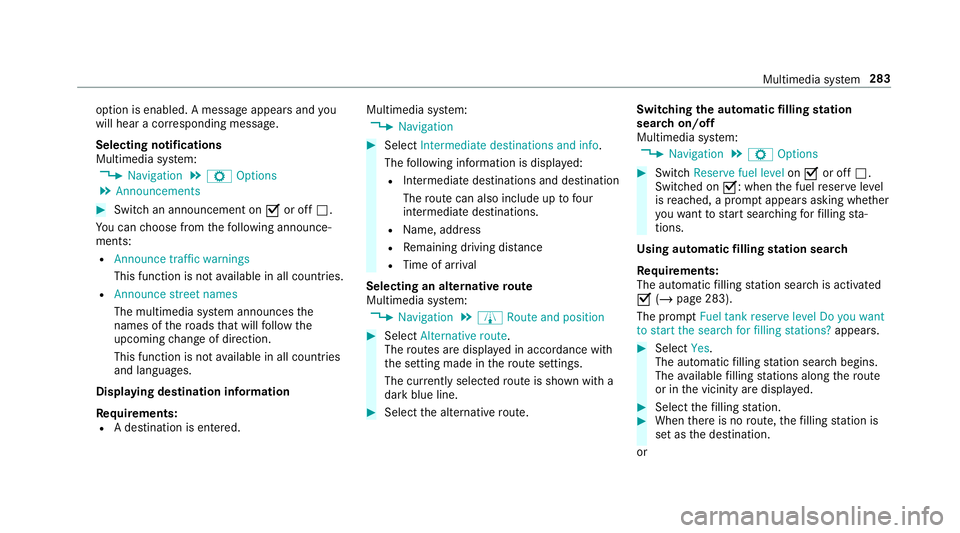
Select Intermediate destinations and info.
The following information is displa yed:
R Intermediate destinations and destination
The route can also include up tofour
intermediate destinations.
R Name, addre ss
R Remaining driving dis tance
R Time of ar rival
Selecting an alternative route
Multimedia sy stem:
4 Navigation 5
À Route and position #
Select Alternative route.
The routes are displ ayed in accordance with
th e setting made in thero ute settings.
The cur rently selected route is shown with a
dark blue line. #
Select the alternative route. Swit
ching the automatic filling station
sear chon/off
Multimedia sy stem:
4 Navigation 5
Z Options #
Switch Reserve fuel level onO or off ª.
Switched on O: whenthe fuel reser velevel
is reached, a prom ptappears asking whe ther
yo uwa nttostart sear ching forfilling sta‐
tions.
Using au tomatic filling station sear ch
Re quirements:
The automatic filling station sear chis activated
O (/ page 283).
The prom ptFuel tank reserve level Do you want
to start the search for filling stations? appears. #
Select Yes.
The au tomatic filling station sear chbegins.
The available filling stations along thero ute
or in the vicinity are displa yed. #
Select thefilling station. #
When there is no route, thefilling station is
set as the destination.
or Multimedia sy
stem 283
Page 287 of 549
#
When there is a route, thefilling station is set
as the next intermediate destination.
St arting the automatic service station
sear ch
Re quirements:
R ATTENTION ASSIST and theSuggest rest
area function are activated (/ page215).
Driving si tuation
The ATTENTION ASSIST Do you want to start
the rest area search? messageis shown. #
Select Yes.
The service station sear ch starts. The availa‐
ble service stations along thero ute or in the
vicinity of theve hicle's cur rent position are
displ ayed. #
Select the service station.
The service station address is displa yed. #
Ifro ute guidance is not active, select Start
route guidance .
The selected service station is set as a desti‐
nation. Route guidance begins.
or #
Ifro ute guidance is active, select Start new
route guidance orSet as next intermediate
destination .
Start new route guidance: the selected
service station is set as a new destination.
The pr evious destination and all intermediate
destinations are dele ted. Ro ute guidance to
th e service station begins.
Set as next intermediate destination: the
selected service station is set as the next
intermediate destination. Route guidance
begins. Ro
ute guidance Note
s onroute guidance &
WARNING Risk of di stra ction from oper‐
ating integrated communication equip‐
ment while theve hicle is in motion
If yo u operate communication equipment
integrated in theve hicle when driving, you
will be distracted from the tra ffic situation.
This could also cause youto lose control of
th eve hicle. #
Only operate this equipment when the
traf fic situation permits. #
Ifyo u cannot be sure of this, stop the
ve hicle whilst paying attention toroad
and traf fic conditions and ope rate the
equipment with theve hicle stationar y. Yo
u must obse rveth e legal requirements forthe
country in whi chyou are cur rently driving when
operating the multimedia sy stem.
Ro ute guidance begins once a route has been
calculated.
The road and traf fic ru les and regulations alw ays
ha ve priority over multimedia sy stem driving
instructions.
The following driving instructions can be used:
R Navigation announcements
R Route guidance displ ays
R Lane recommendations
If yo u do not follow the driving instructions or if
yo u lea vethe calculated route, a new route is
calculated automaticall y.284
Multimedia sy stem
Page 288 of 549
Driving instructions may di
ffer from the actual
ro ad and traf fic conditions if:
R The route is diver ted
R The direction of a one-w aystre et has been
ch anged
Fo rth is reason, you must alw ays obser veroad
and traf fic ru les and regulations during your
journey as well as the pr evailing traf fic condi‐
tions.
The route may dif fer from the ideal route due to
th efo llowing:
R Roadwor ks
R Incomple tedigital map data
Note s on GPS reception
The cor rect function of the navigation sy stem
depends amongst other things on GPS recep‐
tion. In cer tain situations GPS reception can be
impaired, defective or even not possible, e.g. in
tunnels or in multi-s torey car par ks. Changing direction
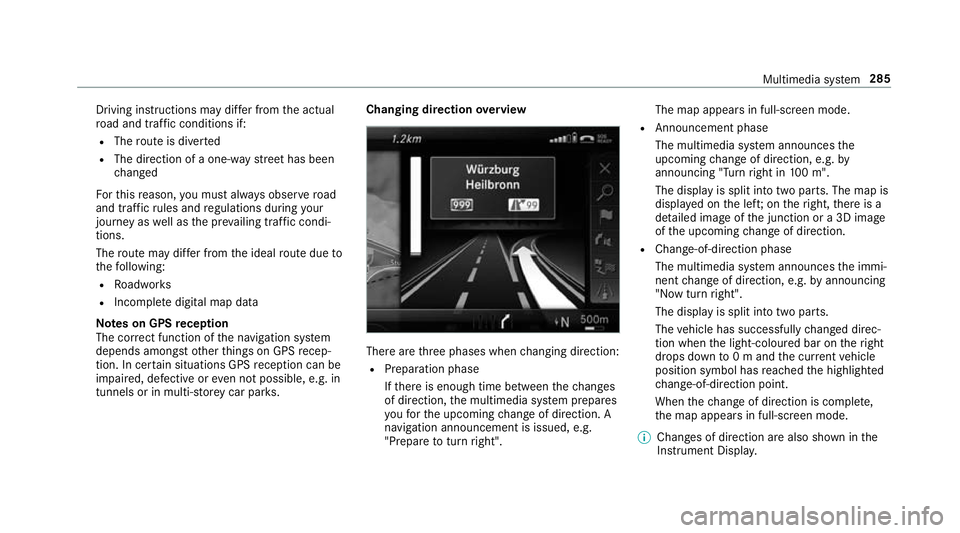
overview There are
thre e phases when changing direction:
R Preparation phase
Ifth ere is enough time between thech anges
of direction, the multimedia sy stem prepares
yo ufo rth e upcoming change of direction. A
navigation announcement is issued, e.g.
"Prepare toturn right". The map appears in full-screen mode.
R Announcement phase
The multimedia sy stem announces the
upcoming change of direction, e.g. by
announcing "Turn right in 100 m".
The display is split into two parts. The map is
displa yed on the lef t;on theright, there is a
de tailed image of the junction or a 3D image
of the upcoming change of direction.
R Chan ge-of-direction phase
The multimedia sy stem announces the immi‐
nent change of direction, e.g. byannouncing
"N ow turn right".
The display is split into two parts.
The vehicle has successfully changed direc‐
tion when the light-coloured bar on theright
drops down to0 m and the cur rent vehicle
position symbol has reached the highlighted
ch ange-of-direction point.
When thech ange of direction is comple te,
th e map appears in full-screen mode.
% Changes of direction are also shown in the
Instrument Displa y. Multimedia sy
stem 285
Page 289 of 549
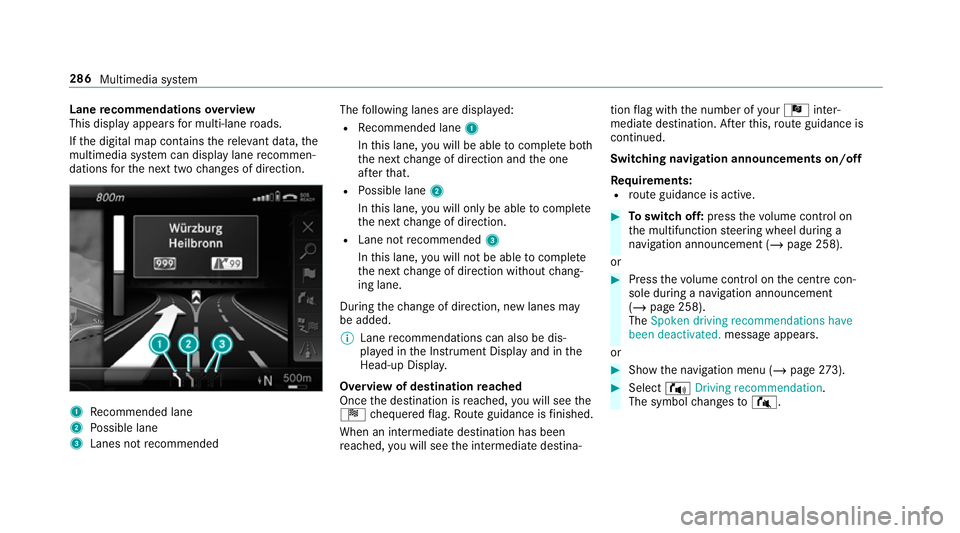
Lane
recommendations overview
This display appears for multi-lane roads.
If th e digital map conta insthere leva nt da ta,the
multimedia sy stem can display lane recommen‐
dations forth e next two changes of direction. 1
Recommended lane
2 Possible lane
3 Lanes not recommended The
following lanes are displa yed:
R Recommended lane 1
In this lane, you will be able tocompl ete bo th
th e next change of direction and the one
af te rth at.
R Possible lane 2
In this lane, you will on lybe able tocompl ete
th e next change of direction.
R Lane not recommended 3
In this lane, you will not be able tocompl ete
th e next change of direction without chang‐
ing lane.
During thech ange of direction, new lanes may
be added.
% Lane recommendations can also be dis‐
pl ay ed in the Instrument Display and in the
Head-up Displa y.
Overview of destination reached
Once the destination is reached, you will see the
Í chequered flag. Route guidance is finished.
When an intermedia tedestination has been
re ached, you will see the intermediate destina‐ tion
flag with the number of your Î inter‐
mediate destination. Af terth is, route guidance is
continued.
Swit ching navigation announcements on/off
Re quirements:
R route guidance is active. #
Toswitch off: pressthevo lume control on
th e multifunction steering wheel during a
navigation announcement (/ page 258).
or #
Press thevo lume control on the cent recon‐
sole du ring a navigation announcement
(/ page 258).
The Spoken driving recommendations have
been deactivated. messageappears.
or #
Show the navigation menu (/ page273). #
Select !Driving recommendation .
The symbol changes to# . 286
Multimedia sy stem
Page 290 of 549
#
Toactivate: select#Driving recommen-
dation .
The cur rent navigation announcement is
pl ay ed.
% Inthefo llowing situations, navigation
announcements are switched on automati‐
cally:
R A new route guidance is star ted.
R The route is recalculated.
% You can add and call up this function as a
fa vo urite under Spoken driving recommenda-
tions on/off.
Swit ching navigation announcements on/off
during a phone call #
Select System. #
Select õAudio. #
Select Navigation and traffic announce-
ments. #
Swit chDriving recommendations during
phone call onO or off ª. Ad
justing the volume of navigation
announcements
Re quirements:
R Route guidance is active. #
On the multifunction steering wheel or
on the multimedia sy stem: turn thevo lume
control on the multifunction steering wheel
during a navigation announcement.
or #
Turn thevo lume control on the cent recon‐
sole du ring a navigation announcement
(/ page 258).
% Inthefo llowing situations, thevo lume is
ra ised tothe maximum volume or lo weredto
th e minimum volume:
R A new route guidance is star ted.
R The route is recalculated.
% The minimum volume can be individually set
at a Mercedes-Benz Service Cent re. #
Via sy stem settings: selectSystem. #
Select õAudio. #
Select Navigation and traffic announce-
ments. #
Select Driving recommendation volume. #
Set thevo lume. #
Toswitch audio fadeout on/o ffduring
navigation announcements: selectSystem . #
Select õAudio. #
Select Navigation and traffic announce-
ments . #
Switch Audio fadeout during driving recom-
mendation onO or off ª.
Re peating navigation announcements
Re quirements:
R aro ute has already been created.
R route guidance is active.
Multimedia sy stem:
4 Navigation #
Select !Driving recommendation . #
Select #Driving recommendation .
The cur rent navigation announcement is
re peated. Multimedia sy
stem 287
Page 291 of 549
%
You can add and call up this function as a
fa vo urite under Repeat spoken driving rec-
ommendation .
Cancelling route guidance
Re quirements:
R Aro ute has already been created.
R Route guidance is active.
Multimedia sy stem:
4 Navigation #
Select %Cancel route guidance .
Overview of route guidance toan off-road
destination
An off-road destination is within the digital map.
The map conta ins noroads that lead tothe des‐
tination.
Yo u can en terge o-coordinates or a thre ewo rd
address for off-road destinations on the map.
Ro ute guidance guides youfo r as long as possi‐
ble with navigation announcements and displa ys
on roads that are kn ownto the multimedia sys‐
te m. Shortly before
youre ach the last know n position
on the map, you will hear the "Please follow the
direction ar row" announcement. The displ ay
sho wsa direction ar rowand the linear dis tance
to the destination.
Overview of route guidance from an off-road
location toa destination
Off-road position: the cur rent vehicle position is
located within the digital map on roads that are
not available.
When route guidance begins thefo llowing dis‐
pla ysappear:
R The Road not mapped message is shown.
R A direction ar row showing the linear direc‐
tion tothe POI.
When theve hicle is back on a road kn ownto the
multimedia sy stem, route guidance continues as
no rm al.
Overview of off- road status during route
guidance
Due toroadwor ks,fo rex ample, there may be dif‐
fe re nces between the data on the digital map
and the actual course of thero ad. In such cases, th
e multimedia sy stem will temp orarily be
unable tolocate theve hicle's cur rent position on
th e digital map. The vehicle is off-road.
When theve hicle is off-road, thefo llowing dis‐
pla ysare shown:
R theRoad not mapped message
R a direction ar rowshowing the linear direction
to the POI
When theve hicle is back on a road kn ownto the
multimedia sy stem, route guidance continues as
no rm al. Destination
Saving
the cur rent vehicle position
Multimedia sy stem:
4 Navigation #
Ifth e map is displa yed in full screen mode,
press the cent ral control element.
The map menu appears. #
Select 1onthe map menu (/ page 293).
The cur rent vehicle position is sa vedto the
"Pr evious destinations" memo ry.288
Multimedia sy stem
Page 292 of 549
St
oring a map position
Multimedia sy stem:
4 Navigation
The map is in full-screen mode. #
Press theTo uch Control, the controller or the
to uchpad. #
Select "mo vemap" in map menu 2
(/ page 293). #
Select a position on the map.
If multiple entri es areavailable for a map
position, a list appears. #
Highlight an entr y. #
Select ¥Store in "Previous destina-
tions" .
The map position is sa vedto the "Pr evious
destinations" memo ry.
Editing the pr evious destinations
Multimedia sy stem:
4 Navigation
5 ¬ Previous and other destinations
5 Previous destinations #
Highlight one of the pr evious destinations. #
Tosave as a favo urite: select ¥Save
as global favourite .
The favo urites are displ ayed. #
Movethefa vo urite tothe desired position.
If a favo urite has already been added at this
position, it will be overwritten. #
Tosave as "Home" address: select¥
Save as "Home" address . #
Tosave as "Work" address: select¥
Save as "Work" address . #
Todel ete a single or all destinations:
select ¥Delete orDelete all.
A prom ptappears. #
Select Yes. #
Todispl aydestination information: select
¥ Details.
Using extern al destinations
External destinations can be recei ved from the
fo llowing sources:
R Mercedes-Benz Apps
R door-to-door navigation %
Recei ved destinations are sa ved in the pr evi‐
ous destinations.
A prom ptappears on the media displa y. #
A destination has been received without
picture information: selectYes. #
Ifro ute guidance is not active, select Start
route guidance .
The route tothe destination is calculated.
The map sho ws thero ute. Route guidance
th en begins.
or #
Ifro ute guidance is active, select Start new
route guidance orSet as next intermediate
destination .
Start new route guidance: there cei ved desti‐
nation address is set as a new destination.
The pr evious destinations and intermediate
destinations are dele ted. Ro ute guidance to
th e new destination begins.
Set as next intermediate destination: the
re cei ved destination address is set as the
next intermedia tedestination. Route guid‐
ance begins. Multimedia sy
stem 289
Page 293 of 549
#
A destination has been received with pic‐
tu re information: selectStart route guid-
ance .
Ro ute guidance starts. Ro
ute guidance with cur rent traf fic re ports Tr
af fic information overview
The services are not available in everycountr y.
Tr af fic re ports can be recei ved with thefo llowing
services:
R Live Traf fic Information
R FM RDS-TMC
It is not possible touse bo thservices simultane‐
ously.
Live Traf fic Information or FM RDS-TMC is dis‐
pl ay ed with a symbol.
% Hazard warnings can be recei ved using the
Car-to-X service.
There may be dif fere nces between the traf fic
re ports recei ved and the actual road and traf fic
conditions. Impor
tant information on Live Traf fic Informa‐
tion:
R Current tra ffic reports are recei ved via the
Internet connection or via data roaming (for
selec ted count ries).
R The traf fic situation is upda ted at short, regu‐
lar inter vals.
R In selec ted count ries, the subscription
service is available free of charge for a period
of thre eye ars from the manufacturing date.
The subscription information sho wsthest a‐
tus (/ page 290).
Re gis tering Live Traf fic Information:
R The service must be regis tere d with
Mercedes me (/ page 290).
R Registration is car ried out at a Mercedes-
Benz service cent re.
Information on theve hicle's position is regular ly
sent toDaimler AG. The da tais immediately ren‐
de red anonymous byDaimler AGand forw arded
to the tra ffic data pr ovider. Using this data, traf‐
fi c re ports releva nt totheve hicle's position are
sent totheve hicle. The vehicle acts as a sensor fo
rth eflow of traf fic and helps toimpr ovethe
qu ality of the traf fic re ports.
If yo u do not wish totransmit your vehicle posi‐
tion, you can ha vethis service deactivated at a
Mercedes-Benz service centre.
Useful information on FM RDS -TMC:
R A FM RDS-TMC radio station broadcasts traf‐
fi c re ports alongside thera dio programme.
R FM RDS-TMC is not available in all countries.
Displ aying subscription information
Requ irements:
R The vehicle is equipped with Live Traf fic
Information.
R Forre gistration at Mercedes me and the
ex tension of the subscription: you ha ve a
user account in the Mercedes me por tal.
Multimedia sy stem:
4 Navigation 5
Z Options
The subscription expiry date is automatically dis‐
pla yed:
R one month before theex piry date. 290
Multimedia sy stem
Page 294 of 549
R
one week before theex piry date.
R ontheex piry date. #
Todispl aymanuall y:select Live Traffic Sub-
scription Info.
Depending on thest atus, one of thefo llowing
messages appears:
R the period of validity forth e subscription
is displa yed.
R the subscription has expired.
Re gis tering on Mercedes me
Live Traf fic Information must be regis tere d. Re g‐
istration is car ried out at a Mercedes-Benz
service cent re. #
Create a user account at Mercedes me at:
http://www.mercedes.me. A valid email
address is requ ired forth is. #
Regis terth eve hicle using theve hicle identifi‐
cation number (VIN). #
Have theve hicle linked tothe Mercedes me
user account at a Mercedes-Benz service
cent re. The vehicle registration documents and a
form of identification are requ ired for
th is. #
Accept thege neral and specific term s of use.
Extending a subscription #
Call up the Mercedes me user account. #
Switch tothe Mercedes me connect online
st ore via the linked vehicle. #
Extend the Live Traf fic Information service. #
Select there ne wa l period. #
Addth e product tothe shopping bask et. #
Accept thege neral and specific term s of use.
Live Traf fic Information remains activated for
th e selected extension pe riod. Activation
begins on the date of extension.
Displ aying the traf fic map
Re quirements:
R For Live Traf fic Information: theve hicle is
equipped with a communication module fea‐
turing an activated, integrated SIM card.
R When theve hicle is star ted, the communica‐
tion module automatically es tablishes an Internet connection.
Traf fic information is
made available shortly af terw ards.
Multimedia sy stem:
4 Navigation 5
Z Options
5 Map menu #
Alternatively: if the map is displa yed in full
screen mode, press theTo uch Control, the
controller or theto uchpad.
The map menu appears. #
Activate ºO.
The traf fic map sho ws thefo llowing information,
fo rex ample:
R traf fic incidents, forex ample:
- roadwor ks
- road bloc ks
- warning messages
The symbols for traf fic incidents are dis‐
pl ay ed in colour (on thero ute) or grey (off
th ero ute).
R traf fic flow information:
- traf fic jam (red line) Multimedia sy
stem 291