ECU MERCEDES-BENZ G-CLASS SUV 2018 Repair Manual
[x] Cancel search | Manufacturer: MERCEDES-BENZ, Model Year: 2018, Model line: G-CLASS SUV, Model: MERCEDES-BENZ G-CLASS SUV 2018Pages: 549, PDF Size: 10.22 MB
Page 322 of 549
R
Concie rge Service (when the service is acti‐
va ted), appointment requests or similar (me
button)
R Mercedes-Benz emer gency call sy stem (auto‐
matic emer gency call or SOS button)
The Mercedes-Benz Cu stomer Centre and the
Mercedes-Benz emer gency call centre are availa‐
ble foryo u around the cloc k.
The me button and the SOS button can be found
on theve hicle's overhead control panel
(/ page 319).
Yo u can also call the Mercedes-Benz Cus tomer
Centre using the multimedia sy stem
(/ page 319).
Please no tethat Mercedes me connect is a
Mercedes-Benz service. In emer gencies, al ways
call the national emer gency services firs t using
th est andard national emer gency service phone
numbe rs. In emergencies, you can also use the
Mercedes-Benz emer gency call sy stem
(/ page 322).
Obser vethe conditions of use for Mercedes me
connect and other services. These can be obtained in
the Mercedes me por tal: https://
me.secure.mercedes-benz.com
Fu rther information on Mercedes me connect,
th e pr ovided service scope and operation:
http://manuals.daimler.com/baix/cars/
connectme/en_GB/index.html
Calling the Mercedes-Benz Cus tomer Centre
using the multimedia sy stem
Requ irements:
R You ha veaccess toa GSM networ k.
R The contra ct partner's GSM network co ver‐
age is available in there spective region.
R The ignition is switched on so that vehicle
data can be transfer red automatically.
Multimedia sy stem:
4 Telephone 5
ª Contacts #
Call Mercedes me connect.
The call is made.
Af ter confirmation, the multimedia sy stem
sends there qu ired vehicle data. The data
transfer is shown in the media displa y. Then,
you can select a service and be con‐
nected toa specialist at the Mercedes-Benz
Cus tomer Centre.
Fu rther information on Mercedes me connect,
th e pr ovided service scope and operation is
av ailable at: http://manuals.daimler.com/baix/
cars/connectme/de_DE/ind ex.html
Making a call via the overhead control panel
Re quirements:
R You ha veaccess toa GSM networ k.
R The contra ct partner's GSM network co ver‐
age is available in there spective region.
R The ignition is switched on so that vehicle
data can be transfer red automatically. Multimedia sy
stem 319
Page 324 of 549
R
If necessar y,theve hicle will be towe dto a
Mercedes-Benz service centre.
Ar ranging a service appointment via
Mercedes me connect
If yo u ha veactivated the maintenance manage‐
ment service, releva nt vehicle data is transfer red
automatically tothe Mercedes-Benz Cus tomer
Centre. You will then recei veindividual recom‐
mendations rega rding the maintenance of your
ve hicle.
Re gardless of whe ther you ha veconsented to
th e maintenance management service, the multi‐
media sy stem reminds you af ter a cer tain
amount of time that a service is due. A prom pt
appears asking if youwo uld like tomake an
appointment. #
Toarra nge a service appointment: select
Call .
Af teryo ur agreement theve hicle data is sent
and a Mercedes-Benz Cus tomer Centre
emplo yee deals with your appointment. The
information is then sent toyour desired
service outlet. This service outlet will
then conta ctyou
within 24hours.
% Ifyo u select Call later afte rth e service mes‐
sage appears, the message is hidden and
re appears af ter a cer tain period of time.
Giving consent todata transfer for Me rcedes
me connect
Re quirements:
R A service call is active using the multimedia
sy stem (/ page319) or theove rhead con‐
trol panel (/ page319).
If th e breakdown and Mercedes me connect
Concier geservices are not activated on
Mercedes me, theDo you want to transmit vehi-
cle data and the vehicle's position to the
Mercedes-Benz Customer Centre in order to
improve the processing of your request? mes‐
sage appears. #
Select Yes.
The releva nt vehicle data is sent automati‐
call y.
More information on Mercedes me: http://
www.mercedes.me Tr
ansfer red data during a se rvice call Obser
vethe conditions of use for Mercedes me
connect and other services. These can be
obtained in the Mercedes me por tal: https://
me.secure.mercedes-benz.com
When you make a service call via Mercedes me
connect, data will be transmitted.
Depending on which service is activated, thefo l‐
lowing data is transmitte d when a call is made:
R Vehicle identification number
R Mercedes me cus tomer identification num‐
ber
R Reason forth e initiation of the call
R Language set in the multimedia sy stem
R Confirmation of the data pr otection prom pt
R Cur rent vehicle location
R Mileage and maintenance data
R Selected data about thest atus of theve hicle Multimedia sy
stem 321
Page 364 of 549
&
WARNING Risk of inju ryfrom unsecu red
items in theve hicle
If objects such as headphones/headsets or
ex tern al audio/video sources are not
secured in theve hicle interior, they can be
fl ung around and hit vehicle occupants. #
Alw aysstow these items or similar
objects carefully so that they cannot be
fl ung around, forex ample in a loc kable
ve hicle stowage compartment. Obse
rveth e no tes on loading theve hicle. &
WARNING Risk of accident and inju ry
caused byspilling liquids on a display
Spilled liquids could result in a fire or an
electric shoc k. #
Do not pour or sp ray any liquids on to
th e displa y. *
NO
TEDama getothere ar display and/or
th ere ar ben chseat The
rear displa ysoftheRe ar Seat En tertain‐
ment Sy stem and/or there ar ben chseat can
be damaged when folding there ar ben ch
seat forw ards. #
Make sure that when folding there ar
ben chseat forw ards it does not come
into con tact wi th there ar displa ysand
th e front seats. *
NO
TEDama getocomponent pa rts when
adjusting the front seats The
rear displa ysoftheRe ar Seat En tertain‐
ment Sy stem, the front seats or other com‐
ponent parts can be damaged when adjust‐
ing the front seats. #
When adjusting the front seats and the
fi tted rear displa ysmake sure that they
do not come into con tact wi thother
component parts. Obser
vethe no tes on adjusting the front seats. Fu
nction restrictions
Ra dio-based elect ronic devices, e.g. mobile
phones, can inter fere with theRe ar Seat En ter‐
ta inment Sy stem and adversely af fect thequ ality
of the playbac k.Ke ep the number of these devi‐
ces in theve hicle tothe minimum necessar y.
Note s ontemp eratures: intheev ent that a
re ar display overheats a saf ety shutoff is car ried
out. Pr otect there ar displa ysfrom cons tant
di re ct sunlight.
If th ete mp erature fluctuates widel y,condensa‐
tion could occur on the inside of the screen. This
can adversely af fect the function. Only switch on
th ere ar displa yswhen they have adjus tedto the
ambient temp erature.
Declarations of conformity
Obser vethe no tes on thefo llowing topics:
R Elect romagnetic compatibility (/ page 22)
R Wireless vehicle components (/ page 22) Multimedia sy
stem 361
Page 371 of 549
Setting
thevo lume and brightness Re
ar Seat En tertainment Sy stem:
4 Comfort
Setting the sound #
Select Sound. #
Select Volume . #
Set thevo lume.
or #
Select Equalizer. #
Set the treble and bass.
Ad justing the brightness #
Select Brightness . #
Set the screen brightness.
% Settings for sound and brightness can be
car ried out individually for bo threar displa ys. Setting
the sy stem language for the rear dis‐
play Re
ar Seat En tertainment Sy stem:
4 Settings 5
Language #
The desired sy stem language is set. Setting
theRe ar Seat Entertainment Sy stem
connections Re
ar Seat En tertainment Sy stem:
4 Settings
Wi -Fi settings #
Select Wi-Fi.
The following menus are available:
R Access point mode
Inthis menu you can set the sear chname
of the device as well as the password for
Wi -Fi secu rity. For suf ficient secu rity you
should use a password with 8-16 charac‐
te rs.
R Wi-Fi connection In
this menu you can swit chtheWi -Fi
on/o ffas well as set automatic and man‐
ual connection toavailable networ ks.
% Where there is active Wi-Fi theö symbol
is shown at theto pright of thest atus bar.
Pa iring settings (Blue tooth ®
) #
Select Pairing.
The following functions are available:
R Activating/deactivating Blu etoo th®
R Pairing/disconnecting Blue tooth devices
(e.g. Blue tooth headphones)
% Ifth eRe ar Seat En tertainment Sy stem is
re set tothefa ctory settings, theWi -Fi and
pairing settings are also reset.
Fu rther information on resetting tothefa c‐
to ry settings (/ page 369). Sharing playback with a
rear display Re
quirements for playba ckof a mobile end
device via there ar displa y:
R The end device is DLNA compatible. 368
Multimedia sy stem
Page 396 of 549
Re
moving the fire extinguisher &
WARNING Risk of accident due toan
incor rectly secu redfire extinguisher in
th e driver's foot we ll
A fire extinguisher in the driver's foot we ll
may impede pedal tra vel or block a
depressed pedal.
This jeopardises the operating and road
saf ety of theve hicle.
Moreo ver,th efire extinguisher can be flung
around in the driver's foot we ll and injure the
driver or other vehicle occupants. #
Alw aysst ore and secure thefire extin‐
guisher in the brac ket du ring the jour‐
ne y. #
Do not remo vethefire extinguisher
while driving. #
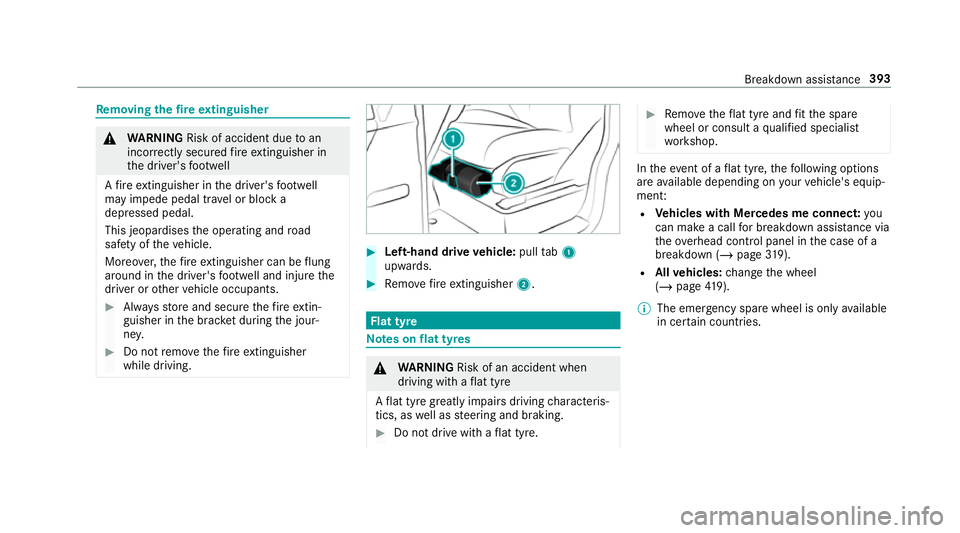
Left-hand drive vehicle: pulltab1
upwards. #
Remo vefire extinguisher 2. Flat tyre
Note
s onflat tyres &
WARNING Risk of an accident when
driving wi thaflat tyre
A flat tyre great lyimpairs driving characteris‐
tics, as well as steering and braking. #
Do not drive with a flat tyre. #
Remo vetheflat tyre and fit th e spare
wheel or consult a qualified specialist
wo rkshop. In
theeve nt of a flat tyre, thefo llowing options
are available depending on your vehicle's equip‐
ment:
R Vehicles with Mercedes me connect: you
can make a call for breakdown assi stance via
th eove rhead control panel in the case of a
breakdown (/ page319).
R Allvehicles: change the wheel
(/ page 419).
% The emer gency spa rewheel is only available
in cer tain countries. Breakdown assis
tance 393
Page 397 of 549
Spare wheel brac
ket on the rear-end door St
ainless-s teel spa rewheel brac ket Re
moving a stainless-s teel spa rewheel
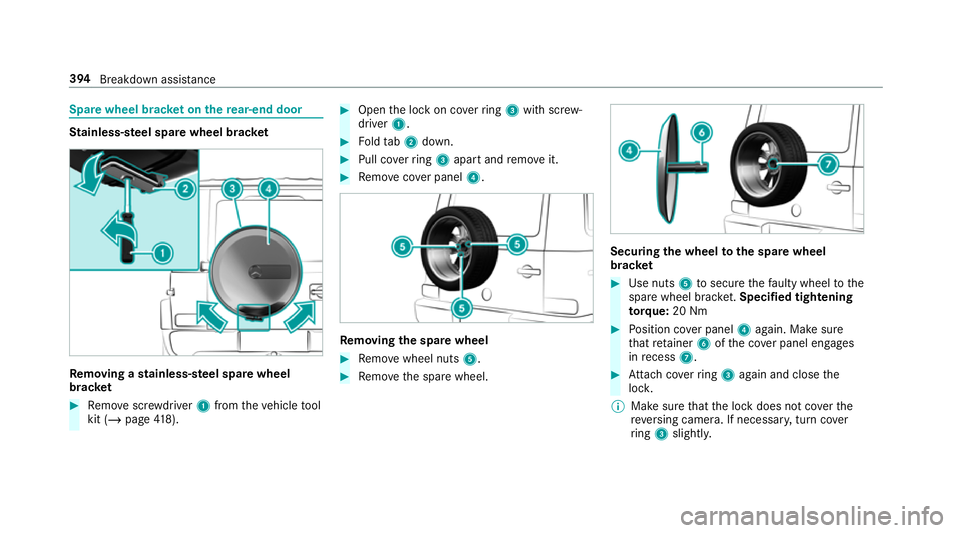
brac ket #
Remo vescr ewdriver 1from theve hicle tool
kit (/ page418). #
Open the lock on co verring 3 with scr ew‐
driver 1. #
Foldtab2 down. #
Pull co verring 3 apart and remo veit. #
Remo vecover panel 4. Re
moving the spare wheel #
Remo vewheel nuts 5. #
Remo vethe spare wheel. Securing
the wheel tothe spa rewheel
brac ket #
Use nuts 5tosecure thefa ulty wheel tothe
spare wheel brac ket.Speci fied tigh tening
to rq ue: 20 Nm #
Position co ver panel 4again. Make sure
th at retai ner 6ofthe co ver panel engages
in recess 7. #
Attach coverring 3 again and close the
loc k.
% Make sure that the lock does not co verthe
re ve rsing camera. If necessar y,turn co ver
ri ng 3 slightly. 394
Breakdown assi stance
Page 398 of 549
Ve
hicles with an emer gency spare wheel:
obser vethe no tes on the emer gency spa re
wheel.
Spa rewheel brac ket with pr otective ty re
co ver Re
moving the pr otective ty recover #
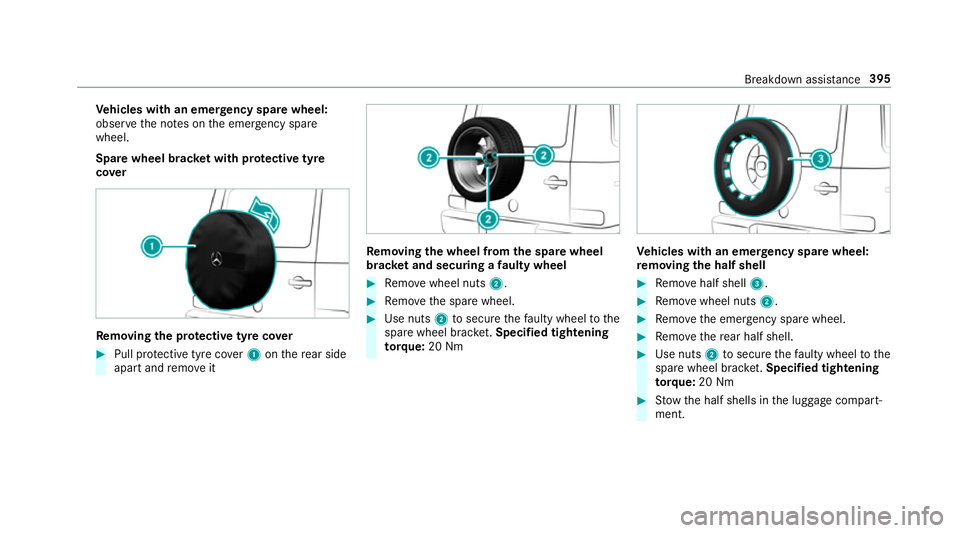
Pull pr otective tyre co ver1 onthere ar side
apart and remo veit Re
moving the wheel from the spare wheel
brac ket and securing a faulty wheel #
Remo vewheel nuts 2. #
Remo vethe spare wheel. #
Use nuts 2tosecure thefa ulty wheel tothe
spare wheel brac ket.Speci fied tigh tening
to rq ue: 20 Nm Ve
hicles with an emer gency spare wheel:
re moving the half shell #
Remo vehalf shell 3. #
Remo vewheel nuts 2. #
Remo vethe emer gency spa rewheel. #
Remo vethere ar half shell. #
Use nuts 2tosecure thefa ulty wheel tothe
spare wheel brac ket.Speci fied tigh tening
to rq ue: 20 Nm #
Stow th e half shells in the luggage compart‐
ment. Breakdown assis
tance 395
Page 402 of 549
#
Avoid numerous and extended attem pts
to start the engine. Obser
vethefo llowing points during starting
assis tance and when charging the battery:
R Only use undamaged jump lead/charging
cables with a suf ficient cross-section and
insula tedte rm inal clamps.
R Non- insulated parts of thete rm inal clamps
must not come into con tact wi thother me tal
parts while the jump lead/charging cable is
connected tothe battery/jump-s tart connec‐
tion point.
R The jump lead/charging cable must not
come into contact wi thany parts which may
mo vewhen the engine is running.
R Alw ays make sure that nei ther you nor the
battery is elect rostatically charge d.
R Keep away from fire and naked flames.
R Do not lean overth e batter y. Obser
vethe additional following points when
ch arging the battery:
R Only use battery charge rs tested and
appr oved for Mercedes-Benz.
R Read the battery charge r's operating instruc‐
tions before charging the batter y.
Obser vethe additional following points during
st arting assis tance:
R Starting assis tance may be pe rformed using
only batteries with a nominal voltage of 12V.
R The vehicles must not touch.
R Petrol engine: only acceptstarting assis‐
ta nce if the engine and exhaust sy stem are
cold. St
arting assi stance and charging the12 V
battery Requ
irements:
R The vehicle is secured with the electric park‐
ing brake.
R The transmission is in position j.R
The ignition and all electrical consumers are
switched off.
R The bonn etis open. #
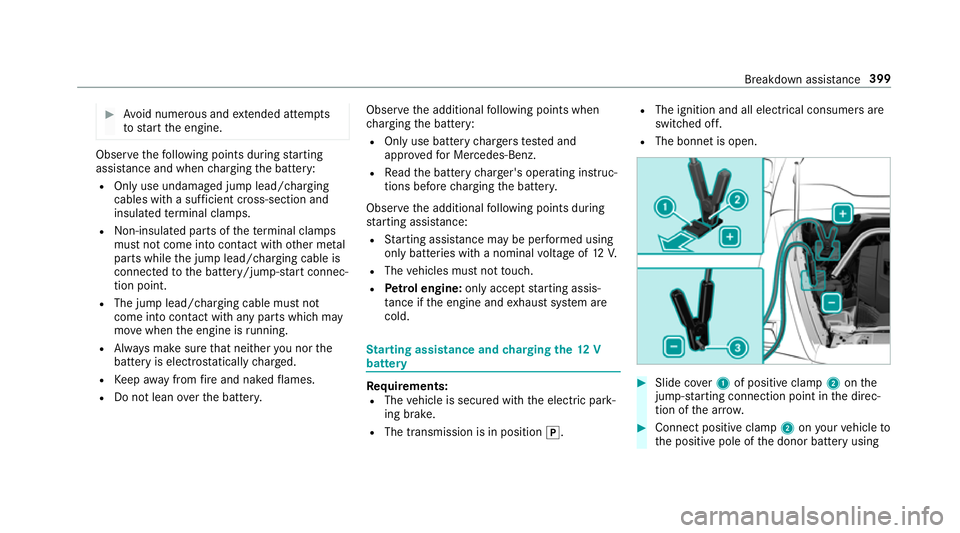
Slide co ver1 of positive clamp 2onthe
jump-s tarting connection point in the direc‐
tion of the ar row. #
Connect positive clamp 2onyour vehicle to
th e positive pole of the donor battery using Breakdown assis
tance 399
Page 406 of 549
When
your vehicle is then towe daw ay, signif‐
icantly more ef fort may be requ ired tosteer
and brake than is no rmally requ ired. #
Use a tow bar. #
Make sure that thesteering wheel can
mo vefreely, before towing theve hicle
aw ay. *
NO
TEDama gedue toexcessive tracti ve
po wer If
yo u pull away sharpl y,the tractive po wer
may be too high and theve hicles could be
damaged. #
Pull away slowly and smoo thly. Note
s onreco vering a vehicle that is stuck *
NO
TEDama geas a result of reco vering a
ve hicle that is stuck If
th e tractive po wer is too high, theve hicles
could be damaged. #
Pull theve hicle that is stuck out as
st ra ight and evenly as possible du ring
re co very. Obser
vethefo llowing during reco very to avo id
damage to yourvehicle:
R ifth e driven wheels get trapped on loose or
muddy ground, reco verth eve hicle with the
utmost care,
especially so if theve hicle is laden.
R never attem pttoreco ver a vehicle that is
st uck with a trailer attached.
R pull out theve hicle that is stuck backwards,
if possible, using the trac ksit made before it
became stuc k. To
wing vehicle away intheeve nt of malfunc‐
tions Note
s ontowing away intheeve nt of mal‐
functions
* NO
TEDama gedue toincor rect attach‐
ment and use of old nuts The
vehicle and components of theve hicle
can be damaged due toincor rect attachment
and use of old nuts. #
Ifyo ure mo vethe propeller shaft, place
th e M10 nuts on the M8 bolts as
spacers and secure them with M8 nuts. #
Alw ays use new self-locking nuts when
ins talling the propeller shafts. Obser
vethe no tes on towing away
( / page 401).
% For fur ther information, consult a Mercedes-
Benz Service Centre. Breakdown assis
tance 403
Page 407 of 549
To
wing away intheev ent of malfunctions
To wing away intheev ent of dama getothe
engine, transmission or electrics #
Shift the transmission toposition i.
To wing away intheev ent of transfer case
dama ge #
Remo vethe propeller shafts between the
axles and the transfer case.
To wing away intheev ent of front axle dam‐
age #
Remo vethe propeller shaft between there ar
axle and the transfer case. #
Tow aw ay theve hicle with a raised front axle.
To wing away intheev ent of rear axle dam‐
age #
Remo vethe propeller shaft between the front
axle and the transfer case. #
Tow aw ay theve hicle with a raised rear axle
and with wheel rollers under the front axle. Loading
theve hicle for transport #
Obser vethe no tes on towing away
( / page 401). #
Connect theto w bar totheto wing eye in
order toload theve hicle. #
Shift the transmission toposition i.
% The automatic transmission may be loc ked
in position jintheeve nt of dama getothe
electrics. Toshift toi , pr ovide the on-
board electrical sy stem with po wer
( / page 399). #
Load theve hicle onto the transpor ter. #
Shift the transmission toposition j. #
Use the electric parking brake tosecure the
ve hicle against rolling away. #
Only secure theve hicle bythe wheels. #
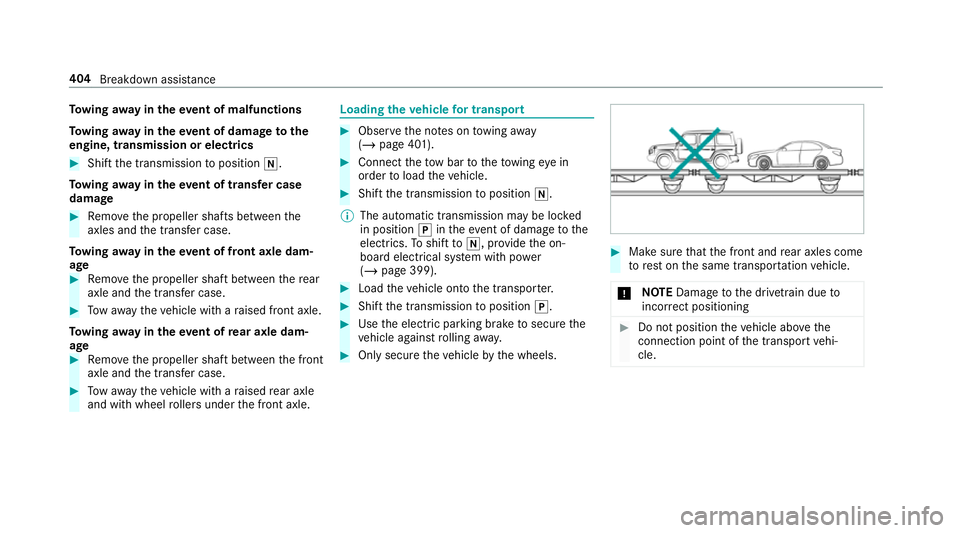
Make sure that the front and rear axles come
to rest on the same transpor tation vehicle.
* NO
TEDama getothe driv etra in due to
incor rect positioning #
Do not position theve hicle abo vethe
connection point of the transport vehi‐
cle. 404
Breakdown assis tance