phone MERCEDES-BENZ G550 2011 W463 User Guide
[x] Cancel search | Manufacturer: MERCEDES-BENZ, Model Year: 2011, Model line: G550, Model: MERCEDES-BENZ G550 2011 W463Pages: 288, PDF Size: 11.16 MB
Page 170 of 288
XPress the V or U button on the
steering wheel to select the Telephone
menu.XPress the & or * button to select the
desired name.
To start scrolling rapidly, press and hold the
& or * button for longer than one
second.XPress 6 to start dialing.
The multifunction display shows the
Connecting call display message.
The number dialed is stored in the redial
memory.
If the call is connected, the call duration
appears in the multifunction display. If it is
stored in the phone book, the name is also
displayed. Otherwise, the number dialed is
displayed.
or
XIf you do not want to make a call, press the
~ button.
Redialing
The on-board computer stores the last phone
numbers which have been dialed.
XPress the V or U button on the
steering wheel to select the Telephone
menu.XPress the 6 button to switch to the
redial memory.XPress the & or * button to select the
desired name or number.XPress 6 to start dialing.168Menus and submenusOn-board computer and displays
Page 183 of 288
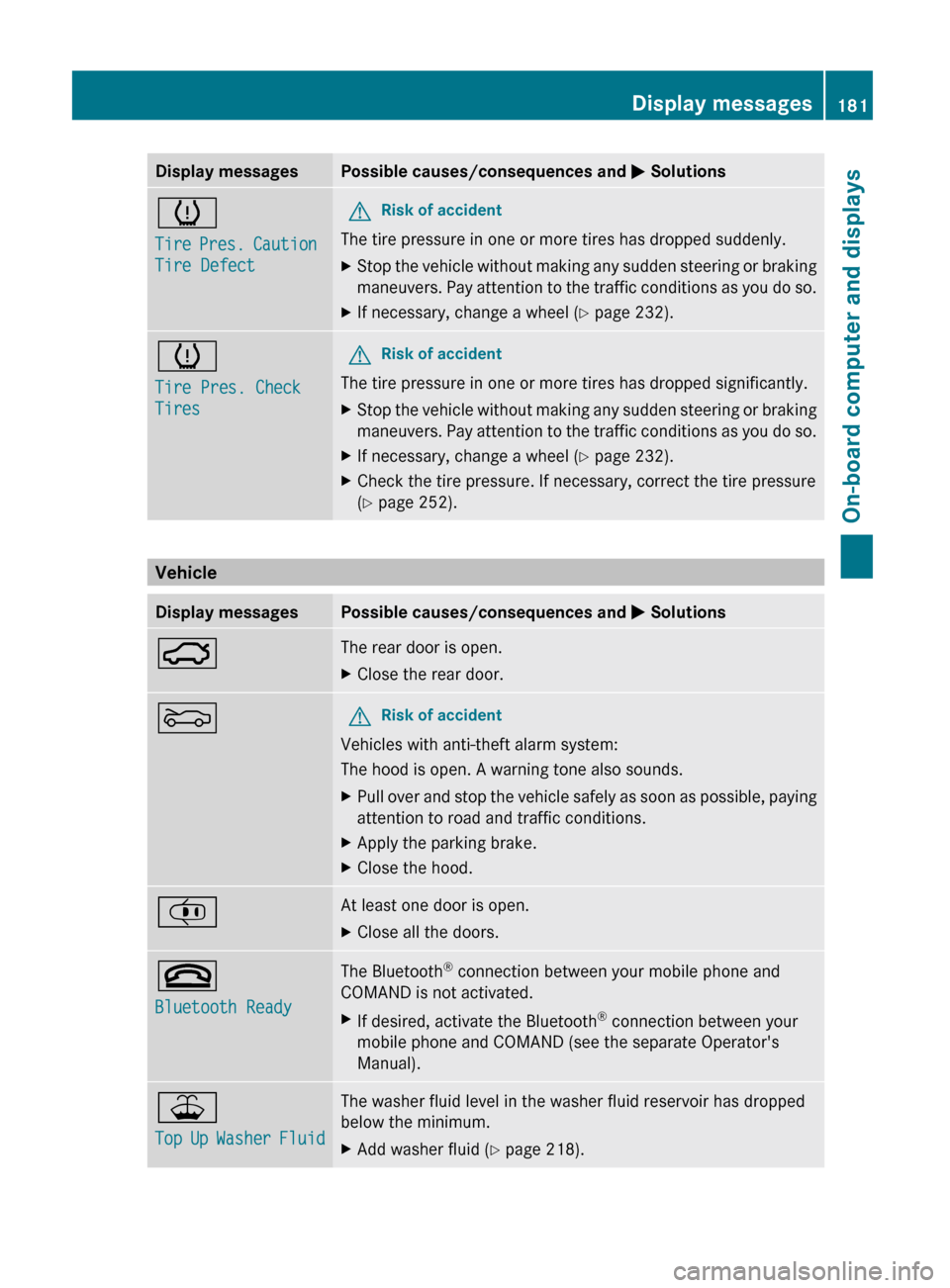
Display messagesPossible causes/consequences and M Solutionsh
Tire Pres. Caution
Tire DefectGRisk of accident
The tire pressure in one or more tires has dropped suddenly.
XStop the vehicle without making any sudden steering or braking
maneuvers. Pay attention to the traffic conditions as you do so.XIf necessary, change a wheel ( Y page 232).h
Tire Pres. Check
TiresGRisk of accident
The tire pressure in one or more tires has dropped significantly.
XStop the vehicle without making any sudden steering or braking
maneuvers. Pay attention to the traffic conditions as you do so.XIf necessary, change a wheel ( Y page 232).XCheck the tire pressure. If necessary, correct the tire pressure
( Y page 252).
Vehicle
Display messagesPossible causes/consequences and M Solutions:The rear door is open.XClose the rear door.MGRisk of accident
Vehicles with anti-theft alarm system:
The hood is open. A warning tone also sounds.
XPull over and stop the vehicle safely as soon as possible, paying
attention to road and traffic conditions.XApply the parking brake.XClose the hood.¡At least one door is open.XClose all the doors.~
Bluetooth ReadyThe Bluetooth ®
connection between your mobile phone and
COMAND is not activated.XIf desired, activate the Bluetooth ®
connection between your
mobile phone and COMAND (see the separate Operator's
Manual).¥
Top Up Washer FluidThe washer fluid level in the washer fluid reservoir has dropped
below the minimum.XAdd washer fluid ( Y page 218).Display messages181On-board computer and displaysZ
Page 195 of 288
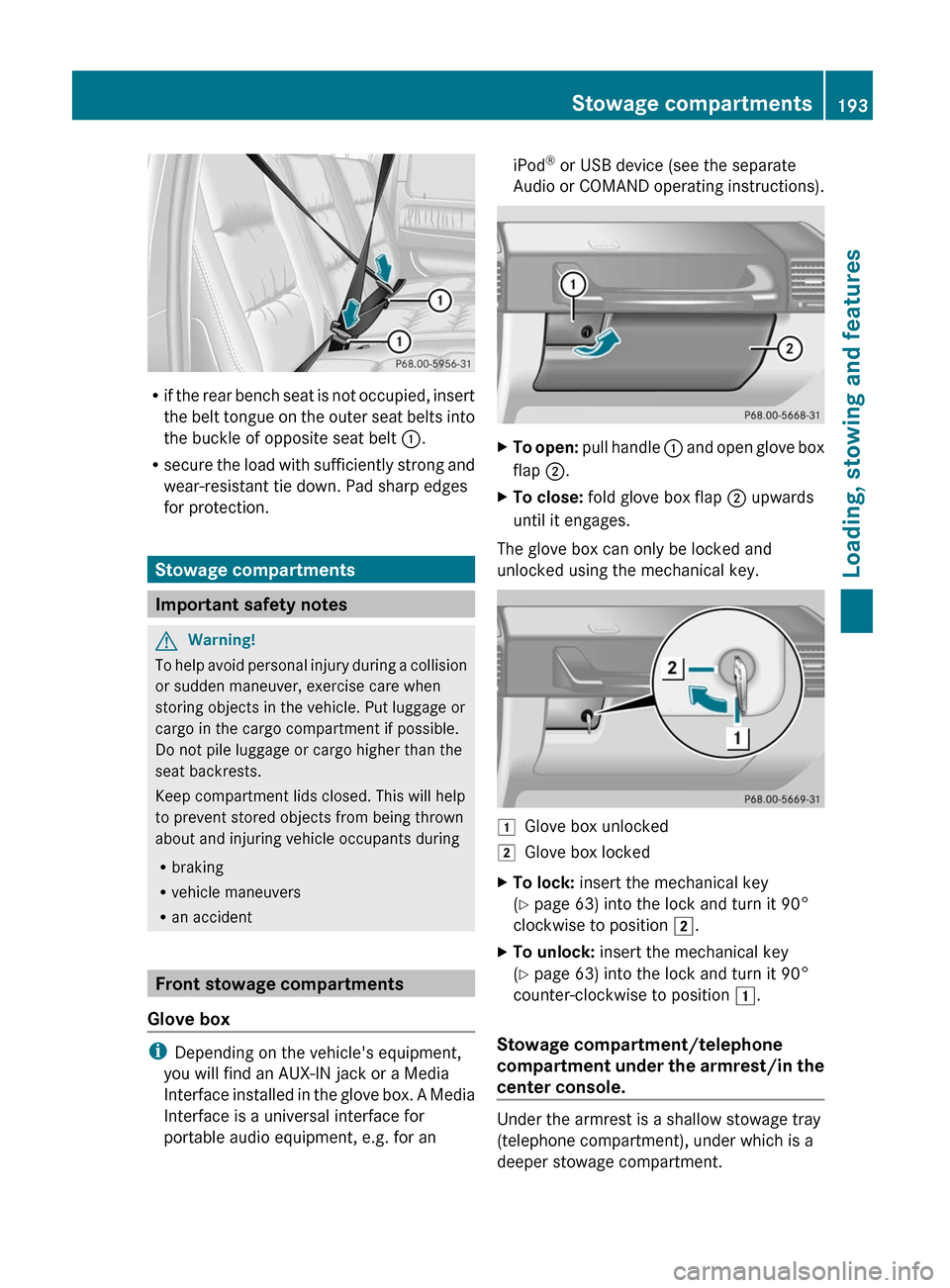
Rif the rear bench seat is not occupied, insert
the belt tongue on the outer seat belts into
the buckle of opposite seat belt :.
R secure the load with sufficiently strong and
wear-resistant tie down. Pad sharp edges
for protection.
Stowage compartments
Important safety notes
GWarning!
To help avoid personal injury during a collision
or sudden maneuver, exercise care when
storing objects in the vehicle. Put luggage or
cargo in the cargo compartment if possible.
Do not pile luggage or cargo higher than the
seat backrests.
Keep compartment lids closed. This will help
to prevent stored objects from being thrown
about and injuring vehicle occupants during
R braking
R vehicle maneuvers
R an accident
Front stowage compartments
Glove box
i Depending on the vehicle's equipment,
you will find an AUX-IN jack or a Media
Interface installed in the glove box. A Media
Interface is a universal interface for
portable audio equipment, e.g. for an
iPod ®
or USB device (see the separate
Audio or COMAND operating instructions).XTo open: pull handle : and open glove box
flap ;.XTo close: fold glove box flap ; upwards
until it engages.
The glove box can only be locked and
unlocked using the mechanical key.
1Glove box unlocked2Glove box lockedXTo lock: insert the mechanical key
( Y page 63) into the lock and turn it 90°
clockwise to position 2.XTo unlock: insert the mechanical key
( Y page 63) into the lock and turn it 90°
counter-clockwise to position 1.
Stowage compartment/telephone
compartment under the armrest/in the
center console.
Under the armrest is a shallow stowage tray
(telephone compartment), under which is a
deeper stowage compartment.
Stowage compartments193Loading, stowing and featuresZ
Page 196 of 288
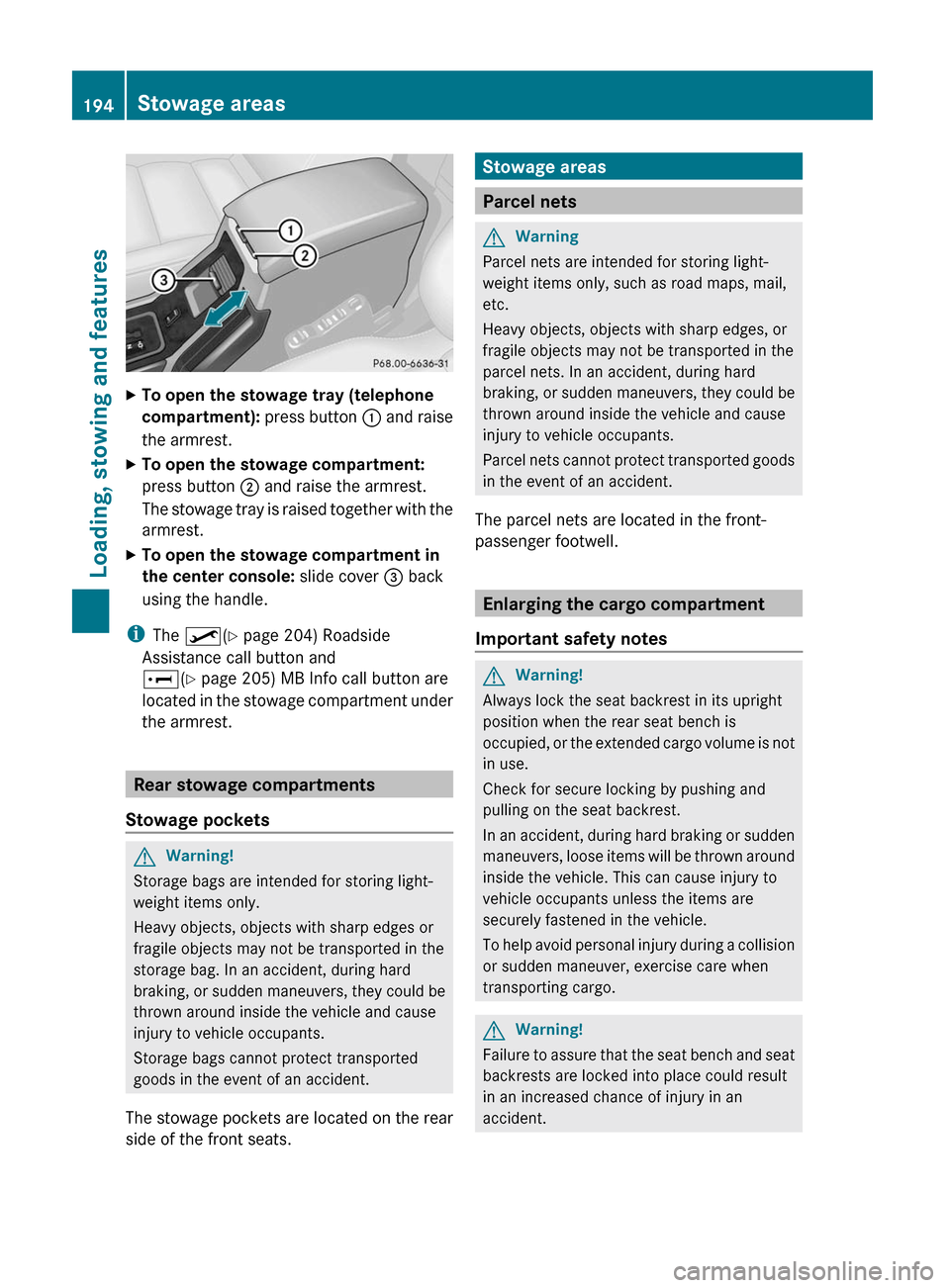
XTo open the stowage tray (telephone
compartment): press button : and raise
the armrest.XTo open the stowage compartment:
press button ; and raise the armrest.
The stowage tray is raised together with the
armrest.XTo open the stowage compartment in
the center console: slide cover = back
using the handle.
i The º (Y page 204) Roadside
Assistance call button and
E (Y page 205) MB Info call button are
located in the stowage compartment under
the armrest.
Rear stowage compartments
Stowage pockets
GWarning!
Storage bags are intended for storing light-
weight items only.
Heavy objects, objects with sharp edges or
fragile objects may not be transported in the
storage bag. In an accident, during hard
braking, or sudden maneuvers, they could be
thrown around inside the vehicle and cause
injury to vehicle occupants.
Storage bags cannot protect transported
goods in the event of an accident.
The stowage pockets are located on the rear
side of the front seats.
Stowage areas
Parcel nets
GWarning
Parcel nets are intended for storing light-
weight items only, such as road maps, mail,
etc.
Heavy objects, objects with sharp edges, or
fragile objects may not be transported in the
parcel nets. In an accident, during hard
braking, or sudden maneuvers, they could be
thrown around inside the vehicle and cause
injury to vehicle occupants.
Parcel nets cannot protect transported goods
in the event of an accident.
The parcel nets are located in the front-
passenger footwell.
Enlarging the cargo compartment
Important safety notes
GWarning!
Always lock the seat backrest in its upright
position when the rear seat bench is
occupied, or the extended cargo volume is not
in use.
Check for secure locking by pushing and
pulling on the seat backrest.
In an accident, during hard braking or sudden
maneuvers, loose items will be thrown around
inside the vehicle. This can cause injury to
vehicle occupants unless the items are
securely fastened in the vehicle.
To help avoid personal injury during a collision
or sudden maneuver, exercise care when
transporting cargo.
GWarning!
Failure to assure that the seat bench and seat
backrests are locked into place could result
in an increased chance of injury in an
accident.
194Stowage areasLoading, stowing and features
Page 202 of 288
frequent insertion and removal or by
sockets that do not fit correctly. A damaged
socket can cause the cigarette lighter to
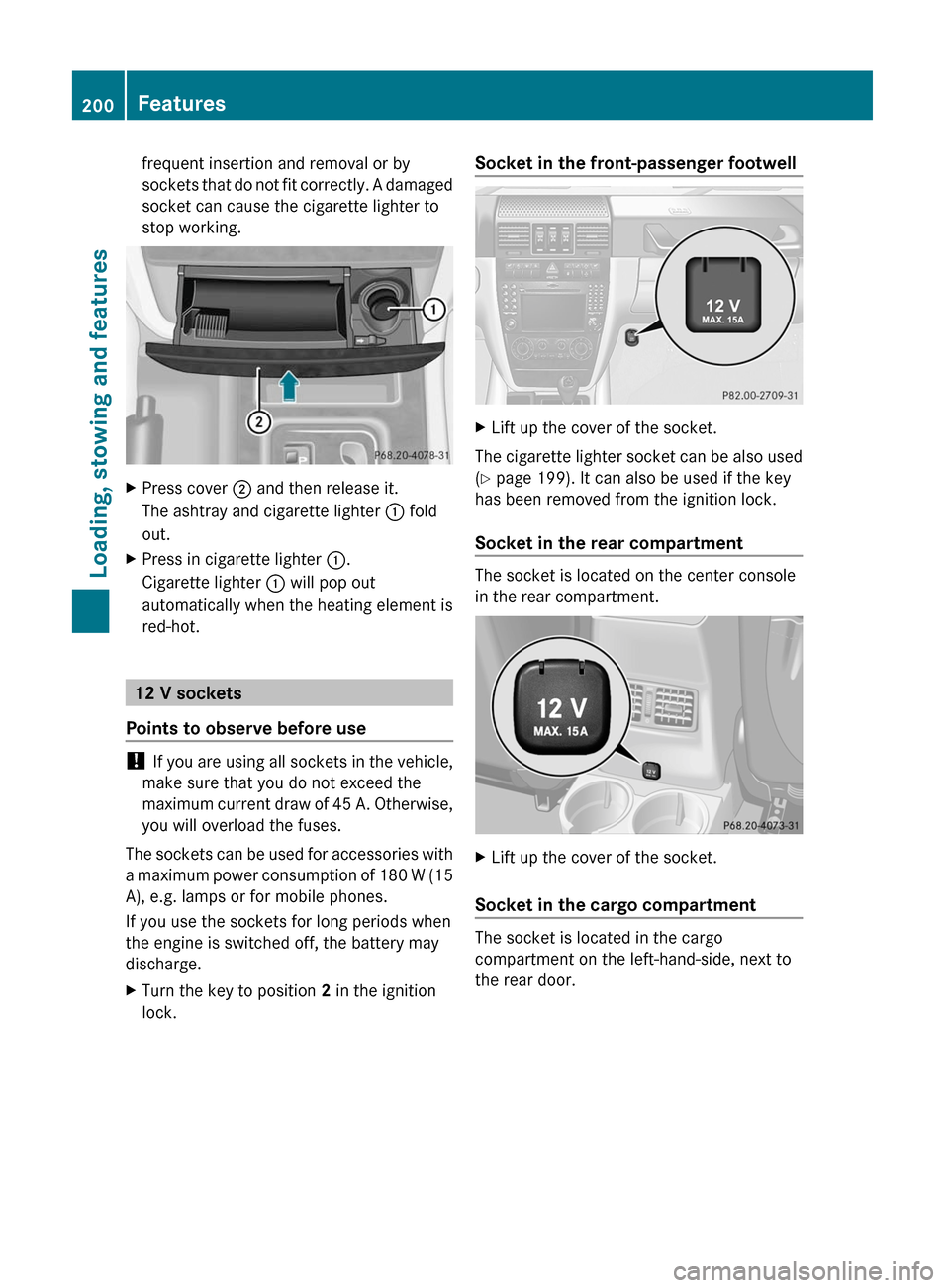
stop working.XPress cover ; and then release it.
The ashtray and cigarette lighter : fold
out.XPress in cigarette lighter :.
Cigarette lighter : will pop out
automatically when the heating element is
red-hot.
12 V sockets
Points to observe before use
! If you are using all sockets in the vehicle,
make sure that you do not exceed the
maximum current draw of 45 A. Otherwise,
you will overload the fuses.
The sockets can be used for accessories with
a maximum power consumption of 180 W (15
A), e.g. lamps or for mobile phones.
If you use the sockets for long periods when
the engine is switched off, the battery may
discharge.
XTurn the key to position 2 in the ignition
lock.Socket in the front-passenger footwellXLift up the cover of the socket.
The cigarette lighter socket can be also used
( Y page 199). It can also be used if the key
has been removed from the ignition lock.
Socket in the rear compartment
The socket is located on the center console
in the rear compartment.
XLift up the cover of the socket.
Socket in the cargo compartment
The socket is located in the cargo
compartment on the left-hand-side, next to
the rear door.
200FeaturesLoading, stowing and features
Page 204 of 288
Possible causes of malfunction:
R the on-board voltage is not within a
permissible voltage range.
R the temperature of the DC/AC converter is
temporarily too high.
R some small electronic devices have a
constant nominal power of less than
150 W, but a very high switch-on current.
In that case, there is a possibility that these
devices will not function properly as 115 V
socket : is not able to provide a high
enough current.
If indicator lamp ; still does not light up,
consult a qualified specialist workshop, e.g.
an authorized Mercedes-Benz Center.
mbrace 15
Important safety notes
! A license agreement must exist in order
to activate the mbrace service. Make sure
that your system is activated and ready for
use, and press the E MB info call button
to register. If you cannot carry out any of
the steps mentioned, the system may not
be activated.
If you have any questions concerning
activation, please contact one of the
following service hotlines:
R USA: Response Center under
1-888-990-9007
R Canada: Customer Service under
1-888-923-8367
Shortly after successfully registering with the
mbrace service, a user ID and password will
be sent to you by post. You can use this
password to log in to the mbrace section
under "Owners Online" at http://
www.mbusa.com 16
.
The mbrace system is available if:
R it has been activated and is operational.
Activation requires an available mobile
phone network, a valid SIM card and a
service subscription to a surveillance
service provider.
R the battery is sufficiently charged.
R the corresponding mobile phone network
is available for transmitting data to the
Customer Center.
i Determining the location of the vehicle on
a map is only possible if there is sufficient
GPS reception and the vehicle position can
be forwarded to the Customer Center.
The mbrace system
The mbrace system provides three different
services:
R automatic and manual emergency call
R Roadside Assistance call
R MB Info call
To adjust the volume during an mbrace call,
proceed as follows:
XPress the W or X button on the
multifunction steering wheel.
or
XUse the COMAND volume controller.
You can find information and a description of
all available features under "Owners Online"
at http://www.mbusa.com 17
.
System self-test
After you have switched on the ignition, the
system carries out a self-diagnosis.
15 The system is called TELE AID in Canada.
16 USA only.
17 USA only.202FeaturesLoading, stowing and features
Page 206 of 288
established, then the mbrace system could
not initiate an emergency call (e.g. the
relevant cellular phone network is not
available).
The message Call Failed appears in the
multifunction display for approximately
10 seconds.
Should this occur, assistance must be
summoned by other means.
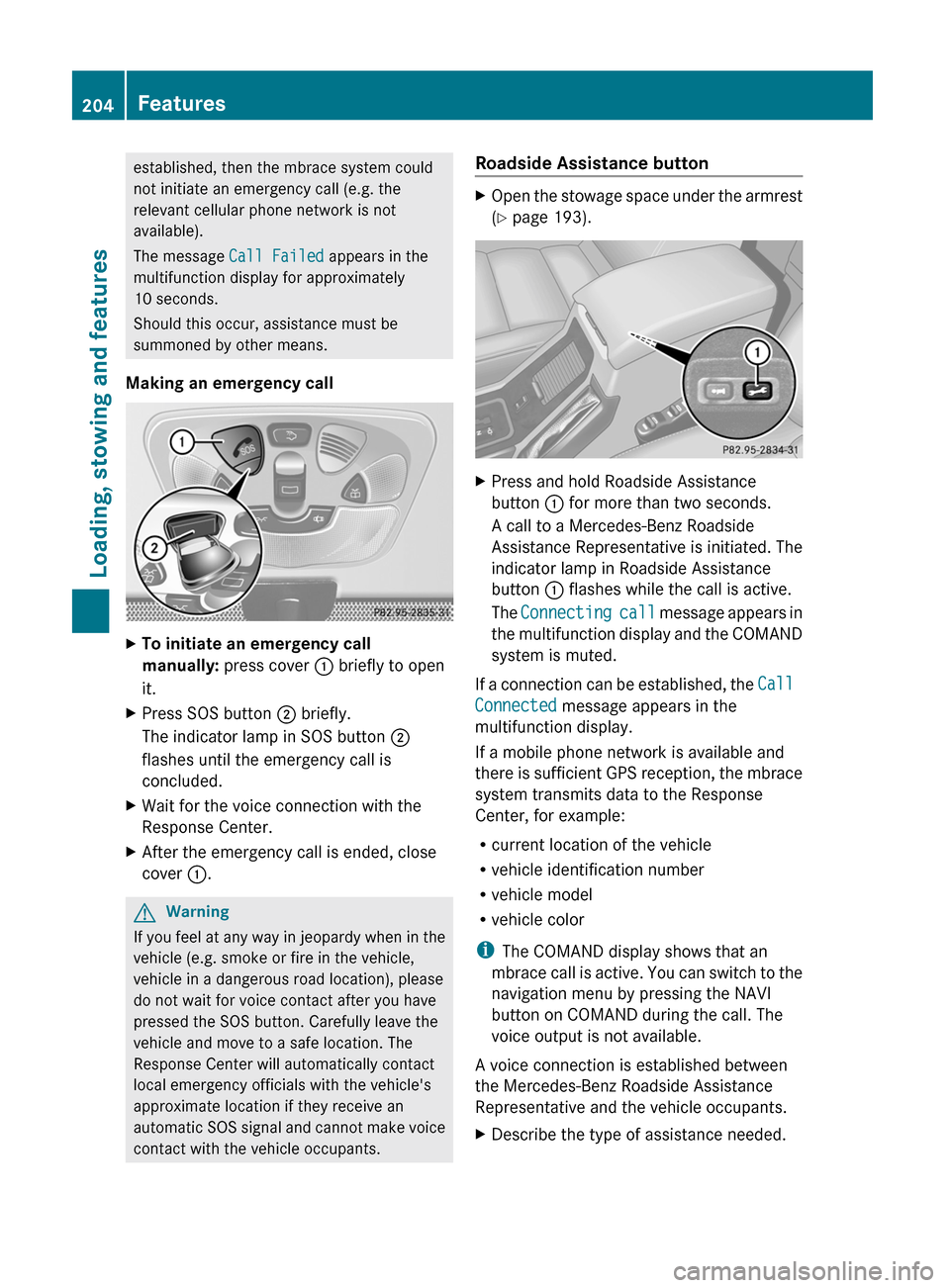
Making an emergency callXTo initiate an emergency call
manually: press cover : briefly to open
it.XPress SOS button ; briefly.
The indicator lamp in SOS button ;
flashes until the emergency call is
concluded.XWait for the voice connection with the
Response Center.XAfter the emergency call is ended, close
cover :.GWarning
If you feel at any way in jeopardy when in the
vehicle (e.g. smoke or fire in the vehicle,
vehicle in a dangerous road location), please
do not wait for voice contact after you have
pressed the SOS button. Carefully leave the
vehicle and move to a safe location. The
Response Center will automatically contact
local emergency officials with the vehicle's
approximate location if they receive an
automatic SOS signal and cannot make voice
contact with the vehicle occupants.
Roadside Assistance buttonXOpen the stowage space under the armrest
( Y page 193).XPress and hold Roadside Assistance
button : for more than two seconds.
A call to a Mercedes-Benz Roadside
Assistance Representative is initiated. The
indicator lamp in Roadside Assistance
button : flashes while the call is active.
The Connecting call message appears in
the multifunction display and the COMAND
system is muted.
If a connection can be established, the Call
Connected message appears in the
multifunction display.
If a mobile phone network is available and
there is sufficient GPS reception, the mbrace
system transmits data to the Response
Center, for example:
R current location of the vehicle
R vehicle identification number
R vehicle model
R vehicle color
i The COMAND display shows that an
mbrace call is active. You can switch to the
navigation menu by pressing the NAVI
button on COMAND during the call. The
voice output is not available.
A voice connection is established between
the Mercedes-Benz Roadside Assistance
Representative and the vehicle occupants.
XDescribe the type of assistance needed.204FeaturesLoading, stowing and features
Page 207 of 288
The Mercedes-Benz Roadside Assistance
Representative either sends a qualified
Mercedes-Benz technician or organizes for
your vehicle to be transported to the nearest
authorized Mercedes-Benz Center. You may
be charged for services such as repair work
and/or towing. Further details are available
in your mbrace manual.
i If the indicator lamp in Roadside
Assistance button : flashes continuously
and no voice connection to the Response
Center has been established, then the
mbrace system has failed to initiate a
Roadside Assistance call (e.g. the
corresponding mobile phone network is not
available). The Call Failed message
appears in the multifunction display.XTo end a call: press the ~ button on the
multifunction steering wheel.
or
XPress the corresponding button for ending
a phone call on COMAND.
i Sign and Drive services 18
: you are not
charged for services such as jump-starting,
providing a few gallons of fuel for a fuel tank
that has been run dry or changing a flat tire
with the vehicle's own spare wheel.
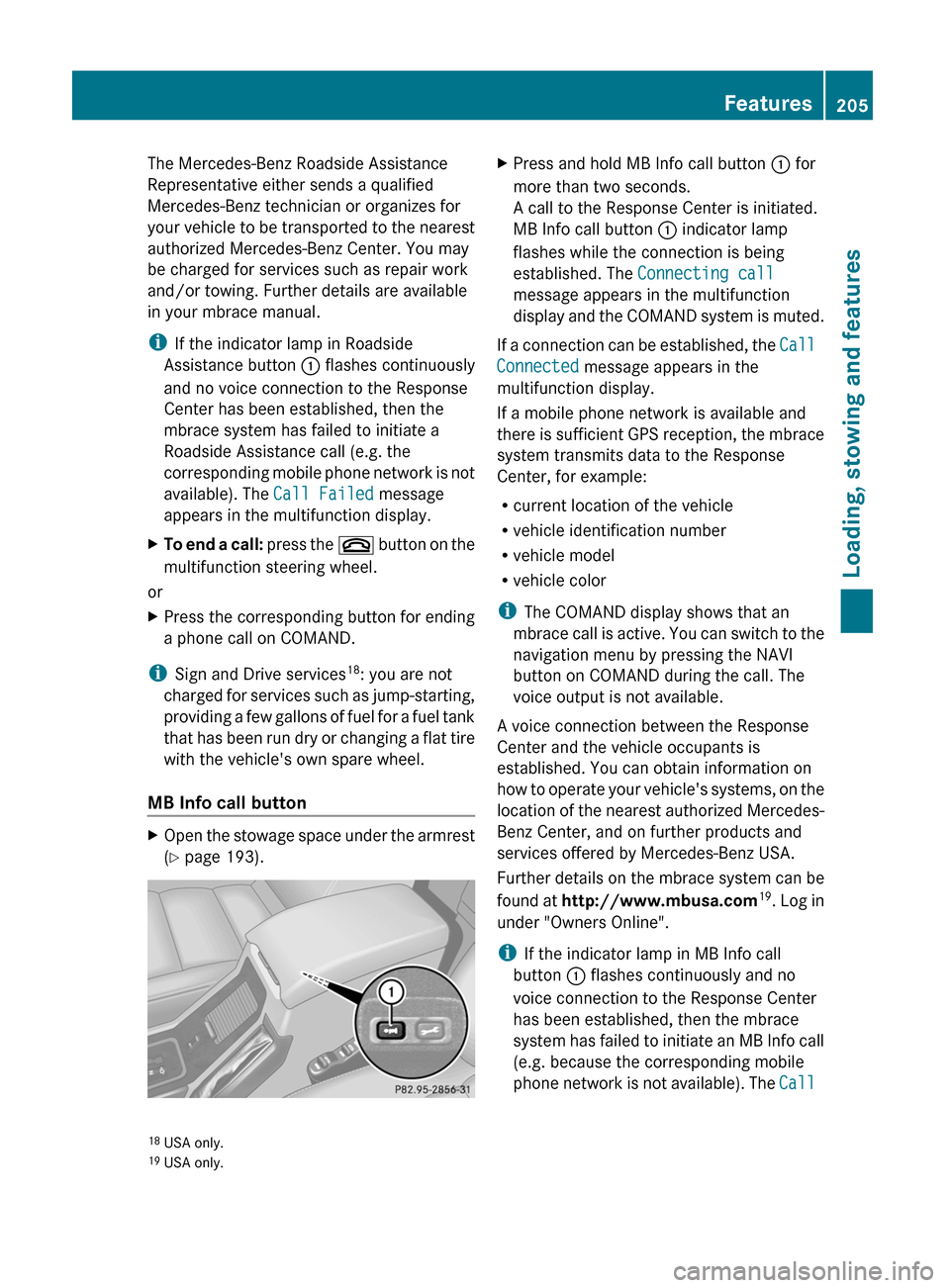
MB Info call button
XOpen the stowage space under the armrest
( Y page 193).XPress and hold MB Info call button : for
more than two seconds.
A call to the Response Center is initiated.
MB Info call button : indicator lamp
flashes while the connection is being
established. The Connecting call
message appears in the multifunction
display and the COMAND system is muted.
If a connection can be established, the Call
Connected message appears in the
multifunction display.
If a mobile phone network is available and
there is sufficient GPS reception, the mbrace
system transmits data to the Response
Center, for example:
R current location of the vehicle
R vehicle identification number
R vehicle model
R vehicle color
i The COMAND display shows that an
mbrace call is active. You can switch to the
navigation menu by pressing the NAVI
button on COMAND during the call. The
voice output is not available.
A voice connection between the Response
Center and the vehicle occupants is
established. You can obtain information on
how to operate your vehicle's systems, on the
location of the nearest authorized Mercedes-
Benz Center, and on further products and
services offered by Mercedes-Benz USA.
Further details on the mbrace system can be
found at http://www.mbusa.com 19
. Log in
under "Owners Online".
i If the indicator lamp in MB Info call
button : flashes continuously and no
voice connection to the Response Center
has been established, then the mbrace
system has failed to initiate an MB Info call
(e.g. because the corresponding mobile
phone network is not available). The Call
18
USA only.
19 USA only.Features205Loading, stowing and featuresZ
Page 208 of 288
Failed message appears in the
multifunction display.XTo end a call: press the ~ button on the
multifunction steering wheel.
or
XPress the corresponding button for ending
a phone call on COMAND.
Call priority
When service calls are active, e.g. Roadside
Assistance or MB Info calls, an emergency
call can still be initiated. In this case, an
emergency call has the highest priority and
takes precedence over all other active calls.
The indicator lamp of the respective button
flashes until the call is ended. An emergency
call can only be terminated by the Response
Center. All other calls can be ended by
pressing the ~ button on the
multifunction steering wheel or the
corresponding button for ending a telephone
call on COMAND.
i When an mbrace call has been initiated,
COMAND is muted. The mobile phone is no
longer connected to COMAND. However, if
you want to use your mobile phone, we
recommend that you do this only when the
vehicle is stationary and in a safe location.
Downloading destinations in COMAND
i Information on the components and
operating principles of the COMAND
system can be found in the separate
COMAND operating instructions.
Destination Download gives you access to a
database with over ten million points of
interest (POIs) which can be downloaded onto
the navigation system of your vehicle. If you
know the destination, you can download the
address or obtain the location of points of
interest (POIs) or important destinations in
the surrounding area.
You are prompted to confirm route guidance
to the address entered.XSelect Yes using the = or ; button
on COMAND.XPress 9 on COMAND to confirm.
The system calculates the route and
subsequently starts the route guidance with
the address entered.
i If you select No, the address can be stored
in the address book.
i The Destination Download function is
available if the corresponding mobile
phone network is available and data
transfer is possible.
Search & Send
"Search & Send" is a destination entry
service. You can find further information on
"Search & Send" in the separate COMAND
operating instructions.
Vehicle remote unlocking
If you have unintentionally locked your
vehicle (e.g. the SmartKey is inside the
vehicle) and a replacement key is not
available:
XContact the following service hotlines:
R USA: Response Center at
1-888-990-9007
R Canada: Customer Service at
1-888-923-8367
You will be asked for your password.XReturn to your vehicle at the time arranged
with the Response Center.XPress and hold the release button on the
rear door handle for at least 20 seconds
until the indicator lamp in the SOS button
( Y page 203) begins flashing.
The Connecting Call message appears
on the multifunction display.
Alternatively, the vehicle can also be opened
via the Internet in the "Owners Online"
206FeaturesLoading, stowing and features
Page 209 of 288
section using your ID number and
password 20
.
i Vehicle remote unlocking is only possible
if the corresponding mobile phone network
is accessible.
The SOS button flashes and the
Connecting Call message appears in the
multifunction display to confirm that the
command for vehicle remote unlocking has
been received.
If you press the rear door's locking cylinder
for more than 20 seconds before receiving
authorization for remote unlocking, you
must wait 15 minutes before you can press
the rear door's locking cylinder again.
Service for recovering stolen vehicles
If your vehicle has been stolen:
XContact the police.
The police will issue an incident report. This
report has a number.XForward this number to the Response
Center together with your PIN.
The Response Center will then attempt to
covertly contact the mbrace system. The
Response Center contacts you and the
local law enforcement authority if the
vehicle is located. However, only the law
enforcement is informed of the location of
the vehicle.
i If the anti-theft alarm system remains
activated for longer than thirty seconds,
mbrace is automatically connected to the
Response Center.
Brush guard (USA only)
GWarning
The brush guard is designed solely to enhance
the appearance of the vehicle and help
protect grille and headlamps from minor
mishaps, either on or off road.
Since the safety characteristics are limited in
the event of an accident, brush guard are not
intended to prevent injury or damage in the
event of an accident. Also observe state and
local regulations on installation and use.
Raise and lower the brush guard in an open
space with plenty of room.
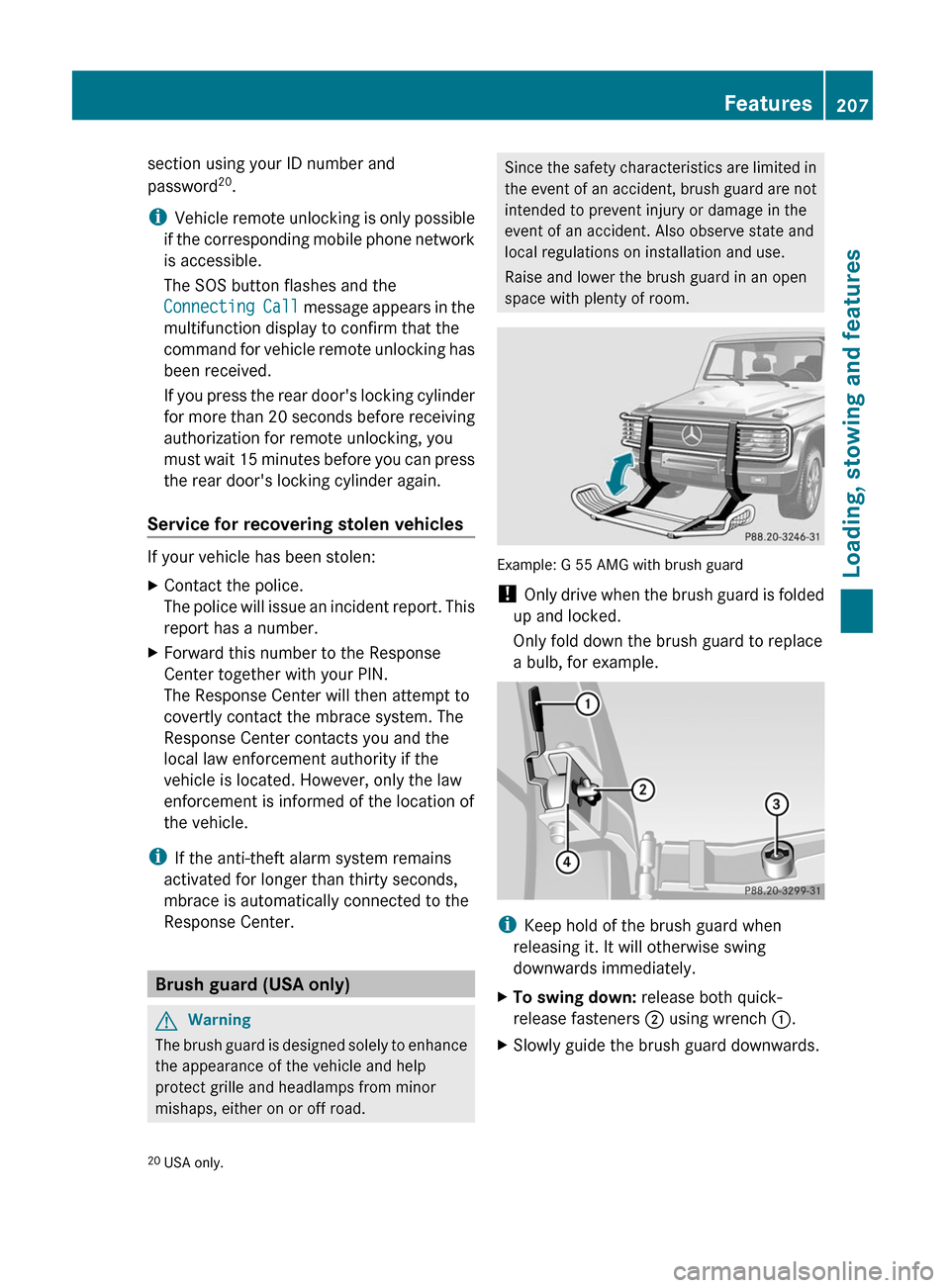
Example: G 55 AMG with brush guard
! Only drive when the brush guard is folded
up and locked.
Only fold down the brush guard to replace
a bulb, for example.
i Keep hold of the brush guard when
releasing it. It will otherwise swing
downwards immediately.
XTo swing down: release both quick-
release fasteners ; using wrench :.XSlowly guide the brush guard downwards.20
USA only.Features207Loading, stowing and featuresZ