lock MERCEDES-BENZ GL 2010 Owners Manual
[x] Cancel search | Manufacturer: MERCEDES-BENZ, Model Year: 2010, Model line: GL, Model: MERCEDES-BENZ GL 2010Pages: 380, PDF Size: 9.81 MB
Page 286 of 380
Vehicle equipment
iThis Operator’s Manual describes all
features, standard or optional, potentially
available for your vehicle at the time of
purchase. Please be aware that your
vehicle might not be equipped with all
features described in this manual.
Where will I find ...?
First aid kit
iCheck expiration dates and contents for
completeness at least once a year and
replace missing/expired items.
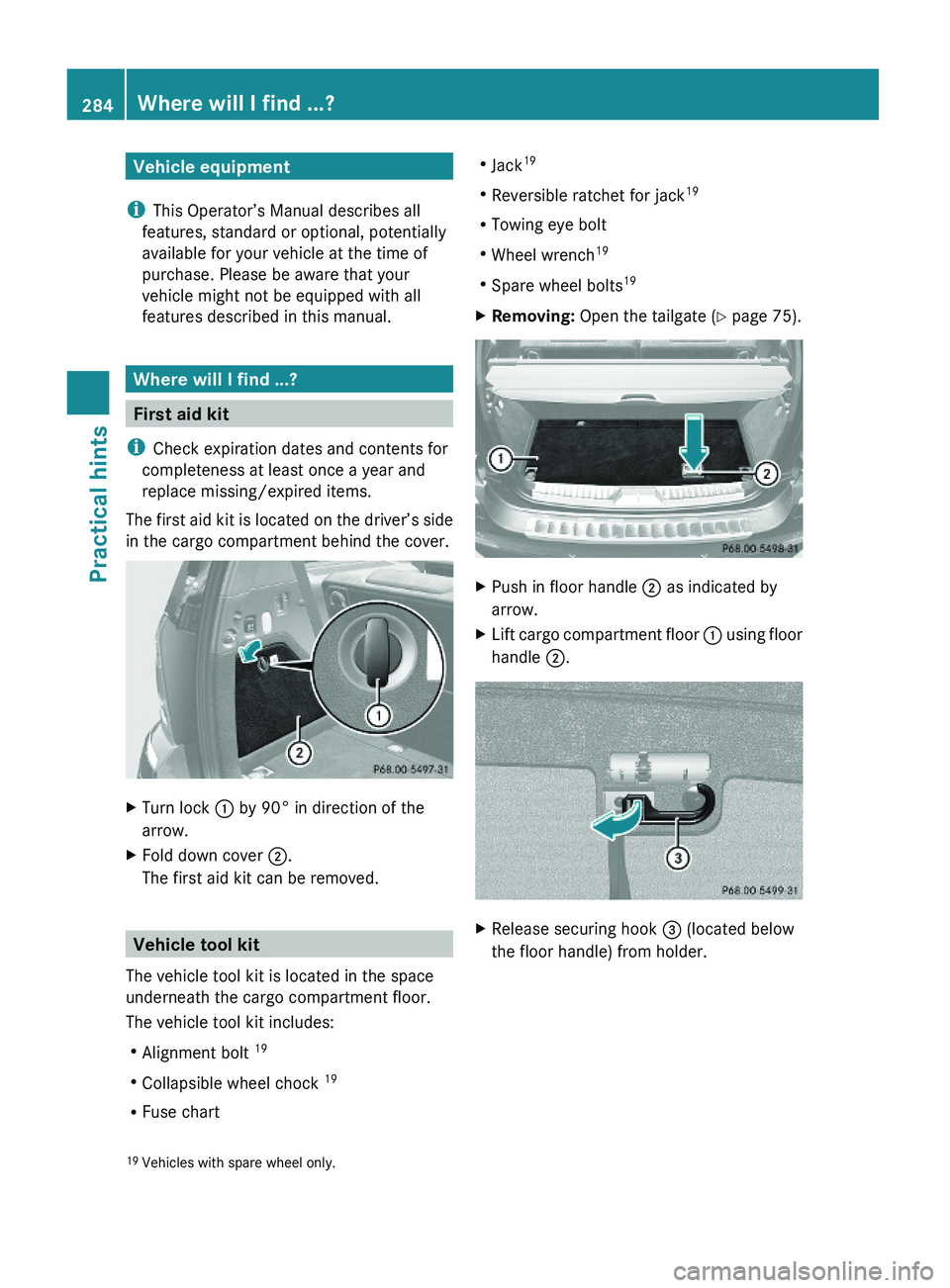
The first aid kit is located on the driver’s side
in the cargo compartment behind the cover.
XTurn lock : by 90° in direction of the
arrow.
XFold down cover ;.
The first aid kit can be removed.
Vehicle tool kit
The vehicle tool kit is located in the space
underneath the cargo compartment floor.
The vehicle tool kit includes:
RAlignment bolt 19
RCollapsible wheel chock 19
RFuse chart
RJack19
RReversible ratchet for jack19
RTowing eye bolt
RWheel wrench19
RSpare wheel bolts19
XRemoving: Open the tailgate (Y page 75).XPush in floor handle ; as indicated by
arrow.
XLift cargo compartment floor : using floor
handle ;.
XRelease securing hook = (located below
the floor handle) from holder.19Vehicles with spare wheel only.284Where will I find ...?Practical hints
X164_AKB; 5; 31, en-USd2ureepe,Version: 2.11.8.12009-09-11T12:30:16+02:00 - Seite 284
Page 289 of 380
XRemoving: Open the tailgate (Y page 75).XLift the cargo compartment floor and
secure it on the upper cargo compartment
lip (Y page 284).
! To prevent damage, always disengage the
securing hook from upper cargo
compartment lip and lower the cargo
compartment floor before closing the
tailgate.
XRemove the jack from the vehicle tool kit
(Y page 285).
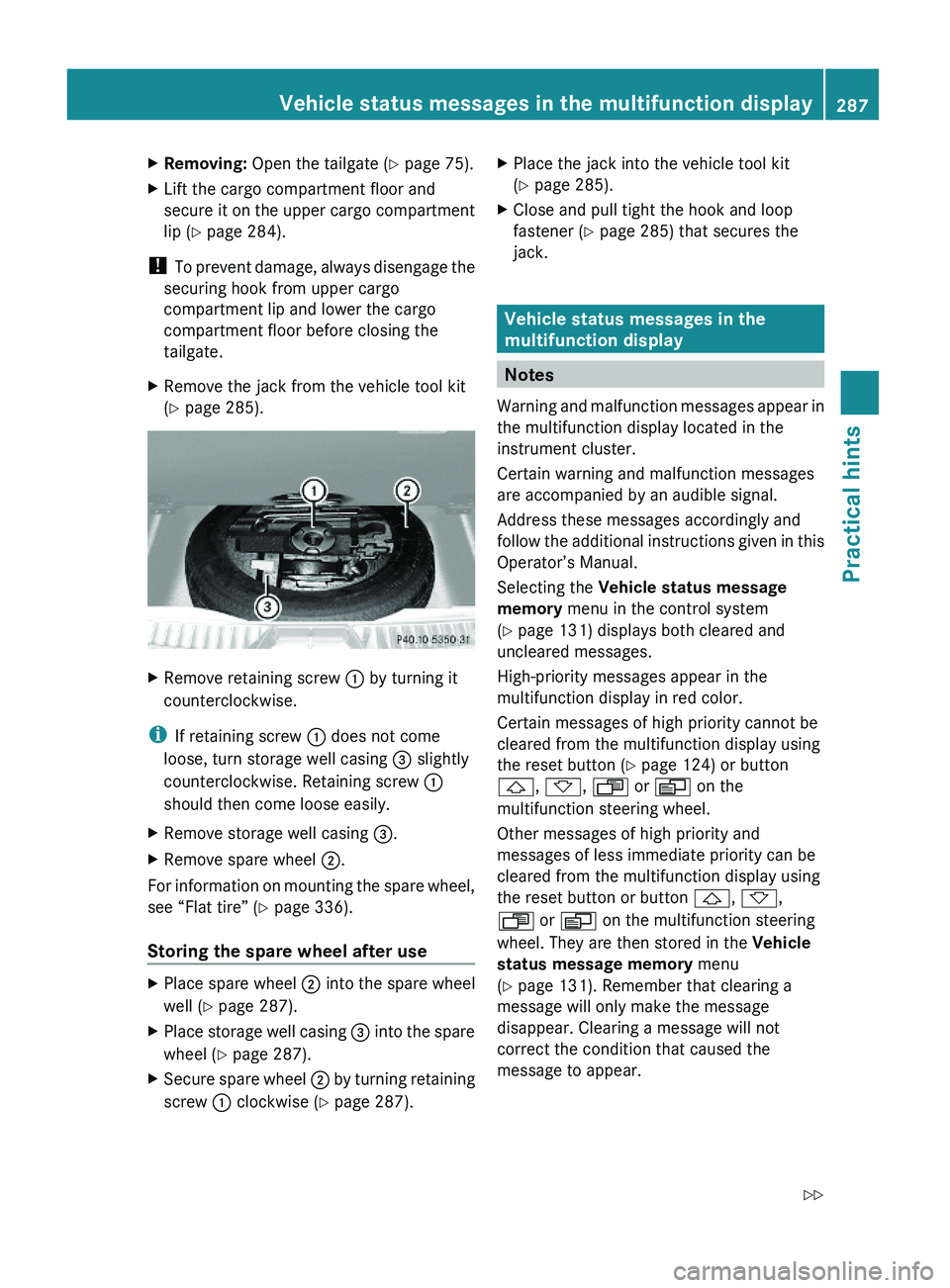
XRemove retaining screw : by turning it
counterclockwise.
iIf retaining screw : does not come
loose, turn storage well casing = slightly
counterclockwise. Retaining screw :
should then come loose easily.
XRemove storage well casing =.XRemove spare wheel ;.
For information on mounting the spare wheel,
see “Flat tire” (Y page 336).
Storing the spare wheel after use
XPlace spare wheel ; into the spare wheel
well (Y page 287).
XPlace storage well casing = into the spare
wheel (Y page 287).
XSecure spare wheel ; by turning retaining
screw : clockwise (Y page 287).
XPlace the jack into the vehicle tool kit
(Y page 285).
XClose and pull tight the hook and loop
fastener (Y page 285) that secures the
jack.
Vehicle status messages in the
multifunction display
Notes
Warning and malfunction messages appear in
the multifunction display located in the
instrument cluster.
Certain warning and malfunction messages
are accompanied by an audible signal.
Address these messages accordingly and
follow the additional instructions given in this
Operator’s Manual.
Selecting the Vehicle status message
memory menu in the control system
(Y page 131) displays both cleared and
uncleared messages.
High-priority messages appear in the
multifunction display in red color.
Certain messages of high priority cannot be
cleared from the multifunction display using
the reset button (Y page 124) or button
&, *, U or V on the
multifunction steering wheel.
Other messages of high priority and
messages of less immediate priority can be
cleared from the multifunction display using
the reset button or button &, *,
U or V on the multifunction steering
wheel. They are then stored in the Vehicle
status message memory menu
(Y page 131). Remember that clearing a
message will only make the message
disappear. Clearing a message will not
correct the condition that caused the
message to appear.
Vehicle status messages in the multifunction display287Practical hintsX164_AKB; 5; 31, en-USd2ureepe,Version: 2.11.8.12009-09-11T12:30:16+02:00 - Seite 287Z
Page 290 of 380
GWarning!
All categories of messages contain important
information which should be taken note of
and, where a malfunction is indicated,
addressed as soon as possible at an
authorized Mercedes-Benz Center.
Failure to repair the condition noted may
cause damage not covered by the Mercedes-
Benz Limited Warranty, or result in property
damage or personal injury.
GWarning!
No messages will be displayed if either the
instrument cluster or the multifunction
display is inoperative.
As a result, you will not be able to see
information about your driving conditions,
such as
R speed
R outside temperature
R warning/indicator lamps
R malfunction/warning messages
R failure of any systems
Driving characteristics may be impaired.
If you must continue to drive, do so with added
caution. Contact an authorized Mercedes-
Benz Center as soon as possible.
On the pages that follow, you will find a
compilation of the most important warning
and malfunction messages that may appear.
For your convenience the messages are
divided into text messages ( Y page 288) and
symbol messages ( Y page 299).
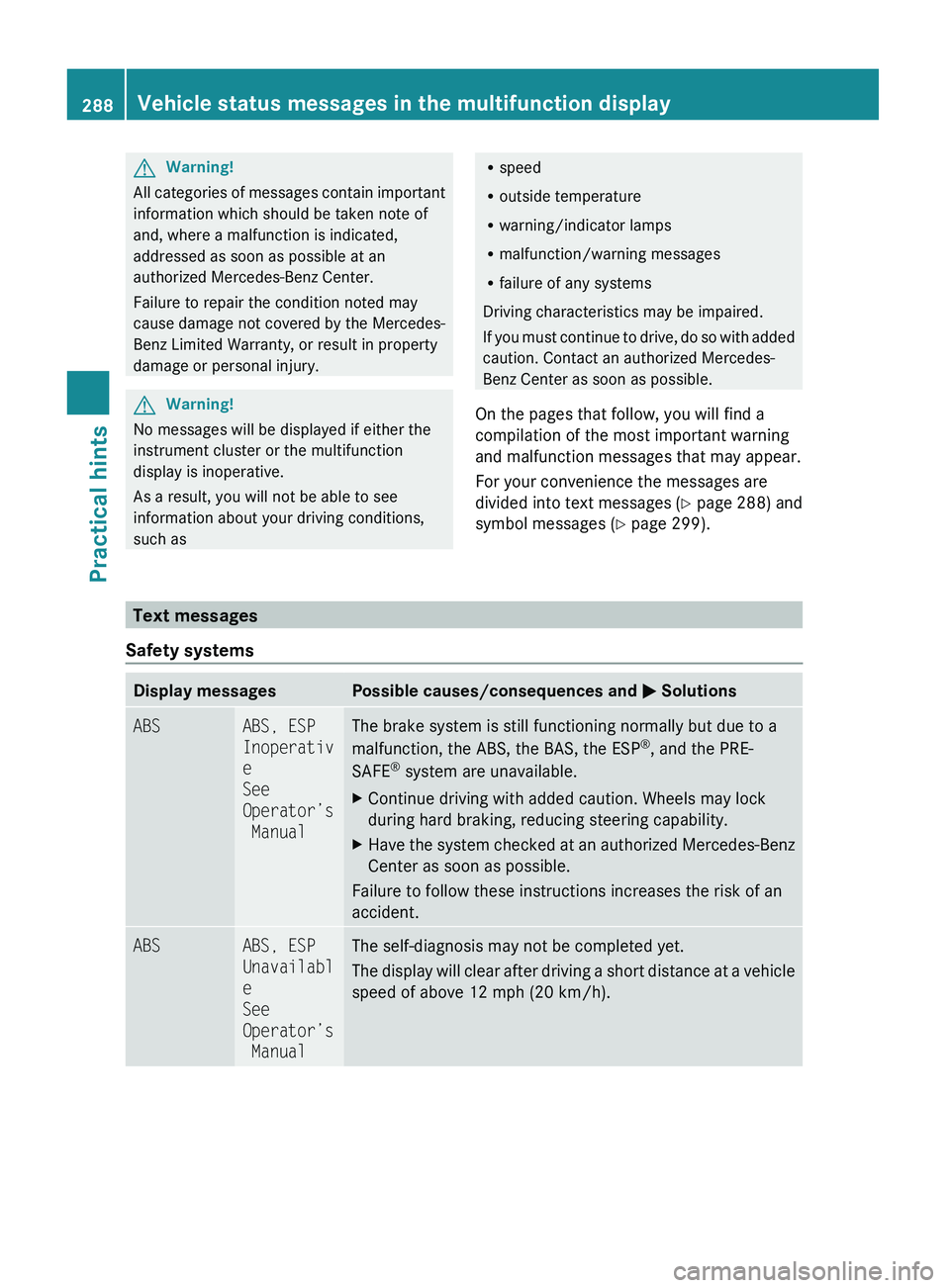
Text messages
Safety systems
Display messagesPossible causes/consequences and M SolutionsABSABS, ESP
Inoperativ
e
See
Operator’s
ManualThe brake system is still functioning normally but due to a
malfunction, the ABS, the BAS, the ESP ®
, and the PRE-
SAFE ®
system are unavailable.XContinue driving with added caution. Wheels may lock
during hard braking, reducing steering capability.XHave the system checked at an authorized Mercedes-Benz
Center as soon as possible.
Failure to follow these instructions increases the risk of an
accident.
ABSABS, ESP
Unavailabl
e
See
Operator’s
ManualThe self-diagnosis may not be completed yet.
The display will clear after driving a short distance at a vehicle
speed of above 12 mph (20 km/h).288Vehicle status messages in the multifunction displayPractical hints
X164_AKB; 5; 31, en-USd2ureepe,Version: 2.11.8.12009-09-11T12:30:16+02:00 - Seite 288
Page 291 of 380
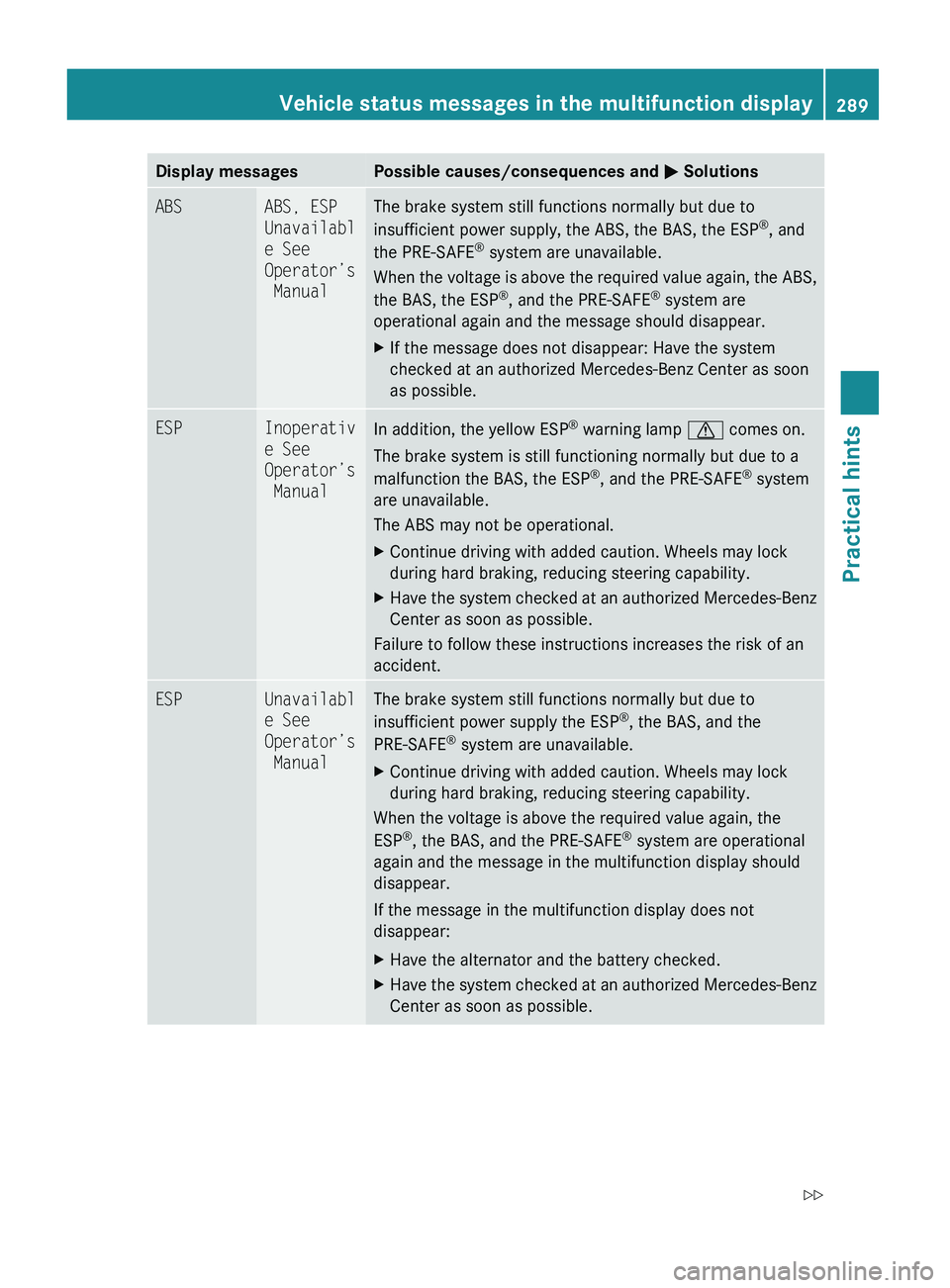
Display messagesPossible causes/consequences and M SolutionsABSABS, ESP
Unavailabl
e See
Operator’s
ManualThe brake system still functions normally but due to
insufficient power supply, the ABS, the BAS, the ESP ®
, and
the PRE-SAFE ®
system are unavailable.
When the voltage is above the required value again, the ABS,
the BAS, the ESP ®
, and the PRE-SAFE ®
system are
operational again and the message should disappear.XIf the message does not disappear: Have the system
checked at an authorized Mercedes-Benz Center as soon
as possible.ESPInoperativ
e See
Operator’s
ManualIn addition, the yellow ESP ®
warning lamp d comes on.
The brake system is still functioning normally but due to a
malfunction the BAS, the ESP ®
, and the PRE-SAFE ®
system
are unavailable.
The ABS may not be operational.XContinue driving with added caution. Wheels may lock
during hard braking, reducing steering capability.XHave the system checked at an authorized Mercedes-Benz
Center as soon as possible.
Failure to follow these instructions increases the risk of an
accident.
ESPUnavailabl
e See
Operator’s
ManualThe brake system still functions normally but due to
insufficient power supply the ESP ®
, the BAS, and the
PRE-SAFE ®
system are unavailable.XContinue driving with added caution. Wheels may lock
during hard braking, reducing steering capability.
When the voltage is above the required value again, the
ESP ®
, the BAS, and the PRE-SAFE ®
system are operational
again and the message in the multifunction display should
disappear.
If the message in the multifunction display does not
disappear:
XHave the alternator and the battery checked.XHave the system checked at an authorized Mercedes-Benz
Center as soon as possible.Vehicle status messages in the multifunction display289Practical hintsX164_AKB; 5; 31, en-USd2ureepe,Version: 2.11.8.12009-09-11T12:30:16+02:00 - Seite 289Z
Page 302 of 380
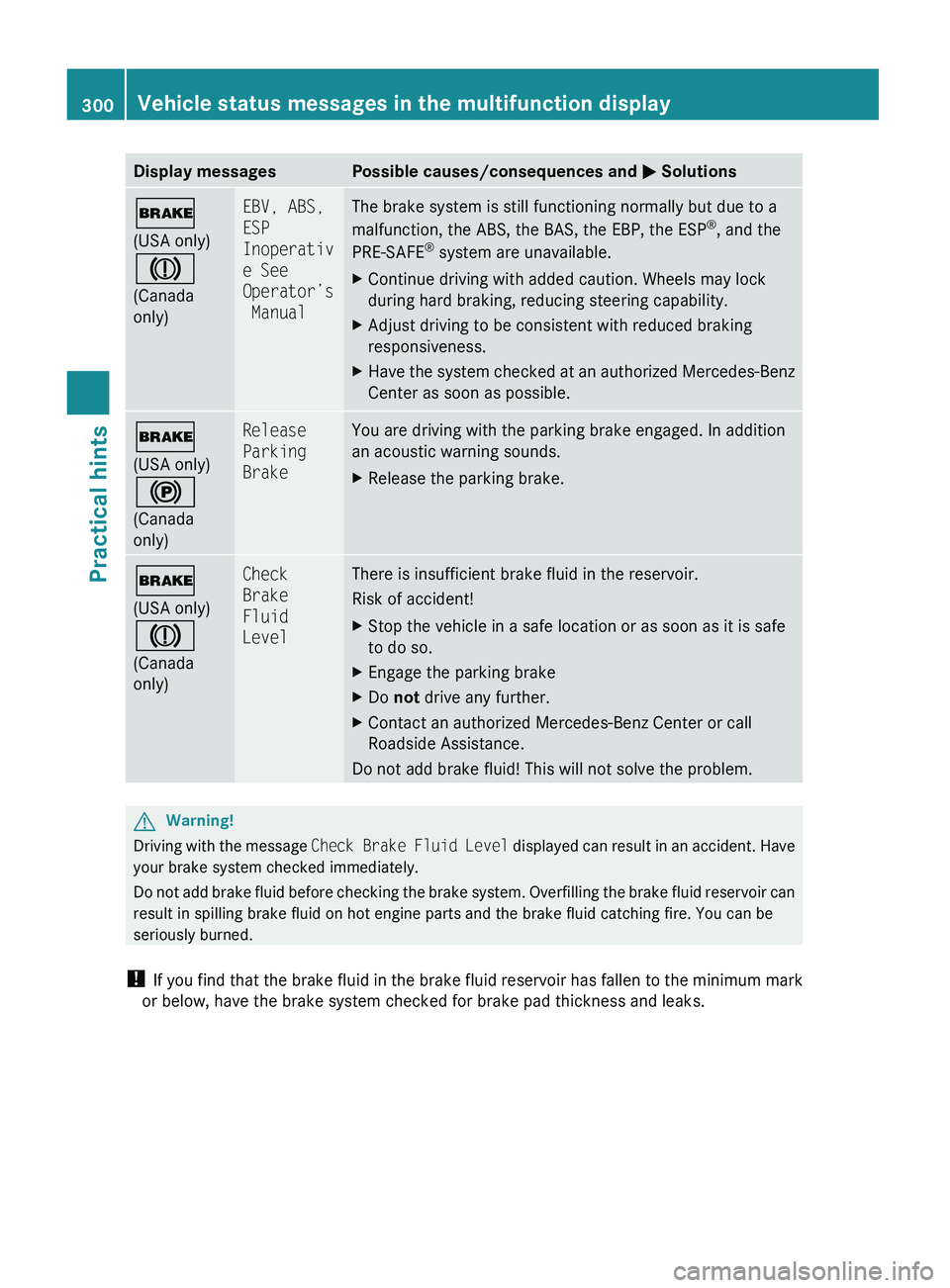
Display messagesPossible causes/consequences and M Solutions$
(USA only)
J
(Canada
only)EBV, ABS,
ESP
Inoperativ
e See
Operator’s
ManualThe brake system is still functioning normally but due to a
malfunction, the ABS, the BAS, the EBP, the ESP ®
, and the
PRE-SAFE ®
system are unavailable.XContinue driving with added caution. Wheels may lock
during hard braking, reducing steering capability.XAdjust driving to be consistent with reduced braking
responsiveness.XHave the system checked at an authorized Mercedes-Benz
Center as soon as possible.$
(USA only)
!
(Canada
only)Release
Parking
BrakeYou are driving with the parking brake engaged. In addition
an acoustic warning sounds.XRelease the parking brake.$
(USA only)
J
(Canada
only)Check
Brake
Fluid
LevelThere is insufficient brake fluid in the reservoir.
Risk of accident!XStop the vehicle in a safe location or as soon as it is safe
to do so.XEngage the parking brakeXDo not drive any further.XContact an authorized Mercedes-Benz Center or call
Roadside Assistance.
Do not add brake fluid! This will not solve the problem.
GWarning!
Driving with the message Check Brake Fluid Level displayed can result in an accident. Have
your brake system checked immediately.
Do not add brake fluid before checking the brake system. Overfilling the brake fluid reservoir can
result in spilling brake fluid on hot engine parts and the brake fluid catching fire. You can be
seriously burned.
! If you find that the brake fluid in the brake fluid reservoir has fallen to the minimum mark
or below, have the brake system checked for brake pad thickness and leaks.
300Vehicle status messages in the multifunction displayPractical hints
X164_AKB; 5; 31, en-USd2ureepe,Version: 2.11.8.12009-09-11T12:30:16+02:00 - Seite 300
Page 304 of 380
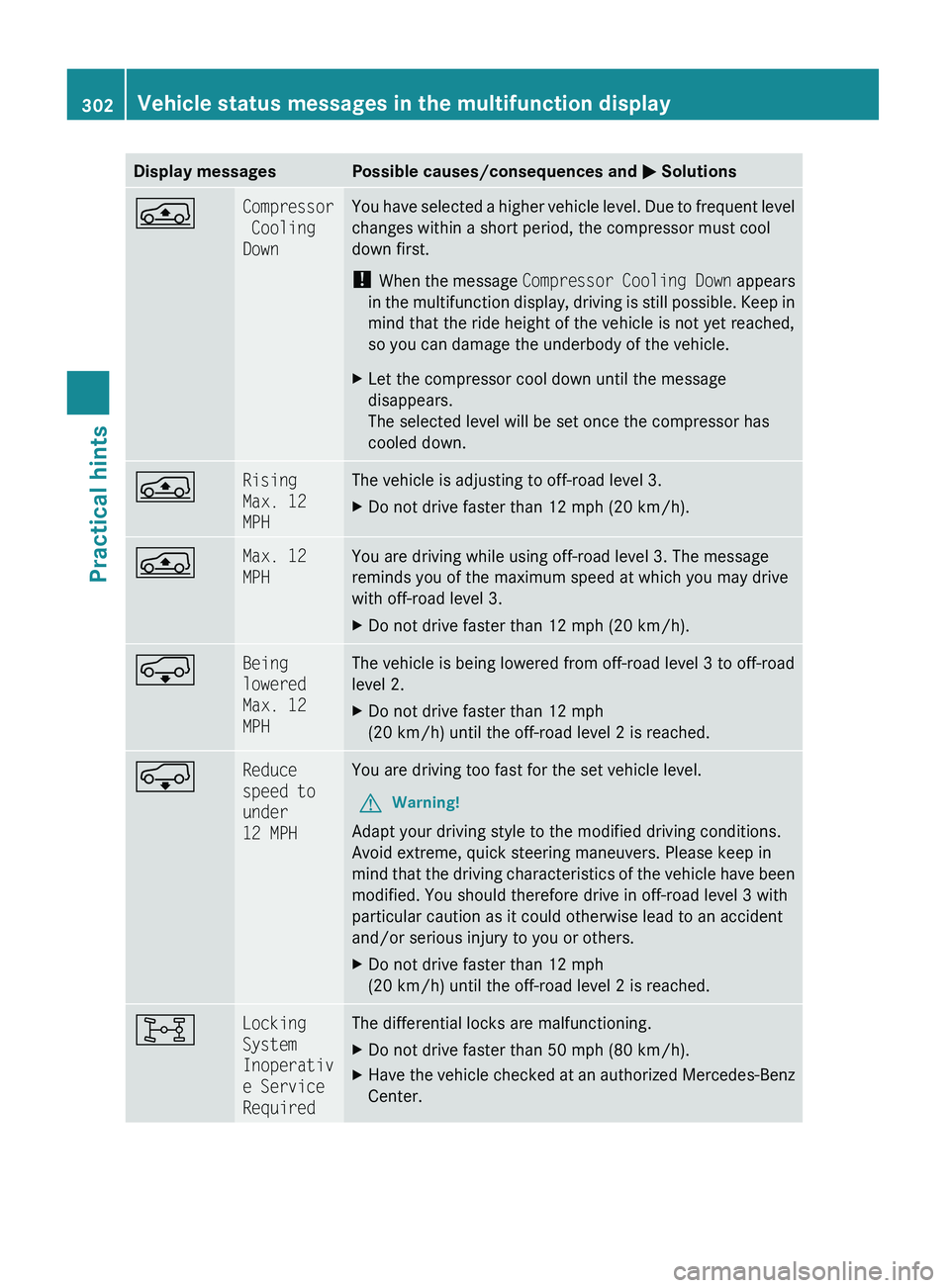
Display messagesPossible causes/consequences and M SolutionsÁCompressor
Cooling
DownYou have selected a higher vehicle level. Due to frequent level
changes within a short period, the compressor must cool
down first.
! When the message Compressor Cooling Down appears
in the multifunction display, driving is still possible. Keep in
mind that the ride height of the vehicle is not yet reached,
so you can damage the underbody of the vehicle.XLet the compressor cool down until the message
disappears.
The selected level will be set once the compressor has
cooled down.ÁRising
Max. 12
MPHThe vehicle is adjusting to off-road level 3.XDo not drive faster than 12 mph (20 km/h).ÁMax. 12
MPHYou are driving while using off-road level 3. The message
reminds you of the maximum speed at which you may drive
with off-road level 3.XDo not drive faster than 12 mph (20 km/h).ÆBeing
lowered
Max. 12
MPHThe vehicle is being lowered from off-road level 3 to off-road
level 2.XDo not drive faster than 12 mph
(20 km/h) until the off-road level 2 is reached.ÆReduce
speed to
under
12 MPHYou are driving too fast for the set vehicle level.GWarning!
Adapt your driving style to the modified driving conditions.
Avoid extreme, quick steering maneuvers. Please keep in
mind that the driving characteristics of the vehicle have been
modified. You should therefore drive in off-road level 3 with
particular caution as it could otherwise lead to an accident
and/or serious injury to you or others.
XDo not drive faster than 12 mph
(20 km/h) until the off-road level 2 is reached.8Locking
System
Inoperativ
e Service
RequiredThe differential locks are malfunctioning.XDo not drive faster than 50 mph (80 km/h).XHave the vehicle checked at an authorized Mercedes-Benz
Center.302Vehicle status messages in the multifunction displayPractical hints
X164_AKB; 5; 31, en-USd2ureepe,Version: 2.11.8.12009-09-11T12:30:16+02:00 - Seite 302
Page 305 of 380
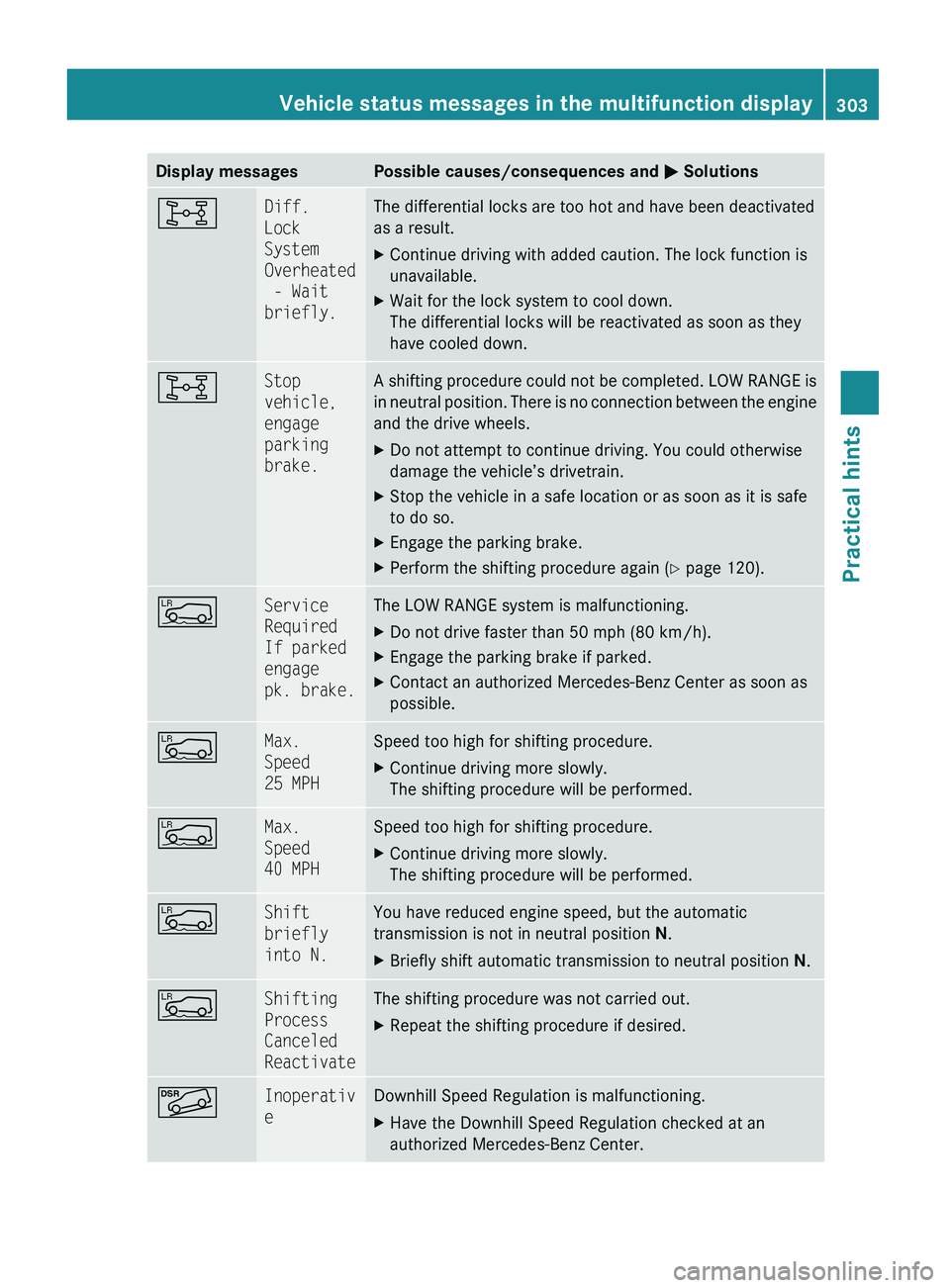
Display messagesPossible causes/consequences and M Solutions8Diff.
Lock
System
Overheated
- Wait
briefly.The differential locks are too hot and have been deactivated
as a result.XContinue driving with added caution. The lock function is
unavailable.XWait for the lock system to cool down.
The differential locks will be reactivated as soon as they
have cooled down.8Stop
vehicle,
engage
parking
brake.A shifting procedure could not be completed. LOW RANGE is
in neutral position. There is no connection between the engine
and the drive wheels.XDo not attempt to continue driving. You could otherwise
damage the vehicle’s drivetrain.XStop the vehicle in a safe location or as soon as it is safe
to do so.XEngage the parking brake.XPerform the shifting procedure again ( Y page 120).ÅService
Required
If parked
engage
pk. brake.The LOW RANGE system is malfunctioning.XDo not drive faster than 50 mph (80 km/h).XEngage the parking brake if parked.XContact an authorized Mercedes-Benz Center as soon as
possible.ÅMax.
Speed
25 MPHSpeed too high for shifting procedure.XContinue driving more slowly.
The shifting procedure will be performed.ÅMax.
Speed
40 MPHSpeed too high for shifting procedure.XContinue driving more slowly.
The shifting procedure will be performed.ÅShift
briefly
into N.You have reduced engine speed, but the automatic
transmission is not in neutral position N.XBriefly shift automatic transmission to neutral position N.ÅShifting
Process
Canceled
ReactivateThe shifting procedure was not carried out.XRepeat the shifting procedure if desired.ÃInoperativ
eDownhill Speed Regulation is malfunctioning.XHave the Downhill Speed Regulation checked at an
authorized Mercedes-Benz Center.Vehicle status messages in the multifunction display303Practical hintsX164_AKB; 5; 31, en-USd2ureepe,Version: 2.11.8.12009-09-11T12:30:16+02:00 - Seite 303Z
Page 306 of 380
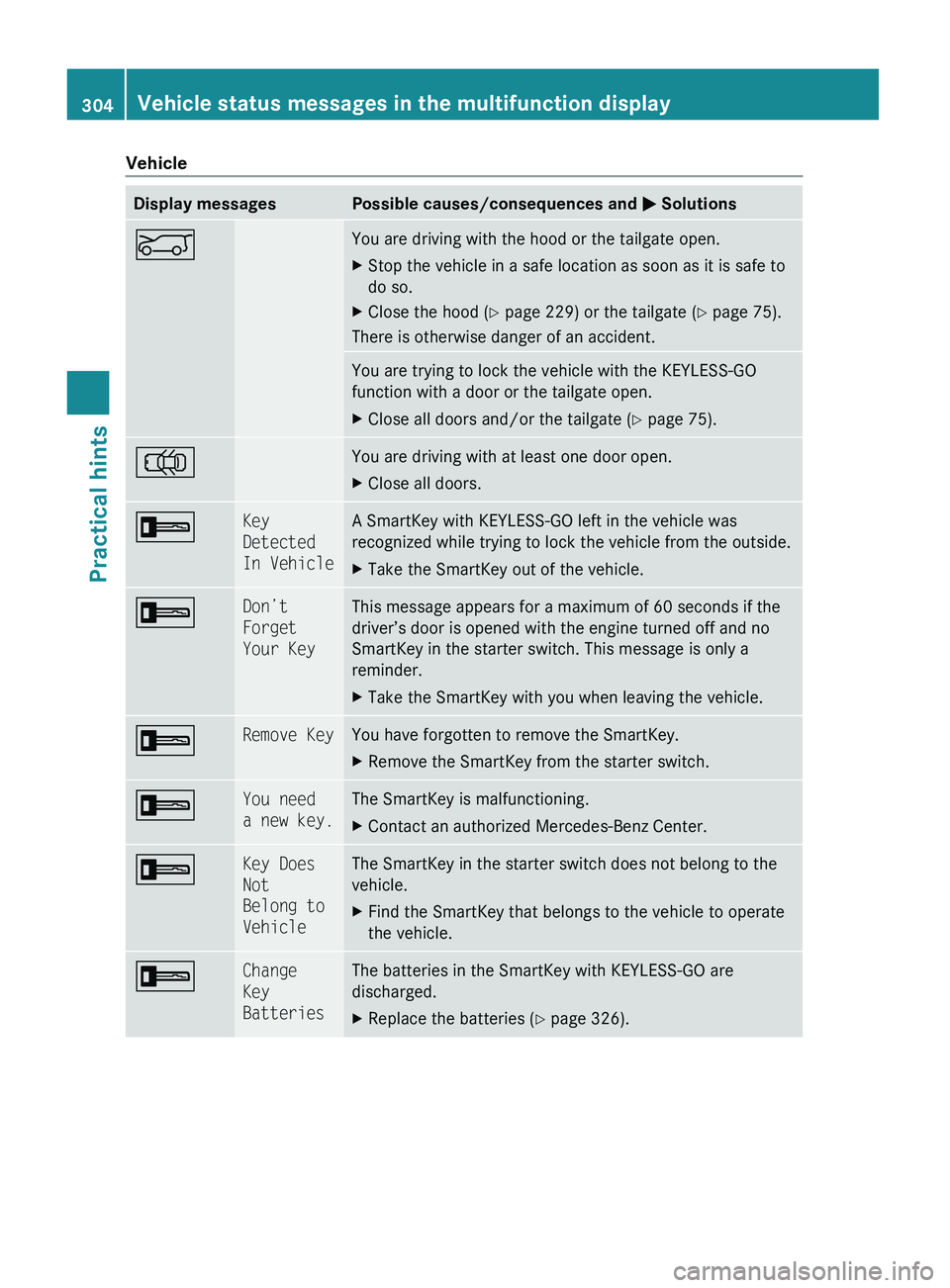
VehicleDisplay messagesPossible causes/consequences and M SolutionsEYou are driving with the hood or the tailgate open.XStop the vehicle in a safe location as soon as it is safe to
do so.XClose the hood ( Y page 229) or the tailgate ( Y page 75).
There is otherwise danger of an accident.
You are trying to lock the vehicle with the KEYLESS-GO
function with a door or the tailgate open.XClose all doors and/or the tailgate ( Y page 75).;You are driving with at least one door open.XClose all doors.+Key
Detected
In VehicleA SmartKey with KEYLESS-GO left in the vehicle was
recognized while trying to lock the vehicle from the outside.XTake the SmartKey out of the vehicle.+Don’t
Forget
Your KeyThis message appears for a maximum of 60 seconds if the
driver’s door is opened with the engine turned off and no
SmartKey in the starter switch. This message is only a
reminder.XTake the SmartKey with you when leaving the vehicle.+Remove KeyYou have forgotten to remove the SmartKey.XRemove the SmartKey from the starter switch.+You need
a new key.The SmartKey is malfunctioning.XContact an authorized Mercedes-Benz Center.+Key Does
Not
Belong to
VehicleThe SmartKey in the starter switch does not belong to the
vehicle.XFind the SmartKey that belongs to the vehicle to operate
the vehicle.+Change
Key
BatteriesThe batteries in the SmartKey with KEYLESS-GO are
discharged.XReplace the batteries ( Y page 326).304Vehicle status messages in the multifunction displayPractical hints
X164_AKB; 5; 31, en-USd2ureepe,Version: 2.11.8.12009-09-11T12:30:16+02:00 - Seite 304
Page 307 of 380
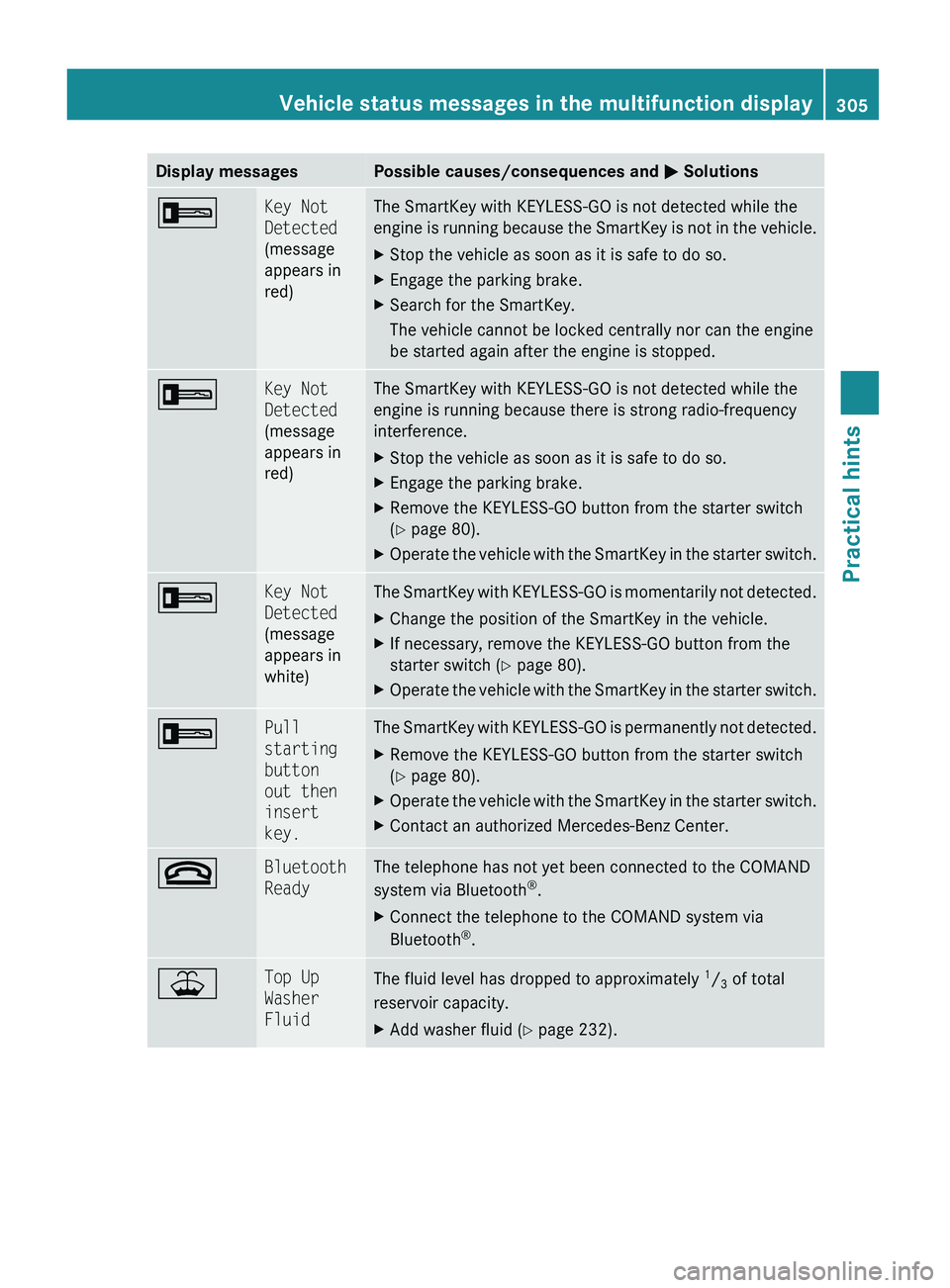
Display messagesPossible causes/consequences and M Solutions+Key Not
Detected
(message
appears in
red)The SmartKey with KEYLESS-GO is not detected while the
engine is running because the SmartKey is not in the vehicle.XStop the vehicle as soon as it is safe to do so.XEngage the parking brake.XSearch for the SmartKey.
The vehicle cannot be locked centrally nor can the engine
be started again after the engine is stopped.+Key Not
Detected
(message
appears in
red)The SmartKey with KEYLESS-GO is not detected while the
engine is running because there is strong radio-frequency
interference.XStop the vehicle as soon as it is safe to do so.XEngage the parking brake.XRemove the KEYLESS-GO button from the starter switch
( Y page 80).XOperate the vehicle with the SmartKey in the starter switch.+Key Not
Detected
(message
appears in
white)The SmartKey with KEYLESS-GO is momentarily not detected.XChange the position of the SmartKey in the vehicle.XIf necessary, remove the KEYLESS-GO button from the
starter switch ( Y page 80).XOperate the vehicle with the SmartKey in the starter switch.+Pull
starting
button
out then
insert
key.The SmartKey with KEYLESS-GO is permanently not detected.XRemove the KEYLESS-GO button from the starter switch
( Y page 80).XOperate the vehicle with the SmartKey in the starter switch.XContact an authorized Mercedes-Benz Center.~Bluetooth
ReadyThe telephone has not yet been connected to the COMAND
system via Bluetooth ®
.XConnect the telephone to the COMAND system via
Bluetooth ®
.¥Top Up
Washer
FluidThe fluid level has dropped to approximately 1
/ 3 of total
reservoir capacity.XAdd washer fluid ( Y page 232).Vehicle status messages in the multifunction display305Practical hintsX164_AKB; 5; 31, en-USd2ureepe,Version: 2.11.8.12009-09-11T12:30:16+02:00 - Seite 305Z
Page 317 of 380
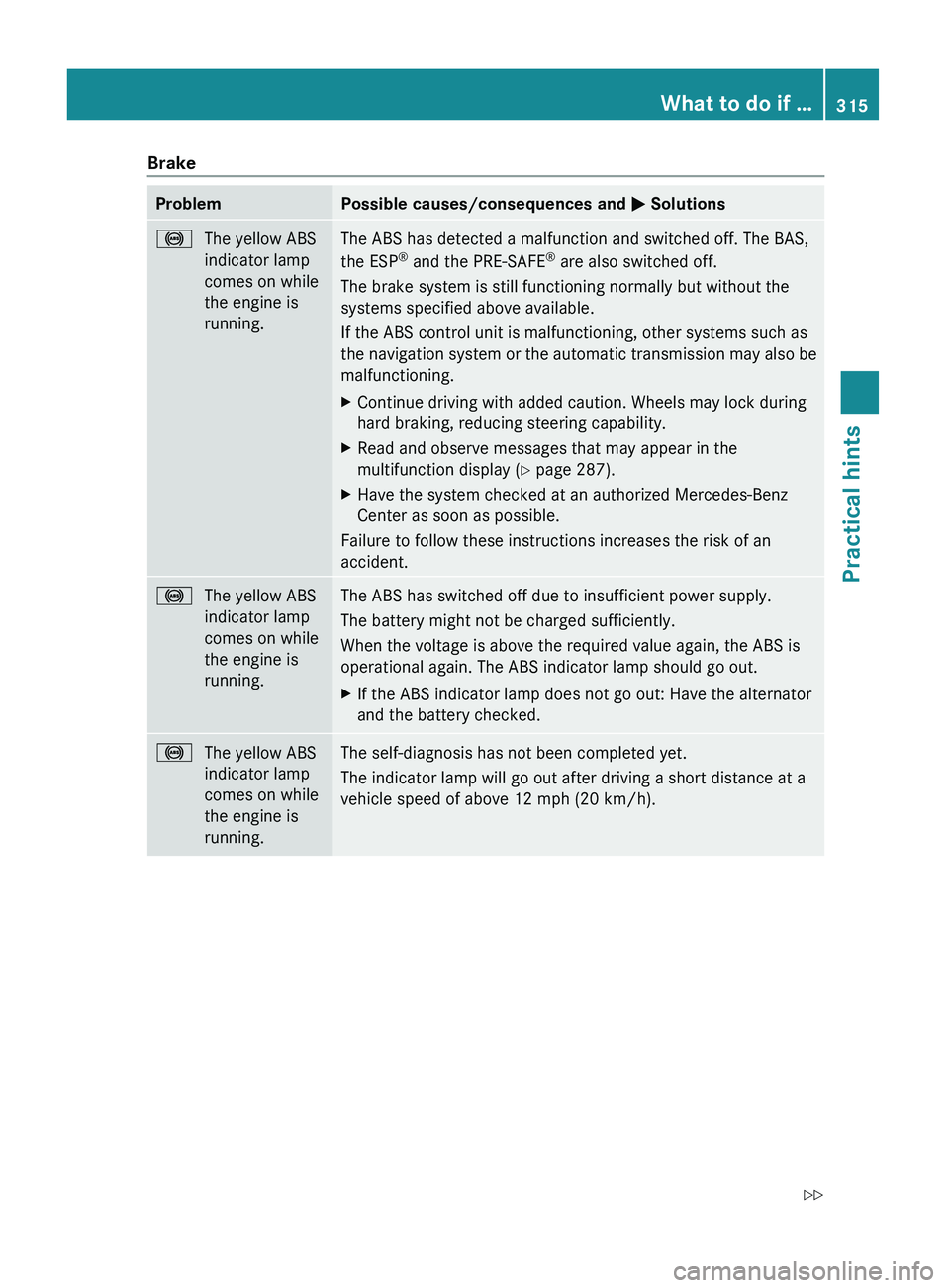
BrakeProblemPossible causes/consequences and M Solutions!The yellow ABS
indicator lamp
comes on while
the engine is
running.The ABS has detected a malfunction and switched off. The BAS,
the ESP ®
and the PRE-SAFE ®
are also switched off.
The brake system is still functioning normally but without the
systems specified above available.
If the ABS control unit is malfunctioning, other systems such as
the navigation system or the automatic transmission may also be
malfunctioning.XContinue driving with added caution. Wheels may lock during
hard braking, reducing steering capability.XRead and observe messages that may appear in the
multifunction display ( Y page 287).XHave the system checked at an authorized Mercedes-Benz
Center as soon as possible.
Failure to follow these instructions increases the risk of an
accident.
!The yellow ABS
indicator lamp
comes on while
the engine is
running.The ABS has switched off due to insufficient power supply.
The battery might not be charged sufficiently.
When the voltage is above the required value again, the ABS is
operational again. The ABS indicator lamp should go out.XIf the ABS indicator lamp does not go out: Have the alternator
and the battery checked.!The yellow ABS
indicator lamp
comes on while
the engine is
running.The self-diagnosis has not been completed yet.
The indicator lamp will go out after driving a short distance at a
vehicle speed of above 12 mph (20 km/h).What to do if …315Practical hintsX164_AKB; 5; 31, en-USd2ureepe,Version: 2.11.8.12009-09-11T12:30:16+02:00 - Seite 315Z