fog light MERCEDES-BENZ GL 2012 User Guide
[x] Cancel search | Manufacturer: MERCEDES-BENZ, Model Year: 2012, Model line: GL, Model: MERCEDES-BENZ GL 2012Pages: 384, PDF Size: 15.71 MB
Page 127 of 384
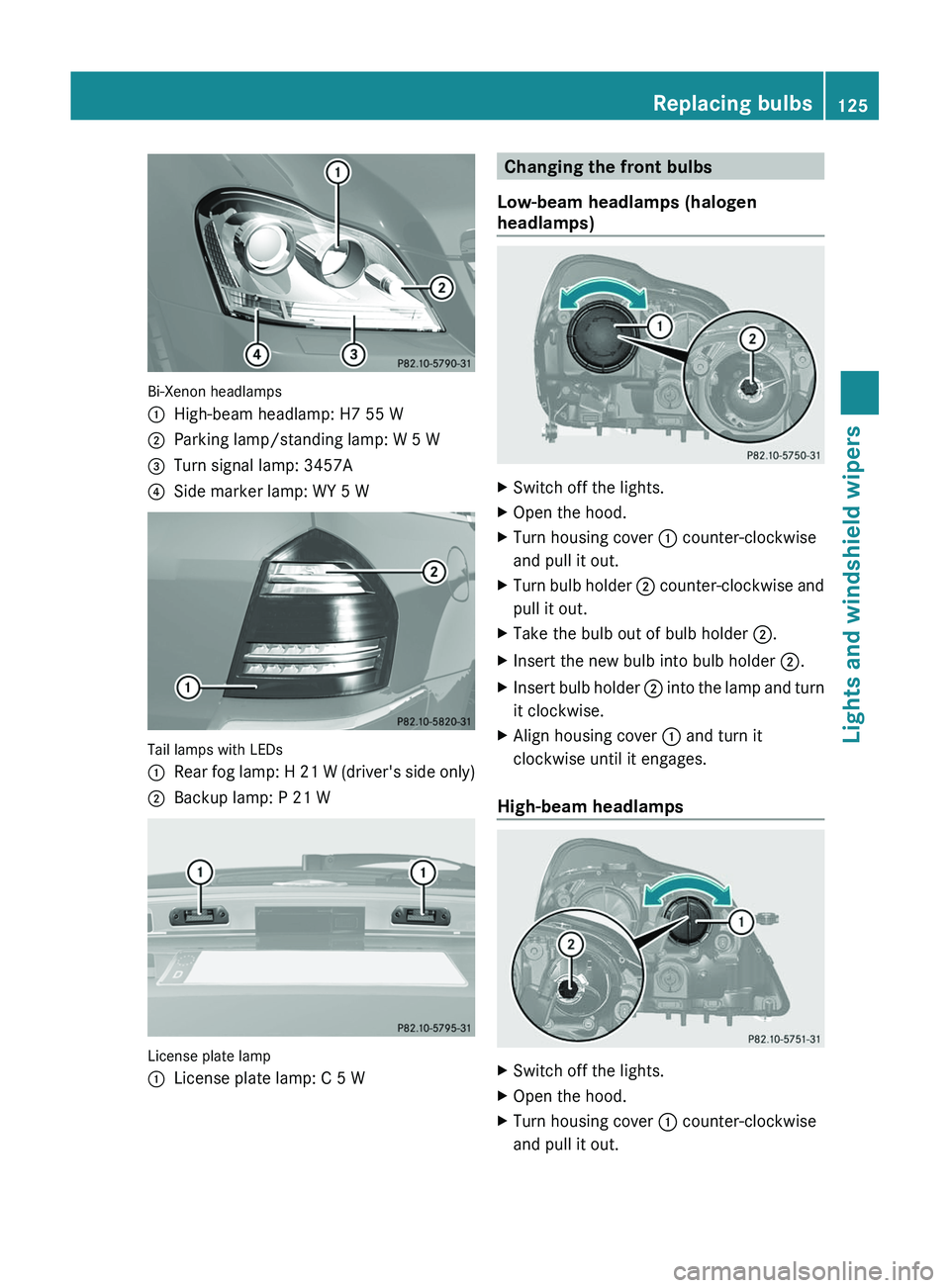
Bi-Xenon headlamps
:High-beam headlamp: H7 55 W;Parking lamp/standing lamp: W 5 W=Turn signal lamp: 3457A?Side marker lamp: WY 5 W
Tail lamps with LEDs
:Rear fog lamp: H 21 W (driver's side only);Backup lamp: P 21 W
License plate lamp
:License plate lamp: C 5 WChanging the front bulbs
Low-beam headlamps (halogen
headlamps)XSwitch off the lights.XOpen the hood.XTurn housing cover : counter-clockwise
and pull it out.XTurn bulb holder ; counter-clockwise and
pull it out.XTake the bulb out of bulb holder ;.XInsert the new bulb into bulb holder ;.XInsert bulb holder ; into the lamp and turn
it clockwise.XAlign housing cover : and turn it
clockwise until it engages.
High-beam headlamps
XSwitch off the lights.XOpen the hood.XTurn housing cover : counter-clockwise
and pull it out.Replacing bulbs125Lights and windshield wipersZ
Page 129 of 384
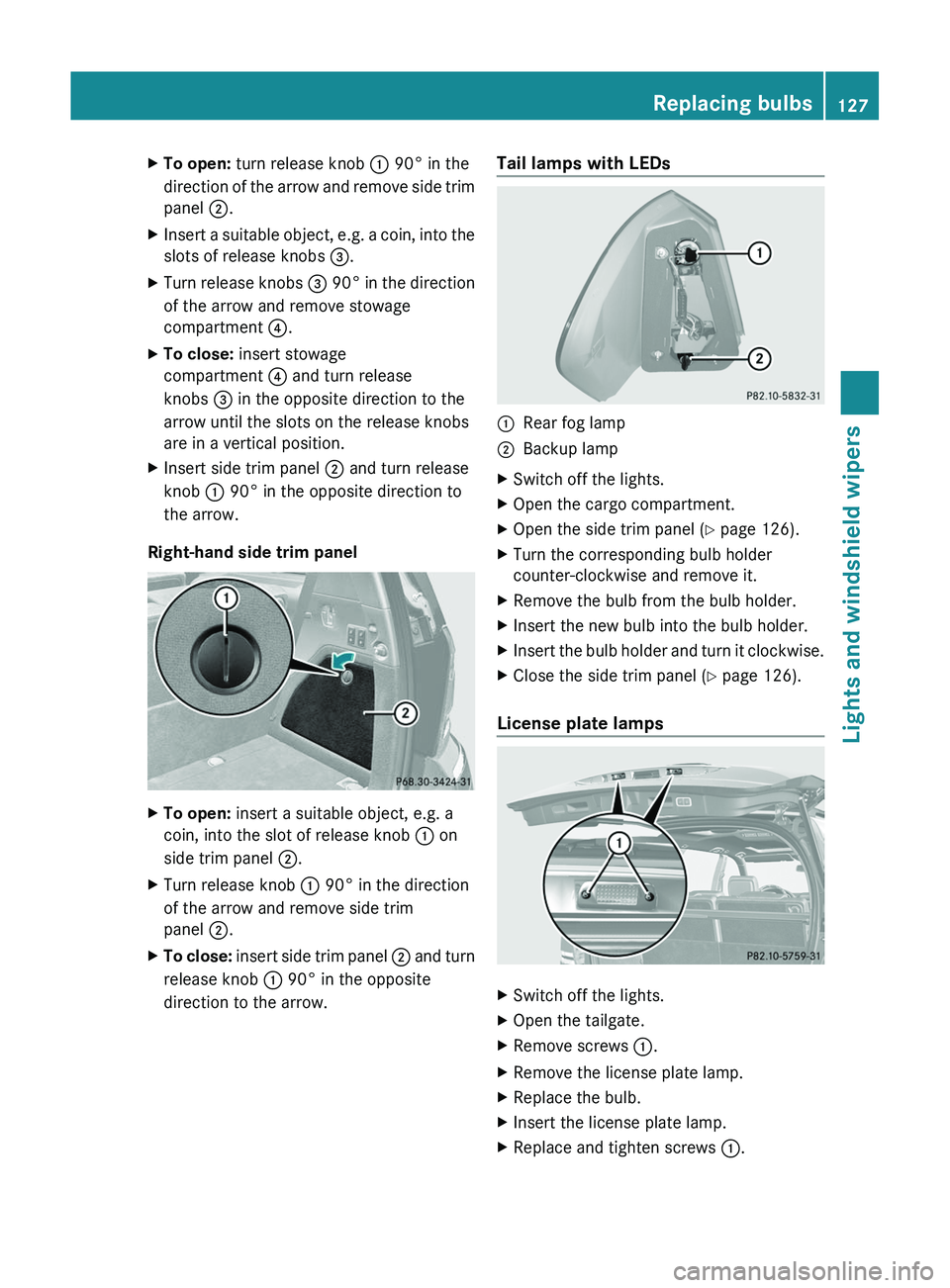
XTo open: turn release knob : 90° in the
direction of the arrow and remove side trim
panel ;.XInsert a suitable object, e.g. a coin, into the
slots of release knobs =.XTurn release knobs = 90° in the direction
of the arrow and remove stowage
compartment ?.XTo close: insert stowage
compartment ? and turn release
knobs = in the opposite direction to the
arrow until the slots on the release knobs
are in a vertical position.XInsert side trim panel ; and turn release
knob : 90° in the opposite direction to
the arrow.
Right-hand side trim panel
XTo open: insert a suitable object, e.g. a
coin, into the slot of release knob : on
side trim panel ;.XTurn release knob : 90° in the direction
of the arrow and remove side trim
panel ;.XTo close: insert side trim panel ; and turn
release knob : 90° in the opposite
direction to the arrow.Tail lamps with LEDs:Rear fog lamp;Backup lampXSwitch off the lights.XOpen the cargo compartment.XOpen the side trim panel ( Y page 126).XTurn the corresponding bulb holder
counter-clockwise and remove it.XRemove the bulb from the bulb holder.XInsert the new bulb into the bulb holder.XInsert the bulb holder and turn it clockwise.XClose the side trim panel ( Y page 126).
License plate lamps
XSwitch off the lights.XOpen the tailgate.XRemove screws :.XRemove the license plate lamp.XReplace the bulb.XInsert the license plate lamp.XReplace and tighten screws :.Replacing bulbs127Lights and windshield wipersZ
Page 137 of 384
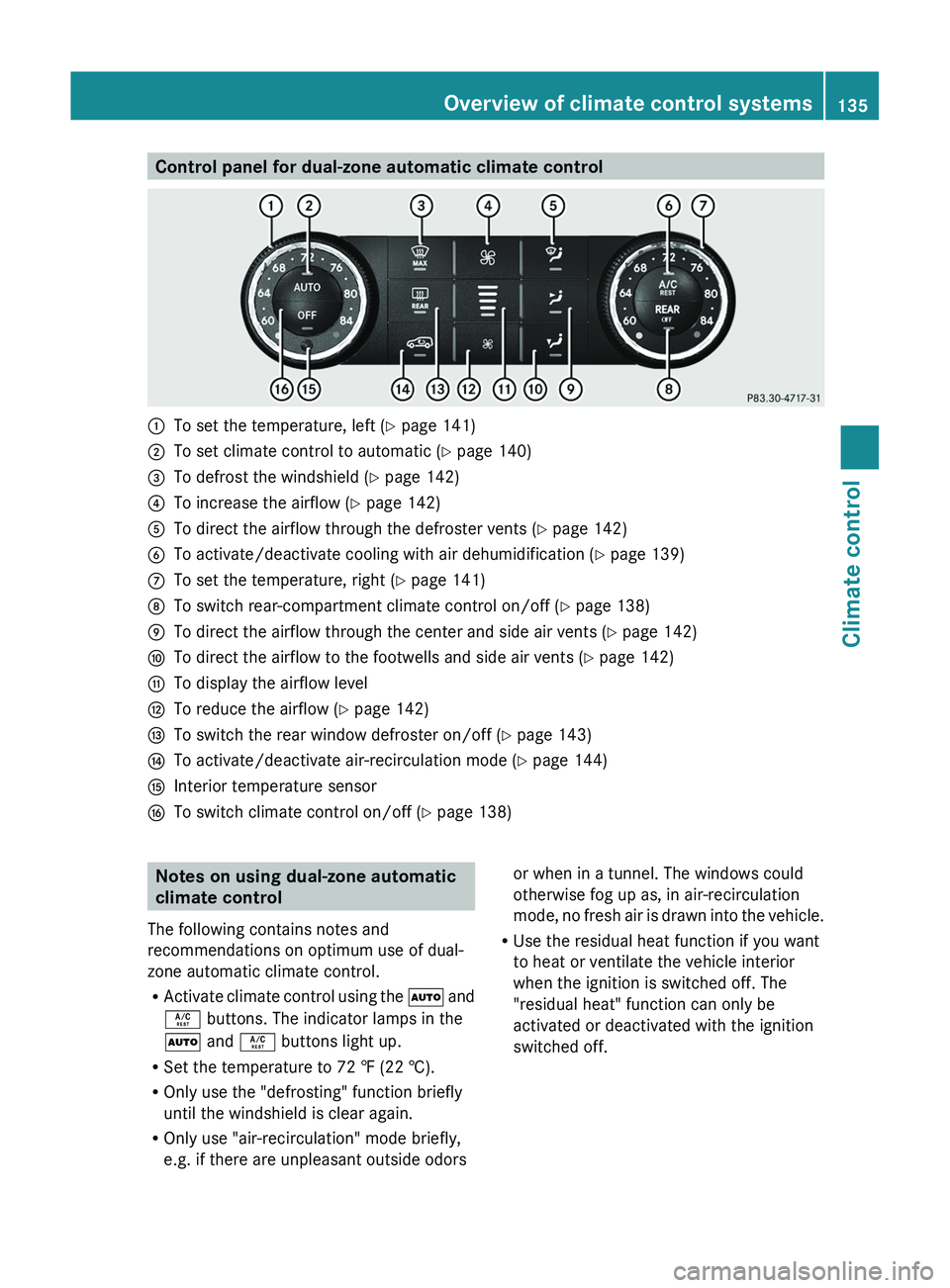
Control panel for dual-zone automatic climate control:To set the temperature, left (Y page 141);To set climate control to automatic ( Y page 140)=To defrost the windshield ( Y page 142)?To increase the airflow ( Y page 142)ATo direct the airflow through the defroster vents ( Y page 142)BTo activate/deactivate cooling with air dehumidification ( Y page 139)CTo set the temperature, right ( Y page 141)DTo switch rear-compartment climate control on/off ( Y page 138)ETo direct the airflow through the center and side air vents ( Y page 142)FTo direct the airflow to the footwells and side air vents ( Y page 142)GTo display the airflow levelHTo reduce the airflow ( Y page 142)ITo switch the rear window defroster on/off ( Y page 143)JTo activate/deactivate air-recirculation mode ( Y page 144)KInterior temperature sensorLTo switch climate control on/off ( Y page 138)Notes on using dual-zone automatic
climate control
The following contains notes and
recommendations on optimum use of dual-
zone automatic climate control.
R Activate climate control using the à and
Á buttons. The indicator lamps in the
à and Á buttons light up.
R Set the temperature to 72 ‡ (22 †).
R Only use the "defrosting" function briefly
until the windshield is clear again.
R Only use "air-recirculation" mode briefly,
e.g. if there are unpleasant outside odorsor when in a tunnel. The windows could
otherwise fog up as, in air-recirculation
mode, no fresh air is drawn into the vehicle.
R Use the residual heat function if you want
to heat or ventilate the vehicle interior
when the ignition is switched off. The
"residual heat" function can only be
activated or deactivated with the ignition
switched off.Overview of climate control systems135Climate controlZ
Page 140 of 384
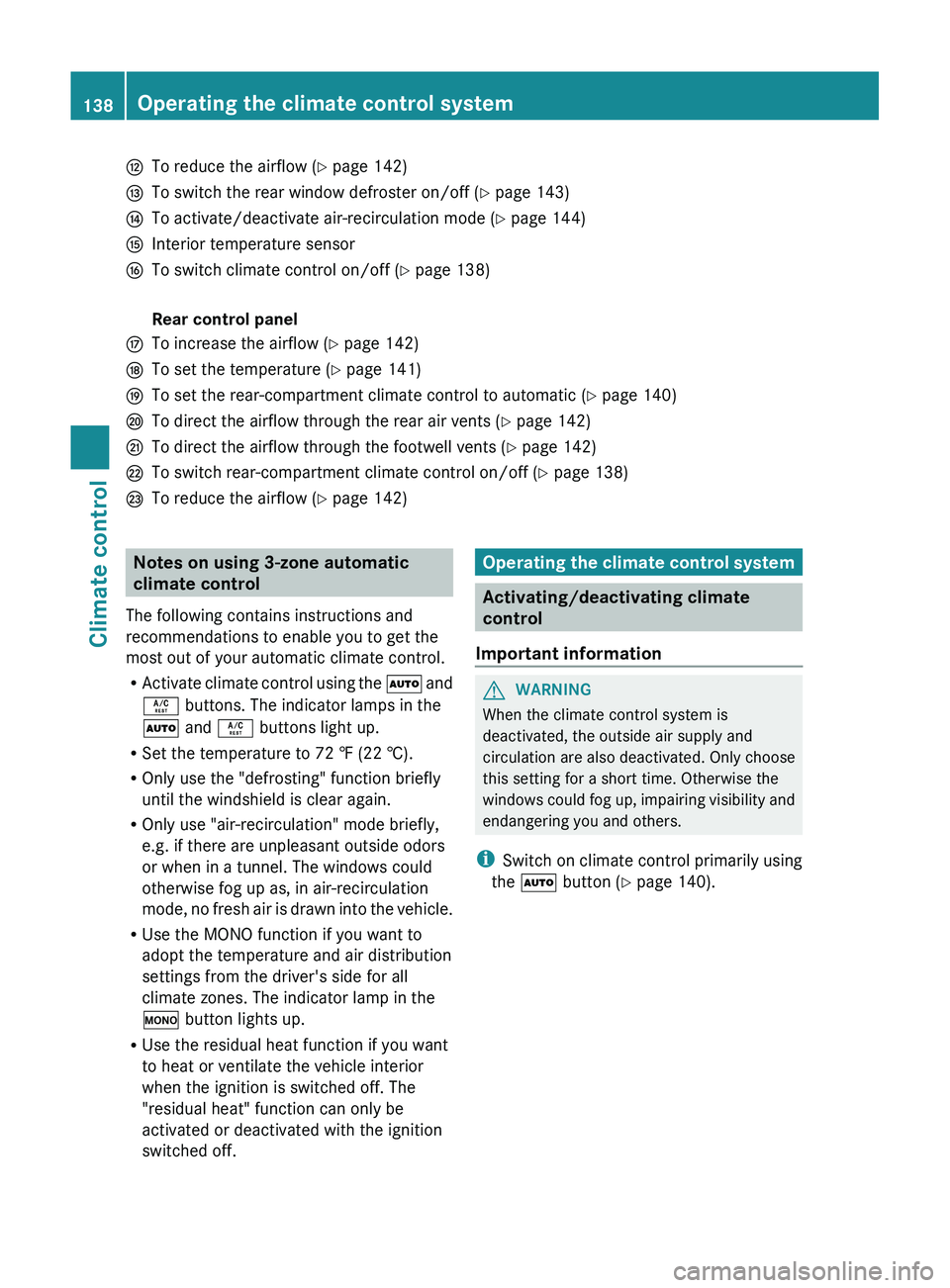
HTo reduce the airflow (Y page 142)ITo switch the rear window defroster on/off ( Y page 143)JTo activate/deactivate air-recirculation mode ( Y page 144)KInterior temperature sensorLTo switch climate control on/off ( Y page 138) Rear control panelMTo increase the airflow ( Y page 142)NTo set the temperature ( Y page 141)OTo set the rear-compartment climate control to automatic ( Y page 140)PTo direct the airflow through the rear air vents ( Y page 142)QTo direct the airflow through the footwell vents ( Y page 142)RTo switch rear-compartment climate control on/off ( Y page 138)STo reduce the airflow ( Y page 142)Notes on using 3-zone automatic
climate control
The following contains instructions and
recommendations to enable you to get the
most out of your automatic climate control.
R Activate climate control using the à and
Á buttons. The indicator lamps in the
à and Á buttons light up.
R Set the temperature to 72 ‡ (22 †).
R Only use the "defrosting" function briefly
until the windshield is clear again.
R Only use "air-recirculation" mode briefly,
e.g. if there are unpleasant outside odors
or when in a tunnel. The windows could
otherwise fog up as, in air-recirculation
mode, no fresh air is drawn into the vehicle.
R Use the MONO function if you want to
adopt the temperature and air distribution
settings from the driver's side for all
climate zones. The indicator lamp in the
º button lights up.
R Use the residual heat function if you want
to heat or ventilate the vehicle interior
when the ignition is switched off. The
"residual heat" function can only be
activated or deactivated with the ignition
switched off.Operating the climate control system
Activating/deactivating climate
control
Important information
GWARNING
When the climate control system is
deactivated, the outside air supply and
circulation are also deactivated. Only choose
this setting for a short time. Otherwise the
windows could fog up, impairing visibility and
endangering you and others.
i Switch on climate control primarily using
the à button ( Y page 140).
138Operating the climate control systemClimate control
Page 141 of 384
Switching the front climate control on/
off using the front control panelXTurn the SmartKey to position 2 in the
ignition lock.XTo switch on: press the à button.
The indicator lamp in the à button lights
up. Airflow and air distribution are set to
automatic mode.
or
XPress the ^ button.
The indicator lamp in the ^ button goes
out. The previously selected settings come
into effect again.XTo switch off: press the ^ button.
The indicator lamp in the ^ button lights
up.
Switching the rear-compartment
climate control on/off using the front
control panel
2-zone automatic climate control
XTurn the SmartKey to position 2 in the
ignition lock.XTo switch on/off: press the ± button.
The indicator lamp in the ± button lights
up or goes out.
3-zone automatic climate control
USA only:
XTurn the SmartKey to position 2 in the
ignition lock.XTo switch on/off: press the ± button.
The indicator lamp in the ± button lights
up or goes out.
Canada only:
XTurn the SmartKey to position 2 in the
ignition lock.XTo switch on: press the Y button.
ON and MODE are shown in the automatic
climate control display behind the Y
symbol. The MODE display goes out after
three seconds. The display switches back
to the standard display.XTo switch off: press the Y button.
MODE is shown in the display behind the
Y symbol.XPress button ^.
OFF is shown in the display behind the
Y symbol.
Switching the rear-compartment
climate control on/off using the rear
control panel
3-zone automatic climate control
XTurn the SmartKey to position 2 in the
ignition lock.XSwitch on automatic climate control using
the front control panel.XTo switch on: press the à button.
The indicator lamp in the à button lights
up.XTo switch off: press the ^ button.
The indicator lamp in the ^ button lights
up.
Activating/deactivating cooling with
air dehumidification
Important information
The cooling with air dehumidification function
is only available when the engine is running.
The air inside the vehicle is cooled and
dehumidified according to the temperature
selected.
GWARNING
If you switch off the cooling function, the
vehicle will not be cooled when weather
conditions are warm. The windows can fog up
more quickly. Window fogging may impair
visibility and endanger you and others.
Condensation may drip from the underside of
the vehicle when it is in cooling mode. This is
normal and not a sign that there is a
malfunction.
Operating the climate control system139Climate controlZ
Page 142 of 384
iThe cooling with air dehumidification
function uses refrigerant R134a. This
coolant does not contain
chlorofluorocarbons, and therefore does
not damage the ozone layer.
Activating/deactivating
! If the cooling with air dehumidification
does not switch on, it is possible that the
climate control system has lost coolant.
Have the cooling with air dehumidification
checked at a qualified specialist workshop.
XTo activate: press the Á button.
The indicator lamp in the Á button lights
up.XTo switch off: press the Á button.
The indicator lamp in the Á button goes
out. The cooling with air dehumidification
function has a delayed switch-off feature.
Problems with the cooling with air
dehumidification function
If the indicator lamp in the Á button does
not go out when the function is activated, the
cooling with air dehumidification function is
deactivated due to a malfunction. You can no
longer switch on the cooling with air
dehumidification function.
XConsult a qualified specialist workshop.
Setting climate control to automatic
GWARNING
If you switch off the cooling function, the
vehicle will not be cooled when weather
conditions are warm. The windows can fog up
more quickly. Window fogging may impair
visibility and endanger you and others.
In automatic mode, the set temperature is
maintained automatically at a constant level.
The system automatically regulates the
temperature of the dispensed air, the airflow
and the air distribution.
Automatic mode will achieve optimal
operation if cooling with air dehumidification
is also activated. If desired, cooling with air
dehumidification can be deactivated.
Controlling the front climate control
using the front control panelXTurn the SmartKey to position 2 in the
ignition lock.XSet the desired temperature.XTo activate: press the à button.
The indicator lamp in the à button lights
up. Automatic air distribution and airflow
are activated.XTo deactivate: press the K or I
button.
The indicator lamp in the à button goes
out. Automatic airflow is deactivated and
the airflow is controlled according to the
level set. Automatic air distribution
remains activated.
or
XPress the Z, M , ¯ , \ , P ,
c or O button.
The indicator lamp in the à button goes
out. Automatic air distribution is
deactivated. Air distribution is controlled
according to the position set. Automatic
airflow remains activated.
Controlling the rear-compartment
climate control automatically using the
rear control panel
XTurn the SmartKey to position 2 in the
ignition lock.XSwitch on automatic climate control using
the front control panel.XSet the desired temperature.XTo activate: press the à button.
The indicator lamp in the à button lights
up. Automatic air distribution and airflow
are activated.140Operating the climate control systemClimate control
Page 145 of 384
The climate control system switches to the
following functions:
R cooling with air dehumidification on
R high airflow 19
R high temperature 19
R air distribution to the windshield and
front side windows
R air-recirculation mode offXTo switch off: press the ¦ button.
The indicator lamp in the ¦ button goes
out. The previously selected settings come
into effect again. The cooling with air
dehumidification function remains on. Air-
recirculation mode remains deactivated.
or
XPress the ^ button.
or
XPress the à button.
or
XTurn the temperature control clockwise or
counter-clockwise.
or
XPress the K or I button.
Defrosting the windows
Windows fogged up on the inside
XActivate the cooling with air
dehumidification function Á.XActivate automatic mode Ã.XIf the windows continue to fog up, activate
the defrosting function ( Y page 142).
i
You should only select this setting until
the windshield is clear again.
Windows fogged up on the outsideXSwitch on the windshield wipers.XPress the P/\ 20
or O /c 20
air distribution button.
i You should only select this setting until
the windshield is clear again.
Rear window defroster
Activating/deactivating
GWARNING
Any accumulation of snow and ice should be
removed from the rear window before driving.
Visibility could otherwise be impaired,
endangering you and others.
The rear window defroster has a high current
draw. You should therefore switch it off as
soon as the window is clear as it only switches
off automatically after several minutes.
If the battery voltage is too low, the rear
window defroster may switch off.
XTurn the SmartKey to position 2 in the
ignition lock.XPress the ª button.
The indicator lamp in the ª button lights
up or goes out.
Problems with the rear window
defroster
If the indicator lamp in the ª rear window
defroster button flashes, the on-board
voltage is too low or the roof is open. The rear
window defroster has deactivated itself
prematurely or cannot be activated.
XSwitch off any consumers that are not
required, e.g. reading lamps or interior
lighting.
When the battery is sufficiently charged,
the rear window defroster is activated
again automatically.19 Depending on the outside temperature.
20 Canada only.Operating the climate control system143Climate controlZ
Page 146 of 384
Activating/deactivating air-
recirculation mode
You can deactivate the flow of fresh air if
unpleasant odors are entering the vehicle
from outside. The air already inside the
vehicle will then be recirculated.
The operation of air-recirculation mode is the
same for all control panels.GWARNING
Fogged windows impair visibility,
endangering you and others. If the windows
begin to fog on the inside, switching off the
air recirculation mode immediately should
clear interior window fogging. If interior
window fogging persists, make sure the air
conditioning is activated, or press the ¬
button.
XTurn the SmartKey to position 2 in the
ignition lock.XTo activate: press the d button.
The indicator lamp in the d button lights
up.
i Air-recirculation mode is activated
automatically at high outside
temperatures. When air-recirculation mode
is activated automatically, the indicator
lamp in the d button is not lit.
Outside air is added after about 30
minutes.
XTo switch off: press the d button.
The indicator lamp in the d button goes
out.i Air-recirculation mode deactivates
automatically:
R after approximately five minutes if
outside temperatures are less than about
41 ‡ (5 †)
R after approximately five minutes if
cooling with air dehumidification is
deactivated
R after approximately 30 minutes if outside
temperatures are over about
41 ‡ (5 †)
i The air-recirculation mode is not
deactivated automatically at outside
temperatures above 79 ‡ (26 †). After
approximately 30 minutes, outside air is
added. 21
Activating/deactivating the residual
heat function
It is possible to make use of the residual heat
of the engine to continue heating the
stationary vehicle for up to 30 minutes after
the engine has been switched off. The heating
time depends on the temperature that has
been set.
i The blower will run at a low speed
regardless of the airflow setting.
i If you activate the residual heat function
at high temperatures, only the ventilation
will be activated. The blower runs at
medium speed.
XTurn the SmartKey to position 0 in the
ignition lock or remove it.XTo activate: press the Á button.
The indicator lamp in the Á button lights
up.XTo switch off: press the Á button.
The indicator lamp in the Á button goes
out.21 Vehicles with automatic climate control144Operating the climate control systemClimate control
Page 202 of 384
GWARNING
The rear view camera is only an aid and may
display obstacles
R from a distorted perspective
R inaccurately
R may not display obstacles at all
The rear view camera does not relieve you of
the responsibility to be cautious. Take care
and pay careful attention. The rear view
camera may not show objects which are
R very close to the rear bumper
R under the rear bumper
R above the tailgate handle
You are responsible for safety at all times and
must continue to pay attention to the
immediate surroundings when parking and
maneuvering. This includes the area behind,
in front of, and beside the vehicle. Otherwise
you could endanger yourself and/or others.
GWARNING
The rear view camera will not function or will
not fully function if:
R the tailgate is open
R it is raining or snowing strongly or if it is
foggy
R it is night or if you are parking/
maneuvering your vehicle in a very dark
area
R a very bright white light is affecting the
camera
R the immediate vicinity is illuminated with
fluorescent light (the display can flicker)
R temperature changes abruptly, for example
if you drive out of the cold into a heated
garage (condensation on the lens)
R the camera lens is dirty or covered
R the rear of your vehicle is damaged
In this case, have the position and the
setting of the camera checked at a
specialist workshop. Mercedes-Benz
recommends that you consult a Mercedes-
Benz Center for this purpose.
Do not use the rear view camera in these
situations. You could otherwise injure
yourself and other people and/or cause
damage - including damage to your vehicle -
while parking/maneuvering.
Activating the rear view cameraXMake sure that the SmartKey is in position
2 in the ignition lock.XMake sure that the "rear view camera"
function is selected in COMAND (see the
separate operating instructions for
COMAND).XEngage reverse gear.
The area behind the vehicle is shown in the
COMAND display with guide lines.
Guide lines in the COMAND display
GWARNING
Use of rear view camera can be dangerous if
you are color-blind or have impaired color
vision.
Only use rear view camera if you can see and
distinguish all colored guidelines shown by
rear view camera on the COMAND system
display.
GWARNING
Please note that objects that do not touch the
ground may appear to be further away than
they actually are, for example:
R the bumper of a vehicle parked behind you
R the trailer drawbar
R the ball coupling of a trailer tow hitch
R the rear end of a truck
R a slanted post
In such cases, you should not use the guide
lines to judge the distance. You may misjudge
the distance, which increases the risk of
impacting the objects.
Even if the object you approach is directly on
the ground, do not approach the object any
closer than the red guide line.
200Driving systemsDriving and parking
Page 227 of 384
Rthe license plate lamp
R the side marker lamps
On vehicles with daytime running lamps, the
factory setting is OnXSwitch off the engine.XPress V or U on the steering wheel
to select the Settings menu.XPress the & button to select submenus.XPress the W or X button to select the
Lighting submenu.XPress & to select Daytime Running
Lamps .XPress W or X to set daytime running
lamps to On or Off .XPress the &, V or U button to
select a different display.
Switching the surround lighting on or off
If you activate the surround lighting function
and the light switch is set to Ã, the
following will light up if it is dark and you
unlock the vehicle using the SmartKey:
R the parking lamps
R the license plate lamp
R the tail lamps
R the fog lamps 28
R the low-beam headlamps 29
R the side marker lamps
R the surround lighting in the exterior mirrors
The surround lighting switches off
automatically after 40 seconds or when the
driver's door is opened.
XPress V or U on the steering wheel
to select the Settings menu.XPress the & button to select submenus.XPress the W or X button to select the
Lighting submenu.XPress & to select Surround lighting
function .XPress W or X to switch the
Surround lighting function on or off.XWhen leaving the vehicle, turn the light
switch to position Ã.
The surround lighting is activated.XPress the &, V or U button to
select a different display.
Setting the brightness of the ambient
lighting
XPress the V or U button on the
steering wheel to select the Settings
menu.XPress the & button to select submenus.XPress the W or X button to select the
Lighting submenu.XPress the & button to select Ambient
light .XPress the W or X button to adjust the
brightness to any level from Level 0 (off)
to Level 5 (bright).XPress the &, V or U button to
select a different display.
Activating/deactivating the exterior
lighting delayed switch-off
If the Headlamp deactivation function is
activated and the light switch is in the Ã
position, the exterior lighting continues to
light for 15 seconds after the doors have been
closed when it is dark.
If the engine is switched off and then none of
the doors are opened, or if an open door is
not closed, the exterior lighting goes out after
60 seconds.
If you have activated the delayed switch-off
function, the light switch is set to à and
you switch off the engine, the following
remain lit:
R the parking lamps
R the license plate lamp
28Only for vehicles with front fog lamps.
29 Only for vehicles without front fog lamps.Menus and submenus225On-board computer and displaysZ