service MERCEDES-BENZ GL 2012 Owner's Manual
[x] Cancel search | Manufacturer: MERCEDES-BENZ, Model Year: 2012, Model line: GL, Model: MERCEDES-BENZ GL 2012Pages: 384, PDF Size: 15.71 MB
Page 170 of 384
Driving tips
General driving tips
Important safety notes
GWARNING
Always remember that you must concentrate
primarily on driving the vehicle. The driver's
concentration must always be directed
primarily at road traffic. For your own safety
and that of others, we recommend that you
stop the vehicle at a safe place and in
accordance with the traffic conditions before
making or accepting a phone call.
Comply with all legal requirements if you use
the telephone while driving. Use the hands-
free system and only use the telephone when
road, weather and traffic conditions permit. In
some jurisdictions, it is forbidden for drivers
to use mobile phones while driving.
Only operate COMAND (Cockpit Management
and Data System) in compliance with all legal
requirements and when the road, weather and
traffic conditions permit. You may otherwise
not be able to observe the traffic conditions,
endangering yourself and others.
Remember that your vehicle covers a distance
of 44 feet (approximately 14 m) a second
when it is traveling at only 30 mph
(approximately 50 km/h).
Drive sensibly – save fuel
Observe the following tips to save fuel:
XThe tires should always be inflated to the
recommended tire pressure.XRemove unnecessary loads.XRemove roof carriers when they are not
needed.XRemove basic carriers when they are not
needed.XWarm up the engine at low engine speeds.XAvoid frequent acceleration or braking.XHave all maintenance work carried out as
indicated by the service intervals in theService Booklet or by the service interval
display.
Fuel consumption also increases when
driving in cold weather, in stop-and-go traffic
and in mountainous terrain.
Drinking and driving
GWARNING
Drinking and driving and/or taking drugs and
driving are very dangerous combinations.
Even a small amount of alcohol or drugs can
affect your reflexes, perceptions and
judgment.
The possibility of a serious or even fatal
accident are greatly increased when you drink
or take drugs and drive.
Do not drink or take drugs and drive or allow
anyone to drive who has been drinking or
taking drugs.
Pedals
GWARNING
Make sure absolutely no objects are
obstructing the pedals' range of movement.
Keep the driver's footwell clear of all
obstacles. If there are any floormats or
carpets in the footwell, make sure that the
pedals still have sufficient clearance.
During sudden driving or braking maneuvers,
the objects could get caught between the
pedals. You could then no longer brake or
accelerate. This could lead to accidents and
injury.
Rolling with the engine switched off
GWARNING
There is no power assistance for the steering
and the brake when the engine is not running.
Steering and braking requires significantly
more effort and you could lose control of the
vehicle and cause an accident as a result.
Do not turn off the engine while the vehicle is
in motion.
168Driving tipsDriving and parking
Page 171 of 384
Exhaust checkGWARNING
Inhalation of exhaust gas is hazardous to your
health. All exhaust gas contains carbon
monoxide (CO), and inhaling it can cause
unconsciousness and possible death.
Do not run the engine in confined areas (such
as a garage) which are not properly ventilated.
If you think that exhaust gas fumes are
entering the vehicle while driving, have the
cause determined and corrected
immediately. If you must drive under these
conditions, drive only with at least one
window fully open at all times.
Certain engine systems are designed to keep
the level of poisonous components in exhaust
fumes within legal limits.
These systems only work at peak efficiency
when they are maintained exactly in
accordance with the manufacturer's
specifications. For this reason, all work on the
engine must be carried out only by qualified
and authorized Mercedes-Benz technicians.
The engine settings must not be changed in
any circumstances. Furthermore, all specific
service work must be carried out at regular
intervals and in accordance with the
Mercedes-Benz service requirements. Details
can be found in the Service Booklet.
Engine oil
! Vehicles with a diesel particle filter:
If the vehicle is mostly driven for short
distances, it is possible that malfunctions
may occur during the automatic cleaning of
the diesel particle filter. This can lead to
engine damage. Therefore, if you frequently
drive short distances, make sure to drive
on highways or inter-urban roads for 20
minutes at least every 310 miles (500 km).
Brakes
Important safety notesGWARNING
On slippery road surfaces, never downshift in
order to obtain braking action. This could
result in drive wheel slip and reduced vehicle
control. Your vehicle's ABS will not prevent
this type of control loss.
Do not engage the transfer case in position
LOW when driving on ice or packed snow. At
speeds below 18 mph (30 km/h) vehicle
steering is adversely affected by the Off-road
ABS.
GWARNING
Make sure that you do not endanger other
road users when you apply the brakes.
Downhill gradients
! On long and steep gradients, you must
reduce the load on the brakes by shifting
early to a lower gear. This allows you to take
advantage of the engine braking effect and
helps avoid overheating and excessive
wear of the brakes.
When you take advantage of the engine
braking effect, a drive wheel may not turn
for some time, e.g. on a slippery road
surface. This could cause damage to the
drive train. This type of damage is not
covered by the Mercedes-Benz warranty.
Heavy and light loads
GWARNING
Depressing the brake pedal constantly results
in excessive and premature wear to the brake
pads.
It may also cause the brakes to overheat,
seriously impairing their effectiveness. It may
then not be possible to stop the vehicle in
sufficient time to avoid an accident.
If the brakes have been subjected to a heavy
load, do not stop the vehicle immediately, but
Driving tips169Driving and parkingZ
Page 176 of 384
Slippery road surfacesGWARNING
The outside temperature indicator is not
designed to serve as an ice-warning device
and is therefore unsuitable for that purpose.
Indicated temperatures just above the
freezing point do not guarantee that the road
surface is free of ice. The road may still be icy,
especially in wooded areas or on bridges.
GWARNING
On slippery road surfaces, never downshift in
order to obtain braking action. This could
result in drive wheel slip and reduced vehicle
control. Your vehicle's ABS will not prevent
this type of control loss.
Do not engage the transfer case in position
LOW when driving on ice or packed snow. At
speeds below 18 mph (30 km/h) vehicle
steering is adversely affected by the Off-road
ABS.
Drive particularly carefully on slippery road
surfaces. Avoid sudden acceleration, steering
and braking maneuvers. Do not use cruise
control.
If the vehicle threatens to skid or cannot be
stopped when moving at low speed:
XShift the transmission to position N.
i
For more information on driving with
snow chains, see ( Y page 173).
GWARNING
Make sure that you do not endanger other
road users when you apply the brakes.
Off-road driving
Important safety notes
GWARNING
Grains of sand, particles of dirt and other
abrasive materials can enter the brake
system. This can lead to excessive wear and
unpredictable braking efficiency.
After the brakes have been exposed to dirty
conditions, have them checked and cleaned
at a qualified specialist workshop, e.g. an
authorized Mercedes-Benz Center.
Otherwise, there is a risk that braking power
may be insufficient in the event of an
emergency, or that the braking effect may be
unpredictable.GWARNING
Do not load items on the crossbars. It may
cause instability during some maneuvers
which could result in an accident.
Drive slowly in unknown terrain. This will
make it easier to recognize unexpected
obstacles and avoid damage to the vehicle.
To help avoid the vehicle rolling over, never
turn it around on steep inclines. If the vehicle
cannot complete the attempted climb, back it
down in reverse gear.
Do not drive along the side of a slope. The
vehicle might otherwise rollover. If in doing so
the vehicle begins to show a tendency to roll,
immediately steer into a line of gravity
(straight up or downhill).
Never let the vehicle roll backwards in idle.
You may lose control of the vehicle if you use
only the service brake. For information on
driving downhill, see "Driving downhill".
GWARNING
Please be aware that by raising the vehicle
level, the center of gravity also rises.
Therefore, always ensure that the vehicle
level is as low as possible. With higher ride
height the ESP ®
may activate earlier in certain
situations.
GWARNING
Do not reduce the tire inflation pressure
before driving through sand. However, if you
do so, remember to correct the tire inflation
pressure before continuing your trip. Driving
with reduced tire inflation pressure increases
174Driving tipsDriving and parking
Page 221 of 384
Menus and submenus
Menu overview
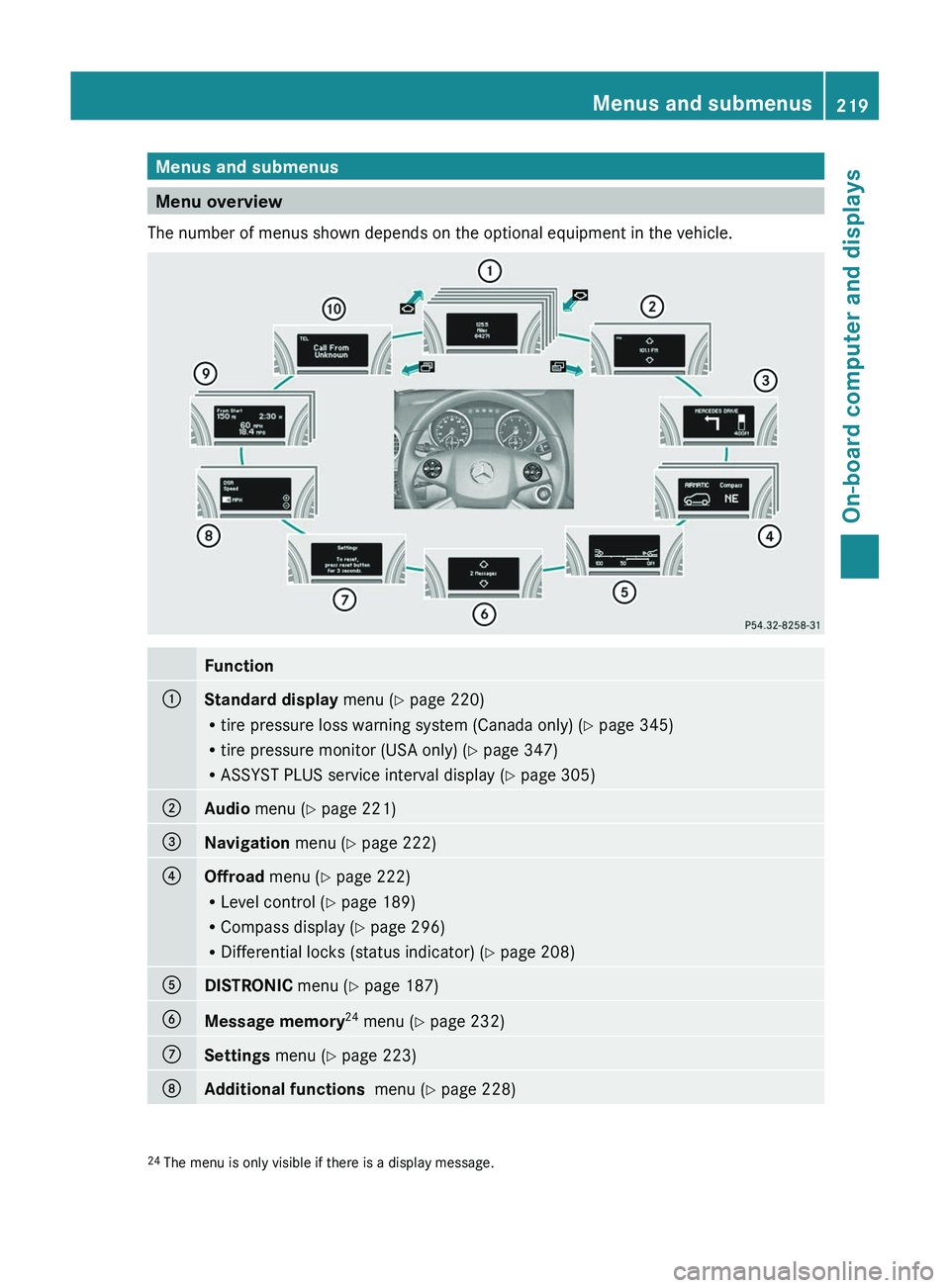
The number of menus shown depends on the optional equipment in the vehicle.
Function:Standard display menu (Y page 220)
R tire pressure loss warning system (Canada only) ( Y page 345)
R tire pressure monitor (USA only) ( Y page 347)
R ASSYST PLUS service interval display ( Y page 305);Audio menu ( Y page 221)=Navigation menu (Y page 222)?Offroad menu (Y page 222)
R Level control ( Y page 189)
R Compass display ( Y page 296)
R Differential locks (status indicator) ( Y page 208)ADISTRONIC menu (Y page 187)BMessage memory 24
menu ( Y page 232)CSettings menu (Y page 223)DAdditional functions menu (Y page 228)24
The menu is only visible if there is a display message.Menus and submenus219On-board computer and displaysZ
Page 222 of 384
FunctionETrip computer menu (Y page 229)FTelephone menu (Y page 230)Standard display menu
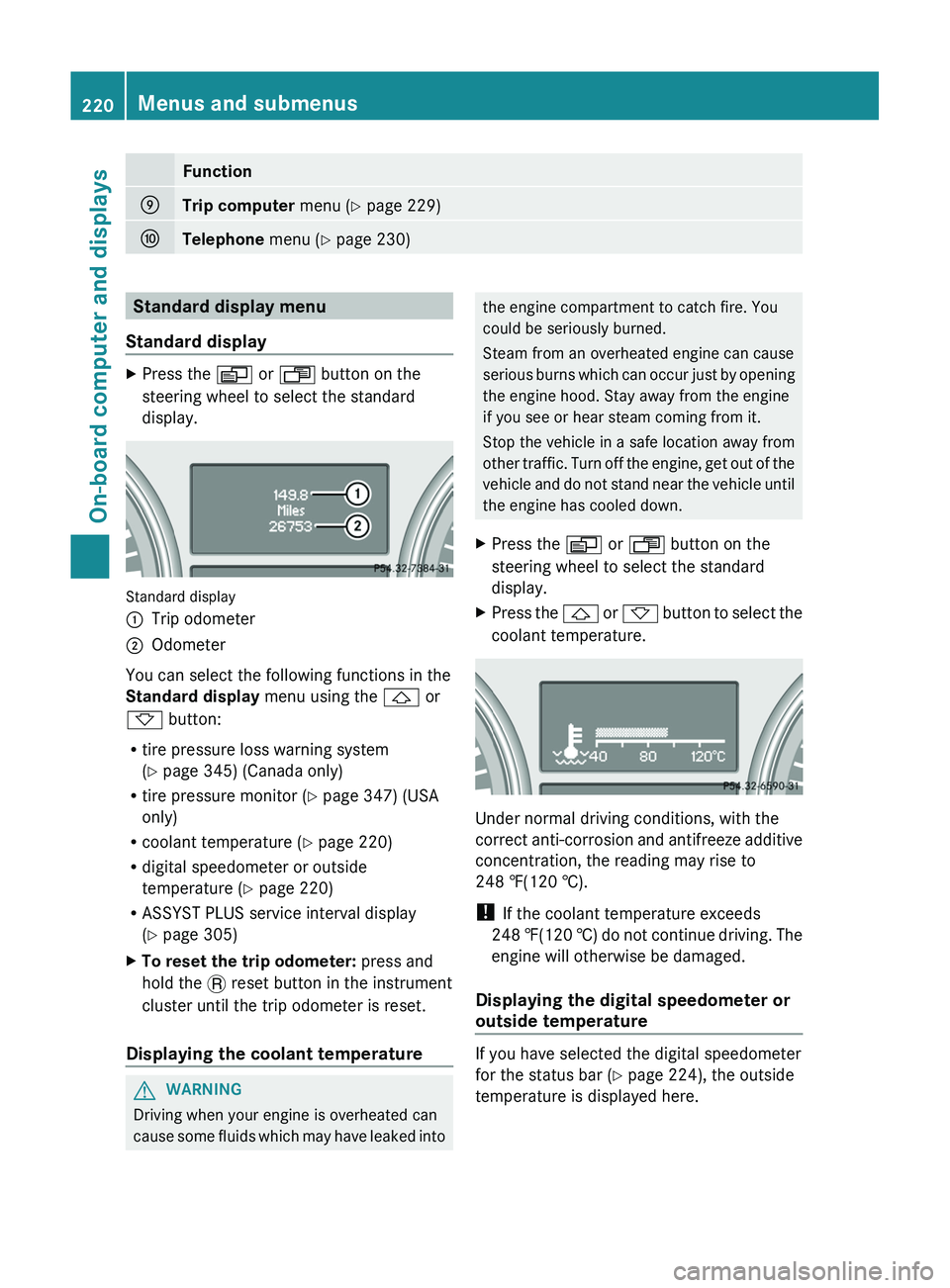
Standard displayXPress the V or U button on the
steering wheel to select the standard
display.
Standard display
:Trip odometer;Odometer
You can select the following functions in the
Standard display menu using the & or
* button:
R tire pressure loss warning system
( Y page 345) (Canada only)
R tire pressure monitor ( Y page 347) (USA
only)
R coolant temperature ( Y page 220)
R digital speedometer or outside
temperature ( Y page 220)
R ASSYST PLUS service interval display
( Y page 305)
XTo reset the trip odometer: press and
hold the . reset button in the instrument
cluster until the trip odometer is reset.
Displaying the coolant temperature
GWARNING
Driving when your engine is overheated can
cause some fluids which may have leaked into
the engine compartment to catch fire. You
could be seriously burned.
Steam from an overheated engine can cause
serious burns which can occur just by opening
the engine hood. Stay away from the engine
if you see or hear steam coming from it.
Stop the vehicle in a safe location away from
other traffic. Turn off the engine, get out of the
vehicle and do not stand near the vehicle until
the engine has cooled down.XPress the V or U button on the
steering wheel to select the standard
display.XPress the & or * button to select the
coolant temperature.
Under normal driving conditions, with the
correct anti-corrosion and antifreeze additive
concentration, the reading may rise to
248 ‡(120 †).
! If the coolant temperature exceeds
248 ‡(120 †) do not continue driving. The
engine will otherwise be damaged.
Displaying the digital speedometer or
outside temperature
If you have selected the digital speedometer
for the status bar ( Y page 224), the outside
temperature is displayed here.
220Menus and submenusOn-board computer and displays
Page 232 of 384
Telephone menu
Introduction
You can establish a Bluetooth ®
connection to
COMAND (see the separate operating
instructions).
GWARNING
A driver's attention to the road must always
be his/her primary focus when driving. For
your safety and the safety of others, we
recommend that you pull over to a safe
location and stop before placing or taking a
telephone call. If you choose to use the
telephone while driving, please use the hands-
free device and only use the telephone when
weather, road and traffic conditions permit.
Some jurisdictions prohibit the driver from
using a mobile phone while driving a vehicle.
Bear in mind that at a speed of just 30 mph
(approximately 50 km/h ), your vehicle is
covering a distance of 44 feet (approximately
14 m) every second.
XSwitch on the mobile phone and COMAND
(see the separate operating instructions).XPress the V or U button on the
steering wheel to select the Telephone
menu.
You will see one of the following display
messages in the multifunction display:
R Ready or the name of the network provider:
the mobile phone has found a network and
is ready to receive.
R No Service : no network is available, or the
mobile phone is searching for a network.
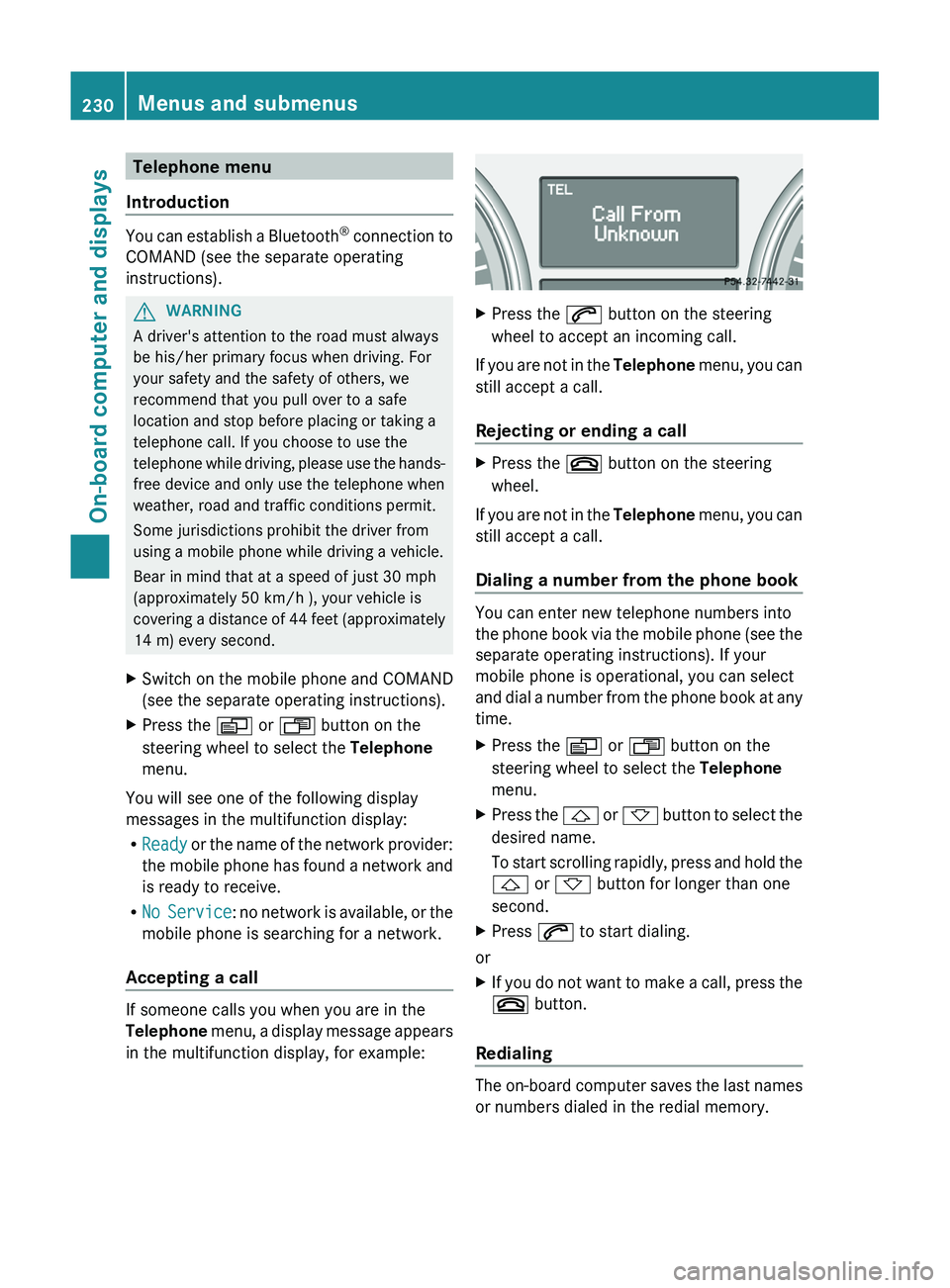
Accepting a call
If someone calls you when you are in the
Telephone menu, a display message appears
in the multifunction display, for example:
XPress the 6 button on the steering
wheel to accept an incoming call.
If you are not in the Telephone menu, you can
still accept a call.
Rejecting or ending a call
XPress the ~ button on the steering
wheel.
If you are not in the Telephone menu, you can
still accept a call.
Dialing a number from the phone book
You can enter new telephone numbers into
the phone book via the mobile phone (see the
separate operating instructions). If your
mobile phone is operational, you can select
and dial a number from the phone book at any
time.
XPress the V or U button on the
steering wheel to select the Telephone
menu.XPress the & or * button to select the
desired name.
To start scrolling rapidly, press and hold the
& or * button for longer than one
second.XPress 6 to start dialing.
or
XIf you do not want to make a call, press the
~ button.
Redialing
The on-board computer saves the last names
or numbers dialed in the redial memory.
230Menus and submenusOn-board computer and displays
Page 239 of 384
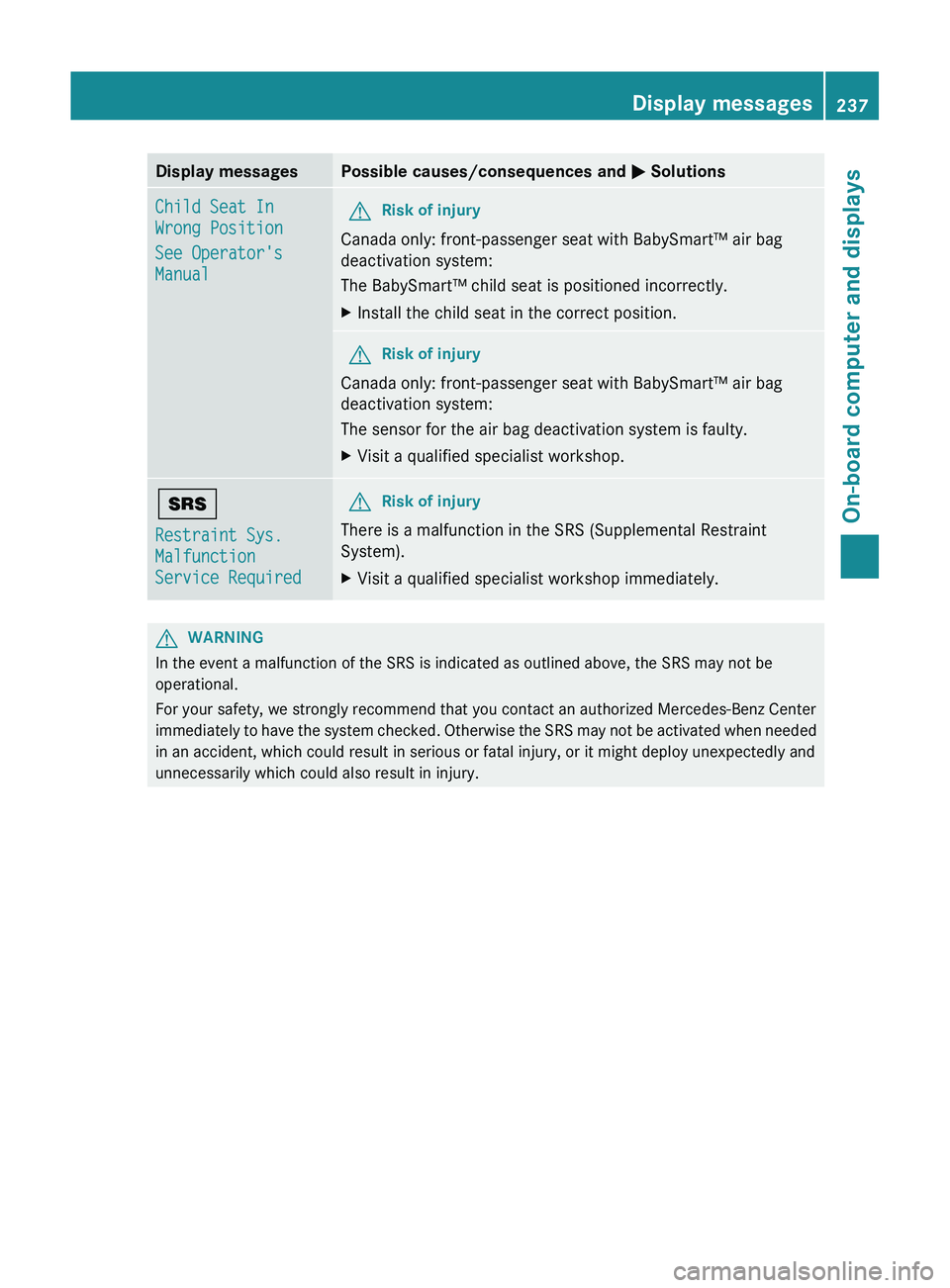
Display messagesPossible causes/consequences and M SolutionsChild Seat In
Wrong Position
See Operator's
ManualGRisk of injury
Canada only: front-passenger seat with BabySmart™ air bag
deactivation system:
The BabySmart™ child seat is positioned incorrectly.
XInstall the child seat in the correct position.GRisk of injury
Canada only: front-passenger seat with BabySmart™ air bag
deactivation system:
The sensor for the air bag deactivation system is faulty.
XVisit a qualified specialist workshop.+
Restraint Sys.
Malfunction
Service RequiredGRisk of injury
There is a malfunction in the SRS (Supplemental Restraint
System).
XVisit a qualified specialist workshop immediately.GWARNING
In the event a malfunction of the SRS is indicated as outlined above, the SRS may not be
operational.
For your safety, we strongly recommend that you contact an authorized Mercedes-Benz Center
immediately to have the system checked. Otherwise the SRS may not be activated when needed
in an accident, which could result in serious or fatal injury, or it might deploy unexpectedly and
unnecessarily which could also result in injury.
Display messages237On-board computer and displaysZ
Page 251 of 384
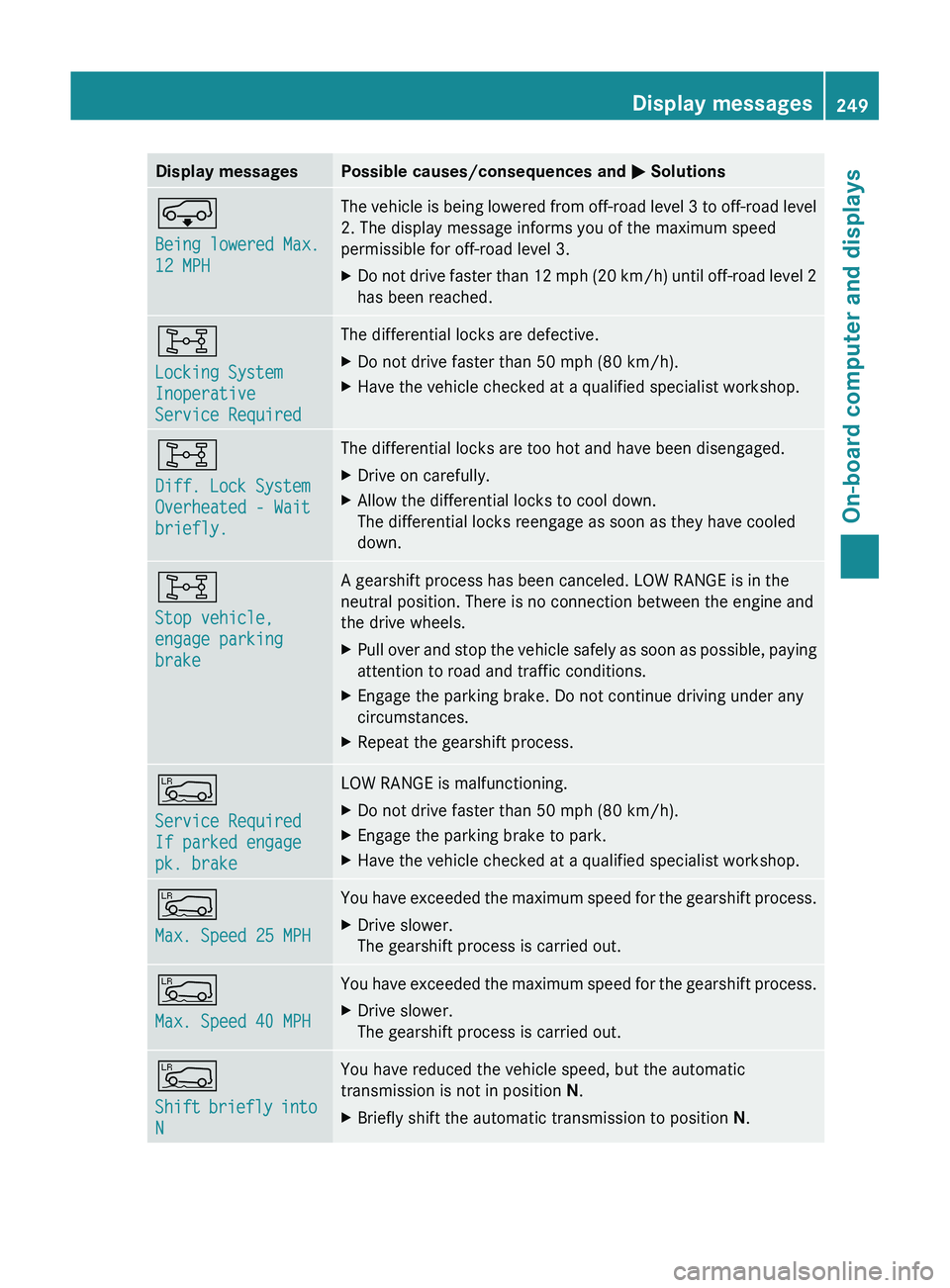
Display messagesPossible causes/consequences and M SolutionsÆ
Being lowered Max.
12 MPHThe vehicle is being lowered from off-road level 3 to off-road level
2. The display message informs you of the maximum speed
permissible for off-road level 3.XDo not drive faster than 12 mph (20 km/h) until off-road level 2
has been reached.8
Locking System
Inoperative
Service RequiredThe differential locks are defective.XDo not drive faster than 50 mph (80 km/h).XHave the vehicle checked at a qualified specialist workshop.8
Diff. Lock System
Overheated - Wait
briefly.The differential locks are too hot and have been disengaged.XDrive on carefully.XAllow the differential locks to cool down.
The differential locks reengage as soon as they have cooled
down.8
Stop vehicle,
engage parking
brakeA gearshift process has been canceled. LOW RANGE is in the
neutral position. There is no connection between the engine and
the drive wheels.XPull over and stop the vehicle safely as soon as possible, paying
attention to road and traffic conditions.XEngage the parking brake. Do not continue driving under any
circumstances.XRepeat the gearshift process.Å
Service Required
If parked engage
pk. brakeLOW RANGE is malfunctioning.XDo not drive faster than 50 mph (80 km/h).XEngage the parking brake to park.XHave the vehicle checked at a qualified specialist workshop.Å
Max. Speed 25 MPHYou have exceeded the maximum speed for the gearshift process.XDrive slower.
The gearshift process is carried out.Å
Max. Speed 40 MPHYou have exceeded the maximum speed for the gearshift process.XDrive slower.
The gearshift process is carried out.Å
Shift briefly into
NYou have reduced the vehicle speed, but the automatic
transmission is not in position N.XBriefly shift the automatic transmission to position N.Display messages249On-board computer and displaysZ
Page 257 of 384
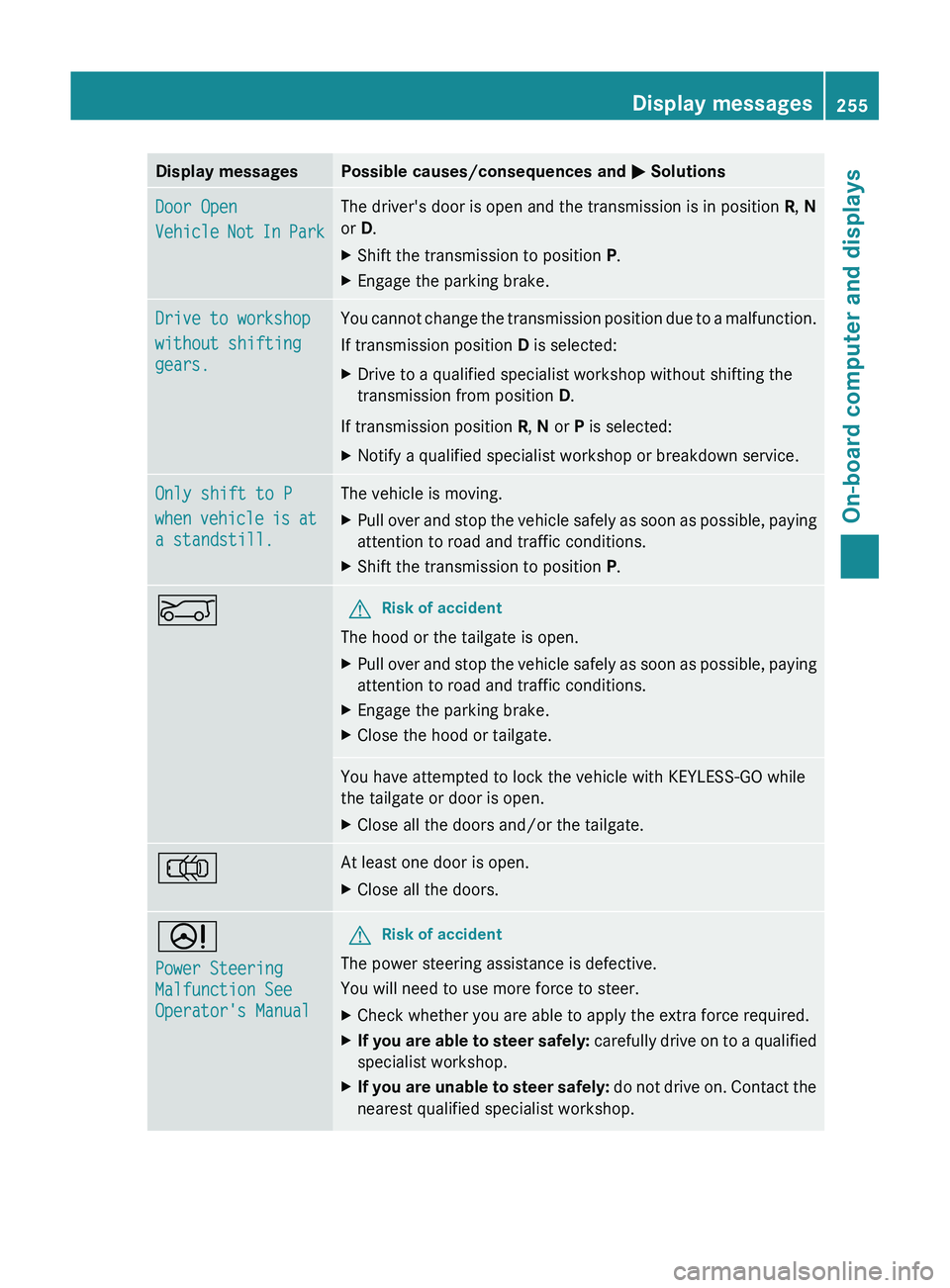
Display messagesPossible causes/consequences and M SolutionsDoor Open
Vehicle Not In ParkThe driver's door is open and the transmission is in position R, N
or D.XShift the transmission to position P.XEngage the parking brake.Drive to workshop
without shifting
gears.You cannot change the transmission position due to a malfunction.
If transmission position D is selected:XDrive to a qualified specialist workshop without shifting the
transmission from position D.
If transmission position R, N or P is selected:
XNotify a qualified specialist workshop or breakdown service.Only shift to P
when vehicle is at
a standstill.The vehicle is moving.XPull over and stop the vehicle safely as soon as possible, paying
attention to road and traffic conditions.XShift the transmission to position P.EGRisk of accident
The hood or the tailgate is open.
XPull over and stop the vehicle safely as soon as possible, paying
attention to road and traffic conditions.XEngage the parking brake.XClose the hood or tailgate.You have attempted to lock the vehicle with KEYLESS-GO while
the tailgate or door is open.XClose all the doors and/or the tailgate.;At least one door is open.XClose all the doors.D
Power Steering
Malfunction See
Operator's ManualGRisk of accident
The power steering assistance is defective.
You will need to use more force to steer.
XCheck whether you are able to apply the extra force required.XIf you are able to steer safely: carefully drive on to a qualified
specialist workshop.XIf you are unable to steer safely: do not drive on. Contact the
nearest qualified specialist workshop.Display messages255On-board computer and displaysZ
Page 258 of 384
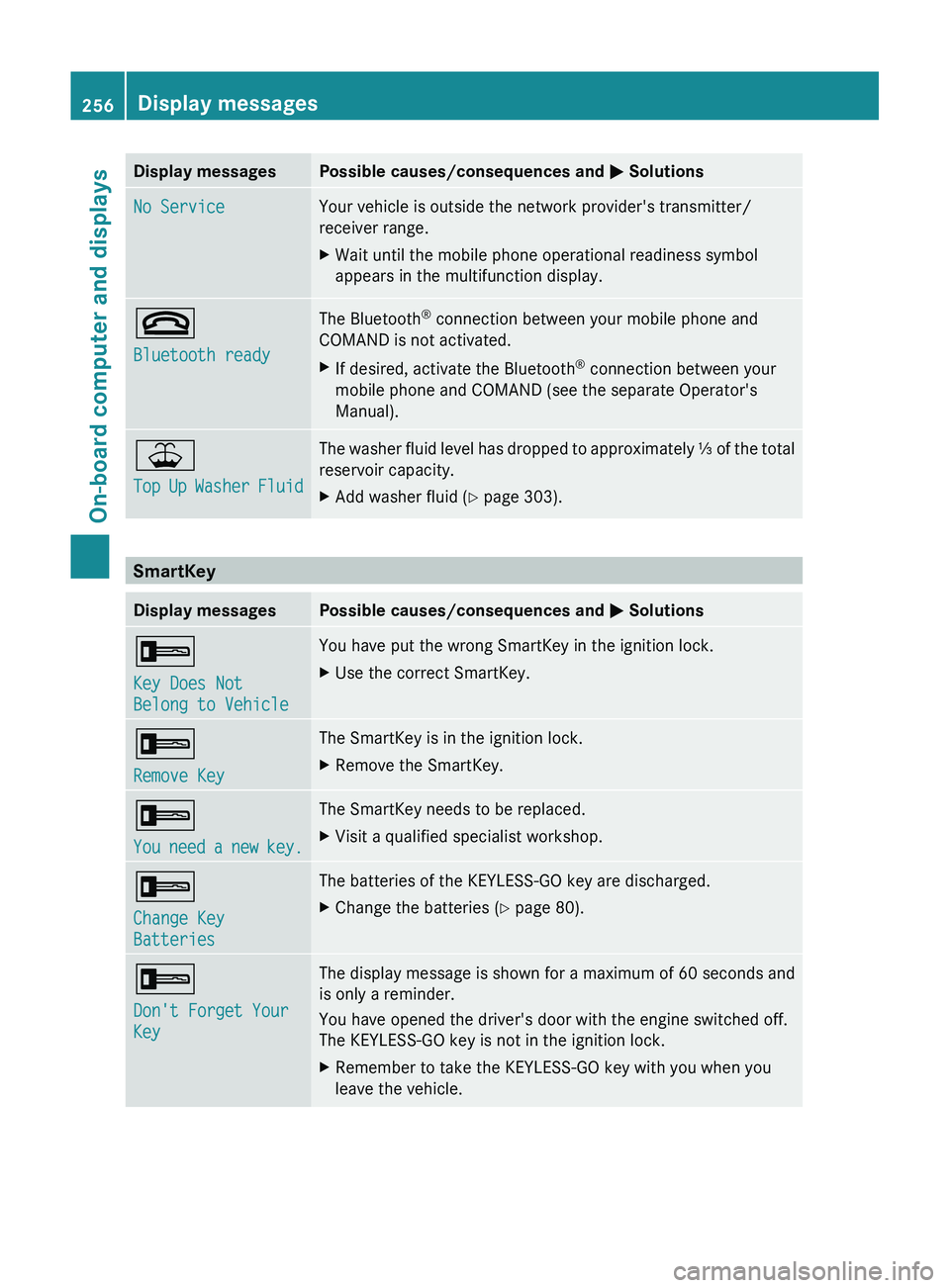
Display messagesPossible causes/consequences and M SolutionsNo ServiceYour vehicle is outside the network provider's transmitter/
receiver range.XWait until the mobile phone operational readiness symbol
appears in the multifunction display.~
Bluetooth readyThe Bluetooth ®
connection between your mobile phone and
COMAND is not activated.XIf desired, activate the Bluetooth ®
connection between your
mobile phone and COMAND (see the separate Operator's
Manual).¥
Top Up Washer FluidThe washer fluid level has dropped to approximately ⅓ of the total
reservoir capacity.XAdd washer fluid ( Y page 303).
SmartKey
Display messagesPossible causes/consequences and M Solutions+
Key Does Not
Belong to VehicleYou have put the wrong SmartKey in the ignition lock.XUse the correct SmartKey.+
Remove KeyThe SmartKey is in the ignition lock.XRemove the SmartKey.+
You need a new key.The SmartKey needs to be replaced.XVisit a qualified specialist workshop.+
Change Key
BatteriesThe batteries of the KEYLESS-GO key are discharged.XChange the batteries ( Y page 80).+
Don't Forget Your
KeyThe display message is shown for a maximum of 60 seconds and
is only a reminder.
You have opened the driver's door with the engine switched off.
The KEYLESS-GO key is not in the ignition lock.XRemember to take the KEYLESS-GO key with you when you
leave the vehicle.256Display messagesOn-board computer and displays