automatic transmission MERCEDES-BENZ GL 2012 Owners Manual
[x] Cancel search | Manufacturer: MERCEDES-BENZ, Model Year: 2012, Model line: GL, Model: MERCEDES-BENZ GL 2012Pages: 384, PDF Size: 15.71 MB
Page 6 of 384
1, 2, 3 ...
115 V socket ...................................... 286
12 V socket see Sockets
4ETS (Electronic Traction System) .... 70
4MATIC (permanent four-wheel
drive) .................................................. 203
A
ABS (Anti-lock Braking System) Display message ............................ 233
Function/notes ................................ 68
Important safety notes ....................68
Warning lamp ................................. 260
Activating/deactivating cooling
with air dehumidification ................. 139
Active light function ......................... 122
Active Light System Display message ............................ 243
Active service system PLUS
see ASSYST PLUS service interval
display
Adaptive Damping System (ADS) ..... 195
Additives (engine oil) ........................ 375
ADS (Adaptive Damping System) ..... 195
Air bags Display message ............................ 239
Front air bag (driver, front
passenger) ....................................... 42
Important safety notes ....................40
Knee bag .......................................... 43
PASSENGER AIRBAG OFF
indicator lamp .................................. 45
PASSENGER AIR BAG OFF
indicator lamp (only Canada) ...........50
PASSENGER AIR BAG OFF
indicator lamp (only USA) ................45
Safety guidelines ............................. 39
Side impact air bag ..........................43
Window curtain air bag ....................44
Air-conditioning system
see Climate control
Air filter (display message) .............. 247
Air pressure see Tire pressure
Air vents
Important safety notes ..................145
Rear ............................................... 146
Setting ........................................... 145
Setting the center air vents ...........145
Setting the side air vents ...............145
Alarm system
see ATA (Anti-Theft Alarm system)
Ambient lighting (on-board
computer) .......................................... 225
Anti-lock Braking System see ABS (Anti-lock Braking System)
Anti-Theft Alarm system
see ATA (Anti-Theft Alarm system)
Anti-theft system
ATA (Anti-Theft Alarm system) .........72
Approach/departure angle .............. 178
Ashtray ............................................... 284
ASSYST PLUS see ASSYST PLUS service interval
display
ATA (Anti-Theft Alarm system)
Activating/deactivating ...................72
Function ........................................... 72
Switching off the alarm ....................72
Audio menu (on-board computer) .... 221
Audio system see separate operating instructions
Authorized Mercedes-Benz Center
see Qualified specialist workshop
AUTO lights
Display message ............................ 244
see Lights
Automatic headlamp mode .............. 119
Automatic transmission Changing gear ............................... 156
DIRECT SELECT lever .....................154
Display message ............................ 254
Driving tips .................................... 157
Emergency running mode ..............159
Kickdown ....................................... 157
Problem (malfunction) ...................159
Pulling away ................................... 151
Shift ranges ................................... 157
Starting the engine ........................150
Steering wheel paddle shifters ......157
Trailer towing ................................. 1574Index
Page 7 of 384
Transmission position display ........155
Transmission positions ..................156
Automatic transmission
emergency mode ............................... 159
B
Back support see Lumbar support
Backup lamp
Changing bulbs (LEDs) ...................127
Display message ............................ 243
BAS (Brake Assist System) ................. 69
Basic settings see Settings
Battery (key)
Checking .......................................... 80
Battery (SmartKey)
Important safety notes ....................80
Replacing ......................................... 80
Battery (vehicle)
Charging ........................................ 328
Display message ............................ 246
Important safety notes ..................326
Jump starting ................................. 329
Belt
see Seat belts
Blind Spot Assist
Activating/deactivating .................228
Display message ............................ 250
Notes/function .............................. 201
Trailer towing ................................. 203
BlueTEC
Adding DEF .................................... 164
BlueTEC (DEF) .................................... 374
Brake Assist System see BAS (Brake Assist System)
Brake fluid
Display message ............................ 236
Notes ............................................. 375
Brake fluid level ................................ 304
Brake lamps Display message ............................ 242
Brakes
ABS .................................................. 68
BAS .................................................. 69
Brake fluid (notes) .........................375
Display message ............................ 233
Driving tips .................................... 169
Important safety notes ..................169
Maintenance .................................. 170
Parking brake ........................ 167, 171
Warning lamp ................................. 259
Breakdown
see Flat tire
see Towing away
Bulbs
see Changing bulbs
C
California Important notice for retail
customers and lessees ....................22
Calling up a malfunction
see Display messages
Capacities
see Technical data
Car
see Vehicle
Care
Carpets .......................................... 312
Car wash ........................................ 306
Display ........................................... 310
Exterior lights ................................ 309
Gear or selector lever ....................311
Matte finish ................................... 308
Notes ............................................. 305
Paint .............................................. 308
Plastic trim .................................... 310
Power washer ................................ 307
Rear view camera .......................... 310
Roof lining ...................................... 312
Seat belt ........................................ 311
Seat cover ..................................... 311
Sensors ......................................... 309
Steering wheel ............................... 311
Tail pipes ....................................... 310
Trim pieces .................................... 311
Washing by hand ........................... 307
Wheels ........................................... 307
Windows ........................................ 309
Wiper blades .................................. 309
Wooden trim .................................. 311
Cargo compartment cover ............... 273
Cargo compartment enlargement ... 270
Index5
Page 9 of 384
Convenience closing feature .............. 91
Convenience opening feature ............ 91
Coolant (engine) Checking the level .........................303
Display message ............................ 244
Notes ............................................. 376
Temperature gauge ........................ 220
Cooling
see Climate control
Cornering light (display message) ... 241
Crash-responsive emergency
lighting ............................................... 123
Crossbar Installing ........................................ 278
Setting the span width ...................280
Cruise control
Cruise control lever .......................180
Deactivating ................................... 181
Display message ............................ 250
Driving system ............................... 179
Function/notes ............................. 179
Important safety notes ..................179
LIM indicator lamp .........................180
Setting a speed .............................. 181
Storing and maintaining current
speed ............................................. 180
Cup holder
Center console .............................. 282
Important safety notes ..................282
Rear compartment .........................282
third row of seats ........................... 282
Customer Assistance Center (CAC) ... 24
Customer Relations Department ....... 25
D
Dashboard see Cockpit
Date (on-board computer) ................ 224
Daytime running lamp mode see Daytime running lamps
Daytime running lamps
Display message ............................ 243
Switching on/off (on-board
computer) ...................................... 224
Switching on/off (switch) ..............119
DEF
Adding ........................................... 164
Display message ............................ 247
Delayed switch-off
Exterior lighting (on-board
computer) ...................................... 225
Interior lighting .............................. 226
Diesel particle filter .......................... 169
Differential locks Display message ............................ 249
Notes/function .............................. 208
Digital speedometer
Displaying ...................................... 220
Setting the unit (on-board
computer) ...................................... 224
DIRECT SELECT lever
see Automatic transmission
Display (cleaning instructions) ........ 310
Display messages Calling up (on-board computer) .....232
Driving systems ............................. 248
Engine ............................................ 244
General notes ................................ 232
Hiding (on-board computer) ...........232
Key ................................................ 256
KEYLESS-GO .................................. 256
Lights ............................................. 241
Safety systems .............................. 233
Service interval display ..................305
Tires ............................................... 252
Vehicle ........................................... 254
Distance recorder ............................. 220
see Odometer
see Trip odometer
Distance warning (warning lamp) .... 265
Distance warning function
(vehicles with DISTRONIC) Activating/deactivating (on-
board computer) ............................ 228
Notes ............................................... 72
DISTRONIC
Deactivating ................................... 187
Display message ............................ 251
Displays in the multifunction
display ........................................... 187
Driving tips .................................... 188
Important safety notes ..................182
Notes/function .............................. 182Index7
Page 10 of 384
Setting the specified minimum
distance ......................................... 186
Warning lamp ................................. 265
Door
Central locking/unlocking (key) ......76
Control panel ................................... 36
Important safety notes ....................83
Doors
Automatic locking (on-board
computer) ...................................... 226
Automatic locking (switch) ............... 84
Display message ............................ 255
Emergency locking ........................... 85
Emergency unlocking .......................85
Opening (from inside) ......................84
Downhill Speed Regulation
see DSR (Downhill Speed Regulation)
Drinking and driving ......................... 168
Drinks holder see Cup holders
Driver's door
see Doors
Driver's seat
see Seats
Driving abroad
Mercedes-Benz Service .................305
Symmetrical low beam ..................118
Driving in mountainous terrain
Approach/departure angle ............178
Driving off-road
see Off-road driving
Driving safety systems
4ETS (Electronic Traction System) ...70
ABS (Anti-lock Braking System) .......68
BAS (Brake Assist System) ..............69
Distance warning system
(vehicles with DISTRONIC) ...............72
Electronic brake force distribution ...71
ESP ®
(Electronic Stability
Program) .......................................... 69
Important safety information ...........68
Overview .......................................... 67
Driving systems
Blind Spot Assist ............................ 201
Cruise control ................................ 179
Display message ............................ 248
DISTRONIC .................................... 182Level control .................................. 189
PARKTRONIC ................................. 196
Rear view camera .......................... 199
Driving tips
Automatic transmission .................157
Brakes ........................................... 169
Break-in period .............................. 148
DISTRONIC .................................... 188
Downhill gradient ........................... 169
Drinking and driving .......................168
Driving abroad ............................... 118
Driving on flooded roads ................171
Driving on sand .............................. 176
Driving on wet roads ......................171
Driving over obstacles ...................177
Exhaust check ............................... 169
Fuel ................................................ 168
General .......................................... 168
Hydroplaning ................................. 171
Icy road surfaces ........................... 174
Limited braking efficiency on
salted roads ................................... 170
Off-road driving .............................. 175
Off-road fording ............................. 171
Pedals ............................................ 168
Snow chains .......................... 173, 341
Symmetrical low beam ..................118
Tire ruts ......................................... 177
Towing a trailer .............................. 210
Traveling uphill ............................... 178
Wet road surface ........................... 170
DSR (Downhill Speed Regulation)
Display message ............................ 250
Function/notes ............................. 204
Setting (on-board computer) .......... 228
DVD audio (on-board computer) ...... 221
E
EASY-ENTRY feature 3rd row of seats ............................. 105
Activating/deactivating .................227
Function/notes ............................. 111
EASY-EXIT feature
3rd row of seats ............................. 105
Crash-responsive ........................... 111
Function/notes ............................. 111
Switching on/off ........................... 227
8Index
Page 16 of 384
Position of exterior mirror, front-
passenger side ............................... 113
Rear view camera .......................... 199
see Parking
see PARKTRONIC
Parking aid
see Exterior mirrors
see PARKTRONIC
Parking brake
Display message ............................ 236
Notes/function .............................. 167
see Parking brake
Parking lamps (changing bulbs) ...... 126
PARKTRONIC Deactivating/activating .................198
Driving system ............................... 196
Function/notes ............................. 196
Problem (malfunction) ...................199
Range of the sensors .....................196
Trailer towing ................................. 198
Warning display ............................. 197
PASSENGER AIRBAG OFF indicator
lamp ...................................................... 45
PASSENGER AIR BAG OFF indicator
lamp (only Canada) ............................. 50
PASSENGER AIR BAG OFF indicator
lamp (only USA) ................................... 45
Pedals ................................................. 168
Permanent four-wheel drive see 4MATIC (permanent four-
wheel drive)
Plastic trim (cleaning instructions) . 310
Power steering Filling capacity ............................... 371
Power washers .................................. 307
Power windows see Side windows
PRE-SAFE ®
(Preventive occupant
safety system) Display message ............................ 236
Operation ......................................... 53
PRE-SAFE ®
Brake (vehicles with
DISTRONIC PLUS) Warning lamp ................................. 265Preventive occupant safety
system
see PRE-SAFE ®
(Preventive
occupant safety system)
Product information ............................ 21
Pulling away (automatic
transmission) ..................................... 151
Q
Qualified specialist workshop ........... 24
R
Radar sensor system Activating/deactivating .................227
Radiator cover ................................... 301
Radio Selecting a station .........................221
see separate operating instructions
Radio-controlled devices
(installing) .......................................... 297
Reading lamp ..................................... 122
Rear bench seat Folding forwards/back ..................270
Rear compartment
Activating/deactivating climate
control ........................................... 138
Setting the air vents ......................146
Setting the temperature ................141
Rear-compartment seat
see Rear seat
Rear fog lamp
Display message ............................ 242
Switching on/off ........................... 120
Rear lamps
see Lights
Rear seat
Adjusting ....................................... 104
Rear view camera
Cleaning instructions .....................310
Function/notes ............................. 199
Rear-view mirror
Anti-glare (manual) ........................112
Dipping (automatic) .......................113
Rear window defroster
Problem (malfunction) ...................143
14Index
Page 21 of 384

Lights display message ..................241
Power supply ................................. 213
Shift range ..................................... 157
Towing away
With both axles on the ground .......332
Tow-starting
Emergency engine starting ............333
Important safety notes ..................331
Trailer
Towing ........................................... 211
Trailer loads and drawbar
noseweights ...................................... 213
Trailer towing Blind Spot Assist ............................ 203
ESP ®
................................................ 71
PARKTRONIC ................................. 198
Permissible trailer loads and
drawbar noseweights .....................213
Towing a trailer .............................. 211
Transmission
see Automatic transmission
Transporting the vehicle .................. 332
Traveling uphill
Brow of hill ..................................... 179
Driving downhill ............................. 179
Maximum gradient-climbing
capability ....................................... 179
Trim pieces (cleaning instructions) . 311
Trip computer (on-board
computer) .......................................... 229
Trip meter see Trip odometer
Trip odometer
Calling up ....................................... 220
Resetting (on-board computer) ......229
Trunk
see Tailgate
Turn signals
Changing bulbs (front) ...................126
Display message ............................ 241
Switching on/off ........................... 121
see Turn signals
TWR (Tongue Weight Rating)
(definition) ......................................... 361
Type identification plate see Vehicle identification plate U
Unlocking Emergency unlocking .......................85
From inside the vehicle (central
unlocking button) ............................. 84
V
Vanity mirror (in sun visor) .............. 283
Vehicle Correct use ...................................... 24
Data acquisition ............................... 25
Display message ............................ 254
Equipment ....................................... 21
Individual settings ..........................223
Limited Warranty ............................. 25
Loading .......................................... 349
Locking (in an emergency) ...............85
Locking (SmartKey) .......................... 77
Lowering ........................................ 325
Maintenance .................................... 22
Parking for a long period ................ 167
Pulling away ................................... 151
Raising ........................................... 322
Reporting problems .........................24
Towing away .................................. 331
Transporting .................................. 332
Unlocking (in an emergency) ...........85
Unlocking (SmartKey) ......................77
Vehicle battery
see Battery (vehicle)
Vehicle dimensions
see Technical data
Vehicle emergency locking ................ 85
Vehicle identification number see VIN
Vehicle identification plate .............. 369
Vehicle level (display message) ....... 248
Vehicle tool kit .................................. 314
Vehicle weights see Technical data
Video (DVD) ........................................ 222
Video DVD (on-board computer) ...... 222
VIN ...................................................... 369
Index19
Page 80 of 384
2. this device must accept any interference
received, including interference that may
cause undesired operation of the device.
Any unauthorized modification to this
device could void the user’s authority to
operate the equipment.
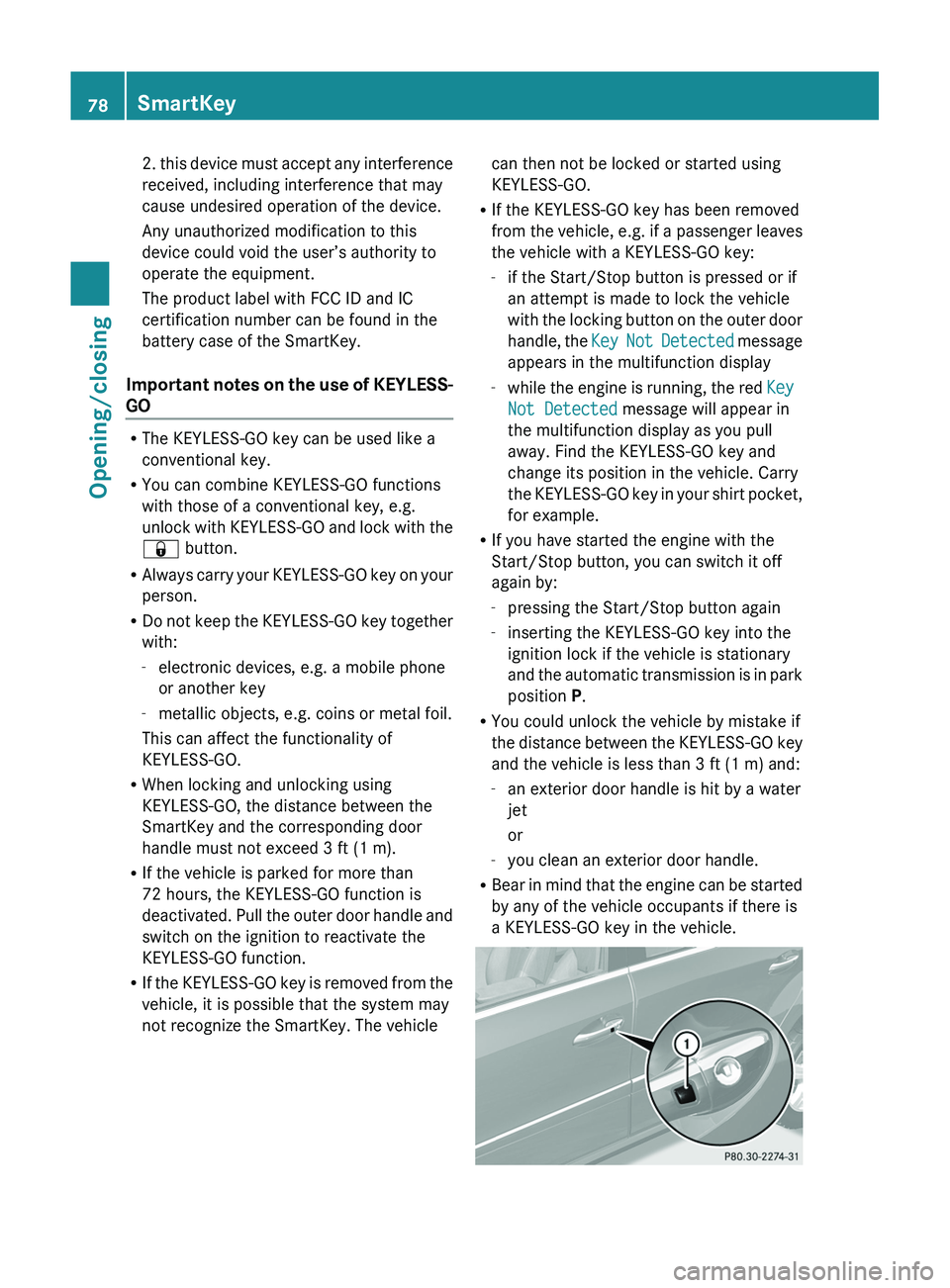
The product label with FCC ID and IC
certification number can be found in the
battery case of the SmartKey.
Important notes on the use of KEYLESS-
GO
R The KEYLESS-GO key can be used like a
conventional key.
R You can combine KEYLESS-GO functions
with those of a conventional key, e.g.
unlock with KEYLESS-GO and lock with the
& button.
R Always carry your KEYLESS-GO key on your
person.
R Do not keep the KEYLESS-GO key together
with:
- electronic devices, e.g. a mobile phone
or another key
- metallic objects, e.g. coins or metal foil.
This can affect the functionality of
KEYLESS-GO.
R When locking and unlocking using
KEYLESS-GO, the distance between the
SmartKey and the corresponding door
handle must not exceed 3 ft (1 m).
R If the vehicle is parked for more than
72 hours, the KEYLESS-GO function is
deactivated. Pull the outer door handle and
switch on the ignition to reactivate the
KEYLESS-GO function.
R If the KEYLESS-GO key is removed from the
vehicle, it is possible that the system may
not recognize the SmartKey. The vehicle
can then not be locked or started using
KEYLESS-GO.
R If the KEYLESS-GO key has been removed
from the vehicle, e.g. if a passenger leaves
the vehicle with a KEYLESS-GO key:
- if the Start/Stop button is pressed or if
an attempt is made to lock the vehicle
with the locking button on the outer door
handle, the Key Not Detected message
appears in the multifunction display
- while the engine is running, the red Key
Not Detected message will appear in
the multifunction display as you pull
away. Find the KEYLESS-GO key and
change its position in the vehicle. Carry
the KEYLESS-GO key in your shirt pocket,
for example.
R If you have started the engine with the
Start/Stop button, you can switch it off
again by:
- pressing the Start/Stop button again
- inserting the KEYLESS-GO key into the
ignition lock if the vehicle is stationary
and the automatic transmission is in park
position P.
R You could unlock the vehicle by mistake if
the distance between the KEYLESS-GO key
and the vehicle is less than 3 ft (1 m) and:
- an exterior door handle is hit by a water
jet
or
- you clean an exterior door handle.
R Bear in mind that the engine can be started
by any of the vehicle occupants if there is
a KEYLESS-GO key in the vehicle.78SmartKeyOpening/closing
Page 149 of 384
Useful information ............................148
Breaking-in notes .............................. 148
Driving ............................................... 148
Automatic transmission ...................154
Refueling ............................................ 159
Parking ............................................... 166
Driving tips ........................................ 168
Driving systems ................................ 179
Off-road driving systems ..................203
Trailer towing .................................... 210147Driving and parking
Page 150 of 384
Useful information
i This Operator's Manual describes all
models and all standard and optional
equipment of your vehicle available at the
time of publication of the Operator's
Manual. Country-specific differences are
possible. Please note that your vehicle may
not be equipped with all features
described. This also applies to safety-
related systems and functions.
i Please read the information on qualified
specialist workshops ( Y page 24).
Breaking-in notes
The first 1000 miles (1500 km)
The more you look after the engine when it is
new, the more satisfied you will be with its
performance in the future.
R Drive at varying vehicle speeds and engine
speeds for the first 1000 miles (1500 km)
for this reason.
R Avoid overstraining the vehicle during this
period, e.g. driving at full throttle.
R Change gear in good time, at the latest
when the tachometer needle is 2
/ 3 of the
way to the red area in the tachometer
display.
R Do not manually shift to a lower gear to
brake the vehicle.
R If possible, do not depress the accelerator
pedal past the point of resistance
(kickdown).
R Only select shift ranges 3, 2 or 1 when
driving slowly, e.g. in mountainous terrain.
After 1000 miles (1500 km), you can increase
the engine speed gradually and bring the
vehicle up to full speed.
i You should also observe these notes on
running in if the engine or parts of the drive
train on your vehicle have been replaced.
i Always observe the respective speed
restrictions.
Driving
Important safety notes
GWARNING
Make sure absolutely no objects are
obstructing the pedals' range of movement.
Keep the driver's footwell clear of all
obstacles. If there are any floormats or
carpets in the footwell, make sure the pedals
still have sufficient clearance.
During sudden driving or braking maneuvers
the objects could get caught between the
pedals. You could then no longer brake or
accelerate. This could lead to accidents and
injury.
GWARNING
On slippery road surfaces, never downshift in
order to obtain braking action. This could
result in drive wheel slip and reduced vehicle
control. Your vehicle's ABS will not prevent
this type of loss of control.
GWARNING
It is dangerous to shift the automatic
transmission out of parking position P or
neutral position N if the engine speed is
higher than idle speed. If your foot is not firmly
on the brake pedal, the vehicle could
accelerate quickly forward or in reverse. You
could lose control of the vehicle and hit
someone or something. Only shift into gear
when the engine is idling normally and when
your right foot is firmly on the brake pedal.
! Warm up the engine quickly. Do not use
the engine's full performance until it has
reached operating temperature.
Only shift the automatic transmission to
the desired drive position when the vehicle
is stationary.
148DrivingDriving and parking
Page 152 of 384
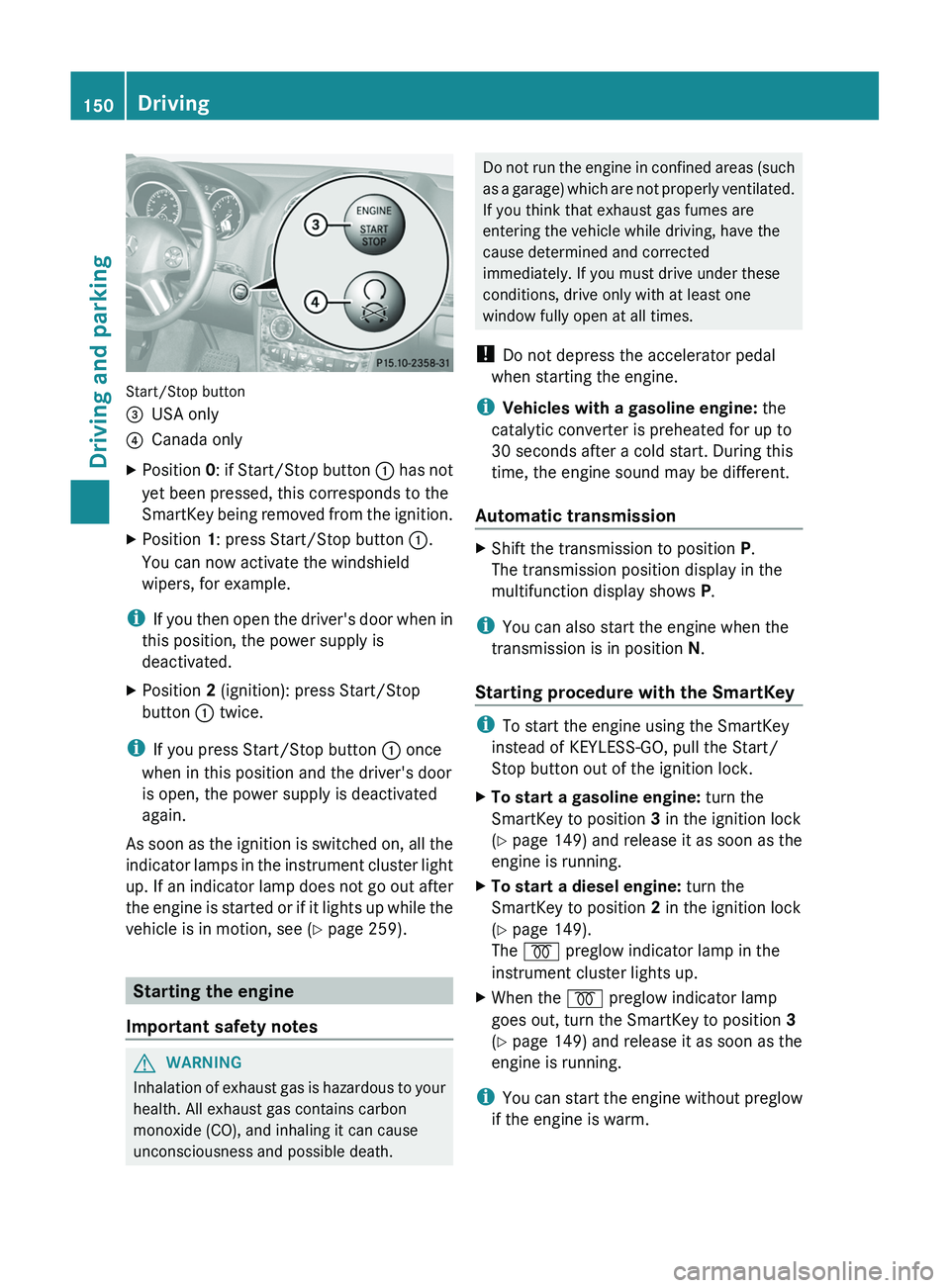
Start/Stop button
=USA only?Canada onlyXPosition 0: if Start/Stop button : has not
yet been pressed, this corresponds to the
SmartKey being removed from the ignition.XPosition 1: press Start/Stop button :.
You can now activate the windshield
wipers, for example.
i If you then open the driver's door when in
this position, the power supply is
deactivated.
XPosition 2 (ignition): press Start/Stop
button : twice.
i
If you press Start/Stop button : once
when in this position and the driver's door
is open, the power supply is deactivated
again.
As soon as the ignition is switched on, all the
indicator lamps in the instrument cluster light
up. If an indicator lamp does not go out after
the engine is started or if it lights up while the
vehicle is in motion, see ( Y page 259).
Starting the engine
Important safety notes
GWARNING
Inhalation of exhaust gas is hazardous to your
health. All exhaust gas contains carbon
monoxide (CO), and inhaling it can cause
unconsciousness and possible death.
Do not run the engine in confined areas (such
as a garage) which are not properly ventilated.
If you think that exhaust gas fumes are
entering the vehicle while driving, have the
cause determined and corrected
immediately. If you must drive under these
conditions, drive only with at least one
window fully open at all times.
! Do not depress the accelerator pedal
when starting the engine.
i Vehicles with a gasoline engine: the
catalytic converter is preheated for up to
30 seconds after a cold start. During this
time, the engine sound may be different.
Automatic transmissionXShift the transmission to position P.
The transmission position display in the
multifunction display shows P.
i
You can also start the engine when the
transmission is in position N.
Starting procedure with the SmartKey
i To start the engine using the SmartKey
instead of KEYLESS-GO, pull the Start/
Stop button out of the ignition lock.
XTo start a gasoline engine: turn the
SmartKey to position 3 in the ignition lock
( Y page 149) and release it as soon as the
engine is running.XTo start a diesel engine: turn the
SmartKey to position 2 in the ignition lock
( Y page 149).
The % preglow indicator lamp in the
instrument cluster lights up.XWhen the % preglow indicator lamp
goes out, turn the SmartKey to position 3
( Y page 149) and release it as soon as the
engine is running.
i You can start the engine without preglow
if the engine is warm.
150DrivingDriving and parking