change time MERCEDES-BENZ GL 2013 User Guide
[x] Cancel search | Manufacturer: MERCEDES-BENZ, Model Year: 2013, Model line: GL, Model: MERCEDES-BENZ GL 2013Pages: 454, PDF Size: 6.31 MB
Page 175 of 454
Program selector button
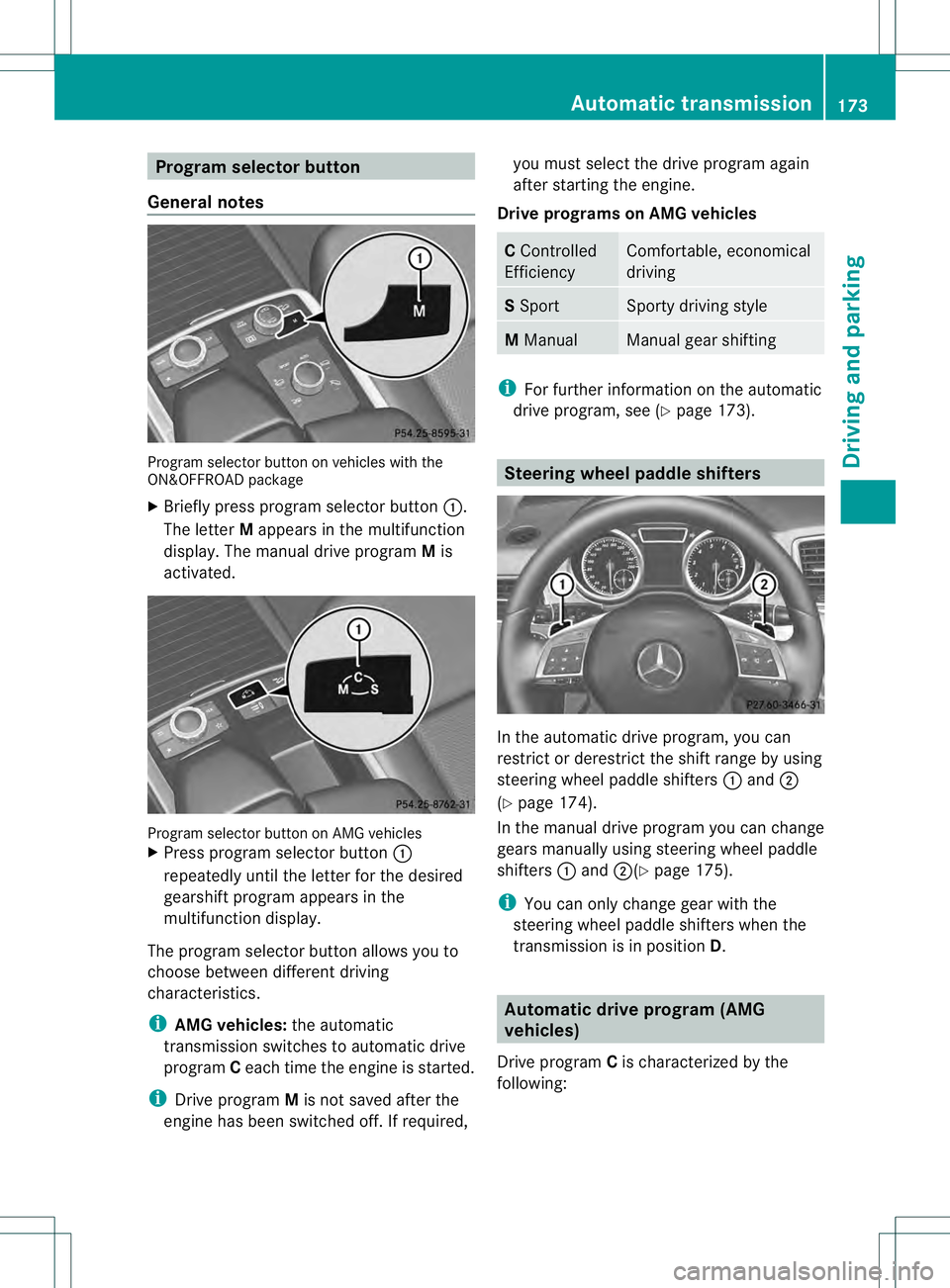
General notes Program selector button on vehicles with the
ON&OFFROAD package
X Briefly press program selector button 0002.
The letter Mappears in the multifunction
display.T he manual drive program Mis
activated. Program selector button on AMG vehicles
X
Press program selector button 0002
repeatedly until the letter for the desired
gearshift program appears in the
multifunction display.
The program selector button allows you to
choose between different driving
characteristics.
i AMG vehicles: the automatic
transmission switches to automatic drive
program Ceach time the engine is started.
i Drive program Mis not saved after the
engine has been switched off. If required, you must select the drive program again
after starting the engine.
Drive programs on AMG vehicles C
Controlled
Efficiency Comfortable, economical
driving
S
Sport Sporty driving style
M
Manual Manual gear shifting
i
For further information on the automatic
drive program, see (Y page 173). Steering wheel paddle shifters
In the automatic drive program, you can
restrict or derestrict the shift range by using
steering wheel paddle shifters
0002and 0003
(Y page 174).
In the manual drive program you can change
gears manually using steering wheel paddle
shifters 0002and 0003(Y page 175).
i You can only change gear with the
steering wheel paddle shifters when the
transmission is in position D. Automatic drive program (AMG
vehicles)
Drive program Cis characterized by the
following: Automatic transmission
173Driving and parking Z
Page 183 of 454
DEF (BlueTEC vehicles only)
Important notes on use To function properly, BlueTEC exhaus
tgas
aftertreatment must be operated with the
reducing agent DEF.
When the supply of DE Fis almost used up,
the Check Additive See Operator's Manual message is shown in the
multifunction display.
When the DEF supply drops to a minimum, the
Remaining Starts: 16 message is shown
in the multifunction display.
If the Remaining Starts: 16 message
appears in the multifunction display, you can
start the engine another 16 times. If DEF is
not refilled, you will subsequently be unable
to start the engine .Refill the DEFt ank with
approximately 1gal (3. 8l) DEF. Have the DEF
tan krefilled at a qualified specialist
workshop.
i If you drive the vehicle faster than
10 mph (16 km/h), the Check Additive See Operator's Manual message goes
out after approximately one minute.
If the outside temperature is below 12 ‡
(002211 †) it may be difficult to top up. If DEF is
frozen and there is an active warning
indicator, it may not be possible to add DEF.
Park the vehicle in a warmer place, e.g. in a
garage, until DEF has become fluid again. It
will then be possible to add DEF again.
Alternatively, have the DEF tank refilled at a
qualified specialist workshop.
Further information about BlueTEC exhaust
gas aftertreatment and DEF is available at any
authorized Mercedes-Benz Center. Important safety notes on the refilling
procedure DEF is a water-soluble fluid for the exhaust
gas aftertreatment of diesel engines. It is:
R
not poisonous
R colorless and odorless
R not flammable
When you open the DEF container, small
amounts of ammonia vapor may be released.
Ammonia vapors have a pungent odor and are
particularly irritating to the skin, to mucous
membranes and to the eyes. You may
experience a burning sensation in you reyes,
nose and throat. Coughing and watering of
the eyes are possible.
Do not inhale ammonia vapors. Fill the DEF
tank only in well-ventilated areas.
DEF must not come into contact with your
skin, eyes or clothing and mus tnot be
swallowed. Keep DEFa way fromchildren.
If you or other persons come into contact with
DEF, observe the following:
R Rinse DEF from your skin immediately with
soap and water.
R If DEF comes into contact with your eyes,
immediately rinse them thoroughly with
clean water. Seek medical assistance
without delay.
R If DEF has been swallowed, rinse your
mouth out immediately. Drink plenty of
water. Seek medical assistance without
delay.
R Change out of clothing contaminated with
DEF immediately.
! Only use DEF in accordance with
ISO 22241. Do not mix any additives with
DEF, and do not dilute DEF with water. This
may destroy the BlueTEC exhaust gas
aftertreatment system.
! The vehicle must be parked on level
ground to fill the DEF tank. The DEF tank
can only be filled as intended with the
vehicle parked on a level surface. This
avoids false level readings. Filling the tank Refueling
181Driving and parking Z
Page 189 of 454
these exhaust gases leads to poisoning. There
is a risk of fatal injury. Therefore never leave
the engine running in enclosed spaces
withou tsufficient ventilation.
Certain engine systems are designed to keep
the level of poisonous components in exhaust
fumes within legal limits.
These systems only work at peak efficiency if
they are serviced exactly in accordance with
the manufacturer's specifications. For this
reason, all work on th eengine must be carried
ou tb y qualified and authorized Mercedes-
Benz technicians.
The engine settings mus tnot be changed
under any circumstances. Furthermore, all
specific service work must be carried out at
regular intervals and in accordance with the
Mercedes-Benz service requirements. Details
can be found in the Maintenance Booklet. Braking
Important safety notes G
WARNING
If you shift down on a slippery road surface in
an attempt to increase the engine's braking
effect, the drive wheels could lose their grip.
There is an increased danger of skidding and
accidents.
Do not shift down for additional engine
braking on a slippery road surface.
Downhill gradients !
On long and steep gradients, you must
reduce the load on the brakes by shifting
early to a lower gear. This allows you to take
advantage of the engine braking effect and
helps avoid overheating and excessive
wear of the brakes.
When you take advantage of the engine
braking effect, a drive wheel may not turn
for some time, e.g. on a slippery road
surface. This could cause damage to the drive train. This type of damage is not
covered by the Mercedes-Benz warranty.
Do not depress the brake pedal continuously
while the vehicle is in motion, e.g. causing the
brakes to rub by constantly applying light
pressure to the pedal. This results in
excessive and premature wear to the brake
pads.
Heavy and light loads G
WARNING
If you rest your foot on the brake pedal while
driving, the braking system can overheat. This
increases the stopping distance and can even
cause the braking system to fail. There is a
risk of an accident.
Never use the brake pedal as a footrest. Never
depress the brake pedal and the accelerator
pedal at the same time.
! Depressing the brake pedal constantly
results in excessive and premature wear to
the brake pads.
If the brakes have been subjected to a heavy
load, do not stop the vehicle immediately.
Drive on for a short while. This allows the
airflow to cool the brakes more quickly.
Wet roads If you have driven for a long time in heavy rain
without braking, there may be a delayed
reaction from the brakes when braking for the
first time. This may also occur after the
vehicle has been washed or driven through
deep water.
You then have to depress the brake pedal
more firmly. Maintain a greater distance from
the vehicle in front.
After driving on a wet road or having the
vehicle washed, brake firmly while paying
attention to the traffic conditions. This will
warm up the brake discs, thereby drying them
more quickly and protecting them against
corrosion. Driving tips
187Driving and parking Z
Page 198 of 454

to lose tractio
nand the vehicle could then
skid
R when there is poor visibility, e.g .due to fog,
heavy rain or snow
If there is a change of drivers, advise the new
driver of the speed stored.
General notes Cruise control maintains a constant road
speed for you. It brakes automatically in order
to avoid exceeding the set speed. On long and
steep downhill gradients, especially if the
vehicle is laden or towing a trailer, you must
select shif trange 1,2or 3in good time. By
doing so, you will make use of the braking
effect of the engine, which relieves the load
on the brake system and prevents the brakes
from overheating and wearing too quickly.
Use cruise control only if road and traffic
conditions make it appropriate to maintain a
steady speed for a prolonged period. You can
store any road speed above 20 mph
(30 km/h).
i Cruise control should no tbeactivated
during off-road driving.
Cruise control lever 0002
To activate or increase speed
0003 To activate or reduce speed
0021 To deactivate cruise control
0020 To activate at the current speed/last
stored speed
Whe nyou activate cruise control, the stored
speed is shown in the multifunction display for five seconds. In the multifunction display,
the segments between the stored speed and
the maximum speed light up.
Activation conditions To activate cruise control, all of the following
activation conditions must be fulfilled:
R
the electric parking brake must be
released.
R you are driving faster than 20mph
(30 km/h).
R ESP ®
must be active, but not intervening.
R the transmission must be in position D.
R DSR must be deactivated.
R off-road program 2 must be deactivated
(vehicles with the ON&OFFROAD package).
Storing, maintaining and calling up a
speed Storing and maintaining
aspeed X
Accelerate the vehicle to the desired
speed.
X Briefly press the cruise control lever
up 0002 or down 0003.
X Remove your foot from the accelerator
pedal.
Cruise control is activated. The vehicle
automatically maintains the stored speed.
You can accept the current speed if you are
driving faster than 20 mph (30 km/h).
i Cruise control may be unable to maintain
the stored speed on uphill gradients. The 196
Driving systemsDriving and parking
Page 201 of 454
front, for vehicle speed, for braking in good
time and for staying in you
rlane.
Do not use DISTRONIC PLUS:
R in road and traffic conditions which do not
allow you to maintain a constan tspeed e.g.
in heavy traffic or on winding roads
R on slippery road surfaces .Braking or
accelerating could cause the drive wheels
to lose traction and the vehicle could then
skid
R when there is poor visibility, e.g. due to fog,
heavy rain or snow
DISTRONIC PLUS may not detect narrow
vehicles driving in front, e.g. motorcycles, or
vehicles driving on a different line.
In particular, the detection of obstacles can
be impaired if:
R dirt on the sensors or anything else
covering the sensors
R snow or heavy rain
R interference by other rada rsources
R strong radar reflections, for example, in
parking garages
If DISTRONIC PLUS no longer detects a
vehicle in front, DISTRONIC PLUS may
unexpectedly accelerate the vehicle to the
stored speed.
This speed may:
R be too high if you are driving in a filter lane
or an exit lane
R be so high when driving in the right-hand
lane that you overtake vehicles in the left-
hand lane
R be so high when driving in the left-hand lane
that you overtake vehicles in the right-hand
lane
If there is a change of drivers, advise the new
driver of the speed stored.
General notes DISTRONIC PLUS regulates the speed and
automatically helps you maintain the
distance to the vehicle detected in front. DISTRONIC PLUS brakes automatically so
that the set speed is not exceeded.
On long and steep downhill gradients,
especially if the vehicle is laden or towing a
trailer, you must select shift range
1,2or 3
in good time. By doing so, you will make use
of the braking effect of the engine, This
relieves the load on the brake system and
prevents the brakes from overheating and
wearing too quickly.
If DISTRONIC PLUS detects a slower-moving
vehicle in front, your vehicle is braked in order
to maintain the preset distance to the vehicle
in front.
If DISTRONIC PLUS detects that there is a risk
of a collision, you will be warned visually and
acoustically. DISTRONIC PLUS cannot
prevent a collision without your intervention.
An intermittent warning tone will then sound
and the distance warning lamp will light up in
the instrument cluster. Brake immediately in
order to increase the distance to the vehicle
in front or take evasive action provided it is
safe to do so.
For DISTRONIC PLUS to assist you when
driving, the radar sensor system must be:
R activated (Y page 281)
R operational
If there is no vehicle in front, DISTRONIC
PLUS operates in the same way as cruise
control in the speed range between 20 mph
(Canada: 30 km/h) and120 mph (Canada:
200 km/h). If a vehicle is driving in front of
you, it operates in the speed range between
0 mph (0 km/h) and 120 mph (Canada:
200 km/h).
Do not use DISTRONIC PLUS while driving on
roads with steep gradients.
As DISTRONIC PLUS transmits radar waves,
it can resemble the radar detectors of the
responsible authorities. You can refer to the
relevant chapter in the Operator's Manual if
questions are asked about this.
i USA only: Driving systems
199Driving and parking Z
Page 203 of 454
pressure point for a higher speed or down
0021 for a lower speed.
Every time the cruise control lever is
pressed up or down, the last speed stored
is increased or reduced.
or
X To adjust the set speed in 5 mph
increments (10 km/h increments):
briefly press the cruise control lever
up 0002 past the pressure point for a higher
speed or down 0021for a lower speed.
Every time the cruise control lever is
pressed up or down, the last speed stored
is increased or reduced.
X Remove your foot from the accelerator
pedal.
Your vehicle adapts its speed to that of the
vehicle in front, but only up to the desired
stored speed.
If the vehicle in front has been detected and
is shown in the multifunction display, you can
also activate DISTRONIC PLUS when driving
at speeds below 20 mph (30km/h). If the
vehicle in front is no longer detected and
displayed, for example because it has
changed lanes, DISTRONIC PLUS is
deactivated. You will hear awarning tone if
this is the case.
i If you do no tfully release the accelerator
pedal, the DISTRONIC PLUS Passive message appears in the multifunction
display. The set distance to a slower-
moving vehicle in front will then not be
maintained. You will be driving at the speed
you determine by the position of the
accelerato rpedal.
Activating when driving towards a
stationary vehicle
X Briefly pull the cruise control lever towards
you 0003or press it up 0002or down 0021.
DISTRONIC PLUS is selected.
X To adjust the set speed in 1 mph
increments (1 km/h increments): briefly
press the cruise control lever up 0002to the pressure point for a higher speed or down
0021
for a lower speed.
Every time the cruise control lever is
pressed up or down, the last speed stored
is increased or reduced.
or
X To adjust the set speed in 5 mph
increments (10 km/h increments):
briefly press the cruise control lever
up 0002 past the pressure point for a higher
speed or down 0021for a lower speed.
Every time the cruise control lever is
pressed up or down, the last speed stored
is increased or reduced.
If the vehicle in fron tofyou is stationary, you
can only activate DISTRONIC PLUS once your
vehicle is stationary as well.
i DISTRONIC PLUS can only be activated at
under 20 mph (30km/h) if a vehicle in front
has been detected. Therefore, the
DISTRONIC PLUS distance display in the
instrumen tcluster should be activated
(Y page 276).
i You can use the cruise control lever to set
the stored speed and the control on the
cruise control lever to set the specified
minimum distance (Y page 204).
Activating at the current speed/last
stored speed G
WARNING
If you call up the stored speed and it differs
from the current speed, the vehicle
accelerates or decelerates. If you do not know
the stored speed, the vehicle could accelerate
or brake unexpectedly. There is a risk of an
accident.
Pay attention to the road and traffic
conditions before calling up the stored speed.
If you do not know the stored speed, store the
desired speed again. Driving systems
201Driving and parking Z
Page 204 of 454
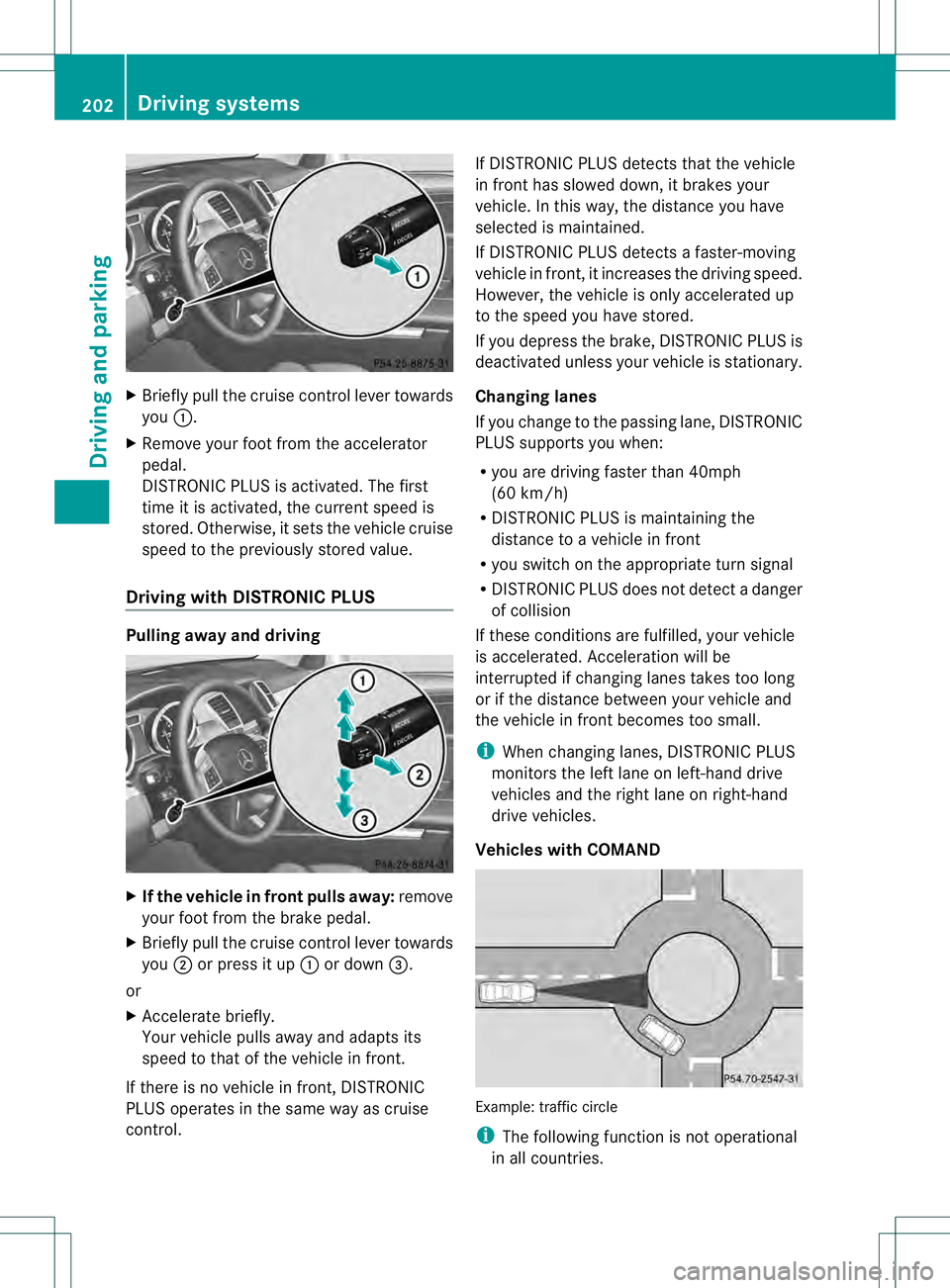
X
Briefly pull the cruise control lever towards
you 0002.
X Remove your foot from the accelerator
pedal.
DISTRONIC PLUS is activated. The first
time it is activated, the current speed is
stored. Otherwise, it sets the vehicle cruise
speed to the previously store dvalue.
Driving with DISTRONIC PLUS Pulling awa
yand driving X
If the vehicle in front pulls away: remove
your foot from the brake pedal.
X Briefly pull the cruise control lever towards
you 0003or press it up 0002or down 0021.
or
X Accelerate briefly.
Your vehicle pulls away and adapts its
speed to that of the vehicle in front.
If there is no vehicle in front, DISTRONIC
PLUS operates in the same way as cruise
control. If DISTRONIC PLUS detects that the vehicle
in fron
thas slowed down, it brakes your
vehicle .Inthis way, the distance you have
selected is maintained.
If DISTRONIC PLUS detects a faster-moving
vehicle in front, it increases the driving speed.
However, the vehicle is only accelerated up
to the speed you have stored.
If you depress the brake, DISTRONIC PLUS is
deactivated unless your vehicle is stationary.
Changing lanes
If you change to the passing lane, DISTRONIC
PLUS supports you when:
R you are driving faster than 40mph
(60 km/h)
R DISTRONIC PLUS is maintaining the
distance to a vehicle in front
R you switch on the appropriate turn signal
R DISTRONIC PLUS does not detect a danger
of collision
If these conditions are fulfilled, your vehicle
is accelerated. Acceleration will be
interrupted if changing lanes takes too long
or if the distance between your vehicle and
the vehicle in front becomes too small.
i When changing lanes, DISTRONIC PLUS
monitors the left lane on left-hand drive
vehicles and the right lane on right-hand
drive vehicles.
Vehicles with COMAND Example: traffic circle
i
The following function is not operational
in all countries. 202
Driving systemsDriving and parking
Page 210 of 454
G
WARNING
When you drive with the chassis lowered or
raised, the vehicle's braking and driving
characteristics can be significantly impaired.
You could also exceed the permissible vehicle
height if the chassis is raised. There is a risk
of an accident.
Adjust the vehicle level before pulling away. G
WARNING
Due to the high center of gravity, the vehicle
may start to skid and roll over in the event of
an abrupt steering maneuver and/or when
the vehicle's speed is not adapted to the road
conditions. There is a risk of an accident.
Always adapt yours peed and driving style to
the vehicle's driving characteristics and to the
prevailing road and weather conditions.
! When driving on extremely rough terrain,
select a high vehicle level in good time.
Make sure there is always sufficien tground
clearance. You will otherwise damage the
vehicle.
R Utility vehicles have a significantly higher
rollover rate than other types of vehicles.
Failure to operate this vehicle safely may
result in an accident, rollover of the vehicle,
and severe or fatal injury.
R In a rollover crash, an unbelted person is
significantly more likely to die than a
person wearing a seat belt.
You and all vehicle occupants should
always weary our seat belts.
Level control adapts the vehicle level
automatically to the current operating and
driving situation. This results in reduced fuel
consumption and improved handling.
Make changes to the vehicle level while the
vehicle is in motion .This enables the vehicle
to adjust to the new level as quickly as
possible.
The vehicle level may change visibly if you
park the vehicle and the outside temperature
changes. If the temperature drops, the vehicle level is lower; with an increase in
temperature, the vehicle level rises.
If you unlock the vehicle or open a door, the
vehicle begins to compensate for load
discrepancies while still parked. However, for
significant level changes, such as after the
vehicle has been stationary for a long period,
the engine must be on. For safety reasons,
the vehicle is only lowered when the doors are
closed. Lowering is interrupted if a door is
opened, and it continues once the door has
been closed.
For information about driving off-road, see
(Y
page 191).
Basic settings The extentt
o which the vehicle is raised or
lowered depends on the basic setting
selected.
Select:
R highway/high-speed level for driving on
normal roads
R off-road level 1for driving on easily
negotiable off-road terrain
R off-road level 2 for driving on normal off-
road terrain
R off-road level 3for freeing the vehicle in
particularly rough terrain at low speeds
only
The individual vehicle levels differ from
highway level as follows:
R highway level: +/–0 in (+/–0 mm)
R high-speed level: –0.6 in (–15 mm)
R off-road level 1: + 1.2 in (+30 mm)
R off-road level 2: + 2.3 in (+60 mm)
R off-road level 3: + 3.6 in (+ 90 mm)
Highway/high-speed level !
Make sure that there is enough ground
clearance when the vehicle is being
lowered. It could otherwise hit the ground,
damaging the underbody. 208
Driving systemsDriving and parking
Page 216 of 454
the vehicle's speed is not adapted to the road
conditions. There is a risk of an accident.
Always adap tyour speed and driving style to
the vehicle's driving characteristics and to the
prevailing road and weather conditions.
! When driving on extremely rough terrain,
select a high vehicle level in good time.
Make sure there is always sufficient ground
clearance. You will otherwise damage the
vehicle.
! When you raise the vehicle in such a way
that not all wheels have contact with the
ground, remove the SmartKey from the
ignition lock.
R Utility vehicles have a significantly higher
rollover rate than other types of vehicles.
Failure to operate this vehicle safely may
result in an accident, rollover of the vehicle,
and severe or fatal injury.
R In a rollover crash, an unbelted person is
significantly more likely to die than a
person wearing a seat belt.
You and all vehicle occupant sshould
always wear your seat belts.
General notes
Further information about "Driving off-road"
(Y page 191).
Level control adapts the vehicle level
automatically to the current operating and
driving situation. This results in reduced fuel
consumption and improved handling.
If you select ADS comfort mode
(Y page 212), the vehicle is lowered to high-
speed level as the speed increases. As the
vehicle speed decreases, the vehicle is raised
back up to highway level.
If you select ADS sport mode (Y page 212),
the vehicle skips highway level and lowers
directly to high-speed level depending on the
basic setting (Y page 214).
Make changes to the vehicle level while the
vehicle is in motion. This enables the vehicle
to adjust to the new level as quickly as
possible. The vehicle level may change visibly if you
park the vehicle and the outside temperature
changes. If the temperature drops, the
vehicle level is lower; with an increase in
temperature, the vehicle level rises.
If you unlock the vehicle or open a door, the
vehicle begins to compensate for load
discrepancies while still parked. However, for
significant level changes, such as after the
vehicle has been stationary for a long period,
the engine must be on. For safety reasons,
the vehicle is only lowered when the doors are
closed. Lowering is interrupted if a door is
opened, and it continues once the door has
been closed.
Basic settings (excluding AMG vehicles)
The extentt
o which the vehicle is raised or
lowered depends on the basic setting
selected. Select raised level for off-road
driving or highway/high-speed level for
normal roads.
The individual vehicle levels differ from
highway level as follows:
R highway level: +/–0 in (+/–0 mm)
R high-speed level: –0.6 in (–15 mm)
R raised level: +2.3 in (+60 mm)
Basic settings for AMG vehicles
The extentt o which the vehicle is raised or
lowered depends on the AMG adaptive sport
suspension setting selected. Select the
raised level for off-road driving or highway/
high-speed level for normal roads.
The raised level corresponds to a vehicle
position raised by 50 mm compared with
highway level in comfor tmode. 214
Driving systemsDriving and parking
Page 226 of 454
parking space, or not far enough into it. In
some cases, it may also lead you across or
onto the curb. If necessary, you should
cancel the parking procedure with Active
Parking Assist.
R You can also engage forward gear
prematurely. The vehicle redirects and
does not drive as far into the parking space.
Should the gear change occur too soon to
achieve a sensible parking position, the
parking procedure will be aborted.
R You can intervene in the steering procedure
to correct it at any time. Active Parking
Assist will then be canceled.
Exiting aparking space G
WARNING
Active Parking Assist doe snot monitor street
traffic .Insome cases, the vehicle will also
take you onto sections of the oncoming lane
when exiting a parking space.
You are responsible for safety at all times and
must pay attention to any road users
approaching or passing. Stop the vehicle if
necessary or cancel Active Parking Assist.
Active Parking Assist can only assist you with
exiting a parking space if you have parked the
vehicle using Active Parking Assist.
X Start the engine.
X Switch on the turn signal on the side facing
the street.
X Shift the transmission to position Dor R.
The Start Park Assist? Yes: OK No: 0007
message appears in the multifunction
display.
X To cancel the procedure: press the
0007 button on the multifunction steering
wheel or pull away.
or
X To exit aparking space using Active
Parking Assist: press the000Bbutton on
the multifunctio nsteering wheel.
The Park Assist Active Accelerate and Brake Observe Surroundings message appears in the multifunction
display.
X Let go of the multifunctio nsteering wheel.
X Reverse the vehicle or drive forwards, being
ready to brake at all times. Do not exceed
a maximum speed of approximately
6 mph (10 km/h) when exiting a parking
space .Otherwise, Active Parking Assist will
be deactivated.
X Stop as soon as PARKTRONIC sounds the
continuous warning tone, if not before.
X Shift the transmission to position Dor Ras
required while the vehicle is stationary.
Active Parking Assist immediately steers in
the other direction.
i You will achieve the best results by
waiting for the steering procedure to
complete before pulling away.
If you back up after activation, the steering
wheel is moved to the straight-ahead
position.
X Drive forwards or back up the vehicle, being
ready to brake at all times.
X Stop as soon as PARKTRONIC sounds the
continuous warning tone, if not before.
X Drive forwards and back up as instructed
by the PARKTRONIC warning displays.
Once you have exited the parking space
completely, the steering whee lis moved to
the straight-ahead position. You hear a tone
and the message Park Assist Finished appears in the multifunction display. You will
then have to steer and merge into traffic on
your own. PARKTRONIC is still available.
Canceling Active Parking Assist
X
Stop the movement of the multifunction
steering wheel or steer yourself.
Active Parking Assist will be canceled at
once. The Park Assist Canceled 224
Driving systemsDriving and parking