lights MERCEDES-BENZ GL 2013 Repair Manual
[x] Cancel search | Manufacturer: MERCEDES-BENZ, Model Year: 2013, Model line: GL, Model: MERCEDES-BENZ GL 2013Pages: 454, PDF Size: 6.31 MB
Page 254 of 454
X
To increase or decrease in 1 mph
increments (Canada: 1 km/h
increments): briefly press the cruise
control lever up 0002for a highe rset speed
or down 0003for a lower set speed.
The set speed appears in the multifunction
display with the 0001DSR symbol. It is also
displayed in status indicator 0021.
When DSR is activated, you can change the
set speed to a value between 1mph and
11 mph (Canada: between 2 km/h and
18 km/h).
i The DSR set speed is always changed in
1 mph increments (Canada: 1 km/h
increments). This is regardless of whether
you press the cruise control lever to or
beyond the pressure point.
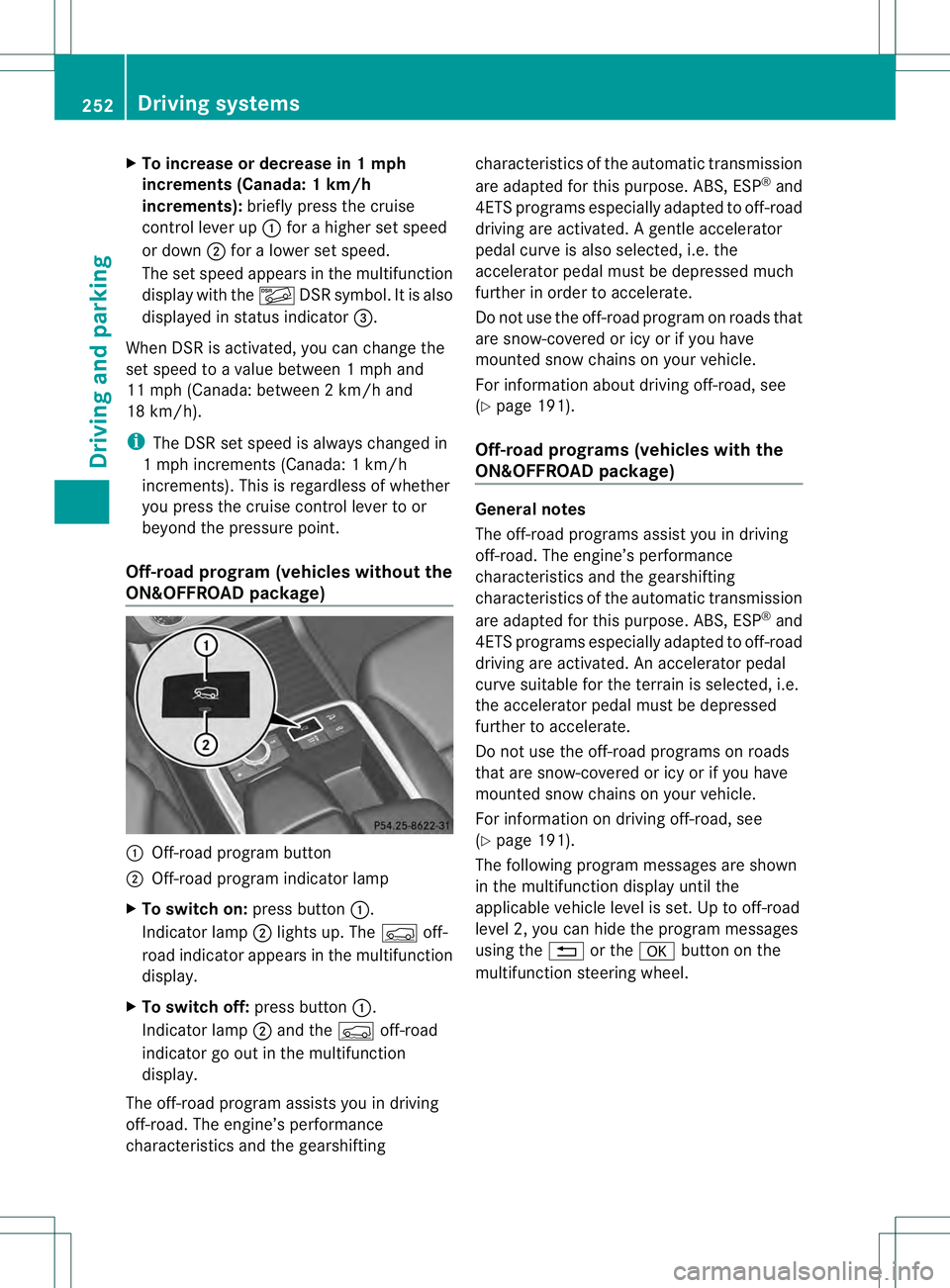
Off-road program (vehicles without the
ON&OFFROAD package) 0002
Off-road program button
0003 Off-road program indicator lamp
X To switch on: press button0002.
Indicator lamp 0003lights up. The 0006off-
road indicator appears in the multifunction
display.
X To switch off: press button0002.
Indicator lamp 0003and the 0006off-road
indicator go out in the multifunction
display.
The off-road program assists you in driving
off-road. The engine’s performance
characteristics and the gearshifting characteristics of the automatic transmission
are adapted for this purpose. ABS, ESP
®
and
4ET Sprograms especially adapted to off-road
driving are activated .Agentle accelerator
pedal curve is also selected, i.e. the
accelerator pedal must be depressed much
further in order to accelerate.
Do not use the off-road program on roads that
are snow-covered or icy or if you have
mounted snow chains on your vehicle.
For information about driving off-road, see
(Y page 191).
Off-road programs (vehicles with the
ON&OFFROAD package) General notes
The off-road programs assist you in driving
off-road. The engine’s performance
characteristics and the gearshifting
characteristics of the automatic transmission
are adapted for this purpose. ABS, ESP
®
and
4ETS programs especially adapted to off-road
driving are activated. An accelerator pedal
curve suitable for the terrain is selected, i.e.
the accelerator pedal must be depressed
further to accelerate.
Do not use the off-road programs on roads
that are snow-covered or icy or if you have
mounted snow chains on your vehicle.
For information on driving off-road, see
(Y page 191).
The following program messages are shown
in the multifunction display until the
applicable vehicle level is set. Up to off-road
level 2, you can hide the program messages
using the 0007or the 000Bbutton on the
multifunction steering wheel. 252
Driving systemsDriving and parking
Page 257 of 454
Further information about "Driving off-road"
(Y page 191) .You will find information about
driving safety systems in conjunction with
LOW RANGE in the "Safety" section
(Y page 66).
From HIGH RANGE to LOW RANGE
! Only change from LOW RANGE to HIGH
RANGE if:
R the engine is running.
R the transmission is in position N
R you are driving at a speed below
40 km/h
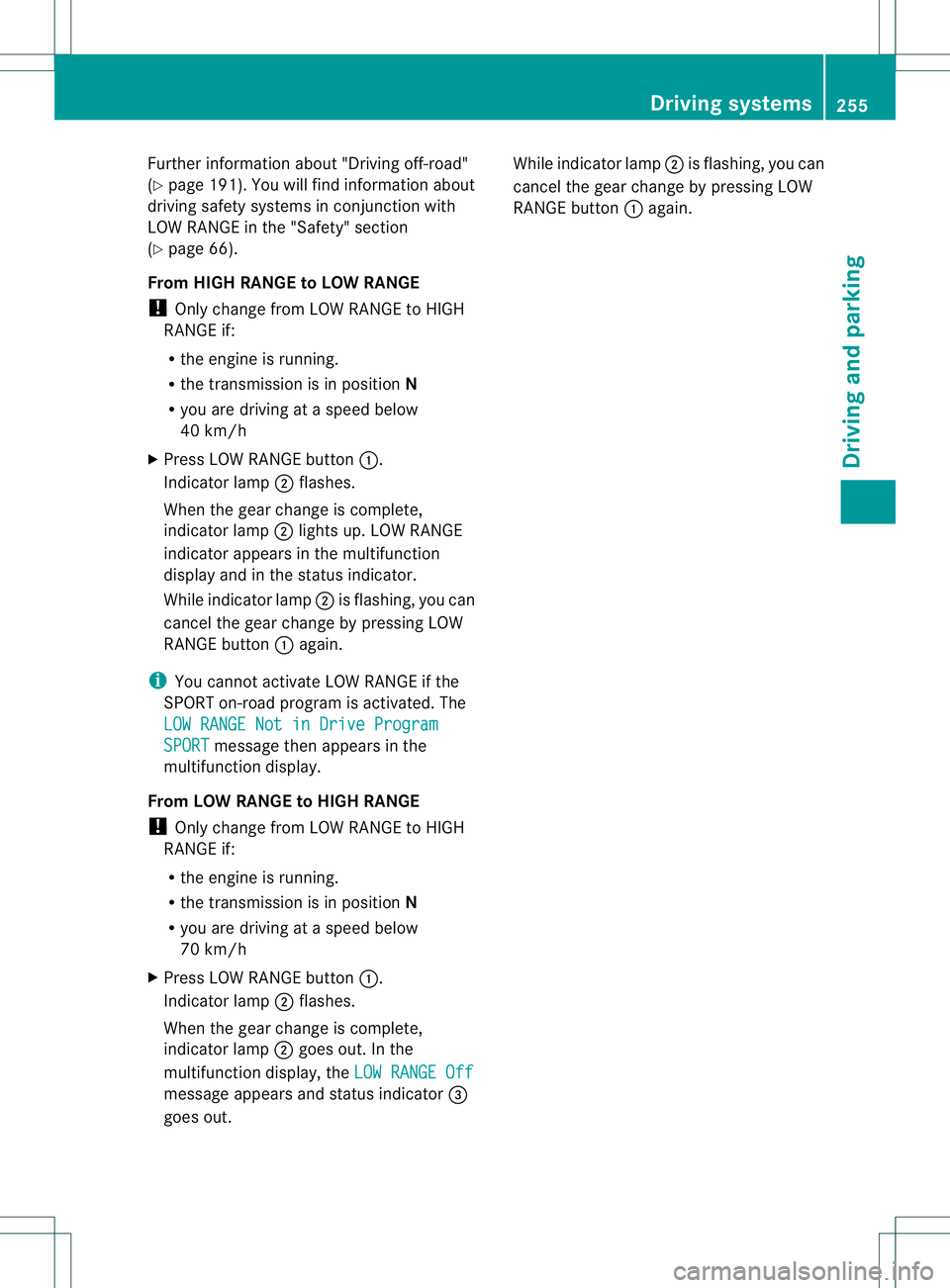
X Press LOW RANGE button 0002.
Indicator lamp 0003flashes.
When the gear change is complete,
indicator lamp 0003lights up. LOW RANGE
indicator appears in the multifunction
display and in the status indicator.
While indicator lamp 0003is flashing, you can
cancel the gear change by pressing LOW
RANGE button 0002again.
i You cannot activate LOW RANGE if the
SPORT on-road program is activated. The
LOW RANGE Not in Drive Program SPORT message then appears in the
multifunction display.
From LOW RANGE to HIGH RANGE
! Only change from LOW RANGE to HIGH
RANGE if:
R the engine is running.
R the transmission is in position N
R you are driving at a speed below
70 km/h
X Press LOW RANGE button 0002.
Indicator lamp 0003flashes.
When the gear change is complete,
indicator lamp 0003goes out. In the
multifunction display, the LOW RANGE Offmessage appears and status indicator
0021
goes out. While indicator lamp
0003is flashing, you can
cancel the gear change by pressing LOW
RANGE button 0002again. Driving systems
255Driving and parking Z
Page 263 of 454
of the towing vehicle, as the latter is
equipped with an anti-lock brake system.
Doing so will result in a loss of function of
the brake systems of both the vehicle and
the trailer.
X Make sure that the automatic transmission
is set to position P.
X Apply the vehicle's electric parking brake.
X Start the engine.
X Vehicles with the AIRMATIC package:
select highway level.
X Vehicles with ADS: set ADS toAUTOor
COMF.
X Switch off the engine.
X Close all doors and the tailgate.
X Couple up the trailer.
X Establish all electrical connections.
X Check that the trailer lighting system is
working.
i Vehicles with the AIRMATIC package:
with a trailer attached, the vehicle will
always remain at highway level. When
coupling up a trailer, please observe the
following:
R Unless highway level has been set
manually, the vehicle is automatically
lowered to highway level. This is the case
if a speed of 5mph(8km/h) is reached.
R High-speed level is not available.
These restrictions apply to all accessories
powered through a connectio nto the trailer
power socket of your vehicle, e.g. a bicycle
carrier.
Observe the maximum permissible trailer
dimensions (width and length).
Most U.S. states and all Canadia nprovinces
require by law:
R Safety chains between the towing vehicle
and the trailer. The chains should be cross-
wound under the trailer drawbar. They must
be fastened to the vehicle's trailer
coupling, not to the bumper or the axle. Leave enough play in the chains to make
tight cornering possible.
R As eparate brake system for certain types
of trailer.
R As afety switch for braked trailers. Check
the specific legal requirements applicable
to your state.
If the trailer detaches from the towing
vehicle, the safety switch applies the
trailer's brakes. Towing
atrailer
There are numerous legal requirements
concerning the towing of a trailer, e.g .speed
restrictions. Make sure that your vehicle/
trailer combination complies with the local
requirements not only in your area of
residence but also at any location to which
you are traveling. The police and local
authorities can provide reliable information.
Please observe the following when towing a
trailer:
R To acquaint yourself with driving with a
trailer and with the resulting changes to
handling, you should practice cornering,
stopping and backing up in a traffic-free
location.
R Before driving, check:
-Trailer tow hitch
- Safety switch for braked trailers
- Safety chains
- Electrical connections
- Lights
- the wheels
R Adjust the exterior mirrors to provide an
unobstructed view of the rear section of the
trailer.
R If the trailer features electronically
controlled brakes, pull away the vehicle/
trailer combination carefully, manually
brake using the brake controller, and check
the brakes for correct function. Towing
atrailer
261Driving an d parking Z
Page 281 of 454
X
Press the 0002or0005 button on the
steering wheel to select the Sett. menu.
X Press the 0004or0003 button to select the
Lights submenu.
X Press 000Bto confirm.
X Press 0004or0003 to select the Daytime Running Lights: function.
If the Daytime Running Lights: have
been switched on, the cone of light and the
0004 symbol in the multifunction display
are shown in red.
X Press the 000Bbutton to save the setting.
Further information on daytime running
lamps (Y page 124).
Switching Adaptive Highbeam Assist on/
off
X Press the 0002or0005 button on the
steering wheel to select the Sett. menu.
X Press the 0004or0003 button to select the
Lights submenu.
X Press 000Bto confirm.
X Press the 0004or0003 button to select the
Adaptive Highbeam function.
If the Adaptive Highbeam function has
been switched on, the cone of light and the
0005 symbol in the upper multifunction
display are shown in red.
X Press the 000Bbutton to save the setting.
For further information about Adaptive
Highbeam Assist, see (Y page 130).
Setting the brightness of the ambient
lighting
X Press the 0002or0005 button on the
steering wheel to select the Sett. menu.
X Press the 0004or0003 button to select the
Lights submenu.
X Press 000Bto confirm.
X Press the 0004or0003 button to select the
Amb. Light +/-. function.
You will see the selected setting.
X Press 000Bto confirm. X
Press the 0004or0003 button to adjust the
brightness to any level from Off to
Level 5 (bright).
X Press the 000Bor0007 button to save the
setting.
Setting the ambient lighting color
X Press the 0002or0005 button on the
steering wheel to select the Sett. menu.
X Press the 0004or0003 button to select the
Lights submenu.
X Press 000Bto confirm.
X Press the 0004or0003 button to select the
Ambient Light Color function.
X Press 000Bto confirm.
X Press the 0004or0003 button to set the
color to SOLAR ,
NEUTRAL or
POLAR .
X Press the 000Bor0007 button to save the
setting.
Surround lighting and exterior lighting
delayed switch-off
X Press the 0002or0005 button on the
steering wheel to select the Sett. menu.
X Press the 0004or0003 button to select the
Light submenu.
X Press 000Bto confirm.
X Press 0004or0003 to select the
Surround Lighting function.
When the Surround Lighting function is
activated, the light cone and the area
around the vehicle are displayed in red in
the multifunction display.
X Press the 000Bbutton to save the setting.
Deactivating delayed switch-off of the
exterior lighting temporarily:
X Before leaving the vehicle, turn the
SmartKey to position 0in the ignition lock.
X Turn the SmartKey to position 2in the
ignition lock.
The exterior lighting delayed switch-off is
deactivated. Menus and submenus
279On-board computer and displays Z
Page 282 of 454
Delayed switch-off of the exterior lighting is
reactivated the next time you start the
engine.
If you have activated the
SurroundLighting functio
nand the light switch is set
to 0006, the following functions are activated
when it is dark:
R Surround lighting: the exteriorlighting
remains lit for 40 seconds after unlocking
with the SmartKey. If you start the engine,
the surround lighting is switched off and
the automatic headlamp mode is activated
(Y page 124).
R Exterior lighting delayed switch-off: the
exterior lighting remains lit for
60 seconds after the engine is switched off.
If you close all the doors and the tailgate,
the exterior lighting goes off after
5s econds.
i Depending on your vehicle's equipment,
when the surround lighting and delayed
switch-off exterior lighting are on, the
following light up:
R Parking lamps
R Daytime running lamps
R Side marker lamps
R Surround lighting in the exterior mirrors
Activating/deactivating the interior
lighting delayed switch-off
If you activate the Interior LightingDelay function, the interior lighting remains
on for 20seconds after you remove the
SmartKey from the ignition lock.
X Press the 0002or0005 button on the
steering wheel to select the Sett. menu.
X Press the 0004or0003 button to select the
Lights submenu.
X Press 000Bto confirm.
X Press 0004or0003 to select the
Interior Lighting Delay function.
When the Interior Lighting Delay function is activated, the vehicle interior is displayed in red in the multifunction
display.
X Press the 000Bbutton to save the setting.
Vehicle submenu Activating/deactivating the automatic
door locking mechanism
If you activate the
Automatic Door Lock function, the vehicle is centrally locked above
a speed of around 9 mph (15 km/h).
X Press the 0002or0005 button on the
steering wheel to select the Sett. menu.
X Press 0004or0003 to select the Vehicle submenu.
X Press 000Bto confirm.
X Press 0004or0003 to select the
Automatic Door Lock function.
When the Automatic Door Lock function
is activated, the vehicle doors are displayed
in red in the multifunction display.
X Press the 000Bbutton to save the setting.
For further information on the automatic
locking feature, see (Y page 86).
Activating/deactivating the acoustic
locking verification signal
If you switch on the Acoustic Lock function,
an acoustic signal sounds when you lock the
vehicle.
X Press the 0002or0005 button on the
steering wheel to select the Sett. menu.
X Press 0004or0003 to select the Vehicle submenu.
X Press 000Bto confirm.
X Press the 0004or0003 button to select the
Acoustic Lock function.
If the Acoustic Lock function is activated,
the 000C symbol in the multifunction
display lights up red.
X Press the 000Bbutton to save the setting. 280
Menus and submenusOn-board computer and displays
Page 284 of 454
X
Press 0004or0003 to select the Auto. Mirror Folding function.
If the Auto. Mirror Folding function is
activated, the vehicle's exterior mirror is
displayed in red in the multifunction
display.
X Press the 000Bbutton to save the setting. 0002
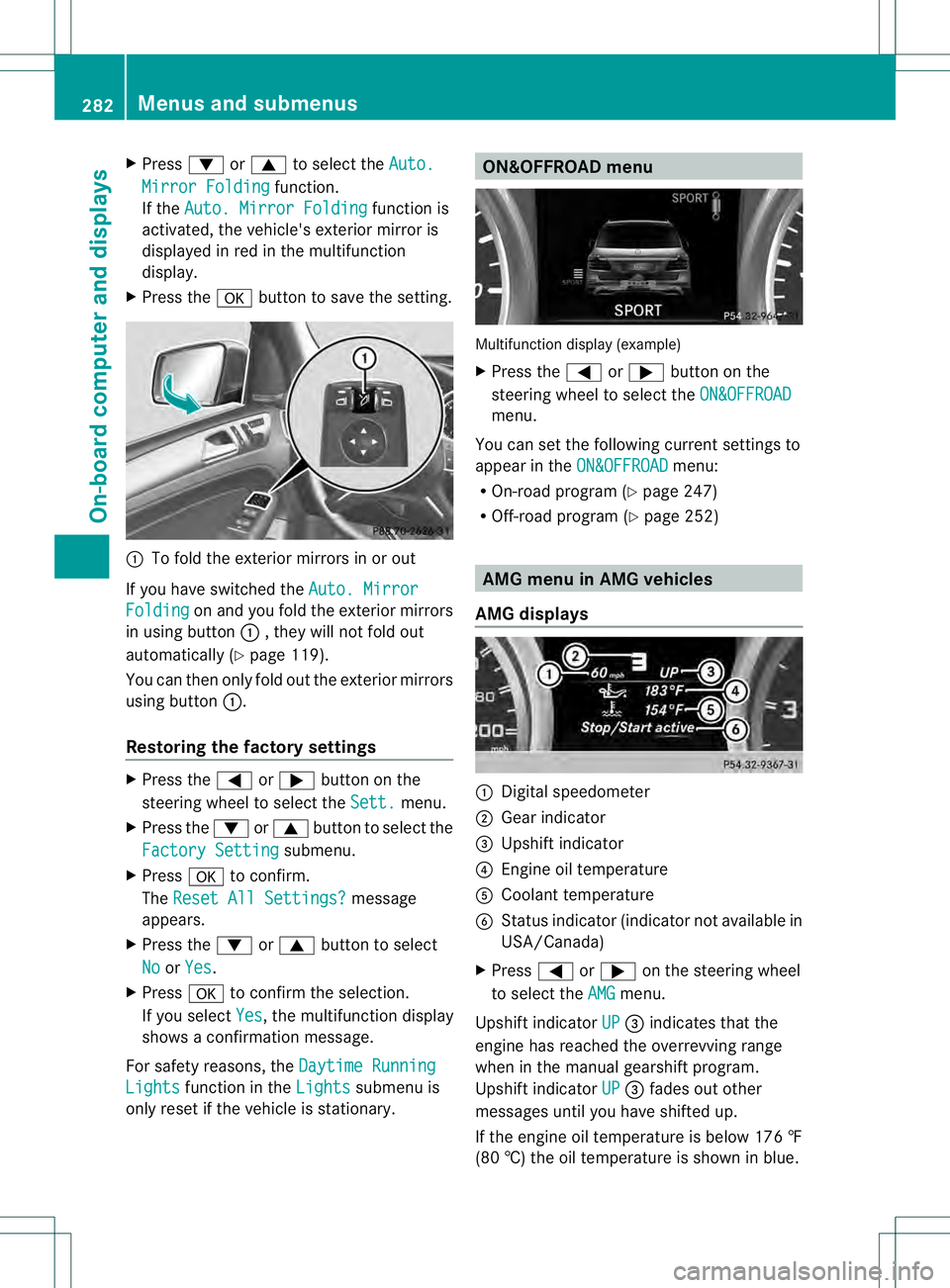
To fold the exterior mirrors in or out
If you have switched the Auto. MirrorFolding on and you fold the exterior mirrors
in using button 0002, they will not fold out
automatically (Y page 119).
You can then only fold out the exterior mirrors
using button 0002.
Restoring the factory settings X
Press the 0002or0005 button on the
steering wheel to select the Sett. menu.
X Press the 0004or0003 button to select the
Factory Setting submenu.
X Press 000Bto confirm.
The Reset All Settings? message
appears.
X Press the 0004or0003 button to select
No or
Yes .
X Press 000Bto confirm the selection.
If you select Yes , the multifunction display
shows a confirmation message.
For safety reasons, the Daytime RunningLights function in the
Lights submenu is
only reset if the vehicle is stationary. ON&OFFROAD menu
Multifunction display (example)
X
Press the 0002or0005 button on the
steering wheel to select the ON&OFFROAD menu.
You can set the following curren tsettings to
appear in the ON&OFFROAD menu:
R On-road program (Y page 247)
R Off-road program (Y page 252) AMG menu in AMG vehicles
AMG displays 0002
Digital speedometer
0003 Gear indicator
0021 Upshift indicator
0020 Engine oil temperature
001E Coolant temperature
001F Status indicator (indicator not available in
USA/Canada)
X Press 0002or0005 on the steering wheel
to select the AMG menu.
Upshift indicator UP 0021
indicates that the
engine has reached the overrevving range
when in the manual gearshift program.
Upshift indicator UP 0021
fades out other
messages until you have shifted up.
If the engine oil temperature is below 176 ‡
(80 †) the oil temperature is shown in blue. 282
Menus and submenusOn-board computer and displays
Page 289 of 454
Safety systems
Display messages Possible causes/consequences and
0001 Solutions
0019000F
Currently
Unavailable See
Operator's Manual ABS (Anti-lock Braking System), ESP
®
(Electronic Stability
Program), BAS (Brake Assist), PRE-SAFE ®
, the HOLD function, hill
start assist, the adaptive brake lights, crosswind driving
assistance and ESP ®
trailer stabilization are temporarily
unavailable.
COLLISION PREVENTION ASSIST, BAS PLUS and
PRE-SAFE ®
Brake may also have failed.
In addition, the 000F,0017and0019 warning lamps light up in
the instrument cluster.
ATTENTION ASSIST is deactivated.
Possible causes are:
R self-diagnosis is not yet complete.
R the on-board voltage may be insufficient.
G WARNING
The brake system continues to function normally, but without the
functions listed above. The wheels could therefore lock if you
brake hard, for example.
The steerability and braking characteristics may be severely
affected. The braking distance in an emergency braking situation
can increase.
If ESP ®
is not operational, ESP ®
is unable to stabilize the vehicle.
There is an increased risk of skidding and an accident.
X Carefully drive on a suitable stretch of road, making slight
steering movements at a speed above 12 mph (20 km/h).
If the display message disappears, the functions mentioned
above are available again.
If the display message continues to be displayed:
X Drive on carefully.
X Visit a qualified specialist workshop. 0019000F
Inoperative See
Operator's Manual ABS, ESP
®
, BAS, PRE-SAFE ®
, HOLD, hill start assist, crosswind
driving assistance and ESP ®
trailer stabilization are unavailable
due to a malfunction.
COLLISION PREVENTION ASSIST, BAS PLUS and
PRE-SAFE ®
Brake may also have failed.
The 0012 (USA only)/0009 (Canada only),000F,0017and0019
warning lamps in the instrumen tcluster also light up.
ATTENTION ASSIST is deactivated. Display messages
287On-board computer and displays Z
Page 292 of 454
Display messages Possible causes/consequences and
0001 Solutions
0008(USA
only)
000D(Canada
only)
Release Parking Brake The red
0008(USA only)/ 000D(Canada only) indicato rlamp
flashes and a warning tone sounds. Acondition for automatic
release of the electric parking brake is not fulfilled (Y page 184).
You are driving with the electric parking brake applied.
X Release the electric parking brake manually. The red
0008(USA only)/000D (Canada only) indicator lamp
flashes and a warning tone sounds.
You are making an emergency stop using the electric parking
brake (Y page 184). 0008(USA
only)000D(Canada
only)
Parking Brake See
Operator's Manual The yellow
000Dwarning lamp lights up.
The electric parking brake is malfunctioning.
To apply:
X Switch the ignition off.
X Press the electric parking brake handle for at least ten seconds.
X Shift the transmission to P.
X Consult a qualified specialist workshop. The yellow
000Dwarning lamp and the red 0008(USA
only)/000D (Canada only) indicator lamp light up.
The electric parking brake is malfunctioning.
To release:
X Switch off the ignition and turn it back on.
X Release the electric parking brake manually.
or
X Release the electric parking brake automatically (Y page 184).
If the electric parking brake still cannot be released:
X Do not drive on.
X Consult a qualified specialist workshop. 290
Display messagesOn-board computer and displays
Page 293 of 454
Display messages Possible causes/consequences and
0001 Solutions
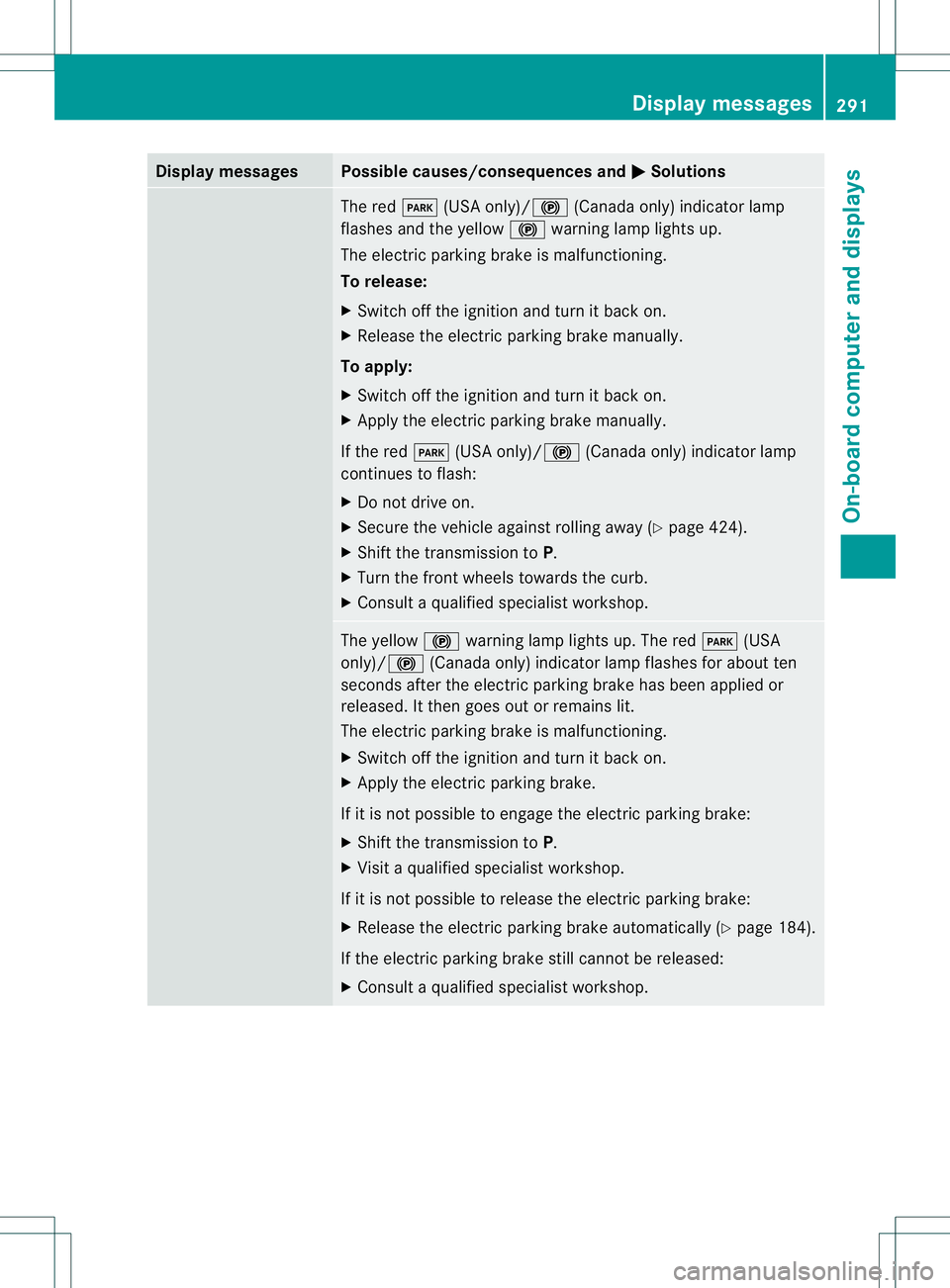
The red
0008(USA only)/ 000D(Canada only) indicato rlamp
flashes and the yellow 000Dwarning lamp lights up.
The electric parking brake is malfunctioning.
To release:
X Switch off the ignition and turn it back on.
X Release the electric parking brake manually.
To apply:
X Switch off the ignition and turn it back on.
X Apply the electric parking brake manually.
If the red 0008(USA only)/000D (Canada only) indicator lamp
continues to flash:
X Do not drive on.
X Secure the vehicle against rolling away ( Ypage 424).
X Shift the transmission to P.
X Turn the fron twheels towards the curb.
X Consult a qualified specialist workshop. The yellow
000Dwarning lamp lights up. The red 0008(USA
only)/000D (Canada only) indicator lamp flashes for about ten
seconds after the electric parking brake has been applied or
released. It then goes out or remains lit.
The electric parking brake is malfunctioning.
X Switch off the ignition and turn it back on.
X Apply the electric parking brake.
If it is not possible to engage the electric parking brake:
X Shift the transmission to P.
X Visit a qualified specialist workshop.
If it is not possible to release the electric parking brake:
X Release the electric parking brake automatically (Y page 184).
If the electric parking brake still cannot be released:
X Consult a qualified specialist workshop. Display messages
291On-board computer and displays Z
Page 294 of 454
Display messages Possible causes/consequences and
0001 Solutions
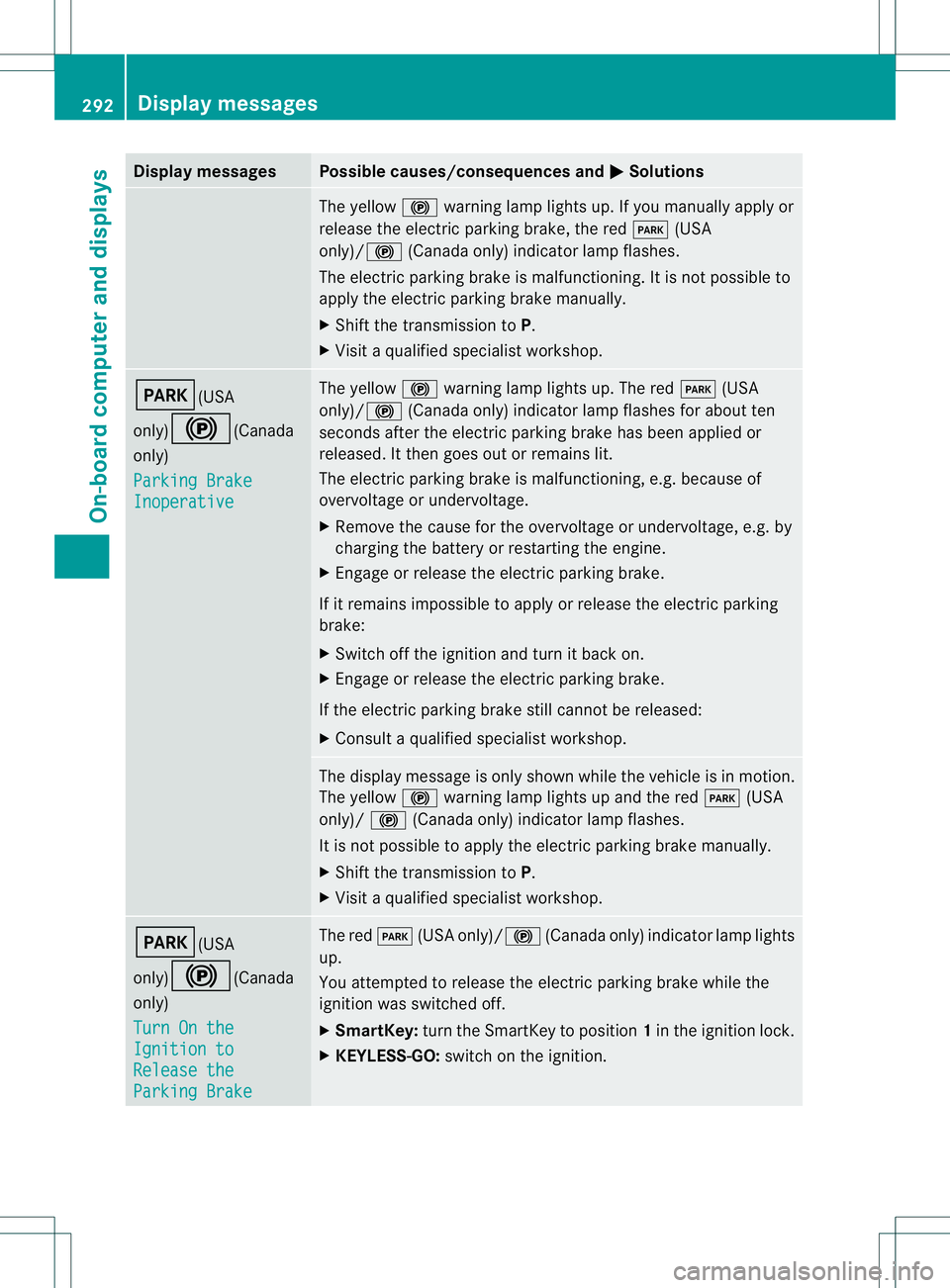
The yellow
000Dwarning lamp lights up. If you manually apply or
release the electric parkin gbrake, the red 0008(USA
only)/000D (Canada only) indicator lamp flashes.
The electric parking brake is malfunctioning. It is not possible to
apply the electric parking brake manually.
X Shift the transmission to P.
X Visi taqualified specialist workshop. 0008(USA
only)000D
(Canada
only)
Parking Brake Inoperative The yellow
000Dwarning lamp lights up. The red 0008(USA
only)/ 000D(Canada only) indicator lamp flashes for about ten
seconds after the electric parking brake has been applied or
released. It then goes out or remains lit.
The electric parking brake is malfunctioning, e.g. because of
overvoltage or undervoltage.
X Remove the cause for the overvoltage or undervoltage, e.g. by
charging the battery or restarting the engine.
X Engage or release the electric parking brake.
If it remains impossible to apply or release the electric parking
brake:
X Switch off the ignition and turn it back on.
X Engage or release the electric parking brake.
If the electric parking brake still cannot be released:
X Consult a qualified specialist workshop. The display message is only shown while the vehicle is in motion.
The yellow
000Dwarning lamp lights up and the red 0008(USA
only)/ 000D(Canada only) indicator lamp flashes.
It is not possible to apply the electric parking brake manually.
X Shift the transmission to P.
X Visit a qualified specialist workshop. 0008(USA
only)000D
(Canada
only)
Turn On the Ignition to
Release the
Parking Brake The red
0008(USA only)/000D (Canada only) indicator lamp lights
up.
You attempted to release the electric parking brake while the
ignition was switched off.
X SmartKey: turn the SmartKey to position 1in the ignition lock.
X KEYLESS-GO: switch on the ignition.292
Display messagesOn-board computer and displays