brake MERCEDES-BENZ GL 2014 Owner's Manual
[x] Cancel search | Manufacturer: MERCEDES-BENZ, Model Year: 2014, Model line: GL, Model: MERCEDES-BENZ GL 2014Pages: 462, PDF Size: 8.98 MB
Page 70 of 462
The pulsating brake pedal can be an
indication of hazardous road conditions, and
functions as a reminder to take extra care
while driving.
Off-road ABS
An ABS system specifically suited to off-road
terrain is activated automatically once the off-
road program is activated (Ypage 258).
At speeds below 20 mph (30 km/h), the front
wheels lock cyclically during braking. The
digging-in effect achieved in the process
reduces the stopping distance on off-road
terrain. This limits steering capability.
BAS (Brake Assist System)
General information
BAS operates in emergency braking
situations. If you depress the brake pedal
quickly, BAS automatically boosts the braking
force, thus shortening the stopping distance.
Important safety notes
iObserve the "Important safety notes"
section (Ypage 67).
GWARNING
If BAS is malfunctioning, the braking distance
in an emergency braking situation is
increased. There is a risk of an accident.
In an emergency braking situation, depress
the brake pedal with full force. ABS prevents
the wheels from locking.
Braking
XKeep the brake pedal firmly depressed until
the emergency braking situation is over.
ABS prevents the wheels from locking.
The brakes will function as usual once you
release the brake pedal. BAS is deactivated.
BAS PLUS (Brake Assist System
PLUS)
General information
iObserve the "Important safety notes"
section (Ypage 67).
BAS PLUS is only available in vehicles
equipped with DISTRONIC PLUS.
For BAS PLUS to assist you, the radar sensor
system must be operational.
With the help of the radar sensor system, BAS
PLUS can detect obstacles that are in the
path of your vehicle for an extended period of
time.
If the radar sensor system is malfunctioning,
BAS PLUS will not be available. The brake
system is still available with complete brake
boosting effect and BAS.
BAS PLUS can help you to minimize the risk
of a collision with a vehicle or reduce the
effects of such a collision. If BAS PLUS
detects a danger of collision, you are assisted
when braking.
Important safety notes
GWARNING
BAS PLUS cannot always clearly identify
objects and complex traffic situations.
In such cases, BAS PLUS may:
Rintervene unnecessarily
Rnot intervene
There is a risk of an accident.
Always pay careful attention to the traffic
situation and be ready to brake. Terminate the
intervention in a non-critical driving situation.
GWARNING
BAS PLUS does not react:
Rto people or animals
Rto oncoming vehicles
Rto crossing traffic
Rwhen cornering
68Driving safety systems
Safety
Page 71 of 462
As a result, BAS PLUS may not intervene in all
critical situations. There is a risk of an
accident.
Always pay careful attention to the traffic
situation and be ready to brake.
In the event of snowfall or heavy rain, the
recognition can be impaired.
Recognition by the radar sensor system is
also impaired in the event of:
Rdirt on the sensors or anything else
covering the sensors
Rthere is interference by other radar sources
Rthere are strong radar reflections, for
example in parking garages
Ra narrow vehicle traveling in front, e.g. a
motorbike
Ra vehicle traveling in front on a different line
relative to the center of your vehicle
Following damage to the front end of the
vehicle, have the configuration and operation
of the radar sensors checked at a qualified
specialist workshop. This also applies to
collisions at low speeds where there is no
visible damage to the front of the vehicle.
Function
To avoid a collision, BAS PLUS calculates the
brake force necessary if:
Ryou approach an obstacle, and
RBAS PLUS has detected a risk of collision
When driving at a speed under 20 mph
(30 km/h): if you depress the brake pedal,
BAS PLUS is activated. The increase in brake
pressure will be carried out at the last
possible moment.
When driving at a speed above 20 mph
(30 km/h): if you depress the brake pedal
sharply, BAS PLUS automatically raises the
brake pressure to a value adapted to the
traffic situation.
BAS PLUS provides braking assistance in
hazardous situations with vehicles in front
within a speed range between 4 mph
(7 km/h) and 155 mph (250 km/h).
At speeds of up to approximately 40 mph
(70 km/h), BAS PLUS can also react to
stationary objects. Examples of stationary
objects are stopped or parked vehicles.
iIf BAS PLUS demands particularly high
braking force, preventative passenger
protection measures (PRE-SAFE®) are
activated simultaneously.
XKeep the brake pedal depressed until the
emergency braking situation is over.
ABS prevents the wheels from locking.
BAS PLUS is deactivated and the brakes
function as usual again, if:
Ryou release the brake pedal.
Rthere is no longer a risk of collision.
Rno obstacle is detected in front of your
vehicle.
If you have activated DSR (Ypage 256), BAS
PLUS is likewise deactivated.
COLLISION PREVENTION ASSIST
General notes
COLLISION PREVENTION ASSIST consists of
Adaptive Brake Assist and the distance
warning function, which are described in the
following.
Distance warning function
Important safety notes
iObserve the "Important safety notes"
section (Ypage 67).
GWARNING
The distance warning function does not react:
Rto people or animals
Rto oncoming vehicles
Rto crossing traffic
Rwhen cornering
Driving safety systems69
Safety
Z
Page 72 of 462
Thus, the distance warning function cannot
provide a warning in all critical situations.
There is a risk of an accident.
Always pay careful attention to the traffic
situation and be ready to brake.
GWARNING
The distance warning function cannot always
clearly identify objects and complex traffic
situations.
In such cases, the distance warning function
may:
Rgive an unnecessary warning
Rnot give a warning
There is a risk of an accident.
Always pay careful attention to the traffic
situation and do not rely solely on the distance
warning function.
Function
XTo activate/deactivate:activate or
deactivate the distance warning function in
the on-board computer (Ypage 281).
If the distance warning function is not
activated, the
Page 73 of 462
Adaptive Brake Assist
iObserve the "Important safety notes"
section (Ypage 67).
GWARNING
Adaptive Brake Assist cannot always clearly
identify objects and complex traffic
situations.
In such cases, Adaptive Brake Assist may:
Rintervene unnecessarily
Rnot intervene
There is a risk of an accident.
Always pay careful attention to the traffic
situation and be ready to brake. Terminate the
intervention in a non-critical driving situation.
GWARNING
Adaptive Brake Assist does not react:
Rto people or animals
Rto oncoming vehicles
Rto crossing traffic
Rto stationary obstacles
Rwhen cornering
As a result, Adaptive Brake Assist may not
intervene in all critical conditions. There is a
risk of an accident.
Always pay careful attention to the traffic
situation and be ready to brake.
Due to the nature of the system, particularly
complicated but non-critical driving
conditions may also cause Brake Assist to
intervene.
Adaptive Brake Assist aids you in braking
during hazardous situations at speeds above
4 mph (7 km/h) and uses the radar sensor
system to evaluate the traffic situation.
With the help of Adaptive Brake Assist, the
distance warning signal can detect obstacles
that are in the path of your vehicle for an
extended period of time.
Should you approach an obstacle and
Adaptive Brake Assist has detected a risk of
collision, Adaptive Brake Assist calculates the
braking force necessary to avoid a rear-end
collision. Should you apply the brakes
vigorously, Adaptive Brake Assist will
automatically increase the braking force to a
level suitable for the traffic conditions.
XKeep the brake pedal depressed until the
emergency braking situation is over.
ABS prevents the wheels from locking.
The brakes will work normally again if:
Ryou release the brake pedal.
Rthere is no longer any danger of a collision.
Rno obstacle is detected in front of your
vehicle.
Adaptive Brake Assist is then deactivated.
Vehicles with PRE-SAFE®:if adaptive Brake
Assist requires particularly high brake
pressure, preventive passenger protection
measures (PRE-SAFE®) are deployed
simultaneously.
Up to vehicle speeds of around 155 mph
(250 km/h), adaptive Brake Assist is capable
of reacting to moving objects that have
already been recognized as such at least once
over the period of observation. Adaptive
Brake Assist does not react to stationary
obstacles.
If Adaptive Brake Assist is not available due
to a malfunction in the radar sensor system,
the brake system remains available with full
brake boosting effect and BAS.
In particular, the detection of obstacles can
be impaired if there is:
Rdirt on the sensors or anything else
covering the sensors
Rthere is snow or heavy rain
Rthere is interference by other radar sources
Rthere are strong radar reflections, for
example in parking garages
Ra narrow vehicle traveling in front, e.g. a
motorbike
Driving safety systems71
Safety
Z
Page 74 of 462
Ra vehicle traveling in front on a different line
relative to the center of your vehicle
Rnew vehicles or after the COLLISION
PREVENTION ASSIST system has been
serviced
Observe the notes in the section on
breaking-in (Ypage 166).
Following damage to the front end of the
vehicle, have the configuration and operation
of the radar sensor checked at a qualified
specialist workshop. This also applies to
collisions at low speeds where there is no
visible damage to the front of the vehicle.
ESP®(Electronic Stability Program)
General notes
iObserve the "Important safety notes"
section (Ypage 67).
ESP®monitors driving stability and traction,
i.e. power transmission between the tires and
the road surface.
If ESP®detects that the vehicle is deviating
from the direction desired by the driver, one
or more wheels are braked to stabilize the
vehicle. The engine output is also modified to
keep the vehicle on the desired course within
physical limits. ESP®assists the driver when
pulling away on wet or slippery roads. ESP®
can also stabilize the vehicle during braking.
4ETS (Electronic Traction System)
4ETS traction control is part of ESP®.
Traction control brakes the drive wheels
individually if they spin. This enables you to
pull away and accelerate on slippery surfaces,
for example if the road surface is slippery on
one side. In addition, more drive torque is
transferred to the wheel or wheels with
traction.
Traction control remains active, even if you
deactivate ESP®.
In appropriate driving situations, activate the
off-road program (Ypage 258).
Off-road 4ETS (Electronic Traction
System)
A 4ETS system specifically suited to off-road
terrain is activated automatically once the off-
road program is activated (Ypage 258).
Important safety notes
GWARNING
If ESP®is malfunctioning, ESP®is unable to
stabilize the vehicle. Additionally, further
driving safety systems are deactivated. This
increases the risk of skidding and an accident.
Drive on carefully. Have ESP®checked at a
qualified specialist workshop.
!Only operate the vehicle for a maximum
of ten seconds on a brake test
dynamometer. Switch off the ignition.
Application of the brakes by ESP®may
otherwise destroy the brake system.
!A function or performance test should
only be carried out on a two-axle
dynamometer. Before you operate the
vehicle on such a dynamometer, please
consult a qualified workshop. You could
otherwise damage the drive train or the
brake system.
ESP®is deactivated if the
Page 76 of 462
The spinning of the wheels results in a
cutting action for better traction on loose
surfaces.
Rtraction control is still activated.
RESP®still provides support when you
brake.
Off-road ESP®
An ESP®system specifically suited to off-road
terrain is activated automatically once the off-
road program is activated (Ypage 258).
Off-road ESP®intervenes with a delay if there
is oversteering or understeering, thus
improving traction.
ESP®trailer stabilization
General information
ESP®trailer stabilization is not available in
AMG vehicles.
If your vehicle/trailer combination begins to
swerve, ESP®assists you in this situation.
ESP®slows the vehicle down by braking and
limiting the engine output until the vehicle/
trailer combination has stabilized.
Important safety notes
GWARNING
If road and weather conditions are poor,
trailer stabilization will not be able to prevent
the vehicle/trailer combination from
swerving. Trailers with a high center of gravity
can tip over before ESP®can detect this.
There is a risk of an accident.
Always adapt your driving style to the
prevailing road and weather conditions.
If your vehicle with trailer (vehicle/trailer
combination) begins to lurch, you can only
stabilize the vehicle/trailer combination by
depressing the brake firmly.
Trailer stabilisation is active above speeds of
about 37 mph (60 km/h).
ESP®trailer stabilization does not work if
ESP®is deactivated or disabled because of a
malfunction.
Crosswind driving assistance
General information
Strong crosswinds can cause your vehicle to
deviate from a straight course. The crosswind
driving assistance function integrated into
ESP®significantly reduces these effects.
ESP®intervenes automatically according to
the direction and intensity of the crosswinds
affecting your vehicle.
ESP stabilities the vehicle with braking
interventions to assist you in keeping the
vehicle in the lane.
Crosswind driving assistance is active at
vehicle speeds above 50 mph (80 km/h)
when driving straight ahead or cornering
gently.
Important safety notes
Crosswind driving assistance does not work
if ESP®is deactivated or disabled because of
a malfunction.
EBD (electronic brake force
distribution)
General information
EBD monitors and controls the brake
pressure on the rear wheels to improve
driving stability while braking.
Important safety notes
iObserve the "Important safety notes"
section for driving safety systems
(Ypage 67).
GWARNING
If EBD has malfunctioned, the rear wheels can
still lock, e.g. under full braking. This
increases the risk of skidding and an accident.
74Driving safety systems
Safety
Page 77 of 462
You should therefore adapt your driving style
to the different handling characteristics. Have
the brake system checked at a qualified
specialist workshop.
Observe information regarding indicator and
warning lamps (Ypage 327) as well as
display messages (Ypage 293).
ADAPTIVE BRAKE
ADAPTIVE BRAKE enhances braking safety
and offers increased braking comfort. In
addition to the braking function, ADAPTIVE
BRAKE also has the HOLD function
(Ypage 216) and hill start assist
(Ypage 171).
PRE-SAFE®Brake
General information
iObserve the "Important safety notes"
section (Ypage 67).
PRE-SAFE®Brake is only available in vehicles
with DISTRONIC PLUS.
For PRE-SAFE®Brake to assist you when
driving, the radar sensor system must be
operational.
With the help of the radar sensor system,
PRE-SAFE®Brake can detect obstacles that
are in front of your vehicle for an extended
period of time.
PRE-SAFE®Brake can help you to minimize
the risk of a collision with a vehicle ahead, and
reduce the effects of such a collision. If PRE-
SAFE®Brake has detected a risk of collision,
you will be warned visually and acoustically
as well as by automatic braking. PRE-SAFE®
Brake cannot prevent a collision without your
intervention.
Important safety notes
GWARNING
PRE-SAFE®Brake will initially brake your
vehicle by a partial application of the brakes
if a danger of collision is detected. There may
be a collision unless you also brake.
Automatic emergency braking cannot prevent
a collision. There is a risk of an accident.
Always apply the brakes yourself and try to
take evasive action.
GWARNING
PRE-SAFE®Brake cannot always clearly
identify objects and complex traffic
conditions.
In these cases, PRE-SAFE®Brake may:
Rgive an unnecessary warning and then
brake the vehicle
Rnot give a warning or intervene
There is a risk of an accident.
Always pay particular attention to the traffic
situation and be ready to brake, especially if
PRE-SAFE®Brake warns you. Terminate the
intervention in a non-critical driving situation.
In order to maintain the appropriate distance
to the vehicle in front and thus prevent a
collision, you must apply the brakes yourself.
GWARNING
PRE-SAFE®Brake does not react:
Rto people or animals
Rto oncoming vehicles
Rto crossing traffic
Rwhen cornering
As a result, PRE-SAFE®Brake may neither
give warnings nor intervene in all critical
situations. There is a risk of an accident.
Always pay careful attention to the traffic
situation and be ready to brake.
In the event of snowfall or heavy rain, the
recognition can be impaired.
Driving safety systems75
Safety
Z
Page 78 of 462
Recognition by the radar sensor system is
also impaired in the event of:
Rdirt on the sensors or anything else
covering the sensors
Rthere is interference by other radar sources
Rthere are strong radar reflections, for
example in parking garages
Ra narrow vehicle traveling in front, e.g. a
motorbike
Ra vehicle traveling in front on a different line
relative to the center of your vehicle
Following damage to the front end of the
vehicle, have the configuration and operation
of the radar sensors checked at a qualified
specialist workshop. This also applies to
collisions at low speeds where there is no
visible damage to the front of the vehicle.
Function
XTo activate/deactivate:activate or
deactivate PRE-SAFE®Brake in the on-
board computer (Ypage 281).
If the PRE-SAFE®Brake is not activated, the
Page 82 of 462
Useful information
iThis Operator's Manual describes all
models and all standard and optional
equipment of your vehicle available at the
time of publication of the Operator's
Manual. Country-specific differences are
possible. Please note that your vehicle may
not be equipped with all features
described. This also applies to safety-
related systems and functions.
iRead the information on qualified
specialist workshops: (Ypage 28).
SmartKey
Important safety notes
GWARNING
If children are left unsupervised in the vehicle,
they could:
Ropen the doors, thus endangering other
people or road users.
Rget out and disrupt traffic.
Roperate the vehicle's equipment.
Additionally, children could set the vehicle in
motion if, for example, they:
Rrelease the parking brake.
Rshifting the automatic transmission out of
park positionP
RStart the engine.
There is a risk of an accident and injury.
When leaving the vehicle, always take the
SmartKey with you and lock the vehicle. Never
leave children or animals unattended in the
vehicle. Always keep the SmartKey out of
reach of children.
GWARNING
If persons, particularly children are subjected
to prolonged exposure to extreme heat or
cold, there is a risk of injury, possibly even
fatal. Never leave children unattended in the
vehicle.
GWARNING
If you attach heavy or large objects to the
SmartKey, the SmartKey could be
unintentionally turned in the ignition lock. This
could cause the engine to be switched off.
There is a risk of an accident.
Do not attach any heavy or large objects to
the SmartKey. Remove any bulky key rings
before inserting the SmartKey into the
ignition lock.
!Keep the SmartKey away from strong
magnetic fields. Otherwise, the remote
control function could be affected.
Strong magnetic fields can occur in the
vicinity of powerful electrical installations.
Do not keep the SmartKey:
Rwith electronic devices, e.g. a mobile
phone or another SmartKey
Rwith metallic objects, e.g. coins or metal
foil
Rinside metallic objects, e.g. a metal case
This can affect the functionality of the
SmartKey.
Do not keep the KEYLESS-GO key in the
temperature-controlled cup holder.
Otherwise, the KEYLESS-GO key will not be
recognized.
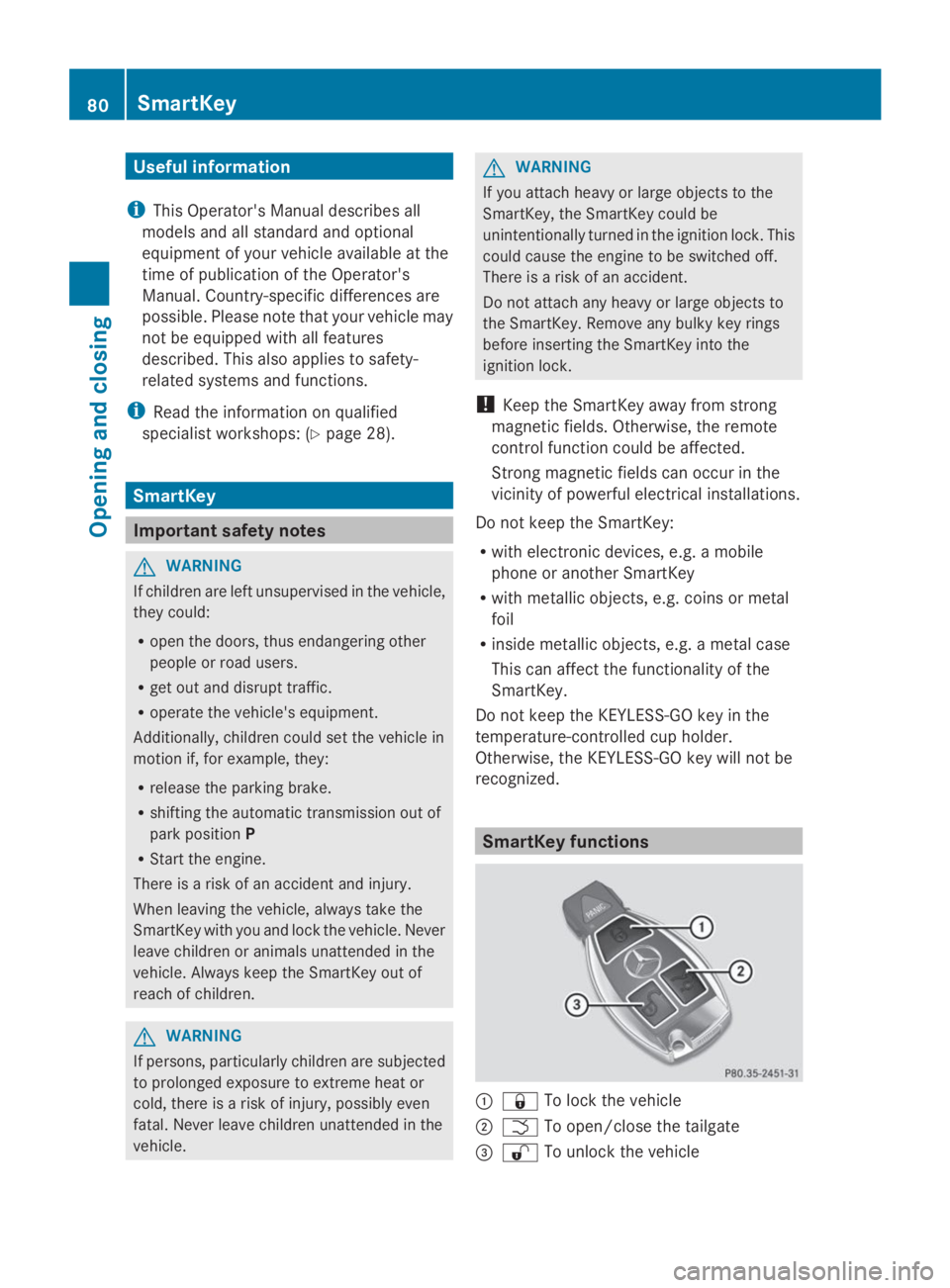
SmartKey functions
C7To lock the vehicle
DTTo open/close the tailgate
Page 88 of 462
ProblemPossible causes/consequences andPPSolutions
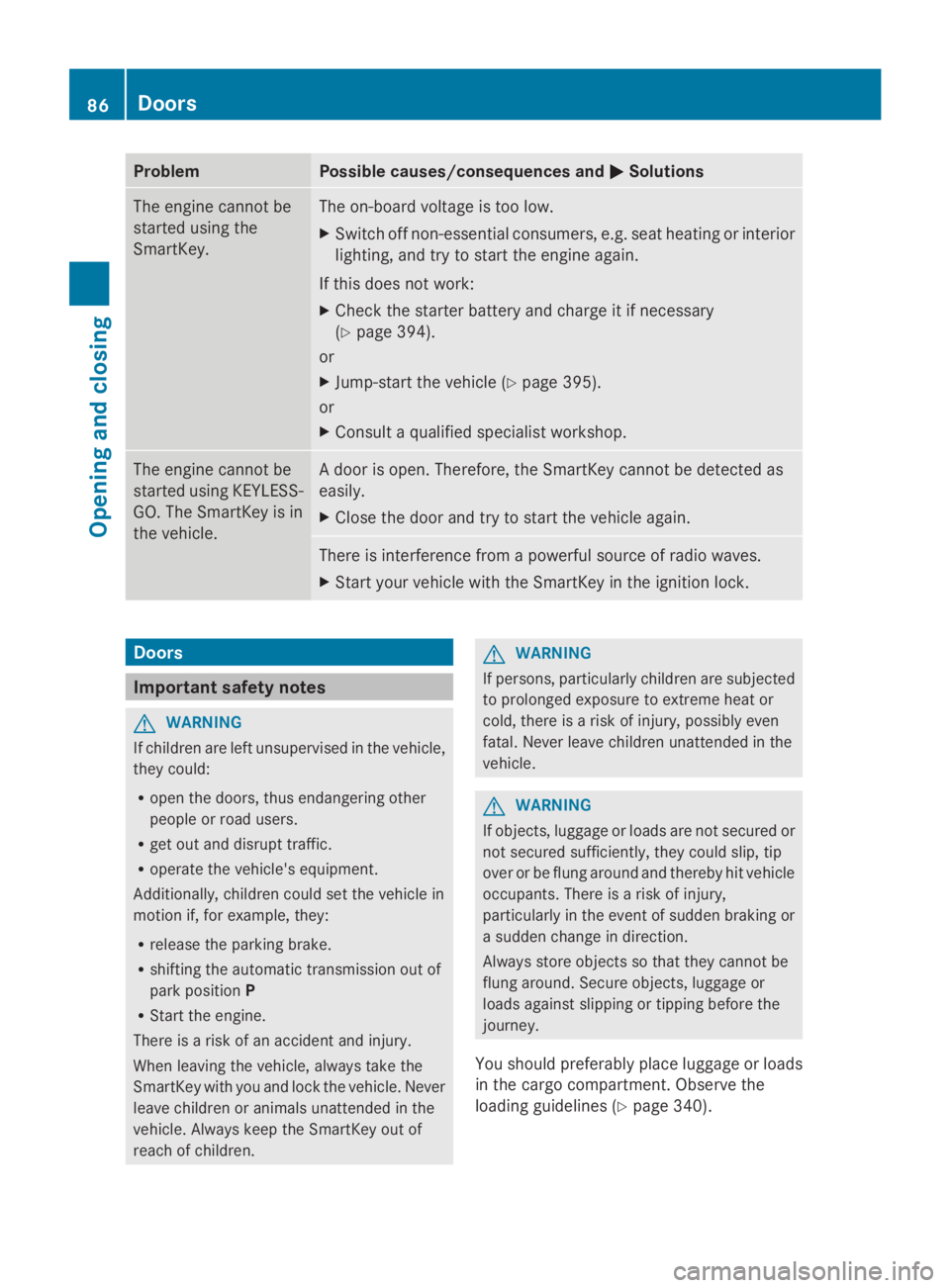
The engine cannot be
started using the
SmartKey.
The on-board voltage is too low.
XSwitch off non-essential consumers, e.g. seat heating or interior
lighting, and try to start the engine again.
If this does not work:
XCheck the starter battery and charge it if necessary
(Ypage 394).
or
XJump-start the vehicle (Ypage 395).
or
XConsult a qualified specialist workshop.
The engine cannot be
started using KEYLESS-
GO. The SmartKey is in
the vehicle.
A door is open. Therefore, the SmartKey cannot be detected as
easily.
XClose the door and try to start the vehicle again.
There is interference from a powerful source of radio waves.
XStart your vehicle with the SmartKey in the ignition lock.
Doors
Important safety notes
GWARNING
If children are left unsupervised in the vehicle,
they could:
Ropen the doors, thus endangering other
people or road users.
Rget out and disrupt traffic.
Roperate the vehicle's equipment.
Additionally, children could set the vehicle in
motion if, for example, they:
Rrelease the parking brake.
Rshifting the automatic transmission out of
park positionP
RStart the engine.
There is a risk of an accident and injury.
When leaving the vehicle, always take the
SmartKey with you and lock the vehicle. Never
leave children or animals unattended in the
vehicle. Always keep the SmartKey out of
reach of children.
GWARNING
If persons, particularly children are subjected
to prolonged exposure to extreme heat or
cold, there is a risk of injury, possibly even
fatal. Never leave children unattended in the
vehicle.
GWARNING
If objects, luggage or loads are not secured or
not secured sufficiently, they could slip, tip
over or be flung around and thereby hit vehicle
occupants. There is a risk of injury,
particularly in the event of sudden braking or
a sudden change in direction.
Always store objects so that they cannot be
flung around. Secure objects, luggage or
loads against slipping or tipping before the
journey.
You should preferably place luggage or loads
in the cargo compartment. Observe the
loading guidelines (Ypage 340).
86Doors
Opening and closing