brake MERCEDES-BENZ GL 2014 Repair Manual
[x] Cancel search | Manufacturer: MERCEDES-BENZ, Model Year: 2014, Model line: GL, Model: MERCEDES-BENZ GL 2014Pages: 462, PDF Size: 8.98 MB
Page 209 of 462
or brake unexpectedly. There is a risk of an
accident.
Pay attention to the road and traffic
conditions before calling up the stored speed.
If you do not know the stored speed, store the
desired speed again.
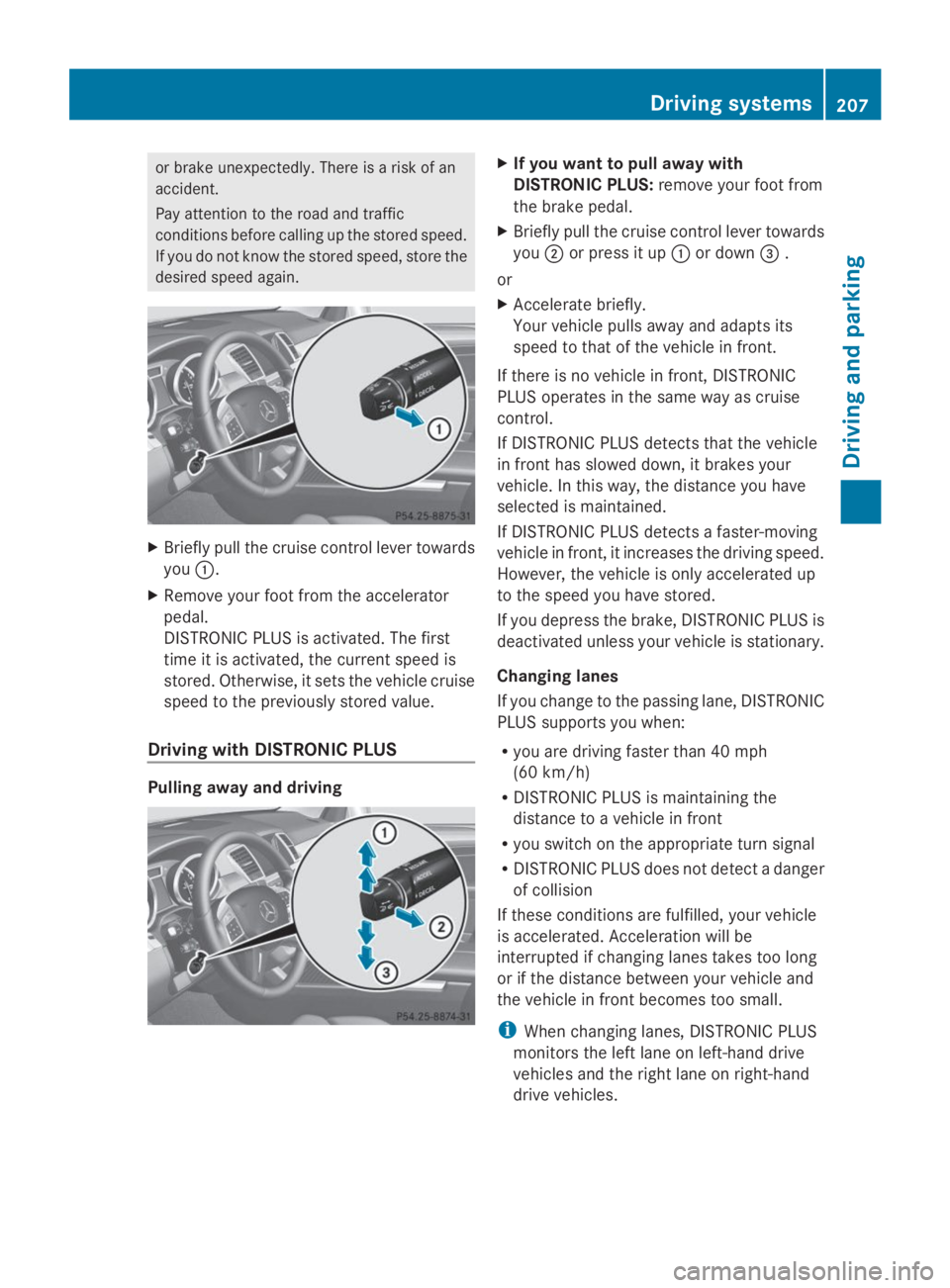
XBriefly pull the cruise control lever towards
youC.
XRemove your foot from the accelerator
pedal.
DISTRONIC PLUS is activated. The first
time it is activated, the current speed is
stored. Otherwise, it sets the vehicle cruise
speed to the previously stored value.
Driving with DISTRONIC PLUS
Pulling away and driving
XIf you want to pull away with
DISTRONIC PLUS:remove your foot from
the brake pedal.
XBriefly pull the cruise control lever towards
youDor press it upCor down
Page 210 of 462
Stopping
GWARNING
When leaving the vehicle, even if it is braked
only by DISTRONIC PLUS, it could roll away if:
Rthere is a malfunction in the system or in
the voltage supply.
RDISTRONIC PLUS has been deactivated
with the cruise control lever, e.g. by a
vehicle occupant or from outside the
vehicle.
Rthe electrical system in the engine
compartment, the battery or the fuses have
been tampered with.
Rthe battery is disconnected.
Rthe accelerator pedal has been depressed,
e.g. by a vehicle occupant.
There is a risk of an accident.
If you wish to exit the vehicle, always turn off
DISTRONIC PLUS and secure the vehicle
against rolling away.
If DISTRONIC PLUS detects that the vehicle
in front is stopping, it brakes your vehicle until
it is stationary.
Once your vehicle is stationary, it remains
stationary and you do not need to depress the
brake.
After a time, the electric parking brake
secures the vehicle and relieves the service
brake.
Depending on the specified minimum
distance, your vehicle will come to a standstill
at a sufficient distance behind the vehicle in
front. The specified minimum distance is set
using the control on the cruise control lever.
The electric parking brake automatically
secures the vehicle if DISTRONIC PLUS is
activated and:
Rthe driver's door is open and the driver's
seat belt is unfastened.
Rthe engine is switched off, unless it is
automatically switched off by the ECO
start/stop function.
Ra system malfunction occurs.
Rthe power supply is not sufficient.
On steep uphill or downhill inclines or if there
is a malfunction, the transmission may also
automatically be shifted into positionP.
Setting a speed
Keep in mind that it may take a brief moment
until the vehicle has accelerated or braked to
the speed set.
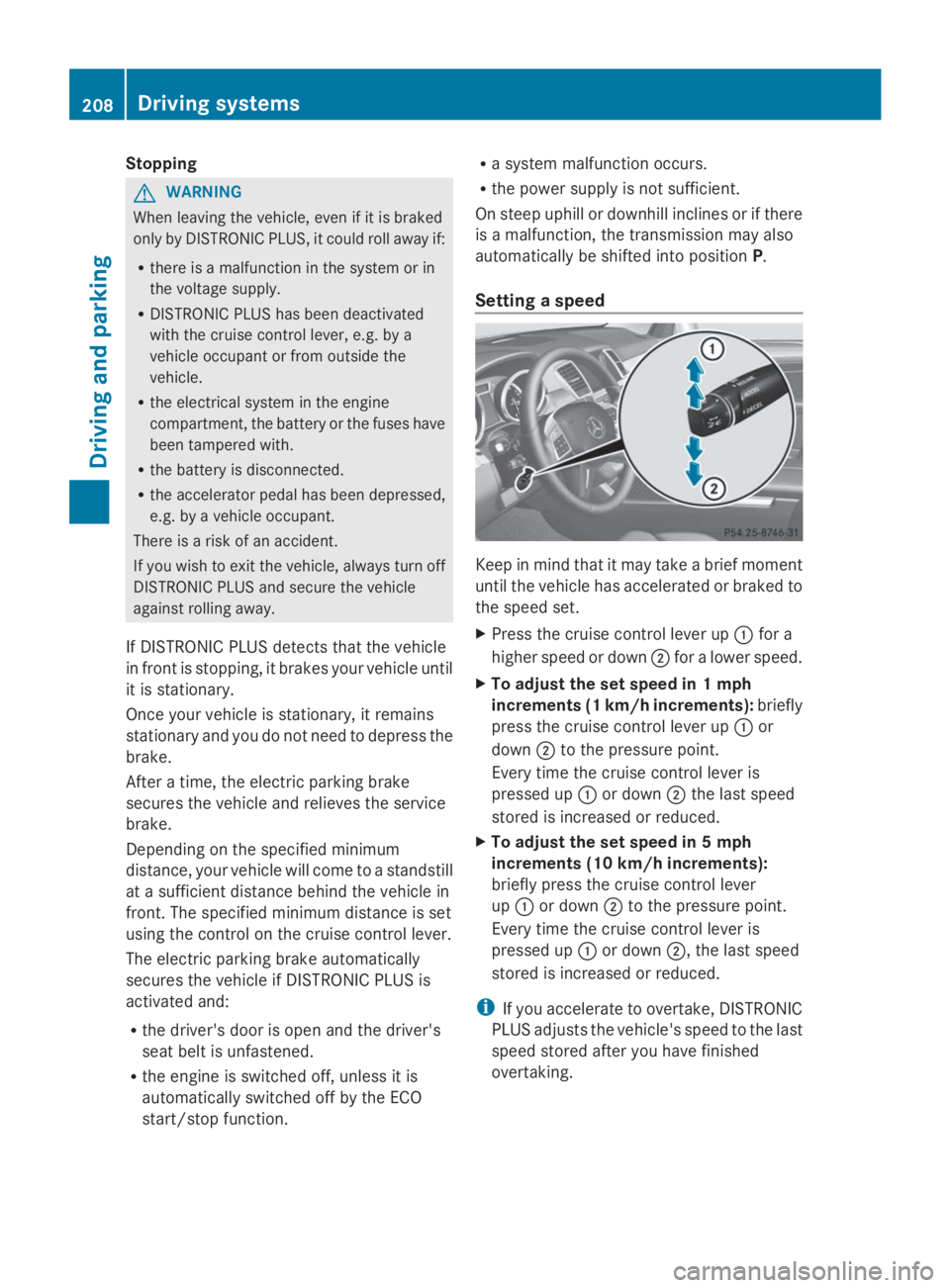
XPress the cruise control lever upCfor a
higher speed or downDfor a lower speed.
XTo adjust the set speed in 1 mph
increments (1 km/h increments):briefly
press the cruise control lever upCor
downDto the pressure point.
Every time the cruise control lever is
pressed upCor downDthe last speed
stored is increased or reduced.
XTo adjust the set speed in 5 mph
increments (10 km/h increments):
briefly press the cruise control lever
upCor downDto the pressure point.
Every time the cruise control lever is
pressed upCor downD, the last speed
stored is increased or reduced.
iIf you accelerate to overtake, DISTRONIC
PLUS adjusts the vehicle's speed to the last
speed stored after you have finished
overtaking.
208Driving systems
Driving and parking
Page 213 of 462
In the Assistance menu of the on-board
computer, you can select the assistance
display.
XSelect theDistance DisplayDistance Displayfunction
using the on-board computer
(Ypage 280).
You will see the stored speed for about five
seconds when you activate DISTRONIC PLUS.
Tips for driving with DISTRONIC PLUS
General notes
Pay particular attention in the following traffic
situations:
Rcornering, going into and coming out of a
bend
Rvehicles traveling on a different line
Rother vehicles changing lanes
Rnarrow vehicles
Robstructions and stationary vehicles
Rcrossing vehicles
In such situations, brake if necessary.
DISTRONIC PLUS is then deactivated.
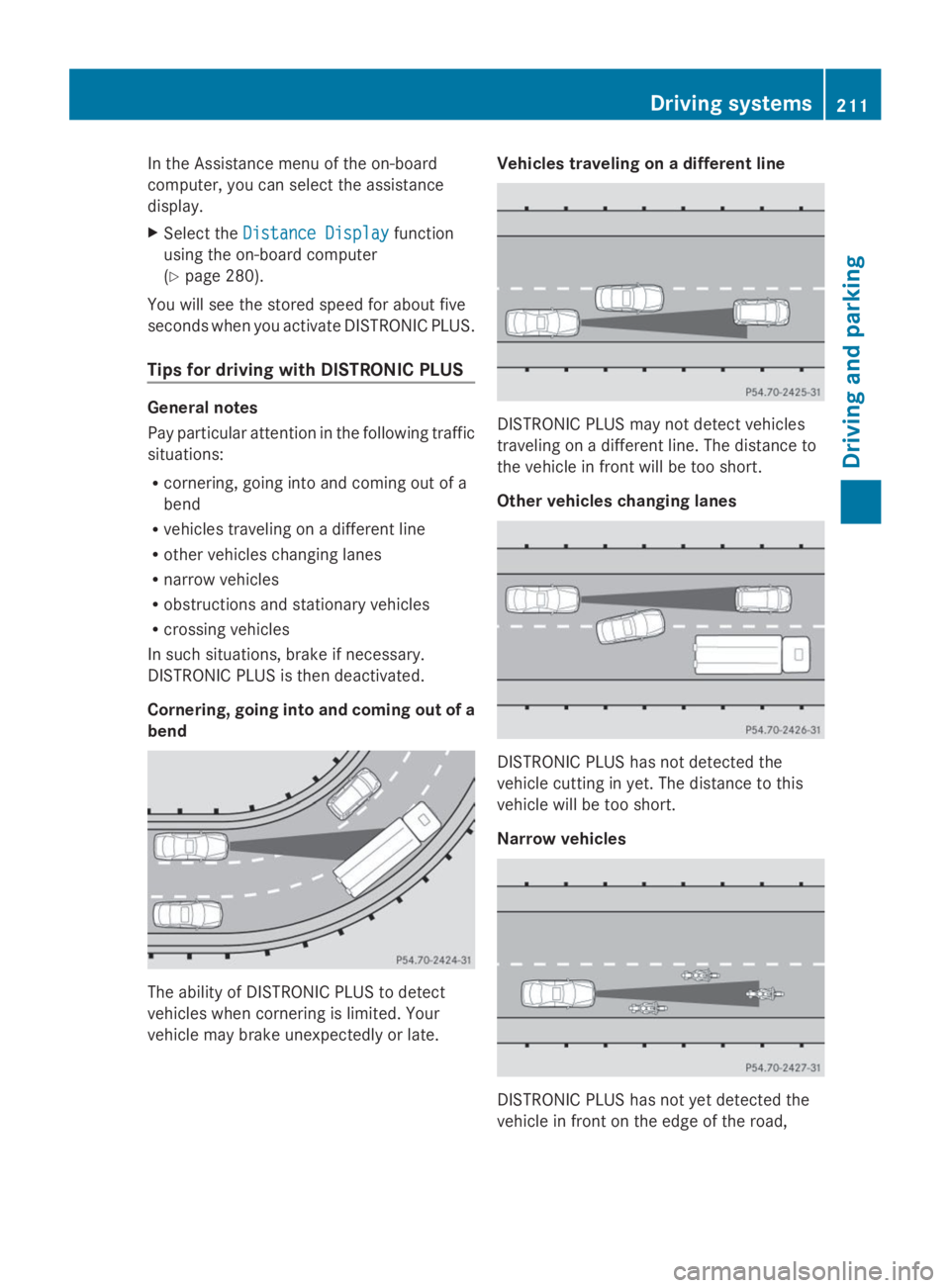
Cornering, going into and coming out of a
bend
The ability of DISTRONIC PLUS to detect
vehicles when cornering is limited. Your
vehicle may brake unexpectedly or late.
Vehicles traveling on a different line
DISTRONIC PLUS may not detect vehicles
traveling on a different line. The distance to
the vehicle in front will be too short.
Other vehicles changing lanes
DISTRONIC PLUS has not detected the
vehicle cutting in yet. The distance to this
vehicle will be too short.
Narrow vehicles
DISTRONIC PLUS has not yet detected the
vehicle in front on the edge of the road,
Driving systems211
Driving and parking
Z
Page 214 of 462
because of its narrow width. The distance to
the vehicle in front will be too short.
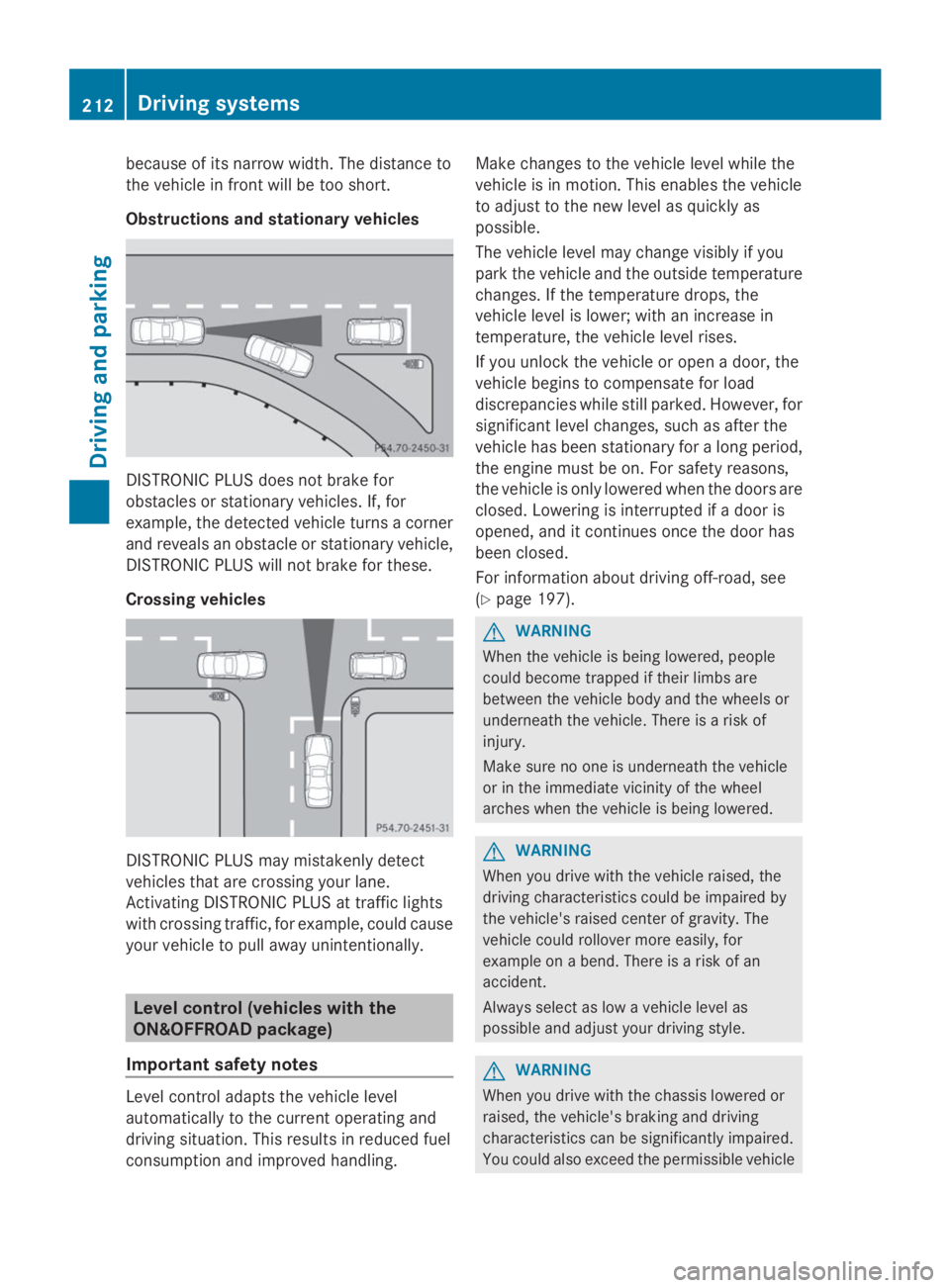
Obstructions and stationary vehicles
DISTRONIC PLUS does not brake for
obstacles or stationary vehicles. If, for
example, the detected vehicle turns a corner
and reveals an obstacle or stationary vehicle,
DISTRONIC PLUS will not brake for these.
Crossing vehicles
DISTRONIC PLUS may mistakenly detect
vehicles that are crossing your lane.
Activating DISTRONIC PLUS at traffic lights
with crossing traffic, for example, could cause
your vehicle to pull away unintentionally.
Level control (vehicles with the
ON&OFFROAD package)
Important safety notes
Level control adapts the vehicle level
automatically to the current operating and
driving situation. This results in reduced fuel
consumption and improved handling.
Make changes to the vehicle level while the
vehicle is in motion. This enables the vehicle
to adjust to the new level as quickly as
possible.
The vehicle level may change visibly if you
park the vehicle and the outside temperature
changes. If the temperature drops, the
vehicle level is lower; with an increase in
temperature, the vehicle level rises.
If you unlock the vehicle or open a door, the
vehicle begins to compensate for load
discrepancies while still parked. However, for
significant level changes, such as after the
vehicle has been stationary for a long period,
the engine must be on. For safety reasons,
the vehicle is only lowered when the doors are
closed. Lowering is interrupted if a door is
opened, and it continues once the door has
been closed.
For information about driving off-road, see
(Ypage 197).
GWARNING
When the vehicle is being lowered, people
could become trapped if their limbs are
between the vehicle body and the wheels or
underneath the vehicle. There is a risk of
injury.
Make sure no one is underneath the vehicle
or in the immediate vicinity of the wheel
arches when the vehicle is being lowered.
GWARNING
When you drive with the vehicle raised, the
driving characteristics could be impaired by
the vehicle's raised center of gravity. The
vehicle could rollover more easily, for
example on a bend. There is a risk of an
accident.
Always select as low a vehicle level as
possible and adjust your driving style.
GWARNING
When you drive with the chassis lowered or
raised, the vehicle's braking and driving
characteristics can be significantly impaired.
You could also exceed the permissible vehicle
212Driving systems
Driving and parking
Page 218 of 462
You will see a message in the multifunction
display, for example:LoweringLowering.
HOLD function
General notes
The HOLD function can assist the driver in the
following situations:
Rwhen pulling away, especially on steep
slopes
Rwhen maneuvering on steep slopes
Rwhen waiting in traffic
The vehicle is kept stationary without the
driver having to depress the brake pedal.
The braking effect is canceled and the HOLD
function deactivated when you depress the
accelerator pedal to pull away.
iDo not use the HOLD function when
driving off-road, on steep uphill or downhill
gradients or on slippery or loose surfaces.
The HOLD function cannot hold the vehicle
on such surfaces.
Important safety notes
GWARNING
When leaving the vehicle, it can still roll away
despite being braked by the HOLD function if:
Rthere is a malfunction in the system or in
the voltage supply.
Rthe HOLD function has been deactivated by
pressing the accelerator pedal or the brake
pedal, e.g. by a vehicle occupant.
Rthe electrical system in the engine
compartment, the battery or the fuses have
been tampered with.
Rthe battery is disconnected
There is a risk of an accident.
If you wish to exit the vehicle, always turn off
the HOLD function and secure the vehicle
against rolling away.
!If DISTRONIC PLUS or the HOLD function
is activated, the vehicle brakes
automatically in certain situations. To
prevent damage to the vehicle, deactivate
DISTRONIC PLUS and the HOLD function in
the following or other similar situations:
Rwhen towing the vehicle
Rin the car wash
Deactivating the HOLD function
(Ypage 217).
Activation conditions
You can activate the HOLD function if:
Rthe vehicle is stationary
Rthe engine is running
Rthe driver's door is closed or your seat belt
is fastened
Rthe electric parking brake is released
Rthe transmission is in positionD,RorN
RDISTRONIC PLUS is deactivated
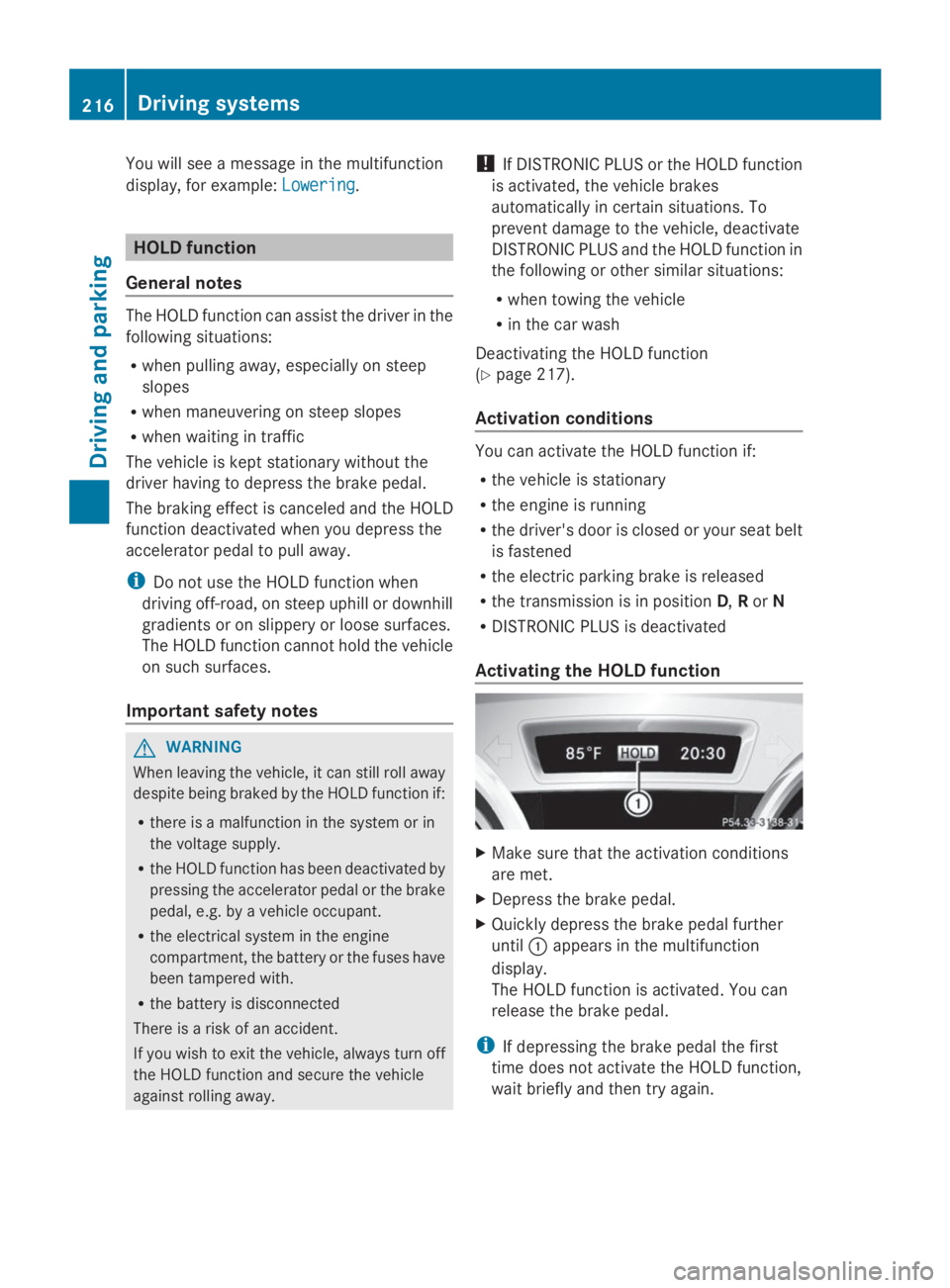
Activating the HOLD function
XMake sure that the activation conditions
are met.
XDepress the brake pedal.
XQuickly depress the brake pedal further
untilCappears in the multifunction
display.
The HOLD function is activated. You can
release the brake pedal.
iIf depressing the brake pedal the first
time does not activate the HOLD function,
wait briefly and then try again.
216Driving systems
Driving and parking
Page 219 of 462
Deactivating the HOLD function
The HOLD function is deactivated
automatically if:
Ryou accelerate and the transmission is in
positionDorR.
Ryou shift the transmission to positionP.
Ryou depress the brake pedal again with a
certain amount of pressure untilC
disappears from the multifunction display.
Ryou secure the vehicle using the electric
parking brake.
Ryou activate DISTRONIC PLUS.
iAfter a time, the electric parking brake
secures the vehicle and relieves the service
brake.
The electric parking brake automatically
secures the vehicle if the HOLD function is
activated and:
Rthe driver's door is open and the driver's
seat belt is unfastened.
Rthe engine is switched off.
Ra system malfunction occurs.
Rthe power supply is not sufficient.
On steep uphill or downhill inclines or if there
is a malfunction, the transmission may also
be automatically shifted into positionP.
AIRMATIC package
General notes
AIRMATIC regulates the level of your vehicle.
As well as level control (Ypage 218), your
vehicle can be equipped with ADS (Adaptive
Damping System) (Ypage 217) and ACTIVE
CURVE SYSTEM (Ypage 218).
Observe the notes on driving with a trailer
(Ypage 264).
ADS (Adaptive Damping System)
General notes
ADS adapts the damping characteristics to
the current operating and driving situation.
This depends on:
Ryour driving style
Rthe road surface conditions
Rthe ADS setting
Rthe vehicle level setting
Your selection remains stored even if you
remove the SmartKey from the ignition lock.
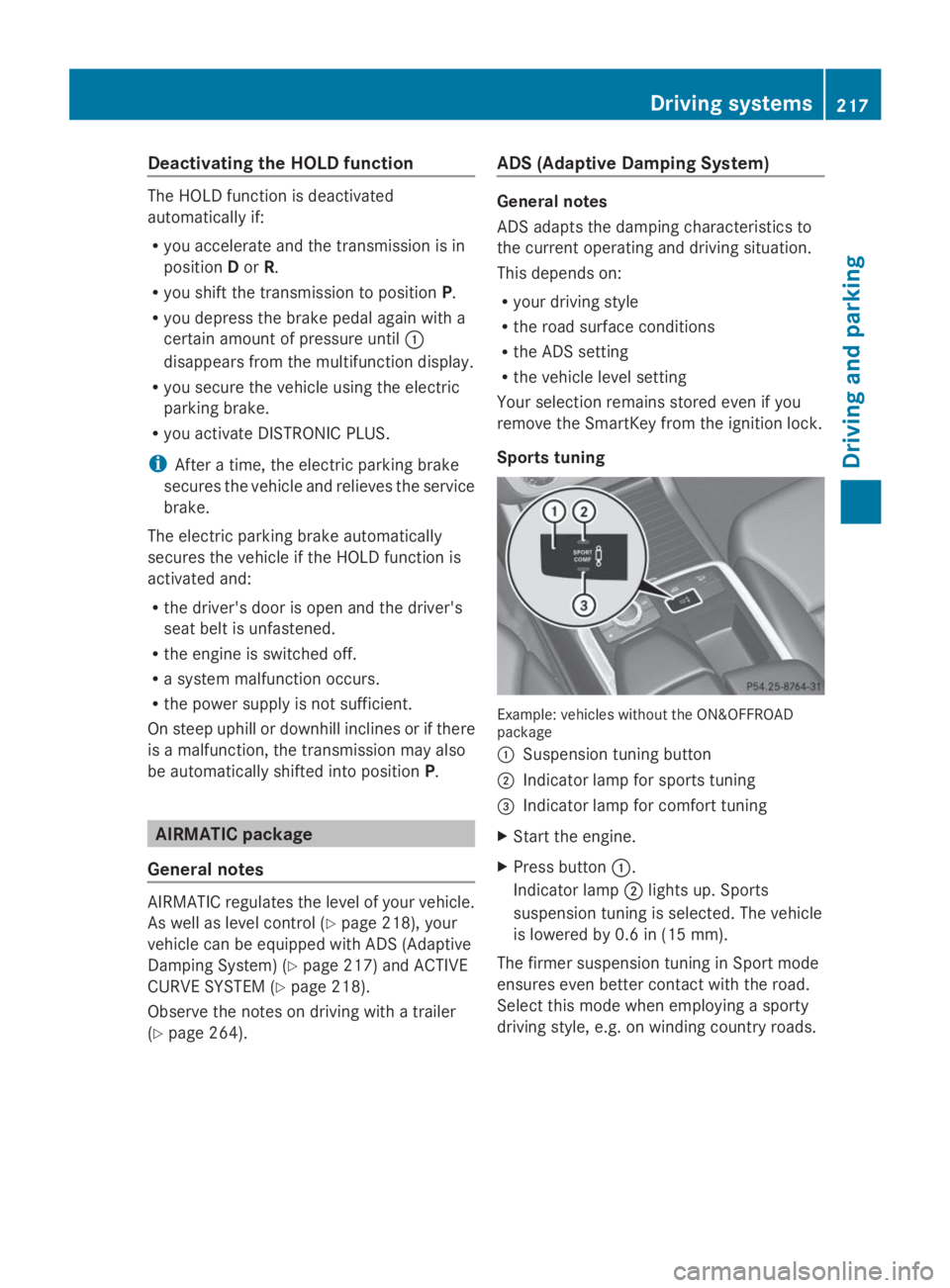
Sports tuning
Example: vehicles without the ON&OFFROADpackage
CSuspension tuning button
DIndicator lamp for sports tuning
Page 225 of 462
PARKTRONIC does not detect such objects
when they are in the immediate vicinity of
the vehicle. You could damage the vehicle
or the objects.
The sensors may not detect snow and other
objects that absorb ultrasonic waves.
Ultrasonic sources such as an automatic
car wash, the compressed-air brakes on a
truck or a pneumatic drill could cause
PARKTRONIC to malfunction.
PARKTRONIC may not function correctly on
uneven terrain.
PARKTRONIC is activated automatically when
you:
Rswitch on the ignition
Rshift the transmission to positionD,RorN
RRelease the electric parking brake
PARKTRONIC is deactivated at speeds above
11 mph (18 km/h). It is reactivated at lower
speeds.
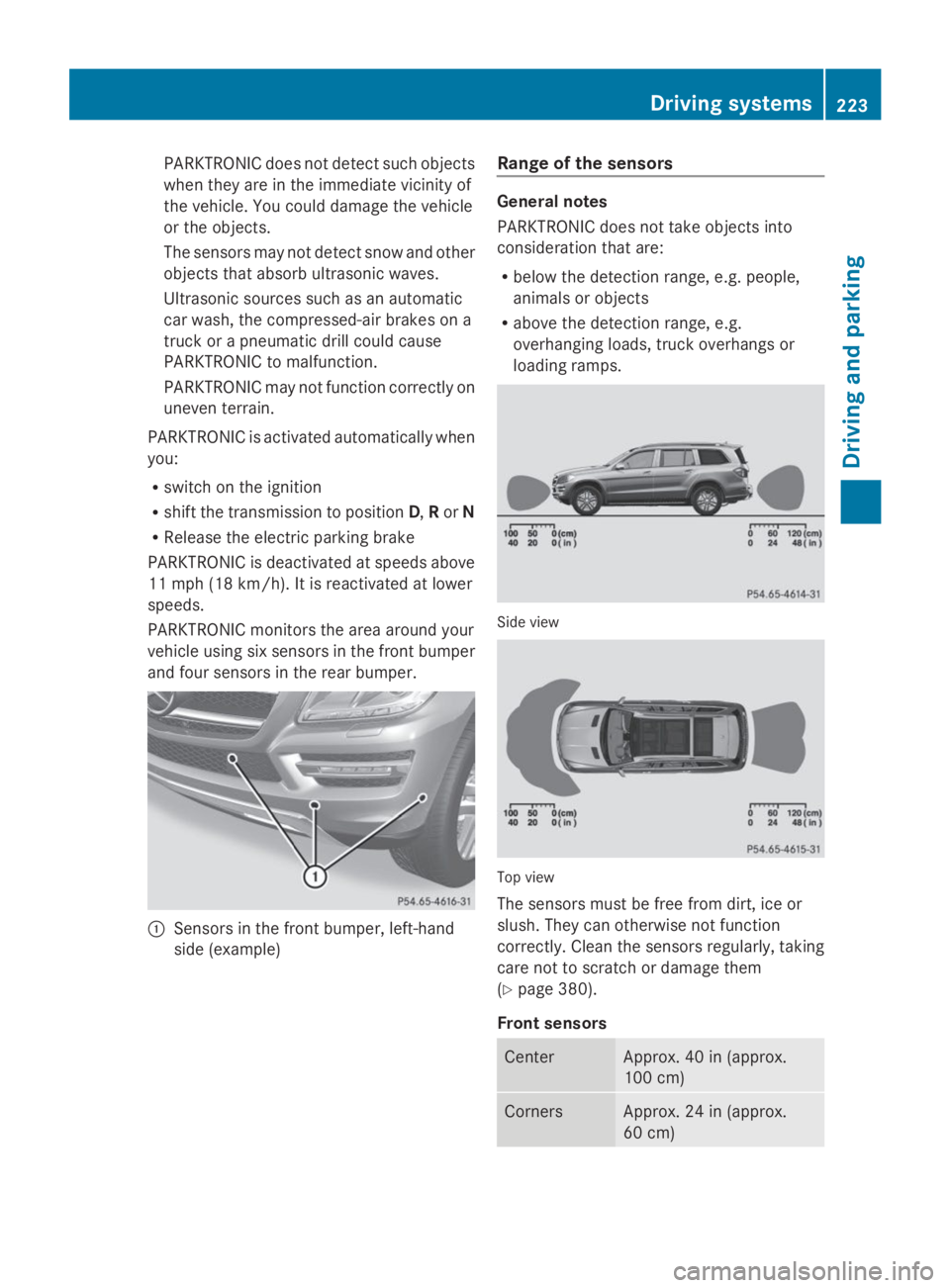
PARKTRONIC monitors the area around your
vehicle using six sensors in the front bumper
and four sensors in the rear bumper.
CSensors in the front bumper, left-hand
side (example)
Range of the sensors
General notes
PARKTRONIC does not take objects into
consideration that are:
Rbelow the detection range, e.g. people,
animals or objects
Rabove the detection range, e.g.
overhanging loads, truck overhangs or
loading ramps.
Side view
Top view
The sensors must be free from dirt, ice or
slush. They can otherwise not function
correctly. Clean the sensors regularly, taking
care not to scratch or damage them
(Ypage 380).
Front sensors
CenterApprox. 40 in (approx.
100 cm)
CornersApprox. 24 in (approx.
60 cm)
Driving systems223
Driving and parking
Z
Page 230 of 462
Active Parking Assist will only detect parking
spaces:
Rthat are parallel to the direction of travel
Rthat are at least 59 in (1.5 m) wide
Rthat are at least 51 in (1.3 m) longer than
your vehicle
When driving at speeds below 19 mph
(30 km/h), you will see parking symbol as a
status indicator in the instrument cluster.
When a parking space has been detected, an
arrow towards the right or the left also
appears. By default, Active Parking Assist
only displays parking spaces on the front-
passenger side. Parking spaces on the
driver's side are displayed as soon as the turn
signal on the driver's side is activated. When
parking on the driver's side, this must remain
switched on until you acknowledge the use of
Active Parking Assist by pressing thev
button on the multifunction steering wheel.
A parking space is displayed while you are
driving past it, and until you are
approximately 50 ft (15 m) away from it.
Parking
GWARNING
Active Parking Assist merely aids you by
intervening actively in the steering. If you do
not brake there is a risk of an accident.
Always apply the brakes yourself when
maneuvering and parking.
XStop the vehicle when the parking space
symbol shows the desired parking space in
the instrument cluster.
XShift the transmission to positionR.
TheStart Park Assist? Yes: OK No:Start Park Assist? Yes: OK No:
8message appears in the multifunction
display.
XTo cancel the procedure:press the
8button on the multifunction steering
wheel or pull away.
or
XTo park using Active Parking Assist:
press thevbutton on the multifunction
steering wheel.
ThePark Assist Active AcceleratePark Assist Active Accelerate
and Brake Observe Surroundingsand Brake Observe Surroundings
message appears in the multifunction
display.
XLet go of the multifunction steering wheel.
XBack up the vehicle, being ready to brake
at all times. When backing up, drive at a
speed below approximately 6 mph
(10 km/h). Otherwise Active Parking Assist
will be canceled.
iIn tight parking spaces, you will achieve
the best parking results by backing up as
far as possible. When doing so, also
observe the PARKTRONIC messages.
XStop as soon as PARKTRONIC sounds the
continuous warning tone, if not before.
Maneuvering may be required in tight
parking spaces.
ThePark Assist active Select DPark Assist active Select D
ObserveObservesurroundingssurroundingsmessage appears in
the multifunction display.
XShift the transmission to positionDwhile
the vehicle is stationary.
Active Parking Assist immediately steers in
the other direction.
ThePark Assist active AcceleratePark Assist active Accelerate
and brake Observe surroundingsand brake Observe surroundings
message appears in the multifunction
display.
iYou will achieve the best results by
waiting for the steering procedure to
complete before pulling away.
XDrive forwards and be ready to brake at all
times.
XStop as soon as PARKTRONIC sounds the
continuous warning tone, if not before.
228Driving systems
Driving an d parking
Page 231 of 462
ThePark Assist active Select RPark Assist active Select R
ObserveObservesurroundingssurroundingsmessage appears in
the multifunction display.
As soon as the parking procedure is
complete, thePark Assist switched offPark Assist switched off
message appears and a warning tone sounds.
Active Parking Assist no longer supports you
with steering interventions. When Active
Parking Assist is finished, you must steer
again yourself. PARKTRONIC is still available.
Parking tips:
RThe way your vehicle is positioned in the
parking space after parking is dependent
on various factors. These include the
position and shape of the vehicles parked
in front and behind it and the conditions of
the location. It may be the case that Active
Parking Assist guides you too far into a
parking space, or not far enough into it. In
some cases, it may also lead you across or
onto the curb. If necessary, you should
cancel the parking procedure with Active
Parking Assist.
RYou can also select preselect transmission
positionD. The vehicle redirects and does
not drive as far into the parking space.
Should the gear change occur too soon to
achieve a sensible parking position, the
parking procedure will be aborted.
Exiting a parking space
In order that Active Parking Assist can
support you when you exit the parking space:
Ryou need to have parked using Active
Parking Assist.
Rthe border of the parking space must be
high enough at the front and the rear. A
curb stone is too small, for example.
Rthe border of the parking space must not
be too wide, as the position of the vehicle
must not exceed an angle of 45° to the
starting position as it is maneuvered into
the parking space.
Ra maneuvering distance of at least 3.3 ft
(1.0 m) must be available.
XStart the engine.
XSwitch on the turn signal in the direction
you are pulling away.
XShift the transmission to positionDorR.
TheStart Park Assist? Yes: OK No:Start Park Assist? Yes: OK No:
8message appears in the multifunction
display.
XTo cancel the procedure:press the
8button on the multifunction steering
wheel or pull away.
or
XTo exit a parking space using Active
Parking Assist:press thevbutton on
the multifunction steering wheel.
ThePark Assist active AcceleratePark Assist active Accelerate
and brake Observe surroundingsand brake Observe surroundings
message appears in the multifunction
display.
XLet go of the multifunction steering wheel.
XReverse the vehicle or drive forwards, being
ready to brake at all times. Do not exceed
a maximum speed of approximately
6 mph (10 km/h) when exiting a parking
space. Otherwise Active Parking Assist will
be canceled.
XStop as soon as PARKTRONIC sounds the
continuous warning tone, if not before.
XShift the transmission to positionDorRas
required while the vehicle is stationary.
Active Parking Assist immediately steers in
the other direction.
iYou will achieve the best results by
waiting for the steering procedure to
complete before pulling away.
If you back up after activation, the steering
wheel is moved to the straight-ahead
position.
XDrive forwards or back up the vehicle, being
ready to brake at all times.
XStop as soon as PARKTRONIC sounds the
continuous warning tone, if not before.
XDrive forwards and back up as prompted by
the PARKTRONIC warning displays, several
times if necessary.
Driving systems229
Driving and parking
Z
Page 232 of 462
Once you have exited the parking space
completely, the steering wheel is moved to
the straight-ahead position. You hear a tone
and thePark Assist FinishedPark Assist Finishedmessage
appears in the multifunction display. You will
then have to steer and merge into traffic on
your own. PARKTRONIC is still available. You
can take over the steering, before the vehicle
has exited the parking space completely. This
is useful, for example when you recognize
that it is already possible to pull out of the
parking space.
Canceling Active Parking Assist
XStop the movement of the multifunction
steering wheel or steer yourself.
Active Parking Assist will be canceled at
once. ThePark Assist CanceledPark Assist Canceled
message appears in the multifunction
display.
or
XPress the PARKTRONIC button on the
center console (Ypage 224).
PARKTRONIC is switched off and Active
Parking Assist is immediately canceled.
ThePark Assist CanceledPark Assist Canceledmessage
appears in the multifunction display.
Active Parking Assist is canceled
automatically if:
Rthe electric parking brake is engaged
Rtransmission positionPis selected
Rparking using Active Parking Assist is no
longer possible
Ryou are driving faster than 6 mph
(10 km/h)
Ra wheel spins, ESP®intervenes or fails. The