service MERCEDES-BENZ GL 2014 Owner's Manual
[x] Cancel search | Manufacturer: MERCEDES-BENZ, Model Year: 2014, Model line: GL, Model: MERCEDES-BENZ GL 2014Pages: 462, PDF Size: 8.98 MB
Page 219 of 462
Deactivating the HOLD function
The HOLD function is deactivated
automatically if:
Ryou accelerate and the transmission is in
positionDorR.
Ryou shift the transmission to positionP.
Ryou depress the brake pedal again with a
certain amount of pressure untilC
disappears from the multifunction display.
Ryou secure the vehicle using the electric
parking brake.
Ryou activate DISTRONIC PLUS.
iAfter a time, the electric parking brake
secures the vehicle and relieves the service
brake.
The electric parking brake automatically
secures the vehicle if the HOLD function is
activated and:
Rthe driver's door is open and the driver's
seat belt is unfastened.
Rthe engine is switched off.
Ra system malfunction occurs.
Rthe power supply is not sufficient.
On steep uphill or downhill inclines or if there
is a malfunction, the transmission may also
be automatically shifted into positionP.
AIRMATIC package
General notes
AIRMATIC regulates the level of your vehicle.
As well as level control (Ypage 218), your
vehicle can be equipped with ADS (Adaptive
Damping System) (Ypage 217) and ACTIVE
CURVE SYSTEM (Ypage 218).
Observe the notes on driving with a trailer
(Ypage 264).
ADS (Adaptive Damping System)
General notes
ADS adapts the damping characteristics to
the current operating and driving situation.
This depends on:
Ryour driving style
Rthe road surface conditions
Rthe ADS setting
Rthe vehicle level setting
Your selection remains stored even if you
remove the SmartKey from the ignition lock.
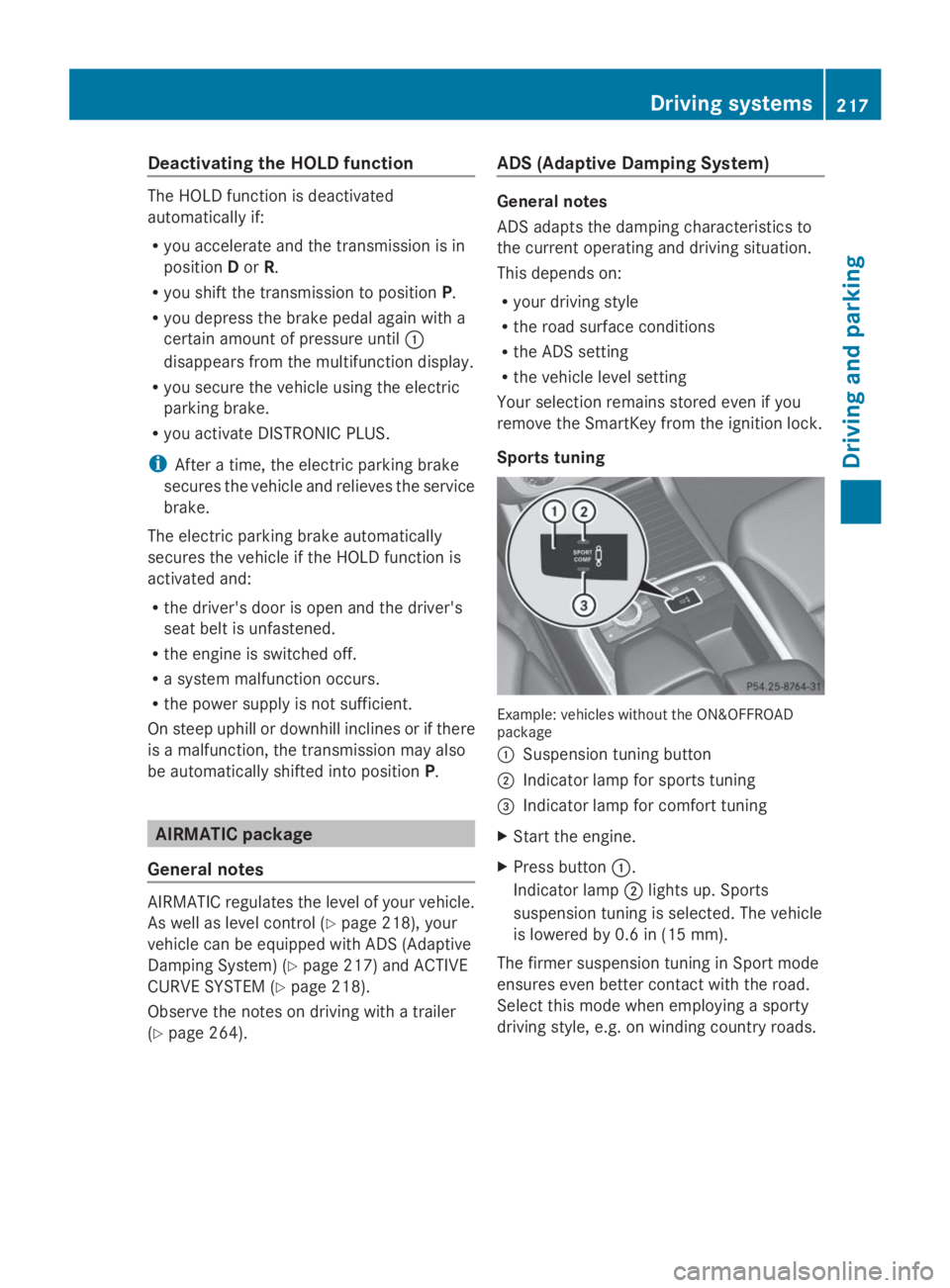
Sports tuning
Example: vehicles without the ON&OFFROADpackage
CSuspension tuning button
DIndicator lamp for sports tuning
Page 274 of 462
Useful information
iThis Operator's Manual describes all
models and all standard and optional
equipment of your vehicle available at the
time of publication of the Operator's
Manual. Country-specific differences are
possible. Please note that your vehicle may
not be equipped with all features
described. This also applies to safety-
related systems and functions.
iRead the information on qualified
specialist workshops: (Ypage 28).
Important safety notes
GWARNING
If you operate information systems and
communication equipment integrated in the
vehicle while driving, you will be distracted
from traffic conditions. You could also lose
control of the vehicle. There is a risk of an
accident.
Only operate the equipment when the traffic
situation permits. If you are not sure that this
is possible, park the vehicle paying attention
to traffic conditions and operate the
equipment when the vehicle is stationary.
GWARNING
If the instrument cluster has failed or
malfunctioned, you may not recognize
function restrictions in systems relevant to
safety. The operating safety of your vehicle
may be impaired. There is a risk of an
accident.
Drive on carefully. Have the vehicle checked
at a qualified specialist workshop
immediately.
You must observe the legal requirements for
the country in which you are currently driving
when operating the on-board computer.
The on-board computer only shows messages
or warnings from certain systems in the
multifunction display. You should therefore
make sure your vehicle is operating safely at
all times. Otherwise, a vehicle that is not
operating safely may cause an accident.
For an overview, see the instrument panel
illustration (Ypage 33).
Displays and operation
Instrument cluster lighting
The lighting in the instrument cluster, in the
displays and the controls in the vehicle
interior can be adjusted using the brightness
control knob.
The brightness control knob is located on the
bottom left of the instrument cluster
(Ypage 33).
XTurn the brightness control knob clockwise
or counter-clockwise.
If the light switch is set toX,`or
X, the brightness is dependent upon
the brightness of the ambient light.
iThe light sensor in the instrument cluster
automatically controls the brightness of
the multifunction display.
In daylight, the displays in the instrument
cluster are not illuminated.
Coolant temperature display
GWARNING
Opening the hood when the engine is
overheated or when there is a fire in the
engine compartment could expose you to hot
gases or other service products. There is a
risk of injury.
Let an overheated engine cool down before
opening the hood. If there is a fire in the
engine compartment, keep the hood closed
and contact the fire department.
!A display message is shown if the coolant
temperature is too high.
272Displays and operation
On-board computer and displays
Page 281 of 462
If track information is stored on the audio
device or medium, the multifunction display
will show the number and title of the track.
The current track does not appear in audio
AUX mode (Auxiliary audio mode: external
audio source connected).
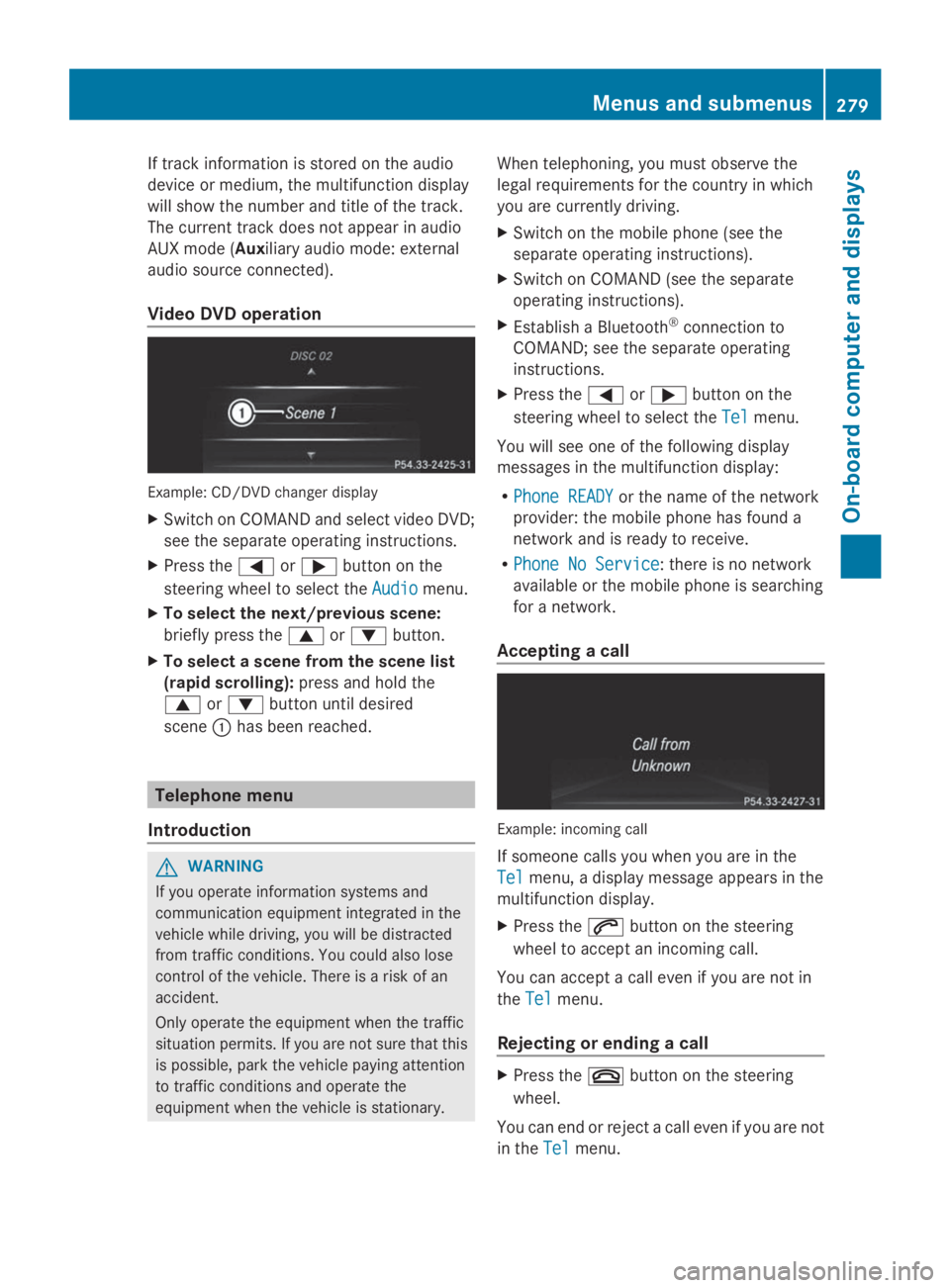
Video DVD operation
Example: CD/DVD changer display
XSwitch on COMAND and select video DVD;
see the separate operating instructions.
XPress theYorebutton on the
steering wheel to select theAudioAudiomenu.
XTo select the next/previous scene:
briefly press thecordbutton.
XTo select a scene from the scene list
(rapid scrolling):press and hold the
cordbutton until desired
sceneChas been reached.
Telephone menu
Introduction
GWARNING
If you operate information systems and
communication equipment integrated in the
vehicle while driving, you will be distracted
from traffic conditions. You could also lose
control of the vehicle. There is a risk of an
accident.
Only operate the equipment when the traffic
situation permits. If you are not sure that this
is possible, park the vehicle paying attention
to traffic conditions and operate the
equipment when the vehicle is stationary.
When telephoning, you must observe the
legal requirements for the country in which
you are currently driving.
XSwitch on the mobile phone (see the
separate operating instructions).
XSwitch on COMAND (see the separate
operating instructions).
XEstablish a Bluetooth®connection to
COMAND; see the separate operating
instructions.
XPress theYorebutton on the
steering wheel to select theTelTelmenu.
You will see one of the following display
messages in the multifunction display:
RPhone READYPhone READYor the name of the network
provider: the mobile phone has found a
network and is ready to receive.
RPhone No ServicePhone No Service: there is no network
available or the mobile phone is searching
for a network.
Accepting a call
Example: incoming call
If someone calls you when you are in the
TelTelmenu, a display message appears in the
multifunction display.
XPress theabutton on the steering
wheel to accept an incoming call.
You can accept a call even if you are not in
theTelTelmenu.
Rejecting or ending a call
XPress thevbutton on the steering
wheel.
You can end or reject a call even if you are not
in theTelTelmenu.
Menus and submenus279
On-board computer and displays
Z
Page 284 of 462
Activating/deactivating Lane Keeping
Assist
XPressYoreon the steering wheel
to select theDriveAssistDriveAssistmenu.
XPresscordto selectLaneLane
Keeping AssistKeeping Assist.
XPress thevbutton.
The current selection is displayed.
XPressvto confirm.
XPress thedorcbutton to setOffOff,
StandardStandardorAdaptiveAdaptive.
When Lane Keeping Assist or Active Lane
Keeping Assist is activated, the
multifunction display shows the lane
markings as bright lines in the assistance
graphic.
XPress thevbutton to save the setting.
For further information about Lane Keeping
Assist, see (Ypage 245).
For further information about Active Lane
Keeping Assist, see (Ypage 251).
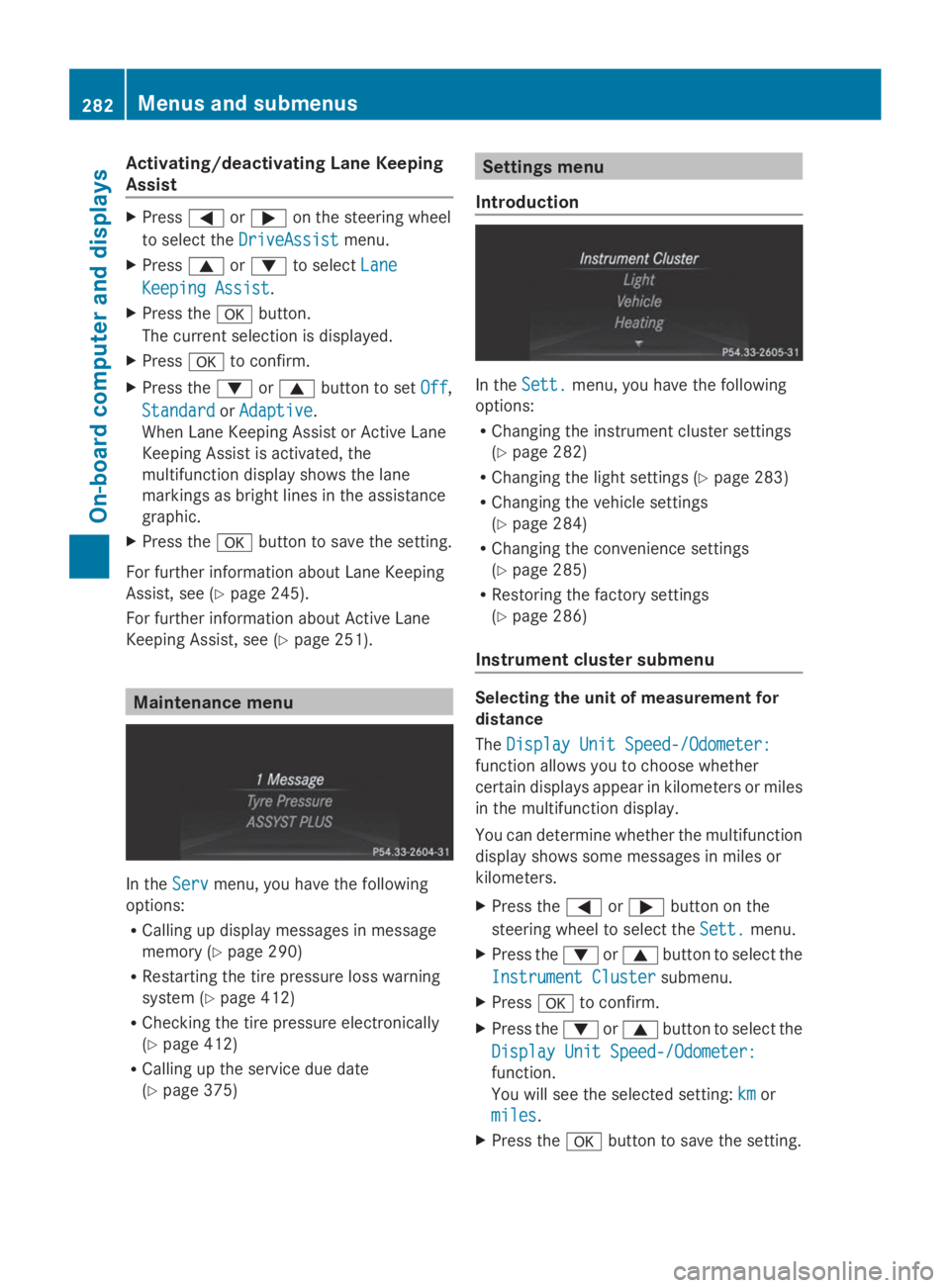
Maintenance menu
In theServServmenu, you have the following
options:
RCalling up display messages in message
memory (Ypage 290)
RRestarting the tire pressure loss warning
system (Ypage 412)
RChecking the tire pressure electronically
(Ypage 412)
RCalling up the service due date
(Ypage 375)
Settings menu
Introduction
In theSett.Sett.menu, you have the following
options:
RChanging the instrument cluster settings
(Ypage 282)
RChanging the light settings (Ypage 283)
RChanging the vehicle settings
(Ypage 284)
RChanging the convenience settings
(Ypage 285)
RRestoring the factory settings
(Ypage 286)
Instrument cluster submenu
Selecting the unit of measurement for
distance
TheDisplay Unit Speed-/Odometer:Display Unit Speed-/Odometer:
function allows you to choose whether
certain displays appear in kilometers or miles
in the multifunction display.
You can determine whether the multifunction
display shows some messages in miles or
kilometers.
XPress theYorebutton on the
steering wheel to select theSett.Sett.menu.
XPress thedorcbutton to select the
Instrument ClusterInstrument Clustersubmenu.
XPressvto confirm.
XPress thedorcbutton to select the
Display Unit Speed-/Odometer:Display Unit Speed-/Odometer:
function.
You will see the selected setting:kmkmor
milesmiles.
XPress thevbutton to save the setting.
282Menus and submenus
On-b oard computer and displays
Page 285 of 462
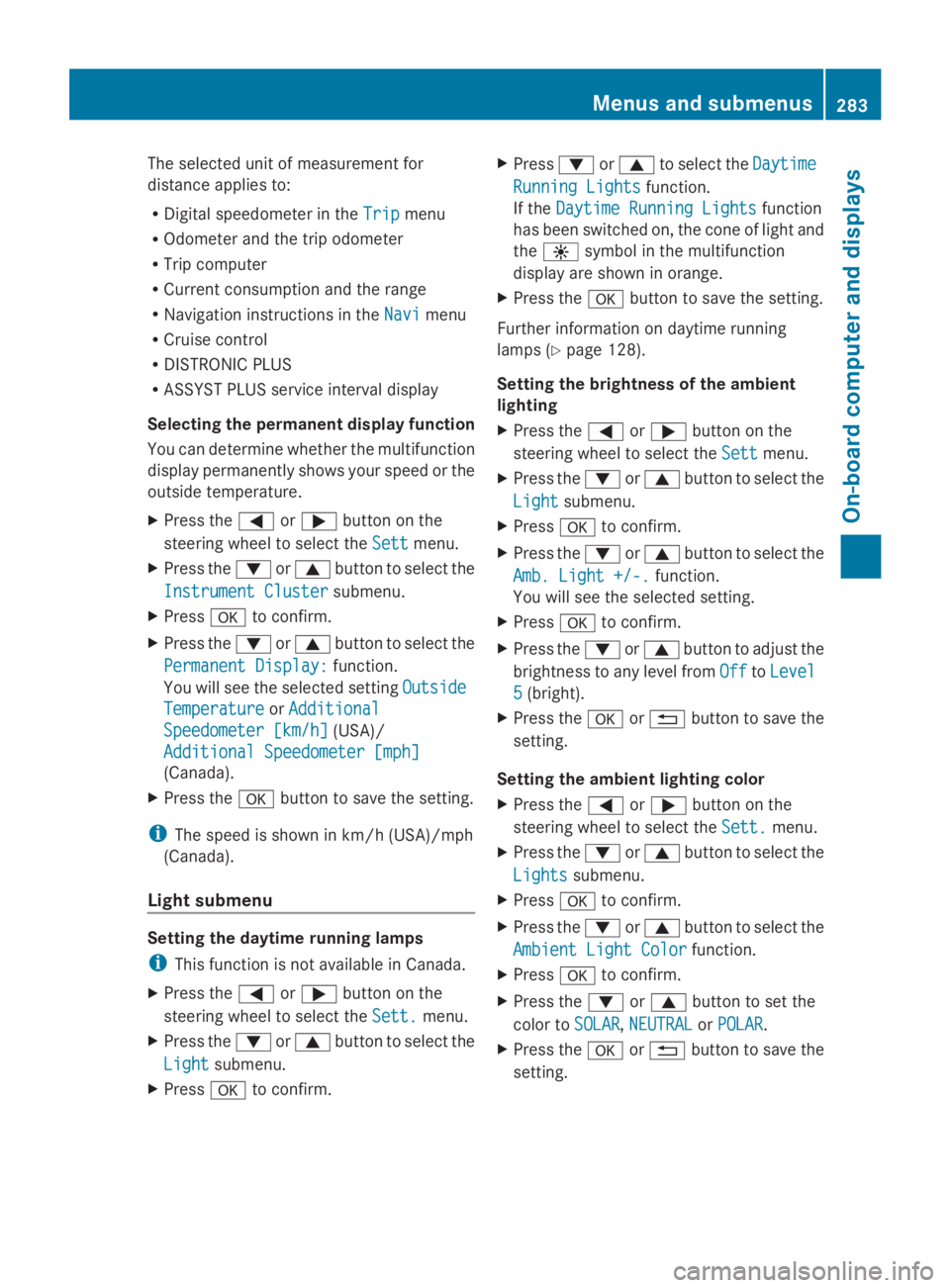
The selected unit of measurement for
distance applies to:
RDigital speedometer in theTripTripmenu
ROdometer and the trip odometer
RTrip computer
RCurrent consumption and the range
RNavigation instructions in theNaviNavimenu
RCruise control
RDISTRONIC PLUS
RASSYST PLUS service interval display
Selecting the permanent display function
You can determine whether the multifunction
display permanently shows your speed or the
outside temperature.
XPress theYorebutton on the
steering wheel to select theSettSettmenu.
XPress thedorcbutton to select the
Instrument ClusterInstrument Clustersubmenu.
XPressvto confirm.
XPress thedorcbutton to select the
Permanent Display:Permanent Display:function.
You will see the selected settingOutsideOutside
TemperatureTemperatureorAdditionalAdditional
Speedometer [km/h]Speedometer [km/h](USA)/
Additional Speedometer [mph]Additional Speedometer [mph]
(Canada).
XPress thevbutton to save the setting.
iThe speed is shown in km/h (USA)/mph
(Canada).
Light submenu
Setting the daytime running lamps
iThis function is not available in Canada.
XPress theYorebutton on the
steering wheel to select theSett.Sett.menu.
XPress thedorcbutton to select the
LightLightsubmenu.
XPressvto confirm.
XPressdorcto select theDaytimeDaytime
Running LightsRunning Lightsfunction.
If theDaytime Running LightsDaytime Running Lightsfunction
has been switched on, the cone of light and
the
Page 301 of 462
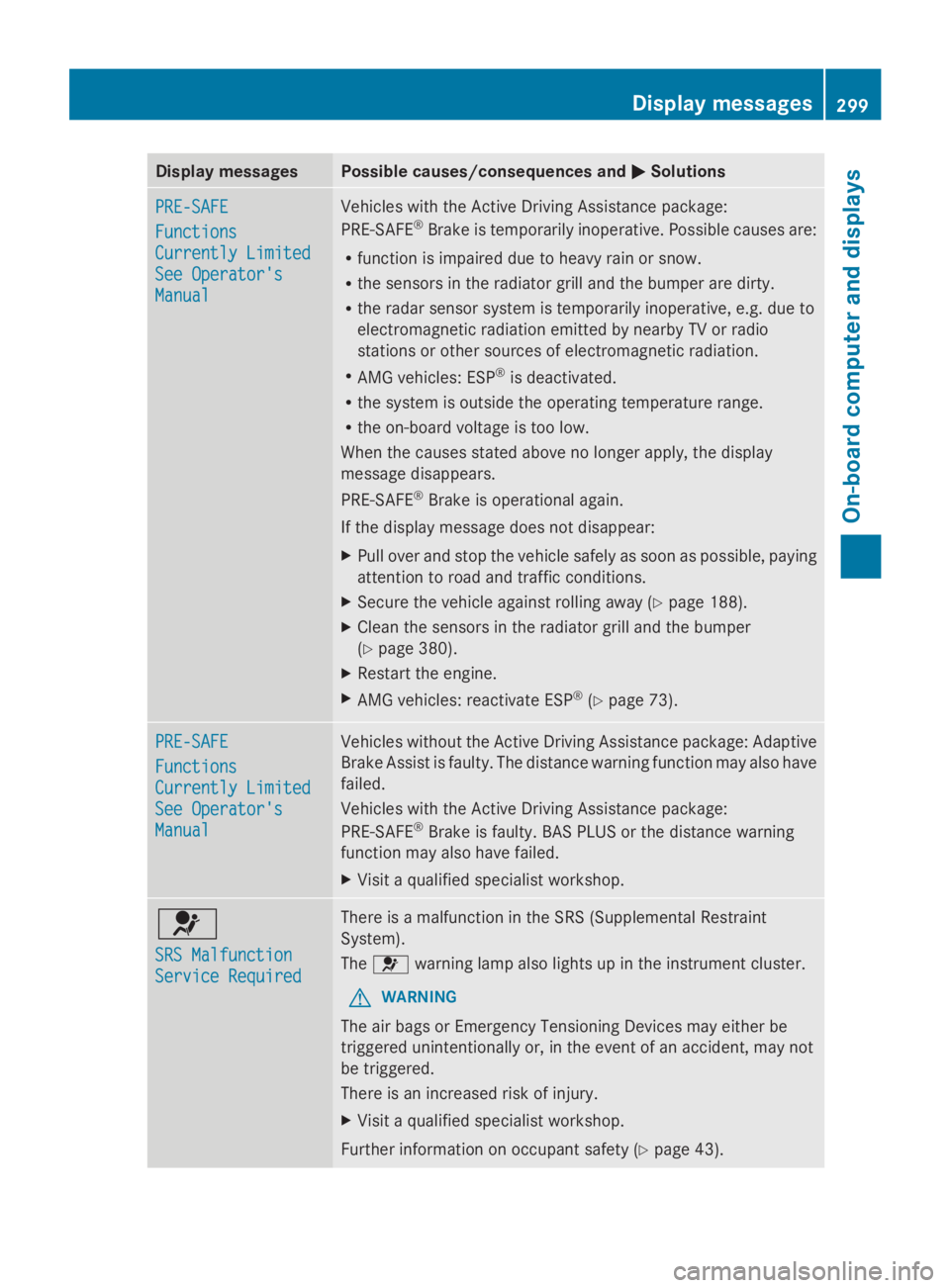
Display messagesPossible causes/consequences andPPSolutions
PRE-SAFEPRE-SAFE
FunctionsFunctions
Currently LimitedCurrently Limited
See Operator'sSee Operator's
ManualManual
Vehicles with the Active Driving Assistance package:
PRE-SAFE®Brake is temporarily inoperative. Possible causes are:
Rfunction is impaired due to heavy rain or snow.
Rthe sensors in the radiator grill and the bumper are dirty.
Rthe radar sensor system is temporarily inoperative, e.g. due to
electromagnetic radiation emitted by nearby TV or radio
stations or other sources of electromagnetic radiation.
RAMG vehicles: ESP®is deactivated.
Rthe system is outside the operating temperature range.
Rthe on-board voltage is too low.
When the causes stated above no longer apply, the display
message disappears.
PRE-SAFE®Brake is operational again.
If the display message does not disappear:
XPull over and stop the vehicle safely as soon as possible, paying
attention to road and traffic conditions.
XSecure the vehicle against rolling away (Ypage 188).
XClean the sensors in the radiator grill and the bumper
(Ypage 380).
XRestart the engine.
XAMG vehicles: reactivate ESP®(Ypage 73).
PRE-SAFEPRE-SAFE
FunctionsFunctions
Currently LimitedCurrently Limited
See Operator'sSee Operator's
ManualManual
Vehicles without the Active Driving Assistance package: Adaptive
Brake Assist is faulty. The distance warning function may also have
failed.
Vehicles with the Active Driving Assistance package:
PRE-SAFE®Brake is faulty. BAS PLUS or the distance warning
function may also have failed.
XVisit a qualified specialist workshop.
u
SRS MalfunctionSRS Malfunction
Service RequiredService Required
There is a malfunction in the SRS (Supplemental Restraint
System).
Theuwarning lamp also lights up in the instrument cluster.
GWARNING
The air bags or Emergency Tensioning Devices may either be
triggered unintentionally or, in the event of an accident, may not
be triggered.
There is an increased risk of injury.
XVisit a qualified specialist workshop.
Further information on occupant safety (Ypage 43).
Displaymessages299
On-b oard computer and displays
Z
Page 302 of 462
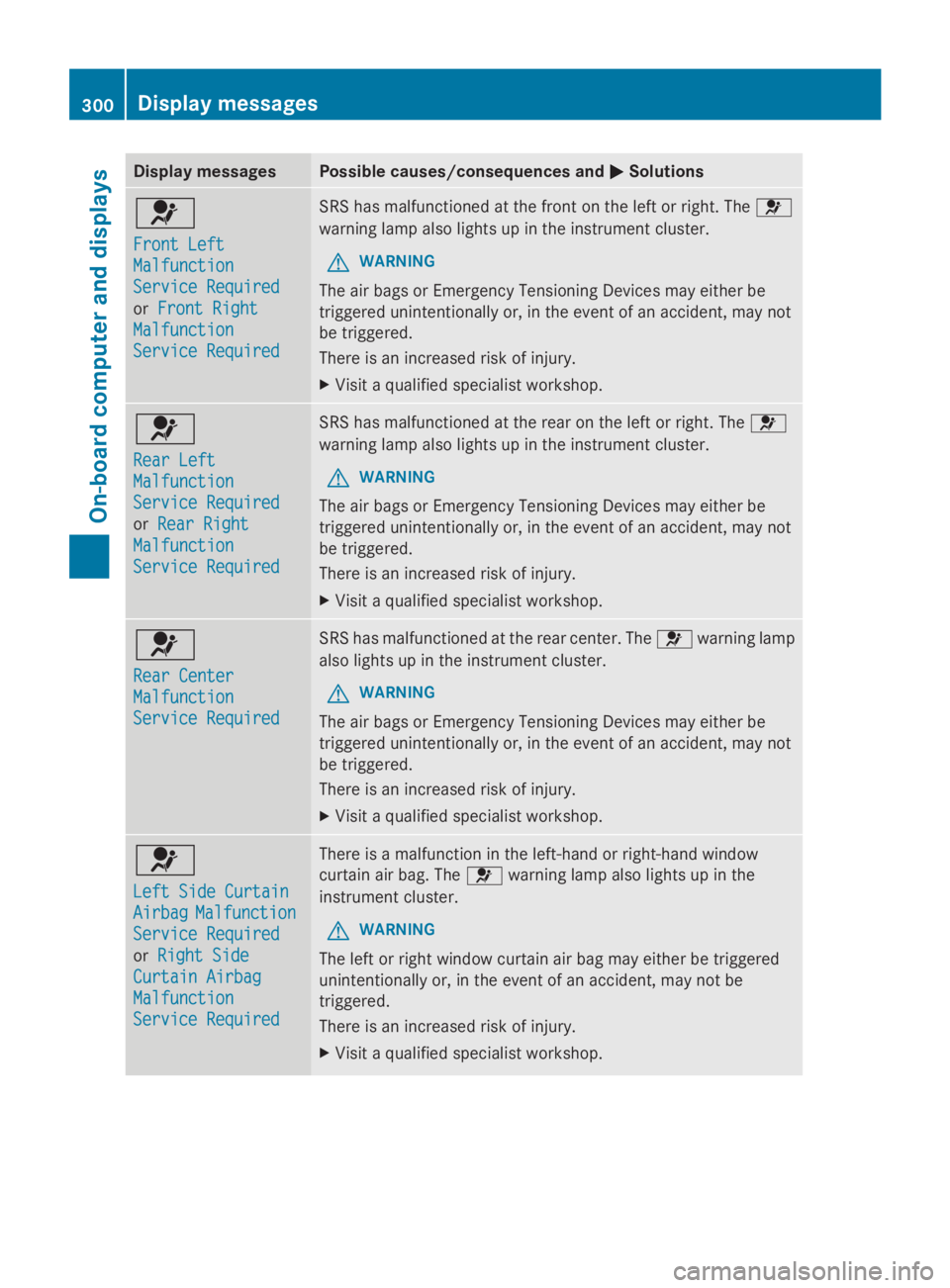
Display messagesPossible causes/consequences andPPSolutions
u
Front LeftFront Left
MalfunctionMalfunction
Service RequiredService Required
orFront RightFront Right
MalfunctionMalfunction
Service RequiredService Required
SRS has malfunctioned at the front on the left or right. Theu
warning lamp also lights up in the instrument cluster.
GWARNING
The air bags or Emergency Tensioning Devices may either be
triggered unintentionally or, in the event of an accident, may not
be triggered.
There is an increased risk of injury.
XVisit a qualified specialist workshop.
u
Rear LeftRear Left
MalfunctionMalfunction
Service RequiredService Required
orRear RightRear Right
MalfunctionMalfunction
Service RequiredService Required
SRS has malfunctioned at the rear on the left or right. Theu
warning lamp also lights up in the instrument cluster.
GWARNING
The air bags or Emergency Tensioning Devices may either be
triggered unintentionally or, in the event of an accident, may not
be triggered.
There is an increased risk of injury.
XVisit a qualified specialist workshop.
u
Rear CenterRear Center
MalfunctionMalfunction
Service RequiredService Required
SRS has malfunctioned at the rear center. Theuwarning lamp
also lights up in the instrument cluster.
GWARNING
The air bags or Emergency Tensioning Devices may either be
triggered unintentionally or, in the event of an accident, may not
be triggered.
There is an increased risk of injury.
XVisit a qualified specialist workshop.
u
Left Side CurtainLeft Side Curtain
AirbagAirbagMalfunctionMalfunction
Service RequiredService Required
orRight SideRight Side
Curtain AirbagCurtain Airbag
MalfunctionMalfunction
Service RequiredService Required
There is a malfunction in the left-hand or right-hand window
curtain air bag. Theuwarning lamp also lights up in the
instrument cluster.
GWARNING
The left or right window curtain air bag may either be triggered
unintentionally or, in the event of an accident, may not be
triggered.
There is an increased risk of injury.
XVisit a qualified specialist workshop.
300Displaymessages
On-b oard computer and displays
Page 323 of 462
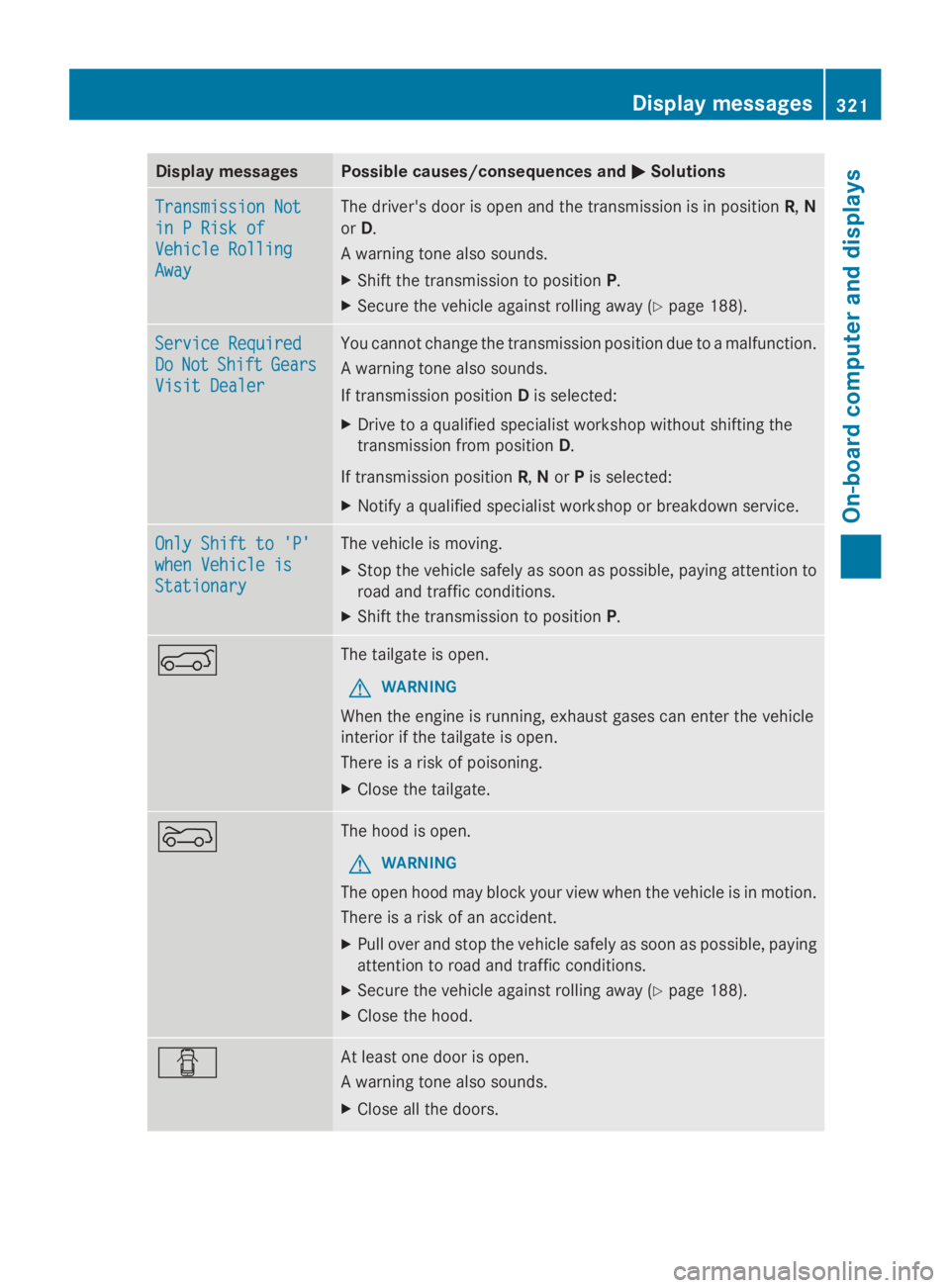
Display messagesPossible causes/consequences andPPSolutions
Transmission NotTransmission Not
in P Risk ofin P Risk of
Vehicle RollingVehicle Rolling
AwayAway
The driver's door is open and the transmission is in positionR,N
orD.
A warning tone also sounds.
XShift the transmission to positionP.
XSecure the vehicle against rolling away (Ypage 188).
Service RequiredService Required
DoDoNotNotShiftShiftGearsGears
Visit DealerVisit Dealer
You cannot change the transmission position due to a malfunction.
A warning tone also sounds.
If transmission positionDis selected:
XDrive to a qualified specialist workshop without shifting the
transmission from positionD.
If transmission positionR,NorPis selected:
XNotify a qualified specialist workshop or breakdown service.
Only Shift to 'P'Only Shift to 'P'
when Vehicle iswhen Vehicle is
StationaryStationary
The vehicle is moving.
XStop the vehicle safely as soon as possible, paying attention to
road and traffic conditions.
XShift the transmission to positionP.
eThe tailgate is open.
GWARNING
When the engine is running, exhaust gases can enter the vehicle
interior if the tailgate is open.
There is a risk of poisoning.
XClose the tailgate.
fThe hood is open.
GWARNING
The open hood may block your view when the vehicle is in motion.
There is a risk of an accident.
XPull over and stop the vehicle safely as soon as possible, paying
attention to road and traffic conditions.
XSecure the vehicle against rolling away (Ypage 188).
XClose the hood.
QAt least one door is open.
A warning tone also sounds.
XClose all the doors.
Displaymessages321
On-b oard computer and displays
Z
Page 357 of 462
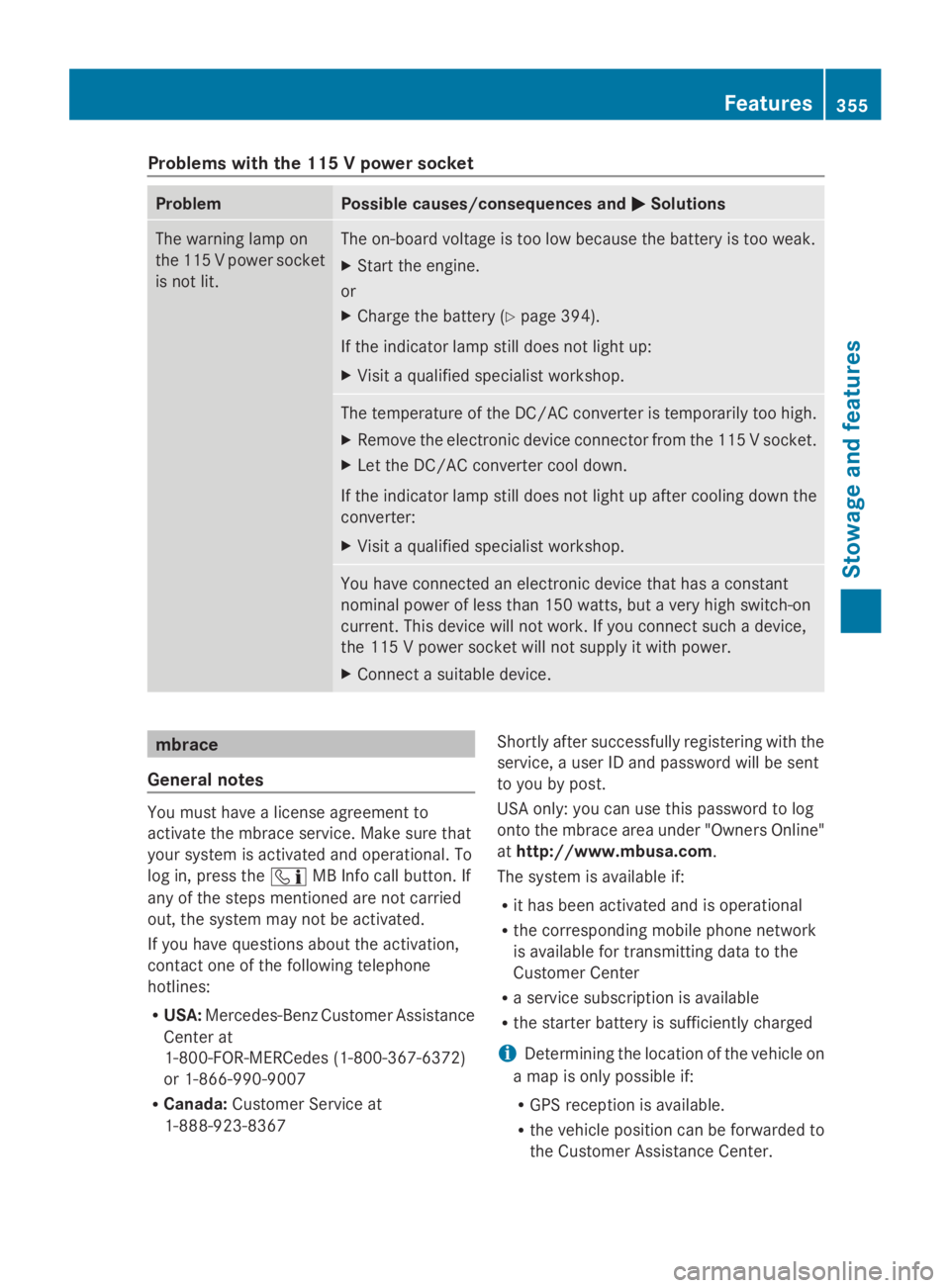
Problems with the 115 V power socket
ProblemPossible causes/consequences andPPSolutions
The warning lamp on
the 115 V power socket
is not lit.
The on-board voltage is too low because the battery is too weak.
XStart the engine.
or
XCharge the battery (Ypage 394).
If the indicator lamp still does not light up:
XVisit a qualified specialist workshop.
The temperature of the DC/AC converter is temporarily too high.
XRemove the electronic device connector from the 115 V socket.
XLet the DC/AC converter cool down.
If the indicator lamp still does not light up after cooling down the
converter:
XVisit a qualified specialist workshop.
You have connected an electronic device that has a constant
nominal power of less than 150 watts, but a very high switch-on
current. This device will not work. If you connect such a device,
the 115 V power socket will not supply it with power.
XConnect a suitable device.
mbrace
General notes
You must have a license agreement to
activate the mbrace service. Make sure that
your system is activated and operational. To
log in, press the
Page 359 of 462
If you have questions about the activation,
contact one of the following telephone
hotlines:
RUSA:Mercedes-Benz Customer Assistance
Center at
1-800-FOR-MERCedes (1-800-367-6372)
or 1-866-990-9007
RCanada:Customer Service at
1-888-923-8367
General notes
An emergency call is dialed automatically if
an air bag or Emergency Tensioning Device is
triggered.
iYou cannot end an automatically
triggered emergency call yourself.
An emergency call can also be initiated
manually.
As soon as the emergency call has been
initiated, the indicator lamp in the SOS button
flashes. The multifunction display shows the
Connecting CallConnecting Callmessage.
The audio output is muted.
Once the connection has been made, the
Call ConnectedCall Connectedmessage appears in the
multifunction display.
All important information on the emergency
is transmitted, for example:
RCurrent location of the vehicle (as
determined by the GPS system)
RVehicle identification number
RInformation on the severity of the accident
Shortly after the emergency call has been
initiated, a voice connection is automatically
established between the Customer
Assistance Center and the vehicle occupants.
RIf the vehicle occupants respond, the
Mercedes-Benz Customer Assistance
Center attempts to get more information
on the emergency.
RIf there is no response from the vehicle
occupants, an ambulance is immediately
sent to the vehicle.
If no voice connection can be established to
the Mercedes-Benz Customer Assistance
Center, the system has been unable to initiate
an emergency call.
This can occur, for example, if the relevant
mobile phone network is not available. The
indicator lamp in the SOS button flashes
continuously.
TheCall FailedCall Failedmessage appears in the
multifunction display and must be confirmed.
In this case, summon assistance by other
means.
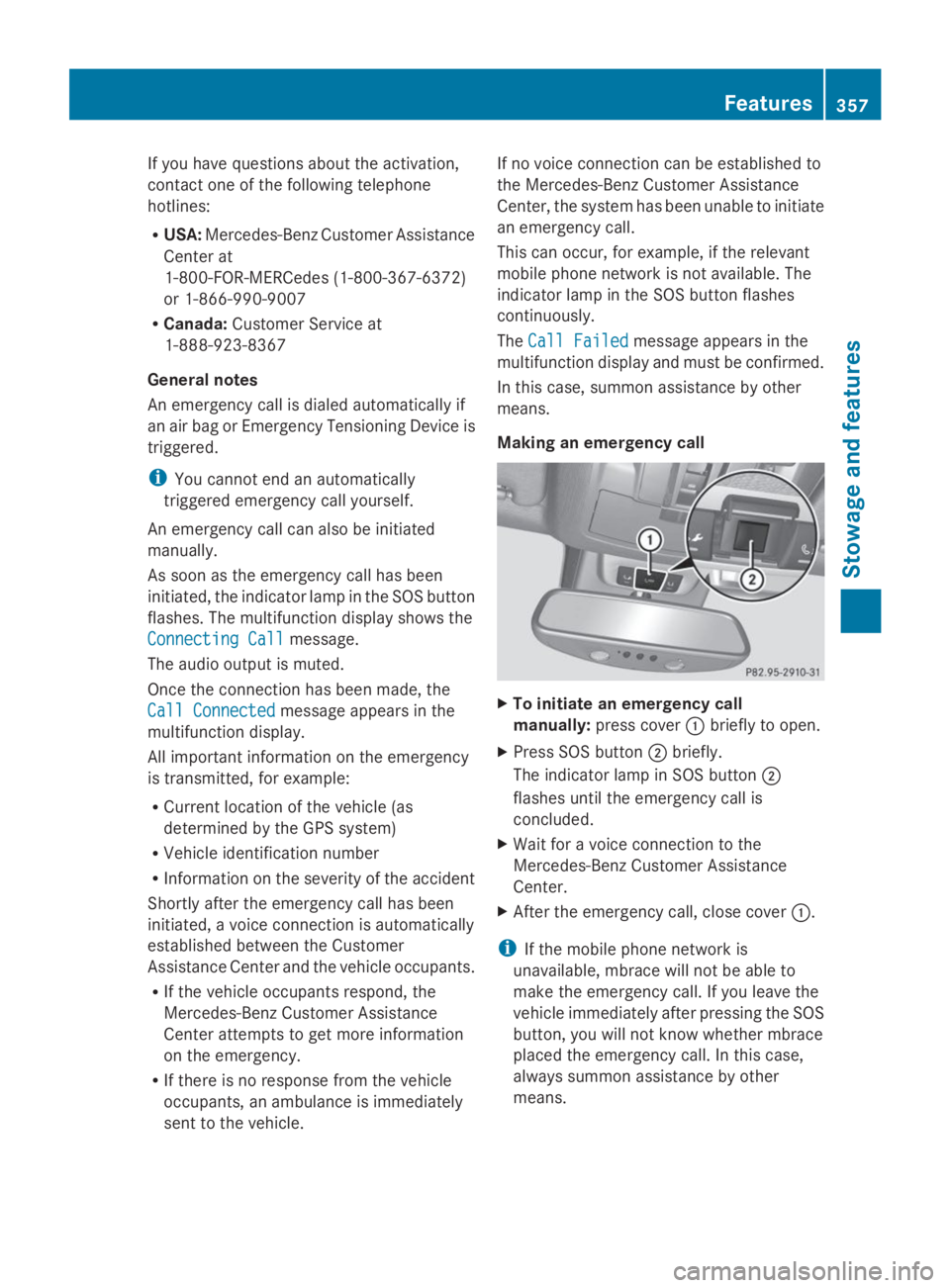
Making an emergency call
XTo initiate an emergency call
manually:press coverCbriefly to open.
XPress SOS buttonDbriefly.
The indicator lamp in SOS buttonD
flashes until the emergency call is
concluded.
XWait for a voice connection to the
Mercedes-Benz Customer Assistance
Center.
XAfter the emergency call, close coverC.
iIf the mobile phone network is
unavailable, mbrace will not be able to
make the emergency call. If you leave the
vehicle immediately after pressing the SOS
button, you will not know whether mbrace
placed the emergency call. In this case,
always summon assistance by other
means.
Features357
Stowage and features
Z