ignition MERCEDES-BENZ GL 2014 Manual PDF
[x] Cancel search | Manufacturer: MERCEDES-BENZ, Model Year: 2014, Model line: GL, Model: MERCEDES-BENZ GL 2014Pages: 462, PDF Size: 8.98 MB
Page 355 of 462
the on-board voltage is too low, the power
to the sockets is automatically cut. This
ensures that there is sufficient power to
start the engine.
Socket in the front-compartment center
console
!The socket is not suitable for operating
the tire inflation compressor.
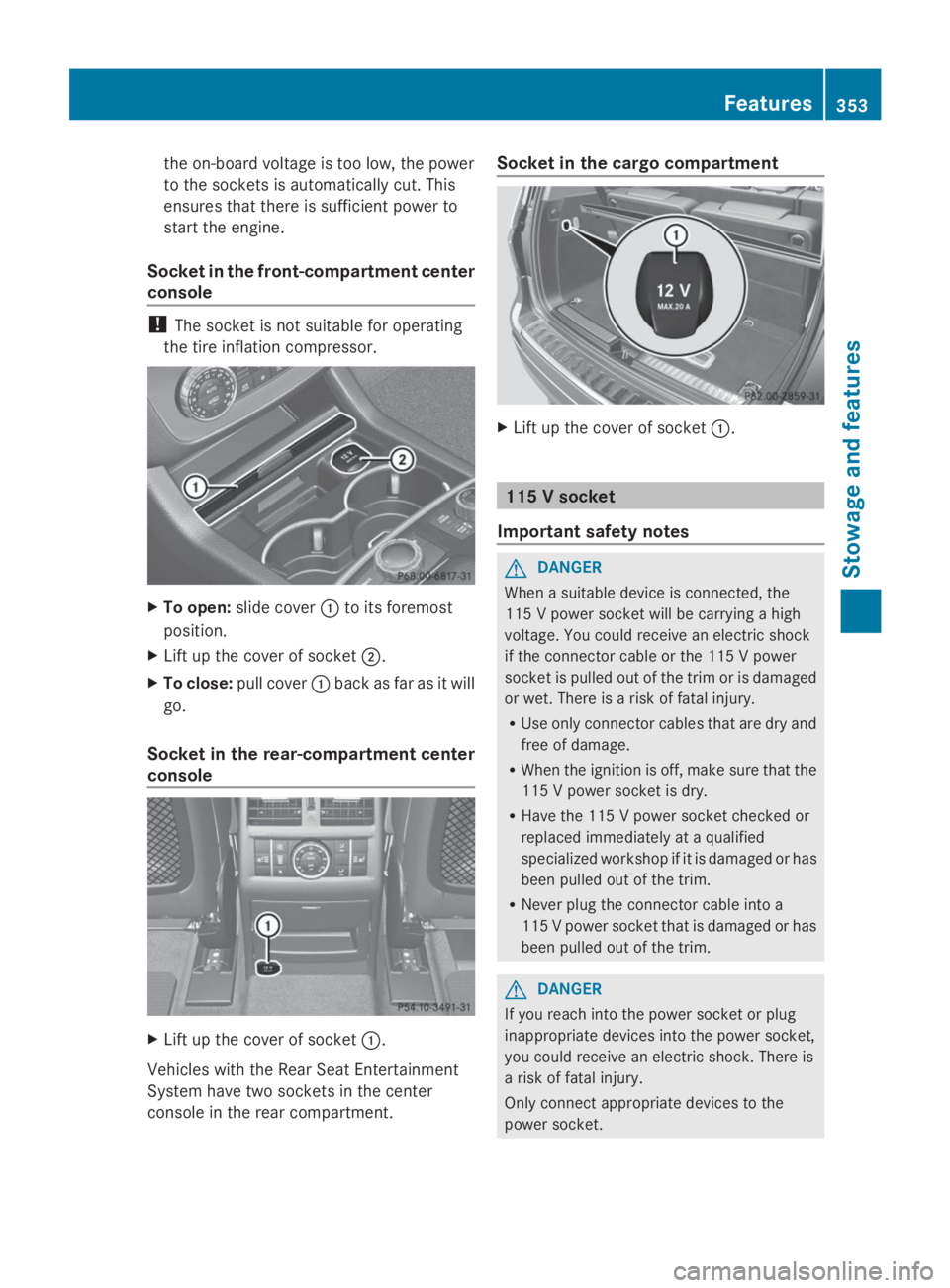
XTo open:slide coverCto its foremost
position.
XLift up the cover of socketD.
XTo close:pull coverCback as far as it will
go.
Socket in the rear-compartment center
console
XLift up the cover of socketC.
Vehicles with the Rear Seat Entertainment
System have two sockets in the center
console in the rear compartment.
Socket in the cargo compartment
XLift up the cover of socketC.
115 V socket
Important safety notes
GDANGER
When a suitable device is connected, the
115 V power socket will be carrying a high
voltage. You could receive an electric shock
if the connector cable or the 115 V power
socket is pulled out of the trim or is damaged
or wet. There is a risk of fatal injury.
RUse only connector cables that are dry and
free of damage.
RWhen the ignition is off, make sure that the
115 V power socket is dry.
RHave the 115 V power socket checked or
replaced immediately at a qualified
specialized workshop if it is damaged or has
been pulled out of the trim.
RNever plug the connector cable into a
115 V power socket that is damaged or has
been pulled out of the trim.
GDANGER
If you reach into the power socket or plug
inappropriate devices into the power socket,
you could receive an electric shock. There is
a risk of fatal injury.
Only connect appropriate devices to the
power socket.
Features353
Sto wage an d features
Z
Page 356 of 462
!Note that work and repairs on the 115 V
power socket should only be carried out by
qualified specialist personnel.
General notes
115 V power socket provides an alternating
voltage of 115 V so that small electronic
devices can be connected. These devices,
such as games consoles, chargers and
laptops, should not consume more than a
maximum of 150 watts altogether.
Requirements for operation of these devices:
Rthe electronic device that you connect has
a suitable connector and conforms to
standards specific to the country you are
in.
Rthe plug of the electronic device is plugged
correctly into 115 V power socket.
Rthe maximum wattage of the device to be
connected must not exceed 150 watts.
Rthe on-board power supply is within a
permissible voltage range.
Rthe 12 V sockets in the rear compartment
and the cargo compartment are
operational.
Using the 115 V power socket
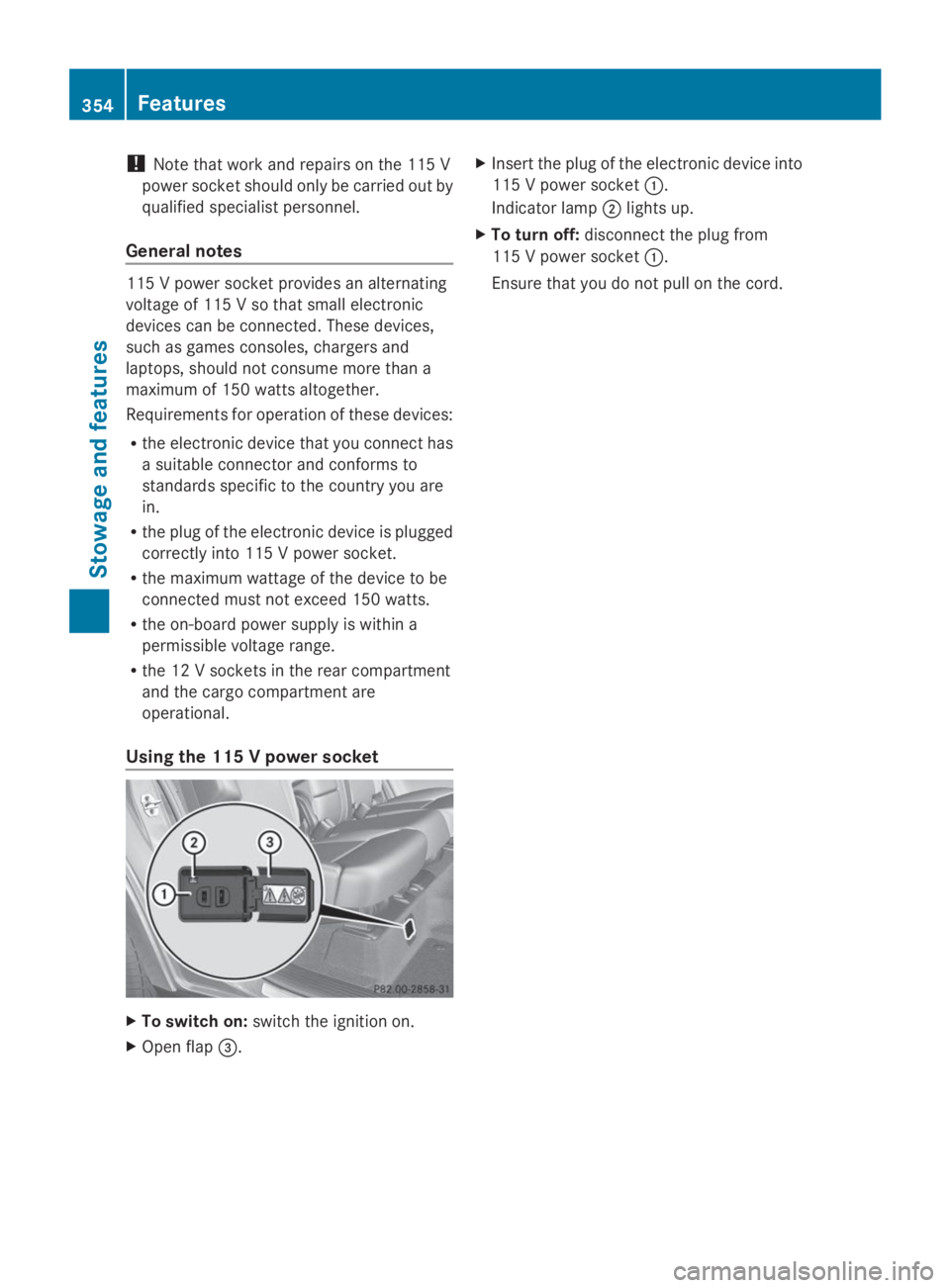
XTo switch on:switch the ignition on.
XOpen flap
Page 362 of 462
You are prompted to confirm route guidance
to the address entered.
The system calculates the route and
subsequently starts the route guidance with
the address entered.
iIf you selectNoNo, the address can be saved
in the address book.
iThe destination download function is
available if the relevant mobile phone
network is available and data transfer is
possible.
iThe destination download function can
only be used if the vehicle is equipped with
a navigation system.
Route Assistance
This service is part of the mbrace PLUS
Package and cannot be purchased
separately.
iYou can also use the Route Assistance
function if your vehicle is not equipped with
a navigation system.
Within the framework of this service, you
receive a professional and reliable form of
navigation support without having to leave
your vehicle.
The customer service representative finds a
suitable route depending on your vehicle's
current position and the desired destination.
You will then be guided live through the
current route section.
Search & Send
General notes
iTo use "Search & Send", your vehicle
must be equipped with mbrace and a
navigation system. Additionally, an mbrace
service subscription must be completed.
"Search & Send" is a destination entry
service. A destination address which is found
on Google Maps®can be transferred via
mbrace directly to your vehicle's navigation
system.
Specifying and sending the destination
address
XGo to the website http://
www.maps.google.com and enter a
destination address into the entry field.
XTo send the destination address to the
e-mail address of your mbrace
account:click on the corresponding
button on the website.
iExample:
If you select 'Send to vehicle' and then
'Mercedes-Benz', the destination address
will be sent to your vehicle.
XWhen the "Send" dialog window appears:
Enter the e-mail address you specified
when setting up your mbrace account into
the corresponding field.
XClick "Send".
iInformation on specific commands such
as "Address entry" or "Send" can be found
on the website.
Calling up destination addresses
XSwitch on the ignition.
The destination address is loaded into the
vehicle's navigation system.
A display message appears, asking
whether navigation should be started.
XSelectYesYesby turningyRzor sliding
Page 363 of 462
If you own multiple Mercedes-Benz
vehicles with mbrace and activated mbrace
accounts:
If multiple vehicles are registered under the
same e-mail address, the destination will
be sent to all the vehicles.
Vehicle remote opening
You can use the vehicle remote opening if you
have unintentionally locked your vehicle and
a replacement SmartKey is not available.
The vehicle can be opened by the Mercedes-
Benz Customer Assistance Center.
The vehicle can be immediately opened
remotely within four days of the ignition being
turned off. After this time, the remote
unlocking may be delayed by 15 to 60
minutes. After 30 days, the vehicle can no
longer be opened remotely.
XContact the following service hotlines:
RUSA:Mercedes-Benz Customer
Assistance Center at 1-800-FOR-
MERCedes (1-800-367-6372) or
1-866-990-9007
RCanada:Customer Service at
1-888-923-8367
You will be asked for your password.
XReturn to your vehicle at the time agreed
upon with the Mercedes-Benz Customer
Assistance Center.
USA only: alternatively, the vehicle can be
opened via:
Rthe Internet, under the "Owners Online"
section
Rthe telephone application (e.g. iPhone®,
Blackberry)
To do this, you will need your identification
number and password.
iVehicle remote opening is only possible if
the corresponding mobile phone network
is accessible.
Vehicle remote closing
The remote closing feature can be used when
you have forgotten to lock the vehicle and you
are no longer nearby.
The vehicle can then be locked by the
Mercedes-Benz Customer Assistance Center.
The vehicle can be immediately remotely
locked within four days of the ignition being
turned off. After this time, the remote closing
may be delayed by 15 to 60 minutes. After
30 days the vehicle can no longer be closed
remotely.
XContact the following service hotlines:
RUSA:Mercedes-Benz Customer
Assistance Center at 1-800-FOR-
MERCedes (1-800-367-6372) or
1-866-990-9007
RCanada:Customer Service at
1-888-923-8367
You will be asked for your password.
The next time you are inside the vehicle and
you switch on the ignition, theDoorsDoors
Locked RemotelyLocked Remotelymessage appears in the
multifunction display.
USA only: alternatively, the vehicle can be
locked via:
Rthe Internet, under the "Owners Online"
section
Rthe telephone application (e.g. iPhone®,
Blackberry)
To do this, you will need your identification
number and password.
iThe vehicle remote closing feature is
available when the relevant mobile phone
network is available and data connection is
possible.
Features361
Stowage and features
Z
Page 364 of 462
Stolen vehicle recovery service
If your vehicle has been stolen:
XNotify the police.
The police will issue a numbered incident
report.
XThis number will be forwarded to the
Mercedes-Benz Customer Assistance
Center together with your PIN.
The Mercedes-Benz Customer Assistance
Center then tries to locate the system. The
Mercedes-Benz Customer Assistance
Center contacts you and the local law
enforcement agency if the vehicle is
located.
However, only the law enforcement agency
is informed of the location of the vehicle.
iIf the anti-theft alarm system is activated
for longer than 30 seconds, the Mercedes-
Benz Customer Assistance Center is
automatically informed.
Vehicle remote malfunction diagnosis
With the vehicle remote malfunction
diagnosis (Vehicle Health Check), the
Customer Assistance center can provide
improved support for problems with your
vehicle. During an existing call, vehicle data
is transferred to the Customer Assistance
center. The customer service representative
can use the received data to decide what kind
of assistance is required. You are then, for
example, guided to the nearest authorized
Mercedes-Benz Center or a recovery vehicle
is called.
If vehicle data needs to be transferred during
an MB Info call or a Roadside Assistance call,
this is initiated by the Customer Assistance
center. You will see theRoadsideRoadside
Assistance ConnectedAssistance Connectedmessage in the
COMAND display. If the vehicle remote
malfunction diagnosis can be started, the
Request for vehicle diagnosisRequest for vehicle diagnosis
received. Start vehicle diagnosis?received. Start vehicle diagnosis?
message appears in the display.
XConfirm the message withYesYes.
XWhen theVehicle Diagnosis PleaseVehicle Diagnosis Please
start ignitionstart ignitionmessage appears, turn
the SmartKey to position2in the ignition
lock (Ypage 167).
XWhen thePlease follow thePlease follow the
instructionsinstructionsreceivedreceivedbybyphonephoneandand
move your vehicle to a safemove your vehicle to a safe
position.position.message appears, follow the
customer service representative's
instructions.
The message in the display disappears.
If you selectCancelCancel, the vehicle remote
malfunction diagnosis is canceled
completely.
The vehicle operating state check begins.
You will see theVehicle diagnosisVehicle diagnosis
activated.activated.message.
When the diagnosis is completed, theSendSend
vehicle diagnostics data//(Voicevehicle diagnostics data//(Voice
connection may be//interruptedconnection may be//interrupted
duringduringdatadatatransfer)transfer)message appears.
The vehicle data can now be sent to the
Customer Assistance center.
XPressOKOKto confirm the message.
The voice connection with the Customer
Assistance center is terminated.
You will see theVehicle Diagnosis:Vehicle Diagnosis:
Transferring data...Transferring data...message.
The vehicle data is sent to the Customer
Assistance center.
Depending on what the customer service
representative agreed with you, the voice
connection is re-established after the transfer
is complete. If necessary, you will be
contacted at a later time by another means,
e.g. by e-mail or phone.
Further functions of the vehicle remote
malfunction diagnosis include, for example:
Rtransfer of service data to the Customer
Assistance center. If a service is overdue,
the COMAND display shows a message
362Features
Stowage and features
Page 369 of 462
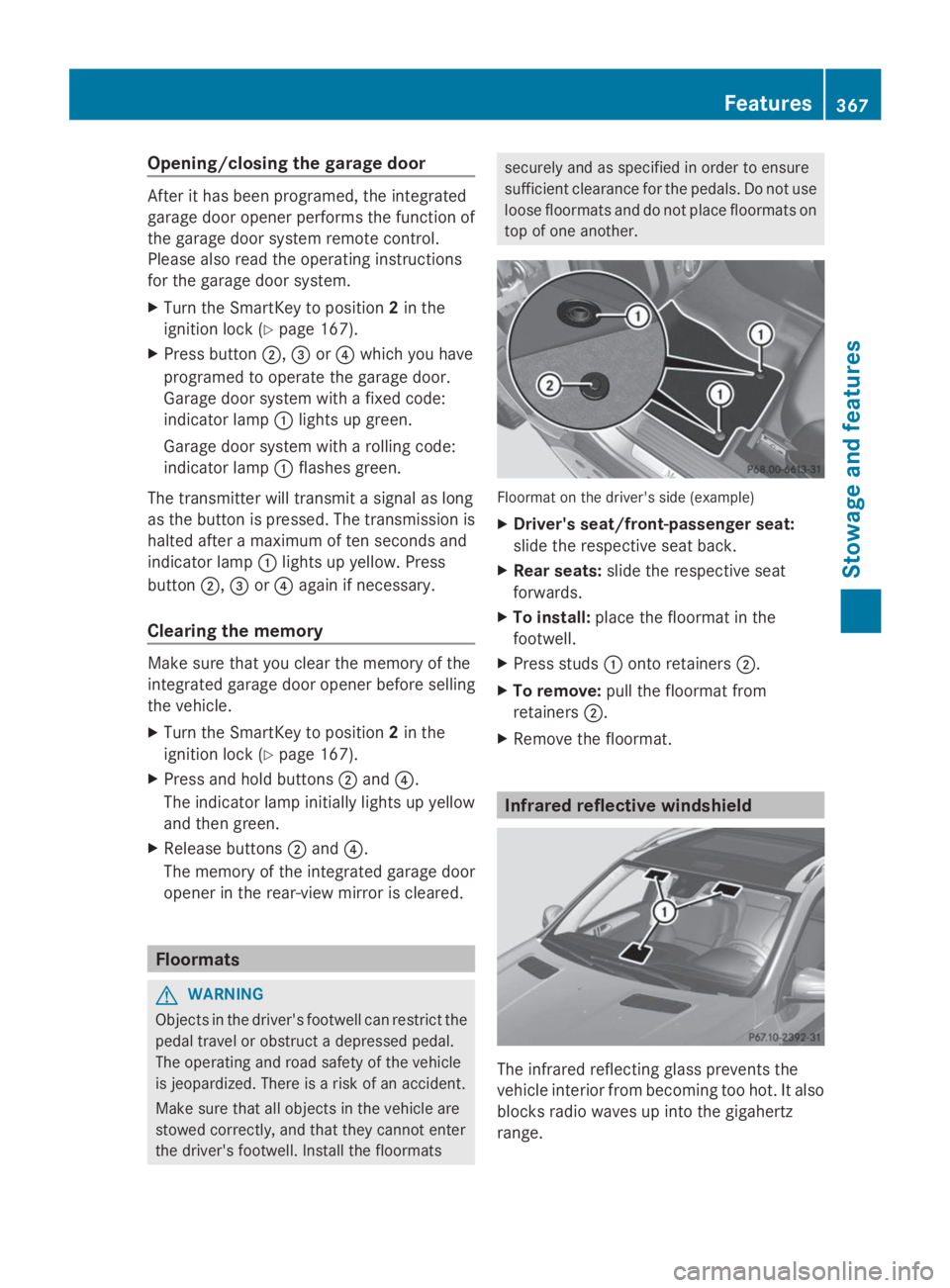
Opening/closing the garage door
After it has been programed, the integrated
garage door opener performs the function of
the garage door system remote control.
Please also read the operating instructions
for the garage door system.
XTurn the SmartKey to position2in the
ignition lock (Ypage 167).
XPress buttonD,
Page 372 of 462
Useful information
iThis Operator's Manual describes all
models and all standard and optional
equipment of your vehicle available at the
time of publication of the Operator's
Manual. Country-specific differences are
possible. Please note that your vehicle may
not be equipped with all features
described. This also applies to safety-
related systems and functions.
iRead the information on qualified
specialist workshops: (Ypage 28).
Engine compartment
Hood
Important safety notes
GWARNING
If the hood is unlatched, it may open up when
the vehicle is in motion and block your view.
There is a risk of an accident.
Never unlatch the hood while driving.
GWARNING
When opening and closing the hood, it may
suddenly fall into the closed position. There is
a risk of injury to persons within range of
movement of the hood.
Open and close the hood only when no one is
within its range of movement.
GWARNING
Opening the hood when the engine is
overheated or when there is a fire in the
engine compartment could expose you to hot
gases or other service products. There is a
risk of injury.
Let an overheated engine cool down before
opening the hood. If there is a fire in the
engine compartment, keep the hood closed
and contact the fire department.
GWARNING
The engine compartment contains moving
components. Certain components, such as
the radiator fan, may continue to run or start
again suddenly when the ignition is off. There
is a risk of injury.
If you need to do any work inside the engine
compartment:
Rswitch off the ignition
Rnever reach into the area where there is a
risk of danger from moving components,
such as the fan rotation area
Rremove jewelery and watches
Rkeep items of clothing and hair, for
example, away from moving parts
GWARNING
The ignition system and the fuel injection
system work under high voltage. If you touch
components which are under voltage, you
could get an electric shock. There is a risk of
injury.
Never touch components of the ignition
system or fuel injection system when the
ignition is switched on.
Opening the hood
GWARNING
Certain components in the engine
compartment, such as the engine, radiator
and parts of the exhaust system, can become
very hot. Working in the engine compartment
poses a risk of injury.
Where possible, let the engine cool down and
touch only the components described in the
following.
GWARNING
When the hood is open and the windshield
wipers are set in motion, you can be injured
by the wiper linkage. There is a risk of injury.
Always switch off the windshield wipers and
the ignition before opening the hood.
370Engine compartment
Maintenance and care
Page 375 of 462
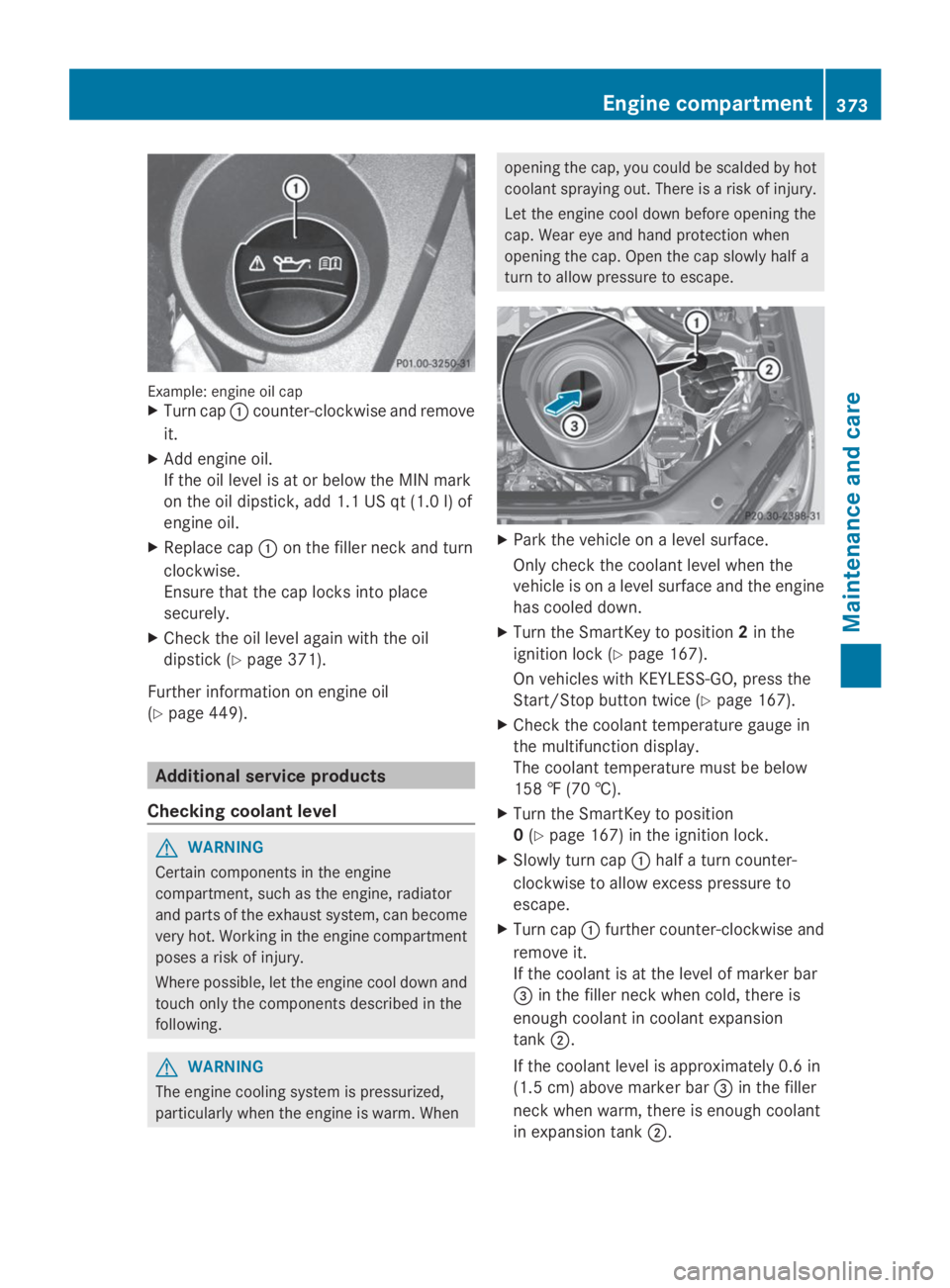
Example: engine oil capXTurn capCcounter-clockwise and remove
it.
XAdd engine oil.
If the oil level is at or below the MIN mark
on the oil dipstick, add 1.1 US qt (1.0 l) of
engine oil.
XReplace capCon the filler neck and turn
clockwise.
Ensure that the cap locks into place
securely.
XCheck the oil level again with the oil
dipstick (Ypage 371).
Further information on engine oil
(Ypage 449).
Additional service products
Checking coolant level
GWARNING
Certain components in the engine
compartment, such as the engine, radiator
and parts of the exhaust system, can become
very hot. Working in the engine compartment
poses a risk of injury.
Where possible, let the engine cool down and
touch only the components described in the
following.
GWARNING
The engine cooling system is pressurized,
particularly when the engine is warm. When
opening the cap, you could be scalded by hot
coolant spraying out. There is a risk of injury.
Let the engine cool down before opening the
cap. Wear eye and hand protection when
opening the cap. Open the cap slowly half a
turn to allow pressure to escape.
XPark the vehicle on a level surface.
Only check the coolant level when the
vehicle is on a level surface and the engine
has cooled down.
XTurn the SmartKey to position2in the
ignition lock (Ypage 167).
On vehicles with KEYLESS-GO, press the
Start/Stop button twice (Ypage 167).
XCheck the coolant temperature gauge in
the multifunction display.
The coolant temperature must be below
158 ‡ (70 †).
XTurn the SmartKey to position
0(Ypage 167) in the ignition lock.
XSlowly turn capChalf a turn counter-
clockwise to allow excess pressure to
escape.
XTurn capCfurther counter-clockwise and
remove it.
If the coolant is at the level of marker bar
Page 377 of 462
You can obtain further information from an
authorized Mercedes-Benz Center or at
http://www.mbusa.com (USA only).
iThe ASSYST PLUS service interval display
does not show any information on the
engine oil level. Observe the notes on the
engine oil level (Ypage 371).
The multifunction display shows a service
message for several seconds, e.g.:
RService A in .. DaysService A in .. Days
RService A DueService A Due
RService A Exceeded by .. DaysService A Exceeded by .. Days
Depending on the operating conditions of the
vehicle, the remaining time or distance until
the next service due date is displayed.
The letterAAorBB, possibly in connection with
a number or another letter, shows the type of
service.AAstands for a minor service andBBfor
a major service.
You can obtain further information from an
authorized Mercedes-Benz Center.
The ASSYST PLUS service interval display
does not take into account any periods of
time during which the battery is
disconnected.
Maintaining the time-dependent service
schedule:
XNote down the service due date displayed
in the multifunction display before
disconnecting the battery.
or
XAfter reconnecting the battery, subtract
the battery disconnection periods from the
service date shown on the display.
Hiding a service message
XPress the8orvbutton on the
steering wheel.
Displaying service messages
XSwitch on the ignition.
XPress theYorebutton on the
steering wheel to select theServ.Serv.menu.
XPress thecordbutton to select the
ASSYST PLUSASSYST PLUSsubmenu and confirm by
pressing thevbutton.
The service due date appears in the
multifunction display.
Information about Service
Resetting the ASSYST PLUS service
interval display
!If the ASSYST PLUS service interval
display has been inadvertently reset, this
setting can be corrected at a qualified
specialist workshop.
Have service work carried out as described
in the Maintenance Booklet. This may
otherwise lead to increased wear and
damage to the major assemblies or the
vehicle.
A qualified specialist workshop, e.g. an
authorized Mercedes-Benz Center, will reset
the ASSYST PLUS service interval display
after the service work has been carried out.
You can also obtain further information on
maintenance work, for example.
Special service requirements
The specified maintenance interval takes only
the normal operation of the vehicle into
account. Under arduous operating conditions
or increased load on the vehicle,
maintenance work must be carried out more
frequently, for example:
Rregular city driving with frequent
intermediate stops
Rif the vehicle is primarily used to travel
short distances
ASSYST PLUS375
Maintenance and care
Z
Page 379 of 462
is in transmission positionN, otherwise the
vehicle could be damaged.
RVehicles with a SmartKey:
Do not remove the SmartKey from the
ignition lock. Do not open the driver's
door or front-passenger door when the
engine is switched off. Otherwise, the
automatic transmission selects park
positionPautomatically and locks the
wheels. You can prevent this by shifting
the automatic transmission toN
beforehand.
RVehicles with KEYLESS-GO:
Do not open the driver's door or front-
passenger door when the engine is
switched off. Otherwise, the automatic
transmission selects park positionP
automatically and locks the wheels.
Observe the following to make sure that the
automatic transmission stays in positionN:
XMake sure the vehicle is stationary and the
ignition is switched off.
XTurn the SmartKey to position
2(Ypage 167) in the ignition lock.
Use the SmartKey instead of the Start/
Stop button on vehicles with KEYLESS-GO.
XDepress and hold the brake pedal.
XShift the automatic transmission to
positionN.
XRelease the brake pedal.
XRelease the electric parking brake.
XSwitch off the ignition and leave the
SmartKey in the ignition lock.
You can wash the vehicle in an automatic car
wash from the very start.
If the vehicle is very dirty, pre-wash it before
cleaning it in an automatic car wash.
After using an automatic car wash, wipe off
wax from the windshield and the wiper
blades. This will prevent smears and reduce
wiping noises caused by residue on the
windshield.
Washing by hand
In some countries, washing by hand is only
allowed at specially equipped washing bays.
Observe the legal requirements in all
countries concerned.
XDo not use hot water and do not wash the
vehicle in direct sunlight.
XUse a soft sponge to clean.
XUse a mild cleaning agent, such as a car
shampoo approved by Mercedes-Benz.
XThoroughly hose down the vehicle with a
gentle jet of water.
XDo not point the water jet directly towards
the air inlets.
XUse plenty of water and rinse out the
sponge frequently.
XRinse the vehicle with clean water and dry
thoroughly with a chamois.
XDo not let the cleaning agent dry on the
paintwork.
When using the vehicle in winter, remove all
traces of road salt deposits carefully and as
soon as possible.
Power washers
GWARNING
The water jet from a circular jet nozzle (dirt
blasters) can cause invisible exterior damage
to the tires or chassis components.
Components damaged in this way may fail
unexpectedly. There is a risk of an accident.
Do not use power washers with circular jet
nozzles to clean the vehicle. Have damaged
tires or chassis components replaced
immediately.
!Always maintain a distance of at least
11.8 in (30 cm) between the vehicle and the
power washer nozzle. Information about
the correct distance is available from the
equipment manufacturer.
Move the power washer nozzle around
when cleaning your vehicle.
Care377
Maintenance and care
Z