ignition MERCEDES-BENZ GL 2014 Repair Manual
[x] Cancel search | Manufacturer: MERCEDES-BENZ, Model Year: 2014, Model line: GL, Model: MERCEDES-BENZ GL 2014Pages: 462, PDF Size: 8.98 MB
Page 256 of 462
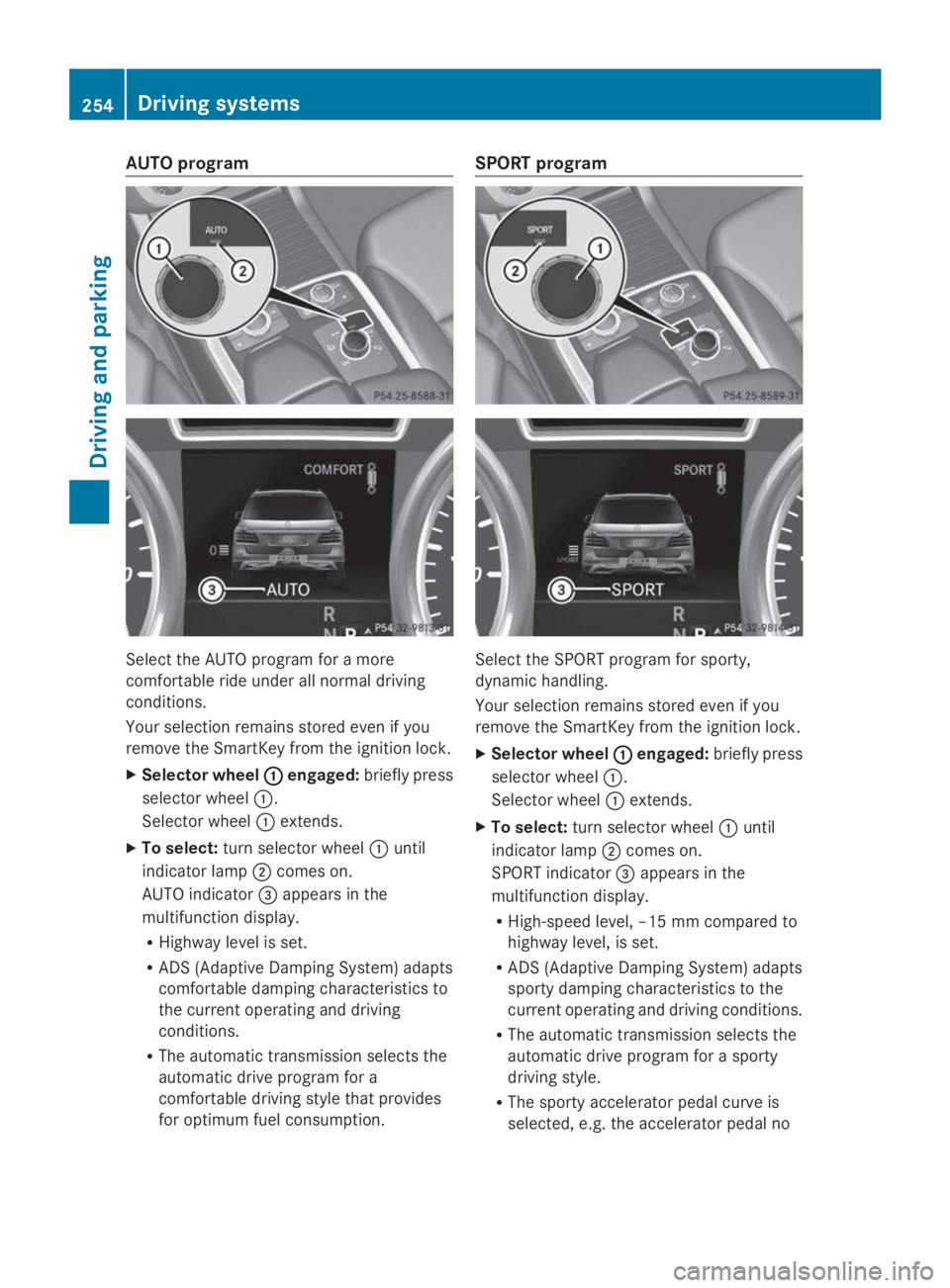
AUTO program
Select the AUTO program for a more
comfortable ride under all normal driving
conditions.
Your selection remains stored even if you
remove the SmartKey from the ignition lock.
XSelector wheelCCengaged:briefly press
selector wheelC.
Selector wheelCextends.
XTo select:turn selector wheelCuntil
indicator lampDcomes on.
AUTO indicator
Page 264 of 462
Messages in the multifunction display
If a gear change process has not been successful, the following messages may be displayed
in the multifunction display:
Display messagesPossible causes/consequences andPPSolutions
LOW RANGE Max.LOW RANGE Max.
Speed 40 km/hSpeed 40 km/h
You have been driving faster than 40 km/h. Additionally, the
indicator lamp on the button in the center console blinks.
XDrive more slowly to carry out the gear change process.
LOWLOWRANGERANGEShiftShifttoto
Position N BrieflyPosition N Briefly
The transmission is in positionDand you are driving at below
40 km/h.
XShift the transmission toNto complete the gear change
process.
LOWLOWRANGERANGEShiftingShifting
Canceled PleaseCanceled Please
ReactivateReactivate
The gear change process was not carried out.
XEnsure that all gear change conditions are fulfilled and carry out
the gear change process again.
LOW RANGE StopLOW RANGE Stop
ApplyApplyParkingParkingBrakeBrake
A warning tone also sounds. The gear change process has not been
completed. LOW RANGE is in the neutral position. There is no
connection between the engine and the drive wheels.
!Do not drive any further. You could otherwise damage the
vehicle's drive train.
XStop the vehicle. Take into account the road and traffic
conditions when doing this.
XDepress the electric parking brake (Ypage 189).
XCarry out the gear change process again.
If the gear change process has been carried out, theLOWLOWRANGERANGE
Stop Apply Parking BrakeStop Apply Parking Brakemessage disappears.
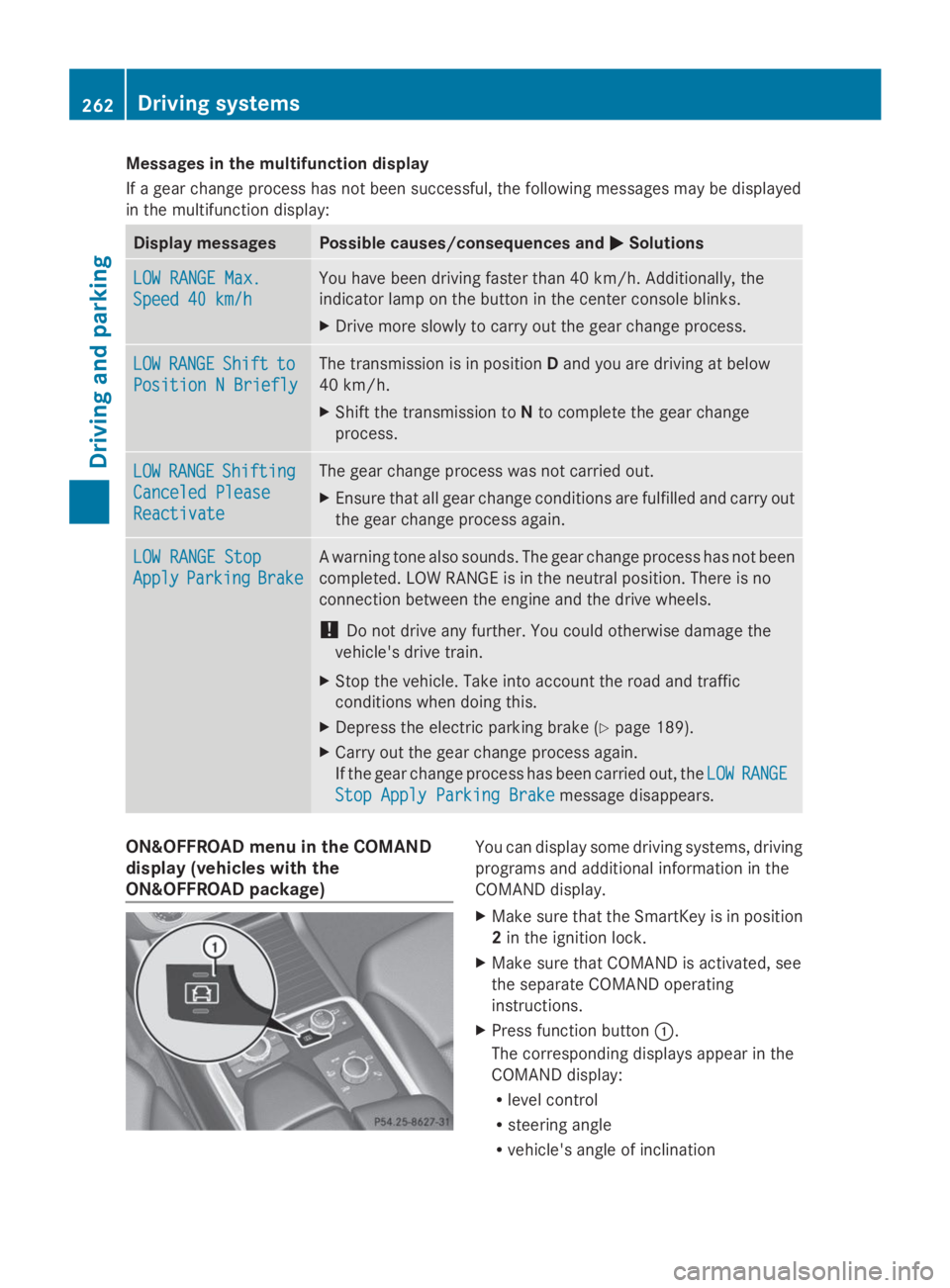
ON&OFFROAD menu in the COMAND
display (vehicles with the
ON&OFFROAD package)
You can display some driving systems, driving
programs and additional information in the
COMAND display.
XMake sure that the SmartKey is in position
2in the ignition lock.
XMake sure that COMAND is activated, see
the separate COMAND operating
instructions.
XPress function buttonC.
The corresponding displays appear in the
COMAND display:
Rlevel control
Rsteering angle
Rvehicle's angle of inclination
262Driving systems
Driving and parking
Page 278 of 462
Rthe ignition has been switched off for more
than four hours.
R999 hours have been exceeded.
R9,999 miles have been exceeded.
TheFrom ResetFrom Resettrip computer is
automatically reset if the value exceeds
9,999 hours or 99,999 miles.
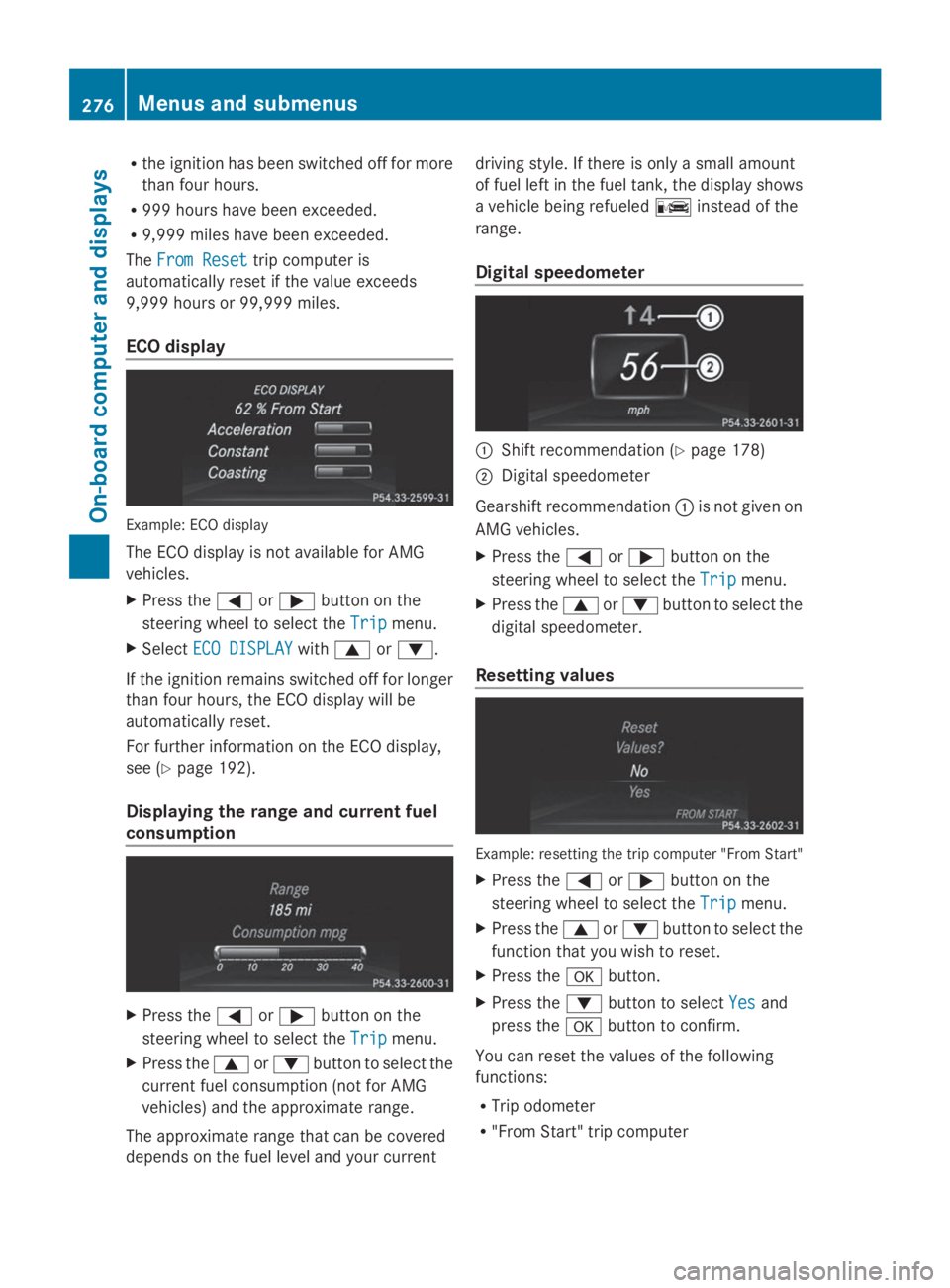
ECO display
Example: ECO display
The ECO display is not available for AMG
vehicles.
XPress theYorebutton on the
steering wheel to select theTripTripmenu.
XSelectECO DISPLAYECO DISPLAYwithcord.
If the ignition remains switched off for longer
than four hours, the ECO display will be
automatically reset.
For further information on the ECO display,
see (Ypage 192).
Displaying the range and current fuel
consumption
XPress theYorebutton on the
steering wheel to select theTripTripmenu.
XPress thecordbutton to select the
current fuel consumption (not for AMG
vehicles) and the approximate range.
The approximate range that can be covered
depends on the fuel level and your current
driving style. If there is only a small amount
of fuel left in the fuel tank, the display shows
a vehicle being refueled
Page 286 of 462
Surround lighting and exterior lighting
delayed switch-off
XPress theYorebutton on the
steering wheel to select theSett.Sett.menu.
XPress thedorcbutton to select the
LightsLightssubmenu.
XPressvto confirm.
XPressdorcto select the
Surround LightingSurround Lightingfunction.
When theSurround LightingSurround Lightingfunction is
activated, the light cone and the area
around the vehicle are displayed in orange
in the multifunction display.
XPress thevbutton to save the setting.
Deactivating delayed switch-off of the
exterior lighting temporarily:
XBefore leaving the vehicle, turn the
SmartKey to position0in the ignition lock.
XTurn the SmartKey to position2in the
ignition lock.
The exterior lighting delayed switch-off is
deactivated.
Delayed switch-off of the exterior lighting is
reactivated the next time you start the
engine.
If you have activated theSurroundSurround
LightingLightingfunction and the light switch is set
toX, the following functions are activated
when it is dark:
Rsurround lighting:the exterior lighting
remains lit for 40 seconds after unlocking
with the SmartKey. If you start the engine,
the surround lighting is switched off and
automatic headlamp mode is activated
(Ypage 128).
Rexterior lighting delayed switch-off:the
exterior lighting remains lit for
60 seconds after the engine is switched off.
If you close all the doors and the tailgate,
the exterior lighting goes off after
5 seconds.
iDepending on your vehicle's equipment,
when the surround lighting and delayed
switch-off exterior lighting are on, the
following light up:
RParking lamps
RDaytime running lamps
RSide marker lamps
RSurround lighting in the exterior mirrors
Activating/deactivating the interior
lighting delayed switch-off
If you activate theInterior LightingInterior Lighting
DelayDelayfunction, the interior lighting remains
on for 20 seconds after you remove the
SmartKey from the ignition lock.
XPress theYorebutton on the
steering wheel to select theSettSettmenu.
XPress thedorcbutton to select the
LightLightsubmenu.
XPressvto confirm.
XPress thedorcbutton to select the
Interior Lighting DelayfInterior Lighting Delayffunction.
If theInteriorInteriorLightingLightingDelayDelayfunction
has been switched on, the vehicle interior
is displayed in orange in the multifunction
display.
XPress thevbutton to save the setting.
Vehicle submenu
Activating/deactivating the automatic
door locking mechanism
If you activate theAutomatic Door LockAutomatic Door Lock
function, the vehicle is centrally locked above
a speed of approximately 9 mph (15 km/h).
XPress theYorebutton on the
steering wheel to select theSettSettmenu.
XPress thedorcbutton to select the
VehicleVehiclesubmenu.
XPressvto confirm.
XPress thedorcbutton to select the
Automatic Door LockAutomatic Door Lockfunction.
When theAutomaticAutomaticDoorDoorLockLockfunction
is activated, the vehicle doors are displayed
in orange in the multifunction display.
XPress thevbutton to save the setting.
284Menus and submenus
On-board computer and displays
Page 292 of 462
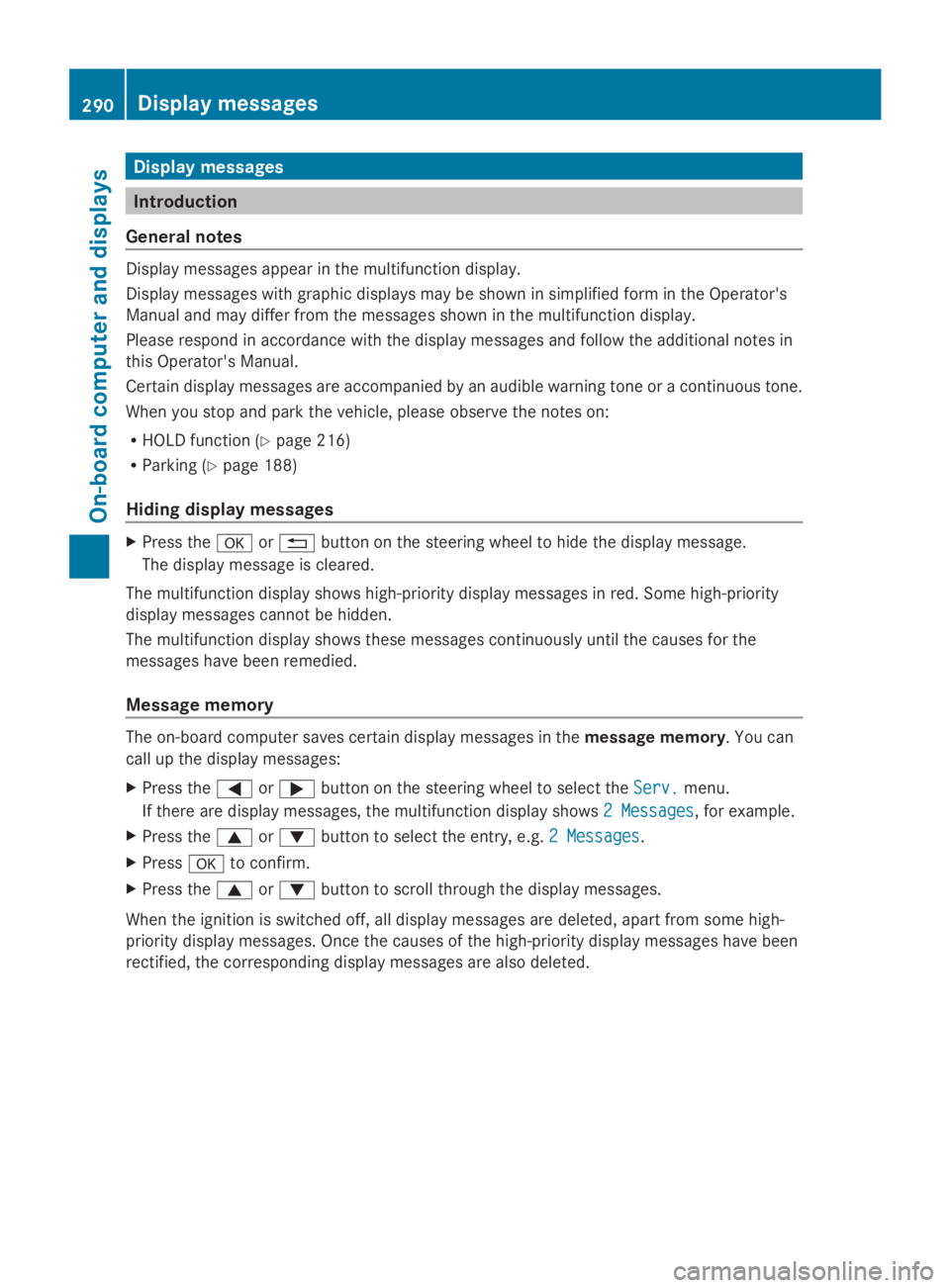
Display messages
Introduction
General notes
Display messages appear in the multifunction display.
Display messages with graphic displays may be shown in simplified form in the Operator's
Manual and may differ from the messages shown in the multifunction display.
Please respond in accordance with the display messages and follow the additional notes in
this Operator's Manual.
Certain display messages are accompanied by an audible warning tone or a continuous tone.
When you stop and park the vehicle, please observe the notes on:
RHOLD function (Ypage 216)
RParking (Ypage 188)
Hiding display messages
XPress thevor8button on the steering wheel to hide the display message.
The display message is cleared.
The multifunction display shows high-priority display messages in red. Some high-priority
display messages cannot be hidden.
The multifunction display shows these messages continuously until the causes for the
messages have been remedied.
Message memory
The on-board computer saves certain display messages in themessage memory. You can
call up the display messages:
XPress theYorebutton on the steering wheel to select theServ.Serv.menu.
If there are display messages, the multifunction display shows2 Messages2 Messages, for example.
XPress thecordbutton to select the entry, e.g.2 Messages2 Messages.
XPressvto confirm.
XPress thecordbutton to scroll through the display messages.
When the ignition is switched off, all display messages are deleted, apart from some high-
priority display messages. Once the causes of the high-priority display messages have been
rectified, the corresponding display messages are also deleted.
290Displaymessages
On-b oard computer and displays
Page 296 of 462
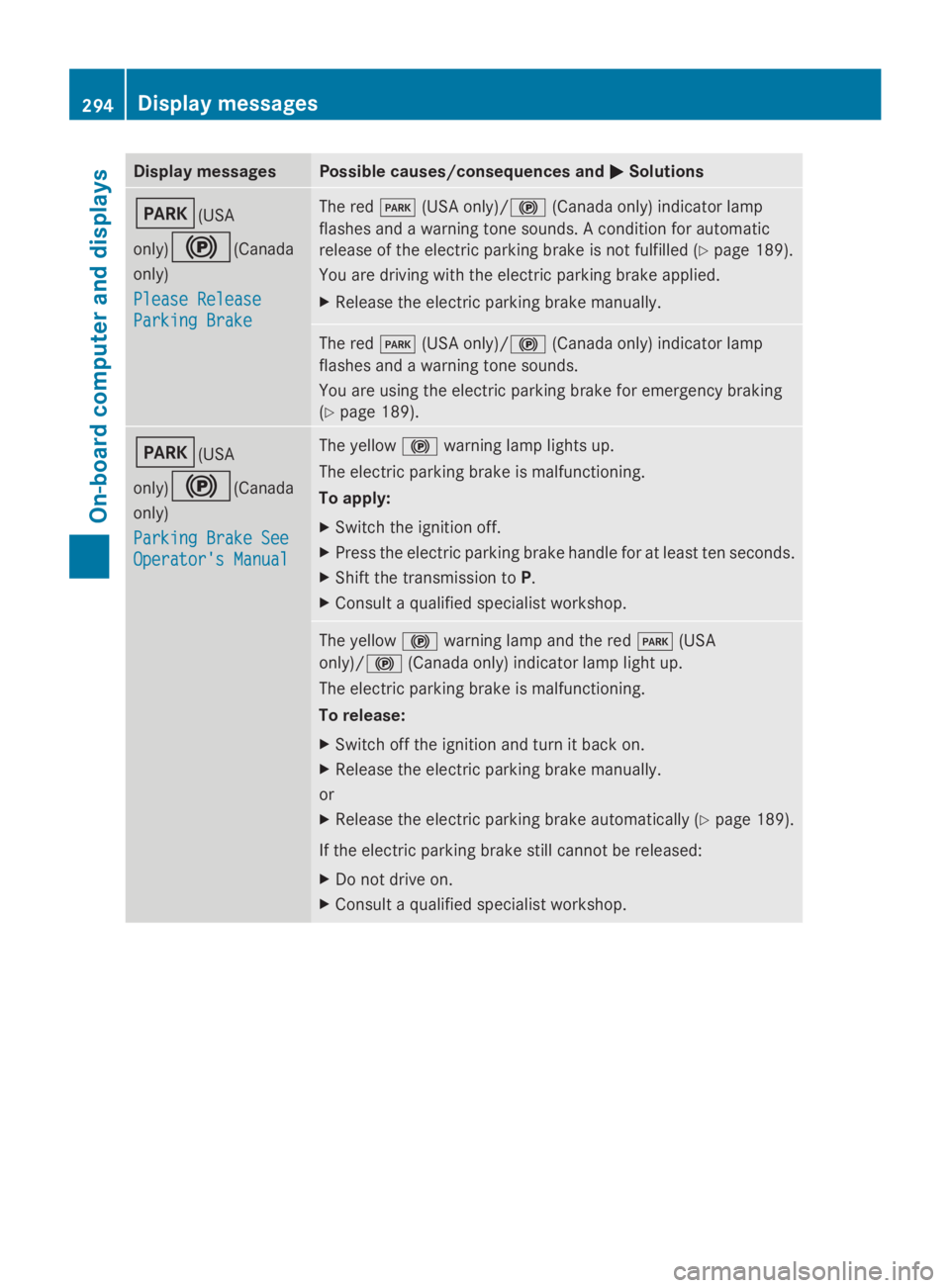
Display messagesPossible causes/consequences andPPSolutions
I(USA
only)$(Canada
only)
Please ReleasePlease Release
Parking BrakeParking Brake
The redI(USA only)/$(Canada only) indicator lamp
flashes and a warning tone sounds. A condition for automatic
release of the electric parking brake is not fulfilled (Ypage 189).
You are driving with the electric parking brake applied.
XRelease the electric parking brake manually.
The redI(USA only)/$(Canada only) indicator lamp
flashes and a warning tone sounds.
You are using the electric parking brake for emergency braking
(Ypage 189).
I(USA
only)$(Canada
only)
Parking Brake SeeParking Brake See
Operator's ManualOperator's Manual
The yellow$warning lamp lights up.
The electric parking brake is malfunctioning.
To apply:
XSwitch the ignition off.
XPress the electric parking brake handle for at least ten seconds.
XShift the transmission toP.
XConsult a qualified specialist workshop.
The yellow$warning lamp and the redI(USA
only)/$(Canada only) indicator lamp light up.
The electric parking brake is malfunctioning.
To release:
XSwitch off the ignition and turn it back on.
XRelease the electric parking brake manually.
or
XRelease the electric parking brake automatically (Ypage 189).
If the electric parking brake still cannot be released:
XDo not drive on.
XConsult a qualified specialist workshop.
294Displaymessages
On-b oard computer and displays
Page 297 of 462
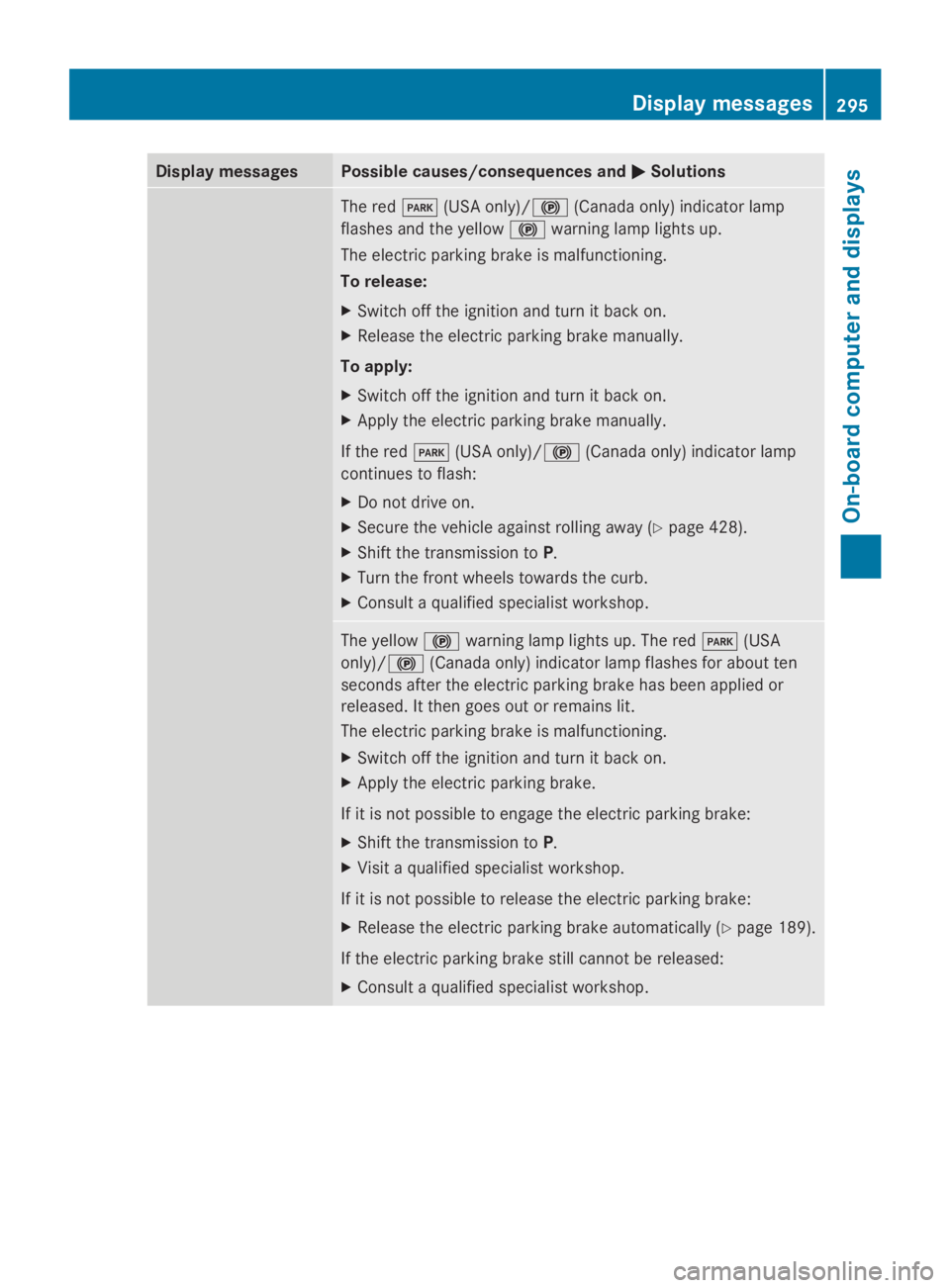
Display messagesPossible causes/consequences andPPSolutions
The redI(USA only)/$(Canada only) indicator lamp
flashes and the yellow$warning lamp lights up.
The electric parking brake is malfunctioning.
To release:
XSwitch off the ignition and turn it back on.
XRelease the electric parking brake manually.
To apply:
XSwitch off the ignition and turn it back on.
XApply the electric parking brake manually.
If the redI(USA only)/$(Canada only) indicator lamp
continues to flash:
XDo not drive on.
XSecure the vehicle against rolling away (Ypage 428).
XShift the transmission toP.
XTurn the front wheels towards the curb.
XConsult a qualified specialist workshop.
The yellow$warning lamp lights up. The redI(USA
only)/$(Canada only) indicator lamp flashes for about ten
seconds after the electric parking brake has been applied or
released. It then goes out or remains lit.
The electric parking brake is malfunctioning.
XSwitch off the ignition and turn it back on.
XApply the electric parking brake.
If it is not possible to engage the electric parking brake:
XShift the transmission toP.
XVisit a qualified specialist workshop.
If it is not possible to release the electric parking brake:
XRelease the electric parking brake automatically (Ypage 189).
If the electric parking brake still cannot be released:
XConsult a qualified specialist workshop.
Displaymessages295
On-b oard computer and displays
Z
Page 298 of 462
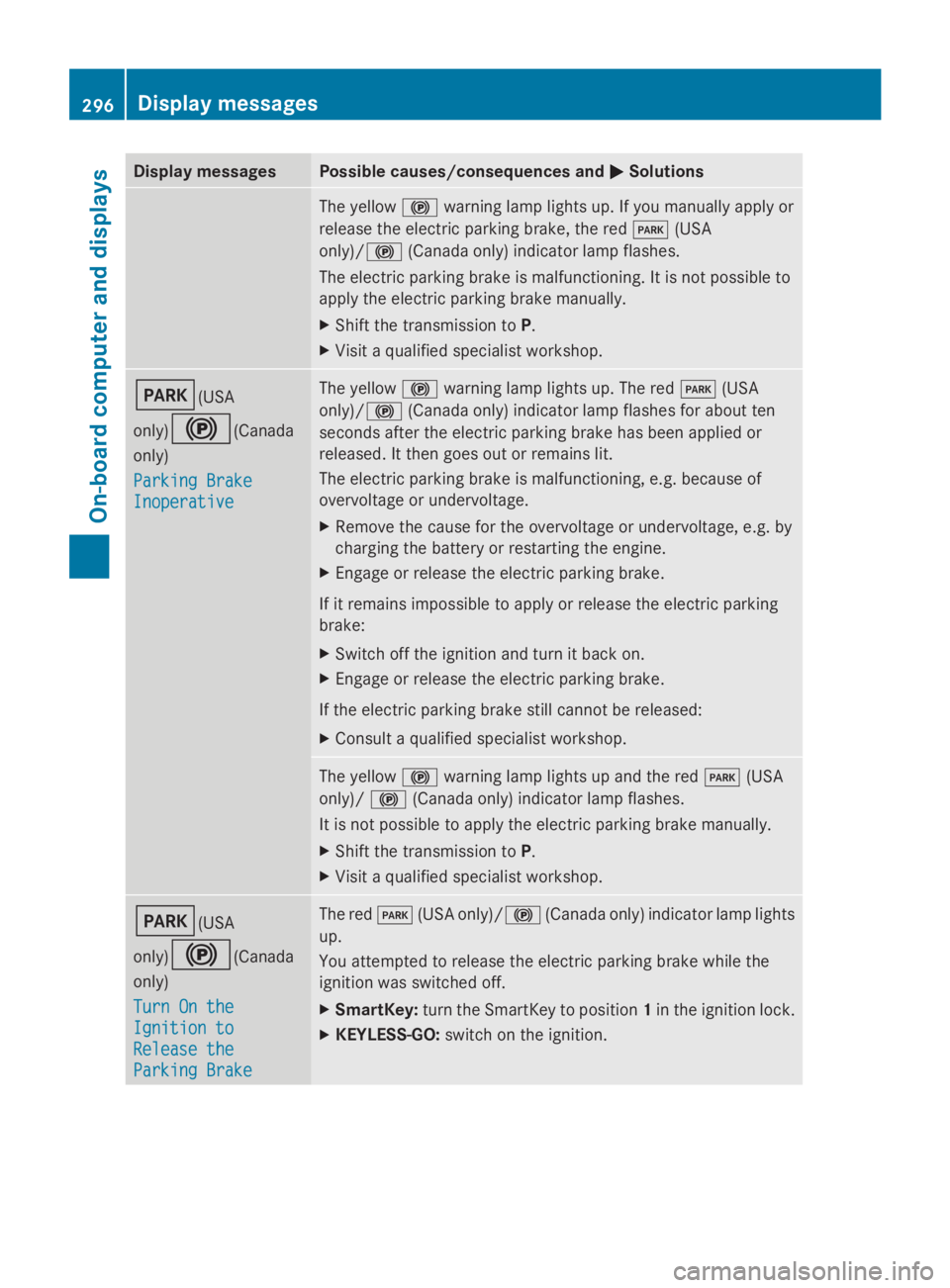
Display messagesPossible causes/consequences andPPSolutions
The yellow$warning lamp lights up. If you manually apply or
release the electric parking brake, the redI(USA
only)/$(Canada only) indicator lamp flashes.
The electric parking brake is malfunctioning. It is not possible to
apply the electric parking brake manually.
XShift the transmission toP.
XVisit a qualified specialist workshop.
I(USA
only)$(Canada
only)
Parking BrakeParking Brake
InoperativeInoperative
The yellow$warning lamp lights up. The redI(USA
only)/$(Canada only) indicator lamp flashes for about ten
seconds after the electric parking brake has been applied or
released. It then goes out or remains lit.
The electric parking brake is malfunctioning, e.g. because of
overvoltage or undervoltage.
XRemove the cause for the overvoltage or undervoltage, e.g. by
charging the battery or restarting the engine.
XEngage or release the electric parking brake.
If it remains impossible to apply or release the electric parking
brake:
XSwitch off the ignition and turn it back on.
XEngage or release the electric parking brake.
If the electric parking brake still cannot be released:
XConsult a qualified specialist workshop.
The yellow$warning lamp lights up and the redI(USA
only)/$(Canada only) indicator lamp flashes.
It is not possible to apply the electric parking brake manually.
XShift the transmission toP.
XVisit a qualified specialist workshop.
I(USA
only)$(Canada
only)
Turn On theTurn On the
Ignition toIgnition to
Release theRelease the
Parking BrakeParking Brake
The redI(USA only)/$(Canada only) indicator lamp lights
up.
You attempted to release the electric parking brake while the
ignition was switched off.
XSmartKey:turn the SmartKey to position1in the ignition lock.
XKEYLESS-GO:switch on the ignition.
296Displaymessages
On-b oard computer and displays
Page 303 of 462
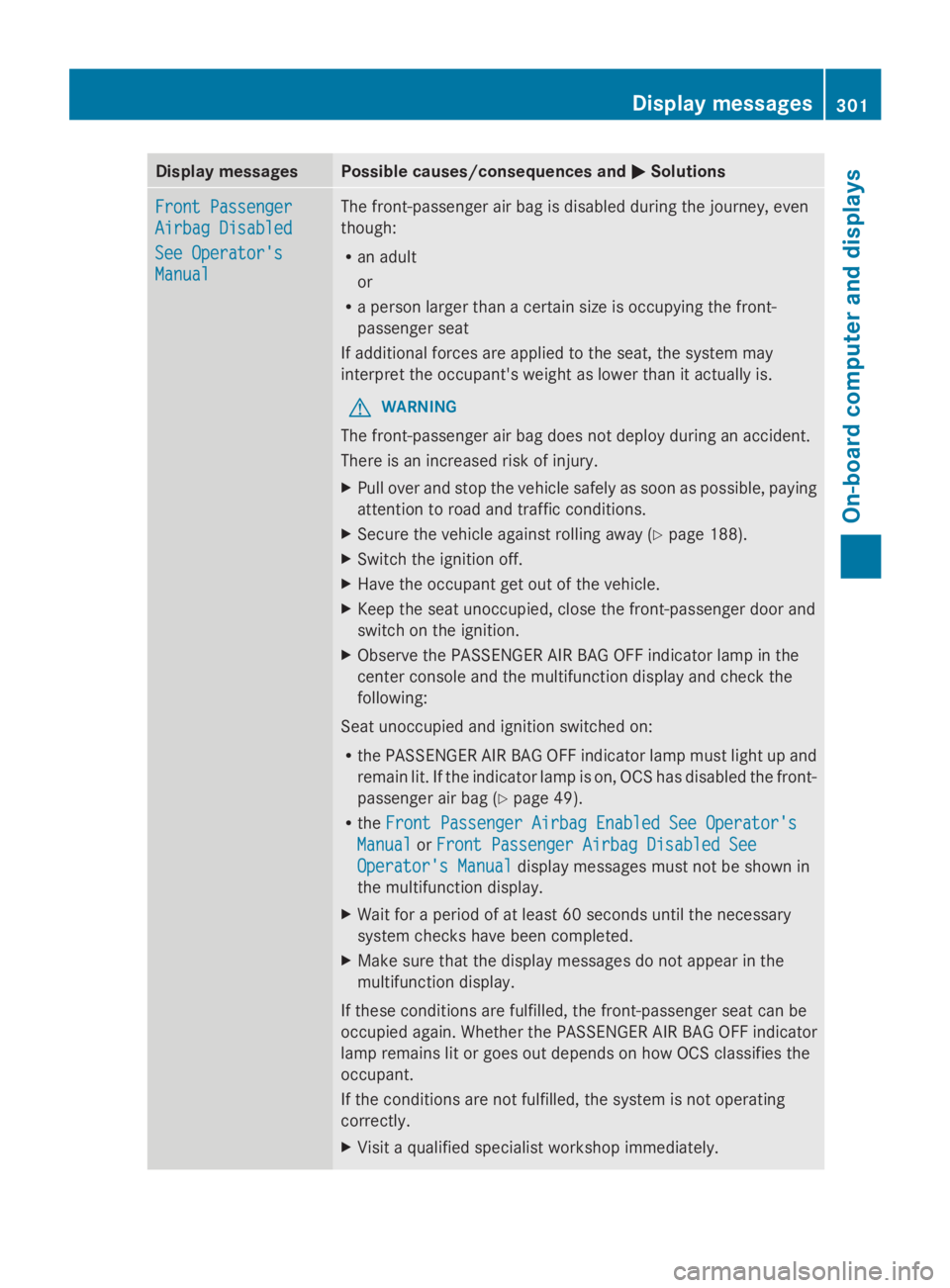
Display messagesPossible causes/consequences andPPSolutions
Front PassengerFront Passenger
Airbag DisabledAirbag Disabled
See Operator'sSee Operator's
ManualManual
The front-passenger air bag is disabled during the journey, even
though:
Ran adult
or
Ra person larger than a certain size is occupying the front-
passenger seat
If additional forces are applied to the seat, the system may
interpret the occupant's weight as lower than it actually is.
GWARNING
The front-passenger air bag does not deploy during an accident.
There is an increased risk of injury.
XPull over and stop the vehicle safely as soon as possible, paying
attention to road and traffic conditions.
XSecure the vehicle against rolling away (Ypage 188).
XSwitch the ignition off.
XHave the occupant get out of the vehicle.
XKeep the seat unoccupied, close the front-passenger door and
switch on the ignition.
XObserve the PASSENGER AIR BAG OFF indicator lamp in the
center console and the multifunction display and check the
following:
Seat unoccupied and ignition switched on:
Rthe PASSENGER AIR BAG OFF indicator lamp must light up and
remain lit. If the indicator lamp is on, OCS has disabled the front-
passenger air bag (Ypage 49).
RtheFront Passenger Airbag Enabled See Operator'sFront Passenger Airbag Enabled See Operator's
ManualManualorFront Passenger Airbag Disabled SeeFront Passenger Airbag Disabled See
Operator's ManualOperator's Manualdisplay messages must not be shown in
the multifunction display.
XWait for a period of at least 60 seconds until the necessary
system checks have been completed.
XMake sure that the display messages do not appear in the
multifunction display.
If these conditions are fulfilled, the front-passenger seat can be
occupied again. Whether the PASSENGER AIR BAG OFF indicator
lamp remains lit or goes out depends on how OCS classifies the
occupant.
If the conditions are not fulfilled, the system is not operating
correctly.
XVisit a qualified specialist workshop immediately.
Displaymessages301
On-b oard computer and displays
Z
Page 304 of 462
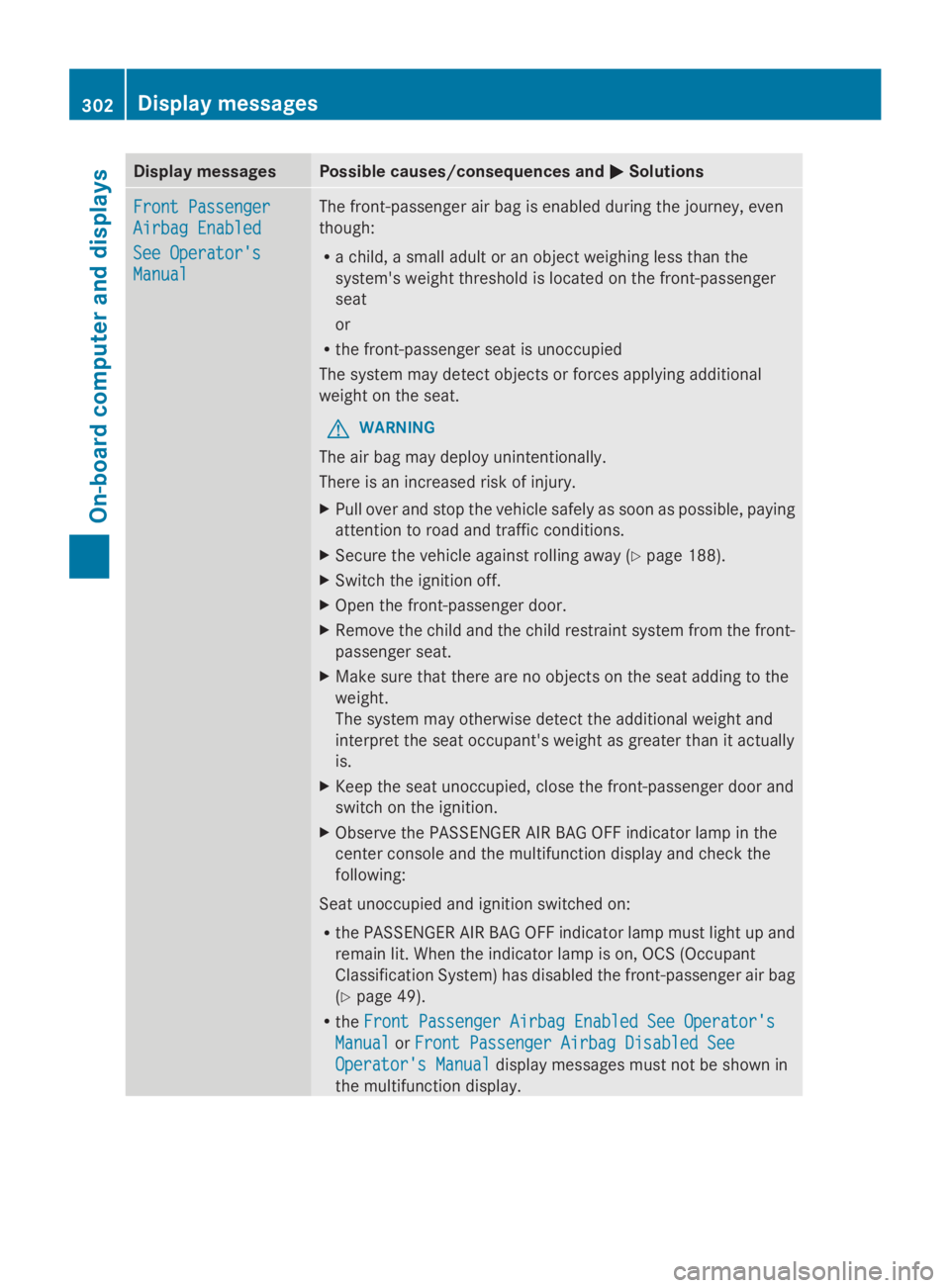
Display messagesPossible causes/consequences andPPSolutions
Front PassengerFront Passenger
Airbag EnabledAirbag Enabled
See Operator'sSee Operator's
ManualManual
The front-passenger air bag is enabled during the journey, even
though:
Ra child, a small adult or an object weighing less than the
system's weight threshold is located on the front-passenger
seat
or
Rthe front-passenger seat is unoccupied
The system may detect objects or forces applying additional
weight on the seat.
GWARNING
The air bag may deploy unintentionally.
There is an increased risk of injury.
XPull over and stop the vehicle safely as soon as possible, paying
attention to road and traffic conditions.
XSecure the vehicle against rolling away (Ypage 188).
XSwitch the ignition off.
XOpen the front-passenger door.
XRemove the child and the child restraint system from the front-
passenger seat.
XMake sure that there are no objects on the seat adding to the
weight.
The system may otherwise detect the additional weight and
interpret the seat occupant's weight as greater than it actually
is.
XKeep the seat unoccupied, close the front-passenger door and
switch on the ignition.
XObserve the PASSENGER AIR BAG OFF indicator lamp in the
center console and the multifunction display and check the
following:
Seat unoccupied and ignition switched on:
Rthe PASSENGER AIR BAG OFF indicator lamp must light up and
remain lit. When the indicator lamp is on, OCS (Occupant
Classification System) has disabled the front-passenger air bag
(Ypage 49).
RtheFront Passenger Airbag Enabled See Operator'sFront Passenger Airbag Enabled See Operator's
ManualManualorFront Passenger Airbag Disabled SeeFront Passenger Airbag Disabled See
Operator's ManualOperator's Manualdisplay messages must not be shown in
the multifunction display.
302Displaymessages
On-b oard computer and displays