service MERCEDES-BENZ GL 2016 Owner's Manual
[x] Cancel search | Manufacturer: MERCEDES-BENZ, Model Year: 2016, Model line: GL, Model: MERCEDES-BENZ GL 2016Pages: 462, PDF Size: 12.66 MB
Page 285 of 462
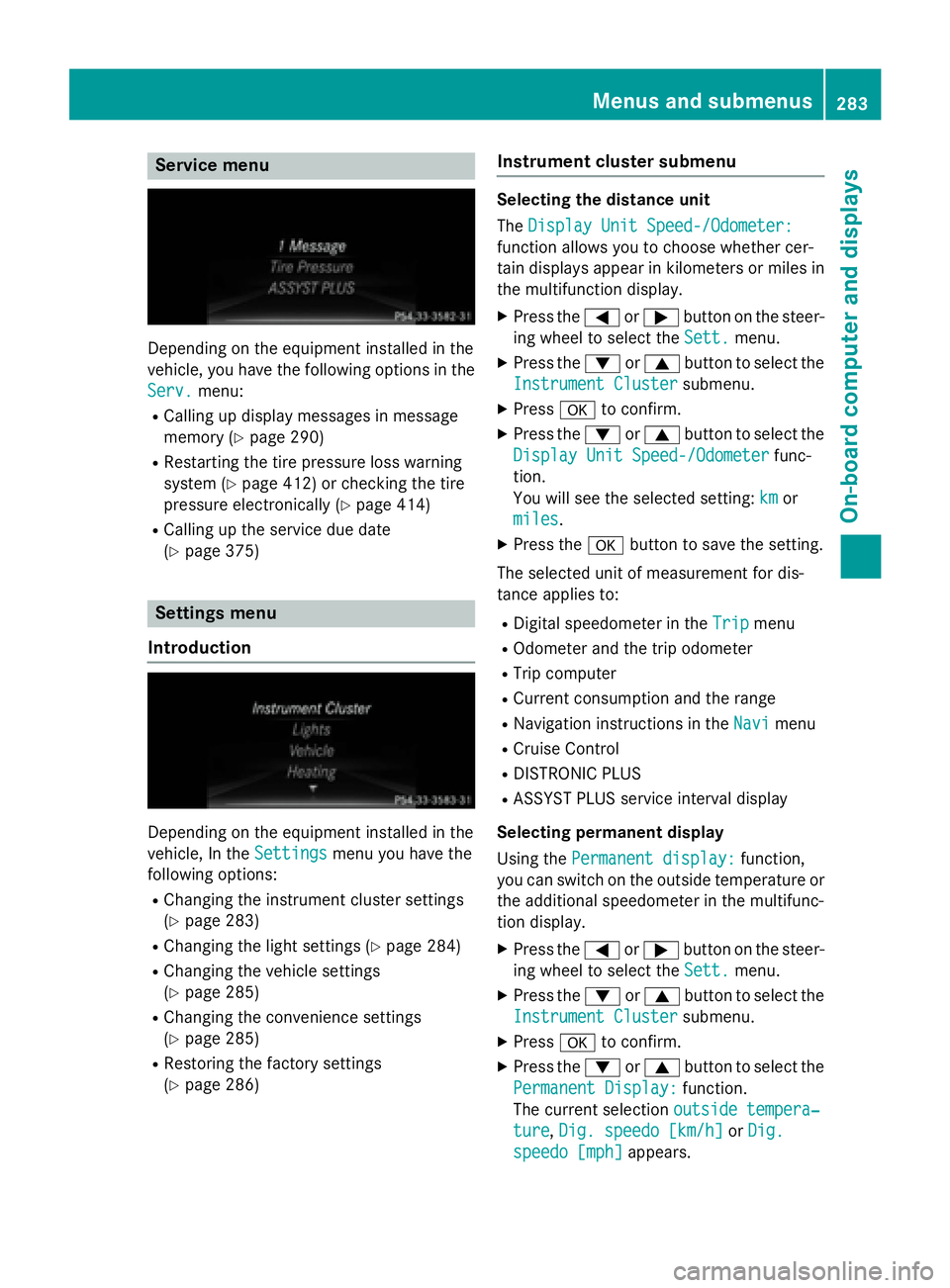
Service menu
Depending on the equipment installed in the
vehicle, you have the following options in the
Serv.
menu: R
Calling up display messages in message
memory ( Y
page 290)R
Restarting the tire pressure loss warning
system ( Y
page 412) or checking the tire
pressure electronically ( Y
page 414)R
Calling up the service due date
( Y
page 375)
Settings menu
Introduction
Depending on the equipment installed in the
vehicle, In the Settings
menu you have the
following options: R
Changing the instrument cluster settings
( Y
page 283) R
Changing the light settings ( Y
page 284)R
Changing the vehicle settings
( Y
page 285) R
Changing the convenience settings
( Y
page 285) R
Restoring the factory settings
( Y
page 286) Instrument cluster submenu Selecting the distance unit
The Display Unit Speed-/Odometer:
function allows you to choose whether cer-
tain displays appear in kilometers or miles in
the multifunction display. X
Press the Y or e button on the steer-
ing wheel to select the Sett.
menu.X
Press the d or c button to select the
Instrument Cluster
submenu.X
Press v to confirm. X
Press the d or c button to select the
Display Unit Speed-/Odometer
func-
tion.
You will see the selected setting: km
or
miles
. X
Press the v button to save the setting.
The selected unit of measurement for dis-
tance applies to: R
Digital speedometer in the Trip menuR
Odometer and the trip odometer R
Trip computer R
Current consumption and the range R
Navigation instructions in the Navi menuR
Cruise Control R
DISTRONIC PLUS R
ASSYST PLUS service interval display
Selecting permanent display
Using the Permanent display:
function,
you can switch on the outside temperature or
the additional speedometer in the multifunc-
tion display. X
Press the Y or e button on the steer-
ing wheel to select the Sett.
menu.X
Press the d or c button to select the
Instrument Cluster
submenu.X
Press v to confirm. X
Press the d or c button to select the
Permanent Display:
function.
The current selection outside tempera‐
ture , Dig. speedo [km/h] or Dig.
speedo [mph] appears.Menus and submenus 283
On-board computer and displays Z
Page 323 of 462
Display messages
Possible causes/consequences and P Solutions
Ris k of vehicl e
rollin g Transmis‐
sio n not in P The driver's doo r is open/not completely closed and th e trans -
missio n is in position R , N or D .
A warnin g tone also sounds.
G WARNIN G
The vehicl e may rol l away.
There is a ris k of an accident. X
Shift th e transmissio n to position P .X
Secur e th e vehicl e against rollin g away ( Y
page 189).X
Clos e th e driver's doo r completely.
Onl y select Par k
(P) whe n vehicl e
is stationar y The vehicl e is moving. X
Stop th e vehicl e safely as soo n as possible, payin g attention to
roa d and traffic conditions. X
Shift th e transmissio n to position P .
Withou t changing
gear, consul t work‐
sho p You canno t chang e th e transmissio n position due to a malfunction .
A warnin g tone also sounds.
If transmissio n position D is selected:X
Drive to a qualified specialist workshop without shiftin g th e
transmissio n from position D .
If transmissio n position R , N or P is selected:X
Secur e th e vehicl e against rollin g away ( Y
page 189).X
Notify a qualified specialist workshop or breakdown service.
Auxiliary batter y
malfunction The auxiliar y battery fo r th e automati c transmissio n is no longer
bein g charged. X
Visit a qualified specialist workshop at th e next opportunity.X
Unti l then , set th e automati c transmissio n to position P before
you switch of f th e engine.X
Before leavin g th e vehicle, apply th e electric parkin g brake.X
Secur e th e vehicl e against rollin g away ( Y
page 189).
e The tailgat e is open .
G WARNIN G
Whe n th e engin e is running , exhaus t gase s can ente r th e vehicl e
interio r if th e tailgat e is open .
There is a ris k of poisoning. X
Clos e th e tailgate. Display messages 32 1
On-board computer and displays Z
Page 358 of 462
Problems with the 115 V power socket Problem
Possible causes/consequences and P Solutions
The warning lamp on
the 115 Vp ower socket
is not lit. The on-board voltage is too low because the battery is too weak. X
Start the engine.
or X
Charge the battery ( Y
page 394).
If the indicator lamp still does not light up: X
Visit a qualified specialist workshop.
The temperature of the DC/AC converter is temporarily too high. X
Remove the electronic device connector from the 115 V socket. X
Let the DC/AC converter cool down.
If the indicator lamp still does not light up after cooling down the
converter: X
Visit a qualified specialist workshop.
You have connected an electronic device that has a constant
nominal power of less than 150 watts, but has a very high switch-
on current. This device will not work. If you connect such a device,
the 115 V power socket will not supply it with power. X
Connect a suitable electronic device.
mbrace
General notes
You must have a license agreement to acti-
vate the mbrace service. Make sure that your
system is activated and operational. To log in,
press the
Page 361 of 462
X
Press Roadside Assistance button C .
This initiates a call to the Mercedes-Benz
Customer Assistance Center.
The indicator lamp in Roadside Assistance
button C flashes while the call is active.
The multifunction display shows the Con‐
necting Call message. The audio output
is muted.
If a connection can be made, the Call Con‐
nected message appears in the multifunction
display.
If a mobile phone network and GPS reception
are available, the system transfers data to the
Mercedes-Benz Customer Assistance Center,
for example: R
current location of the vehicle R
vehicle identification number
i The audio system or COMAND display
indicates that a call is active. During the
call, you can change to the navigation menu
by pressing the NAVI button on COMAND,
for example.
Voice output is not available.
A voice connection is established between
the Mercedes-Benz Customer Assistance
Center and the vehicle occupants.
From the remote malfunction diagnosis, the
Mercedes-Benz Customer Assistance Center
can ascertain the nature of the problem
( Y
page 363).
The Mercedes-Benz Customer Assistance
Center either sends a qualified Mercedes-
Benz technician or makes arrangements for
your vehicle to be transported to the nearest
authorized Mercedes-Benz Center.
You may be charged for services such as
repair work and/or towing.
Further details are available in your mbrace
manual. i The system has not been able to initiate a
Roadside Assistance call, if: R
the indicator lamp for Roadside Assis-
tance call button C is flashing continu-
ously. R
no voice connection to the Mercedes-
Benz Customer Assistance Center was
established.
This can occur if the relevant mobile phone
network is not available, for example.
The Call Failed message appears in the
multifunction display. X
To end a call: press the v button on the
multifunction steering wheel.
or X
Press the corresponding button for ending
a phone call on the audio system or on
COMAND.
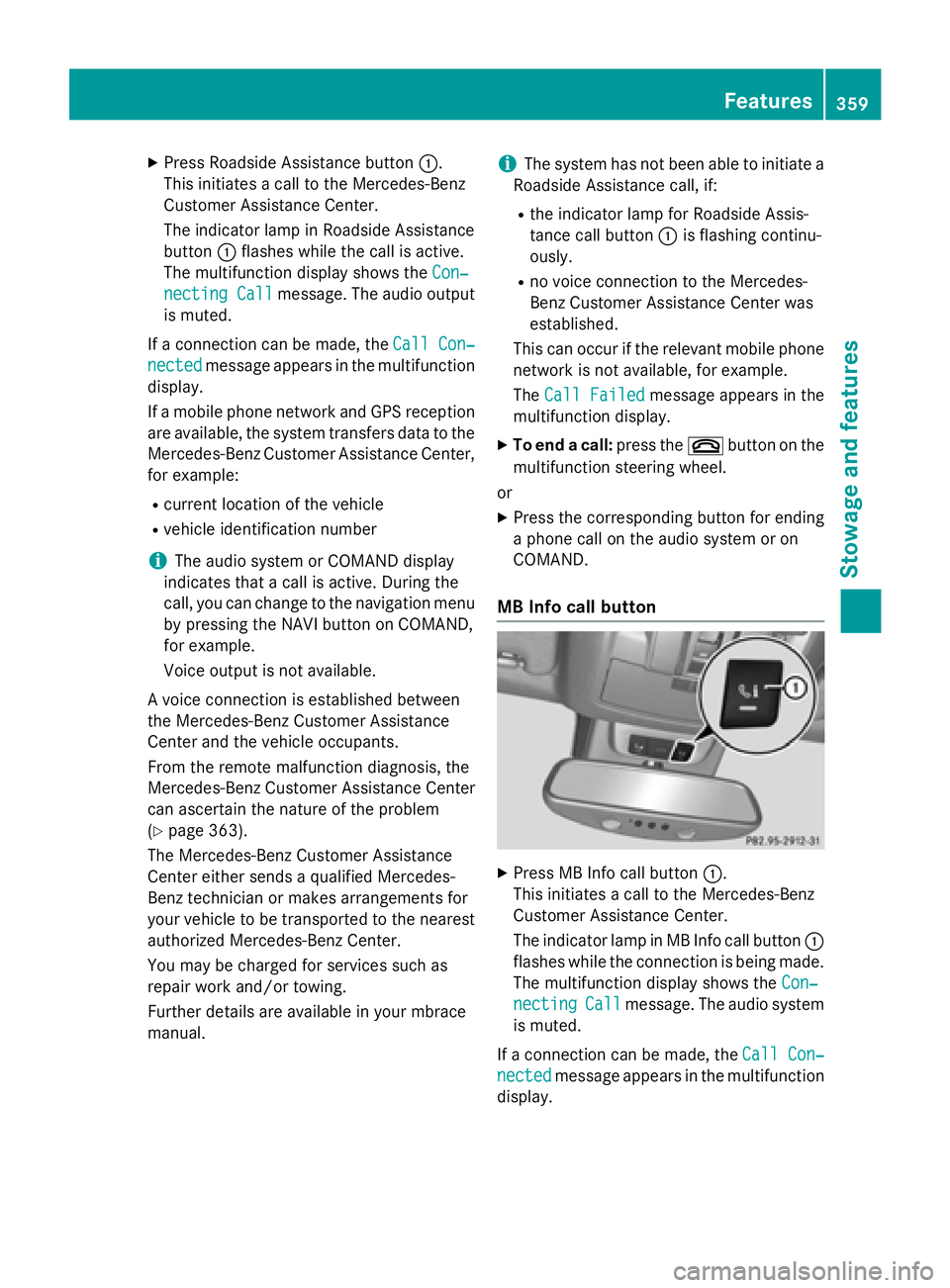
MB Info call button
X
Press MB Info call button C .
This initiates a call to the Mercedes-Benz
Customer Assistance Center.
The indicator lamp in MB Info call button C
flashes while the connection is being made.
The multifunction display shows the Con‐
necting Call message. The audio system
is muted.
If a connection can be made, the Call Con‐
nected message appears in the multifunction
display. Features 359
Stowage and features Z
Page 362 of 462
If a mobile phone network and GPS reception
are available, the system transfers data to the
Mercedes-Benz Customer Assistance Center,
for example: R
current location of the vehicle R
vehicle identification number
i The audio system or COMAND display
indicates that a call is active. During the
call, you can change to the navigation menu
by pressing the NAVI button on COMAND,
for example.
Voice output is not available.
A voice connection is established between
the Mercedes-Benz Customer Assistance
Center and the vehicle occupants.
You receive information about operating your
vehicle, about the nearest authorized
Mercedes-Benz Center and about other prod-
ucts and services from Mercedes-Benz.
USA only: you can find further information on
the mbrace system under "Owners Online" at
http://www.mbusa.com.
i The system has not been able to initiate
an MB Info call, if: R
the indicator lamp in MB Info call but-
ton C is flashing continuously.R
no voice connection to the Mercedes-
Benz Customer Assistance Center was
established.
This can occur if the relevant mobile phone
network is not available, for example.
The Call Failed message appears in the
multifunction display. X
To end a call: press the v button on the
multifunction steering wheel.
or X
Press the corresponding button for ending
a phone call on the audio system or on
COMAND. Call priority When service calls are active, e.g. Roadside
Assistance or MB Info calls, an emergency
call can still be initiated. In this case, an emer-
gency call will take priority and override all
other active calls.
The indicator lamp of the respective button
flashes until the call is ended.
An emergency call can only be terminated by
the Mercedes-Benz Customer Assistance
Center.
All other calls can be ended by pressing: R
the v button on the multifunction steer-
ing wheel R
the corresponding button on the audio sys-
tem or on COMAND for ending a telephone
call
i When a call is initiated, the audio system
is muted. The mobile phone is no longer
connected to COMAND. However, if you
want to use your mobile phone, do so only
when the vehicle is stationary and in a safe
location.
Downloading destinations in COMAND
Downloading destinations
Downloading destinations gives you access
to a database with over 15 million points of
interest (POIs). These can be downloaded on
the navigation system in your vehicle. If you
know the destination, the address can be
downloaded. Alternatively, you can obtain the
location of Points of Interest (POIs)/impor-
tant destinations in the vicinity.
Furthermore, you can download routes with
up to 20 way points.
You are prompted to confirm route guidance
to the address entered.
The system calculates the route and subse-
quently starts the route guidance with the
address entered.
i If you select No , the address can be saved
in the address book.360
Features
Stowage and features
Page 363 of 462
i The destination download function is
available if the relevant mobile phone net-
work is available and data transfer is pos-
sible.
i The destination download function can
only be used if the vehicle is equipped with
a navigation system.
Route Assistance
This service is part of the mbrace PLUS Pack-
age and cannot be purchased separately.
i You can also use the Route Assistance
function if your vehicle is not equipped with
a navigation system.
Within the framework of this service, you
receive a professional and reliable form of
navigation support without having to leave
your vehicle.
The customer service representative finds a
suitable route depending on your vehicle's
current position and the desired destination.
You will then be guided live through the cur-
rent route section.
Search & Send
General notes
i To use "Search & Send", your vehicle
must be equipped with mbrace and a navi-
gation system. Additionally, an mbrace ser-
vice subscription must be completed.
"Search & Send" is a destination entry ser-
vice. A destination address which is found on
Google Maps ®
can be transferred via mbrace
directly to your vehicle's navigation system.
Specifying and sending the destination
address X
Go to the website http://
www.maps.google.com and enter a desti-
nation address into the entry field. X
To send the destination address to the
e-mail address of your mbrace account:
click on the corresponding button on the
website. i Example:
If you select 'Send to vehicle' and then
'Mercedes-Benz', the destination address
will be sent to your vehicle. X
When the "Send" dialog window appears:
Enter the e-mail address you specified
when setting up your mbrace account into
the corresponding field. X
Click "Send".
i Information on specific commands such
as "Address entry" or "Send" can be found
on the website.
Calling up destination addresses X
Switch on the ignition.
The destination address is loaded into the
vehicle's navigation system.
A display message appears, asking
whether navigation should be started. X
Select Yes by turning yRz or sliding
Page 364 of 462
Vehicle remote opening You can use the vehicle remote opening if you
have unintentionally locked your vehicle and
a replacement SmartKey is not available.
The vehicle can be opened by the Mercedes-
Benz Customer Assistance Center.
The vehicle can be immediately opened
remotely within four days of the ignition being
turned off. After this time, the remote unlock-
ing may be delayed by 15 to 60 minutes. After
30 days, the vehicle can no longer be opened
remotely. X
Contact the following service hotlines: R
USA: Mercedes-Benz Customer Assis-
tance Center at 1-800-FOR-MERCedes
(1-800-367-6372) or 1-866-990-9007 R
Canada: Customer Service at
1-888-923-8367
You will be asked for your password. X
Return to your vehicle at the time agreed
upon with the Mercedes-Benz Customer
Assistance Center.
USA only: alternatively, the vehicle can be
opened via: R
the Internet, under the "Owners Online"
section R
the telephone application (e .g . for iPhone ®
,
Android)
To do this, you will need your identification
number and password.
i Vehicle remote opening is only possible if
the corresponding mobile phone network is
accessible.
Vehicle remote closing
The valet locking feature can be used when
you have forgotten to lock the vehicle and you
are no longer nearby.
The vehicle can then be locked by the
Mercedes-Benz Customer Assistance Center.
The vehicle can be immediately remotely
locked within four days of the ignition being
turned off. After this time, remote closing may be delayed by 15 to 60 minutes. After 30 days
the vehicle can no longer be locked remotely. X
Contact the following service hotlines: R
USA: Mercedes-Benz Customer Assis-
tance Center at 1-800-FOR-MERCedes
(1-800-367-6372) or 1-866-990-9007 R
Canada: Customer Service at
1-888-923-8367
You will be asked for your password.
The next time you are inside the vehicle and
you switch on the ignition, the Doors
Locked Remotely message appears in the
multifunction display.
USA only: alternatively, the vehicle can be
locked via: R
the Internet, under the "Owners Online"
section R
the telephone application (e .g . for iPhone ®
,
Android)
To do this, you will need your identification
number and password.
i The vehicle remote closing feature is
available when the relevant mobile phone
network is available and data connection is
possible.
Stolen vehicle recovery service
If your vehicle has been stolen: X
Notify the police.
The police will issue a numbered incident
report. X
This number will be forwarded to the
Mercedes-Benz Customer Assistance Cen-
ter together with your PIN.
The Mercedes-Benz Customer Assistance
Center then tries to locate the system. The
Mercedes-Benz Customer Assistance Cen-
ter contacts you and the local law enforce-
ment agency if the vehicle is located.
However, only the law enforcement agency
is informed of the location of the vehicle.
i If the anti-theft alarm system is activated
for longer than 30 seconds, the Mercedes-362
Features
Stowage and features
Page 365 of 462
Benz Customer Assistance Center is auto-
matically notified.
Vehicle Health Check With the Vehicle Health Check, the Customer
Assistance Center can provide improved sup-
port for problems with your vehicle. During an
existing call, vehicle data is transferred to the
Customer Assistance Center. The customer
service representative can use the received
data to decide what kind of assistance is
required. You are then, for example, guided to
the nearest authorized Mercedes-Benz Cen-
ter or a recovery vehicle is called.
If vehicle data needs to be transferred during
an MB Info call or a Roadside Assistance call,
this is initiated by the Customer Assistance
Center. You will see the Roadside Assis‐
tance Connected message in the COMAND
display. If the vehicle remote malfunction
diagnosis can be started, the Request for
vehicle diagnosis received. Start
vehicle diagnosis? message appears in
the display. X
Confirm the message with Yes .X
When the Vehicle Diagnosis Please
start ignition message appears, turn
the SmartKey to position 2 in the ignition
lock ( Y
page 165).X
When the Please follow the instruc‐
tions received by phone and move
your vehicle to a safe position
message appears, follow the customer ser-
vice representative's instructions.
The message in the display disappears.
If you select Cancel the remote malfunc-
tion diagnosis is canceled completely.
The vehicle operating state check begins.
You will see the Vehicle diagnosis
activated message.
When the diagnosis is completed, the Trans‐
fer vehicle diagnostics data (Voice
connection may be interrupted dur‐
ing data transfer) message appears. The vehicle data can now be sent to the Customer
Assistance center. X
Press OK to confirm the message.
The voice connection with the Customer
Assistance Center is terminated.
You will see the Vehicle diagnosis:
Transferring data... message.
The vehicle data is sent to the Customer
Assistance Center.
Depending on what the customer service rep-
resentative agreed with you, the voice con-
nection is re-established after the transfer is
complete. If necessary, you will be contacted
at a later time by another means, e.g. by e-
mail or phone.
Another function of the Vehicle Health Check
is the transfer of service data to the Customer
Assistance Center. If a service is overdue, the
COMAND display shows a message about
various special offers at your workshop.
USA only: this information can also be called
up under "Owners Online" at http://
www.mbusa.com.
Information on the data stored in the vehicle
( Y
page 30).
Information on Roadside Assistance
( Y
page 26).
Downloading routes
Downloading routes allows you to transfer
and save predefined routes in the navigation
system. To do this, an SD memory card must
be inserted into the COMAND system. If no
SD memory card is inserted, you must insert
the card into the card slot on the COMAND
system before saving.
A route can be prepared and sent either by a
customer service representative or via the
mbrace portal on the Internet.
Each route can include up to 20 way points.
Once a route has been received by the navi-
gation system, you will see the
Do you want to start route guidance?Features 363
Stowage and features Z
Page 366 of 462
message in the COMAND display. The route is
saved to the SD memory card. X
To start route guidance: select Yes .
An overview of the route is shown in the
display.
i If you select No , the saved route can be
called up later via the navigation menu. X
Select Start .
Route guidance is started.
i Downloaded and saved data can be called
up again in COMAND.
You can find further information in the sep-
arate COMAND Operating Instructions.
Speed alert You can define the upper speed limit, which
must not be exceeded by the vehicle.
If this selected speed is exceeded by the vehi-
cle, a message will be sent to the Customer
Assistance Center. The Customer Assistance
Center then forwards this information to you.
You can select the way in which you receive
this information beforehand. Possible options
include text message, e-mail or an automated
call.
The data you receive contains the following
information: R
the location where the speed limit was
exceeded R
the time at which the speed limit was
exceeded R
the selected speed limit which was excee-
ded
Geo fencing
Geo fencing allows you to select areas which
the vehicle should not enter or leave. You will
be informed if the vehicle crosses the boun-
daries of the selected areas. You can select
the way in which you receive this information
beforehand. Possible options include text
message, e-mail or an automated call. The area can be determined as either a circle
or a polygon with a maximum of ten corners.
You can specify up to ten areas simultane-
ously. Different settings are possible for each
area.
USA only: these settings can be called up
under "Owners Online" at http://
www.mbusa.com.
Alternatively, you can trigger an MB Info call
and inform the customer service representa-
tive that you wish to activate geo fencing.
Currently inactive areas can be activated by
text message.
Triggering the vehicle alarm With this function, you can trigger the vehi-
cle's panic alarm via text message. An alarm
sounds and the exterior lighting flashes.
Depending on the setting, the panic alarm
lasts five or ten seconds. Afterwards, the
alarm switches off.
Garage door opener
General notes
The HomeLink ®
garage door opener integra-
ted in the rear-view mirror allows you to oper-
ate up to three different door and gate sys-
tems.
Use the integrated garage door opener only
on garage doors that: R
have safety stop and reverse features and R
meet current U.S. federal safety standards
Once programed, the integrated garage door
opener in the rear-view mirror will assume the
function of the garage door system's remote
control. Please also read the operating
instructions for the garage door system.
When programming a garage door opener,
park the vehicle outside the garage. Do not
run the engine while programming.
Certain garage door drives are incompatible
with the integrated garage door opener. If you
have difficulty programing the integrated364
Features
Stowage and features
Page 367 of 462
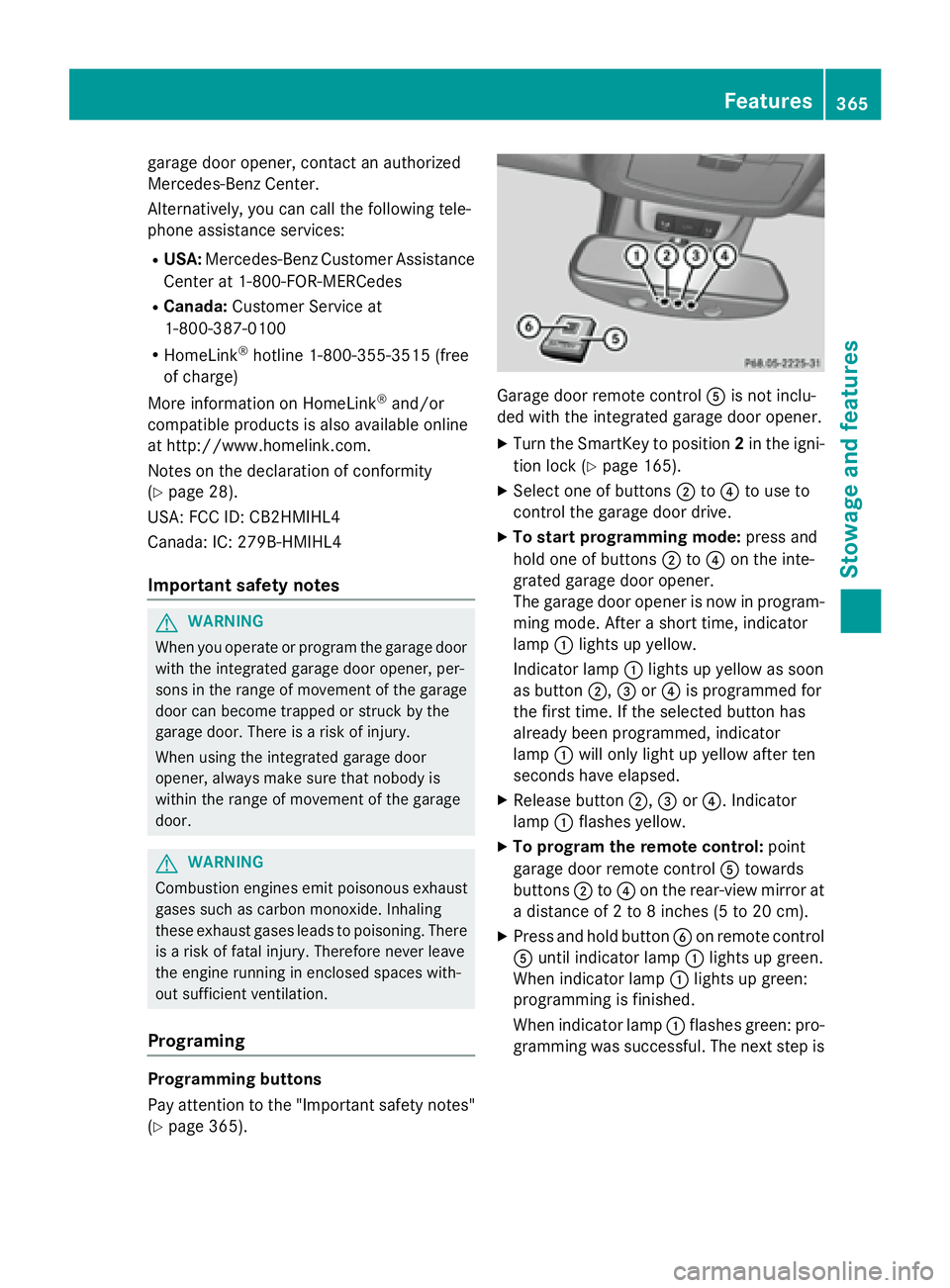
garage door opener, contact an authorized
Mercedes-Benz Center.
Alternatively, you can call the following tele-
phone assistance services: R
USA: Mercedes-Benz Customer Assistance
Center at 1-800-FOR-MERCedes R
Canada: Customer Service at
1-800-387-0100 R
HomeLink ®
hotline 1-800-355-3515 (free
of charge)
More information on HomeLink ®
and/or
compatible products is also available online
at http://www.homelink.com.
Notes on the declaration of conformity
( Y
page 28).
USA: FCC ID: CB2HMIHL4
Canada: IC: 279B-HMIHL4
Important safety notes
G WARNING
When you operate or program the garage door
with the integrated garage door opener, per-
sons in the range of movement of the garage
door can become trapped or struck by the
garage door. There is a risk of injury.
When using the integrated garage door
opener, always make sure that nobody is
within the range of movement of the garage
door.
G WARNING
Combustion engines emit poisonous exhaust
gases such as carbon monoxide. Inhaling
these exhaust gases leads to poisoning. There
is a risk of fatal injury. Therefore never leave
the engine running in enclosed spaces with-
out sufficient ventilation.
Programing
Programming buttons
Pay attention to the "Important safety notes"
( Y
page 365). Garage door remote control