light MERCEDES-BENZ GL 2016 Owner's Guide
[x] Cancel search | Manufacturer: MERCEDES-BENZ, Model Year: 2016, Model line: GL, Model: MERCEDES-BENZ GL 2016Pages: 462, PDF Size: 12.66 MB
Page 94 of 462
You could therefore be locked out if: R
the vehicle is being pushed. R
the vehicle is being towed. R
the vehicle is on a roller dynamometer.
You can also switch the automatic locking
function on and off using the on-board com-
puter ( Y
page 285).
Power closingPower closing pulls the doors and trunk lid
into their locks automatically even if they are
only partly closed. X
To power close a door: push the door into
the lock up to the first detent position.
Power closing will pull the door fully closed. X
To power close the tailgate: lightly press
the tailgate downwards.
Power closing will pull the tailgate fully
closed.
Unlocking the driver's door (mechan-
ical key)
If the vehicle can no longer be locked or
unlocked with the SmartKey or KEYLESS-GO,
use the mechanical key.
If you use the mechanical key to unlock and
open the driver's door, the anti-theft alarm
system will be triggered ( Y
page 78).X
Take the mechanical key out of the Smart-
Key ( Y
page 85).X
Insert the mechanical key into the lock of
the driver's door as far as it will go. X
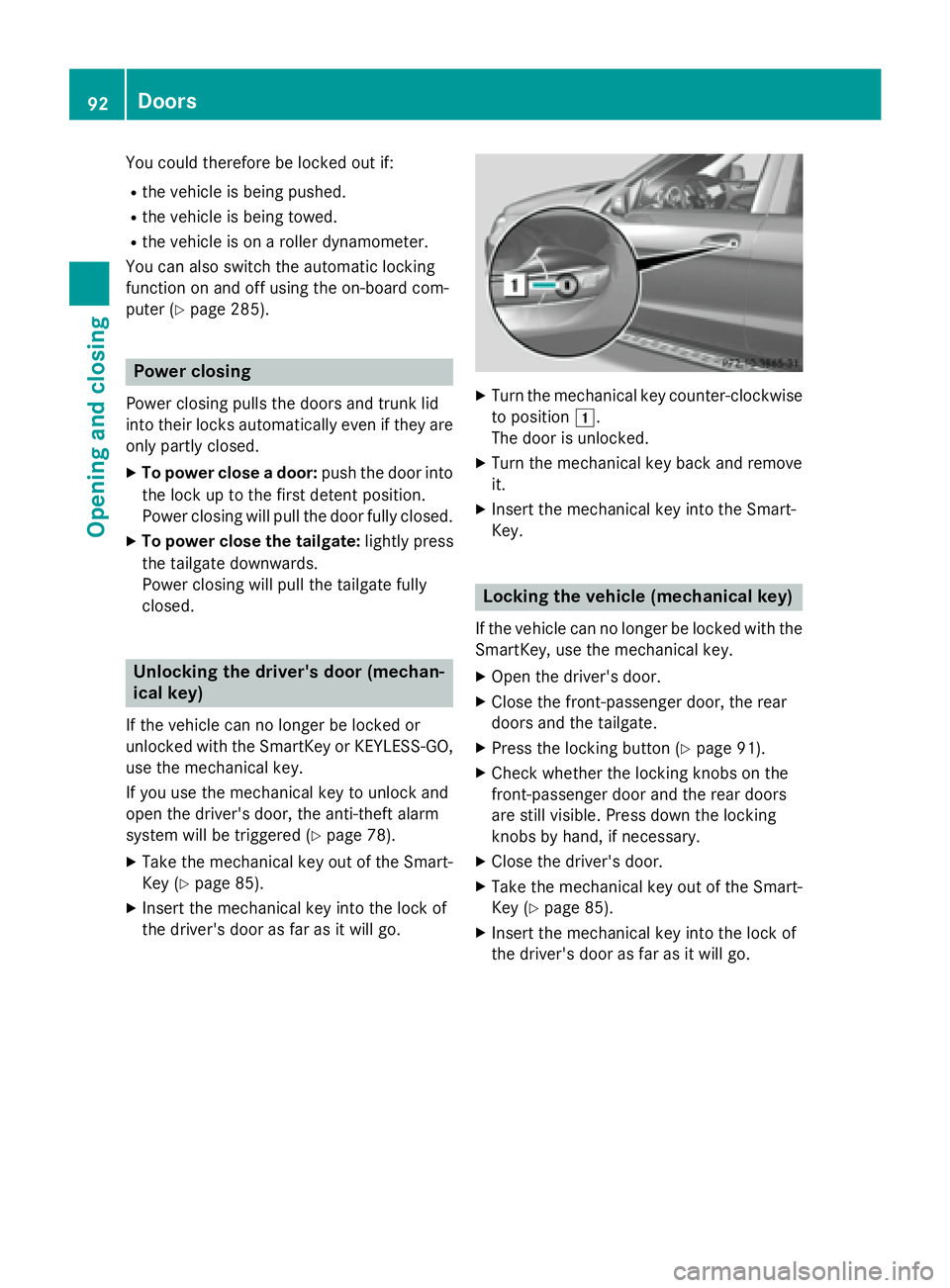
Turn the mechanical key counter-clockwise
to position G .
The door is unlocked. X
Turn the mechanical key back and remove
it. X
Insert the mechanical key into the Smart-
Key.
Locking the vehicle (mechanical key) If the vehicle can no longer be locked with the
SmartKey, use the mechanical key. X
Open the driver's door. X
Close the front-passenger door, the rear
doors and the tailgate. X
Press the locking button ( Y
page 91).X
Check whether the locking knobs on the
front-passenger door and the rear doors
are still visible. Press down the locking
knobs by hand, if necessary. X
Close the driver's door. X
Take the mechanical key out of the Smart-
Key ( Y
page 85). X
Insert the mechanical key into the lock of
the driver's door as far as it will go.92
Doors
Opening and closing
Page 96 of 462
recognition with reversing feature is only an
aid. It is not a substitute for your attentive-
ness when opening and closing the tailgate.
G WARNING
The reversing feature does not react: R
to soft, light and thin objects, e.g. small fin-
gers R
over the last 1/3 in (8 mm) of the closing
movement
This means that the reversing feature cannot
prevent someone being trapped in these sit-
uations. There is a risk of injury.
Make sure that no body parts are in close
proximity during the closing procedure.
If somebody becomes trapped: R
press the T button on the SmartKey, orR
pull or press the remote operating switch
on the driver's door or R
press the closing or locking button on the
tailgate or R
pull the handle on the tailgate
Opening and closing manually from
outside
Opening
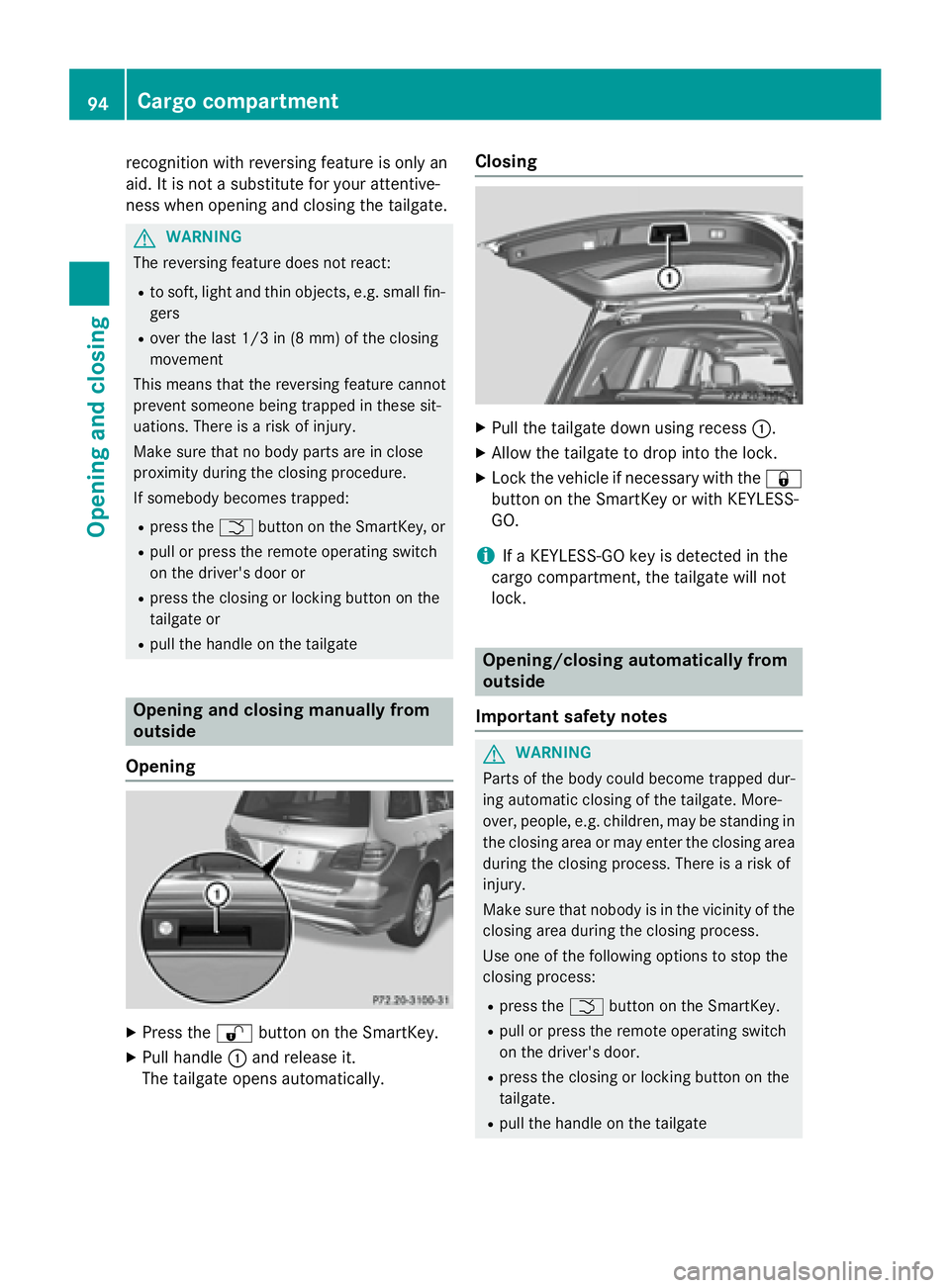
X
Press the 6 button on the SmartKey.X
Pull handle C and release it.
The tailgate opens automatically. Closing X
Pull the tailgate down using recess C .X
Allow the tailgate to drop into the lock. X
Lock the vehicle if necessary with the 7
button on the SmartKey or with KEYLESS-
GO.
i If a KEYLESS-GO key is detected in the
cargo compartment, the tailgate will not
lock.
Opening/closing automatically from
outside
Important safety notes
G WARNING
Parts of the body could become trapped dur-
ing automatic closing of the tailgate. More-
over, people, e.g. children, may be standing in
the closing area or may enter the closing area
during the closing process. There is a risk of
injury.
Make sure that nobody is in the vicinity of the
closing area during the closing process.
Use one of the following options to stop the
closing process: R
press the T button on the SmartKey. R
pull or press the remote operating switch
on the driver's door. R
press the closing or locking button on the
tailgate. R
pull the handle on the tailgate94
Cargo compartment
Opening and closing
Page 100 of 462
Side window reversing featureThe side windows are equipped with an auto-
matic reversing feature. If a solid object
blocks or restricts a side window during the
closing process, the side window opens again
automatically. However, the automatic
reversing feature is only an aid and does not
relieve you of the responsibility of paying
attention when closing a side window.
G WARNING
The reversing feature does not react: R
to soft, light and thin objects, e.g. small fin-
gers R
over the last 1/6 in(4 mm) of the closing
movement R
during resetting R
when closing the side window again man-
ually immediately after automatic reversing
This means that the reversing feature cannot
prevent someone being trapped in these sit-
uations. There is a risk of injury.
Make sure that no body parts are in close
proximity during the closing procedure. If
someone becomes trapped, press the switch
to open the side window again.
Opening and closing the side win-
dows
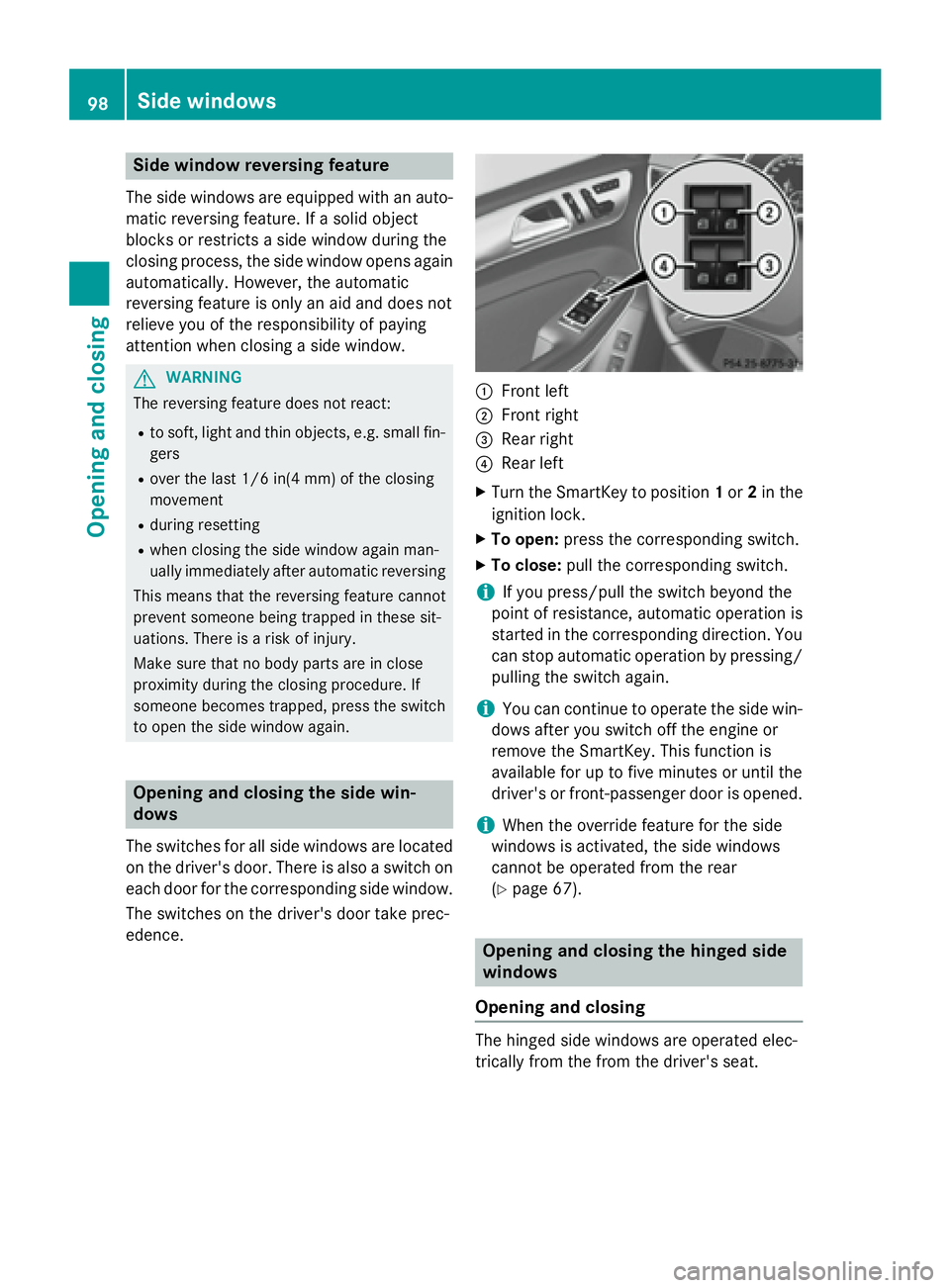
The switches for all side windows are located
on the driver's door. There is also a switch on
each door for the corresponding side window.
The switches on the driver's door take prec-
edence. C
Front left D
Front right
Page 103 of 462
If the side window opens again slightly: X
Immediately pull the corresponding switch
on the door control panel until the side win-
dow is completely closed ( Y
page 98).X
Hold the switch for an additional second. X
If the respective side window remains
closed after the button is released, then it
has been set correctly. If this is not the
case, repeat the steps above again.
Side windows 101
Opening and closing Z
Page 104 of 462
Problems with the side windows
G WARNING
If you close a side window again immediately after it has been blocked or reset, the side window
closes with increased or maximum force. The reversing feature is then not active. Parts of the
body could be trapped in the closing area in the process. This poses an increased risk of injury or
even fatal injury.
Make sure that no parts of the body are in the closing area. To stop the closing process, release
the switch or push the switch again to reopen the side window.
Problem
Possible causes/consequences and P Solutions
A side window cannot
be closed because it is
blocked by objects, e.g.
leaves in the window
guide. X
Remove the objects. X
Close the side window.
A side window cannot
be closed and you can-
not see the cause. If a side window is obstructed during closing and reopens again
slightly: X
Immediately after the window blocks, pull the corresponding
switch again until the side window has closed.
The side window is closed with increased force.
If a side window is obstructed again during closing and reopens
again slightly: X
Immediately after the window blocks, pull the corresponding
switch again until the side window has closed.
The side window is closed without the anti-entrapment feature.
Sliding sunroof
Important safety notes
Your vehicle may be equipped with a sliding
sunroof or a panorama roof with power tilt/
sliding panel. In this section, the term "sliding
sunroof" refers to both types of sliding sun-
roof.
G WARNING
While opening and closing the sliding sunroof,
body parts in close proximity could become
trapped. There is a risk of injury.
Make sure that no body parts are in close
proximity during the opening and closing pro-
cedures. If somebody becomes trapped: R
release the switch immediately, or R
during automatic operation, push the
switch briefly in any direction
The opening or closing procedure will be stop-
ped.
G WARNING
If children operate the sliding sunroof they
could become trapped, particularly if they are
left unsupervised. There is a risk of injury.
When leaving the vehicle, always take the
SmartKey with you and lock the vehicle. Never
leave children unsupervised in the vehicle.102
Sliding sunroof
Opening and closing
Page 105 of 462
! Only open the sliding sunroof if it is free of
snow and ice. Otherwise, malfunctions may
occur.
Do not allow anything to protrude from the
sliding sunroof. Otherwise, the seals could
be damaged.
! The weather can change abruptly. It could
start to rain or snow. Make sure that the
sliding sunroof is closed when you leave the
vehicle. The vehicle electronics can be
damaged if water enters the vehicle inte-
rior.
i Resonance noises can occur in addition to
the usual airflow noises when the sliding
sunroof is open. They are caused by minor
pressure fluctuations in the vehicle interior.
Change the position of the sliding sunroof
or open a side window. The noise will be
reduced or eliminated.
Sliding sunroof reversing feature The sliding sunroof is equipped with an auto-
matic reversing feature. If a solid object
blocks or restricts the sliding sunroof during
the closing process, the sliding sunroof opens
again automatically. However, the automatic
reversing feature is only an aid and does not
relieve you of the responsibility of paying
attention when closing the sliding sunroof.
G WARNING
The reversing feature does not react: R
to soft, light and thin objects, e.g. small fin-
gers R
over the last 1/6 in (4 mm) of the closing
movement R
during resetting R
when closing the sliding sunroof again man-
ually immediately after automatic reversing
This means that the reversing feature cannot
prevent someone being trapped in these sit-
uations. There is a risk of injury.
Make sure that no body parts are in close
proximity during the closing procedure. If somebody becomes trapped: R
release the switch immediately, or R
press the switch in any direction during the
automatic closing process
The closing process is stopped.
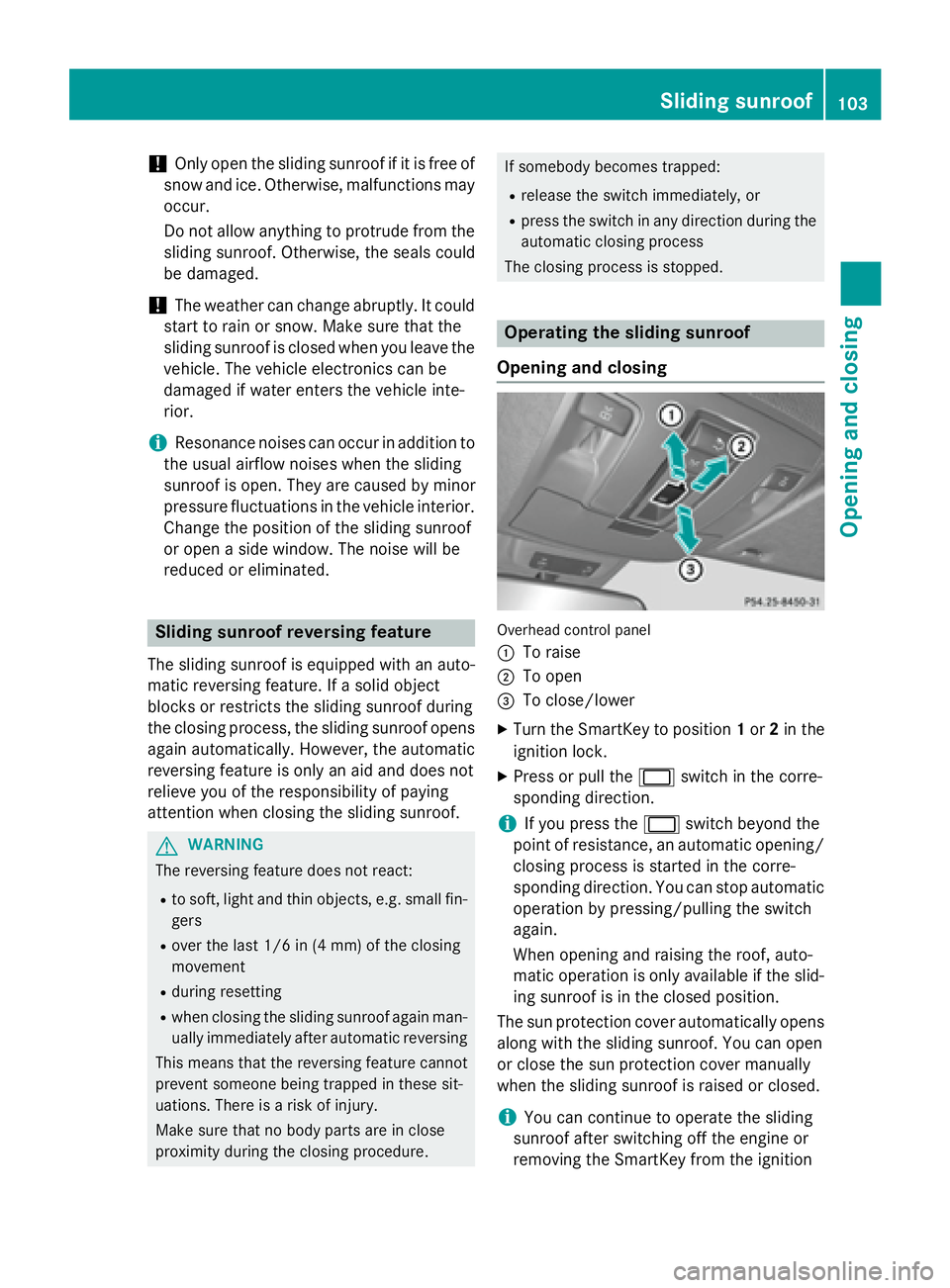
Operating the sliding sunroof
Opening and closing
Overhead control panel
C
To raise D
To open
Page 107 of 462
again automatically. However, the automatic
reversing feature is only an aid and does not
relieve you of the responsibility of paying
attention when closing the roller sunblinds.
G WAR NING
The reversing feature does not react in par-
ticular to soft, light and th in objects, e.g. small
fingers. This means that the reversing feature
cannot prevent someone bein g trapped in
these situations. There is a risk of injury.
When closing the roller sun blind, make sure
that no body parts are in the sweep area.
If somebody becomes tr apped:R
release the swit ch immediately, orR
press the swit ch in any dire ction during the
automat ic closing process
The closing process is st opped.
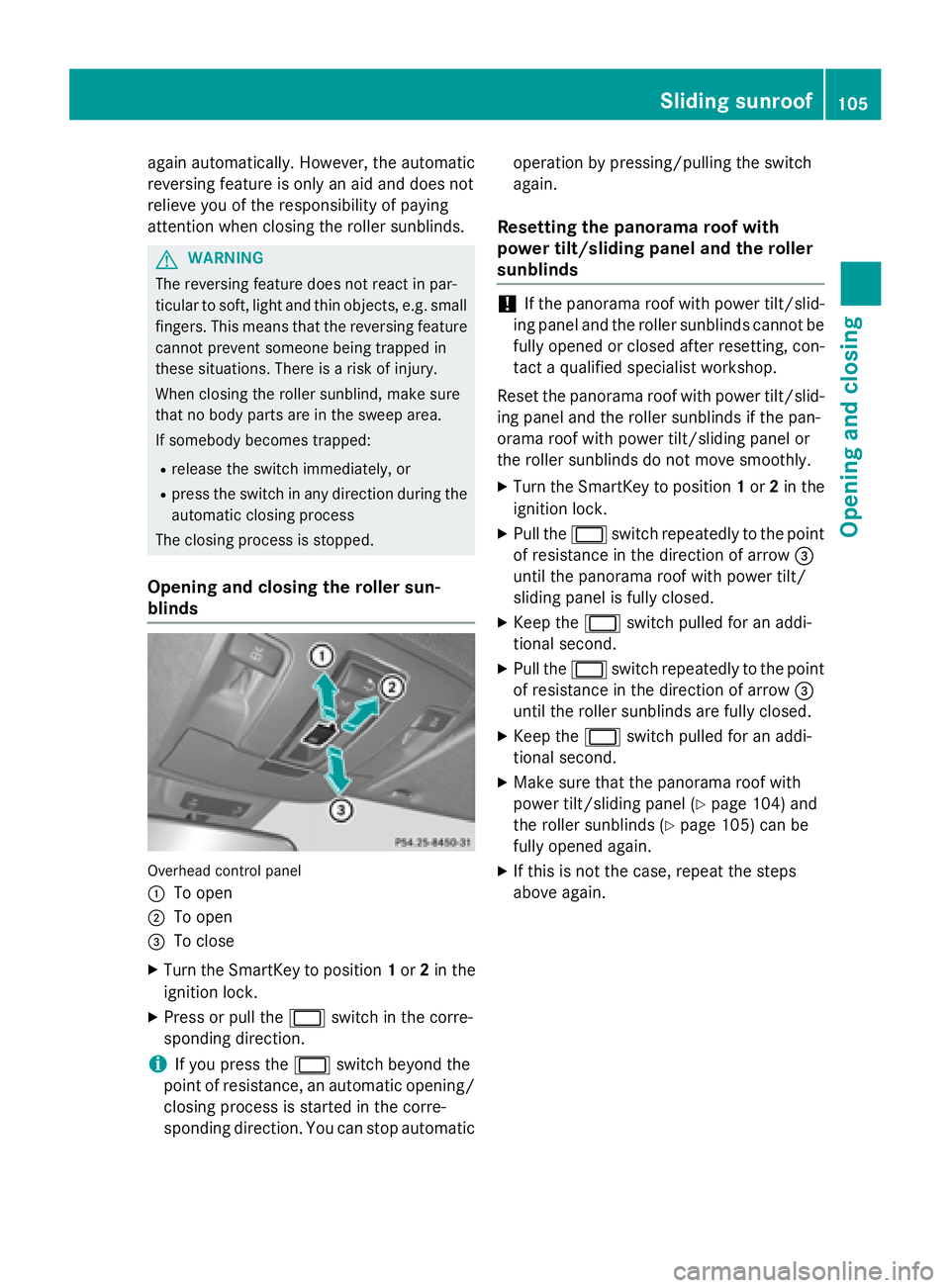
Opening and closing the roller sun-
blinds
Ove rhead control panel
C
To openD
To open
Page 108 of 462
Problems with the sliding sunroofYour vehicle may be equipped with a sliding sunroof or a panorama roof with power tilt/sliding
panel. In this section, the term "sliding sunroof" refers to both types of sliding sunroof.
G WARNING
If you close the sliding sunroof again immediately after it has been blocked or reset, the sliding
sunroof closes with increased or maximum force. The reversing feature is then not active. Parts
of the body could be trapped in the closing area in the process. This poses an increased risk of
injury or even fatal injury.
Make sure that no parts of the body are in the closing area.
If somebody becomes trapped: R
release the switch immediately, or R
press the switch in any direction during the automatic closing process
The closing process is stopped.
! If the sliding sunroof still cannot be opened or closed as a result of a malfunction, contact
a qualified specialist workshop.
Problem
Possible causes/consequences and P Solutions
The sliding sunroof can-
not be closed and you
cannot see the cause. If the sliding sunroof is obstructed during closing and reopens
again slightly: X
Immediately after the sliding sunroof blocks, pull the V
switch in the overhead control panel down to the point of resist-
ance and hold it until the sliding sunroof is closed.
The sliding sunroof is closed with increased force.
If the sliding sunroof is obstructed again during closing and then
reopens slightly: X
Immediately after the sliding sunroof blocks, pull the V
switch in the overhead control panel down to the point of resist-
ance and hold it until the sliding sunroof is closed.
The sliding sunroof is closed without the anti-entrapment fea-
ture.
i Notes on the automatic reversing feature of the sliding sunroof ( Y
page 103).106
Sliding sunroof
Opening and closing
Page 118 of 462
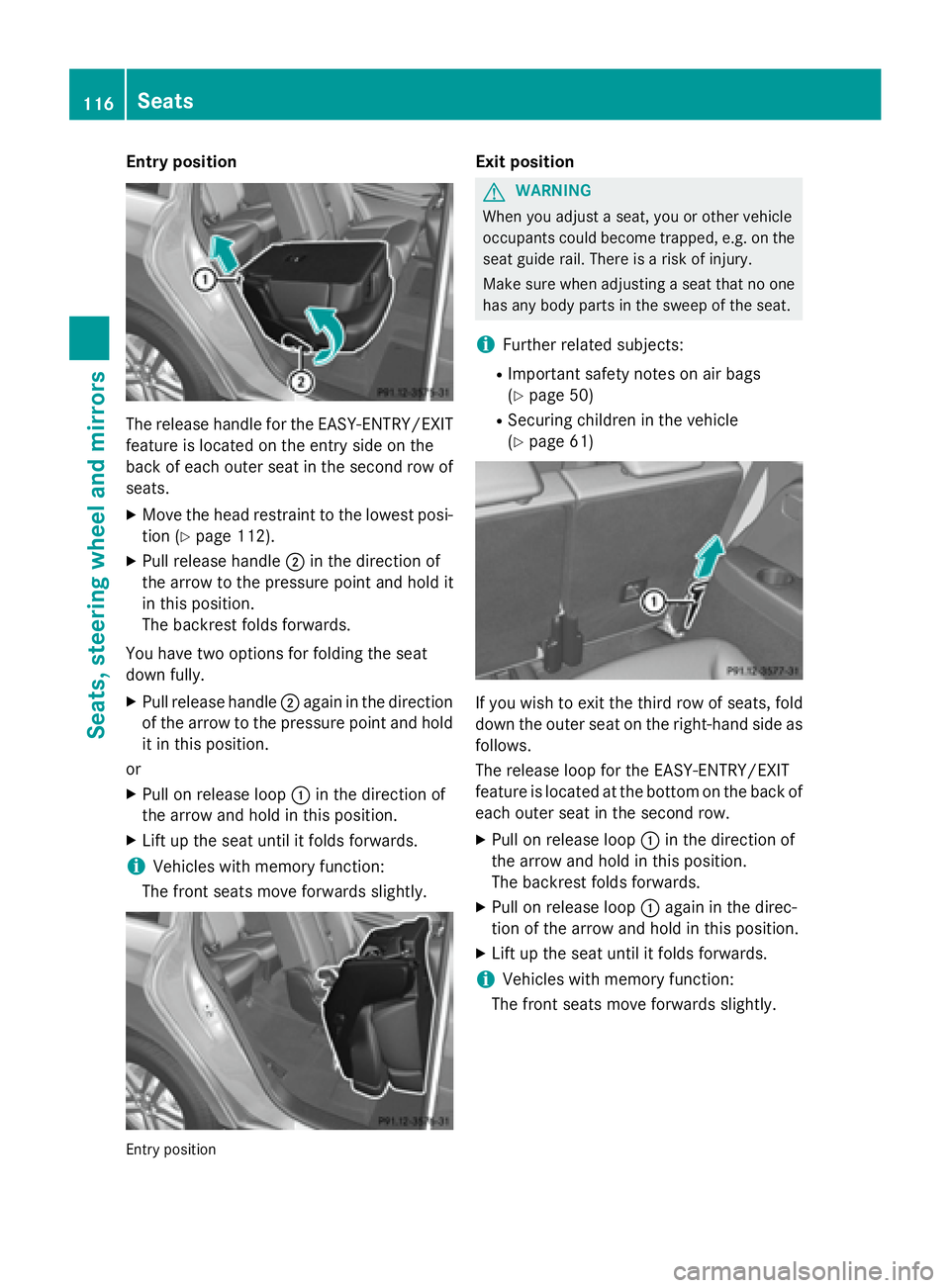
Entry position
The release handle for the EASY-ENTRY/EXIT
feature is located on the entry side on the
back of each outer seat in the second row of
seats. X
Move the head restraint to the lowest posi-
tion ( Y
page 112).X
Pull release handle D in the direction of
the arrow to the pressure point and hold it
in this position.
The backrest folds forwards.
You have two options for folding the seat
down fully. X
Pull release handle D again in the direction
of the arrow to the pressure point and hold
it in this position.
or X
Pull on release loop C in the direction of
the arrow and hold in this position. X
Lift up the seat until it folds forwards.
i Vehicles with memory function:
The front seats move forwards slightly.
Entry position Exit position
G WARNING
When you adjust a seat, you or other vehicle
occupants could become trapped, e.g. on the
seat guide rail. There is a risk of injury.
Make sure when adjusting a seat that no one
has any body parts in the sweep of the seat.
i Further related subjects: R
Important safety notes on air bags
( Y
page 50) R
Securing children in the vehicle
( Y
page 61)
If you wish to exit the third row of seats, fold
down the outer seat on the right-hand side as
follows.
The release loop for the EASY-ENTRY/EXIT
feature is located at the bottom on the back of
each outer seat in the second row. X
Pull on release loop C in the direction of
the arrow and hold in this position.
The backrest folds forwards. X
Pull on release loop C again in the direc-
tion of the arrow and hold in this position. X
Lift up the seat until it folds forwards.
i Vehicles with memory function:
The front seats move forwards slightly.116
Seats
Seats, steering wheel and mirrors
Page 122 of 462
Problems with the seat heating Problem
Possible causes/consequences and P Solutions
The seat heating has
switched off prema-
turely or cannot be
switched on. The on-board voltage is too low because too many electrical con-
sumers are switched on. X
Switch off electrical consumers that you do not need, such as
the rear window defroster or interior lighting.
Once the battery is sufficiently charged, the seat heating will
switch back on automatically.
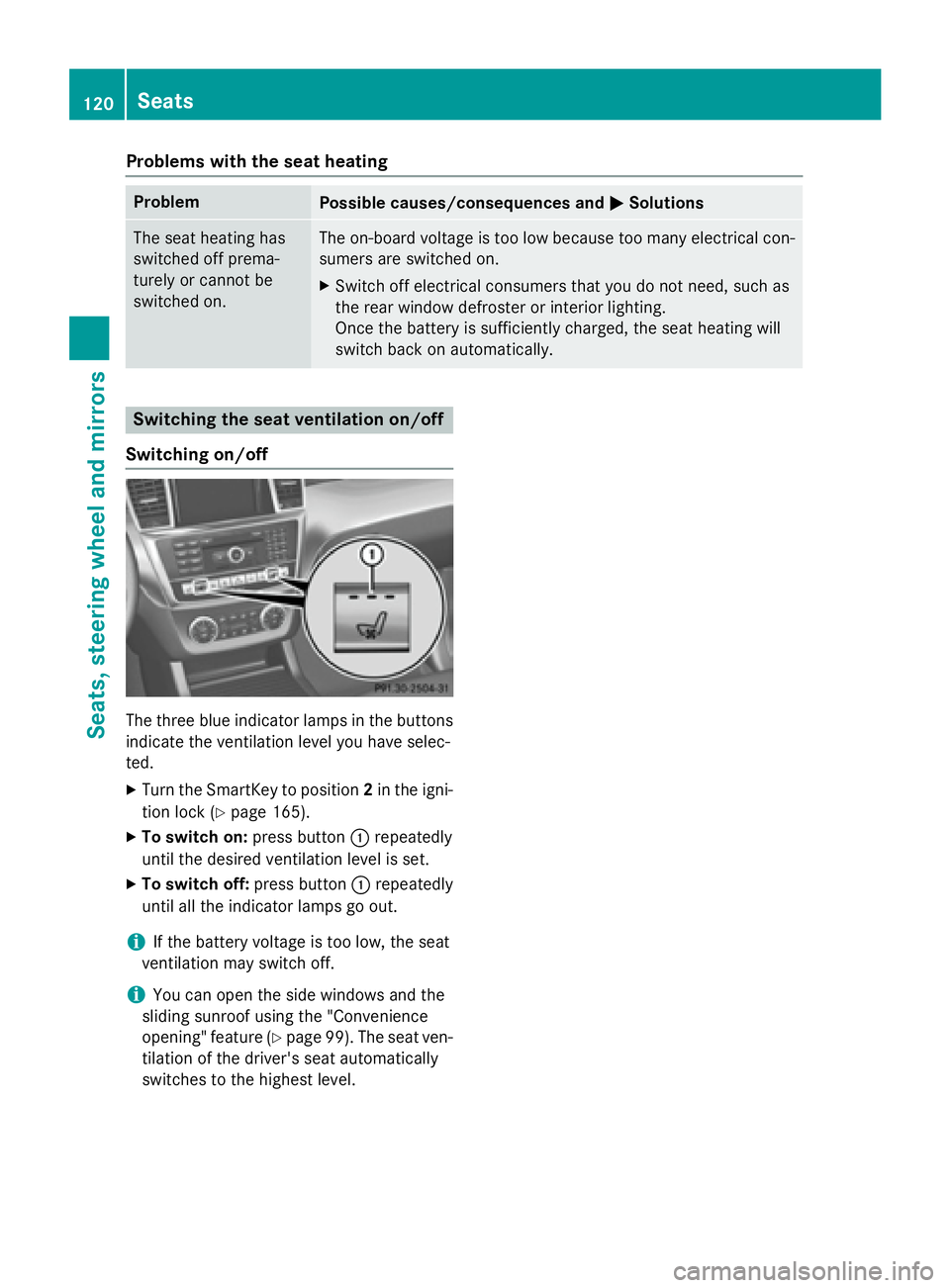
Switching the seat ventilation on/off
Switching on/off
The three blue indicator lamps in the buttons
indicate the ventilation level you have selec-
ted. X
Turn the SmartKey to position 2 in the igni-
tion lock ( Y
page 165).X
To switch on: press button C repeatedly
until the desired ventilation level is set. X
To switch off: press button C repeatedly
until all the indicator lamps go out.
i If the battery voltage is too low, the seat
ventilation may switch off.
i You can open the side windows and the
sliding sunroof using the "Convenience
opening" feature ( Y
page 99). The seat ven-
tilation of the driver's seat automatically
switches to the highest level.120
Seats
Seats, steering wheel and mirrors