SD card MERCEDES-BENZ GL-Class 2011 X164 Comand Manual
[x] Cancel search | Manufacturer: MERCEDES-BENZ, Model Year: 2011, Model line: GL-Class, Model: MERCEDES-BENZ GL-Class 2011 X164Pages: 214, PDF Size: 4.69 MB
Page 111 of 214
Add
ingaph one num bertoan address
book entry X
Call upacall listand selectan entry
(Y page 107).
X Se lec tOpt ions usin
gth e; buttona nd
pre ssthe 9button toconfi rm.
X Sel ect SaveEnt ry and
pressthe 9
bu tton toconfi rm.
i Sav eEnt ry is
sho wningra yif the
sel ecte dlist entry hasal rea dybeen saved .
X Sel ect Add and
pressthe 9button to
confi rm.
X Sel ect acate goryfor the num ber,e.g .
Hom e ,
and pressthe 9button toconfi rm.
X Sel ect acate goryfor the phone ,e.g .
Mob ile Pho
ne ,
and pressthe 9button to
confi rm.
X Sel ect Save .
The search menu foraddre ssbook entri es
ap pe ars.
X Sea rch forthe desired entry (Ypage 104) .
X Pre ssthe 9button whenyouha ve fini she d
sea rchi ng.
CO MAND storesthe data ifther ear efew er
tha nfive numb ersassign edtothe entryyou
are searc hingforinthe selec tednumb er
cat egory.
You willsee amess agetothis effect .
If five numb ersare stored forthe entryyou
are searc hingfor,a prom ptwill appear
askin gwhet heryou wish toover writeone
of the exis tingnumb ers.
X Selec tYes or
No and
press the9butt on
to con firm .
If you selec tYes ,
a selec tionlistwith the
five existingnumb ersisdisplayed.
If you selec tNo ,
the proc esswillbe
can celed.
X Selec tthe numb erto be over written from
the listusing the9: buttons and
press the9butt ontocon firm .
COMA NDover writesthe selec tednumb er
with thenew data. Deleting
calllists
i The stored calllistsremain inCOMA ND,
even ifyou useCOMA NDwith another
mobile phone.For this reason ,delet ethe
call listsbefor esellin gor transf errin g
owner shipofyour vehic le.
X Selec tCall Lists in
the telep honebasic
men uusing the:=; buttons
and press the9butt ontocon firm .
X Selec tDele teCall Lists and
press the
9 butt ontocon firm .
Aq uery appear sask ing ifall call listsare to
be delet ed.
X Se lec tYes or
No and
pressthe9 button
to confirm .
If you selectYes ,
th ecall listsare delet ed.
If you selectNo ,
th epro ces swill be
can celed. Using
thead dress book Int
rod uction G
Wa
rning!
Pleas edev oteyour attentio nfirst and
for emost tothe traffic situat ionyou arein.
Bef ore your journey, please familiar ize
yourself withtheaddress bookfunctions.
Only usetheCOMA NDwhen roadandtraffic
con dition sperm ityou todo so. Oth erwise you
could beinvolved inan acc ident inwhich you
or oth ers could beinjured.
The address bookorgan izesandstores
ent ries fromd ifferen tsources (mobile phone,
SD memory card,COMAND telephone book,
navigation system).
You canusethese entriestomake telephone
calls andfornavigation.
i Address bookentriesare not deleted
when themobile phoneisremoved. Forthis
reason, youshould deleteyourpersonal
data using thereset functionbefore selling
your vehicle, forexample (Ypage 43). Using
theaddress book
109Telephone Z
Page 116 of 214

List
ening toav oice tag X
Sear chfor anaddre ssbook entrywith a
voic etag (Ypage 110).
X Sele ctOpt ions usin
gth e; buttonand
pres sth e9 butt ontocon firm.
X Sele ctVoi ceName and
pres sth e9
butt ontocon firm.
X Sele ctLis ten and
pres sth e9 butt onto
con firm.
You hear thevoic etag . Imp
orting conta cts
Condit ions You
canimpo rtcon tactsto theaddre ssbook
fr om anext ern alBluet ooth®
devic eor an SD
mem orycard.
The Bluet ooth®
devic enee dstobe inside the
veh icle and hastobe swit chedon ,act ivat ed,
and auth orized. Itmust beable totrans mit
con tactsand/ orvCard sviaBluet ooth®
.
Imp orting conta cts X
Start the data exchang eon the extern al
devic e(see theextern aldevic e'soperat ing
inst ruct ions ).
or
X Insert anSD memo rycard .
X Selec tAddr essBook in
the address book
using the:=; buttons and
press the9butt ontocon firm .
X Selec tDown load Contacts and
press the
9 butt ontocon firm .
Am enu appears. X
Select FromMobile Phone ,
From The Memory
Card or
Receive Business Card(s) and
press the9button to
con firm.
The contact sare import ed.
Deleting contacts X
With theaddress bookshown, select
Address Book and
press the9button to
con firm.
Am enu appears.
X Select Delete Contacts and
press the
9 button tocon firm.
X Select oneofthe following options:
R Interna lContact s R
From Mobile Phone R
From TheMemory Card R
Receive dBusines sCards R
Delete All Ap
rompt correspo ndingtoyou rselection
appears.
X Select Yes or
No and
press the9button
to con firm.
If you select Yes ,
the contact sare deleted
accor dingtoyour select ion.
If you select No ,
the process willbe
canc eled. 114
Using
theadd ress bookTelephone
Page 126 of 214
i
SIRIUS XMRadio offe rsmore than130
di gital -qu ality rad iocha nnel spro viding
100% comme rcial-fre emus ic,spo rt,new s
and enter tainment.
SIR IUS XMRadio emp loys afle et ofhigh-
pe rfor mance satel lites tobro adcas taround
the clock through outtheUSA andCanada .
The SatRa dioprogra misavail able fora
monthly fee.Details areavail able from the
SIRIUS XMService Centerandat
htt p://www .sirius.com (USA)or
htt p://www .siriuscanada. com
(Ca nada). Registering
Registering SatRadio Switching
toSatRadio mode:
X From another mainfunction: select
Audio using
the9:=;
buttons andpress the9button toconfirm.
X Select Audio and
press the9button to
confirm.
X Select SatRadio and
press the9button
to confirm.
i Ifradio mode wasthelast active mode,
you only need toselect Audio .
X When inaudio mode: selectAudio using
the 9:=; buttonsand
press the9button toconfirm.
X Select SatRadio and
press the9button
to confirm.
The satellite radiomainmenu appears
showing theweather channel. Youcannot
select anyother stations.
X Select SatRadio (in
the submenu) using
the 9:=; buttonsand
press the9button toconfirm.
X Select Service and
press the9button to
confirm.
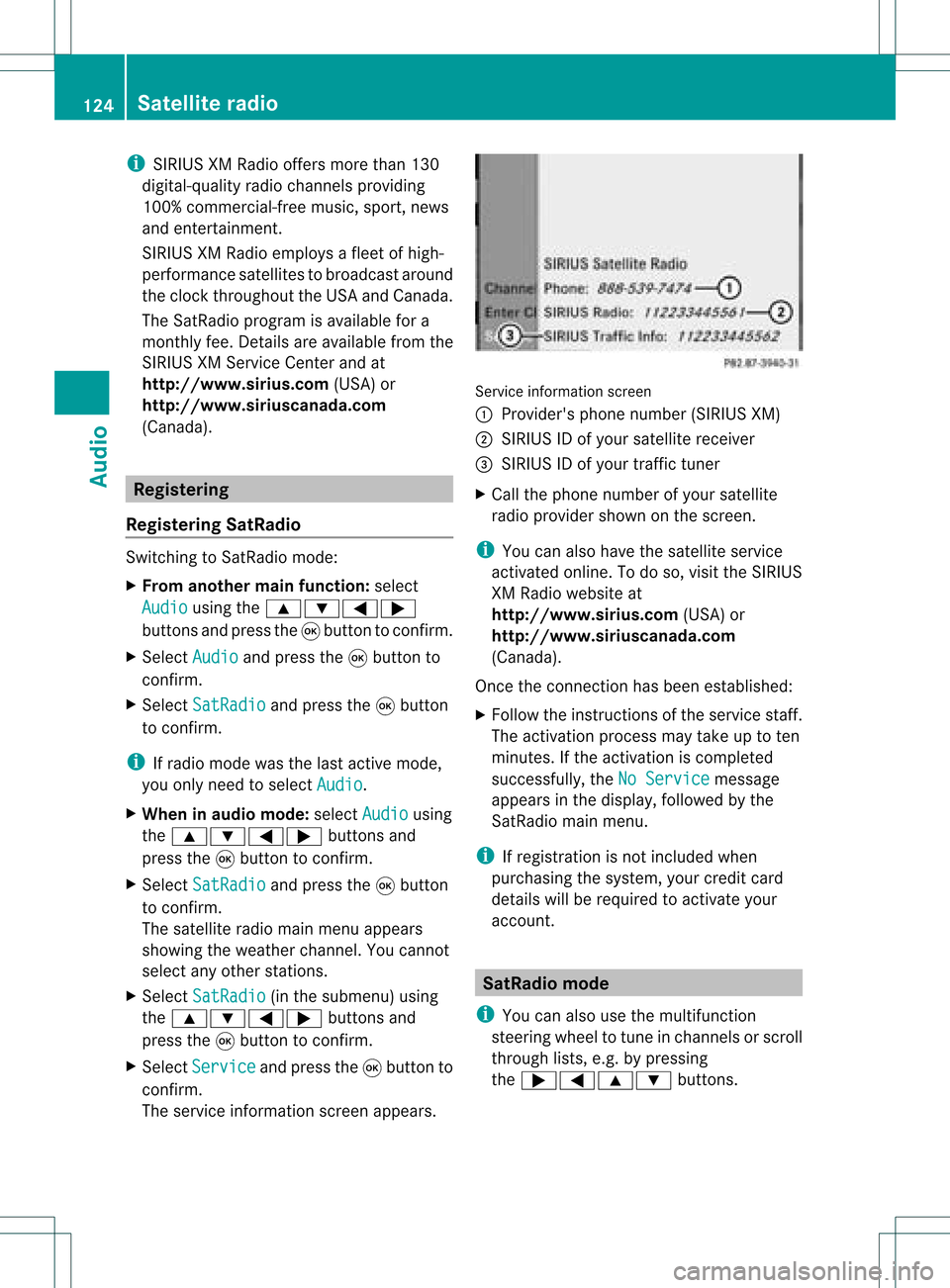
The service information screenappears. Service
information screen
1 Provider's phonenumber (SIRIUSXM)
2 SIRIUS IDofyour satellite receiver
= SIRIUS IDofyour traffic tuner
X Cal lthe phone number ofyour satellite
radio provider shownonthe screen.
i You canalso have thesatellite service
activated online.Todo so, visit theSIRIUS
XM Radi owebsite at
htt p://www .sirius.com (USA)or
htt p://www .siriuscanada. com
(Canad a).
Once theconn ection hasbeen established :
X Follow theinstruct ionsofthe service staff.
The activation processmaytake uptoten
minutes. Ifthe activation iscompleted
successfully ,the NoService message
appea rsinthe displa y,followed bythe
SatRadio mainmenu.
i Ifregistration isnot included when
purchasing thesystem, yourcredit card
details willberequired toactivate your
account. SatRa
diomode
i You canalso usethemultifunction
steering wheeltotune inchannels orscroll
through lists,e.g.bypressing
the ;=9: buttons.124
Satellite
radioAudio
Page 133 of 214

Eject
ingallCDs/DVDs X
Pres sth eV load/eject butt on.
The magaz inemen uappear s.
X Sele ctEje ct All .
The DVDc hanger ejectsthe last disc
selected. YouseetheEjecting Disc
X Take thedisc outofthe disc slotwhen you
see thePlease RemoveDisc
The DVD changer switches tothe next
loaded magazine trayandeject sthe disc.
X Repea tthe last step until themagazine is
empty.
X To cancel ejecting: presstheV eject/
load button againorpress thek button. Inserting
andejecting anSD memory
card
General informat ion COMAND
supports16-bitfull-size typeIand
II SD mem orycards.
Me rced es-Benzreco mme ndsusing SD
mem orycardswith astor agecap acityof up
to 4GB.
SD mem orycardsfea turethe following logo: This
logo isaregistered trademark ofSanDisk
Corporation.
i COMAND doesnotsupport the"SD-H C
2.0 Standard" SDcard format. NotallSD
memory cardsandstorage mediaare
designed forthe temperatures whichmay
be reached inthe vehicle.
Due tothe wide range ofSD memory cards
availa bleonthe market, playback cannot
be guaranteed forallbrands ofSD memory
card.
Inserting anSD memory card X
Insert theSDmemory cardintotheslot.
The side with thecont acts must face
downwards andpoint towards theslot.
COMAND loadsthememory cardand
shows amessage tothis effect .Ifn oMP3
track scan befound, youwillsee amessage
to this effect .
Ejecting anSD memor ycard X
Press theSDmemory card.
The SDmemory cardiseject ed.
X Remove theSDmemory cardfrom theslot. Switching
onaudio CD/DVDorMP3
mode
Option 1 X
Insert aCD/D VD(Ypage 128)oran SD
memory card(Ypage 131).
COMAND loadsthemedium insertedand
start sto play it. CD/
DVD audioand MP3 mode
131Audio Z
Page 134 of 214
Opt
ion 2 X
Press theh functionbutton oneormore
times.
i Bypressing theh function button
repeatedly, youcan change theoperatin g
mode inthe following order:
R Audio CD/DVD,video DVDorMP3 disc
in the DVD changer
R SD memory cardmode
R MUSIC REGISTE R
R Media Interface mode
X Ifdesired, selectanaudio medium fromthe
media list(Ypage 134).
Opt ion 3 X
Select Audio in
the main functionbarusing
the =;9: buttonsand
press the9button tocon firm.
If disc mode wasthelast mode selected,it
will now beactive.
If anoth eraudio source isswitched on,you
can now switch todisc mode inthe audio
menu.
X Select Audio using
the9=;
button sand press the9button tocon firm.
The audio menu appears.
X Select Disc or
Memory Card and
press the
9 button tocon firm.
The desired discmode isactivat ed.
X Ifdesired, selectanaudio medium fromthe
media list(Ypage 134). Examp
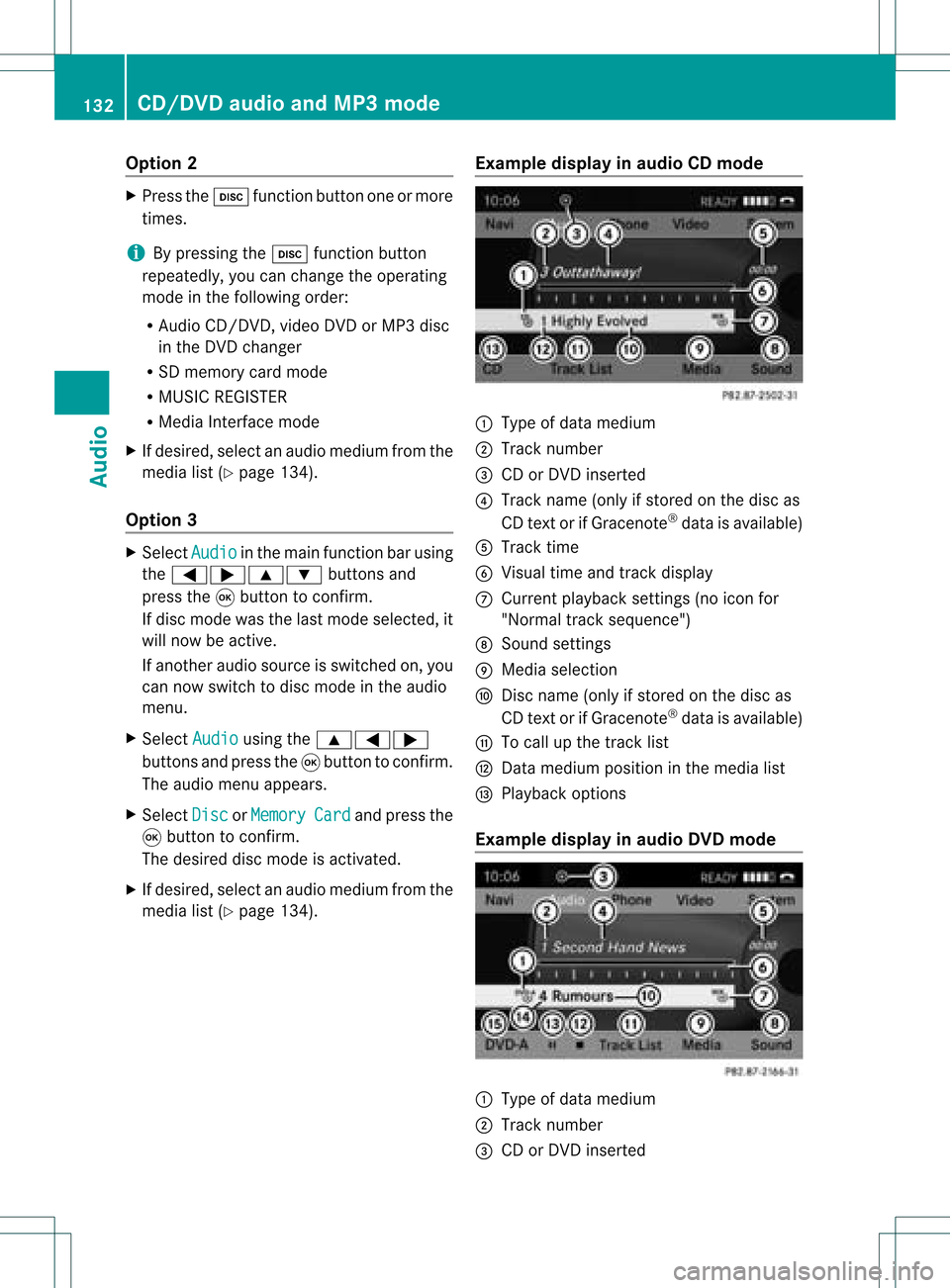
ledispla yin aud ioCD mode :
Type ofdata medium
; Track number
= CD orDVD insert ed
? Track name (onlyifstor edon the disc as
CD textor ifGracenot e®
data isavailable)
A Track time
B Visual timeandtrackdisplay
C Curren tplayback settings (no icon for
"Norm altrack sequen ce")
D Soun dset tings
E Media selection
F Disc name (onlyifstored onthe disc as
CD textor ifGracen ote®
data isavailable)
G Tocall upthe track list
H Datamedium positioninthe media list
I Playback options
Exam pledisp layinaud ioDVD mode :
Type ofdata medium
; Trac knumb er
= CD orDV Dinse rted 132
CD/DVD
audio and MP3 modeAudio
Page 136 of 214
X
To sto pplay back:wh ile play ba ck is
inte rrupte d,sel ect ±againa nd pre ssthe
9 button toconfi rm.
M ishighl ighted .
X To res tart playback:sel ect Mand press
the 9button toconfi rm.
Pl ay ba ck sta rts atthe beginning ofthe
DVD. Se
lecti ng CD/au dioDVD /MP3 discs
Se lecti ng viat he media list X
In audio CD/DVD and MP3 mode: select
Media or
Change r usi
ng
the :=; buttonsandpress the
9 button toconfirm.
or
X In audio CD/DVD mode only:press the
9 button whenthe displa y/selection
window isactive.
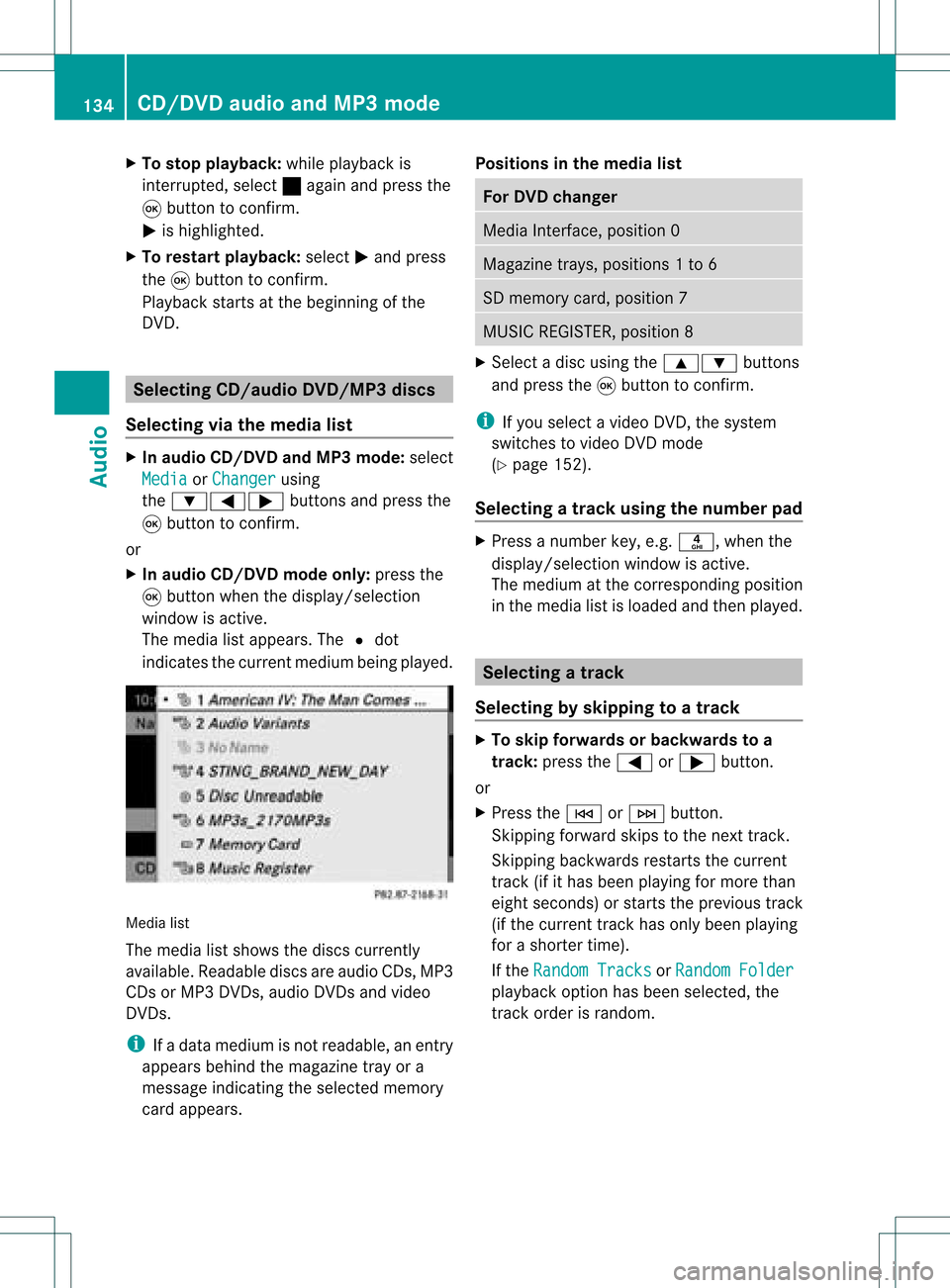
The media listappea rs.The #dot
indicates thecurrent medium beingplayed. Media
list
The media listshows thediscs current ly
availa ble.Reada blediscs areaudi oCDs, MP3
CDs orMP3 DVDs,audi oDVD sand video
DVD s.
i Ifadata medium isnot readabl e,an entr y
appea rsbehind themagazine trayora
message indicating theselected memory
card appea rs. Positions
inthe media list For
DVD changer Media
Interface, position 0 Magazine
trays,positions 1to6 SD
memory card,position 7 MUSIC
REGISTER, position8 X
Select adisc using the9: buttons
and press the9button toconf irm.
i Ifyou select avideo DVD,the system
switches tovideo DVDmode
(Y page 152).
Selecting atrac kusing thenumber pad X
Press anumber key,e.g.n, whenthe
<0004000900130010000C0001001C002400130005000C0005000300140009000F
000E> windowisactive.
The medium atthe corr espondin gposition
in the media listisloaded andthen played. Selecting
atrac k
Se lecti ng byskippin gto atrac k X
To skipfo rwa rds orbac kwards toa
trac k:pre ssthe = or; button.
or
X Pre ssthe E orF button.
Skip ping forwa rdski ps tothe next track.
Skip ping backw ards res tartsthe curre nt
tra ck (ifi th as been playin gfor mor eth an
eigh tsecon ds)orstart sthe previous track
(if the curren ttrack hasonly been playing
for ashorter time).
If the Random Tracks or
Random Folder
pla
yba ckoption hasbeen selected, the
track order israndom. 134
CD
/DVD audio andMP3 modeAudio
Page 137 of 214
Selec
tingbytrack list X
Select Title or
Tracks in
audi oCD/D VD
mode andpress the9button toconf irm.
or
X Press the9button inMP3 mode whenthe
display /selection windowisactive.
The track listappears. The#dot indicates
the current track.
X Select atrack using the9: buttons
and press the9button toconf irm.
i InMP3 mode, thelistshows allthe track s
in alphab eticalorder.
Selec tingatrac kusing thenumber pad X
Press theU button onthe number pad.
An umer icalentry fiel dappear s.The
num berofposi tion soff ere dcorresponds to
the number oftrack sonthe CD/DV D.Onl y
num bers tha tcorr espond toatrac k
num beron the CD/DV Dcan beente red.
X Enter thedesired trac knum berus ing the
num berk eys.
X To complete entry:press the9button .
i Pressin gand holding anumber keyfor
two secon dsormore alsocomplet esent ry
and thecorr espondin gtrac kisplay ed.
Selec tingusing themultifunction
steering wheel X
Switch onaudi oCD/DVD ,MP3 orSD
memory cardmode onCOMAND.
X Use theV orU button onthe
multifunction steeringwheeltoselect the
DISC displa y.
X Press the9 or: button onthe
multifunction steeringwheel.
You willhear theprevious ornext track.
Skipping backwards skipstothe beginning
of the current trackifthe track hasbeen
play ingformore thaneight seconds. Ifthe
track hasbeen playingforless than eight
seconds, itskips tothe start ofthe previous
track. Fast
forward/rewind
Selec tingusing COMAND X
The displa y/selection windowisactive:
press the= or; button repeatedly
until youreach thedesired position.
or
X Press andhold theE orF button
until thedesired position hasbeen
reached.
Selec tingusing themultifunction
steering wheel X
Press andhold the9 or: button on
the multifunction steeringwheeluntilthe
desired position hasbeen reached. Selec
tingafolder
This function ison lyavailable inMP3 mode .
X Swit chon MP3 mode (Ypage 131).
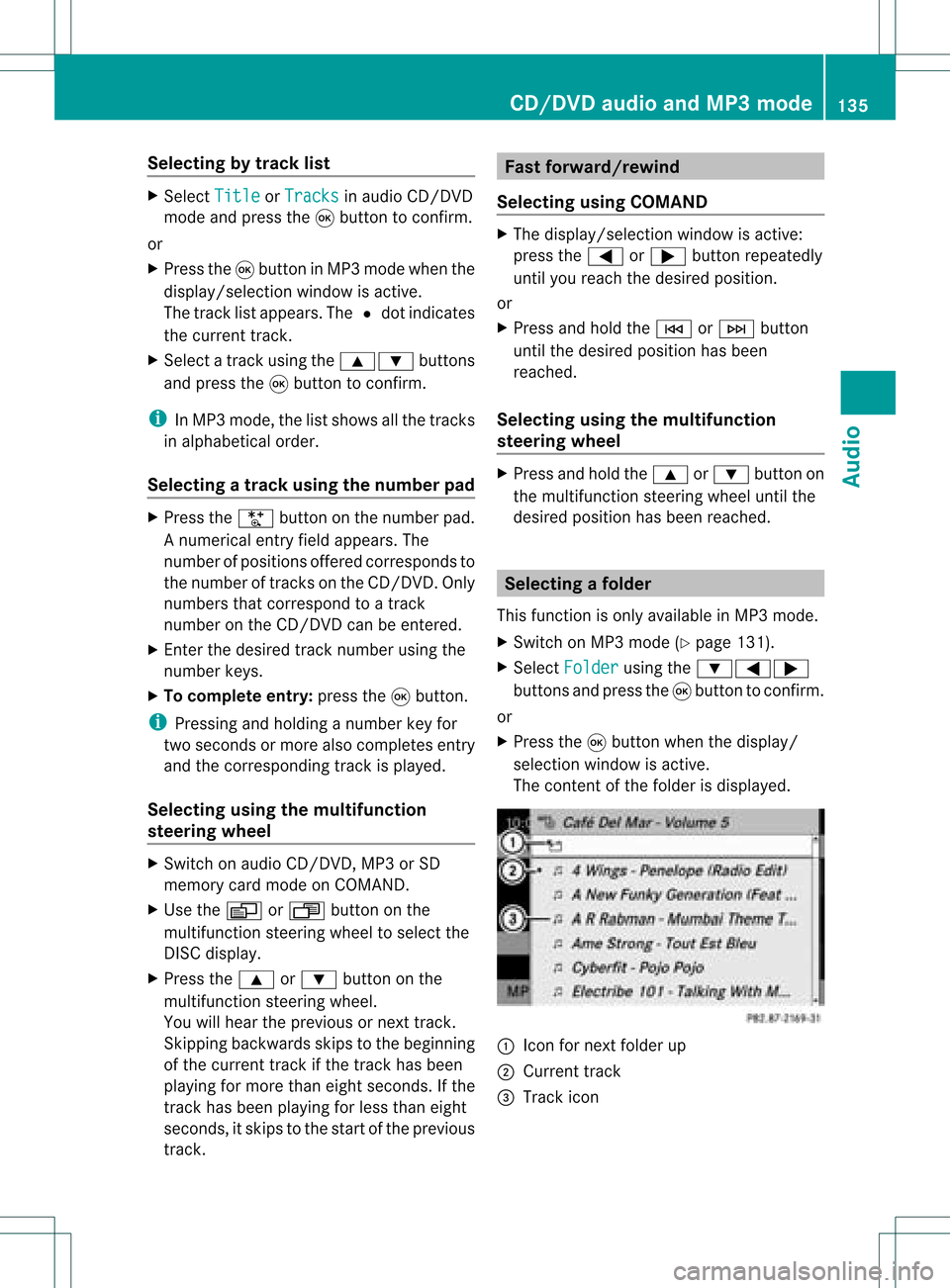
X Sele ctFol der usin
gth e:=;
butt onsand pres sth e9 butt ontocon firm.
or
X Pres sth e9 butt onwhen thedisplay/
selec tionw indow isact ive.
The contentofthe folder isdispla yed. :
Icon fornext folder up
; Current track
= Track icon CD/
DVD audioand MP3 mode
135Audio Z
Page 139 of 214

can
only beatta ined with up-to-da te
Gra cenote ®
mus icreco gnitiontechno logy .
Inform ation abou tnew versions can be
obta ined from anauthori zedMercede s-Benz
Ce nter.
You canhave your mus icreco gnition
softw areupdated there with aD VD, oryou
can upda teityou rself.
i The Gracenote MediaDatabase is
upda tedatthe same timeasthe map
software. Setting
theaudio format
You canonly setthe audioformat inaud io
DVD mode. Thenumber ofaud ioformats
avai labledepends onthe DVD. Theconten tof
an audio DVDiscalled an"album", andthis
can bedivided intouptonine groups. Agroup
can contain musicind iffe ren tsound qualities
(stereo andmultichann elformats ,for
example) orbonus tracks.Each group can
cont ainupto99 track s.Ifan audio DVDonly
cont ains oneaudio format, the"Group" menu
item(s) cannotbe selected.
X Switch onaudio DVDmode (Ypage 131).
X Select DVD-A using
the:=;
button sand press the9button toconf irm.
X Select Group using
the9: buttons
and press the9button toconf irm.
The listofavaila bleaudio formats appears.
The #dot indicates theformat currently
selected.
X Select anaudio format usingthe
9: buttonsand press the9button
to conf irm.
X To exit themenu: pressthe=
or ; button . Playback
options
The following optionsareavaila bletoyou:
R Normal TrackSequence You
willhear thetrack sin the normal order
(e.g. track 1,2,3etc. ).
In MP3 mode, playbackproceeds inthe
order inwhich thetrack swere written to
the disc bythe program usedtocreate the
MP3 disc. Thisiscommon lyalphabetical
order. Onceallthe track sin afolder have
been played,the track sin the next folder
are playe d.
R Random Tracks All
the track son the medium areplaye din
random order(e.g.track 3,8, 5etc. ).
R Random Folder (MP3
mode only)
The track sin the current lyactive category
or folder areplaye din random order.
X To select options: switchonaudio CD/
DVD orMP3 mode (Ypage 131).
X Select CD ,
DVD-A or
MP3 using
the :=; buttonsand press the
9 button toconf irm.
The options listappears. A# dot indicates
the option selected.
X Select anoption usingthe9 or:
button andpress the9button toconf irm.
The option isswitched on.For alloptions
except "Normal tracksequence", youwill
see acorrespon dingdisplay inthe display /
selection window.Seethedisplay example
for audio CDmode (Ypage 132), itemB.
i The "Normal tracksequence" optionis
automatically selectedwhenyouchange
the medium youarecurrent lylistening to
or when youselect adifferent medium. If
an option isselected, itremains selected
after COMAND isswitched onoroff. Notes
onMP3 mode
Permissible discs R
CD-R andCD-RW
R DVD -Rand DVD -RW
R DVD +Rand DVD +RW
R SD memory card CD/
DVD audioand MP3 mode
137Audio Z
Page 140 of 214

i
COMA NDdoes notsuppo rtthe"SD -HC
2. 0St and ard" SDcardfor mat .Mer cedes-
Ben zrec omm ends usin gSDmem orycards
wi th astor agecap acityof up to4G B.
Pe rmiss ible filesys tems R
ISO9660/J oliet for CDs
R UDF foraudio and video DVDs
R FAT16 forSD memo rycard swi th stora ge
med ium
Multi sessi on CDs For
multisession CDs, thecontent ofthe first
ses siond eterm ineshow COMAND will
process theCD. COMAND playsonlyone
session andgives priority tothe audio CD
session.
If possible, useCOMAND toplay only CDs
which werewritteninone session.
File structur eof adisc When
youcreat eadisc with compr essed
music files,thetrac kscan beorganiz edin
folders. Afolder canalso containsubfolders.
A disc cancont ainam axim umof25 5fold ers.
Eac hfold ercan contain amax imum of25 5
tr ack sand 255s ubfo lders.Ad isc can contain
a maxim umof120 0track s.
The disc may contain nomor ethan eight
direc torylevels. Filesbeyond theeight hlevel
will notberec ogn ized bythe syst em.
Tr ack and filenam es When
youcreate adisc with compress ed
music files,youcan assign namesto the
tr ack sand folder s.
COMA NDuses thesename sacc ordin glyfor
the display. Folderswhich contain data other
than MP3 orWMA track sare not displayed by
COMA ND.
If MP3 orWMA filesarestored inthe root
direc toryits elf, the root direc torywill also be
tr eated asafolder .COMAND willthen show the
name ofthe root directory asthe folder
name.
You must observe thefollowi ngwhen
assigning tracknames:
R track names musthaveatleast one
character.
R track names musthavetheextension
"mp3" or"wma ".
R there mustbeafull stop between thetrack
name andtheextension.
Example ofacorrect trackname:
"Track1.mp3"
i COMAND doesnotsupport ID3tags.
Permissible formats COMAND
supportsthefollowi ngformats:
R MPEG1 AudioLayer3(MP3)
R Microsoft WindowsMediaAudioV2,V7,V8
and V9(WMA) without copyprotect ion
Permissible bitand samp lingrates MP3
COMAND supportsMP3filesofthe following
types:
R fixed andvariable bitrates of32 kbit/s up
to 320 kbit/s
R sampling ratesof8kHz to48 kHz
WMA
COMAND supportsWMAfilesofthe following
types:
R fixed bitrates of8kbit/s upto
384 kbit/s
R sampling ratesof8kHz to48 kHz
COMAND doesnotsupport WMAfilesofthe
following types:
R DRM (Digital RightsManagement)
encrypted files
R variable bitrate
R WMA Pro
R 5.1 Surround 138
CD/
DVD audioand MP3 modeAudio
Page 142 of 214
playback
willbegin atthe point itwas last
int errupt ed.
If ther eare nomusic files,youwillsee a
message tothis effec t.
By pressin gthe h function button
repeatedly, youcan chang ethe operatin g
mode inthe following order:
R audio CD/DVD/MP3 (disc)
R SD memor ycard mode
R MUSI CREGISTE R
R operatin gwith theMedia Interface
X You first need tocopy music filestothe
MUSI CREGISTE R(Y page 140).
Opt ion 2 X
Select Audio in
the main functionbarusing
the 9=; buttons and press the
9 butt ontocon firm.
If MUSI CREGISTE Rwas thelast mode
select ed,itis now switc hedon.
If anot heraudio source isswitc hedon,you
can now switc hon the MUSI CREGISTE Rin
the audio menu.
X Select Audio using
the9 buttonand
press the9butt ontocon firm.
The audio menu appears.
X Select Music Regist er and
press the9
butt ontocon firm.
Opt ion 3 X
Press ther number key.
The MUSI CREGISTE Ris switc hedon. Ex
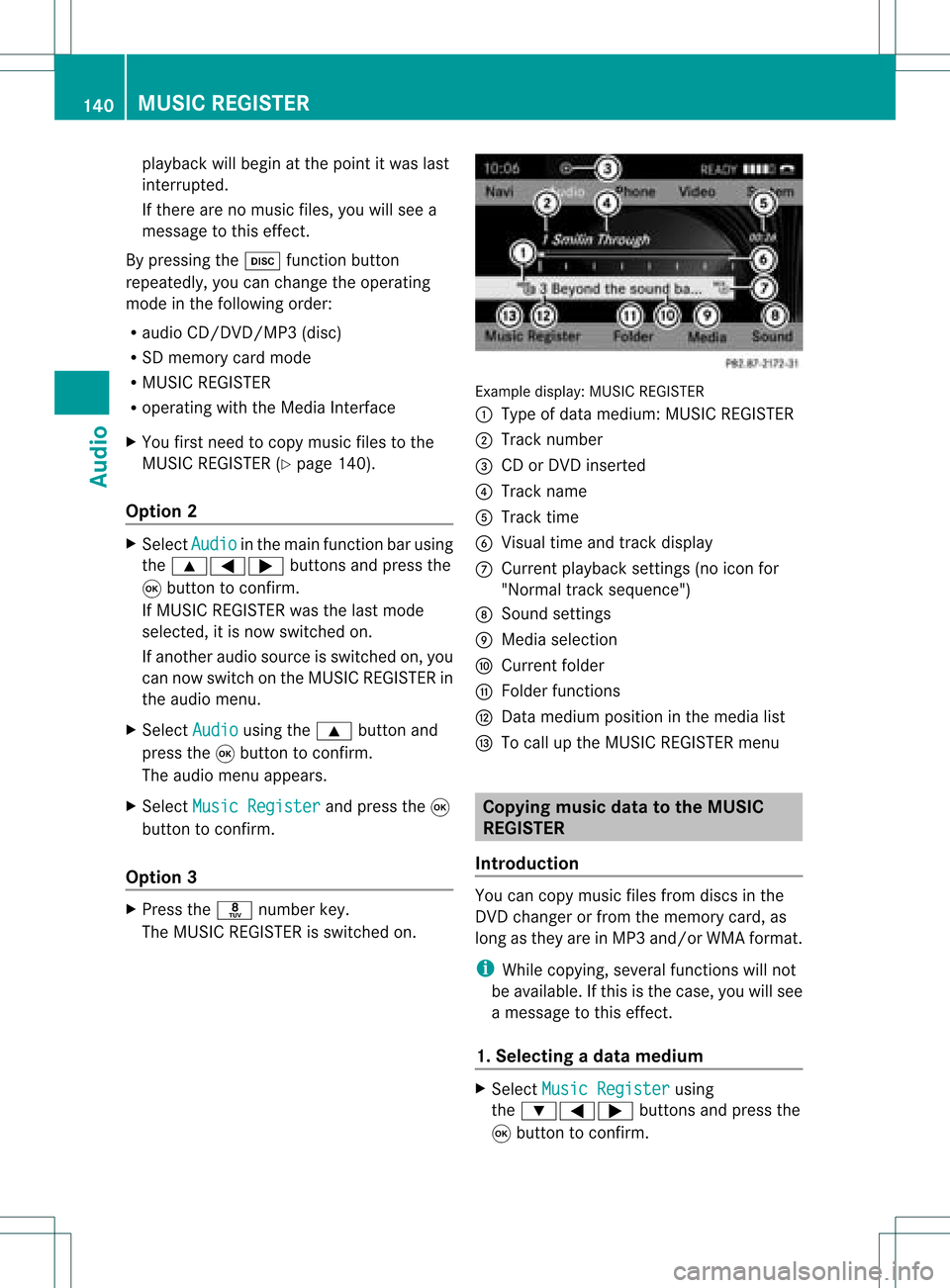
ample display: MUSICREGISTE R
: Type ofdata medium: MUSICREGISTE R
; Track number
= CD orDVD insert ed
? Track name
A Track time
B Visual timeandtrackdisplay
C Curren tplayback settings (no icon for
"Norm altrack sequen ce")
D Soun dset tings
E Media selection
F Curren tfolder
G Folder functions
H Data medium positioninthe media list
I Tocall upthe MUSIC REGISTER menu Copying
musicdatato the MUSIC
REGISTER
Introdu ction You
cancopy music filesfrom discs inthe
DVD changer orfrom thememory card,as
long asthey areinMP3 and/or WMAformat.
i While copying, severalfunctionswillnot
be availa ble.Ifthis isthe case, youwillsee
a message tothis effect .
1. Selecting adat amedium X
Select Music Register using
the :=; buttonsand press the
9 button toconf irm. 140
MUSIC
REGISTERAudio