Button MERCEDES-BENZ GL-Class 2012 X164 Repair Manual
[x] Cancel search | Manufacturer: MERCEDES-BENZ, Model Year: 2012, Model line: GL-Class, Model: MERCEDES-BENZ GL-Class 2012 X164Pages: 384, PDF Size: 15.71 MB
Page 172 of 384
drive on for a short while. This allows the
airflow to cool the brakes more quickly.
Wet roadsGWARNING
After driving in heavy rain for some time
without applying the brakes or through water
deep enough to wet brake components, the
first braking action may be somewhat
reduced. You have to depress the brake pedal
more firmly. Maintain a safe distance from
vehicles in front.
After driving on a wet road or having the
vehicle washed, brake firmly while paying
attention to the traffic conditions. This will
warm up the brake discs, thereby drying them
more quickly and protecting them against
corrosion.
Limited braking performance on salt
treated roads
GWARNING
The layer of salt on the brake discs and the
brake pads/linings may cause a delay in the
braking effect, resulting in a significantly
longer braking distance, which could lead to
an accident.
To avoid this danger, you should:
R occasionally brake carefully, without
putting other road users at risk, when you
are driving on salted roads. This helps to
remove any salt that may have started to
build up on the brake discs and the brake
pads/linings.
R maintain a greater distance to the vehicle
ahead and drive with particular care.
R carefully apply the brakes at the end of a
trip and immediately after commencing a
new trip, so that salt residues are removed
from the brake discs.
Servicing the brakes
! If the brake warning lamp lights up in the
instrument cluster and you hear a warning
tone even though the parking brake has
been released, the brake fluid level may be
too low. Observe additional warning
messages in the multifunction display.
The brake fluid level may be too low due to
brake pad wear or leaking brake lines.
Have the brake system checked
immediately. Have this work carried out at
an authorized Mercedes-Benz Center.
All checks and maintenance work on the
brake system must be carried out at a
qualified specialist workshop. This work
should be carried out at an authorized
Mercedes-Benz Center.
Have the brake pads and brake fluid installed
or replaced at a qualified specialist workshop,
e.g. an authorized Mercedes-Benz Center.
GWARNING
If other than recommended brake pads are
installed, or other than recommended brake
fluid is used, the braking properties of the
vehicle can be degraded to an extent that safe
braking is substantially impaired. This could
result in an accident.
! A function or performance test should
only be carried out on a 2-axle
dynamometer. If you are planning to have
the vehicle tested on such a dynamometer,
contact an authorized Mercedes-Benz
Center to obtain further information first.
Otherwise, you could damage the drive
train or the brake system.
! As the ESP ®
system operates
automatically, the engine and the ignition
must be switched off (SmartKey in position
0 or 1 in the ignition lock or Start/Stop
button in position 0 or 1) while the parking
brake is being tested on a brake
dynamometer (maximum 10 seconds).
170Driving tipsDriving and parking
Page 189 of 384
GWARNING
DISTRONIC brakes your vehicle with a
maximum deceleration of 13 ft/s 2
(4 m/s 2
).
This corresponds to approximately 40% of
your vehicle's maximum possible braking
power.
You must apply the brakes yourself to avoid a
collision. DISTRONIC brakes the vehicle to
restore the set distance to the vehicle in front
or to restore the set speed. In this case, the
brake pedal is depressed automatically,
which can be seen by a movement of the
brake pedal.
Always keep the driver's footwell clear,
including the area under the brake pedal.
Objects in this area may impair pedal
movement and cause the DISTRONIC braking
function to malfunction.
Do not place your foot under the brake pedal
– your foot could become caught.
DISTRONIC displays in the
multifunction display
XPress the V or U button to select the
DISTRONIC menu (Y page 219).
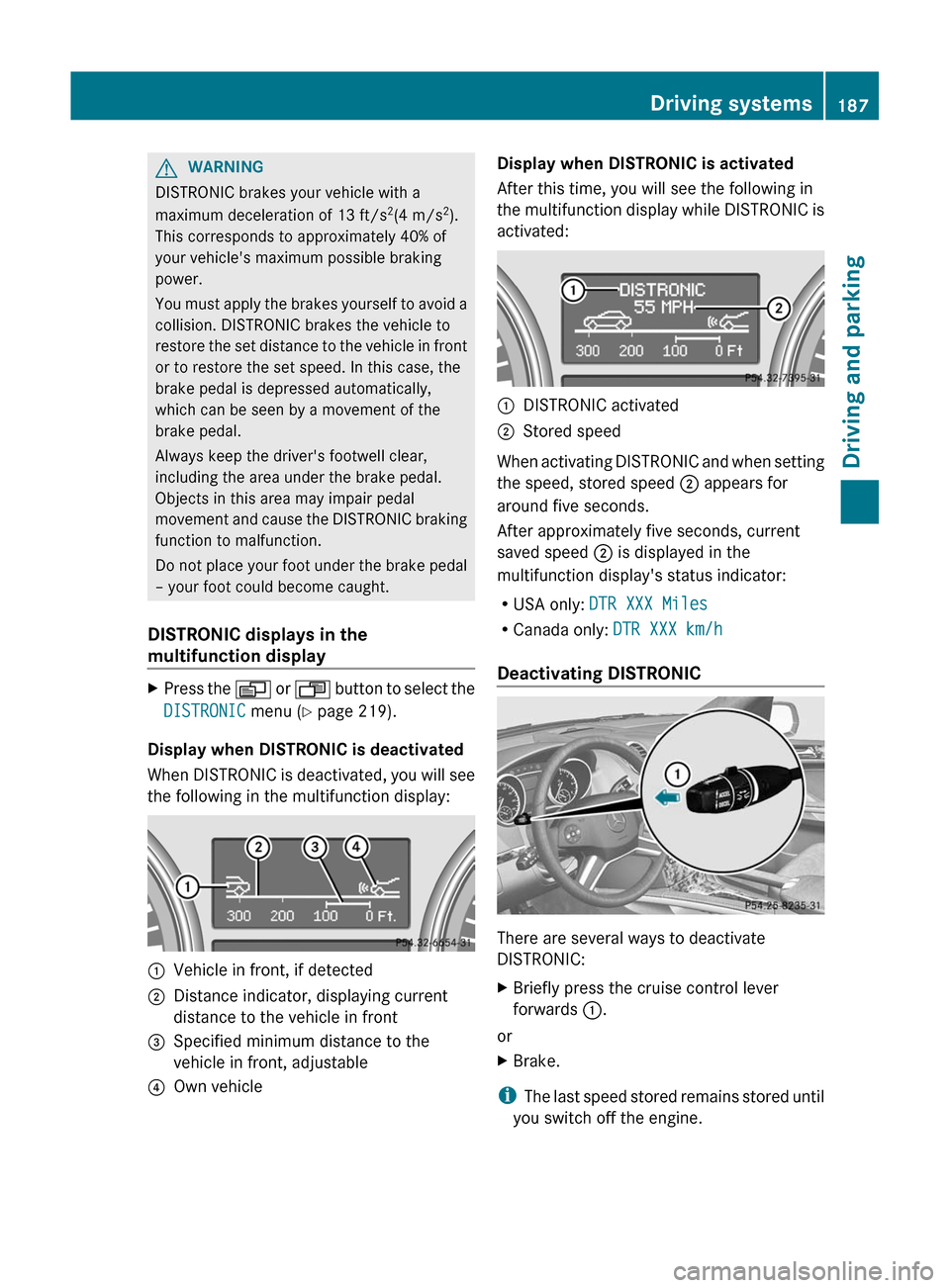
Display when DISTRONIC is deactivated
When DISTRONIC is deactivated, you will see
the following in the multifunction display:
:Vehicle in front, if detected;Distance indicator, displaying current
distance to the vehicle in front=Specified minimum distance to the
vehicle in front, adjustable?Own vehicleDisplay when DISTRONIC is activated
After this time, you will see the following in
the multifunction display while DISTRONIC is
activated::DISTRONIC activated;Stored speed
When activating DISTRONIC and when setting
the speed, stored speed ; appears for
around five seconds.
After approximately five seconds, current
saved speed ; is displayed in the
multifunction display's status indicator:
R USA only: DTR XXX Miles
R Canada only: DTR XXX km/h
Deactivating DISTRONIC
There are several ways to deactivate
DISTRONIC:
XBriefly press the cruise control lever
forwards :.
or
XBrake.
i
The last speed stored remains stored until
you switch off the engine.
Driving systems187Driving and parkingZ
Page 193 of 384
XPress button :.
The vehicle rises to raised level.
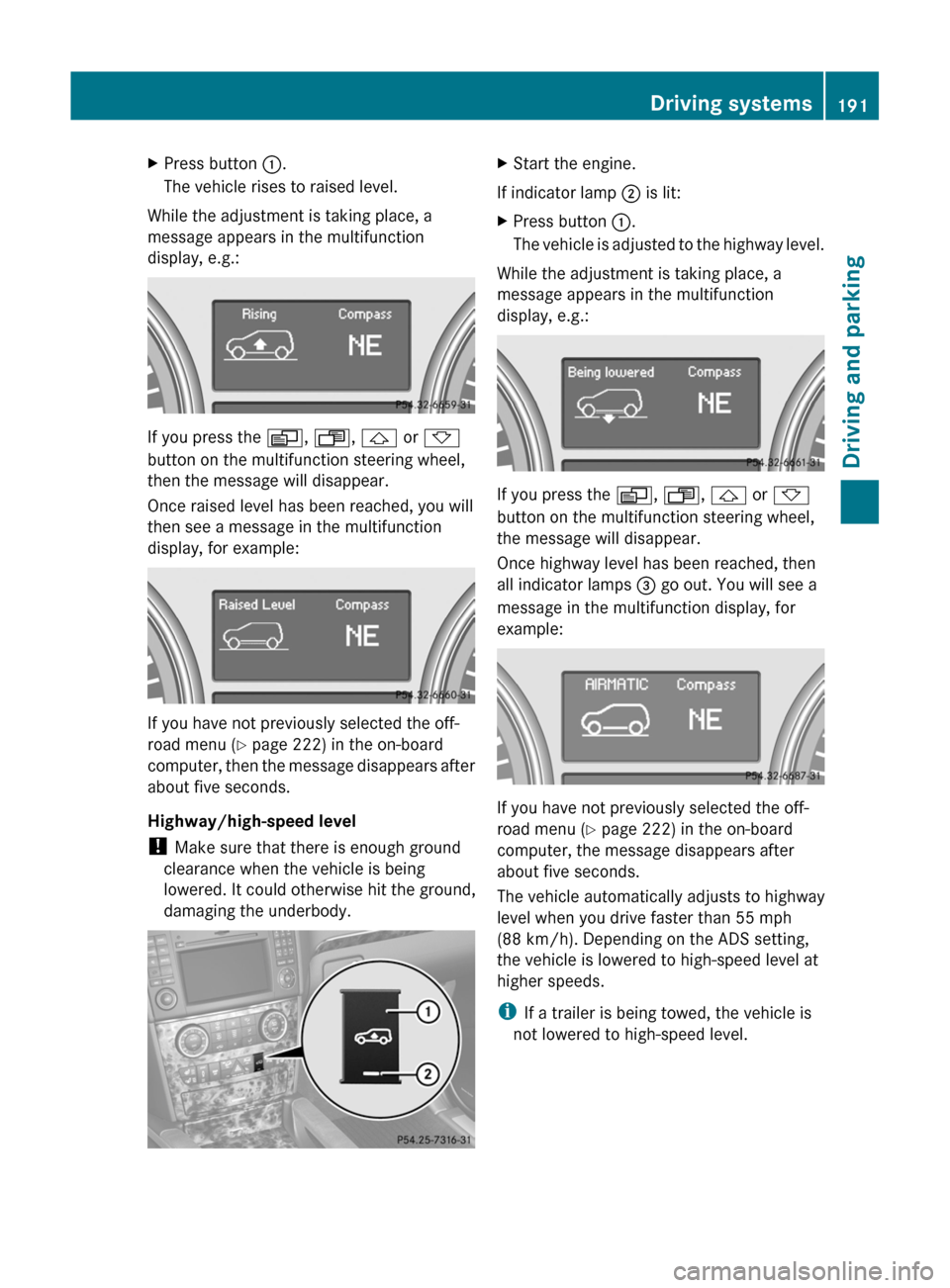
While the adjustment is taking place, a
message appears in the multifunction
display, e.g.:
If you press the V, U , & or *
button on the multifunction steering wheel,
then the message will disappear.
Once raised level has been reached, you will
then see a message in the multifunction
display, for example:
If you have not previously selected the off-
road menu ( Y page 222) in the on-board
computer, then the message disappears after
about five seconds.
Highway/high-speed level
! Make sure that there is enough ground
clearance when the vehicle is being
lowered. It could otherwise hit the ground,
damaging the underbody.
XStart the engine.
If indicator lamp ; is lit:
XPress button :.
The vehicle is adjusted to the highway level.
While the adjustment is taking place, a
message appears in the multifunction
display, e.g.:
If you press the V, U , & or *
button on the multifunction steering wheel,
the message will disappear.
Once highway level has been reached, then
all indicator lamps = go out. You will see a
message in the multifunction display, for
example:
If you have not previously selected the off-
road menu ( Y page 222) in the on-board
computer, the message disappears after
about five seconds.
The vehicle automatically adjusts to highway
level when you drive faster than 55 mph
(88 km/h). Depending on the ADS setting,
the vehicle is lowered to high-speed level at
higher speeds.
i If a trailer is being towed, the vehicle is
not lowered to high-speed level.
Driving systems191Driving and parkingZ
Page 195 of 384
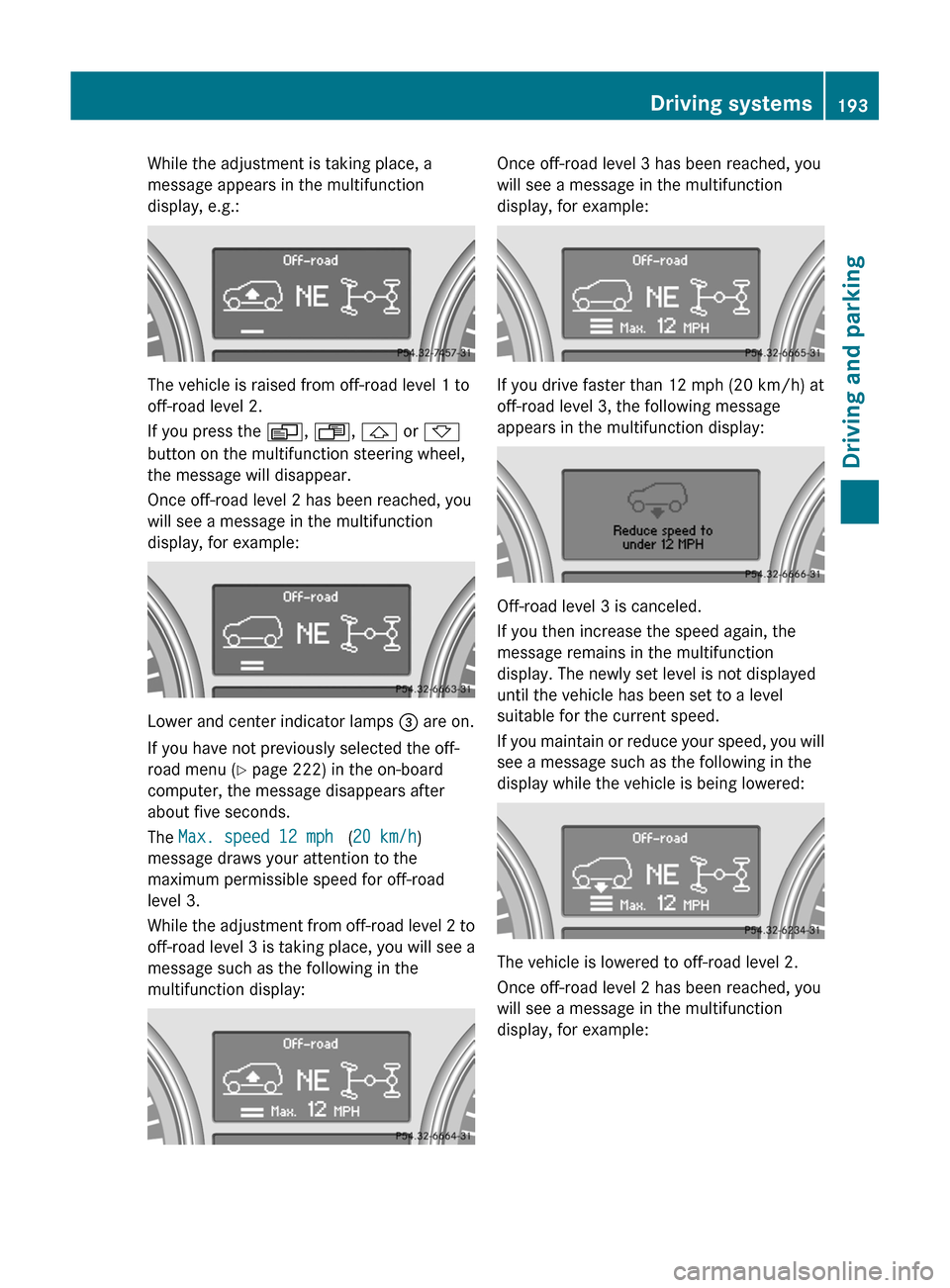
While the adjustment is taking place, a
message appears in the multifunction
display, e.g.:
The vehicle is raised from off-road level 1 to
off-road level 2.
If you press the V, U , & or *
button on the multifunction steering wheel,
the message will disappear.
Once off-road level 2 has been reached, you
will see a message in the multifunction
display, for example:
Lower and center indicator lamps = are on.
If you have not previously selected the off-
road menu ( Y page 222) in the on-board
computer, the message disappears after
about five seconds.
The Max. speed 12 mph (20 km/h )
message draws your attention to the
maximum permissible speed for off-road
level 3.
While the adjustment from off-road level 2 to
off-road level 3 is taking place, you will see a
message such as the following in the
multifunction display:
Once off-road level 3 has been reached, you
will see a message in the multifunction
display, for example:
If you drive faster than 12 mph (20 km/h) at
off-road level 3, the following message
appears in the multifunction display:
Off-road level 3 is canceled.
If you then increase the speed again, the
message remains in the multifunction
display. The newly set level is not displayed
until the vehicle has been set to a level
suitable for the current speed.
If you maintain or reduce your speed, you will
see a message such as the following in the
display while the vehicle is being lowered:
The vehicle is lowered to off-road level 2.
Once off-road level 2 has been reached, you
will see a message in the multifunction
display, for example:
Driving systems193Driving and parkingZ
Page 196 of 384
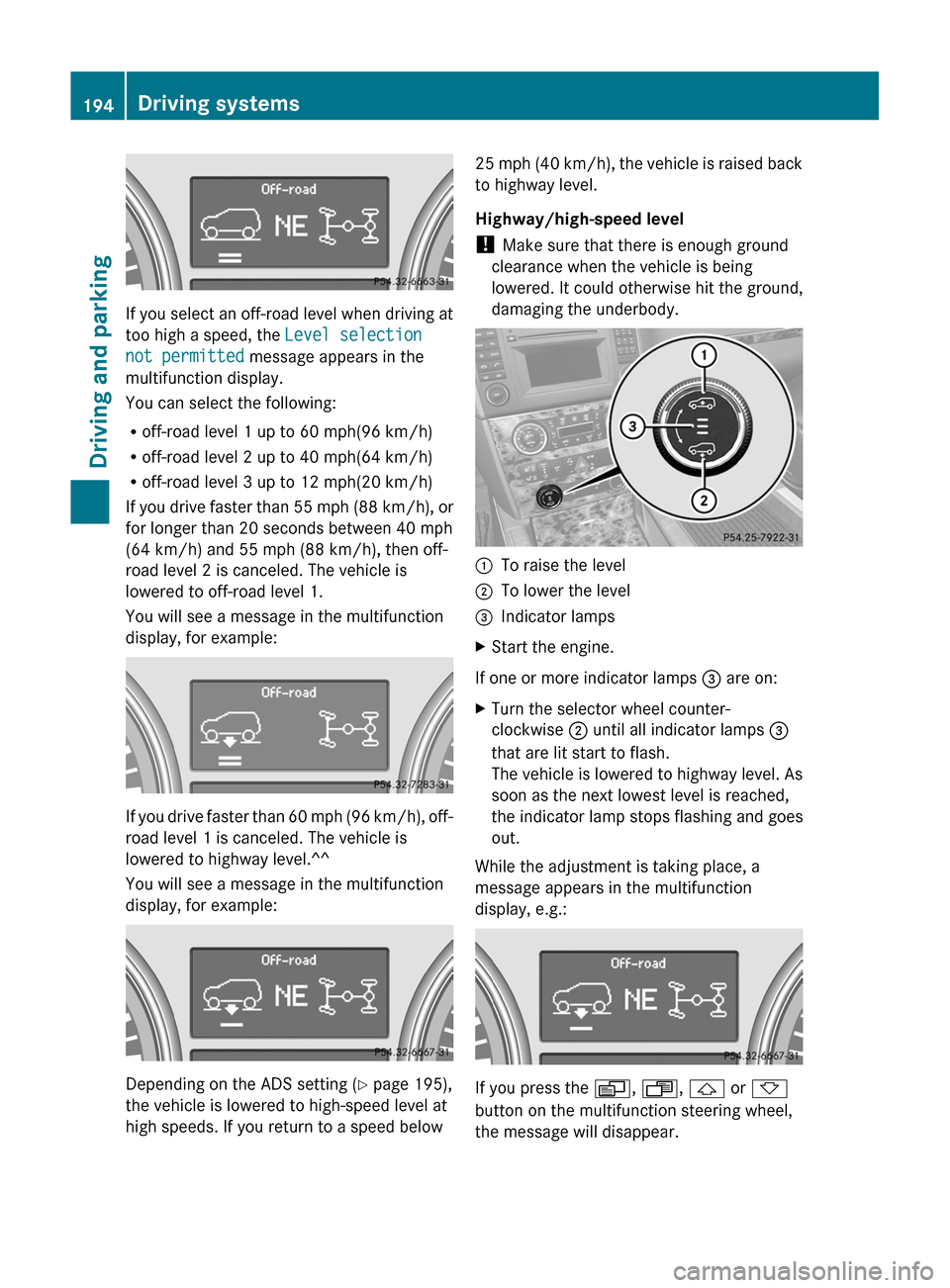
If you select an off-road level when driving at
too high a speed, the Level selection
not permitted message appears in the
multifunction display.
You can select the following:
R off-road level 1 up to 60 mph(96 km/h)
R off-road level 2 up to 40 mph(64 km/h)
R off-road level 3 up to 12 mph(20 km/h)
If you drive faster than 55 mph (88 km/h), or
for longer than 20 seconds between 40 mph
(64 km/h) and 55 mph (88 km/h), then off-
road level 2 is canceled. The vehicle is
lowered to off-road level 1.
You will see a message in the multifunction
display, for example:
If you drive faster than 60 mph (96 km/h), off-
road level 1 is canceled. The vehicle is
lowered to highway level.^^
You will see a message in the multifunction
display, for example:
Depending on the ADS setting ( Y page 195),
the vehicle is lowered to high-speed level at
high speeds. If you return to a speed below
25 mph (40 km/h), the vehicle is raised back
to highway level.
Highway/high-speed level
! Make sure that there is enough ground
clearance when the vehicle is being
lowered. It could otherwise hit the ground,
damaging the underbody.:To raise the level;To lower the level=Indicator lampsXStart the engine.
If one or more indicator lamps = are on:
XTurn the selector wheel counter-
clockwise ; until all indicator lamps =
that are lit start to flash.
The vehicle is lowered to highway level. As
soon as the next lowest level is reached,
the indicator lamp stops flashing and goes
out.
While the adjustment is taking place, a
message appears in the multifunction
display, e.g.:
If you press the V, U , & or *
button on the multifunction steering wheel,
the message will disappear.
194Driving systemsDriving and parking
Page 197 of 384
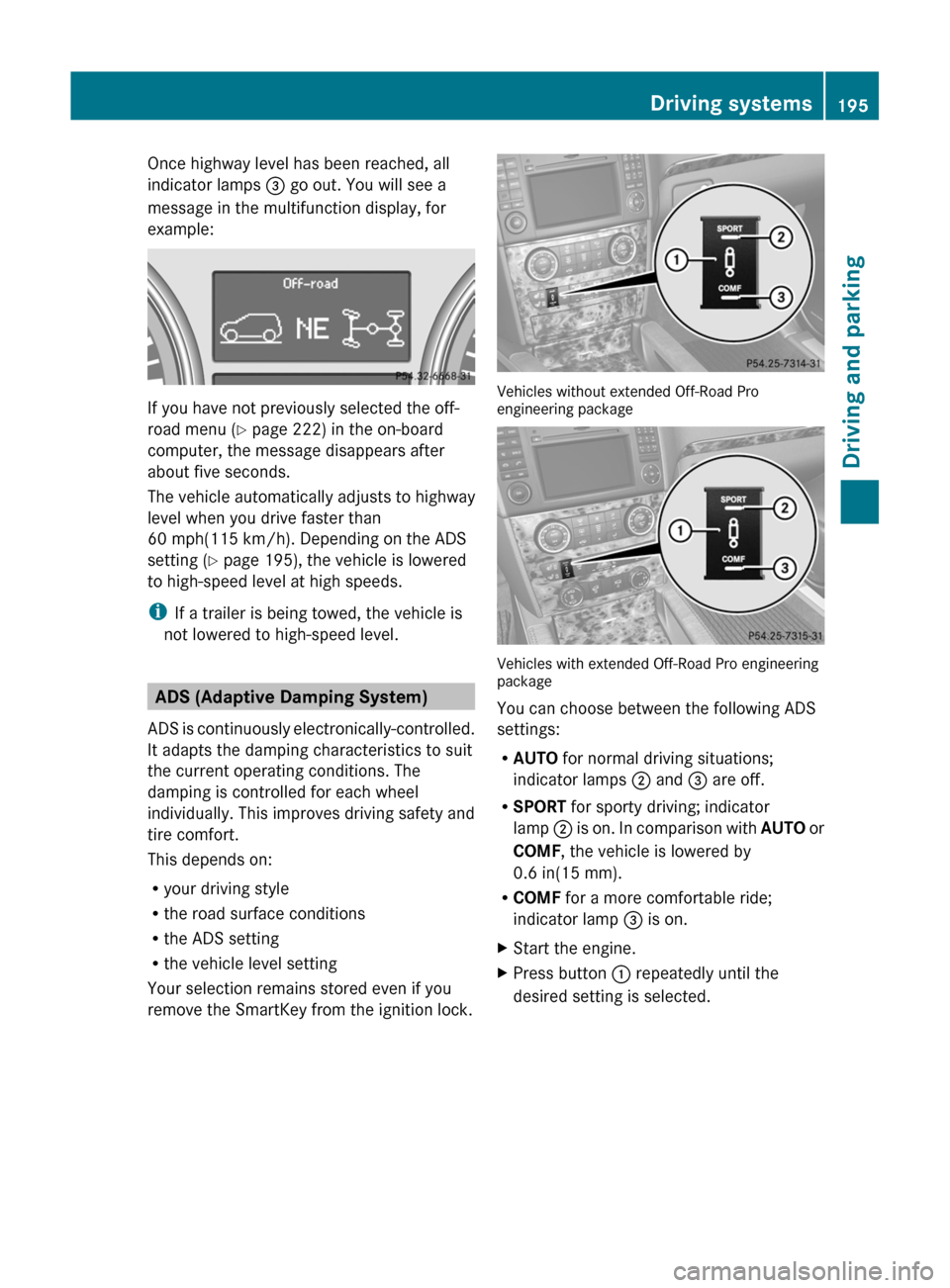
Once highway level has been reached, all
indicator lamps = go out. You will see a
message in the multifunction display, for
example:
If you have not previously selected the off-
road menu ( Y page 222) in the on-board
computer, the message disappears after
about five seconds.
The vehicle automatically adjusts to highway
level when you drive faster than
60 mph(115 km/h). Depending on the ADS
setting ( Y page 195), the vehicle is lowered
to high-speed level at high speeds.
i If a trailer is being towed, the vehicle is
not lowered to high-speed level.
ADS (Adaptive Damping System)
ADS is continuously electronically-controlled.
It adapts the damping characteristics to suit
the current operating conditions. The
damping is controlled for each wheel
individually. This improves driving safety and
tire comfort.
This depends on:
R your driving style
R the road surface conditions
R the ADS setting
R the vehicle level setting
Your selection remains stored even if you
remove the SmartKey from the ignition lock.
Vehicles without extended Off-Road Pro
engineering package
Vehicles with extended Off-Road Pro engineering
package
You can choose between the following ADS
settings:
R AUTO for normal driving situations;
indicator lamps ; and = are off.
R SPORT for sporty driving; indicator
lamp ; is on. In comparison with AUTO or
COMF , the vehicle is lowered by
0.6 in(15 mm).
R COMF for a more comfortable ride;
indicator lamp = is on.
XStart the engine.XPress button : repeatedly until the
desired setting is selected.Driving systems195Driving and parkingZ
Page 201 of 384
Problems with PARKTRONICProblemPossible causes/consequences and M SolutionsOnly the red segments
in the PARKTRONIC
warning displays are lit.
You also hear a warning
tone for approximately
two seconds.
PARKTRONIC is
deactivated after
approximately
20 seconds, and the
indicator lamp in the
PARKTRONIC button
lights up.PARKTRONIC has malfunctioned and has switched off.XIf problems persist, have PARKTRONIC checked at a qualified
specialist workshop.Only the red segments
in the PARKTRONIC
warning displays are lit.
PARKTRONIC is
deactivated after
approximately 20
seconds.The PARKTRONIC sensors are dirty or there is interference.XClean the PARKTRONIC sensors ( Y page 309).XSwitch the ignition back on.The problem may be caused by an external source of radio or
ultrasound waves.XSee if PARKTRONIC functions in a different location.Rear view camera
Important safety notes
The rear view camera is an optical parking aid.
It shows the area behind your vehicle in the
COMAND display.
GWARNING
Make sure that no persons or animals are in
the maneuvering range. Otherwise, they
could be injured.
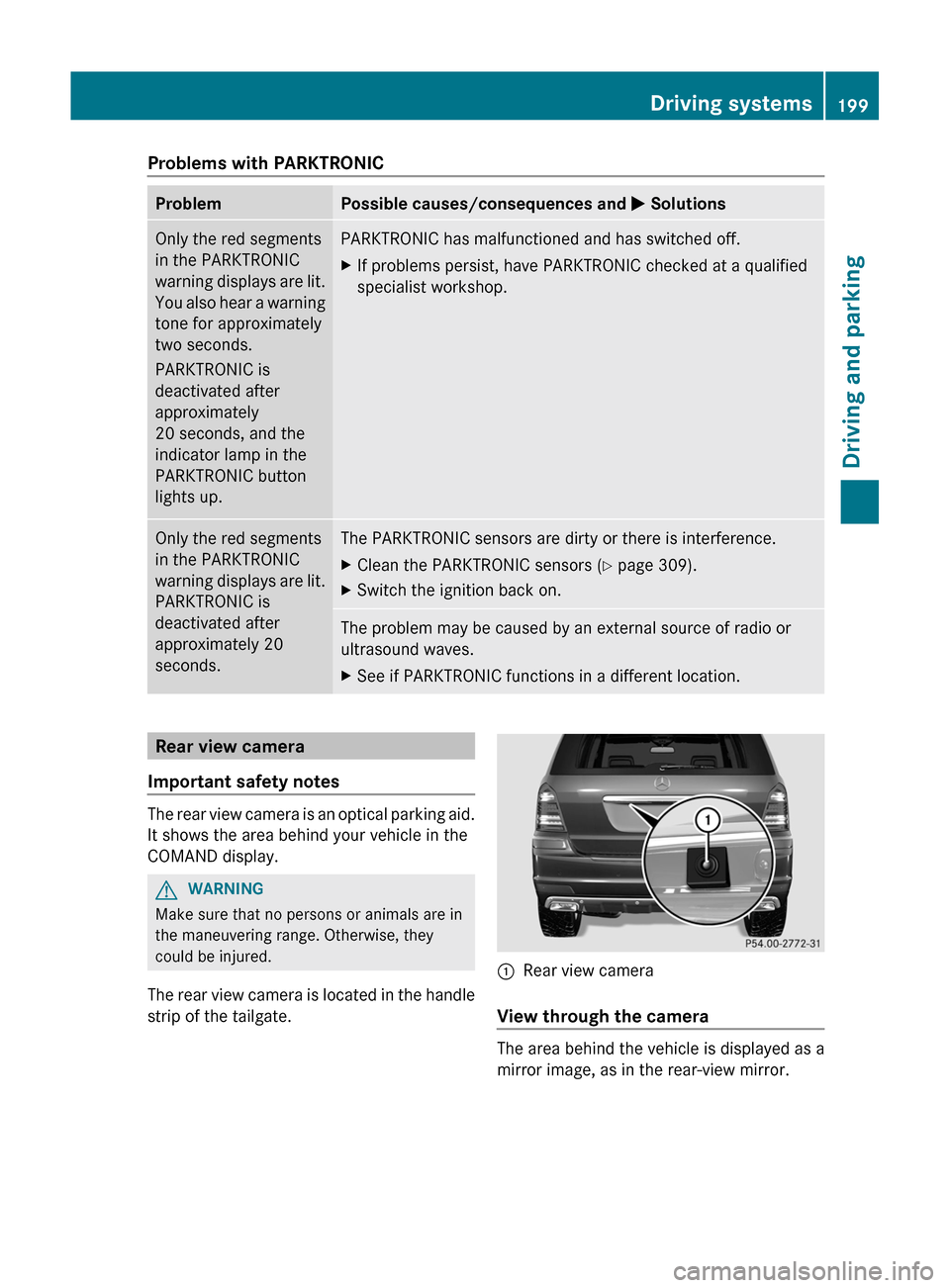
The rear view camera is located in the handle
strip of the tailgate.
:Rear view camera
View through the camera
The area behind the vehicle is displayed as a
mirror image, as in the rear-view mirror.
Driving systems199Driving and parkingZ
Page 207 of 384
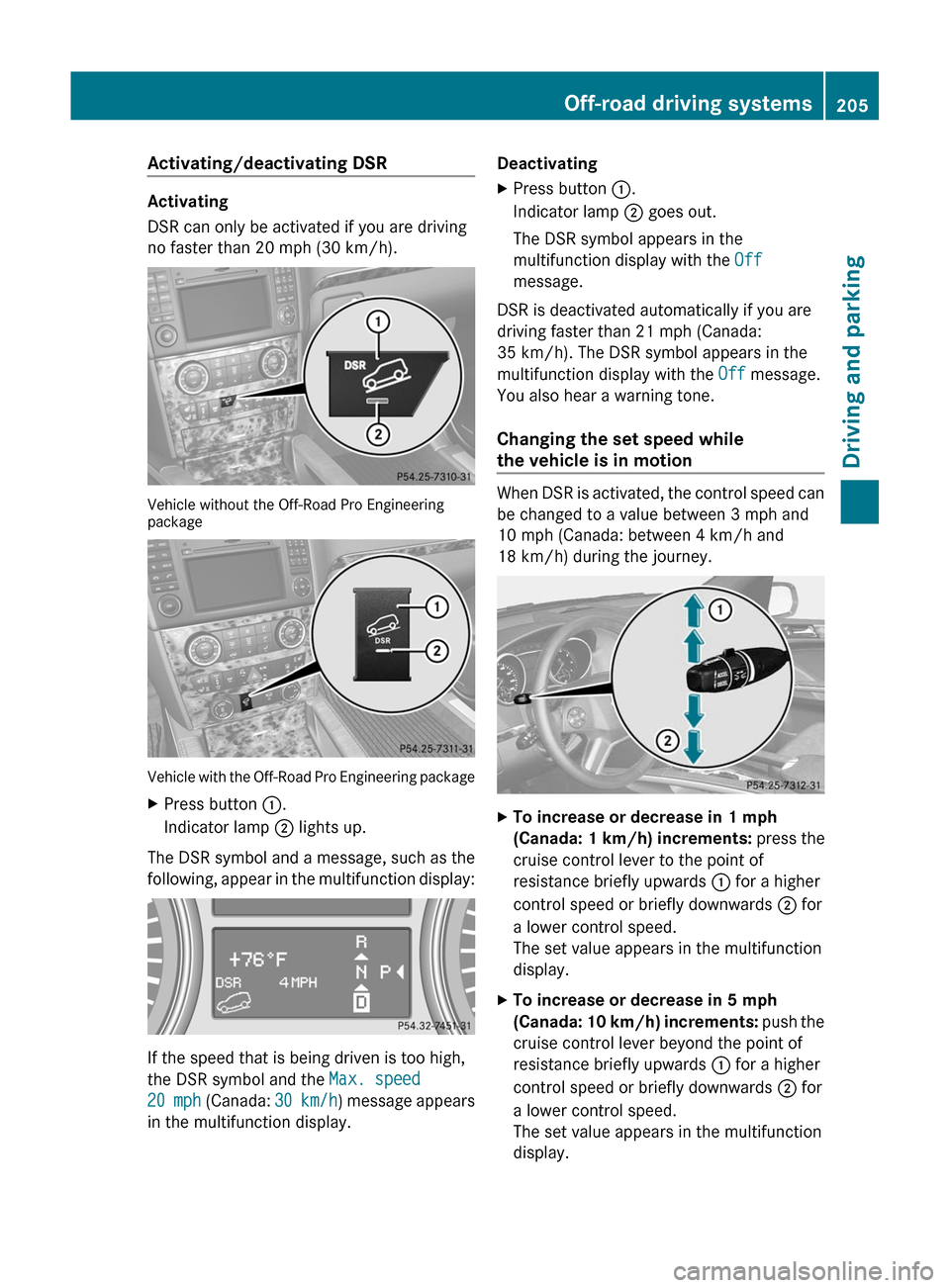
Activating/deactivating DSR
Activating
DSR can only be activated if you are driving
no faster than 20 mph (30 km/h).
Vehicle without the Off-Road Pro Engineering
package
Vehicle with the Off-Road Pro Engineering package
XPress button :.
Indicator lamp ; lights up.
The DSR symbol and a message, such as the
following, appear in the multifunction display:
If the speed that is being driven is too high,
the DSR symbol and the Max. speed
20 mph (Canada: 30 km/h) message appears
in the multifunction display.
DeactivatingXPress button :.
Indicator lamp ; goes out.
The DSR symbol appears in the
multifunction display with the Off
message.
DSR is deactivated automatically if you are
driving faster than 21 mph (Canada:
35 km/h). The DSR symbol appears in the
multifunction display with the Off message.
You also hear a warning tone.
Changing the set speed while
the vehicle is in motion
When DSR is activated, the control speed can
be changed to a value between 3 mph and
10 mph (Canada: between 4 km/h and
18 km/h) during the journey.
XTo increase or decrease in 1 mph
(Canada: 1 km/h) increments: press the
cruise control lever to the point of
resistance briefly upwards : for a higher
control speed or briefly downwards ; for
a lower control speed.
The set value appears in the multifunction
display.XTo increase or decrease in 5 mph
(Canada: 10 km/h) increments: push the
cruise control lever beyond the point of
resistance briefly upwards : for a higher
control speed or briefly downwards ; for
a lower control speed.
The set value appears in the multifunction
display.Off-road driving systems205Driving and parkingZ
Page 208 of 384
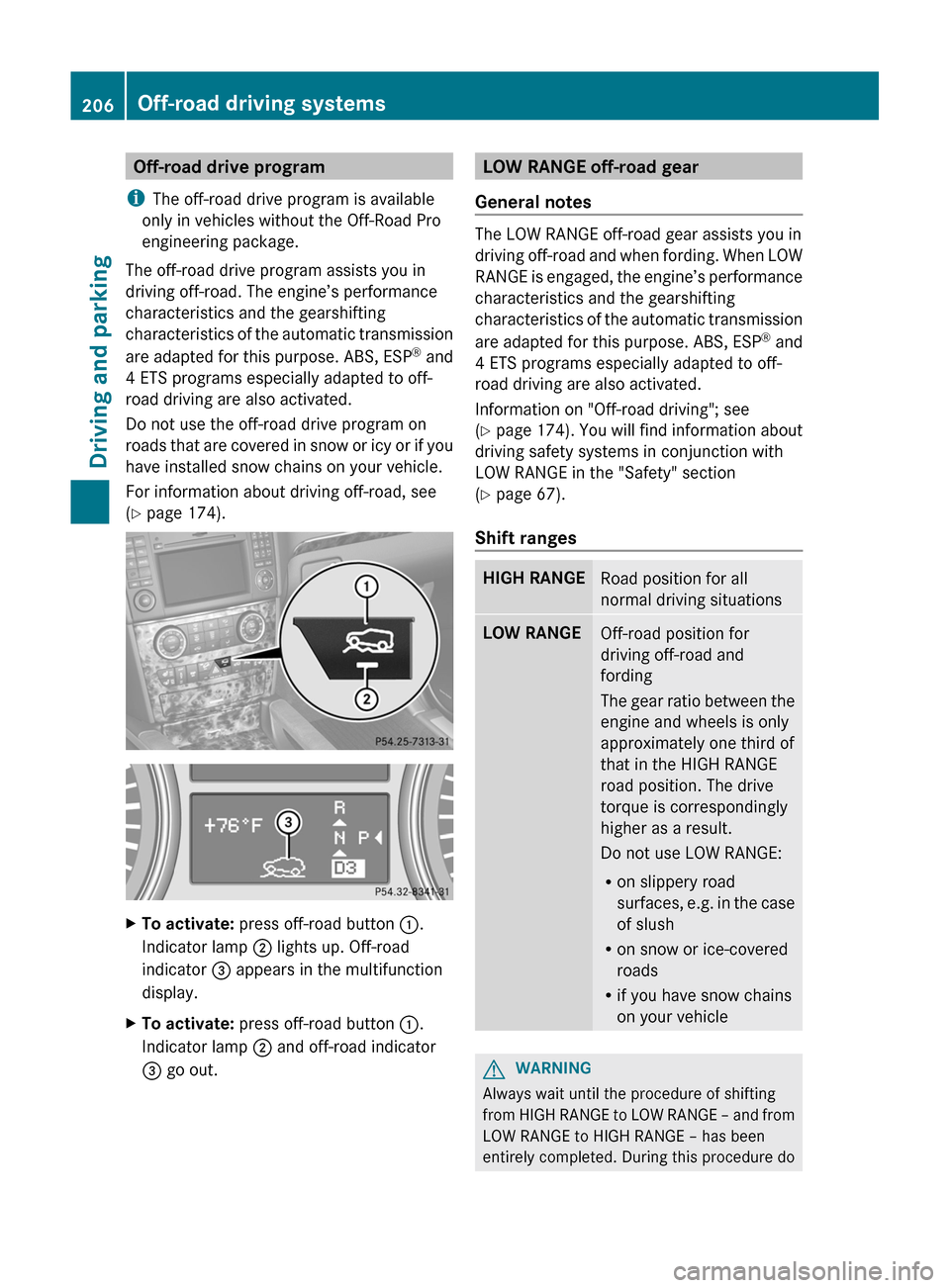
Off-road drive program
i The off-road drive program is available
only in vehicles without the Off-Road Pro
engineering package.
The off-road drive program assists you in
driving off-road. The engine’s performance
characteristics and the gearshifting
characteristics of the automatic transmission
are adapted for this purpose. ABS, ESP ®
and
4 ETS programs especially adapted to off-
road driving are also activated.
Do not use the off-road drive program on
roads that are covered in snow or icy or if you
have installed snow chains on your vehicle.
For information about driving off-road, see
( Y page 174).XTo activate: press off-road button :.
Indicator lamp ; lights up. Off-road
indicator = appears in the multifunction
display.XTo activate: press off-road button :.
Indicator lamp ; and off-road indicator
= go out.LOW RANGE off-road gear
General notes
The LOW RANGE off-road gear assists you in
driving off-road and when fording. When LOW
RANGE is engaged, the engine’s performance
characteristics and the gearshifting
characteristics of the automatic transmission
are adapted for this purpose. ABS, ESP ®
and
4 ETS programs especially adapted to off-
road driving are also activated.
Information on "Off-road driving"; see
( Y page 174) . You will find information about
driving safety systems in conjunction with
LOW RANGE in the "Safety" section
( Y page 67).
Shift ranges
HIGH RANGERoad position for all
normal driving situationsLOW RANGEOff-road position for
driving off-road and
fording
The gear ratio between the
engine and wheels is only
approximately one third of
that in the HIGH RANGE
road position. The drive
torque is correspondingly
higher as a result.
Do not use LOW RANGE:
R on slippery road
surfaces, e.g. in the case
of slush
R on snow or ice-covered
roads
R if you have snow chains
on your vehicleGWARNING
Always wait until the procedure of shifting
from HIGH RANGE to LOW RANGE – and from
LOW RANGE to HIGH RANGE – has been
entirely completed. During this procedure do
206Off-road driving systemsDriving and parking
Page 209 of 384
not turn off the engine or shift the automatic
transmission into another gear.
If you do not wait until the shifting procedure
has been entirely completed then it might not
be correctly performed. The transfer case
might be in neutral, thus interrupting the
transfer of power between the engine and the
drive axle.
The vehicle is then freely movable, even if a
gear has been selected, and could
unintentionally be set into motion –
particularly on up – or downhill grades. This
could lead to an accident and cause injury to
yourself and others.
Please observe related messages appearing
in the multifunction display.
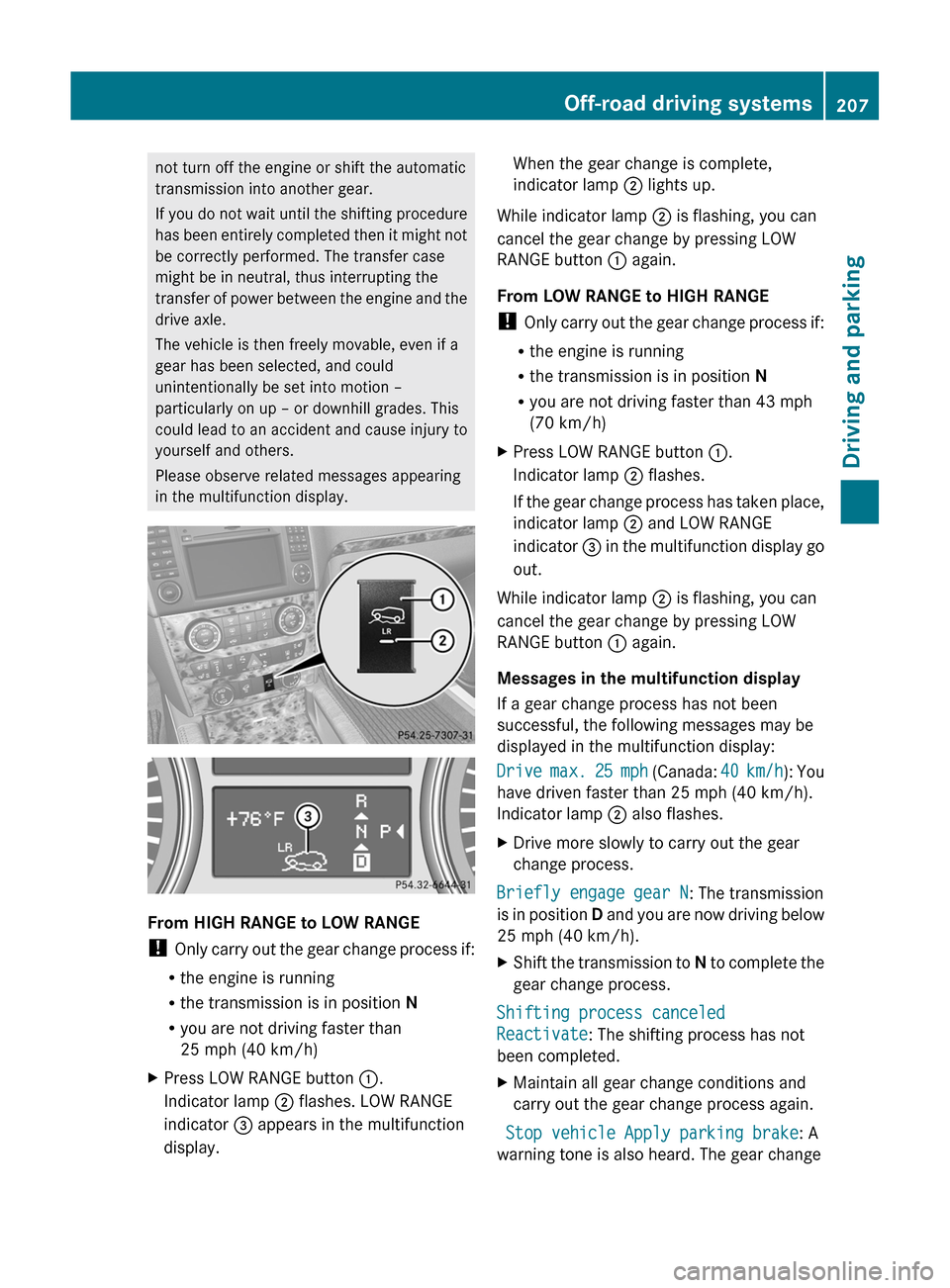
From HIGH RANGE to LOW RANGE
! Only carry out the gear change process if:
R the engine is running
R the transmission is in position N
R you are not driving faster than
25 mph (40 km/h)
XPress LOW RANGE button :.
Indicator lamp ; flashes. LOW RANGE
indicator = appears in the multifunction
display.When the gear change is complete,
indicator lamp ; lights up.
While indicator lamp ; is flashing, you can
cancel the gear change by pressing LOW
RANGE button : again.
From LOW RANGE to HIGH RANGE
! Only carry out the gear change process if:
R the engine is running
R the transmission is in position N
R you are not driving faster than 43 mph
(70 km/h)
XPress LOW RANGE button :.
Indicator lamp ; flashes.
If the gear change process has taken place,
indicator lamp ; and LOW RANGE
indicator = in the multifunction display go
out.
While indicator lamp ; is flashing, you can
cancel the gear change by pressing LOW
RANGE button : again.
Messages in the multifunction display
If a gear change process has not been
successful, the following messages may be
displayed in the multifunction display:
Drive max. 25 mph (Canada: 40 km/h): You
have driven faster than 25 mph (40 km/h).
Indicator lamp ; also flashes.
XDrive more slowly to carry out the gear
change process.
Briefly engage gear N : The transmission
is in position D and you are now driving below
25 mph (40 km/h).
XShift the transmission to N to complete the
gear change process.
Shifting process canceled
Reactivate : The shifting process has not
been completed.
XMaintain all gear change conditions and
carry out the gear change process again.
Stop vehicle Apply parking brake : A
warning tone is also heard. The gear change
Off-road driving systems207Driving and parkingZ