Dsr MERCEDES-BENZ GL-Class 2015 X166 Owner's Manual
[x] Cancel search | Manufacturer: MERCEDES-BENZ, Model Year: 2015, Model line: GL-Class, Model: MERCEDES-BENZ GL-Class 2015 X166Pages: 462, PDF Size: 9.09 MB
Page 12 of 462
PARKTRONIC ................................. 225
Rear view camera .......................... 232
Driving tips
Automatic transmission ................. 179
Brakes ...........................................1 96
Break-in period .............................. 166
DISTRONIC PLUS ........................... 213
Downhill gradient ........................... 196
Drinking and driving ....................... 194
Driving abroad ............................... 128
Driving in winter ............................ .198
Driving on flooded roads ................ 198
Driving on sand .............................. 201
Driving on wet roads ..................... .198
Driving over obstacles ................... 202
Exhaust check ............................... 194
Fuel ................................................ 194
General .......................................... 194
Hydroplaning ................................. 198
Icy road surfaces ........................... 198
Limited braking efficiency on sal-
ted roads ....................................... 196
Off-road driving .............................. 200
Off-road fording ............................ .198
Snow chains .................................. 409
Symmetrical low bea m.................. 128
Tire ruts ......................................... 202
Towing a trailer .............................. 265
Traveling uphill ............................... 202
Wet road surface ........................... 196
DSR (Downhill Speed Regulation)
Display message ............................ 314
Function/note s............................. 258
DVD video
Operating (on-board computer) ..... 281 E
EASY-ENTRY feature Activating/deactivating ................. 287
Function/note s............................. 121
EASY-EXIT feature
Crash-responsive ........................... 122
Function/note s............................. 121
Switching on/of f........................... 287 EBD (electronic brake force distri-
bution)
Display message ............................ 295
Function/note s................................ 75
ECO display
Function/note s............................. 195
On-board computer ....................... 278
Electronic Stability Program
see ESP ®
(Electronic Stability Program)
Emergency
Automatic measures after an acci-
dent ................................................. 60
Emergency release
Driver's door .................................... 90
Vehicle ............................................. 90
Emergency spare wheel
General notes ................................ 440
Important safety notes .................. 440
Removing ....................................... 441
Storage location ............................ 441
Technical data ............................... 443
Emergency Tensioning Devices
Activation ......................................... 58
Emergency unlocking
Tailgate ............................................ 95
Emissions control
Service and warranty information .... 25
Engine
Check Engine warning lamp ........... 335
Display message ............................ 308
ECO start/stop function ................ 171
Engine number ............................... 447
Irregular running ............................ 175
Jump-starting ................................. 397
Starting problems .......................... 175
Starting the engine with the
SmartKey ....................................... 170
Starting with KEYLESS-GO ............. 170
Switching off .................................. 191
Tow-starting (vehicle) ..................... 402
Engine electronics
Problem (malfunction) ................... 175
Engine jump starting
see Jump starting (engine)
Engine oil
Adding ........................................... 374
Additives ........................................ 452 10
Index
Page 17 of 462
Operation ......................................... 54
System self-test ...............................56
Occupant safety
Automatic measures after an acci-
dent .................................................60
Children in the vehicle .................... .61
Important safety notes .................... 45
Pets in the vehicle ........................... 67
PRE-SAFE ®
(anticipatory occu-
pant protection) ............................... 60
OCS
Conditions ....................................... 53
Faults ............................................... 57
Operation .........................................54
System self-test ............................... 56
Odometer ........................................... 277
Off-road driving Approach/departure angle ............ 457
Checklist after driving off-road ...... 201
Checklist before driving off-road .... 200
Fording depth ................................ 456
General information ....................... 200
Important safety notes .................. 199
Maximum gradient climbing abil-
ity .................................................. 457
Traveling uphill ............................... 202
Off-road programs (vehicles with
the ON&OFFROAD package)
Displays in the COMAND display ... 263
Function/note s............................. 259
Off-road program 1 ........................ 260
Off-road program 2 ........................ 260
Off-road system
4MATIC .......................................... 257
DSR ............................................... 258
LOW RANGE off-road gear ............. 261
Off-road 4ETS .................................. 73
Off-road ABS .................................... 69
Off-road ESP ®
.................................. 75
Off-road programs (vehicles with
the ON&OFFROAD package) .......... 259
Oil
see Engine oil
On and Offroad menu (on-board
computer) .......................................... 289 On-board computer
AMG menu ..................................... 289
Assistance menu ........................... 283
Audio menu ................................... 280
Convenience submenu .................. 287
Displaying a service message ........ 377
Display messages .......................... 292
DISTRONIC PLUS ........................... 213
Factory settings submenu ............. 289
Important safety notes .................. 274
Instrument cluster submenu .......... 285
Lighting submenu .......................... 285
Menu overview .............................. 277
Message memory .......................... 292
Navigation menu ............................ 279
On and Offroad menu .................... 289
Operation ....................................... 275
RACETIMER ................................... 290
Service menu ................................. 284
Settings menu ............................... 285
Standard display ............................ 277
Telephone menu ............................ 281
Trip menu ...................................... 277
Vehicle submenu ........................... 287
Video DVD operation ..................... 281
On-road programs
AUTO program ............................... 255
Function/note s............................. 255
Snow program ............................... 256
SPORT program ............................. 256
Trailer program .............................. 257
Opening and closing the side trim
panels ................................................. 139
Operating safety Declaration of conformity ................ 28
Important safety notes .................... 27
Operating system
see On-board computer
Operator's Manual
Vehicle equipment ........................... 25
Outside temperature display ........... 275
Overhead control panel ...................... 41
Override feature Rear side window s........................... 67 Index
15
Page 41 of 462
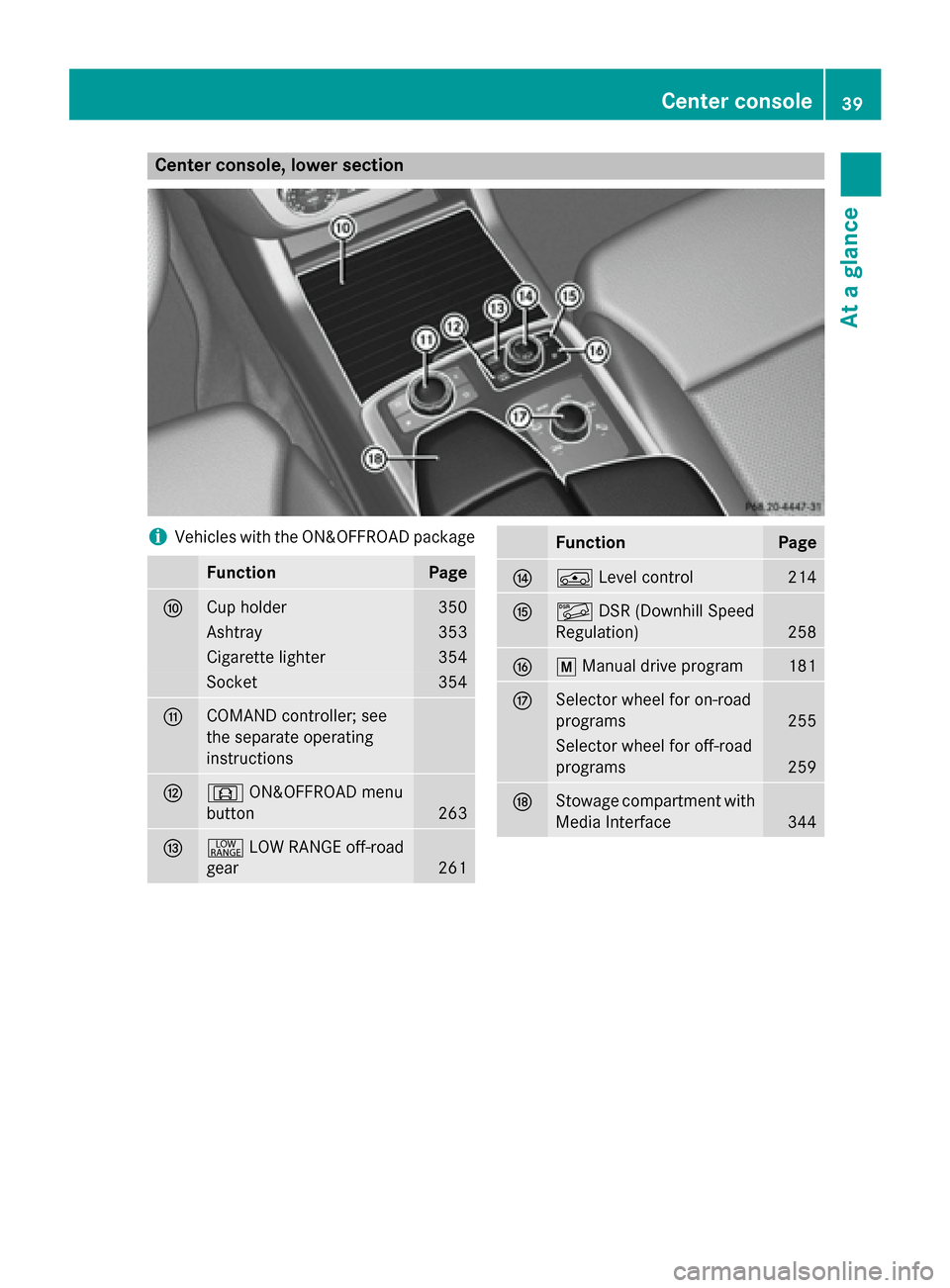
Center console, lower section
i
Vehicles with the ON&OFFROAD package Function Page
006E
Cup holder 350
Ashtray 353
Cigarette lighter 354
Socket 354
006F
COMAND controller; see
the separate operating
instructions
0070
0090
ON&OFFROAD menu
button 263
0071
002E
LOW RANGE off-road
gear 261 Function Page
0072
00C4
Level control 214
0073
00C6
DSR (Downhill Speed
Regulation) 258
0074
0063
Manual drive program 181
0075
Selector wheel for on-road
programs
255
Selector wheel for off-road
programs
259
0076
Stowage compartment with
Media Interface 344Center console
39At a glance
Page 42 of 462
i
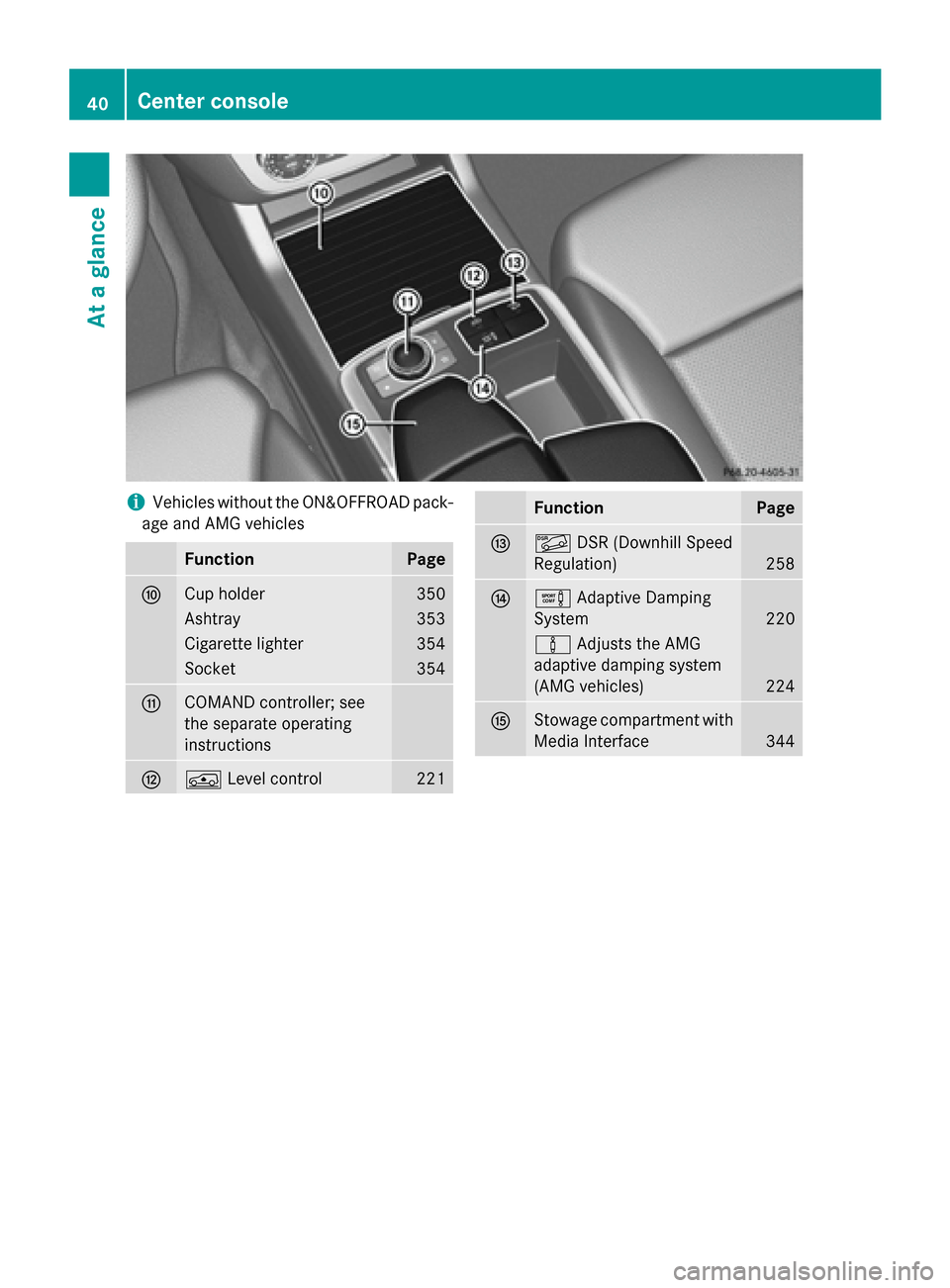
Vehicles without the ON&OFFROAD pack-
age and AMG vehicles Function Page
006E
Cup holder 350
Ashtray 353
Cigarette lighter 354
Socket 354
006F
COMAND controller; see
the separate operating
instructions
0070
00C4
Level control 221 Function Page
0071
00C6
DSR (Downhill Speed
Regulation) 258
0072
0091
Adaptive Damping
System 220
00CC
Adjusts the AMG
adaptive damping system
(AMG vehicles) 224
0073
Stowage compartment with
Media Interface 34440
Center consoleAt a glance
Page 72 of 462
G
WARNING
BAS PLUS does not react:
R to people or animals
R to oncoming vehicles
R to crossing traffic
R when cornering
As a result, BAS PLUS may not intervene in all
critical situations. There is a risk of an acci-
dent.
Always pay careful attention to the traffic sit-
uation and be ready to brake.
In the event of snowfall or heavy rain, the rec-
ognition can be impaired.
Recognition by the radar sensor system is
also impaired in the event of:
R dirt on the sensors or anything else cover-
ing the sensors
R there is interference by other radar sources
R there are strong radar reflections, for
example in parking garages
R a narrow vehicle traveling in front, e.g. a
motorbike
R a vehicle traveling in front on a different line
relative to the center of your vehicle
Following damage to the front end of the vehi-
cle, have the configuration and operation of
the radar sensors checked at a qualified spe-
cialist workshop. This also applies to colli-
sions at low speeds where there is no visible
damage to the front of the vehicle.
Function To avoid a collision, BAS PLUS calculates the
brake force necessary if:
R you approach an obstacle, and
R BAS PLUS has detected a risk of collision
When driving at a speed under 20 mph
(30 km/h): if you depress the brake pedal,
BAS PLUS is activated. The increase in brake pressure will be carried out at the last possi-
ble moment. When driving at a speed above 20 mph
(30 km/h): if you depress the brake pedal
sharply, BAS PLUS automatically raises the
brake pressure to a value adapted to the traf-
fic situation.
BAS PLUS provides braking assistance in haz-
ardous situations with vehicles in front within a speed range between 4 mph (7 km/h) and
155 mph (250 km/h).
At speeds of up to approximately 40 mph
(70 km/h), BAS PLUS can also react to sta-
tionary objects. Examples of stationary
objects are stopped or parked vehicles.
i If BAS PLUS demands particularly high
braking force, preventative passenger pro-
tection measures (PRE-SAFE ®
) are activa-
ted simultaneously.
X Keep the brake pedal depressed until the
emergency braking situation is over.
ABS prevents the wheels from locking.
BAS PLUS is deactivated and the brakes func- tion as usual again, if:
R you release the brake pedal.
R there is no longer a risk of collision.
R no obstacle is detected in front of your
vehicle.
If you have activated DSR (Y page 258), BAS
PLUS is likewise deactivated. COLLISION PREVENTION ASSIST
General notes COLLISION PREVENTION ASSIST consists of
Adaptive Brake Assist and the distance warn-
ing function, which are described in the fol-
lowing.
Distance warning function Important safety notes
i Observe the "Important safety notes" sec-
tion (Y page 68). 70
Driving safety systemsSafety
Page 79 of 462
R
a narrow vehicle traveling in front, e.g. a
motorbike
R a vehicle traveling in front on a different line
relative to the center of your vehicle
Following damage to the front end of the vehi-
cle, have the configuration and operation of
the radar sensors checked at a qualified spe-
cialist workshop. This also applies to colli-
sions at low speeds where there is no visible
damage to the front of the vehicle.
Function X
To activate/deactivate: activate or deac-
tivate PRE-SAFE ®
Brake in the on-board
computer (Y page 284).
If the PRE-SAFE ®
Brake is not activated, the
00D4 symbol appears in the multifunction
display.
Starting at a speed of around 4 mph (7 km/h),
this function warns you if you rapidly
approach a vehicle in front. An intermittent
warning tone will then sound and the 00BA
distance warning lamp will light up in the
instrument cluster.
X Brake immediately to defuse the situation.
or X Take evasive action provided it is safe to do
so.
PRE-SAFE ®
Brake can also brake the vehicle
automatically under the following conditions:
R the driver and front-passenger have their
seat belts fastened
and
R the vehicle speed is between approx-
imately 4 mph (7 km/h) and 124 mph
(200 km/h)
At speeds of up to approximately 40 mph
(70 km/h) PRE-SAFE ®
Brake can also detect
stationary objects. Examples of stationary
objects are stopped or parked vehicles.
i If there is an increased risk of collision,
preventive passenger protection measures
(PRE-SAFE ®
) are activated. If the risk of collision with the vehicle in front
remains and you do not brake, take evasive
action or accelerate significantly, the vehicle
may perform automatic emergency braking,
up to the point of full brake application. Auto-
matic emergency braking is not performed
until immediately prior to an imminent acci-
dent.
You can prevent the intervention of the PRE-
SAFE ®
Brake at any time by:
R depressing the accelerator pedal further.
R activating kickdown.
R releasing the brake pedal.
The braking action of PRE-SAFE ®
Brake is
ended automatically if:
R you maneuver to avoid the obstacle.
R there is no longer any danger of a collision.
R there is no longer an obstacle detected in
front of your vehicle.
If you have activated DSR (Y page 258), PRE-
SAFE ®
Brake is deactivated. STEER CONTROL
General information STEER CONTROL helps you by transmitting a
noticeable steering force to the steering
wheel in the direction required for vehicle
stabilization.
This steering assistance is provided in partic-
ular if:
R both right wheels or both left wheels are on
a wet or slippery road surface when you
brake.
R the vehicle starts to skid.
Important safety notes i
Observe the "Important safety notes" sec-
tion (Y page 68). Driving safety systems
77Safety Z
Page 202 of 462
Driving off-road increases the likelihood of
damage to the vehicle, which, in turn, can lead to failure of the mechanical assembly or sys-
tems. Adapt your driving style to suit the ter- rain conditions. Drive carefully. Have damage
to the vehicle rectified immediately at a quali-
fied specialist workshop.
Do not switch to transmission position N
when driving off-road. You could lose control
of the vehicle if you attempt to brake using
the service brake. If the gradient is too steep, drive backwards in reverse gear.
General notes Read this section carefully before driving your
vehicle off-road. Practice by driving over more gentle off-road terrain first.
Familiarize yourself with the characteristics
of your vehicle and the gear shift operation
before driving through difficult terrain.
The following driving systems are specially
adapted to off-road driving:
R Off-road program 1 and 2 (vehicles with the
ON&OFFROAD package) (Y page 259)
R LOW RANGE off-road gear (vehicles with
the ON&OFFROAD package)
(Y page 261)
R Differential lock (vehicles with the
ON&OFFROAD package) (Y page 260)
R Off-road ABS (Y page 69)
R Off-road 4ETS (Y page 73)
R AIRMATIC package (vehicle level)
(Y page 219)
R DSR (Downhill Speed Regulation)
(Y page 258)
Observe the following notes:
R Stop the vehicle before starting to drive
along an off-road route.
R For vehicles with the AIRMATIC pack-
age: select a vehicle level that is suitable
for the off-road terrain. To avoid damaging
the vehicle, make sure there is always suf-
ficient ground clearance. R
Check that items of luggage and loads are
stowed safely and are well secured
(Y page 347).
R Always keep the engine running and in gear
when driving on a downhill gradient. Acti-
vate DSR (Y page 258).
R Always keep the doors, tailgate, windows
and sliding sunroof closed while driving.
R Adapt your speed to the terrain. The
rougher, steeper or more ruts on the ter-
rain, the slower your speed should be.
R Drive slowly and at an even speed through
the water. Ensure that a bow wave does not
form as you drive.
R Drive with extreme care on unfamiliar off-
road routes where visibility is poor. For
safety reasons, get out of the vehicle first
and survey the off-road route.
R Look out for obstacles, such as rocks,
holes, tree stumps and furrows.
R Check the depth of water before fording
rivers and streams.
R When fording, do not stop and do not
switch off the engine.
R On sand, drive quickly to overcome the roll-
ing resistance. Otherwise the vehicle's
wheels could become stuck in loose
ground.
R Do not jump with the vehicle as this will
interrupt the vehicle's propulsion.
R Always keep the engine running and in gear
when driving on a slope.
R Do not shift the automatic transmission to
transmission position N.
i Do not use the HOLD function when driv-
ing off-road, on steep uphill or downhill gra-
dients or on slippery or loose surfaces. The HOLD function cannot hold the vehicle on
such surfaces.
Checklist before driving off-road !
If the engine oil warning lamp lights up
while the vehicle is in motion, stop the vehi-
cle in a safe place as soon as possible. 200
Driving
tipsDriving an d parking
Page 203 of 462
Check the engine oil level. The engine oil
warning lamp warning must not be ignored. Continuing the journey while the symbol is
displayed could lead to engine damage.
X Engine oil level: check the engine oil level
and add oil if necessary.
When driving on steep gradients, the
engine oil level must be sufficiently high to
ensure a correct oil supply in the vehicle.
X DEF tank (BlueTEC vehicles): check the
level and top up if necessary (Y page 188).
X Tire-changing tool kit: check that the jack
is working and make sure you have the lug
wrench, a robust tow cable and a folding
spade in the vehicle.
X Wheels and tires: check the tire tread
depth and tire pressure.
X Check for damage and remove any foreign
objects, e.g. small stones, from the
wheels/tires.
X Replace any missing valve caps.
X Replace dented or damaged wheels.
X Rims: dented or bent rims can result in a
loss of tire pressure and damage the tire
bead. Therefore, check your rims before
driving off-road and replace them as
required.
Checklist after driving off-road !
If you detect damage to the vehicle after
driving off-road, have the vehicle checked
immediately at a qualified specialist work-
shop.
X Vehicles with the ON&OFFROAD pack-
age: activate the on-road program
(Y page 259).
X Deactivate the LOW RANGE off-road gear
(Y page 261).
X Deactivate DSR (Y page 258).
X Vehicles with the AIRMATIC package:
lower the vehicle to a ride height suitable
for the road conditions, e.g. to the high-
way/high-speed level. X
Clean the headlamps and rear lights and
check for damage.
X Clean the front and rear license plates.
X Clean the wheels/tires with a water jet and
remove any foreign objects.
X Clean the wheels, wheel housings and the
vehicle underside with a water jet; check
for any foreign objects and damage.
X Check whether twigs or other parts of
plants have become trapped. These
increase the risk of fire and can damage
fuel pipes, brake hoses or the rubber bel-
lows of the axle joints and propeller shafts.
X After the trip, examine without fail the
entire undercarriage, wheels, tires, brakes,
bodywork structure, steering, chassis and
exhaust system for damage.
X After driving for extended periods across
sand, mud, gravel, water or in similarly dirty
conditions, have the brake discs, wheels,
brake pads/linings and axle joints checked
and cleaned.
X If you detect strong vibrations after off-road
travel, check for foreign objects in the
wheels and drive train and remove them if
necessary. Foreign objects can disturb the
balance and cause vibrations.
Driving over rough terrain places greater
demands on your vehicle than driving on nor-
mal roads. After driving off-road, check the
vehicle. This allows you to detect damage
promptly and reduce the risk of an accident to
yourself and other road users.
Driving on sand Observe the following rules when driving on
sand:
R Vehicles with the ON&OFFROAD pack-
age: select off-road program 1
(Y page 259).
R Vehicles with the AIRMATIC package:
select a raised vehicle level.
R Avoid high engine speeds. Driving tips
201Driving and pa rking Z
Page 205 of 462
R
When driving down an incline, make use of
the engine's braking effect. Observe the
engine speed; do not overrev the engine.
R Before driving on extreme uphill and down-
hill gradients, select the LOW RANGE off-
road gear (Y page 261).
R Drive slowly.
R Avoid high engine speeds. Drive at appro-
priate engine speeds (maximum
3,000 rpm).
R Use the left-hand paddle shifter to shift into
a lower gear in good time on long and steep
downhill gradients.
R Check the brakes after prolonged off-road
driving.
i Hill start assist will aid you when pulling
away on a hill.
For further information about hill start
assist, see (Y page 171).
Do not switch to transmission position N
when driving off-road. If you try to brake the
vehicle using the service brake, you could
lose control of the vehicle. If the gradient is
too steep for your vehicle, drive back down in
reverse gear.
Always observe the approach/departure
angle values (Y page 457).
Maximum gradient-climbing capability Always observe the maximum gradient climb-
ing ability values (Y page 457).
Hilltops When driving up an uphill gradient, slightly
reduce pressure on the accelerator immedi-
ately before reaching the brow of the hill. Use
the vehicle's own impetus to drive over the
top of the hill.
This style of driving prevents:
R the vehicle from lifting off the ground on the
brow of a hill
R the vehicle from traveling too quickly down
the other side Driving downhill R
Drive slowly.
R Do not drive at an angle down steep
inclines. Steer into the line of fall and drive
with the front wheels aligned straight. Oth- erwise, the vehicle could slip sideways, tip
and rollover.
R Shift to a lower gear using the left-hand
paddle shifter before tackling steep down-
hill gradients.
R Activate DSR. If this is not sufficient, brake
gently. When doing so, make sure that the
vehicle is facing in the direction of the line
of fall.
R Check that the brakes are working normally
after a long downhill stretch.
i The special off-road ABS setting enables a
precise, brief and repeated locking of the
front wheels. This causes them to dig into
loose earth. Be aware that the front wheels easily skid across the ground surface if
completely braked and therefore lose their
ability to steer. Driving systems
Cruise control
General notes Cruise control maintains a constant road
speed for you. It brakes automatically in order
to avoid exceeding the set speed. You must
select a lower gear in good time on long and
steep downhill gradients, especially if the
vehicle is laden or towing a trailer. By doing
so, you will make use of the braking effect of
the engine. This relieves the load on the brake
system and prevents the brakes from over-
heating and wearing too quickly.
Use cruise control only if road and traffic con-
ditions make it appropriate to maintain a
steady speed for a prolonged period. You can store any road speed above 20 mph
(30 km/h). Driving systems
203Driving and parking Z
Page 206 of 462
i
Cruise control should not be activated
when driving off-road.
Important safety notes If you fail to adapt your driving style, cruise
control can neither reduce the risk of an acci-
dent nor override the laws of physics. Cruise
control cannot take into account the road,
traffic and weather conditions. Cruise control is only an aid. You are responsible for the dis-
tance to the vehicle in front, for vehicle speed,
for braking in good time and for staying in
your lane.
Do not use cruise control:
R in road and traffic conditions which do not
allow you to maintain a constant speed e.g.
in heavy traffic or on winding roads
R on slippery road surfaces. Braking or accel-
erating could cause the drive wheels to lose traction and the vehicle could then skid
R when there is poor visibility, e.g. due to fog,
heavy rain or snow
If there is a change of drivers, advise the new driver of the speed stored.
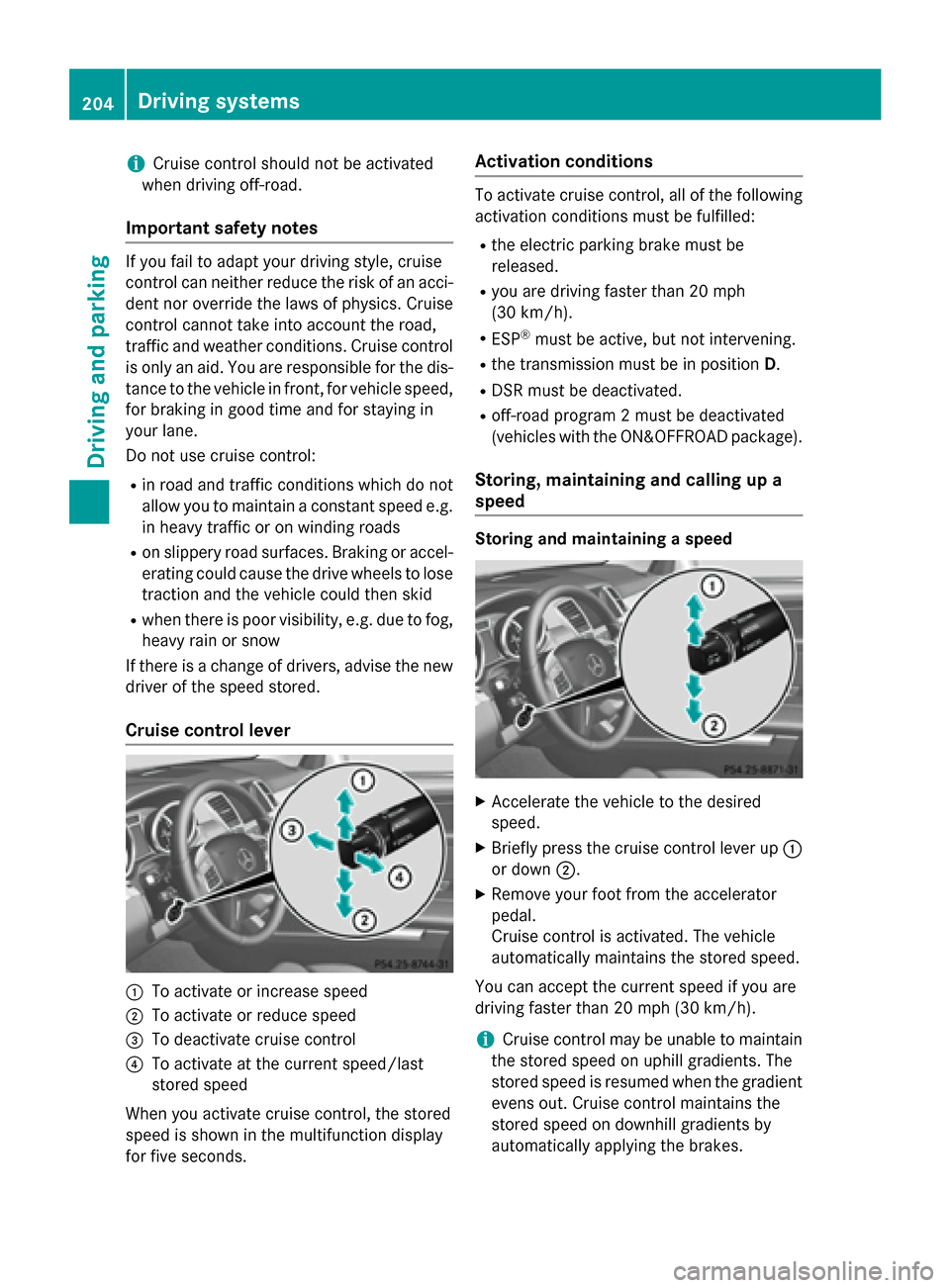
Cruise control lever 0043
To activate or increase speed
0044 To activate or reduce speed
0087 To deactivate cruise control
0085 To activate at the current speed/last
stored speed
When you activate cruise control, the stored
speed is shown in the multifunction display
for five seconds. Activation conditions To activate cruise control, all of the following
activation conditions must be fulfilled:
R the electric parking brake must be
released.
R you are driving faster than 20 mph
(30 km/h).
R ESP ®
must be active, but not intervening.
R the transmission must be in position D.
R DSR must be deactivated.
R off-road program 2 must be deactivated
(vehicles with the ON&OFFROAD package).
Storing, maintaining and calling up a
speed Storing and maintaining a speed
X
Accelerate the vehicle to the desired
speed.
X Briefly press the cruise control lever up 0043
or down 0044.
X Remove your foot from the accelerator
pedal.
Cruise control is activated. The vehicle
automatically maintains the stored speed.
You can accept the current speed if you are
driving faster than 20 mph (30 km/h).
i Cruise control may be unable to maintain
the stored speed on uphill gradients. The
stored speed is resumed when the gradient
evens out. Cruise control maintains the
stored speed on downhill gradients by
automatically applying the brakes. 204
Driving systemsDriving and pa
rking