Low range MERCEDES-BENZ GL-Class 2015 X166 Owner's Manual
[x] Cancel search | Manufacturer: MERCEDES-BENZ, Model Year: 2015, Model line: GL-Class, Model: MERCEDES-BENZ GL-Class 2015 X166Pages: 462, PDF Size: 9.09 MB
Page 13 of 462
Checking the oil leve
l .....................373
Checking the oil level using the
dipstick .......................................... 373
Display message ............................ 310
Filling capacity ............................... 451
Notes about oil grades ................... 451
Notes on oil level/consumption .... 373
Temperature (on-board com-
puter) ............................................. 289
Viscosity ........................................ 452
ESP ®
(Electronic Stability Pro-
gram) AMG menu (on-board computer) ... 289
Characteristics ................................. 74
Deactivating/activating ................... 74
Display message ............................ 293
ETS/4ETS ........................................ 73
Function/notes ................................ 73
General notes .................................. 73
Important safety information ........... 73
Trailer stabilization ........................... 75
Warning lamp ................................. 331
ETS/4ETS (Electronic Traction Sys-
tem) ...................................................... 73
Exhaust check ................................... 194
Exhaust pipe (cleaning instruc-
tions) ................................................. .382
Exterior lighting see Lights
Exterior mirrors
Adjusting ....................................... 122
Dipping (automatic) ....................... 123
Folding in/out (automatically) ....... 123
Folding in/out (electrically) ........... 123
Folding in when locking (on-board computer) ...................................... 288
Out of position (troubleshooting) ... 123
Setting ........................................... 123
Storing settings (memory func-
tion) ............................................... 124
Storing the parking position .......... 124
Eyeglasses compartment ................. 344 F
Filler cap see Fuel filler flap
Flat tire
MOExtended tire s.......................... 389
Preparing the vehicle ..................... 389
TIREFIT kit ...................................... 390
see Emergency spare wheel
Floormats ........................................... 369
Folding the rear bench seat for-
wards/back ....................................... 346
Fording Off-road ......................................... 198
On flooded roads ........................... 198
Fuel
Additives ........................................ 449
Consumption statistics .................. 277
Displaying the current consump-
tion ................................................ 278
Displaying the range ...................... 278
Driving tips .................................... 194
Fuel gaug e....................................... 35
Grade (gasoline )............................ 448
Important safety notes .................. 448
Low outside temperature s............. 450
Premium-grade unleaded gaso-
line ................................................. 448
Problem (malfunction) ................... 188
Quality (diesel )............................... 449
Refueling ........................................ 185
Tank content/reserve fue l............. 448
Fuel filler flap
Opening ......................................... 187
Fuel filter (display message) ............ 311
Fuel level Calling up the range (on-board
computer) ...................................... 278
Fuel tank
Capacity ........................................ 448
Problem (malfunction) ................... 188
Fuses
Allocation chart ............................. 402
Before changing ............................. 402
Dashboard fuse box ....................... 403
Fuse box in the engine compart-
ment .............................................. 403 Index
11
Page 16 of 462
Setting for driving abroad (sym-
metrical) ........................................ 128
Switching on/of f........................... 129
LOW RANGE
Display message ............................ 314
Off-road gear ................................. 261
LOW RANGE off-road gear ................ 261
Lumbar support Adjusting (on the seat) .................. 116
Luxury head restraints ..................... 109M
M+S tires ............................................ 408
Malfunction message see Display messages
Matte finish (cleaning instruc-
tions) .................................................. 380
mbrace Call priority .................................... 361
Display message ............................ 299
Downloading destinations
(COMAND) ..................................... 361
Downloading routes ....................... 364
Emergency call .............................. 358
General notes ................................ 357
Geo fencing ................................... 365
Locating a stolen vehicle ............... 363
MB info call button ........................ 360
Remote vehicle locking .................. 363
Roadside Assistance button .......... 359
Search & Send ............................... 362
Self-test ......................................... 358
Speed alert .................................... 365
System .......................................... 358
Triggering the vehicle alarm ........... 365
Vehicle remote malfunction diag-
nosis .............................................. 364
Vehicle remote unlocking .............. 363
Mechanical key
Function/note s................................ 84
Inserting .......................................... 85
Locking vehicle ................................ 90
Removing ......................................... 84
Unlocking the driver's door .............. 90
Media Interface
see Separate operating instructions
Memory card (audio) ......................... 281 Memory function
............................... 124
Message memory (on-board com-
puter) .................................................. 292
Mirrors see Exterior mirrors
see Rear-view mirror
see Vanity mirror (in the sun visor)
Mobile phone
Menu (on-board computer) ............ 281
Modifying the programming
(SmartKey) ........................................... 83
MOExtended tires .............................. 389
Mounting wheels Lowering the vehicle ...................... 434
Mounting a new whee l................... 433
Preparing the vehicle ..................... 430
Raising the vehicl e......................... 431
Removing a whee l.......................... 433
Securing the vehicle against roll-
ing away ........................................ 430
MP3
Operation ....................................... 281
see separate operating instructions
Multifunction display
Function/note s............................. 276
Permanent display ......................... 285
Multifunction steering wheel
Operating the on-board compute r..2 75
Overview .......................................... 37 N
Navigation Menu (on-board computer) ............ 279
see separate operating instructions
Night View Assist Plus
Activating/deactivating ................. 243
Cleaning ......................................... 383
Problem (malfunction) ................... 245
Notes on breaking-in a new vehi-
cle ....................................................... 166 O
Occupant Classification System
(OCS) Conditions ....................................... 53
Faults ............................................... 57 14
Index
Page 17 of 462
Operation ......................................... 54
System self-test ...............................56
Occupant safety
Automatic measures after an acci-
dent .................................................60
Children in the vehicle .................... .61
Important safety notes .................... 45
Pets in the vehicle ........................... 67
PRE-SAFE ®
(anticipatory occu-
pant protection) ............................... 60
OCS
Conditions ....................................... 53
Faults ............................................... 57
Operation .........................................54
System self-test ............................... 56
Odometer ........................................... 277
Off-road driving Approach/departure angle ............ 457
Checklist after driving off-road ...... 201
Checklist before driving off-road .... 200
Fording depth ................................ 456
General information ....................... 200
Important safety notes .................. 199
Maximum gradient climbing abil-
ity .................................................. 457
Traveling uphill ............................... 202
Off-road programs (vehicles with
the ON&OFFROAD package)
Displays in the COMAND display ... 263
Function/note s............................. 259
Off-road program 1 ........................ 260
Off-road program 2 ........................ 260
Off-road system
4MATIC .......................................... 257
DSR ............................................... 258
LOW RANGE off-road gear ............. 261
Off-road 4ETS .................................. 73
Off-road ABS .................................... 69
Off-road ESP ®
.................................. 75
Off-road programs (vehicles with
the ON&OFFROAD package) .......... 259
Oil
see Engine oil
On and Offroad menu (on-board
computer) .......................................... 289 On-board computer
AMG menu ..................................... 289
Assistance menu ........................... 283
Audio menu ................................... 280
Convenience submenu .................. 287
Displaying a service message ........ 377
Display messages .......................... 292
DISTRONIC PLUS ........................... 213
Factory settings submenu ............. 289
Important safety notes .................. 274
Instrument cluster submenu .......... 285
Lighting submenu .......................... 285
Menu overview .............................. 277
Message memory .......................... 292
Navigation menu ............................ 279
On and Offroad menu .................... 289
Operation ....................................... 275
RACETIMER ................................... 290
Service menu ................................. 284
Settings menu ............................... 285
Standard display ............................ 277
Telephone menu ............................ 281
Trip menu ...................................... 277
Vehicle submenu ........................... 287
Video DVD operation ..................... 281
On-road programs
AUTO program ............................... 255
Function/note s............................. 255
Snow program ............................... 256
SPORT program ............................. 256
Trailer program .............................. 257
Opening and closing the side trim
panels ................................................. 139
Operating safety Declaration of conformity ................ 28
Important safety notes .................... 27
Operating system
see On-board computer
Operator's Manual
Vehicle equipment ........................... 25
Outside temperature display ........... 275
Overhead control panel ...................... 41
Override feature Rear side window s........................... 67 Index
15
Page 27 of 462
You could jeopardize the operating safety of
your vehicle if you use parts, tires and wheels as well as accessories relevant to safety
which have not been approved by Mercedes.
This could lead to malfunctions in safety-rel-
evant systems, e.g. the brake system. Use
only genuine Mercedes-Benz parts or parts of
equal quality. Only use tires, wheels and
accessories that have been specifically
approved for your vehicle.
Genuine Mercedes-Benz parts are subject to
strict quality control. Every part has been spe- cifically developed, manufactured or selected
for and adapted to Mercedes-Benz vehicles.
Only genuine Mercedes-Benz parts should
therefore be used.
More than 300,000 different genuine
Mercedes-Benz parts are available for
Mercedes-Benz models.
All authorized Mercedes-Benz Centers main-
tain a supply of genuine Mercedes-Benz parts for necessary service and repair work. In addi-
tion, strategically located parts delivery cen-
ters provide quick and reliable parts service.
Always specify the vehicle identification num- ber (VIN) when ordering genuine Mercedes-
Benz parts (Y page 446). Operator's Manual
Vehicle equipment
This Operator's Manual describes all models
and all standard and optional equipment of
your vehicle available at the time of going to
print. Country-specific differences are possi-
ble. Bear in mind that your vehicle may not
feature all functions described here. This also applies to safety-relevant systems and func-
tions. The equipment in your vehicle may
therefore differ from that shown in the
descriptions and illustrations.
The original purchase agreement lists all sys-tems installed in your vehicle.
Should you have any questions concerning
equipment and operation, please consult an
authorized Mercedes-Benz Center. The Operator's Manual and Maintenance
Booklet are important documents and should
be kept in the vehicle. Service and vehicle operation
Warranty
The implied warranty for your vehicle applies in accordance with the warranty terms and
conditions in the Service and Warranty Infor-
mation booklet.
Your authorized Mercedes-Benz Center will
replace and repair all factory-installed parts in
accordance with the following warranty terms
and conditions:
R New Vehicle Limited Warranty
R Emission System Warranty
R Emission Performance Warranty
R California, Connecticut, Maine, Massachu-
setts, New York, Pennsylvania, Rhode
Island and Vermont Emission Control Sys-
tem Warranty
R State warranty enforcement laws (lemon
laws)
Replacement parts and accessories are cov-
ered by the Mercedes-Benz Parts and Acces- sories warranties. These are available at any
authorized Mercedes-Benz Center.
i Should you lose your Service and War-
ranty Information booklet, have an author-
ized Mercedes-Benz Center arrange for a
replacement. The new Service and War-
ranty Information booklet will be posted to you. Introduction
25 Z
Page 41 of 462
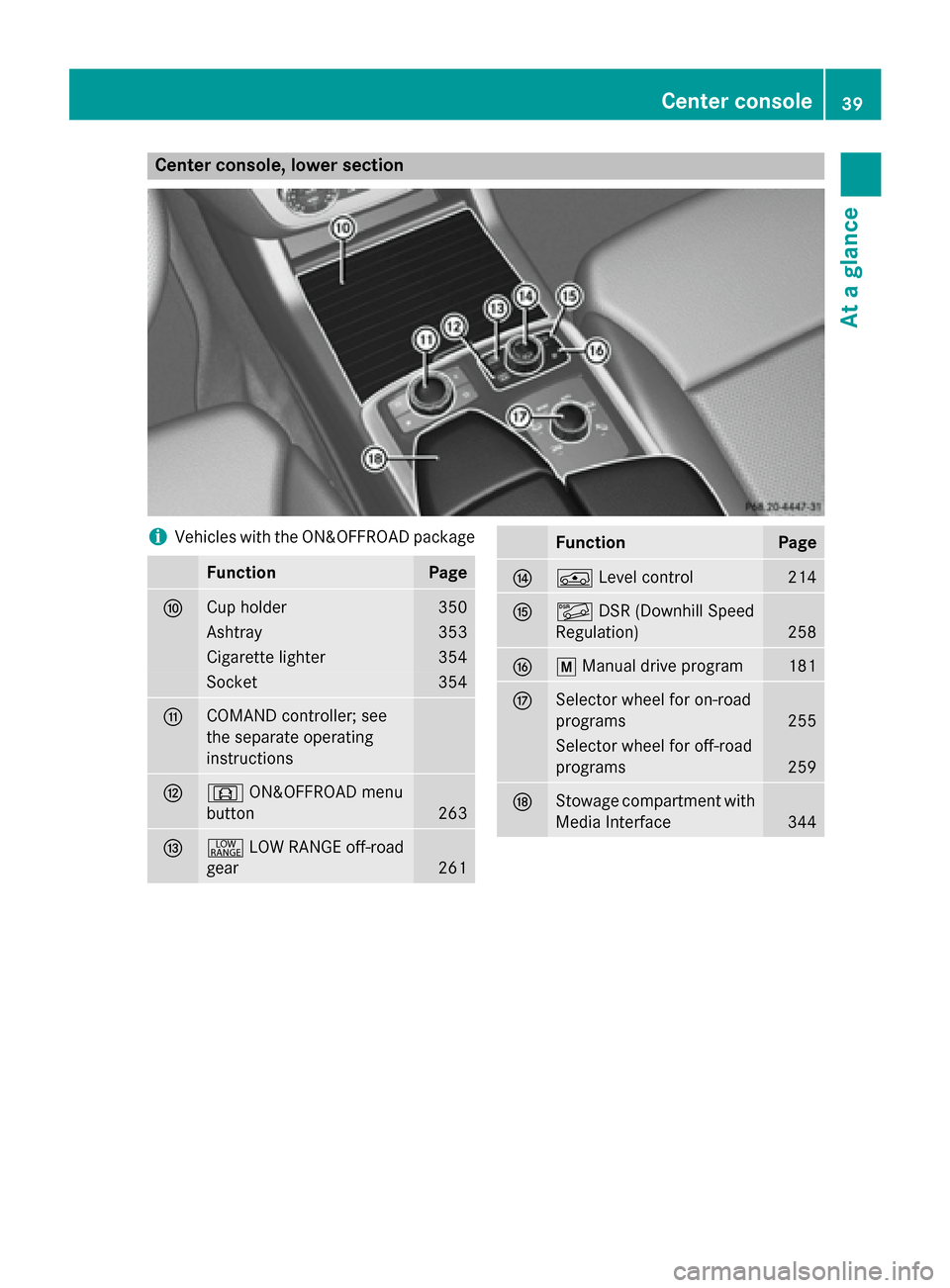
Center console, lower section
i
Vehicles with the ON&OFFROAD package Function Page
006E
Cup holder 350
Ashtray 353
Cigarette lighter 354
Socket 354
006F
COMAND controller; see
the separate operating
instructions
0070
0090
ON&OFFROAD menu
button 263
0071
002E
LOW RANGE off-road
gear 261 Function Page
0072
00C4
Level control 214
0073
00C6
DSR (Downhill Speed
Regulation) 258
0074
0063
Manual drive program 181
0075
Selector wheel for on-road
programs
255
Selector wheel for off-road
programs
259
0076
Stowage compartment with
Media Interface 344Center console
39At a glance
Page 72 of 462
G
WARNING
BAS PLUS does not react:
R to people or animals
R to oncoming vehicles
R to crossing traffic
R when cornering
As a result, BAS PLUS may not intervene in all
critical situations. There is a risk of an acci-
dent.
Always pay careful attention to the traffic sit-
uation and be ready to brake.
In the event of snowfall or heavy rain, the rec-
ognition can be impaired.
Recognition by the radar sensor system is
also impaired in the event of:
R dirt on the sensors or anything else cover-
ing the sensors
R there is interference by other radar sources
R there are strong radar reflections, for
example in parking garages
R a narrow vehicle traveling in front, e.g. a
motorbike
R a vehicle traveling in front on a different line
relative to the center of your vehicle
Following damage to the front end of the vehi-
cle, have the configuration and operation of
the radar sensors checked at a qualified spe-
cialist workshop. This also applies to colli-
sions at low speeds where there is no visible
damage to the front of the vehicle.
Function To avoid a collision, BAS PLUS calculates the
brake force necessary if:
R you approach an obstacle, and
R BAS PLUS has detected a risk of collision
When driving at a speed under 20 mph
(30 km/h): if you depress the brake pedal,
BAS PLUS is activated. The increase in brake pressure will be carried out at the last possi-
ble moment. When driving at a speed above 20 mph
(30 km/h): if you depress the brake pedal
sharply, BAS PLUS automatically raises the
brake pressure to a value adapted to the traf-
fic situation.
BAS PLUS provides braking assistance in haz-
ardous situations with vehicles in front within a speed range between 4 mph (7 km/h) and
155 mph (250 km/h).
At speeds of up to approximately 40 mph
(70 km/h), BAS PLUS can also react to sta-
tionary objects. Examples of stationary
objects are stopped or parked vehicles.
i If BAS PLUS demands particularly high
braking force, preventative passenger pro-
tection measures (PRE-SAFE ®
) are activa-
ted simultaneously.
X Keep the brake pedal depressed until the
emergency braking situation is over.
ABS prevents the wheels from locking.
BAS PLUS is deactivated and the brakes func- tion as usual again, if:
R you release the brake pedal.
R there is no longer a risk of collision.
R no obstacle is detected in front of your
vehicle.
If you have activated DSR (Y page 258), BAS
PLUS is likewise deactivated. COLLISION PREVENTION ASSIST
General notes COLLISION PREVENTION ASSIST consists of
Adaptive Brake Assist and the distance warn-
ing function, which are described in the fol-
lowing.
Distance warning function Important safety notes
i Observe the "Important safety notes" sec-
tion (Y page 68). 70
Driving safety systemsSafety
Page 86 of 462
the battery check lamp flashes twice
(Y page 85).
i If the setting of the locking system is
changed within the signal range of the vehi- cle, pressing the 0037or0036 button:
R locks or
R unlocks the vehicle
The SmartKey now functions as follows:
X To unlock the driver's door: press the
0036 button once.
X To unlock centrally: press the0036but-
ton twice.
X To lock centrally: press the0037button.
The KEYLESS-GO function is changed as fol-
lows:
X To unlock the driver's door: touch the
inner surface of the door handle on the
driver's door.
X To unlock centrally: touch the inner sur-
face of the door handle on the front-
passenger door or the rear door.
X To lock centrally: touch the outer sensor
surface on one of the door handles
(Y page 83).
X To restore the factory settings: press
and hold down the 0036and0037 buttons
simultaneously for approximately six sec-
onds until the battery check lamp flashes
twice (Y page 85). Mechanical key
General notes If the vehicle can no longer be locked or
unlocked with the SmartKey, use the
mechanical key.
If you use the mechanical key to unlock and
open the driver's door, the anti-theft alarm
system will be triggered (Y page 78).There are several ways to turn off the alarm:
X To deactivate the alarm with the Smart-
Key: press the 0036or0037 button on the
SmartKey.
or
X Insert the SmartKey into the ignition lock.
or
X To deactivate the alarm with KEYLESS-
GO: press the Start/Stop button in the igni-
tion lock. The SmartKey must be in the
vehicle.
or
X Lock or unlock the vehicle using KEYLESS-
GO. The SmartKey must be outside the
vehicle.
If you unlock the vehicle using the mechanical key, the fuel filler flap will not be unlocked
automatically.
X To unlock the fuel filler flap: insert the
SmartKey into the ignition lock.
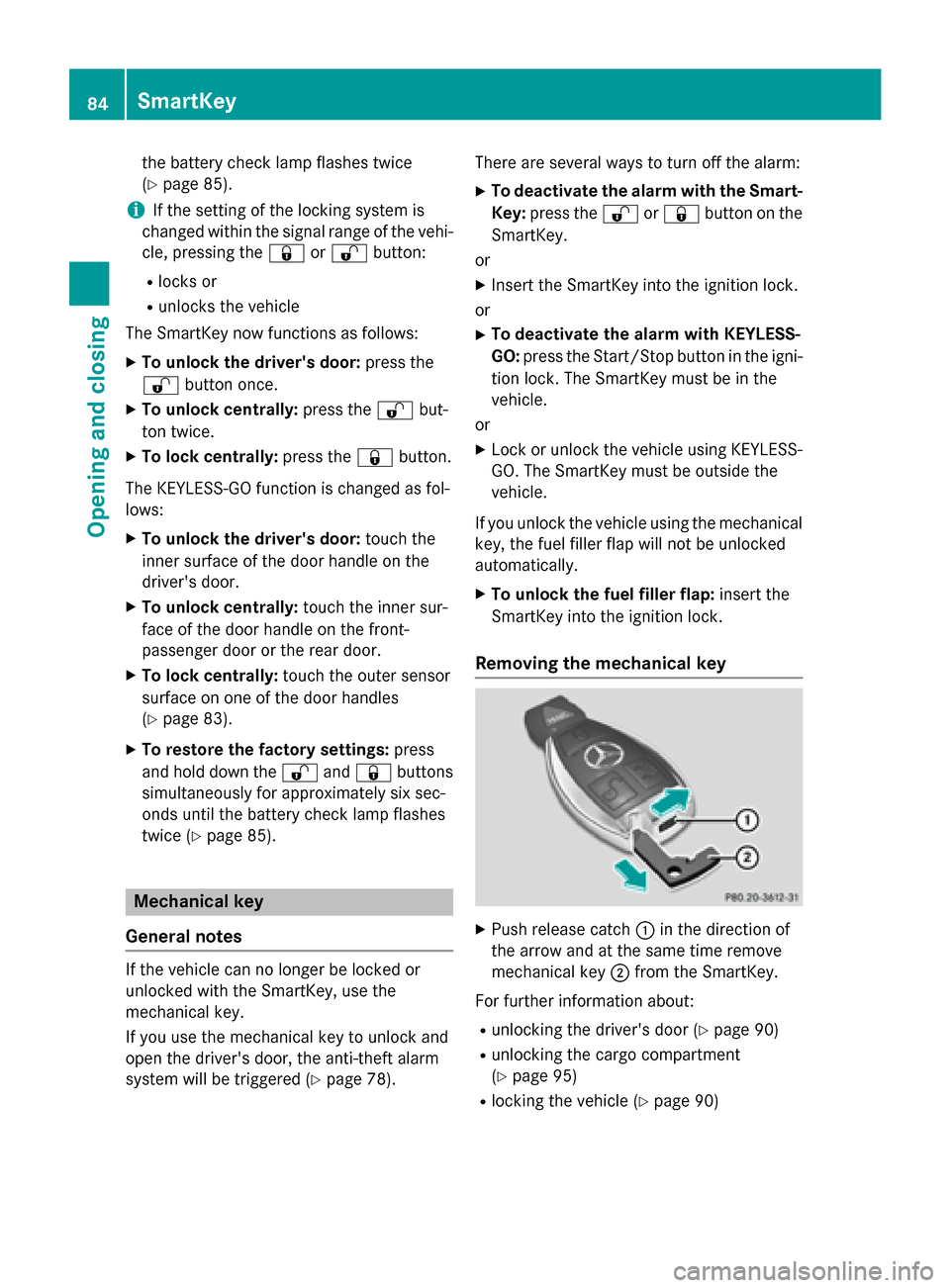
Removing the mechanical key X
Push release catch 0043in the direction of
the arrow and at the same time remove
mechanical key 0044from the SmartKey.
For further information about: R unlocking the driver's door (Y page 90)
R unlocking the cargo compartment
(Y page 95)
R locking the vehicle (Y page 90)84
SmartKeyOpening and closing
Page 87 of 462
Inserting the mechanical key
X
Push mechanical key 0044completely into
the SmartKey until it engages and release
catch 0043is back in its basic position. SmartKey battery
Important safety notes G
WARNING
Batteries contain toxic and corrosive substan- ces. If batteries are swallowed, it can result in
severe health problems. There is a risk of fatal injury.
Keep batteries out of the reach of children. If
a battery is swallowed, seek medical attention immediately.
Mercedes-Benz recommends that you have
the batteries replaced at a qualified specialist workshop.
The SmartKey batteries contain perchlorate
material, which may require special handling
and regard for the environment. National
guidelines must be observed during disposal.
In California, see www.dtsc.ca.gov/Hazard-
ousWaste/Perchlorate/index.cfm.
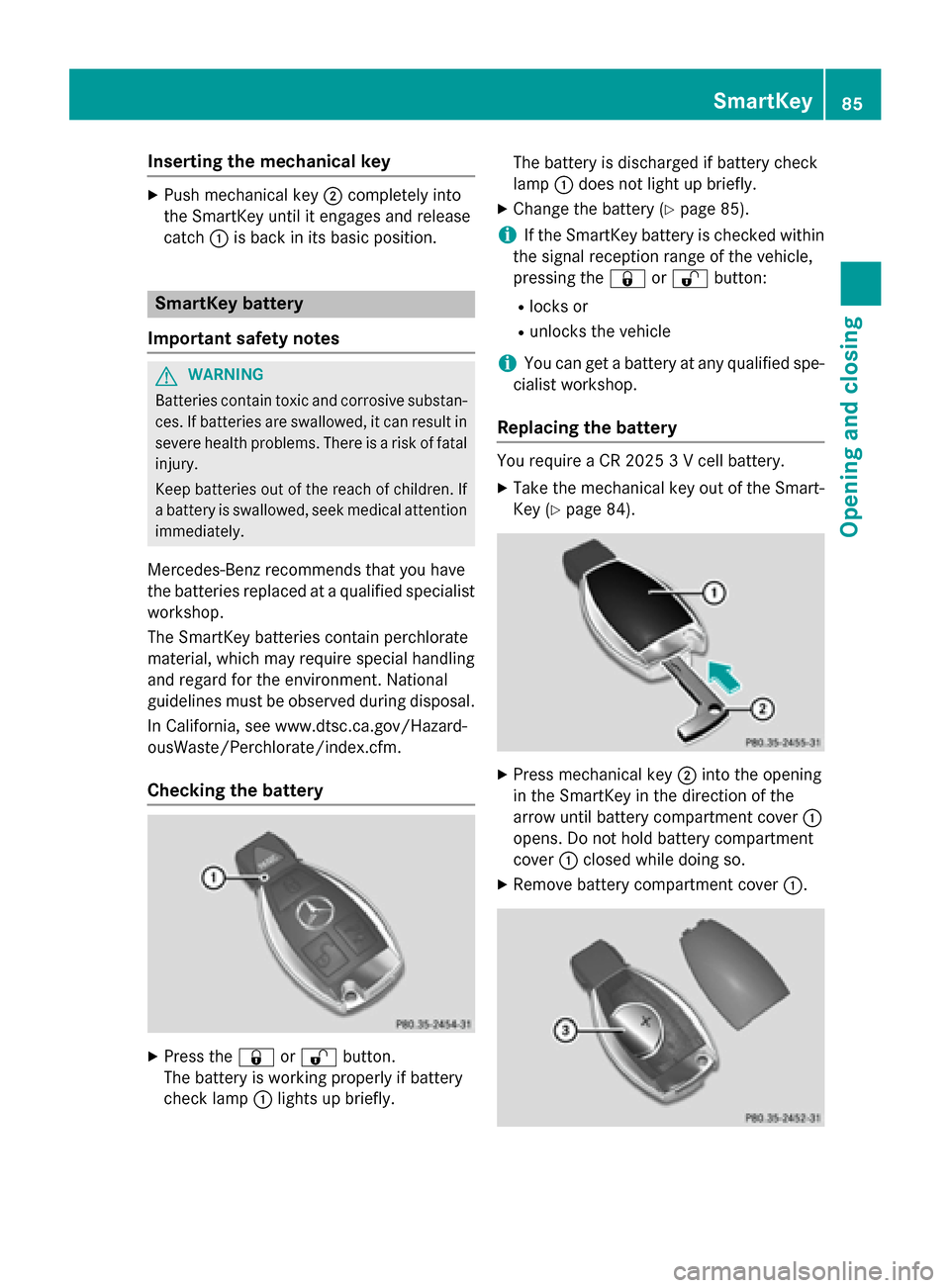
Checking the battery X
Press the 0037or0036 button.
The battery is working properly if battery
check lamp 0043lights up briefly. The battery is discharged if battery check
lamp
0043does not light up briefly.
X Change the battery (Y page 85).
i If the SmartKey battery is checked within
the signal reception range of the vehicle,
pressing the 0037or0036 button:
R locks or
R unlocks the vehicle
i You can get a battery at any qualified spe-
cialist workshop.
Replacing the battery You require a CR 2025 3 V cell battery.
X Take the mechanical key out of the Smart-
Key (Y page 84). X
Press mechanical key 0044into the opening
in the SmartKey in the direction of the
arrow until battery compartment cover 0043
opens. Do not hold battery compartment
cover 0043closed while doing so.
X Remove battery compartment cover 0043. SmartKey
85Opening and closing Z
Page 96 of 462
Opening/closing automatically from
inside
Important safety notes G
WARNING
Parts of the body could become trapped dur-
ing automatic closing of the tailgate. More-
over, people, e.g. children, may be standing in the closing area or may enter the closing area
during the closing process. There is a risk of
injury.
Make sure that nobody is in the vicinity of the closing area during the closing process.
Use one of the following options to stop the
closing process:
R press the 0054button on the SmartKey.
R press the remote operating switch on the
driver's door.
R press the closing or locking button on the
tailgate.
R pull the handle on the tailgate. G
WARNING
Combustion engines emit poisonous exhaust
gases such as carbon monoxide. If the tailgate is open when the engine is running, particu-
larly if the vehicle is moving, exhaust fumes
could enter the passenger compartment.
There is a risk of poisoning.
Turn off the engine before opening the tail-
gate. Never drive with the tailgate open.
! The tailgate swings upwards and to the
rear when opened. Therefore, make sure
that there is sufficient clearance above and behind the tailgate.
i Tailgate opening dimensions
(Y page 455).
i Notes on the reversing feature for the tail-
gate (Y page 91). Opening and closing
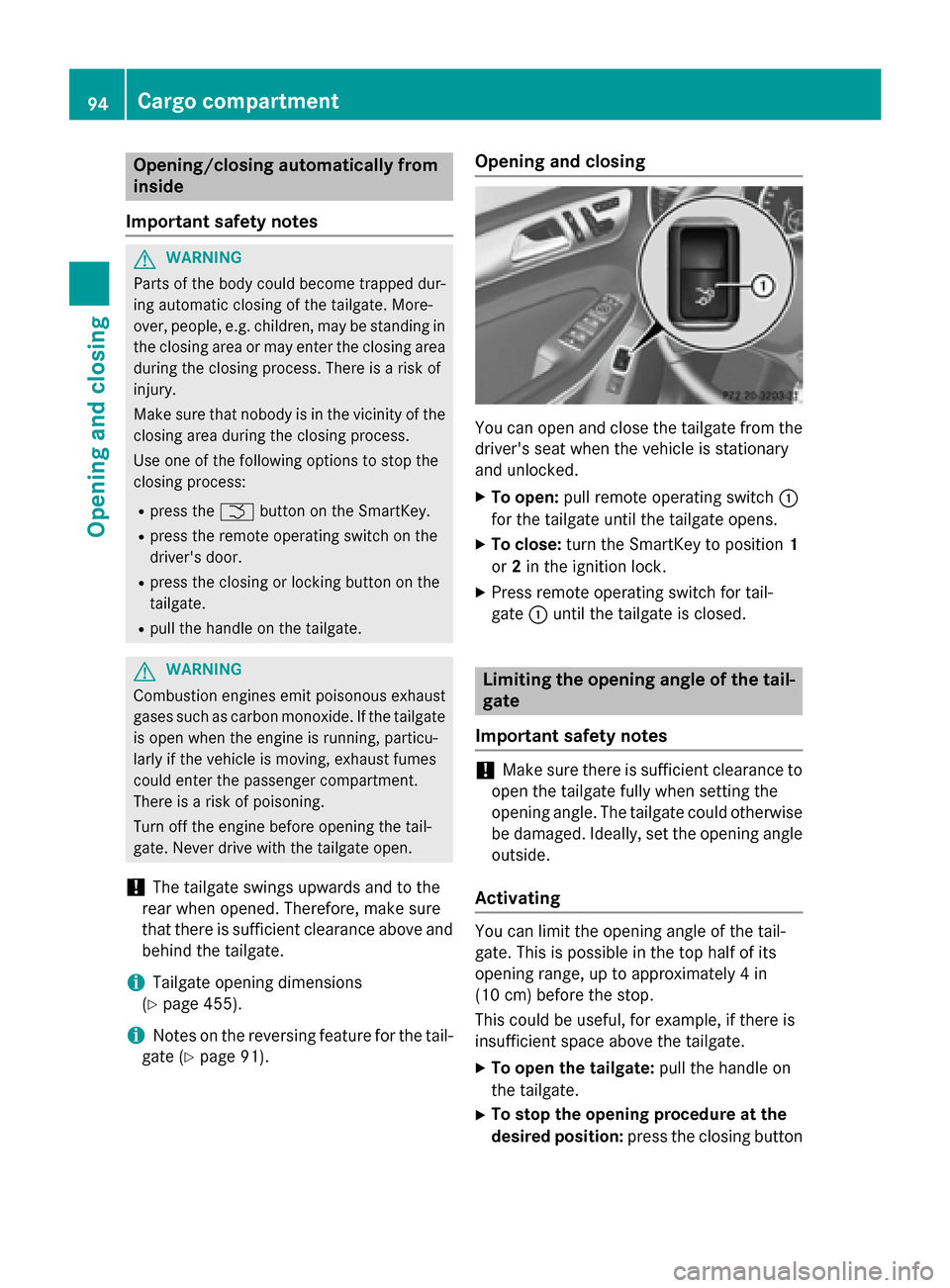
You can open and close the tailgate from the
driver's seat when the vehicle is stationary
and unlocked.
X To open: pull remote operating switch 0043
for the tailgate until the tailgate opens.
X To close: turn the SmartKey to position 1
or 2in the ignition lock.
X Press remote operating switch for tail-
gate 0043until the tailgate is closed. Limiting the opening angle of the tail-
gate
Important safety notes !
Make sure there is sufficient clearance to
open the tailgate fully when setting the
opening angle. The tailgate could otherwise be damaged. Ideally, set the opening angleoutside.
Activating You can limit the opening angle of the tail-
gate. This is possible in the top half of its
opening range, up to approximately 4 in
(10 cm) before the stop.
This could be useful, for example, if there is
insufficient space above the tailgate.
X To open the tailgate: pull the handle on
the tailgate.
X To stop the opening procedure at the
desired position: press the closing button94
Cargo compartmentOpening and closing
Page 136 of 462
Adaptive Highbeam Assist
General notes You can use this function to set the head-
lamps to change between low beam and high
beam automatically. The system recognizes
vehicles with their lights on, either approach-
ing from the opposite direction or traveling in front of your vehicle, and consequently
switches the headlamps from high beam to
low beam.
The system automatically adapts the low-
beam headlamp range depending on the dis-
tance to the other vehicle. Once the system
no longer detects any other vehicles, it reac-
tivates the high-beam headlamps.
The system's optical sensor is located behind
the windshield near the overhead control
panel.
Important safety notes G
WARNING
Adaptive Highbeam Assist does not recognize road users:
R who have no lights, e.g. pedestrians
R who have poor lighting, e.g. cyclists
R whose lighting is blocked, e.g. by a barrier
In very rare cases, Adaptive Highbeam Assist
may fail to recognize other road users that have lights, or may recognize them too late. In
this or similar situations, the automatic high-
beam headlamps will not be deactivated or
activated regardless. There is a risk of an acci-
dent.
Always carefully observe the traffic conditions and switch off the high-beam headlamps in
good time.
Adaptive Highbeam Assist cannot take into
account road, weather or traffic conditions.
Adaptive Highbeam Assist is only an aid. You
are responsible for adjusting the vehicle's
lighting to the prevailing light, visibility and
traffic conditions.
In particular, the detection of obstacles can
be restricted if there is:
R poor visibility, e.g. due to fog, heavy rain or
snow
R dirt on the sensors or the sensors are
obscured
Switching Adaptive Highbeam Assist
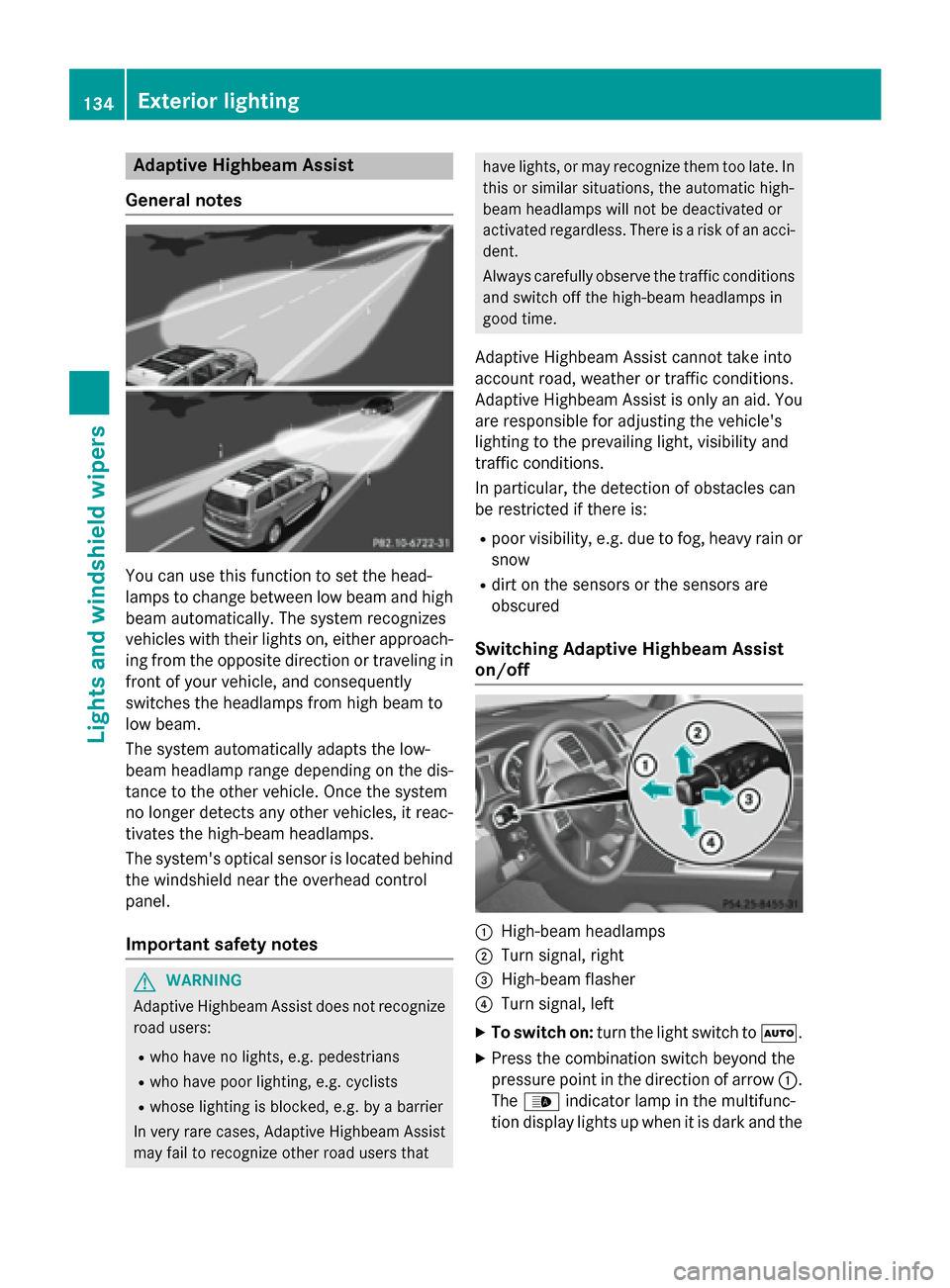
on/off 0043
High-beam headlamps
0044 Turn signal, right
0087 High-beam flasher
0085 Turn signal, left
X To switch on: turn the light switch to 0058.
X Press the combination switch beyond the
pressure point in the direction of arrow 0043.
The 00CE indicator lamp in the multifunc-
tion display lights up when it is dark and the 134
Exterior lightingLights and windshield wipers