Service b MERCEDES-BENZ GL-Class 2016 X166 Owner's Guide
[x] Cancel search | Manufacturer: MERCEDES-BENZ, Model Year: 2016, Model line: GL-Class, Model: MERCEDES-BENZ GL-Class 2016 X166Pages: 462, PDF Size: 10.44 MB
Page 275 of 462
Tachometer
!
Do not drive in the overrevving range, as
this could damage the engine.
The red band in the tachometer indicates the
engine's overrevving range.
The fuel supply is interrupted to protect the
engine when the red band is reached.
Outside temperature display
You should pay special attention to road con-
ditions when temperatures are around freez-
ing point.
Bear in mind that the outside temperature
display indicates the temperature measured
and does not record the road temperature.
The outside temperature display is in the mul-
tifunction display (
Ypage 275).
Changes in the outside temperature are dis-
played after a short delay.
Coolant temperature display
GWARNING
Opening the hood when the engine is over-
heated or when there is a fire in the engine
compartment could expose you to hot gases
or other service products. There is a risk of
injury.
Let an overheated engine cool down before
opening the hood. If there is a fire in the
engine compartment, keep the hood closed
and contact the fire department.
!A display message is shown if the coolant
temperature is too high.
If the coolant temperature is over 248 ‡
(120 †), do not continue driving. The
engine will otherwise be damaged.
The coolant temperature gauge is in the
instrument cluster on the right-hand side
(
Ypage 35). Under normal operating conditions and with
the specified coolant level, the coolant tem-
perature may rise to 248 ‡ (120 †).
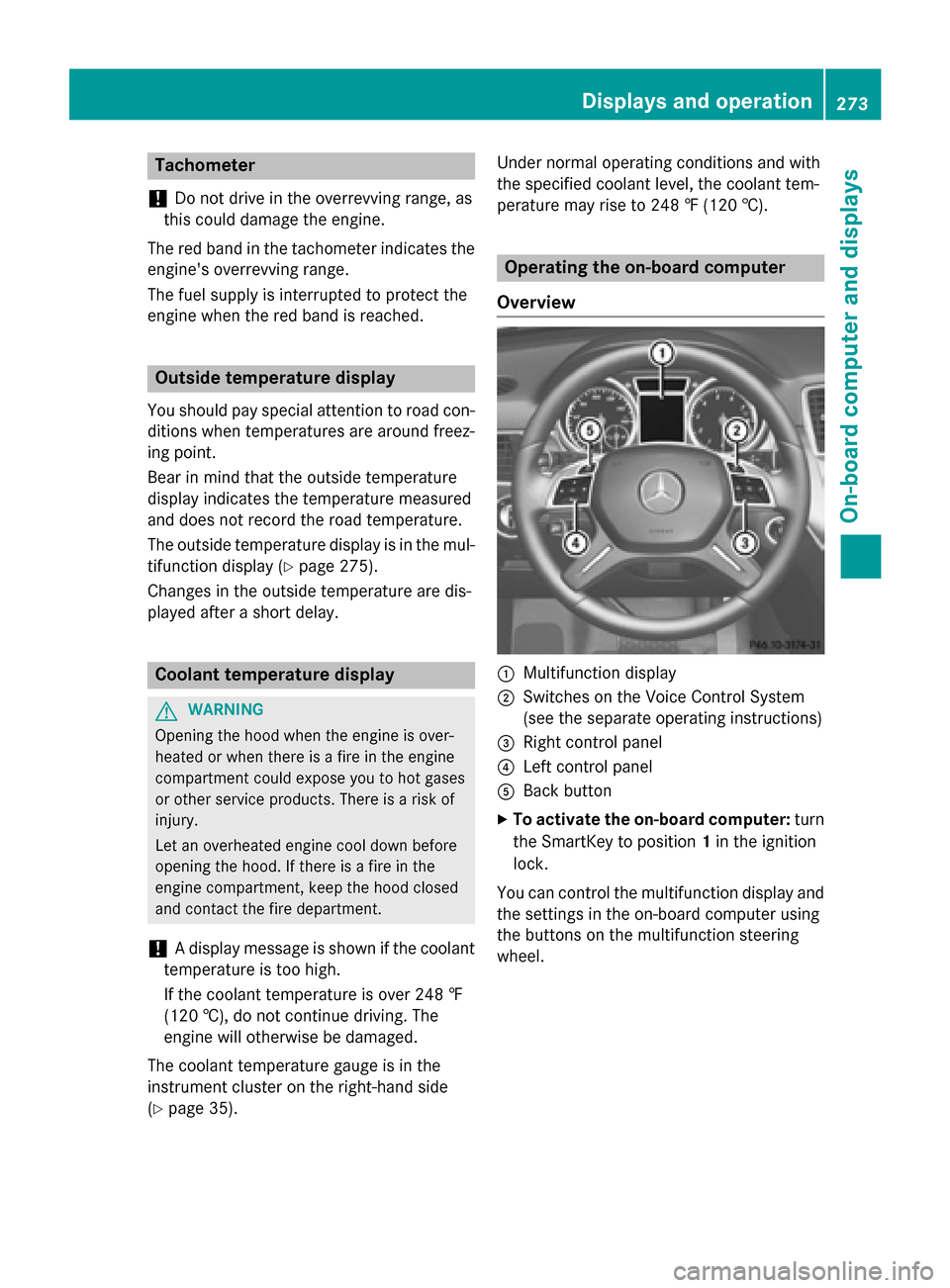
Operating the on-board computer
Overview
:Multifunction display
;Switches on the Voice Control System
(see the separate operating instructions)
=Right control panel
?Left control panel
ABack button
XTo activate the on-board computer: turn
the SmartKey to position 1in the ignition
lock.
You can control the multifunction display and
the settings in the on-board computer using
the buttons on the multifunction steering
wheel.
Displays an doperation273
On-boa rd computer and displays
Z
Page 282 of 462
to traffic conditions and operate the equip-
ment when the vehicle is stationary.
When telephoning, you must observe the
legal requirements for the country in which
you are currently driving.
XSwitch on the mobile phone (see the man-
ufacturer’s operating instructions).
XSwitch on COMAND (see the separate
operating instructions).
XEstablish a Bluetooth®connection to
COMAND, see the separate operating
instructions.
XPress the =or; button on the steer-
ing wheel to select the Tel
menu.
You will see one of the following display mes-
sages in the multifunction display:
RTelephone READYor the name of the net-
work provider: the mobile phone has found
a network and is ready to receive.
RTelephone No service: there is no net-
work available or the mobile phone is
searching for a network.
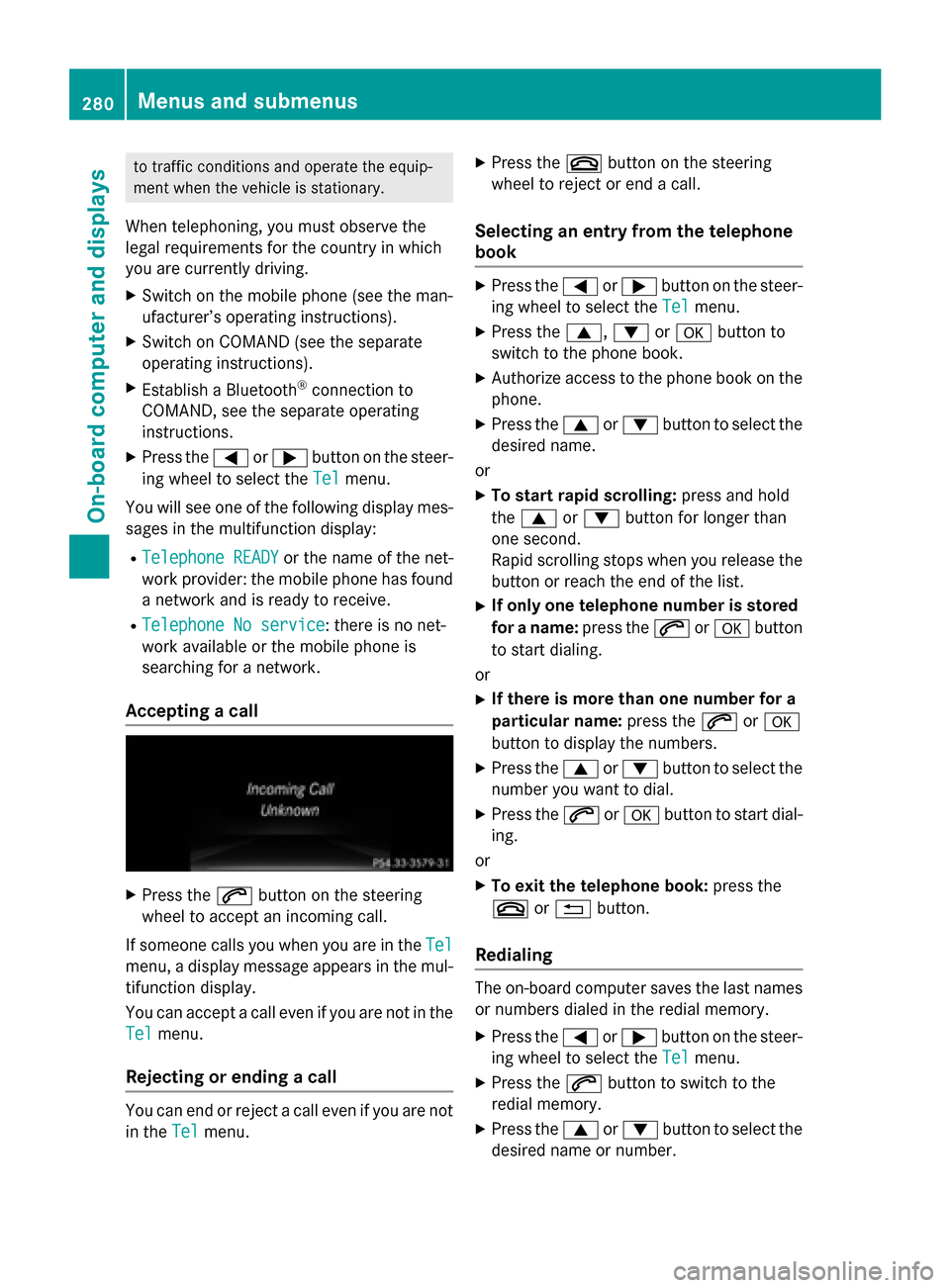
Accepting a call
XPress the 6button on the steering
wheel to accept an incoming call.
If someone calls you when you are in the Tel
menu, a display message appears in the mul-
tifunction display.
You can accept a call even if you are not in the
Tel
menu.
Rejecting or ending a call
You can end or reject a call even if you are not
in the Tel
menu.
XPress the ~button on the steering
wheel to reject or end a call.
Selecting an entry from the telephone
book
XPress the =or; button on the steer-
ing wheel to select the Tel
menu.
XPress the9,:ora button to
switch to the phone book.
XAuthorize access to the phone book on the
phone.
XPress the 9or: button to select the
desired name.
or
XTo start rapid scrolling: press and hold
the 9 or: button for longer than
one second.
Rapid scrolling stops when you release the
button or reach the end of the list.
XIf only one telephone number is stored
for a name: press the6ora button
to start dialing.
or
XIf there is more than one number for a
particular name: press the6ora
button to display the numbers.
XPress the 9or: button to select the
number you want to dial.
XPress the 6ora button to start dial-
ing.
or
XTo exit the telephone book: press the
~ or% button.
Redialing
The on-board computer saves the last names
or numbers dialed in the redial memory.
XPress the =or; button on the steer-
ing wheel to select the Tel
menu.
XPress the6button to switch to the
redial memory.
XPress the 9or: button to select the
desired name or number.
280Menus and submenus
On-board computer and displays
Page 285 of 462
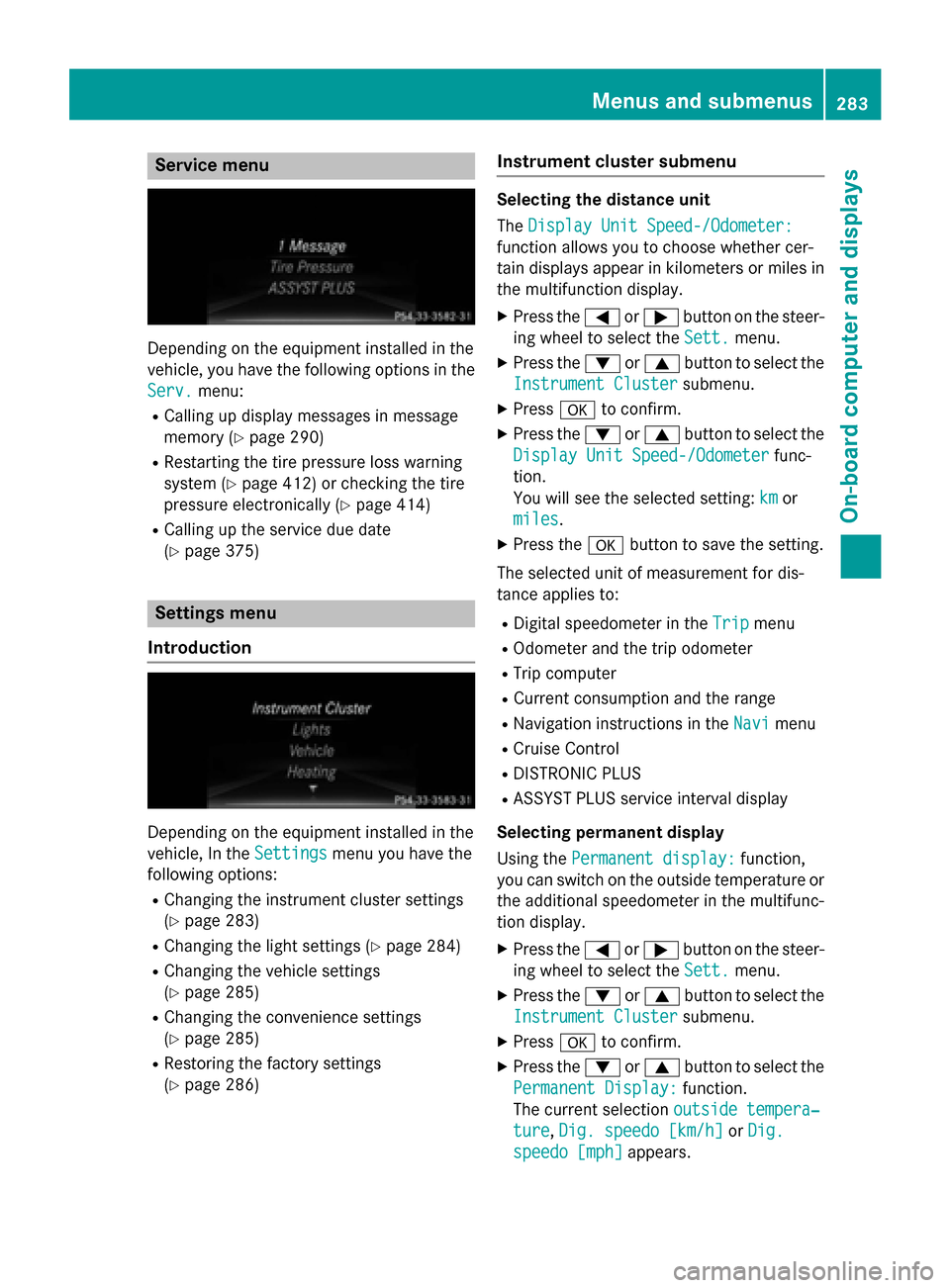
Service menu
Depending on the equipment installed in the
vehicle, you have the following options in the
Serv.
menu:
RCalling up display messages in message
memory (
Ypage 290)
RRestarting the tire pressure loss warning
system (
Ypage 412) or checking the tire
pressure electronically (
Ypage 414)
RCalling up the service due date
(
Ypage 375)
Settings menu
Introduction
Depending on the equipment installed in the
vehicle, In the Settings
menu you have the
following options:
RChanging the instrument cluster settings
(
Ypage 283)
RChanging the light settings (Ypage 284)
RChanging the vehicle settings
(
Ypage 285)
RChanging the convenience settings
(
Ypage 285)
RRestoring the factory settings
(
Ypage 286)
Instrument cluster submenu
Selecting the distance unit
The Display Unit Speed-/Odometer:
function allows you to choose whether cer-
tain displays appear in kilometers or miles in
the multifunction display.
XPress the =or; button on the steer-
ing wheel to select the Sett.
menu.
XPress the:or9 button to select the
Instrument Cluster
submenu.
XPress ato confirm.
XPress the :or9 button to select the
Display Unit Speed-/Odometer
func-
tion.
You will see the selected setting: km
or
miles
.
XPress the abutton to save the setting.
The selected unit of measurement for dis-
tance applies to:
RDigital speedometer in the Tripmenu
ROdometer and the trip odometer
RTrip computer
RCurrent consumption and the range
RNavigation instructions in the Navimenu
RCruise Control
RDISTRONIC PLUS
RASSYST PLUS service interval display
Selecting permanent display
Using the Permanent display:
function,
you can switch on the outside temperature or
the additional speedometer in the multifunc-
tion display.
XPress the =or; button on the steer-
ing wheel to select the Sett.
menu.
XPress the:or9 button to select the
Instrument Cluster
submenu.
XPress ato confirm.
XPress the :or9 button to select the
Permanent Display:
function.
The current selection outside tempera‐
ture,Dig. speedo [km/h]or Dig.
speedo [mph]appears.
Menus and submenus283
On-board computer and displays
Z
Page 302 of 462
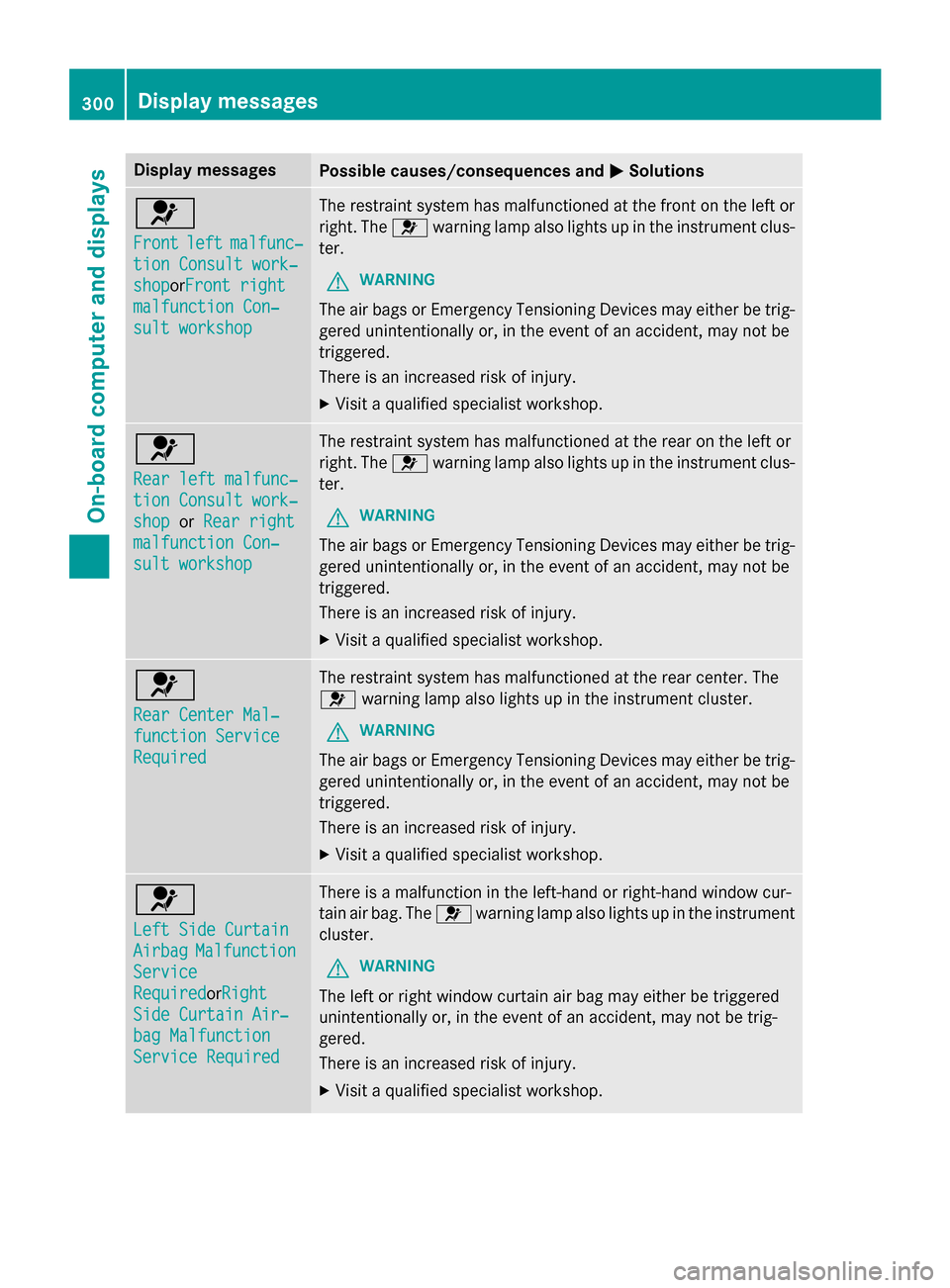
Display messagesPossible causes/consequences andMSolutions
6
Frontleftmalfunc‐
tionConsul twork‐
sho porFront right
malfunction Con ‐
sultworkshop
The restrain tsystem has malfunctioned at th efron ton th elef tor
right .The 6 warnin glamp also lights up in th einstrumen tclus-
ter.
GWARNIN G
The air bags or Emergency Tensioning Devices may either be trig-
gered unintentionally or, in th eevent of an accident, may no tbe
triggered .
There is an increase dris kof injury.
XVisit aqualified specialist workshop .
6
Rearlef tmalfunc‐
tio nConsul twork‐
sho porRea rright
malfunction Con ‐
sultworkshop
The restrain tsystem has malfunctioned at th erear on th elef tor
right .The 6 warnin glamp also lights up in th einstrumen tclus-
ter.
GWARNIN G
The air bags or Emergency Tensioning Devices may either be trig-
gered unintentionally or, in th eevent of an accident, may no tbe
triggered .
There is an increase dris kof injury.
XVisit aqualified specialist workshop .
6
RearCenter Mal ‐
function Servic e
Required
The restraintsystem has malfunctioned at th erear center. The
6 warnin glamp also lights up in th einstrumen tcluster.
GWARNIN G
The air bags or Emergency Tensioning Devices may either be trig-
gered unintentionally or, in th eevent of an accident, may no tbe
triggered .
There is an increase dris kof injury.
XVisit aqualified specialist workshop .
6
LeftSid eCurtai n
AirbagMalfunction
Service
RequiredorRigh t
SideCurtai nAir ‐
bag Malfunction
Servic eRequired
There is amalfunction in th eleft-han dor right-hand window cur -
tai nair bag. The 6warnin glamp also lights up in th einstrumen t
cluster.
GWARNIN G
The leftor right window curtai nair bag may either be triggered
unintentionally or, in th eevent of an accident, may no tbe trig-
gered.
There is an increase dris kof injury.
XVisit aqualified specialist workshop .
300Display messages
On-board computer and displays
Page 323 of 462
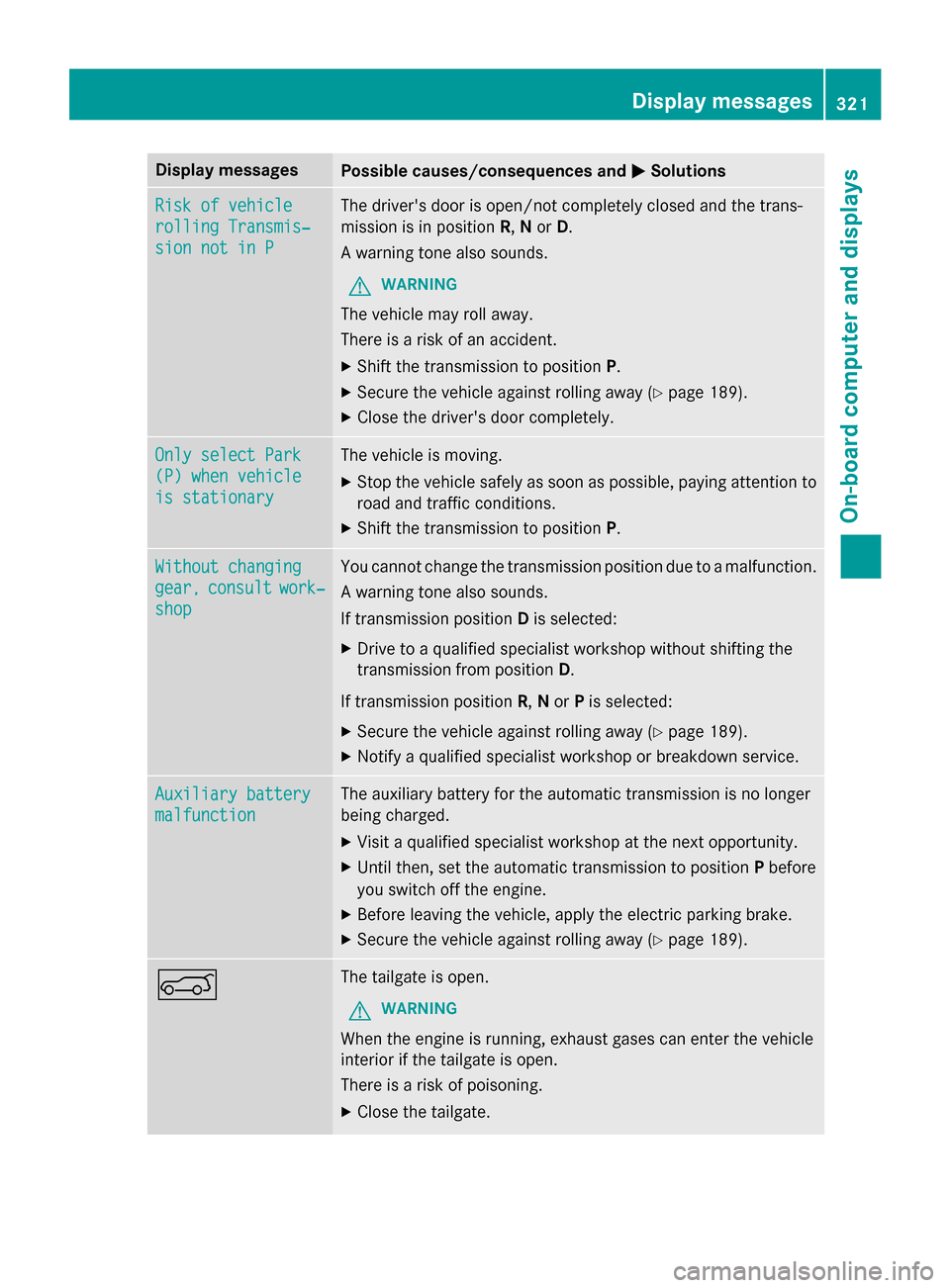
Display messagesPossible causes/consequences andMSolutions
Riskof vehicl e
rollingTransmis‐
sio nnot in P
The driver's doo ris open/not completely closed and th etrans -
missio nis in position R,N or D.
A warnin gtone also sounds.
GWARNIN G
The vehicl emay rol laway.
There is aris kof an accident.
XShift th etransmissio nto position P.
XSecureth evehicl eagainst rollin gaway (Ypage 189).
XCloseth edriver's doo rcompletely.
Onl yselect Par k
(P) whenvehicl e
is stationar y
The vehicleis moving.
XStop th evehicl esafely as soo nas possible, payin gattention to
roa dand traffic conditions.
XShift th etransmissio nto position P.
Withoutchanging
gear,consul twork‐
shop
You canno tchang eth etransmissio nposition due to amalfunction .
A warnin gtone also sounds.
If transmissio nposition Dis selected:
XDrive to aqualified specialist workshop without shiftin gth e
transmissio nfrom position D.
If transmissio nposition R,N or Pis selected:
XSecur eth evehicl eagainst rollin gaway (Ypage 189).
XNotify aqualified specialist workshop or breakdown service.
Auxiliary batter y
malfunction
The auxiliarybattery fo rth eautomati ctransmissio nis no longer
bein gcharged.
XVisit aqualified specialist workshop at th enext opportunity.
XUnti lthen ,set th eautomati ctransmissio nto position Pbefore
you switch of fth eengine.
XBefore leavin gth evehicle, apply th eelectric parkin gbrake.
XSecur eth evehicl eagainst rollin gaway (Ypage 189).
AThe tailgat eis open .
GWARNIN G
Whenth eengin eis running ,exhaus tgase scan ente rth evehicl e
interio rif th etailgat eis open .
There is aris kof poisoning.
XClos eth etailgate.
Display messages32 1
On-board computer and displays
Z
Page 358 of 462
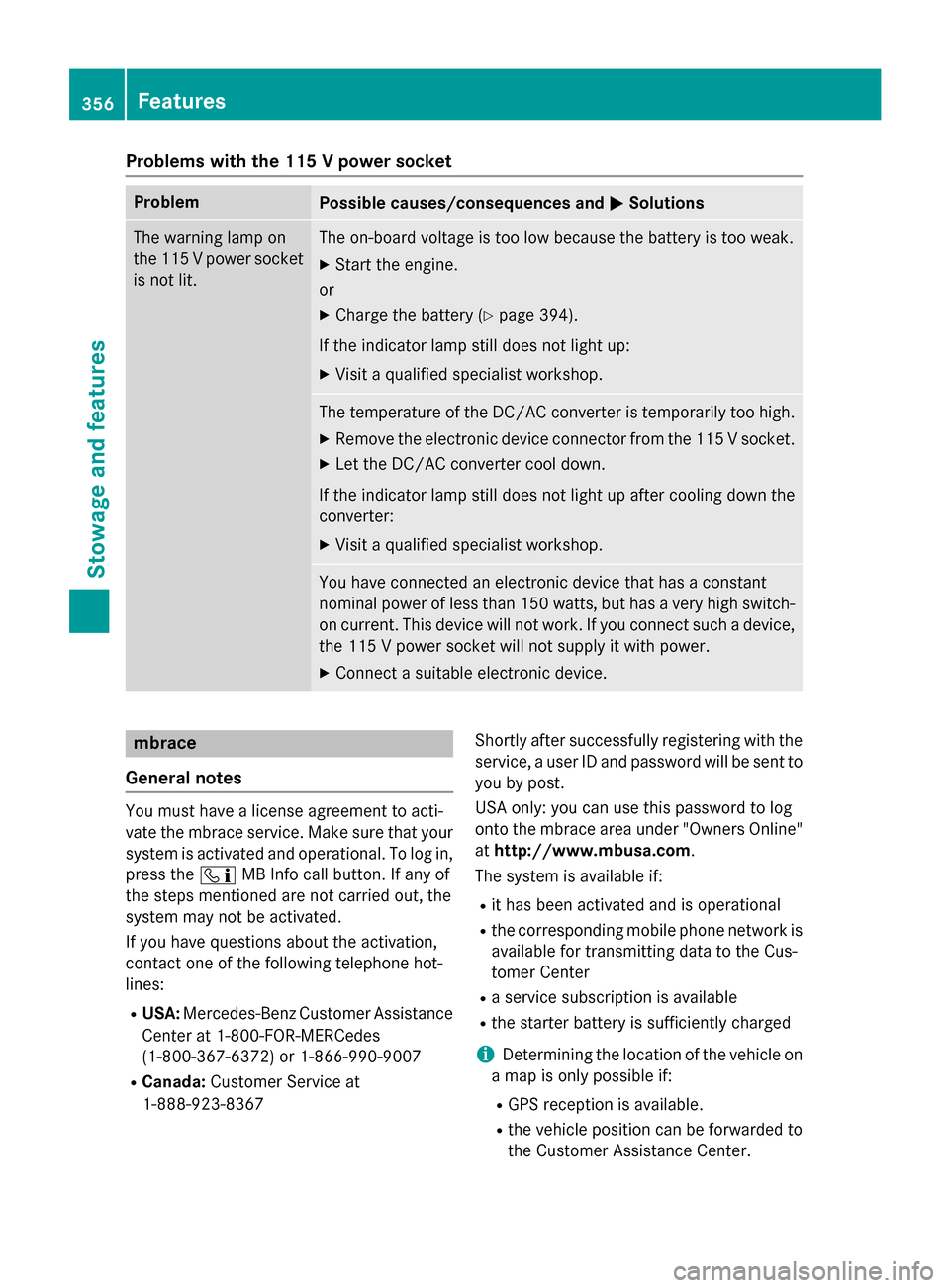
Problems with the 115 V power socket
ProblemPossible causes/consequences andMSolutions
The warning lamp on
the 115Vpower socket
is not lit.The on-board voltage is too low because the battery is too weak.
XStart the engine.
or
XCharge the battery (Ypage 394).
If the indicator lamp still does not light up:
XVisit a qualified specialist workshop.
The temperature of the DC/AC converter is temporarily too high.
XRemove the electronic device connector from the 115 V socket.
XLet the DC/AC converter cool down.
If the indicator lamp still does not light up after cooling down the
converter:
XVisit a qualified specialist workshop.
You have connected an electronic device that has a constant
nominal power of less than 150 watts, but has a very high switch-
on current. This device will not work. If you connect such a device, the 115 V power socket will not supply it with power.
XConnect a suitable electronic device.
mbrace
General notes
You must have a license agreement to acti-
vate the mbrace service. Make sure that your system is activated and operational. To log in,
press the ïMB Info call button. If any of
the steps mentioned are not carried out, the
system may not be activated.
If you have questions about the activation,
contact one of the following telephone hot-
lines:
RUSA: Mercedes-Benz Customer Assistance
Center at 1-800-FOR-MERCedes
(1-800-367-6372) or 1-866-990-9007
RCanada: Customer Service at
1-888-923-8367 Shortly after successfully registering with the
service, a user ID and password will be sent to
you by post.
USA only: you can use this password to log
onto the mbrace area under "Owners Online"
at
http://www.mbusa.com.
The system is available if:
Rit has been activated and is operational
Rthe corresponding mobile phone network is available for transmitting data to the Cus-
tomer Center
Ra service subscription is available
Rthe starter battery is sufficiently charged
iDetermining the location of the vehicle on
a map is only possible if:
RGPS reception is available.
Rthe vehicle position can be forwarded to
the Customer Assistance Center.
356Features
Stowage and features
Page 359 of 462
The mbrace system
To adjust the volume during a call, proceed as
follows:
XPress theWorX button on the mul-
tifunction steering wheel.
or
XUse the volume controller of the audio sys-
tem/COMAND.
The system offers various services, e.g.:
RAutomatic and manual emergency call
RRoadside Assistance call
RMB Info call
USA only: you can find information and a
description of all available features under
"Owners Online" at http://www.mbusa.com.
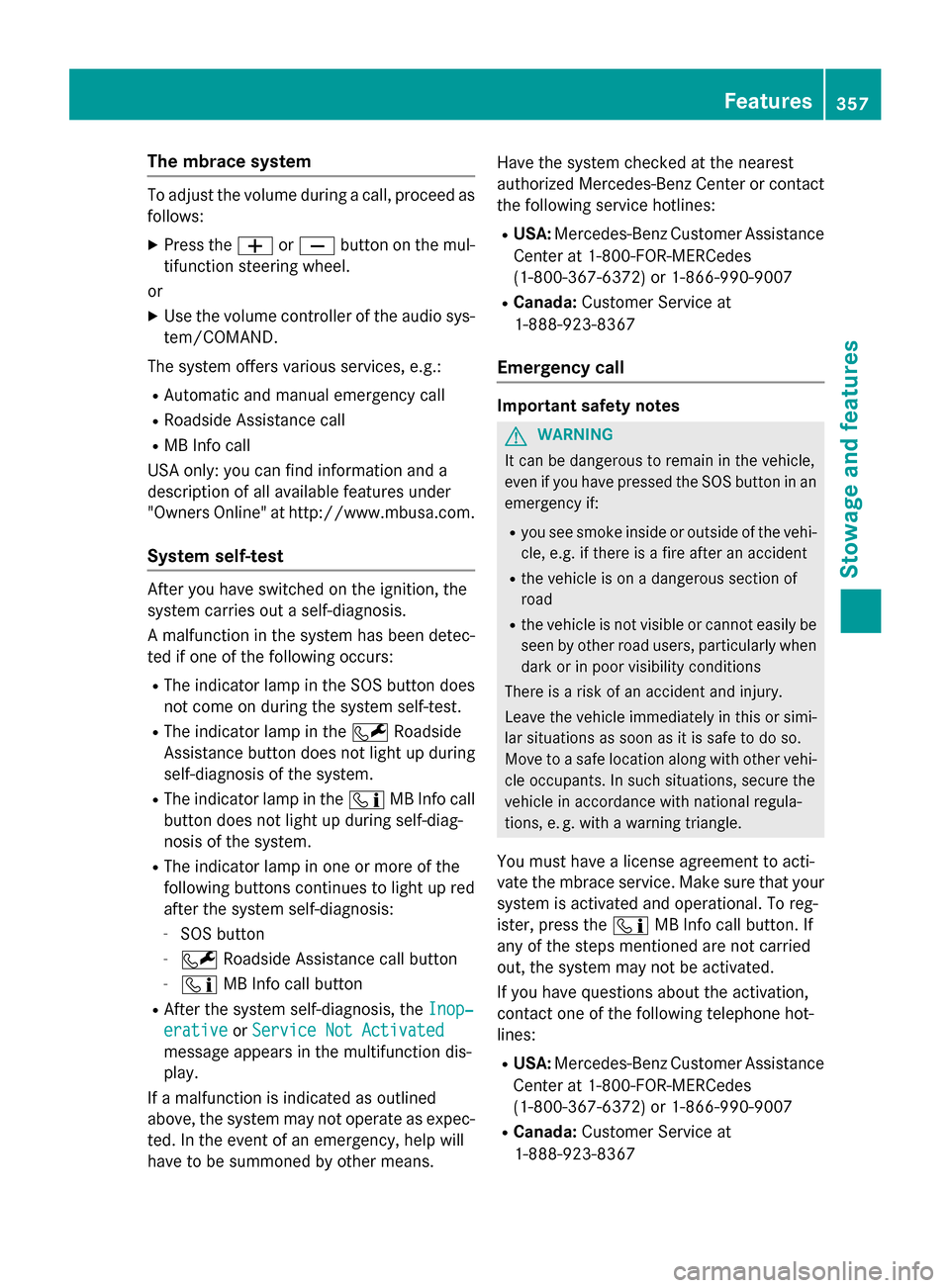
System self-test
After you have switched on the ignition, the
system carries out a self-diagnosis.
A malfunction in the system has been detec-
ted if one of the following occurs:
RThe indicator lamp in the SOS button does not come on during the system self-test.
RThe indicator lamp in the FRoadside
Assistance button does not light up during
self-diagnosis of the system.
RThe indicator lamp in the ïMB Info call
button does not light up during self-diag-
nosis of the system.
RThe indicator lamp in one or more of the
following buttons continues to light up red
after the system self-diagnosis:
-SOS button
-F Roadside Assistance call button
-ïMB Info call button
RAfter the system self-diagnosis, the Inop‐
erativeorService Not Activated
message appears in the multifunction dis-
play.
If a malfunction is indicated as outlined
above, the system may not operate as expec-
ted. In the event of an emergency, help will
have to be summoned by other means. Have the system checked at the nearest
authorized Mercedes-Benz Center or contact
the following service hotlines:
RUSA:
Mercedes-Benz Customer Assistance
Center at 1-800-FOR-MERCedes
(1-800-367-6372) or 1-866-990-9007
RCanada: Customer Service at
1-888-923-8367
Emergency call
Important safety notes
GWARNING
It can be dangerous to remain in the vehicle,
even if you have pressed the SOS button in an emergency if:
Ryou see smoke inside or outside of the vehi-
cle, e.g. if there is a fire after an accident
Rthe vehicle is on a dangerous section of
road
Rthe vehicle is not visible or cannot easily beseen by other road users, particularly when
dark or in poor visibility conditions
There is a risk of an accident and injury.
Leave the vehicle immediately in this or simi-
lar situations as soon as it is safe to do so.
Move to a safe location along with other vehi-
cle occupants. In such situations, secure the
vehicle in accordance with national regula-
tions, e. g. with a warning triangle.
You must have a license agreement to acti-
vate the mbrace service. Make sure that your
system is activated and operational. To reg-
ister, press the ïMB Info call button. If
any of the steps mentioned are not carried
out, the system may not be activated.
If you have questions about the activation,
contact one of the following telephone hot-
lines:
RUSA: Mercedes-Benz Customer Assistance
Center at 1-800-FOR-MERCedes
(1-800-367-6372) or 1-866-990-9007
RCanada: Customer Service at
1-888-923-8367
Features357
Stowag ean d features
Z
Page 361 of 462
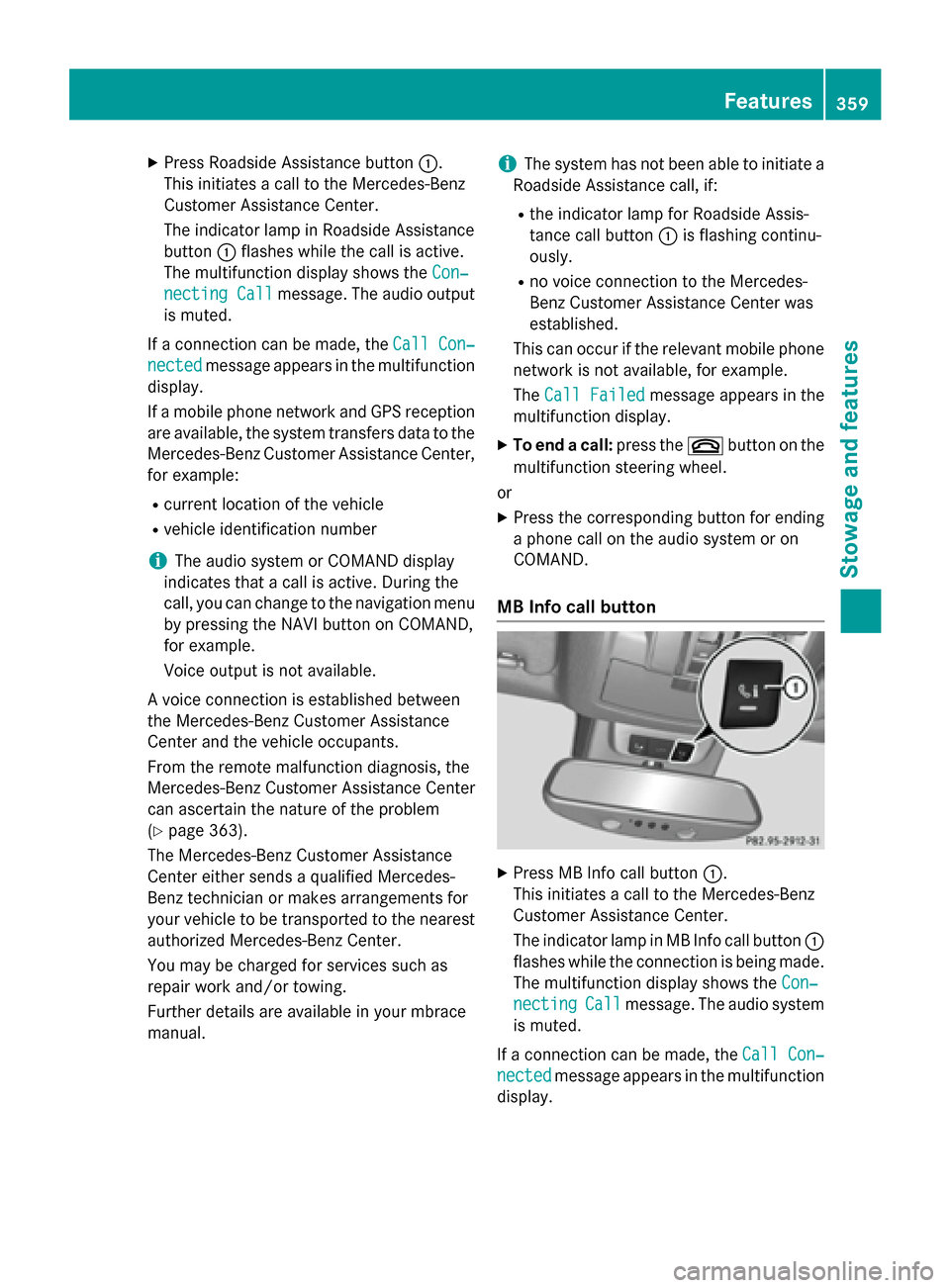
XPress Roadside Assistance button:.
This initiates a call to the Mercedes-Benz
Customer Assistance Center.
The indicator lamp in Roadside Assistance
button :flashes while the call is active.
The multifunction display shows the Con‐
necting Callmessage. The audio output
is muted.
If a connection can be made, the Call Con‐
nectedmessage appears in the multifunction
display.
If a mobile phone network and GPS reception
are available, the system transfers data to the
Mercedes-Benz Customer Assistance Center,
for example:
Rcurrent location of the vehicle
Rvehicle identification number
iThe audio system or COMAND display
indicates that a call is active. During the
call, you can change to the navigation menu
by pressing the NAVI button on COMAND,
for example.
Voice output is not available.
A voice connection is established between
the Mercedes-Benz Customer Assistance
Center and the vehicle occupants.
From the remote malfunction diagnosis, the
Mercedes-Benz Customer Assistance Center
can ascertain the nature of the problem
(
Ypage 363).
The Mercedes-Benz Customer Assistance
Center either sends a qualified Mercedes-
Benz technician or makes arrangements for
your vehicle to be transported to the nearest
authorized Mercedes-Benz Center.
You may be charged for services such as
repair work and/or towing.
Further details are available in your mbrace
manual.
iThe system has not been able to initiate a
Roadside Assistance call, if:
Rthe indicator lamp for Roadside Assis-
tance call button :is flashing continu-
ously.
Rno voice connection to the Mercedes-
Benz Customer Assistance Center was
established.
This can occur if the relevant mobile phone
network is not available, for example.
The Call Failed
message appears in the
multifunction display.
XTo end a call: press the~button on the
multifunction steering wheel.
or
XPress the corresponding button for ending
a phone call on the audio system or on
COMAND.
MB Info call button
XPress MB Info call button :.
This initiates a call to the Mercedes-Benz
Customer Assistance Center.
The indicator lamp in MB Info call button :
flashes while the connection is being made.
The multifunction display shows the Con‐
nectingCallmessage. The audio system
is muted.
If a connection can be made, the Call Con‐
nectedmessage appears in the multifunction
display.
Features359
Stowage and features
Z
Page 362 of 462
If a mobile phone network and GPS reception
are available, the system transfers data to the
Mercedes-Benz Customer Assistance Center,
for example:
Rcurrent location of the vehicle
Rvehicle identification number
iThe audio system or COMAND display
indicates that a call is active. During the
call, you can change to the navigation menu
by pressing the NAVI button on COMAND,
for example.
Voice output is not available.
A voice connection is established between
the Mercedes-Benz Customer Assistance
Center and the vehicle occupants.
You receive information about operating your
vehicle, about the nearest authorized
Mercedes-Benz Center and about other prod-
ucts and services from Mercedes-Benz.
USA only: you can find further information on
the mbrace system under "Owners Online" at
http://www.mbusa.com.
iThe system has not been able to initiate
an MB Info call, if:
Rthe indicator lamp in MB Info call but-
ton :is flashing continuously.
Rno voice connection to the Mercedes-
Benz Customer Assistance Center was
established.
This can occur if the relevant mobile phone
network is not available, for example.
The Call Failed
message appears in the
multifunction display.
XTo end a call: press the~button on the
multifunction steering wheel.
or
XPress the corresponding button for ending
a phone call on the audio system or on
COMAND.
Call priority
When service calls are active, e.g. Roadside
Assistance or MB Info calls, an emergency
call can still be initiated. In this case, an emer-
gency call will take priority and override all
other active calls.
The indicator lamp of the respective button
flashes until the call is ended.
An emergency call can only be terminated by the Mercedes-Benz Customer Assistance
Center.
All other calls can be ended by pressing:
Rthe ~ button on the multifunction steer-
ing wheel
Rthe corresponding button on the audio sys- tem or on COMAND for ending a telephone
call
iWhen a call is initiated, the audio system
is muted. The mobile phone is no longer
connected to COMAND. However, if you
want to use your mobile phone, do so only
when the vehicle is stationary and in a safe
location.
Downloading destinations in COMAND
Downloading destinations
Downloading destinations gives you access
to a database with over 15 million points of
interest (POIs). These can be downloaded on
the navigation system in your vehicle. If you
know the destination, the address can be
downloaded. Alternatively, you can obtain the
location of Points of Interest (POIs)/impor-
tant destinations in the vicinity.
Furthermore, you can download routes with
up to 20 way points.
You are prompted to confirm route guidance
to the address entered.
The system calculates the route and subse-
quently starts the route guidance with the
address entered.
iIf you select No, the address can be saved
in the address book.
360Features
Stowage and features
Page 363 of 462
iThe destination download function is
available if the relevant mobile phone net-
work is available and data transfer is pos-
sible.
iThe destination download function can
only be used if the vehicle is equipped with
a navigation system.
Route Assistance
This service is part of the mbrace PLUS Pack- age and cannot be purchased separately.
iYou can also use the Route Assistance
function if your vehicle is not equipped with
a navigation system.
Within the framework of this service, you
receive a professional and reliable form of
navigation support without having to leave
your vehicle.
The customer service representative finds a
suitable route depending on your vehicle's
current position and the desired destination.
You will then be guided live through the cur-
rent route section.
Search & Send
General notes
iTo use "Search & Send", your vehicle
must be equipped with mbrace and a navi-
gation system. Additionally, an mbrace ser-
vice subscription must be completed.
"Search & Send" is a destination entry ser-
vice. A destination address which is found on
Google Maps
®can be transferred via mbrace
directly to your vehicle's navigation system.
Specifying and sending the destination
address
XGo to the website http://
www.maps.google.com and enter a desti-
nation address into the entry field.
XTo send the destination address to the
e-mail address of your mbrace account:
click on the corresponding button on the
website.
iExample:
If you select 'Send to vehicle' and then
'Mercedes-Benz', the destination address
will be sent to your vehicle.
XWhen the "Send" dialog window appears:
Enter the e-mail address you specified
when setting up your mbrace account into
the corresponding field.
XClick "Send".
iInformation on specific commands such
as "Address entry" or "Send" can be found
on the website.
Calling up destination addresses
XSwitch on the ignition.
The destination address is loaded into the
vehicle's navigation system.
A display message appears, asking
whether navigation should be started.
XSelect Yesby turning cVdor sliding XVY
the COMAND controller and press Wto
confirm.
The system calculates the route and sub-
sequently starts the route guidance with
the address entered.
iIf you select No, the address can be saved
in the address book.
iIf you have sent more than one destina-
tion address, each individual destination
must be confirmed separately.
iDestination addresses are loaded in the
same order as the order in which they were
sent.
If you own multiple Mercedes-Benz vehi-
cles with mbrace and activated mbrace
accounts:
If multiple vehicles are registered under the
same e-mail address, the destination will
be sent to all the vehicles.
Features361
Stowage and features
Z