lights MERCEDES-BENZ GL-Class 2016 X166 Manual PDF
[x] Cancel search | Manufacturer: MERCEDES-BENZ, Model Year: 2016, Model line: GL-Class, Model: MERCEDES-BENZ GL-Class 2016 X166Pages: 462, PDF Size: 10.44 MB
Page 305 of 462
Display messagesPossible causes/consequences andMSolutions
If these conditionsare fulfilled ,th efront-passenger seat can be
occupied again .Whether th ePASSENGER AI RBA GOF Findicato r
lamp remain slit or goe sout depend son how OCS classifie sth e
occupant .
If th econdition sare no tfulfilled ,th esystem is no toperating cor-
rectly.
XVisit aqualified specialist workshop immediately.
Lights
i
Vehicles wit hLE Dbulbs in th eligh tclusters :
The display message fo rth ecorrespondin glamp only appears when all of th eLEDs in th e
lamp hav efailed.
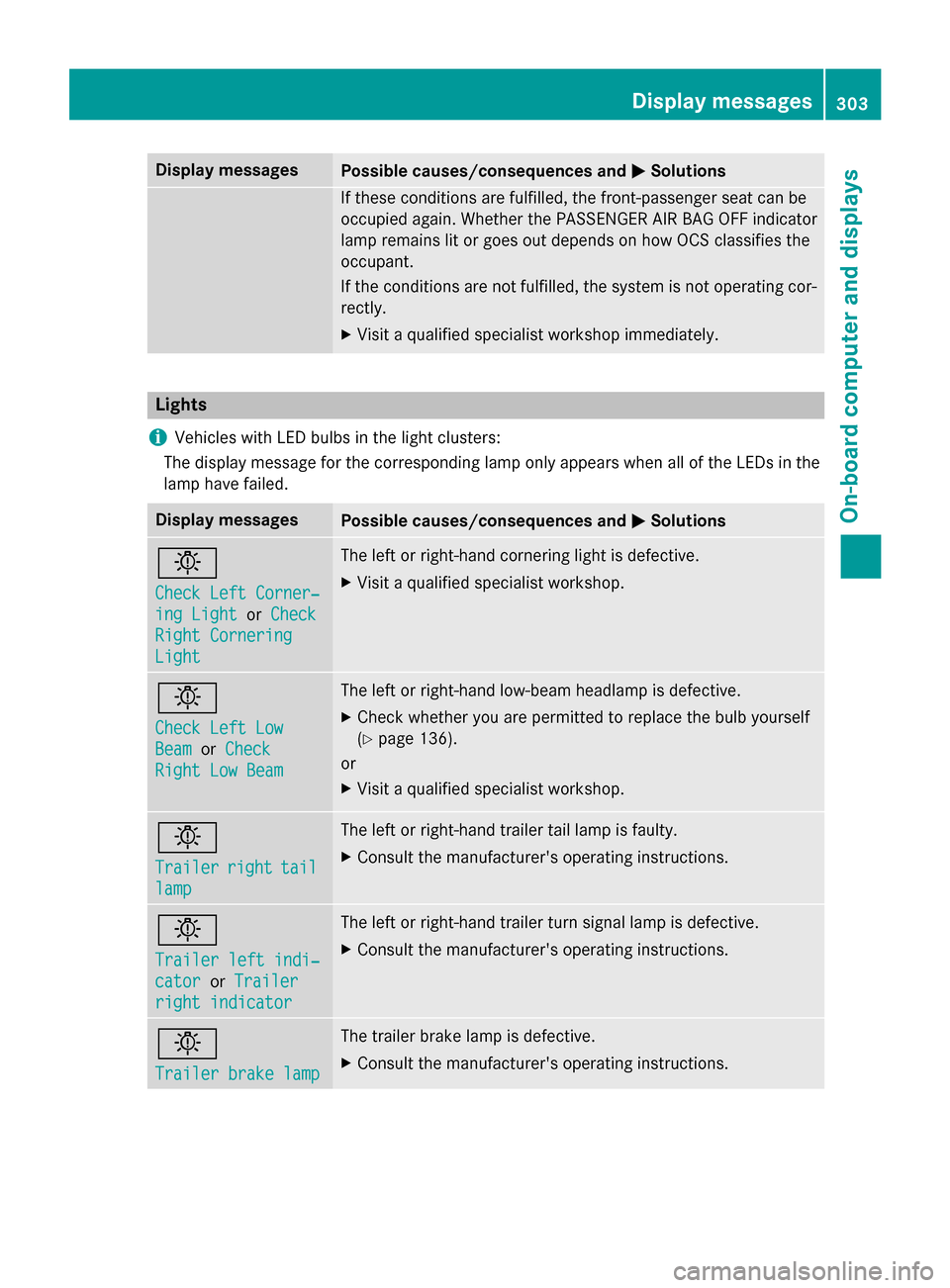
Display messagesPossible causes/consequences and MSolutions
b
Check LeftCorner ‐
ing LightorCheck
Right Cornering
Light
The lef tor right-hand cornering ligh tis defective.
XVisit aqualified specialist workshop .
b
Check LeftLow
Bea morCheck
Right Low Bea m
The leftor right-hand low-beam headlamp is defective.
XChec kwhether you are permitte dto replac eth ebulb yourself
(
Ypage 136).
or
XVisit aqualified specialist workshop .
b
Trailerrighttail
lamp
The lef tor right-hand trailer tai llamp is faulty.
XConsult th emanufacturer' soperating instructions.
b
Traile rlef tindi‐
catoror Traile r
right indicator
The leftor right-hand trailer tur nsignal lamp is defective.
XConsult th emanufacturer' soperating instructions.
b
Traile rbrake lam p
The trailer brak elamp is defective.
XConsult th emanufacturer' soperating instructions.
Display messages30 3
On-board computer and displays
Z
Page 308 of 462
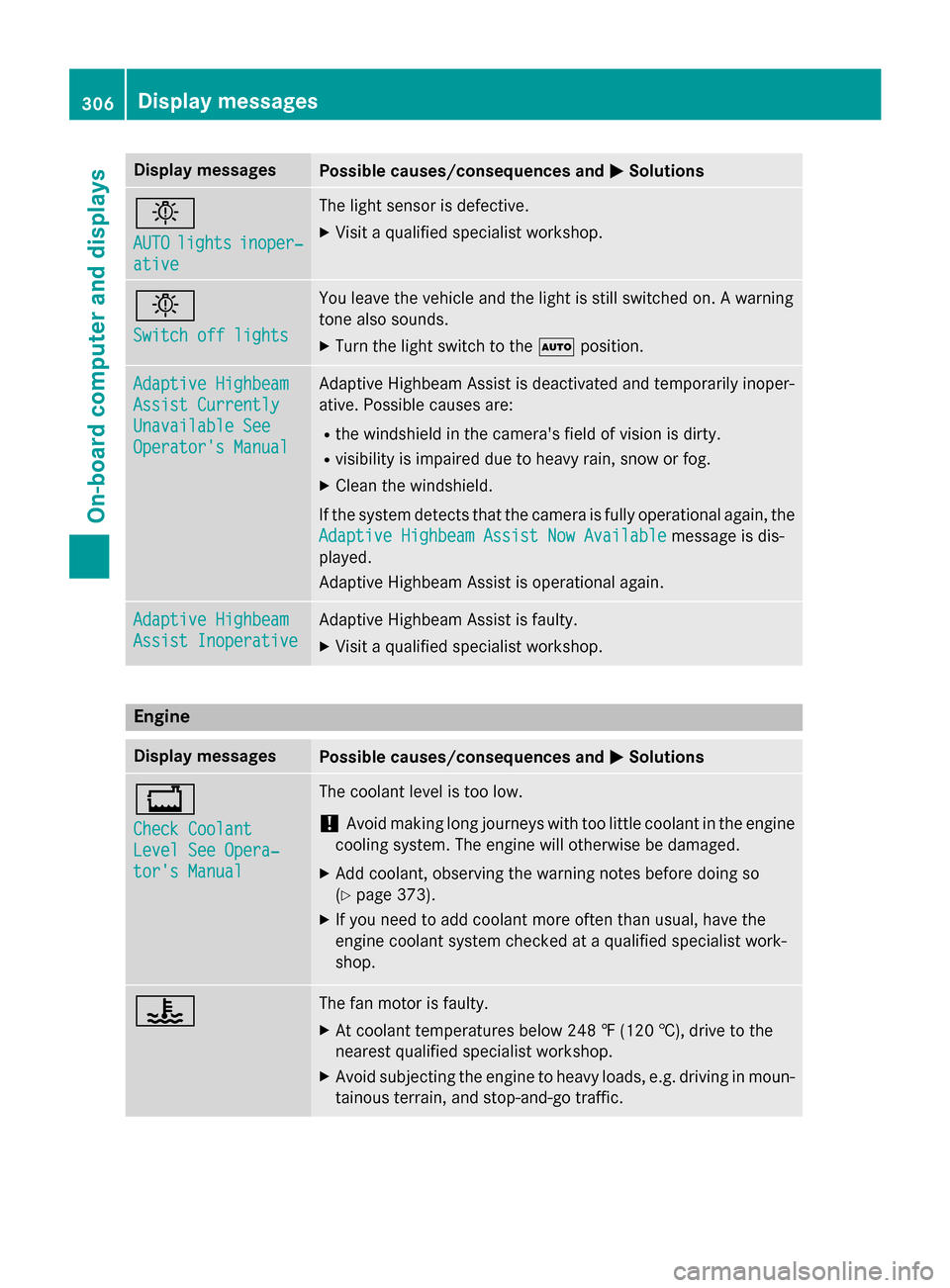
Display messagesPossible causes/consequences andMSolutions
b
AUTOlightsinoper ‐
ative
The ligh tsensor is defective.
XVisit aqualified specialist workshop .
b
Switch off lights
You leaveth evehicl eand th eligh tis still switched on . Awarnin g
tone also sounds.
XTur nth eligh tswitch to th eà position .
Adaptive Highbeam
Assist Currently
Unavailable See
Operator' sManual
Adaptive Highbeam Assis tis deactivated and temporarily inoper -
ative. Possibl ecauses are:
Rth ewindshield in th ecamera' sfield of vision is dirty.
Rvisibility is impaire ddue to heav yrain ,snow or fog.
XClean th ewindshield.
If th esystem detects that th ecamera is full yoperational again ,th e
Adaptive Highbeam Assist Now Available
message is dis-
played .
Adaptive Highbeam Assis tis operational again .
Adaptive Highbeam
Assist Inoperative
Adaptive Highbeam Assis tis faulty.
XVisit aqualified specialist workshop .
Engine
Display messagesPossible causes/consequences and MSolutions
+
Check Coolant
Level See Opera‐
tor's Manual
The coolantlevel is to olow.
!Avoid makin glon gjourneys wit hto olittl ecoolan tin th eengin e
coolin gsystem. The engin ewill otherwise be damaged.
XAd dcoolant, observin gth ewarnin gnote sbefore doin gso
(
Ypage 373).
XIf you need to add coolan tmor eofte nthan usual, hav eth e
engin ecoolan tsystem checke dat aqualified specialist work-
shop.
?The fan motor is faulty.
XAt coolan ttemperatures belo w24 8 ‡ (120†), drive to th e
neares tqualified specialist workshop .
XAvoid subjecting theengin eto heav yloads ,e.g. drivin gin moun-
tainous terrain ,and stop-and-g otraffic.
306Display messages
On-board computer and displays
Page 327 of 462
Safety
Seat belts
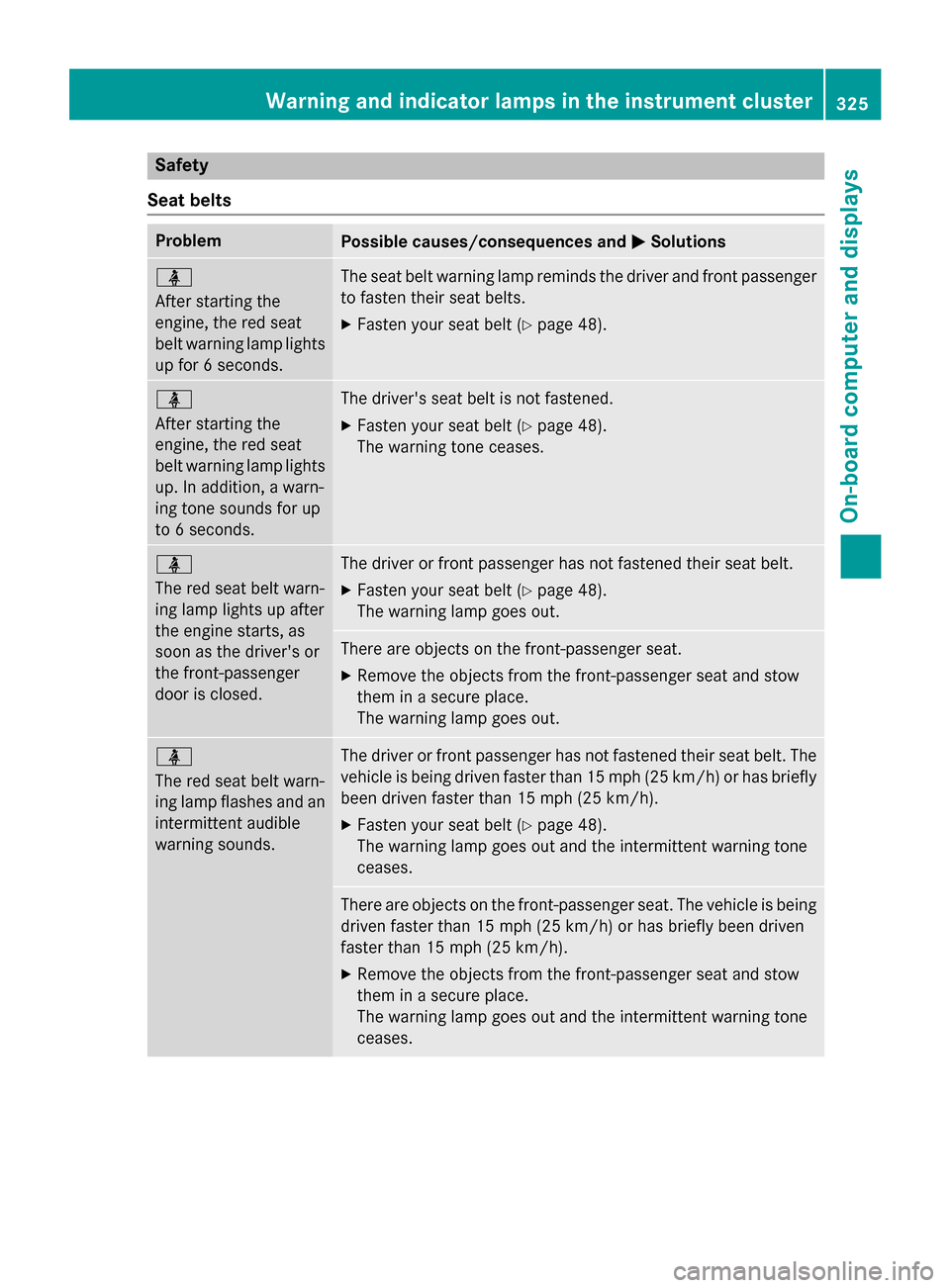
ProblemPossible causes/consequences and MSolutions
ü
After starting the
engine, the red seat
belt warning lamp lights
up for 6 seconds.The seat belt warning lamp reminds the driver and front passenger
to fasten their seat belts.
XFasten your seat belt (Ypage 48).
ü
After starting the
engine, the red seat
belt warning lamp lights
up. In addition, a warn-
ing tone sounds for up
to 6 seconds.The driver's seat belt is not fastened.
XFasten your seat belt (Ypage 48).
The warning tone ceases.
ü
The red seat belt warn-
ing lamp lights up after
the engine starts, as
soon as the driver's or
the front-passenger
door is closed.The driver or front passenger has not fastened their seat belt.
XFasten your seat belt (Ypage 48).
The warning lamp goes out.
There are objects on the front-passenger seat.
XRemove the objects from the front-passenger seat and stow
them in a secure place.
The warning lamp goes out.
ü
The red seat belt warn-
ing lamp flashes and an
intermittent audible
warning sounds.The driver or front passenger has not fastened their seat belt. The
vehicle is being driven faster than 15 mph (25 km/h) or has briefly
been driven faster than 15 mph (25 km/h).
XFasten your seat belt (Ypage 48).
The warning lamp goes out and the intermittent warning tone
ceases.
There are objects on the front-passenger seat. The vehicle is being
driven faster than 15 mph (25 km/h) or has briefly been driven
faster than 15 mph (25 km/h).
XRemove the objects from the front-passenger seat and stow
them in a secure place.
The warning lamp goes out and the intermittent warning tone
ceases.
Warning and indicator lamps in the instrument cluster325
On-board computer and displays
Z
Page 335 of 462
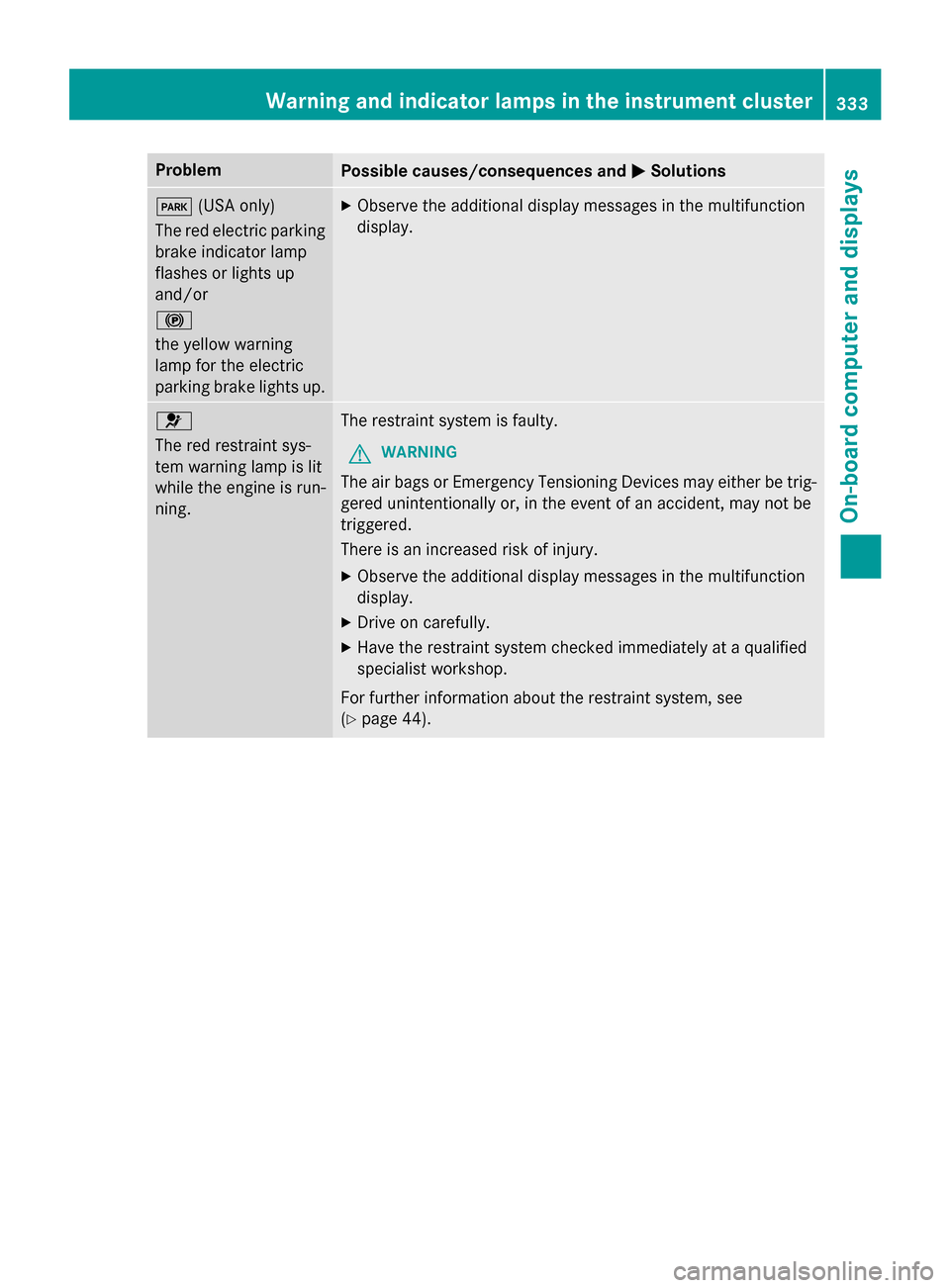
ProblemPossible causes/consequences andMSolutions
F(USA only)
The red electric parking
brake indicator lamp
flashes or lights up
and/or
!
the yellow warning
lamp for the electric
parking brake lights up.XObserve the additional display messages in the multifunction
display.
6
The red restraint sys-
tem warning lamp is lit
while the engine is run-
ning.The restraint system is faulty.
GWARNING
The air bags or Emergency Tensioning Devices may either be trig-
gered unintentionally or, in the event of an accident, may not be
triggered.
There is an increased risk of injury.
XObserve the additional display messages in the multifunction
display.
XDrive on carefully.
XHave the restraint system checked immediately at a qualified
specialist workshop.
For further information about the restraint system, see
(
Ypage 44).
Warning and indicator lamps in the instrument cluster333
On-board computer and displays
Z
Page 336 of 462
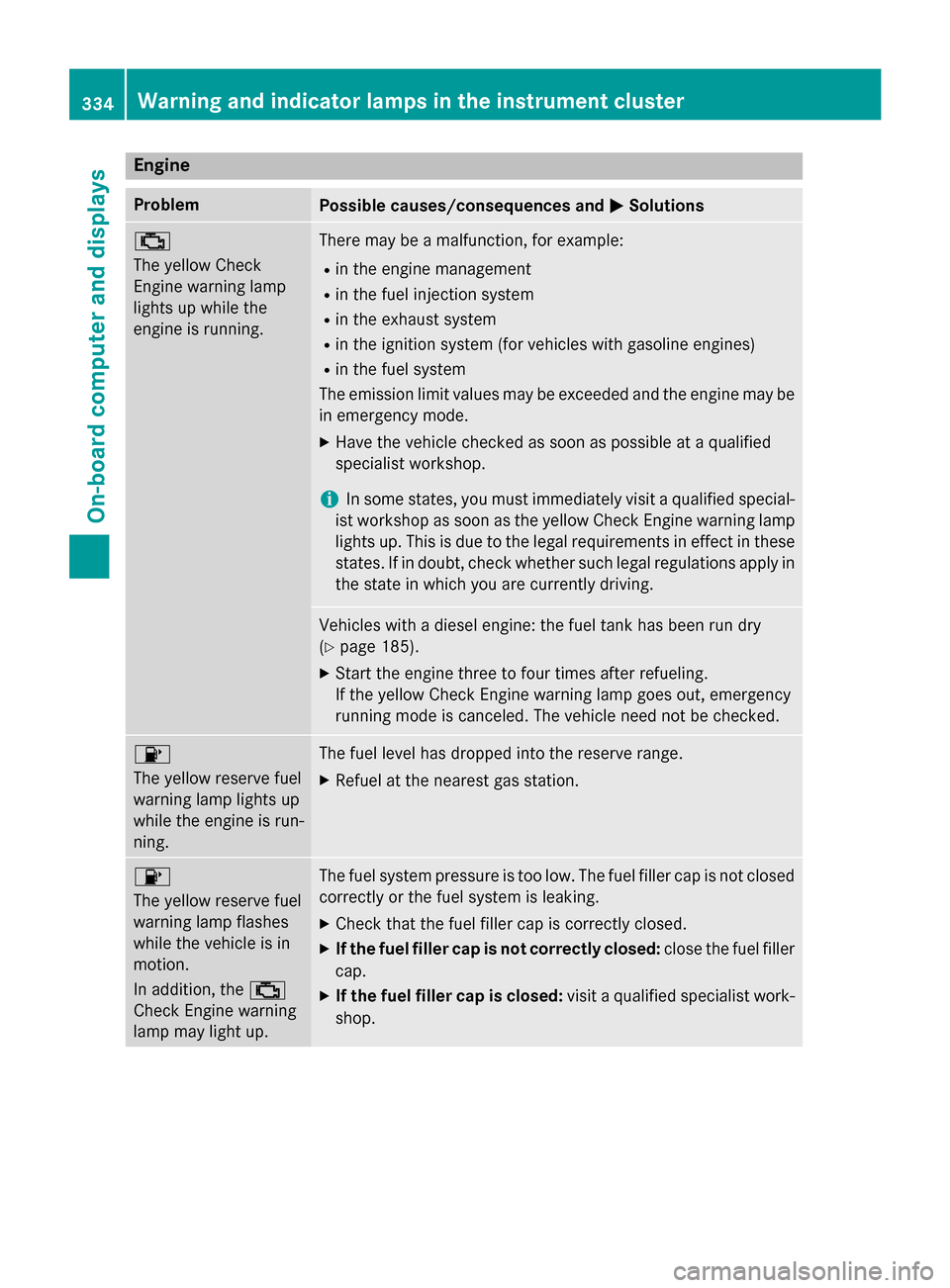
Engine
ProblemPossible causes/consequences andMSolutions
;
The yellow Check
Engine warning lamp
lights up while the
engine is running.There may be a malfunction, for example:
Rin the engine management
Rin the fuel injection system
Rin the exhaust system
Rin the ignition system (for vehicles with gasoline engines)
Rin the fuel system
The emission limit values may be exceeded and the engine may be
in emergency mode.
XHave the vehicle checked as soon as possible at a qualified
specialist workshop.
iIn some states, you must immediately visit a qualified special-
ist workshop as soon as the yellow Check Engine warning lamp
lights up. This is due to the legal requirements in effect in these
states. If in doubt, check whether such legal regulations apply in the state in which you are currently driving.
Vehicles with a diesel engine: the fuel tank has been run dry
(
Ypage 185).
XStart the engine three to four times after refueling.
If the yellow Check Engine warning lamp goes out, emergency
running mode is canceled. The vehicle need not be checked.
8
The yellow reserve fuel
warning lamp lights up
while the engine is run-
ning.The fuel level has dropped into the reserve range.
XRefuel at the nearest gas station.
8
The yellow reserve fuel
warning lamp flashes
while the vehicle is in
motion.
In addition, the ;
Check Engine warning
lamp may light up.The fuel system pressure is too low. The fuel filler cap is not closed
correctly or the fuel system is leaking.
XCheck that the fuel filler cap is correctly closed.
XIf the fuel filler cap is not correctly closed: close the fuel filler
cap.
XIf the fuel filler cap is closed: visit a qualified specialist work-
shop.
334Warning and indicator lamps in the instrument cluster
On-board computer and displays
Page 337 of 462
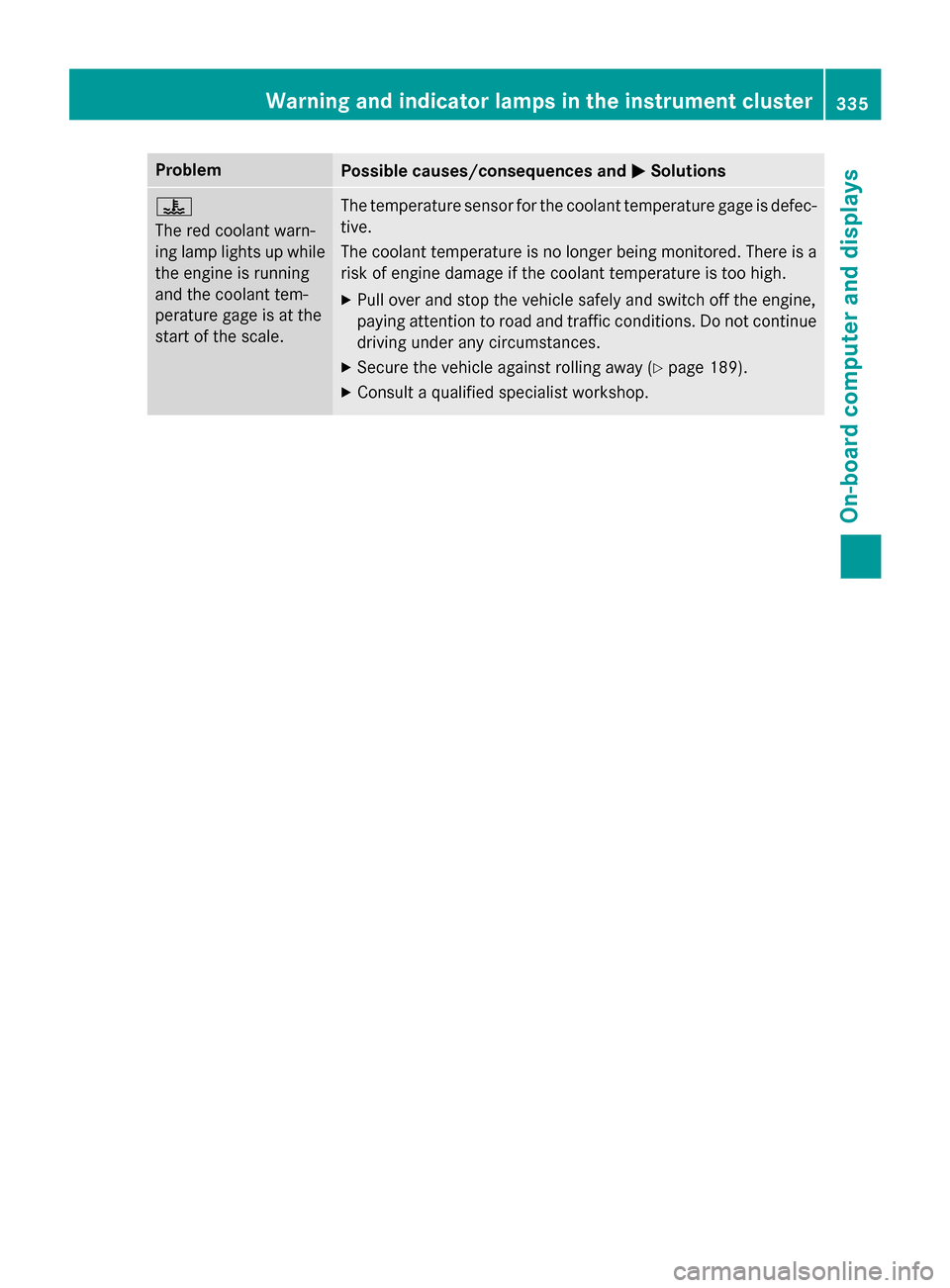
ProblemPossible causes/consequences andMSolutions
?
The red coolant warn-
ing lamp lights up while
the engine is running
and the coolant tem-
perature gage is at the
start of the scale.The temperature sensor for the coolant temperature gage is defec-
tive.
The coolant temperature is no longer being monitored. There is a
risk of engine damage if the coolant temperature is too high.
XPull over and stop the vehicle safely and switch off the engine,
paying attention to road and traffic conditions. Do not continue
driving under any circumstances.
XSecure the vehicle against rolling away (Ypage 189).
XConsult a qualified specialist workshop.
Warning and indicator lamps in the instrument cluster335
On-board computer and displays
Z
Page 352 of 462
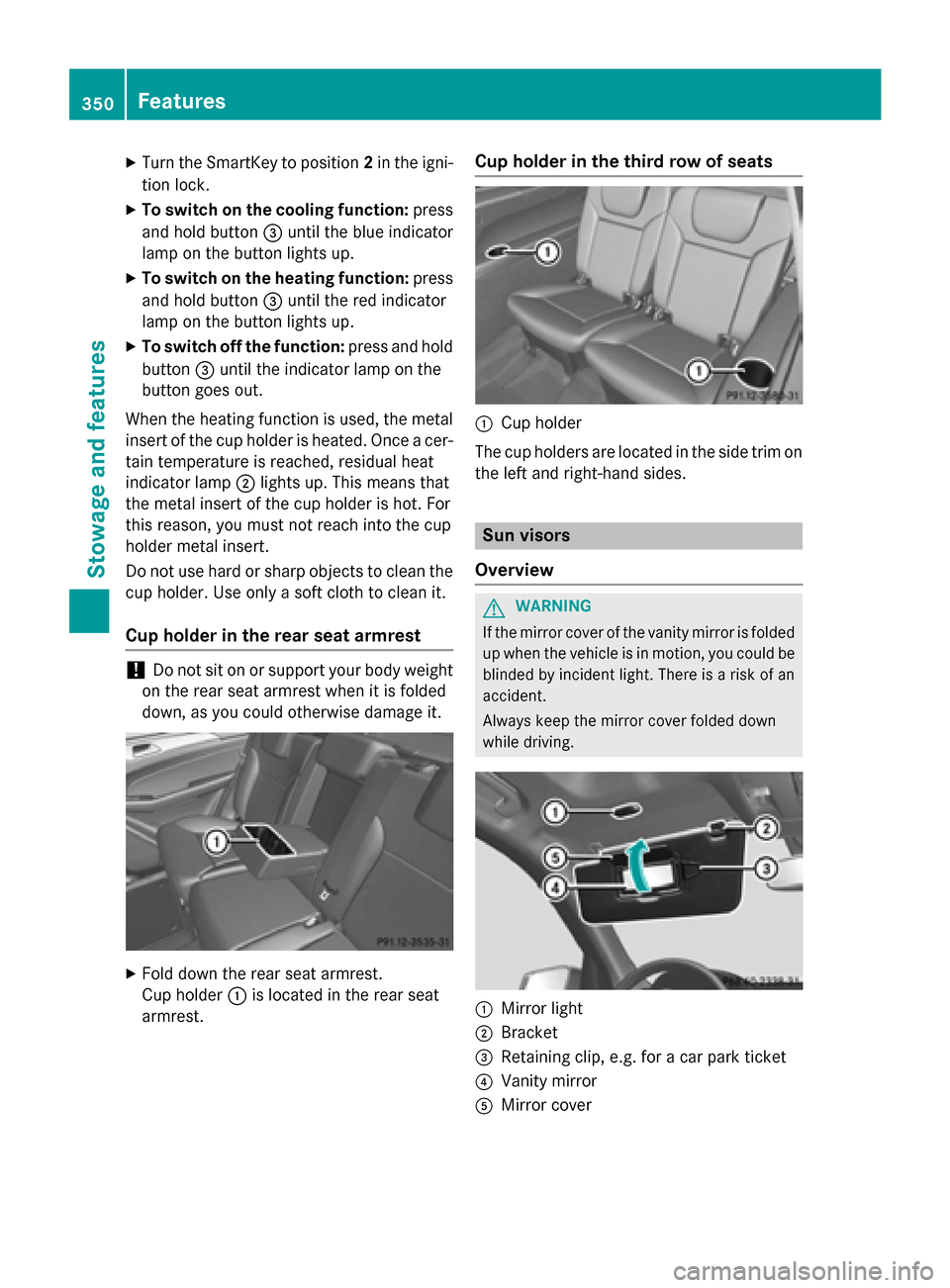
XTurn the SmartKey to position2in the igni-
tion lock.
XTo switch on the cooling function: press
and hold button =until the blue indicator
lamp on the button lights up.
XTo switch on the heating function: press
and hold button =until the red indicator
lamp on the button lights up.
XTo switch off the function: press and hold
button =until the indicator lamp on the
button goes out.
When the heating function is used, the metal
insert of the cup holder is heated. Once a cer-
tain temperature is reached, residual heat
indicator lamp ;lights up. This means that
the metal insert of the cup holder is hot. For
this reason, you must not reach into the cup
holder metal insert.
Do not use hard or sharp objects to clean the
cup holder. Use only a soft cloth to clean it.
Cup holder in the rear seat armrest
!Do not sit on or support your body weight
on the rear seat armrest when it is folded
down, as you could otherwise damage it.
XFold down the rear seat armrest.
Cup holder :is located in the rear seat
armrest.
Cup holder in the third row of seats
:Cup holder
The cup holders are located in the side trim on
the left and right-hand sides.
Sun visors
Overview
GWARNING
If the mirror cover of the vanity mirror is folded
up when the vehicle is in motion, you could be
blinded by incident light. There is a risk of an
accident.
Always keep the mirror cover folded down
while driving.
:Mirror light
;Bracket
=Retaining clip, e.g. for a car park ticket
?Vanity mirror
AMirror cover
350Features
Stowage and features
Page 356 of 462
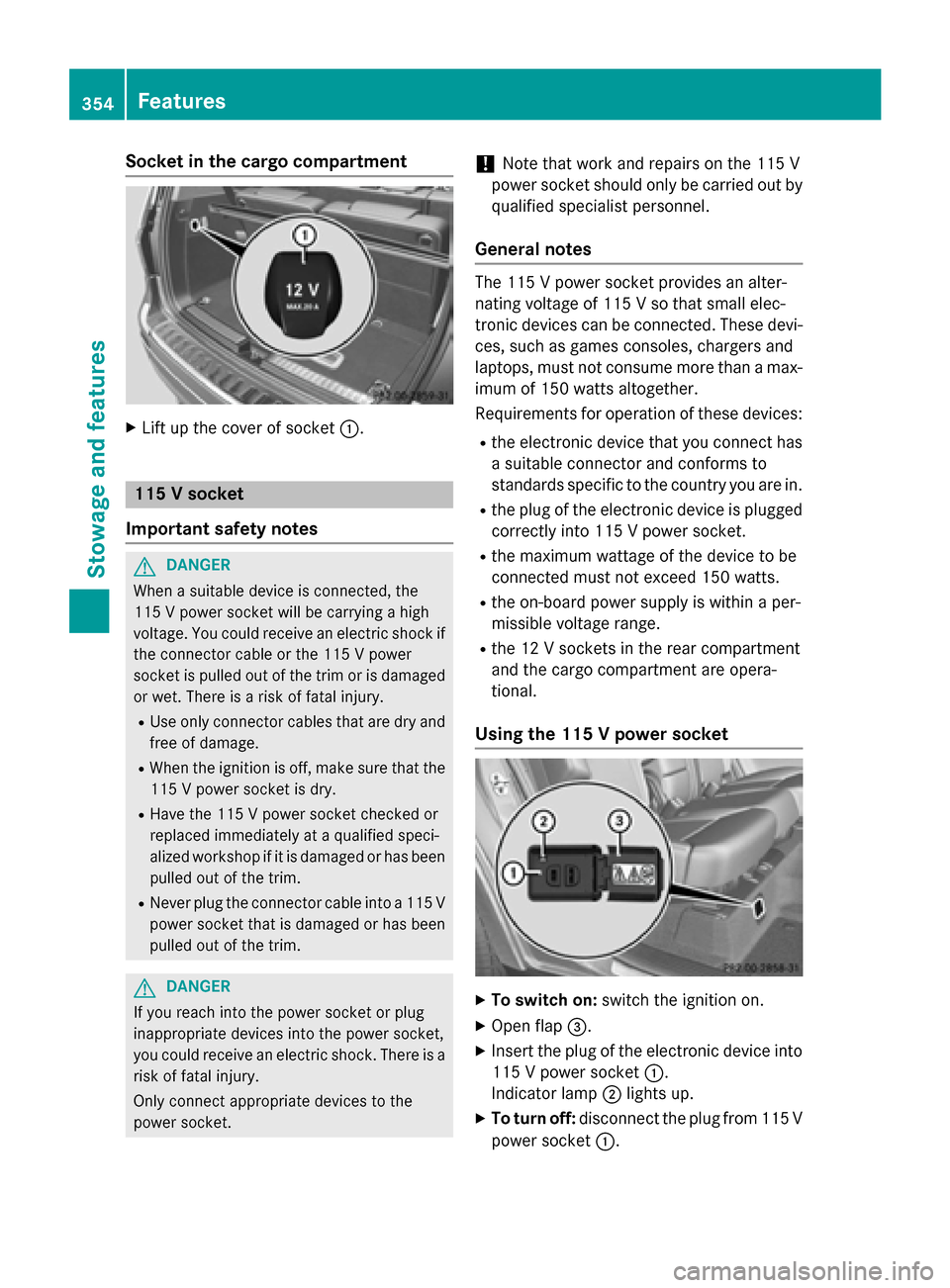
Socket in the cargo compartment
XLift up the cover of socket:.
115 V socket
Important safety notes
GDANGER
When a suitable device is connected, the
115 V power socket will be carrying a high
voltage. You could receive an electric shock if the connector cable or the 115 V power
socket is pulled out of the trim or is damaged
or wet. There is a risk of fatal injury.
RUse only connector cables that are dry and
free of damage.
RWhen the ignition is off, make sure that the
115 V power socket is dry.
RHave the 115 V power socket checked or
replaced immediately at a qualified speci-
alized workshop if it is damaged or has been
pulled out of the trim.
RNever plug the connector cable into a 115 V
power socket that is damaged or has been
pulled out of the trim.
GDANGER
If you reach into the power socket or plug
inappropriate devices into the power socket,
you could receive an electric shock. There is a
risk of fatal injury.
Only connect appropriate devices to the
power socket.
!Note that work and repairs on the 115 V
power socket should only be carried out by
qualified specialist personnel.
General notes
The 115 V power socket provides an alter-
nating voltage of 115 V so that small elec-
tronic devices can be connected. These devi-
ces, such as games consoles, chargers and
laptops, must not consume more than a max-
imum of 150 watts altogether.
Requirements for operation of these devices:
Rthe electronic device that you connect has a suitable connector and conforms to
standards specific to the country you are in.
Rthe plug of the electronic device is plugged
correctly into 115 V power socket.
Rthe maximum wattage of the device to be
connected must not exceed 150 watts.
Rthe on-board power supply is within a per-
missible voltage range.
Rthe 12 V sockets in the rear compartment
and the cargo compartment are opera-
tional.
Using the 115 V power socket
XTo switch on: switch the ignition on.
XOpen flap=.
XInsert the plug of the electronic device into
115 V power socket :.
Indicator lamp ;lights up.
XTo turn off: disconnect the plug from 115 V
power socket :.
354Features
Stowage and features
Page 367 of 462
garage door opener, contact an authorized
Mercedes-Benz Center.
Alternatively, you can call the following tele-
phone assistance services:
RUSA:Mercedes-Benz Customer Assistance
Center at 1-800-FOR-MERCedes
RCanada: Customer Service at
1-800-387-0100
RHomeLink®hotline 1-800-355-3515 (free
of charge)
More information on HomeLink
®and/or
compatible products is also available online
at http://www.homelink.com.
Notes on the declaration of conformity
(
Ypage 28).
USA: FCC ID: CB2HMIHL4
Canada: IC: 279B-HMIHL4
Important safety notes
GWARNING
When you operate or program the garage door
with the integrated garage door opener, per-
sons in the range of movement of the garage
door can become trapped or struck by the
garage door. There is a risk of injury.
When using the integrated garage door
opener, always make sure that nobody is
within the range of movement of the garage
door.
GWARNING
Combustion engines emit poisonous exhaust
gases such as carbon monoxide. Inhaling
these exhaust gases leads to poisoning. There
is a risk of fatal injury. Therefore never leave
the engine running in enclosed spaces with-
out sufficient ventilation.
Programing
Programming buttons
Pay attention to the "Important safety notes"
(
Ypage 365).
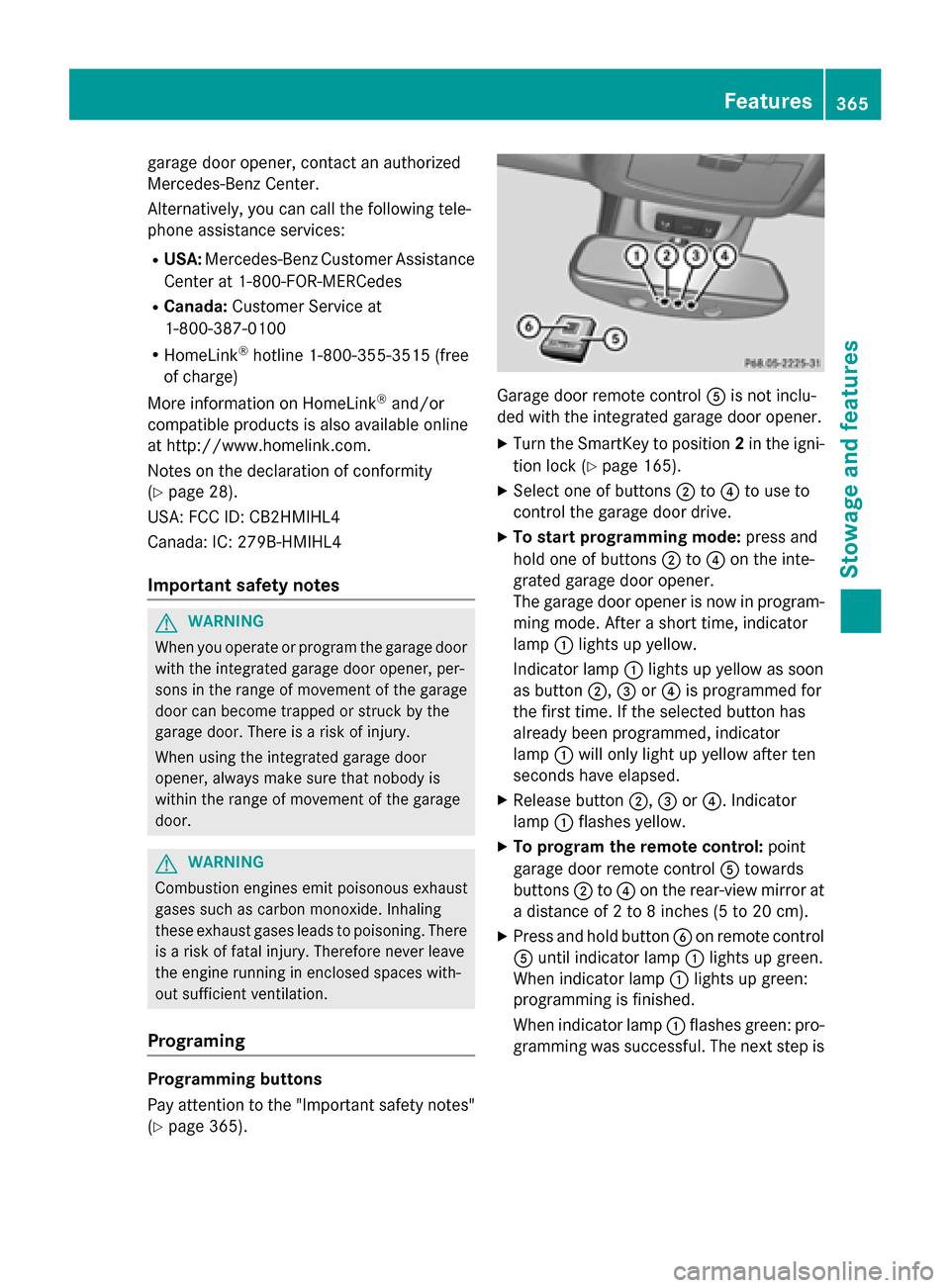
Garage door remote control Ais not inclu-
ded with the integrated garage door opener.
XTurn the SmartKey to position 2in the igni-
tion lock (
Ypage 165).
XSelect one of buttons ;to? to use to
control the garage door drive.
XTo start programming mode: press and
hold one of buttons ;to? on the inte-
grated garage door opener.
The garage door opener is now in program-
ming mode. After a short time, indicator
lamp :lights up yellow.
Indicator lamp :lights up yellow as soon
as button ;,=or? is programmed for
the first time. If the selected button has
already been programmed, indicator
lamp :will only light up yellow after ten
seconds have elapsed.
XRelease button ;,=or?. Indicator
lamp :flashes yellow.
XTo program the remote control: point
garage door remote control Atowards
buttons ;to? on the rear-view mirror at
a distance of 2 to 8 inches (5 to 20 cm).
XPress and hold button Bon remote control
A until indicator lamp :lights up green.
When indicator lamp :lights up green:
programming is finished.
When indicator lamp :flashes green: pro-
gramming was successful. The next step is
Features365
Stowage and features
Z
Page 368 of 462
to synchronize the rolling code
(
Ypage 366).
XRelease buttonBon remote control Afor
the garage door drive system.
If indicator lamp :lights up red: repeat the
programing procedure for the correspond-
ing button on the rear-view mirror. When
doing so, vary the distance between remote
control Aand the rear-view mirror.
The required distance between remote
control Aand the integrated garage door
opener depends on the garage door drive
system. Several attempts might be neces-
sary. You should test every position for at
least 25 seconds before trying another
position.
Synchronizing the rolling code
Pay attention to the "Important safety notes"
(
Ypage 365).
If the garage door system uses a rolling code,
you will also have to synchronize the garage
door system with the integrated garage door
opener in the rear-view mirror. To do this you
will need to use the programming button on
the door drive control panel. The program-
ming button may be positioned in different
places depending on the manufacturer. It is
usually located on the door drive unit on the
garage ceiling.
Familiarize yourself with the garage door
drive operating instructions, e.g. under "Pro-
gramming of additional remote controls",
before carrying out the following steps.
Your vehicle must be within reach of the
garage door or gate opener drive. Make sure
that neither your vehicle nor any persons/
objects are present within the swe ep of the
door or ga
te.
XTurn the SmartKey to position 2in the igni-
tion lock (
Ypage 165).
XGet out of the vehicle.
XPress the programming button on the door
drive unit.
Usually, you now have 30 seconds to ini-
tiate the next step.
XGet into the vehicle.
XPress previously programmed button ;,
= or? on the integrated garage door
opener multiple times until the door closes.
The rolling code synchronization is then
complete.
Notes on programming the remote con-
trol
Canadian radio frequency laws require a
"break" (or interruption) of the transmission
signals after broadcasting for a few seconds. Therefore, these signals may not last long
enough for the integrated garage door
opener. The signal is not recognized during
programming. Comparable with Canadian
law, some U.S. garage door openers also fea-
ture a "break".
Proceed as follows:
Rif you live in Canada
Rif you have difficulties programming the
garage door opener (regardless of where
you live) when using the programming
steps
XPress and hold one of buttons ;to? on
the integrated garage door opener.
After a short time, indicator lamp :lights
up yellow.
XRelease the button.
Indicator lamp :flashes yellow.
XPress button Bof garage door remote
control Afor two seconds, then release it
for two seconds.
XPress button Bagain for two seconds.
XRepeat this sequence on button Bof
remote control Auntil indicator lamp :
lights up green.
When indicator lamp :lights up green:
programming is finished.
366Features
Stowage and features