buttons MERCEDES-BENZ GL SUV 2009 User Guide
[x] Cancel search | Manufacturer: MERCEDES-BENZ, Model Year: 2009, Model line: GL SUV, Model: MERCEDES-BENZ GL SUV 2009Pages: 309, PDF Size: 10.27 MB
Page 143 of 309
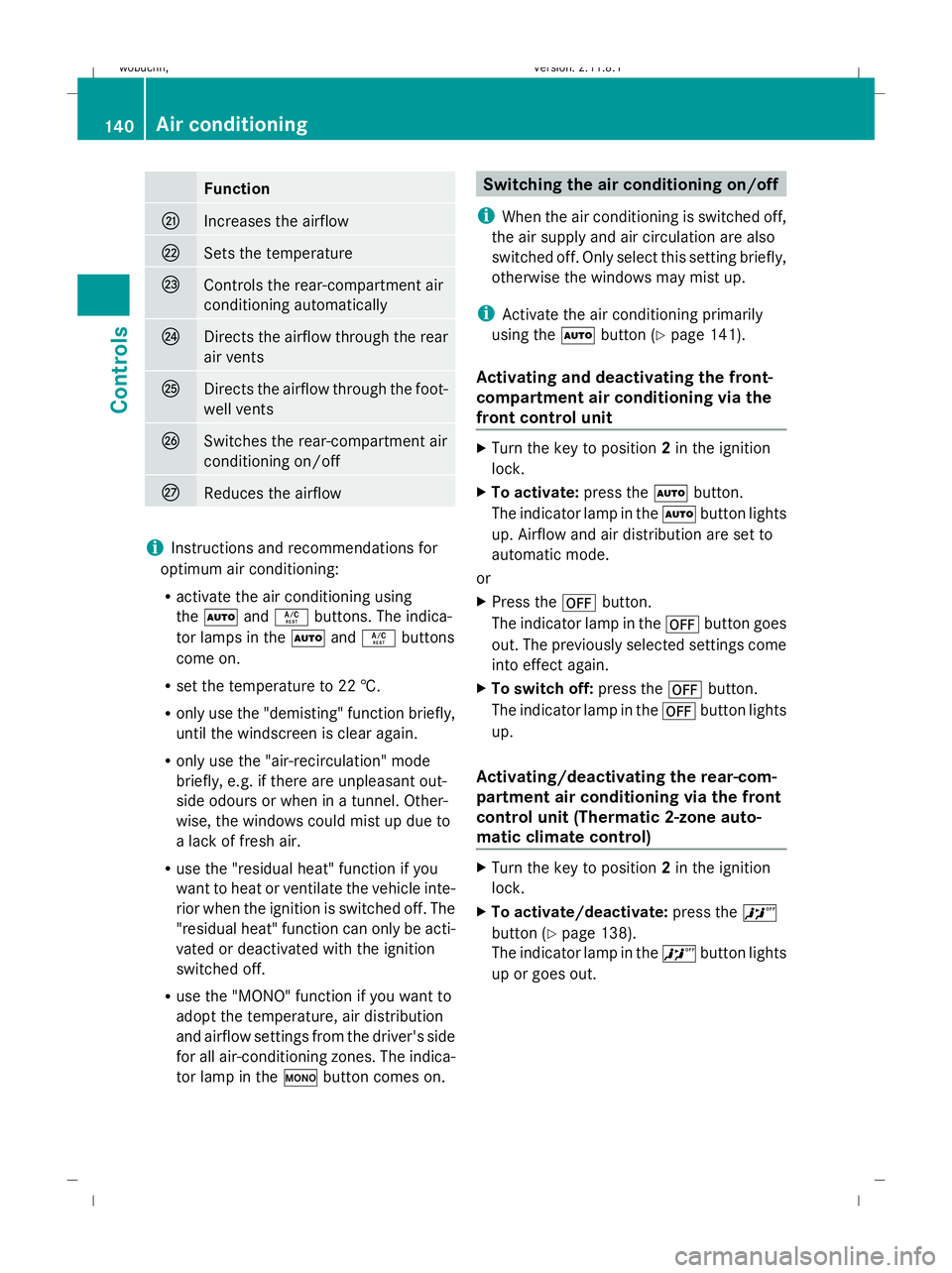
Function
Q
Increases the airflow
R
Sets the temperature
S
Controls the rear-compartment air
conditioning automatically
T
Directs the airflow through the rear
air vents
U
Directs the airflow through the foot-
well vents
V
Switches the rear-compartment air
conditioning on/off
W
Reduces the airflow
i
Instructions and recommendations for
optimum air conditioning:
R activate the air conditioning using
the à andÁ buttons. The indica-
tor lamps in the ÃandÁ buttons
come on.
R set the temperature to 22 †.
R only use the "demisting" function briefly,
until the windscreen is clear again.
R only use the "air-recirculation" mode
briefly, e.g. if there are unpleasant out-
side odours or when in a tunnel. Other-
wise, the windows could mist up due to
a lack of fresh air.
R use the "residual heat" function if you
want to heat or ventilate the vehicle inte-
rior when the ignition is switched off. The
"residual heat" function can only be acti-
vated or deactivated with the ignition
switched off.
R use the "MONO" function if you want to
adopt the temperature, air distribution
and airflow settings from the driver's side
for all air-conditioning zones. The indica-
tor lamp in the ºbutton comes on. Switching the air conditioning on/off
i When the air conditioning is switched off,
the air supply and air circulation are also
switched off. Only select this setting briefly,
otherwise the windows may mist up.
i Activate the air conditioning primarily
using the Ãbutton (Y page 141).
Activating and deactivating the front-
compartment air conditioning via the
front control unit X
Turn the key to position 2in the ignition
lock.
X To activate: press theÃbutton.
The indicator lamp in the Ãbutton lights
up. Airflow and air distribution are set to
automatic mode.
or
X Press the ^button.
The indicator lamp in the ^button goes
out. The previously selected settings come
into effect again.
X To switch off: press the^button.
The indicator lamp in the ^button lights
up.
Activating/deactivating the rear-com-
partment air conditioning via the front
control unit (Thermatic 2-zone auto-
matic climate control) X
Turn the key to position 2in the ignition
lock.
X To activate/deactivate: press the^
button (Y page 138).
The indicator lamp in the ^button lights
up or goes out. 140
Air conditioningControls
X164_AKB; 2; 3, en-GB
wobuchh,
Version: 2.11.8.1 2009-03-31T14:14:58+02:00 - Seite 140
Dateiname: 6515431202_buchblock.pdf; erzeugt am 01. Apr 2009 00:17:29; WK
Page 145 of 309
X
To deactivate: press theKorI
button.
The indicator lamp in the Ãbutton goes
out. Automatic airflow is deactivated and
the airflow is controlled according to the
level set. Automatic air distribution
remains activated.
or
X Press the Z,M,¯,\,P,
c orO button.
The indicator lamp in the Ãbutton goes
out. Automatic air distribution is deactiva-
ted. Air distribution is controlled according
to the position set. Automatic airflow
remains activated.
Controlling the rear-compartment air
conditioning automatically via the rear
control unit* X
Turn the key to position 2in the ignition
lock.
X Activate Thermotronic luxury multi-zone
automatic climate control*.
X Set the desired temperature.
X To switch on: press theÃbutton.
The indicator lamp in the Ãbutton lights
up. Automatic air distribution and airflow
are activated.
X To deactivate: press theKorI
button.
Automatic airflow is deactivated and the
airflow is controlled according to the level
set. Automatic air distribution remains acti-
vated.
or
X Press one of the MorO buttons.
Automatic air distribution is deactivated.
Air distribution is controlled according to
the position set. Automatic airflow remains
activated. Setting the temperature
Thermatic 2-zone automatic climate
control Different temperatures can be set for the
driver's and front-passenger sides.
X
Turn the key to position 2in the ignition
lock.
X To increase/reduce: turn controls:and
C clockwise or anti-clockwise
(Y page 138). Only change the temperature
setting in small increments. Start at 22 †.
Thermotronic multi-zone luxury auto-
matic climate control* Climate zones of Thermotronic multi-zone luxury
automatic climate control*
You can select different temperature settings
for the driver's and front-passenger sides as
well as for the rear compartment.
X To increase/reduce the front-compart-
ment temperature using the front con-
trol unit: turn the key in the ignition lock
to position 2.
X Turn controls :and Eclockwise or anti-
clockwise (Y page 139). Only change the
temperature setting in small increments.
Start at 22 †.
X To increase/reduce the rear-compart-
ment temperature using the front con- 142
Air conditioningControls
* optional
X164_AKB; 2; 3, en-GB
wobuchh
,V ersion: 2.11.8.1
2009-03-31T14:14:58+02:00 - Seite 142
Dateiname: 6515431202_buchblock.pdf; erzeugt am 01. Apr 2009 00:17:29; WK
Page 168 of 309
cases, these are country-specific. You can
obtain these mobile phone brackets from a
qualified specialist workshop, e.g. a
Mercedes-Benz Service Centre.
The functions and services available when
you use the phone depend on your mobile
phone model and service provider.
Inserting the mobile phone
X Open the telephone compartment
(Y page 153).
X Place the mobile phone bracket into the
pre-installed fitting; see the separate
mobile phone bracket fitting instructions.
X Insert the mobile phone into the mobile
phone bracket; see the separate mobile
phone bracket fitting instructions.
If the mobile phone is inserted in the mobile
phone bracket, you can speak to the person
you are calling using the hands-free system.
You can operate the telephone using the
6 and~ buttons on the multi-function
steering wheel. You can operate other mobile
phone functions via the on-board computer
(Y page 111).
When you take the key out of the ignition lock,
the mobile phone stays on but you can no
longer use the hands-free system.
If you are making a call and you would like to
take the key out of the ignition lock, first
remove the mobile phone from the bracket.
Otherwise, the call will be ended. Garage door opener*
The remote control integrated in the rear-view
mirror allows you to operate up to three dif-
ferent door and gate systems.
i The garage door opener is only available
for certain countries. Observe the legal
requirements in all countries concerned.
The HomeLink ®
garage door opener is
compatible with most European garage and
gate opener drives. More information on HomeLink
®
and/or compatible products is
available from:
R any Mercedes-Benz Service Centre
R the HomeLink ®
hotline
(0) 08000 466 354 65 (free of charge) or
+49 (0) 6838 907-277 (charges apply)
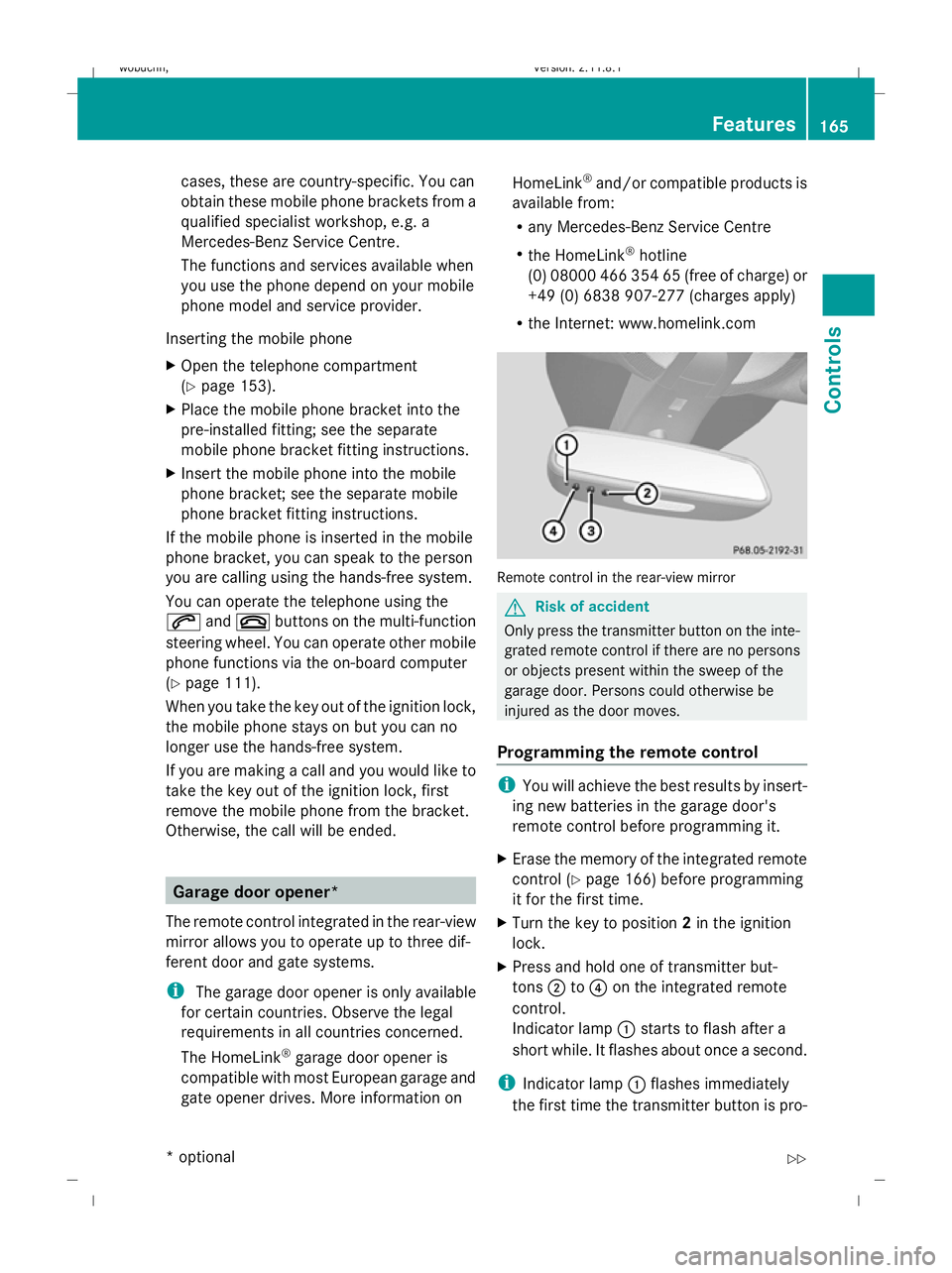
R the Internet: www.homelink.com Remote control in the rear-view mirror
G
Risk of accident
Only press the transmitter button on the inte-
grated remote control if there are no persons
or objects present within the sweep of the
garage door. Persons could otherwise be
injured as the door moves.
Programming the remote control i
You will achieve the best results by insert-
ing new batteries in the garage door's
remote control before programming it.
X Erase the memory of the integrated remote
control ( Ypage 166) before programming
it for the first time.
X Turn the key to position 2in the ignition
lock.
X Press and hold one of transmitter but-
tons ;to? on the integrated remote
control.
Indicator lamp :starts to flash after a
short while. It flashes about once a second.
i Indicator lamp :flashes immediately
the first time the transmitter button is pro- Features
165Controls
* optional
X164_AKB; 2; 3, en-GB
wobuchh,
Version: 2.11.8.1 2009-03-31T14:14:58+02:00 - Seite 165 Z
Dateiname: 6515431202_buchblock.pdf; erzeugt am 01. Apr 2009 00:17:43; WK
Page 169 of 309
grammed. If this transmitter button has
already been programmed, indicator
lamp
:will only start flashing at a rate of
once a second after 20 seconds have
elapsed.
X Keep the transmitter buttons depressed.
X Point the garage door's remote control with
the transmitter towards the left-hand side
of the rear-view mirror from a distance of 5
to 20 cm.
i The distance between the garage door's
remote control and the integrated garage
door opener depends on the system of the
garage door drive. You might require sev-
eral attempts. You should test every posi-
tion for at least 20 seconds before trying
another position.
X Keep the transmitter button on the garage
door's remote control depressed until indi-
cator lamp :starts to flash rapidly.
The programming was successful if indica-
tor lamp :flashes rapidly.
X Release the transmitter buttons on the
garage door's remote control and the inte-
grated remote control.
If indicator lamp :goes out after approx-
imately 20 seconds and did not flash rapidly
before this:
X Release the transmitter buttons on the
integrated and portable remote controls.
X Repeat the programming procedure. When
doing so, change the distance between the
garage door's remote control and the trans-
mitter buttons in the rear-view mirror.
i If the garage door system works with a
rolling code, after programming you must
synchronise the remote control integrated
in the rear-view mirror with the garage door
system receiver.
You will find further information in the
garage door opening system's operating
instructions, e.g. the sections on "Synchro-
nising the transmitter" or "Registering a new transmitter". You can also call the hot-
line mentioned above.
Opening or closing the garage door Once programmed, the integrated remote
control will assume the function of the garage
door system's remote control. Please read
the operating instructions for the garage door
system.
X
Turn the key to position 2in the ignition
lock.
X Press the transmitter button on the rear-
view mirror that you have programmed to
operate the garage door.
Garage door system with fixed code: indi-
cator lamp :lights up continuously.
Garage door system with rolling code: indi-
cator lamp :flashes briefly and then lights
up for approximately two seconds. This is
repeated for up to 20 seconds.
i The transmitter will transmit a signal for
as long as the transmitter button is being
pressed. The transmission will be halted
after a maximum of 20 seconds and indi-
cator lamp :will flash. Press the trans-
mitter button again, if necessary.
Clearing the remote control memory X
Turn the key to position 2in the ignition
lock.
X Press and hold transmitter buttons ;
and ?for approximately 20 seconds until
indicator lamp :flashes rapidly.
The memory is cleared.
i You should clear the remote control mem-
ory before selling the vehicle. Compass*
In the Off-road menu* (Y page 102), the
compass displays the compass bearing of
your direction of travel. You will see N,NE, E,
SE, S,SW, Wor NW in the multi-function display. 166
FeaturesControls
* optional
X164_AKB; 2; 3, en-GB
wobuchh,
Version: 2.11.8.1 2009-03-31T14:14:58+02:00 - Seite 166
Dateiname: 6515431202_buchblock.pdf; erzeugt am 01. Apr 2009 00:17:43; WK
Page 214 of 309
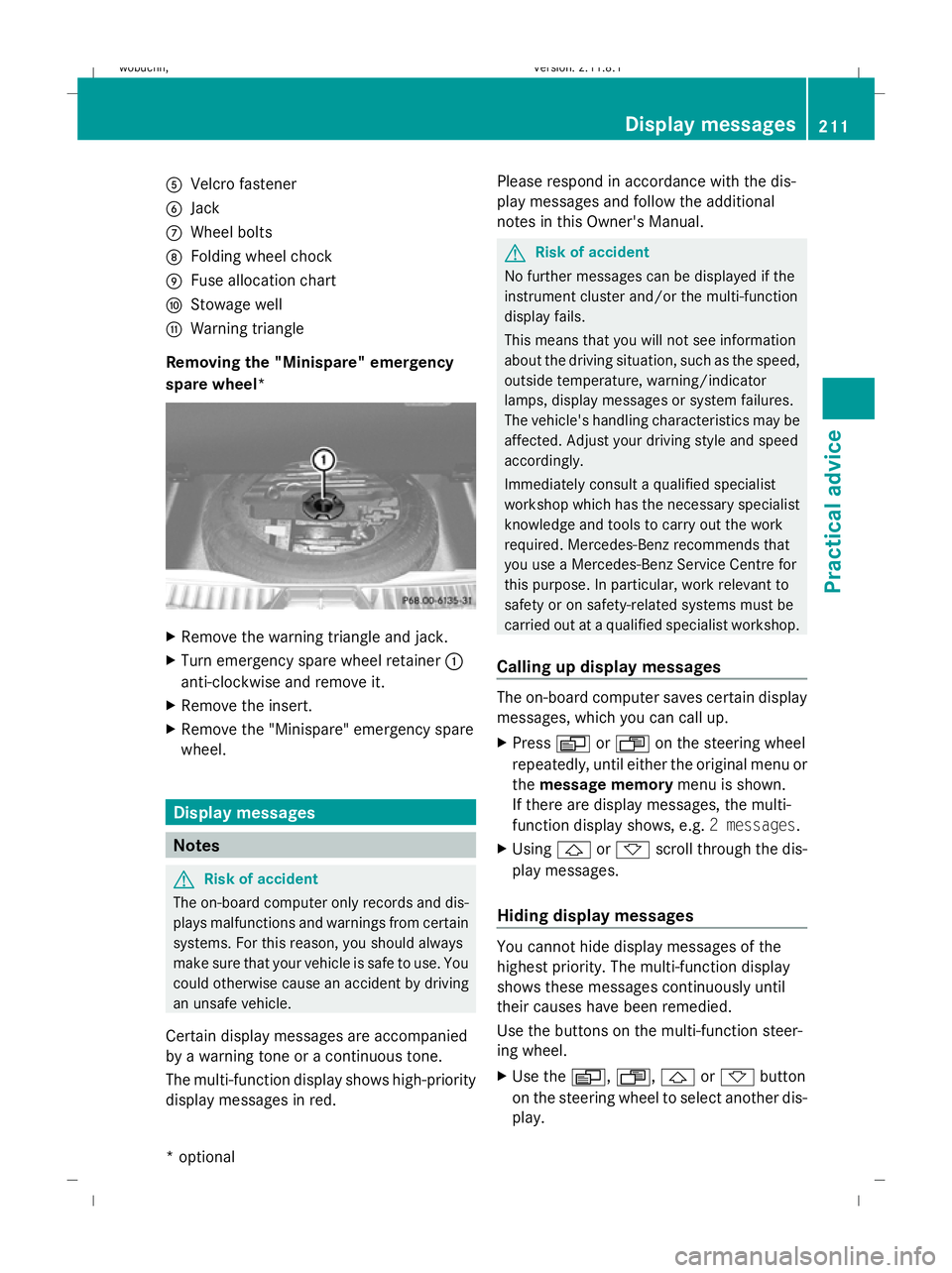
A
Velcro fastener
B Jack
C Wheel bolts
D Folding wheel chock
E Fuse allocation chart
F Stowage well
G Warning triangle
Removing the "Minispare" emergency
spare wheel* X
Remove the warning triangle and jack.
X Turn emergency spare wheel retainer :
anti-clockwise and remove it.
X Remove the insert.
X Remove the "Minispare" emergency spare
wheel. Display messages
Notes
G
Risk of accident
The on-board computer only records and dis-
plays malfunctions and warnings from certain
systems. For this reason, you should always
make sure that your vehicle is safe to use. You
could otherwise cause an accident by driving
an unsafe vehicle.
Certain display messages are accompanied
by a warning tone or a continuous tone.
The multi-function display shows high-priority
display messages in red. Please respond in accordance with the dis-
play messages and follow the additional
notes in this Owner's Manual. G
Risk of accident
No further messages can be displayed if the
instrument cluster and/or the multi-function
display fails.
This means that you will not see information
about the driving situation, such as the speed,
outside temperature, warning/indicator
lamps, display messages or system failures.
The vehicle's handling characteristics may be
affected. Adjust your driving style and speed
accordingly.
Immediately consult a qualified specialist
workshop which has the necessary specialist
knowledge and tools to carry out the work
required. Mercedes-Benz recommends that
you use a Mercedes-Benz Service Centre for
this purpose. In particular, work relevant to
safety or on safety-related systems must be
carried out at a qualified specialist workshop.
Calling up display messages The on-board computer saves certain display
messages, which you can call up.
X
Press VorU on the steering wheel
repeatedly, until either the original menu or
the message memory menu is shown.
If there are display messages, the multi-
function display shows, e.g. 2 messages.
X Using &or* scroll through the dis-
play messages.
Hiding display messages You cannot hide display messages of the
highest priority. The multi-function display
shows these messages continuously until
their causes have been remedied.
Use the buttons on the multi-function steer-
ing wheel.
X
Use the V,U,&or* button
on the steering wheel to select another dis-
play. Display messages
211Practical advice
* optional
X164_AKB; 2; 3, en-GB
wobuchh,
Version: 2.11.8.1 2009-03-31T14:14:58+02:00 - Seite 211 Z
Dateiname: 6515431202_buchblock.pdf; erzeugt am 01. Apr 2009 00:17:58; WK
Page 236 of 309
Troubleshooting
Points to remember
G
Risk of accident and injury
The operating safety of your vehicle could be compromised if service work is carried out improp-
erly. You could lose control of the vehicle and cause an accident. Safety systems may also not
be able to protect you or others as intended.
Always have maintenance work carried out at a qualified specialist workshop. The workshop must
have the necessary specialist knowledge and tools to carry out the work required. Mercedes-
Benz recommends that you use a Mercedes-Benz Service Centre for this purpose. In particular,
work relevant to safety or on safety-related systems must be carried out at a qualified specialist
workshop. Warning and indicator lamps in switches and buttons
Problem
Possible causes/consequences and
X
X Solutions One or all of the indica-
tor lamps in the seat
ventilation* button are
flashing. The seat ven-
tilation* has switched
off automatically. The on-board voltage is too low, because too many consumers are
switched on.
X Switch off consumers that are not required, e.g. rear window
heating or interior lighting.
Once the battery is sufficiently charged, the seat ventilation*
will switch back on automatically. One or all of the indica-
tor lamps in the seat
heating* button are
flashing. The seat heat-
ing* has switched off
automatically. The on-board voltage is too low, because too many consumers are
switched on.
X Switch off consumers that are not required, e.g. rear window
heating or interior lighting.
Once the battery is sufficiently charged, the seat ventilation*
will switch back on automatically. The steering wheel
heating* indicator lamp
on the lower left lever of
the steering column is
flashing. The on-board voltage is too low, because too many consumers are
switched on. The steering wheel heating* has switched off auto-
matically.
X Switch off consumers that are not required, e.g. rear window
heating or interior lighting.
Once the battery is sufficiently charged, the steering wheel
heating* will switch back on automatically. Troubleshooting
233Practical advice
* optional
X164_AKB; 2; 3, en-GB
wobuchh
,V ersion: 2.11.8.1
2009-03-31T14:14:58+02:00 - Seite 233 Z
Dateiname: 6515431202_buchblock.pdf; erzeugt am 01. Apr 2009 00:18:01; WK
Page 256 of 309
X
Press resetting tool :downwards until
you hear the head restraint deployment
mechanism engage.
X Pull out resetting tool :.
X Firmly press back the head restraint cush-
ion until it engages =.
X Repeat this procedure for the second head
restraint. Replacing batteries (key and remote
control) Notes
It is advisable to have the batteries replaced
at a qualified specialist workshop, e.g. at a
Mercedes-Benz Service Centre. G
Risk of poisoning
Batteries contain toxic and caustic substan-
ces. For this reason, keep batteries away from
children.
If a battery is swallowed, consult a doctor
immediately. H
Environmental note
Do not dispose of batteries with the house-
hold rubbish. They contain highly toxic sub-
stances.
Take discharged batteries to a qualified spe-
cialist workshop, e.g. a Mercedes-Benz
Service Centre, or to a special collection point
for old batteries. Key
Checking the batteries X
Press the &or% button.
The batteries are in working order if the
battery charge indicator lamp lights up
briefly. Changing batteries (key with KEYLESS
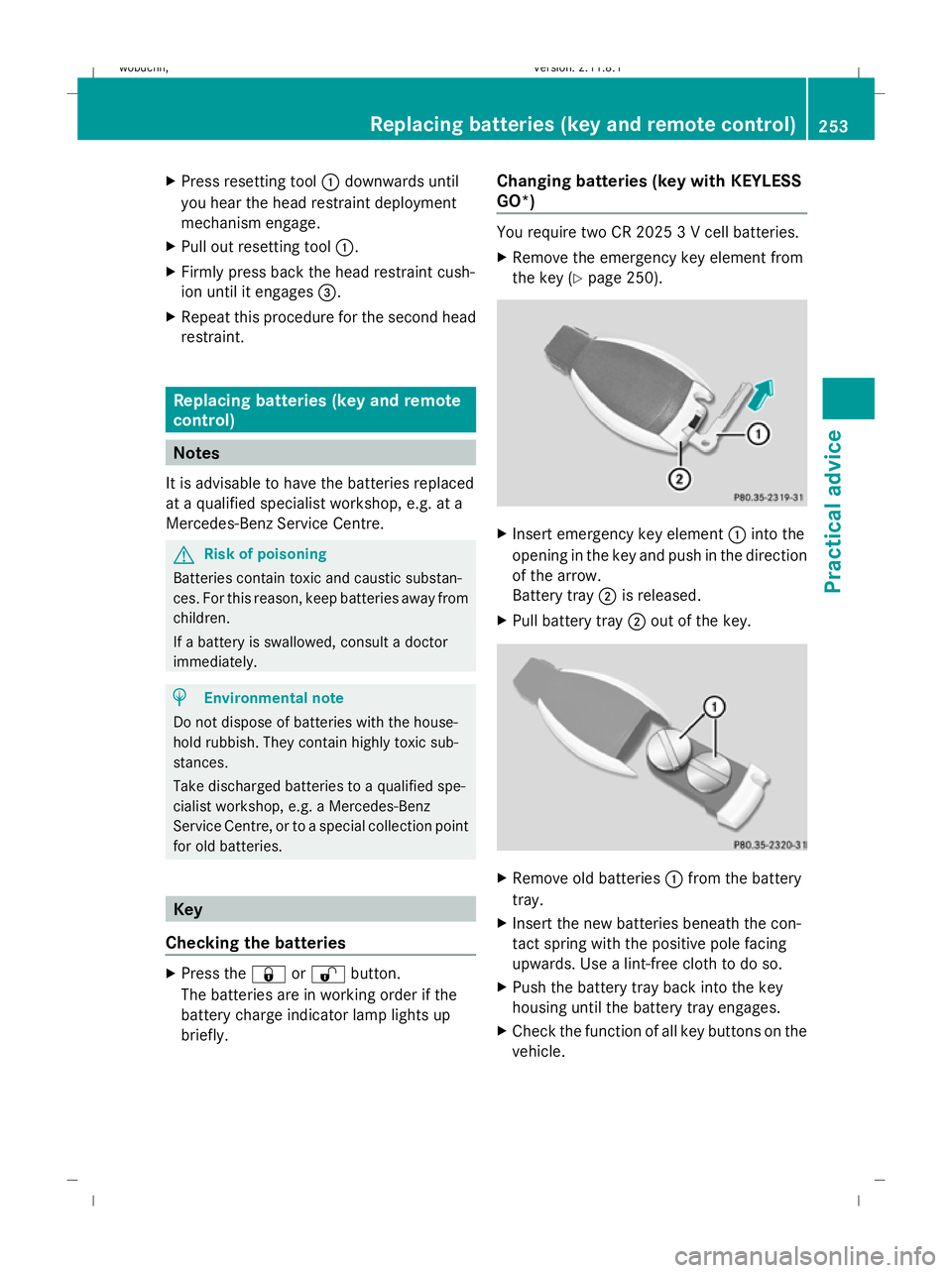
GO*) You require two CR 2025 3 V cell batteries.
X
Remove the emergency key element from
the key (Y page 250). X
Insert emergency key element :into the
opening in the key and push in the direction
of the arrow.
Battery tray ;is released.
X Pull battery tray ;out of the key. X
Remove old batteries :from the battery
tray.
X Insert the new batteries beneath the con-
tact spring with the positive pole facing
upwards. Use a lint-free cloth to do so.
X Push the battery tray back into the key
housing until the battery tray engages.
X Check the function of all key buttons on the
vehicle. Replacing batteries (key and remote control)
253Practical advice
X164_AKB; 2; 3, en-GB
wobuchh,Version: 2.11.8.1 2009-03-31T14:14:58+02:00 - Seite 253 Z
Dateiname: 6515431202_buchblock.pdf; erzeugt am 01. Apr 2009 00:18:04; WK
Page 257 of 309
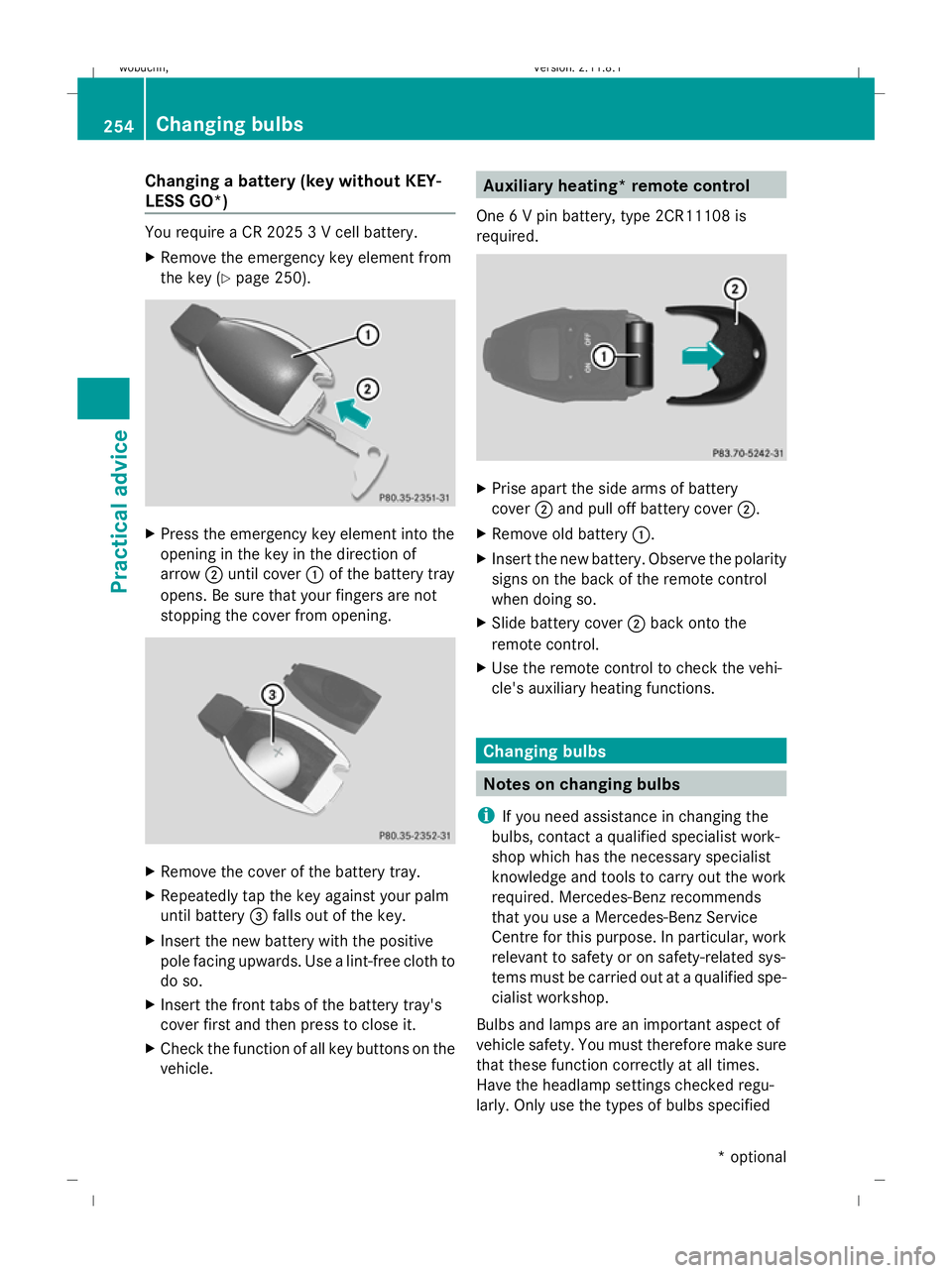
Changing a battery (key without KEY-
LESS GO*) You require a CR 2025 3 V cell battery.
X Remove the emergency key element from
the key (Y page 250). X
Press the emergency key element into the
opening in the key in the direction of
arrow ;until cover :of the battery tray
opens. Be sure that your fingers are not
stopping the cover from opening. X
Remove the cover of the battery tray.
X Repeatedly tap the key against your palm
until battery =falls out of the key.
X Insert the new battery with the positive
pole facing upwards. Use a lint-free cloth to
do so.
X Insert the front tabs of the battery tray's
cover first and then press to close it.
X Check the function of all key buttons on the
vehicle. Auxiliary heating* remote control
One 6 V pin battery, type 2CR11108 is
required. X
Prise apart the side arms of battery
cover ;and pull off battery cover ;.
X Remove old battery :.
X Insert the new battery. Observe the polarity
signs on the back of the remote control
when doing so.
X Slide battery cover ;back onto the
remote control.
X Use the remote control to check the vehi-
cle's auxiliary heating functions. Changing bulbs
Notes on changing bulbs
i If you need assistance in changing the
bulbs, contact a qualified specialist work-
shop which has the necessary specialist
knowledge and tools to carry out the work
required. Mercedes-Benz recommends
that you use a Mercedes-Benz Service
Centre for this purpose. In particular, work
relevant to safety or on safety-related sys-
tems must be carried out at a qualified spe-
cialist workshop.
Bulbs and lamps are an important aspect of
vehicle safety. You must therefore make sure
that these function correctly at all times.
Have the headlamp settings checked regu-
larly. Only use the types of bulbs specified 254
Changing bulbsPractical advice
* optional
X164_AKB; 2; 3, en-GB
wobuchh,
Version: 2.11.8.1 2009-03-31T14:14:58+02:00 - Seite 254
Dateiname: 6515431202_buchblock.pdf; erzeugt am 01. Apr 2009 00:18:05; WK
Page 262 of 309
X
Turn bulb holder :(WY 5 W)/;
(PY 21 W) anti-clockwise and pull it out.
X Remove the bulb from bulb holder :/;.
X Insert the new bulb into bulb
holder :/;.
X Insert bulb holder :/;and turn it clock-
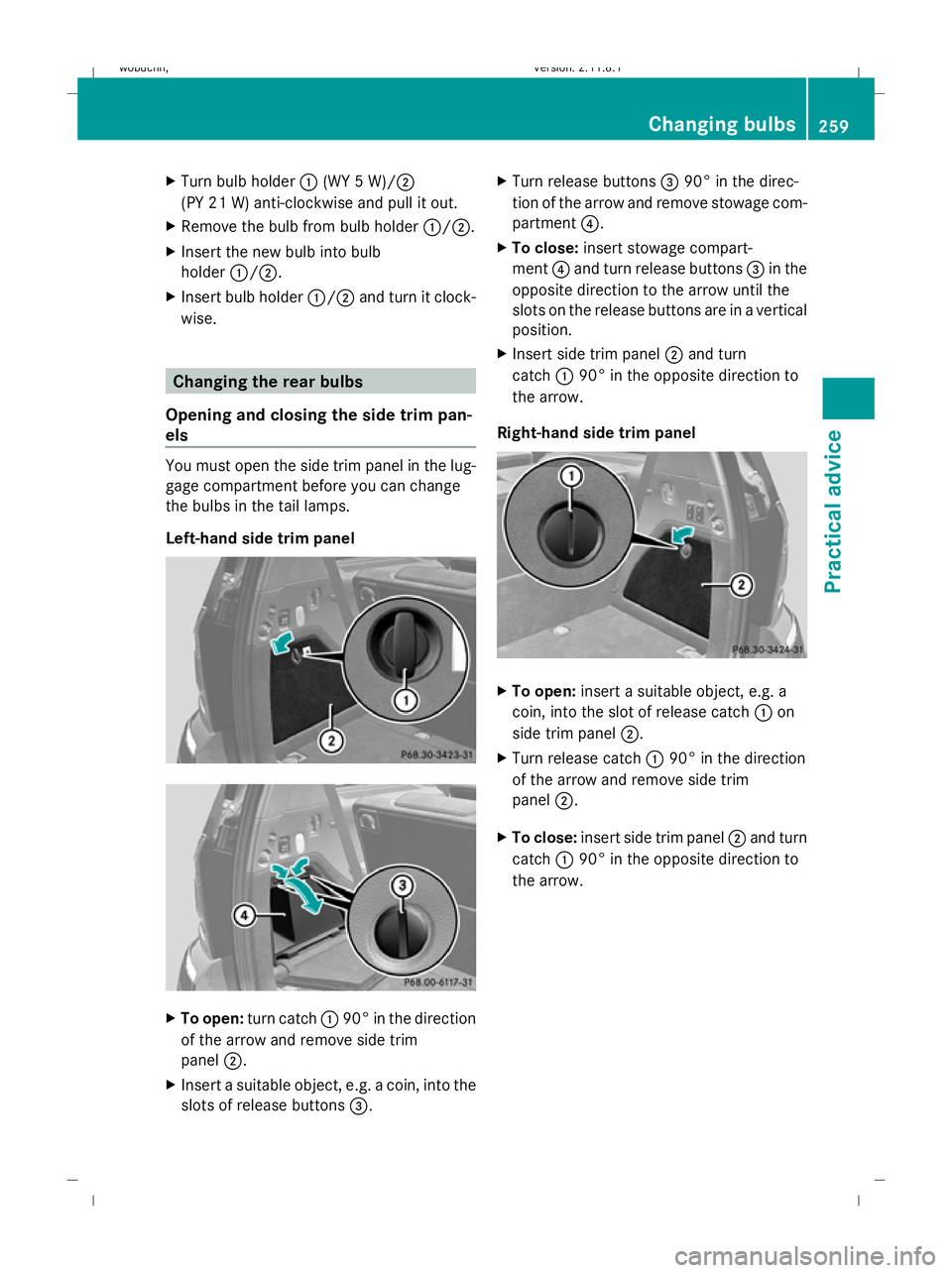
wise. Changing the rear bulbs
Opening and closing the side trim pan-
els You must open the side trim panel in the lug-
gage compartment before you can change
the bulbs in the tail lamps.
Left-hand side trim panel
X
To open: turn catch :90° in the direction
of the arrow and remove side trim
panel ;.
X Insert a suitable object, e.g. a coin, into the
slots of release buttons =.X
Turn release buttons =90° in the direc-
tion of the arrow and remove stowage com-
partment ?.
X To close: insert stowage compart-
ment ?and turn release buttons =in the
opposite direction to the arrow until the
slots on the release buttons are in a vertical
position.
X Insert side trim panel ;and turn
catch :90° in the opposite direction to
the arrow.
Right-hand side trim panel X
To open: insert a suitable object, e.g. a
coin, into the slot of release catch :on
side trim panel ;.
X Turn release catch :90° in the direction
of the arrow and remove side trim
panel ;.
X To close: insert side trim panel ;and turn
catch :90° in the opposite direction to
the arrow. Changing bulbs
259Practical advice
X164_AKB; 2; 3, en-GB
wobuchh, Version: 2.11.8.1 2009-03-31T14:14:58+02:00 - Seite 259 Z
Dateiname: 6515431202_buchblock.pdf; erzeugt am 01. Apr 2009 00:18:07; WK