differential MERCEDES-BENZ GL SUV 2009 Owners Manual
[x] Cancel search | Manufacturer: MERCEDES-BENZ, Model Year: 2009, Model line: GL SUV, Model: MERCEDES-BENZ GL SUV 2009Pages: 309, PDF Size: 10.27 MB
Page 10 of 309
D
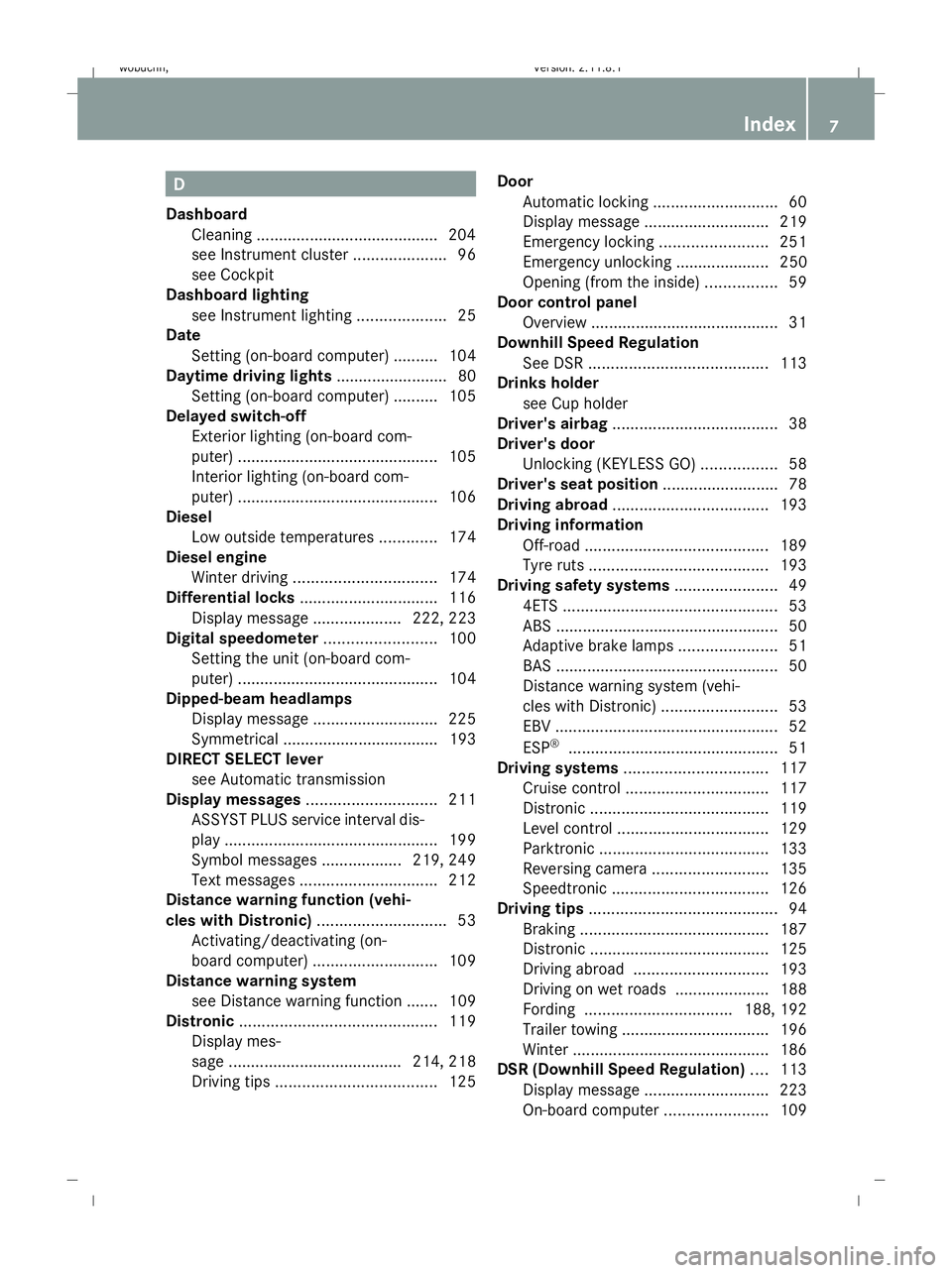
Dashboard Cleaning ........................................ .204
see Instrument cluster .....................96
see Cockpit
Dashboard lighting
see Instrument lighting ....................25
Date
Setting (on-board computer) .......... 104
Daytime driving lights ......................... 80
Setting (on-board computer) .......... 105
Delayed switch-off
Exterior lighting (on-board com-
puter) ............................................. 105
Interior lighting (on-board com-
puter) ............................................. 106
Diesel
Low outside temperatures .............174
Diesel engine
Winter driving ................................ 174
Differential locks ............................... 116
Display message .................... 222, 223
Digital speedometer .........................100
Setting the unit (on-board com-
puter) ............................................. 104
Dipped-beam headlamps
Display message ............................ 225
Symmetrical ................................... 193
DIRECT SELECT lever
see Automatic transmission
Display messages ............................. 211
ASSYST PLUS service interval dis-
pla y................................................ 199
Symbol messages ..................219, 249
Text messages ............................... 212
Distance warning function (vehi-
cles with Distronic) .............................53
Activating/deactivating (on-
board computer) ............................ 109
Distance warning system
see Distance warning function ....... 109
Distronic ............................................ 119
Display mes-
sage ...................................... .214, 218
Driving tips .................................... 125Door
Automatic locking ............................ 60
Display message ............................ 219
Emergency locking ........................251
Emergency unlocking ..................... 250
Opening (from the inside) ................59
Door control panel
Overview .......................................... 31
Downhill Speed Regulation
See DSR ........................................ 113
Drinks holder
see Cup holder
Driver's airbag ..................................... 38
Driver's door Unlocking (KEYLESS GO) .................58
Driver's seat position ..........................78
Driving abroad ................................... 193
Driving information Off-road ......................................... 189
Tyre ruts ........................................ 193
Driving safety systems .......................49
4ETS ................................................ 53
ABS .................................................. 50
Adaptive brake lamps ......................51
BAS .................................................. 50
Distance warning system (vehi-
cles with Distronic) ..........................53
EBV .................................................. 52
ESP ®
............................................... 51
Driving systems ................................ 117
Cruise control ................................ 117
Distronic ........................................ 119
Level control .................................. 129
Parktroni c...................................... 133
Reversing camera ..........................135
Speedtronic ................................... 126
Driving tips .......................................... 94
Braking .......................................... 187
Distronic ........................................ 125
Driving abroad .............................. 193
Driving on wet roads .....................188
Fording ................................. 188, 192
Trailer towing ................................. 196
Winter ............................................ 186
DSR (Downhill Speed Regulation) ....113
Display message ............................ 223
On-board computer .......................109 Index
7 X164_AKB; 2; 3, en-GB
wobuchh,
Version: 2.11.8.1
2009-03-31T14:14:58+02:00 - Seite 7Dateiname: 6515431202_buchblock.pdf; erzeugt am 01. Apr 2009 00:16:29; WK
Page 14 of 309
Luggage cover
................................... 157
Luggage net Front-passenger footwell ...............154
Front seats (behind) ....................... 154
Lumbar support
4-way ............................................... 66
Luxury head restraint .........................66 M
Main-beam headlamps Display message ............................ 227
Maintenance
Battery ........................................... 272
Making calls
On-board computer .......................111
Memory card ...................................... 101
Operating (on-board computer) .....101
see separate operating instructions
Memory function ................................. 74
Menu Overview of the menus ....................99
Menu (on-board computer) ................. 99
Additional functions .......................109
Audio ............................................. 100
Distronic ........................................ 124
DVD ............................................... 102
Navi ............................................... 102
Off-road ......................................... 102
Resetting to factory settings ..........103
Settings ......................................... 103
Standard displa y.............................. 99
Telephone ...................................... 111
Trip computer ................................ 110
TV .................................................. 101
Message
see Display message .....................211
see Indicator and warning lamp .....235
Minispare emergency spare wheel
Technical data ............................... 297
Mirrors
Sun visor ........................................ 162
see Exterior mirrors or Rear-view mirror
Mobile phone ..................................... 164
Display message .................... 216, 232
Installation ..................................... 285
Operation (on-board computer) .....111 Mobile telephone
see Mobile phone .......................... 164
Modifying the programming
Key .................................................. 59
MP3 .................................................... 101
Operating (on-board computer) .....101
see separate operating instructions
Multicontour seat ................................ 67
Multi-function display .........................98
Setting the display when the igni-
tion is switched off (on-board
computer) ...................................... 107
Multi-function steering wheel ............97
Overview .......................................... 28 N
Navigation .......................................... 102
On-board computer .......................102
see separate operating instructions
NECK-PRO head restraints .................40
Resetting after being triggered ......252
NECK-PRO luxury head restraints ...... 40
Resetting after being triggered ......252
Notes on running in a new vehicle ..172 O
Odometer see Trip meter ............................... 110
Off-road
4MATIC .......................................... 112
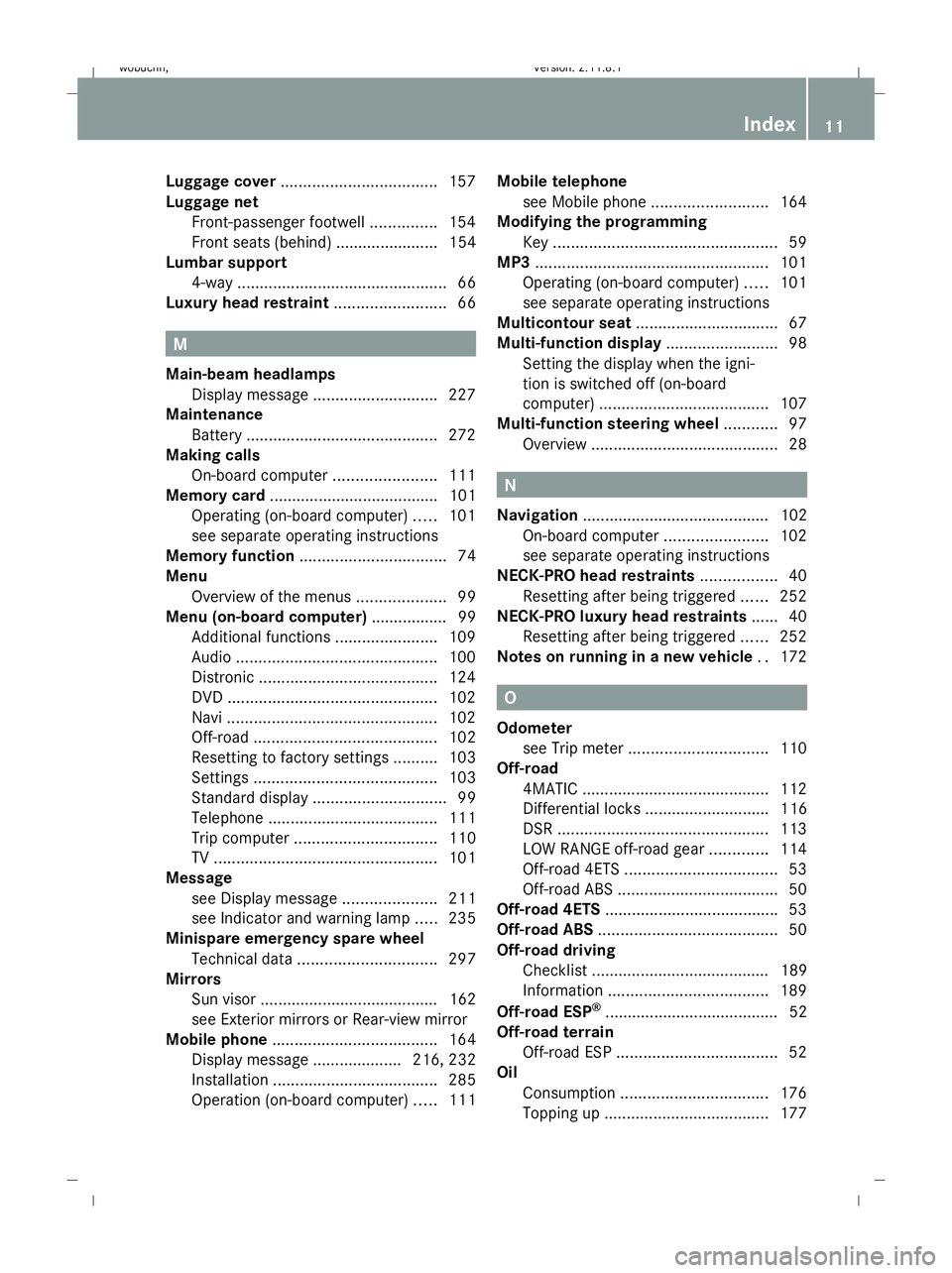
Differential locks ............................ 116
DSR ............................................... 113
LOW RANGE off-road gear .............114
Off-road 4ETS .................................. 53
Off-road ABS .................................... 50
Off-road 4ETS ...................................... .53
Off-road ABS ........................................ 50
Off-road driving Checklist ........................................ 189
Information .................................... 189
Off-road ESP ®
....................................... 52
Off-road terrain Off-road ESP .................................... 52
Oil
Consumption ................................. 176
Topping up ..................................... 177 Index
11 X164_AKB; 2; 3, en-GB
wobuchh,
Version: 2.11.8.1
2009-03-31T14:14:58+02:00 - Seite 11Dateiname: 6515431202_buchblock.pdf; erzeugt am 01. Apr 2009 00:16:30; WK
Page 32 of 309
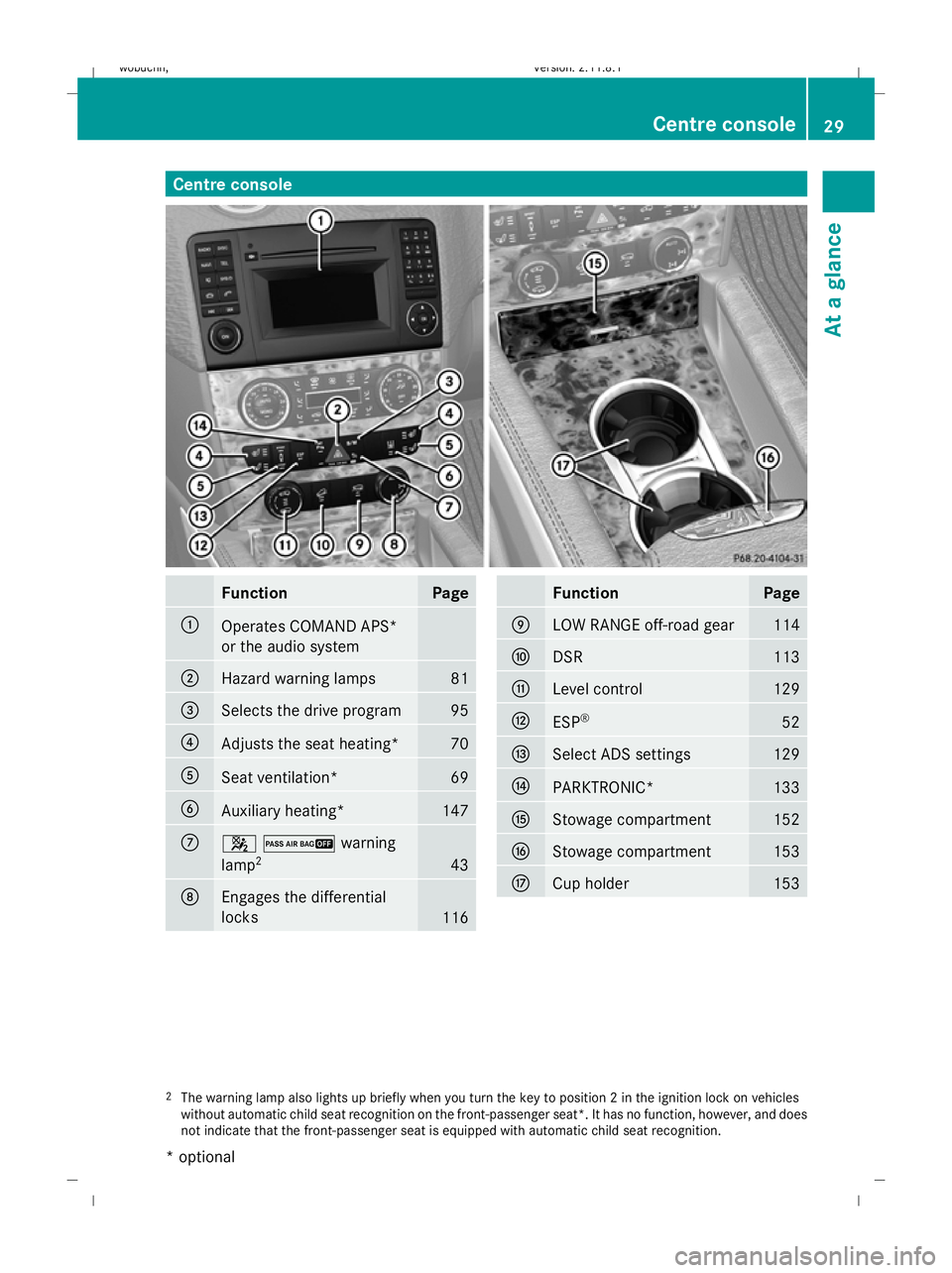
Centre console
Function Page
:
Operates COMAND APS*
or the audio system
;
Hazard warning lamps 81
=
Selects the drive program 95
?
Adjusts the seat heating* 70
A
Seat ventilation* 69
B
Auxiliary heating* 147
C
42warning
lamp
2 43
D
Engages the differential
locks
116 Function Page
E
LOW RANGE off-road gear 114
F
DSR 113
G
Level control 129
H
ESP
® 52
I
Select ADS settings 129
J
PARKTRONIC* 133
K
Stowage compartment 152
L
Stowage compartment 153
M
Cup holder 153
2
The warning lamp also lights up briefly when you turn the key to position 2 in the ignition lock on vehicles
without automatic child seat recognition on the front-passenger seat*. It has no function, however, and does
not indicate that the front-passenger seat is equipped with automatic child seat recognition. Centre console
29At a glance
* optional
X164_AKB; 2; 3, en-GB
wobuchh,
Version: 2.11.8.1 2009-03-31T14:14:58+02:00 - Seite 29 Z
Dateiname: 6515431202_buchblock.pdf; erzeugt am 01. Apr 2009 00:16:40; WK
Page 102 of 309
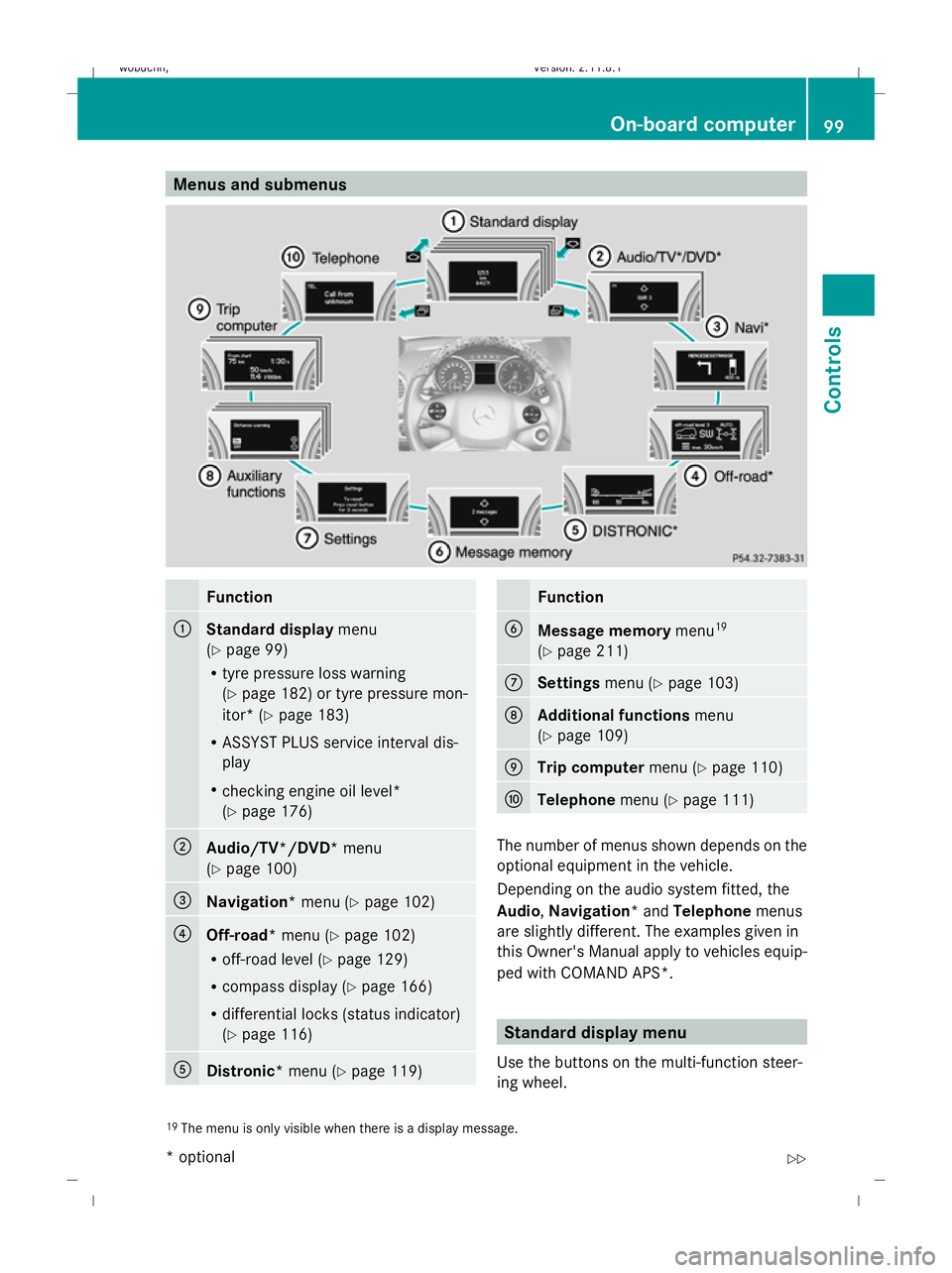
Menus and submenus
Function
:
Standard display
menu
(Y page 99)
R tyre pressure loss warning
(Y page 182) or tyre pressure mon-
itor* (Y page 183)
R ASSYST PLUS service interval dis-
play
R checking engine oil level*
(Y page 176) ;
Audio/TV*/DVD*
menu
(Y page 100) =
Navigation*
menu (Ypage 102) ?
Off-road*
menu (Ypage 102)
R off-road level (Y page 129)
R compass display (Y page 166)
R differential locks (status indicator)
(Y page 116) A
Distronic*
menu (Ypage 119) Function
B
Message memory
menu19
(Y page 211) C
Settings
menu (Ypage 103) D
Additional functions
menu
(Y page 109) E
Trip computer
menu (Ypage 110) F
Telephone
menu (Ypage 111) The number of menus shown depends on the
optional equipment in the vehicle.
Depending on the audio system fitted, the
Audio, Navigation* and Telephonemenus
are slightly different. The examples given in
this Owner's Manual apply to vehicles equip-
ped with COMAND APS*. Standard display menu
Use the buttons on the multi-function steer-
ing wheel.
19 The menu is only visible when there is a display message. On-board computer
99Controls
* optional
X164_AKB; 2; 3, en-GB
wobuchh,
Version: 2.11.8.1 2009-03-31T14:14:58+02:00 - Seite 99 Z
Dateiname: 6515431202_buchblock.pdf; erzeugt am 01. Apr 2009 00:17:15; WK
Page 105 of 309
not receive channel lists): press and briefly
hold the &or* button.
Operating the DVD video* X
Switch on COMAND and select video DVD
(see the separate operating instructions).
X Press VorU on the steering wheel
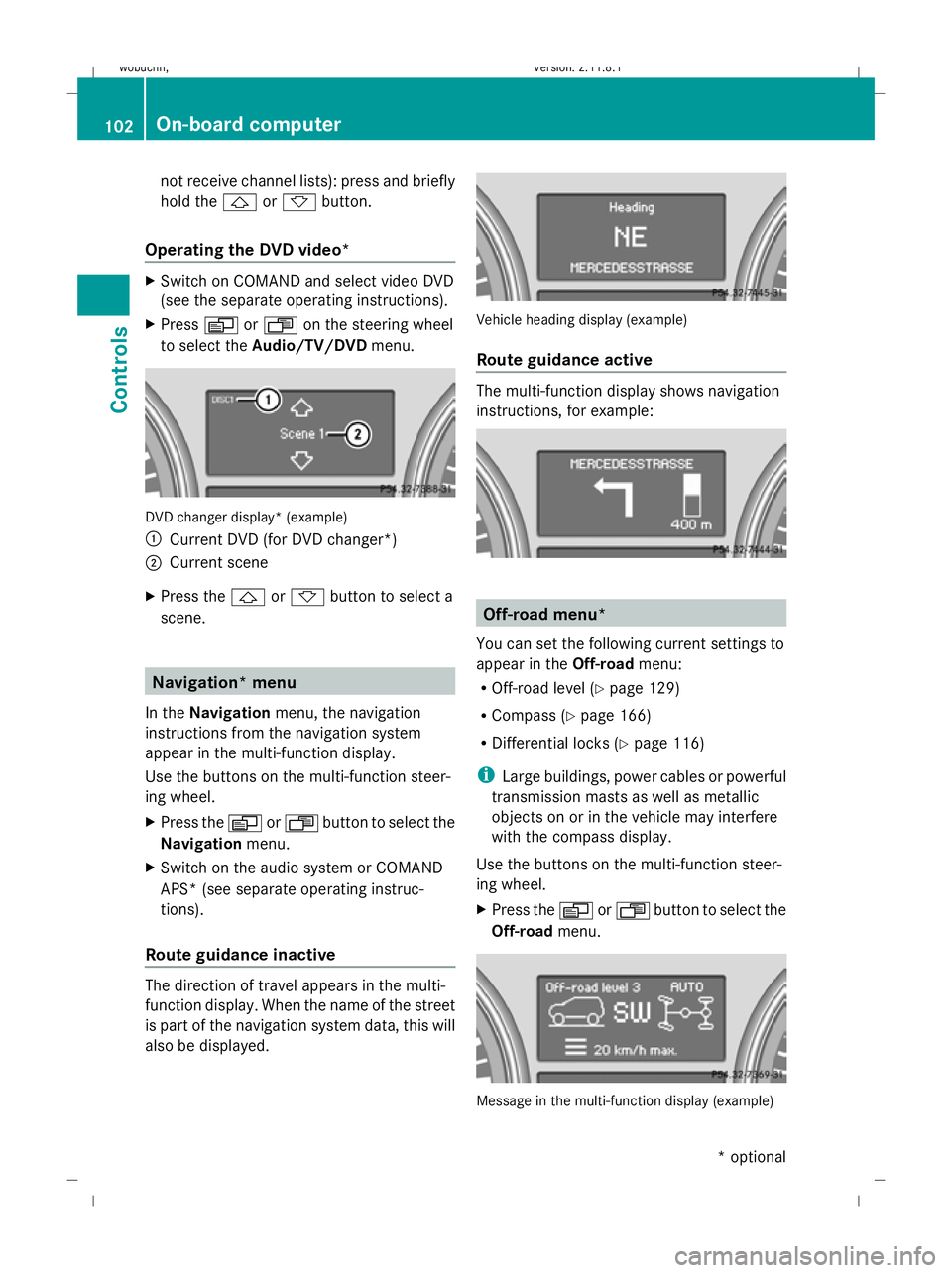
to select the Audio/TV/DVD menu. DVD changer display* (example)
:
Current DVD (for DVD changer*)
; Current scene
X Press the &or* button to select a
scene. Navigation* menu
In the Navigation menu, the navigation
instructions from the navigation system
appear in the multi-function display.
Use the buttons on the multi-function steer-
ing wheel.
X Press the VorU button to select the
Navigation menu.
X Switch on the audio system or COMAND
APS* (see separate operating instruc-
tions).
Route guidance inactive The direction of travel appears in the multi-
function display. When the name of the street
is part of the navigation system data, this will
also be displayed. Vehicle heading display (example)
Route guidance active
The multi-function display shows navigation
instructions, for example:
Off-road menu*
You can set the following current settings to
appear in the Off-roadmenu:
R Off-road level (Y page 129)
R Compass (Y page 166)
R Differential locks (Y page 116)
i Large buildings, power cables or powerful
transmission masts as well as metallic
objects on or in the vehicle may interfere
with the compass display.
Use the buttons on the multi-function steer-
ing wheel.
X Press the VorU button to select the
Off-road menu. Message in the multi-function display (example)102
On-board computerControls
* optional
X164_AKB; 2; 3, en-GB
wobuchh
,V ersion: 2.11.8.1
2009-03-31T14:14:58+02:00 - Seite 102
Dateiname: 6515431202_buchblock.pdf; erzeugt am 01. Apr 2009 00:17:16; WK
Page 115 of 309
If you are not in the
Telephonemenu, you can
still accept a call.
Rejecting or ending a call X
Press the ~button.
If you are not in the Telephonemenu, you can
still accept a call.
Dialling a number from the phone book You can use the mobile phone to enter new
telephone numbers into the phone book (see
separate operating instructions). If your
mobile phone is operational, you can select
and dial a number from the phone book at any
time.
X Press the VorU button to select the
Telephone menu.
X Press the &or* button to call up
the phone book.
X Press the &or* button to select the
name you are searching for. To scroll rap-
idly, press and hold the &or* but-
ton for longer than 1 second.
X Press the 6button to start dialling.
or
X If you do not want to make a call, press the
~ button.
Redialling The on-board computer saves the last names
or numbers dialled in the redial memory.
X Press the VorU button to select the
Telephone menu.
X Press the 6button to switch to the
redial memory.
X Press the &or* button to select the
desired name or number.
X Press the 6button to start dialling. Off-road driving
Overview of off-road driving systems
The systems which are relevant for off-road
driving are explained on the following pages:
R 4MATIC (permanent four-wheel drive), for
optimum traction
R DSR (Downhill Speed Regulation), which
assists you when driving downhill
R LOW RANGE off-road gear for better trac-
tion off-road
R Differential locks for increased traction off-
road
You will find further information about driving
off-road in the "Operation" section
(Y page 188). 4MATIC (permanent four-wheel drive)
4MATIC ensures that all four wheels are per-
manently driven. Together with ESP ®
and
4ETS, it improves the traction of your vehicle
whenever a drive wheel spins due to insuffi-
cient grip. G
Risk of accident
4MATIC cannot reduce the risk of an accident
if you drive too fast.
If a drive wheel spins due to insufficient grip:
R only depress the accelerator pedal as far as
necessary when pulling away.
R accelerate less when driving.
R adapt your driving style to suit road and
traffic conditions.
i In wintry driving conditions, the maximum
effect of 4MATIC can only be achieved if
you use winter tyres (M+S tyres), with snow
chains if necessary.
! When testing the parking brake, operate
the vehicle only briefly (for a maximum of
ten seconds) on a brake test dynamometer.
When doing this, turn the key to position 112
Off-road drivingControls
X164_AKB; 2; 3, en-GB
wobuchh,
Version: 2.11.8.1 2009-03-31T14:14:58+02:00 - Seite 112
Dateiname: 6515431202_buchblock.pdf; erzeugt am 01. Apr 2009 00:17:18; WK
Page 119 of 309
An acoustic warning will also sound. The
gear change process has not been comple-
ted. LOW RANGE is in the neutral position.
There is no connection between the engine
and the drive wheels.
! Do not drive any further, otherwise you
could damage the vehicle's drive train.
XStop the vehicle. Take into account the
road and traffic conditions when doing
this.
X Depress the parking brake.
X Carry out the gear change process
again.
If the gear change process has been
carried out, the Stop vehicle. Apply
parking brake message disappears. Differential locks
Differential locks improve the vehicle’s trac-
tion.
Your vehicle is equipped with the following:
R A differential lock for the transfer box: this
controls the balance between the front and
rear axles.
R A differential lock for the rear axle: this
controls the balance between the wheels
and the rear axle.
4ETS (Y page 53) controls the compensation
between the wheels and the front axle.
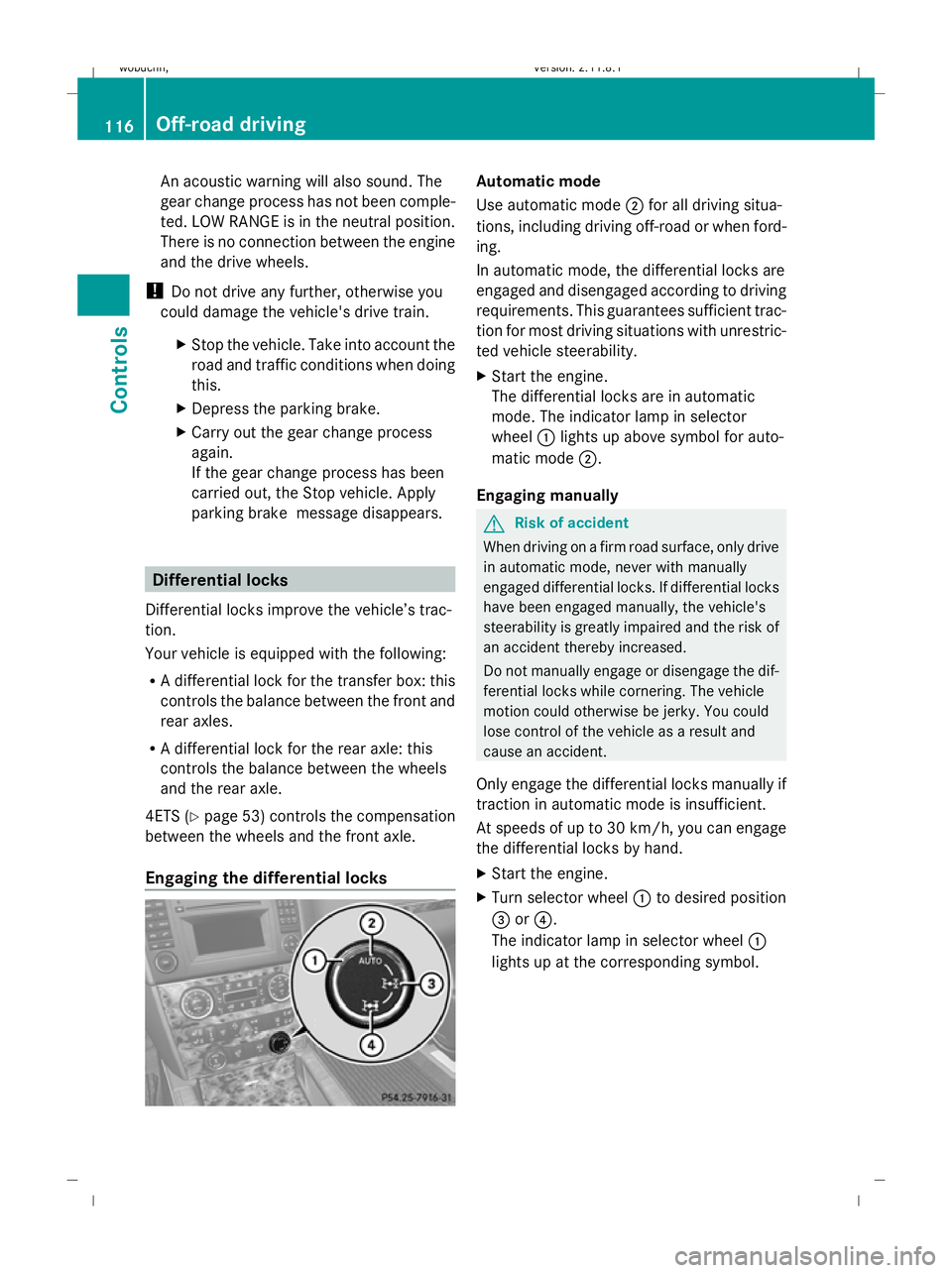
Engaging the differential locks Automatic mode
Use automatic mode
;for all driving situa-
tions, including driving off-road or when ford-
ing.
In automatic mode, the differential locks are
engaged and disengaged according to driving
requirements. This guarantees sufficient trac-
tion for most driving situations with unrestric-
ted vehicle steerability.
X Start the engine.
The differential locks are in automatic
mode. The indicator lamp in selector
wheel :lights up above symbol for auto-
matic mode ;.
Engaging manually G
Risk of accident
When driving on a firm road surface, only drive
in automatic mode, never with manually
engaged differential locks. If differential locks
have been engaged manually, the vehicle's
steerability is greatly impaired and the risk of
an accident thereby increased.
Do not manually engage or disengage the dif-
ferential locks while cornering. The vehicle
motion could otherwise be jerky. You could
lose control of the vehicle as a result and
cause an accident.
Only engage the differential locks manually if
traction in automatic mode is insufficient.
At speeds of up to 30 km/h, you can engage
the differential locks by hand.
X Start the engine.
X Turn selector wheel :to desired position
= or?.
The indicator lamp in selector wheel :
lights up at the corresponding symbol. 116
Off-road drivingControls
X164_AKB; 2; 3, en-GB
wobuchh
,V ersion: 2.11.8.1
2009-03-31T14:14:58+02:00 - Seite 116
Dateiname: 6515431202_buchblock.pdf; erzeugt am 01. Apr 2009 00:17:20; WK
Page 120 of 309
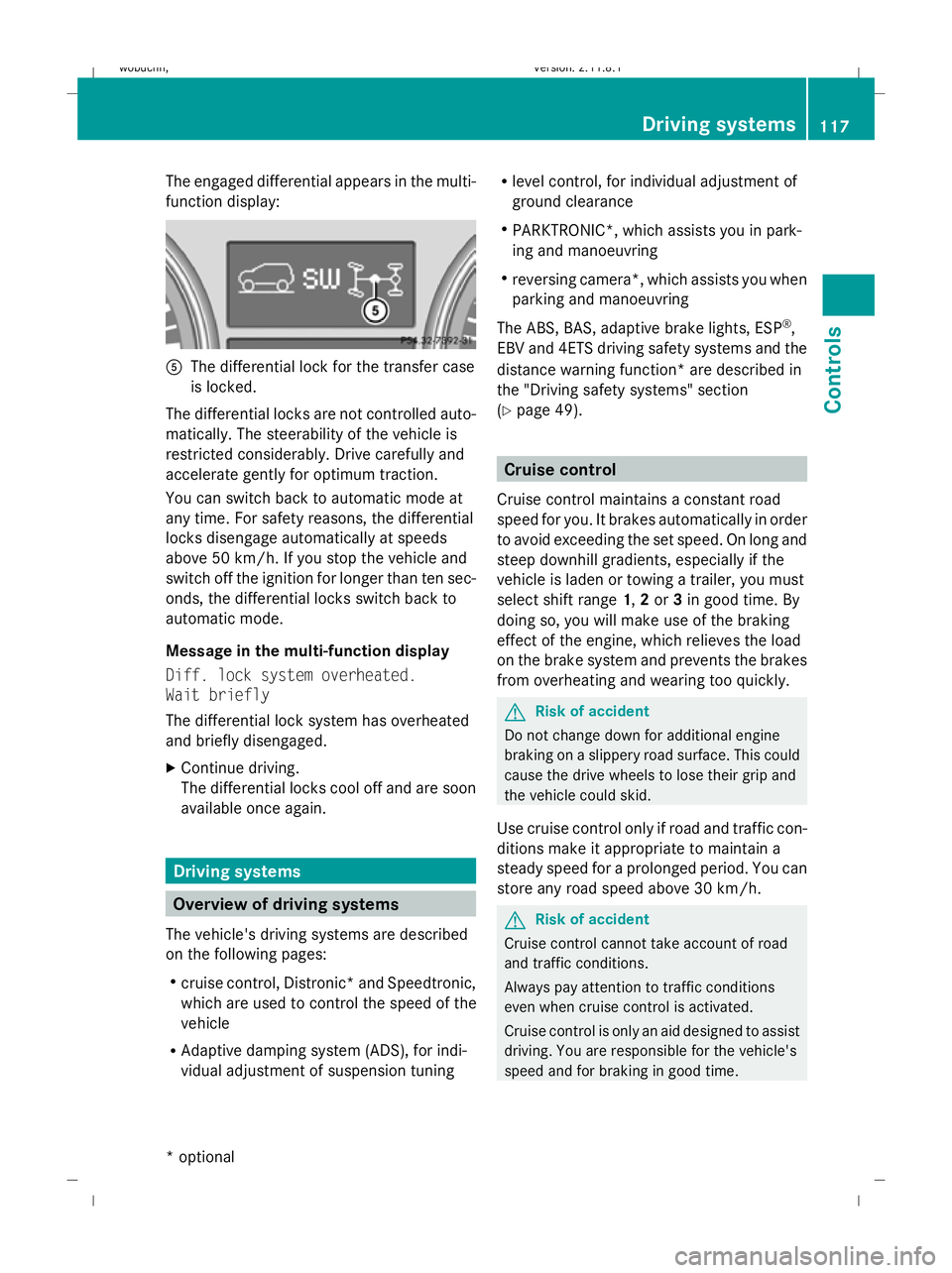
The engaged differential appears in the multi-
function display:
A
The differential lock for the transfer case
is locked.
The differential locks are not controlled auto-
matically. The steerability of the vehicle is
restricted considerably. Drive carefully and
accelerate gently for optimum traction.
You can switch back to automatic mode at
any time. For safety reasons, the differential
locks disengage automatically at speeds
above 50 km/h. If you stop the vehicle and
switch off the ignition for longer than ten sec-
onds, the differential locks switch back to
automatic mode.
Message in the multi-function display
Diff. lock system overheated.
Wait briefly
The differential lock system has overheated
and briefly disengaged.
X Continue driving.
The differential locks cool off and are soon
available once again. Driving systems
Overview of driving systems
The vehicle's driving systems are described
on the following pages:
R cruise control, Distronic *and Speedtronic,
which are used to control the speed of the
vehicle
R Adaptive damping system (ADS), for indi-
vidual adjustment of suspension tuning R
level control, for individual adjustment of
ground clearance
R PARKTRONIC*, which assists you in park-
ing and manoeuvring
R reversing camera*, which assists you when
parking and manoeuvring
The ABS, BAS, adaptive brake lights, ESP ®
,
EBV and 4ETS driving safety systems and the
distance warning function* are described in
the "Driving safety systems" section
(Y page 49). Cruise control
Cruise control maintains a constant road
speed for you. It brakes automatically in order
to avoid exceeding the set speed. On long and
steep downhill gradients, especially if the
vehicle is laden or towing a trailer, you must
select shift range 1,2or 3in good time. By
doing so, you will make use of the braking
effect of the engine, which relieves the load
on the brake system and prevents the brakes
from overheating and wearing too quickly. G
Risk of accident
Do not change down for additional engine
braking on a slippery road surface. This could
cause the drive wheels to lose their grip and
the vehicle could skid.
Use cruise control only if road and traffic con-
ditions make it appropriate to maintain a
steady speed for a prolonged period. You can
store any road speed above 30 km/h. G
Risk of accident
Cruise control cannot take account of road
and traffic conditions.
Always pay attention to traffic conditions
even when cruise control is activated.
Cruise control is only an aid designed to assist
driving. You are responsible for the vehicle's
speed and for braking in good time. Driving systems
117Controls
* optional
X164_AKB; 2; 3, en-GB
wobuchh
,V ersion: 2.11.8.1
2009-03-31T14:14:58+02:00 - Seite 117 Z
Dateiname: 6515431202_buchblock.pdf; erzeugt am 01. Apr 2009 00:17:20; WK
Page 175 of 309
Running-in notes
The first 1,500 km
G
Risk of accident
New brake pads/linings only have optimal
braking performance after several hundred
kilometres. Until then, compensate for this by
applying greater force to the brake pedal. This
also applies when brake pads/linings or
brake discs have been changed.
If you treat the engine with sufficient care
from the very start, you will be rewarded with
excellent performance for the remainder of
the engine's life.
R Therefore, you should drive at varying road
and engine speeds for the first 1,500 km.
R Avoid heavy loads, e.g. driving at full throt-
tle, during this time. Do not exceed 2
/ 3 of
the maximum permissible engine speed for
each gear.
R Change gear in good time.
R Do not shift down a gear manually in order
to brake.
R try to avoid depressing the accelerator
pedal beyond the pressure point (kick-
down).
R only use ranges 3,2or 1for slow driving,
e.g. in mountainous terrain.
After 1,500 km, you may gradually bring the
vehicle up to full road and engine speeds.
i These running-in instructions must also
be observed if you have the engine, the dif-
ferenial gear or the front axle differential of
your vehicle replaced. Refuelling
Refuelling
G
Risk of explosion
Fuel is highly flammable. Fire, naked flames
and smoking are therefore prohibited when
handling fuels.
Switch off the engine and the auxiliary heat-
ing* before refuelling. G
Risk of injury
Avoid any contact with fuels.
You can damage your health if your skin
comes into direct contact with fuel or if you
inhale fuel vapours. G
Risk of fire
Do not use petrol to refuel vehicles with a die-
sel engine. Never mix diesel with petrol. This
causes damage to the fuel system and engine
and could result in the vehicle catching fire.
! Do not use petrol to refuel vehicles with a
diesel engine. Do not use diesel to refuel
vehicles with a petrol engine. Even a small
quantity of the wrong fuel will damage the
fuel system and engine. Damage resulting
from adding the wrong fuel is not covered
by the implied warranty.
! Do not start the engine if you accidentally
refuel with the wrong fuel. Otherwise, the
fuel could enter the fuel lines. This would
require draining of the fuel tank and fuel
lines. Notify a qualified specialist workshop
and have the fuel tank and fuel lines
drained completely.
When you open or close the vehicle with the
key or KEYLESS GO*, the fuel filler flap is
automatically unlocked or locked.
The position of the fuel filler cap is to the rear
on the right. The position of the fuel filler cap
is displayed in the instrument cluster 8.172
RefuellingOperation
* optional
X164_AKB; 2; 3, en-GB
wobuchh,
Version: 2.11.8.1 2009-03-31T14:14:58+02:00 - Seite 172
Dateiname: 6515431202_buchblock.pdf; erzeugt am 01. Apr 2009 00:17:45; WK
Page 192 of 309
G
Risk of accident
Grains of sand, particles of dirt and other
abrasive materials can enter the brake sys-
tem. This can lead to excessive wear and
unpredictable braking efficiency.
After the brakes have been exposed to dirty
conditions, have them checked and cleaned
at a qualified specialist workshop, e.g. a
Mercedes-Benz Service Centre. Otherwise,
there is a risk that braking power may be
insufficient in the event of an emergency, or
that braking efficiency may be unpredictable.
Read this section before driving your vehicle
off-road. Practise by travelling over more gen-
tle off-road terrain first.
The following driving systems are specially
adapted to off-road driving:
R LOW RANGE off-road gear (Y page 114)
R off-road ABS (Y page 50)
R off-road 4-ETS (Y page 53)
R off-road ESP ®
(Y page 52)
R differential locks (Y page 116)
R DSR (Downhill Speed Regulation)
(Y page 113) Off-road driving
G
Risk of accident
Damage to the vehicle creates the risk of an
accident for yourself and other road users. If
in doubt, have your vehicle checked at a quali-
fied specialist workshop which has the nec-
essary specialist knowledge and tools to carry
out the work required. Mercedes-Benz rec-
ommends that you use a Mercedes-Benz
Service Centre for this purpose. H
Environmental note
Protection of the environment is of primary
importance. Treat nature with respect.
Observe all prohibiting signs. General information R
Stop your vehicle and, if necessary, select
the LOW RANGE off-road gear
(Y page 114) before driving off-road.
R Select a vehicle level suitable for the off-
road terrain. Make sure there is always suf-
ficient ground clearance to prevent dam-
age to the vehicle.
R Check that items of luggage and loads are
stowed safely and are well secured
(Y page 156).
R Always keep the engine running and in gear
when driving on a downhill gradient. Acti-
vate DSR.
R Drive slowly and evenly, if necessary at a
walking pace.
R Ensure that the wheels are in contact with
the ground at all times.
R Drive with extreme care on unknown off-
road routes where visibility is poor. For
safety reasons, get out of the vehicle first
and survey the off-road route.
R Check the depth of water before fording
rivers and streams.
R Look out for obstacles such as rocks, holes,
tree stumps and furrows.
R Always keep the side windows and the slid-
ing /tilting sunroof* closed during the jour-
ney.
R Do not stray from marked routes or paths.
i Information about retrofitting special all-
terrain tyres is available from any
Mercedes-Benz Service Centre.
Checklist before driving off-road X
Engine oil level: check the engine oil and
top it up if necessary.
X Vehicle toolkit: check that the jack is
working and make sure you have the wheel-
brace, a robust tow cable and a folding
spade in the vehicle. Off-road driving
189Operation
* optional
X164_AKB; 2; 3, en-GB
wobuchh,
Version: 2.11.8.1 2009-03-31T14:14:58+02:00 - Seite 189 Z
Dateiname: 6515431202_buchblock.pdf; erzeugt am 01. Apr 2009 00:17:49; WK