keyless MERCEDES-BENZ GL SUV 2009 Owners Manual
[x] Cancel search | Manufacturer: MERCEDES-BENZ, Model Year: 2009, Model line: GL SUV, Model: MERCEDES-BENZ GL SUV 2009Pages: 309, PDF Size: 10.27 MB
Page 10 of 309
D
Dashboard Cleaning ........................................ .204
see Instrument cluster .....................96
see Cockpit
Dashboard lighting
see Instrument lighting ....................25
Date
Setting (on-board computer) .......... 104
Daytime driving lights ......................... 80
Setting (on-board computer) .......... 105
Delayed switch-off
Exterior lighting (on-board com-
puter) ............................................. 105
Interior lighting (on-board com-
puter) ............................................. 106
Diesel
Low outside temperatures .............174
Diesel engine
Winter driving ................................ 174
Differential locks ............................... 116
Display message .................... 222, 223
Digital speedometer .........................100
Setting the unit (on-board com-
puter) ............................................. 104
Dipped-beam headlamps
Display message ............................ 225
Symmetrical ................................... 193
DIRECT SELECT lever
see Automatic transmission
Display messages ............................. 211
ASSYST PLUS service interval dis-
pla y................................................ 199
Symbol messages ..................219, 249
Text messages ............................... 212
Distance warning function (vehi-
cles with Distronic) .............................53
Activating/deactivating (on-
board computer) ............................ 109
Distance warning system
see Distance warning function ....... 109
Distronic ............................................ 119
Display mes-
sage ...................................... .214, 218
Driving tips .................................... 125Door
Automatic locking ............................ 60
Display message ............................ 219
Emergency locking ........................251
Emergency unlocking ..................... 250
Opening (from the inside) ................59
Door control panel
Overview .......................................... 31
Downhill Speed Regulation
See DSR ........................................ 113
Drinks holder
see Cup holder
Driver's airbag ..................................... 38
Driver's door Unlocking (KEYLESS GO) .................58
Driver's seat position ..........................78
Driving abroad ................................... 193
Driving information Off-road ......................................... 189
Tyre ruts ........................................ 193
Driving safety systems .......................49
4ETS ................................................ 53
ABS .................................................. 50
Adaptive brake lamps ......................51
BAS .................................................. 50
Distance warning system (vehi-
cles with Distronic) ..........................53
EBV .................................................. 52
ESP ®
............................................... 51
Driving systems ................................ 117
Cruise control ................................ 117
Distronic ........................................ 119
Level control .................................. 129
Parktroni c...................................... 133
Reversing camera ..........................135
Speedtronic ................................... 126
Driving tips .......................................... 94
Braking .......................................... 187
Distronic ........................................ 125
Driving abroad .............................. 193
Driving on wet roads .....................188
Fording ................................. 188, 192
Trailer towing ................................. 196
Winter ............................................ 186
DSR (Downhill Speed Regulation) ....113
Display message ............................ 223
On-board computer .......................109 Index
7 X164_AKB; 2; 3, en-GB
wobuchh,
Version: 2.11.8.1
2009-03-31T14:14:58+02:00 - Seite 7Dateiname: 6515431202_buchblock.pdf; erzeugt am 01. Apr 2009 00:16:29; WK
Page 11 of 309
DVD audio
Operating (on-board computer) .....101
DVD video
Operating (on-board computer) .....102 E
EASY-ENTRY/EXIT feature Activating/deactivating (on-
board computer) ............................ 108
EASY-ENTRY feature ............................ 72
Activating/deactivating (on-
board computer) ............................ 108
EASY-EXIT feature ............................... 72
Crash-responsive ............................. 72
Easy-Pack fix kit ................................ 159
EBV (electronic brake force distri-
bution) .................................................. 52
Display message ............................ 220
Electronic brake force distribution
See EBV ........................................... 52
Electronic Stability Program
see ESP ®
......................................... 51
Electronic Traction System
see 4ETS .......................................... 53
Emergency key element
Lost ............................................... 247
Emergency locking
Vehicle .......................................... .251
Emergency release
Fuel filler fla p................................. 251
Spare wheel bracket ......................251
Emergency running mode
Automatic transmission .................244
Emergency unlocking
Vehicle .......................................... .250
Engine
Running irregularl y......................... 243
Starting problems ..................242, 243
Starting with KEYLESS GO ...............89
Starting with the key ........................ 88
Switching off .................................... 91
Engine diagnostics warning
lamp .................................................... 237
Engine electronics .............................284
Malfunction ................................... .242
Engine number .................................. 287Engine oil
.......................................... 289
Capacities ...................................... 177
Checking the oil level (dipstick) .....177
Checking the oil level (on-board
computer) ...................................... 176
Consumption ................................ 176
Display mes-
sage .............................. 176, 228, 229
Filler neck ...................................... 177
Topping up ..................................... 177
ESP ®
(Electronic Stability Pro-
gram) .................................................... 51
Activating/deactivating ...................52
Display mes-
sages ............................................. 215
Trailer stabilisatio n.......................... 51
Warning lamp ..................51, 235, 236
Exterior lighting
Delayed switch-off (on-board
computer) ...................................... 105
Exterior mirrors
Adjusting ......................................... 72
Anti-dazzle mode (automatic) ..........73
Folding in/out (automatically). ........73
Folding in/out (electrically). ............73
Folding in when locking (on-board
computer) ...................................... 109
Malfunction ................................... .246
Parking position ............................... 74
Resetting ......................................... 73
Storing settings ............................... 74
Exterior view
Overview .......................................... 22 F
Fault message see Display message .....................211
Fire extinguisher ............................... 208
First-aid kit ......................................... 208
Flat tyre Equipment ..................................... 262
Preparing the vehicle .....................262
TIREFIT kit ...................................... 263
Floormat ............................................ .168
Foglamps Display message ............................ 227
Fording ....................................... 188, 1928
Index X164_AKB; 2; 3, en-GB
wobuchh,
Version: 2.11.8.1 2009-03-31T14:14:58+02:00 - Seite 8Dateiname: 6515431202_buchblock.pdf; erzeugt am 01. Apr 2009 00:16:29; WK
Page 13 of 309
Overview
.......................................... 25
Selecting the language (on-board
computer) ...................................... 104
Instrument lighting .............................25
Intelligent Light System Menu (on-board computer) ............106
Interior lighting
Ambient lighting (on-board com-
puter) ............................................. 106
Automatic control system ................84
Delayed switch-off (on-board
computer) ...................................... 106
Emergency lighting ..........................84
Manual control ................................ .83
Reading lamp ................................... 83
Interior motion sensor ........................55
Activating/deactivating (on-
board computer) ............................ 110
ISOFIX child seat securing system ....47 J
Jack .................................................... .209
Operation ....................................... 268
Jump-starting ..................................... 276
Jump leads ..................................... 276K
Key ........................................................ 58
Checking the battery .....................253
Convenience closing ........................87
Convenience opening ......................87
Display mes-
sage .............................................. 230, 231
Loss ............................................... 247
Malfunction ................................... .247
Modifying the programming .............59
KEYLESS GO
Button .............................................. 63
Changing the battery .....................254
Checking the battery .....................253
Convenience closing ........................88
Locking ............................................ 58
Malfunction ................................... .247
Starting the engine ..........................89
Unlocking ......................................... 58 Key positions
Key .................................................. 63
KEYLESS GO .................................... 63
Kickdown ....................................... 94, 96 L
Lamp see Indicator and warning lamp .....235
Lashing eyelets ................................. 156
Level control ...................................... 129
Licence plate lighting Display message ............................ 227
Lighting
see Lights
Lights
Active light function .........................82
Automatic headlamp mode ..............80
Combination switch .........................78
Daytime driving lights ......................80
Dipped-beam headlamps .................80
Display messages ..........................225
Foglamps ................................... 80, 83
Hazard warning lamps .....................81
Headlamp flasher ............................. 80
Light switch ..................................... 78
Main-beam headlamps ..................... 81
Motorway mode ............................... 82
Rear foglamp ................................... 81
Switching off (display message) ..... 227
Turn signals ..................................... 81
LIM indicator lamp
Cruise control ................................ 118
Distronic ........................................ 121
Variable Speedtronic .....................126
Loading guidelines ............................151
Locking Automatic ........................................ 60
Emergency locking ........................251
From the inside (central locking
button) ............................................. 59
LOW RANGE
Display mes-
sage ............................................... 223
Off-road gear ................................ 114
LOW RANGE off-road gear ................114
Luggage compartment enlarge-
ment ................................................... 15410
Index X164_AKB; 2; 3, en-GB
wobuchh,
Version: 2.11.8.1 2009-03-31T14:14:58+02:00 - Seite 10Dateiname: 6515431202_buchblock.pdf; erzeugt am 01. Apr 2009 00:16:29; WK
Page 57 of 309
In order to maintain the appropriate distance
to the vehicle in front and thus prevent a
crash, you must apply the brakes yourself. G
Risk of accident
Pay particular attention to the traffic condi-
tions if the distance warning lamp ·in the
instrument cluster lights up or an intermittent
warning tone sounds.
If necessary, brake or manoeuvre to avoid an
obstacle.
X To activate/deactivate: activate or deac-
tivate the distance warning function in the
on-board computer (Y page 109).
After activation, the Äsymbol is dis-
played in the lower multi-function display.
For more information on the distance warning
function, see the Distronic section*
(Y page 119). Anti-theft systems
Immobiliser
The immobiliser prevents your vehicle from
being started without the correct key.
Activating the immobiliser X
With the key: remove the key from the
ignition lock.
X With KEYLESS GO*: press the start/stop
button on the dashboard.
The engine switches off.
Deactivating the immobiliser X
With the key: turn the key to position 2in
the ignition lock.
X With KEYLESS GO*: press the start/stop
button on the dashboard twice without
depressing the brake.
i The immobiliser is always deactivated
when you start the engine. ATA* (anti-theft alarm system)
A visual and audible alarm is triggered when
the alarm system is primed and you open:
R a door
R a door using the emergency key element
R the tailgate
R the bonnet
The alarm is not switched off even if you close
an open door again. X
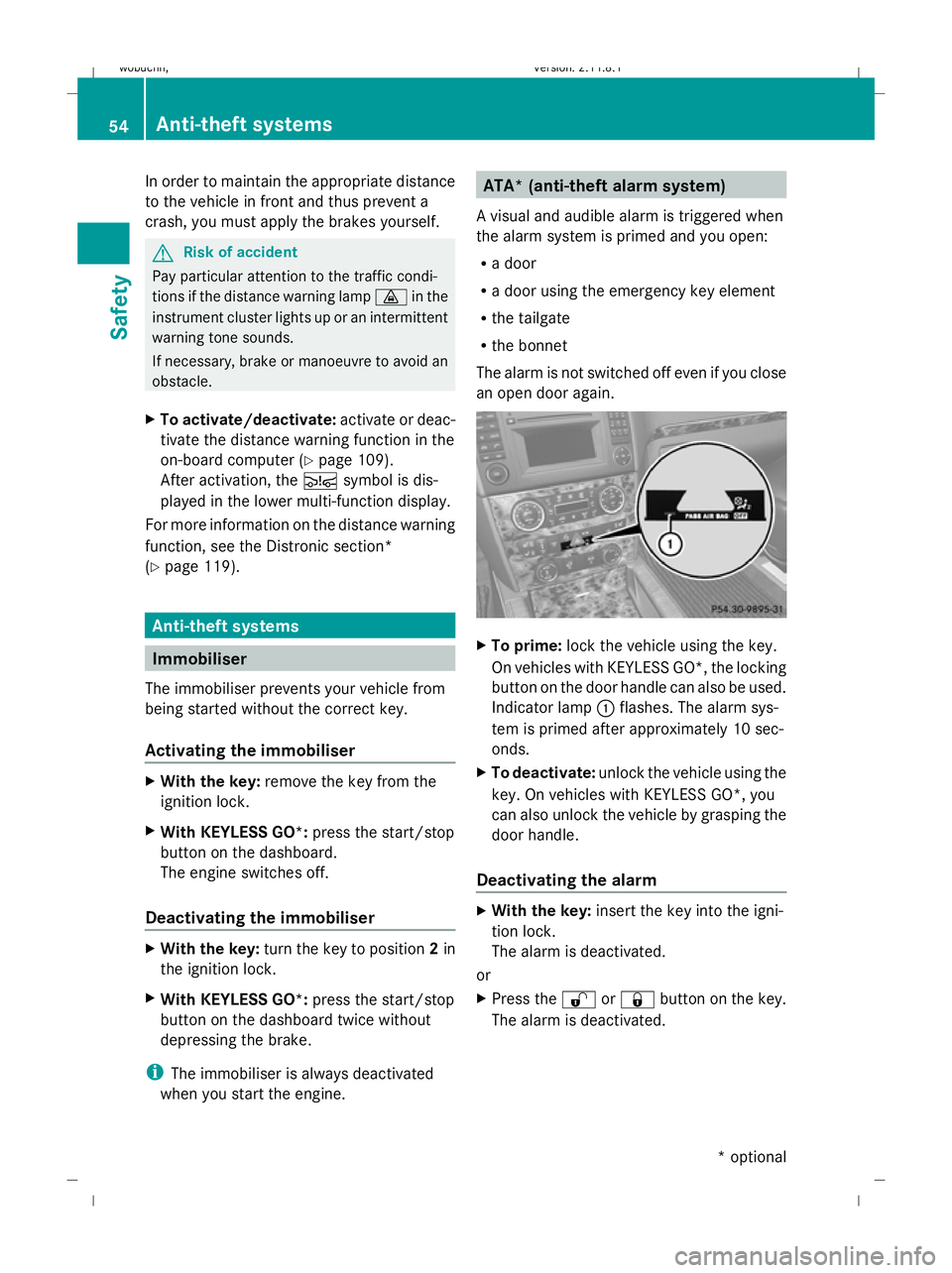
To prime: lock the vehicle using the key.
On vehicles with KEYLESS GO*, the locking
button on the door handle can also be used.
Indicator lamp :flashes. The alarm sys-
tem is primed after approximately 10 sec-
onds.
X To deactivate: unlock the vehicle using the
key. On vehicles with KEYLESS GO*, you
can also unlock the vehicle by grasping the
door handle.
Deactivating the alarm X
With the key: insert the key into the igni-
tion lock.
The alarm is deactivated.
or
X Press the %or& button on the key.
The alarm is deactivated. 54
Anti-theft systemsSafety
* optional
X164_AKB; 2; 3, en-GB
wobuchh,
Version: 2.11.8.1 2009-03-31T14:14:58+02:00 - Seite 54
Dateiname: 6515431202_buchblock.pdf; erzeugt am 01. Apr 2009 00:16:49; WK
Page 58 of 309
X
With KEYLESS GO*: grasp the door han-
dle. The key must be outside the vehicle.
The alarm is deactivated.
or
X Press the Start/Stop button on the dash-
board. The key must be inside the vehicle.
The alarm is deactivated. Tow-away protection*
An audible and visual alarm is triggered if the
vehicle's angle of inclination is altered while
tow-away protection is primed. For example,
this occurs if the vehicle is jacked up on one
side.
Priming tow-away protection X
Make sure that all the doors and the tail-
gate are closed.
X Lock the vehicle with the key or, on vehicles
with KEYLESS GO*, with the locking button
on the door handle.
Tow-away protection is primed after
approximately 30 seconds.
Deactivating tow-away protection When you unlock your vehicle using the key
or KEYLESS GO*, tow-away protection is
automatically deactivated.
Deactivate tow-away protection manually to
prevent a false alarm if your vehicle:
R is being transported
R is being loaded, e.g. onto a ferry or car
transporter
R is parked on a movable surface, e.g. split-
level garages
It is possible to switch off tow-away protec-
tion on the on-board computer for the next
time the vehicle is locked (Y page 109). Tow-
away protection remains deactivated until
you unlock and lock the vehicle again.
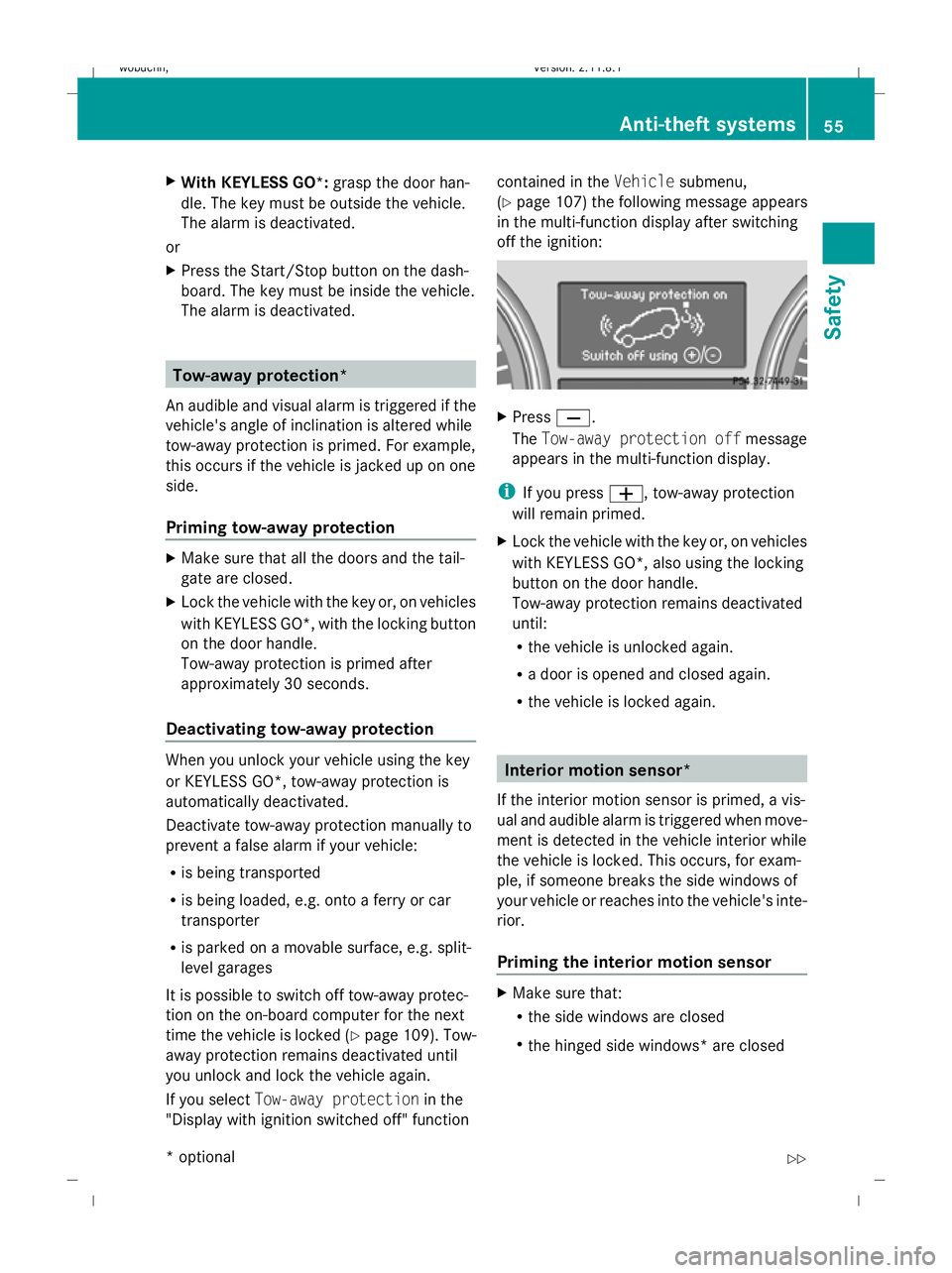
If you select Tow-away protection in the
"Display with ignition switched off" function contained in the
Vehiclesubmenu,
(Y page 107) the following message appears
in the multi-function display after switching
off the ignition: X
Press X.
The Tow-away protection off message
appears in the multi-function display.
i If you press W, tow-away protection
will remain primed.
X Lock the vehicle with the key or, on vehicles
with KEYLESS GO*, also using the locking
button on the door handle.
Tow-away protection remains deactivated
until:
R the vehicle is unlocked again.
R a door is opened and closed again.
R the vehicle is locked again. Interior motion sensor*
If the interior motion sensor is primed, a vis-
ual and audible alarm is triggered when move-
ment is detected in the vehicle interior while
the vehicle is locked. This occurs, for exam-
ple, if someone breaks the side windows of
your vehicle or reaches into the vehicle's inte-
rior.
Priming the interior motion sensor X
Make sure that:
R
the side windows are closed
R the hinged side windows* are closed Anti-theft systems
55Safety
* optional
X164_AKB; 2; 3, en-GB
wobuchh,
Version: 2.11.8.1 2009-03-31T14:14:58+02:00 - Seite 55 Z
Dateiname: 6515431202_buchblock.pdf; erzeugt am 01. Apr 2009 00:16:50; WK
Page 59 of 309
R
the sliding/tilting sunroof* is closed.
R there are no objects, e.g. mascots, hang-
ing on the rear-view mirror or on the grab
handles on the roof trim.
This will prevent false alarms.
X Make sure that all the doors and the tail-
gate are closed.
X Lock the vehicle with the key or, on vehicles
with KEYLESS GO*, also using the locking
button on the door handle.
The interior motion sensor is primed after
approximately 40 seconds.
Deactivating the interior motion sensor When you unlock your vehicle using the key
or KEYLESS GO *,the interior motion sensor
is automatically deactivated.
To prevent a false alarm, deactivate the inte-
rior motion sensor if you lock your vehicle
and:
R people or animals remain in the vehicle.
R a side window remains open.
R a hinged side window* remains open.
R the sliding/tilting sunroof* remains open.
It is possible to deactivate the interior motion
sensor using the on-board computer for the
next time the vehicle is locked
(Y page 109). The interior motion sensor
remains deactivated until you unlock and lock
the vehicle again.
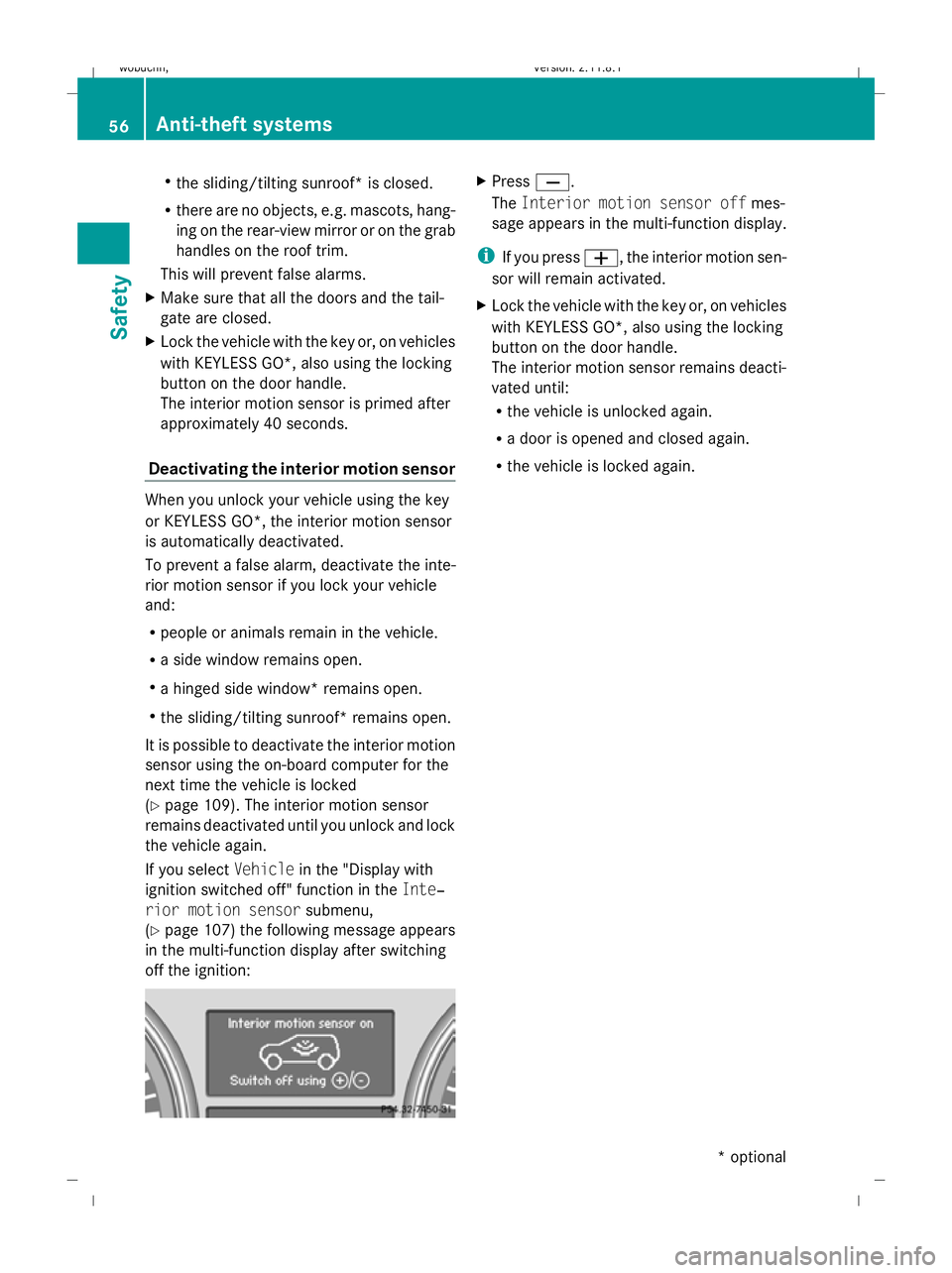
If you select Vehiclein the "Display with
ignition switched off" function in the Inte‐
rior motion sensor submenu,
(Y page 107) the following message appears
in the multi-function display after switching
off the ignition: X
Press X.
The Interior motion sensor off mes-
sage appears in the multi-function display.
i If you press W, the interior motion sen-
sor will remain activated.
X Lock the vehicle with the key or, on vehicles
with KEYLESS GO*, also using the locking
button on the door handle.
The interior motion sensor remains deacti-
vated until:
R
the vehicle is unlocked again.
R a door is opened and closed again.
R the vehicle is locked again. 56
Anti-theft systemsSafety
* optional
X164_AKB; 2; 3, en-GB
wobuchh
,V ersion: 2.11.8.1
2009-03-31T14:14:58+02:00 - Seite 56
Dateiname: 6515431202_buchblock.pdf; erzeugt am 01. Apr 2009 00:16:50; WK
Page 61 of 309
Opening and closing
Key
The key centrally locks/unlocks:
R the doors
R the tailgate
R the fuel filler flap G
Risk of accident
If children are left unsupervised in the vehicle,
they could:
R open a door from the inside at any time,
even if it has been locked
R start the vehicle using a key which has been
left in the vehicle
R release the parking brake
They could thereby endanger themselves and
others. Never leave children unsupervised in
the vehicle. Always take the key with you
when leaving the vehicle, even if you are only
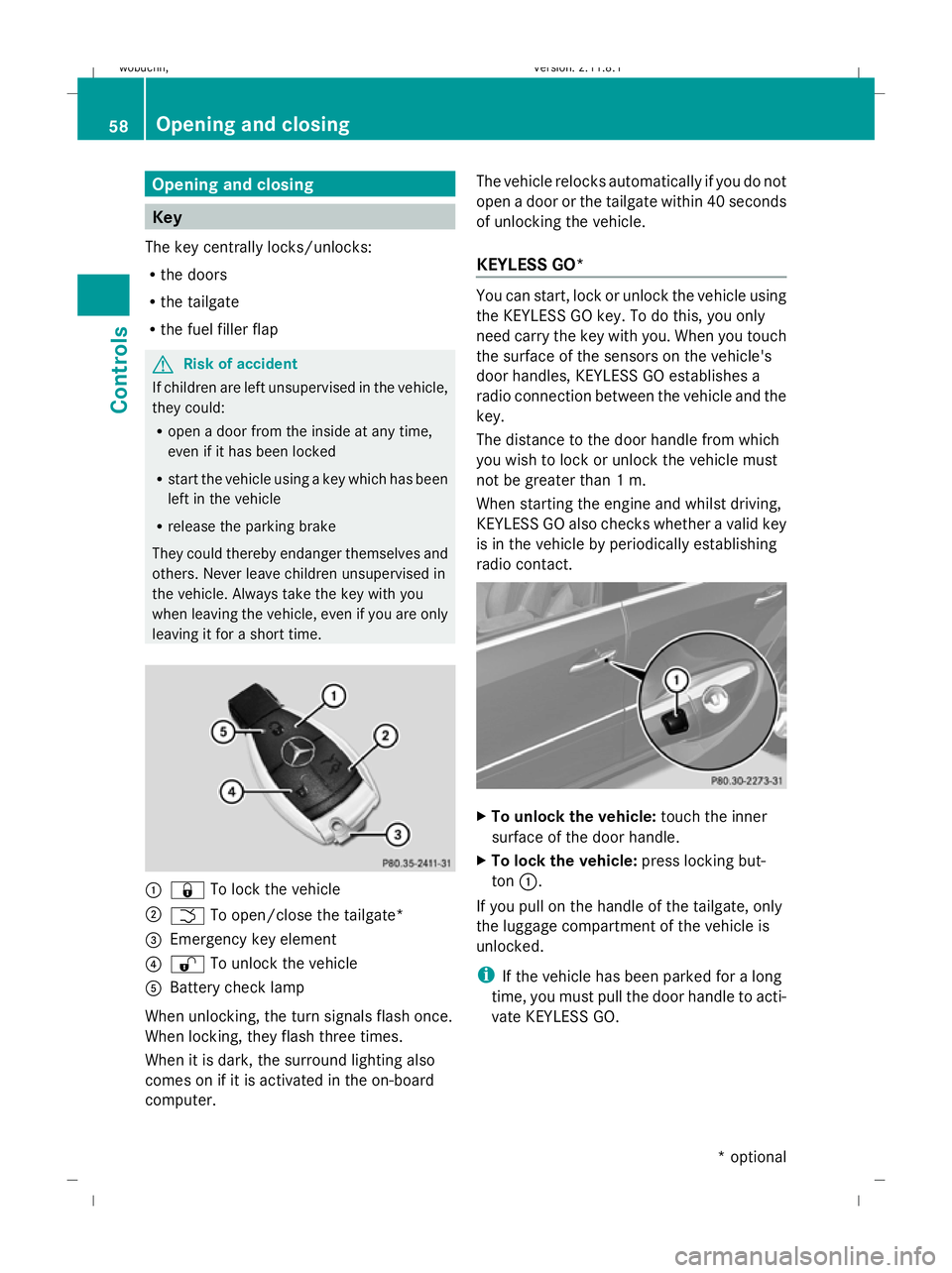
leaving it for a short time. :
& To lock the vehicle
; F To open/close the tailgate*
= Emergency key element
? % To unlock the vehicle
A Battery check lamp
When unlocking, the turn signals flash once.
When locking, they flash three times.
When it is dark, the surround lighting also
comes on if it is activated in the on-board
computer. The vehicle relocks automatically if you do not
open a door or the tailgate within 40 seconds
of unlocking the vehicle.
KEYLESS GO* You can start, lock or unlock the vehicle using
the KEYLESS GO key. To do this, you only
need carry the key with you. When you touch
the surface of the sensors on the vehicle's
door handles, KEYLESS GO establishes a
radio connection between the vehicle and the
key.
The distance to the door handle from which
you wish to lock or unlock the vehicle must
not be greater than 1 m.
When starting the engine and whilst driving,
KEYLESS GO also checks whether a valid key
is in the vehicle by periodically establishing
radio contact. X
To unlock the vehicle: touch the inner
surface of the door handle.
X To lock the vehicle: press locking but-
ton :.
If you pull on the handle of the tailgate, only
the luggage compartment of the vehicle is
unlocked.
i If the vehicle has been parked for a long
time, you must pull the door handle to acti-
vate KEYLESS GO. 58
Opening and closingControls
* optional
X164_AKB; 2; 3, en-GB
wobuchh,
Version: 2.11.8.1 2009-03-31T14:14:58+02:00 - Seite 58
Dateiname: 6515431202_buchblock.pdf; erzeugt am 01. Apr 2009 00:16:51; WK
Page 62 of 309
Individual settings
You can change the setting of the locking
system in such a way that only the driver's
door and the fuel filler flap are unlocked. This
could be useful if you frequently travel on your
own.
X To change the setting: press the%
and & buttons simultaneously for
approximately six seconds until the battery
check lamp flashes twice.
The key now functions as follows:
X To unlock the driver's door: press the
% button once.
X To unlock centrally: press the%but-
ton twice.
X To lock centrally: press the&button.
The KEYLESS GO* function is changed as fol-
lows:
X To unlock the driver's door: touch the
inner surface of the door handle on the
driver's door.
X To unlock centrally: touch the inner sur-
face of the door handle on the front-
passenger door or the rear door.
X To lock centrally: press locking but-
ton :on one of the door handles.
Restoring the factory settings X
Press the %and& buttons simulta-
neously for approximately six seconds until
the battery check lamp flashes twice.
Additional information R
Convenience opening (Y page 87)
R Convenience closing (Y page 87)
R Opening and closing in an emergency
(Y page 250) Opening the doors from the inside
You can open a door from the inside even if it
has been locked, unless the child-proof locks
have been activated ( Ypage 49). X
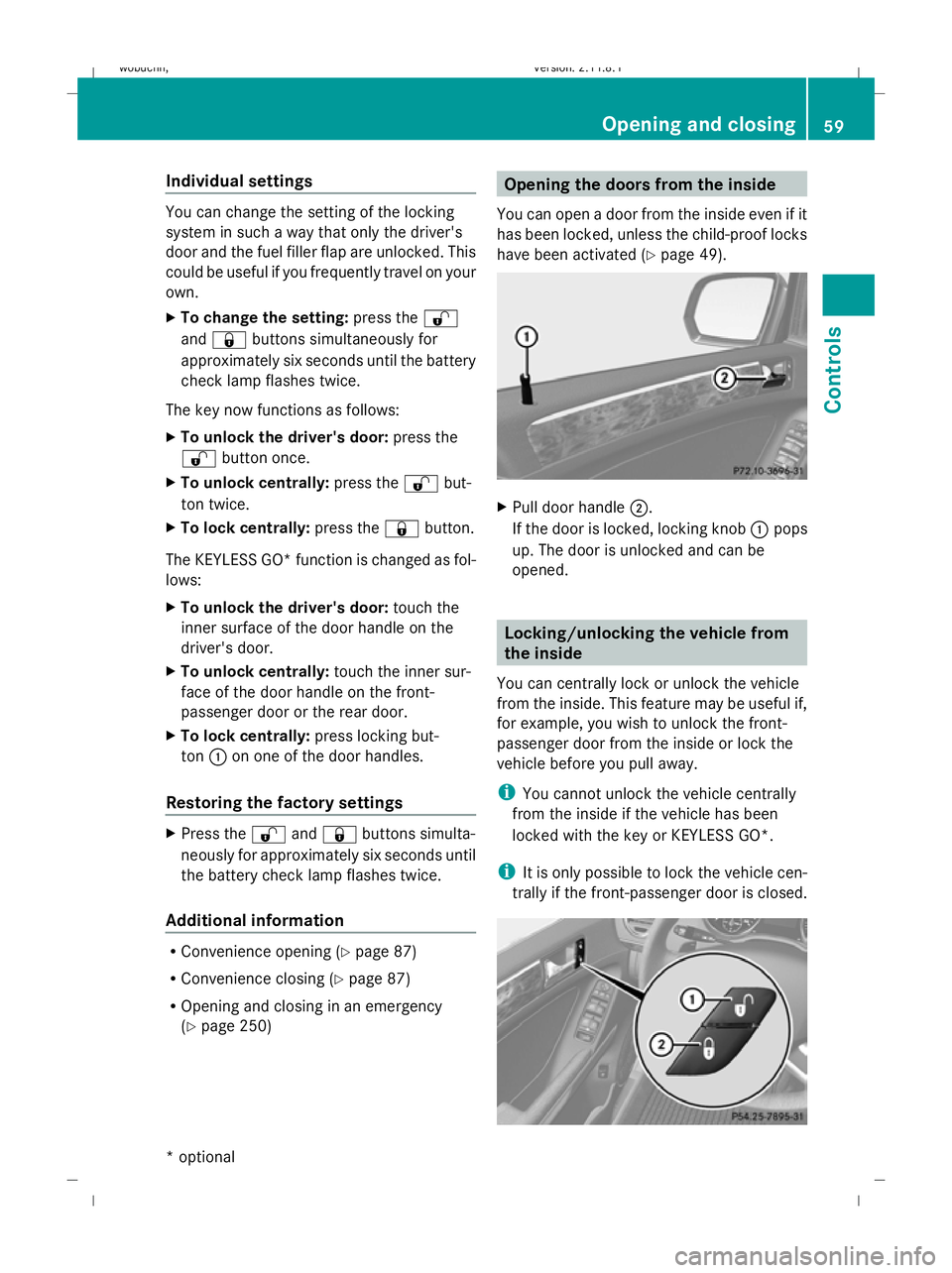
Pull door handle ;.
If the door is locked, locking knob :pops
up. The door is unlocked and can be
opened. Locking/unlocking the vehicle from
the inside
You can centrally lock or unlock the vehicle
from the inside. This feature may be useful if,
for example, you wish to unlock the front-
passenger door from the inside or lock the
vehicle before you pull away.
i You cannot unlock the vehicle centrally
from the inside if the vehicle has been
locked with the key or KEYLESS GO*.
i It is only possible to lock the vehicle cen-
trally if the front-passenger door is closed. Opening and closing
59Controls
* optional
X164_AKB; 2; 3, en-GB
wobuchh,
Version: 2.11.8.1 2009-03-31T14:14:58+02:00 - Seite 59 Z
Dateiname: 6515431202_buchblock.pdf; erzeugt am 01. Apr 2009 00:16:52; WK
Page 65 of 309
X
Press handle :in the direction of
arrow ;as far as it will go and hold it there.
X From this position, pull handle :in the
direction of arrow =as far as it will go and
hold it there.
X Swing the tailgate upwards.
i Vehicles with the EASY-PACK tailgate*:
If you do not open the tailgate after unlock-
ing, it will lock again automatically after a
few seconds. Automatically opening/closing* the
vehicle from inside G
Risk of injury
Monitor the tailgate opening and closing pro-
cedures to make sure that nobody can
become trapped. To halt the opening or clos-
ing procedure, press the closing button* on
the tailgate again or pull the handle on the
outside of the tailgate.
Opening the spare wheel bracket You can open the tailgate automatically using
the key or the handle in the tailgate. 11
X To open: press and hold the Fbutton
on the key until the tailgate opens.
or
X When the tailgate is unlocked, pull the han-
dle and let it go again immediately.
Closing the spare wheel bracket You can close the tailgate automatically using
the key 11
, using the closing button 11
or lock-
ing button 12
. X
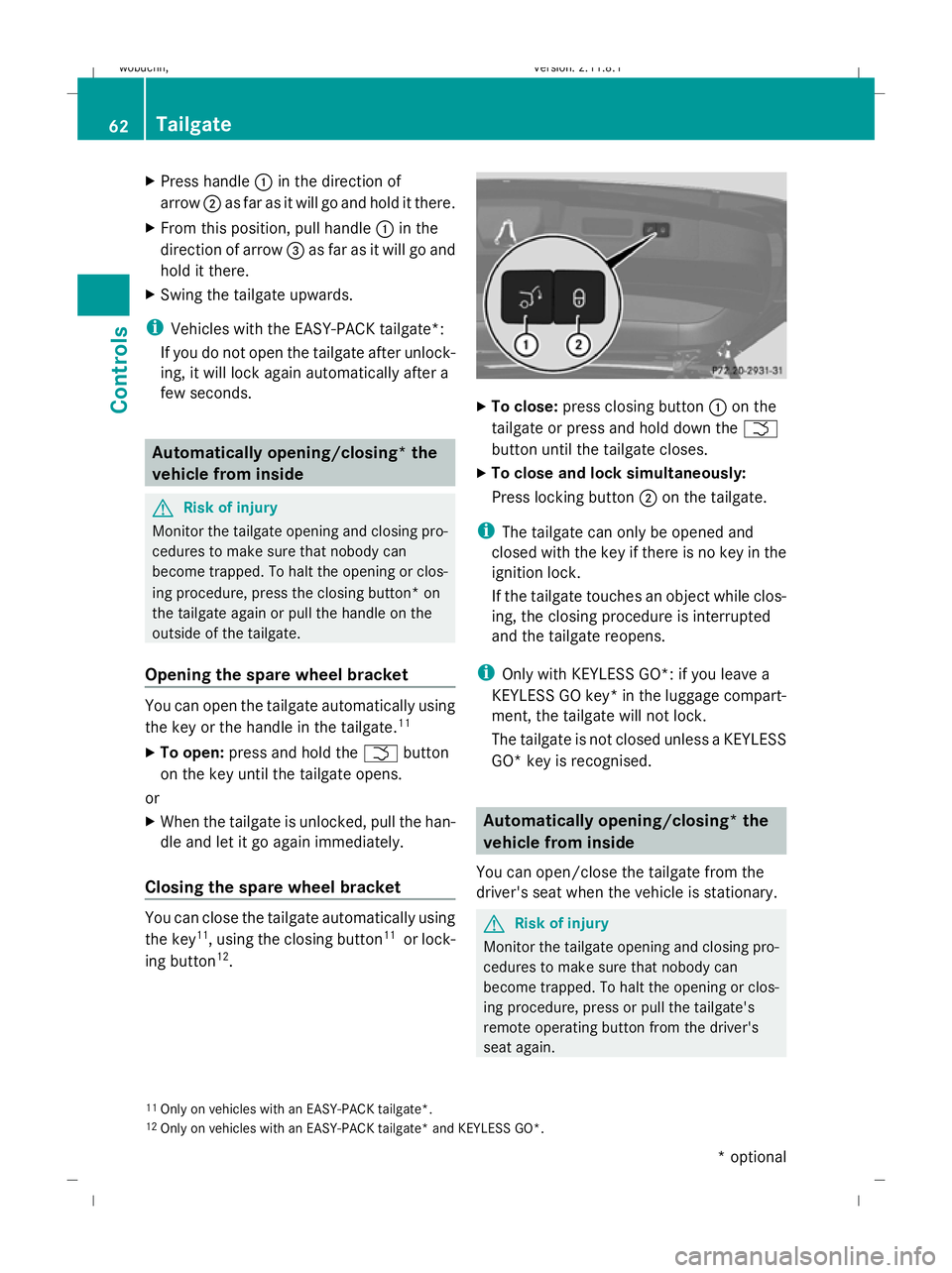
To close: press closing button :on the
tailgate or press and hold down the F
button until the tailgate closes.
X To close and lock simultaneously:
Press locking button ;on the tailgate.
i The tailgate can only be opened and
closed with the key if there is no key in the
ignition lock.
If the tailgate touches an object while clos-
ing, the closing procedure is interrupted
and the tailgate reopens.
i Only with KEYLESS GO*: if you leave a
KEYLESS GO key* in the luggage compart-
ment, the tailgate will not lock.
The tailgate is not closed unless a KEYLESS
GO* key is recognised. Automatically opening/closing* the
vehicle from inside
You can open/close the tailgate from the
driver's seat when the vehicle is stationary. G
Risk of injury
Monitor the tailgate opening and closing pro-
cedures to make sure that nobody can
become trapped. To halt the opening or clos-
ing procedure, press or pull the tailgate's
remote operating button from the driver's
seat again.
11 Only on vehicles with an EASY-PACK tailgate*.
12 Only on vehicles with an EASY-PACK tailgate* and KEYLESS GO*. 62
TailgateControls
* optional
X164_AKB; 2; 3, en-GB
wobuchh,
Version: 2.11.8.1 2009-03-31T14:14:58+02:00 - Seite 62
Dateiname: 6515431202_buchblock.pdf; erzeugt am 01. Apr 2009 00:16:54; WK
Page 66 of 309
X
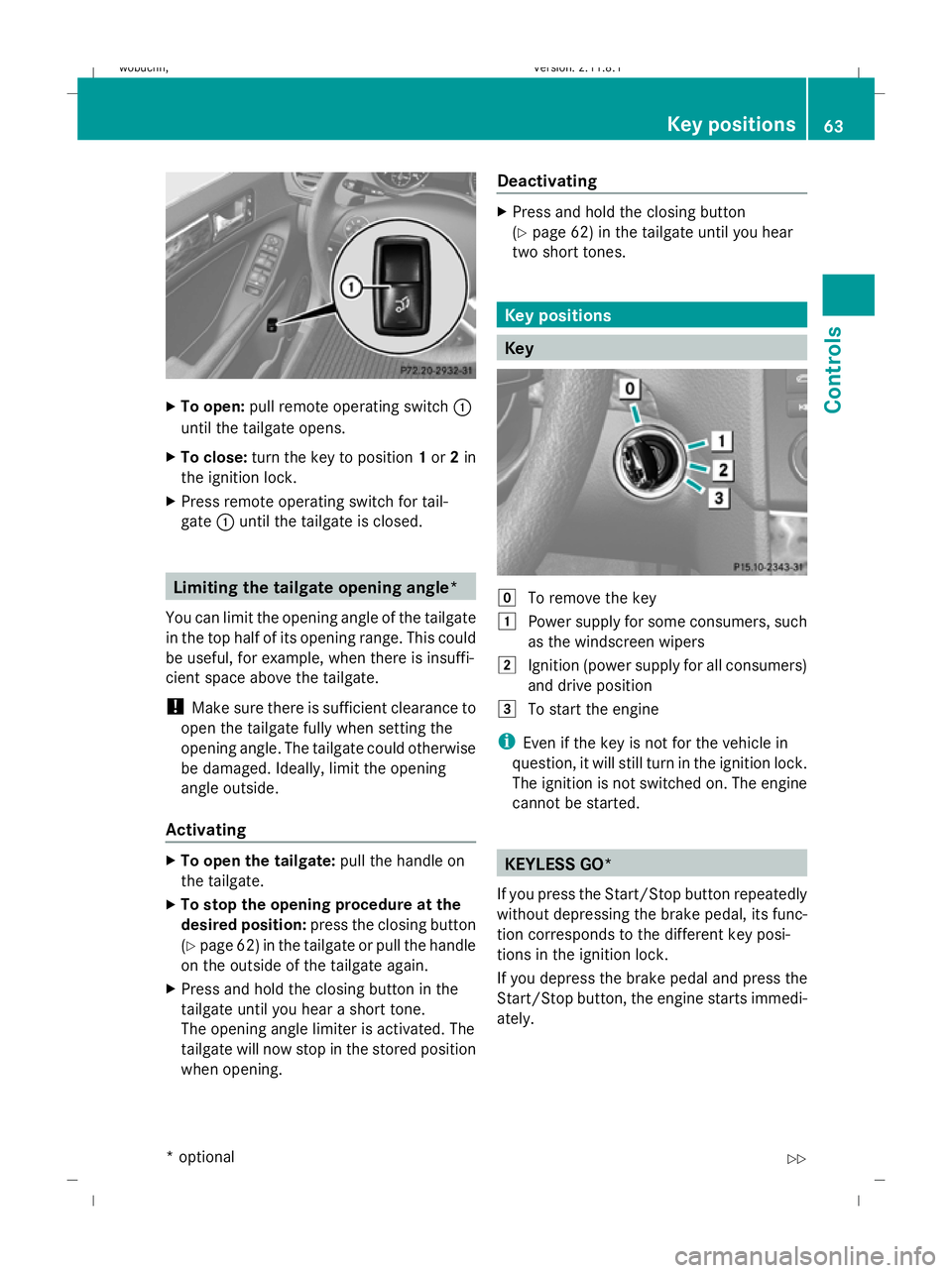
To open: pull remote operating switch :
until the tailgate opens.
X To close: turn the key to position 1or 2in
the ignition lock.
X Press remote operating switch for tail-
gate :until the tailgate is closed. Limiting the tailgate opening angle*
You can limit the opening angle of the tailgate
in the top half of its opening range. This could
be useful, for example, when there is insuffi-
cient space above the tailgate.
! Make sure there is sufficient clearance to
open the tailgate fully when setting the
opening angle. The tailgate could otherwise
be damaged. Ideally, limit the opening
angle outside.
Activating X
To open the tailgate: pull the handle on
the tailgate.
X To stop the opening procedure at the
desired position: press the closing button
(Y page 62) in the tailgate or pull the handle
on the outside of the tailgate again.
X Press and hold the closing button in the
tailgate until you hear a short tone.
The opening angle limiter is activated. The
tailgate will now stop in the stored position
when opening. Deactivating X
Press and hold the closing button
(Y page 62) in the tailgate until you hear
two short tones. Key positions
Key
g
To remove the key
1 Power supply for some consumers, such
as the windscreen wipers
2 Ignition (power supply for all consumers)
and drive position
3 To start the engine
i Even if the key is not for the vehicle in
question, it will still turn in the ignition lock.
The ignition is not switched on. The engine
cannot be started. KEYLESS GO*
If you press the Start/Stop button repeatedly
without depressing the brake pedal, its func-
tion corresponds to the different key posi-
tions in the ignition lock.
If you depress the brake pedal and press the
Start/Stop button, the engine starts immedi-
ately. Key positions
63Controls
* optional
X164_AKB; 2; 3, en-GB
wobuchh
,V ersion: 2.11.8.1
2009-03-31T14:14:58+02:00 - Seite 63 Z
Dateiname: 6515431202_buchblock.pdf; erzeugt am 01. Apr 2009 00:16:54; WK