fog light MERCEDES-BENZ GL SUV 2012 User Guide
[x] Cancel search | Manufacturer: MERCEDES-BENZ, Model Year: 2012, Model line: GL SUV, Model: MERCEDES-BENZ GL SUV 2012Pages: 441, PDF Size: 10.66 MB
Page 231 of 441
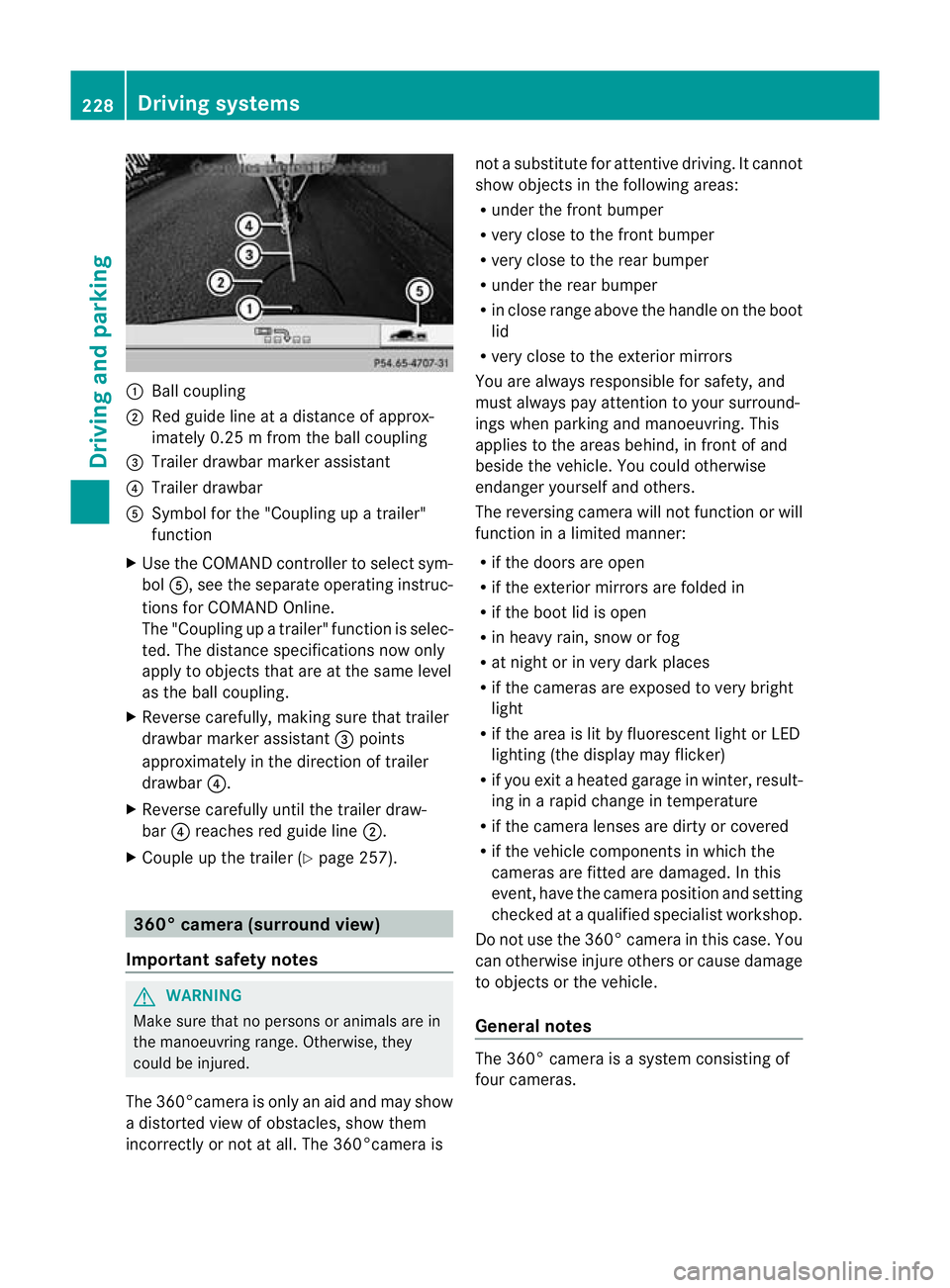
:
Ballcoupling
; Red guid elineatad istance of approx-
imately 0.25 mfromt he ball coupling
= Trailer drawbar marker assistant
? Trailer drawbar
A Symbol for the "Coupling up atrailer"
functi on
X Use th eCOM AND controlle rtoselect sym-
bol A,s ee the separate operating instruc-
tions for COMAN DOnline.
The "Coupling up atrailer" functio nisselec-
ted. The distance specification snow only
apply to objec tsthat are at the same level
as the ball coupling.
X Reverse carefully, making sure that trailer
drawbar marker assistant =points
approximately in the directio noftrailer
drawbar ?.
X Revers ecarefully until the trailer draw-
bar ?reaches red guide line ;.
X Couple up the trailer (Y page 257).360° camera (surround view)
Important safety notes G
WARNING
Make sure that no persons or animals are in
the manoeuvring range. Otherwise, they
could be injured.
The 360°camera is only an aid and may show
ad istorted view of obstacles, show them
incorrectly or not at all. The 360°camer aisnot
asubstitute for attentiv edriving. It cannot
sho wobjects in the following areas:
R under the fr ontb um per
R very clos etothe frontb um per
R very clos etothe rear bumper
R unde rthe rear bumper
R in close range abov ethe handle on th eboot
lid
R ver yclose to th eexter ior mirrors
You are always responsible for safety, and
must always pay attention to your surround-
ing sw hen par king and manoeuvring. This
applies to the areas behind ,inf ront of and
beside th evehicle. Yo ucould otherwise
endanger yoursel fand oth ers.
The rever sing camera will not functi on or will
function in alimited manner:
R if the doors are open
R if the exterior mir rors are folde din
R if the boot lid is open
R in heavy rain, snow or fog
R at night or in very dark places
R if the cameras are exposed to very bright
light
R if the area is lit by fluorescen tlight or LED
lightin g(the display may flicker)
R if you exit aheate dgarage in winter, result-
ing in arapid change in temperature
R if the camera lenses are dirt yorcovered
R if the vehicle component sinwhich the
cam erasare fitted are damaged .Inthis
event, hav ethe cam eraposition and setting
checked at aqualified specialist workshop.
Do not use the 360 °camer aint his case .You
can otherwise injur eothersorc ause damage
to object sorthe vehicle.
Ge neral notes The 360° camera is
asystem consisting of
four cameras. 228
Drivin
gsystemsDriving and parking
Page 238 of 441
You are responsible for safet
yand must drive
in accordanc ewith traffic conditions. You
could otherwise endanger yourself and oth-
ers.
The system may be impaired or may not func-
tion if:
R there is poor visibility, e.g. due to snow,
rain ,fog or spray.
R thew indscree nisdirty, misted up or cov-
ered, for instance by asticker, in the vicinity
of the camera.
R on bends ,onuphillgradient sordownhill
gradients. G
WARNING
Night Vie wAssist Plus is only an aid designed
to assist driving and does not reliev eyou of
the responsibility to pay attention. Continue
to look through the windscreen instea dof
relyin gonthe Night View Assist Plus display.
You ar eresponsible for safet yand must drive
in accordance with traffic conditions .You
coul dotherwis eendange ryourself and oth-
ers.
The syste mmay be impaired or may not func-
tio nif:
R the re is poor visibility,e.g.d ue to snow,
rain ,fog or spray.
R thew indscree nisdirty, misted up or cov-
ered, for instance by asticker, in the vicinity
of the camera.
R on bends ,onuphillgradient sordownhill
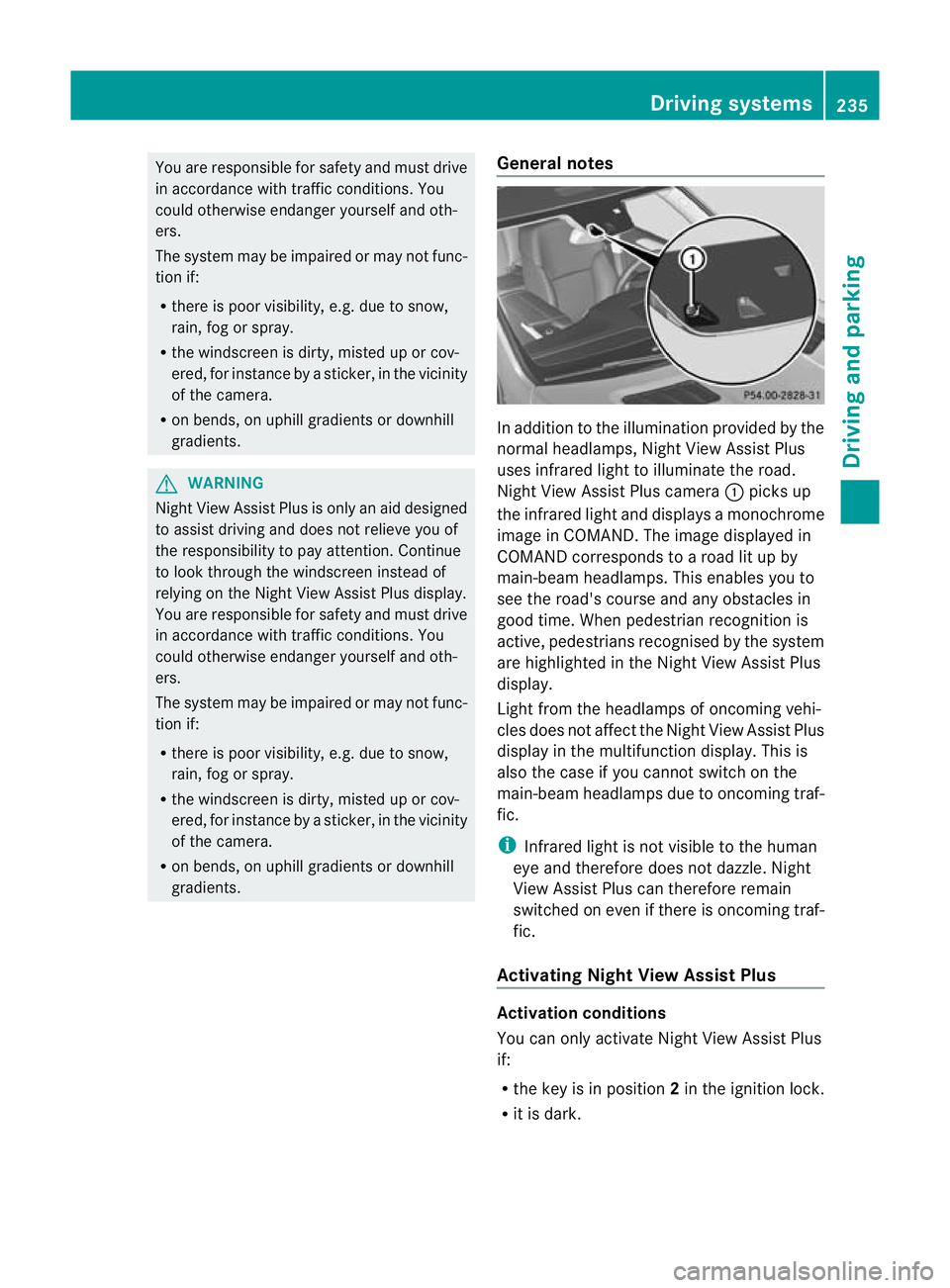
gradients. General notes In addition to the illumination provided by the
normal headlamps, Night View Assist Plus
uses infrared light to illuminate the road.
Night View Assist Plus camera
:pick sup
the infrared ligh tand displays amonochrome
image in COMAND. The image displayed in
COMAN Dcorresponds to aroad lit up by
main-beam headlamps. This enables you to
see the road's course and any obstacles in
good time. When pedestrian recognition is
active, pedestrians recognised by the system
ar eh ighlighted in the Night View Assist Plus
display.
Light from the headlamps of oncomin gvehi-
cles does not affect the Night View Assist Plus
display in the multifunction display. This is
also the case if you cannot switch on the
main-bea mheadlamps due to oncoming traf-
fic.
i Infrared light is not visible to the human
eye and therefore does not dazzle. Night
View Assist Plus can therefore remain
switched on even if there is oncoming traf-
fic.
Activating Nigh tView Assis tPlus Activation conditions
You can only activat
eNight View Assist Plus
if:
R the key is in position 2in the ignition lock.
R it is dark. Drivin
gsystems
235Drivingand parking Z
Page 243 of 441
If
av ehicle is detected within the monitoring
range of Blin dSpot Assist at speed sabove
30 km/h, warning lamp :on the corre-
sponding side lights up red. This warning
alway soccurs whe navehicle enter sthe blind
spot monitoring range from behind or from
the side. When you overtak eavehicle, the
warning only occurs if the difference in speed
is less than 12 km/h.
The yellow indicator lam pgoes out if reverse
gear is engaged. Blin dSpot Assist is then
deactivated.
The brightness of the indicator/warning
lamps is adjusted autom atically according to
the ambient light.
Collision warning
If av ehicle is detected in the monitoring range
of Blin dSpot Assist and you switch on the
correspondin gturn signal ,adouble warning
tone sounds. Red warnin glamp :flashes. If
the turn signal remains on, detected vehicles
are indicated by the flashing of red warning
lamp :.There ar enofurther warning tones.
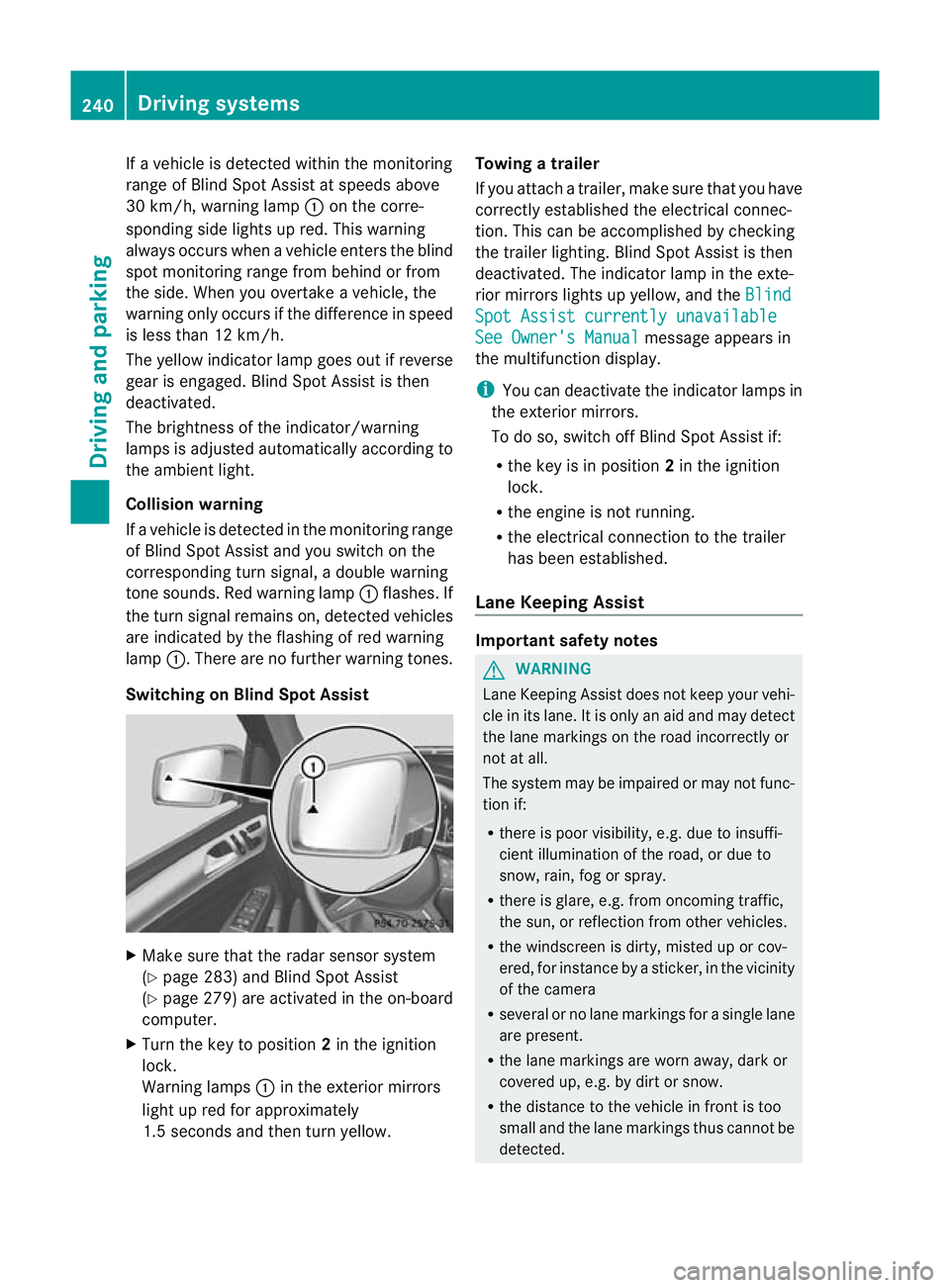
Switching on Blind Spot Assist X
Make sure that the radar senso rsystem
(Y page 283) and Blind Spot Assist
(Y page 279) are activated in the on-board
computer.
X Turn the key to position 2in the ignition
lock.
Warning lamps :in the exterior mirrors
ligh tupr ed for approximately
1. 5s econds and then tur nyellow. Towing
atrailer
If yo uattach atrailer, make sure th at you have
corre ctly established the electrical connec-
tion. This can be accomplished by checking
the trailer lighting. Blind Spot Assist is then
deactivated. The indicator lamp in the exte-
rior mirrors lights up yellow ,and the Blind Spo
tAssist currently unavailable See Owner's Manual message appears in
th em ultifunction display.
i You can deactivate the indicator lamps in
the exterior mirrors.
To do so, switch off Blind Spot Assis tif:
R thek ey is in position 2in the ignition
lock.
R the engine is not running.
R the electrical connection to the trailer
has been established.
Lane Keeping Assist Important safety notes
G
WARNING
Lan eKeeping Assist does not keep your vehi-
cle in its lane. It is only an aid and may detect
the lane markings on the road incor rectly or
not at all.
Th es ystem may be impaired or may not func-
tion if:
R there is poo rvisibility, e.g. due to insuffi-
cient illumination of the road, or due to
snow, rain, fog or spray.
R there is glare, e.g. from oncoming traffic,
the sun, or reflec tion from other vehicles.
R the windscreen is dirty, misted up or cov-
ered, for insta ncebyasticker, in the vicinity
of the camera
R several or no lane markings for asingle lane
are present.
R the lane markings are worn away, dark or
covered up, e.g. by dirt or snow.
R the distance to the vehicle in fron tist oo
smal land the lane markings thus cannot be
detected. 240
Drivin
gsystemsDrivin gand pa rking
Page 248 of 441
No course-correctin
gbrake applicatio nor
brak eapplication adapted to the driving con-
ditions occurs if:
R there are vehicles or obstacles, e.g. crash
barriers, on both sides of your vehicle.
R av ehicle approaches too closely on the
side.
R you have adopted asport ydriving style with
high cornerin gspeeds.
R you brak eoraccelerat edecisively.
R ad riving safety system intervenes, such as
ESP ®
or PRE-SAFE ®
Brake.
R ESP ®
is deactivated.
R theO ff-roa dprogram is activated (vehicles
without th eON&O FFROAD package).
R Off-road program 1or2isactivated (vehi-
cles with the ON&OFFROAD package).
R the LOW RANGE off-road gear is activated
(vehicle swith the ON&OFFROAD package).
R al oss of tyr epressure or adefec tive tyre is
detected.
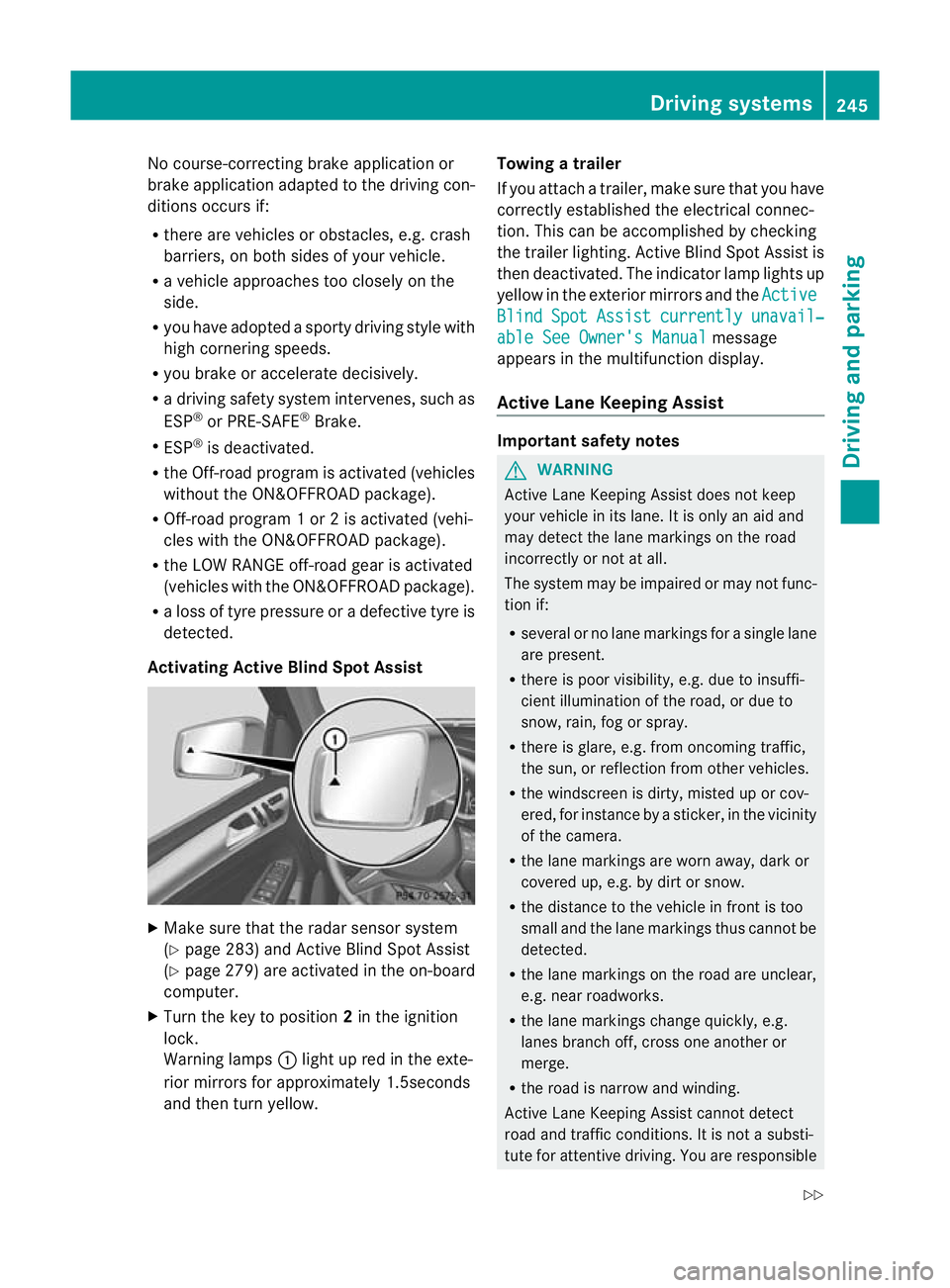
Activatin gActive Blind Spot Assist X
Make sure that the radar senso rsystem
(Y page 283 )and Active Blind Spot Assist
(Y pag e279)are activate dint he on-board
computer.
X Tur nthe key to position 2in the ignition
lock.
Warnin glamps :light up red in the exte-
rior mirrors for approximately 1.5seconds
and then tur nyellow. Towin
gatrailer
If yo uattach atrailer, make sure th at you have
corre ctly established the electrical connec-
tion. This can be accomplished by checking
the trailer lighting. Active Blind Spot Assist is
then deactivated. The indicator lamp lights up
yellow in the exterior mirrors and the Active Blind Spot Assist currently unavail‐
able Se
eOwner's Manual message
appears in th emultifunction display.
Active Lane Keeping Assist Important safety notes
G
WARNING
Active Lane Keeping Assis tdoes not keep
your vehicle in its lane. It is only an aid and
may detec tthe lan emarkings on the road
incorrectly or not at all.
The system may be impaired or may not func-
tion if:
R several or no lane markings for asingle lane
are present.
R there is poor visibility, e.g. due to insuffi-
cient illumination of the road, or due to
snow, rain, fog or spray.
R there is glare, e.g. from oncoming traffic,
the sun, or reflec tion from other vehicles.
R the windscreen is dirty, misted up or cov-
ered, for insta ncebyasticker, in the vicinity
of the camera.
R the lane markings are worn away ,dark or
covered up, e.g. by dirt or snow.
R the distance to the vehicle in front is too
small and the lane markings thus cannot be
detected.
R the lane markings on the road are unclear,
e.g. near roadworks.
R the lane markings change quickly, e.g.
lanes branch off, cross one another or
merge.
R the road is narrow and winding.
Active Lane Keeping Assis tcannot detect
road and traffic conditions. It is not asubsti-
tute for attentive driving. You are responsible Driving systems
245Drivingand pa rking
Z
Page 284 of 441
Switching th
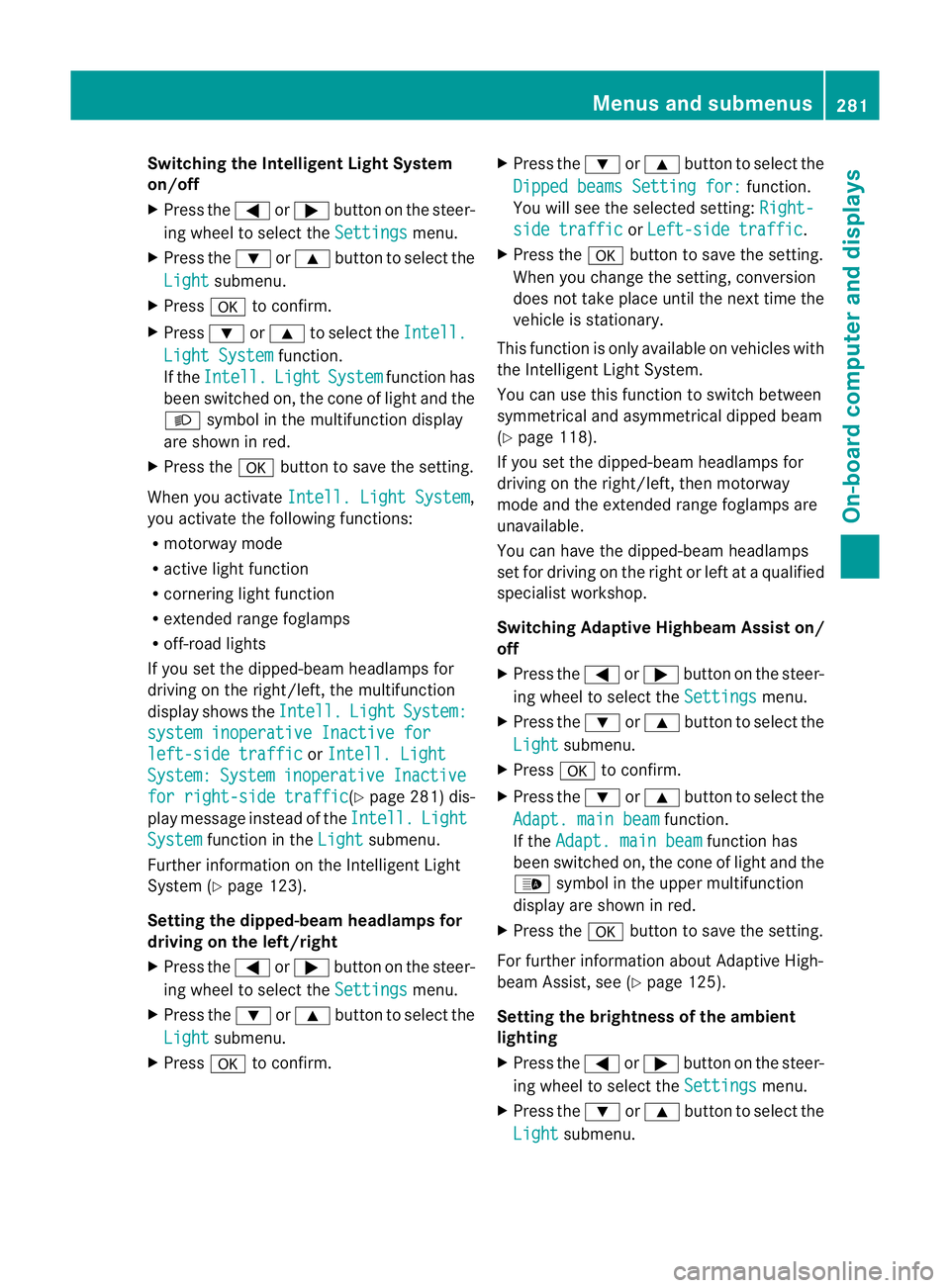
eIntelligent Ligh tSystem
on/off
X Press the =or; buttononthe steer-
ing wheel to selec tthe Settings menu.
X Press the :or9 button to selec tthe
Light submenu.
X Press ato con firm.
X Press :or9 to select the Intell. Ligh
tSystem function.
If the Intell. Light System functio
nhas
been switched on, the cone of light and the
L symbol in the multifunc tion display
ar es hown in red.
X Press the abutton to sav ethe setti ng.
When you activate Intell.Light System ,
yo ua ctivate the following functions:
R motorway mode
R active light function
R cornering light function
R exte nded range foglamps
R off-road lights
If you set the dipped-beam headlamps for
driving on the right/left ,the multifunc tion
display shows the Intell. Light System:
system inoperativ
eInactive for left-side traffic or
Intell. Light System: System inoperative Inactive
for right-side traffic (Y
page 281) dis-
play message instea doftheIntell. Light
System func
tion in the Light submenu.
Further information on the In telligent Light
System (Y page 123).
Setting the dippe d-beam headlamps for
driving on the left/right
X Press the =or; button on the steer-
ing wheel to select the Settings menu.
X Press the :or9 button to select the
Light submenu.
X Press ato confirm. X
Press the :or9 button to select the
Dipped beam sSetting for: function.
Yo uw ill see the selected setting: Right- side traffic or
Left-sid etraffic .
X Press the abuttontos ave the setting.
When you change the setting, conversion
does not take place until the next time the
vehicle is stationary.
This function is only available on vehicles with
the Intelligent Light System.
You can use this function to switch between
symmetrical and asymmetrical dipped beam
(Y page 118).
If you set the dipped-beam headlamps for
driving on the right/left ,then motorway
mode and the extended range foglamps are
unavailable.
You can hav ethe dipped-beam headlamps
set for driving on the right or lef tataqualified
specialist workshop.
Switching Adaptive Highbeam Assist on/
off
X Press the =or; button on the steer-
ing wheel to select the Settings menu.
X Press the :or9 button to select the
Light submenu.
X Press ato confirm.
X Press the :or9 button to select the
Adapt. main beam function.
If the Adapt. main beam function has
been switched on, the cone of light and the
_ symbol in the upper multifunction
display are shown in red.
X Press the abutton to save the setting.
For further information about Adaptive High-
beam Assist, see (Y page 125).
Setting the brightness of the ambient
lighting
X Press the =or; button on the steer-
ing wheel to select the Settings menu.
X Press the :or9 button to select the
Light submenu. Menus and submenus
281On-board computer and displays Z
Page 305 of 441
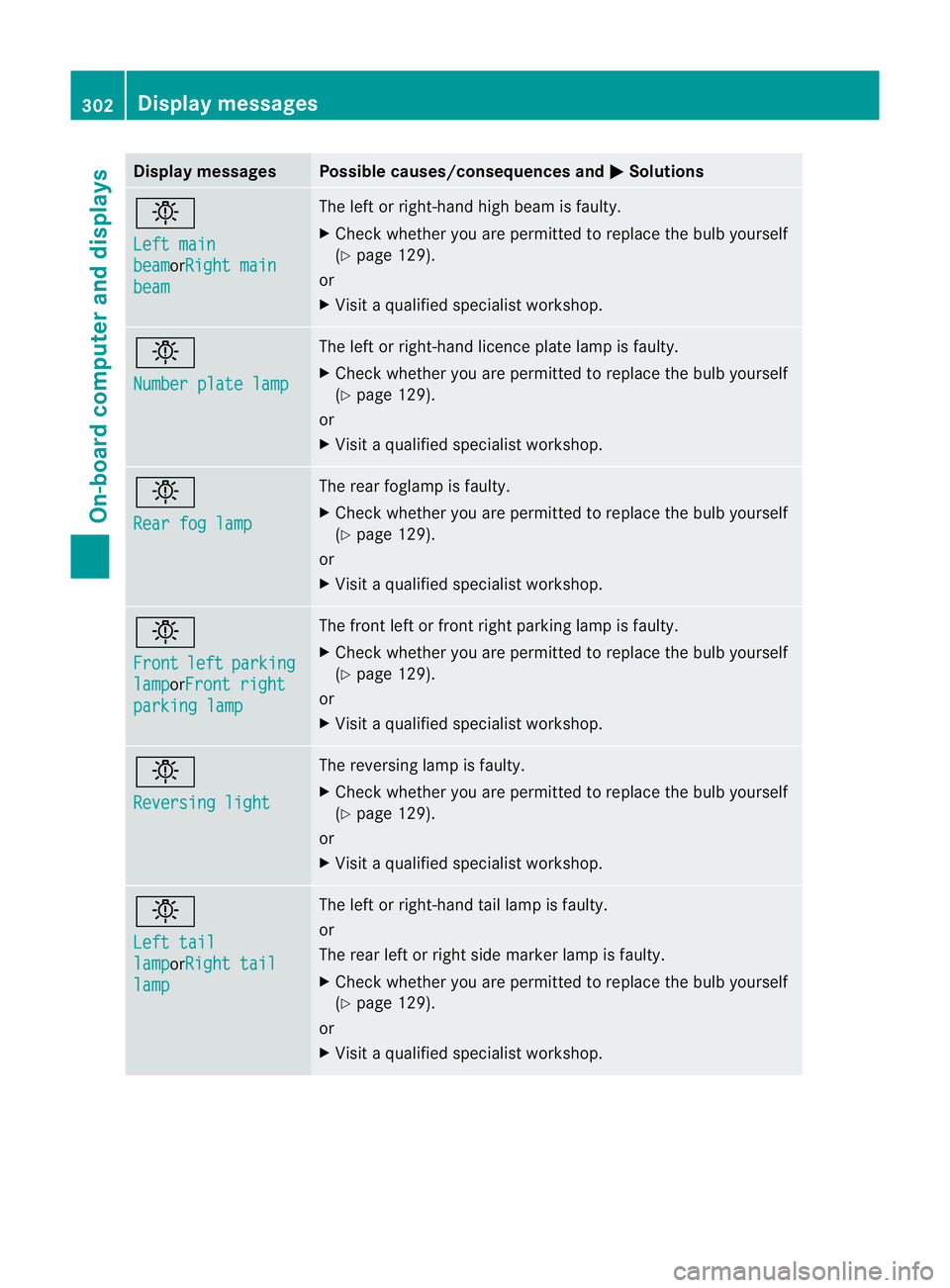
Displa
ymessages Possible causes/consequences and
M Solutions
b
Le
ft main beam or
Ri ghtm ain beam Th
eleftorr ight-han dhigh beam is faulty.
X Check whether you are permitted to replac ethe bulb yourself
(Y page 12 9).
or
X Visit aqualified specialist workshop. b
Number plat
elamp Th
eleft or right-han dlicence plate lamp is faulty.
X Check whether you are permitted to replac ethe bulb yourself
(Y page 12 9).
or
X Visit aqualified specialist workshop. b
Rear fo
glamp Th
er ear foglam pisfaulty.
X Check whether you are permitted to replac ethe bulb yourself
(Y page 12 9).
or
X Visit aqualified specialist workshop. b
Front
left parking
lamp orFron
tright parking lamp Th
ef ront left or front right parking lamp is faulty.
X Check whethe ryou ar epermitted to repla cethe bulb yourself
(Y page 129).
or
X Visit aqualified specialist workshop. b
Reversin
glight Th
er eversin glamp is faulty.
X Check whether you are permitted to replac ethe bulb yourself
(Y page 12 9).
or
X Visit aqualified specialist workshop. b
Left tail
lamp orRigh
ttail lamp Th
eleft or right-han dtail lamp is faulty.
or
The rear left or right side marker lamp is faulty.
X Check whether you are permitted to replac ethe bulb yourself
(Y page 12 9).
or
X Visit aqualified specialist workshop. 302
Display mess
agesOn-board computer and displays
Page 306 of 441
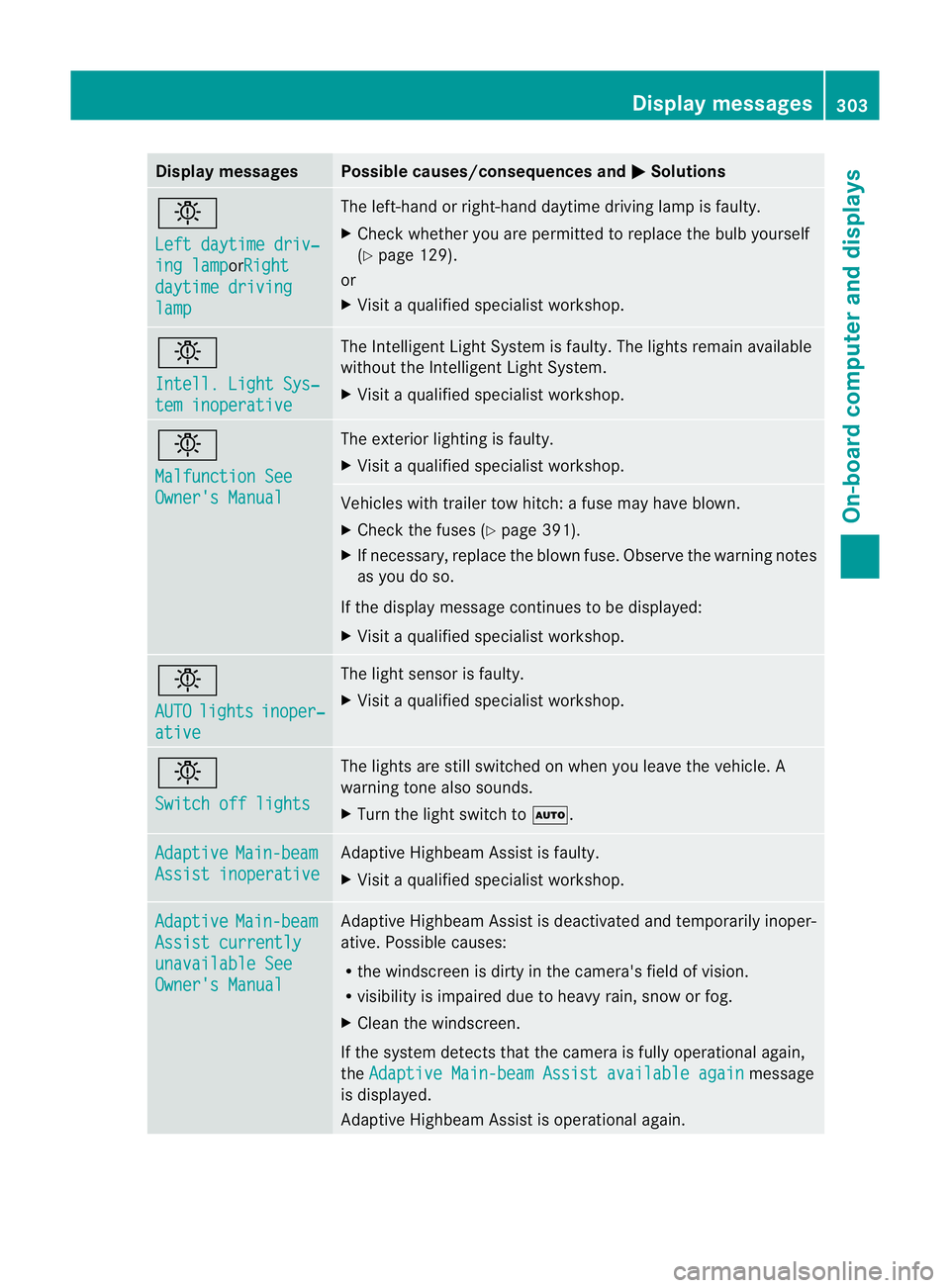
Displa
ymessages Possible causes/consequences and
M Solutions
b
Le
ft daytim edriv‐ ing lamp or
Ri ght daytim
edriving lamp Th
eleft-han dorright-hand daytime drivin glamp is faulty.
X Chec kwhether you ar epermitted to replace the bulb yourself
(Y page 129).
or
X Visit aqualified specialist workshop. b
Intell
.Light Sys‐ tem inoperative Th
eI ntelligent Light Syste misfaulty. The lights remain available
without the Intelligent Light System.
X Visit aqualified specialist workshop. b
Malfunctio
nSee Owner's Manual Th
ee xterior lighting is faulty.
X Visit aqualified specialist workshop. Vehicles with trailer tow hitch:
afuse may have blown.
X Check the fuses (Y page 391).
X If necessary, replace the blown fuse. Observe the warning notes
as you do so.
If the displa ymessage continues to be displayed:
X Visit aqualified specialist workshop. b
AUTO
lights inoper‐
ative The light senso
risf aulty.
X Visit aqualified specialist workshop. b
Switch of
flights Th
elights are still switched on when you leave the vehicle. A
warnin gtone also sounds.
X Tur nthe light switc htoÃ. Adaptive Main-beam
Assist inoperative Adaptive Highbea
mAssist is faulty.
X Visit aqualified specialist workshop. Adaptive Main-beam
Assist currently
unavailabl
eSee Owner's Manual Adaptive Highbea
mAssist is deactivate dand temporarily inoper-
ative. Possible causes:
R the windscreen is dirty in the camera's field of vision.
R visibility is impaired due to heavy rain, sno worfog.
X Clean the windscreen.
If the system detec tsthat the camera is fully operational again,
the Adaptive Main-beam Assist available again message
is displayed.
Adaptive Highbeam Assist is operational again. Display messages
303On-board computer and displays Z
Page 313 of 441
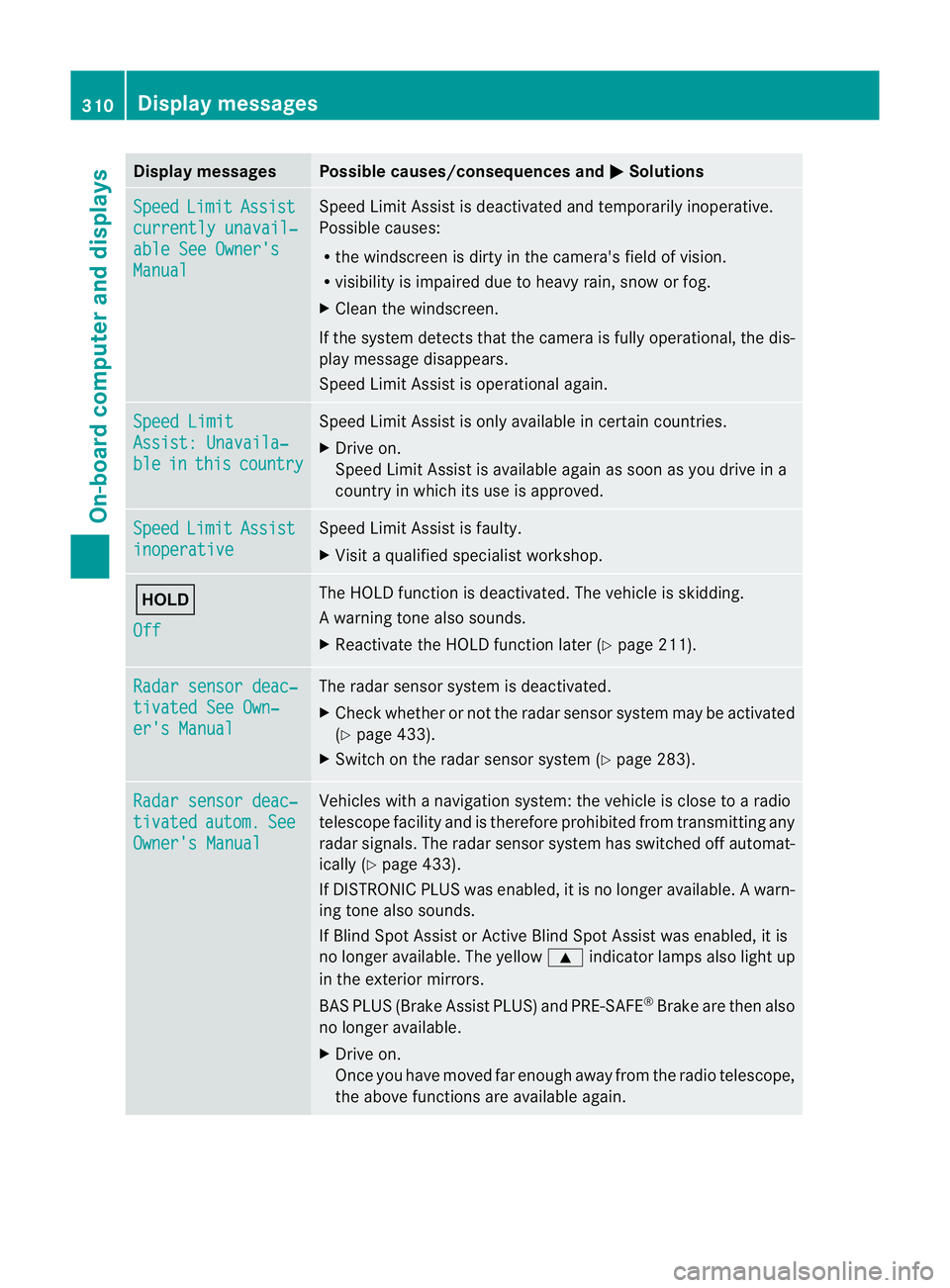
Displa
ymessages Possible causes/consequences and
M Solutions
Sp
eed Limit Assist
currently unavail‐
abl
eS ee Owner's Manual Spee
dLimit Assist is deactivated an dtemporarily inoperative.
Possible causes:
R the windscreen is dirt yinthe camera's field of vision.
R visibility is impaired due to heav yrain, snow or fog.
X Clea nthe windscreen.
If the system detec tsthat the camera is fully operational, the dis-
play message disappears.
Speed Limit Assist is operational again. Speed Limit
Assist
:Unavaila‐ ble in this country Spee
dLimit Assist is only available in certain countries.
X Driv eon.
Spee dLimit Assist is available again as soon as you drive in a
countr yinwhich its use is approved. Speed Limit Assist
inoperative Speed Limi
tAssist is faulty.
X Visit aqualified specialist workshop. ë
Off The HOLD function is deactivated. The vehicle is skidding.
Aw
arning ton ealso sounds.
X Reactivat ethe HOL Dfunction later (Y page 211). Ra
dars ensor deac‐ tivate
dSee Own‐ er'
sM anual Th
er adar sensor system is deactivated.
X Check whether or not the radar sensor system ma ybeactivated
(Y pag e433).
X Switch on the rada rsensor system (Y page 283). Rada
rsensor deac‐ tivated autom. See
Owner's Manual Vehicles with
anavigation system: the vehicle is close to aradio
telescop efacility and is therefore prohibite dfrom transmitting any
radar signals .The radar sensor system has switched off automat-
ically (Y page 433).
If DI STRONIC PLUS was enabled, it is no longe ravail able. Aw arn-
ing ton ealso sounds.
If Blin dSpotA ssist or Ac tiveBlind Spo tAssist was enabled, it is
no longe ravailable .The yellow 9indicator lamps also light up
in the exterior mirrors.
BA SP LUS (Brake Assist PLUS) and PRE-SAFE ®
Brak eare then also
no longe ravailable.
X Drive on.
Once yo uhave moved far enough awa yfrom th eradio telescope,
the above function sare avai lable again. 310
Display messagesOn-board computer and displays