trailer MERCEDES-BENZ GL SUV 2012 User Guide
[x] Cancel search | Manufacturer: MERCEDES-BENZ, Model Year: 2012, Model line: GL SUV, Model: MERCEDES-BENZ GL SUV 2012Pages: 441, PDF Size: 10.66 MB
Page 199 of 441
SPEEDTRONIC
Important safety notes G
WARNING
Never depress the brake peda lcontinuously
while the vehicle is in motion, e.g. never cause
the brakes to rub by applying constant slight
pedal pressure. This causes the brake system
to overheat, increases the brakin gdistance
and can lead to the brakes failing completely. G
WARNING
Do not change down for additional engine
braking on aslippery road surface. This could
cause the drive wheels to lose their grip and
the vehicle could skid. G
WARNING
SPEEDTRONI Cisonly an aid designe dto
assis tdriving. Yo uare responsibl efor the
vehicle' sspeed and for braking in good time. G
WARNING
If there is achange of drivers, advise the new
driver of the limit speed stored.
Only use variable SPE EDTRONI Cifyou will not
have to accelerate suddenl ytoaspeed above
that stored as the limit speed. You could oth-
erwise cause an accident.
You can only exceed the limit speed stored if
you deactivate variable SPE EDTRONIC:
R using the cruise control lever
R by depressin gthe accelerator pedal
beyon dthe pressure point (kickdown)
It is not possible to deactivate variable
SPE EDTRONI Cbybraking.
General notes SPE
EDTRONIC brakes automatically so that
you do not exceed the set speed. On long and
steep downhil lgradients ,especially if the
vehicle is laden or towing atrailer, yo umust
select shift range 1,2or 3in good time. By
doing so, you will make use of the braking
effect of the engine. This relieves the load on the brake system and prevent
sthe brakes
from overheating and wearing too quickly .If
you need additional braking, depres sthe
brake pedal repeatedly rather than con tinu-
ously.
You can set avariable or permanent limit
speed:
R variable for speedlimits, e.g. in built-up
areas
R permanent for long-term speed restric-
tions, e.g. when drivin gwith winter tyres
fitted (Y page 198)
i The speed indicated in the speedometer
may differ slightly from the limit speed
stored.
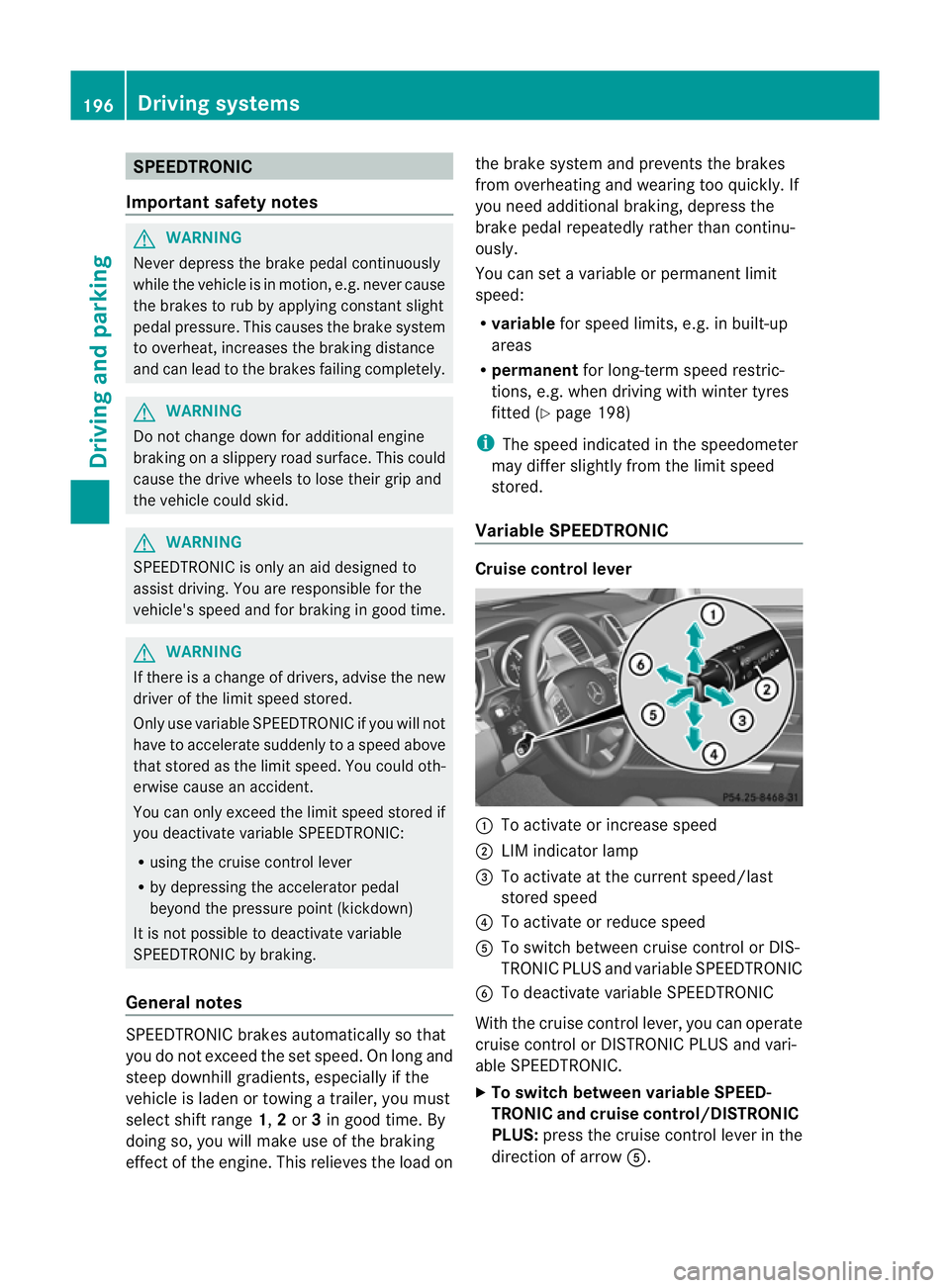
Variable SPEEDTRONIC Cruise control lever
:
To activate or increase speed
; LIMi ndicato rlamp
= To activate at the current speed/last
stored speed
? To activate or reduce speed
A To switch between cruise control or DIS-
TRONIC PLUS and variable SPEEDTRONIC
B To deactivate variable SPEEDTRONIC
With the cruise control lever, you can operate
cruise control or DISTRONIC PLUS and vari-
able SPEEDTRONIC.
X To switch between variable SPEED-
TRONIC and cruise control/DISTRONIC
PLUS: press the cruise control lever in the
direction of arrow A.196
Driving systemsDriving and parking
Page 202 of 441
G
WARNING
DISTRONIC PLUS canno ttake account of road
and traffic conditions. If DISTRONI Cdoes not
recognise or no longer recognises the vehicle
in front, do not activate DISTRONIC or, if it is
alr eady active, deactivate it. This is especially
the case:
R befor ecorners
R on filter lanes
R when changing to alane with faster moving
traffic
R in comple xdriving situations or where lanes
are diverte d,e.g. at roadworks on amotor-
way
DISTRONIC PLU Sotherwise maintains the
current spe ed setbyyou or accelerates up to
the set speed.
DISTRONIC PLU Scannot take account of
weather conditions. Deactivate, or do not
activate, DISTRONI CPLUS:
R if th eroads are slippery, snow-covered or
icy .The wheels coul dlose their grip when
brakin goraccelerating .The vehicle could
star ttos kid.
R if the sensors are dirty or there is poo rvis-
ibility, e.g. due to snow, rain or fog. Dis-
tance control may be impaired.
Always pay attention to traffic conditions
even when DISTRONIC PLU Sisactivate d.
Otherwise, you ma yfail to recognise dangers
in time, caus eanaccident and injure yourself
and others. G
WARNING
DISTRONIC PLUS brake syourvehicle up to a
maximu mof4m /s2
depending on its speed.
This corresponds to approximately 40% of
your vehicle's maximum braking power. You
must als oapply the brakes yourself if this
braking power is not sufficient.
If DISTRONI CPLUS detect sarisk of collision
with avehicle in front, an intermit tent warning
tone sounds. In addition, the ·distance
warning lamp in the instrument cluste rlights
up. Brak etoavoidac ollision. G
WAR
NING
The vehicle can be braked when DISTRONIC
PLUS is activated. For this reason, deactivate
DISTRONIC PLUS if the vehicle is to be set in
motion by othe rmeans (e.g. in acar wash or
by towing).
The radar senso rsystem is switched off auto-
matically in the vicinity of radio teles cope
facilities (Y page 433).
If you want DISTRONIC PLUS to assist you,
the radar sensor syste mmust be activated
(Y page 283 )and operational.
General notes DISTRONIC PLUS regulates the speed and
automati
cally helps you maintain the dis-
tanc etot he vehicle detected in front. DI S-
TRONIC PLU Sbrake sautomatically so that
the set spee disnot exceeded.
On long and steep downhil lgradients, espe-
ciall yifthe vehicle is laden or towing atrailer,
yo um ust select shift range 1,2or 3in good
time. By doing so, you will make use of the
braking effec tofthe engine. This relieves the
load on the brake system and prevents the
brakes from overheating and wearing too
quickly.
If DI STRONIC PLUS detects aslower-moving
vehicle in front ,your vehicle is braked in order
to maintain the preset distance to the vehicle
in front.
If ther eisnov ehicle in front ,DISTRONIC
PLUS operate sinthe sam eway as cruise
control in the spee drange between
30 km/h and 200 km/h. If avehicle is driving
in fron tofyou, DI STRONIC operates in the
speed range betwee n0km/h and
200 km/h.
Do not us eDISTRONIC PLUS on roa dswith
steep gradients. Driving systems
199Drivinga nd parking Z
Page 215 of 441
R
you depress the brak epedal again wit ha
certain amount of pressure until ëdis-
appears from themultifun ctiondisplay.
R you secur ethe vehi cleu sing the elec tric
parking brake.
R you activat eDISTRONIC PLU S.
i After atime, the electric parking brake
secures the vehicle and relieves the service
brake.
The electric parking brak esecures the vehicle
automatically if the HOL Dfunction is activa-
ted and:
R the driver' sdoor is open and the driver's
seat belt is unfastened.
R the engin eisswitched off, unless it is auto-
matically switched off by the ECO start/
stop function.
R as ystem fault occurs.
R the powe rsupply is not sufficient.
On steep uphill or downhill inclines or if there
is am alfunction, the transmissio nmay also
be automatically shifted int oposition P. AIRMATIC package
Genera lnotes AIRMATI
Cenable sasuspension tuning set-
ting to be selected and regulates the damping
behaviour and level of your vehicle. The sys-
tem comprises aminimum of two compo-
nents. These are AD S(Adaptive Damp ingS ys-
tem) (Y page 212) and level control
(Y page 213) .Your vehicle ma yalso be equip-
ped with the Active Curv eSystem
(Y page 213).
Observe the notes on driving with atrailer
(Y page 257).
ADS (Adaptive Damping System) General notes
ADS adapts th
edamping characteristic sto
the curren toperatin gand driving situation. Thi
sd epends on:
R your drivin gstyle
R the road surface conditions
R the AD Ssetting
R the vehicle level setting
Your selection remains stored even if you
remov ethe key from the igni tion lock.
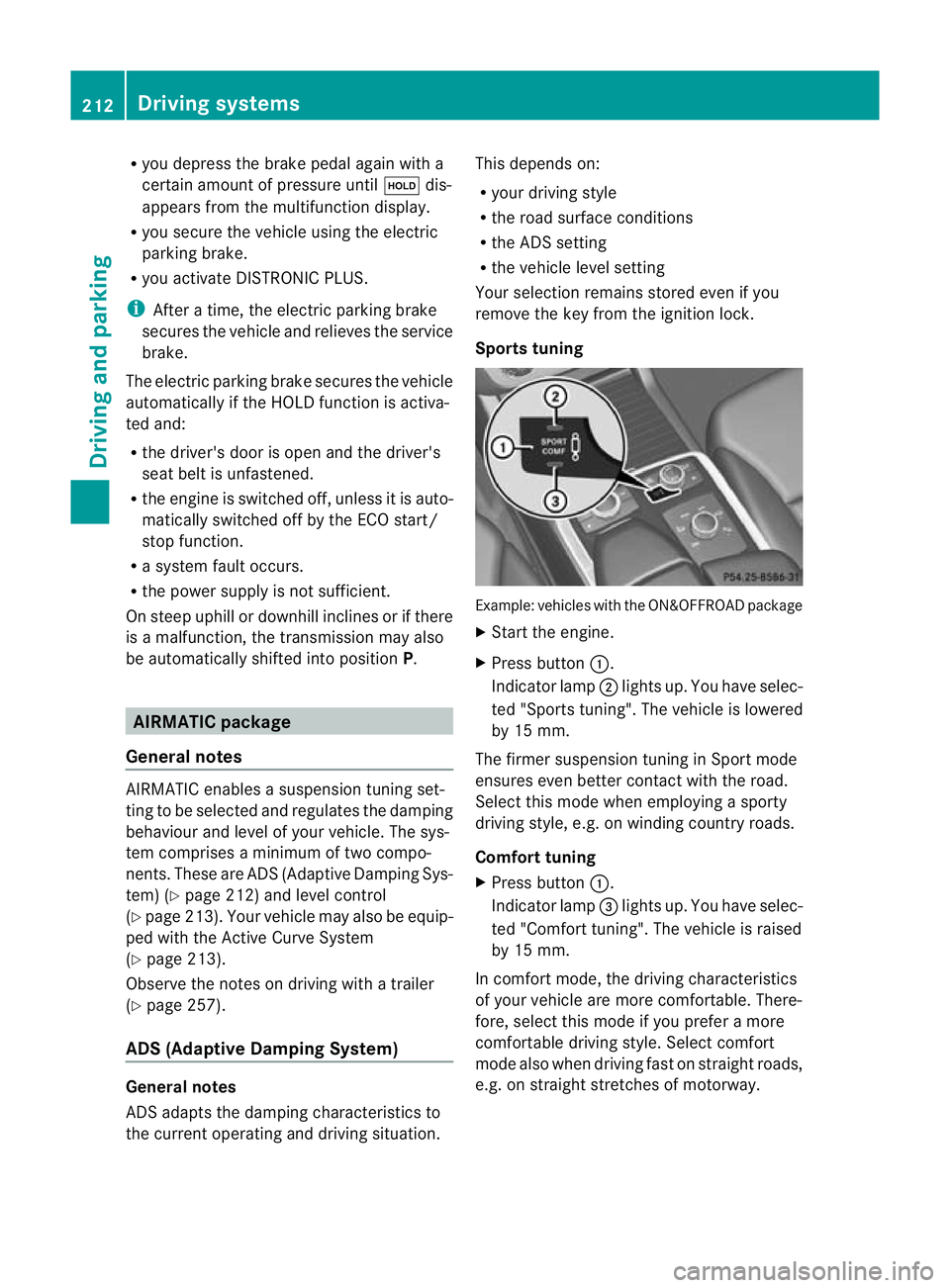
Sports tuning Example: vehicles wit
hthe ON&OFFROA Dpackage
X Start the engine.
X Press button :.
Indicator lamp ;ligh tsup. You have sele c-
ted "Sport stuning". The vehicle is lowered
by 15 mm.
The firmer suspension tuning in Spor tmode
ensures even bette rcontac twith th eroad.
Select this mode when empl oyingasporty
driving style, e.g .onwindingcountr yroads.
Comfor ttun ing
X Press button :.
Indicator lamp =light sup. You have selec-
ted "Comfor ttuning". The vehicle is raised
by 15 mm.
In com fort mode, the dri ving characteristics
of your vehicl eare more comfortable. There-
fore, select this mode if you prefer amore
comfortable drivin gstyle. Select comfort
mode also when driving fast on straigh troads,
e.g. on straight stretches of motorway. 212
Driving systemsDriving and pa
rking
Page 219 of 441
comfortable driving style. Select comfort
mod
ealsow hend riving fas tonstraightroads,
e.g. on straight str etche sofm otorway.
X Press button :repeatedly unt ilindicator
lamps =and ;go out.
Yo uh aves elec ted Comfort mode.
The AMG Ride Control COMFORT mes-
sage appears in the multifunctio ndisplay. PARKTRONIC
Important safety notes G
WAR
NING
PARKTRONI Cisonly an aid and may not
detect all obs tacles .Itisnotas ubstitut efor
attentive driving.
You are alway sresponsible for safet yand
must continue to pay attention to your imme-
diate surroundings whe nparking and
manoeuvring. You could otherwise endanger
yourself and others. G
WARNING
Make sure that no persons or animals are in
the manoeuvrin grange. Otherwise, they
could be injured.
PARKTRONI Cisanelectronic parking aid with
ultrasonic sensors. It indicates visuallyand
audibl ythe distanc ebetween your vehicle
and an object.
PARKTRONIC is activated automaticall yif
you:
R switch on the ignition
R shift the transmission to position D,Ror N
R release the electri cparking brake
PARKTRONIC is deactivated at speeds above
18 km/h. It is reactivated at lower speeds.
PARKTRONIC monitor sthe ar ea arou ndyour
vehicle using six sensor sint he front bumper
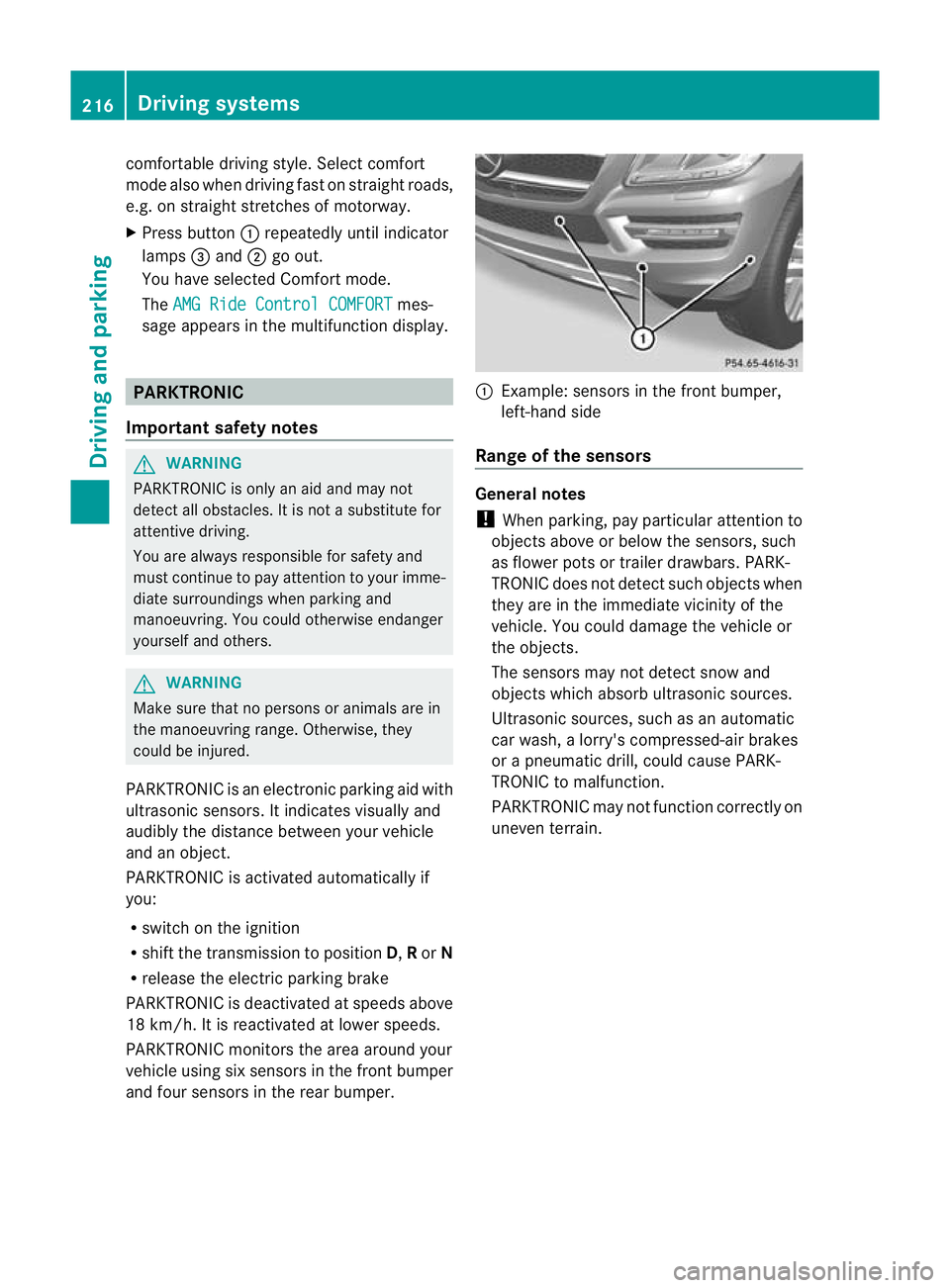
an df our sensor sint he rear bumper. :
Example :sensor sint he front bumper,
left-hand side
Range of th esensors General notes
! When parking ,pay particular attention to
object sabov eorbelow th esensors, such
as flower pot sortrailer drawbars. PARK-
TRONIC does no tdetec tsuch objects when
they are in the immediate vicinity of the
vehicle. You could damage the vehicle or
the objec ts.
The sensors ma ynot detect sno wand
object swhich absor bultrasonic sources.
Ultrasonic sources, such as an automatic
car wash, alorry' scompressed-ai rbrakes
or ap neumatic drill, could cause PARK-
TRONI Ctom alfunction.
PARKTRONI Cmay not function correctly on
uneven terrain. 216
Driving systemsDriving and parking
Page 221 of 441
One or mor
esegments light up as the vehicle
approaches an obstacle, dependin gonthe
vehicle' sdistance from the obstacle.
From the:
R sixth segment onwards, you will hear an
intermittent warnin gtone for approx-
imately two seconds.
R seventh segmen tonwards ,you will hear a
warnin gtone for approximately two sec-
onds. This indicates that you have now
reached the minimu mdistance.
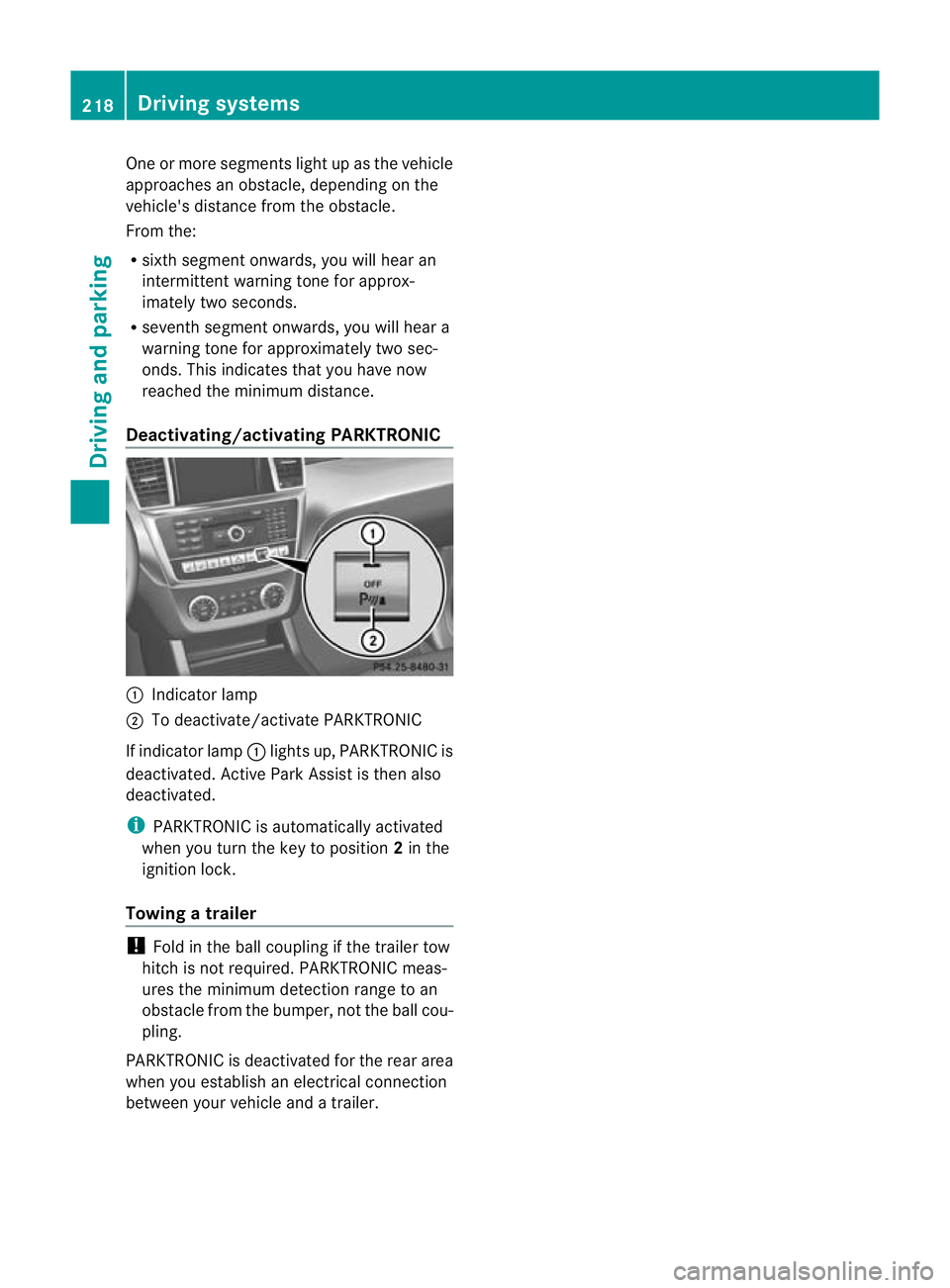
Deactivating/activating PARKTRONIC :
Indicator lamp
; To deactivate/activate PARKTRONIC
If indicator lamp :lights up, PARKTRONIC is
deactivated. Active Park Assist is then also
deactivated.
i PARKTRONIC is automatically activated
when you turn the key to position 2in the
ignition lock.
Towing atrailer !
Foldint he ball coupling if the trailer tow
hitc hisn ot required. PARKTRONIC meas-
ures the min imumdetect ionr ange to an
obstacle from the bumper, no tthe ball cou-
pling.
PARKTRONIC is deactivated for the rea rarea
when yo uestablish an electrica lconnection
between your vehicle and atrailer. 218
Dri
ving systemsDriving and pa rking
Page 223 of 441
G
WARNING
Th ef ront of th evehicle will veer out in the
direction of the oncoming traffic during the
parking operation. In some cases the vehic le
wil lalsot ake you onto sections of the oncom-
ing lane during the parking procedure.
You are responsibl efor safet yatall times and
must pay attention to any road users
approaching or passing. Stop the vehicle if
necessary or cancel the Activ eParking Assist
parking procedure. G
WARNING
Make sure that no persons or animals are in
the manoeuvring range. Otherwise, they
coul dbei njured.
! If unavoidable ,you should driv eover
obstacles such as kerb sslowly and not at
as har pangle .Otherwi se,you ma ydamage
the wheels or tyre s.
Activ eParking Ass isti sane lectroni cparking
aid with ultrasound. Ultrasoun disused to
mea surethe road on bothsides of th evehicle.
As uitable parking space is indicated by the
parking symbol. Activ esteering intervention
can assis tyou during parking. You ma yalso
use PARKTRONIC (Y page 216). When PARK-
TRONIC is switched off, Active Parking Assist
is also unavailable.
Use Active Parking Assist for parkin gspaces:
R that are parallel to the direction of travel
R that are on straight roads, not bends
R that are on the same level as the road, e.g.
not on the pavement
Parking tips:
R on narrow roads, driv easclosely as possi-
ble past the parkin gspace.
R parking spaces that are littered, overgrown
or partially occupied by trailer drawbars
might be identified incor rectly or not at all.
R snowfall or heavy rain may lea dtoap arking
space being measured inaccurately. R
pay attention to the PARKTRONIC
(Y page 217 )warning message sduring the
parking procedure.
R at any time, you can intervene in the steer-
ing procedure to correc tit. Active Parking
Assist will then be cancelled.
R when transporting aload which protrudes
from your vehicle, you should not use
Active Parkin gAssist.
R when snow chains or an emergenc yspare
wheel are fit ted, you should not use Active
Parking Assist here either.
R mak esure that the tyre pressures are
always correct. This has adirec tinfluence
on the parking characteristics of the vehi-
cle.
R the wa yyourv ehicle is positioned in the
parking space after parking is dependent
on various factor s. Theseinclude the posi-
tion and shape of the vehicles parked in
front and behind it and the conditions of the
location. It may be the case that Active
Parking Assist guides you too far into a
parking space, or not far enoug hinto it. In
some cases, it may also lead you across or
onto the kerb. If necessary, you should can-
cel the parking procedure with Active Park-
ing Assist.
R you can also engage forward gea rprema-
turely. Th evehicle redirects and does not
driv easf ar into the parking space. Should
ag ear be changed too earl ytoa chieve a
sensible parkin gposition ,the parkin gpro-
cedure will be cancelled.
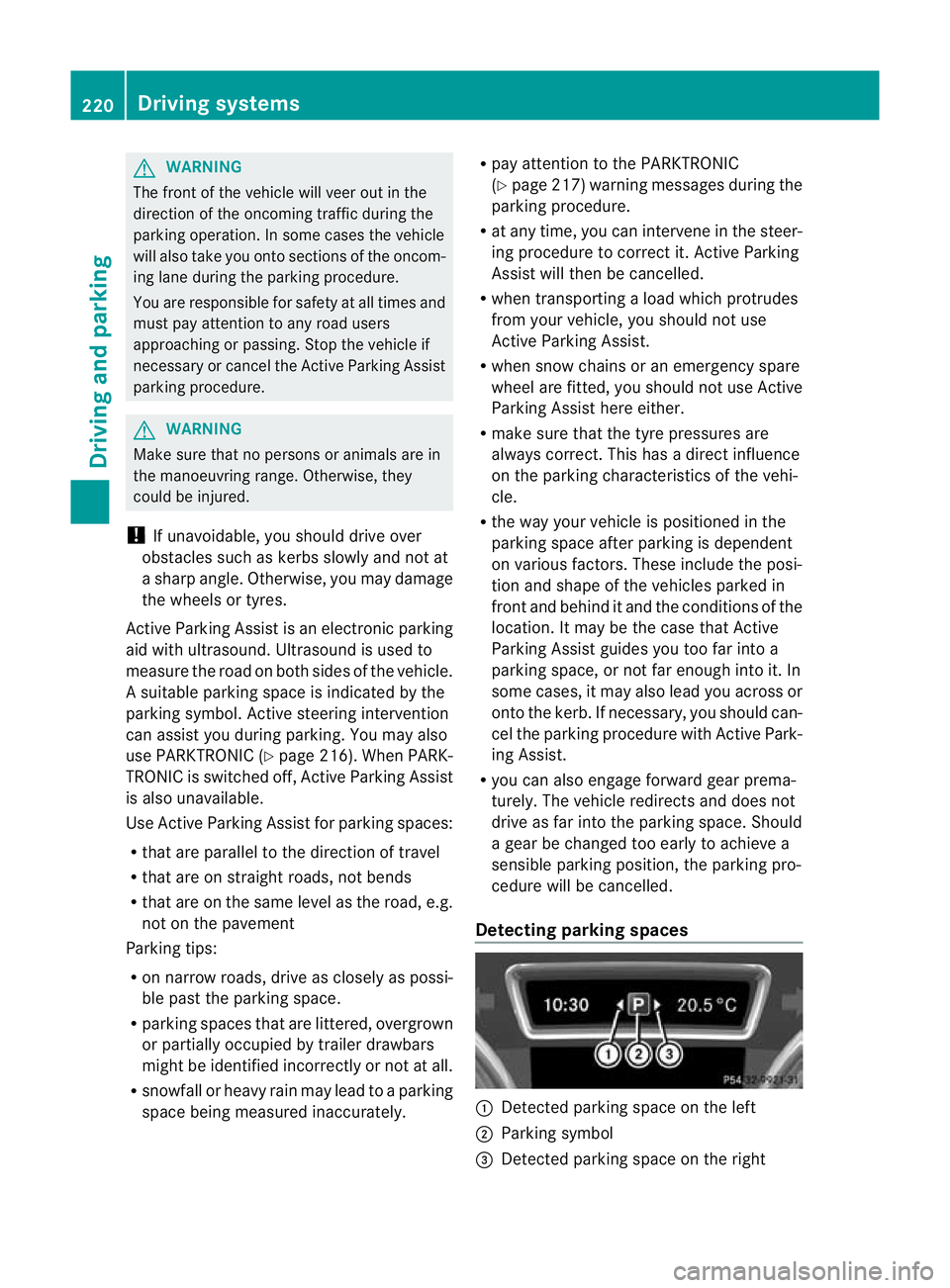
Detectin gparking spaces :
Detected parking space on the left
; Parking symbol
= Detected parking space on the right 220
Driving systemsDri
ving and parking
Page 225 of 441
X
Shift the transmissio ntoposition Dwhile
the vehicle is stationary.
Active Parkin gAssist immediately steer sin
the othe rdirection.
The Park Assist active Accelerate and brake Observe surroundings mes-
sage appears in the multifunction display.
i You will achieve the best results by wait-
ing for the steerin gprocedure to complete
before pulling awa y.
X Drive forwards and be ready to brake at all
times.
X Stop as soo nasPARKTRONIC sounds the
continuous warning tone, if not before.
The ParkAssist active Select R Observe surroundings message appears in
th em ultifunction display.
Further transmissio nshift sm ay be neces-
sary.
As soon as the parking procedure is com-
plete, the Park Assist switched off mes-
sage appears in the multifunc tion display.
PARKTRONIC is still available.
X Manoeuvr eifnecessary.
X Alway sobserv ethe warnin gmessages dis-
played by PARKTRONI C(Ypage 217).
Parking tips:
R on narrow roads, driv easclosely as possi-
ble past the parkin gspace.
R parking spaces that are littered, overgrown
or partially occupied by trailer drawbars
might be identified incor rectly or not at all.
R snowfall or heavy rain may lea dtoap arking
space being measured inaccurately.
R the way your vehicle is positioned in the
parking space after parking is dependent
on various factors. Thes einclude the posi-
tion and shape of the vehicles parked in
front and behind it and the condi tions of the
location .Insome cases, Active Parking
Assist ma yguide you too far into aparking
space, or not far enough into it. In some
cases, it may also lead you across or onto
the kerb. If necessary, you should cancel the parking procedure with Active Parking
Assis
t.
R you can also engag eforward gear prema-
turely. The vehicle redirects and does not
drive as far int othe parkin gspace. Should
ag ear be changed too early, the parking
procedure will be cancelled. Asensible
parkin gposition can no longer be achieved
from this position.
Exiting aparkin gspace G
WARNING
Active Parking Assist doe snot monitor street
traffic .Insome cases, the vehicle will also
tak eyou onto section softhe oncoming lane
when exitin gaparking space.
You are responsible for safety at all times and
must pay attention to any road users
approaching or passing. Stop the vehicle if
necessary or cancel Active Parking Assis t.
Activ eParking Assis tcan only assis tyou with
exitin gaparking space if you have parked the
vehicle using Active Parking Assis t.
X Start the engine.
X Switch on the turn signal on the side facing
the street.
X Shift the transmission to position Dor R.
The Star tPark Assist? Yes: OK No: %
message appears in th emultifunction
display.
X To cancel the procedure: press the
% button on the multifunction steering
wheel or pull away.
or
X To exit aparkin gspace usin gActive
Parking Assist: press theabutton on
the multifunction steering wheel.
The Park Assis tactive Accelerate and brake Observe surroundings mes-
sage appear sinthe multifuncti on display.
X Releas ethe multifunction steeri ngwheel.
X Revers ethe vehi cleo rdrive forwards, being
ready to brake at all times .Donot exceed
am aximum spee dofapproximately 222
Driving systemsDriving and parking
Page 226 of 441
10 km/h wh
enexiting aparking space.
Otherwise ,Active Parking Assist will be
cancel led.
X Stop as soon as PARK TRONIC sounds the
continuous warning tone, if not before.
X Shif tthe transmission to position Dor Ras
req uired wh ilet he vehicle is stationary.
Activ eParking Assis timmediatel ysteers in
the othe rdirection.
i You will achieve the best results by wait-
ing for the steering procedure to complete
before pulling away.
If you rever seafter activation, the steering
wheel is moved to the straight-ahead posi-
tion.
X Drive forwards or reverse the vehicle, being
read ytob rake at al ltimes.
X Stop as soon as PARKTRONIC sounds the
continuou swarning tone, if not before.
X Drive forwards and revers easinstructed by
the PARKTRONI Cwarning displays.
Once you have exite dthe parkin gspace com-
pletely, the steering wheel is moved to the
straight-ahead position. You hea ratonea nd
the message Park Assist switched off appear
sinthe multifuncti on display. You will
then have to steer and merg eintot raffic on
you rown. PARKTRONI Cisstill available.
Cancelling Active Parking Assist X
Stop the movemen tofthe multifunction
steeri ngwheel or steer yourself.
Activ eParking Assist will be cancelled at
once. The Park Assist cancelled mes-
sage appears in the multifunction display.
or
X Press the PARKTRONI Cbutton on the
centr econsole (Y page 218).
PARKTRONI Cisswitched off and Active
Parking Assist is immediately cancelled.
The Park Assist cancelled message
appears in the multifunction display. Activ
eParking Assist is cancelled automati-
cally if:
R parking using Activ eParking Assist is no
longer possible.
R you are drivin gfaster than 10 km/h.
R aw heel spin sand ESP ®
intervenes or fails.
The ÷ warnin glamp lights up in the
instrumen tcluster.
Aw arning ton esounds. The par king symbol
disappears and the multifunction display
shows the ParkA ssist cancelled mes-
sage.
When Activ eParking Assist is cancelled, you
must steer again yourself.
Towing atrailer For vehicles with
atrailer to whitch, the min-
imum length for parking spaces is slightly
increased.
If yo uhavea ttache datrailer to your vehicle,
yo us houl dnot us eActiv eParking Assist.
Once the electrica lconnection is established
between your vehicl eand the trailer, Active
Parking Assist is no longer available .PARK-
TRONIC is deactivated for the rear area. Reversin
gcamera
Important safety notes G
WARNING
Mak esure that no persons or animals are in
the manoeuvring range. Otherwise, they
could be injured. G
WARNING
The reversing camera is only an aid and may
sho wad istorted view of obstacles, show
them incorrectly or not at all. The reversing
camer aisnotas ubstitute for paying atten-
tion. The camera cannot sho wobject sinthe
following areas: Driving systems
223Driving and parking
Z
Page 227 of 441
R
very close to th erear bumper
R under the rear bumper
R in close range above the handle on the boot
lid
You are alway sresponsible for safety, and
must alway spay attention to you rsurround-
ings when parking and manoeuvring. This
applies to the areas behind, in front of and
beside th evehicle. Yo ucould otherwise
endanger yoursel fand others. G
WARNING
Unde rthe followin gcircumstances, the
reversing camer awill not func tion, or will
function in alimited manner:
R if the boot lid is open
R in heavy rain, snow or fog
R at night or in very dark places
R if the camer aisexposed to very brigh tlight
R if the area is lit by fluorescen tlight or LED
lighting (the display may flicker)
R if there is asudden change in temperature,
e.g. when driving into aheated garage in
winter
R if the camera lens is dirt yorobstructed
R if the rear of your vehicl eisdamaged. In this
event, have the camera positio nand setting
checked at aqualified specialist workshop.
Do not use the reversing camera in these
types of situation. You could otherwis einjure
others or damage object sand your vehicle
whil eyou are parking.
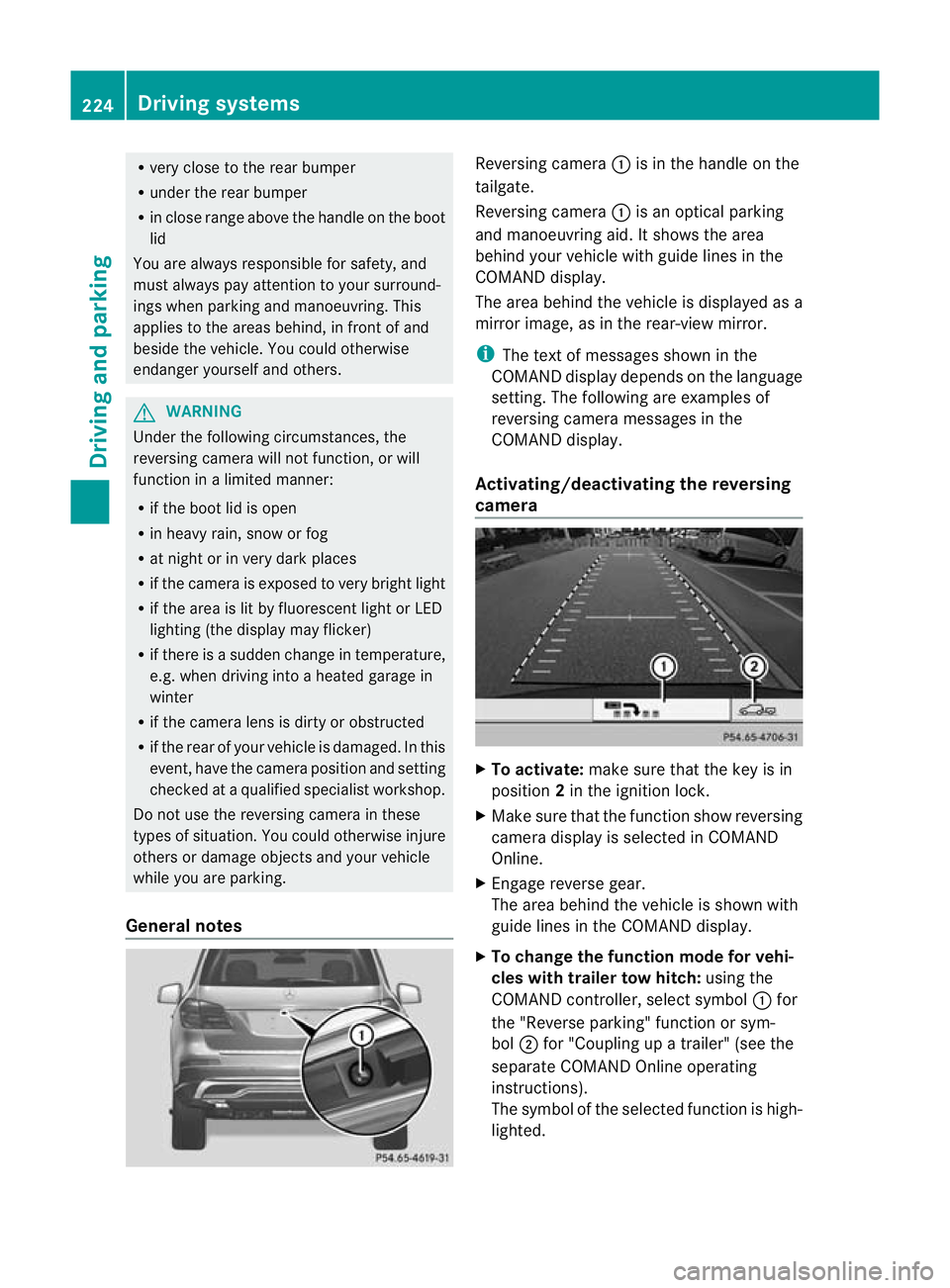
General notes Reversin
gcamera :is in the handle on the
tailgate.
Reversing camera :is an optical parking
and manoeuvring aid. It shows the area
behind your vehicle with guide lines in the
COMAND displ ay.
Th ea rea behind th evehicle is displayed as a
mirror image, as in the rear-view mirror.
i The text of messages shown in the
COMAN Ddispla ydepends on the language
setting. The following are examples of
reversin gcamera message sint he
COMAN Ddisplay.
Activating/deactivating the reversing
camera X
To activate: make sure that the key is in
position 2in the ignition lock.
X Make sure that the func tion show reversing
camera display is selected in COMAND
Online.
X Engage reverse gear.
The area behind the vehicle is shown with
guide lines in the COMAN Ddisplay.
X To change the function mode for vehi-
cles with trailer tow hitch: using the
COMAND controller, select symbol :for
the "Reverse parking" func tion or sym-
bol ;for "Coupling up atrailer" (see the
separate COMAND Online operating
instructions).
Th es ymbol of the selected function is high-
lighted. 224
Driving systemsDrivin
gand pa rking
Page 228 of 441
To deactivate:
the reversing camera is deac-
tivated if you:
R sh iftt he transmission to position P
R drive for wards 10 m
R shift th etransmission from Rto another
positio n(after 15 seconds)
R driv eforwards at aspee dofover
10 km/h
Display sintheCOMAN Ddisplay G
WARNING
Usin gthe reversing camera ca nbedangerous
if you are colour-blind or if your abilit ytodis-
tinguish colours is impaired.
Only use th ereversing camera if you can see
and distinguish between all th ecoloured
guide lines that are displayed by the reversing
camera in the COMAN Ddisplay. G
WARNING
Please note that object snot at groun dlevel
may appear to be further away than they
actually are. These include:
R the bumper of avehicle that is parked
behind your vehicle
R at railer drawbar
R theb all coupling of atrailer tow hitch
R thet ail-end of alorry
R slanted posts
The lines are only guides, not accurate meas-
urements of the distance to an obstacle.
Therefore, you should never pass the red line
when approachin ganobstacle. You could oth-
erwise cause an accident and injur eyourself
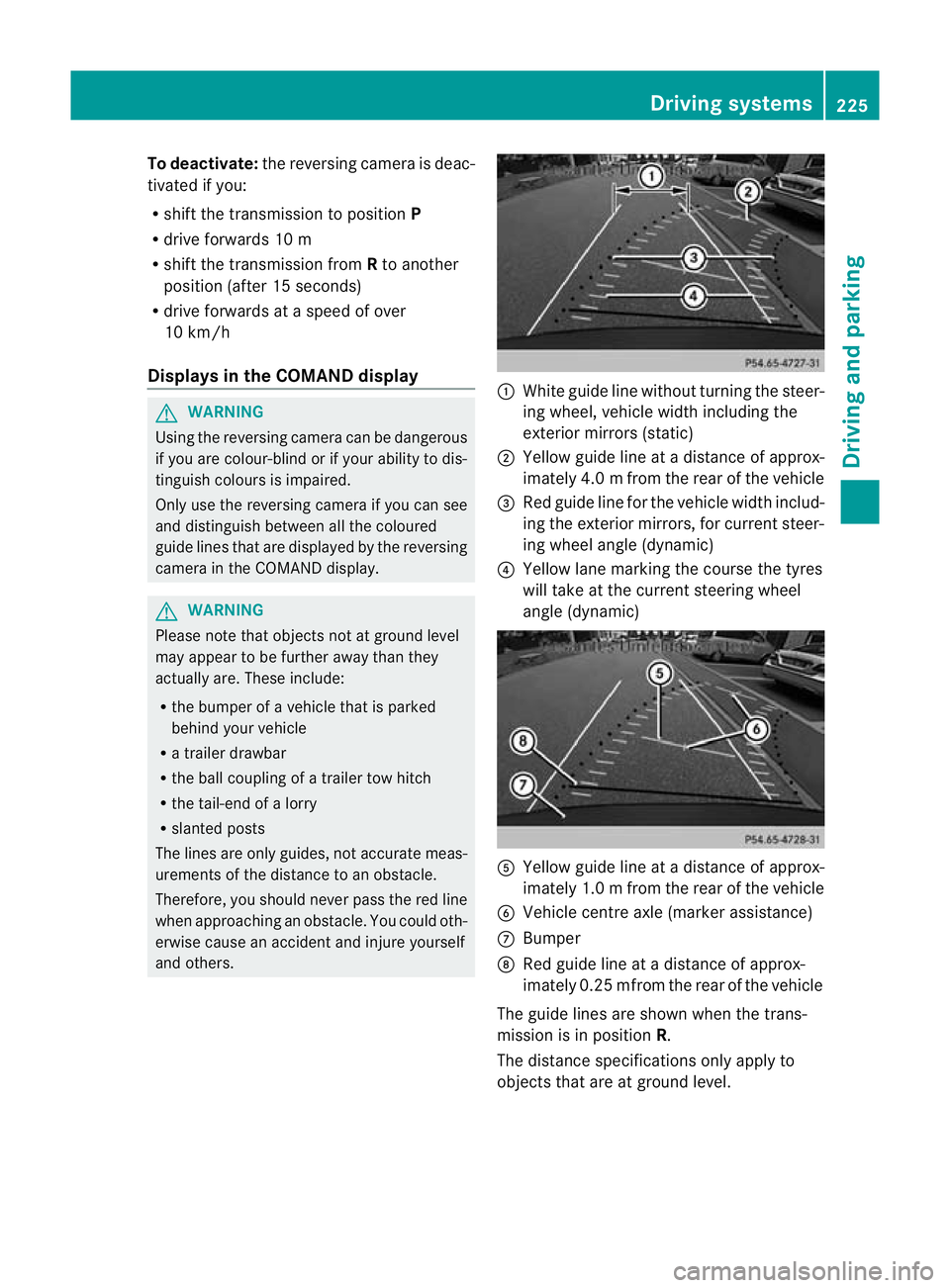
and others. :
White guide line without turnin gthe steer-
ing wheel, vehicle widt hincluding the
exterior mirrors (static)
; Yellow guid eline at adistance of approx-
imately 4.0 mfrom th erear of the vehic le
= Red guide line for the vehicl ewidth includ-
ing the exterior mirrors, for current steer-
ing whee langle (dynamic)
? Yellow lane marking the course the tyres
willtake at the current steering wheel
angle (dynamic) A
Yellow guide line at adistance of approx-
imately 1.0 mfrom th erear of the vehic le
B Veh icle centr eaxle (marker ass istance)
C Bumper
D Red guide line at adistance of approx-
imately 0.2 5mfrom th erear of the vehic le
Th eg uide lines are sho wn whenthe trans-
mission is in position R.
The distance specifications only apply to
object sthat ar eatground level. Dri
ving systems
225Driving and pa rking Z