brake light MERCEDES-BENZ GL SUV 2012 Owner's Manual
[x] Cancel search | Manufacturer: MERCEDES-BENZ, Model Year: 2012, Model line: GL SUV, Model: MERCEDES-BENZ GL SUV 2012Pages: 441, PDF Size: 10.66 MB
Page 197 of 441
for five seconds
.Inthe multifunction display,
the segments between the stored speed and
the maxim um speedlight up.
Activation conditions To activate cruise control, all of the following
activation condition
smust be fulfilled:
R the electric parkin gbrake mus tbe
released.
R yo ua re driving faster than 30 km/h.
R ESP ®
mus tbes witched on, but not inter-
vening.
R the transmission must be in position D.
R DS Rm ust be deactivated.
R off-road program 2must be deactivated
(vehicles with the ON&OFFROA Dpackage).
R the cruise con trol fu nction must be selec-
te d( Ypage 193).
Storing, maintaining and callin gupa
speed Storing and maintaining th
espeed X
Accelerate the vehicl etothe desir ed
speed.
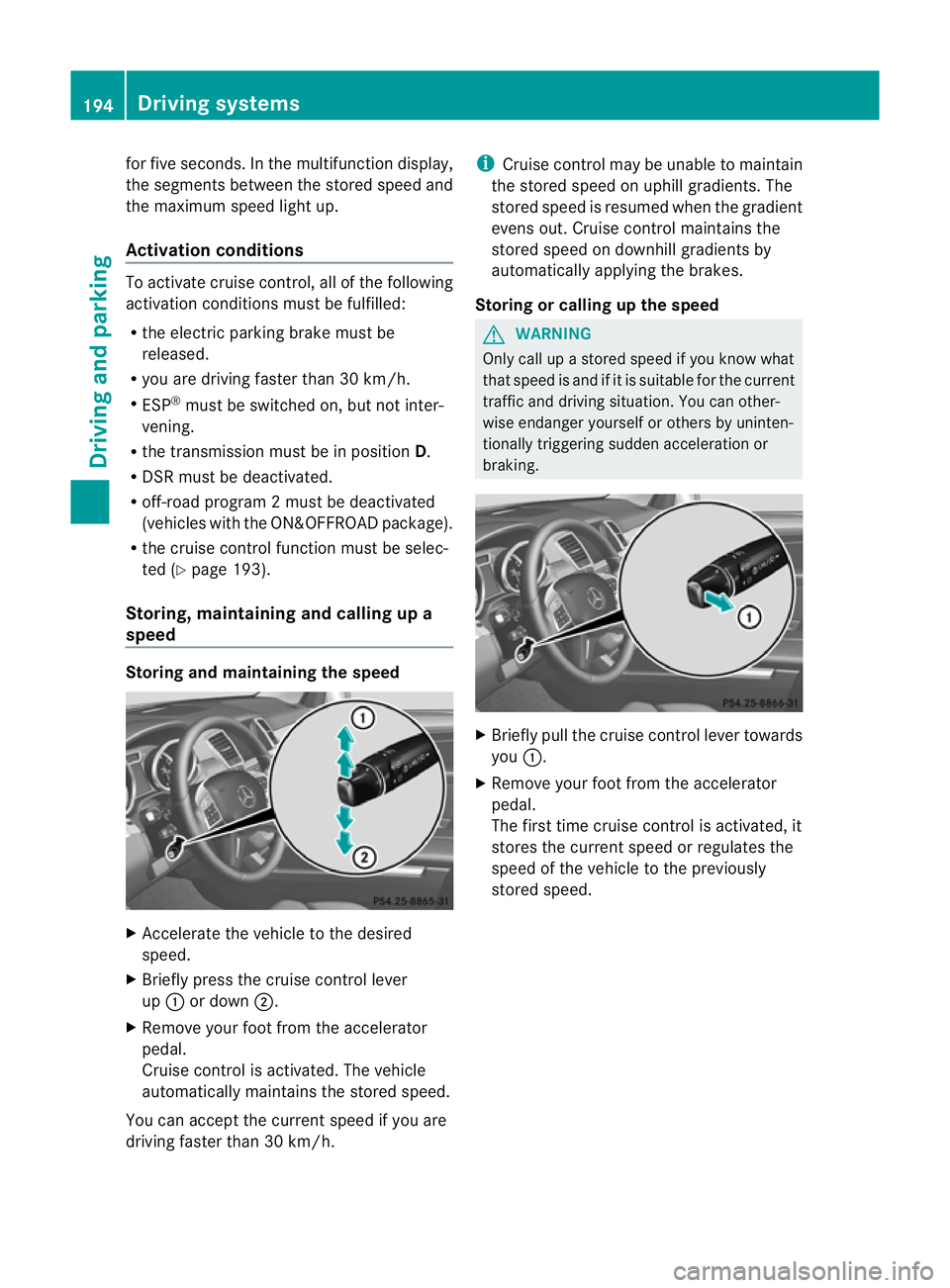
X Briefly press the cruise control lever
up : or down ;.
X Remov eyourfoot from the acc elerator
pedal.
Cruise control is activated. The vehicle
automaticall ymaintains the store dspeed.
Yo uc an accep tthe current speed if you are
drivin gfaster than 30 km/h. i
Cruise control may be unabl etomaintain
the store dspeed on uphil lgradients. The
store dspeed is resumed when the gradient
evens out. Cruise control maintains the
stored speed on downhil lgradient sby
automaticall yapplyin gthe brakes.
Stor ingorc alling up the speed G
WARNING
Onl ycallupas toredspeed if you know what
that speed is and if it is suitable for the current
traffic and driving situation. You can other-
wis eendanger yoursel forothers by uninten-
tionally triggering sudden acce leratio nor
braking. X
Briefly pull the cruise contro llever towards
you :.
X Remov eyour foot from the accelerator
pedal.
The first tim ecruis econtr ol is activated, it
stores the curren tspeed or regulates the
speed of the vehicle to the previously
stored speed. 194
Driving systemsDriving and parking
Page 198 of 441
Setting
aspeed X
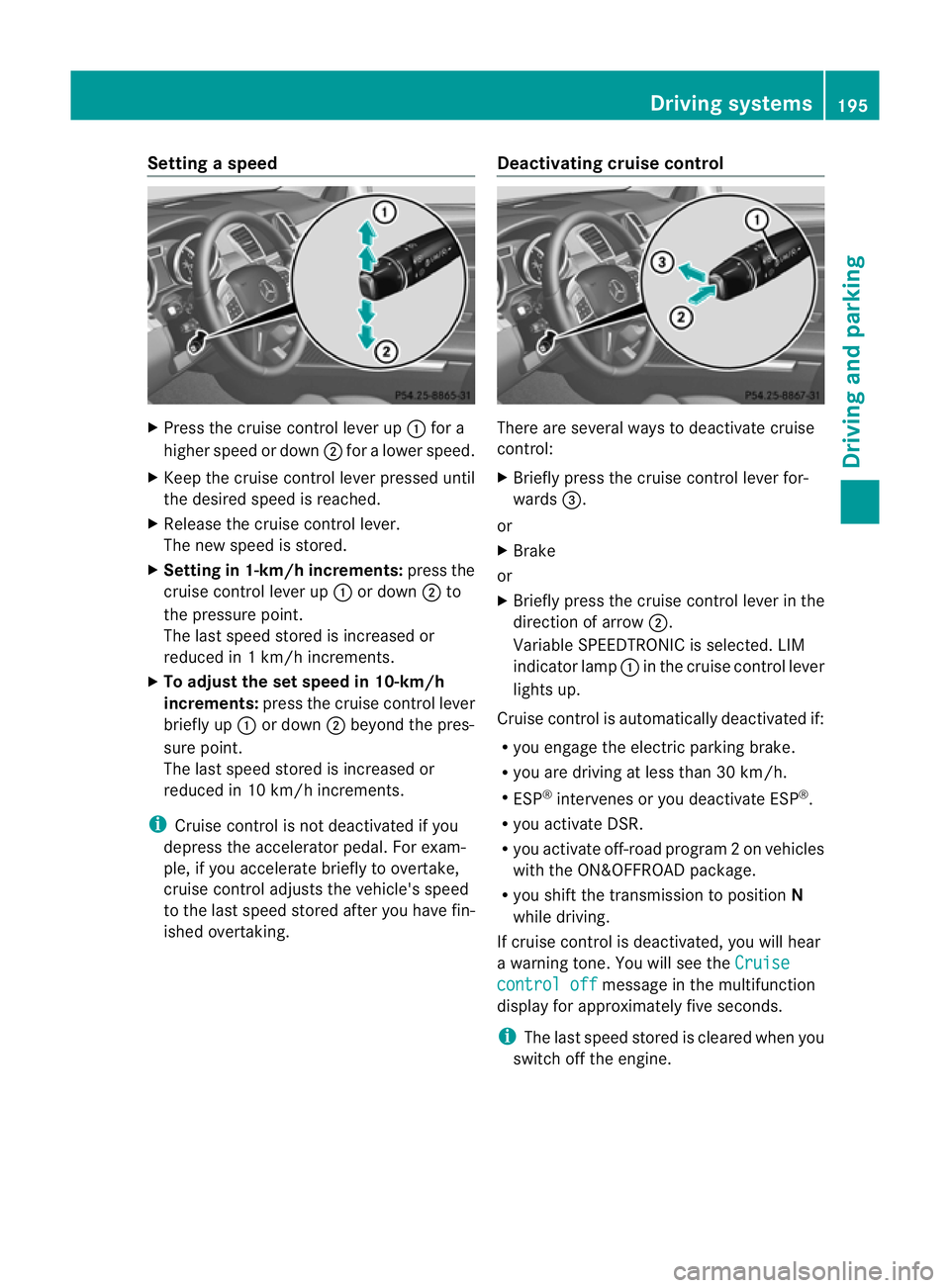
Press the cruise control lever up :for a
high er spee dordown;for alower speed.
X Keep the cruise contr ol leverpresse duntil
the desired speed is reached.
X Release the cruise contro llever.
The new speed is stored.
X Setting in 1-k m/hincrements: press the
cruise control lever up :or down ;to
the pressur epoint.
The last speed stored is inc reased or
reduced in 1km/ hincrements.
X To adjust the set speed in 10-km/h
increments: pressthe cruise contr ol lever
briefl yup: or down ;beyon dthe pres-
sur epoint.
The last speed stored is inc reased or
reduced in 10 km/ hincrements.
i Cruise contro lisnot deactivated if you
depress the accelerator pedal. For exam-
ple, if you accelerate briefly to over take,
cruise control adjusts the vehicle's speed
to the last speed stored after you have fin-
ished overtaking. Deactivating cruise control There are several ways to deacti
vate cruise
control:
X Briefly press the cruise control lever for-
wards =.
or
X Brake
or
X Briefly press the cruise control lever in the
direction of arrow ;.
Variable SPEEDTRONIC is selected. LIM
indicator lamp :in the cruise control lever
lights up.
Cruise control is automatically deactivated if:
R you engag ethe electric parkin gbrake.
R yo ua re driving at less than 30 km/h.
R ESP ®
intervenes or yo udeactiva teESP ®
.
R you activate DSR.
R you activate off-road program 2onvehicles
with the ON&OFFROA Dpackage.
R you shift the transmissio ntoposition N
while driving.
If cruise control is deactivated, you will hear
aw arning tone. You will see the Cruise contro
loff message in th
emultifunction
display for approximately five seconds.
i The last spee dstored is cleared when you
switch off the engine. Drivin
gsystems
195Drivingand parking Z
Page 199 of 441
SPEEDTRONIC
Important safety notes G
WARNING
Never depress the brake peda lcontinuously
while the vehicle is in motion, e.g. never cause
the brakes to rub by applying constant slight
pedal pressure. This causes the brake system
to overheat, increases the brakin gdistance
and can lead to the brakes failing completely. G
WARNING
Do not change down for additional engine
braking on aslippery road surface. This could
cause the drive wheels to lose their grip and
the vehicle could skid. G
WARNING
SPEEDTRONI Cisonly an aid designe dto
assis tdriving. Yo uare responsibl efor the
vehicle' sspeed and for braking in good time. G
WARNING
If there is achange of drivers, advise the new
driver of the limit speed stored.
Only use variable SPE EDTRONI Cifyou will not
have to accelerate suddenl ytoaspeed above
that stored as the limit speed. You could oth-
erwise cause an accident.
You can only exceed the limit speed stored if
you deactivate variable SPE EDTRONIC:
R using the cruise control lever
R by depressin gthe accelerator pedal
beyon dthe pressure point (kickdown)
It is not possible to deactivate variable
SPE EDTRONI Cbybraking.
General notes SPE
EDTRONIC brakes automatically so that
you do not exceed the set speed. On long and
steep downhil lgradients ,especially if the
vehicle is laden or towing atrailer, yo umust
select shift range 1,2or 3in good time. By
doing so, you will make use of the braking
effect of the engine. This relieves the load on the brake system and prevent
sthe brakes
from overheating and wearing too quickly .If
you need additional braking, depres sthe
brake pedal repeatedly rather than con tinu-
ously.
You can set avariable or permanent limit
speed:
R variable for speedlimits, e.g. in built-up
areas
R permanent for long-term speed restric-
tions, e.g. when drivin gwith winter tyres
fitted (Y page 198)
i The speed indicated in the speedometer
may differ slightly from the limit speed
stored.
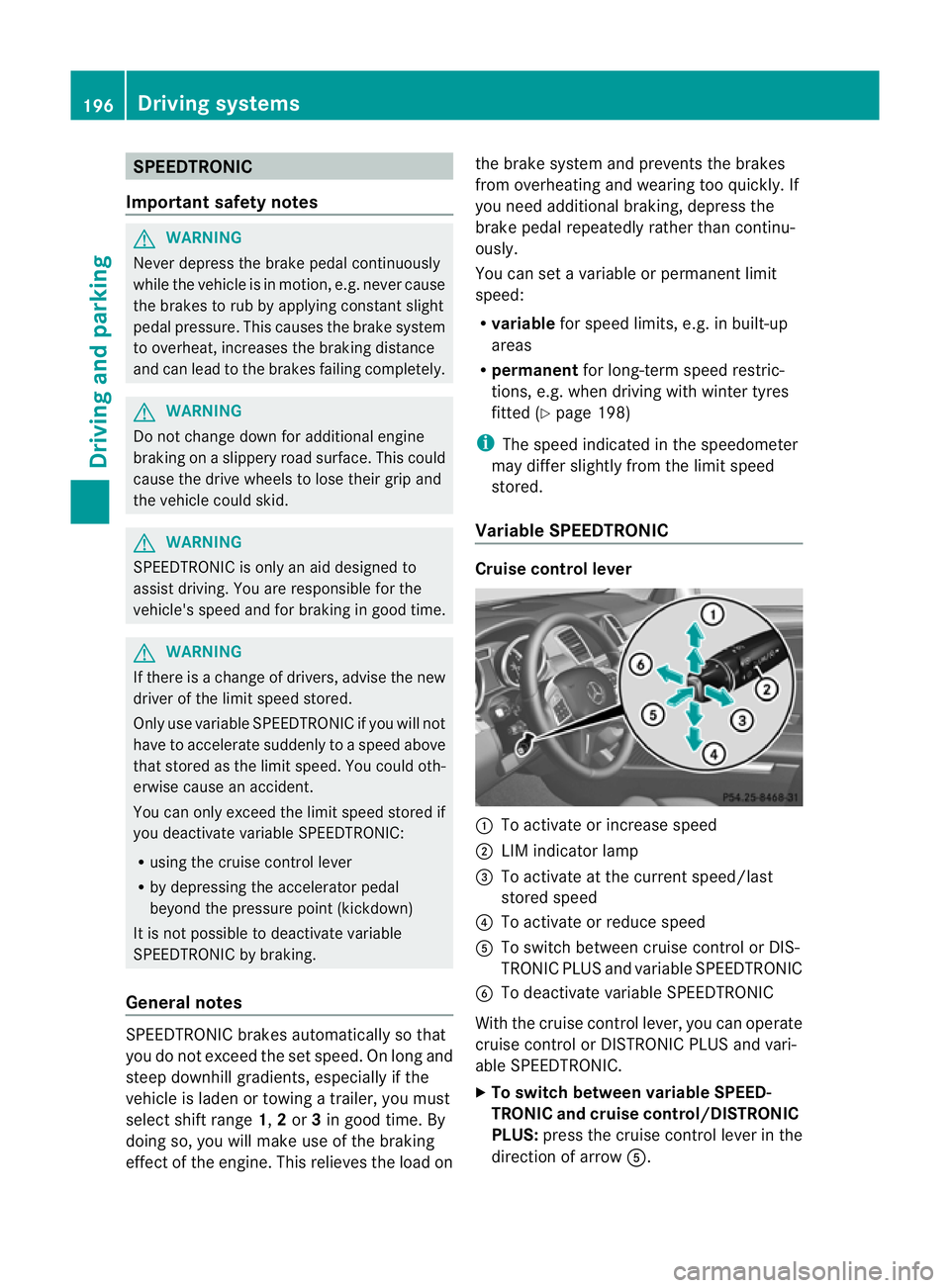
Variable SPEEDTRONIC Cruise control lever
:
To activate or increase speed
; LIMi ndicato rlamp
= To activate at the current speed/last
stored speed
? To activate or reduce speed
A To switch between cruise control or DIS-
TRONIC PLUS and variable SPEEDTRONIC
B To deactivate variable SPEEDTRONIC
With the cruise control lever, you can operate
cruise control or DISTRONIC PLUS and vari-
able SPEEDTRONIC.
X To switch between variable SPEED-
TRONIC and cruise control/DISTRONIC
PLUS: press the cruise control lever in the
direction of arrow A.196
Driving systemsDriving and parking
Page 202 of 441
G
WARNING
DISTRONIC PLUS canno ttake account of road
and traffic conditions. If DISTRONI Cdoes not
recognise or no longer recognises the vehicle
in front, do not activate DISTRONIC or, if it is
alr eady active, deactivate it. This is especially
the case:
R befor ecorners
R on filter lanes
R when changing to alane with faster moving
traffic
R in comple xdriving situations or where lanes
are diverte d,e.g. at roadworks on amotor-
way
DISTRONIC PLU Sotherwise maintains the
current spe ed setbyyou or accelerates up to
the set speed.
DISTRONIC PLU Scannot take account of
weather conditions. Deactivate, or do not
activate, DISTRONI CPLUS:
R if th eroads are slippery, snow-covered or
icy .The wheels coul dlose their grip when
brakin goraccelerating .The vehicle could
star ttos kid.
R if the sensors are dirty or there is poo rvis-
ibility, e.g. due to snow, rain or fog. Dis-
tance control may be impaired.
Always pay attention to traffic conditions
even when DISTRONIC PLU Sisactivate d.
Otherwise, you ma yfail to recognise dangers
in time, caus eanaccident and injure yourself
and others. G
WARNING
DISTRONIC PLUS brake syourvehicle up to a
maximu mof4m /s2
depending on its speed.
This corresponds to approximately 40% of
your vehicle's maximum braking power. You
must als oapply the brakes yourself if this
braking power is not sufficient.
If DISTRONI CPLUS detect sarisk of collision
with avehicle in front, an intermit tent warning
tone sounds. In addition, the ·distance
warning lamp in the instrument cluste rlights
up. Brak etoavoidac ollision. G
WAR
NING
The vehicle can be braked when DISTRONIC
PLUS is activated. For this reason, deactivate
DISTRONIC PLUS if the vehicle is to be set in
motion by othe rmeans (e.g. in acar wash or
by towing).
The radar senso rsystem is switched off auto-
matically in the vicinity of radio teles cope
facilities (Y page 433).
If you want DISTRONIC PLUS to assist you,
the radar sensor syste mmust be activated
(Y page 283 )and operational.
General notes DISTRONIC PLUS regulates the speed and
automati
cally helps you maintain the dis-
tanc etot he vehicle detected in front. DI S-
TRONIC PLU Sbrake sautomatically so that
the set spee disnot exceeded.
On long and steep downhil lgradients, espe-
ciall yifthe vehicle is laden or towing atrailer,
yo um ust select shift range 1,2or 3in good
time. By doing so, you will make use of the
braking effec tofthe engine. This relieves the
load on the brake system and prevents the
brakes from overheating and wearing too
quickly.
If DI STRONIC PLUS detects aslower-moving
vehicle in front ,your vehicle is braked in order
to maintain the preset distance to the vehicle
in front.
If ther eisnov ehicle in front ,DISTRONIC
PLUS operate sinthe sam eway as cruise
control in the spee drange between
30 km/h and 200 km/h. If avehicle is driving
in fron tofyou, DI STRONIC operates in the
speed range betwee n0km/h and
200 km/h.
Do not us eDISTRONIC PLUS on roa dswith
steep gradients. Driving systems
199Drivinga nd parking Z
Page 207 of 441
X
To adjust the se tspee din1k m/h incre-
ments: briefly press the cruise control
lever up :or down ;to the pressure
point.
The last stored speed increase sordecrea-
ses in 1km/ hincrements.
X To adjust the set speed in 10 km/h
increments: briefly pressthe cruise con-
trol lever up :or down ;to beyon dthe
pressur epoint.
The last stored speed inc reases or decrea-
ses in 10 km/ hincrements.
i DISTRONIC PLUS is not deactivated if you
depress the accelerator pedal. If you accel-
erate to overtake, DISTRONIC PLUS
adjusts the vehicle's speed to the last
speed sto reda fter you have finished over-
taki ng.
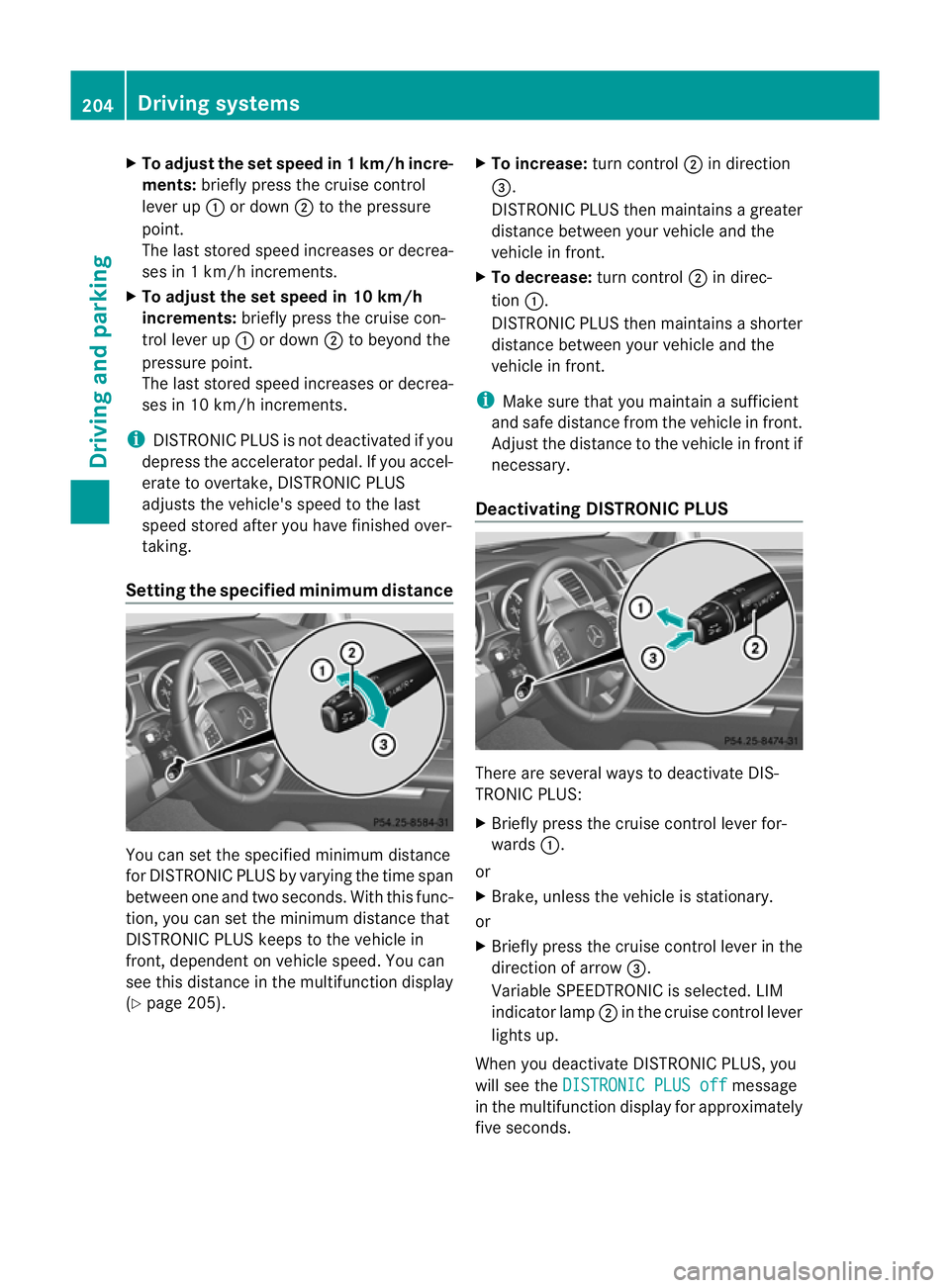
Setting th especified minimum distance Yo
uc an set the specified minimum distance
for DISTRONIC PLUS by varyin gthe tim espan
betwee none and two seconds. With thi sfun c-
tion, yo ucan set the minimum di stancethat
DISTRONIC PLU Skeep stot he vehi clein
front ,dependent on vehicle speed. You can
see this distanc einthe multifunction display
(Y page 20 5). X
To incre ase: tur nc ontrol ;in direction
=.
DISTRONIC PLU Sthenm aintains agreater
distanc ebetween your vehicle and the
vehicle in front.
X To decrease: turnc ontrol ;in direc-
tion :.
DISTRONIC PL US then maintains ashorter
distanc ebetween your vehicle and the
vehicle in front.
i Make sure that you maintai nasufficient
and safe distance from the vehicle in front.
Adjust the distance to the vehicle in front if
necessary.
Deactivating DISTRONIC PLUS There are several way
stodeactivate DI S-
TRONIC PLUS:
X Briefl ypres sthe cruise con trollever for-
wards :.
or
X Brake, unless the vehicle is stationary.
or
X Briefly press the cruise control lever in the
direction of arrow =.
Variable SPEEDTRONIC is selected. LIM
indicator lamp ;in the cruise control lever
lights up.
When you deactivate DI STRONIC PLUS, you
will see the DISTRONIC PLU Soff message
in th emultifunction displa yfor approximately
fiv es econds. 204
Driving systemsDriving and parking
Page 208 of 441
i
The last speed store dremains stored until
you switc hoff th eengine.
i DISTRONIC PLUS is not deactivated if you
depress the accelerator pedal. If you accel-
erate to overtake, DISTRONIC PLUS
adjusts the vehicle's speed to the last
speed stored after you have finished over-
taking.
DISTRONIC PLUS is automatically deactiva-
ted if:
R you engage the electric parking brake or if
the vehicl eisautomatically secured with
the electric parking brake.
R you are driving slowe rthan 25 km /hand
there is no vehicle in front, or if the vehicle
in fron tisnol onger detec ted.
R ESP ®
intervenes or you deactivat eESP®
.
R the transmission is in the P,Ror Nposition.
R the vehicle is near aradio telescop efacility
(Y page 433).
R you switch off the radar senso rsystem
(Y page 283).
R you pull the cruise control lever towards
you in order to pull away ,and the front-
passenger doo rorone of the rear doors is
open.
R you activate DSR.
R you activate off-road program 2onvehicles
with the ON&OFFROA Dpackage.
R the vehicle has skidded.
If DISTRONIC PLUS is deactivated, you will
hear awarning tone. You will see the DIS‐TRONIC PLUS off message in the multifunc-
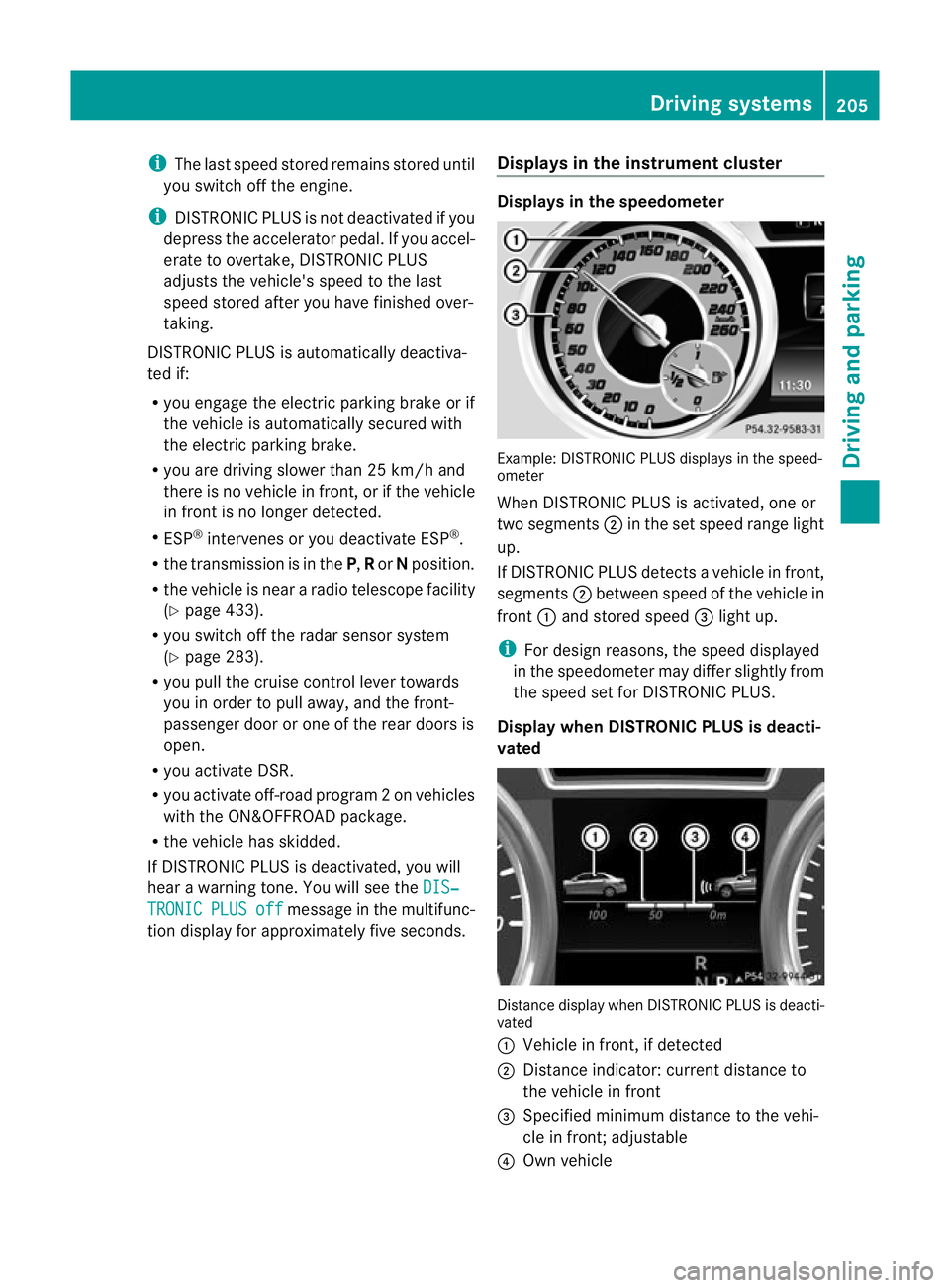
tion display for approximately five seconds. Displays in the instrument cluster Displays in the speedometer
Example: DISTRONIC PLUS displays in the speed-
ometer
When DISTRONIC PLUS is activated, one or
two segments
;in the set spee drange light
up.
If DISTRONIC PLUS detects avehicle in front,
segments ;between speed of the vehicle in
front :and stored speed =light up.
i For design reasons, the speed displayed
in the speedometer may differ slightly from
the speed set for DI STRONIC PLUS.
Display when DISTRONIC PLUS is deacti-
vated Distance display when DISTRONIC PLUS is deacti-
vated
:
Vehicle in front, if detected
; Distance indicator: curren tdistanc eto
the vehicle in front
= Specified minimum distanc etothe vehi-
cle in front; adjustable
? Own vehicle Driving systems
205Driving and parking Z
Page 210 of 441
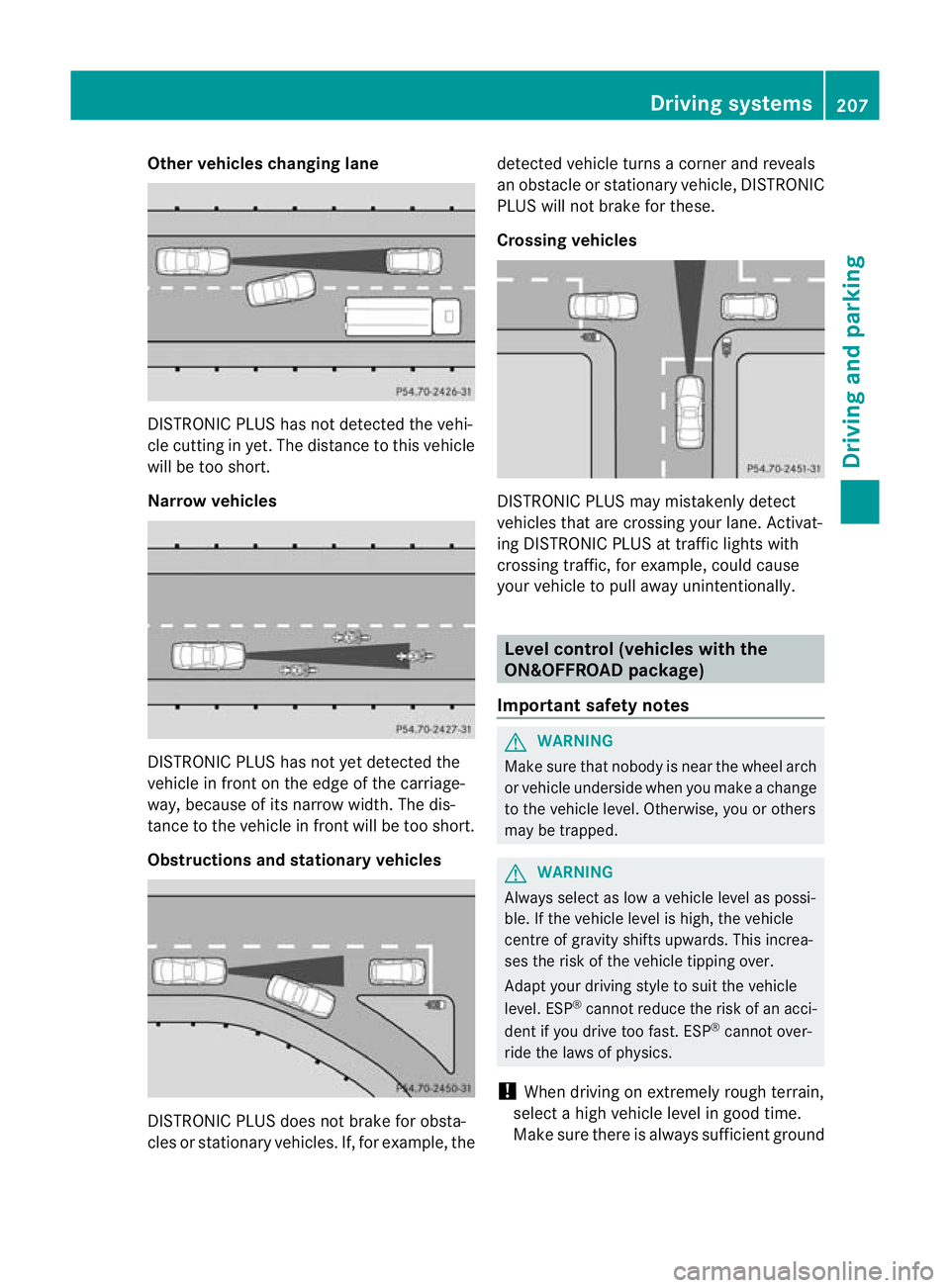
Other vehicles changing lane
DI
ST RONIC PLUS has not detected the vehi-
cle cutting in yet. The distance to this vehicle
will be too short.
Narrow vehicles DISTRONIC PLUS has not yet detected the
vehicle in fron tonthe edge of the carriage-
way, because of its narrow width. The dis-
tance to the vehicle in front will be too short.
Obstruction sand sta tionary vehicles DISTRONIC PLUS does not brake for obsta-
cles or stationary vehicles. If, for example, the detected vehicle turns
acorner and reveals
an obstacle or stationar yvehicle, DI STRONIC
PLUS will not brake for these.
Crossin gvehicles DISTRONIC PLUS may mistakenly detect
vehicles that are crossing your lane. Activat-
ing DISTRONIC PLUS at traffic lights with
crossing traffic, for example, could cause
your vehicle to pull away unintentionally.
Level control (vehicles with the
ON&OFFROAD package)
Important safety notes G
WARNING
Make sure that nobody is near the wheel arch
or vehicle underside when you make achange
to the vehicle level. Otherwise, you or others
ma ybet rapped. G
WARNING
Always select as lo wavehicle level as possi-
ble. If the vehicle level is high, the vehicle
centre of gravity shifts upwards. This increa-
ses the risk of the vehicle tippin gover.
Adapt you rdriving style to suit th evehicle
level. ESP ®
cannot reduc ethe risk of an acci-
dent if you drive too fast. ESP ®
cannot over-
rid ethe laws of physics.
! When driving on extremel yrough terrain,
select ahigh vehicle level in good time.
Make sure there is always sufficient ground Drivin
gsystems
207Drivingand pa rking Z
Page 215 of 441
R
you depress the brak epedal again wit ha
certain amount of pressure until ëdis-
appears from themultifun ctiondisplay.
R you secur ethe vehi cleu sing the elec tric
parking brake.
R you activat eDISTRONIC PLU S.
i After atime, the electric parking brake
secures the vehicle and relieves the service
brake.
The electric parking brak esecures the vehicle
automatically if the HOL Dfunction is activa-
ted and:
R the driver' sdoor is open and the driver's
seat belt is unfastened.
R the engin eisswitched off, unless it is auto-
matically switched off by the ECO start/
stop function.
R as ystem fault occurs.
R the powe rsupply is not sufficient.
On steep uphill or downhill inclines or if there
is am alfunction, the transmissio nmay also
be automatically shifted int oposition P. AIRMATIC package
Genera lnotes AIRMATI
Cenable sasuspension tuning set-
ting to be selected and regulates the damping
behaviour and level of your vehicle. The sys-
tem comprises aminimum of two compo-
nents. These are AD S(Adaptive Damp ingS ys-
tem) (Y page 212) and level control
(Y page 213) .Your vehicle ma yalso be equip-
ped with the Active Curv eSystem
(Y page 213).
Observe the notes on driving with atrailer
(Y page 257).
ADS (Adaptive Damping System) General notes
ADS adapts th
edamping characteristic sto
the curren toperatin gand driving situation. Thi
sd epends on:
R your drivin gstyle
R the road surface conditions
R the AD Ssetting
R the vehicle level setting
Your selection remains stored even if you
remov ethe key from the igni tion lock.
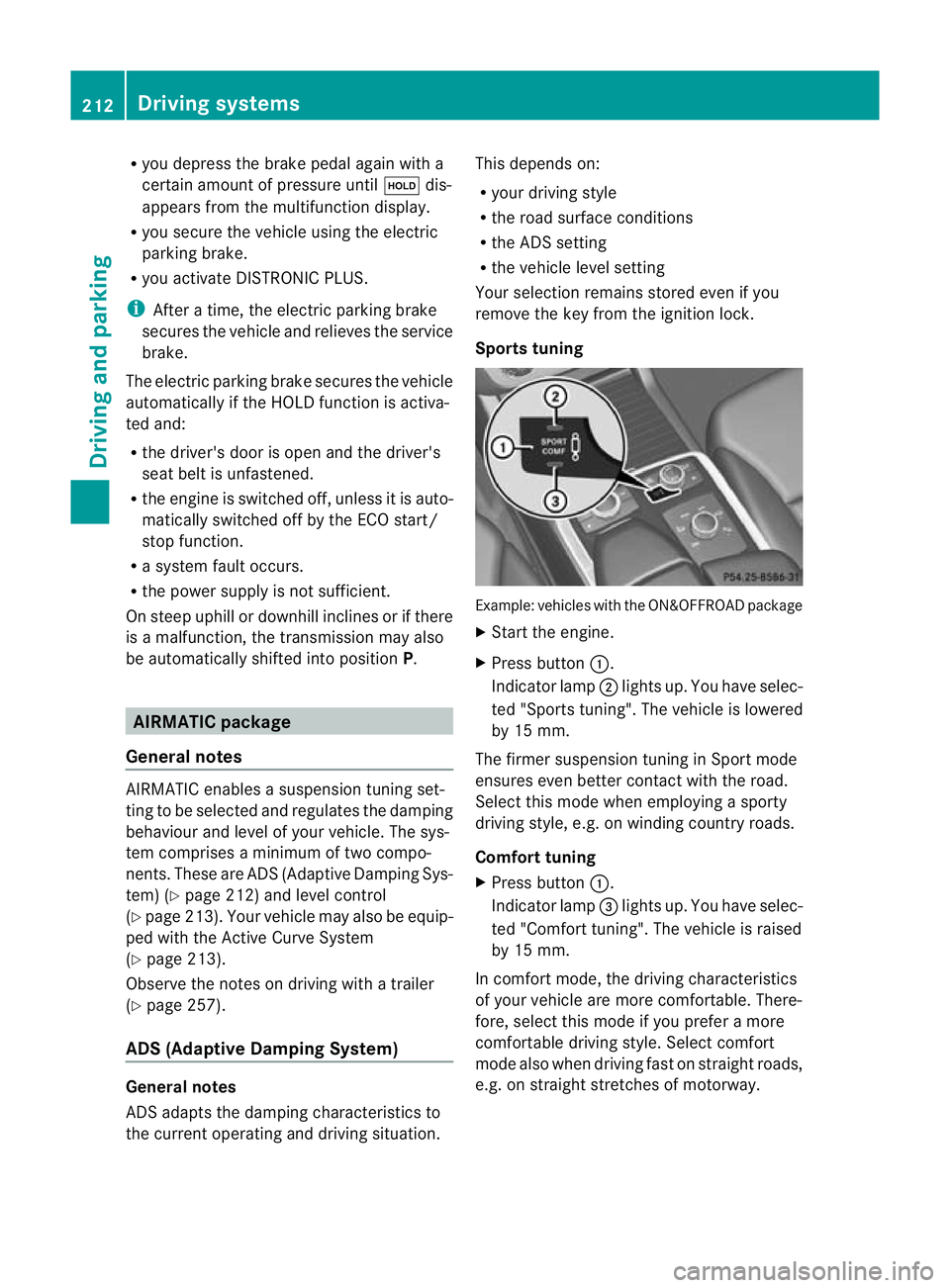
Sports tuning Example: vehicles wit
hthe ON&OFFROA Dpackage
X Start the engine.
X Press button :.
Indicator lamp ;ligh tsup. You have sele c-
ted "Sport stuning". The vehicle is lowered
by 15 mm.
The firmer suspension tuning in Spor tmode
ensures even bette rcontac twith th eroad.
Select this mode when empl oyingasporty
driving style, e.g .onwindingcountr yroads.
Comfor ttun ing
X Press button :.
Indicator lamp =light sup. You have selec-
ted "Comfor ttuning". The vehicle is raised
by 15 mm.
In com fort mode, the dri ving characteristics
of your vehicl eare more comfortable. There-
fore, select this mode if you prefer amore
comfortable drivin gstyle. Select comfort
mode also when driving fast on straigh troads,
e.g. on straight stretches of motorway. 212
Driving systemsDriving and pa
rking
Page 247 of 441
The yellow indicator lam
pgoes out if reverse
gear is engaged. Active Blin dSpot Assist is
then no longer active.
The brightness of the indicator/warning
lamps is adjusted automatically accordin gto
the ambient light.
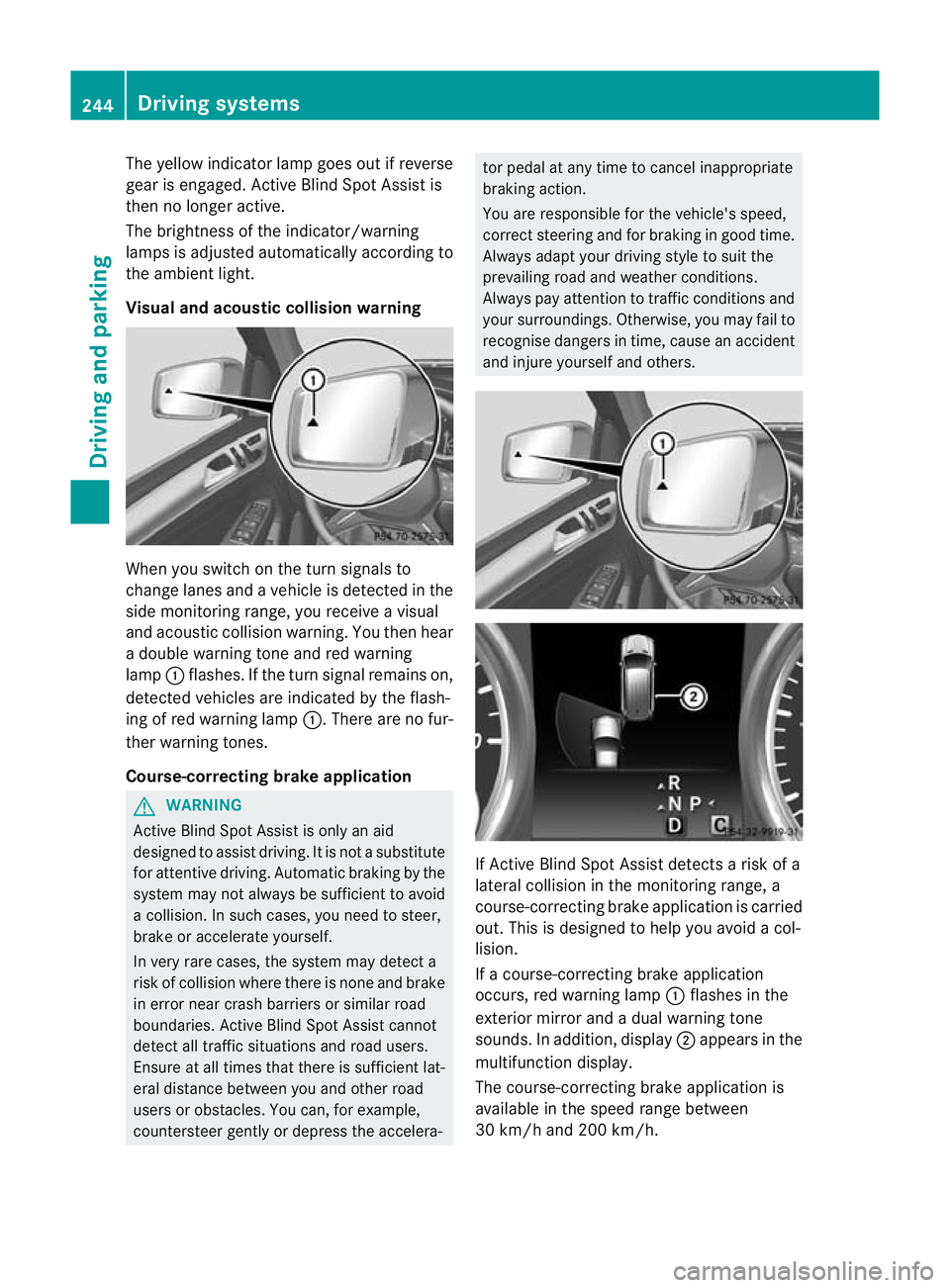
Visual and acoustic collision warning Whe
nyou switc honthe tur nsignals to
change lanes and avehicle is detected in the
side monitorin grange, you receive avisual
and acoustic collision warning. You then hear
ad ouble warnin gtonea nd red warning
lamp :flashes. If the turn signal remains on,
detected vehicles are indicated by the flash-
ing of red warning lamp :.There ar enofur-
ther warning tones.
Course-correcting brake application G
WARNING
Active Blind Spot Assis tiso nly an aid
designe dtoassist driving. It is not asubstitute
for attentive driving. Automatic braking by the
system may not always be sufficient to avoid
ac ollision .Insuch cases, you need to steer,
brake or accelerate yourself.
In very rare cases, the system may detect a
risk of collision where there is none and brake
in error near crash barriers or similar road
boundaries .Active Blind Spot Assist cannot
detect all traffic situations and road users.
Ensure at all times that there is sufficient lat-
eral distance betwee nyou and other road
users or obstacles. You can ,for example,
countersteer gentl yordepress the accelera- tor pedal at any tim
etocancel inappropriate
braking action.
You are responsible for the vehicle's speed,
correct steering and for braking in good time.
Always adapt your driving style to suit the
prevailing road and weather conditions.
Always pay attention to traffic conditions and
your surroundings. Otherwise ,you may fai lto
recognise dangers in time ,cause an accident
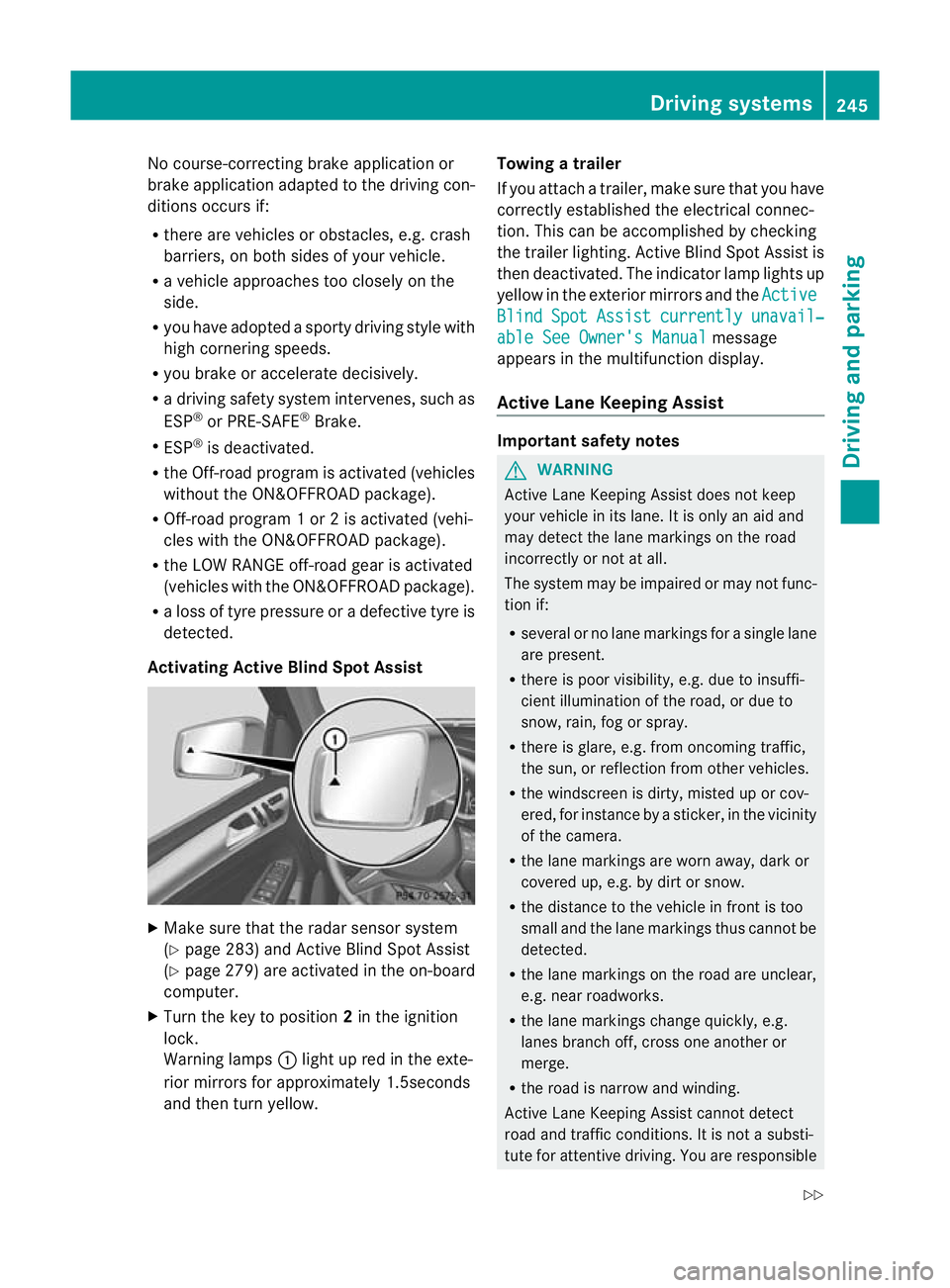
and injure yourself and others. If Active Blind Spot Assis
tdetect sarisk of a
lateral collision in the monitorin grange, a
course-correcting brake application is carried
out. This is designed to help you avoid acol-
lision.
If ac ourse-cor recting brake application
occurs ,red warning lamp :flashes in the
exterior mirror and adual warning tone
sounds .Inaddition, display ;appears in the
multifunction display.
The course-cor recting brake applicatio nis
available in the spee drange between
30 km/h and 200 km/h. 244
Driving systemsDriving and parking
Page 248 of 441
No course-correctin
gbrake applicatio nor
brak eapplication adapted to the driving con-
ditions occurs if:
R there are vehicles or obstacles, e.g. crash
barriers, on both sides of your vehicle.
R av ehicle approaches too closely on the
side.
R you have adopted asport ydriving style with
high cornerin gspeeds.
R you brak eoraccelerat edecisively.
R ad riving safety system intervenes, such as
ESP ®
or PRE-SAFE ®
Brake.
R ESP ®
is deactivated.
R theO ff-roa dprogram is activated (vehicles
without th eON&O FFROAD package).
R Off-road program 1or2isactivated (vehi-
cles with the ON&OFFROAD package).
R the LOW RANGE off-road gear is activated
(vehicle swith the ON&OFFROAD package).
R al oss of tyr epressure or adefec tive tyre is
detected.
Activatin gActive Blind Spot Assist X
Make sure that the radar senso rsystem
(Y page 283 )and Active Blind Spot Assist
(Y pag e279)are activate dint he on-board
computer.
X Tur nthe key to position 2in the ignition
lock.
Warnin glamps :light up red in the exte-
rior mirrors for approximately 1.5seconds
and then tur nyellow. Towin
gatrailer
If yo uattach atrailer, make sure th at you have
corre ctly established the electrical connec-
tion. This can be accomplished by checking
the trailer lighting. Active Blind Spot Assist is
then deactivated. The indicator lamp lights up
yellow in the exterior mirrors and the Active Blind Spot Assist currently unavail‐
able Se
eOwner's Manual message
appears in th emultifunction display.
Active Lane Keeping Assist Important safety notes
G
WARNING
Active Lane Keeping Assis tdoes not keep
your vehicle in its lane. It is only an aid and
may detec tthe lan emarkings on the road
incorrectly or not at all.
The system may be impaired or may not func-
tion if:
R several or no lane markings for asingle lane
are present.
R there is poor visibility, e.g. due to insuffi-
cient illumination of the road, or due to
snow, rain, fog or spray.
R there is glare, e.g. from oncoming traffic,
the sun, or reflec tion from other vehicles.
R the windscreen is dirty, misted up or cov-
ered, for insta ncebyasticker, in the vicinity
of the camera.
R the lane markings are worn away ,dark or
covered up, e.g. by dirt or snow.
R the distance to the vehicle in front is too
small and the lane markings thus cannot be
detected.
R the lane markings on the road are unclear,
e.g. near roadworks.
R the lane markings change quickly, e.g.
lanes branch off, cross one another or
merge.
R the road is narrow and winding.
Active Lane Keeping Assis tcannot detect
road and traffic conditions. It is not asubsti-
tute for attentive driving. You are responsible Driving systems
245Drivingand pa rking
Z