warning light MERCEDES-BENZ GL SUV 2012 Owner's Manual
[x] Cancel search | Manufacturer: MERCEDES-BENZ, Model Year: 2012, Model line: GL SUV, Model: MERCEDES-BENZ GL SUV 2012Pages: 441, PDF Size: 10.66 MB
Page 69 of 441
ESP
®
(Electronic Stability Program)
Important safety notes i
Observ ethe "Important safety notes "sec-
tio n(Ypage 61). G
WARNING
If ESP ®
is mal functioning, ESP ®
is unable to
stabilis ethe vehicle. In addition, othe rdriving
safety systems are switche doff. This increa-
se st he risk of skiddi ngand an accident.
Driv eonc arefully. Have ESP ®
checked at a
qualified specialis tworkshop.
! Only operat ethe vehicle for amaximum
of ten seconds on abrake dynamometer.
Switch off th eignition.
Application of the brakes by ESP ®
ma yoth-
erwise destroy the brake system.
! Afunction or performanc etest should
only be carried out on atwin-axle dyna-
mometer .Before you operate th evehicle
on such adynamometer, pleas econsult a
qualified workshop. You coul dotherwise
damage the drive train or the brake system.
ESP ®
is deactivated if the åwarning lamp
in the instrument cluster lights up continu-
ousl ywhen the engin eisrunning.
If the ÷ warning lamp and the åwarn-
ing lamp are lit continuously, ESP ®
is not
available due to amalfunction.
Observe the information on warning lamps
(Y page 329 )and display message swhich
ma ybes hown in the inst rument cluster
(Y page 291).
If ESP ®
detects that th evehicle is deviating
from the direction desired by the driver, one
or mor ewheels ar ebrake dtos tabilise the
vehicle .The engin eoutput is also modified to
keep the vehicle on the desired course within
physical limits. ESP ®
assists the driver when
pulling away on wet or slippery roads. ESP ®
can also stabilise the vehicle during braking.
If ESP ®
intervenes, the ÷ESP®
warning
lamp flashes in the instrument cluster. If ESP
®
intervenes:
X Do not deactivate ESP ®
under any circum-
stances.
X When pulling away ,only depress the accel-
erator pedal as far as is necessary.
X Adapt your driving style to suit the prevail-
ing road and weather condi tions.
i Only use wheels with the recommended
tyr es izes. Only then will ESP ®
func tion
properly.
4ETS (Electronic Traction System) Traction con
trol is par tofESP®
.
Tractio ncontrol brakes the drive wheels indi-
vidually if they spin. This enables you to pull
away and accelerate on slipper ysurfaces, for
example if the road surface is slippery on one
side .Ina ddition, mor edrive torqu eistrans-
ferre dtot he wheel or wheels with traction.
Traction con trol remains active if you deacti-
vate ESP ®
.
In appropriate drivin gsituations, activate the
off-road program:
X Vehicles without the ON&OFFROAD pack-
age (Y page 252)
X Vehicles with the ON&OFFROAD package
(Y page 253)
Off- road 4ETS (Electronic Traction Sys-
tem) A4
ETS syste mspecifically suited to off -road
ter rain is activated automatically onc ethe off-
roa dprogram is acti vated on:
R Vehicle swithout the ON&OFFROA Dpack-
age (Y page 252)
R Vehicles with the ON&OFFROAD package
(Y page 253) 66
Driving safety systemsSafety
Page 70 of 441
Deactivating/activating ESP
®G
WARNING
If you deactivat eESP®
,E SP ®
no longer sta-
bilises the vehicle. There is an increased risk
of skidding and an accident.
Only deactivat eESP®
in th esituation sdescri-
bed in th efollowing. X
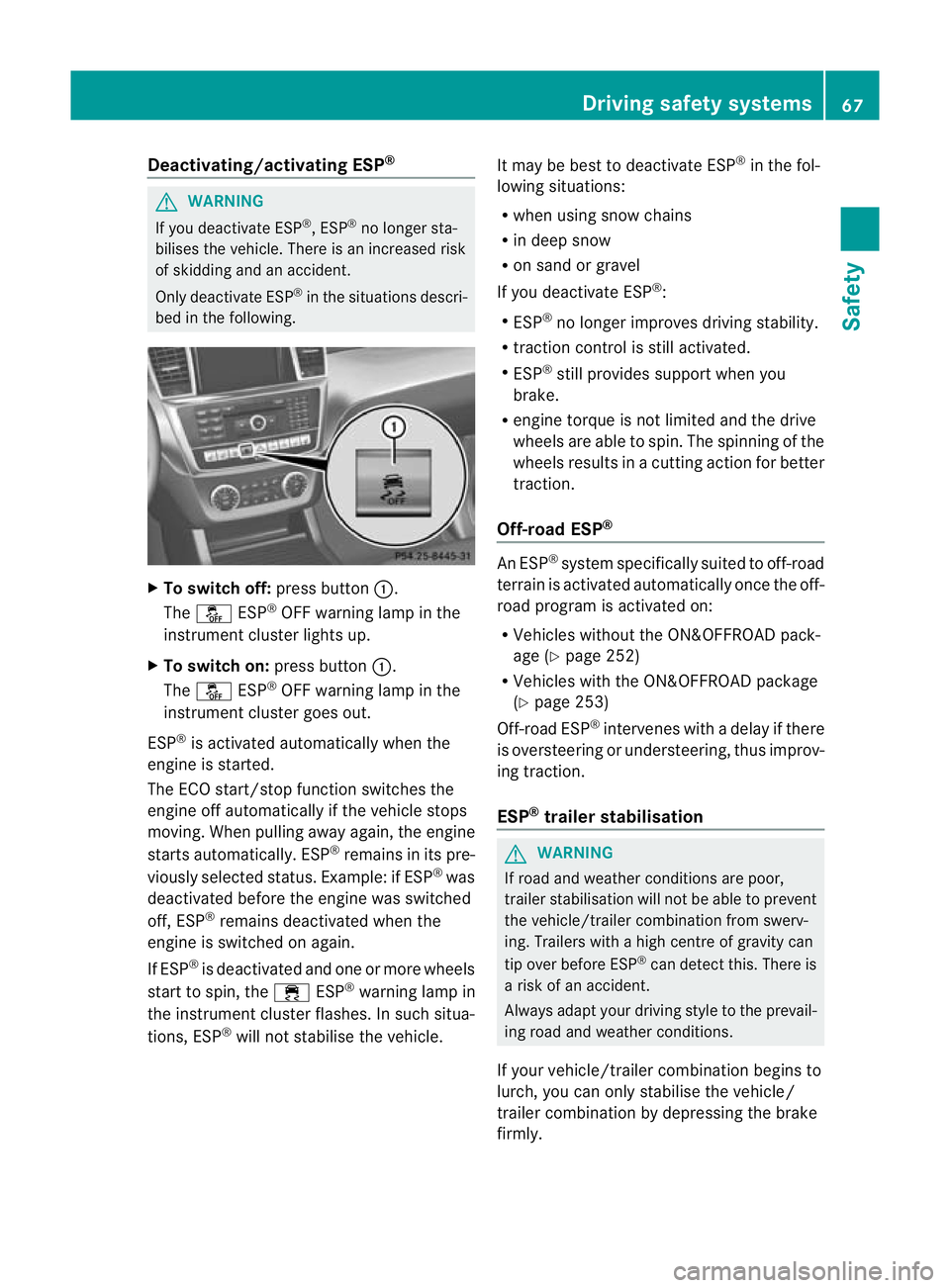
To switch off: press button:.
The å ESP®
OF Fw arnin glamp in the
instrumen tcluster lights up.
X To switch on: press button:.
The å ESP®
OFF warnin glamp in the
instrumen tcluster goes out.
ESP ®
is activated automatically when the
engin eisstarted.
The ECO start/stop fun ction switches the
engin eoff automaticall yifthe vehi cles tops
moving. When pulling away again, the engine
start sautomatically. ESP ®
remain sinits pre-
viousl yselected status. Example: if ESP ®
was
deactiva tedb efor ethe engine was switched
off ,ESP ®
remains deactivated when the
engine is switched on again.
If ESP ®
is deactivated and one or more wheels
start to spin, the ÷ESP®
warning lamp in
th ei nstrumen tcluster flashes. In such situa-
tions, ESP ®
will not stabilise th evehicle. It may be best to deact
ivateESP®
in the fol-
lowing situations:
R when using sno wchains
R in deep snow
R on sand or gravel
If you deactivate ESP ®
:
R ESP ®
no longe rimproves driving stab ility.
R traction control is still activated.
R ESP ®
still provides support when you
brake.
R engine torque is not limited and the drive
wheels are abl etospin. The spinnin gofthe
wheels resu ltsinac utting action for better
traction.
Off-roa dESP® An ESP
®
syste mspecif icall ys uited to off-road
terrain is activated automatically once the off-
road progra misactivate don:
R Vehicles without the ON&OFFROAD pack-
age (Y page252)
R Vehicles wit hthe ON&OFFROAD package
(Y page 253)
Off-road ESP ®
intervenes with adelay if there
is oversteerin gorundersteering ,thus improv-
ing traction.
ESP ®
trailer stabilisation G
WARNING
If roa dand weather conditions are poor,
trailer stabilis ation will not be able to prevent
the vehicle/trailer combination from swerv-
ing. Trailers with ahigh centre of gravit ycan
tip over before ESP ®
can detect this. There is
ar isk of an accident.
Always adap tyour driving style to the prevail-
ing road and weather conditions.
If your vehicle/trailer combination begins to
lurch, you can only stabilise the vehicle/
trailer combination by depressin gthe brake
firmly. Driving safety systems
67Safety Z
Page 71 of 441
In this situation, ESP
®
assist syou and can
detec tifthe vehicle/trailer combination
begins to lurch. ESP ®
slows the vehicle down
by brakin gand limiting the engine outp ut until
the vehicle/trailer combinatio nhas stabi-
lised.
Trailer stabilisation is active above speeds of
about 60 km/h.
Trailer stabilisation does not work if ESP ®
is
deactivated or disabled because of amal-
function.
Crosswin dAssist Strong crosswinds can cause your vehicle to
deviate from astraight course. The crosswind
driving assistance function integrated into
ESP ®
significantly reduces thes eeffects.
ESP ®
intervene sautomatically according to
the direction and intensity of the crosswinds
affecting your vehicle.
When driving on straight roads or gentle
bends ,your vehicle is kept safel yonc ourse
by astabilising brake intervention.
Crosswind driving assistance is active above
av ehicle speed of 80 km /h.
Crosswind driving assistance does not work
if ESP ®
is deactivated or disabled because of
am alfunction. EBD (electronic brake force distribu-
tion)
i Observe the "Importan tsafety notes" sec-
tion (Y page 61). G
WARNING
If EBD has malfunctioned, the rear wheels can
still lock, e.g. under full braking. This increa-
ses the risk of skidding and an accident.
You should therefor eadapt your driving style
to the different handling characteristics. Have
the brak esystem checked at aqualified spe-
cialist workshop. Observe information regarding indicator and
warning lamps (Y
page 327) as well as dis-
play messages (Y page 293).
EBD monitors and controls the brake pres-
sure on the rear wheels to improve driving
stability while braking. ADAPTIVE BRAKE
ADAPTIVE BRAKE enhances braking safety
and offers increased braking comfort. In addi-
tion to the braking function, ADAPTIVE BRAKE
also has the HOLD function (Y page 211) and
hill start assist (Y page 162). PRE-SAFE
®
Brake
i Observe the "Important safety notes" sec-
tion (Y page 61).
PRE-SAFE ®
Brake is only available in vehicles
with DISTRONIC PLUS.
PRE-SAFE ®
Brake can help you to minimise
the risk of acollision with avehicle in front or
reduc ethe effect sofsuchacollision .IfPRE-
SAFE ®
Brake has detected arisk of collision,
you will be warned visually and acoustically
as well as by automatic braking. PRE-SAFE ®
Brake cannot prevent acollision withou tyour
interven tion.
This func tion will issue awarning if:
R at speeds of around 30 km/ horm ore over
several seconds, the distance maintained
to the vehicle travellin ginfront is insuffi-
cient.
The · distance warning lamp then lights
up in th einstrument cluster.
R at as peed of approximately 7km/h or
high er,y ou ver yquickly approach avehicle
in front.
An intermittent warning tone will then
sound and the ·distance warning lamp
will light up in the instrumen tcluster. 68
Driving safety systemsSafety
Page 82 of 441
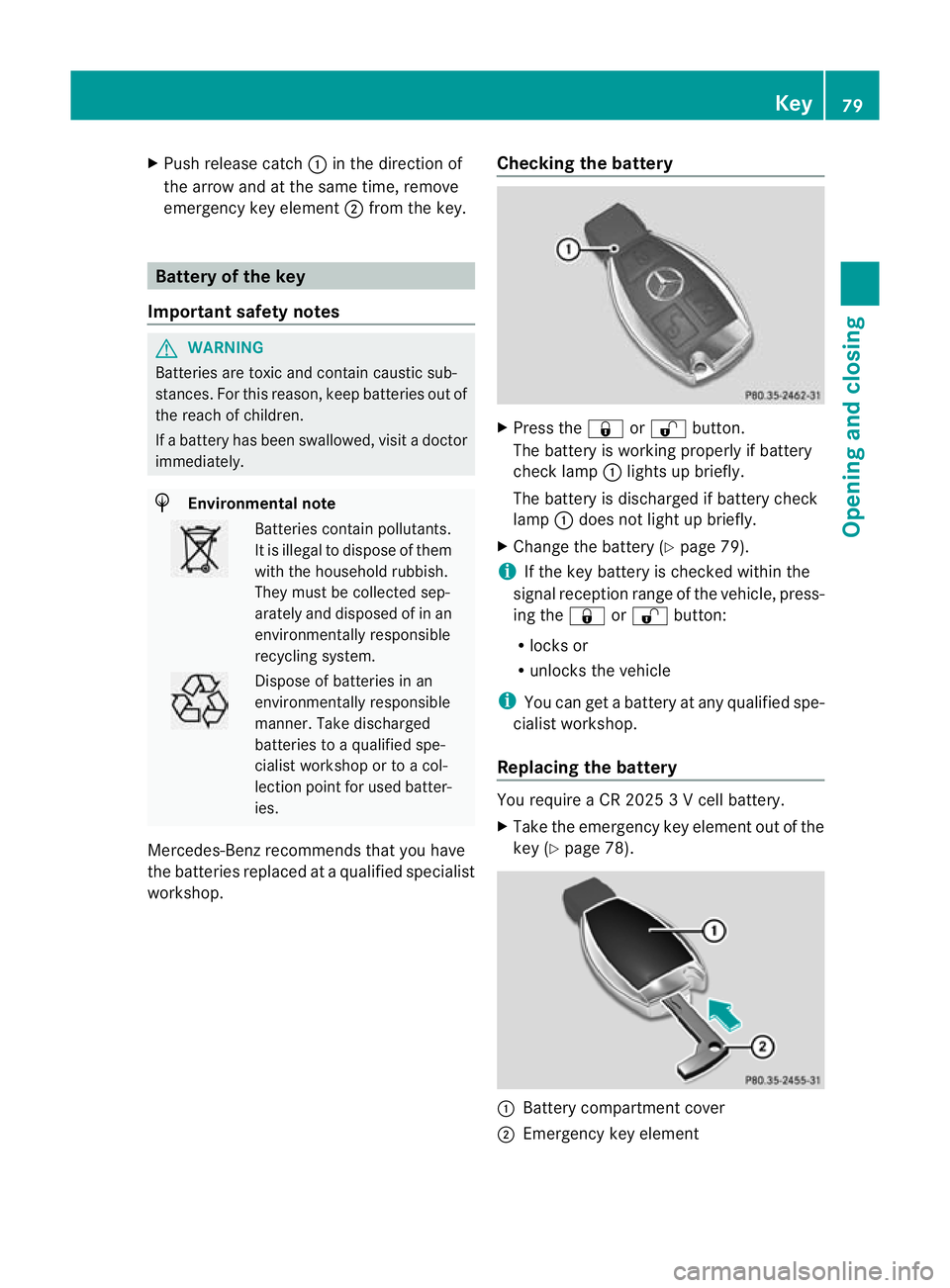
X
Push release cat ch: in the direction of
the arrow and at the same time, remove
emergenc ykey element ;from the key. Ba
ttery of the key
Important safety notes G
WARNING
Batteries are toxic and contain caustic sub-
stances. For this reason, keep batteries out of
the reach of children.
If ab attery has been swallowed, visit adoctor
immediately. H
Environment
alnote Bat
teri es contain pollutants.
It is illegal to dispose of them
with the household rubbish.
They must be collec teds ep-
arately and disposed of in an
environmen tally responsible
recycling system. Dispose of batteries in an
environmentally responsible
manner
.Take discharged
batteries to aqualified spe-
cialist workshop or to acol-
lection point for used batter-
ies.
Mercedes-Benz recommends that you have
the batteries replaced at aqualified specialist
workshop. Checking the battery X
Press the &or% button.
The battery is working properly if battery
check lamp :lights up briefly.
The battery is discharge difbattery check
lamp :does not light up briefly.
X Change the battery (Y page 79).
i If the key battery is checked within the
signal reception range of the vehicle, press-
ing the &or% button:
R locks or
R unlocks the vehicle
i You can get abattery at any qualified spe-
cialist workshop.
Replacing the battery You require
aCR20253Vc ell battery.
X Take the emergenc ykey elemen tout of the
key (Y page 78). :
Battery compartment cover
; Emergency key element Key
79Openin gand closing Z
Page 85 of 441
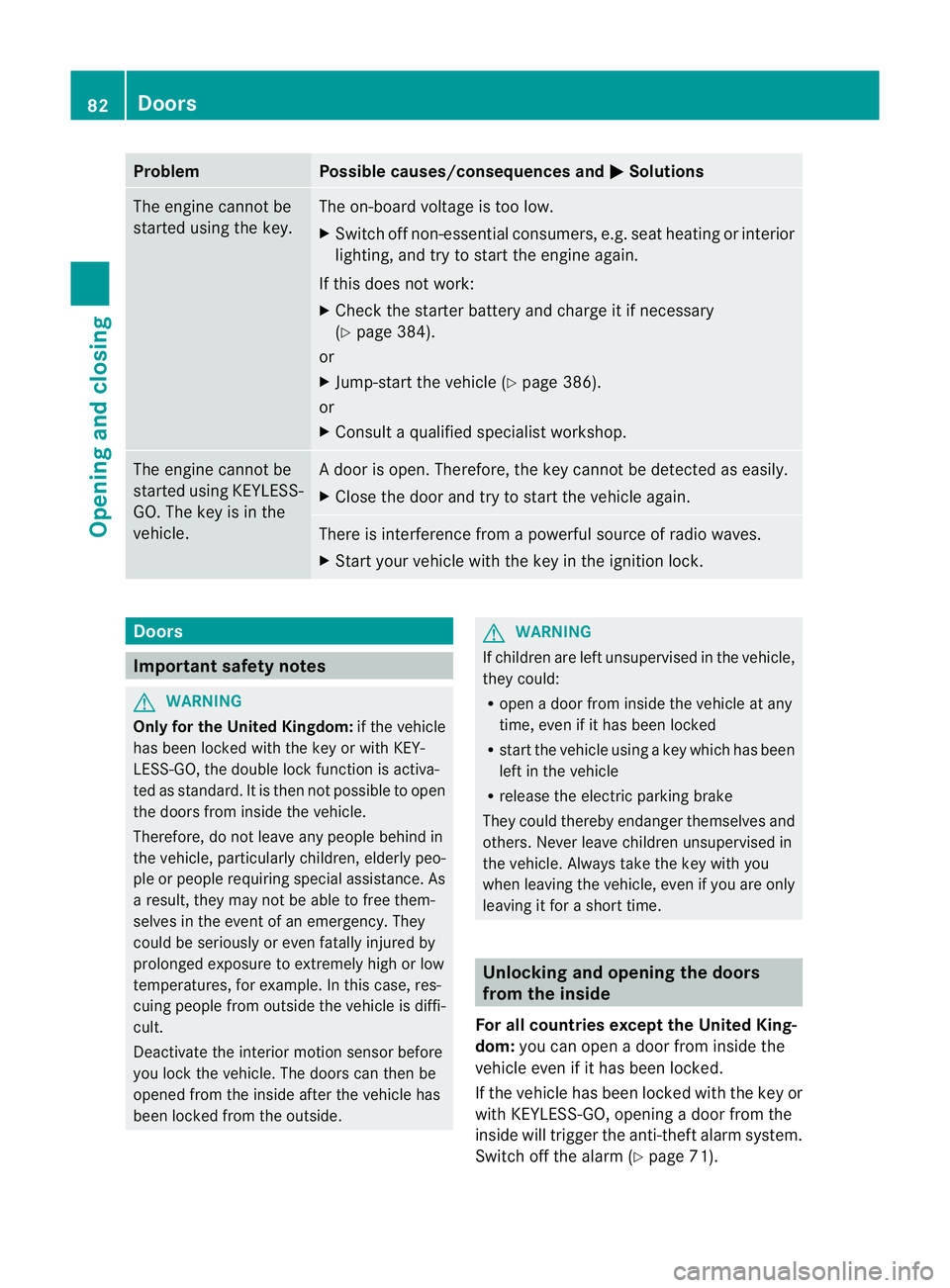
Problem Possible causes/consequences and
M Solutions
The engin
ecannot be
started using the key. The on-board voltage is too low.
X
Switch off non-essential consumers, e.g. seat heating or interior
lighting ,and try to start the engine again.
If this doe snot work:
X Check the starter battery and charge it if necessary
(Y page 384).
or
X Jump-start the vehicle (Y page 386).
or
X Consult aqualified specialist workshop. The engine cannot be
started using KEYLESS-
GO. The key is in the
vehicle. Ad
oor is open. Therefore, the key can notb ed etected as easily.
X Close the door and tr ytostart the vehicle again. There is interferenc
efrom apowerfu lsource of radio waves.
X Start your vehicle with the key in the ignition lock. Doors
Important safety notes
G
WARNING
Only fo rthe Unite dKingdom: if the vehicle
has been locked with the key or with KEY-
LESS-GO, the double lock func tion is activa-
ted as standard. It is then not possible to open
the doors from inside the vehicle.
Therefore, do not leav eany people behind in
the vehicle, particularly children, elderly peo-
ple or people requiring special assistance .As
ar esult, they may not be able to free them-
selves in the event of an emergency. They
could be seriously or even fatally injured by
prolonged exposur etoextremely hig horlow
tempera tures, for example. In this case ,res-
cuin gpeople from outside the vehicle is diffi-
cult.
Deac tivate the interior motion sensor before
you lock the vehicle .The doors can then be
opened from the insid eafter the vehicl ehas
been locked from the outside. G
WARNING
If children are left unsupervised in the vehicle,
they could:
R open adoor from inside the vehicle at any
time, even if it has been locked
R star tthe vehicle usin gakey which has been
left in the vehicle
R release the electric parking brake
They could thereby endanger themselves and
others. Never leave children unsupervised in
the vehicle. Alway stake the key with you
when leaving the vehicle, even if you are only
leaving it for ashort time. Unlocking and opening th
edoors
from the inside
For all countries except the United King-
dom: you can open adoor from inside the
vehicle even if it has been locked.
If the vehicle has been locked with the key or
with KEYLESS -GO, opening adoor from the
inside will trigger the anti-thef talarm system.
Switch off the alarm (Y page 71).82
DoorsOpening and closing
Page 96 of 441
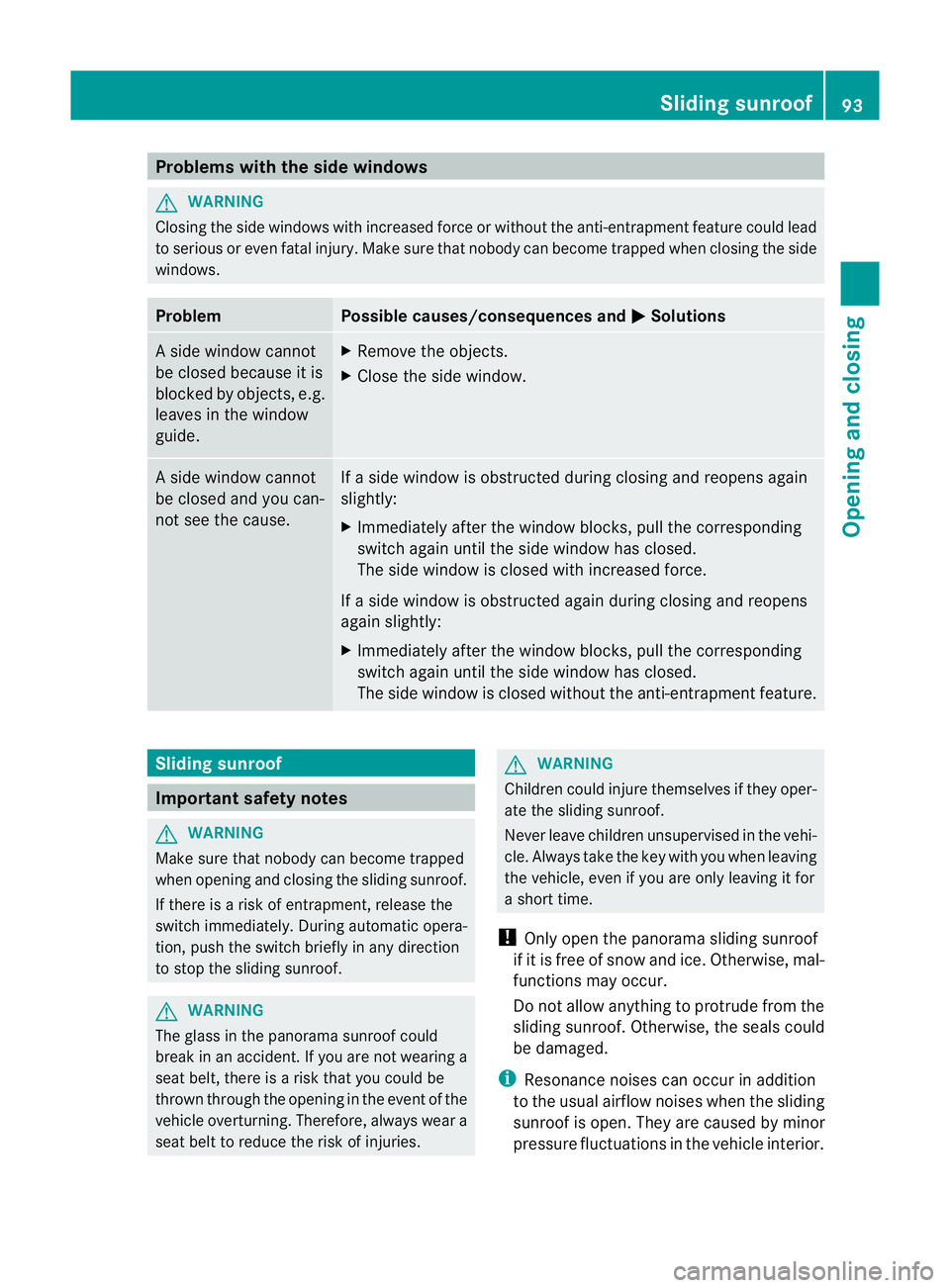
Problems wit
hthe side windows G
WARNING
Closing the side windows wit hincrease dforc eorw ithout the anti-entrapment featur ecould lead
to seriou soreven fata linjury. Make sure that nobody can become trappe dwhen closing the side
windows. Problem Possible causes/consequences and
M Solutions
As
ide window cannot
be closed because it is
blocked by objec ts,e .g.
leave sinthe window
guide. X
Remove the objects.
X Close the side window. As
ide window cannot
be closed and you can-
not see the cause. If
as ide window is obstructed durin gclosing and reopen sagain
slightly:
X Im me diately after the window blocks, pull the corresponding
switc hagain until the side window has closed.
The side window is closed with increased force.
If as ide window is obstructed again durin gclosing and reopens
again slightly:
X Im me diately after the window blocks, pull the corresponding
switc hagain until the side window has closed.
The side window is closed without the anti-entrapmen tfeature. Sliding sunroof
Important safet
ynotes G
WARNING
Make sure that nobody can become trapped
when openin gand closing the sliding sunroo f.
If there is arisk of entrapment ,release the
switch immediately .Durin gautomatic opera-
tion, push the switch briefly in any direction
to stop the sliding sunroof. G
WARNING
The glass in the panorama sunroof could
break in an accident .Ifyou are not wearing a
seat belt, ther eisar isk that you could be
thrown through the openin ginthe even tofthe
vehicle over turning.Therefore, always wear a
seat belt to reduce the risk of injuries. G
WARNING
Children coul dinjure themselves if they oper-
ate the sliding sunroof.
Never leave children unsupervise dint he vehi-
cle. Always tak ethe key with you when leaving
the vehicle, even if you ar eonly leaving it for
as hort time.
! Only open the panoram asliding sunroof
if it is free of snow and ice. Otherwise, mal-
func tions ma yoccur.
Do not allo wanything to protrude from the
sliding sunroof. Otherwise, the seals could
be damaged.
i Resonance noises can occur in addition
to the usua lairflow noises when the sliding
sunroof is open. They are caused by minor
pressure fluctuations in the vehicle interior. Slidin
gsunroof
93Openingand closing Z
Page 98 of 441
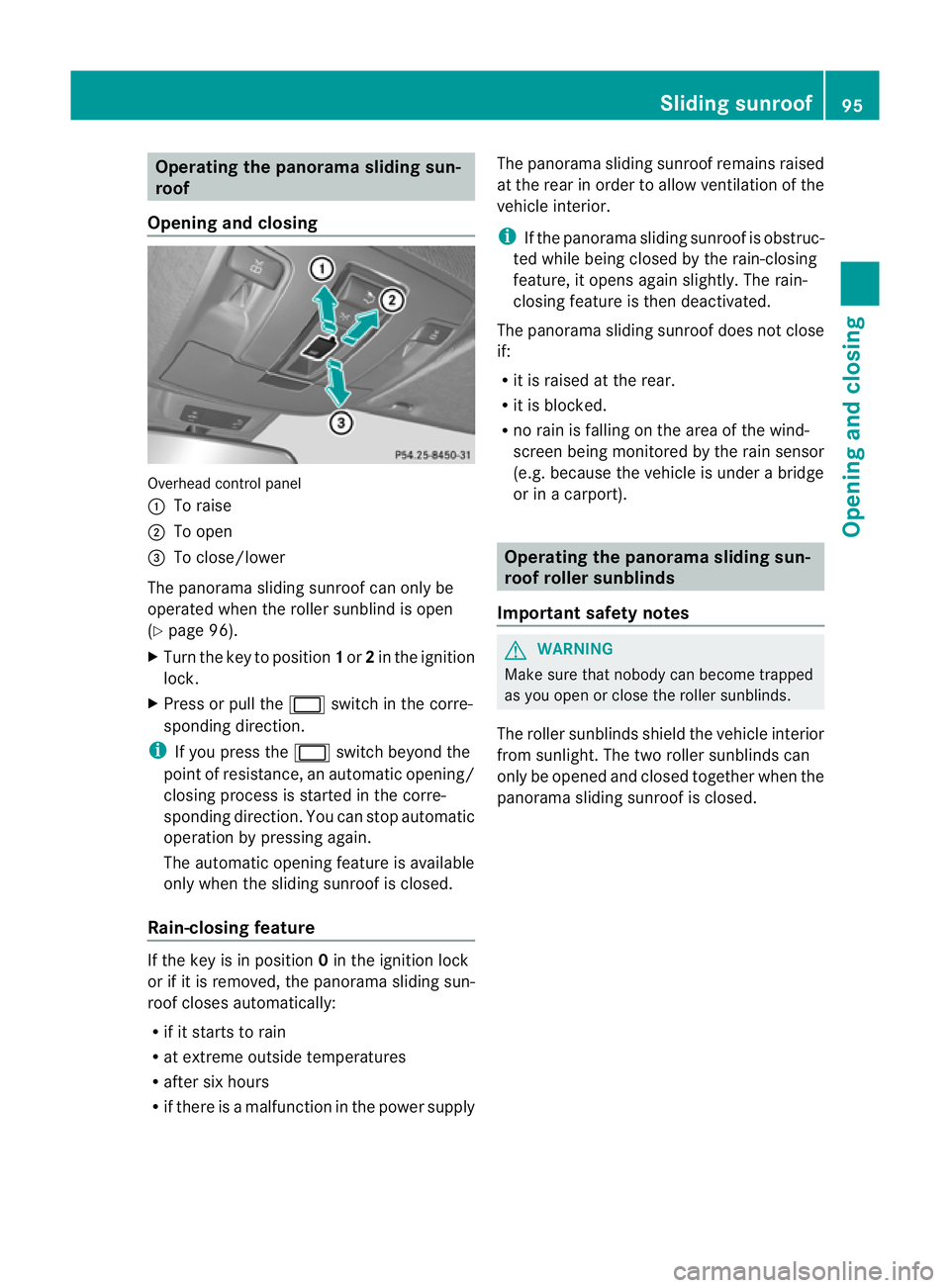
Oper
ating the panorama sliding sun-
roof
Opening and closing Overhead control panel
:
To raise
; To open
= To close/lower
The panorama sliding sunroof can only be
operated when the roller sunblind is open
(Y page 96).
X Turn the key to position 1or 2in the ignition
lock.
X Press or pull the 2switch in the corre-
spondin gdirection.
i If you press the 2switch beyond the
point of resistance, an automatic opening/
closing process is started in the corre-
sponding direction. You can stop automatic
operation by pressing again.
The automatic opening featur eisavailable
onl yw hen the slidin gsunroof is closed.
Rain-closin gfeature If the key is in position
0in the ignition lock
or if it is removed, the panoram asliding sun-
roof closes automatically:
R if it start storain
R at extreme outside temperatures
R after six hours
R if there is amalfunction in the power supply The panorama sliding sunroof remains raised
at the rear in order to allow ventilation of the
vehicle interior.
i
If the panorama sliding sunroof is obstruc-
ted while being closed by the rain-closing
feature, it opens again slightly. The rain-
closing feature is then deactivated.
The panorama sliding sunroof does not close
if:
R it is raised at the rear.
R it is blocked.
R no rain is falling on the area of the wind-
screen being monitored by the rain sensor
(e.g. because the vehicle is under abridge
or in acarport). Operating the panorama sliding sun-
roof roller sunblinds
Important safet ynotes G
WARNING
Make sure that nobody can become trapped
as you open or close the roller sunblinds.
The roller sunblinds shield the vehicle interior
from sunlight. The two roller sunblinds can
only be opened and closed together when the
panoram asliding sunroof is closed. Slidin
gsunroof
95Openingand closing Z
Page 100 of 441
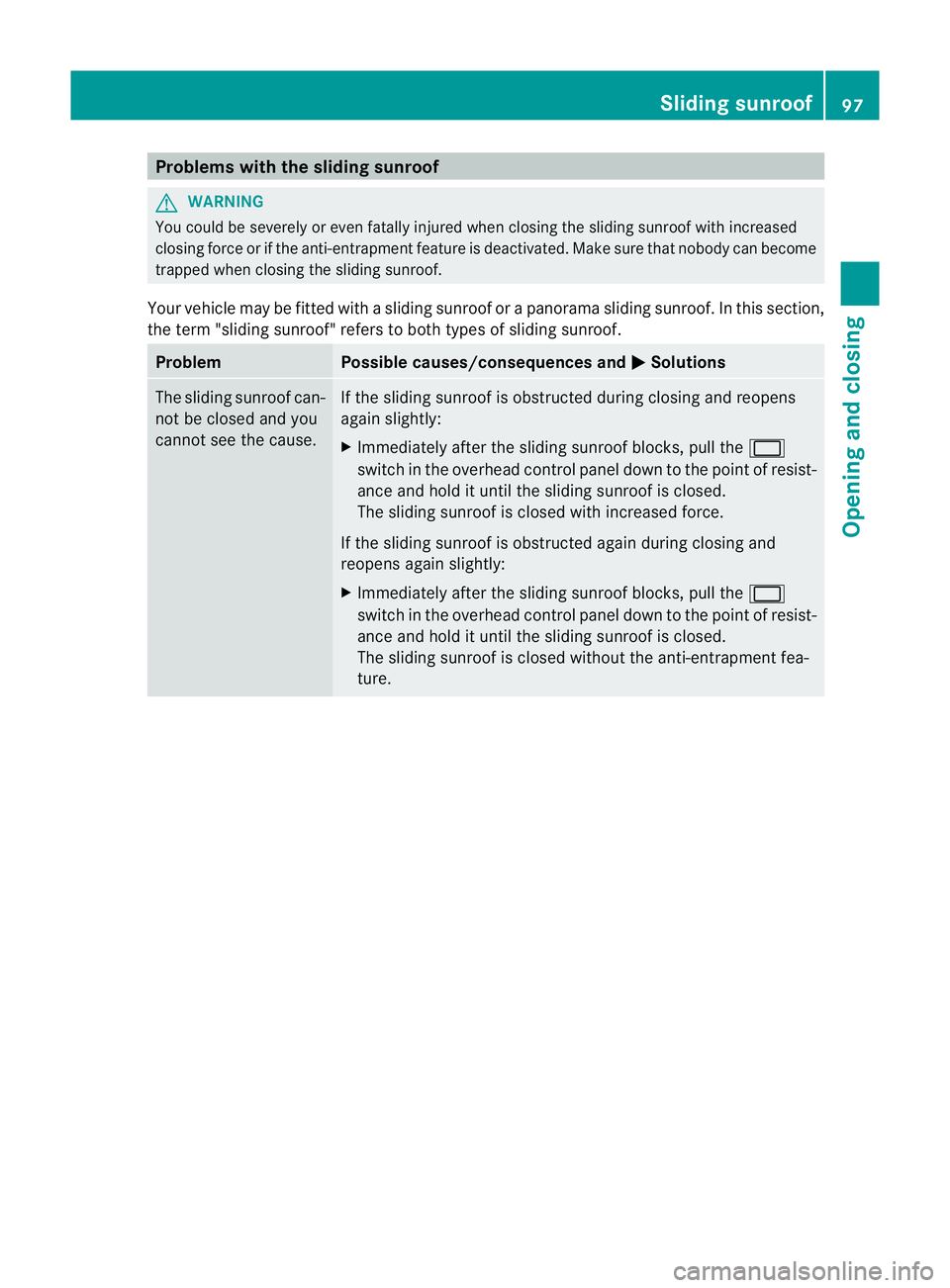
Problems wit
hthe sliding sunroof G
WARNING
Yo uc ould be severely or even fatally injure dwhen closing the slidin gsunroof with increased
closing force or if the anti-entrapment feature is deactivated. Make sure that nobody can become
trapped when closing the sliding sunroof.
Your vehicle may be fitted with asliding sunroof or apanorama sliding sunroof. In this section,
the term "sliding sunroof" refers to both types of sliding sunroof. Problem Possible causes/consequences and
M Solutions
The sliding sunroof can-
not be closed and you
cannot see the cause. If the sliding sunroof is obstructed during closing and reopens
again slightly:
X
Immediately after the sliding sunroof blocks, pull the 2
switch in the overhead control panel down to the point of resist-
ance and hold it until the sliding sunroof is closed.
The sliding sunroof is closed with increased force.
If the sliding sunroof is obstructed again during closing and
reopens again slightly:
X Immediately after the sliding sunroof blocks, pull the 2
switch in the overhead control panel down to the point of resist-
ance and hold it until the sliding sunroof is closed.
The sliding sunroof is closed without the anti-entrapment fea-
ture. Sliding sunroof
97Opening and closing Z
Page 110 of 441
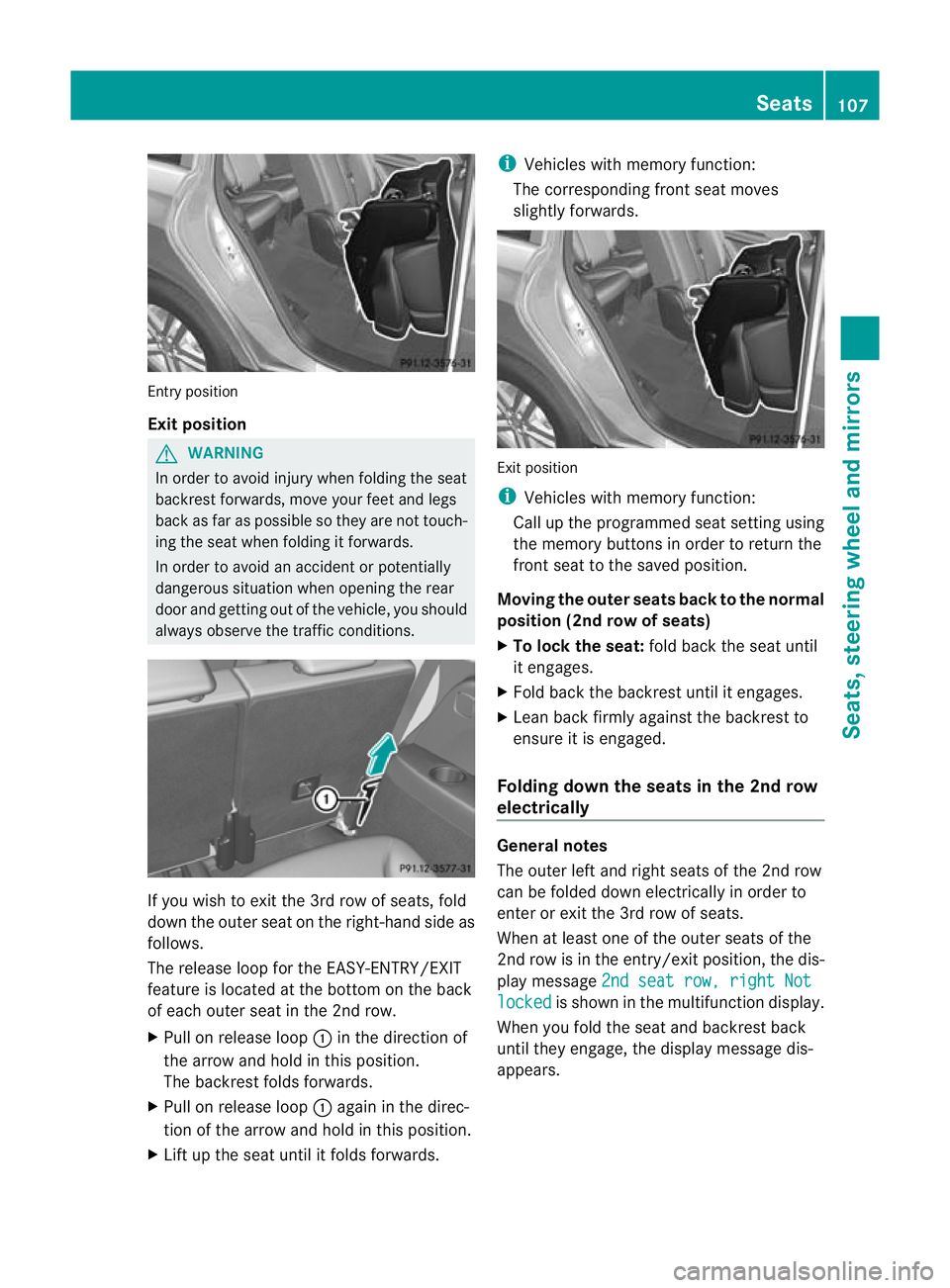
Entry position
Exit position
G
WARNING
In order to avo idinjury when folding the seat
backres tforwards, mov eyour feet and legs
back as far as possible so they are not touch-
ing the seat when folding it forwards.
In order to avoi danaccident or potentially
dangerou ssituation when opening the rear
door and gettin gout of the vehicle, you should
alway sobserv ethe traffic conditions. If you wish to exit the 3r
drow of seats, fold
down the outer seat on the right -hand side as
follows.
The release loop for the EASY-ENTRY/EXIT
feature is located at the bottom on the back
of each outer seat in the 2nd row.
X Pull on release loop :in the direction of
the arrow and hold in this position.
The backrest folds forwards.
X Pull on release loop :again in the direc-
tion of the arrow and hold in this position.
X Lift up the seat until it folds forwards. i
Vehicles with memory function:
The corresponding front seat moves
slightly forwards. Exit position
i
Vehicles with memory function:
Call up the programmed seat setting using
the memory buttons in order to return the
front seat to the saved position.
Moving the outer seats back to the normal
position (2nd row of seats)
X To lock the seat: fold back the seat until
it engages.
X Fold back the backrest until it engages.
X Lean back firmly against the backrest to
ensure it is engaged.
Folding down the seats in the 2nd row
electrically General notes
The outer left and right seats of the 2nd row
can be folded down electrically in order to
enter or exit the 3rd row of seats.
When at least one of the outer seats of the
2nd row is in the entry/exit position, the dis-
play message
2nds eat row, right Not locked is show
ninthe multifunc tion display.
When you fold the seat and backrest back
until they engage, the display message dis-
appears. Seats
107Seats, steering wheel and mirrors Z
Page 113 of 441
Problems wit
hthe seat ventilation Th
es eat ven tilation has switched off prema-
turely or cannot be switched on. The vehicle's
electrical system voltage is too low because
too many electrical consumer sare switched
on.
X Switch off electrica lconsumers that you do
not need, such as the rea rwindow heating
or interior lighting. Steering wheel
Important safet
ynotes G
WARNING
Do not adjust the steering wheel while driving.
Adjusting the steering wheel while driving, or
drivin gwithout the steering wheel adjustment
featur elocked coul dcause the driver to lose
control of the vehicle.
The electrical steering wheel adjustment fea-
ture can be operated at any time. Therefore,
do not leave children unattended in the vehi-
cle, or with access to an unlocked vehicle. A
child's unsupervised access to avehicle could
result in an accident and/or serious personal
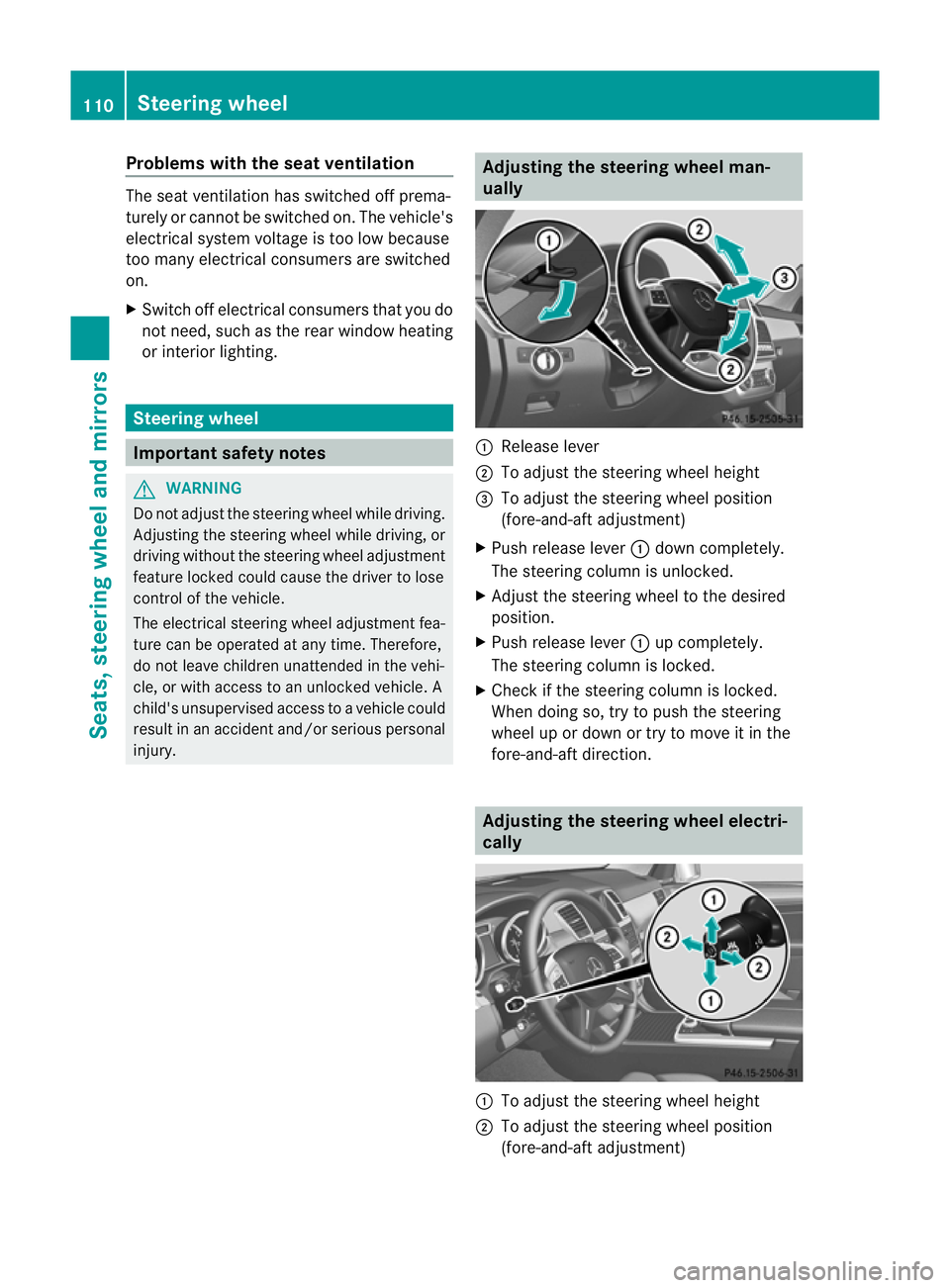
injury. Adjusting the steering whee
lman-
ually :
Release lever
; To adjus tthe steering wheel height
= To adjust the steering wheel position
(fore-and-af tadjustment)
X Push release lever :down completely.
The steerin gcolum nisu nlocked.
X Adjus tthe steering wheel to the desired
position.
X Push release lever :up completely.
The steering column is locked.
X Chec kifthe steering column is locked.
When doing so, tr ytopush the steering
wheel up or down or try to move it in the
fore-and-aft direction. Adjusting the steering wheel electri-
cally :
To adjust the steering wheel height
; To adjust the steering wheel position
(fore-and-aft adjustment) 110
Steering wheelSeats, steerin
gwhee land mirrors