warning light MERCEDES-BENZ GL SUV 2012 Service Manual
[x] Cancel search | Manufacturer: MERCEDES-BENZ, Model Year: 2012, Model line: GL SUV, Model: MERCEDES-BENZ GL SUV 2012Pages: 441, PDF Size: 10.66 MB
Page 150 of 441
vate
dautom atically ,the indicator lam pin
the d button is not lit.
Outsid eair is added after approximately
30 minutes.
X To deactivate: press thedbutton.
The indicator lamp in the dbutton goes
out.
i Air-recirculation mode deactivates auto-
matically:
R after approximatel yfive minutes at out-
side temperatures below approximately
5†
R after approximatel yfive minutes if cool-
ing with air dehumidification is deactiva-
ted
R after approximately 30 minutes at out-
side temperatures above approximately
5† with the "coolin gwith air dehumidi-
fication" function switche don. Conv
enienc eopening/closing using
the air-recirculatio nbutton G
WARNING
Make sure tha tnobody can becom etrapped
between th eside window and the door frame
as the side windows are opened and closed.
Make sure that all object sand body parts are
clear of the side windows when they are being
opene dorclosed.You or the objec tscoul dbe
drawn in or become trapped between the side
window and the door frame as the window
moves. If there is arisk of entrapment, oper-
ate the Wswitchtom ove the side window
in the opposit edirection.
Make sure that nobody can becom etrapped
as the sliding sunroof/panorama sliding sun-
roof is opened and closed. If there is arisk of
entrapment, operat ethe 3 switchtom ove
the sliding sunroof/panorama sliding sunroof
in the opposit edirection. X
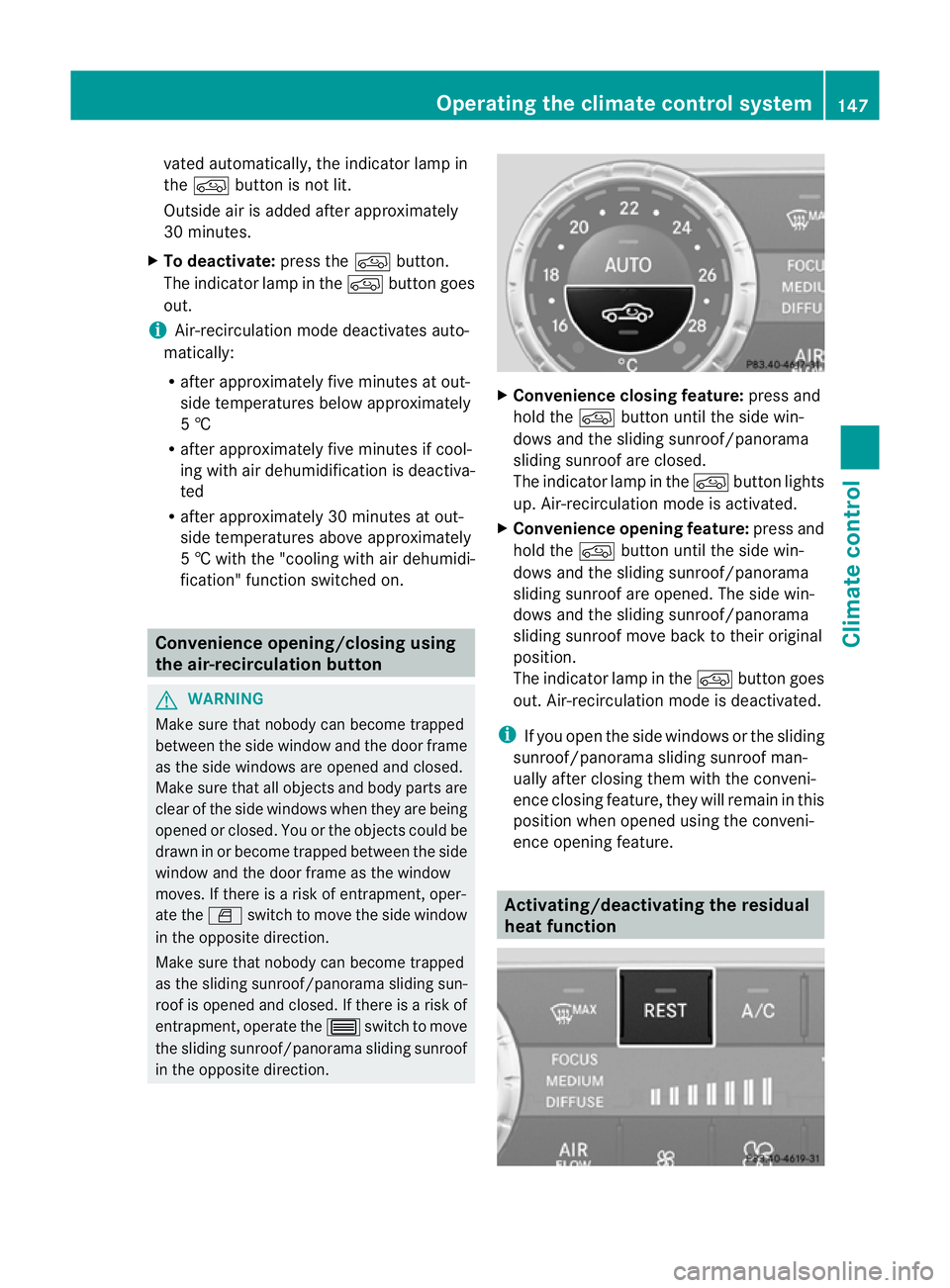
Convenience closing feature: press and
hold the dbutton until the side win-
dows and the sliding sunroof/panorama
sliding sunroof are closed.
The indicator lamp in the dbutton lights
up. Air-recirculation mode is activated.
X Convenience opening feature: press and
hold the dbutton until the side win-
dows and the sliding sunroof/panorama
sliding sunroof are opened. The side win-
dows and the sliding sunroof/panorama
sliding sunroof move back to their original
position.
The indicator lamp in the dbutton goes
out. Air-recirculation mode is deactivated.
i If you open the side windows or the sliding
sunroof/panorama sliding sunroof man-
ually after closin gthemw ith the conveni-
enc eclosing feature, they will remain in this
position when opened using the conveni-
enc eopening feature. Activating/deact
ivatingthe residual
heat function Operating th
eclimate control system
147Climate control Z
Page 151 of 441
It is poss
iblet om ake use of the residual heat
of the engine to continue heating the station-
ary vehicle for up to 30 minutes after the
engine has been switched off. The heating
time depends on the temperature that has
been set for the vehicle interior.
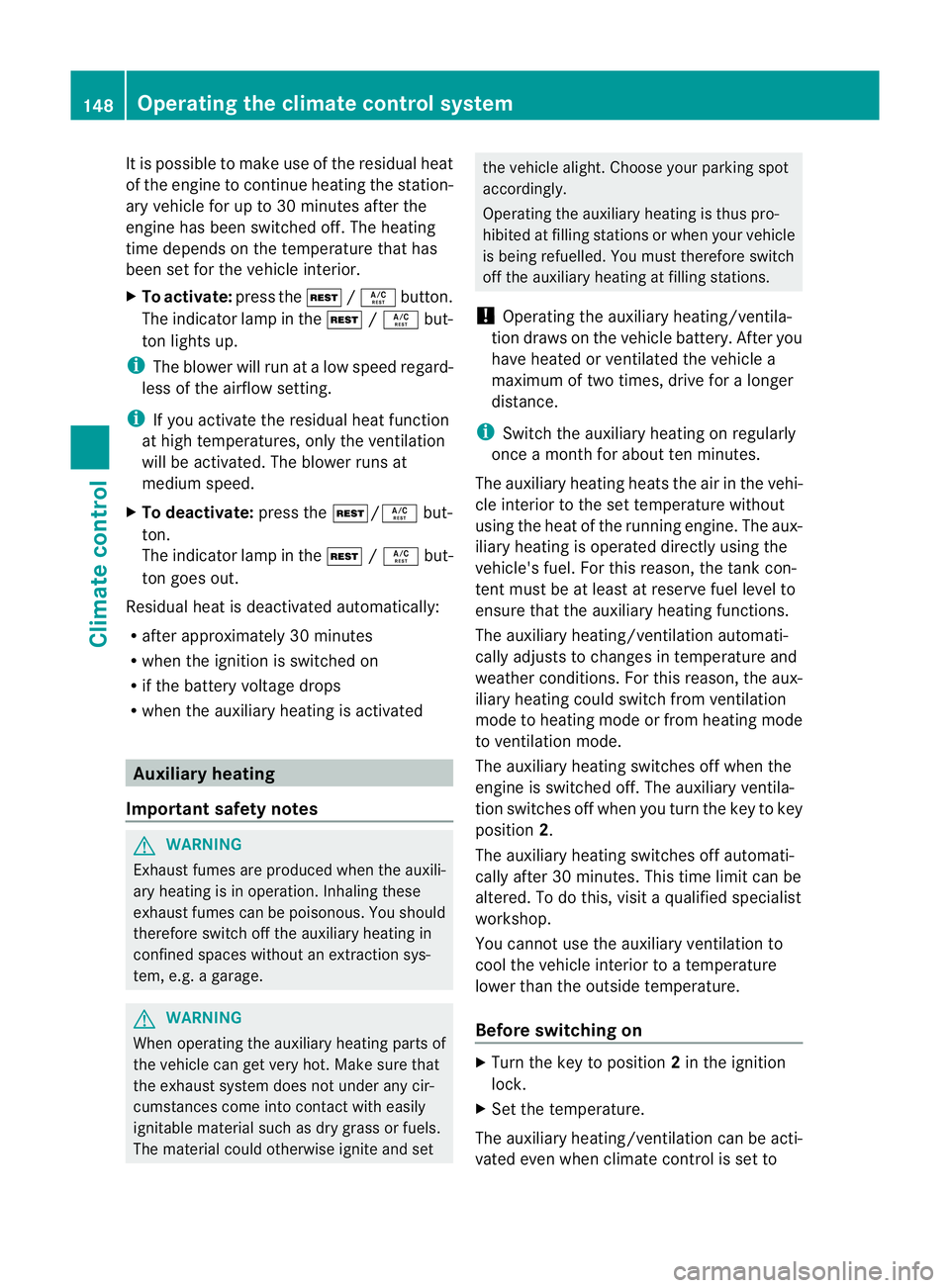
X To activate: press theÌ/Á button.
The indicator lamp in the Ì/Á but-
ton lights up.
i The blower wil lrun at alow speed regard-
less of the airflow setting.
i If you activate the residual heat function
at high temperatur es,only the ventilation
will be activated. The blower runs at
medi um speed.
X To deactivate: pressthe Ì/ Ábut-
ton.
The indicator lam pintheÌ /Á but-
ton goes out.
Residual heat is deactivated automatically:
R after approximately 30 minutes
R when the igni tion is switched on
R if the battery voltage drops
R when the auxiliar yheatin gisa ctivated Auxiliary heating
Important safety notes G
WARNING
Exhaus tfume sare produced when the auxili-
ary heating is in operation. Inhaling these
exhaust fumes can be poisonous. You should
therefo reswitch off the auxiliary heating in
con fined spaces without an extraction sys-
tem, e.g. agarage. G
WARNING
When operating the auxiliary heating parts of
the vehicle can get very hot. Make sure that
the exhaust system does not under any cir-
cumstances come into contact with easily
ignitable material such as dry grass or fuels.
The material could otherwise ignite and set the vehicle alight. Choos
eyour parkin gspot
accordingly.
Operating the auxiliary heating is thus pro-
hibited at fillin gstations or when your vehicle
is being refuelled .You must therefor eswitch
off the auxiliary heating at filling stations.
! Operating the auxiliary heating/ventila-
tion draws on the vehicle battery. After you
have heated or ventilated the vehicle a
maximum of two times, drive for alonger
distance.
i Switch the auxiliary heatin gonregularly
once amonthfor about ten minutes.
The auxiliary heatin gheats the air in the vehi-
cle interior to the set temperature without
using the heat of the runnin gengine .The aux-
iliary heating is operated directly usin gthe
vehicle' sfuel. For this reason, the tank con-
tent must be at least at reserve fuel level to
ensure that the auxiliary heating functions.
The auxiliary heating/ventilation automati-
cally adjusts to changes in temperature and
weather conditions. For this reason, the aux-
iliary heating could switch from ventilation
mode to heating mode or from heating mode
to ventilation mode.
The auxiliary heating switches off when the
engine is switched off. The auxiliary ventila-
tion switches off when you turn the key to key
position 2.
The auxiliary heating switches off automati-
cally after 30 minutes. This time limit can be
altered. To do this, visit aqualified specialist
workshop.
You cannot use the auxiliary ventilation to
cool the vehicle interior to atemperature
lower than the outside temperature.
Before switching on X
Turn the key to position 2in the ignition
lock.
X Set the temperature.
The auxiliary heating/ventilation can be acti-
vated even when climate control is set to 148
Operating the climate control systemClimate control
Page 164 of 441
Sta
rting the engine
Impor tant safety notes G
WARNING
Combustion engines emi tpoisonous exhaust
gases such as carbon monoxide. Inhaling
these exhaust gases leads to poisoning. There
is ar isk of fatal injury. Therefore never leave
the engine running in enclosed spaces with-
out sufficient ventilation.
i Vehicles with apetrol engine: the cat-
alytic converter is preheate dfor up to
30second safter acold star t.The sound of
the engin emay change during this time.
Automatic transmission X
Shift the transmission to position
P(Y page 168).
The transmission position displ ay inthe
multifunction displa yshows
P(Y page 168).
i You can also star tthe engin ewhen the
transmission is in position N.
Sta rting procedur ewith the key X
To star tapetrol engine: turn the key to
position 3in the ignition lock
(Y page 159 )and releas eita ss oon as the
engin eisrunning.
X To star tadiesel engine: turn the key to
position 2in the ignition lock
(Y page 15 9).
The % preglow indicator lam pinthe
instrumen tcluster lights up.
X When the %preglow indicator lamp
goes out, tur nthe key to position
3(Y page 159) and release it as soon as the
engin eisrunning.
i You can start the engine without preglow
if the engine is warm. Usin
gKEYLESS-GO to star tthe en gine G
WARNING
Your vehicle can be started using avalid KEY-
LESS-GO key. For this reason, children should
never be left unsupervised in the vehicle.
Always take the key with you when leaving the
vehicle, even if you are only leaving it for a
short time.
X Depress the brake pedal and keep it
depressed.
X To star tapetrol engine: press the Start/
Stop button (Y page 159) once.
The engin estarts.
X To start adiesel engine: press the Start/
Stop button (Y page 159)once.
Preglow is activated and the engin estarts.
i The Start/Stop button can be used to
start the vehicle without insertin gthe key
int ot he ignition lock .The key must be in
the vehicle and the Star t/Stop butto nmust
be inserted in the ignition lock. This mode
for startin gthe engin eoperates independ-
ently of the ECO start /stop automatic
engine start function. Pulling away
Automatic transmission G
WARNING
If the engine speed is above the idling speed
and you engag etransmission position Dor
R,t he vehicle coul dpull away suddenly. There
is ar isk of an accident.
When engaging transmission position Dor R,
always firmly depress the brake pedal and do
not simultaneously accelerate.
X Depress the brake pedal and keep it
depressed.
X Shift the transmission to position Dor
R(Y page 167). Driving
161Driving and parking Z
Page 166 of 441
ECO start/stop function
Important safety notes G
WARNING
If th eengine is switched off automatically and
you exit the vehicle, the engine is restarted
automatically. The vehicle may begin moving.
There is arisk of accident and injury.
If you wish to exit the vehicle, always turn off
the ignition and secure the vehicle against
rolling away.
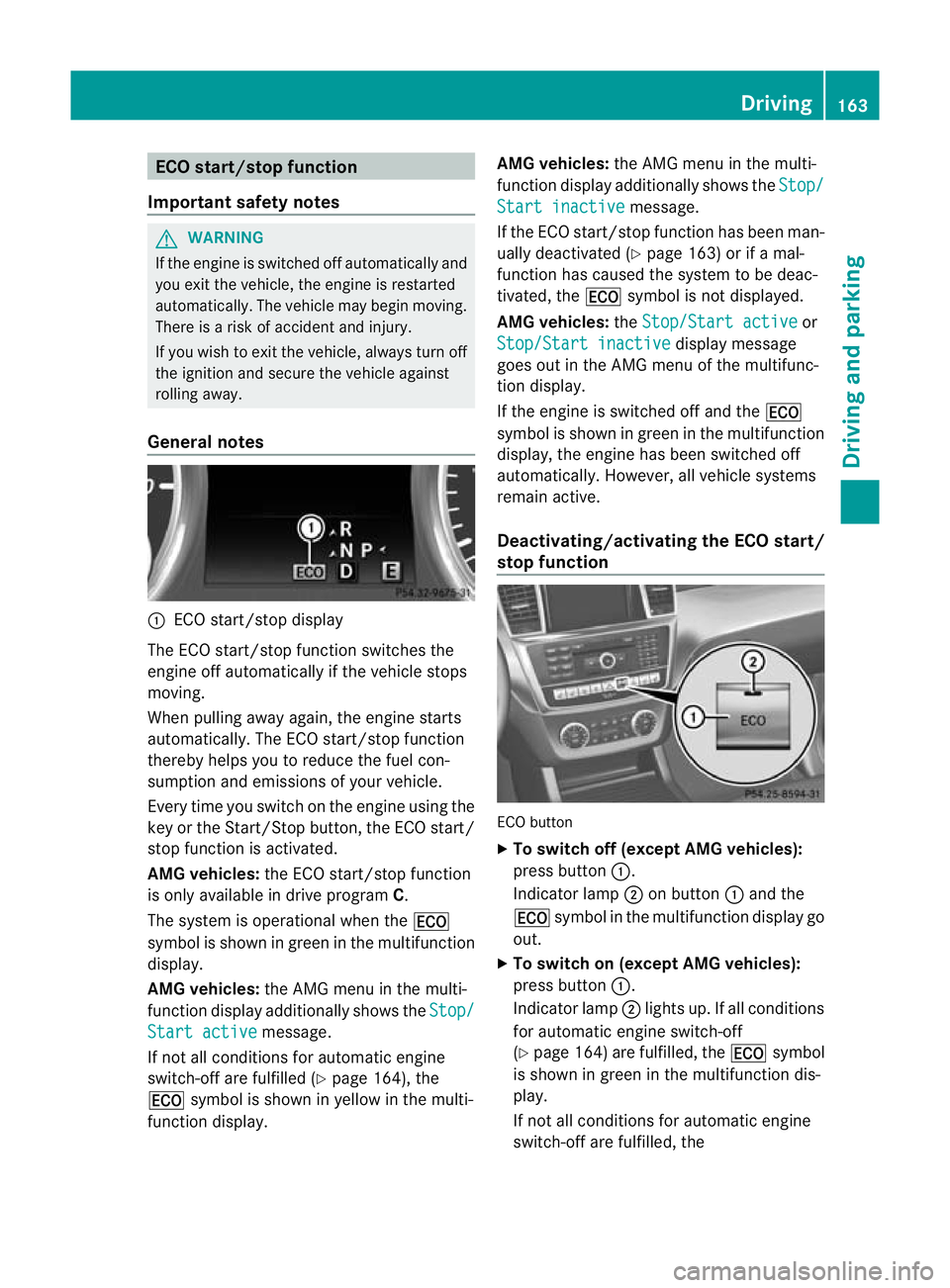
General notes :
ECO start/stop display
The ECO start/stop func tion switches the
engin eoff automatically if th evehicle stops
moving.
When pulling away again, the engine starts
automatically. The ECO start/stop function
thereby helps you to reduc ethe fuel con-
sumption and emissions of your vehicle.
Every tim eyou switc honthe engin eusing the
key or the Star t/Stop button, the ECO start/
sto pfunction is activated.
AMG vehicles: the ECO start/stop function
is only available in drive program C.
The system is operational when the ¤
symbol is shown in green in the multifunction
display.
AMG vehicles: the AMG menu in the multi-
function displa yadditionally shows the Stop/Star
tactive message.
If no tall condition sfor automatic engine
switch-of fare fulfill ed (Ypage 164), the
¤ symbol is shown in yellow in the multi-
function display. AMG vehicles:
the AMG menu in the multi-
function display additionally shows the Stop/ Star
tinactive message.
If th eECO start/stop function has been man-
uall ydeactivated (Y page 163) or if amal-
function has caused the system to be deac-
tivated, the ¤symbol is not displ ayed.
AMG vehicles: theStop/Start active or
Stop/Start inactive displa
ymessage
goes out in the AMG men uofthe multifunc-
tion display.
If the engin eisswitched off and the ¤
symbol is shown in green in the multifunction
display, the engine has been switched off
automatically .However, all vehicle systems
remain active.
Deactivating/activa ting th eECO start/
stop function ECO button
X
To switch off (except AMG vehicles):
press button :.
Indicator lamp ;on button :and the
¤ symbol in the multifunction display go
out.
X To switch on (except AMG vehicles):
press button :.
Indicator lamp ;lights up. If all conditions
for automatic engine switch-off
(Y page 164 )are fulfilled ,the ¤ symbol
is shown in gree ninthe multifunc tion dis-
play.
If not all conditions for automatic engine
switch-off ar efulfilled, the Driving
163Drivingand pa rking Z
Page 169 of 441
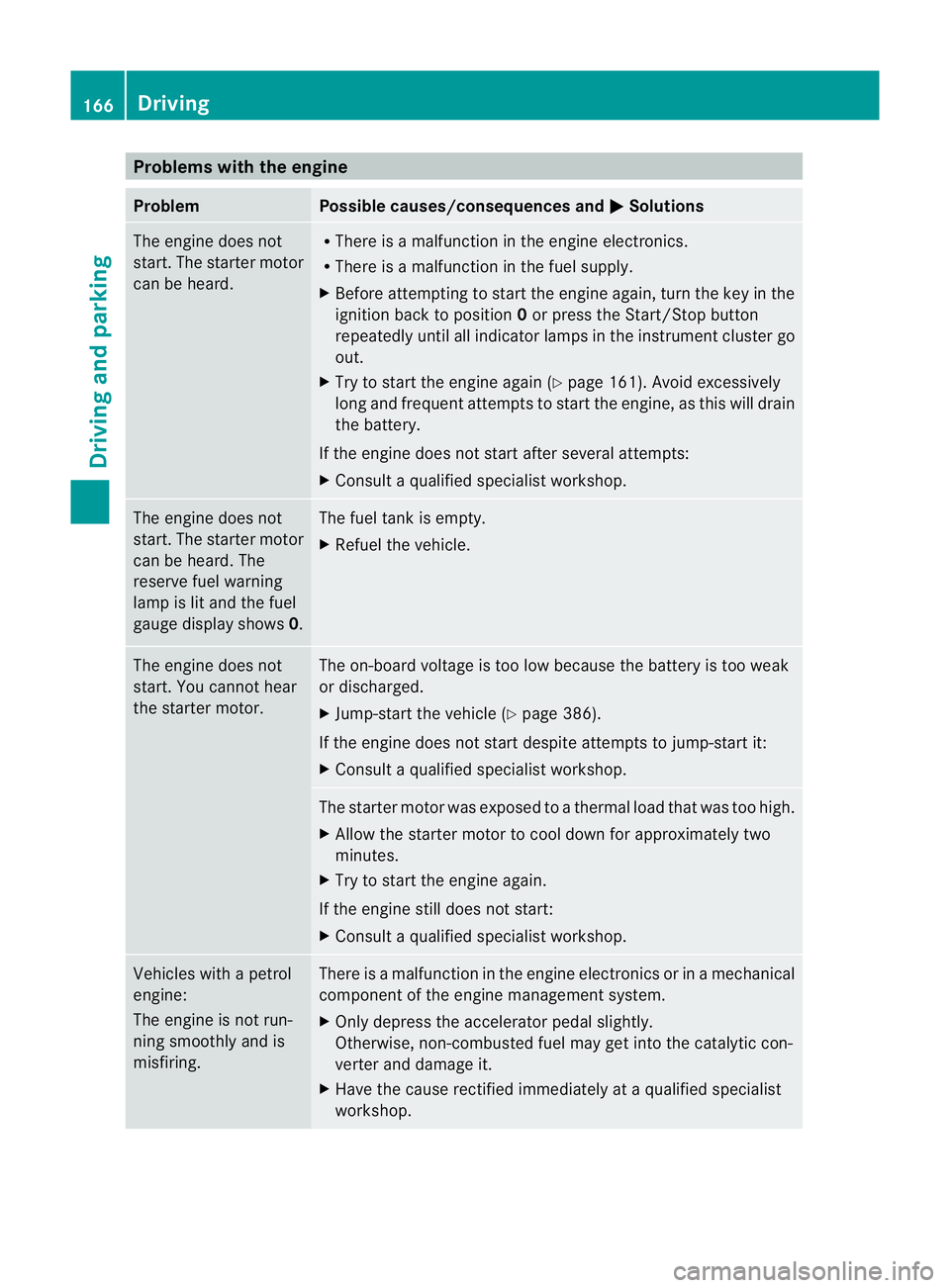
Problems wit
hthe engine Problem Possible causes/consequences and
M Solutions
Th
ee ngine doe snot
start. The starter motor
can be heard. R
There is amalfunction in the engine electronics.
R There is amalfunction in the fuel supply.
X Before attempting to start the engine again, turn the key in the
ignition back to position 0or press the Start/Stop button
repeatedly until all indicator lamps in the instrumen tcluster go
out.
X Try to start the engin eagain (Y page 16 1).A void excessively
long and frequen tattempt stostartthe engine, as this will drain
the battery.
If the engine doe snot star tafter several attempts:
X Consult aqualified specialist workshop. The engine does not
star
t.The starter motor
can be heard. The
reserve fuel warning
lam pisl it and the fuel
gauge displa yshows 0. The fuel tan
kise mpty.
X Refue lthe vehicle. The engin
edoes not
start. You cannot hear
the starter motor. The on-boar
dvoltage is too low because the battery is too weak
or discharged.
X Jump-start the vehicle (Y page 386).
If the engin edoes not star tdespite attempt stojump-start it:
X Consult aqualified specialist workshop. The starter motor was exposed to
athermal load that was too high.
X Allo wthe starter motor to cool down for approximatel ytwo
minutes.
X Try to start the engine again.
If the engine still does not start:
X Consult aqualified specialist workshop. Vehicles with
apetrol
engine:
The engine is not run-
ning smoothly and is
misfiring. There is
amalfunction in the engine electronics or in amechanical
componen tofthe engin emanagement system.
X Only depress the accelerator pedal slightly.
Otherwise, non-combusted fuel may get into the catalytic con-
verter and damage it.
X Have the cause rectified immediately at aqualified specialist
workshop. 166
DrivingDrivin
gand pa rking
Page 188 of 441
effect, the driv
ewheels coul dlose their grip.
This inc reases the risk of skidding and having
an accident.
Do not shift down for additional engine brak-
ing on aslippery road surface.
Downhill gradients Do not depress the brake pedal continuously
while the vehicle is in motion ,e.g. causing the
brakes to rub by constantly applying light
pressure to the pedal. This results in exces-
sive and premature wear to the brake pads.
On long and steep downhil lgradients, you
mus tselect shift range 1,2or 3in good time.
Take particular not eofthis when drivin ga
laden vehicle.
i This also applies if you have activated
cruise control, SPEEDTRONIC or DIS-
TRONIC PLUS.
This will use the brakin geffect of the engine,
so les sbraking wil lberequired to prevent the
vehicle from gainin gspeed. This relieves the
load on the brak esystem and prevents the
brakes from overheating and wearing too
quickly.
Heavy and light loads G
WARNING
The braking syste mcan overheat if you leave
your foot on the brake pedal while driving.
This increases the braking distance and could
even cause the braking system to fail. There
is ar isk of an accident.
Never use the brake pedal as afootrest .Do
not simultaneousl ydepress both th ebrake
peda land the accelerato rpedal while driving.
! Depressing the brak epedal constantly
result sinexcessive and premature wear to
the brake pads.
If the brakes have bee nsubjected to aheavy
load, do not stop the vehicle immediately.
Driv eonfor as hort while. This allow sthe air-
flo wtoc ool the brakes mor equickly. If the brakes have been used only moderately,
you should occasionally test their effective-
ness. To do this, brake more firmly from a
higher speed. This improves the grip of the
brakes.
Wet road surfaces
If you have driven for
along tim einheavy rain
without braking ,there ma ybeadelayed reac-
tion from the brakes when braking for the first
time. This may also occu rafter acar wash or
after driving through deep water.
You then have to depress the brake pedal
more firmly. Maintain agreater distance from
th ev ehicle in front.
Af terd riving on awet road or havin gthe vehi-
cle washed, brake firml ywhile paying atten-
tion to the traf ficc onditions. This will warm
up the brake discs, thereby dryin gthem more
quickly and protecting them against corro-
sion.
Limited braking performanc eonsalt-
treated roads If you drive on salte
droads, alaye rofs alt
residue may form on the brake discs and
brake pads. This can result in asignificantly
longer brakin gdistance.
R Brake occasionally to remov eany possible
salt residue. Make sure that you do not
endanger other road users whe ndoing so.
R Carefully depress the brake pedal and the
beginning and end of ajourney.
R Maintain agreater distance to th evehicle
ahead.
New brak epads/linings New and replace
dbrake pads and discs only
reach thei roptimum braking effect after sev-
eral hundred kilometres of driving. Compen-
sate for this by applying greater force to the
brak epedal.
For safet yreasons, Mercedes-Ben zrecom-
mends that you only have brak epads/linings
fitted to your vehicle which have been Driving tips
185Driving and parking Z
Page 195 of 441
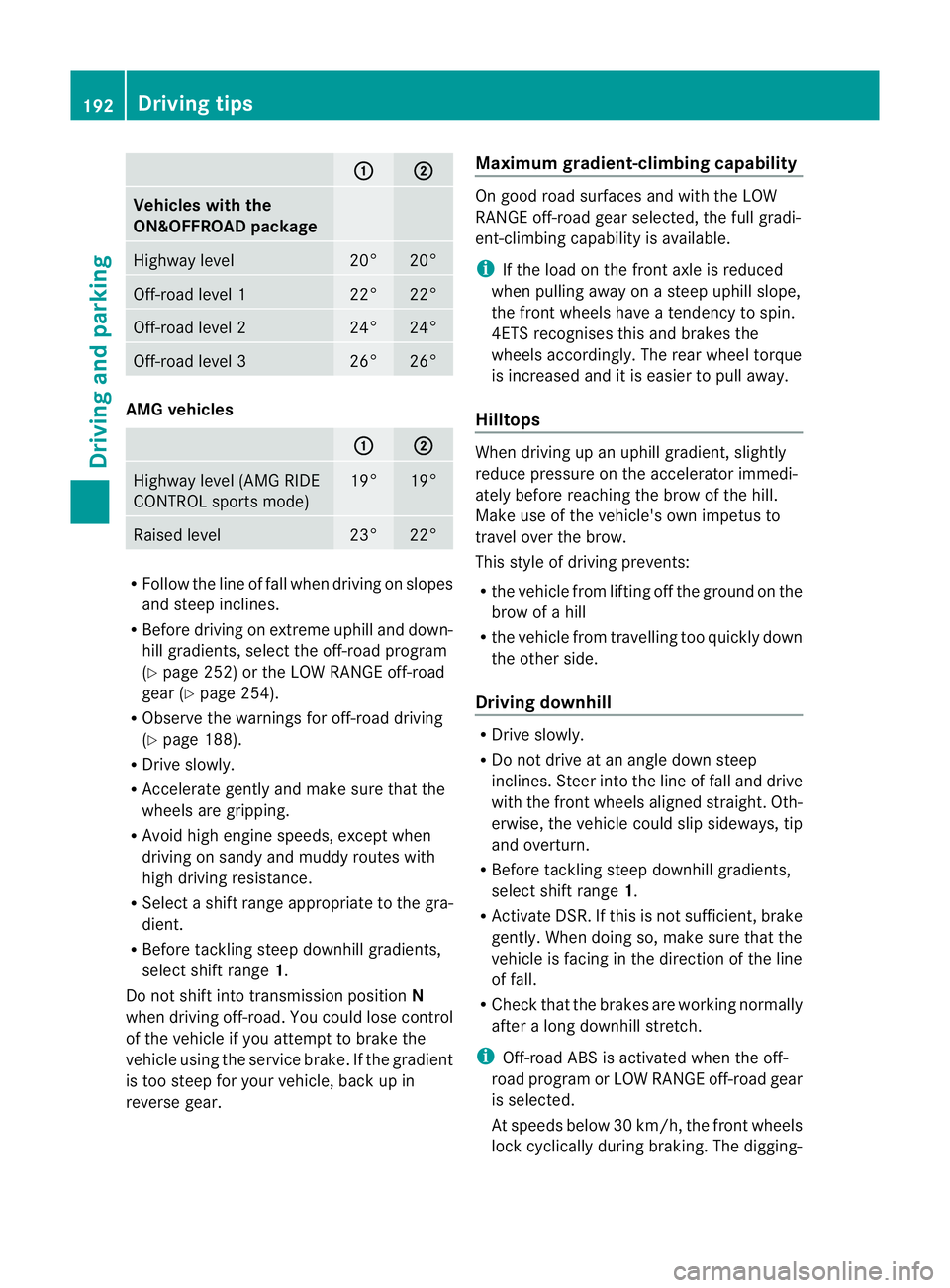
: ;
Vehicles with the
ON&OFFROA
Dpackage Highway level 20° 20°
Off-road level 1 22° 22°
Off-road level 2 24° 24°
Off-road level 3 26° 26°
AMG vehicles
: ;
Highway level (AM
GRIDE
CONTROL sport smode) 19° 19°
Raised level 23° 22°
R
Follo wthe line of fa llwhen driving on slopes
and stee pinclines.
R Before driving on extreme uphill and down-
hill gradients, select the off-road program
(Y page 252) or the LOW RANGE off-road
gea r(Ypage 25 4).
R Obser vethe warnings for off-road driving
(Y page 188).
R Driv eslowly.
R Accelerat egently and mak esure that the
wheel sare gripping.
R Avoi dhigh engin espeeds, except when
drivin gonsandy and muddy routes with
high drivin gresistance.
R Selec tashif trange appropriate to the gra-
dient.
R Befor etackling steep downhill gradients,
select shift range 1.
Do not shift int otransmission position N
when driving off-road .You coul dlose contr ol
of the vehicle if you attempt to brake the
vehicle using the servic ebrake .Ifthe gradient
is too steep for your vehicle, bac kupin
reve rseg ear. Maximum gradient-climbing cap
ability On good road surfaces and with the LOW
RANGE off
-road gear selected, the full gradi-
ent-climbing capabilit yisavailable.
i If th eload on the fron taxle is reduced
whe npulling away on asteep uphill slope,
the fron twheels hav eatendency to spin.
4ETS recognises this and brakes the
wheels accordingly. The rear wheel torque
is increased and it is easier to pull away.
Hilltops When driving up an uphill gradient, slightly
reduc
epressure on th eaccelerator immedi-
atel ybefor ereachin gthe brow of the hill.
Make use of the vehicle' sown impetus to
travel over the brow.
This style of driving prevents:
R the vehicle from lifting off the ground on the
brow of ahill
R the vehicle from travelling too quickly down
the other side.
Driving downhill R
Driv eslowly.
R Do not drive at an angle down steep
inclines. Steer into the line of fall and drive
with the front wheels aligned straight. Oth-
erwise, the vehicle could slip sideways, tip
and overturn.
R Befor etackling steep downhill gradients,
select shift range 1.
R Activate DSR. If this is not sufficient, brake
gently. When doing so, make sure that the
vehicle is facing in the direction of the line
of fall.
R Check that the brakes are working normally
after along downhil lstretch.
i Off-road ABS is activated when the off-
road program or LOW RANGE off-road gear
is selected.
At speeds belo w30km/h, th efront wheels
lock cyclicall yduring braking. The digging- 192
Driving tipsDrivin
gand pa rking
Page 197 of 441
for five seconds
.Inthe multifunction display,
the segments between the stored speed and
the maxim um speedlight up.
Activation conditions To activate cruise control, all of the following
activation condition
smust be fulfilled:
R the electric parkin gbrake mus tbe
released.
R yo ua re driving faster than 30 km/h.
R ESP ®
mus tbes witched on, but not inter-
vening.
R the transmission must be in position D.
R DS Rm ust be deactivated.
R off-road program 2must be deactivated
(vehicles with the ON&OFFROA Dpackage).
R the cruise con trol fu nction must be selec-
te d( Ypage 193).
Storing, maintaining and callin gupa
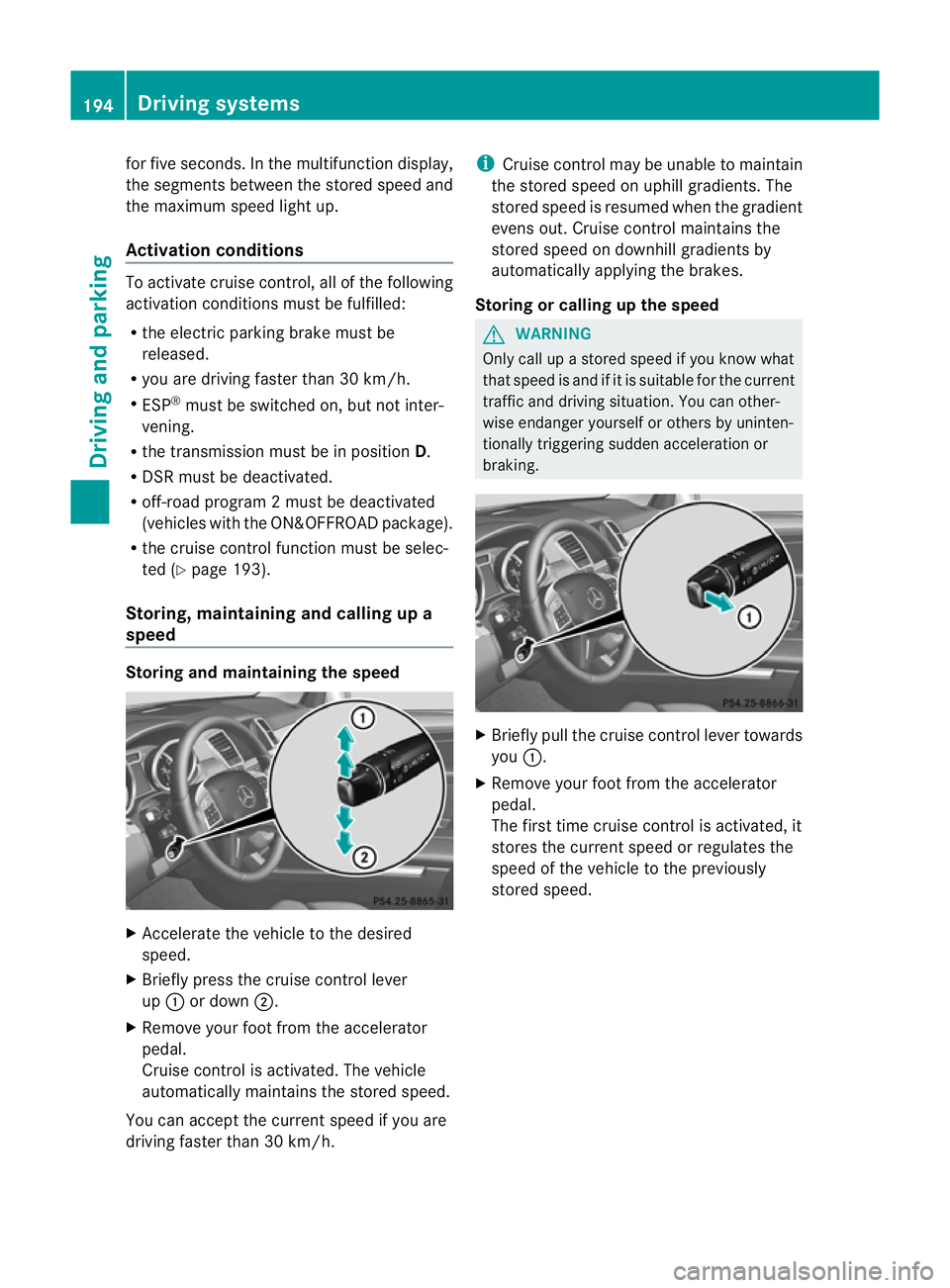
speed Storing and maintaining th
espeed X
Accelerate the vehicl etothe desir ed
speed.
X Briefly press the cruise control lever
up : or down ;.
X Remov eyourfoot from the acc elerator
pedal.
Cruise control is activated. The vehicle
automaticall ymaintains the store dspeed.
Yo uc an accep tthe current speed if you are
drivin gfaster than 30 km/h. i
Cruise control may be unabl etomaintain
the store dspeed on uphil lgradients. The
store dspeed is resumed when the gradient
evens out. Cruise control maintains the
stored speed on downhil lgradient sby
automaticall yapplyin gthe brakes.
Stor ingorc alling up the speed G
WARNING
Onl ycallupas toredspeed if you know what
that speed is and if it is suitable for the current
traffic and driving situation. You can other-
wis eendanger yoursel forothers by uninten-
tionally triggering sudden acce leratio nor
braking. X
Briefly pull the cruise contro llever towards
you :.
X Remov eyour foot from the accelerator
pedal.
The first tim ecruis econtr ol is activated, it
stores the curren tspeed or regulates the
speed of the vehicle to the previously
stored speed. 194
Driving systemsDriving and parking
Page 199 of 441
SPEEDTRONIC
Important safety notes G
WARNING
Never depress the brake peda lcontinuously
while the vehicle is in motion, e.g. never cause
the brakes to rub by applying constant slight
pedal pressure. This causes the brake system
to overheat, increases the brakin gdistance
and can lead to the brakes failing completely. G
WARNING
Do not change down for additional engine
braking on aslippery road surface. This could
cause the drive wheels to lose their grip and
the vehicle could skid. G
WARNING
SPEEDTRONI Cisonly an aid designe dto
assis tdriving. Yo uare responsibl efor the
vehicle' sspeed and for braking in good time. G
WARNING
If there is achange of drivers, advise the new
driver of the limit speed stored.
Only use variable SPE EDTRONI Cifyou will not
have to accelerate suddenl ytoaspeed above
that stored as the limit speed. You could oth-
erwise cause an accident.
You can only exceed the limit speed stored if
you deactivate variable SPE EDTRONIC:
R using the cruise control lever
R by depressin gthe accelerator pedal
beyon dthe pressure point (kickdown)
It is not possible to deactivate variable
SPE EDTRONI Cbybraking.
General notes SPE
EDTRONIC brakes automatically so that
you do not exceed the set speed. On long and
steep downhil lgradients ,especially if the
vehicle is laden or towing atrailer, yo umust
select shift range 1,2or 3in good time. By
doing so, you will make use of the braking
effect of the engine. This relieves the load on the brake system and prevent
sthe brakes
from overheating and wearing too quickly .If
you need additional braking, depres sthe
brake pedal repeatedly rather than con tinu-
ously.
You can set avariable or permanent limit
speed:
R variable for speedlimits, e.g. in built-up
areas
R permanent for long-term speed restric-
tions, e.g. when drivin gwith winter tyres
fitted (Y page 198)
i The speed indicated in the speedometer
may differ slightly from the limit speed
stored.
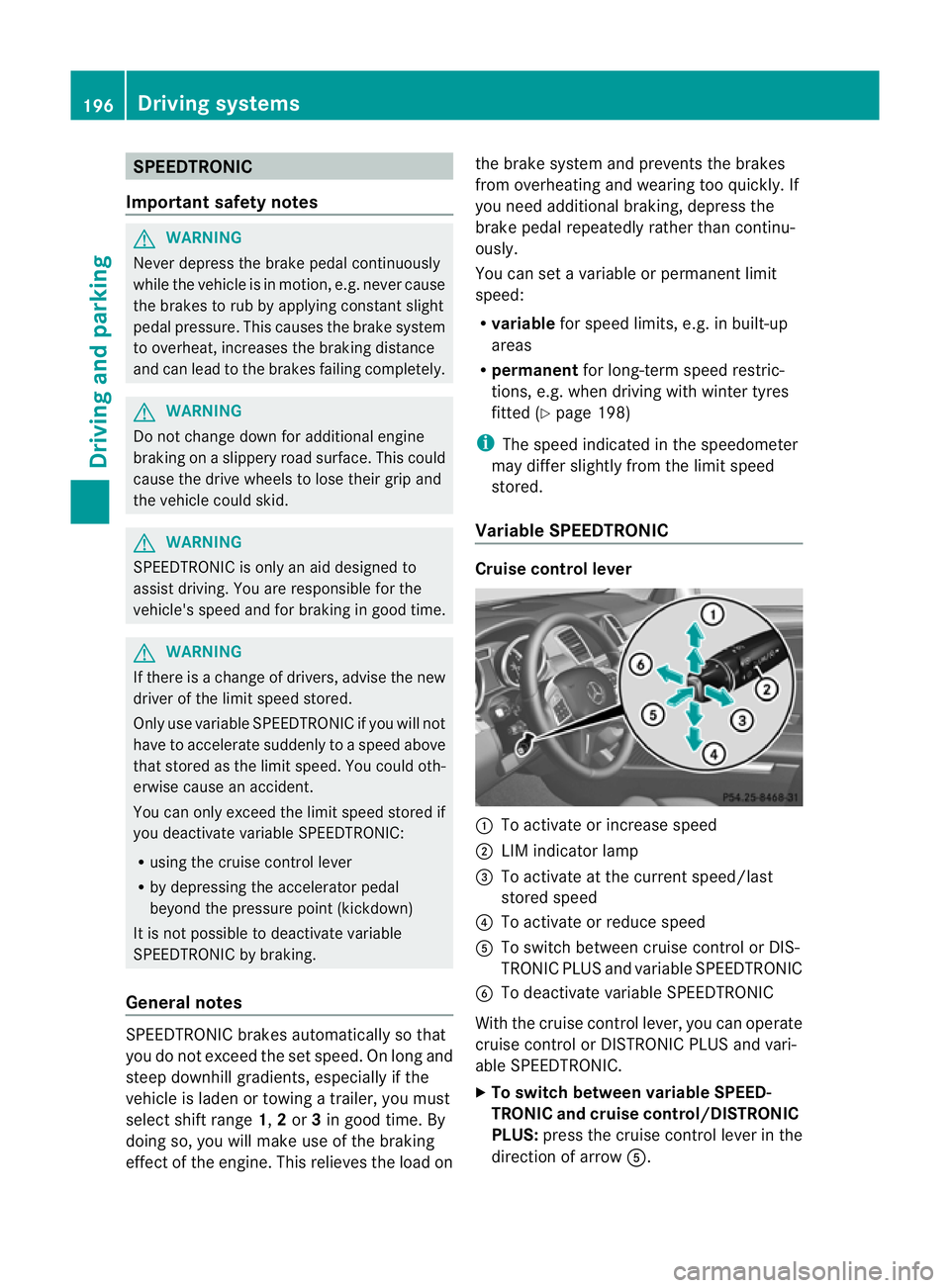
Variable SPEEDTRONIC Cruise control lever
:
To activate or increase speed
; LIMi ndicato rlamp
= To activate at the current speed/last
stored speed
? To activate or reduce speed
A To switch between cruise control or DIS-
TRONIC PLUS and variable SPEEDTRONIC
B To deactivate variable SPEEDTRONIC
With the cruise control lever, you can operate
cruise control or DISTRONIC PLUS and vari-
able SPEEDTRONIC.
X To switch between variable SPEED-
TRONIC and cruise control/DISTRONIC
PLUS: press the cruise control lever in the
direction of arrow A.196
Driving systemsDriving and parking
Page 200 of 441
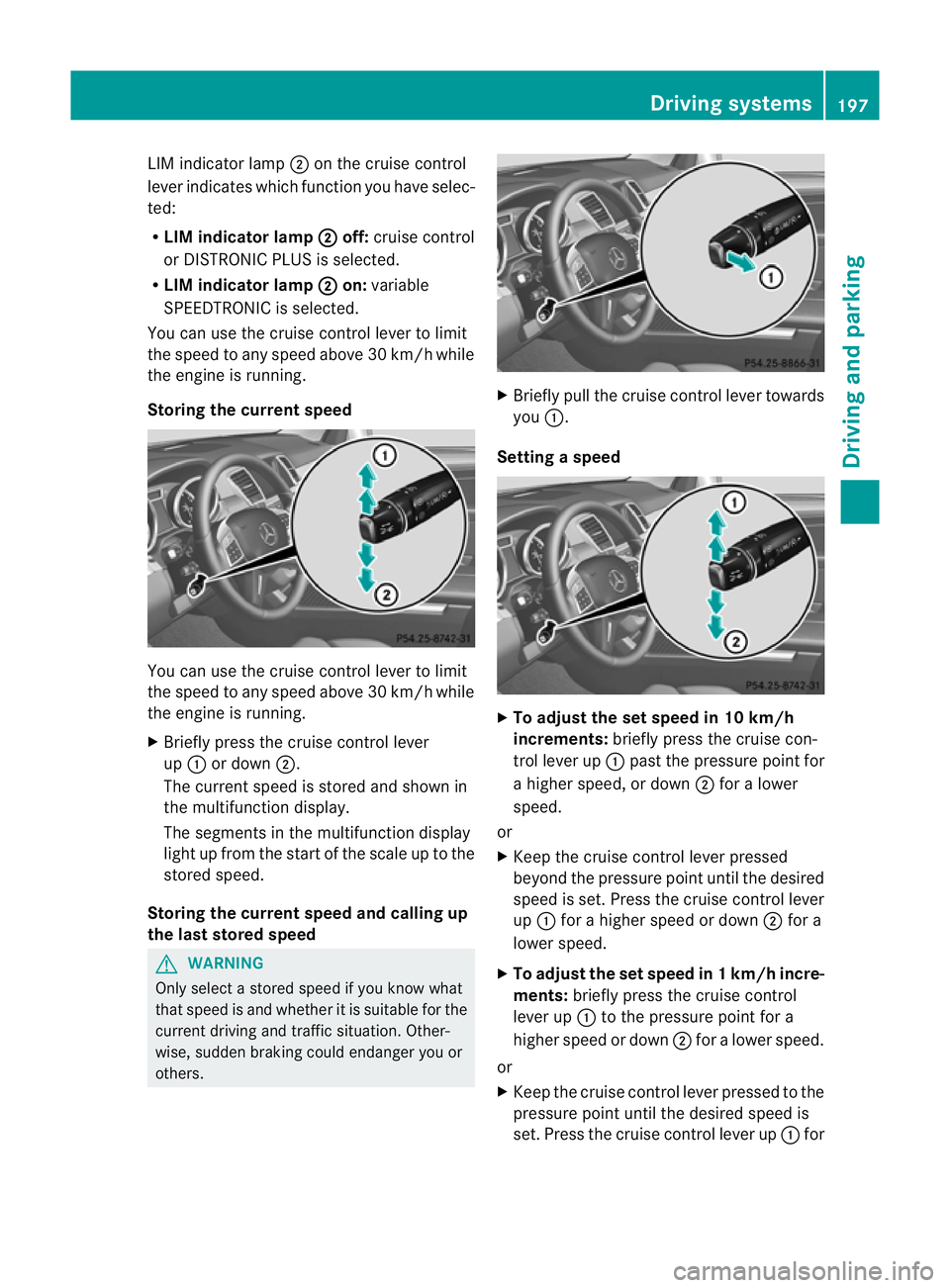
LIM indicato
rlamp ;on the cruise control
lever indicates which function you have selec-
ted:
R LIM indicator lamp ; off:
cruise control
or DISTRONI CPLUS is selected.
R LIM indicator lamp ; on:
variable
SPEEDTRONIC is selected.
You can use the cruise control lever to limit
the speed to any speed above 30 km/ hwhile
the engin eisrunning.
Storing the current speed You can use the cruise control lever to limit
the spee dtoa ny speed above 30 km/h while
the engine is running.
X Briefly pres sthe cruise control lever
up : or down ;.
The curren tspeed is stored and shown in
the multifunction display.
The segment sinthe multifunction display
light up from the start of the scale up to the
stored speed.
Storing the current speed and calling up
the last stored speed G
WARNING
Only select astored speed if you know what
that speed is and whether it is suitable for the
curren tdriving and traffic situatio n.Other-
wise, sudden brakin gcould endan ger youor
others. X
Briefly pull the cruise control lever towards
you :.
Setting aspeed X
To adjust the se tspeed in 10 km/h
increments: brieflypress th ecruise con-
tro llev er up :pas tthe pressure point for
ah igher speed, or down ;for alower
speed.
or
X Keep the cruise control lever pressed
beyond the pressure point until the desired
speed is set. Press the cruise control lever
up : for ahigher speed or down ;for a
lowe rspeed.
X To ad just th eset speed in 1km/h incre-
ments: briefly press the cruise control
lever up :to the pressure point for a
higher speed or down ;for alower speed.
or
X Keep the cruise contr ol leverpresse dtothe
pressur epoint until the desire dspeed is
set. Press the cruise contro llever up :for Driving systems
197Driving and parking Z