wheel MERCEDES-BENZ GL SUV 2012 Repair Manual
[x] Cancel search | Manufacturer: MERCEDES-BENZ, Model Year: 2012, Model line: GL SUV, Model: MERCEDES-BENZ GL SUV 2012Pages: 441, PDF Size: 10.66 MB
Page 196 of 441
in effect achieved in the process reduces
the stoppin gdistanc ewhen drivin goff-
road. Th esteerabilit yofthe vehi cleisc on-
siderably redu cedift he wheels lock. Driving systems
Cruise cont
rol
Important safety notes G
WARNING
Do not change down for additional engine
braking on aslipper yroad surface. This could
cause the driv ewheels to lose their grip and
the vehi clec ould skid. G
WAR
NING
Cruise control cannot tak eaccount of road
and traffic conditions.
Alway spay attention to traffic conditions
even when cruis econtrol is activa ted.
Cruise control is only an aid designed to assist
driving. You are responsible for the vehicle's
speed and for braking in good time. G
WAR
NING
Do not use cruise control
R in traffic conditions that do not allow you to
drive at aconstan tspeed (e.g. heavy tra ffic
or winding roads). You may otherwise
cause an accident.
R on slippery roads. The drive wheels may
lose their grip when brakin goraccelerating
and the vehicle may skid.
R whe nther eisl ow visibility ,e.g. due to fog,
heavy rain or snow.
General notes Cruis
econtr ol maintains aconstan troad
speed for you. It brakes automatically in order
to avoid exceeding the set speed. On long and
steep downhil lgradients, especiall yifthe
vehicle is laden or towing atrailer, yo umust
select shift range 1,2or 3in good time. By doing so, you will make use of the braking
effec
tofthe engine. This relieves the load on
the brake system and prevents the brakes
from overheating and wearing too quickly.
Use cruise con trolonly if road and traffic con-
ditions make it appropriate to maintain a
steady speed for aprolonged period. Yo ucan
store any road spee dabove 30 km/h.
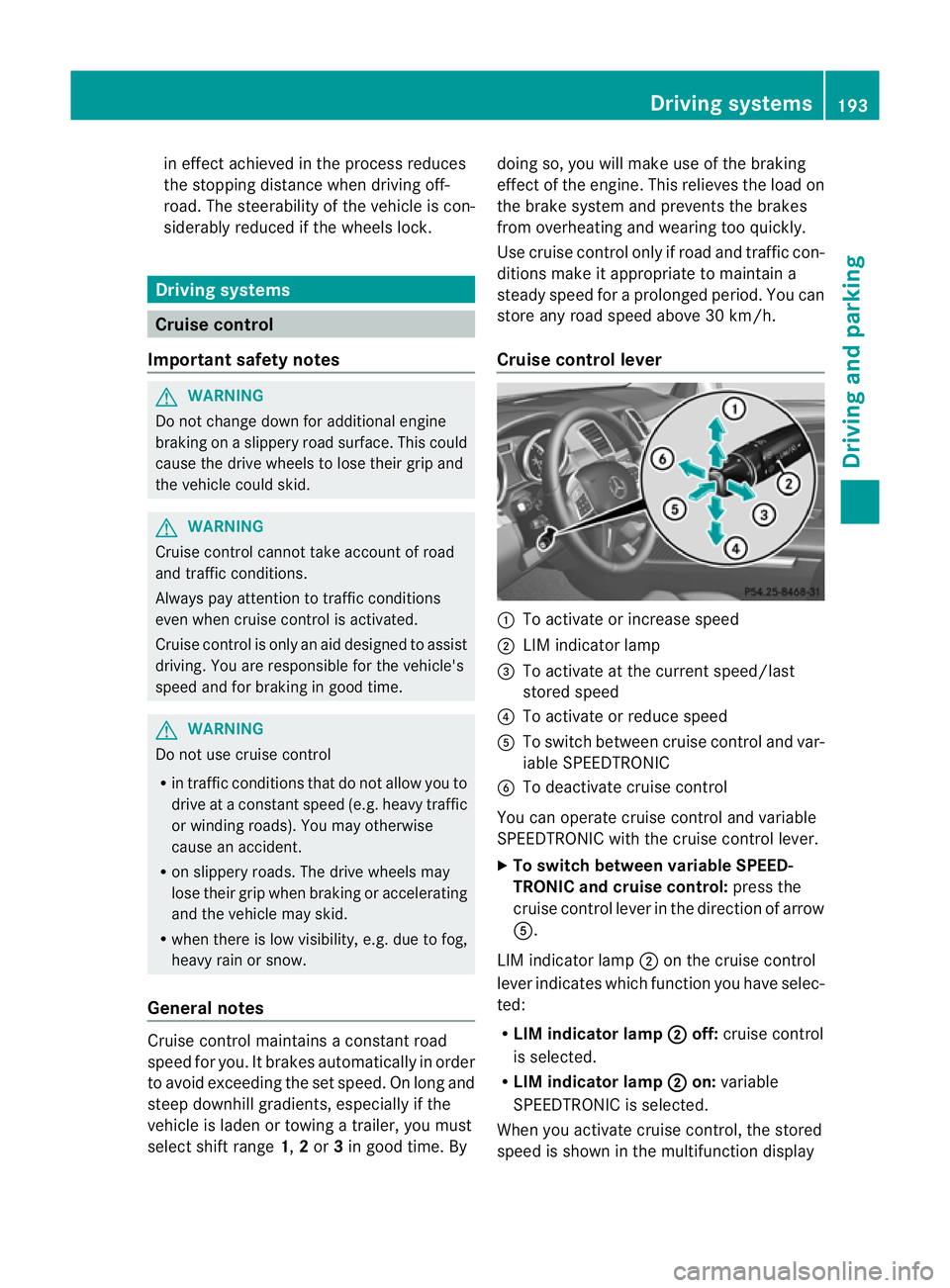
Cruise contro llever :
To activate or increase speed
; LIMi ndicato rlamp
= To activate at the current speed/last
stored speed
? To activate or reduce speed
A To switch between cruise control and var-
iable SPEEDTRONIC
B To deactivate cruise control
You can operate cruise control and variable
SPEEDTRONIC with the cruise control lever.
X To switch between variable SPEED-
TRONIC and cruise control: press the
cruise control lever in the direction of arrow
A.
LIM indicator lamp ;on the cruise control
lever indicates which function you have selec-
ted:
R LIM indicator lamp ; off:
cruise control
is selected.
R LIM indicator lamp ; on:
variable
SPEEDTRONIC is selected.
When you activate cruise control, the stored
spee diss hown in the multifunction display Driving systems
193Driving and parking Z
Page 199 of 441
SPEEDTRONIC
Important safety notes G
WARNING
Never depress the brake peda lcontinuously
while the vehicle is in motion, e.g. never cause
the brakes to rub by applying constant slight
pedal pressure. This causes the brake system
to overheat, increases the brakin gdistance
and can lead to the brakes failing completely. G
WARNING
Do not change down for additional engine
braking on aslippery road surface. This could
cause the drive wheels to lose their grip and
the vehicle could skid. G
WARNING
SPEEDTRONI Cisonly an aid designe dto
assis tdriving. Yo uare responsibl efor the
vehicle' sspeed and for braking in good time. G
WARNING
If there is achange of drivers, advise the new
driver of the limit speed stored.
Only use variable SPE EDTRONI Cifyou will not
have to accelerate suddenl ytoaspeed above
that stored as the limit speed. You could oth-
erwise cause an accident.
You can only exceed the limit speed stored if
you deactivate variable SPE EDTRONIC:
R using the cruise control lever
R by depressin gthe accelerator pedal
beyon dthe pressure point (kickdown)
It is not possible to deactivate variable
SPE EDTRONI Cbybraking.
General notes SPE
EDTRONIC brakes automatically so that
you do not exceed the set speed. On long and
steep downhil lgradients ,especially if the
vehicle is laden or towing atrailer, yo umust
select shift range 1,2or 3in good time. By
doing so, you will make use of the braking
effect of the engine. This relieves the load on the brake system and prevent
sthe brakes
from overheating and wearing too quickly .If
you need additional braking, depres sthe
brake pedal repeatedly rather than con tinu-
ously.
You can set avariable or permanent limit
speed:
R variable for speedlimits, e.g. in built-up
areas
R permanent for long-term speed restric-
tions, e.g. when drivin gwith winter tyres
fitted (Y page 198)
i The speed indicated in the speedometer
may differ slightly from the limit speed
stored.
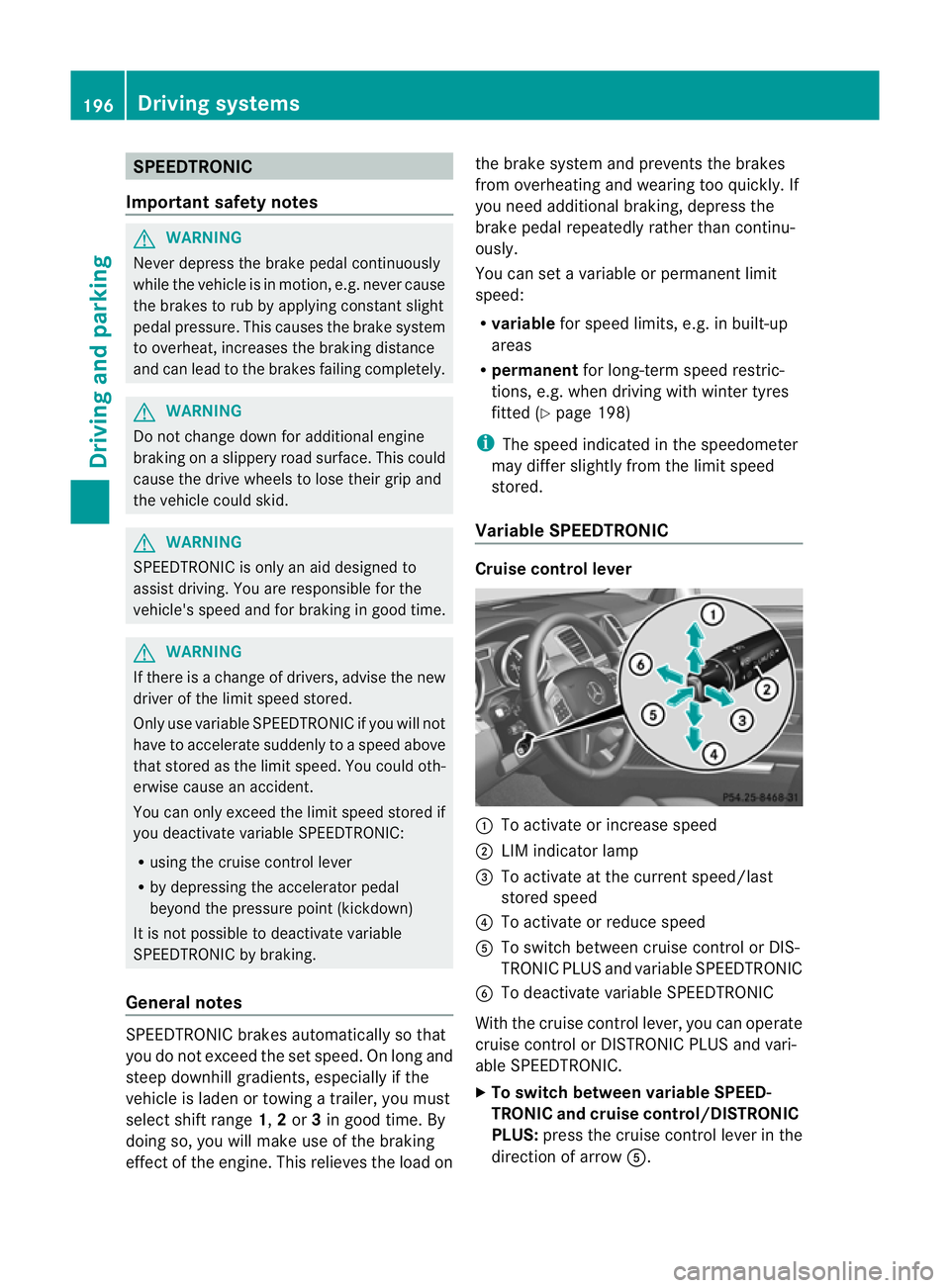
Variable SPEEDTRONIC Cruise control lever
:
To activate or increase speed
; LIMi ndicato rlamp
= To activate at the current speed/last
stored speed
? To activate or reduce speed
A To switch between cruise control or DIS-
TRONIC PLUS and variable SPEEDTRONIC
B To deactivate variable SPEEDTRONIC
With the cruise control lever, you can operate
cruise control or DISTRONIC PLUS and vari-
able SPEEDTRONIC.
X To switch between variable SPEED-
TRONIC and cruise control/DISTRONIC
PLUS: press the cruise control lever in the
direction of arrow A.196
Driving systemsDriving and parking
Page 201 of 441
ah
igher speed or down ;for alower
speed.
Deactivatin gvariable SPEED TRONIC G
WARNING
It is no tpossible to deactivate variable Speed-
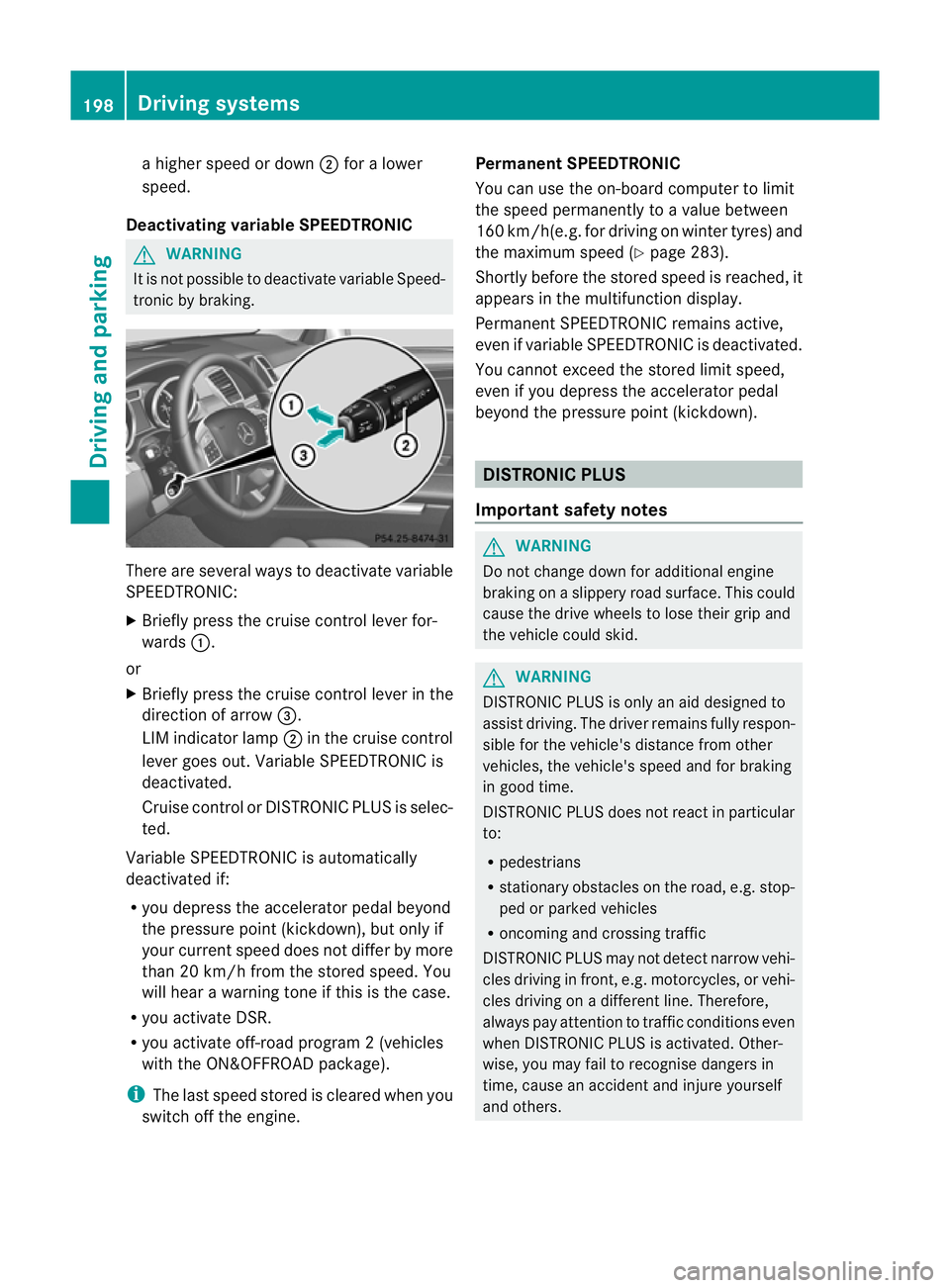
tronic by braking. There are several ways to deactivate variable
SPEEDTRONIC:
X Briefly press the cruise control lever for-
wards :.
or
X Briefly press the cruise control lever in the
direction of arrow =.
LI Mi ndicato rlamp ;in the cruise control
lever goes out. Variable SPEEDTRONIC is
deactivated.
Cruise control or DISTRONIC PLUS is selec-
ted.
Variable SPEEDTRONIC is automatically
deactivated if:
R you depress the accelerator pedal beyond
the pressure point (kickdown), but only if
your current spee ddoes not differ by more
than 20 km /h from the stored speed. You
will hear awarning tone if this is the case.
R you activate DSR.
R you activate off-road program 2(vehicles
wit hthe ON&OFFROAD package).
i The last speed stored is cleared when you
switch off the engine. Permanent SPEEDTRONIC
You can use the on-board computer to limit
the speed permanently to avalue between
16 0k m/ h(e.g .for dri ving on winter tyres) and
the maximum speed (Y page283).
Shortly before th estore dspeed is reached, it
appear sinthe multifunction display.
Permanent SPEEDTRONIC remain sactive,
even if variabl eSPEEDTRONI Cisdeactivated.
You can note xceed the sto redl imit speed,
even if you depress the accelerator pedal
beyond the pressure point (kickdown). DISTRONIC PLUS
Importan tsafety notes G
WARNING
Do not change down for additiona lengine
braking on aslippery road surface. This could
cause the drive wheels to lose their grip and
the vehicle could skid. G
WARNING
DISTRONIC PLU Siso nly an aid designe dto
assis tdriving. Th edrive rremain sfully respon-
sible for the vehicle's distance from other
vehicles, the vehicle's spee dand for braking
in goo dtime.
DISTRONIC PLU Sdoes not react in particular
to:
R pedestrians
R stationar yobstacles on the road, e.g. stop-
ped or parked vehicles
R oncoming and crossin gtraffic
DISTRONIC PLUS may not detect narrow vehi-
cle sdriving in front, e.g .motorcycles, or vehi-
cles driving on adifferen tline. Therefore,
always pay attention to traffic condition seven
when DISTRO NICP LUS is activated. Other-
wise ,you may fai ltorecognise danger sin
time, cause an accident and injure yourself
and others. 198
Drivin
gsystemsDrivin gand parking
Page 202 of 441
G
WARNING
DISTRONIC PLUS canno ttake account of road
and traffic conditions. If DISTRONI Cdoes not
recognise or no longer recognises the vehicle
in front, do not activate DISTRONIC or, if it is
alr eady active, deactivate it. This is especially
the case:
R befor ecorners
R on filter lanes
R when changing to alane with faster moving
traffic
R in comple xdriving situations or where lanes
are diverte d,e.g. at roadworks on amotor-
way
DISTRONIC PLU Sotherwise maintains the
current spe ed setbyyou or accelerates up to
the set speed.
DISTRONIC PLU Scannot take account of
weather conditions. Deactivate, or do not
activate, DISTRONI CPLUS:
R if th eroads are slippery, snow-covered or
icy .The wheels coul dlose their grip when
brakin goraccelerating .The vehicle could
star ttos kid.
R if the sensors are dirty or there is poo rvis-
ibility, e.g. due to snow, rain or fog. Dis-
tance control may be impaired.
Always pay attention to traffic conditions
even when DISTRONIC PLU Sisactivate d.
Otherwise, you ma yfail to recognise dangers
in time, caus eanaccident and injure yourself
and others. G
WARNING
DISTRONIC PLUS brake syourvehicle up to a
maximu mof4m /s2
depending on its speed.
This corresponds to approximately 40% of
your vehicle's maximum braking power. You
must als oapply the brakes yourself if this
braking power is not sufficient.
If DISTRONI CPLUS detect sarisk of collision
with avehicle in front, an intermit tent warning
tone sounds. In addition, the ·distance
warning lamp in the instrument cluste rlights
up. Brak etoavoidac ollision. G
WAR
NING
The vehicle can be braked when DISTRONIC
PLUS is activated. For this reason, deactivate
DISTRONIC PLUS if the vehicle is to be set in
motion by othe rmeans (e.g. in acar wash or
by towing).
The radar senso rsystem is switched off auto-
matically in the vicinity of radio teles cope
facilities (Y page 433).
If you want DISTRONIC PLUS to assist you,
the radar sensor syste mmust be activated
(Y page 283 )and operational.
General notes DISTRONIC PLUS regulates the speed and
automati
cally helps you maintain the dis-
tanc etot he vehicle detected in front. DI S-
TRONIC PLU Sbrake sautomatically so that
the set spee disnot exceeded.
On long and steep downhil lgradients, espe-
ciall yifthe vehicle is laden or towing atrailer,
yo um ust select shift range 1,2or 3in good
time. By doing so, you will make use of the
braking effec tofthe engine. This relieves the
load on the brake system and prevents the
brakes from overheating and wearing too
quickly.
If DI STRONIC PLUS detects aslower-moving
vehicle in front ,your vehicle is braked in order
to maintain the preset distance to the vehicle
in front.
If ther eisnov ehicle in front ,DISTRONIC
PLUS operate sinthe sam eway as cruise
control in the spee drange between
30 km/h and 200 km/h. If avehicle is driving
in fron tofyou, DI STRONIC operates in the
speed range betwee n0km/h and
200 km/h.
Do not us eDISTRONIC PLUS on roa dswith
steep gradients. Driving systems
199Drivinga nd parking Z
Page 210 of 441
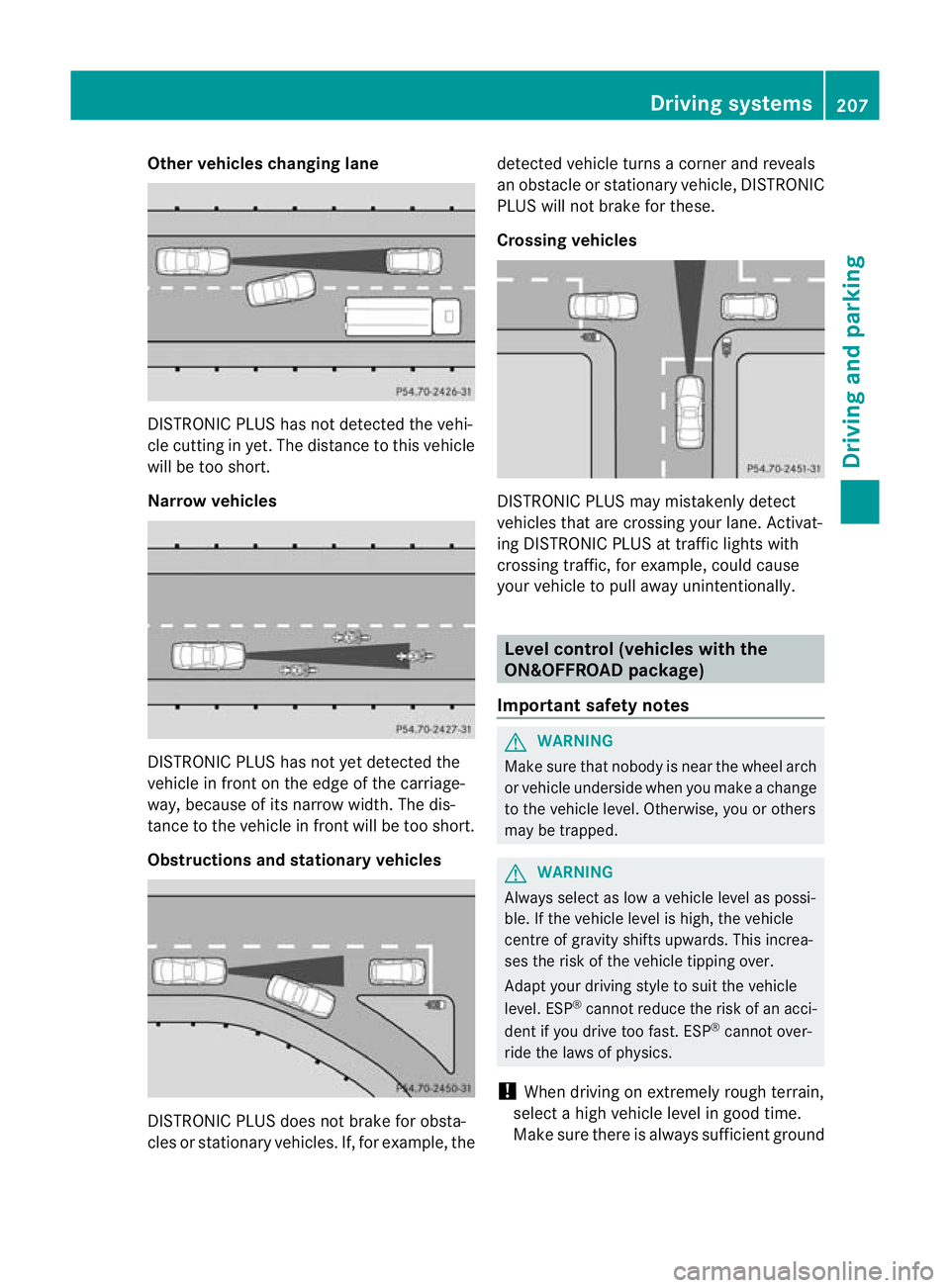
Other vehicles changing lane
DI
ST RONIC PLUS has not detected the vehi-
cle cutting in yet. The distance to this vehicle
will be too short.
Narrow vehicles DISTRONIC PLUS has not yet detected the
vehicle in fron tonthe edge of the carriage-
way, because of its narrow width. The dis-
tance to the vehicle in front will be too short.
Obstruction sand sta tionary vehicles DISTRONIC PLUS does not brake for obsta-
cles or stationary vehicles. If, for example, the detected vehicle turns
acorner and reveals
an obstacle or stationar yvehicle, DI STRONIC
PLUS will not brake for these.
Crossin gvehicles DISTRONIC PLUS may mistakenly detect
vehicles that are crossing your lane. Activat-
ing DISTRONIC PLUS at traffic lights with
crossing traffic, for example, could cause
your vehicle to pull away unintentionally.
Level control (vehicles with the
ON&OFFROAD package)
Important safety notes G
WARNING
Make sure that nobody is near the wheel arch
or vehicle underside when you make achange
to the vehicle level. Otherwise, you or others
ma ybet rapped. G
WARNING
Always select as lo wavehicle level as possi-
ble. If the vehicle level is high, the vehicle
centre of gravity shifts upwards. This increa-
ses the risk of the vehicle tippin gover.
Adapt you rdriving style to suit th evehicle
level. ESP ®
cannot reduc ethe risk of an acci-
dent if you drive too fast. ESP ®
cannot over-
rid ethe laws of physics.
! When driving on extremel yrough terrain,
select ahigh vehicle level in good time.
Make sure there is always sufficient ground Drivin
gsystems
207Drivingand pa rking Z
Page 211 of 441
clearance. You will oth
erwise damag ethe
vehicle.
Lev elcontro ladapt sthe vehicle level auto-
matically to the current operating and driving
situation. Thi sresults in reduced fuel con-
sumption and improved handling.
Make changes to the vehicle level whil ethe
vehicle is in motion. Thi senable sthe vehicle
to adjus ttothe new level as quickly as pos-
sible.
The vehicle level ma ychange visibly if you
par kthe vehicle and the outside temperature
changes. If the temperatur edrops, th evehi-
cle level lowers; with an increase in temper-
ature, the vehicle level rises.
If you unloc kthe vehicle or open adoor, the
vehicle begins to compensate for load dis-
crepancies while still parked. However, for
significant leve lchanges, e.g. after the vehi-
cle has been stationar yfor along period, the
engin emust be running. For safety reasons,
the vehicle is only lowered when the doors are
closed .Lowering is interrupted if adoor is
opened; it con tinues once the doo rhas been
closed.
For information about driving off-road, see
(Y page 188).
Basic settings The exten
ttowhich the vehicle is raised or
lowered depend sonthe basic setting selec-
ted.
Select:
R Highway/high-spee dlevel for driving on
normal roads
R Off -road level 1for drivin goneasily nego-
tiable off-road terrain
R Off-road level 2for drivin gonnormal off-
roa dterrain
R Off -road level 3for freeing the vehicle from
especially difficult off -road terrain at low
speeds The individual vehicle levels differ from high-
way level as follows:
R
highway level: +/– 0mm
R high-spee dlevel: –1 5mm
R off-road leve l1:30mma bove highway level
R off-road level 2: 60 mm above highway level
R off-road level 3: 90 mm above highway level
Highway/high-speed level !
Make sure there is enough groun dclear-
ance when the vehicle is being lowered. It
could otherwise hit the ground, damaging
the underbody. :
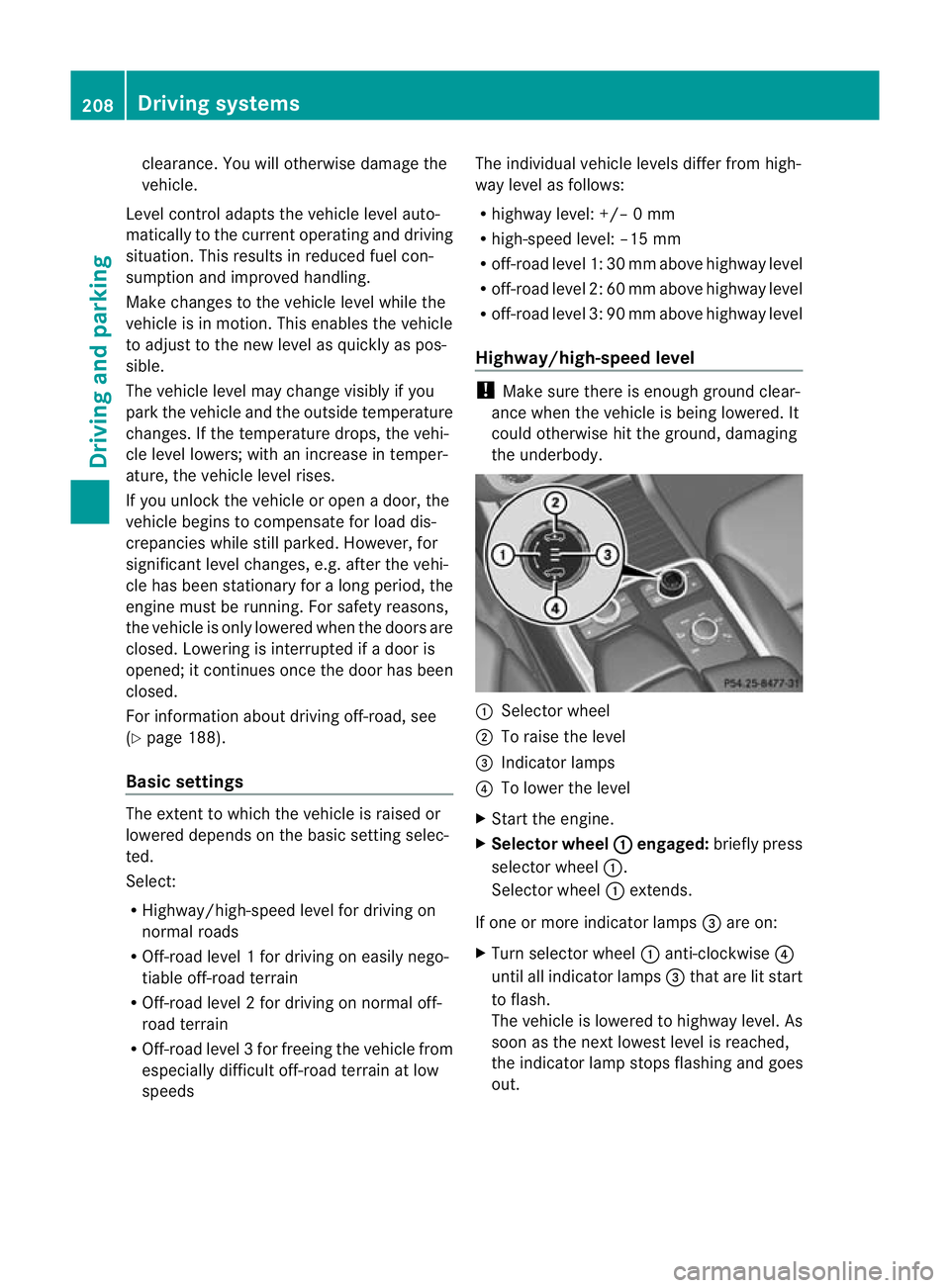
Selector wheel
; To raise the level
= Indicator lamps
? To lower the level
X Star tthe engine.
X Selector wheel : engaged:
brieflypress
selecto rwheel :.
Selector wheel :extends.
If one or mor eindicato rlamps =are on:
X Turn selector wheel :anti-clockwise ?
until all indicator lamps =that are lit start
to flash.
The vehicle is lowered to highway level. As
soon as the next lowes tlevel is reached,
the indicator lam pstops flashing and goes
out. 208
Drivin
gsystemsDrivin gand pa rking
Page 212 of 441
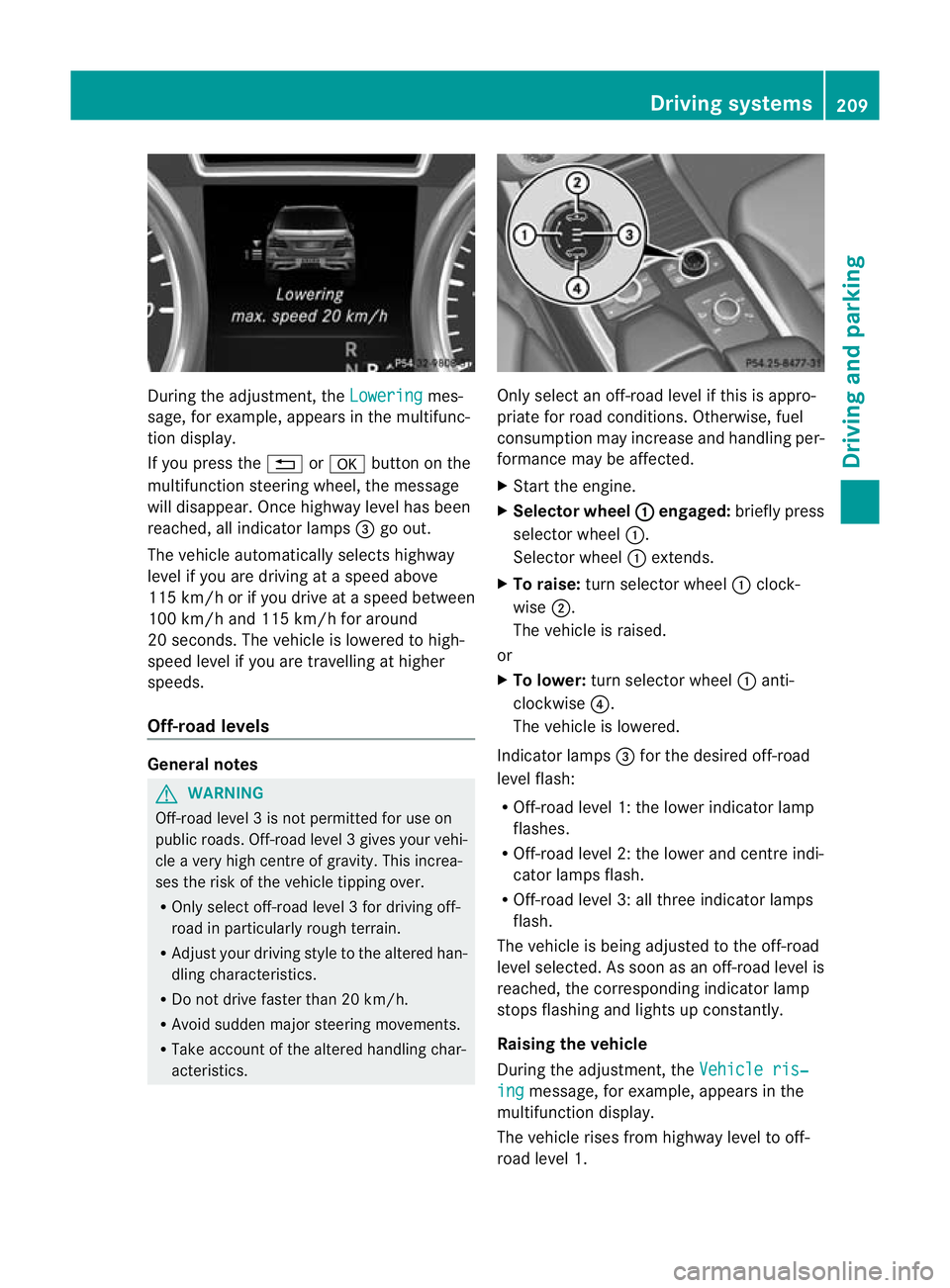
During the adjustment, the
Lowering mes-
sage ,for example, appears in the multifunc-
tion display.
If yo upressthe % ora button on the
multifunction steeri ngwheel, the message
will disappear. Onc ehighway level has been
reached, all indicator lamps =go out.
The vehicle automatically select shighway
level if you are drivin gataspeed above
11 5k m/ horify ou drive at aspeed between
10 0k m/ hand 115 km/h for around
20 seconds. The vehicle is lowered to high-
speed level if you are travelling at higher
speeds.
Off- road levels General notes
G
WARNING
Off-road level 3isn ot permitte dfor use on
public roads. Off -road level 3gives your vehi-
cle avery high centr eofgravity. This increa-
se st he risk of the vehi clet ippin gover.
R Onl yselec toff-road level 3for drivin goff-
road in particularl yrough terrain.
R Adjust your drivin gstyle to the altered han-
dling charac teristics.
R Do not drive faster than 20 km/h.
R Avoid sudden majo rsteering movements.
R Take account of th ealtered handling char-
acteristics. Only select an off-road level if this is appro-
priate for road conditions. Otherwise, fuel
consumption may increase and handling per-
formanc
emay be affected.
X Start the engine.
X Selector wheel : engaged:
briefly press
selector wheel :.
Selector wheel :extends.
X To raise: turn selector wheel :clock-
wise ;.
The vehicle is raised.
or
X To lower: turn selector wheel :anti-
clockwise ?.
The vehicle is lowered.
Indicator lamps =for the desired off-road
level flash:
R Off-road level 1: the lower indicator lamp
flashes.
R Off-road level 2: the lower and centre indi-
cator lamps flash.
R Off-road level 3: all three indicator lamps
flash.
The vehicle is being adjusted to the off-road
level selected .Assoon as an off-road leve lis
reached, th ecorresponding indicator lamp
stops flashing and lights up constantly.
Raising th evehicle
During the adjustment, the Vehicleris‐ ing message
,for example, appear sint he
multifunc tion display.
The vehicle rises from highway leve ltooff-
roa dlevel 1. Driving systems
209Driving and parking Z
Page 213 of 441
If yo
upressthe % ora button on the
multifunction steering wheel, the messa ge
wil ldisappear.
i Up to off-road level 2, you can hide the
messages using the %ora button
on the multif unctio nsteering wheel.
Once off-road level 2has been reached, the
lower and centr eindicator lamps of the selec-
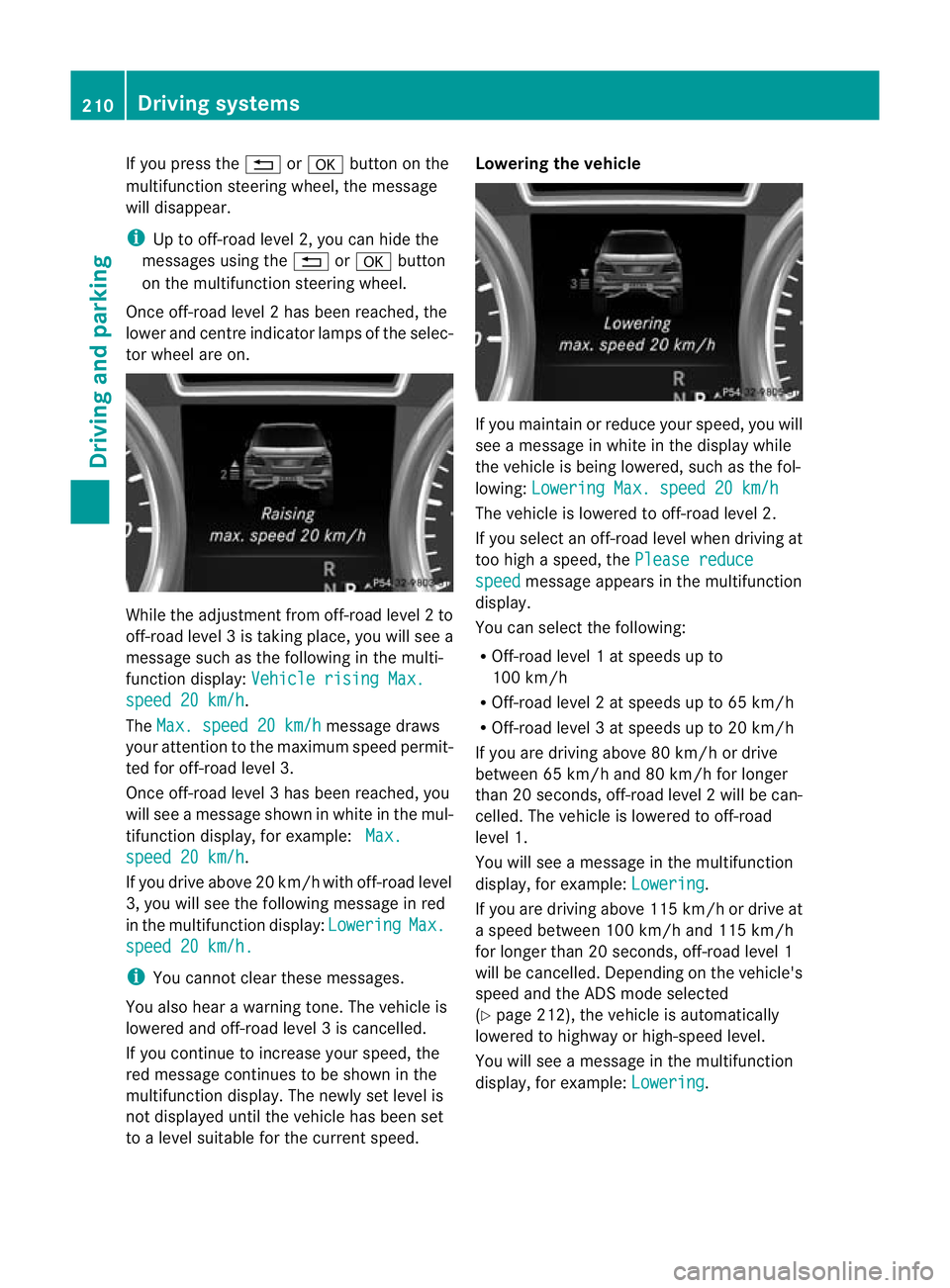
tor wheel are on. While the adjustment from off-road level
2to
off -ro ad level 3istaking place, you will see a
message such as the following in the multi-
function displ ay:Vehicle rising Max. speed 20 km/h .
The Max. speed 20 km/h message draws
your attentio ntothe maximum speed permit-
ted for off-road level 3.
Onc eoff-roa dlevel 3has been reached, you
will see amessage shown in whit eint he mul-
ti fu nction display, for example: Max.spee
d20k m/h .
If yo udrive above 20 km/h wit hoff-road level
3, you wil lsee the followi ngmessage in red
in th emultifunction display: Lowering Max.
spee
d20k m/h. i
Youc annot clear these messages.
You also hear awarnin gtone. The vehicle is
lowered and off-road leve l3iscancelled.
If you continue to increase your speed, the
red message continues to be shown in the
multifunction displ ay.T he newl yset level is
not displayed until the vehicle has been set
to alevel suitable for the curren tspeed. Lowering the vehicle
If you maintain or reduc
eyour speed, you will
see amessage in white in the display while
the vehicle is being lowered, such as the fol-
lowing: Lowering Max. spee d20km/h Th
ev ehicle is lowered to off-road level 2.
If you select an off-road level when driving at
too high aspeed, the Please reduce speed message appears in the multifunction
display.
You can select the following:
R Off-road level 1atspeeds up to
10 0k m/h
R Off-road level 2atspeeds up to 65 km/h
R Off -road leve l3atspeeds up to 20 km/h
If you are drivin gabove 80 km/ hordrive
between 65 km/h and 80 km/h for longer
than 20 seconds ,off-roa dlevel 2will be can-
celled. The vehicle is lowered to off-road
level 1.
You will see amessage in the mul tifunction
display, for example: Lowering .
If you are drivin gabove 11 5km/ hordrive at
as peed between 10 0km/ hand 115 km/h
for longer than 20 seconds ,off-road level 1
wil lbec ancelled. Dependin gonthe vehicle's
speed and the ADS mode selected
(Y page 212), the vehicle is automatically
lowered to highway or high-spee dlevel.
You will see amessage in the multifunction
display, for example: Lowering .210
Driving systemsDriving and parking
Page 216 of 441
Active Curve System
The Active Curv
eSyste muses activ estabil-
isers to optimis eboth drivin gcomfort and
vehicle agility. Depending on the ADS mode
selected (Y page 212), the Active Curve Sys-
tem also changes the setting.
If you select ADS comfor tmode:
R rolling movemen tisr educed in the even tof
changing surface undul ations.
R the roll angle when cornering is reduced.
R the drivin gstyle is agile.
If you select ADS sport mode:
R the roll angle is reduced significantly.
R the driving style is even more agile.
Leve lcontrol Import
ants afety notes G
WARNING
Mak esure that nobody is near the wheel arch
or vehicle underside when you make achange
to the vehicle level. Otherwise, you or others
ma ybet rapped. G
WARNING
Always select as lo wavehicle level as possi-
ble. If the vehicle level is high, the vehicle
centre of gravity shifts upwards. This increa-
ses the risk of the vehicle tipping over.
Adapt your driving style to suit the vehicle
level. ESP ®
cannot reduc ethe risk of an acci-
dent if you drive too fast. ESP ®
cannot over-
rid ethe laws of physics.
! When driving on extremel yrough terrain,
select ahigh vehicle level in good time.
Make sure there is always sufficient ground
clearance. You will otherwise damage the
vehicle.
Genera lnotes
Further information abou t"Driving off-road"
(Y page 188).
Level control adapts the vehicle level auto-
matically to the current operating and driving situation. Thi
sresults in reduced fuel con-
sumption and improved handling.
If you select ADS comfor tmode
(Y page 212), the vehicle is lowered to high-
speed leve lasthe speed increases. As the
vehicle decelerates, the vehicle is raised back
up to highway level.
If you selec tADS sport mode (Y page 212),
the vehicle skip shighwa ylevel and lowers
directly to high-speed level dependin gonthe
basic setting (Y page 213).
Make changes to the vehicle level while the
vehicle is in motion. This enables the vehicle
to adjust to the new level as quickly as pos-
sible.
The vehicle level ma ychange visibly if you
par kthe vehicle and the outside temperature
changes. If the temperature drops, the vehi-
cle level lowers; with an increase in temper-
ature, the vehicle level rises.
If you unlock the vehicle or open adoor, the
vehicle begins to compensat efor load dis-
crepancies while still parked. However, for
significant leve lchanges, e.g. after the vehi-
cle has been stationary for along period, the
engin emust be running. For safety reasons,
the vehicle is only lowered when the doors are
closed .Lowering is interrupted if adoor is
opened; it con tinues once the doo rhas been
closed.
Basic settings
The extent to which the vehicle is raised or
lowered depends on the basic setting selec-
ted. Select raised level for off-road driving or
highway/high-speed level for normal roads.
The individua lvehicle levels differ from high-
way level as follows:
R highway level: +/ –0mm
R high-spee dlevel: –1 5mm
R raised level :+60 mm Driving systems
213Driving and parking Z
Page 217 of 441
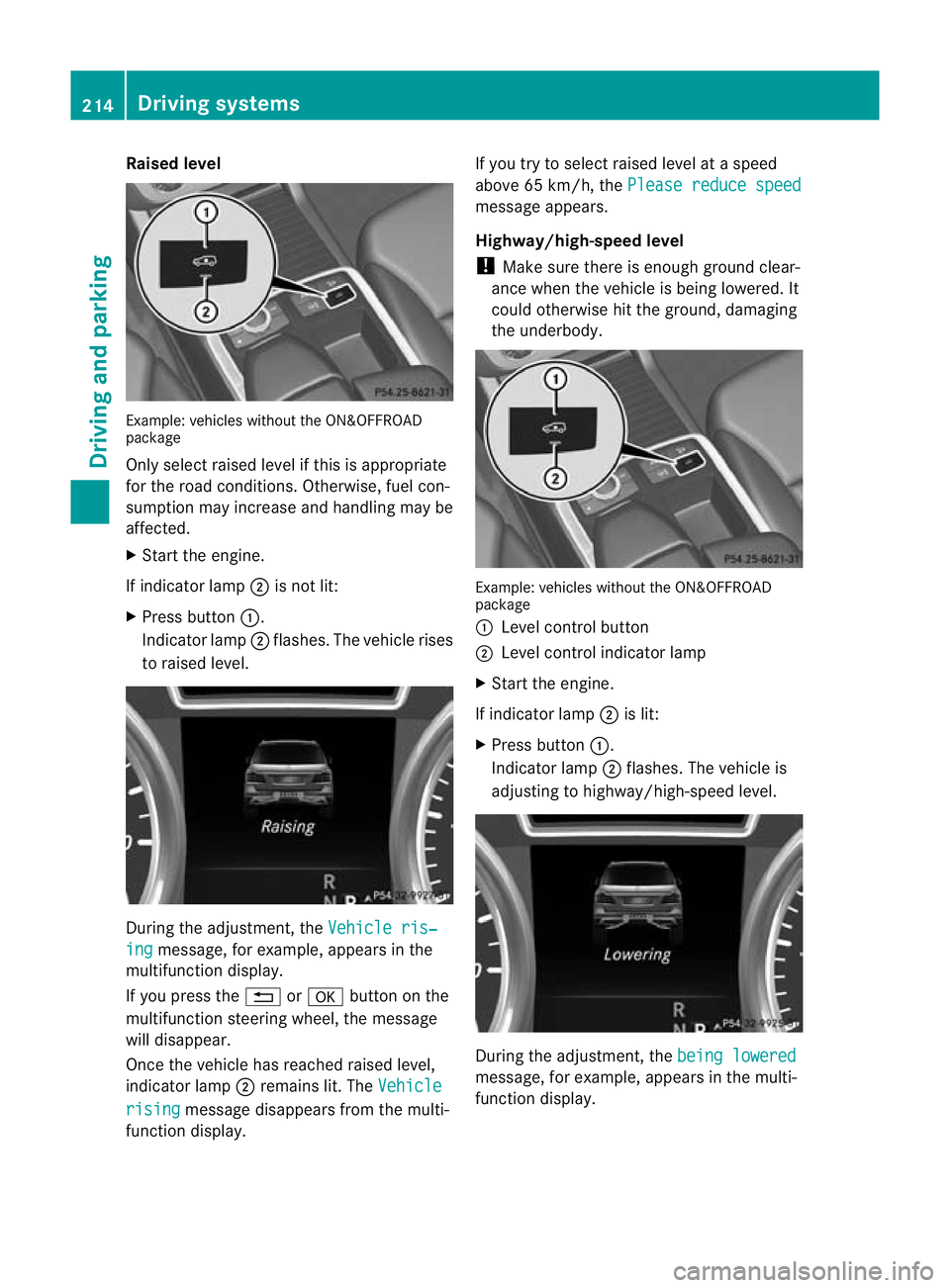
Raised level
Example
:vehicles without the ON&OFFROAD
package
Only select raised level if this is appropriate
for the road conditions. Otherwise, fuel con-
sumption may increase and handling may be
affected.
X Start the engine.
If indicator lamp ;is not lit:
X Press button :.
Indicator lamp ;flashes. The vehicle rises
to raised level. During the adjustment, the
Vehicleris‐ ing message
,for example, appear sint he
multifunction display.
If you press the %ora button on the
multifunction steerin gwheel, the message
will disappear.
Onc ethe vehicle has reached raised level,
indicat or lamp ;remains lit.T he Vehicle rising message disappear
sfrom th emulti-
function display. If you try to select raised level at
aspeed
above 65 km/h, the Please reduce speed message appears.
Highway/high-speed level
!
Make sure there is enough groun dclear-
ance when the vehicle is being lowered. It
could otherwise hit the ground, damaging
the underbody. Example: vehicles without the ON&OF
FROAD
package
: Level control button
; Level control indicator lamp
X Start the engine.
If indicator lamp ;is lit:
X Press button :.
Indicator lamp ;flashes. The vehicle is
adjusting to highway/high-speed level. During the adjustment
,the bein glowered message
,for example, appears in the multi-
func tion display. 214
Driving systemsDriving and pa
rking