wheel MERCEDES-BENZ GL SUV 2012 Manual PDF
[x] Cancel search | Manufacturer: MERCEDES-BENZ, Model Year: 2012, Model line: GL SUV, Model: MERCEDES-BENZ GL SUV 2012Pages: 441, PDF Size: 10.66 MB
Page 218 of 441
If yo
upressthe % ora button on the
multifunction steering wheel, the messa ge
wil ldisappear.
Once highway level has been reached, indi-
cator lamp ;goes out. The beinglow‐ ered messa
gedisappears from the multi-
function display.
The vehicle autom atically adjusts to highway
level when you:
R drive faster than 80 km/ hor
R driv eatas peed between 65 km/ hand
80 km/h for approximatel y20seconds.
Dependin gonthe ADS setting selected
(Y page 212), the vehicle is lowered to high-
speed level at high speeds. AM
GR IDE CONTROL sports suspen-
sion
Vehicl elevel The vehicle automatically sets the vehicle
level at the rear axle. Rea raxle level control
ensures the best poss iblesuspension and
that the ground clearanc eremains const ant
even when the vehicle is loaded .This
improves drivin gsafety and fuel consump-
tion.
Suspensio ntuning General notes
Th
ee lectronically controlled damping system
works continuously. This improves driving
safety and ride comfort.
The damping is tuned individually to each
wheel and depends on:
R your drivin gstyle, e.g. sporty
R the road surface conditio n,e.g .bum ps
R your individual selection of Sport, Sport +
or Comfort
If you select Sport or Sport +mode and
restar tthe engine, the suspension setting
revert stoComfort mode. Spor
tmode The firmer suspension tuning in Sport mode
ensures even better contact with the road.
Select this mode when employing
asporty
driving style, e.g. on windin gcountry roads.
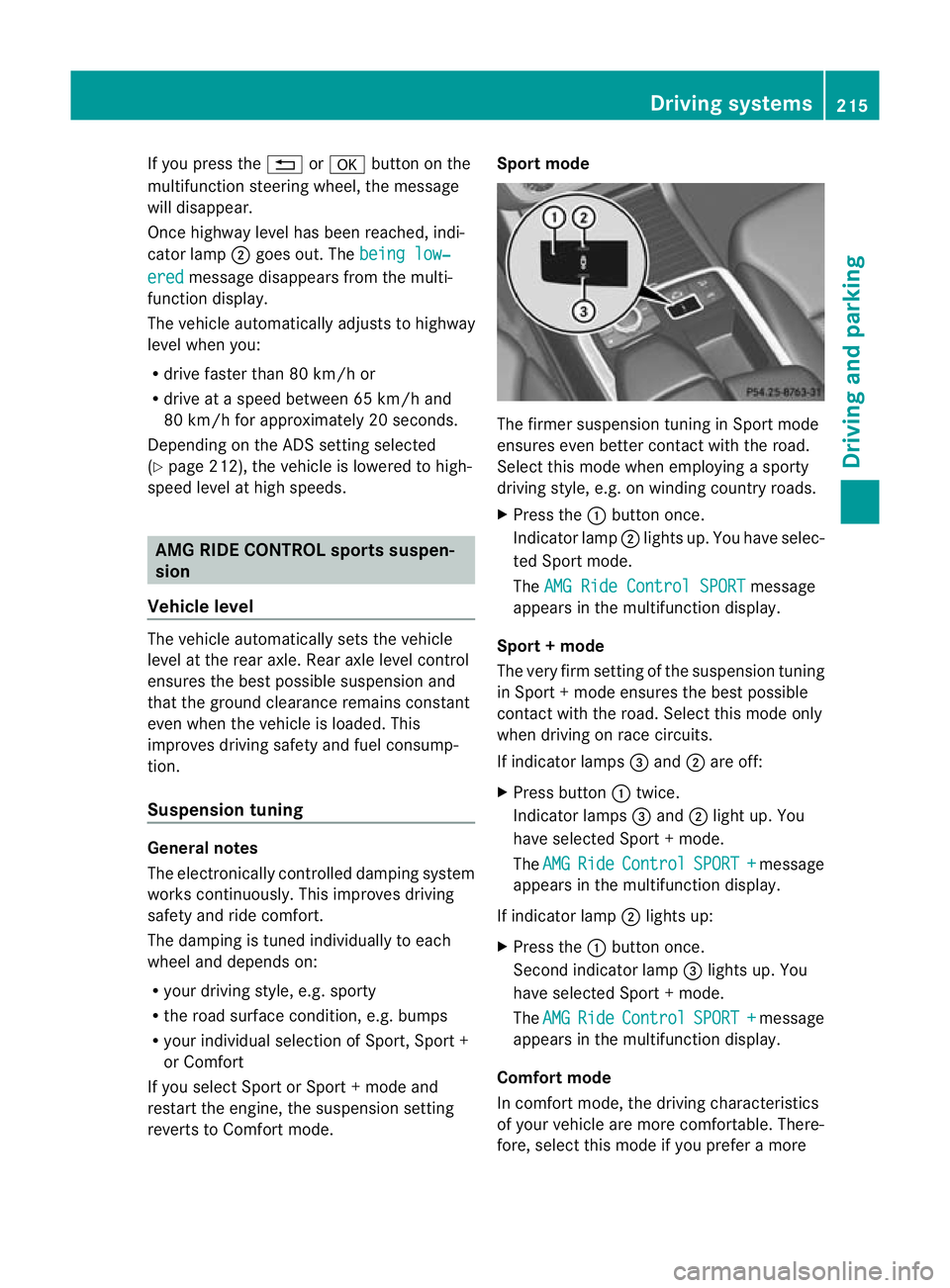
X Press the :button once.
Indica torlamp ;lights up. You have selec-
ted Sport mode.
The AMGR ide Control SPORT message
appears in th emultifunction display.
Sport +mode
The very firm settin gofthe suspension tuning
in Spor t+mode ensures the best possible
con tact with the road .Select this mode only
when driving on rac ecircuits.
If indicator lamps =and ;are off:
X Press button :twice.
Indicator lamps =and ;light up. You
have selected Sport +mode.
The AMG Ride Control SPORT + message
appear sint he multifunc tion display.
If indicator lamp ;lights up:
X Press the :button once.
Secon dindicato rlamp =lights up. You
have selected Sport +mode.
The AMG Ride Control SPORT + message
appear sint he multifunc tion display.
Comfort mode
In comfor tmode, the drivin gcharacteristics
of your vehicle ar emore comfortable .There-
fore, selec tthis mode if you prefer amore Driving systems
215Driving and parking Z
Page 223 of 441
G
WARNING
Th ef ront of th evehicle will veer out in the
direction of the oncoming traffic during the
parking operation. In some cases the vehic le
wil lalsot ake you onto sections of the oncom-
ing lane during the parking procedure.
You are responsibl efor safet yatall times and
must pay attention to any road users
approaching or passing. Stop the vehicle if
necessary or cancel the Activ eParking Assist
parking procedure. G
WARNING
Make sure that no persons or animals are in
the manoeuvring range. Otherwise, they
coul dbei njured.
! If unavoidable ,you should driv eover
obstacles such as kerb sslowly and not at
as har pangle .Otherwi se,you ma ydamage
the wheels or tyre s.
Activ eParking Ass isti sane lectroni cparking
aid with ultrasound. Ultrasoun disused to
mea surethe road on bothsides of th evehicle.
As uitable parking space is indicated by the
parking symbol. Activ esteering intervention
can assis tyou during parking. You ma yalso
use PARKTRONIC (Y page 216). When PARK-
TRONIC is switched off, Active Parking Assist
is also unavailable.
Use Active Parking Assist for parkin gspaces:
R that are parallel to the direction of travel
R that are on straight roads, not bends
R that are on the same level as the road, e.g.
not on the pavement
Parking tips:
R on narrow roads, driv easclosely as possi-
ble past the parkin gspace.
R parking spaces that are littered, overgrown
or partially occupied by trailer drawbars
might be identified incor rectly or not at all.
R snowfall or heavy rain may lea dtoap arking
space being measured inaccurately. R
pay attention to the PARKTRONIC
(Y page 217 )warning message sduring the
parking procedure.
R at any time, you can intervene in the steer-
ing procedure to correc tit. Active Parking
Assist will then be cancelled.
R when transporting aload which protrudes
from your vehicle, you should not use
Active Parkin gAssist.
R when snow chains or an emergenc yspare
wheel are fit ted, you should not use Active
Parking Assist here either.
R mak esure that the tyre pressures are
always correct. This has adirec tinfluence
on the parking characteristics of the vehi-
cle.
R the wa yyourv ehicle is positioned in the
parking space after parking is dependent
on various factor s. Theseinclude the posi-
tion and shape of the vehicles parked in
front and behind it and the conditions of the
location. It may be the case that Active
Parking Assist guides you too far into a
parking space, or not far enoug hinto it. In
some cases, it may also lead you across or
onto the kerb. If necessary, you should can-
cel the parking procedure with Active Park-
ing Assist.
R you can also engage forward gea rprema-
turely. Th evehicle redirects and does not
driv easf ar into the parking space. Should
ag ear be changed too earl ytoa chieve a
sensible parkin gposition ,the parkin gpro-
cedure will be cancelled.
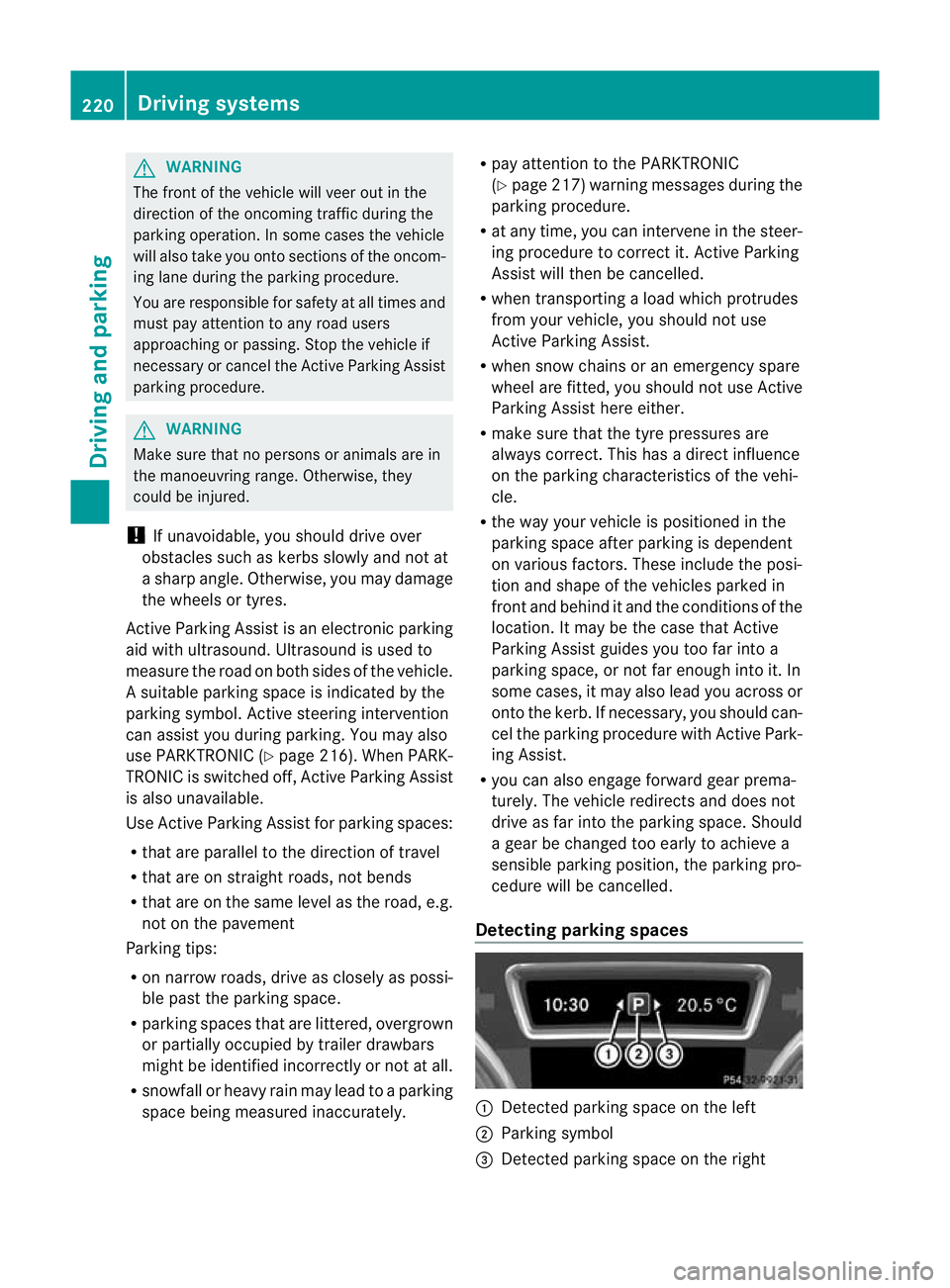
Detectin gparking spaces :
Detected parking space on the left
; Parking symbol
= Detected parking space on the right 220
Driving systemsDri
ving and parking
Page 224 of 441
Active Parking Ass
isti ss witched on automat-
icall ywhend riving forwards .The system is
operational at speeds of up to approximately
35 km/h. While in operation, the system inde-
pendently locates and measures parking
spaces on both sides of the vehicle. When
drivin gatspeeds below 30 km/ h,you will see
the parking symbol as astatus indicato rinthe
instrumen tcluster .Active Parking Ass ist only
display sparking spaces on the front-
pass enger sid easstandard .Parking spaces
on the driver' sside are displayed as soon as
th et urns ignal on the driver' sside is activa-
ted. To park on the driver' sside, you must
leave the driver' sside tur nsignal switched
on. This must remain switched on until you
acknowledge the use of Activ eParking Assist
by pressing the abutton on the multi-
function steerin gwheel.
When aparking space has been detected, an
arrow towards the right or the left also
appears.
Activ eParking Assist will only detect parking
spaces:
R that are parallel to the direction of travel
R that are at least 1. 5mwide
R that are at least 1. 3mlonger than your
vehicle
Ap arking space is displayed while you are
driving past it, and until you are approx-
imately 15 maway from it.
Parking G
WARNING
PARKTRONI Cand Activ eParking Assist are
merely parking aids and may not detec tall
obstacles. They do not reliev eyou of the
responsibili tyof payin gattention.
You are always responsible for safety and
must continue to pay attention to your imme-
diate surroundings when parking and
manoeuvring. You could, otherwise, endanger
yoursel fand others. G
WARNING
Whe nparking, you need to make sure that no
obstacles are located in the vicinity of the
vehicle durin gthe entire opera tion. Active
Parking Assist does not reliev eyou of the
responsibili tyof payin gattention. It merely
aids you by intervenin gactively in the steer-
ing.
To stop the vehi cleo ravoi dana ccident you
need to apply the brakes yourself.
X Stop the vehi clew hen the par king space
symbo lshows the desired par king space in
the instrumen tcluster.
X Shif tthe transmission to position R.
The Star tPark Assist? Yes: OK No: %
message appe arsint he multifunction
display.
X To cancel th eprocedure: press the
% button on the multifunction steering
whee lorp ull away.
or
X To par kusing Active Parking Assist:
press the abutton on the multifunction
steeri ngwheel.
The Park Assist active Accelerate and brake Observe surroundings mes-
sage appears in the multifunction display.
X Release the multifunction steerin gwheel.
X Reverse the vehicle, being ready to brake
at all times. When reversi ng,d rive at a
spee dbelow 10 km /h.O therwise, Active
Parking Assist will be cancelled.
i In tigh tparking spaces, you will achieve
the best parking results by backin gupas
far as possible .When doing so, also
observe the PARKTRONIC messages.
X Stop as soon as PARKTRONIC sound sthe
continuous warnin gtone, if not before.
Manoeuvrin gmay be required in tight park-
ing spaces.
The Park Assist active Select D Observe surroundings message appears in
the multifunction display. Driving systems
221Driving and parking Z
Page 225 of 441
X
Shift the transmissio ntoposition Dwhile
the vehicle is stationary.
Active Parkin gAssist immediately steer sin
the othe rdirection.
The Park Assist active Accelerate and brake Observe surroundings mes-
sage appears in the multifunction display.
i You will achieve the best results by wait-
ing for the steerin gprocedure to complete
before pulling awa y.
X Drive forwards and be ready to brake at all
times.
X Stop as soo nasPARKTRONIC sounds the
continuous warning tone, if not before.
The ParkAssist active Select R Observe surroundings message appears in
th em ultifunction display.
Further transmissio nshift sm ay be neces-
sary.
As soon as the parking procedure is com-
plete, the Park Assist switched off mes-
sage appears in the multifunc tion display.
PARKTRONIC is still available.
X Manoeuvr eifnecessary.
X Alway sobserv ethe warnin gmessages dis-
played by PARKTRONI C(Ypage 217).
Parking tips:
R on narrow roads, driv easclosely as possi-
ble past the parkin gspace.
R parking spaces that are littered, overgrown
or partially occupied by trailer drawbars
might be identified incor rectly or not at all.
R snowfall or heavy rain may lea dtoap arking
space being measured inaccurately.
R the way your vehicle is positioned in the
parking space after parking is dependent
on various factors. Thes einclude the posi-
tion and shape of the vehicles parked in
front and behind it and the condi tions of the
location .Insome cases, Active Parking
Assist ma yguide you too far into aparking
space, or not far enough into it. In some
cases, it may also lead you across or onto
the kerb. If necessary, you should cancel the parking procedure with Active Parking
Assis
t.
R you can also engag eforward gear prema-
turely. The vehicle redirects and does not
drive as far int othe parkin gspace. Should
ag ear be changed too early, the parking
procedure will be cancelled. Asensible
parkin gposition can no longer be achieved
from this position.
Exiting aparkin gspace G
WARNING
Active Parking Assist doe snot monitor street
traffic .Insome cases, the vehicle will also
tak eyou onto section softhe oncoming lane
when exitin gaparking space.
You are responsible for safety at all times and
must pay attention to any road users
approaching or passing. Stop the vehicle if
necessary or cancel Active Parking Assis t.
Activ eParking Assis tcan only assis tyou with
exitin gaparking space if you have parked the
vehicle using Active Parking Assis t.
X Start the engine.
X Switch on the turn signal on the side facing
the street.
X Shift the transmission to position Dor R.
The Star tPark Assist? Yes: OK No: %
message appears in th emultifunction
display.
X To cancel the procedure: press the
% button on the multifunction steering
wheel or pull away.
or
X To exit aparkin gspace usin gActive
Parking Assist: press theabutton on
the multifunction steering wheel.
The Park Assis tactive Accelerate and brake Observe surroundings mes-
sage appear sinthe multifuncti on display.
X Releas ethe multifunction steeri ngwheel.
X Revers ethe vehi cleo rdrive forwards, being
ready to brake at all times .Donot exceed
am aximum spee dofapproximately 222
Driving systemsDriving and parking
Page 226 of 441
10 km/h wh
enexiting aparking space.
Otherwise ,Active Parking Assist will be
cancel led.
X Stop as soon as PARK TRONIC sounds the
continuous warning tone, if not before.
X Shif tthe transmission to position Dor Ras
req uired wh ilet he vehicle is stationary.
Activ eParking Assis timmediatel ysteers in
the othe rdirection.
i You will achieve the best results by wait-
ing for the steering procedure to complete
before pulling away.
If you rever seafter activation, the steering
wheel is moved to the straight-ahead posi-
tion.
X Drive forwards or reverse the vehicle, being
read ytob rake at al ltimes.
X Stop as soon as PARKTRONIC sounds the
continuou swarning tone, if not before.
X Drive forwards and revers easinstructed by
the PARKTRONI Cwarning displays.
Once you have exite dthe parkin gspace com-
pletely, the steering wheel is moved to the
straight-ahead position. You hea ratonea nd
the message Park Assist switched off appear
sinthe multifuncti on display. You will
then have to steer and merg eintot raffic on
you rown. PARKTRONI Cisstill available.
Cancelling Active Parking Assist X
Stop the movemen tofthe multifunction
steeri ngwheel or steer yourself.
Activ eParking Assist will be cancelled at
once. The Park Assist cancelled mes-
sage appears in the multifunction display.
or
X Press the PARKTRONI Cbutton on the
centr econsole (Y page 218).
PARKTRONI Cisswitched off and Active
Parking Assist is immediately cancelled.
The Park Assist cancelled message
appears in the multifunction display. Activ
eParking Assist is cancelled automati-
cally if:
R parking using Activ eParking Assist is no
longer possible.
R you are drivin gfaster than 10 km/h.
R aw heel spin sand ESP ®
intervenes or fails.
The ÷ warnin glamp lights up in the
instrumen tcluster.
Aw arning ton esounds. The par king symbol
disappears and the multifunction display
shows the ParkA ssist cancelled mes-
sage.
When Activ eParking Assist is cancelled, you
must steer again yourself.
Towing atrailer For vehicles with
atrailer to whitch, the min-
imum length for parking spaces is slightly
increased.
If yo uhavea ttache datrailer to your vehicle,
yo us houl dnot us eActiv eParking Assist.
Once the electrica lconnection is established
between your vehicl eand the trailer, Active
Parking Assist is no longer available .PARK-
TRONIC is deactivated for the rear area. Reversin
gcamera
Important safety notes G
WARNING
Mak esure that no persons or animals are in
the manoeuvring range. Otherwise, they
could be injured. G
WARNING
The reversing camera is only an aid and may
sho wad istorted view of obstacles, show
them incorrectly or not at all. The reversing
camer aisnotas ubstitute for paying atten-
tion. The camera cannot sho wobject sinthe
following areas: Driving systems
223Driving and parking
Z
Page 228 of 441
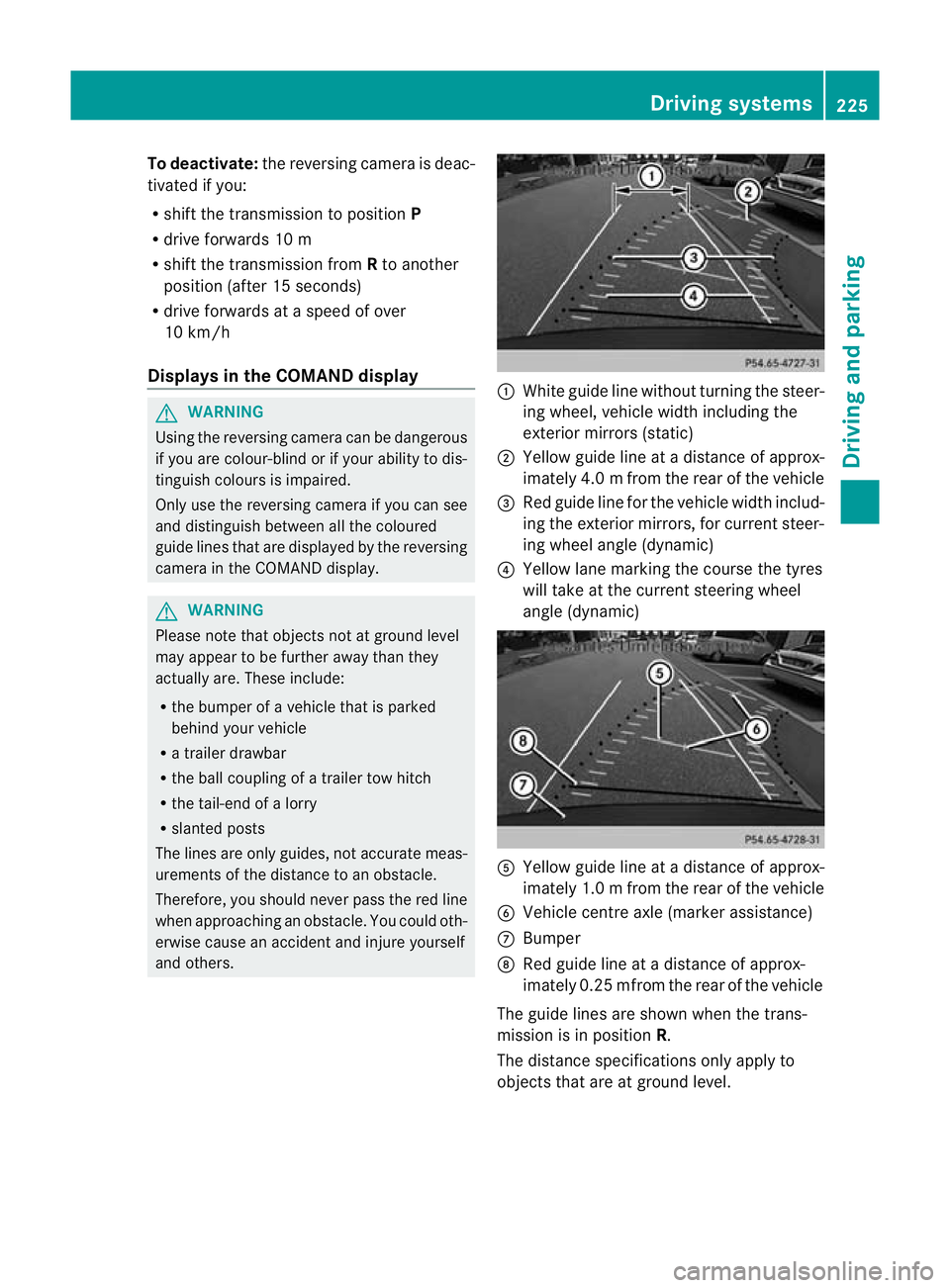
To deactivate:
the reversing camera is deac-
tivated if you:
R sh iftt he transmission to position P
R drive for wards 10 m
R shift th etransmission from Rto another
positio n(after 15 seconds)
R driv eforwards at aspee dofover
10 km/h
Display sintheCOMAN Ddisplay G
WARNING
Usin gthe reversing camera ca nbedangerous
if you are colour-blind or if your abilit ytodis-
tinguish colours is impaired.
Only use th ereversing camera if you can see
and distinguish between all th ecoloured
guide lines that are displayed by the reversing
camera in the COMAN Ddisplay. G
WARNING
Please note that object snot at groun dlevel
may appear to be further away than they
actually are. These include:
R the bumper of avehicle that is parked
behind your vehicle
R at railer drawbar
R theb all coupling of atrailer tow hitch
R thet ail-end of alorry
R slanted posts
The lines are only guides, not accurate meas-
urements of the distance to an obstacle.
Therefore, you should never pass the red line
when approachin ganobstacle. You could oth-
erwise cause an accident and injur eyourself
and others. :
White guide line without turnin gthe steer-
ing wheel, vehicle widt hincluding the
exterior mirrors (static)
; Yellow guid eline at adistance of approx-
imately 4.0 mfrom th erear of the vehic le
= Red guide line for the vehicl ewidth includ-
ing the exterior mirrors, for current steer-
ing whee langle (dynamic)
? Yellow lane marking the course the tyres
willtake at the current steering wheel
angle (dynamic) A
Yellow guide line at adistance of approx-
imately 1.0 mfrom th erear of the vehic le
B Veh icle centr eaxle (marker ass istance)
C Bumper
D Red guide line at adistance of approx-
imately 0.2 5mfrom th erear of the vehic le
Th eg uide lines are sho wn whenthe trans-
mission is in position R.
The distance specifications only apply to
object sthat ar eatground level. Dri
ving systems
225Driving and pa rking Z
Page 229 of 441
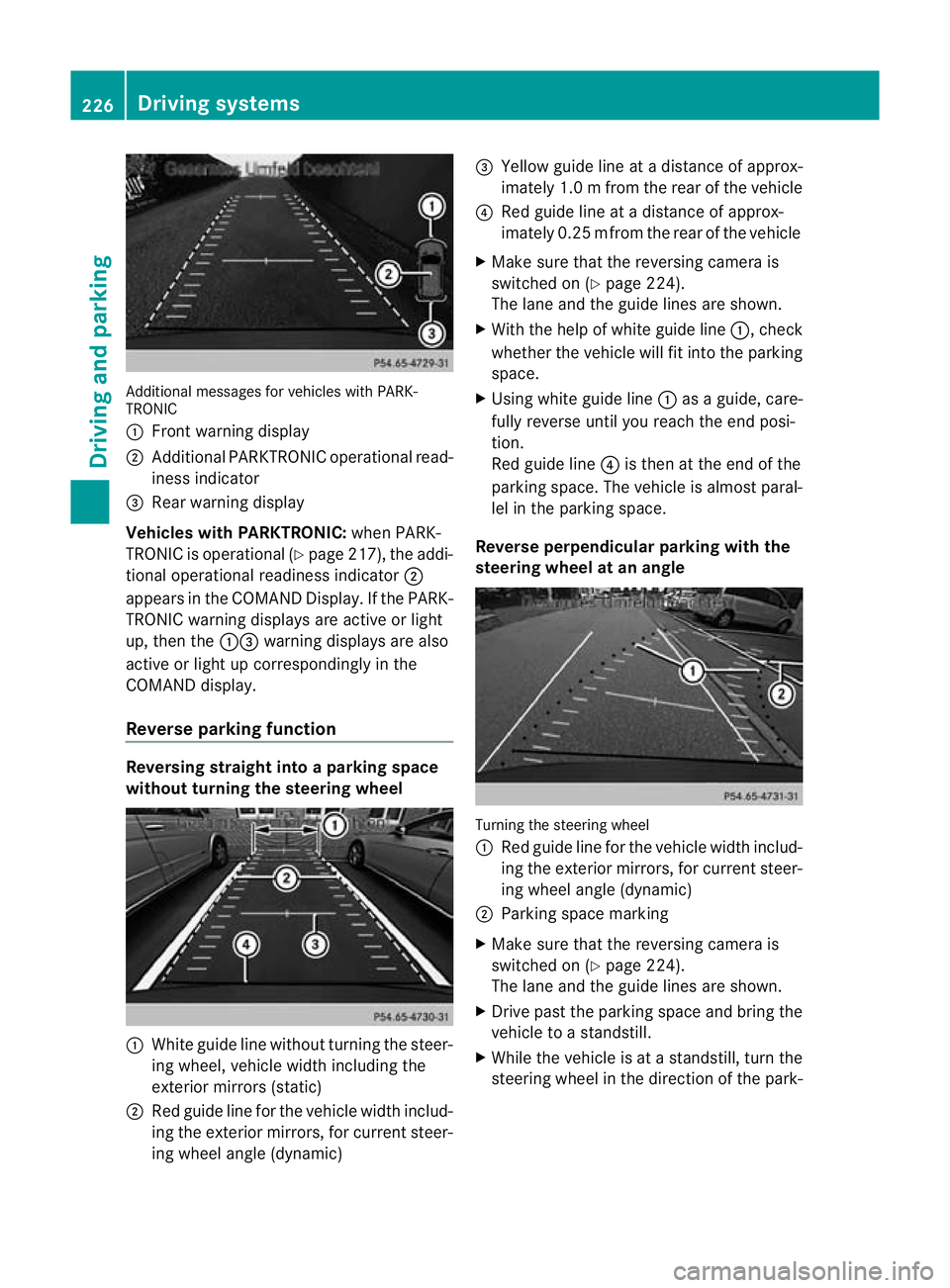
Additiona
lmessages for vehicles with PARK-
TRONIC
: Fron twarning display
; Additiona lPARKTRONIC operationa lread-
iness indicator
= Rear warning display
Veh icleswithP ARKTRONIC: when PARK-
TRONIC is operationa l(Y page 217), the addi-
tional operat iona lreadiness indicator ;
appears in the COMAN DDisplay. If the PARK-
TRONIC warnin gdisplays are active or light
up ,then the :=warnin gdisplays are also
active or light up correspondingl yinthe
COMAND display.
Reverse parkin gfunction Reversin
gstraight into aparkin gspace
withou tturning the ste eringwheel :
White gu idel ine without turning the steer-
ing wheel, vehicle width including the
exterior mirrors (static)
; Red guide line for the vehicle width includ-
ing the exterior mirrors, for current steer-
ing wheel angle (dynamic) =
Yellow guide line at adistance of approx-
imately 1.0 mfrom th erear of the vehic le
? Red guide line at adistance of approx-
imately 0.2 5mfrom th erear of the vehic le
X Ma ke sure that the reversing camera is
switched on (Y page224).
Th elane and the guide lines are sho wn.
X Wi th the hel pofwhite guide line :,check
whether the vehicle will fit into the parking
space.
X Using white guide line :asag uide, care-
fully reverse until you reach the end posi-
tion.
Red guide line ?is then at the end of the
parking space. The vehicle is almost paral-
lel in the parking space.
Reverse perpendicular parking with the
steering wheel at an angle Turning the steering wheel
:
Red guide line for the vehicle width includ-
ing the exterior mirrors, for current steer-
ing wheel angle (dynamic)
; Parking space marking
X Make sure that the reversing camera is
switched on (Y page 224).
The lane and the guide lines are shown.
X Drive past the parking space and bring the
vehicle to astandstill.
X While the vehicle is at astandstill, turn the
steering whee lint he direction of the park- 226
Driving systemsDriving and pa
rking
Page 230 of 441
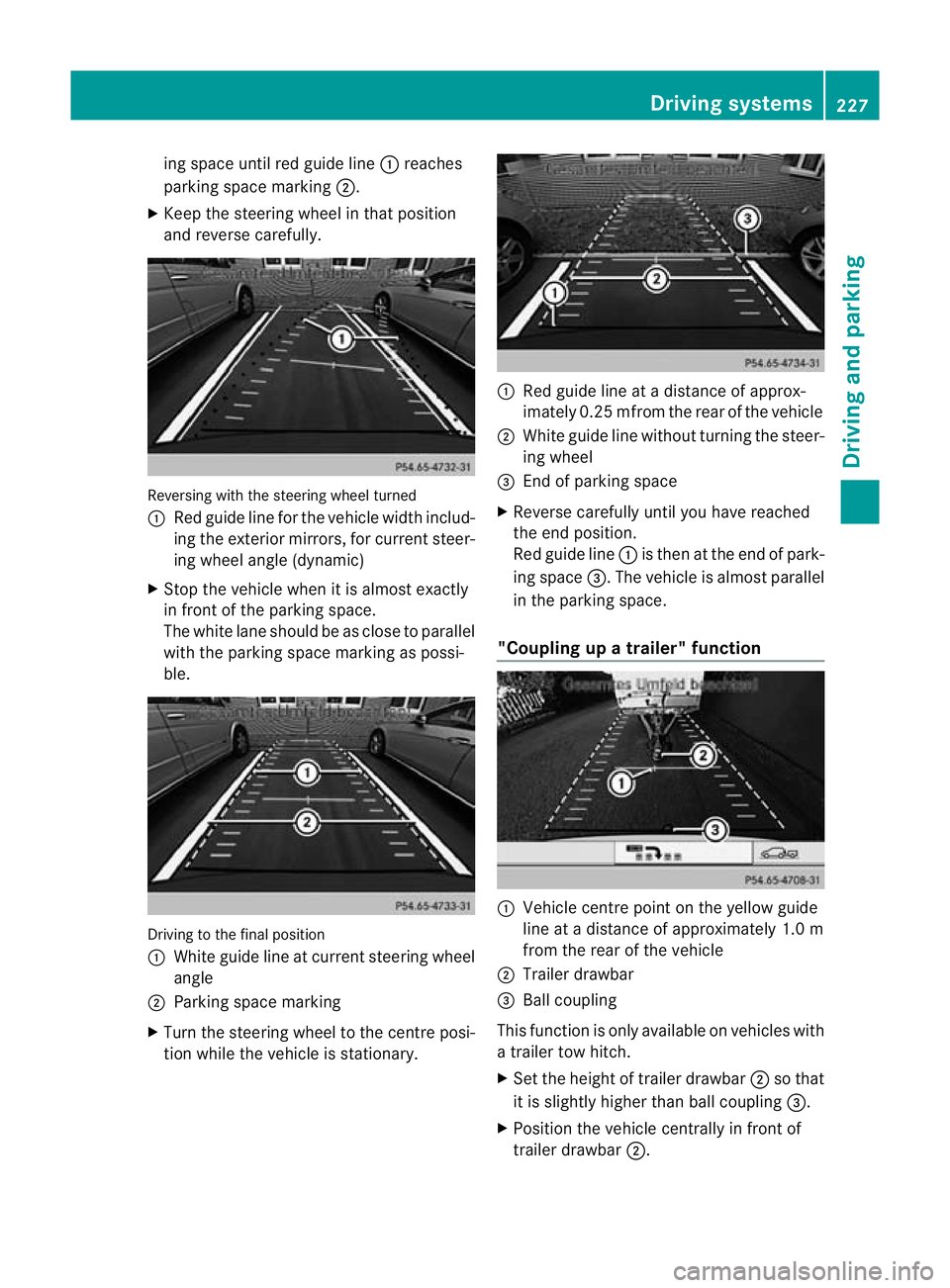
ing space until red guide line
:reaches
parking space mar king ;.
X Keep the steering wheel in that position
and reverse carefully. Reversing with the steerin
gwheel turned
: Red guide line for the vehicle width includ-
ing the exterior mir rors, for current steer-
ing whee langle (dynamic)
X Stop the vehicle whe nitisalmost exactly
in fron tofthe par king space.
The whit elane should be as close to parallel
with the parking space marking as possi-
ble. Drivin
gtothe final position
: Whit eguide line at current steerin gwheel
angle
; Parking space marking
X Turn the steering wheel to the centr eposi-
tion while the vehicle is stationary. :
Red guide line at adistanc eofapprox-
imately 0.2 5mfrom th erear of the vehicle
; White guide line without turning the steer-
ing wheel
= End of park ings pace
X Reverse carefully unti lyou have reached
the end position.
Red guide line :is then at the end of park-
ing space =.The vehicle is almost parallel
in the parkin gspace.
"Coupling up atrailer" function :
Vehicle centre point on the yellow guide
line at adistance of approximately 1.0 m
from the rear of the vehicle
; Trailer drawbar
= Ball coupling
This func tion is only available on vehicles with
at railer to whitch.
X Set the height of trailer drawbar ;so that
it is slightly higher than ball coupling =.
X Position the vehicle centrally in front of
trailer drawbar ;. Drivin
gsystems
227Drivingand pa rking Z
Page 232 of 441
The system evaluates images from the fol-
lowin gcameras:
R reversin gcamera
R fron tcamera
R two cameras in the exterior rear view mir-
rors
The cameras capture the immediate sur-
roundings of the vehicle. The system sup-
ports you, e.g. when parking or if vision is
restricted at an exit.
The 360 °camera images can be shown in full
screen mode or in seven different split-screen
views on the COMAND display. Asplit-screen
view also includes atop view of the vehicle.
This view is calculated from the data supplied
by the installed camera s(virtual camera).
Th e7s plit-screen views are:
R top view and picture from the reversing
camera (13 0°viewing angle)
R top view and picture from the fron tcamera
(without displaying the maximum steering
wheel angle)
R top view and enlarged rear view
R top view and enlarged front view
R top view and trailer view (vehicles with
trailer tow hitch)
R top view and pictures from the rearward
facin gmirror cameras (rear wheel view)
R top view and pictures from the forward
facin gmirror cameras (fron twheel view)
i The top vie wand trailer view are available
for vehicles equipped with atrailer tow
hitch.
When th efunction is active and you shift the
transmission from position Dor Rto N,y ou
see the previous view in the COMAN Ddis-
play. The dynamic guidelines are hidden.
When you change between transmission
positions Dand R,you see the previously
selected front or rea rview. Activation conditions The 360
°camera image can be displ ayed if:
R your vehicle is equip pedw ith the 360°
camera.
R COMAND Online is switched on, see the
separate COMAND Online operating
instruc tions.
R the 360° camera func
tion is activated
Activating th e360° camera using the
SYS but ton X
Press and hold the Wbutton for longer
than 2seconds, see the separate COMAND
Online operatin ginstructions.
Depe nding on whether position Dor Ris
engaged, the following is shown:
R full screen display with the image from
the fron tcamera
R full screen display with the image from
the rear camera.
Activating the 360° camer awith
COMAN DOnline X
Press the Wbutton, see the separate
COMAN DOnline operating instructi ons.
X Select System by turning
cVdthe
COMAND contr ollerand press Wto con-
firm.
X Select 360°camera and press
Wto con-
firm.
Depending on whethe rposition Dor Ris
engaged, the following is shown:
R as plit screen with top view and the
image from the front camera or
R as plit screen with top view and the
image from the reversing camera.
For further information about the COMAND
Controller, see the separat eCOMAN DOnline
operating instructions. Drivin
gsystems
229Drivingand pa rking Z
Page 233 of 441
Activating th
e360° camera using
revers egear You can show images from th
e360°c amera
automatically by engagin grevers egear.
X Mak esuret hat the key is in position 2in
th ei gnition lock.
X Mak esuret hat the Activation by R gear setting is ac
tive in COMAND Online,
se et he separa teCOMAND Onlin eoperat-
ing instructions.
X To sho wthe360° camera image: engage
revers egear.
The COMAND display show sthe ar ea
behind th evehicl einS plitS creen:
R vehicl ewithg uide lines
R top vie wofthe vehicle
Selec ting th esplit-screen and full
screen displays X
To switch between split-scree nviews:
switc htot he line with the vehi cles ymbols
by sliding ZVthe COMAND controller.
X Turn cVd the COMAND controlle rand
select one of the vehicle symbols.
X To switch to full scree nmode: select
Full scre en by tur
ning cVd the
COMAN Dcontroller and press Wto con-
firm.
Display sinthe COMAND display Important safety notes
!
Objec tsnot at ground level may appear to
be further away than they actually are, e.g.:
R the bumpe rofaparked vehicle
R the drawbar of atrailer
R theb all coupling of atrailer to whitch
R the rear section of an HGV
R as lanted post
Use the guidelines only for orientation.
Approach object snofurther than the bot-
tom-most guidel ine. Top vie
wwith pictu re from the rear view
camera :
Symbol for the split screen settin gwith
top view and reversing camera image
; Yellow guide line at adistance of approx-
imately 4.0 mfrom th erear of the vehic le
= Yellow guide line for the vehicle width
including the exterior mirrors, for current
steering whee langle (dynamic)
? Yellow lane marking the course the tyres
wil ltake at the current steering wheel
angle (dynamic) A
Yellow guide line at adistance of approx-
imately 1.0 mfrom th erear of the vehic le
B Veh icle centr eaxle (marker ass istance)
C Red guide line at adistance of approx-
imately 0.3 0mfrom th erear of the vehic le
D Bumper
Th eg uide lines are sho wn whenthe trans-
mission is in position R.
The distance specifications only apply to
object sthat ar eatground level. 230
Dri
ving systemsDriving and pa rking