four wheel drive MERCEDES-BENZ GL SUV 2012 Owners Manual
[x] Cancel search | Manufacturer: MERCEDES-BENZ, Model Year: 2012, Model line: GL SUV, Model: MERCEDES-BENZ GL SUV 2012Pages: 441, PDF Size: 10.66 MB
Page 7 of 441
1, 2,
3...
12 Vsocket
see Socket
360°camera
Function/ notes............................. 228
36 0° ca mera
Cleaning ......................................... 370
4ETS (Electronic Traction System) ....66
4MATIC (permanent four-wheel
drive) .................................................. 250A
ABS (Anti-lock Brakin gSystem)
Disp laym essage ............................ 291
Function/notes ................................ 61
Important safety notes ....................61
Warn ingl am p................................. 327
Activating/deactivating air-recir-
culation mode .................................... 146
Activating/d eactivating cooling
with air dehumidification .................141
Activ eBlindS pot Assist
Activating/deactivating (on-
board computer) ............................ 279
Display message ............................ 311
Function/notes ............................. 242
To wing atrailer .............................. 245
Activ eCurv eSyst em
Disp laym essage ............................ 308
Function/notes ............................. 213
Activ eDriving Assistanc epackage .242
Activ eLane Keepi ngAssist
Activating/deactivating (on-
board computer) ............................ 279
Display message ............................ 311
Function/notes ............................. 246
To wing atrailer .............................. 248
Activ elight function ......................... 123
Activ ePark Assist
Display message ............................ 312
Activ eParkin gAssist
Important safety notes ..................219
To wing atrailer .............................. 223
Activ eService System
see ASSYST PLUS
ADAPTIVE BRAKE ................................ .68Adaptive Brak
eAssist
Display message ............................ 297
Function/notes ................................ 64
Adaptive brake lamps .........................65
Adaptive Dampi ng System
see ADS (Adaptive Damping System)
Adaptive High beam Assist
Display message ............................ 303
Function/notes ............................. 124
Adaptive Main-beam Assist
Switch ingo n/off (on-board com-
puter) ............................................. 281
AdBlue ®
Display message ............................ 306
Fil ling capacity ............................... 428
Important safety notes ..................427
Service ind icator ............................ 366
topping up ..................................... 178
AdBlue ®
service indicator ................366
Additive s(engine oil)........................ 429
AD S(Ad aptiv eDampin gSystem)
Function/note s............................. 212
Airbags
Front airba g(driver, front
passenger) ....................................... 43
Important safety gu idelines ............. 42
Kneeba g.......................................... .44
Sidebag ............................................ 44
Trigg ering ........................................ .41
Windowbag ...................................... 45
Air-co nditionin gsyst em
se eC limate control
Ai rf ilter (whit edisplay message) ....306
AI RF LOW ........................................... 143
AIRMATIC package ADS (Ad aptive Damping System) ...212
Function/notes ............................. 212
Leve lcontrol .................................. 213
Ai rp ressure
see Tyr epres sure
Ai rv ents
Glove compartmen t....................... 154
Important safety notes ..................154
Rea r............................................... 155
Setting ........................................... 154
Setting the centre ai rvents ........... 154
Setting the si deairv ents ............... 154 4
Index
Page 254 of 441
on such
adynamometer, pleas econsult a
qualified workshop. You coul dotherwise
damage the drive train or the brake system.
4MATIC ensures that all four wheels are per-
manently driven. Togethe rwith ESP ®
and
4ETS, it improves the trac tion of your vehicle
whenever adrive whee lspins due to insuffi-
cient grip.
i In wintr ydriving conditions ,the maximum
effect of 4MATIC can only be achieved if
you use winter tyres (M+ Styres), with snow
chain sifn eces sary.
Fo rfurther information on "Driving off-road",
see (Y page 188).
DSR (Downhill Speed Regulation) Important safet
ynotes G
WARNING
DS Riso nlyana id designed to assist you when
drivin gdownhill .You are responsible for keep-
ing control of the vehicle and for assessing
whether the downhil lgradient can be man-
aged.
When activating DSR th evehicle may brake
suddenly due to DSR inter vening. Thi sis
dependent on the downhill gradien tand the
difference between the current speed and the
speed set. DSR may not alway sbeable to
keep to the set speed, depending on road sur-
fac eand tyre conditions .You coul dlose con-
trol of the vehicle and cause an accident.
Selec taset speed suitable for the prevailing
conditions and when necessary, apply the
brakes manually. G
WARNING
If you depress the accelerator pedal wit hDSR
activated, the nthe set speed can be excee-
ded. Drive downhill with specia lcare and
alway skeep in min dthat DSR brakes the vehi-
cle as soon as you remove your foot from the
accelerator pedal. The vehicle ma ybrake sud-
denly due to DSR intervening, depending on
th ed ownhill gradient and the differen ce between the current speed and the set speed.
You could lose control of the vehicl
eand
cause an accident.
DSR assists you whe ndriving downhill. It
keeps th espeed of travel at the speed set on
the on-boar dcomputer .The steeper the
downhill gradient ,the greater the DS Rbrak-
ing effect on th evehicle. When driving on flat
stretches of road or on an uphill gradient, the
DSR braking effect is minima lornon-existent.
DSR con trols the set speed when it is active
and the automatic transmission is in the D,
R or Nposition .Bya ccelerating or braking,
you can always drive at ahigher or alower
speed than that set on the on-boar dcom-
puter.
Further information about "Driving off-road"
(Y page 188).
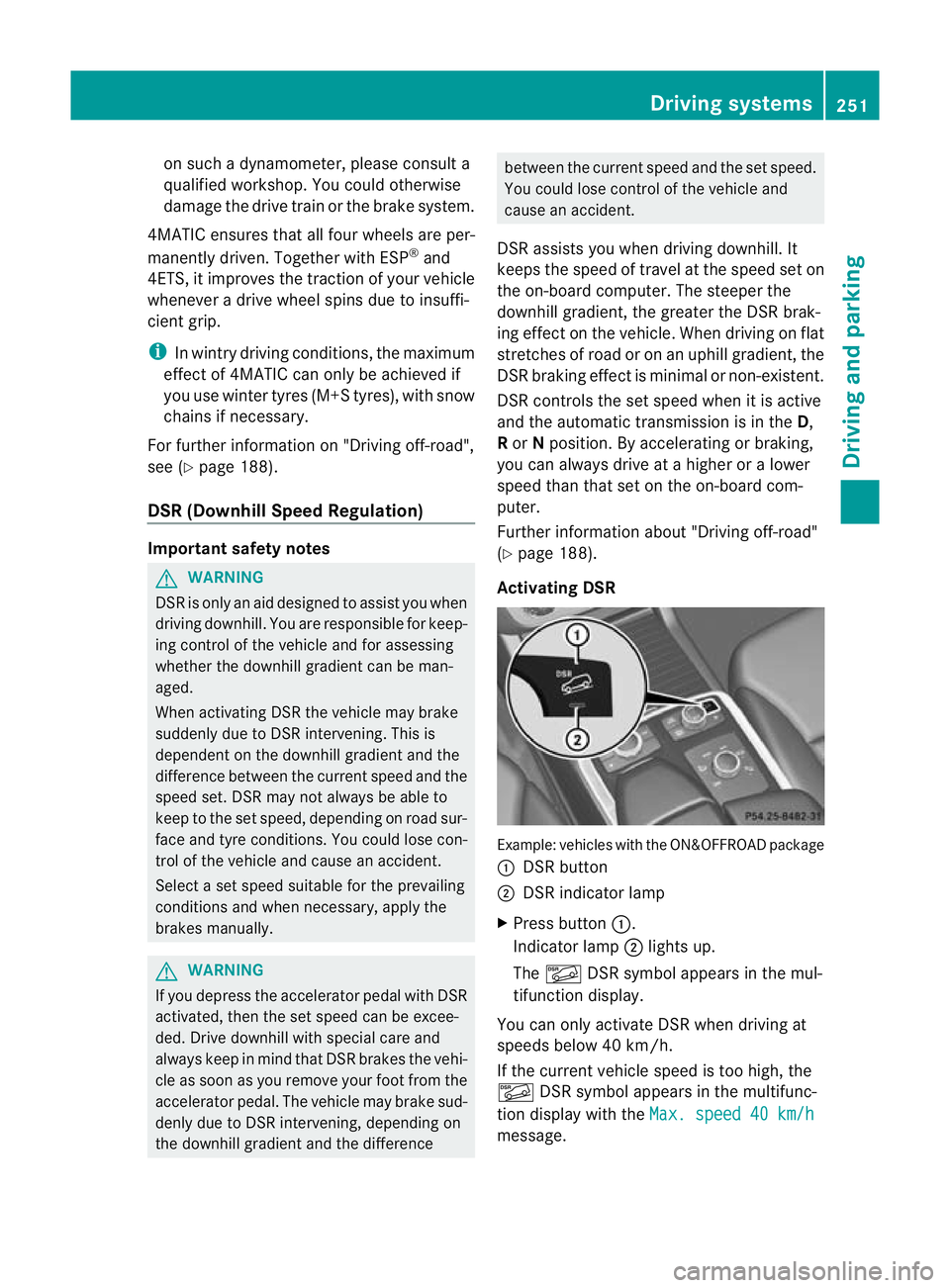
Activating DSR Example: vehicles wit
hthe ON&OFFROAD package
: DSR button
; DSR indicator lamp
X Press button :.
Indicator lamp ;lights up.
The à DSR symbol appear sint he mul-
tifunction display.
You can only activate DS Rwhen drivin gat
speeds below 40 km /h.
If the current vehicle speed is too high, the
à DSR symbol appears in the multifunc-
tion display with the Max.speed 40 km/h message. Drivin
gsystems
251Drivingand pa rking Z
Page 385 of 441
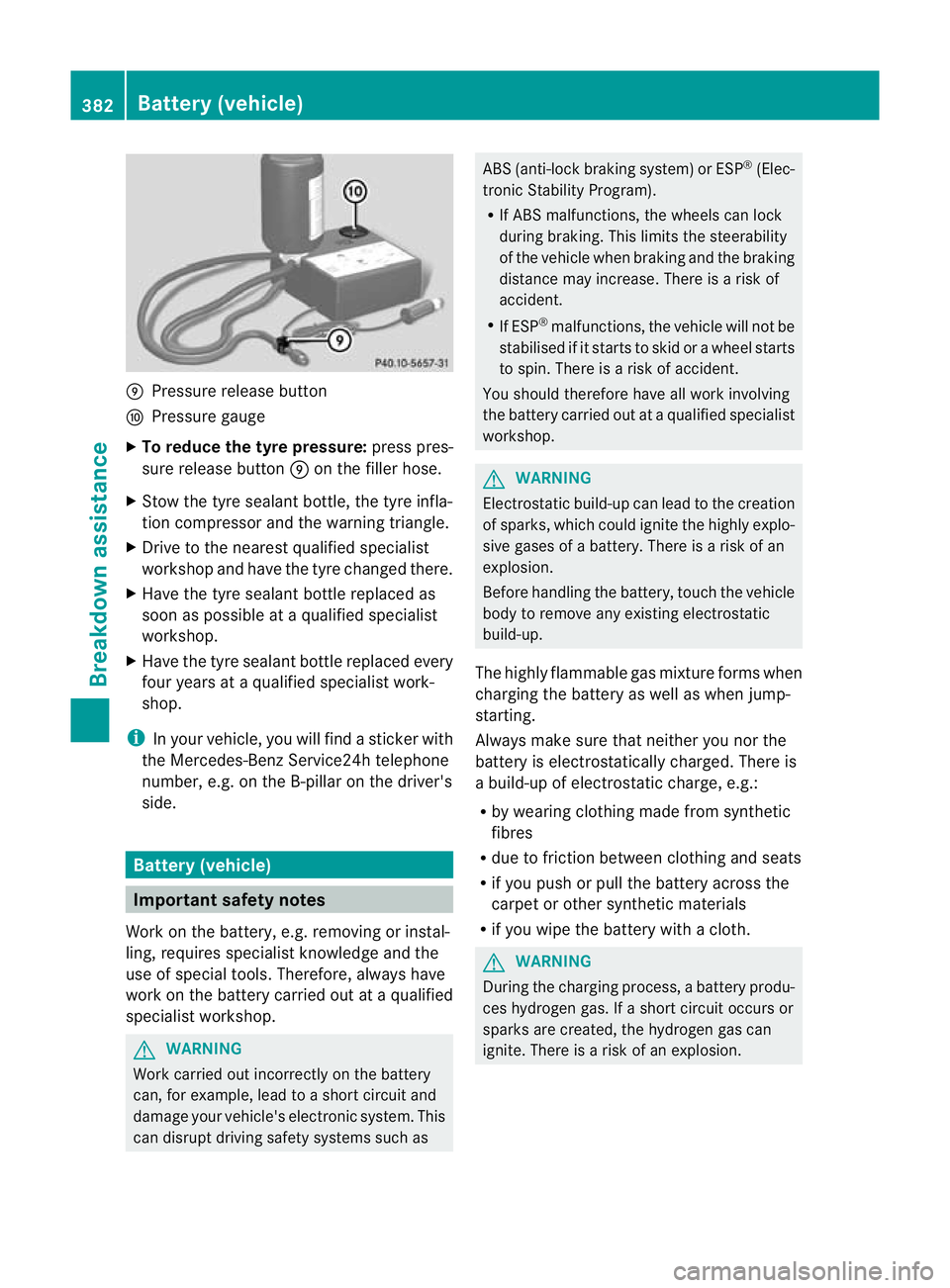
E
Pressur erelease button
F Pressur egauge
X To reduce the tyr epressure: press pres-
sure releas ebutton Eon the filler hose.
X Stow the tyre sealant bottle, the tyre infla-
tion compressor and the warning triangle.
X Drive to the nearest qualified specialist
worksho pand have the tyre changed there.
X Have the tyre sealant bottle replace das
soon as possible at aqualified specialist
workshop.
X Have the tyre sealant bottle replaced every
four years at aqualified specialist work-
shop.
i In your vehicle, you will find asticker with
the Mercedes-Benz Service24h telephone
number, e.g. on the B-pillar on the driver's
side. Battery (vehicle)
Important safety notes
Work on the battery, e.g. removin gorinstal-
ling ,requires specialist knowledge and the
use of special tools. Therefore, always have
work on the batter ycarried out at aqualified
specialist workshop. G
WARNING
Work carried out incorrectly on the battery
can, for example, lead to ashort circui tand
damage your vehicle's electronic system. This
can disrupt driving safety systems such as ABS (anti-lock braking system) or ESP
®
(Elec-
tronic Stability Program).
R If ABS malfunctions ,the wheels can lock
during braking. This limits the steerability
of the vehicle when brakin gand the braking
distance may increase. There is arisk of
accident.
R If ESP ®
malfunctions, the vehicle will not be
stabilised if it start stoskid or awheel star ts
to spin. There is arisk of accident.
You should therefore have all work involving
the batter ycarried out at aqualified specialist
workshop. G
WARNING
Electrostatic build-up can lead to the creation
of sparks, which could ignite the highly explo-
sive gases of abattery. There is arisk of an
explosion.
Befor ehandling the battery, touch the vehicle
body to remove any existing electrostatic
build-up.
The highly flammable gas mixture forms when
charging the battery as well as when jump-
starting.
Always make sure that neither you nor the
batter yiselectrostatically charged. There is
ab uild-up of electrostatic charge, e.g.:
R by wearing clothing made from synthetic
fibres
R due to friction betwee nclothin gand seats
R if you pus horpull the batter yacross the
carpe torother synthe ticm aterials
R if you wipe the batter ywithacloth. G
WARNING
Durin gthe charging process, abatter yprodu-
ces hydroge ngas. If ashort circui toccurs or
sparks are created, the hydroge ngas can
ignite. There is arisk of an explosion. 382
Battery (vehicl
e)Breakdown assistance
Page 405 of 441
After
ateach-in period ,the tyr epressure
loss warning system wil lmonitor the set
tyr ep ressures of all fou rtyres.
If you wish to cancel the restart:
X Press the %button.
or
X If the Tyrepress. now OK? message
appears ,use the 9or: button to
select Cancel .
X Press the abutton.
The tyr epressure values stored at th elast
restar twill continue to be monitored. Tyr
epressur emonitor
Important safet ynotes It is the driver's responsibility to set the tyre
pressure to the recommended cold tyre pres-
sure suitable for the operatin
gsituation
(Y page 399). Note that the correct tyre pres-
sure for the curren toperatin gsituation must
first be taught-in to the tyre pressure monitor.
If ther eisas ubstantial loss of pressure, the
warning threshold for the warning messag eis
aligned to the referenc evalues taught-in.
Restart the tyre pressure monitor after
adjustin gtothe cold tyr epressure
(Y page 403). Th ecurren tpressures are
saved as new referenc evalues. This will
ensure that awarning mess agewillonly
appear if the tyre pressure drops significantly.
The tyre pressure monitor doe snot warn you
of an incorrectly set tyr epressure. Observe
th en otes on the recommended tyr epressure
(Y page 399).
Th et yre press urem onitor is not able to warn
you of asudden loss of pressure, e.g. if the
tyre is penetrated by aforeign object. In the
even tofas udden loss of pressure, bring the
vehicl etoah altbyb raking carefully. Avoid
abrupt stee ringmanoeuvres.
If at yrep ressur emonitor system is fitted, the
vehicle's wheels hav esensor sfitte dthat
mo nito rthe tyre pressures in all four tyres. The tyr
epressur emonitor war nsyou if the
pressur edrops in one or more of the tyres.
Th et yrep ressur emonitor only fu nctionsif
the cor respondin gsensor sare fitte dtoall
wheels.
Information on tyr epressures is displayed in
the multifunctio ndisplay .After afew minutes
of driv ing, the curren ttyre pressure of each
tyre is sho wn inthe multifunction display.
Th et yre pressure values indicated by the on-
board computer may differ from thos emeas-
ured at afilling station using apressure
gauge. Th etyre pressures shown by the on-
board computer refer to thos emeasured at
sea level. At high altitudes, the tyr epressure
values indicated by apressure gaug eare
higher than thos eshown by the on-board
computer. In this case ,donot reduce the tyre
pressures.
The operation of the tyr epressure monitor
can be affecte dbyinterference from radio
transmitting equipment (e.g .radio head-
phones ,two-way radios) that may be being
operated in or near the vehicle.
Checking tyr epressure electronically X
Make sure that the key is in posi-
tion 2(Ypage 159) in the ignitio nlock.
X Press the =or; button on the steer-
ing wheel to select the Serv. menu.
X Press the 9or: button to select
Tyre pressure .
X Press the abutton.
The curren ttyre pressure for each wheel
will be displayed in the multifunction dis-
play.
If the vehicle has been parked for longe rthan
20 minutes ,the Tyre pressures will be
displaye
dafter afew minutes of driving message appe
ars.
After ateach-in period, the tyr epressure
monito rautomatically recognises new
wheel sornew sensors. As long as aclear
allocation of the tyre pressure values to the
individual wheels is not possible ,the Tyre 402
Ty
re pressureWheel sand ty res
Page 406 of 441
pressure monitor active displa
ymes-
sage is shown instead of the tyr epressure
display. Th etyre pressures are already being
monitored.
Warning message softhe tyre pressure
monitor If th
etyre pressure monitor detects asignifi-
cant pressure loss on one or more tyres, a
warnin gmessage is shown in the multifunc-
tion display. Awarning ton ealso sounds and
th et yrep ressure warning lamp ligh tsup in
the instrumen tcluster.
Eac htyret hat is affec tedbyas ignificant loss
of pressure is highlighted in th epressure dis-
play.
X If the Please correc ttyrep ressure messag
eappear sint he multifunctio ndis-
play, check th etyrep ressure on all four
wheels and correct it if necessary.
i If the whee lpositions on th evehicle are
interchanged, th etyrep ressures may be
displayed for the wro ngpositions for a
shor ttime. This is rectified after afew
minute sofdriving, and the tyre pressures
are displayed for the correct positions.
Restartin gthe tyre press urem onitor When you restar
tthe tyr epressure monitor,
all existing warning message sare deleted and
th ew arning lamps go out. The monitor uses
the currently set tyre pressures as the refer-
ence values for monitoring. In most cases, the
tyre pressure monitor will automatically
detect the new referenc evalues after you
have changed the tyr epressure. However,
you can also define referenc evalues man-
uall yasd escribed here.
X Use the table on the inside of the fuel filler
flap to ensur ethat the tyr epressure is set
corre ctly in all four tyres for the current
operating conditions. Also observe the notes in the section on
tyre pressures (Y
page 399).
X Make sure that the key is in position 2in
the ignition lock.
X Press the =or; button on the steer-
ing wheel to select the Serv. menu.
X Press the 9or: button to select
Tyre pressure .
X Press the abutton.
The multifunction display shows the cur-
rent tyre pressure for the individual tyres or
the Tyre pressure swill be dis‐ played after a few minutes of driv‐
ing message.
X Press the :button.
The Use current pressures as new reference values message appears in
th em ultifunction display.
If you wish to confirm the restart:
X Press the abutton.
The Tyre press. monito rrestarted message appears in th
emultifunction dis-
play.
After you have driven for afew minutes, the
system check swhether the curren ttyre
pressures are within the specified range.
The new tyre pressures are then accepted
as reference values and monitored.
If you wish to cancel the restart:
X Press the %button.
The tyre pressure values stored at the last
restart will continue to be monitored.
Radio typ eapproval for the tyr epres-
sure monitor In certain countries
,aradio type approval for
the tyre pressure monitor may be required.
The radio type approval number for the tyre
pressure monitor can be found online at:
http:/ /www.mercedes-benz.de/
betriebsanleitung. Tyr
epressure
403Wheels and ty res Z