engine MERCEDES-BENZ GLA 2016 Manual PDF
[x] Cancel search | Manufacturer: MERCEDES-BENZ, Model Year: 2016, Model line: GLA, Model: MERCEDES-BENZ GLA 2016Pages: 390, PDF Size: 10.2 MB
Page 185 of 390
Otherwise, your vehicle could be damaged
or bottom out and get stuck.
Observe the following rules when driving
along ruts in off-road terrain or on roads with
loose gravel: R
Activate the off-road program
( Y
page 157). R
Avoid high engine speeds. R
Shift to a lower gear using the left-hand
steering wheel paddle shifter. R
Drive slowly. R
Where ruts are too deep, drive with the
wheels of one side on the center grassy
area, if possible.
Traveling uphill
Approach/departure angle
G WARNING
If you drive on a steep incline at an angle or
turn when driving on an incline, the vehicle
could slip sideways, tip and rollover. There is a
risk of an accident.
Always drive on a steep incline in the line of
fall (straight up or down) and do not turn the
vehicle. R
Observe the warnings for off-road driving
( Y
page 180). R
Follow the line of fall when driving on slopes
and steep inclines. R
Before driving on extreme uphill and down-
hill gradients, select the off-road program
( Y
page 157). R
Drive slowly. R
Accelerate gently and make sure that the
wheels are gripping. R
Avoid high engine speeds, except when
driving on sandy and muddy routes with
high driving resistance. R
Use the left-hand steering wheel paddle
shifter to shift to a lower gear appropriate
to the gradient. R
Use the left-hand steering wheel paddle
shifter to shift into a lower gear in good time
on long and steep downhill gradients.
Hill start assist will aid you when pulling away
on a hill. For further information about hill
start assist, see ( Y
page 153).
Do not switch to transmission position N
when driving off-road. If you try to brake the
vehicle using the service brake, you could
lose control of the vehicle. If the gradient is
too steep for your vehicle, drive back down in
reverse gear.
Always observe the approach/departure
angle values ( Y
page 384).
Maximum gradient-climbing capability Always observe the maximum gradient climb-
ing ability values ( Y
page 384).
Hilltops
When driving up an uphill gradient, slightly
reduce pressure on the accelerator immedi-
ately before reaching the brow of the hill.
Make use of the vehicle's own impetus to
travel over the brow.
This style of driving prevents: R
the vehicle from lifting off the ground on the
brow of a hill R
the vehicle from traveling too quickly down
the other side
Driving downhill R
Drive slowly. R
Do not drive at an angle down steep
inclines. Steer into the line of fall and drive
with the front wheels aligned straight. Oth-
erwise, the vehicle could slip sideways, tip
and rollover. R
Shift to a lower gear using the left-hand
steering wheel paddle shifter before tack-
ling steep downhill gradients. Driving tips 183
Driving and parking Z
Page 186 of 390
R
Activate DSR. If this is not sufficient, brake
gently. When doing so, make sure that the
vehicle is facing in the direction of the line
of fall. R
Check that the brakes are working normally
after a long downhill stretch.
Off-road ABS is activated when the off-road
program is selected.
At speeds below 18 mph (30 km/h), the front
wheels lock cyclically during braking. The dig-
ging-in effect achieved in the process reduces
the stopping distance on off-road terrain. The
steerability of the vehicle is considerably
reduced if the wheels lock.
Driving systems
Cruise Control
General notes Cruise control maintains a constant road
speed for you. It brakes automatically in order
to avoid exceeding the set speed. On long and
steep downhill gradients, especially if the
vehicle is laden, you must select a low gear in
good time. You need to have previously selec-
ted manual gearshifting M ( Y
page 166). By
doing so, you will make use of the braking
effect of the engine. This relieves the load on
the brake system and prevents the brakes
from overheating and wearing too quickly.
Use cruise control only if road and traffic con-
ditions make it appropriate to maintain a
steady speed for a prolonged period. You can
store any road speed above 20 mph
(30 km/h).
The speed indicated in the speedometer may
differ slightly from the speed stored.
Important safety notes
If you fail to adapt your driving style, cruise
control can neither reduce the risk of an acci-
dent nor override the laws of physics. Cruise
control cannot take into account the road,
traffic and weather conditions. Cruise control is only an aid. You are responsible for the dis-
tance to the vehicle in front, for vehicle speed,
for braking in good time and for staying in
your lane.
Do not use cruise control: R
in road and traffic conditions which do not
allow you to maintain a constant speed e.g.
in heavy traffic or on winding roads R
on slippery road surfaces. Braking or accel-
erating could cause the drive wheels to lose
traction and the vehicle could then skid R
when there is poor visibility, e.g. due to fog,
heavy rain or snow
If there is a change of drivers, advise the new
driver of the speed stored.
Cruise control lever
C
To activate or increase speed D
To activate or reduce speed
Page 188 of 390
trol Off message in the multifunction dis-
play for approximately five seconds.
i When you switch off the engine, the last
speed stored is cleared.
DISTRONIC PLUS
General notes DISTRONIC PLUS regulates the speed and
automatically helps you maintain the dis-
tance to the vehicle detected in front. Vehi-
cles are detected with the aid of the radar
sensor system. DISTRONIC PLUS brakes
automatically to avoid exceeding the set
speed or to maintain the designated distance
from the vehicle in front.
Change into a lower gear in good time on long
and steep downhill gradients. This is espe-
cially important if the vehicle is laden. By
doing so, you will make use of the braking
effect of the engine. This relieves the load on
the brake system and prevents the brakes
from overheating and wearing too quickly.
If DISTRONIC PLUS detects that there is a risk
of a collision, you will be warned visually and
acoustically. DISTRONIC PLUS cannot pre-
vent a collision without your intervention. An
intermittent warning tone will then sound and
the distance warning lamp will light up in the
instrument cluster. Brake immediately in
order to increase the distance to the vehicle
in front or take evasive action provided it is
safe to do so.
DISTRONIC PLUS operates in range between
0 mph (0 km/h) and 120 mph (200 km/h).
Do not use DISTRONIC PLUS while driving on
roads with steep gradients. Important safety notes
G WARNING
DISTRONIC PLUS does not react to: R
people or animals R
stationary obstacles on the road, e.g. stop-
ped or parked vehicles R
oncoming and crossing traffic
As a result, DISTRONIC PLUS may neither give
warnings nor intervene in such situations.
There is a risk of an accident.
Always pay careful attention to the traffic sit-
uation and be ready to brake.
G WARNING
DISTRONIC PLUS cannot always clearly iden-
tify other road users and complex traffic sit-
uations.
In such cases, DISTRONIC PLUS may: R
give an unnecessary warning and then
brake the vehicle R
neither give a warning nor intervene R
accelerate or brake unexpectedly
There is a risk of an accident.
Continue to drive carefully and be ready to
brake, in particular when warned to do so by
DISTRONIC PLUS.
G WARNING
DISTRONIC PLUS brakes your vehicle with up
to 50% of the maximum possible deceleration.
If this braking force is insufficient, DISTRONIC
PLUS warns you visually and audibly. There is
a risk of an accident.
In such cases, apply the brakes yourself and
try to take evasive action.
! If DISTRONIC PLUS or the HOLD function
is activated, the vehicle brakes automati-
cally in certain situations.186
Driving systems
Driving and parking
Page 191 of 390
If these conditions are fulfilled, your vehicle is
accelerated. Acceleration will be interrupted
if changing lanes takes too long or if the dis-
tance between your vehicle and the vehicle in
front becomes too small.
Stopping
G WARNING
When leaving the vehicle, even if it is braked
only by DISTRONIC PLUS, it could roll away if: R
there is a malfunction in the system or in
the voltage supply. R
DISTRONIC PLUS has been deactivated
with the cruise control lever, e.g. by a vehi-
cle occupant or from outside the vehicle. R
the electrical system in the engine com-
partment, the battery or the fuses have
been tampered with. R
the battery is disconnected. R
the accelerator pedal has been depressed,
e.g. by a vehicle occupant.
There is a risk of an accident.
If you wish to exit the vehicle, always turn off
DISTRONIC PLUS and secure the vehicle
against rolling away.
For further information on deactivating
DISTRONIC PLUS ( Y
page 190).
If DISTRONIC PLUS detects that the vehicle in
front is stopping, it brakes your vehicle until it
is stationary.
Once your vehicle is stationary, it remains
stationary and you do not need to depress the
brake.
i After a time, the electric parking brake
secures the vehicle and relieves the service
brake.
i Depending on the specified minimum dis-
tance, your vehicle will come to a standstill
at a sufficient distance behind the vehicle in
front. The specified minimum distance is
set using the control on the cruise control
lever. When DISTRONIC PLUS is activated, the
transmission is shifted automatically to posi-
tion P if: R
the driver's seat belt is not fastened and the
driver's door is open. R
the engine is switched off, unless it is auto-
matically switched off by the ECO start/
stop function.
The electric parking brake secures the vehicle
automatically if DISTRONIC PLUS is activated
when the vehicle is stationary and: R
a system malfunction occurs. R
the power supply is not sufficient.
If a malfunction in the electric parking brake
occurs, then the transmission may also be
shifted into position P automatically.
Setting a speed
C
To store the current speed or a higher
speed D
To store the current speed or a lower
speed
Keep in mind that it may take a brief moment
until the vehicle has accelerated or braked to
the speed set. X
Press the cruise control lever up C for a
higher speed or down D for a lower speed.X
To adjust the set speed in 1 mph incre-
ments (1 km/h increments): brieflyDriving systems 189
Driving and parking Z
Page 195 of 390
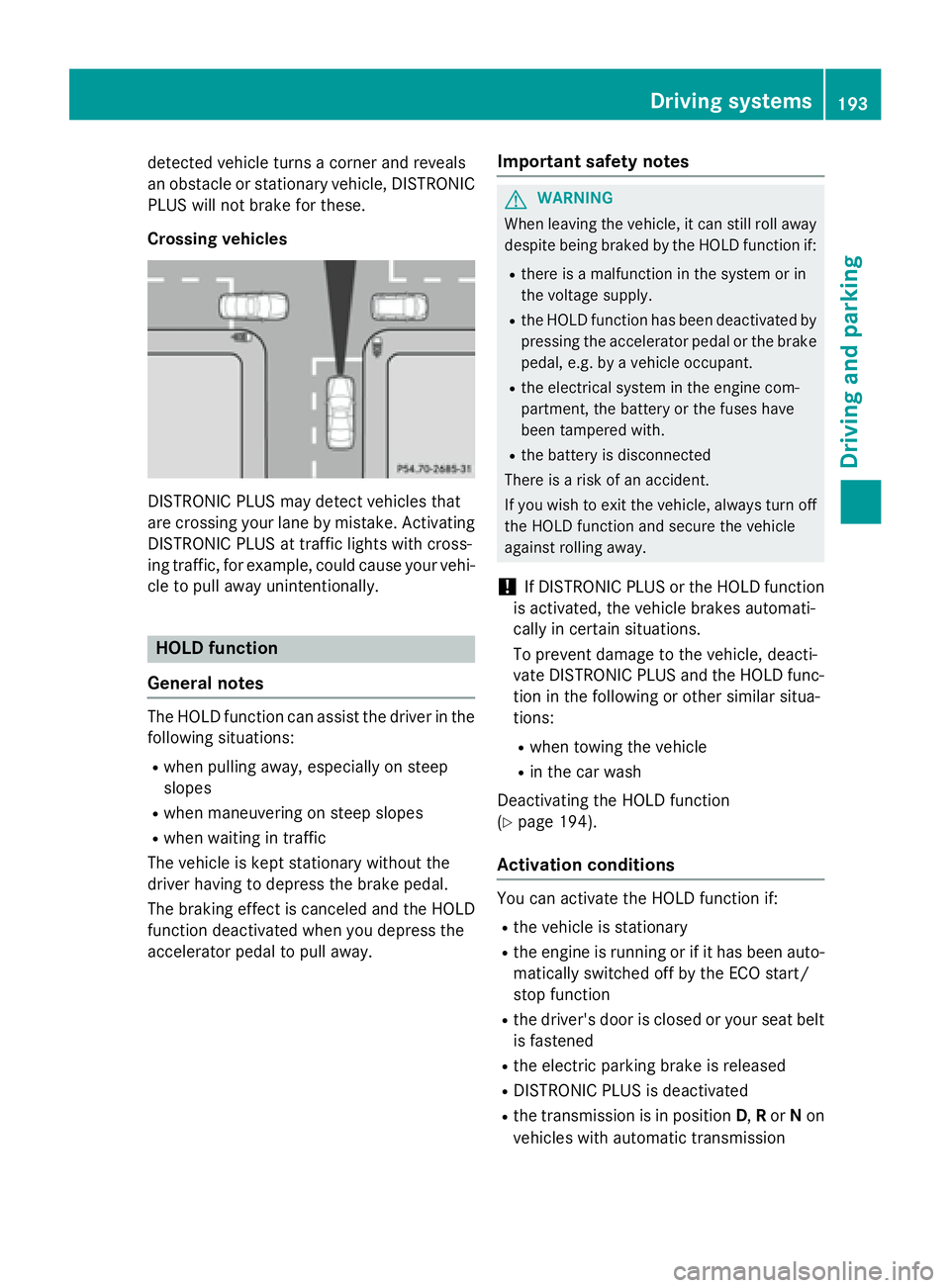
detected vehicle turns a corner and reveals
an obstacle or stationary vehicle, DISTRONIC
PLUS will not brake for these.
Crossing vehicles
DISTRONIC PLUS may detect vehicles that
are crossing your lane by mistake. Activating
DISTRONIC PLUS at traffic lights with cross-
ing traffic, for example, could cause your vehi-
cle to pull away unintentionally.
HOLD function
General notes
The HOLD function can assist the driver in the
following situations: R
when pulling away, especially on steep
slopes R
when maneuvering on steep slopes R
when waiting in traffic
The vehicle is kept stationary without the
driver having to depress the brake pedal.
The braking effect is canceled and the HOLD
function deactivated when you depress the
accelerator pedal to pull away. Important safety notes
G WARNING
When leaving the vehicle, it can still roll away
despite being braked by the HOLD function if: R
there is a malfunction in the system or in
the voltage supply. R
the HOLD function has been deactivated by
pressing the accelerator pedal or the brake
pedal, e.g. by a vehicle occupant. R
the electrical system in the engine com-
partment, the battery or the fuses have
been tampered with. R
the battery is disconnected
There is a risk of an accident.
If you wish to exit the vehicle, always turn off
the HOLD function and secure the vehicle
against rolling away.
! If DISTRONIC PLUS or the HOLD function
is activated, the vehicle brakes automati-
cally in certain situations.
To prevent damage to the vehicle, deacti-
vate DISTRONIC PLUS and the HOLD func-
tion in the following or other similar situa-
tions: R
when towing the vehicle R
in the car wash
Deactivating the HOLD function
( Y
page 194).
Activation conditions
You can activate the HOLD function if: R
the vehicle is stationary R
the engine is running or if it has been auto-
matically switched off by the ECO start/
stop function R
the driver's door is closed or your seat belt
is fastened R
the electric parking brake is released R
DISTRONIC PLUS is deactivated R
the transmission is in position D , R or N on
vehicles with automatic transmission Driving systems 193
Driving and parking Z
Page 197 of 390
X
Depress the brake pedal firmly with your
left foot and keep the brake pedal
depressed. X
Shift the transmission to position D .X
Use the DYNAMIC SELECT button to select
the S drive program ( Y
page 157).X
Quickly depress the accelerator pedal fully. X
Take your foot off the brake, but keep the
accelerator pedal depressed.
The vehicle pulls away at maximum accel-
eration.
i Activate ESP ®
as soon as the acceleration
process has ended. ESP ®
will otherwise not
be able to stabilize the vehicle if the vehicle
starts to skid or a wheel starts to spin.
Canceling start-off assist X
Remove your foot from the accelerator
pedal. X
Reactivate ESP.
RACE START (AMG vehicles)
Important safety notes
i RACE START must not be used on normal
roads. RACE START must only be activated
and used on dedicated road circuits, out-
side of public road use.
i RACE START is only available in
Mercedes ‑ AMG vehicles.
G WARNING
If you use RACE START, individual tires may
start to spin and the vehicle could skid.
Depending on the selected ESP ®
mode, there
is an increased risk of skidding and having an
accident. Make sure that no persons, animals
or obstacles are within range of the vehicle.
RACE START enables optimal acceleration
from a standing start. For this, a suitably high-
grip road surface is required, along with the
tires and vehicle being in proper operating
condition. i Observe the safety notes on driving safety
systems ( Y
page 65).
Be sure to read the safety notes and infor-
mation on ESP ®
( Y
page 69).
Conditions for activation You can activate RACE START if: R
the doors, hood and the trunk lid are
closed. R
the engine is running and the transmission,
all-wheel drive clutch and the engine are at
operating temperature. R
the steering wheel is in the straight-ahead
position. R
the vehicle is stationary and the brake
pedal is depressed (left foot). R
the transmission is in position D .R
drive program S , S+ or RACE is selected
( Y
page 158).
Activating RACE START X
Depress the brake pedal with your left foot
and keep it depressed. X
Pull and hold both steering wheel paddle
shifters. X
The RACE START Confirm: Paddle UP
Cancel: Paddle DOWN message appears
in the multifunction display. X
Release both steering wheel paddle shift-
ers.
i If the activation conditions are no longer
fulfilled, RACE START is canceled. The
RACE START Not Possible See Opera‐
tor's Manual message appears in the
multifunction display. X
To cancel: pull the left steering wheel pad-
dle shifter ( Y
page 166).
or X
To confirm: pull the right steering wheel
paddle shifter ( Y
page 166).
The RACE START Available Depress
gas pedal message appears in the multi-
function display. Driving system s 195
Dr ivi ng an d parking Z
Page 198 of 390
i If you do not depress the accelerator
pedal within a few seconds, RACE START is
canceled. The multifunction display shows
the RACE START Canceled message.X
Fully depress the accelerator pedal.
The engine speed is increased.
The RACE START Release brake to
start message appears in the multifunc-
tion display.
i If you do not release the brake pedal
within a short time, RACE START will be
canceled. The multifunction display shows
the RACE START Canceled
message.X
Take your foot off the brake, but keep the
accelerator pedal depressed.
The vehicle pulls away at maximum accel-
eration.
The RACE START Active message appears
in the multifunction display.
RACE START is deactivated when the vehicle
reaches a speed of approximately 50 km/h.
RACE START is deactivated immediately if
you release the accelerator pedal during
RACE START or if any of the activation condi-
tions are no longer fulfilled. The RACE
START
Not Possible or RACE START Canceled
message appears in the multifunction dis-
play.
i If RACE START is used repeatedly within a
short period of time, it is only available
again after the vehicle has been driven a
certain distance.
AMG adaptive sport suspension sys-
tem
General notes
The electronically controlled damping system
works continuously. This improves driving
safety and ride comfort. The damping is tuned individually to each
wheel and depends on: R
your driving style, e.g. sporty R
the road surface condition, e.g. bumps R
your individual selection of Sport or Com-
fort mode.
The suspension setting is adjusted using the
corresponding button in the center console.
i The mode can also be set using the AMG
DYNAMIC SELECT controller ( Y
page 158).
Each time you start the engine with the igni-
tion key or the Start/Stop button, Comfort
mode is activated. For further information
about starting the engine, see ( Y
page 151).
Sport mode
The firmer setting of the suspension tuning in
Sport mode ensures even better contact with
the road. Select this mode when employing a
sporty driving style, e.g. on winding country
roads. X
Press button C .
Indicator lamp D lights up. You have selec-
ted Sport mode.
The AMG Suspension System SPORT mes-
sage appears in the multifunction display.
Comfort mode
In Comfort mode, the driving characteristics
of your vehicle are more comfortable. Select
this mode if you favor a more comfortable
driving style, but also when driving fast on
straight roads, e.g. highways.196
Driving systems
Driving and parking
Page 199 of 390
X
Press button C again so that indicator
lamp D goes out.
You have selected Comfort mode.
The AMG Suspension System COMFORT
message appears in the multifunction dis-
play.
4MATIC
! Never tow the vehicle with one axle
raised. This may damage the differential.
Damage of this sort is not covered by the
Mercedes-Benz Limited Warranty. All
wheels must remain either on the ground or
be fully raised. Observe the instructions for
towing the vehicle with all wheels in full
contact with the ground.
4MATIC, together with ESP ®
, improves the
traction of your vehicle whenever a drive
wheel spins due to insufficient grip.
If you fail to adapt your driving style, 4MATIC
can neither reduce the risk of accident nor
override the laws of physics. 4MATIC cannot
take account of road, weather and traffic con-
ditions. 4MATIC is only an aid. You are
responsible for the distance to the vehicle in
front, for vehicle speed, for braking in good
time and for staying in your lane.
If a drive wheel spins due to insufficient grip: R
Only depress the accelerator pedal as far as
necessary when pulling away. R
Accelerate less when driving.
i In wintry driving conditions, the maximum
effect of 4MATIC can only be achieved if
you use winter tires (M +S tires), with snow
chains if necessary.
DSR
General notes
i DSR (Downhill Speed Regulation) is only
available for vehicles with the Off-Road
Engineering package. DSR is an aid to assist you when driving down-
hill. It keeps the speed of travel at the speed
selected on the on-board computer. The
steeper the downhill gradient, the greater the
DSR braking effect on the vehicle. When driv-
ing on flat stretches of road or on an uphill
gradient, the DSR braking effect is minimal or
nonexistent.
DSR controls the vehicle’s speed when it is
activated and the transmission is in position
D , R or N . You can drive at a higher or a lower
speed than that set on the on-board computer
at any time by accelerating or braking.
Important safety notes
G WARNING
If the speed driven and the set speed deviate
and you activate DSR on a slippery road sur-
face, the wheels may lose traction. There is an
increased danger of skidding and accidents.
Before switching DSR on, please take into
consideration the road surface and the differ-
ence between driving speed and the set
speed.
If you fail to adapt your driving style, DSR can
neither reduce the risk of accident nor over-
ride the laws of physics. DSR cannot take
account of road, weather and traffic condi-
tions. DSR is only an aid. You are responsible
for the distance to the vehicle in front, for
vehicle speed, for braking in good time and for
staying in your lane.
You are always responsible for keeping con-
trol of the vehicle and for assessing whether
the downhill gradient can be managed. DSR
may not always be able to keep to the set
speed, depending on road surface and tire
conditions. Select a set speed suitable for the
prevailing conditions and when necessary,
apply the brakes manually.
Further information about "Driving off-road"
( Y
page 180).Driving systems 197
Driving and parking Z
Page 201 of 390
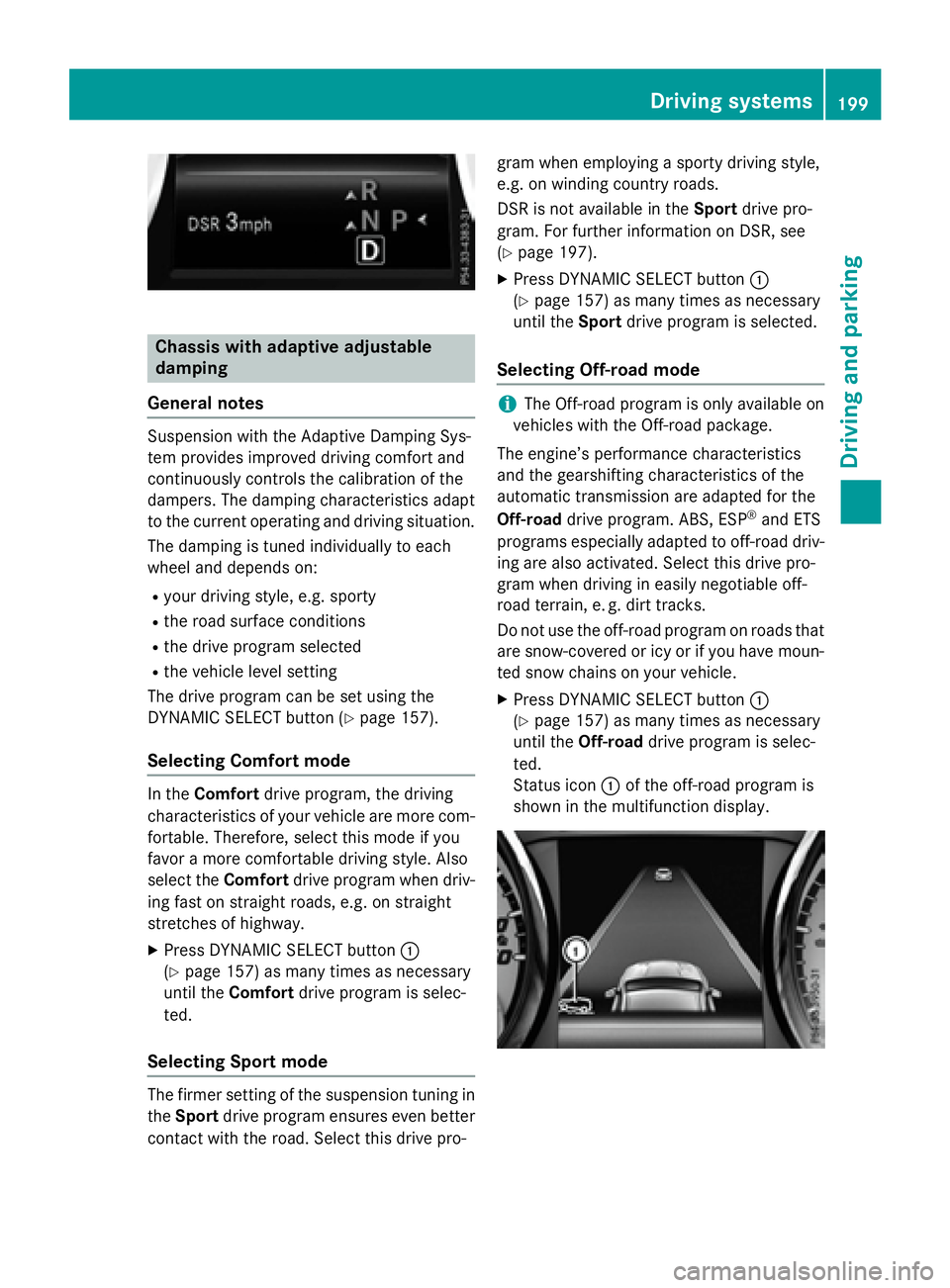
Chassis with adaptive adjustable
damping
General notes Suspension with the Adaptive Damping Sys-
tem provides improved driving comfort and
continuously controls the calibration of the
dampers. The damping characteristics adapt
to the current operating and driving situation.
The damping is tuned individually to each
wheel and depends on: R
your driving style, e.g. sporty R
the road surface conditions R
the drive program selected R
the vehicle level setting
The drive program can be set using the
DYNAMIC SELECT button ( Y
page 157).
Selecting Comfort mode
In the Comfort drive program, the driving
characteristics of your vehicle are more com-
fortable. Therefore, select this mode if you
favor a more comfortable driving style. Also
select the Comfort drive program when driv-
ing fast on straight roads, e.g. on straight
stretches of highway. X
Press DYNAMIC SELECT button C
( Y
page 157) as many times as necessary
until the Comfort drive program is selec-
ted.
Selecting Sport mode
The firmer setting of the suspension tuning in
the Sport drive program ensures even better
contact with the road. Select this drive pro- gram when employing a sporty driving style,
e.g. on winding country roads.
DSR is not available in the Sport drive pro-
gram. For further information on DSR, see
( Y
page 197). X
Press DYNAMIC SELECT button C
( Y
page 157) as many times as necessary
until the Sport drive program is selected.
Selecting Off-road mode
i The Off-road program is only available on
vehicles with the Off-road package.
The engine’s performance characteristics
and the gearshifting characteristics of the
automatic transmission are adapted for the
Off-road drive program. ABS, ESP ®
and ETS
programs especially adapted to off-road driv-
ing are also activated. Select this drive pro-
gram when driving in easily negotiable off-
road terrain, e. g. dirt tracks.
Do not use the off-road program on roads that
are snow-covered or icy or if you have moun-
ted snow chains on your vehicle. X
Press DYNAMIC SELECT button C
( Y
page 157) as many times as necessary
until the Off-road drive program is selec-
ted.
Status icon C of the off-road program is
shown in the multifunction display. Driving systems 199
Driving and parking Z
Page 202 of 390
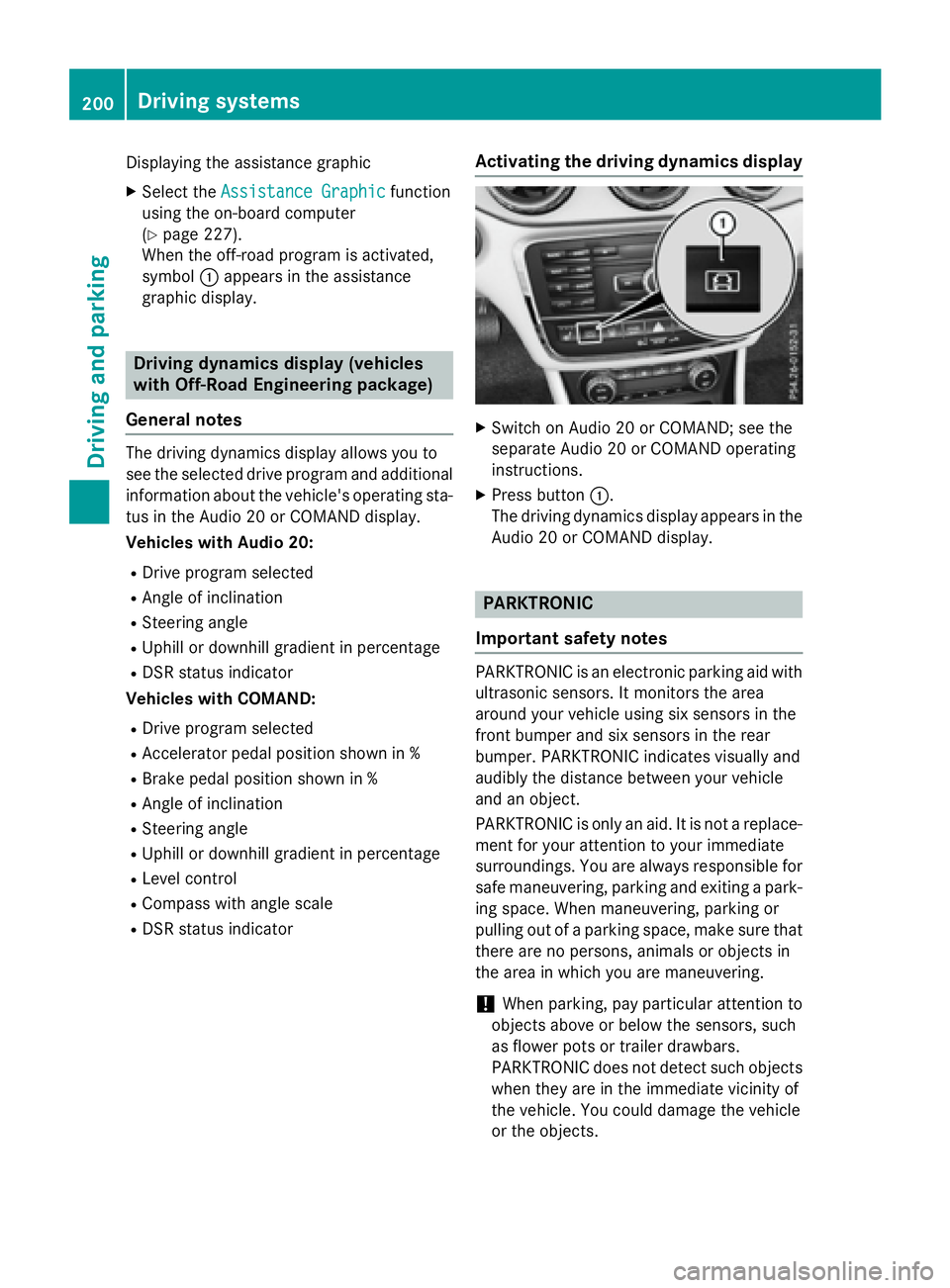
Displaying the assistance graphic X
Select the Assistance Graphic function
using the on-board computer
( Y
page 227).
When the off-road program is activated,
symbol C appears in the assistance
graphic display.
Driving dynamics display (vehicles
with Off-Road Engineering package)
General notes The driving dynamics display allows you to
see the selected drive program and additional
information about the vehicle's operating sta-
tus in the Audio 20 or COMAND display.
Vehicles with Audio 20: R
Drive program selected R
Angle of inclination R
Steering angle R
Uphill or downhill gradient in percentage R
DSR status indicator
Vehicles with COMAND: R
Drive program selected R
Accelerator pedal position shown in % R
Brake pedal position shown in % R
Angle of inclination R
Steering angle R
Uphill or downhill gradient in percentage R
Level control R
Compass with angle scale R
DSR status indicator Activating the driving dynamics display X
Switch on Audio 20 or COMAND; see the
separate Audio 20 or COMAND operating
instructions. X
Press button C .
The driving dynamics display appears in the
Audio 20 or COMAND display.
PARKTRONIC
Important safety notes
PARKTRONIC is an electronic parking aid with
ultrasonic sensors. It monitors the area
around your vehicle using six sensors in the
front bumper and six sensors in the rear
bumper. PARKTRONIC indicates visually and
audibly the distance between your vehicle
and an object.
PARKTRONIC is only an aid. It is not a replace-
ment for your attention to your immediate
surroundings. You are always responsible for
safe maneuvering, parking and exiting a park-
ing space. When maneuvering, parking or
pulling out of a parking space, make sure that
there are no persons, animals or objects in
the area in which you are maneuvering.
! When parking, pay particular attention to
objects above or below the sensors, such
as flower pots or trailer drawbars.
PARKTRONIC does not detect such objects
when they are in the immediate vicinity of
the vehicle. You could damage the vehicle
or the objects.200
Driving system s
Dr ivi ng an d parking