engine MERCEDES-BENZ GLA 2016 Workshop Manual
[x] Cancel search | Manufacturer: MERCEDES-BENZ, Model Year: 2016, Model line: GLA, Model: MERCEDES-BENZ GLA 2016Pages: 390, PDF Size: 10.2 MB
Page 160 of 390
Available drive programs:
C Comfort Comfortable and econom-
ical driving characteristics
S Spo rt Sporty driving character-
istics
I Indivi dual In dividual settings
Off-road
Optimal driving character-
istics for easily negotiable
off-road terrain
E Economy Particularly economical
driving characteristics
Ad dit ional information for drive programs
( Y
page 164).
You can also change gear yourself using the
steering wheel paddle shifters. For further
information on the manual drive program
( Y
page 166).
DYNAMIC SELECT controller
(Mercedes-AMG vehicles)
Use the DYNAMIC SE LE CT controller to
change the driv e program. Depending on the
driv e program selected the following vehicle
characteristics will change: R
the driv eR
the transmission management R
ESP ®
R
the suspension (vehicles with AMG adap-
tive sport suspension system) R
the availab ilit y of the ECO start /s top func-
tion R
the availab ilit y of gliding mode
Each time you start the engine wit h the
Sm artKey or the St art /S top button, drive pro-
gram C is activated. For further information
about starting the engine, see ( Y
page 151). X
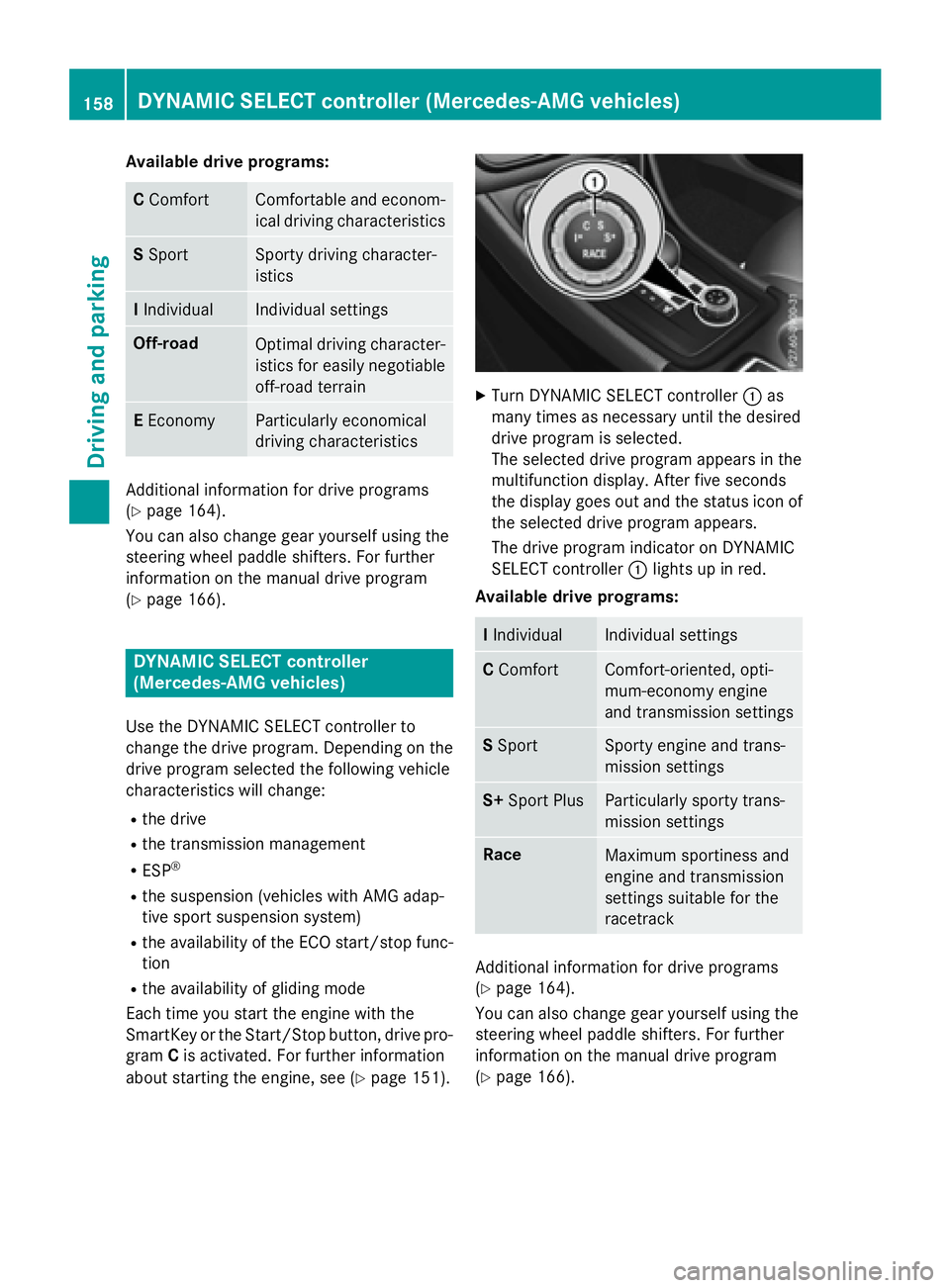
Turn DYNAMIC SE LE CT controller C as
many times as necessary unt il the desired
driv e program is selected.
The selected driv e program appears in the
multifunction display. After five secon ds
the disp lay goes out and the status icon of
the selected drive program appears.
The driv e program indicator on DYNAMIC
SE LE CT controller C lights up in red.
Available drive programs:
I Indivi dual Indivi dual settings
C Comfort Comfort-oriente d, opt i-
mum-economy engine
and transmission settings
S Spo rt Spo rty engine and trans-
mission settings
S+ Sport Plus Particularly sporty trans-
mission settings
Race
Maximum sportiness and
engine and transmission
settings suitable for the
racetrack
Additional information for drive programs
( Y
page 164).
You can also change gear yourself using the
steering wheel paddle shifters. For further
information on the manual drive program
( Y
page 166).158
DYNAMIC SELECT controller (Mercedes-AMG vehicles)
Driving and parking
Page 161 of 390
Aut oma tic trans mi ssion
Import ant safety notes
G WARNIN G
If th e engin e spee d is abov e th e idlin g spee d
and you engage transmission position D or R ,
th e vehicl e could pull away suddenly. There is
a ris k of an accident.
When engagin g transmission position D or R ,
always firmly depress th e brak e pedal and do
no t simultaneously accelerate .
G WARNIN G
The automatic transmission switches to neu-
tral position N when you switch off th e engine.
The vehicl e may rol l away. There is a ris k of an
accident.
Afte r switching off th e engine, always switch
to parking position P . Preven t th e parked vehi-
cle from rollin g away by applyin g th e parking
brake.
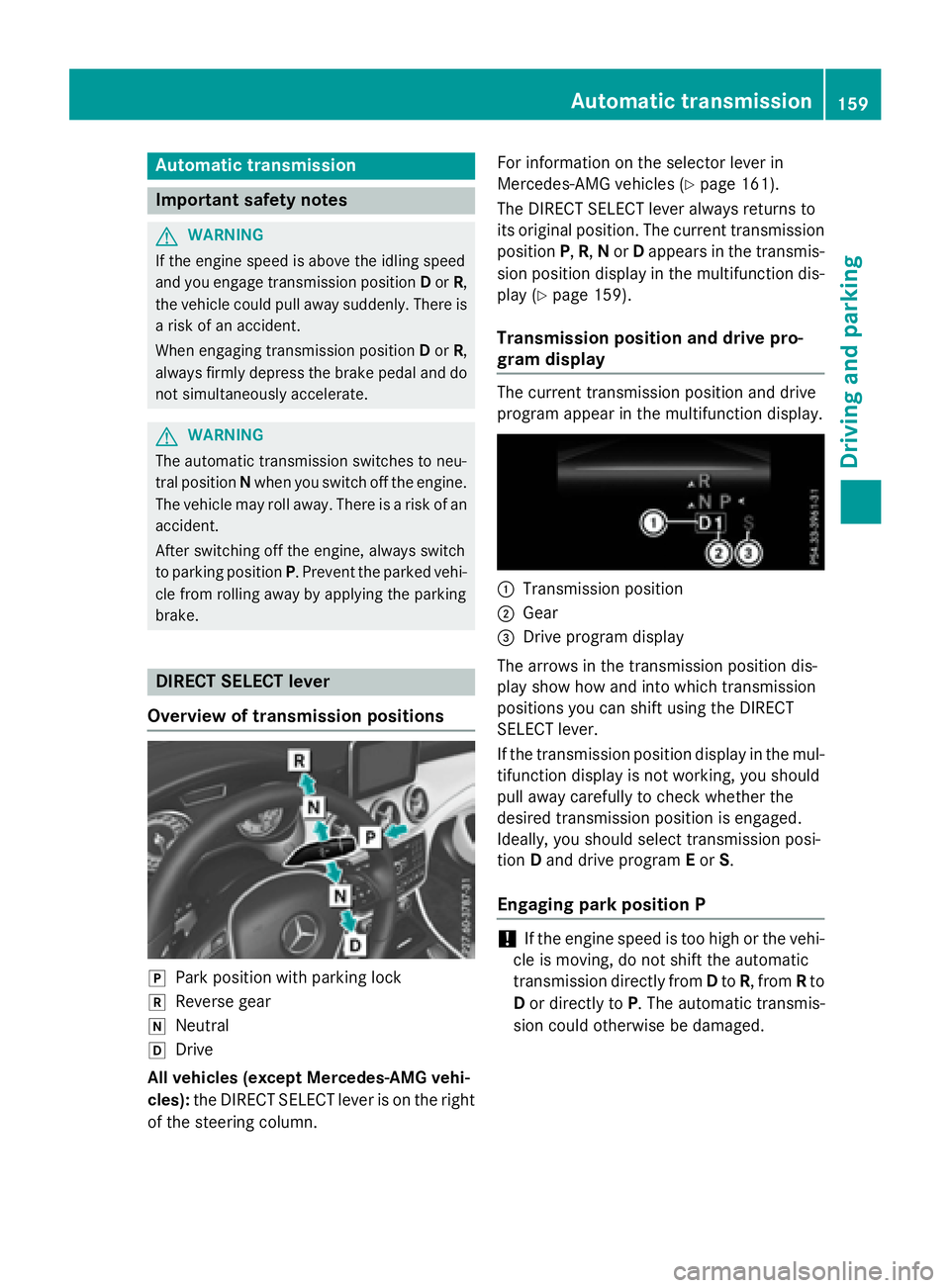
DIRECT SELECT lever
Overview of trans mi ssion positions
]
Park position wit h parking loc k^
Revers e gear\\
Neutral[
Drive
All veh icles (excep t Mercedes-AM G veh i-
cles): th e DIRECT SELECT lever is on th e right
of th e steering column . Fo r information on th e selector lever in
Mercedes-AM G vehicles ( Y
page 161).
The DIRECT SE LE CT lever always return s to
it s original position . The curren t transmission
position P , R , N or D appear s in th e transmis -
sion position display in th e multifunction dis-
play ( Y
page 159).
Trans mi ssion position and drive pr o-
gram display The curren t transmission position and driv e
program appear in th e multifunction display.
C
Transmi ssi on positionD
Gear
Page 163 of 390
When leaving the vehicle, always take the
SmartKey with you and lock the vehicle. Never
leave children or animals unattended in the
vehicle. Always keep the SmartKey out of
reach of children. X
If the transmission is in position D or R :
push the DIRECT SELECT lever up or down
to the first point of resistance. X
If the transmission is in position P : depress
the brake pedal and push the DIRECT
SELECT lever up or down to the first point of
resistance.
If you switch the engine off with the trans-
mission in position R or D , the automatic
transmission shifts to N automatically.
With the SmartKey: if you then open the
driver's door or the front-passenger door or
remove the SmartKey from the ignition, the
automatic transmission shifts to P automati-
cally.
With the Start/Stop button: if you then
open the driver's door or the front-passenger
door, the automatic transmission shifts to P
automatically.
If you want the automatic transmission to
remain in neutral N , e.g. when having the
vehicle cleaned in an automatic car wash with
a towing system:
Using the SmartKey: X
Switch on the ignition. X
Depress the brake pedal and keep it
depressed. X
Shift to neutral N .X
Release the brake pedal. X
Release the electric parking brake. X
Switch off the ignition and leave the Smart-
Key in the ignition lock.
With the Start/Stop button: X
Remove the Start/Stop button from the
ignition lock. X
Insert the SmartKey into the ignition lock. X
Switch on the ignition. X
Depress the brake pedal and keep it
depressed. X
Shift to neutral N . X
Release the brake pedal. X
Release the electric parking brake. X
Switch off the ignition and leave the Smart-
Key in the ignition lock.
Engaging drive position D X
If the transmission is in position R or N :
push the DIRECT SELECT lever down past
the first point of resistance. X
If the transmission is in position P : depress
the brake pedal and push the DIRECT
SELECT lever down past the first point of
resistance.
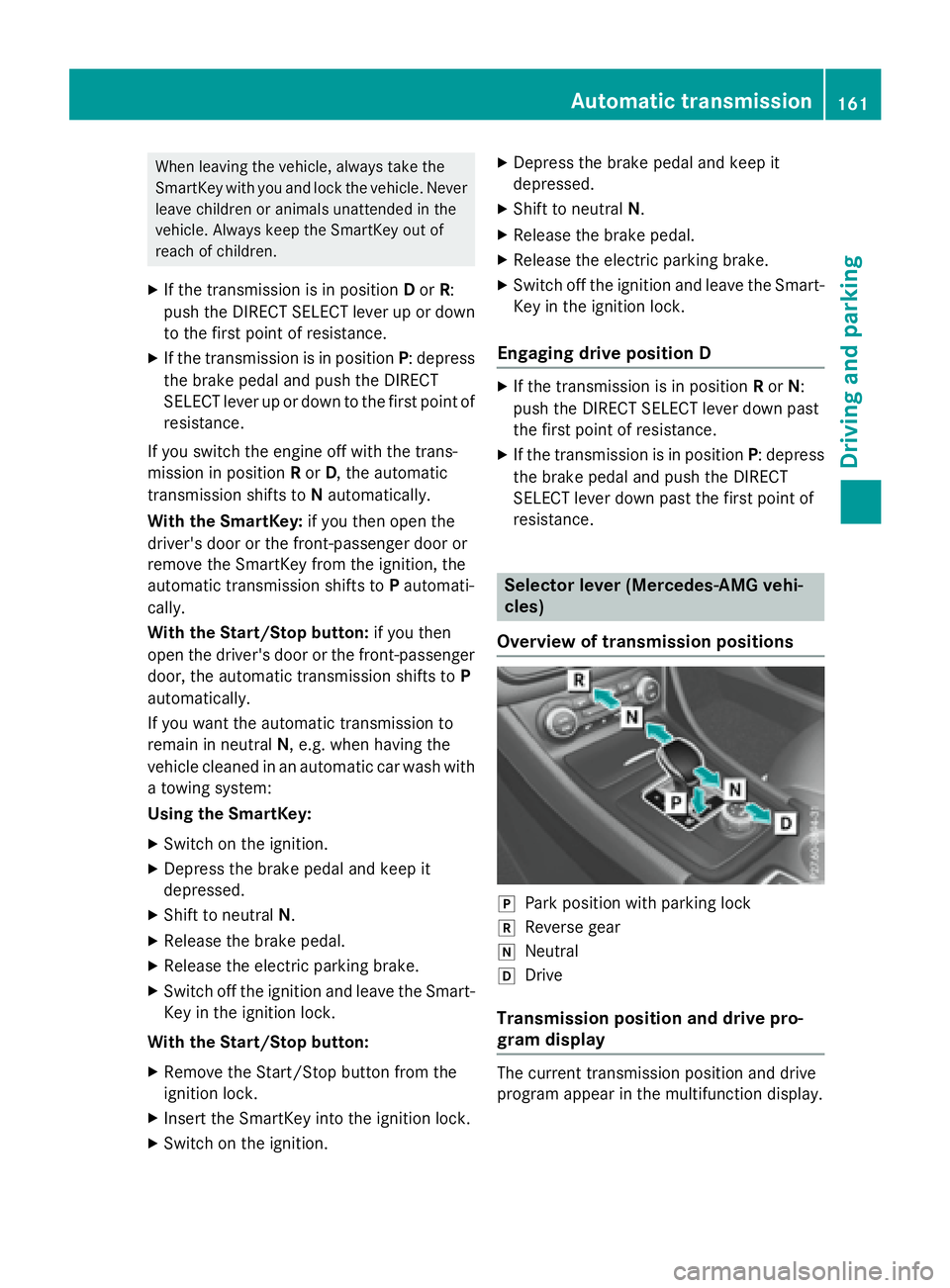
Selector lever (Mercedes-AMG vehi-
cles)
Overview of transmission positions
]
Park position with parking lock ^
Reverse gear \\
Neutral [
Drive
Transmission position and drive pro-
gram display
The current transmission position and drive
program appear in the multifunction display.Automatic transmission 161
Driving and parking Z
Page 164 of 390
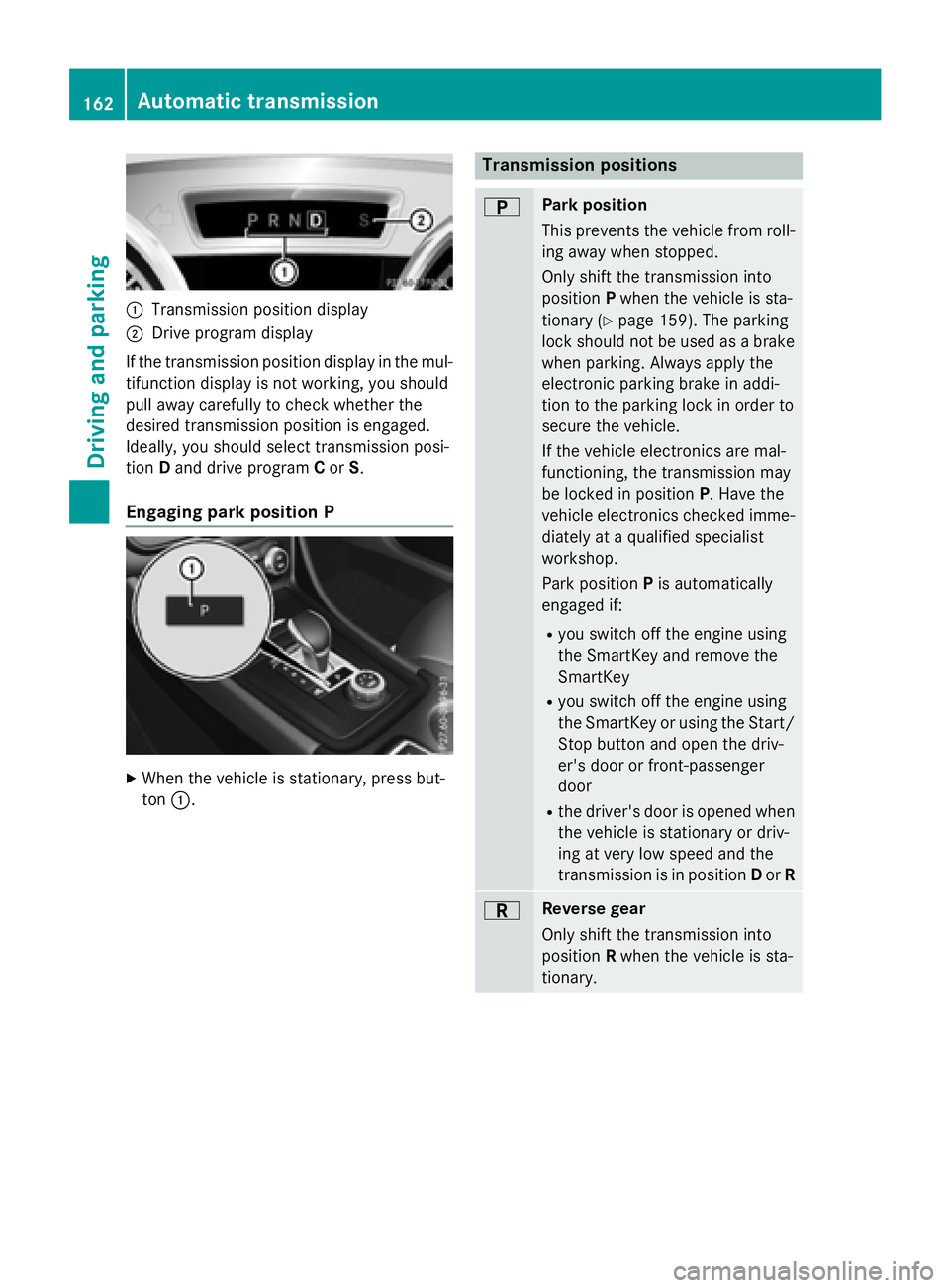
C
Transmission position displayD
Drive program display
If the transmission position display in the mul-
tifunction display is not working, you should
pull away carefully to check whether the
desired transmission position is engaged.
Ideally, you should select transmission posi-
tion D and drive program C or S .
Engaging park position P
X
When the vehicle is stationary, press but-
ton C . Transmission positions E Park position
This prevents the vehicle from roll-
ing away when stopped.
Only shift the transmission into
position P when the vehicle is sta-
tionary ( Y
page 159). The parking
lock should not be used as a brake
when parking. Always apply the
electronic parking brake in addi-
tion to the parking lock in order to
secure the vehicle.
If the vehicle electronics are mal-
functioning, the transmission may
be locked in position P . Have the
vehicle electronics checked imme-
diately at a qualified specialist
workshop.
Park position P is automatically
engaged if: R
you switch off the engine using
the SmartKey and remove the
SmartKey R
you switch off the engine using
the SmartKey or using the Start/
Stop button and open the driv-
er's door or front-passenger
door R
the driver's door is opened when
the vehicle is stationary or driv-
ing at very low speed and the
transmission is in position D or R
F Reverse gear
Only shift the transmission into
position R when the vehicle is sta-
tionary.162
Automatic transmission
Driving and parking
Page 165 of 390
D Neutral
Do not shift the transmission to N
while driving. Otherwise, the auto-
matic transmission could be dam-
aged.
No power is transmitted from the
engine to the drive wheels.
Releasing the brakes will allow you
to move the vehicle freely, e.g. to
push it or tow it.
If ESP ®
is deactivated or faulty:
shift the transmission to position N
if the vehicle is in danger of skid-
ding, e.g. on icy roads.
If you switch the engine off with the
transmission in position R or D , the
automatic transmission shifts to N
automatically.
! Rolling in neutral N can damage
the drive train.
: Drive
The automatic transmission
changes gear automatically. All
forward gears are available.
Driving tips
Changing gear
The automatic transmission shifts to the indi-
vidual gears automatically when it is in trans-
mission position D . This automatic gear shift-
ing behavior is determined by: R
the selected drive program R
the position of the accelerator pedal R
the road speed
Accelerator pedal position
Your style of driving influences how the auto-
matic transmission shifts gear: R
little throttle: early upshifts R
more throttle: late upshifts Holding the vehicle stationary on uphill
gradients
G WARNING
If the clutch overheats, the electronic man-
agement system is automatically deactivated.
This interrupts the power transmission. The
vehicle may, for example, roll backwards on
gradients. There is a risk of an accident.
Never hold the vehicle stationary on uphill
gradients by depressing the accelerator.
The clutch may overheat if you hold the vehi-
cle stationary on uphill gradients by depress-
ing the accelerator pedal. If the clutch over-
heats, a warning tone sounds.
All vehicles (except Mercedes-AMG vehi-
cles): the Stop Vehicle Shift to P
Leave Engine Running display message
appears in the multifunction display. You will
only be able to continue your journey once the
clutch has cooled down and the display mes-
sage in the multifunction display has disap-
peared.
Mercedes-AMG vehicles: the Trans. Oil
Overheated Drive on with Care display
message appears in the multifunction dis-
play.
Do not hold the vehicle stationary on uphill
gradients by depressing the accelerator
pedal. Instead, only ever hold the vehicle sta-
tionary on uphill gradients by: R
depressing the brake pedal R
activating the HOLD function R
engaging the electric parking brake
Kickdown
Use kickdown for maximum acceleration. X
Depress the accelerator pedal beyond the
pressure point.
The automatic transmission shifts to a
lower gear depending on the engine speed. X
Ease off the accelerator pedal once the
desired speed is reached.
The automatic transmission shifts back up.Automatic transmission 163
Driving an d parking Z
Page 166 of 390
Mercedes-AMG vehicles: it is only possible
to use kickdown in the automatic drive pro-
gram and the temporary manual drive pro-
gram M . When manual drive program M is
permanently activated, kickdown is not pos-
sible.
For further information on kickdown in man-
ual drive program M ( Y
page 168).
Rocking the vehicle free Shifting the transmission repeatedly between
gears D and R may help to free the vehicle if it
has become stuck in slush or snow. The vehi-
cle's engine management system limits the
speed to a maximum of 5 mph (9 km/h) when
shifting back and forth. To shift back and forth
between transmission positions D and R ,
move the DIRECT SELECT lever up and down
past the point of resistance.
Drive programs
All vehicles (except Mercedes-AMG
vehicles)
Drive program C (Comfort)
Drive program C is characterized by the fol-
lowing: R
the vehicle delivers comfortable, economi-
cal handling characteristics. R
the vehicle pulling away more gently in
forward and reverse gears, unless the
accelerator pedal is depressed fully. R
the vehicle having improved driving stabil-
ity, for example on slippery road surfaces. R
optimal fuel consumption resulting from
the automatic transmission shifting up
sooner. The vehicle is driven in the low
engine speed range and the wheels are less
likely to spin. Drive program S (Sport)
Drive program S is characterized by the fol-
lowing: R
sporty engine settings. R
the automatic transmission shifting up
later. the fuel consumption possibly being
higher as a result of the later automatic
transmission shift points.
Drive program I (Individual)
In drive program I the following properties of
the drive program can be selected: R
the drive (engine and transmission man-
agement) R
the steering R
the availability of the ECO start/stop func-
tion R
the climate control:
Information about the configuration of drive
program I with COMAND or Audio 20 can be
found in the Digital Operator's Manual.
i To permanently select the gears in drive
program I using the steering wheel paddle
shifters, select the M (manual) setting for
the drive.
Off-road drive program
The Off-road drive program is characterized
by the following: R
the vehicle exhibits optimal driving charac-
teristics on easily negotiable off-road ter-
rain.
Drive program E (Economy)
Drive program E is characterized by the fol-
lowing: R
comfort-oriented engine settings. R
optimal fuel consumption resulting from
the automatic transmission shifting up
sooner. R
the vehicle pulling away more gently in
forward and reverse gears, unless the
accelerator pedal is depressed fully.164
Automatic transmission
Driving and parking
Page 167 of 390
R
the vehicle having improved driving stabil-
ity, for example on slippery road surfaces. R
the automatic transmission shifting up
sooner. This results in the vehicle being
driven at lower engine speeds and the
wheels being less likely to spin. R
gliding mode is activated automatically
when engine-internal conditions are fulfil-
led and the accelerator is not depressed. At
the same time the transmission’s clutch
opens and the vehicle rolls freely using its
kinetic energy. As a result great distances
can be completed without the engine brake
and fuel consumption reduced.
Mercedes-AMG vehicles Drive program I (Individual)
In drive program I the following properties of
the drive program can be selected: R
the drive (engine management) R
the transmission management R
the suspension (vehicles with AMG RIDE
CONTROL) R
ESP ®
Information about the configuration of drive
program I with COMAND or Audio 20 can be
found in the Digital Operator's Manual.
Drive program C (Comfort)
Drive program C is characterized by the fol-
lowing: R
the vehicle delivers comfortable, economi-
cal handling characteristics. R
the vehicle pulling away more gently in
forward and reverse gears, unless the
accelerator pedal is depressed fully. R
the vehicle having improved driving stabil-
ity, for example on slippery road surfaces. R
optimal fuel consumption resulting from
the automatic transmission shifting up
sooner. The vehicle is driven in the low
engine speed range and the wheels are less
likely to spin. R
gliding mode is available. R
the ECO start/stop function is available.
Drive program S (Sport)
Drive program S is characterized by the fol-
lowing: R
the vehicle exhibits sporty driving charac-
teristics. R
the automatic transmission shifting up
l ater. the fuel consumption possibly being
higher as a result of the later automatic
transmission shift points. R
the suspension exhibits stiff springing and
damping settings (vehicles with AIR RIDE
CONTROL). R
gliding mode is not available. R
the ECO start/stop function is not availa-
ble.
Drive program S+ (Sport Plus)
Drive program S+ is characterized by the fol-
lowing: R
the vehicle exhibits particularly sporty driv-
ing characteristics. R
the automatic transmission shifting up
later. R
the fuel consumption possibly being higher
as a result of the later automatic transmis-
sion shift points. R
the suspension exhibits particularly stiff
springing and damping settings (vehicles
with AMG adaptive sport suspension sys-
tem). R
gliding mode is not available. R
the ECO start/stop function is not availa-
ble.
Drive program RACE (vehicles with AMG
RIDE CONTROL)
The RACE drive program is characterized by
the following: R
the vehicle exhibits driving characteristics
suitable for the racetrack. R
all vehicle systems are set for maximum
sportiness.Automatic transmission 165
Driving an d parking Z
Page 169 of 390
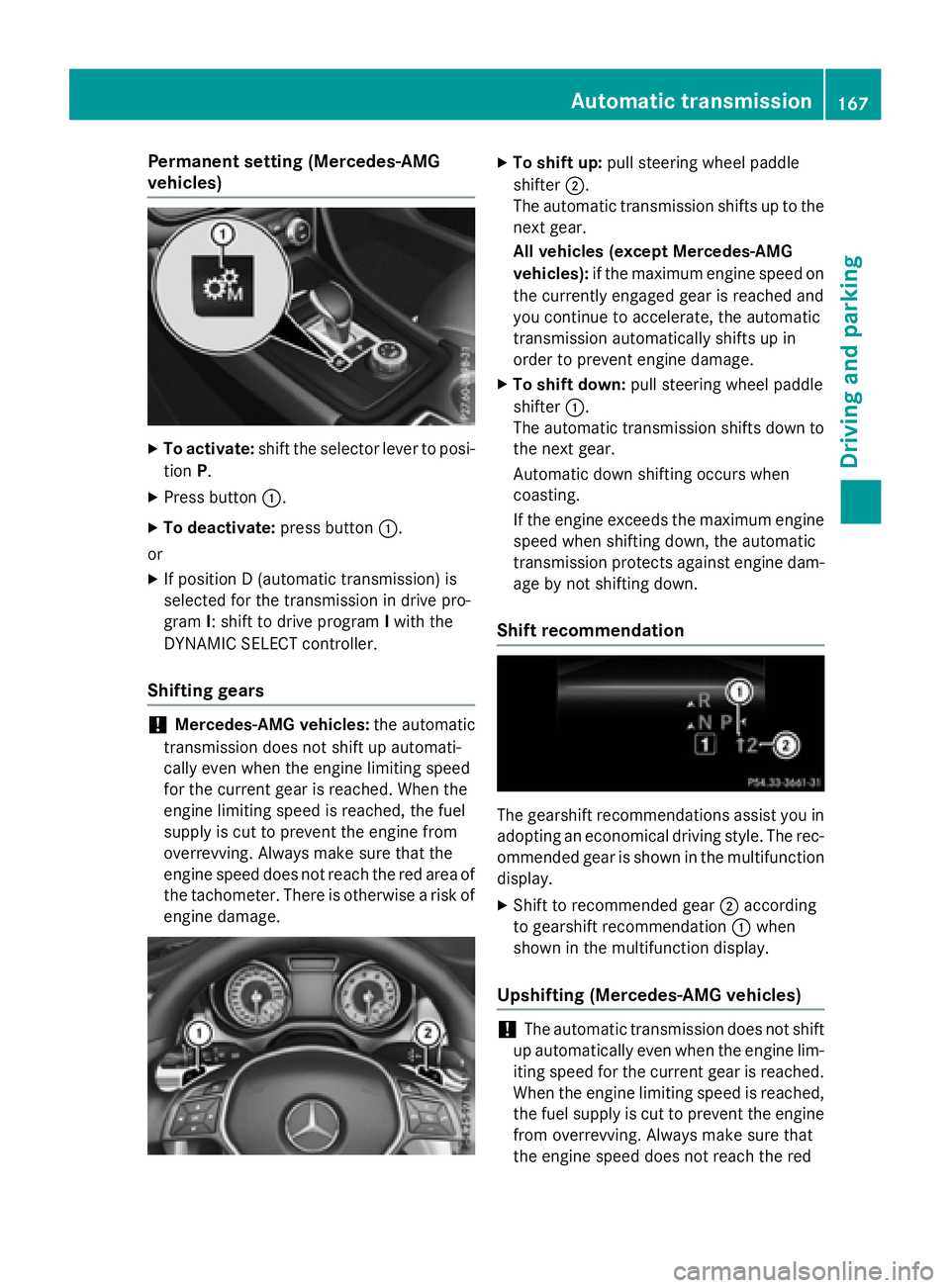
Permanent setting (Mercedes-AMG
vehicles) X
To activate: shift the selector lever to posi-
tion P .X
Press button C .X
To deactivate: press button C .
or X
If position D (automatic transmission) is
selected for the transmission in drive pro-
gram I : shift to drive program I with the
DYNAMIC SELECT controller.
Shifting gears
! Mercedes-AMG vehicles: the automatic
transmission does not shift up automati-
cally even when the engine limiting speed
for the current gear is reached. When the
engine limiting speed is reached, the fuel
supply is cut to prevent the engine from
overrevving. Always make sure that the
engine speed does not reach the red area of
the tachometer. There is otherwise a risk of
engine damage. X
To shift up: pull steering wheel paddle
shifter D .
The automatic transmission shifts up to the
next gear.
All vehicles (except Mercedes-AMG
vehicles): if the maximum engine speed on
the currently engaged gear is reached and
you continue to accelerate, the automatic
transmission automatically shifts up in
order to prevent engine damage. X
To shift down: pull steering wheel paddle
shifter C .
The automatic transmission shifts down to
the next gear.
Automatic down shifting occurs when
coasting.
If the engine exceeds the maximum engine
speed when shifting down, the automatic
transmission protects against engine dam-
age by not shifting down.
Shift recommendation
The gearshift recommendations assist you in
adopting an economical driving style. The rec-
ommended gear is shown in the multifunction
display. X
Shift to recommended gear D according
to gearshift recommendation C when
shown in the multifunction display.
Upshifting (Mercedes-AMG vehicles)
! The automatic transmission does not shift
up automatically even when the engine lim-
iting speed for the current gear is reached.
When the engine limiting speed is reached,
the fuel supply is cut to prevent the engine
from overrevving. Always make sure that
the engine speed does not reach the redAutomatic transmission 167
Driving and parking Z
Page 170 of 390
area of the tachometer. There is otherwise
a risk of engine damage.
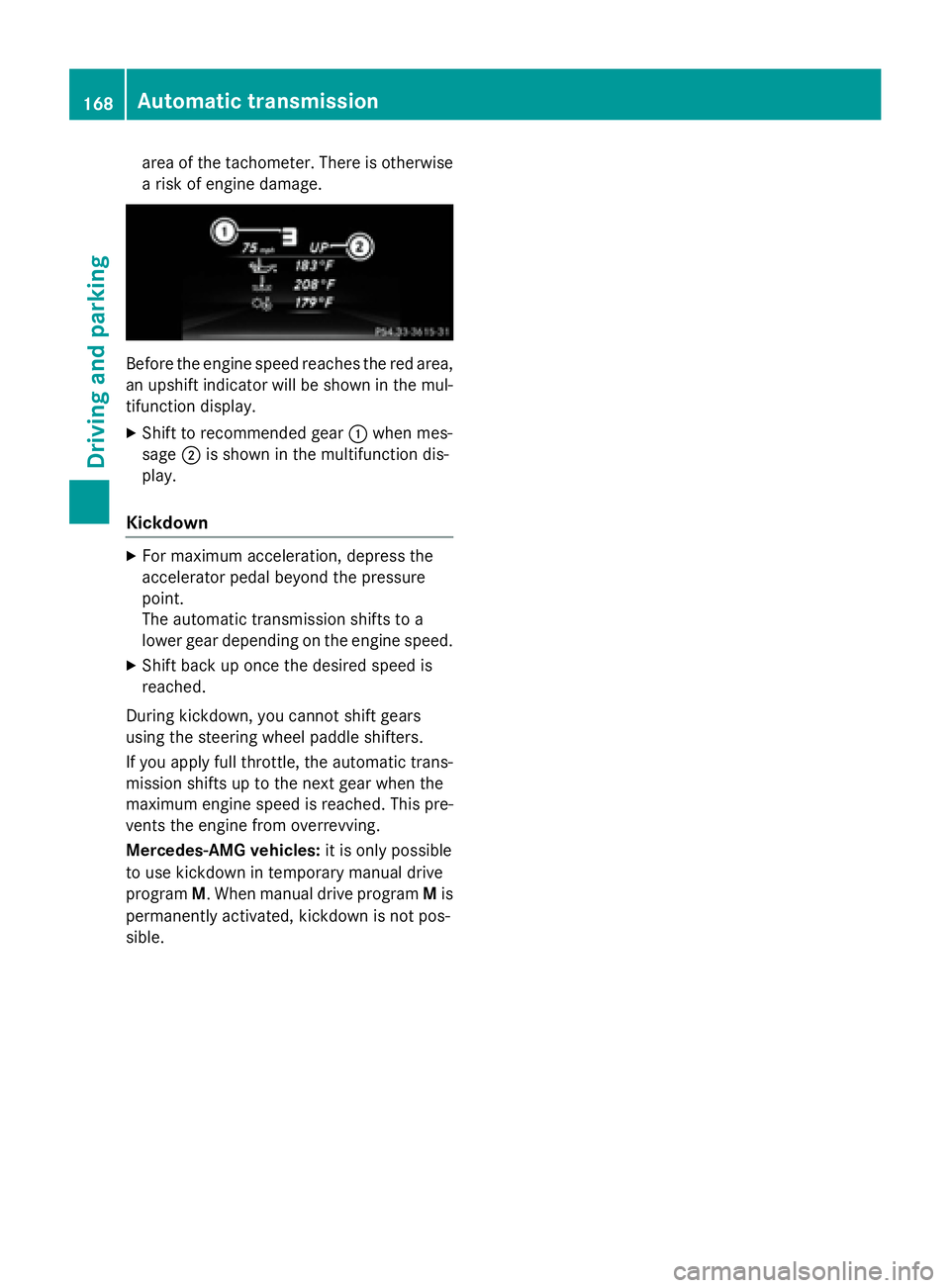
Before the engine speed reaches the red area,
an upshift indicator will be shown in the mul-
tifunction display. X
Shift to recommended gear C when mes-
sage D is shown in the multifunction dis-
play.
Kickdown X
For maximum acceleration, depress the
accelerator pedal beyond the pressure
point.
The automatic transmission shifts to a
lower gear depending on the engine speed. X
Shift back up once the desired speed is
reached.
During kickdown, you cannot shift gears
using the steering wheel paddle shifters.
If you apply full throttle, the automatic trans-
mission shifts up to the next gear when the
maximum engine speed is reached. This pre-
vents the engine from overrevving.
Mercedes-AMG vehicles: it is only possible
to use kickdown in temporary manual drive
program M . When manual drive program M is
permanently activated, kickdown is not pos-
sible.168
Automatic transmission
Driving and parking
Page 171 of 390
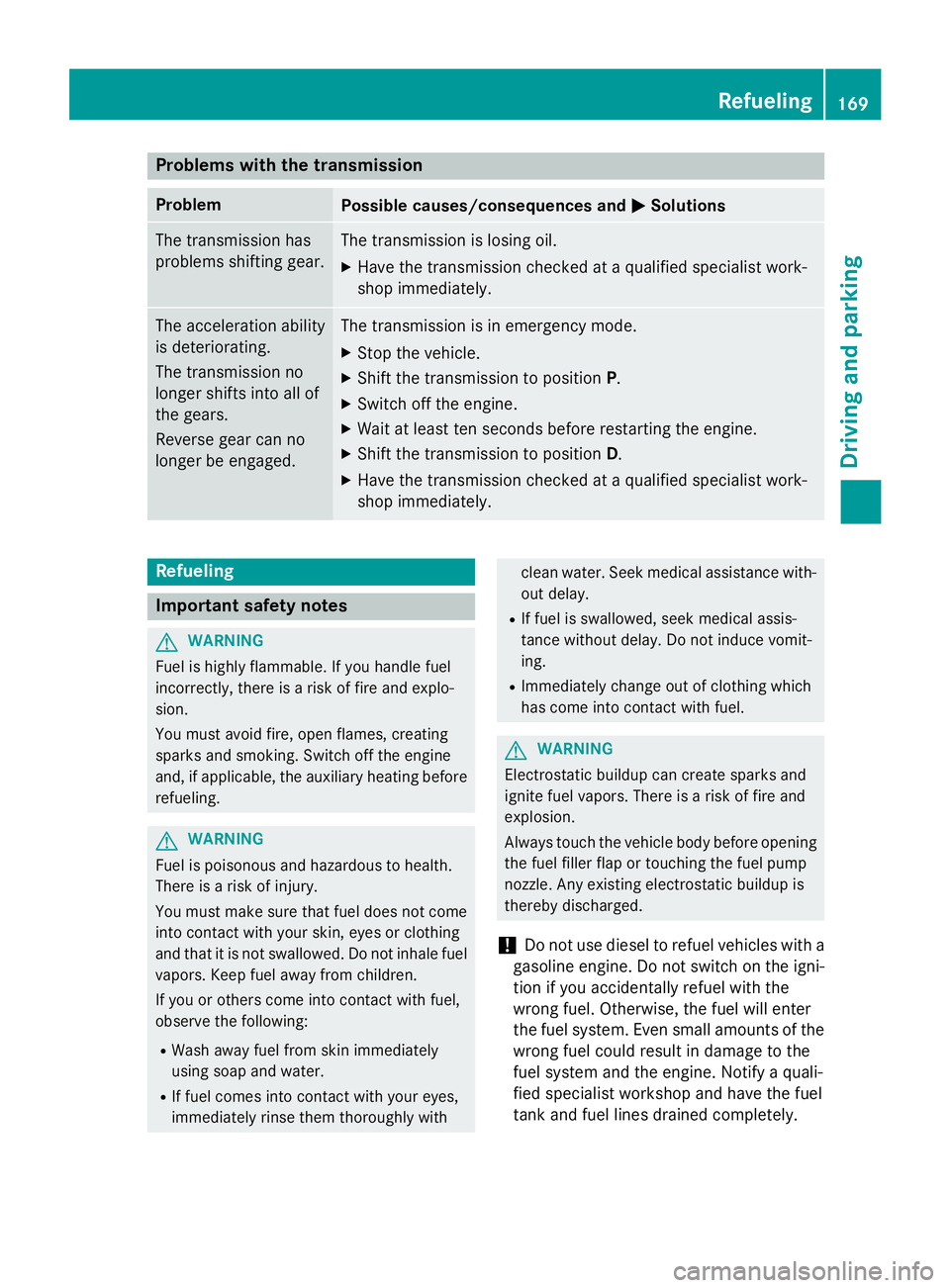
Problems with the transmission Problem
Possible causes/consequences and P Solutions
The transmission has
problems shifting gear. The transmission is losing oil. X
Have the transmission checked at a qualified specialist work-
shop immediately.
The acceleration ability
is deteriorating.
The transmission no
longer shifts into all of
the gears.
Reverse gear can no
longer be engaged. The transmission is in emergency mode. X
Stop the vehicle. X
Shift the transmission to position P .X
Switch off the engine. X
Wait at least ten seconds before restarting the engine. X
Shift the transmission to position D .X
Have the transmission checked at a qualified specialist work-
shop immediately.
Refueling
Important safety notes
G WARNING
Fuel is highly flammable. If you handle fuel
incorrectly, there is a risk of fire and explo-
sion.
You must avoid fire, open flames, creating
sparks and smoking. Switch off the engine
and, if applicable, the auxiliary heating before
refueling.
G WARNING
Fuel is poisonous and hazardous to health.
There is a risk of injury.
You must make sure that fuel does not come
into contact with your skin, eyes or clothing
and that it is not swallowed. Do not inhale fuel
vapors. Keep fuel away from children.
If you or others come into contact with fuel,
observe the following: R
Wash away fuel from skin immediately
using soap and water. R
If fuel comes into contact with your eyes,
immediately rinse them thoroughly with clean water. Seek medical assistance with-
out delay. R
If fuel is swallowed, seek medical assis-
tance without delay. Do not induce vomit-
ing. R
Immediately change out of clothing which
has come into contact with fuel.
G WARNING
Electrostatic buildup can create sparks and
ignite fuel vapors. There is a risk of fire and
explosion.
Always touch the vehicle body before opening
the fuel filler flap or touching the fuel pump
nozzle. Any existing electrostatic buildup is
thereby discharged.
! Do not use diesel to refuel vehicles with a
gasoline engine. Do not switch on the igni-
tion if you accidentally refuel with the
wrong fuel. Otherwise, the fuel will enter
the fuel system. Even small amounts of the
wrong fuel could result in damage to the
fuel system and the engine. Notify a quali-
fied specialist workshop and have the fuel
tank and fuel lines drained completely. Refueling 169
Driving and parking Z