brake light MERCEDES-BENZ GLA 2019 User Guide
[x] Cancel search | Manufacturer: MERCEDES-BENZ, Model Year: 2019, Model line: GLA, Model: MERCEDES-BENZ GLA 2019Pages: 346, PDF Size: 16.66 MB
Page 157 of 346
RDrive slowly and evenly, if necessary at awalking pace.
REnsure that the wheels are in contact withthe ground at all times.
RDrive with extreme care on unfamiliar off-road routes where visibility is poor. Forsafety reasons, get out of the vehicle firstand survey the off-road route.
RCheck the depth of water before fording riv-ers and streams.
RWatch out for obstacles.
RTake care when turning on an uphill ordownhill slope or when driving across aslope. The vehicle could otherwise tip over.
RAlways keep the side windows and the pan-orama roof with power tilt/sliding panelclosed during the journey.
RDo not deviate from marked routes.
RDo not use the HOLD function when drivingoff-road, on steep uphill or downhill gradi-ents or on slippery or loose surfaces. TheHOLD function cannot hold the vehicle onsuch surfaces.
Checklist before driving off-road
XEngine oil level:check the engine oil leveland add oil if necessary.
When driving on steep gradients, the engineoil level must be sufficiently high to ensure acorrect oil supply in the vehicle.
XWheels and tires:check the tire treaddepth and tire pressure.
XCheck for damage and remove any foreignobjects, e.g. small stones, from the wheels/tires.
XReplace any missing valve caps.
XReplace dented or damaged wheels.
XRims:dented or bent rims can result in aloss of tire pressure and damage the tirebead. Before driving off-road, check thewheels and replace them if necessary.
Checklist after driving off-road
!If you detect damage to the vehicle afterdriving off-road, have the vehicle checkedimmediately at a qualified specialist work-shop.
XDeactivate off-road program (Ypage 132).
XDeactivate DSR (Ypage 169).
XClean the headlamps and rear lights andcheck for damage.
XClean the front and rear license plates.
XClean the wheels and tires with a water jetand remove any foreign objects.
XClean the wheels, wheel housings and thevehicle underside with a water jet; check forany foreign objects and damage.
XCheck whether twigs or other parts of plantshave become trapped. These increase therisk of fire and can damage fuel pipes, brakehoses or the air bellows of the axle jointsand propeller shafts.
XAfter the trip, examine without fail the entireundercarriage, wheels, tires, brakes, body-work structure, steering, chassis andexhaust system for damage.
XAfter driving in sand, mud, gravel, water orsimilar dirty conditions, have the followingchecked and cleaned:
Rbrake discs
Rwheels
Rbrake pads
Raxle joints
XIf you detect strong vibrations after off-roadtravel, check for foreign objects in thewheels and drive train and remove them ifnecessary. Foreign objects can disturb thebalance and cause vibrations.
Driving over poor road surfaces places greaterdemands on your vehicle than driving on nor-mal roads. After driving off-road, check thevehicle. This allows you to detect damagepromptly and reduce the risk of an accident toyourself and other road users.
Driving on sand
Observe the following rules when driving onsand:
RActivate the off-road program (Ypage 132).
RAvoid high engine speeds.
RUse the left-hand steering wheel paddleshifter to shift to a lower gear appropriate tothe terrain.
Drivingtips155
Driving an d parking
Z
Page 158 of 346
RDrive quickly to overcome the rolling resist-ance. Otherwise the vehicle's wheels couldbecome stuck in loose ground.
RDrive in the tracks of other vehicles if possi-ble. Make sure that:
-the tire ruts are not too deep.
-the sand is sufficiently firm.
-the ground clearance of the vehicle is suf-ficient.
Tire ruts and gravel roads
!Check that the ruts are not too deep andthat your vehicle has sufficient clearance.Otherwise, your vehicle could be damagedor bottom out and get stuck.
Observe the following rules when driving alongruts in off-road terrain or on roads with loosegravel:
RActivate the off-road program (Ypage 132).
RAvoid high engine speeds.
RShift to a lower gear using the left-handsteering wheel paddle shifter.
RDrive slowly.
RWhere ruts are too deep, drive with thewheels of one side on the center grassyarea, if possible.
Traveling uphill
Approach/departure angle
GWARNING
If you drive on a steep incline at an angle or
turn when driving on an incline, the vehicle
could slip sideways, tip and rollover. There is
a risk of an accident.
Always drive on a steep incline in the line of
fall (straight up or down) and do not turn the
vehicle.
RObserve the warnings for off-road driving(Ypage 153).
RFollow the line of fall when driving on slopesand steep inclines.
RBefore driving on extreme uphill and down-hill gradients, select the off-road program(Ypage 132).
RDrive slowly.
RAccelerate gently and make sure that thewheels are gripping.
RAvoid high engine speeds, except when driv-ing on sandy and muddy routes with highdriving resistance.
RUse the left-hand steering wheel paddleshifter to shift to a lower gear appropriate tothe gradient.
RUse the left-hand steering wheel paddleshifter to shift into a lower gear in good timeon long and steep downhill gradients.
Hill start assist will aid you when pulling awayon a hill. For further information about hillstart assist, see (Ypage 128).
Do not shift into transmission position\\when driving off-road. You could lose controlof the vehicle if you attempt to brake the vehi-cle using the service brake. If the gradient istoo steep for your vehicle, drive back down inreverse gear.
Always observe the approach/departure anglevalues (Ypage 340).
Maximum gradient-climbing capability
Always observe the maximum gradient climb-ing ability values (Ypage 340).
Hilltops
When driving up an uphill gradient, slightlyreduce pressure on the accelerator immedi-ately before reaching the brow of the hill.Make use of the vehicle's own impetus totravel over the brow.
This style of driving prevents:
Rthe vehicle from lifting off the ground on thebrow of a hill
Rthe vehicle from traveling too quickly downthe other side
Driving downhill
RDrive slowly.
RDo not drive at an angle down steepinclines. Steer into the line of fall and drivewith the front wheels aligned straight. Oth-erwise, the vehicle could slip sideways, tipand rollover.
RShift to a lower gear using the left-handsteering wheel paddle shifter before tacklingsteep downhill gradients.
156Drivingtips
Driving an d parking
Page 159 of 346
RActivate DSR. If this is not sufficient, brakegently. When doing so, make sure that thevehicle is facing in the direction of the lineof fall.
RCheck that the brakes are working normallyafter a long downhill stretch.
Off-road ABS is activated when the off-roadprogram is selected.
At speeds below 18 mph (30 km/h), the frontwheels lock cyclically during braking. The dig-ging-in effect achieved in the process reducesthe stopping distance on off-road terrain. Thesteerability of the vehicle is considerablyreduced if the wheels lock.
Driving systems
Cruise control
General notes
Cruise control maintains a constant roadspeed for you. It brakes automatically in orderto avoid exceeding the set speed. On long andsteep downhill gradients, especially if the vehi-cle is laden, you must select a low gear ingood time. You need to shift manually usingthe steering wheel paddle shifters beforehand.By doing so, you will make use of the brakingeffect of the engine. This relieves the load onthe brake system and prevents the brakesfrom overheating and wearing too quickly.
When the engine is running, you can use thecruise control lever to limit the speed to anyspeed between 20 mph (30 km/h) and thetechnically permitted maximum speed of thevehicle.
Use cruise control if road and traffic condi-tions make it appropriate to maintain a steadyspeed for a prolonged period.
The speed indicated in the speedometer maydiffer slightly from the speed stored.
Important safety notes
If you fail to adapt your driving style, cruisecontrol can neither reduce the risk of an acci-dent nor override the laws of physics. Cruisecontrol cannot take into account the road,traffic and weather conditions. Cruise controlis only an aid. You are responsible for the dis-tance to the vehicle in front, for vehicle speed,
for braking in good time and for staying in yourlane.
Do not use cruise control:
Rin road and traffic conditions which do notallow you to maintain a constant speed, e.g.in heavy traffic or on winding roads
Ron slippery road surfaces. Braking or accel-erating could cause the drive wheels to losetraction and the vehicle could then skid
Rin poor visibility, e.g. due to fog, heavy rainor snow
If there is a change of drivers, advise the newdriver of the speed stored.
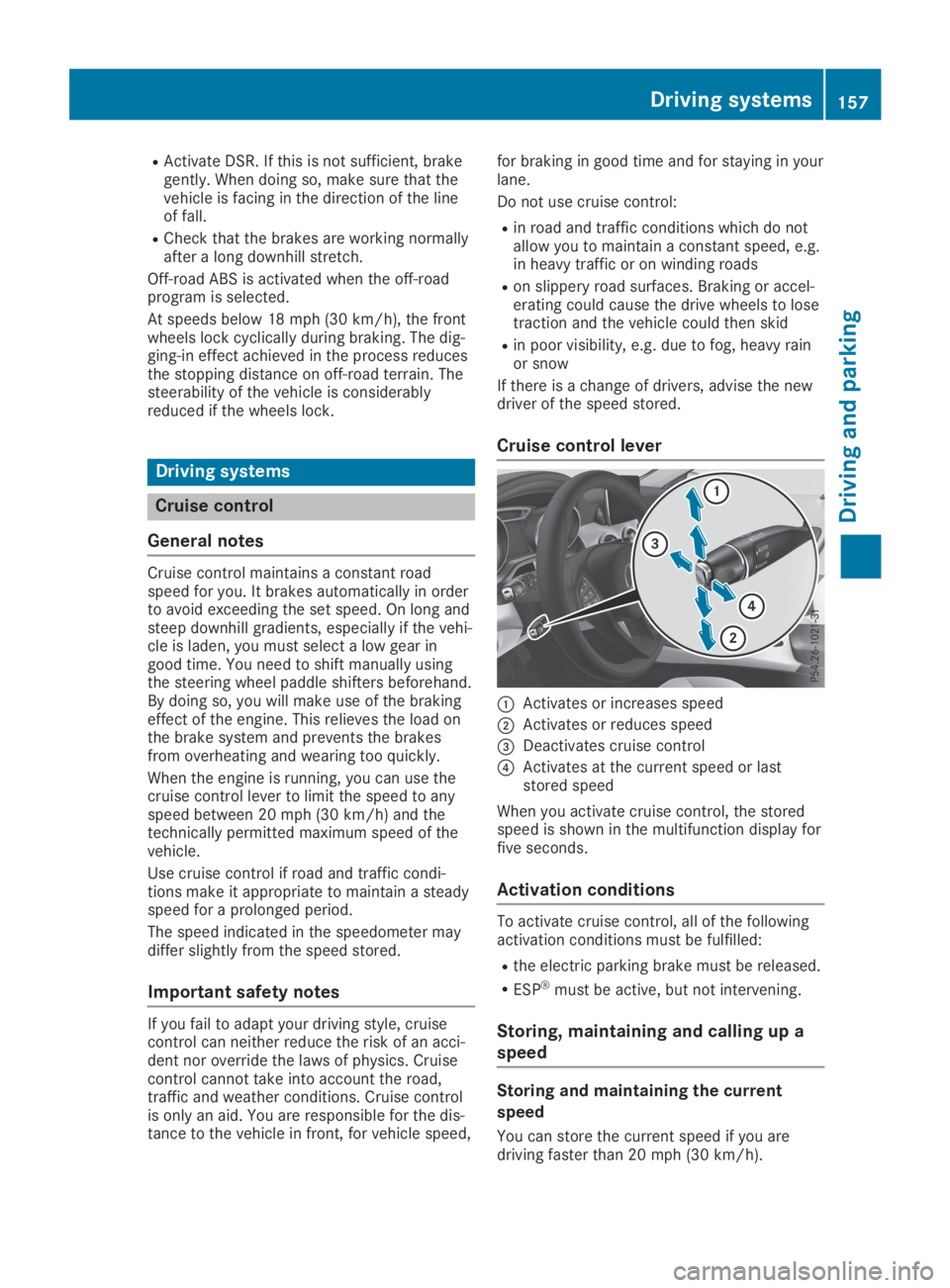
Cruise control lever
CActivates or increases speed
DActivates or reduces speed
Page 161 of 346
sound and the distance warning lamp will lightup in the instrument cluster. Brake immedi-ately in order to increase the distance to thevehicle in front or take evasive action providedit is safe to do so.
Active Distance Assist DISTRONIC operates inthe speed range between 0 mph (0 km/h) and120 mph (200 km/h).
Change into a lower gear in good time on longand steep downhill gradients. This is especiallyimportant if the vehicle is laden. By doing so,you will make use of the braking effect of theengine. This relieves the load on the brake sys-tem and prevents the brakes from overheatingand wearing too quickly.
Do not use Active Distance Assist DISTRONICon roads with steep gradients.
For Active Distance Assist DISTRONIC toassist you when driving, the radar sensor sys-tem must be operational.
As Active Distance Assist DISTRONIC trans-mits radar waves, it can resemble the radardetectors of the responsible authorities. Youcan refer to the relevant chapter in the Opera-tor's Manual if questions are asked about this.
iUSA only: This device has been approvedby the FCC as a "Vehicular Radar System".The radar sensor is intended for use in anautomotive radar system only. Removal,tampering, or altering of the device will voidany warranties, and is not permitted by theFCC. Do not tamper with, alter, or use in anynon-approved way.
Any unauthorized modification to this devicecould void the user's authority to operatethe equipment.
iCanada only: This device complies withRSS-210 of Industry Canada. Operation issubject to the following two conditions:
1. This device may not cause interference,and
2. This device must accept any interferencereceived, including interference that maycause undesired operation of the device.
Removal, tampering, or altering of thedevice will void any warranties, and is notpermitted. Do not tamper with, alter, or usein any non-approved way.
Any unauthorized modification to this devicecould void the user's authority to operatethe equipment.
Important safety notes
GWARNING
Active Distance Assist DISTRONIC does not
react to:
Rpeople or animals
Rstationary objects in the road, e.g. stop-
ped or parked vehicles
Roncoming vehicles and crossing traffic
As a result, Active Distance Assist
DISTRONIC may neither give warnings nor
intervene in such situations. There is a risk
of an accident.
Always pay careful attention to the traffic
situation and be ready to brake.
GWARNING
Active Distance Assist DISTRONIC cannot
always clearly identify other road users and
complex traffic situations.
In such cases, Active Distance Assist
DISTRONIC can:
Rgive an unnecessary warning and then
brake the vehicle
Rneither give a warning nor intervene
Raccelerate or brake unexpectedly
There is a risk of an accident.
Continue to drive carefully and be ready to
brake, especially if Active Distance Assist
DISTRONIC warns you.
GWARNING
Active Distance Assist DISTRONIC brakes
your vehicle with up to 50% of the maximum
possible deceleration. If this deceleration is
not sufficient, Active Distance Assist
DISTRONIC alerts you with a visual and
acoustic warning. There is a risk of an acci-
dent.
Adjust your speed in these cases and main-
tain sufficient distance.
Apply the brakes yourself and/or take eva-
sive action.
Driving systems159
Driving and parking
Z
Page 167 of 346
in front on the edge of the road because ofits narrow width. The distance to the vehiclein front will be too short.
RObstacles and stationary vehicles: ActiveDistance Assist DISTRONIC does not brakefor obstacles or stationary vehicles. If, forexample, the detected vehicle turns a cor-ner and an obstacle or stationary vehicle isrevealed, Active Distance Assist DISTRONICwill not brake for them.
RActive Distance Assist DISTRONIC may mis-takenly detect vehicles that are crossingyour lane. If you activate Active DistanceAssist DISTRONIC under the following condi-tions, the vehicle could pull away uninten-tionally:
-at traffic lights with crossing traffic, forexample
-if there is a vehicle in front, after a cross-ing, with the HOLD function activated
In such situations, brake if necessary. ActiveDistance Assist DISTRONIC will then be deacti-vated.
HOLD function
General notes
The HOLD function can assist the driver in thefollowing situations:
RWhen pulling away, especially on steepslopes
RWhen maneuvering on steep slopes
RWhen waiting in traffic
The vehicle is kept stationary without thedriver having to depress the brake pedal.
The braking effect is canceled and the HOLDfunction deactivated when you depress theaccelerator pedal to pull away.
Important safety notes
GWARNING
If the vehicle is only braked using the HOLD
function, the vehicle may roll away in the fol-
lowing situations when you leave the vehi-
cle:
Rif there is a malfunction in the system or
in the voltage supply
Rif the HOLD function is deactivated by
depressing the accelerator pedal or brake
pedal, e.g. by a vehicle occupant
There is a risk of an accident.
Always deactivate the HOLD function and
secure the vehicle against rolling away
before you leave it.
!When Active Distance Assist DISTRONICor the HOLD function is activated, the vehi-cle brakes automatically in certain situa-tions.
To avoid damage to the vehicle, deactivateActive Distance Assist DISTRONIC and theHOLD function in the following or similar sit-uations:
Rwhen towing the vehicle
Rin the car wash
Deactivate the HOLD function (Ypage 166).
Activation conditions
You can activate the HOLD function if:
Rthe vehicle is stationary
Rthe engine is running or if it has been auto-matically switched off by the ECO start/stop function
Rthe driver's door is closed or your seat beltis fastened
Rthe electric parking brake is released
RActive Distance Assist DISTRONIC is deacti-vated
Rthe transmission is in position[,^or\\on vehicles with automatic transmission
Driving systems165
Driving and parking
Z
Page 171 of 346
DSR
General notes
iDSR (Downhill Speed Regulation) is onlyavailable for vehicles with the ON&OFF-ROAD package.
DSR is an aid to assist you when driving down-hill. It keeps the speed of travel at the speedselected on the on-board computer. Thesteeper the downhill gradient, the greater theDSR braking effect on the vehicle. When driv-ing on flat stretches of road or on an uphillgradient, the DSR braking effect is minimal ornonexistent.
DSR controls the vehicle’s speed when it isactivated and the transmission is in position[,^or\\. You can drive at a higher or alower speed than that set on the on-boardcomputer at any time by accelerating or brak-ing.
Important safety notes
GWARNING
If the speed driven and the set speed devi-
ate and you activate DSR on a slippery road
surface, the wheels may lose traction. There
is an increased danger of skidding and acci-
dents.
Before switching DSR on, please take into
consideration the road surface and the dif-
ference between driving speed and the set
speed.
If you fail to adapt your driving style, DSR canneither reduce the risk of accident nor over-ride the laws of physics. DSR cannot takeaccount of road, weather and traffic condi-tions. DSR is only an aid. You are responsiblefor the distance to the vehicle in front, forvehicle speed, for braking in good time and forstaying in your lane.
You are always responsible for keeping controlof the vehicle and for assessing whether thedownhill gradient can be managed. DSR maynot always be able to keep to the set speed,depending on road surface and tire conditions.Select a set speed suitable for the prevailingconditions and when necessary, apply thebrakes manually.
Further information about "Driving off-road"(Ypage 153).
Activating/deactivating DSR
If you activate DSR and no speed has beenset, the vehicle decelerates to 4 mph (Canada:6 km/h).
You can only activate DSR when driving atspeeds below 19 mph (Canada: 30 km/h).
Activating DSR
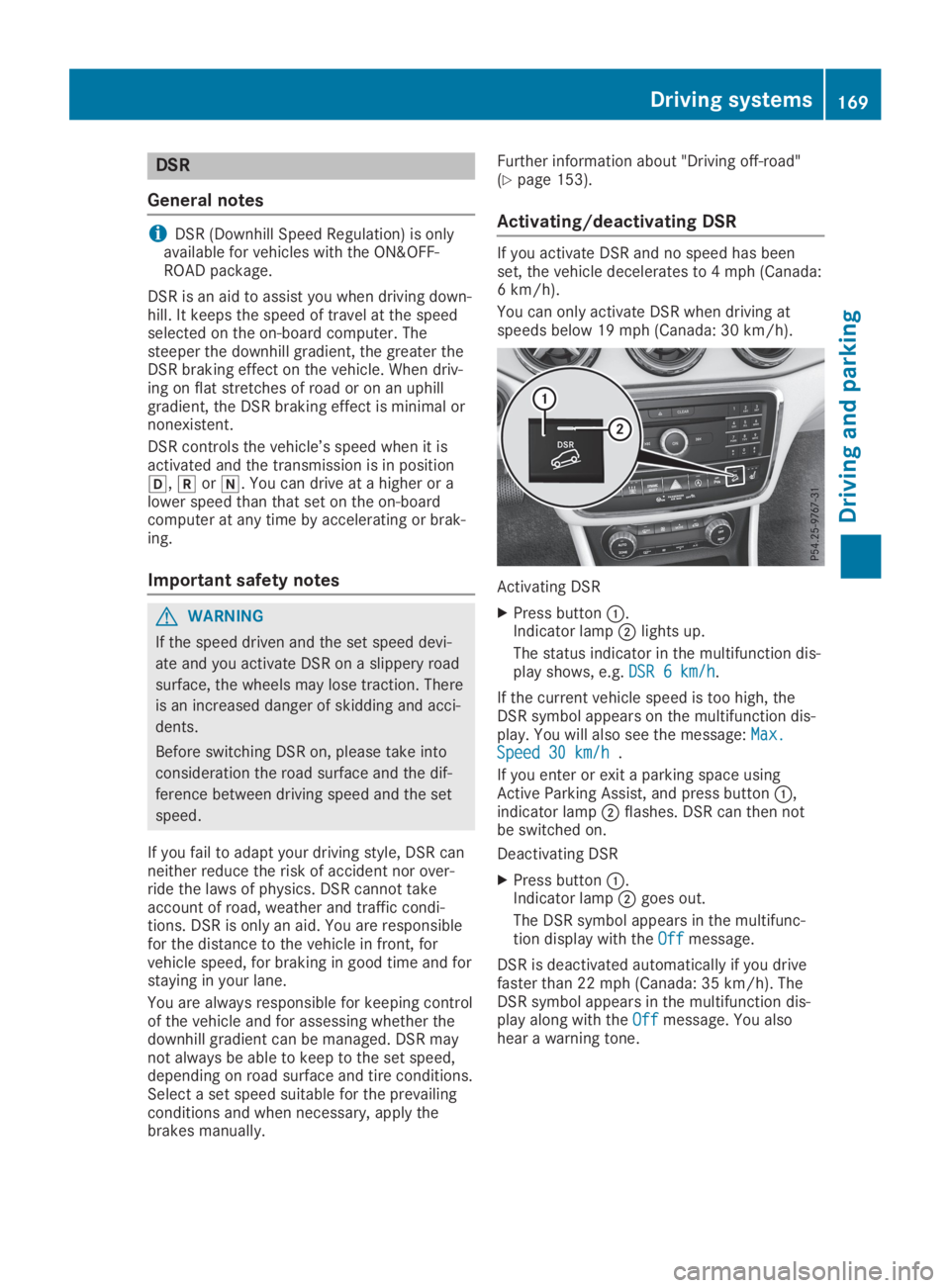
XPress buttonC.Indicator lampDlights up.
The status indicator in the multifunction dis-play shows, e.g.DSR 6 km/hDSR 6 km/h.
If the current vehicle speed is too high, theDSR symbol appears on the multifunction dis-play. You will also see the message:Max.Max.Speed 30 km/hSpeed 30 km/h.
If you enter or exit a parking space usingActive Parking Assist, and press buttonC,indicator lampDflashes. DSR can then notbe switched on.
Deactivating DSR
XPress buttonC.Indicator lampDgoes out.
The DSR symbol appears in the multifunc-tion display with theOffOffmessage.
DSR is deactivated automatically if you drivefaster than 22 mph (Canada: 35 km/h). TheDSR symbol appears in the multifunction dis-play along with theOffOffmessage. You alsohear a warning tone.
Driving systems169
Driving an d parking
Z
Page 174 of 346
objects when they are in the immediatevicinity of the vehicle. You could damage thevehicle or the objects.
The sensors may not detect snow and otherobjects that absorb ultrasonic waves.
Ultrasonic sources such as an automatic carwash, the compressed-air brakes of a truckor a pneumatic drill could cause ParkingAssist PARKTRONIC to malfunction.
Parking Assist PARKTRONIC may not func-tion correctly on uneven terrain.
Parking Assist PARKTRONIC is activated auto-matically when you:
Rswitch on the ignition
Rshift the transmission to position[,^or\\
Parking Assist PARKTRONIC is deactivated atspeeds above 11 mph (18 km/h). It is reacti-vated at lower speeds.
Range of the sensors
General notes
Parking Assist PARKTRONIC does not take intoaccount obstacles located:
Rbelow the detection range, such as persons,animals or objects
Rabove the detection range, e.g. overhangingloads, tail sections or loading ramps oftrucks
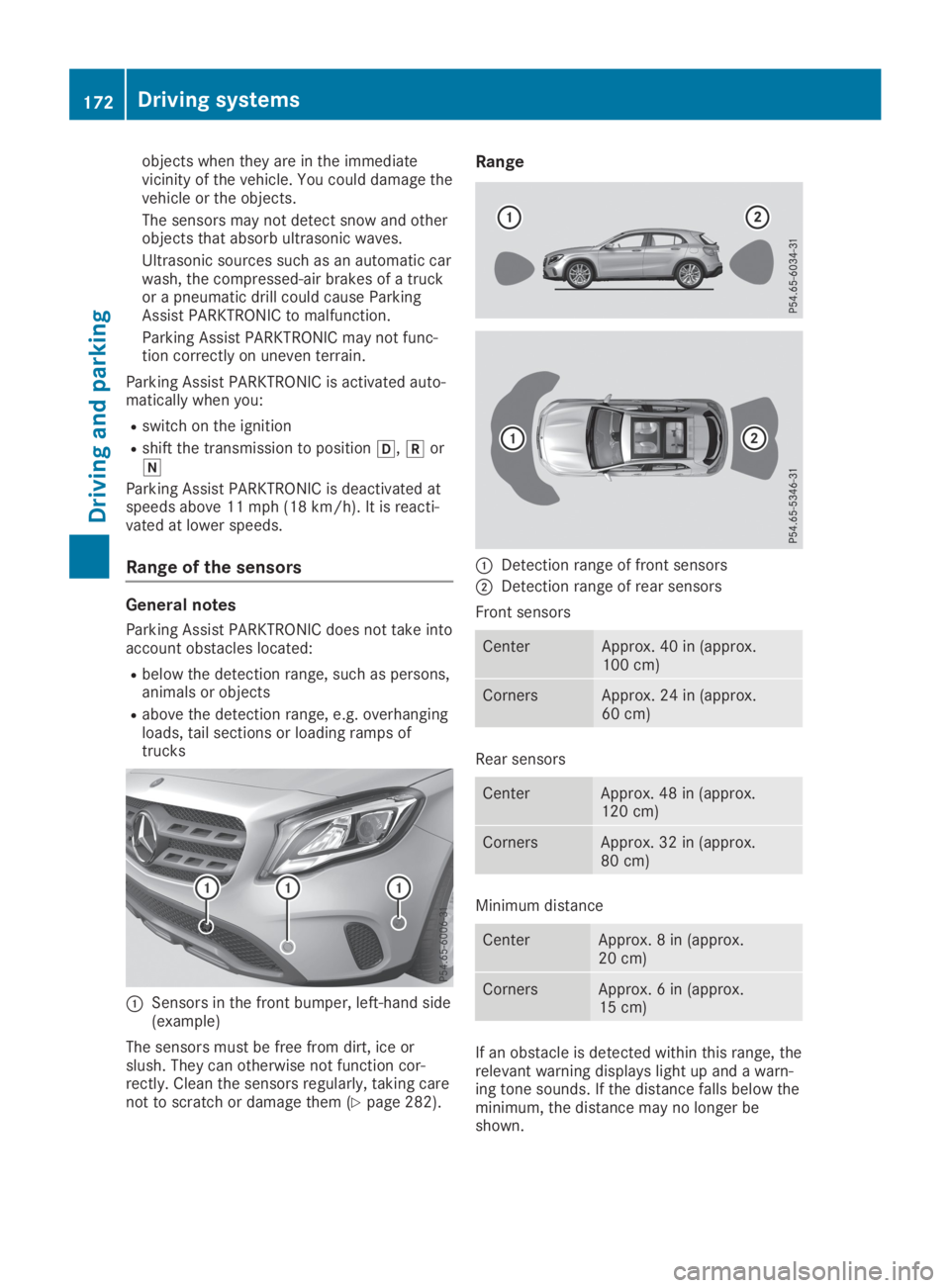
CSensors in the front bumper, left-hand side(example)
The sensors must be free from dirt, ice orslush. They can otherwise not function cor-rectly. Clean the sensors regularly, taking carenot to scratch or damage them (Ypage 282).
Range
CDetection range of front sensors
DDetection range of rear sensors
Front sensors
CenterApprox. 40 in (approx.100 cm)
CornersApprox. 24 in (approx.60 cm)
Rear sensors
CenterApprox. 48 in (approx.120 cm)
CornersApprox. 32 in (approx.80 cm)
Minimum distance
CenterApprox. 8 in (approx.20 cm)
CornersApprox. 6 in (approx.15 cm)
If an obstacle is detected within this range, therelevant warning displays light up and a warn-ing tone sounds. If the distance falls below theminimum, the distance may no longer beshown.
172Driving systems
Driving and parking
Page 176 of 346
Problems with Parking Assist PARKTRONIC
ProblemPossible causes/consequences andPPSolutions
Only the red segmentsin the Parking AssistPARKTRONIC warningdisplays are lit. You alsohear a warning tone forapproximately two sec-onds.
Parking AssistPARKTRONIC is thendeactivated and theindicator lamp on thePARKTRONIC buttonlights up.
Parking Assist PARKTRONIC has malfunctioned and has been deac-tivated.
XIf problems persist, have Parking Assist PARKTRONIC checked ata qualified specialist workshop.
Only the red segmentsin the Parking AssistPARKTRONIC warningdisplays are lit. ParkingAssist PARKTRONIC isthen deactivated.
The Parking Assist PARKTRONIC sensors are dirty or there is inter-ference.
XClean the Parking Assist PARKTRONIC sensors (Ypage 282).
XSwitch the ignition back on.
The problem may be caused by an external source of radio or ultra-sound waves.
XCheck to see if Parking Assist PARKTRONIC works at a differentlocation.
Active Parking Assist
General notes
Active Parking Assist is an electronic parkingaid with ultrasound. It measures the road onboth sides of the vehicle. A parking symbolindicates a suitable parking space. Activesteering intervention and brake applicationcan assist you during parking and when exitinga parking space. You can also still use ParkingAssist PARKTRONIC (Ypage 171).
Important safety notes
Active Parking Assist is merely an aid. It is nota replacement for your attention to your imme-diate surroundings. You are always responsi-ble for safe maneuvering, parking and exiting aparking space. Make sure that there are nopersons, animals or objects in the maneuver-ing area when you are maneuvering or parking.
When Parking Assist PARKTRONIC is deactiva-ted, Active Parking Assist is also unavailable.
GWARNING
While parking or pulling out of a parking
space, the vehicle swings out and can drive
onto areas of the oncoming lane. This could
cause you to collide with other road users or
objects. There is a risk of an accident.
Pay attention to other road users or objects.
Stop the vehicle if necessary or cancel the
Active Parking Assist parking procedure.
!If they cannot be avoided, drive overobstacles such as curbs slowly and at anobtuse angle. Otherwise, you may damagethe wheels or tires.
Active Parking Assist may possibly indicateparking spaces which are not suitable for park-ing, for example:
Rwhere parking or stopping is prohibited
Rin front of driveways or entrances and exits
Ron unsuitable surfaces
174Driving systems
Driving and parking
Page 209 of 346
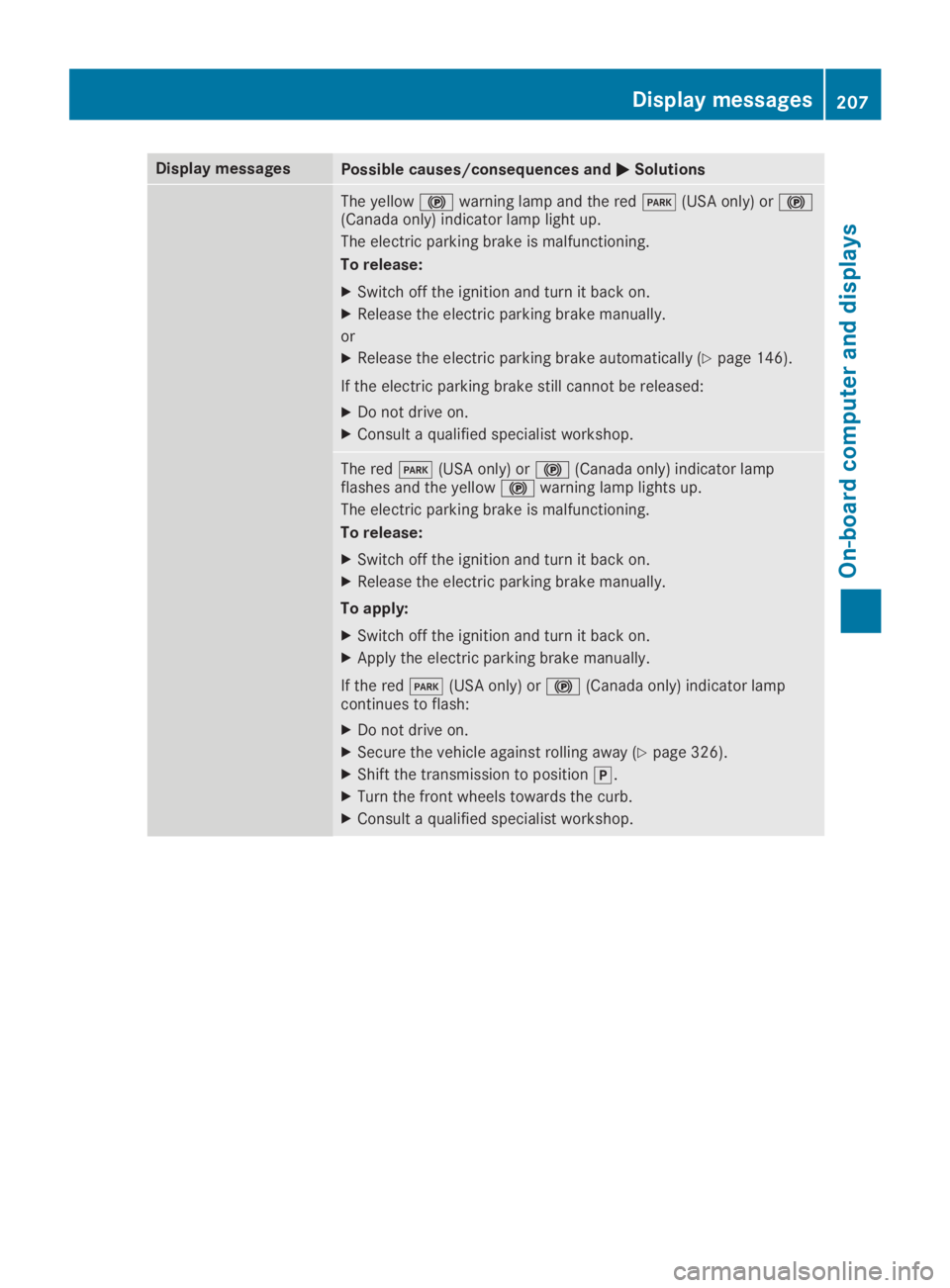
Display messagesPossible causes/consequences andPPSolutions
The yellow$warning lamp and the redI(USA only) or$(Canada only) indicator lamp light up.
The electric parking brake is malfunctioning.
To release:
XSwitch off the ignition and turn it back on.
XRelease the electric parking brake manually.
or
XRelease the electric parking brake automatically (Ypage 146).
If the electric parking brake still cannot be released:
XDo not drive on.
XConsult a qualified specialist workshop.
The redI(USA only) or$(Canada only) indicator lampflashes and the yellow$warning lamp lights up.
The electric parking brake is malfunctioning.
To release:
XSwitch off the ignition and turn it back on.
XRelease the electric parking brake manually.
To apply:
XSwitch off the ignition and turn it back on.
XApply the electric parking brake manually.
If the redI(USA only) or$(Canada only) indicator lampcontinues to flash:
XDo not drive on.
XSecure the vehicle against rolling away (Ypage 326).
XShift the transmission to position].
XTurn the front wheels towards the curb.
XConsult a qualified specialist workshop.
Displaymessages207
On-b oard computer and displays
Z
Page 210 of 346
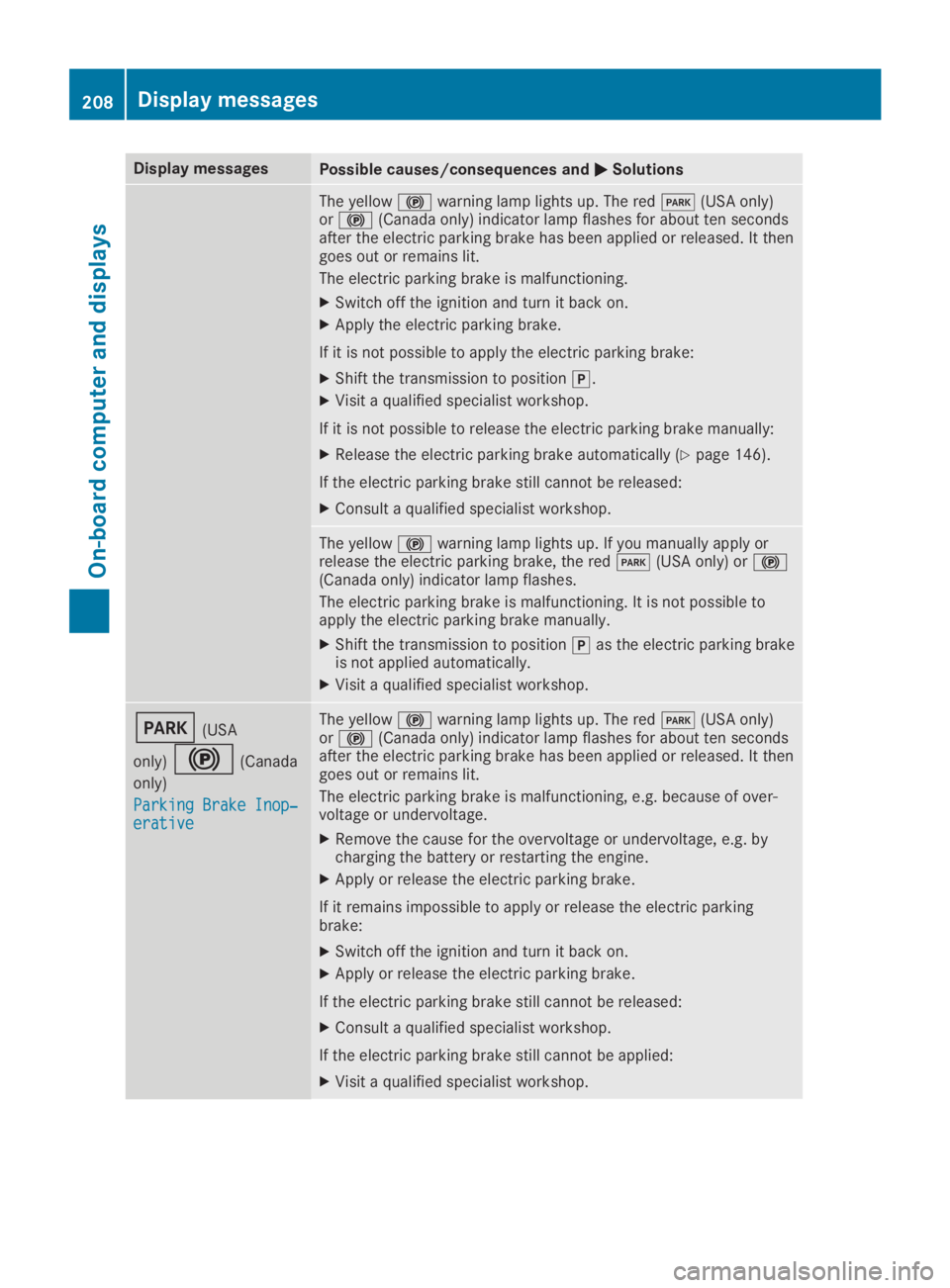
Display messagesPossible causes/consequences andPPSolutions
The yellow$warning lamp lights up. The redI(USA only)or$(Canada only) indicator lamp flashes for about ten secondsafter the electric parking brake has been applied or released. It thengoes out or remains lit.
The electric parking brake is malfunctioning.
XSwitch off the ignition and turn it back on.
XApply the electric parking brake.
If it is not possible to apply the electric parking brake:
XShift the transmission to position].
XVisit a qualified specialist workshop.
If it is not possible to release the electric parking brake manually:
XRelease the electric parking brake automatically (Ypage 146).
If the electric parking brake still cannot be released:
XConsult a qualified specialist workshop.
The yellow$warning lamp lights up. If you manually apply orrelease the electric parking brake, the redI(USA only) or$(Canada only) indicator lamp flashes.
The electric parking brake is malfunctioning. It is not possible toapply the electric parking brake manually.
XShift the transmission to position]as the electric parking brakeis not applied automatically.
XVisit a qualified specialist workshop.
I(USA
only)$(Canada
only)
Parking Brake Inop‐Parking Brake Inop‐erativeerative
The yellow$warning lamp lights up. The redI(USA only)or$(Canada only) indicator lamp flashes for about ten secondsafter the electric parking brake has been applied or released. It thengoes out or remains lit.
The electric parking brake is malfunctioning, e.g. because of over-voltage or undervoltage.
XRemove the cause for the overvoltage or undervoltage, e.g. bycharging the battery or restarting the engine.
XApply or release the electric parking brake.
If it remains impossible to apply or release the electric parkingbrake:
XSwitch off the ignition and turn it back on.
XApply or release the electric parking brake.
If the electric parking brake still cannot be released:
XConsult a qualified specialist workshop.
If the electric parking brake still cannot be applied:
XVisit a qualified specialist workshop.
208Displaymessages
On-b oard computer and displays